
| Название | Русский | English |
|---|---|---|
| PSS-F30 Owner’s Manual | — |
[1.3MB] |
| PSS-F30 Owner’s Manual |
[2.8MB] |
[1.3MB] |
| PSS-F30 Owner’s Manual (TEXT) | — |
[31KB] |
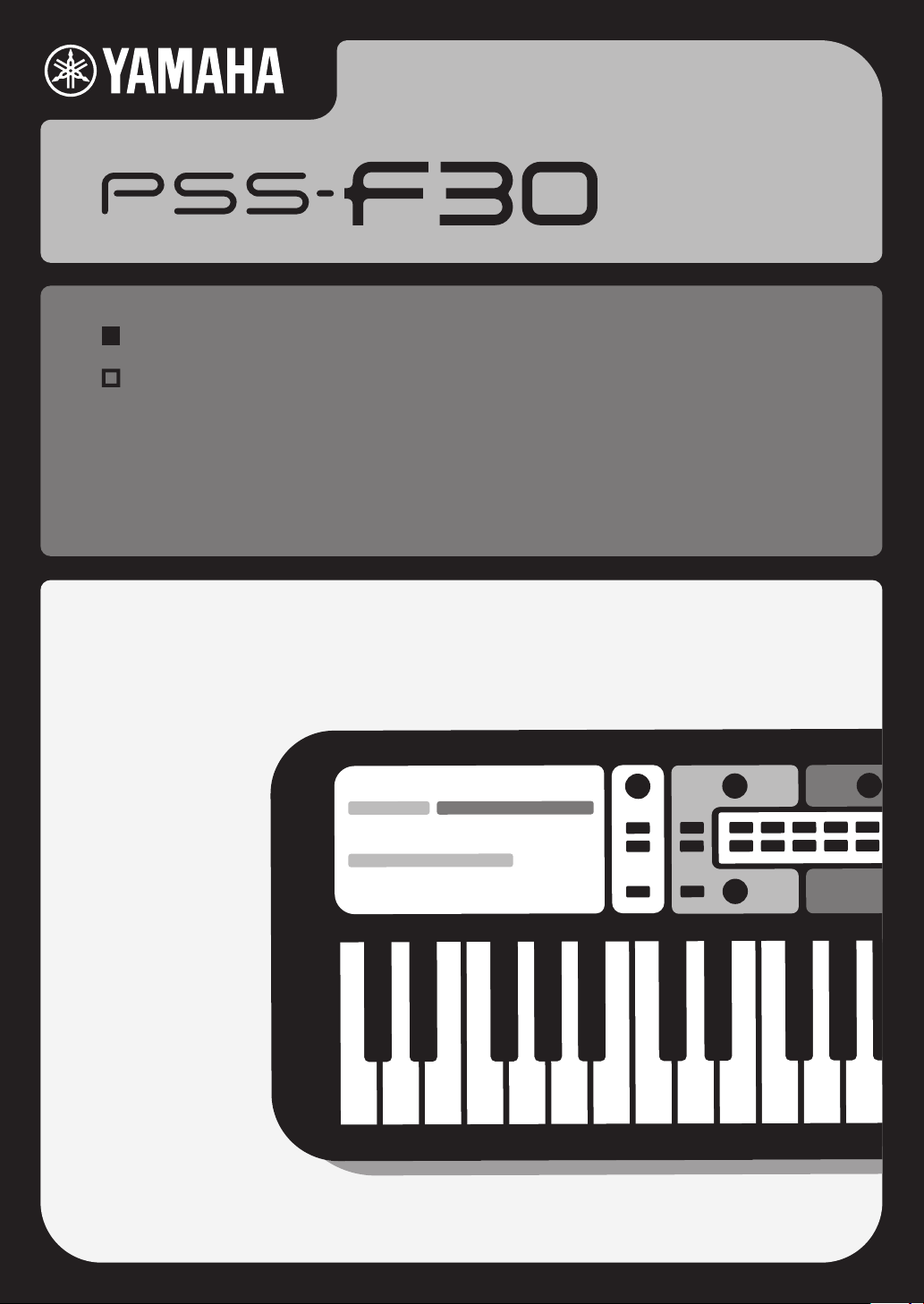
Thank you for purchasing this Yamaha Digital Keyboard!
This instrument is a portable keyboard featuring a wide variety of sounds and functions.
We recommend that you read this manual carefully so that you can fully take advantage of the advanced and convenient
functions of the instrument. We also recommend that you keep this manual in a safe and handy place for future reference.
Before using the instrument, be sure to read “PRECAUTIONS” on pages 4-5.Before using the instrument, be sure to read “PRECAUTIONS” on pages 4-5.
EN
DIGITAL KEYBOARDD I G I TA L K E Y B O A R D
Owner’s ManualO w n e r ’s M a n u a l
SPECIAL MESSAGE SECTION
This product utilizes batteries or an external power supply
(adapter). DO NOT connect this product to any power supply or
adapter other than one described in the manual, on the name
plate, or specifically recommended by Yamaha.
WARNING: Do not place this product in a position where any-
one could walk on, trip over, or roll anything over power or connecting cords of any kind. The use of an extension cord is not
recommended! If you must use an extension cord, the minimum
wire size for a 25’ cord (or less ) is 18 AWG. NOTE: The smaller the
AWG number, the larger the current handling capacity. For longer
extension cords, consult a local electrician.
This product should be used only with the components supplied
or; a cart, rack, or stand that is recommended by Yamaha. If a cart,
etc., is used, please observe all safety markings and instructions
that accompany the accessory product.
SPECIFICATIONS SUBJECT TO CHANGE:
The information contained in this manual is believed to be correct
at the time of printing. However, Yamaha reserves the right to
change or modify any of the specifications without notice or obligation to update existing units.
This product, either alone or in combination with an amplifier and
headphones or speaker/s, may be capable of producing sound
levels that could cause permanent hearing loss. DO NOT operate
for long periods of time at a high volume level or at a level that is
uncomfortable. If you experience any hearing loss or ringing in the
ears, you should consult an audiologist.
IMPORTANT: The louder the sound, the shorter the time period
before damage occurs.
Some Yamaha products may have benches and / or accessory
mounting fixtures that are either supplied with the product or as
optional accessories. Some of these items are designed to be
dealer assembled or installed. Please make sure that benches are
stable and any optional fixtures (where applicable) are well secured
BEFORE using.
Benches supplied by Yamaha are designed for seating only. No
other uses are recommended.
NOTICE:
Service charges incurred due to a lack of knowledge relating to
how a function or effect works (when the unit is operating as
designed) are not covered by the manufacturer’s warranty, and are
therefore the owners responsibility. Please study this manual carefully and consult your dealer before requesting service.
ENVIRONMENTAL ISSUES:
Yamaha strives to produce products that are both user safe and
environmentally friendly. We sincerely believe that our products
and the production methods used to produce them, meet these
goals. In keeping with both the letter and the spirit of the law, we
want you to be aware of the following:
Battery Notice:
This product MAY contain a small non-rechargeable battery which
(if applicable) is soldered in place. The average life span of this
type of battery is approximately five years. When replacement
becomes necessary, contact a qualified service representative to
perform the replacement.
This product may also use “household” type batteries. Some of
these may be rechargeable. Make sure that the battery being
charged is a rechargeable type and that the charger is intended for
the battery being charged.
When installing batteries, never mix old batteries with new ones,
and never mix different types of batteries. Batteries MUST be
installed correctly. Mismatches or incorrect installation may result
in overheating and battery case rupture.
Warning:
Do not attempt to disassemble, or incinerate any battery. Keep all
batteries away from children. Dispose of used batteries promptly
and as regulated by the laws in your area. Note: Check with any
retailer of household type batteries in your area for battery disposal information.
Disposal Notice:
Should this product become damaged beyond repair, or for some
reason its useful life is considered to be at an end, please observe
all local, state, and federal regulations that relate to the disposal of
products that contain lead, batteries, plastics, etc. If your dealer is
unable to assist you, please contact Yamaha directly.
NAME PLATE LOCATION:
The name plate is located on the bottom of the product. The
model number, serial number, power requirements, etc., are
located on this plate. You should record the model number, serial
number, and the date of purchase in the spaces provided below
and retain this manual as a permanent record of your purchase.
Model
Serial No.
Purchase Date
PLEASE KEEP THIS MANUAL
92-BP (bottom)

1. IMPORTANT NOTICE: DO NOT MODIFY THIS UNIT!
This product, when installed as indicated in the instructions
contained in this manual, meets FCC requirements. Modifications not expressly approved by Yamaha may void your authority, granted by the FCC, to use the product.
2. IMPORTANT: When connecting this product to accessories
and/or another product use only high quality shielded cables.
Cable/s supplied with this product MUST be used. Follow all
installation instructions. Failure to follow instructions could void
your FCC authorization to use this product in the USA.
3. NOTE: This product has been tested and found to comply with
the requirements listed in FCC Regulations, Part 15 for Class
“B” digital devices. Compliance with these requirements provides a reasonable level of assurance that your use of this product in a residential environment will not result in harmful
interference with other electronic devices. This equipment generates/uses radio frequencies and, if not installed and used
according to the instructions found in the users manual, may
cause interference harmful to the operation of other electronic
devices. Compliance with FCC regulations does not guarantee
that interference will not occur in all installations. If this product
is found to be the source of interference, which can be determined by turning the unit “OFF” and “ON”, please try to eliminate the problem by using one of the following measures:
Relocate either this product or the device that is being affected
by the interference.
Utilize power outlets that are on different branch (circuit breaker
or fuse) circuits or install AC line filter/s.
In the case of radio or TV interference, relocate/reorient the
antenna. If the antenna lead-in is 300 ohm ribbon lead, change
the lead-in to co-axial type cable.
If these corrective measures do not produce satisfactory
results, please contact the local retailer authorized to distribute
this type of product. If you can not locate the appropriate
retailer, please contact Yamaha Corporation of America, Electronic Service Division, 6600 Orangethorpe Ave, Buena Park,
CA90620
The above statements apply ONLY to those products distributed by Yamaha Corporation of America or its subsidiaries.
* This applies only to products distributed by Yamaha Corporation of America.
FCC INFORMATION (U.S.A.)
(class B)
* This applies only to products distributed by Yamaha Corporation of America.
COMPLIANCE INFORMATION STATEMENT
(Supplier’s declaration of conformity procedure)
Responsible Party : Yamaha Corporation of America
Address : 6600 Orangethorpe Ave., Buena Park, Calif. 90620
Telephone : 714-522-9011
Type of Equipment : Digital Keyboard
Model Name : PSS-F30
This device complies with Part 15 of the FCC Rules.
Operation is subject to the following two conditions:
1) this device may not cause harmful interference, and
2) this device must accept any interference received including interference that may cause undesired operation.
(FCC SDoC)
The model number, serial number, power requirements, etc., may be found on or near the name plate, which is
at the bottom of the unit.
You should note this serial number in the space provided below and retain this manual as a permanent record
of your purchase to aid identification in the event of theft.
Model No.
Serial No.
(bottom_en_01)
PSS-F30 Owner’s Manual
3
PRECAUTIONS
Influences on electro-medical devices
If you notice any abnormality
PLEASE READ CAREFULLY BEFORE PROCEEDING
Please keep this manual in a safe and handy place for future reference.
WARNING
Always follow the basic precautions listed below to avoid the possibility of serious injury or even death from electrical
shock, short-circuiting, damages, fire or other hazards. These precautions include, but are not limited to, the
following:
• Do not place the USB cable near heat sources such as heaters or
radiators. Also, do not excessively bend or otherwise damage the
cable, or place heavy objects on it.
• Only use the voltage specified as correct for the instrument. The
required voltage is printed on the name plate of the instrument.
• Included USB cable is designed for use with only this instrument. Do
not use for any other instrument.
• Check the plug periodically and remove any dirt or dust which may
have accumulated on it.
• This instrument contains no user-serviceable parts. Do not open the
instrument or attempt to disassemble or modify the internal
components in any way. If it should appear to be malfunctioning,
discontinue use immediately and have it inspected by qualified
Yamaha service personnel.
• Do not expose the instrument to rain, use it near water or in damp or
wet conditions, or place on it any containers (such as vases, bottles or
glasses) containing liquids which might spill into any openings. If any
liquid such as water seeps into the instrument, turn off the power
immediately and disconnect the plug from the AC outlet. Then have the
instrument inspected by qualified Yamaha service personnel.
• Never insert or remove a plug with wet hands.
• Do not put burning items, such as candles, on the unit. A burning item
may fall over and cause a fire.
• Magnetism may affect electro-medical devices.
— Do not use this product near medical devices or inside areas in
which the use of radio waves is restricted.
— Do not use this product within 15cm (6 in.) of persons with a heart
pacemaker or defibrillator implant.
• Follow the precautions below. Failure to do so might result in
explosion, fire, overheating or battery fluid leakage.
— Do not tamper with or disassemble batteries.
— Do not dispose of batteries in fire.
— Do not attempt to recharge batteries that are not designed to be
charged.
— Keep the batteries separate from metallic objects such as necklaces,
hairpins, coins, and keys.
— Use the specified battery type (page 11) only.
— Use new batteries, all of which are the same type, same model, and
made by the same manufacturer.
— Always make sure all batteries are inserted in conformity with the +/-
polarity markings.
— When the batteries run out, or if the instrument is not to be used for a
long time, remove the batteries from the instrument.
— When using Ni-MH batteries, follow the instructions that came with
the batteries. Use only the specified charger device when charging.
• Keep batteries away from small children who might accidentally
swallow them.
• If the batteries do leak, avoid contact with the leaked fluid. If the battery
fluid should come in contact with your eyes, mouth, or skin, wash
immediately with water and consult a doctor. Battery fluid is corrosive
and may possibly cause loss of sight or chemical burns.
• When one of the following problems occur, immediately turn off the
power switch and disconnect the plug from the outlet. (If you are using
batteries, remove all batteries from the instrument.) Then have the
device inspected by Yamaha service personnel.
— The USB cable or plug becomes frayed or damaged.
— It emits unusual smells or smoke.
— Some object has been dropped into the instrument.
— There is a sudden loss of sound during use of the instrument.
— If any cracks or breakages exist on the instrument.
PSS-F30 Owner’s Manual
4
DMI-7 1/2
CAUTION
Always follow the basic precautions listed below to avoid the possibility of physical injury to you or others, or damage
to the instrument or other property. These precautions include, but are not limited to, the following:
• Use the specified USB power adaptor (page 6) only. Using the wrong
adaptor can result in damage to the instrument or overheating.
• Do not connect the instrument to an electrical outlet using a multipleconnector. Doing so can result in lower sound quality, or possibly
cause overheating in the outlet.
• When removing the plug from the instrument or an outlet, always hold
the plug itself and not the USB cable. Pulling by the cable can damage
it.
• Remove the plug from the outlet when the instrument is not to be used
for extended periods of time, or during electrical storms.
• Do not place the instrument in an unstable position where it might
accidentally fall over.
• Before moving the instrument, remove all connected cables, to prevent
damage to the cables or injury to anyone who might trip over them.
• When setting up the product, make sure that the AC outlet you are
using is easily accessible. If some trouble or malfunction occurs,
immediately turn off the power switch and disconnect the plug from the
outlet. Even when the power switch is turned off, electricity is still
flowing to the product at the minimum level. When you are not using
the product for a long time, make sure to disconnect the plug from the
wall AC outlet.
Yamaha cannot be held responsible for damage caused by improper use or modifications to the instrument, or data that is lost or destroyed.
Always turn the power off when the instrument is not in use.
Even when the [ ] (Standby/On) switch is in standby status (display is off), electricity is still flowing to the instrument at the minimum level.
When you are not using the instrument for a long time, make sure you disconnect the plug from the wall AC outlet.
Make sure to discard used batteries according to local regulations.
DMI-7
• Before connecting the instrument to other electronic components, turn
off the power for all components. Before turning the power on or off for
all components, set all volume levels to minimum.
• Be sure to set the volumes of all components at their minimum levels
and gradually raise the volume controls while playing the instrument to
set the desired listening level.
• Do not insert a finger or hand in any gaps on the instrument.
• Never insert or drop paper, metallic, or other objects into the gaps on
the panel or keyboard. This could cause physical injury to you or
others, damage to the instrument or other property, or operational
failure.
• Do not rest your weight on, or place heavy objects on the instrument,
and do not use excessive force on the buttons, switches or connectors.
• Do not use the instrument/device or headphones for a long period of
time at a high or uncomfortable volume level, since this can cause
permanent hearing loss. If you experience any hearing loss or ringing
in the ears, consult a physician.
2/2
NOTICE
To avoid the possibility of malfunction/ damage to the
product, damage to data, or damage to other property, follow the notices below.
Handling
• Do not use the instrument in the vicinity of a TV, radio, stereo
equipment, mobile phone, or other electric devices. Otherwise, the
instrument, TV, or radio may generate noise.
• Do not expose the instrument to excessive dust or vibrations, or
extreme cold or heat (such as in direct sunlight, near a heater, or in a
car during the day) to prevent the possibility of panel disfiguration,
damage to the internal components or unstable operation. (Verified
operating temperature range: 5° – 40°C, or 41° – 104°F.)
• Do not place vinyl, plastic or rubber objects on the instrument, since
this might discolor the panel or keyboard.
Maintenance
• When cleaning the instrument, use a soft and dry cloth. Do not use
paint thinners, solvents, alcohol, cleaning fluids, or chemicalimpregnated wiping cloths.
Saving data
• Some of the data of this instrument (page 11) are retained when the
power is turned off. However, the saved data may be lost due to some
failure, an operation mistake, etc.
Information
About copyrights
• Copying of the commercially available musical data including but not
limited to MIDI data and/or audio data is strictly prohibited except for
your personal use.
• This product incorporates and bundles contents in which Yamaha owns
copyrights or with respect to which Yamaha has license to use others’
copyrights. Due to copyright laws and other relevant laws, you are NOT
allowed to distribute media in which these contents are saved or
recorded and remain virtually the same or very similar to those in the
product.
* The contents described above include a computer program, Accompaniment
Style data, MIDI data, WAVE data, voice recording data, a score, score data, etc.
* You are allowed to distribute medium in which your performance or music
production using these contents is recorded, and the permission of Yamaha
Corporation is not required in such cases.
About functions/data bundled with the instrument
• Some of the preset songs have been edited for length or arrangement,
and may not be exactly the same as the original.
About this manual
• The illustrations and displays as shown in this manual are for
instructional purposes only, and may appear somewhat different from
those on your instrument.
• The company names and product names in this manual are the
trademarks or registered trademarks of their respective companies.
PSS-F30 Owner’s Manual
5
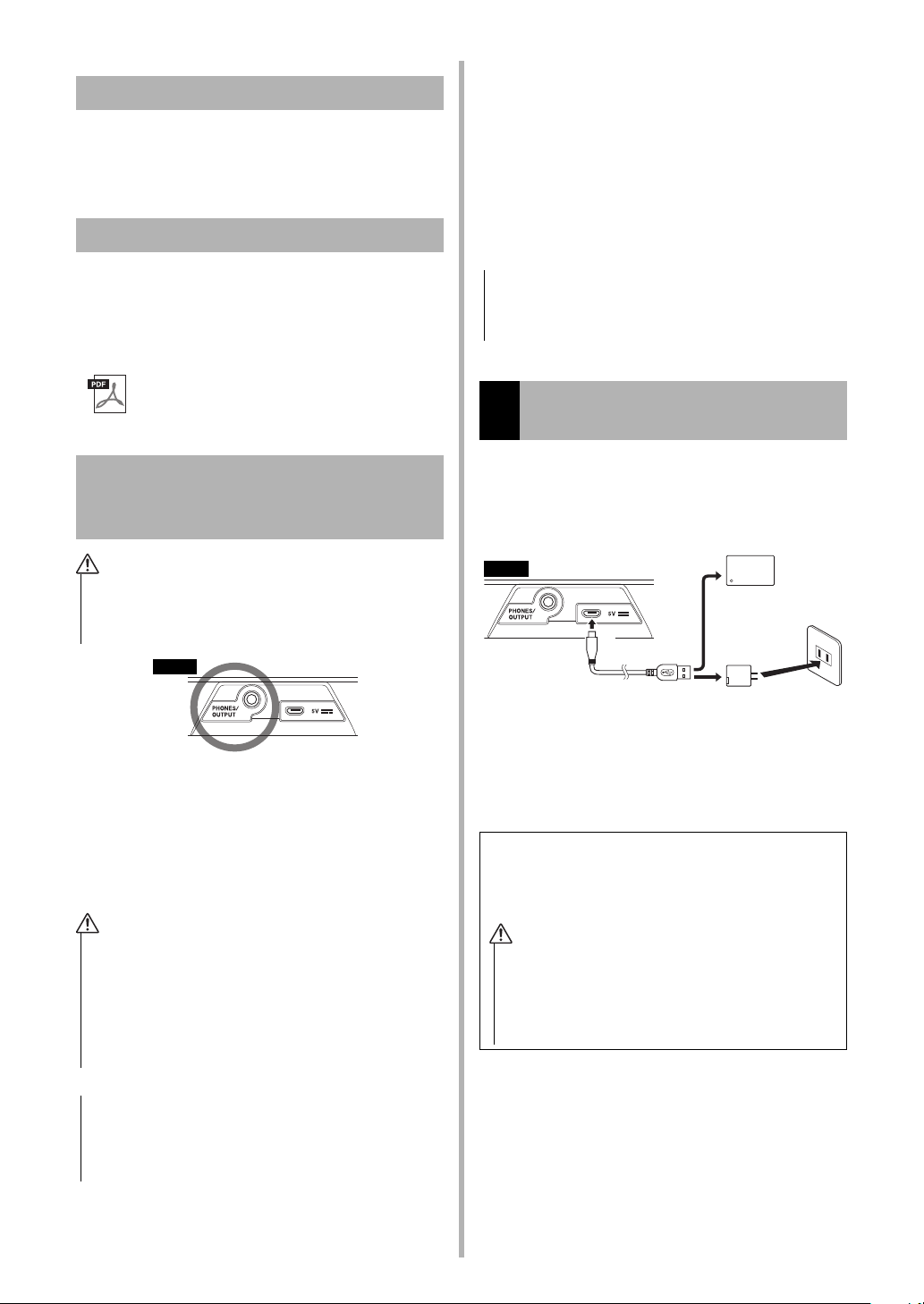
Included Accessories
or
USB cable
AC Outlet
USB mobile battery
(commercially available)
USB power adap-
tor (commercially
available)
5V DC (USB
micro B) jack
The shape of the plug and outlet
differs depending on your locale.
Rear
USB Power adaptor / USB mobile battery
requirements
• Output voltage: 4.8 V to 5.2 V
• Output current: 0.5 A or greater
• Make sure to use a USB power adaptor or USB mobile
battery with the specifications above.
Using the wrong USB power adaptor can result in
damage to the instrument or overheating. Read the
safety precautions for your particular USB power
adaptor or USB mobile battery.
• Owner’s Manual (this book) (1)
• USB cable (1)
• Online Member Product Registration (1)
Song Book (Online Material)
Setting Up
Depending on how you are powering your instrument, follow one of the two power supply instructions below. The PSS-F30 does not include power
supply accessories (with the exception of the USB
cable), so make sure to purchase them separately
as required.
Contains music scores for the preset Songs
(excluding Song No. 001) of this instrument. To
obtain this Song Book, access the Yamaha website, and click on the “Download” tab beneath the
model name.
Song Book
Connecting Headphones or External
Audio Equipment (PHONES/OUTPUT Jack)
• Before using the headphones, be sure to set the volume
of the instrument at the minimum level. Then gradually
raise the volume while playing the instrument, for your
ear comfort and safety.
For connecting a set of stereo headphones with a
stereo mini plug. This jack also functions as an
external output to output for sending the audio signal of this instrument to external audio equipment.
The speakers of the instrument are automatically
shut off when a headphones plug, etc. is inserted
into this jack.
• Using a USB cable other than the one included (or playing
the instrument at a high volume) may result in degraded
sound. If this happens, make sure to use the included
USB cable (or turn down the master volume as needed).
Using a USB power adaptor or
1
USB mobile battery, etc.
Connect the included USB cable and the commercially available USB power adaptor (or USB mobile
battery) in the order shown in the illustration.
2
1
2
When disconnecting the USB cable or so, first turn
off the power, then follow the order shown above in
reverse.
3
• Do not use the instrument or headphones for a long
period of time at a high or uncomfortable volume level,
since this can cause permanent hearing loss.
• Before connecting the instrument to other electronic
components, make sure to set all volume levels to minimum, then turn off the power off all the components. Otherwise, damage to the components or electrical shock
may occur.
• To avoid possible damage to the external device, first turn
on the power to the instrument, then to the external
device. When turning off the power, do so in reverse
order: first turn off the power to the external device, then
to the instrument.
6
PSS-F30 Owner’s Manual
Loading…
Yamaha PSS-F30
Thank you for purchasing this Yamaha Digital Keyboard!
This instrument is a portable keyboard featuring a wide variety of sounds and functions.
We recommend that you read this manual carefully so that you can fully take advantage of the advanced and convenient
functions of the instrument. We also recommend that you keep this manual in a safe and handy place for future reference.
Before using the instrument, be sure to read “PRECAUTIONS” on pages 4-5.Before using the instrument, be sure to read “PRECAUTIONS” on pages 4-5.
EN
DIGITAL KEYBOARDD I G I TA L K E Y B O A R D
Owner’s ManualO w n e r ’s M a n u a l
View the manual for the Yamaha PSS-F30 here, for free. This user manual comes under the category keyboards and has been rated by 1 people with an average of a 7.5. This manual is available in the following languages: English. Do you have a question about the Yamaha PSS-F30?
Ask your question here
Index
- PRECAUTIONS
- Included Accessories
- Song Book (Online Material)
- Connecting Headphones or External Audio Equipment (PHONES/OUTPUT Jack)
- Setting Up
- Selecting and Playing a Voice, Song or Style
- Voices
- Songs
- Styles
- The Functions
- Backup and Initialization
- Troubleshooting
- Specifications
- Voice List
- Drum Kit List
- Style List
- Song List
- Playing with a Style
- Reading the Score
Product Images (9)

Yamaha PSS-F30 specifications
Below you will find the product specifications and the manual specifications of the Yamaha PSS-F30.
The Yamaha PSS-F30 is a digital synthesizer with 37 keys, allowing for versatile musical performance. It can be powered by either batteries or a USB source, providing flexibility for usage. The keyboard requires four AA batteries to function, ensuring longevity during extended sessions. Additionally, it can also be powered by a 5V DC input.
In terms of dimensions, the PSS-F30 has a width of 506 millimeters, a depth of 201 millimeters, and a height of 54 millimeters. Weighing 1200 grams, it is lightweight and portable, making it easy to transport and use in various locations.
The digital synthesizer offers a maximum polyphony of 32 notes, allowing for complex and layered musical compositions. It provides a wide range of preset programs, with a total of 114 available. A tap tempo switch is included to help musicians maintain a consistent rhythm and tempo while playing.
Equipped with a built-in speaker, the PSS-F30 ensures that the sound produced is projected clearly and audibly. It features a single speaker, delivering adequate audio output for personal use. The synthesizer is designed to produce high-quality sounds and tones, showcasing Yamaha’s commitment to excellence and reliability.
In conclusion, the Yamaha PSS-F30 is a compact and lightweight digital synthesizer with 37 keys. It offers a maximum polyphony of 32 notes and provides 114 preset programs for versatile musical expression. Whether using batteries or USB power, this synthesizer is designed to deliver high-quality sound and is an ideal companion for musicians on the go.
Product type
Digital synthesizer
Power source type
Battery, USB
General
| Brand | Yamaha |
| Model | PSS-F30 | PSS-F30 |
| Product | keyboard |
| EAN | 4957812642125 |
| Language | English |
| Filetype | User manual (PDF) |
Features
| Product type | Digital synthesizer |
| Keyboard number of keys | 37 |
| Maximum polyphony (notes) | 32 |
| Preset programs quantity | 114 |
| Tap tempo switch | Yes |
| Built-in speaker(s) | Yes |
| Number of speakers | 1 |
| RMS rated power | 1.4 W |
| Volume control | Buttons |
| Product colour | Black |
Power
| Power source type | Battery, USB |
| Battery type | AA |
| Number of batteries supported | 4 |
| DC input voltage | 5 V |
Weight & dimensions
| Width | 506 mm |
| Depth | 201 mm |
| Height | 54 mm |
| Weight | 1200 g |
Ports & interfaces
| USB ports quantity | 1 |
| Headphone outputs | 1 |
Display
| Built-in display | Yes |
| Display type | LED |
show more
Frequently asked questions
Can’t find the answer to your question in the manual? You may find the answer to your question in the FAQs about the Yamaha PSS-F30 below.
What is the weight of the Yamaha PSS-F30?
The Yamaha PSS-F30 has a weight of 1200 g.
What is the height of the Yamaha PSS-F30?
The Yamaha PSS-F30 has a height of 54 mm.
What is the width of the Yamaha PSS-F30?
The Yamaha PSS-F30 has a width of 506 mm.
What is the depth of the Yamaha PSS-F30?
The Yamaha PSS-F30 has a depth of 201 mm.
How can I best clean my keyboard?
A slightly damp cleaning cloth or soft, dust-free cloth works best to remove fingerprints. Dust in hard-to-reach places is best removed with compressed air.
Is the manual of the Yamaha PSS-F30 available in English?
Yes, the manual of the Yamaha PSS-F30 is available in English .
Is your question not listed? Ask your question here
YAMAHA PSS-F30 Digital Keyboard

Reading the Score
The Keyboard, Staff Lines, and Clef
Accidentals
- (Sharp) Raise a semitone
- (Flat) Lower a semitone
- (Natural) Return to normal pitch
Notes and Rests
Time Signatures and Counting Time

Repeats

Playing with a Style
This sample score is provided to demonstrate the uses and advantages of the
Smart Chord function. Simply play the root notes of chords indicated in this
score with your left hand as you play the melody with your right, and listen
to how the sounds of the chords match the keys you play.
Home Sweet Home

important Notice
Guarantee information for customers in European Economic Area (EEA) and
Switzerland
Important Notice : Guarantee Information for customers in EEA and
Switzerland For detailed guarantee information about this Yamaha product, and
Pan-EEA and Switzerland warranty service, please either visit the website
address below (Printable file at our website) or contact the Yamaha
representative office for your country. * EEA: European Economic Area.
Contact
- CANADA
Yamaha Canada Music Ltd.
135 Milner Avenue, Toronto, Ontario M1S 3R1, Canada
Tel: +1-416-298-1311
- U.S.A.
Yamaha Corporation of America
6600 Orangethorpe Avenue, Buena Park, CA 90620, U.S.A.
Tel: +1-714-522-9011
Yamaha de México, S.A. de C.V. MEXICO
Av. Insurgentes Sur 1647 Piso 9, Col. San José Insurgentes, Delegación Benito
Juárez, CDMX,
C.P. 03900, México Tel: +52-55-5804-0600
Yamaha Global Site
https://www.yamaha.com/
Read User Manual Online (PDF format)
Read User Manual Online (PDF format) >>
Download This Manual (PDF format)
Download this manual >>
FAQ: Types of Manuals and Their Contents
Yamaha PSS-F30 Manuals come in various types, each serving a specific purpose to help users effectively operate and maintain their devices. Here are the common types of Yamaha PSS-F30 User Guides and the information they typically include:
- User Manuals: Provide comprehensive instructions on how to use the device, including setup, features, and operation. They often include troubleshooting tips, safety information, and maintenance guidelines.
- Service Instructions: Designed for technicians and repair professionals, these manuals offer detailed information on diagnosing and repairing issues with the device. They include schematics, parts lists, and step-by-step repair procedures.
- Installation Guides: Focus on the installation process of the device, providing detailed instructions and diagrams for proper setup. They are essential for ensuring the device is installed correctly and safely.
- Maintenance Manuals: Provide guidance on routine maintenance tasks to keep the device in optimal condition. They cover cleaning procedures, part replacements, and regular servicing tips.
- Quick Start Guides: Offer a concise overview of the essential steps needed to get the device up and running quickly. They are ideal for users who need immediate assistance with basic setup and operation.
Each type of Yamaha PSS-F30 instruction is designed to address specific needs, ensuring users have the necessary information to use, maintain, and repair their devices effectively.
Related Instructions for Yamaha PSS-F30:
3
PSR-225
Owner’s manual Yamaha PSR-225 Manual (Owner’s manual), @3V2825
120
963
232
4
RX-596
Owner’s manual PDF Guide (@GKKJPV), Yamaha RX-596 Stereo Receiver (Saturday 29-03-2025)
43
408
98
5
DVD-S2700
Service manual Yamaha CD Player Service manual (File: yamaha-dvd-s2700-cd-player-62, 17.12.2024)
62
413
71
10
AX16-AT
Owner’s manual PDF Manual (@NMY63R), Yamaha AX16-AT Music Mixer (13/10/2024)
65
126
21
Musical Instrument Devices by Other Brands:
|
Roland Fantom-G none Workshop Manual Fantom-G none (Electronic Keyboard ePDF Manual, #P426F6) © 2008, 2009, 2010 Roland Corporation U.S. 23 Oct 2024 | 20 |
|
|
Roland Fantom-G none Sales Manual Roland Fantom-G none Guide (Sales manual), @7XS6RP 1 14 May 2025 | 24 |
|
|
Yamaha MX61 Service Manual Manual: Yamaha MX61 (JP6K67, Upd.01.01.2025) HAMAMATSU, JAPAN 01 Jan 2025 | 93 |
|
|
Yamaha PSR-9000 Version 2 Owner’s Manual PSR-9000 Version 2 (Musical Instrument ePDF Manual, #IUCDTA) Make sure that your local AC mains 07 Dec 2024 | 214 |
Categories:
Jet ski
Digital sound projector
In-ceiling speakers
Surround system
Automobile Parts
Electronic keyboards