
- Каталог
- Общение
- Рейтинг: 4,2 (11 оценок)
- Скачиваний: 3 тыс +
- Размер: 74.0 MB
- Возраст: 18+
Описание приложения
Love Spouse Pro — это новаторское приложение, созданное для современного образа жизни и предлагающее пользователям обновленный и расширенный опыт использования товаров для взрослых. Легко управляйте различными интеллектуальными устройствами для взрослых, позволяя вам наслаждаться приватным и безопасным удовольствием в любое время и в любом месте.
Ключевая особенность:
1. Интеллектуальное управление: легко подключайте и управляйте своими продуктами для взрослых, отправляясь в более персонализированное путешествие.
2. Взаимное удаленное управление. Независимо от того, находится ли ваш партнер рядом или далеко, вы оба можете управлять устройствами в режиме реального времени через приложение, что добавляет азарта удаленному взаимодействию.
3. Безопасность и конфиденциальность. Благодаря передовой технологии шифрования Love Spouse Pro гарантирует, что ваша личная информация и записи об использовании остаются полностью защищенными.
4. Персонализированные настройки. Приложение предлагает множество настраиваемых настроек для удовлетворения разнообразных потребностей пользователей, гарантируя, что каждый сеанс будет соответствовать вашим предпочтениям.
Love Spouse Pro передает контроль над товарами для взрослых в ваши руки, поднимая ваше удовольствие на совершенно новый уровень.
Оценки и отзывы
Не могу включить.. Требует обновления.. Но не обновляется
Нравится: 0
Не нравится: 0
Станислав30 мар 20255 звезд
Легко соединилось, удобно управлять.
Нравится: 2
Не нравится: 0
Aleksander6 янв 20254 звезды
Нет норманого добоыленя друзей, постоянно глючит!!!и глючит во время интерактива!!!не возможности пополнения баланса из России!
Нравится: 0
Не нравится: 0
Алекс27 дек 20244 звезды
почему то платные моменты остались от Google play….
Нравится: 1
Не нравится: 0
Разработчик
Weibu Technology
Возможно, вам понравится
Pure — Нескучные знакомства
Незабываемые знакомства для свободных духом.
4,1
ВКонтакте: чаты, видео, музыка
ВКонтакте — это общение, мессенджер и звонки, знакомства и игры, видео и музыка
4,3
DRIVE2
Крупнейшее сообщество автовладельцев. Реальные отзывы, опыт эксплуатации
4,9
Одноклассники: социальная сеть
Музыка, видео, игры и общение в ОК
4,7
CooMeet
CooMeet: найди свою судьбу на другом конце света!
VK Мессенджер: общение и звонки, контакты и чаты
Общение: контакты, чаты, мессенджер, сообщения, видеочат. Учебный профиль Сферум
3,8
Ещё приложения
Мануал по подключению.
Мануал по подключению.
Barro
Инструкция по подключению моего ловенса для передачи управления вам.
И так скачиваем программу Love spouse с play market либо app store

После скачивания проходим регистрацию по электронной почте.

Далее передаем мне свой логин и я выдаю приглашение на подключение к моей игрушке.

После того когда уже договорились на приват со мной заходим в приложение и выбираем меню интерактивный режим.

Вуаля и вы можете звонить мне сразу внутри приложения и управлять режимами.
Через режим video mode.

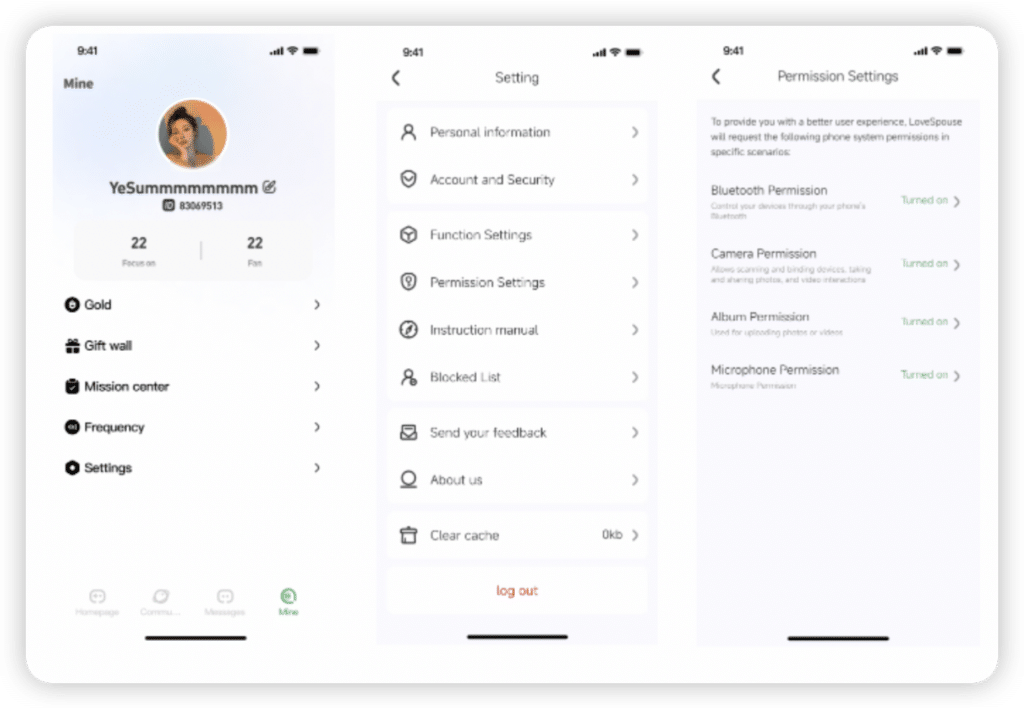
Required Permissions Check
- In “My” settings, find the permission settings
- Enable the corresponding required permissions
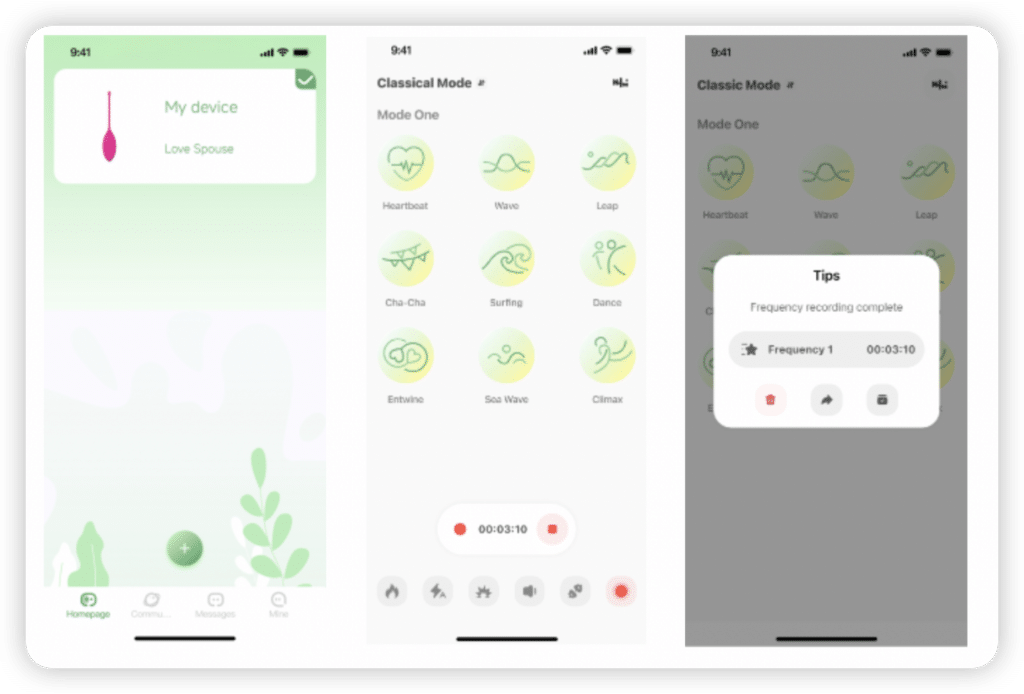
Add device
Scan the QR code or enter the digital binding code to bind the device

Single-player game
Bind the device to start playing
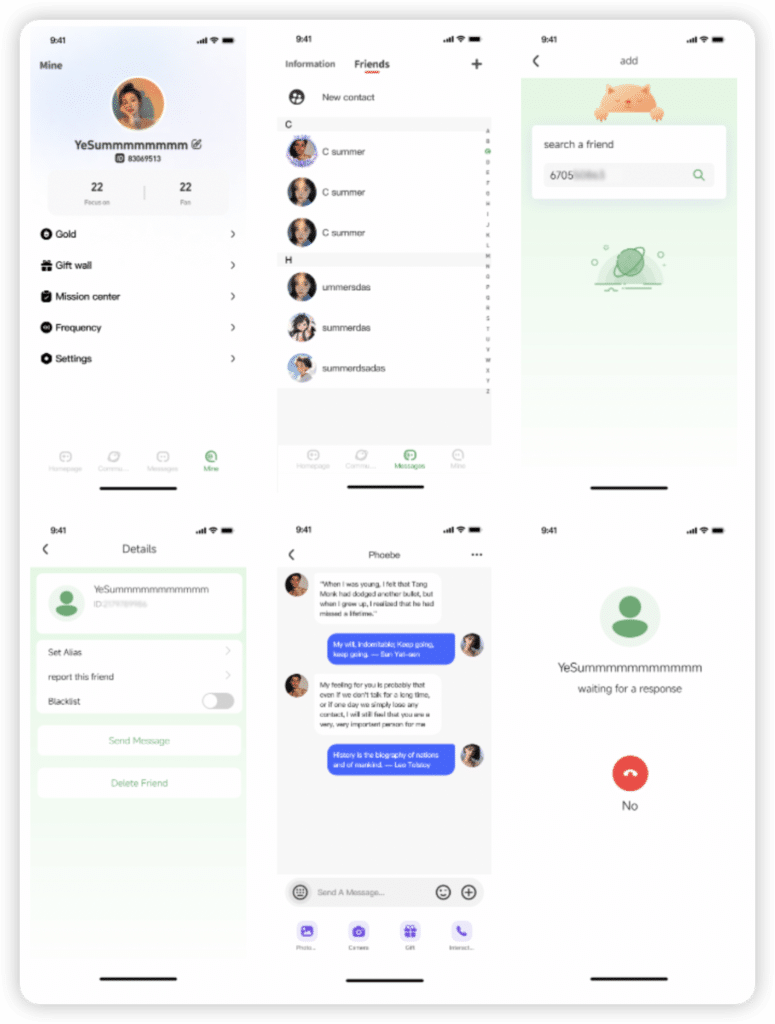
Multiplayer game
1. Obtain friend ID 2. Add as a friend in APP 3. Initiate a call in message 4. Connect and play
Use within the community
By binding the device, you can quickly experience the frequency shared by others

World function play
- Users can use the filter function in the upper right corner to filter the displayed information attributes
- When you see the information you like, you can use the unlock card to unlock the information
- “Receive one” can switch functions, such as switching the same country card and country screening card
- Users can use the store function to purchase the same country card, country screening card, unlocking card
- When users use “Country Screening”, they need to select a country and region to receive information about the specified country and region

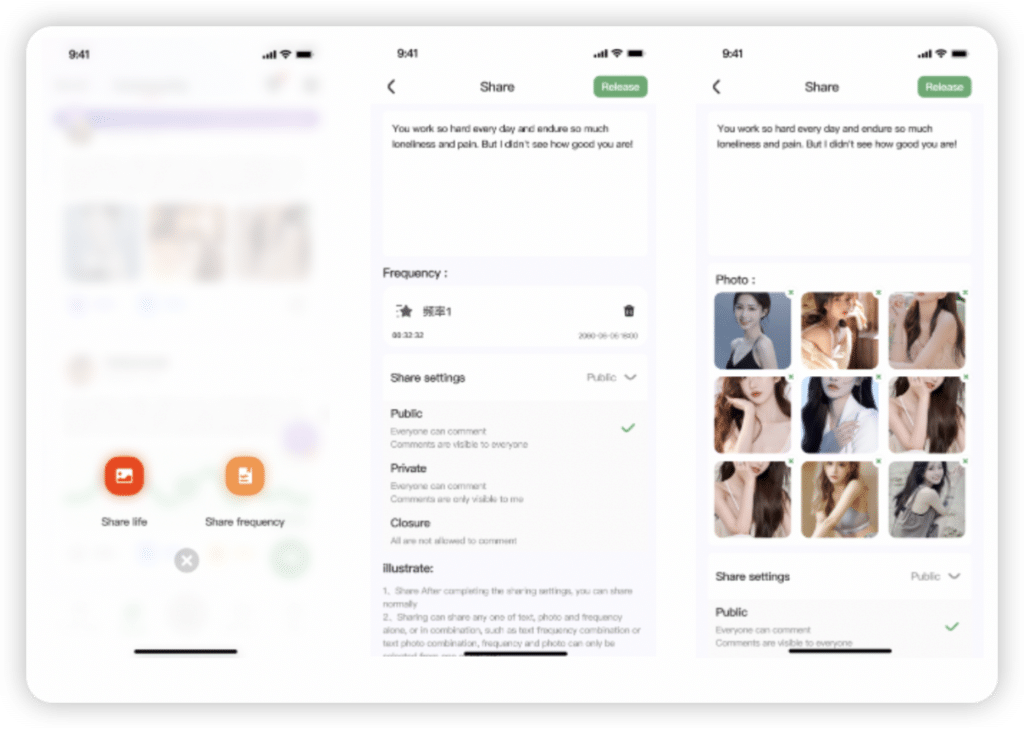
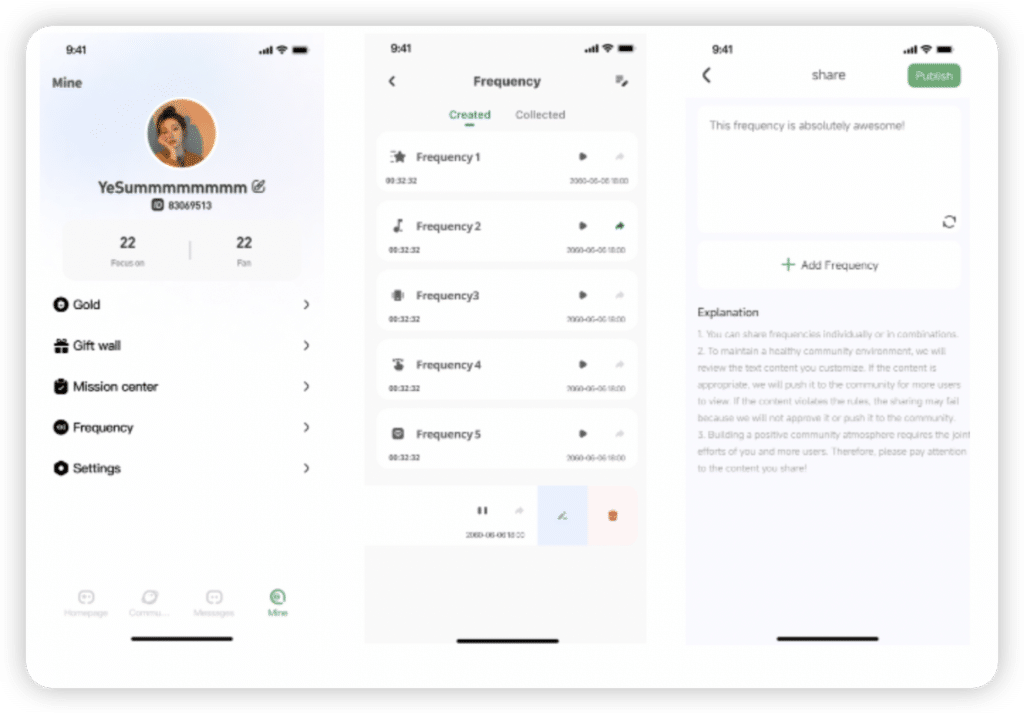
Community sharing
1. You can choose to share your life or frequency with the community
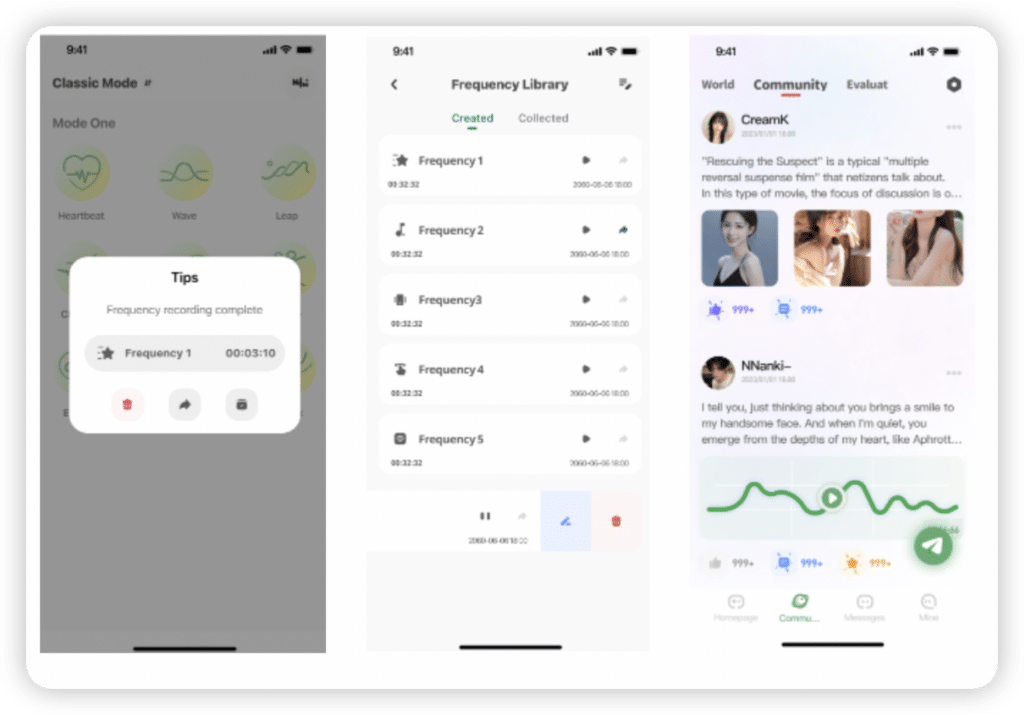
Recording frequency
In single-player mode, the frequency recording function can be used to record the frequency during use Available recording modes include classic mode, music mode, voice control mode, swipe
Sharing frequency
You can directly share unshared frequencies in the frequency library, or you can choose to share frequencies in the community
- June 9, 2024
- APPs
Table of Contents
- Apps Love Spouse APP
- APP Application User Manual
- Download
- Register and log in
- Product ID QR Code
- Device connection
- Interactive mode
- Add friend
- FAQS
- Read User Manual Online (PDF format)
- Download This Manual (PDF format)
Apps Love Spouse APP
APP Application User Manual
IOS system
- Search for ” Love Spouse ” in App Store, download and install.
- Scan the QR code with your mobile phone, and follow the prompts to download and install the” Love Spouse ” APP.
Android system
- Search for “Love Spouse ” in Google Play, download and install.
- Scan the QR code with your mobile phone, select the first or third one, and follow the prompts to download and install the ” Love Spouse ” APP.
Download
Download and install ” Love Spouse ” APP
Register and log in
- Click the ” Love Spouse ” icon to enter the APP, please register for the first login.
- Click “New User Registration” and complete the registration with your mobile phone number or email address. When the mobile phone cannot receive the verification code, please use theemail to register instead.
- After registration, enter the account and password to log in to the APP.
Device binding

- The customer needs to bind the device after logging in for the first time. (View 1)
- Click “+”, the device binding scan box will appear (View 2), please scan the product ID QR code(View code)
- Click the “enter device code”(View 2) will appear (View 3) and you can enter this device code: 9857
- Long press the device icon to delete the device and modify the device name. (View 4)
- After the device is deleted, if the customer wants to restore it, he needs to scan the device binding code or enter the code number again.
Product ID QR Code
Device connection
First turn on the switch of the device, and then click the device icon in the
APP. If the Bluetoothof the mobile phone is not turned on at this time, a
prompt box of “Love Spouse” wants to turnon the Bluetooth“ will appear (View
5). After clicking Allow, the mobile phone will automaticallyturn on the
Bluetooth (iPhone Manually turn on the Bluetooth switch). At this time, the
deviceand the phone begin to establish a connection, and enter the device
control interface after theconnection is successful. (View 6)
Equipment connection
- Classic mode: Click any icon in nine mode on the APP, and the device will start thecorresponding sucking frequency. At the same time, the icon on the APP will flash. Click this iconagain, the device will stop sucking and enter the standby state, and the APP icon will also stopflashing. (View

- Video mode: Click on the video mode or slide the operation interface of the APP to enter thevideo mode. You can click the”select local video”to choose any one you like, then you can enjoy those nine modes with your own video part. (View 9)
- Music mode: Click on the music mode or slide the operation interface of the APP to enter themusic mode. The APP will automatically search for the music player in the mobile phone. If youclick on a music player to play music, the device will vibrate as the music changes. If you want tostop the music mode, click or slide to other control interface. (View 10
- Draw something:Click on the draw something or slide the operation interface of the APPtoenter the draw something. Click + under (View 11) and the (View 12) interface appears, drawaline at will on the screen, (View 13)save and name it and enter the (View 14) interface, click thetriangle symbol on the name to enter the mode of free stroke saving.
- Shake mode: Click on the shake mode or slide the operation interface of the APP to enter theshake mode, and the device will vibrate according to the shaking rhythm and amplitude of your phone (View 15).


Interactive mode
- Tap the interactive mode or slide the operation interface of the APP to enter the interactivemode. (View 16)
- Click the My device on the APP homepage to enter the interactive mode. (View 17)

Add friend
- Click ”+“ to show the interactive interface. (View 16), and you will enter the page (View18), you can search friend by his personal ID (View 19) or email.
- After the search results are displayed, you click the add button on the right, and the system” will send the friend request information to the target user. (View 20)
- After the other party receives the message of the friend application, click the messagebutton to enter the message center to View the message (the red dot is the unread message) (View 21), agree or reject the other party‘s friend application, if agreed, the mutual friendaddition is successful. (View 22)
- After the friend is successfully added(View 23), click the friend icon to send message, delete, black out, or report the friend. (View 24)
- Go back to the homepage and click my device to in the interactive mode, and select your friend which you want to interacted (View 25 & 26). After the interactive connection is successful, the video is not turned on by default. You need to send invitation of video or voice (View27) andthe other party agrees to open the video function before opening both parties (View 28)

FAQS
How do I download and install the Love Spouse app on my Android device?
You can search for “Love Spouse” in Google Play, download and install it.
Alternatively, you can scan the QR code with your mobile phone, select the
first or third one, and follow the prompts to download and install the app.
How do I register and log in to the Love Spouse app?
Click the “Love Spouse” icon to enter the app, then click “New User
Registration” and complete the registration with your mobile phone number or
email address. If your mobile phone cannot receive the verification code, you
can use email to register instead. After registration, enter your account and
password to log in to the app.
How do I bind my device to the Love Spouse app?
After logging in for the first time, click “+”, and the device binding scan
box will appear. Scan the product ID QR code or enter the code number. Long
press the device icon to delete the device and modify the device name. If you
delete the device, you need to scan the device binding code or enter the code
number again to restore it.
How do I connect my device to the Love Spouse app?
First turn on the switch of the device, then click the device icon in the app.
If the Bluetooth of your mobile phone is not turned on at this time, a prompt
box of “Love Spouse” wants to turn on the Bluetooth“ will appear. After
clicking Allow, the mobile phone will automatically turn on Bluetooth. At this
time, the device and the phone begin to establish a connection and enter the
device control interface after the connection is successful.
What are the different equipment connection modes available in the Love
Spouse app?
There are five equipment connection modes available in the Love Spouse app:
Classic mode, Video mode, Music mode, Draw Something, and Shake mode. ”
How do I add a friend in the Love Spouse app?
to show the interactive interface and enter the page. You can search for a
friend by their personal ID or email. After the search results are displayed,
click the add button on the right, and the system will send the friend request
information to the target user. After the other party receives the message of
the friend application, they can agree to or reject the request. If agreed,
the mutual friend addition is successful.
The Love Spouse app: what is it?
The Love Spouse app is a smartphone application designed to improve love
connections and support couples in strengthening their emotional ties.
What features are available in the Love Spouse app?
The LoveSpouse app has a number of features to help couples, including date
night suggestions, love language tests, communication tools, relationship
quizzes, shared calendars, and tailored recommendations based on user
preferences.
How can a relationship be made better with the Love Spouse app?
By giving couples information and skills to better communication,
comprehension, and intimacy, the app strengthens relationships. It encourages
spending quality time together, assists in identifying and meeting each
partner’s needs, and provides suggestions for amicably resolving disputes.
Does the Love Spouse app work across different platforms?
Yes, users may use the Love Spouse app on their smartphones and tablets since
it is accessible on both the iOS and Android operating systems.
Is the app simple to use and navigate?
Yes, the Love Spouse app offers a user-friendly layout that makes it simple
for couples to browse and take advantage of its capabilities.
Is the software adaptable to various types of relationships?
Absolutely!
The Love Spouse app acknowledges that each relationship is unique and gives
users the option to modify settings, preferences, and objectives in accordance
with their own requirements and relationship dynamics.
Does the Love Spouse app place a high priority on security and privacy?
The Love Spouse app does take security and privacy seriously. It uses strong
encryption techniques to protect user data and guarantee the privacy of
personal information.
Does the Love Spouse app allow couples to communicate and exchange
information?
On the Love Spouse app, couples may communicate and exchange information. They
may communicate through messaging, sync their calendars, and work together to
organize events or surprises for one another.
Exist any premium options or subscription packages?
Yes, the Love Spouse app has premium features and subscription options that
provide users access to extra materials, only available via the app, and
tailored suggestions. Users have the option to subscribe to a premium version
for more advantageous features.
Can couples who live apart use the Love Spouse app?
Absolutely! With options for virtual communication, collaborative goal
planning, and the opportunity to schedule activities for when they are
physically together,the Love Spouse app may be helpful for long-distance
relationships. Despite the distance, it helps preserve a feeling of intimacy
and enhances the link.
Apps Love Spouse APP User Manual.pptx
Read User Manual Online (PDF format)
Read User Manual Online (PDF format) >>
Download This Manual (PDF format)
Download this manual >>