
View the manual for the LG FFH-2000AX here, for free. This user manual comes under the category karaoke systems and has been rated by 2 people with an average of a 9.3. This manual is available in the following languages: English. Do you have a question about the LG FFH-2000AX?
Ask your question here
LG FFH-2000AX specifications
Below you will find the product specifications and the manual specifications of the LG FFH-2000AX.
The LG FFH-2000AX is an electronic device that falls outside of specific categorization. It is not easily classified into a particular product type or function. This device is designed and manufactured by LG, a well-known multinational electronics company.
While specific details about the FFH-2000AX are limited, it is likely to possess features and capabilities that align with LG’s reputation for producing high-quality electronic devices. LG is known for incorporating advanced technology and innovative design into their products.
The FFH-2000AX is expected to have a durable construction, as LG is known for using premium materials in their manufacturing processes. This ensures that the device will be reliable and long-lasting, offering value for money.
As the FFH-2000AX is not specifically categorized, it is difficult to determine its exact purpose or use case. However, LG is trusted for its commitment to delivering user-friendly and intuitive products. It is likely that the FFH-2000AX is designed to meet the needs and preferences of consumers in New Zealand.
Overall, the FFH-2000AX is an electronic device that is created by LG, a reputable electronics manufacturer. While specific details about its features and purpose are unavailable, it is expected to possess the quality and reliability that LG is known for.
General
| Brand | LG |
| Model | FFH-2000AX |
| Product | karoake system |
| Language | English |
| Filetype | User manual (PDF) |
Frequently asked questions
Can’t find the answer to your question in the manual? You may find the answer to your question in the FAQs about the LG FFH-2000AX below.
Is the manual of the LG FFH-2000AX available in English?
Yes, the manual of the LG FFH-2000AX is available in English .
Is your question not listed? Ask your question here

— 2 —
CONTENTS
1. SERVICING PRECAUTIONS
……………………………………………………………………………………………………….
3
2. ESD PRECAUTIONS
………………………………………………………………………………………………………………….
5
3. SPECIFICATIONS
……………………………………………………………………………………………………………………..
6
4. ADJUSTMENTS
…………………………………………………………………………………………………………………………
8
5. TROUBLESHOOTING GUIDE
……………………………………………………………………………………………………
10
6. WAVEFORMS OF MAJOR CHECK POINT
………………………………………………………………………………….
21
7. BLOCK DIAGRAM
……………………………………………………………………………………………………………………
23
8. SCHEMATIC DIAGRAMS
………………………………………………………………………………………………………….
24
9. WIRING DIAGRAM
…………………………………………………………………………………………………………………..
30
10. PCB LAYOUTS
………………………………………………………………………………………………………………………..
31
11. INTERNAL BLOCK DIAGRAM OF ICs
………………………………………………………………………………………..
34
12. REPAIRS REGARDING CD MECHANISM
…………………………………………………………………………………..
52
13. EXPLODED VIEW/PARTS LIST(CABINET/TAPE DECK MECHANISM/CD/PICK-UP)
………………………
53
14. SPEAKER EXPLODED VIEW/PARTS LIST
…………………………………………………………………………………
56
15. REPLACEMENT PARTS LIST
……………………………………………………………………………………………………
57

— 3 —
SERVICING PRECAUTIONS
NOTES REGARDING HANDLING OF THE PICK-UP
1. Notes for transport and storage
1) The pick-up should always be left in its conductive bag until immediately prior to use.
2) The pick-up should never be subjected to external pressure or impact.
2. Repair notes
1) The pick-up incorporates a strong magnet, and so should never be brought close to magnetic materials.
2) The pick-up should always be handled correctly and carefully, taking care to avoid external pressure and
impact. If it is subjected to strong pressure or impact, the result may be an operational malfunction and/or
damage to the printed-circuit board.
3) Each and every pick-up is already individually adjusted to a high degree of precision, and for that reason
the adjustment point and installation screws should absolutely never be touched.
4) Laser beams may damage the eyes!
Absolutely never permit laser beams to enter the eyes!
Also NEVER switch ON the power to the laser output part (lens, etc.) of the pick-up if it is damaged.
5) Cleaning the lens surface
If there is dust on the lens surface, the dust should be cleaned away by using an air bush (such as used
for camera lens). The lens is held by a delicate spring. When cleaning the lens surface, therefore, a
cotton swab should be used, taking care not to distort this.
6) Never attempt to disassemble the pick-up.
Spring by excess pressure. If the lens is extremely dirty, apply isopropyl alcohol to the cotton swab. (Do
not use any other liquid cleaners, because they will damage the lens.) Take care not to use too much of
this alcohol on the swab, and do not allow the alcohol to get inside the pick-up.
Storage in conductive bag
Drop impact
NEVER look directly at the laser beam, and don’t let
contact fingers or other exposed skin.
Magnet
How to hold the pick-up
Pressure
Pressure
Cotton swab
Conductive Sheet

— 4 —
NOTES REGARDING COMPACT DISC PLAYER REPAIRS
1. Preparations
1) Compact disc players incorporate a great many ICs as well as the pick-up (laser diode). These
components are sensitive to, and easily affected by, static electricity. If such static electricity is high
voltage, components can be damaged, and for that reason components should be handled with care.
2) The pick-up is composed of many optical components and other high-precision components. Care must
be taken, therefore, to avoid repair or storage where the temperature of humidity is high, where strong
magnetism is present, or where there is excessive dust.
2. Notes for repair
1) Before replacing a component part, first disconnect the power supply lead wire from the unit
2) All equipment, measuring instruments and tools must be grounded.
3) The workbench should be covered with a conductive sheet and grounded.
When removing the laser pick-up from its conductive bag, do not place the pick-up on the bag. (This is
because there is the possibility of damage by static electricity.)
4) To prevent AC leakage, the metal part of the soldering iron should be grounded.
5) Workers should be grounded by an armband (1MΩ)
6) Care should be taken not to permit the laser pick-up to come in contact with clothing, in order to prevent
static electricity changes in the clothing to escape from the armband.
7) The laser beam from the pick-up should NEVER be directly facing the eyes or bare skin.
CLEARING MALFUNCTION
You can reset your unit to initial status if malfunction occur(button malfunction, display, etc.).
Using a pointed good conductor(such as driver), simply short the RESET jump wire on the inside of the
volume knob for more than 3 seconds.
If you reset your unit, you must reenter all its settings(stations, clock, timer)
NOTE: 1. To operate the RESET jump wire, pull the volume rotary knob and release it.
2. If you wish to operate the RESET jump wire, it is necessary to unplug the power cord.
Armband
Conductive
Sheet
Resistor
(1 Mohm)
Resistor
(1 Mohm)
VOLUME KNOB
UP
DOWN
VOLUME
RESET jump wire

— 5 —
ESD PRECAUTIONS
Electrostatically Sensitive Devices (ESD)
Some semiconductor (solid state) devices can be damaged easily by static electricity. Such components
commonly are called Electrostatically Sensitive Devices (ESD). Examples of typical ESD devices are integrated
circuits and some field-effect transistors and semiconductor chip components. The following techniques should
be used to help reduce the incidence of component damage caused by static electricity.
1. Immediately before handling any semiconductor component or semiconductor-equipped assembly, drain off
any electrostatic charge on your body by touching a known earth ground. Alternatively, obtain and wear a
commercially available discharging wrist strap device, which should be removed for potential shock reasons
prior to applying power to the unit under test.
2. After removing an electrical assembly equipped with ESD devices, place the assembly on a conductive
surface such as aluminum foil, to prevent electrostatic charge buildup or exposure of the assembly.
3. Use only a grounded-tip soldering iron to solder or unsolder ESD devices.
4. Use only an anti-static solder removal device. Some solder removal devices not classified as «anti-static» can
generate electrical charges sufficient to damage ESD devices.
5. Do not use freon-propelled chemicals. These can generate electrical charges sufficient to damage ESD
devices.
6. Do not remove a replacement ESD device from its protective package until immediately before you are
ready to install it. (Most replacement ESD devices are packaged with leads electrically shorted together by
conductive foam, aluminum foil or comparable conductive materials).
7. Immediately before removing the protective material from the leads of a replacement ESD device, touch the
protective material to the chassis or circuit assembly into which the device will by installed.
CAUTION : BE SURE NO POWER IS APPLIED TO THE CHASSIS OR CIRCUIT, AND OBSERVE ALL OTHER
SAFETY PRECAUTIONS.
8. Minimize bodily motions when handing unpackaged replacement ESD devices. (Otherwise harmless motion
such as the brushing together of your clothes fabric or the lifting of your foot from a carpeted floor can
generate static electricity sufficient to damage an ESD device).
[CAUTION. GRAPHIC SYMBOLS]
THE LIGHTNING FLASH WITH APROWHEAD SYMBOL. WITHIN AN EQUILATERAL
TRIANGLE, IS INTENDED TO ALERT THE SERVICE PERSONNEL TO THE PRESENCE
OF UNINSULATED “DANGEROUS VOLTAGE” THAT MAY BE OF SUFFICIENT
MAGNITUDE TO CONSTITUTE A RISK OF ELECTRIC SHOCK.
THE EXCLAMATION POINT WITHIN AN EQUILATERAL TRIANGLE IS INTENDED TO
ALERT THE SERVICE PERSONNEL TO THE PRESENCE OF IMPORTANT SAFETY
INFORMATION IN SERVICE LITERATURE.

— 6 —
SPECIFICATIONS
1. AMP SECTION
1) Power Output (6 Ω, 2 channel, T.H.D. 10%) 50W+50W
2) T.H.D 0.2%
3) Frequency Response (-3dB down) 40Hz~25kHz
4) Signal-to-noise Ratio 83dB
5) Input Sensitivity AUX 400±50mV
6) Channel Difference 1kHz 2dB
2. TUNER SECTION
1) FM/OIRT
1) Frequency Range 87.5MHz~108MHz
or 65.0MHz~74.0MHz & 87.5MHz~108MHz
2) Intermediate Frequency 10.7MHz
3) Sensitivity (69MHz/70MHz/71MHz/90.1MHz/98.1MHz/106.1MHz) 12dB
4) Signal-to-noise Ratio 98.1MHz(Mono/Stereo) 62dB/58dB
5) Image Rejection 106.1MHz 35dB
6) IF Rejection 90.1MHz 65dB
7) Distortion 98.1MHz(Mono/Stereo) 1.2%
 Frequency Response (-3dB) 60Hz~12.5kHz
9) Stereo Separation (100Hz/1kHz/10kHz) 23dB
2) AM(MW)
1) Frequency Range 522kHz~1611kHz
2) Intermediate Frequency 455kHz
3) Usable Sensitivity 55dB
4) Image Rejection (1404kHz) 25dB
5) IF Rejection (603kHz) 40dB
6) Selectivity (1008kHz) 23dB
7) Signal-to-noise Ratio (1008kHz) 35dB
Distortion (1008kHz) 1.5%
9) Frequency Response (1008kHz)
100Hz~2000Hz

— 7 —
3. TAPE DECK SECTION
1) Tape Speed (MTT-111) / Normal Speed 4.75(+2%/-1%) cm/sec
2) Wow Flutter (MTT-111) 0.25%
3) Fast Forward and Rewind Time (C-60) 120sec
4) Frequency Response (6dB range) 125Hz~8kHz
5) Signal-to-noise Ratio (Playback/Record) 46dB/43dB
6) Distortion (Playback/Record) 3% / 4%
7) Crosstalk (Playback: 1kHz) 55dB
Channel Separation (Playback: 1kHz) 45dB
9) Erase Ratio 55dB
4. COMPACT DISC PLAYER SECTION
1) Frequency Response (40Hz-18kHz) +0.5/-3.0dB
2) Signal-to-noise Ratio (1kHz) 70dB
3) Dynamic Range (1kHz) 70dB
4) T.H.D. (1kHz) 0.2%
5) Separation (100Hz/1kHz/10kHz) 45dB/45dB/40dB
6) Access Time Short / Long 2sec/6sec
5. VIDEO SECTION
1) Output Level 1Vp-p
6. GENERAL
1) Power requirement Refer to the back panel of unit
2) Power consumption 110W
3) Dimension (W x H x D)
273 x 330 x 360 (mm)
4) Weight (net)
8.0kg
NOTE : specification are subject to change without notice in the course of product improvement.

— 8 —
ADJUSTMENTS
This set has been aligned at the factory and normally will not require further adjustment. As a result, it is not
recommended that any attempt is made to modificate any circuit. If any parts are replaced or if anyone tampers
with the adjustment, realignment may be necessary.
IMPORTANT
1. Check Power-source voltage.
2. Set the function switch to band being aligned.
3. Turn volume control to minimum unless otherwise noted.
4. Connect low side of signal source and output indicator to chassis ground unless otherwise specified.
5. Keep the signal input as low as possible to avoid AGC and AC action.
TAPE DECK ADJUSTMENT
1. AZIMUTH ADJUSTMENT
Figure 2. Azimuth Adjustment Connection Diagram
CH1 CH2
Speaker Out
Playback Mode
Head
Test Tape
MTT-114
L ch
R ch
GND
Dual-trace
synchroscope
Electronic
Voltmeter
L out
R out
Unit
Deck Mode Test Tape Test Point Adjustment Adjust for
A Deck Playback MTT-114 Speaker Out Azimuth Screw Maximum
B Deck Playback MTT-114 Speaker Out Azimuth Screw Maximum

— 9 —
2. MOTOR SPEED ADJUSTMENT
Figure 3. Motor Speed Adjustment Connection Diagram
Deck Mode Test Tape Test Point Adjustment Adjust for Remark
Normal Speed MTT-111 Speaker Out VR401 3kHz ± 1% A Deck
HI-Speed MTT-111 Speaker Out more than 5.4kHz HI-Speed Dubbing Mode
3. RECORD BIAS ADJUSTMENT
Head
Unit
PN402
GND
Record/Playback
head
Test Tape
MTT-5511
Record/Playback
and Pause Mode
Frequency Counter
Deck Mode Test Tape Test Point Adjustment Adjust for
Rec/Pause MTT-5511 PN402 L403 90kHz±5kHz
Figure 4. Record Bias Adjustment Connection Diagram
Head
Test Tape
MTT-111
Record/Playback
head
Playback Mode
L out
Unit
R out
Speaker Out
GND
Frequency Counter

TROUBLESHOOTING GUIDE
1. POWER PART
Turn power on.
PN302 5.6V check?
PN302 Defective.
IC703 Surrounding circuitry
defective.
IC703 defective.
IC301 defective.
IC801 defective.
IC301 defective.
•
PN808 defective.
•
Pattern defective.
•
X301 defective.
•
IC301 defective.
IC301 16, 46, 72, 90 input +5V
IC703 check?
• Pin 1 + 12V
• Pin 3 + 6.3V
IC301 Pin 79 power output?
IC301 Pin 97 HRST output?
IC801 Pin 13,15,17,4 Check?
IC301 Pin 12 Reset check.
OK
IC301 Pin 98,99,100,97 Check?
— 10 —
OFF
ON 5V
PCTL
HRST
13
15
98
99
100
97
17
4
NO NO
NO
NO
NO
NO
NO
NO
YES
YES
YES
YES
YES
YES
YES
YES
YES

— 11 —
2. CD PART
DOOR OPEN/CLOSE
CHECK? (LOADING)
Is rotate turret?
(A) When laser does not light.
(B) When laser lights.
Is DISC play?
Is lead-in?
Is audio output?
2-1
2-2
2-3
2-4
2-5

— 12 —
2-1. DOOR OPEN/CLOSE PART(LOADING)
Door open/close?
IC809 Pin 2, 10 Output?
• ZD803 defective.
• +12V-CD defective.
•
IC809 defective.
•
2,10 pattern defective.
Pick-up MOTOR? Pick-up defective.
OK
• CLOSE leaf s/w defective.
• IC801 Pin 2, 3 defective.
• ZD803 (4.7V)?
• IC809 surrounding circuitry
check?
IC809 Pin 5,6 input?
56
OPEN L H
CLOSE H L
NO
NO
NO
NO
YES
YES
YES
YES

— 13 —
2-2. TURRET PART
OK
Is Rotation turret?
Limit S/W 0V(LOW) check?
IC801 Pin 47, 51, 93, 94 check?
IC808 Pin 15, 16, output check?
PN802 input check?
Pick-up check?
Pick-up defective.
IC808 Pin 11, 12 output
pattern defective.
PN805 connector check.
IC801 DATA, CLK, XLT check?
IC801 defective.
•
IC801 Pin 20, 21, 23
Pattern defective.
•
IC827 defective.
•
IC827 X-TAL Pin 8, 9
defective.
IC827 36, 37, 38 check?
IC806 Pin 43 output check?
IC808 Pin 11, 12 output check?
• IC808 Pin 10 pattern
defective.
• IC806 defective.
Down leaf S/W(PN804) 0V
(LOW) check?
leaf S/W defective.
• IC801 defective.
• IC801 Pin 47, 51, 93,
94 pattern defective.
• IC806 Pin 35, 36, 37
input defective.
• IC806 defective.
• IC808 defective.
• IC808 Pin 9, 14 input
defective.
• IC808 Pin 15, 16,
output defective.
NO NO
NO
NO
NO
NO
NO
NO
NO
NO
NO
YES
YES
YES
YES
YES
YES
YES
YES
YES
YES
YES

— 14 —
2-3. DISC PLAY PART(A, B)
(A) When laser does not light.
IC806 Pin 72 2.8V(LD) check?
•
IC806 defective.
•
IC806 Pin 71 defective.
•
Q801 defective.
•
R833 defective.
PN801 defective.
Pick-up defective.
Q801 Collector 2.0V?
PN801 check?
Pick-up lens check?
OK
NO
NO
NO
NO
YES
YES
YES
YES
YES

— 15 —
(B) When laser lights
(C)
Does the lens move up and
down?
IC806 Pin 48 output (FEO)?
•
IC806 defective.
•
C811 defective.
•
IC806 Pin 25 input
defective.
•
IC806 defective.
•
PN801 defective.
•
Pick-up defective.
IC806 Pin 26, 27 output
check?
IC806 Pin 79 RFO output?
Q801 defective.
NO NO
NO
NO
YES
YES
YES
YES

— 16 —
(C)
The wavefrom of IC806 Pin
79 is below figure?
IC806 “FOK” signal output?
(Pin 40 check?)
IC801 Pin 81 FOK input check?
IC806 “FEO” output? (Pin 48)
IC827 FZC and SENS
output check?
IC827 SMDP signal output?
Pin 75 check?
IC808 disc MOTOR output 17,
18 check?
• Pick-up defective.
• PN802 defective.
• Turntable height error.
• Laser diode degraded.
• IC801 Pin 81 defective.
• IC806 defective.
• IC808 defective.
• IC808 Surrounding
circuitry defective.
• Pin 75 pattern defective.
• X802 defective.
• IC827 defective.
• IC806 defective.
• IC806 Pin 78, 79, 80, 3, 4
defective.
• IC806 defective.
• PN801 connector defective.
• Pick-up defective.
NO
NO
NO
NO
NO
NO
NO
YES
YES
YES
YES
YES
YES
YES

— 17 —
Is leas-in?
IC827 Pin 66 EFM check?
IC806 defective.
IC801 defective.
IC801 Pin 16 SQCK check?
IC827 defective.
IC801 defective.
•
IC827 Pin 25 pattern
defective.
•
IC827 defective.
IC801 Pin 14 input check?
IC827 Pin 25 “GFS” input?
IC801 Pin 88 SCOR check?
OK
NO
NO
NO
NO
NO
YES
YES
YES
YES
YES
2-4. Is Lead-in

— 18 —
2-5. Audio signal KARAOKE AND VCD(A, B)
(A) KARAOKE AUDIO.
IC829 Pin 49 input check?
IC814 Pin 107, 108, 109
output?
IC814 defective.
IC825 Pin 14, 16 output?
RESET surrounding circuitry
defective.
OK
defective.
IC824 Pin 1 input check?
IC824 Pin 3, 6, 10 input
check?
IC825 Pin 1, 2, 3 input check?
IC825 defective.
IC801 defective.
IC829 defective.
IC824 defective.
IC830 DATA LINE ADRS LINE
check?
IC825 defective.
IC829 Pin 17 RESET check?
•
IC801 defective.
•
IC801 Pin 52 defective.
(B) VCD AUDIO.
OFF
VCD
ON
KARAOKE
NO
NO
NO
NO
NO
NO
NO
NO
YES
YES
YES
YES
YES
YES
YES
YES
Loading…
Manuals LG FFH2000AX Files size: 2990 KB, Language: English, Format: pdf, Platform: Windows/Linux, Date: 2015-01-05
On this page you can download the manuals LG FFH2000AX. We suggest you familiarize yourself with the user management, service and repair instructions.
Here you will also find a list of ordering numbers for parts and components LG FFH2000AX.
All files are provided exclusively for introductory purposes. And they are not a repair guide, but are only aimed at helping you to familiarize yourself with the principle of building a device in more detail.
The contents of the guidelines presented here require you to know the technical English language.
If you are going to download service management manual LG FFH2000AX, In other words, the manual service, you are long to possess at least minimal knowledge in the field of electronics and understanding the basic principles of the operation of electromechanical devices.
To view the manuals, you will need Adobe Acrobat Reader version 9 and above or another program for viewing PDF files.
Due to the popularity of the information presented on the site and its free provision of the final user, a convincing request to use special software products for multi-threaded download downloads.
List of manuals for LG FFH2000AX
- Guide to use (User manual)
- Guide to service (Service manual)
- Guide to repair (Repair manual)
- The list of parts and components (PartList)
- Computers & electronics
- Audio & Home Theatre
- CD players
- LG
- FFH-2000AX
-
Hello! I am an AI chatbot trained to assist you with the LG FFH-2000AX User manual. I’ve already reviewed the document and can help you find the information you need or explain it in simple terms. Just ask your questions, and providing more details will help me assist you more effectively!
LG FFH-2000AX
Type: (PDF)
Size
4.1 MB
Page
9
Category
AUDIO
SERVICE MANUAL
If you get stuck in repairing a defective appliance
download
this repair information for help. See below.
Good luck to the repair!
Please do not offer the downloaded file for sell only
use it for personal usage!
Looking for similar lg manual?
Document preview [1st page]
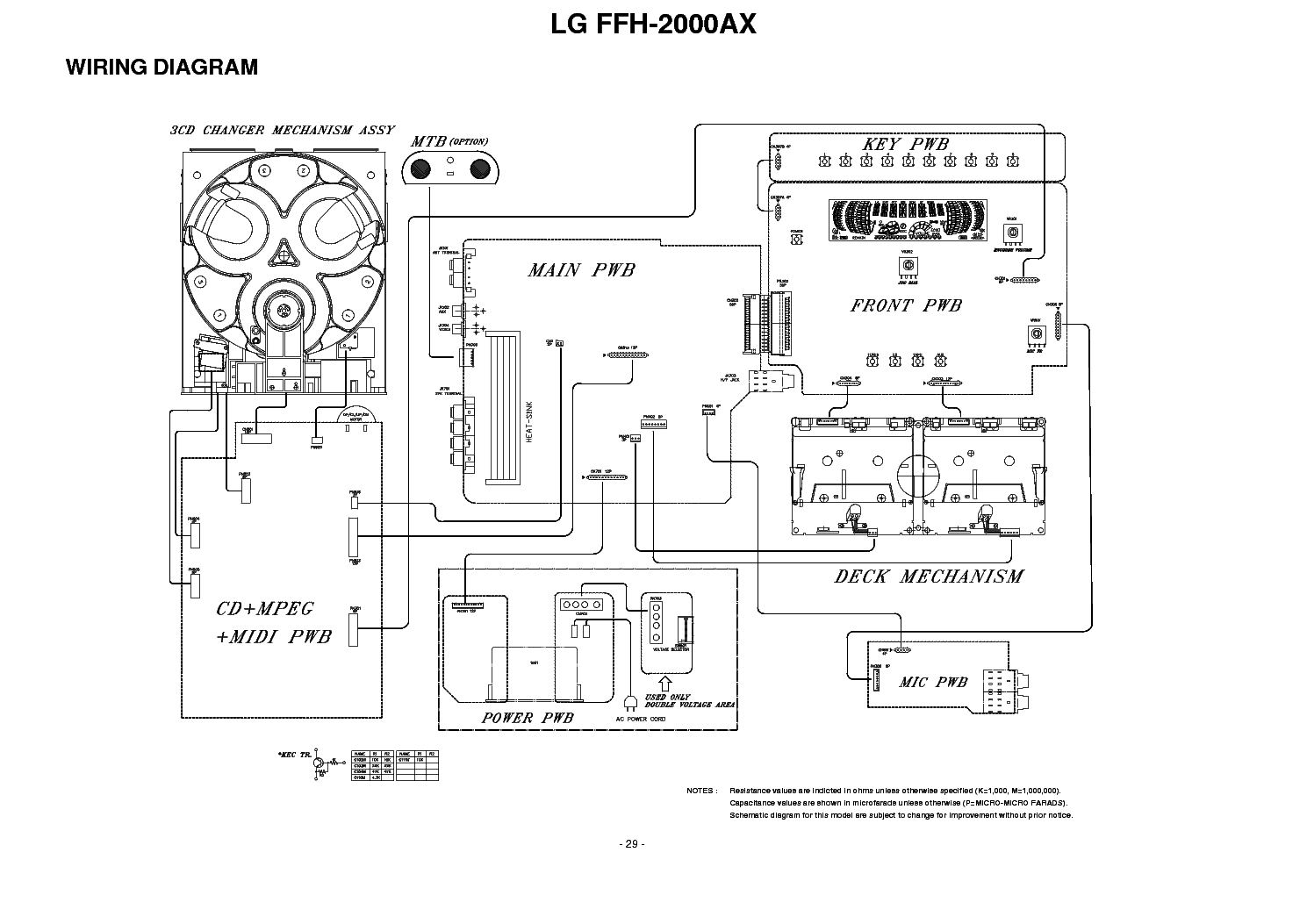
Click on the link for free download!
Document preview [2nd page]
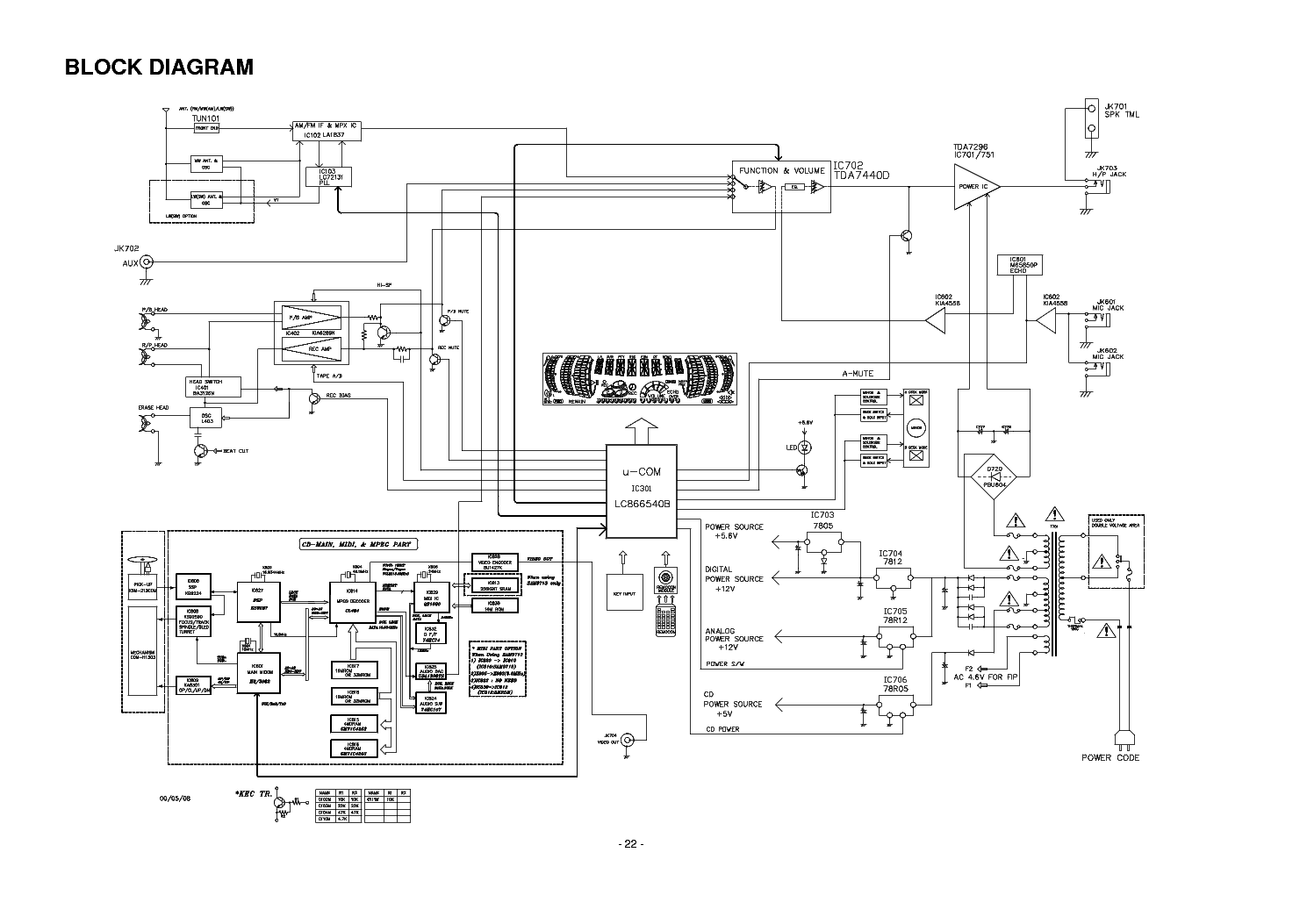
Click on the link for free download!
Please tick the box below to get download link:
- Also known:
LG FFH-2000AX FFH2000AX FFH 2000 AX 2000AX
- If you have any question about repairing write your question to the Message board. For this no need registration.
- If the site has helped you and you also want to help others, please Upload a manual, circuit diagram or eeprom that is not yet available on the site.
Have a nice Day! - See related repair forum topics below. May be help you to repair.
Warning!
If you are not familiar with electronics, do not attempt to repair!
You could suffer a fatal electrical shock! Instead, contact your nearest service center!
Note! To open downloaded files you need acrobat reader or similar pdf reader program. In addition,
some files are archived,
so you need WinZip or WinRar to open that files. Also some files are djvu so you need djvu viewer to open them.
These free programs can be found on this page: needed progs
If you use opera you have to disable opera turbo function to download file!
If you cannot download this file, try it with CHROME or FIREFOX browser.
Relevant AUDIO forum topics:
Kijelző gond miatt ugye szét volt bontva a cucc, és a kijelző alatt kicserélgettem elkokat. Na utána elkezdett a kazettás deck része olyan hibát produkálni, hogy ha elindítom, pár másodperc után vagy megáll vagy fordul és elkezdi a másik oldalt játszani 6x és leáll (play mode beállítástól függően), tehát mintha vége lenne a szalagnak működésbe lép az autostop/auto reverse, csévéléskor is leáll, a digitális counter nem számol. Kicseréltem az egész deck mechanikát, és a másikkal is ezt csinálja, tehát nem azzal van a gond (egy másik hifimben tesztelve hibátlanok). Akkor mi a bánat lehet az oka?!
Sziasztok !
A fent nevezett rádió a kollégám fürdő szobájában működött száz évig . Még anno , Lengyelországból hozta . Először arra panaszkodott ,hogy bekapcsolás után , először szól , majd elhallgat . Kikapcsolás és néhány perc eltelte után vissza kapcsolva újra szól . Majd újra elhallgat .Most , először hol működöt , hol nem . Majd most már , nem szól . A kollégám szeretné megcsináltatni ! Megszokta már , ragaszkodik hozzá . Az első gondolatom az volt , hogy kh-s az üzemmód kapcsoló . Egy pillanatra megszólalt nálam , a bekapcsolás után . Majd most már a 230Vac-be dugva sem szól . Egy pillanatra sem. A potit kimértem .Ellenállásra rendben . A poti lábaira lépve a mérőcsúccsal a hangszórókból kattanás , halk búgás hallatszik . A kapcsolót kimértem . Kapcsol . Kontakt szprével befújtam . Nem használt . A CD forgatja a lemezt . A magnó forgatja a kazetta mechanikát . Hang nincs . A múltkor is kifogtam egy rádiót . De nem kérték az IC cserét benne .Lásd a hivatkozást :
http://elektrotanya.com/?q=hu/content/siemens-e-nr-rg-359-s8-radio-ora-elhallgatott-talan-az-egyik-ic-vissza-adva
A kolléga rádiójának javításához kérem a segítségeteket !
A segítséget előre is nagyon szépen köszönöm .
Üdv jano
Üdv.
Segitséget kérnék!
Hoztak egy ilyen micro hifit,s a cd kiadása helyett ez a felirat jelenik meg:Lock on.
A táv stop és a készülék stop együttes nyomására unlock jelenik meg ,de továbbra sem adja ki a lemezt.(LOCKED)
Sziasztok!
Egy LG LM-M1040D Hi-Fi-ben lévő kapcsoló üzemű táp STRX 6759 IC-je izzik olyannyira, hogy a vízcsepp azonnal elgőzölög róla. Nem javítottam még ilyen készüléket, nem tudom mennyire szabad melegednie, de szerintem ennyire semmiképp. A készülék minden funkciója működik, tápok, elkók jók.
Lehet, hogy az STR hibás?
Üdvözlettel:
Attila
Similar manuals:
If you want to join us and get
repairing help
please sign in or sign up by completing a simple electrical test
or write your question to the Message board without registration.
You can write in English language into the forum (not only in Hungarian)!
E-Waste Reduce