
NOISE CANCELLING
HEADPHONES 700

IMPORTANT SAFETY INSTRUCTIONS
Please read and keep all safety and use instructions.
Important Safety Instructions
1. Read these instructions.
2. Keep these instructions.
3. Heed all warnings.
4. Follow all instructions.
5. Do not use this apparatus near water.
6. Clean only with a dry cloth.
7. Only use attachments/accessories specified by the manufacturer.
8. Refer all servicing to qualified personnel. Servicing is required when the apparatus has been damaged in any
way, such as power-supply cord or plug is damaged, liquid has been spilled or objects have fallen into the
apparatus, the apparatus has been exposed to rain or moisture, does not operate normally, or has been dropped.
WARNINGS/CAUTIONS
• Do NOT use the headphones at a high volume for any extended period.
– To avoid hearing damage, use your headphones at a comfortable, moderate volume level.
– Turn the volume down on your device before placing the headphones on your ears, then turn the volume up
gradually until you reach a comfortable listening level.
• Do NOT use your headphones while driving for phone calls or any other purpose.
• Do NOT use the headphones with noise canceling on at any time the inability to hear surrounding sounds may
present a danger to yourself or others, e.g., while riding a bicycle or walking in or near trac, a construction site or
railroad, etc., and follow applicable laws regarding headphone use.
– Remove the headphones, or use the headphones with noise cancelling o and adjust your volume, to ensure you
can hear surrounding sounds, including alarms and warning signals.
– Be aware of how sounds that you rely on as reminders or warnings may vary in character when using
the headphones.
• Do NOT use the headphones if they emit any loud unusual noise. If this happens, turn the headphones o and
contact Bose customer service.
• Remove headphones immediately if you experience a warming sensation or loss of audio.
• Do NOT use mobile phone adapters to connect headphones to airplane seat jacks, as this could result in injury or
property damage due to overheating.
2
ENG
|

IMPORTANT SAFETY INSTRUCTIONS
• Do NOT use the headphones as aviation communication headsets except in case of emergency.
– No incoming audio will be heard with a discharged or improperly installed battery. This could result in the
potential of missed communications while piloting an aircraft.
– Extremely loud ambient noise levels common to many propeller-driven aircraft may impair your ability to receive
incoming audio communications, particularly during takeo and climb out.
– The headphones are not engineered for noise conditions, altitude, temperature or other environmental conditions
common in non-commercial aircraft, resulting in possible interference to critical communications.
Contains small parts which may be a choking hazard. Not suitable for children under age 3.
This product contains magnetic material. Consult your physician on whether this might aect your
implantable medical device.
• To reduce the risk of fire or electrical shock, do NOT expose this product to rain, liquids or moisture.
• Do NOT expose this product to dripping or splashing, and do not place objects filled with liquids, such as vases, on
or near the product.
• Do NOT make unauthorized alterations to this product.
• Use this product only with an agency-approved power supply that meets local regulatory requirements
(e.g., UL, CSA, VDE, CCC).
• Do not expose products containing batteries to excessive heat (e.g. from storage in direct sunlight, fire or the like).
• Do NOT wear the headphones while charging.
• The headphones do not play audio while charging.
3
ENG
|
REGULATORY INFORMATION
NOTE: This equipment has been tested and found to comply with the limits for a Class B digital device, pursuant to
Part 15 of the FCC Rules. These limits are designed to provide reasonable protection against harmful interference in a
residential installation. This equipment generates, uses, and can radiate radio frequency energy and, if not installed
and used in accordance with the instructions, may cause harmful interference to radio communications. However,
there is no guarantee that interference will not occur in a particular installation. If this equipment does cause harmful
interference to radio or television reception, which can be determined by turning the equipment o and on, the user
is encouraged to try to correct the interference by one or more of the following measures:
• Reorient or relocate the receiving antenna.
• Increase the separation between the equipment and receiver.
• Connect the equipment into an outlet on a circuit dierent from that to which the receiver is connected.
• Consult the dealer or an experienced radio/TV technician for help.
Changes or modifications not expressly approved by Bose Corporation could void the user’s authority to operate
this equipment.
This device complies with part 15 of the FCC Rules and with Industry Canada license-exempt RSS standard(s).
Operation is subject to the following two conditions: (1) This device may not cause harmful interference, and (2) this
device must accept any interference received, including interference that may cause undesired operation.
This device complies with FCC and Industry Canada radiation exposure limits set forth for general population.
This transmitter must not be co-located or operating in conjunction with any other antenna or transmitter.
CAN ICES-3 (B)/NMB-3(B)
Bose Corporation hereby declares that this product is in compliance with the essential requirements and
other relevant provisions of Directive 2014/53/EU and all other applicable EU directive requirements.
The complete declaration of conformity can be found at: www.Bose.com/compliance
For Europe:
Frequency band of operation 2400 to 2483.5 MHz:
Bluetooth: Maximum transmit power less than 20 dBm EIRP.
Bluetooth Low Energy: Maximum power spectral density less than 10 dBm/MHz EIRP.
This symbol means the product must not be discarded as household waste, and should be delivered to an
appropriate collection facility for recycling. Proper disposal and recycling helps protect natural resources,
human health and the environment. For more information on disposal and recycling of this product, contact
your local municipality, disposal service, or the shop where you bought this product.
Management Regulation for Low-power Radio-frequency Devices
Article XII
According to “Management Regulation for Low-power Radio-frequency Devices” without permission granted by
the NCC, any company, enterprise, or user is not allowed to change frequency, enhance transmitting power or alter
original characteristic as well as performance to an approved low power radio-frequency devices.
Article XIV
The low power radio-frequency devices shall not influence aircraft security and interfere legal communications; If
found, the user shall cease operating immediately until no interference is achieved. The said legal communications
means radio communications operated in compliance with the Telecommunications Act.
Product type: Specific small output wireless devices (wireless devices for wireless data communication systems),
Certification number R-C-BFM-423352, Model number 423352
4
ENG
|
REGULATORY INFORMATION
DON’T attempt to remove the rechargeable lithium-ion battery from this product. Contact your local Bose retailer or
other qualified professional for removal.
Please dispose of used batteries properly, following local regulations. Do not incinerate.
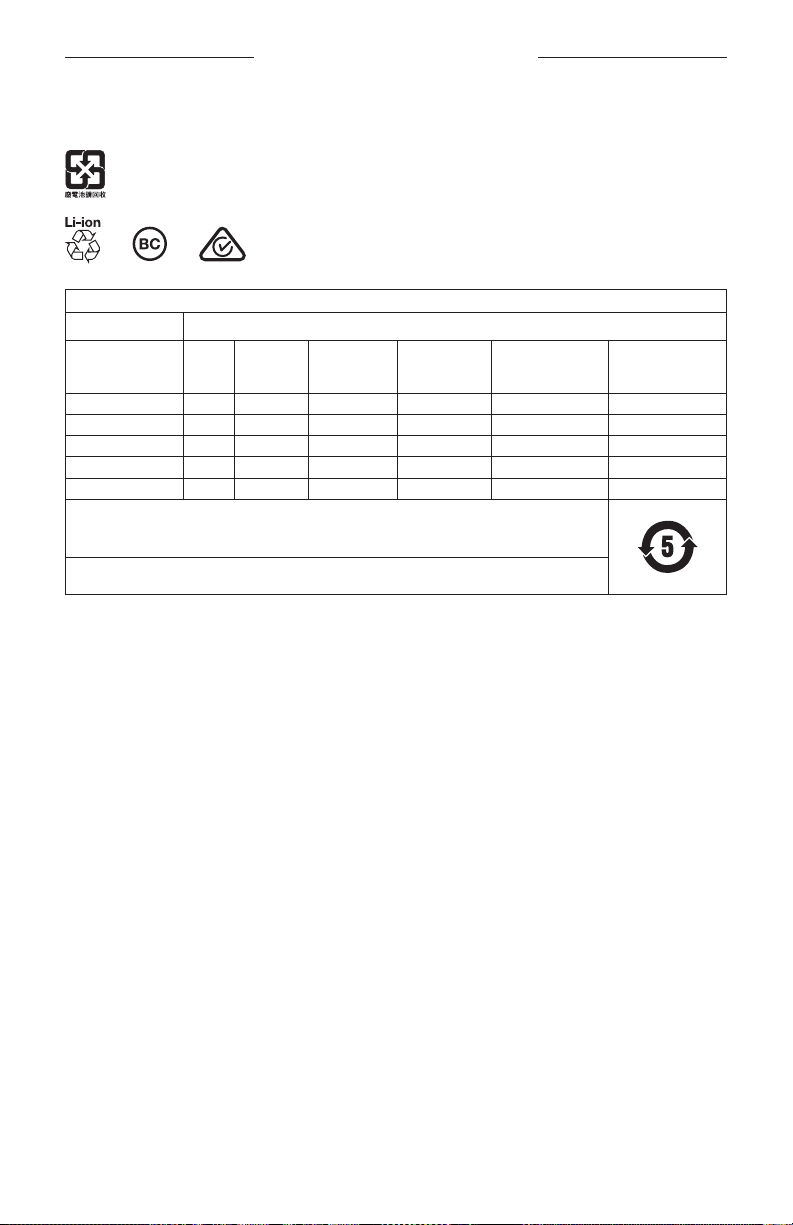
Names and Contents of Toxic or Hazardous Substances or Elements
Toxic or Hazardous Substances and Elements
Lead
Part Name
PCBs X O O O O O
Metal Parts X O O O O O
Plastic Parts O O O O O O
Speakers X O O O O O
Cables X O O O O O
This table is prepared in accordance with the provisions of SJ/T 11364.
O: Indicates that this toxic or hazardous substance contained in all of the homogeneous materials for this
part is below the limit requirement of GB/T 26572.
X: Indicates that this toxic or hazardous substance contained in at least one of the homogeneous materials
used for this part is above the limit requirement of GB/T 26572.
(Pb)
Mercury
(Hg)
Cadmium
(Cd)
Hexavalent
(CR(VI))
Polybrominated
Biphenyl
(PBB)
Polybrominated
diphenylether
(PBDE)
Date of Manufacture: The eighth digit in the serial number indicates the year of manufacture; “9” is 2009 or 2019.
China Importer: Bose Electronics (Shanghai) Company Limited, Part C, Plant 9, No. 353 North Riying Road, China
(Shanghai) Pilot Free Trade Zone
EU Importer: Bose Products B.V., Gorslaan 60, 1441 RG Purmerend, The Netherlands
Taiwan Importer: Bose Taiwan Branch, 9F-A1, No.10, Section 3, Minsheng East Road, Taipei City 104, Taiwan
Phone Number: +886-2-2514 7676
Mexico Importer: Bose de México, S. de R.L. de C.V. , Paseo de las Palmas 405-204, Lomas de Chapultepec, 11000
México, D.F. Phone Number: +5255 (5202) 3545
Charging temperature range: 32° F to 113° F (0° C to 45° C)
Discharging temperature range: -4° F to 140° F (-20° C to 60° C)
Model: 423352
CMIIT ID: XXXXXXXXXX
Place of Origin: China
5
ENG
|

LEGAL INFORMATION
Amazon, Alexa, Amazon Music, and all related logos are trademarks of Amazon, Inc. or its aliates.
Apple, the Apple logo, iPad, iPhone, and iPod are trademarks of Apple Inc., registered in the U.S. and other countries.
The trademark “iPhone” is used in Japan with a license from Aiphone K.K. App Store is a service mark of Apple Inc.
Use of the Made for Apple badge means that an accessory has been designed to connect specifically to the Apple
product(s) identified in the badge, and has been certified by the developer to meet Apple performance standards.
Apple is not responsible for the operation of this device or its compliance with safety and regulatory standards.
The Bluetooth® word mark and logos are registered trademarks owned by Bluetooth SIG, Inc. and any use of such
marks by Bose Corporation is under license.
Google, Google Maps, Google Play and other related marks and logos are trademarks of Google LLC.
Wi-Fi is a registered trademark of Wi-Fi Alliance®.
Bose, Bose Music, and Bose Noise Cancelling Headphones are trademarks of Bose Corporation.
Bose Corporation Headquarters: 1-877-230-5639
©2019 Bose Corporation. No part of this work may be reproduced, modified, distributed or otherwise used without
prior written permission.
6
ENG
|

LICENSE DISCLOSURES
Zlib license
© 2011 Petteri Aimonen <jpa at nanopb.mail.kapsi.fi>
This software is provided ‘as-is’, without any express or implied warranty. In no event will the authors be held liable
for any damages arising from the use of this software.
1. Permission is granted to anyone to use this software for any purpose, including commercial applications, and to
alter it and redistribute it freely, subject to the following restrictions:
2. The origin of this software must not be misrepresented; you must not claim that you wrote the original software.
If you use this software in a product, an acknowledgment in the product documentation would be appreciated
but is not required.
3. Altered source versions must be plainly marked as such, and must not be misrepresented as being the
original software.
4. This notice may not be removed or altered from any source distribution.
Apache License
Version 2.0, January 2004
http://www.apache.org/licenses/
TERMS AND CONDITIONS FOR USE, REPRODUCTION, AND DISTRIBUTION
1. Definitions.
“License” shall mean the terms and conditions for use, reproduction, and distribution as defined by Sections 1
through 9 of this document.
“Licensor” shall mean the copyright owner or entity authorized by the copyright owner that is granting
the License.
“Legal Entity” shall mean the union of the acting entity and all other entities that control, are controlled by, or
are under common control with that entity. For the purposes of this definition, “control” means (i) the power,
direct or indirect, to cause the direction or management of such entity, whether by contract or otherwise, or (ii)
ownership of fifty percent (50%) or more of the outstanding shares, or (iii) beneficial ownership of such entity.
“You” (or “Your”) shall mean an individual or Legal Entity exercising permissions granted by this License.
“Source” form shall mean the preferred form for making modifications, including but not limited to software
source code, documentation source, and configuration files.
“Object” form shall mean any form resulting from mechanical transformation or translation of a Source form,
including but not limited to compiled object code, generated documentation, and conversions to other
media types.
“Work” shall mean the work of authorship, whether in Source or Object form, made available under the License,
as indicated by a copyright notice that is included in or attached to the work (an example is provided in the
Appendix below).
“Derivative Works” shall mean any work, whether in Source or Object form, that is based on (or derived from)
the Work and for which the editorial revisions, annotations, elaborations, or other modifications represent, as a
whole, an original work of authorship. For the purposes of this License, Derivative Works shall not include works
that remain separable from, or merely link (or bind by name) to the interfaces of, the Work and Derivative
Works thereof.
“Contribution” shall mean any work of authorship, including the original version of the Work and any
modifications or additions to that Work or Derivative Works thereof, that is intentionally submitted to Licensor
for inclusion in the Work by the copyright owner or by an individual or Legal Entity authorized to submit on
behalf of the copyright owner. For the purposes of this definition, “submitted” means any form of electronic,
verbal, or written communication sent to the Licensor or its representatives, including but not limited to
communication on electronic mailing lists, source code control systems, and issue tracking systems that are
managed by, or on behalf of, the Licensor for the purpose of discussing and improving the Work, but excluding
communication that is conspicuously marked or otherwise designated in writing by the copyright owner as “Not
a Contribution.”
7
ENG
|

LICENSE DISCLOSURES
“Contributor” shall mean Licensor and any individual or Legal Entity on behalf of whom a Contribution has been
received by Licensor and subsequently incorporated within the Work.
2. Grant of Copyright License. Subject to the terms and conditions of this License, each Contributor hereby grants
to You a perpetual, worldwide, non-exclusive, no-charge, royalty-free, irrevocable copyright license to reproduce,
prepare Derivative Works of, publicly display, publicly perform, sublicense, and distribute the Work and such
Derivative Works in Source or Object form.
3. Grant of Patent License. Subject to the terms and conditions of this License, each Contributor hereby grants to
You a perpetual, worldwide, non-exclusive, no-charge, royalty-free, irrevocable (except as stated in this section)
patent license to make, have made, use, oer to sell, sell, import, and otherwise transfer the Work, where such
license applies only to those patent claims licensable by such Contributor that are necessarily infringed by their
Contribution(s) alone or by combination of their Contribution(s) with the Work to which such Contribution(s)
was submitted. If You institute patent litigation against any entity (including a cross-claim or counterclaim in a
lawsuit) alleging that the Work or a Contribution incorporated within the Work constitutes direct or contributory
patent infringement, then any patent licenses granted to You under this License for that Work shall terminate as
of the date such litigation is filed.
4. Redistribution. You may reproduce and distribute copies of the Work or Derivative Works thereof in any medium,
with or without modifications, and in Source or Object form, provided that You meet the following conditions:
1. You must give any other recipients of the Work or Derivative Works a copy of this License; and
2. You must cause any modified files to carry prominent notices stating that You changed the files; and
3. You must retain, in the Source form of any Derivative Works that You distribute, all copyright, patent,
trademark, and attribution notices from the Source form of the Work, excluding those notices that do not
pertain to any part of the Derivative Works; and
4. If the Work includes a “NOTICE” text file as part of its distribution, then any Derivative Works that You
distribute must include a readable copy of the attribution notices contained within such NOTICE file,
excluding those notices that do not pertain to any part of the Derivative Works, in at least one of the
following places: within a NOTICE text file distributed as part of the Derivative Works; within the Source
form or documentation, if provided along with the Derivative Works; or, within a display generated by the
Derivative Works, if and wherever such third-party notices normally appear. The contents of the NOTICE
file are for informational purposes only and do not modify the License. You may add Your own attribution
notices within Derivative Works that You distribute, alongside or as an addendum to the NOTICE text from
the Work, provided that such additional attribution notices cannot be construed as modifying the License.
You may add Your own copyright statement to Your modifications and may provide additional or dierent
license terms and conditions for use, reproduction, or distribution of Your modifications, or for any such
Derivative Works as a whole, provided Your use, reproduction, and distribution of the Work otherwise
complies with the conditions stated in this License.
5. Submission of Contributions. Unless You explicitly state otherwise, any Contribution intentionally submitted for
inclusion in the Work by You to the Licensor shall be under the terms and conditions of this License, without any
additional terms or conditions. Notwithstanding the above, nothing herein shall supersede or modify the terms
of any separate license agreement you may have executed with Licensor regarding such Contributions.
6. Trademarks. This License does not grant permission to use the trade names, trademarks, service marks, or
product names of the Licensor, except as required for reasonable and customary use in describing the origin of
the Work and reproducing the content of the NOTICE file.
8
ENG
|

LICENSE DISCLOSURES
7. Disclaimer of Warranty. Unless required by applicable law or agreed to in writing, Licensor provides the Work
(and each Contributor provides its Contributions) on an “AS IS” BASIS, WITHOUT WARRANTIES OR CONDITIONS
OF ANY KIND, either express or implied, including, without limitation, any warranties or conditions of TITLE,
NON-INFRINGEMENT, MERCHANTABILITY, or FITNESS FOR A PARTICULAR PURPOSE. You are solely responsible
for determining the appropriateness of using or redistributing the Work and assume any risks associated with
Your exercise of permissions under this License.
8. Limitation of Liability. In no event and under no legal theory, whether in tort (including negligence), contract,
or otherwise, unless required by applicable law (such as deliberate and grossly negligent acts) or agreed to in
writing, shall any Contributor be liable to You for damages, including any direct, indirect, special, incidental,
or consequential damages of any character arising as a result of this License or out of the use or inability to
use the Work (including but not limited to damages for loss of goodwill, work stoppage, computer failure or
malfunction, or any and all other commercial damages or losses), even if such Contributor has been advised of
the possibility of such damages.
9. Accepting Warranty or Additional Liability. While redistributing the Work or Derivative Works thereof, You may
choose to oer, and charge a fee for, acceptance of support, warranty, indemnity, or other liability obligations
and/or rights consistent with this License. However, in accepting such obligations, You may act only on Your own
behalf and on Your sole responsibility, not on behalf of any other Contributor, and only if You agree to indemnify,
defend, and hold each Contributor harmless for any liability incurred by, or claims asserted against, such
Contributor by reason of your accepting any such warranty or additional liability.
END OF TERMS AND CONDITIONS
©2018-2019 Bose Corporation
Licensed under the Apache License, Version 2.0 (the “License”); you may not use this file except in compliance with
the License.
You may obtain a copy of the License at:
http://www.apache.org/licenses/LICENSE-2.0
Unless required by applicable law or agreed to in writing, software distributed under the License is distributed on an
“AS IS” BASIS, WITHOUT WARRANTIES OR CONDITIONS OF ANY KIND, either express or implied.
See the License for the specific language governing permissions and limitations under the License.
9
ENG
|

CONTENTS
WHAT’S IN THE BOX
Contents …………………………………………………………………………………………………………….. 13
BOSE MUSIC APP SETUP
Download the Bose Music app ………………………………………………………………………. 14
Add the headphones to an existing account ………………………………………………. 14
HOW TO WEAR
Adjust the headphones …………………………………………………………………………………… 15
Button orientation ……………………………………………………………………………………………. 16
POWER
Power on/o ……………………………………………………………………………………………………… 17
Auto-o ……………………………………………………………………………………………………………… 17
TOUCH CONTROL
Touch surface area …………………………………………………………………………………………… 18
Media playback and volume functions …………………………………………………………. 18
Play/Pause ………………………………………………………………………………………………….. 18
Skip forward ………………………………………………………………………………………………. 19
Skip backward ……………………………………………………………………………………………. 19
Change the volume …………………………………………………………………………………… 20
Call functions …………………………………………………………………………………………………….. 21
Answer/End a call ……………………………………………………………………………………… 21
Decline an incoming call ………………………………………………………………………….. 21
Mute a call…………………………………………………………………………………………………… 22
Call notifications ……………………………………………………………………………………….. 22
Customize Shortcut …………………………………………………………………………………………. 23
10 | ENG

CONTENTS
VOICE ASSISTANT
Voice Assistant options …………………………………………………………………………………… 24
Set up your Voice Assistant ……………………………………………………………………………. 24
Access your Google Assistant ……………………………………………………………………….. 25
Use the Voice Assistant button ………………………………………………………………. 26
Access Amazon Alexa ……………………………………………………………………………………… 27
Use your voice …………………………………………………………………………………………… 28
Use the Voice Assistant button ………………………………………………………………. 29
Access mobile device voice control ……………………………………………………………… 30
NOISE CANCELLATION
Adjust noise cancelling levels ………………………………………………………………………… 31
Noise cancelling levels ……………………………………………………………………………… 31
Cycle through Favorites …………………………………………………………………………… 32
Conversation mode ………………………………………………………………………………………….. 33
Turn on conversation mode …………………………………………………………………….. 33
Turn o conversation mode ……………………………………………………………………. 33
Noise cancellation while on a call ………………………………………………………………….. 34
Use noise cancellation only…………………………………………………………………………….. 34
BATTERY
Charge the headphones ………………………………………………………………………………….. 35
Charging time…………………………………………………………………………………………….. 36
Hear the battery level ………………………………………………………………………………………. 36
HEADPHONE STATUS
Bluetooth® light …………………………………………………………………………………………………. 37
Battery light ………………………………………………………………………………………………………. 38
11 | ENG

CONTENTS
BLUETOOTH CONNECTIONS
Connect using the Bluetooth menu on your mobile device …………………….. 39
Disconnect a mobile device ……………………………………………………………………………. 40
Reconnect a mobile device …………………………………………………………………………….. 40
Connect an additional mobile device …………………………………………………………… 41
Switch between two connected mobile devices ………………………………………… 41
Clear the headphone device list…………………………………………………………………….. 41
WIRED CONNECTIONS
Connect the audio cable …………………………………………………………………………………. 42
CARE AND MAINTENANCE
Store the headphones ……………………………………………………………………………………… 43
Clean the headphones …………………………………………………………………………………….. 45
Replacement parts and accessories ……………………………………………………………… 45
Limited warranty ………………………………………………………………………………………………. 45
Serial number locations …………………………………………………………………………………… 46
TROUBLESHOOTING
Try these solutions first …………………………………………………………………………………… 47
Other solutions …………………………………………………………………………………………………. 47
Reboot the headphones………………………………………………………………………………….. 51
12 | ENG
WHAT’S IN THE BOX
CONTENTS
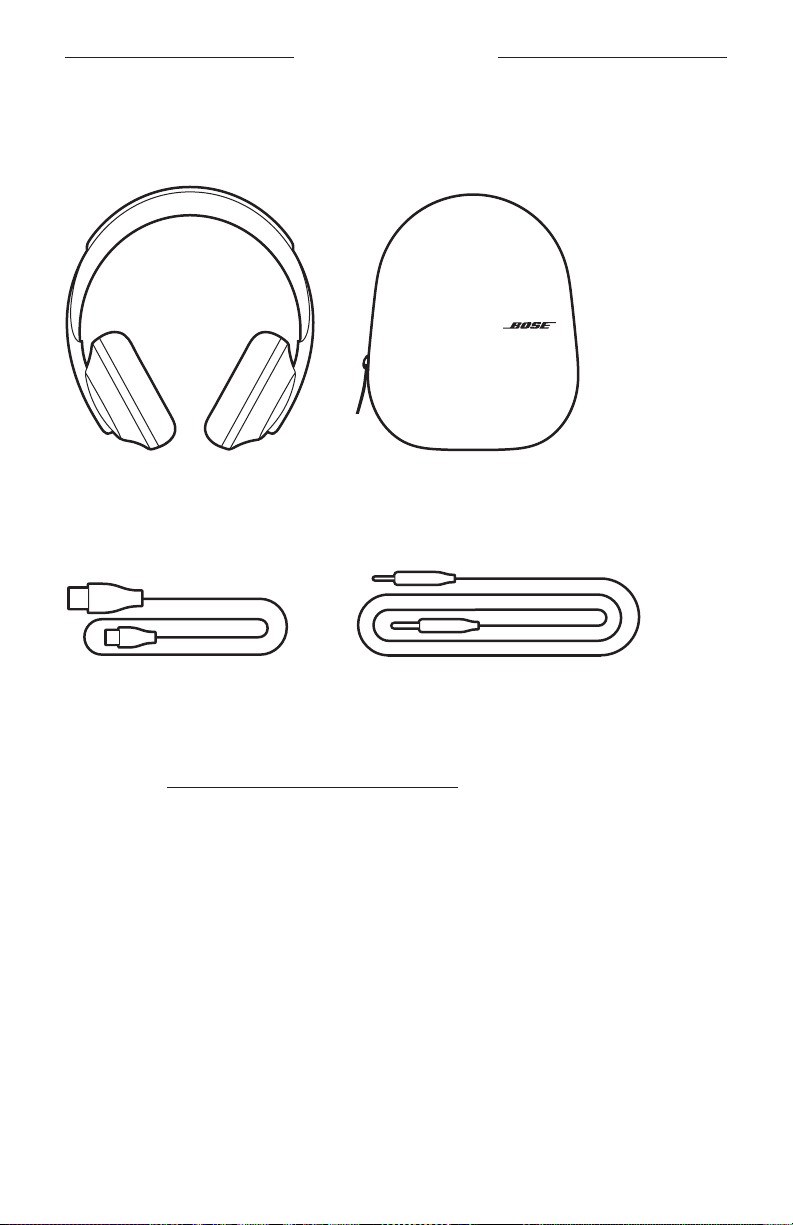
Confirm that the following parts are included:
Bose Noise Cancelling Headphones 700 Carry case
USB-C to USB-A Audio cable
NOTE: If any part of the product is damaged, do not use it. Contact your authorized
Bose dealer or Bose customer service.
Visit: worldwide.Bose.com/Support/HP700
13 | ENG
BOSE MUSIC APP SETUP
The Bose Music app lets you set up and control the headphones from any mobile
device such as a smartphone or tablet. Using the app, you can configure your Google
Assistant or Amazon Alexa, choose your voice prompt language, adjust noise
cancelling levels, and manage headphone settings.
NOTE: If you have already created a Bose account in the app for another Bose
product, see “Add the headphones to an existing account.”
DOWNLOAD THE BOSE MUSIC APP
1. On your mobile device, download the Bose Music app.
2. Follow the app instructions.
ADD THE HEADPHONES TO AN EXISTING ACCOUNT
1. In the Bose Music app, from the My Bose screen, tap H.
NOTE: To return to the My Bose screen, tap Z in the top-left corner of the screen.
2. Follow the app instructions.
14 | ENG
HOW TO WEAR
ADJUST THE HEADPHONES
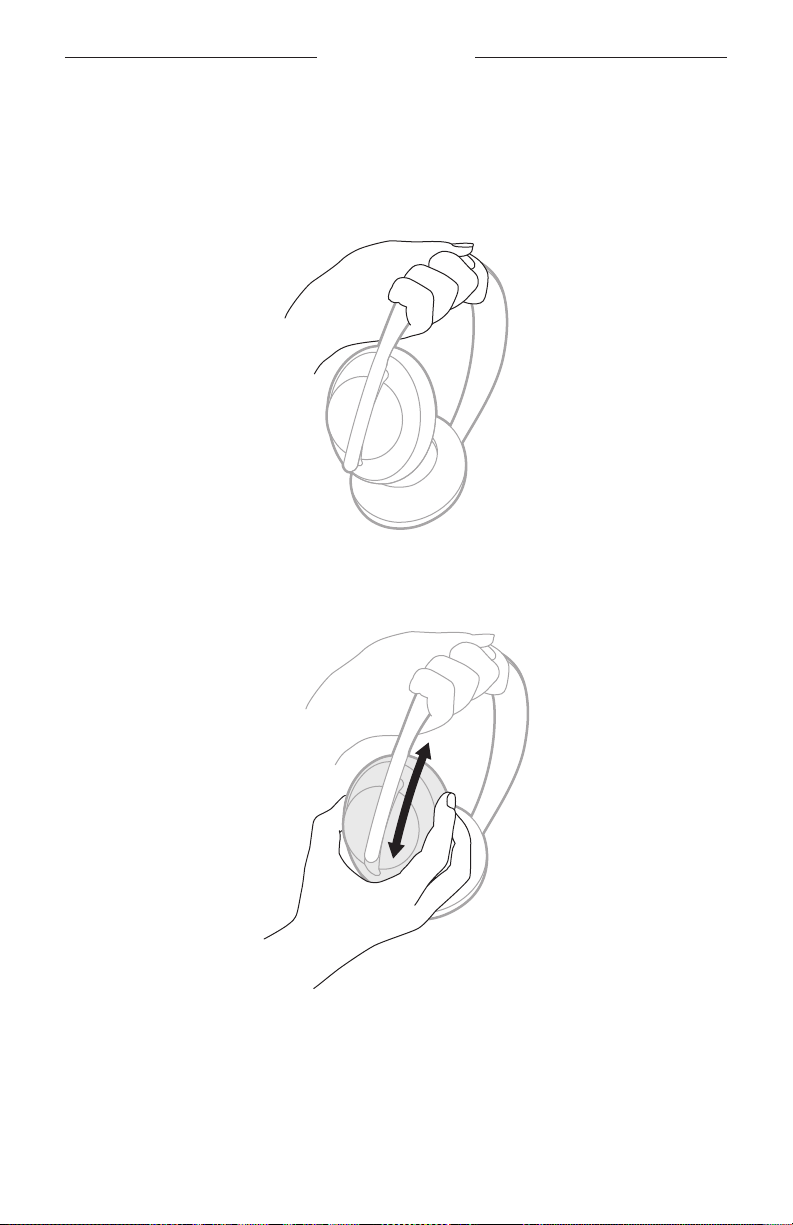
Before placing the headphones on your head, adjust the position of the earcups on
the headband to ensure proper fit.
1. With the outer earcup facing toward you, firmly grip the side of the headband.
2. With your other hand, grip the earcup. Move the earcup up or down to adjust
the position.
3. Repeat steps 1-3 for the other earcup.
15 | ENG
HOW TO WEAR
BUTTON ORIENTATION
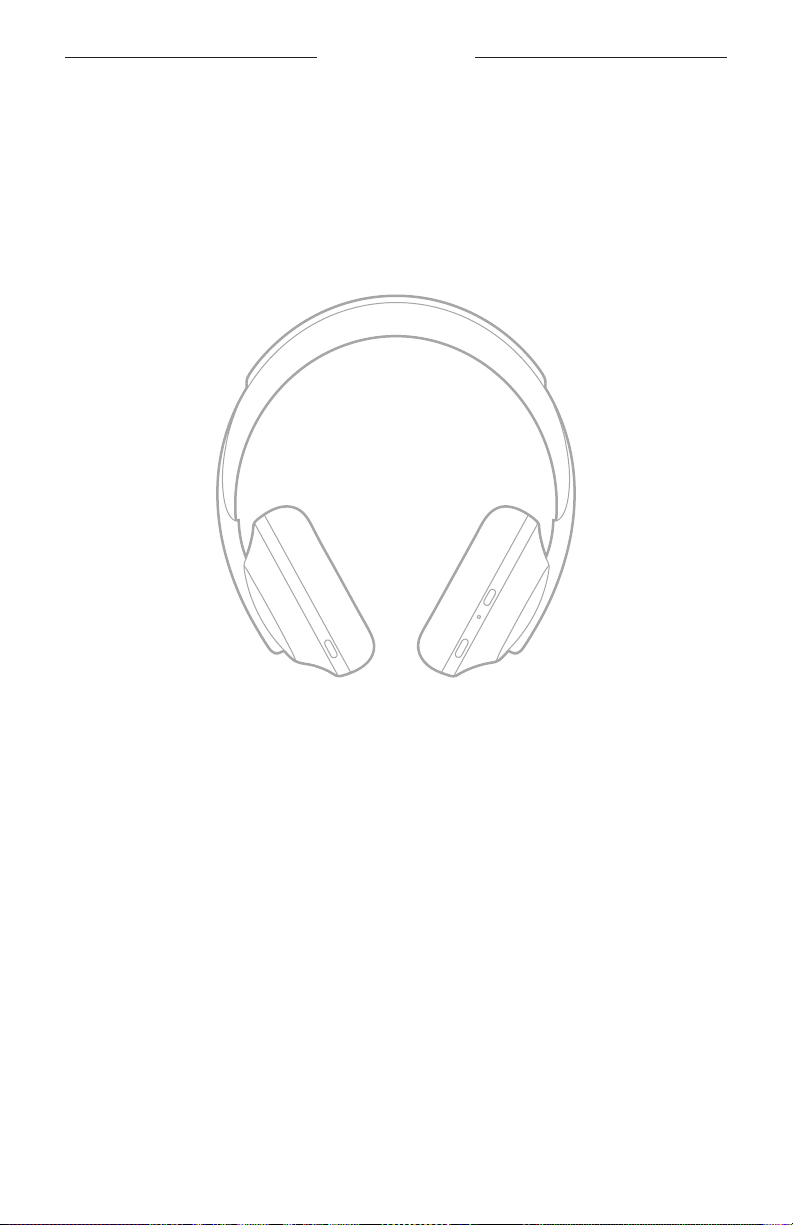
The inner scrims (cloth covers) of the headphone earcups are marked with an L (left
earcup) and R (right earcup). There are two buttons on the right earcup and one on
the left earcup.
Match the right earcup with your right ear and the left earcup with your left ear.
Place the headphones on your head with the buttons facing behind you. Once the
headphones are on your head, use your thumbs to press the buttons.
16 | ENG
Loading…
CERTIFIED REFURBISHED SALE: Save up to 40% on select products. SHOP
Product guides and manuals
Owner’s guide—Headphones 700:
Quick-start guide—Headphones 700:
Owner’s guide—Headphones 700 with Charging Case:
Quick-start guide—Headphones 700 with Charging Case:
Download and install Bose app
- Free app compatible with most Apple and Android™ systems
- Guided product setup
- Easily control your product and adjust settings
- Add music services and a voice assistant
- Browse and play content and save presets
- Group playback with multiple Bose smart products
NOISE CANCELLING HEADPHONES 700
START HERE
Download the Bose Music app to: Manage Bluetooth connections.
Add a voice assistant.
Get new features.
BOSE MUSIC
Please read and keep all safety, security, and use instructions.
a
Press and release the Power/Bluetooth button so the app can find your headphones.
b
Lea y conserve todas las instrucciones de uso, proteccin y seguridad. Lue ja silyt kaikki turvallisuus- ja kyttohjeet. Lisez et conservez porte de main toutes les consignes de scurit et le mode demploi.
a Descargue la aplicacin Bose Music para: Controlar las conexiones Bluetooth. Agregar un asistente de voz. Acceder a nuevas funciones.
b Presione y suelte el botn de Encendido/Bluetooth para que la aplicacin pueda encontrar los auriculares.
a Lataa Bose Music -sovellus, jotta voit Bluetooth-yhteyksien hallintaan niavustajan lismiseksi Uusien ominaisuuksien saaminen
b Paina virta-/Bluetooth-painiketta ja vapauta se, jotta sovellus voi lyt kuulokkeet.
a Tlchargez lapplication Bose Music pour : grer les connexions Bluetooth ; ajouter un assistant vocal ; obtenir de nouvelles fonctionnalits.
b Appuyez sur la touche Alimentation/Bluetooth puis relchez-la afin que lapplication dtecte votre casque
Ls og opbevar alle sikkerheds- og brugsinstruktioner. Bitte lesen Sie alle Sicherheitshinweise und Gebrauchsanleitungen durch und bewahren Sie sie auf. Lees alle veiligheids- en beveiligingsinstructies en de gebruiksaanwijzing door en bewaar deze.
a Download Bose Music-appen for at: Hndtere Bluetooth-forbindelser. Tilfje en stemmeassistent. F nye funktioner.
b Tryk p og slip Tnd/sluk-/Bluetooth-knappen, s appen kan finde dine hovedtelefoner.
a Laden Sie die Bose Music App herunter, um: Bluetooth-Verbindungen zu verwalten. Einen Sprachassistenten hinzuzufgen. Neue Funktionen zu erhalten.
b Drcken Sie kurz die Power/Bluetooth-Taste, damit die App Ihre Kopfhrer finden kann.
a Download de Bose Music-app om: Bluetooth-verbindingen te beheren. Een spraakassistent toe te voegen. Nieuwe functies te krijgen.
b Druk kort op de aan-uit-/Bluetooth-knop, zodat de app uw hoofdtelefoon kan vinden.
Lea y conserve todas las instrucciones de uso, proteccin y seguridad. Lue ja silyt kaikki turvallisuus- ja kyttohjeet. Lisez et conservez porte de main toutes les consignes de scurit et le mode demploi.
a Descargue la aplicacin Bose Music para: Controlar las conexiones Bluetooth. Agregar un asistente de voz. Acceder a nuevas funciones.
b Presione y suelte el botn de Encendido/Bluetooth para que la aplicacin pueda encontrar los auriculares.
a Lataa Bose Music -sovellus, jotta voit Bluetooth-yhteyksien hallintaan niavustajan lismiseksi Uusien ominaisuuksien saaminen
b Paina virta-/Bluetooth-painiketta ja vapauta se, jotta sovellus voi lyt kuulokkeet.
a Tlchargez lapplication Bose Music pour : grer les connexions Bluetooth ; ajouter un assistant vocal ; obtenir de nouvelles fonctionnalits.
b Appuyez sur la touche Alimentation/Bluetooth puis relchez-la afin que lapplication dtecte votre casque
Naley przeczyta i zachowa wszystkie zalecenia dotyczce bezpieczestwa, zabezpiecze i korzystania z tego produktu. Ls igenom och spara alla anvisningar om skerhet och anvndning.
a Pobierz aplikacj Bose Music, aby korzysta z nastpujcych funkcji: Zarzdzanie poczeniami Bluetooth Dodawanie asystenta gosowego Dostp do nowych funkcji
b Nacinij i zwolnij przycisk Zasilanie/Bluetooth, aby umoliwi aplikacji znalezienie suchawek.
a Ladda ned Bose Music-appen fr att: hantera Bluetooth-anslutningar. lgga till en rstassistent. f nya funktioner.
b Tryck och slpp Power/Bluetooth-knappen s att appen kan hitta dina hrlurar.
a Bose Music : Bluetooth
b-/Bluetooth
Leggere e conservare tutte le istruzioni per la sicurezza, la tutela delle persone e luso del prodotto. Krjk, olvassa el, s tartsa be a biztonsgi s hasznlati utastsokat. Les og ta vare p alle sikkerhets- og bruksinstruksjoner.
a Scaricare lapp Bose Music per: Gestire le connessioni Bluetooth. Aggiungere un assistente vocale. Scaricare nuove funzioni.
b Premere e rilasciare il pulsante di accensione/Bluetooth per consentire allapp di individuare le cuffie.
a Tltse le a Bose Music alkalmazst a kvetkez feladatok elvgzshez: Bluetooth-kapcsolatok kezelse. Hangsegd hozzadsa. j funkcik beszerzse.
b Nyomja le s tartsa lenyomva a Fkapcsol/Bluetooth gombot, hogy az alkalmazs meg tudja tallni a fejhallgatjt.
a Last ned Bose Music-appen for administrere Bluetooth-tilkoblinger legge til en taleassistent f tilgang til nye funksjoner.
b Trykk og slipp av/p-/Bluetooth-knappen, slik at appen kan finne hodetelefonene dine.
Naley przeczyta i zachowa wszystkie zalecenia dotyczce bezpieczestwa, zabezpiecze i korzystania z tego produktu. Ls igenom och spara alla anvisningar om skerhet och anvndning.
a Pobierz aplikacj Bose Music, aby korzysta z nastpujcych funkcji: Zarzdzanie poczeniami Bluetooth Dodawanie asystenta gosowego Dostp do nowych funkcji
b Nacinij i zwolnij przycisk Zasilanie/Bluetooth, aby umoliwi aplikacji znalezienie suchawek.
a Ladda ned Bose Music-appen fr att: hantera Bluetooth-anslutningar. lgga till en rstassistent. f nya funktioner.
b Tryck och slpp Power/Bluetooth-knappen s att appen kan hitta dina hrlurar.
a Bose Music : Bluetooth
b-/Bluetooth
Leggere e conservare tutte le istruzioni per la sicurezza, la tutela delle persone e luso del prodotto. Krjk, olvassa el, s tartsa be a biztonsgi s hasznlati utastsokat. Les og ta vare p alle sikkerhets- og bruksinstruksjoner.
a Scaricare lapp Bose Music per: Gestire le connessioni Bluetooth. Aggiungere un assistente vocale. Scaricare nuove funzioni.
b Premere e rilasciare il pulsante di accensione/Bluetooth per consentire allapp di individuare le cuffie.
a Tltse le a Bose Music alkalmazst a kvetkez feladatok elvgzshez: Bluetooth-kapcsolatok kezelse. Hangsegd hozzadsa. j funkcik beszerzse.
b Nyomja le s tartsa lenyomva a Fkapcsol/Bluetooth gombot, hogy az alkalmazs meg tudja tallni a fejhallgatjt.
a Last ned Bose Music-appen for administrere Bluetooth-tilkoblinger legge til en taleassistent f tilgang til nye funksjoner.
b Trykk og slipp av/p-/Bluetooth-knappen, slik at appen kan finne hodetelefonene dine.
, .
a Bose Music : Bluetooth . . .
b /Bluetooth .
a Bose Music Bluetooth
Bose
b /Bluetooth
a Bose Music Bluetooth
b /Bluetooth
.
a Bose Music Bluetooth
b /Bluetooth1
: Bose Music a .Bluetooth
. .
. Bluetooth/ b
, .
a Bose Music : Bluetooth . . .
b /Bluetooth .
a Bose Music Bluetooth
Bose
b /Bluetooth
a Bose Music Bluetooth
b /Bluetooth
.
a Bose Music Bluetooth
b /Bluetooth1
: Bose Music a .Bluetooth
. .
. Bluetooth/ b
ENG L I S H
Please read and keep all safety and use instructions. Refer to the owners guide for more information about your Bose Noise Cancelling Headphones 700 (including accessories and replacement parts) at worldwide.Bose.com/Support/HP700 or contact Bose customer service for a printed copy.
Bose Corporation hereby declares that this product is in compliance with the essential requirements and other relevant provisions of Directive 2014/53/EU and all other applicable EU
directive requirements. The complete declaration of conformity can be found at: www.Bose.com/compliance
This product conforms to all applicable Electromagnetic Compatibility Regulations 2016 and all other applicable UK regulations. The complete declaration of conformity can be found at: www.Bose.com/compliance
Bose Corporation hereby declares that this product is in compliance with the essential requirements per Radio Equipment Regulations 2017 and all other applicable UK regulations. The complete declaration of conformity can be found at: www.Bose.com/compliance
Important Safety Instructions 1. Read these instructions. 2. Keep these instructions. 3. Heed all warnings. 4. Follow all instructions. 5. Do not use this apparatus near water. 6. Clean only with a dry cloth. 7. Only use attachments/accessories specified by the manufacturer. 8. Refer all servicing to qualified personnel. Servicing is required when the
apparatus has been damaged in any way, such as power-supply cord or plug is damaged, liquid has been spilled or objects have fallen into the apparatus, the apparatus has been exposed to rain or moisture, does not operate normally, or has been dropped.
WARNINGS/CAUTIONS Do NOT use the headphones at a high volume for any extended period.
To avoid hearing damage, use your headphones at a comfortable, moderate volume level.
Turn the volume down on your device before placing the headphones in/on your ears, then turn the volume up gradually until you reach a comfortable listening level.
Do NOT use your headphones while driving for phone calls or any other purpose.
Do NOT use the headphones with noise canceling on at any time the inability to hear surrounding sounds may present a danger to yourself or others, e.g., while riding a bicycle or walking in or near traffic, a construction site or railroad, etc., and follow applicable laws regarding headphone use.
Remove the headphones, or use the headphones with noise canceling off and adjust your volume, to ensure you can hear surrounding sounds, including alarms and warning signals.
Be aware of how sounds that you rely on as reminders or warnings may vary in character when using the headphones.
Do NOT use the headphones if they emit any loud unusual noise. If this happens, turn the headphones off and contact Bose customer service.
Remove headphones immediately if you experience a warming sensation or loss of audio.
Do NOT use mobile phone adapters to connect headphones to airplane seat jacks, as this could result in injury or property damage due to overheating.
Do NOT use the headphones as aviation communication headsets.
Contains small parts which may be a choking hazard. Not suitable for children under age 3.
This product contains magnetic material. Consult your physician on whether this might affect your implantable medical device.
To reduce the risk of fire or electrical shock, do NOT expose this product to rain, liquids or moisture.
Do NOT expose this product to dripping or splashing, and do not place objects filled with liquids, such as vases, on or near the product.
Do NOT make unauthorized alterations to this product. Use this product only with an agency-approved power supply which meets
local regulatory requirements (e.g., UL, CSA, VDE, CCC). Do not expose products containing batteries to excessive heat
(e.g., from storage in direct sunlight, fire or the like). Do NOT wear the headphones while charging. The headphones do not play audio while charging. Regulatory and Legal Information NOTE:This equipment has been tested and found to comply with the limits for a Class B digital device, pursuant to Part 15 of the FCC Rules. These limits are designed to provide reasonable protection against harmful interference in a residential installation. This equipment generates, uses, and can radiate radio frequency energy and, if not installed and used in accordance with the instructions, may cause harmful interference to radio communications. However, there is no guarantee that interference will not occur in a particular installation. If this equipment does cause harmful interference to radio or television reception, which can be determined by turning the equipment off and on, the user is encouraged to try to correct the interference by one or more of the following measures: Reorient or relocate the receiving antenna. Increase the separation between the equipment and receiver. Connect the equipment into an outlet on a circuit different from that to
which the receiver is connected. Consult the dealer or an experienced radio/TV technician for help.
Changes or modifications not expressly approved by Bose Corporation could void the users authority to operate this equipment. This device complies with part 15 of the FCC Rules and with ISED Canada license-exempt RSS standard(s). Operation is subject to the following two conditions: (1) This device may not cause harmful interference, and (2) this device must accept any interference received, including interference that may cause undesired operation. This device complies with FCC and ISED Canada radiation exposure limits set forth for general population. This transmitter must not be co-located or operating in conjunction with any other antenna or transmitter. CAN ICES-3(B)/NMB-3(B) For Europe: Frequency bands of operation 2400 to 2483.5 MHz, 5150 to 5350 MHz, and 5470 to 5725 MHz. Maximum transmit power less than 20 dBm EIRP. Maximum transmit power is below regulatory limits such that SAR testing is not necessary and exempt per applicable regulations.
This symbol means the product must not be discarded as household waste, and should be delivered to an appropriate collection facility for recycling. Proper disposal and recycling helps protect natural resources, human health and the environment. For more information on disposal and recycling of this product, contact
your local municipality, disposal service, or the shop where you bought this product. Management Regulation for Low-power Radio-frequency Devices Article XII According to Management Regulation for Low-power Radio- frequency Devices without permission granted by the NCC, any company, enterprise, or user is not allowed to change frequency, enhance transmitting power or alter original characteristic as well as performance to an approved low power radio-frequency devices. Article XIV The low power radio-frequency devices shall not influence aircraft security and interfere legal communications; If found, the user shall cease operating immediately until no interference is achieved. The said legal communications means radio communications operated in compliance with the Telecommunications Act. DONT attempt to remove the rechargeable lithium-ion battery from this product. Contact your local Bose retailer or other qualified professional for removal.
Please dispose of used batteries properly, following local regulations. Do not incinerate.
Date of Manufacture:The eighth digit in the serial number indicates the year of manufacture; 1 is 2011 or 2021.
China Importer: Bose Electronics (Shanghai) Company Limited, Part C, Plant 9, No. 353 North Riying Road, China (Shanghai) Pilot Free Trade Zone EU Importer: Bose Products B.V., Gorslaan 60, 1441 RG Purmerend, The Netherlands Taiwan Importer: Bose Taiwan Branch, 9F-A1, No. 10, Section 3, Minsheng East Road, Taipei City 104, Taiwan Phone Number: +886-2-2514 7676 Mexico Importer: Bose de Mxico, S. de R.L. de C.V., Paseo de las Palmas 405-204, Lomas de Chapultepec, 11000 Mxico, D.F. Phone Number: +5255 (5202) 3545 UK Importer: Bose Limited, Bose House, Quayside Chatham Maritime, Chatham, Kent, ME4 4QZ, United Kingdom Charging temperature range: 32 F to 113 F (0 C to 45 C) Discharging temperature range: -4 F to 140 F (-20 C to 60 C) Security Information
This product is capable of receiving security updates from Bose automatically when connected to the Bose Music app. In order to receive security updates via the mobile application, you must complete the product setup process in the Bose Music app. If you do not complete the setup process, you will be responsible for installing security updates that Bose makes available via btu.bose.com
The Bose Privacy Policy is available at worldwide.bose.com/privacypolicy Amazon, Alexa, Amazon Music, and all related logos are trademarks of Amazon.com, Inc. or its affiliates. Apple, the Apple logo, iPad, iPhone, and iPod are trademarks of Apple Inc., registered in the U.S. and other countries. The trademark iPhone is used in Japan with a license from Aiphone K.K. App Store is a service mark of Apple Inc. Use of the Made for Apple badge means that an accessory has been designed to connect specifically to the Apple product(s) identified in the badge, and has been certified by the developer to meet Apple performance standards. Apple is not responsible for the operation of this device or its compliance with safety and regulatory standards. The Bluetooth word mark and logos are registered trademarks owned by Bluetooth SIG, Inc. and any use of such marks by Bose Corporation is under license. USB Type-C and USB-C are registered trademarks of USB Implementers Forum. Google and Google Play are trademarks of Google LLC. Bose, Bose Music, the Bose Music logo, and Bose Noise Cancelling Headphones are trademarks of Bose Corporation. Bose Corporation Headquarters: 1-877-230-5639 2021 Bose Corporation. No part of this work may be reproduced, modified, distributed or otherwise used without prior written permission.
Warranty Information This product is covered by a limited warranty from Bose. For warranty details, visit global.Bose.com/warranty
DANSK
Ls og opbevar venligst alle sikkerheds- og brugsinstruktioner. Du kan finde flere oplysninger om dine Bose Noise Cancelling Headphones 700 (inklusive tilbehr og reservedele) p worldwide.Bose.com/Support/HP700, eller du kan kontakte Boses kundeservice for at f et trykt eksemplar.
Bose Corporation erklrer hermed, at dette produkt stemmer overens med de vsentlige krav og andre relevante bestemmelser i direktiv 2014/53/EU og alle andre krav i EU-direktiver. Den fulde overensstemmelseserklring kan findes p: www.Bose.com/compliance
Dette produkt efterlever alle relevante regler for elektromagnetisk kompatibilitet pr. 2016 og alle andre relevante UK-regler. Den fulde overensstemmelseserklring kan findes p: www.Bose.com/compliance
Bose Corporation erklrer hermed, at dette produkt stemmer overens med de vsentlige krav i henhold til reglerne for radioudstyr pr. 2017 og alle andre relevante UK-regler. Den fulde overensstemmelseserklring kan findes p: www.Bose.com/compliance
Vigtige sikkerhedsinstruktioner 1. Ls disse instruktioner. 2. Gem disse instruktioner. 3. Ret dig efter alle advarsler. 4. Flg alle instruktioner. 5. Anvend ikke dette apparat i nrheden af vand. 6. Rengr kun med en tr klud. 7. Brug kun tilslutningsudstyr/tilbehr, der er angivet af producenten. 8. Overlad al service til kvalificeret servicepersonale. Et serviceeftersyn
er pkrvet, nr apparatet p nogen mde er beskadiget, hvis f.eks. netledningen eller stikket er beskadiget, der er blevet spildt vske, eller der er kommet objekter ind i apparatet, hvis apparatet er blevet udsat for regn eller fugt, ikke virker normalt eller er blevet tabt.
ADVARSLER/FORSIGTIGHEDSFORHOLDSREGLER Brug IKKE hovedtelefonerne ved hj lydstyrke igennem lngere tid.
For at undg hreskader skal du bruge hovedtelefonerne med et behageligt, moderat lydstyrkeniveau.
Skru ned for lyden p din enhed, inden du placerer hovedtelefonerne i/p dine rer, skru derefter gradvist op for lyden, indtil du nr et behageligt lytteniveau.
Brug IKKE dine hovedtelefoner, mens du krer bil til telefonopkald eller et andet forml.
Brug IKKE hovedtelefonerne med funktionen til stjreduktion slet til, da den manglende evne til at hre omgivende lyde kan udgre en fare for dig selv eller andre, f.eks. nr du krer p cykel eller bevger dig i nrheden af trafik, en byggeplads eller jernbanen osv., og flg gldende lovgivning vedrrende brug af hovedtelefoner.
Fjern hovedtelefonerne, eller brug hovedtelefonerne med funktionen til stjreduktion slet fra, og tilpas din lydstyrke, s du sikrer, at du hrer omkringliggende lyde, inklusive alarmer og advarselssignaler.
Vr opmrksom p, at lyde, som du stoler p som pmindelser eller advarsler, kan variere i karakter, nr du bruger hovedtelefoner.
Brug IKKE hovedtelefonerne, hvis de udsender hj, unormal stj. Hvis det sker, skal du slukke hovedtelefonerne og kontakte Boses kundeservice.
Fjern hovedtelefonerne med det samme, hvis du fler varme, eller hvis lyden forsvinder.
Brug IKKE mobiltelefonadaptere til at tilslutte hovedtelefoner til flysdestik, da dette kan medfre personskader eller tingsskader som flge af overophedning.
Brug IKKE hovedtelefonerne til luftfartskommunikation.
Indeholder sm dele, som kan udgre en kvlningsfare. Egner sig ikke til brn under 3 r.
Dette produkt indeholder magnetisk materiale. Kontakt din lge for at finde ud af, om dette kan pvirke din implanterbare medicinske enheds funktion.
Systemet m IKKE udsttes for regn eller fugt af hensyn til risikoen for brand eller elektrisk std.
Udst IKKE dette produkt for dryp eller stnk, og placer ikke genstande, der er fyldt med vske, p eller nr ved produktet.
Foretag IKKE nogen uautoriserede ndringer af produktet. Produktet m kun bruges med en godkendt strmforsyning, der overholder de
lokale love og regler (f.eks. UL, CSA, VDE, CCC). Udst ikke produkter, der indeholder batterier, for voldsom varme (f.eks.
ved opbevaring i direkte sollys, brand eller lignende). Brug IKKE hovedtelefonerne under opladning. Hovedtelefonerne afspiller ikke lyd under opladning. Oplysninger om regler og love BEMRK:Dette udstyr er testet og det er blevet konstateret, at det overholder grnsevrdierne for en digital enhed i Klasse B i henhold til afsnit 15 i FCC-reglerne. Disse grnser er udviklet til at yde rimelig beskyttelse mod skadelig interferens i en privat installation. Dette udstyr genererer, bruger og kan udstrle radiofrekvensenergi, og kan hvis det ikke installeres og bruges i overensstemmelse med instruktionerne forrsage skadelig interferens i forbindelse med radiokommunikation. Dette garanterer dog ikke, at der ikke kan forekomme interferens i en bestemt installation. Hvis dette udstyr forrsager skadelig interferens i forbindelse med radio- og tv-modtagelsen, hvilket kan kontrolleres ved at slukke og tnde for udstyret, opfordres brugere til at forsge at eliminere interferensen ved hjlp af en eller flere af flgende fremgangsmder: Ret modtageantennen i en anden retning, eller flyt antennen. Skab strre afstand mellem udstyret og modtageren. Tilslut udstyret til en stikkontakt p et andet kredslb end det, som modtageren
er tilsluttet. Kontakt forhandleren eller en radio/tv-tekniker for at f hjlp.
ndringer eller modifikationer, der ikke udtrykkeligt er godkendt af Bose Corporation, kan ophve brugerens ret til at betjene dette udstyr. Denne enhed overholder del 15 i FCC-reglerne og ISED Canadas licensfritagede RSS-standard(er). Driften er underlagt flgende to betingelser: (1) Denne enhed m ikke forrsage skadelig interferens, og (2) denne enhed skal acceptere enhver modtaget interferens, herunder interferens, der kan forrsage unsket drift. Denne enhed overholder FCCs og ISED Canadas strlingseksponeringsgrnser for befolkningen i almindelighed. Denne sender m ikke placeres eller anvendes sammen med nogen andre antenner eller sendere. CAN ICES-3(B)/NMB-3(B) Europa: Frekvensbndets driftsomrde er 2400 til 2483,5 MHz, 5150 til 5350 MHz og 5470 til 5725 MHz. Maksimal sendeeffekt mindre end 20 dBm EIRP. Den maksimale sendeeffekt er under de grnser, reglerne faststter. SAR-test er derfor ikke ndvendigt og er undtaget i henhold til de gldende regler.
Dette symbol betyder, at produktet ikke m smides ud som husholdningsaffald og br indleveres til en passende indsamlingsordning med henblik p genanvendelse. Korrekt bortskaffelse og genanvendelse bidrager til at beskyttelse naturressourcer, menneskets sundhed og miljet. Hvis du nsker flere oplysninger om bortskaffelse og genanvendelse af dette produkt, kan du kontakte din kommune, dit renovationsselskab eller den butik, hvor du har kbt dette produkt.
Management Regulation for Low-power Radio-frequency Devices Artikel XII I henhold til Management Regulation for Low-power Radio-frequency Devices m ingen virksomhed, organisation eller bruger uden tilladelse fra NCC ndre frekvensen, ge transmissionseffekten eller ndre de oprindelige egenskaber eller ydeevnen for godkendte laveffektradiofrekvensenheder. Artikel XIV Laveffektradiofrekvensenhederne m ikke pvirke flysikkerheden eller forstyrre lovlig kommunikation; hvis dette konstateres, skal brugeren jeblikkeligt ophre med at bruge enheden, indtil der opns en tilstand uden forstyrrelser. Den omtalte lovlige kommunikation vil sige radiokommunikation, der anvendes i overensstemmelse med telekommunikationsloven. UNDLAD forsg p at fjerne det genopladelige litium-ion batteri fra dette produkt. Kontakt din lokale Bose-forhandler eller en anden kvalificeret tekniker vedrrende fjernelse.
Bortskaf brugte batterier i henhold til lokale bestemmelser. Batterier m ikke brndes.
Fremstillingsdato:Det ottende ciffer i serienummeret angiver fremstillingsret: 1 er 2011 eller 2021.
Importr i Kina: Bose Electronics (Shanghai) Company Limited, Part C, Plant 9, No. 353 North Riying Road, Kina (Shanghai) Pilot Free Trade Zone Importr i EU: Bose Products B.V., Gorslaan 60, 1441 RG Purmerend, Holland Importr i Taiwan: Bose Taiwan Branch, 9F-A1, No. 10, Section 3, Minsheng East Road, Taipei City 104, Taiwan Telefonnummer: +886-2-2514 7676 Importr i Mexico: Bose de Mxico, S. de R.L. de C.V., Paseo de las Palmas 405-204, Lomas de Chapultepec, 11000 Mxico, D.F. Telefonnummer: +5255 (5202) 3545 Importr i UK: Bose Limited, Bose House, Quayside Chatham Maritime, Chatham, Kent, ME4 4QZ, Storbritannien Temperaturomrde for opladning: 0 C til 45 C Temperaturomrde for afladning: -20 C til 60 C Sikkerhedsoplysninger
Dette produkt er i stand til at modtage sikkerhedsopdateringer fra Bose automatisk, nr det er tilsluttet Bose Music-appen. For at kunne modtage sikkerhedsopdateringer via mobilappen skal du gennemfre produktopstningsprocessen i Bose Music-appen. Hvis du ikke gennemfrer opstningsprocessen, har du ansvaret for at installere sikkerhedsopdateringer, som Bose stiller til rdighed via btu.bose.com
Boses fortrolighedspolitik er tilgngelig p worldwide.bose.com/privacypolicy Amazon, Alexa, Amazon Music og alle tilknyttede logoer er varemrker tilhrende Amazon.com, Inc. eller dets associerede selskaber. Apple, Apple-logoet, iPad, iPhone og iPod er varemrker, der tilhrer Apple Inc., og er registreret i USA og andre lande. Varemrket iPhone bruges i Japan med en licens fra Aiphone K.K. App Store er et servicemrke, der tilhrer Apple Inc. Anvendelse af mrket Made for Apple betyder, at et tilbehr er designet til at tilsluttes specifikt til de de(t) Apple-produkt(er), som identificeres i mrket, og at det er certificeret af udvikleren til at leve op til Apples ydelsesstandarder. Apple er ikke ansvarlig for denne enheds virkemde eller for dens overensstemmelse med sikkerhedsstandarder og regler. Bluetooth-ordmrket og -logoerne er registrerede varemrker, der ejes af Bluetooth SIG, Inc., og enhver brug af sdanne mrker fra Bose Corporations side finder sted under licens. USB Type-C og USB-C er registrerede varemrker, der tilhrer USB Implementers Forum. Google og Google Play er varemrker, der tilhrer Google LLC. Bose, Bose Music, Bose Music-logoet og Bose Noise Cancelling Headphones er varemrker, der tilhrer Bose Corporation. Bose Corporations hovedkvarter: 1-877-230-5639 2021 Bose Corporation. Gengivelse, ndring, distribution eller anden brug af denne dokumentation eller dele heraf er forbudt uden forudgende skriftlig tilladelse.
Garantioplysninger Produktet er omfattet af en begrnset garanti fra Bose. G til global.Bose.com/warranty for at f flere oplysninger om garantien.
DEU T S CH
Bitte lesen Sie alle Sicherheitshinweise und Gebrauchsanleitungen durch und bewahren Sie sie auf. In der Bedienungsanleitung unter worldwide.Bose.com/Support/HP700 finden Sie weitere Informationen ber Ihre Bose Noise Cancelling Headphones 700 (zum Beispiel Zubehr und Ersatzteile), oder wenden Sie sich an den Bose-Kundendienst, um ein gedrucktes Exemplar zu erhalten.
Die Bose Corporation erklrt hiermit, dass dieses Produkt die wesentlichen Anforderungen und andere relevante Bestimmungen der Richtlinie 2014/53/EU und weitere geltende EU-Richtlinien erfllt. Die vollstndige Konformittserklrung ist einsehbar unter www.Bose.com/compliance
Dieses Produkt erfllt alle geltenden Vorschriften zur elektromagnetischen Vertrglichkeit 2016 und alle anderen zutreffenden UK-Richtlinien. Die vollstndige Konformittserklrung ist einsehbar unter: www.Bose.com/compliance
Die Bose Corporation erklrt hiermit, dass dieses Produkt die wesentlichen Anforderungen gem Funkgerterichtlinie 2017 und alle anderen zutreffenden UK-Richtlinien erfllt. Die vollstndige Konformittserklrung ist einsehbar unter www.Bose.com/compliance
Wichtige Sicherheitshinweise 1. Lesen Sie die folgenden Anweisungen. 2. Bewahren Sie die Anweisungen auf. 3. Beachten Sie alle Warn- und Sicherheitshinweise. 4. Befolgen Sie alle Anweisungen. 5. Verwenden Sie dieses Gert nicht in der Nhe von Wasser. 6. Reinigen Sie das Gert nur mit einem sauberen, trockenen Tuch. 7. Verwenden Sie nur Zubehr-/Anbauteile, die vom Hersteller zugelassen sind. 8. Wenden Sie sich bei allen Reparatur- und Wartungsarbeiten nur an qualifiziertes
Personal. Wartungsarbeiten sind in folgenden Fllen ntig: bei jeglichen Beschdigungen wie z. B. des Netzkabels oder Netzsteckers, wenn Flssigkeiten oder Gegenstnde in das Gehuse gelangt sind, das Gert Regen oder Feuchtigkeit ausgesetzt wurde, fallen gelassen wurde oder nicht ordnungsgem funktioniert.
WARNUNGEN/VORSICHTSMASSNAHMEN Verwenden Sie die Kopfhrer nicht lngere Zeit bei hoher Lautstrke.
Um Gehrschden zu vermeiden, sollten Sie die Kopfhrer bei angenehmer, mittlerer Lautstrke verwenden. Schalten Sie die Lautstrke an Ihrem Gert leiser, bevor Sie die Kopfhrer aufsetzen, und erhhen Sie die Lautstrke dann nach und nach, bis ein angenehmes Niveau erreicht ist.
Verwenden Sie die Kopfhrer NICHT beim Autofahren fr Telefonanrufe oder andere Zwecke.
Verwenden Sie die Kopfhrer NICHT mit Geruschunterdrckung, wenn die Unmglichkeit, Umgebungsgerusche zu hren, eine Gefahr fr Sie selbst oder andere darstellen knnte, z. B. beim Fahrradfahren oder Gehen in der Nhe von Verkehr, einer Baustelle oder Eisenbahnstrecke usw. Befolgen Sie die geltenden Gesetze zur Verwendung von Kopfhrern.
Nehmen Sie die Kopfhrer ab oder verwenden Sie Kopfhrer ohne Geruschunterdrckung und passen Sie die Lautstrke an, um sicherzustellen, dass Sie Umgebungsgerusch hren knnen, z. B. Alarme und Warnsignale. Seien Sie sich bewusst, dass Gerusche, auf die Sie als Erinnerungen oder Warnungen vertrauen, sich bei Verwendung von Kopfhrern unterscheiden knnen.
Verwenden Sie die Kopfhrer NICHT, wenn sie ein lautes ungewhnliches Gerusch von sich geben. Schalten Sie in diesem Fall die Kopfhrer aus und wenden Sie sich an den Bose-Kundendienst.
Entfernen Sie die Kopfhrer sofort, wenn Sie Wrme spren oder nichts mehr hren. Verwenden Sie Handyadapter nicht zum Anschlieen von Kopfhrern an
Flugzeugsitzbuchsen, da dies zu Verletzungen oder zu Sachschden aufgrund von berhitzung fhren kann.
Verwenden Sie die Kopfhrer NICHT als Headsets fr die Flugkommunikation.
Enthlt kleine Teile, die verschluckt werden knnen und eine Erstickungsgefahr darstellen. Nicht geeignet fr Kinder unter drei Jahren.
Dieses Produkt enthlt magnetische Materialien. Wenden Sie sich an Ihren Arzt, wenn Sie wissen mchten, ob dies den Betrieb Ihres implantierten medizinischen Gerts beeinflussen kann.
Um Brnde und Stromschlge zu vermeiden, darf dieses Gert keinem Regen, Flssigkeiten oder Feuchtigkeit ausgesetzt werden.
Schtzen Sie das Gert vor tropfenden oder spritzenden Flssigkeiten, und stellen Sie KEINE mit Flssigkeiten gefllten Gefe (z. B. Vasen) auf das Gert oder in die Nhe des Gerts.
Nehmen Sie KEINE nicht genehmigten nderungen an diesem Produkt vor. Verwenden Sie dieses Produkt nur mit einem zugelassenen Netzteil, das die lokalen
gesetzlichen Anforderungen erfllt (z. B UL, CSA, VDE, CCC). Setzen Sie Produkte mit Batterien keiner groen Hitze aus (z. B.
durch Aufbewahrung im direkten Sonnenlicht, Feuer oder hnliches). Tragen Sie die Kopfhrer NICHT, whrend sie aufgeladen werden. Beim Aufladen erfolgt keine Audiowiedergabe ber die Kopfhrer. Zulassungs- und rechtliche Hinweise HINWEIS:Dieses Gert wurde getestet und erfllt die Grenzwerte fr digitale Gerte der Klasse B gem Abschnitt 15 der FCC-Vorschriften. Diese Grenzwerte wurden festgelegt, um einen angemessenen Schutz gegen elektromagnetische Strungen bei einer Installation in Wohngebieten zu gewhrleisten. Dieses Gert erzeugt und verwendet Hochfrequenzstrahlung und kann sie auch aussenden. Daher verursacht das Gert bei nicht ordnungsgemer Installation und Benutzung mglicherweise Strungen des Funkverkehrs. Es wird jedoch keine Garantie dafr gegeben, dass bei einer bestimmten Installation keine Strstrahlungen auftreten. Sollte dieses Gert den Radio- oder Fernsehempfang stren (Sie knnen dies berprfen, indem Sie das Gert aus- und wiedereinschalten), so ist der Benutzer dazu angehalten, die Strungen durch eine der folgenden Manahmen zu beheben: Richten Sie die Antenne neu aus. Vergrern Sie den Abstand zwischen dem Gert und einem Radio- oder
Fernsehempfnger. Schlieen Sie das Gert an eine Steckdose in einem anderen Stromkreis als den
Empfnger an. Wenden Sie sich an einen Hndler oder einen erfahrenen Radio-/Fernsehtechniker.
Vernderungen am Gert, die nicht durch die Bose Corporation autorisiert wurden, knnen zur Folge haben, dass die Betriebserlaubnis fr das Gert erlischt. Dieses Gert erfllt die Bestimmungen in Teil 15 der FCC-Vorschriften und die lizenzfreien RSS-Standards von ISED Canada. Der Betrieb unterliegt den beiden folgenden Bedingungen: (1) dieses Gert darf keine Strungen verursachen und (2) dieses Gert muss jegliche Strungen dulden, einschlielich Strungen, die zu einem unerwnschten Betrieb fhren. Dieses Gert erfllt die Strahlungsexpositionsgrenzwerte der FCC und ISED fr die allgemeine Bevlkerung. Der Sender darf nicht zusammen mit einer anderen Antenne oder einem anderen Sender aufgestellt oder betrieben werden. CAN ICES-3(B)/NMB-3(B) Fr Europa: Frequenzband des Betriebs 2400 bis 2483,5 MHz, 5150 bis 5350 MHz und 5470 bis 5725 MHz. Maximale Sendeleistung weniger als 20 dBm EIRP. Maximale Sendeleistung liegt unter den vorgeschriebenen Grenzwerten, sodass keine SAR-Tests ntig sind und gem den geltenden Vorschriften eine Befreiung gilt.
Dieses Symbol bedeutet, dass das Produkt nicht mit dem Hausmll entsorgt werden darf, sondern bei einer geeigneten Sammelstelle fr das Recycling abgegeben werden muss. Die ordnungsgeme Entsorgung und das Recycling tragen dazu bei, die natrlichen Ressourcen, die Gesundheit und die Umwelt zu schtzen. Weitere Informationen zur Entsorgung und zum Recycling dieses Produkts erhalten Sie von Ihrer zustndigen Kommune, Ihrem Entsorgungsdienst oder dem Geschft, in dem Sie dieses Produkt gekauft haben.
Verwaltungsverordnung fr energiearme Funkfrequenzgerte Artikel XII Laut der Verwaltungsverordnung fr energiearme Funkfrequenzgerte drfen Unternehmen oder Benutzer ohne Erlaubnis durch die NCC Folgendes nicht: die Frequenz ndern, die bertragungsleistung verbessern oder die ursprnglichen Eigenschaften sowie die Leistung fr ein zugelassenes energiearmes Funkfrequenzgert ndern. Artikel XIV Energiearme Funkfrequenzgerte drfen die Flugsicherheit nicht beeintrchtigen oder gesetzlich zulssige Kommunikation stren. Andernfalls muss der Benutzer den Betrieb sofort einstellen, bis keine Strung mehr auftritt. Besagte gesetzlich zulssige Kommunikation bedeutet Funkkommunikation, die in bereinstimmung mit dem Telekommunikationsgesetz erfolgt. Versuchen Sie NICHT, die aufladbare Lithium-Ionen-Batterie aus diesem Produkt zu nehmen. Wenden Sie sich zum Herausnehmen an Ihren Bose-Hndler oder einen anderen qualifizierten Fachmann.
Leere Batterien mssen getrennt entsorgt werden und gehren nicht in den Hausmll. Nicht verbrennen.
Herstellungsdatum:Die achte Ziffer in der Seriennummer gibt das Herstellungsjahr an: 1 ist 2011 oder 2021.
China-Import: Bose Electronics (Shanghai) Company Limited, Part C, Plant 9, No. 353 North Riying Road, China (Shanghai) Pilot Free Trade Zone EU-Import: Bose Products B.V., Gorslaan 60, 1441 RG Purmerend, Niederlande Taiwan-Import: Bose Taiwan Branch, 9F-A1, No. 10, Section 3, Minsheng East Road, Taipei City 104, Taiwan Telefonnummer: +886-2-2514 7676 Mexiko-Import: Bose de Mxico, S. de R.L. de C.V., Paseo de las Palmas 405-204, Lomas de Chapultepec, 11000 Mxico, D.F. Telefonnummer: +5255 (5202) 3545 UK-Import: Bose Limited, Bose House, Quayside Chatham Maritime, Chatham, Kent, ME4 4QZ, Vereinigtes Knigreich Ladetemperaturbereich: 0 C bis 45 C Entladetemperaturbereich: -20 C bis 60 C Sicherheitshinweise
Dieses Produkt kann Sicherheitsupdates von Bose ber die Bose Music App empfangen. Um Sicherheitsupdates ber die mobile Anwendung zu empfangen, mssen Sie den Produkteinrichtungsvorgang in der Bose Music App abschlieen. Wenn Sie den Einrichtungsvorgang nicht abschlieen, sind Sie fr das Installieren von Sicherheitsupdates verantwortlich, die Bose ber btu.bose.com zur Verfgung stellt.
Die Bose Datenschutzrichtlinie knnen Sie auf worldwide.bose.com/privacypolicy einsehen. Amazon, Alexa, Amazon Music und alle damit verbundenen Logos sind Marken von Amazon.com, Inc. oder seinen Partnerunternehmen. Apple, das Apple-Logo, iPad, iPhone und iPod sind Marken von Apple Inc., die in den USA und anderen Lndern eingetragen sind. Die Marke iPhone wird in Japan mit einer Lizenz von Aiphone K.K. verwendet. App Store ist eine Dienstleistungsmarke von Apple Inc. Die Verwendung des Aufklebers Made for Apple bedeutet, dass ein elektronisches Zubehr speziell fr die Verwendung mit Apple-Produkten entwickelt wurde, die auf dem Aufkleber angegeben sind, und vom Entwickler fr die Erfllung der Apple- Leistungsstandards zertifiziert wurde. Apple bernimmt keine Verantwortung fr den Betrieb dieses Gerts oder die Einhaltung von Sicherheits- und gesetzlichen Standards. Die Bluetooth Wortmarke und Logos sind eingetragene Marken der Bluetooth SIG, Inc. Jegliche Nutzung dieser Marken durch die Bose Corporation erfolgt unter Lizenz. USB Type-C und USB-C sind eingetragene Marken des USB Implementers Forum. Google und Google Play sind Marken von Google, LLC. Bose, Bose Music, das Bose Music-Logo und Bose Noise Cancelling Headphones sind Marken der Bose Corporation. Bose Corporation Unternehmenszentrale: 1-877-230-5639 2021 Bose Corporation. Dieses Dokument darf ohne vorherige schriftliche Genehmigung weder ganz noch teilweise reproduziert, verndert, vertrieben oder in anderer Weise verwendet werden.
Garantie Fr dieses Produkt gilt eine eingeschrnkte Garantie von Bose. Nhere Informationen zu Garantie finden Sie unter global.Bose.com/warranty
DU TCH
Lees alle veiligheidsinstructies en de gebruiksaanwijzing door en bewaar deze. Raadpleeg de gebruikershandleiding voor meer informatie over de Bose Noise Cancelling Headphones 700 (inclusief accessoires en vervangingsonderdelen) op worldwide.Bose.com/Support/HP700 of neem contact op met de Bose- klantenservice voor een gedrukt exemplaar.
Bose Corporation verklaart hierbij dat dit product voldoet aan de essentile vereisten en andere relevante bepalingen van richtlijn 2014/53/EU en alle andere vereisten van de toepasselijke EU-richtlijnen. De volledige conformiteitsverklaring kunt u vinden op www.Bose.com/compliance
Dit product voldoet aan alle toepasselijke voorschriften in de Electromagnetic Compatibility Regulations 2016 en aan alle overige toepasselijke wet- en regelgeving van het Verenigd Koninkrijk. De volledige conformiteitsverklaring kunt u vinden op: www.Bose.com/compliance
Bose Corporation verklaart hierbij dat dit product voldoet aan de essentile vereisten zoals vastgelegd in de Radio Equipment Regulations 2017 en alle overige toepasselijke wet- en regelgeving van het Verenigd Koninkrijk. De volledige conformiteitsverklaring kunt u vinden op: www.Bose.com/compliance
Belangrijke veiligheidsinstructies 1. Lees deze instructies door. 2. Bewaar deze instructies. 3. Neem alle waarschuwingen in acht. 4. Volg alle instructies. 5. Gebruik dit apparaat niet in de buurt van water. 6. Alleen met een droge doek schoonmaken. 7. Gebruik uitsluitend aansluitstukken/accessoires die door de fabrikant worden
gespecificeerd. 8. Laat alle onderhoud over aan bevoegde medewerkers. Onderhoud is vereist als
het apparaat is beschadigd, als bijvoorbeeld een elektriciteitssnoer of stekker is beschadigd, als er vloeistof in het apparaat is gemorst of voorwerpen in het apparaat zijn gevallen, als het apparaat is blootgesteld aan regen of vocht, of als het niet normaal werkt of is gevallen.
WAARSCHUWINGEN Gebruik de hoofdtelefoon NIET gedurende lange tijd bij een hoog volume.
Om gehoorschade te voorkomen, dient u de hoofdtelefoon op een comfortabel, matig volume te gebruiken. Zet het volume lager op uw apparaat voordat u de hoofdtelefoon in/op uw oren plaatst en zet het volume vervolgens geleidelijk hoger totdat u een comfortabel luistervolume bereikt.
Gebruik de hoofdtelefoon NIET voor telefoongesprekken of andere doeleinden terwijl u rijdt.
Gebruik de hoofdtelefoon NIET met noise cancelling wanneer het niet kunnen horen van omgevingsgeluiden een gevaar voor uzelf of anderen kan opleveren, bijvoorbeeld tijdens fietsen of wandelen in of bij verkeer, een bouwterrein of spoorweg, enz. en houd u aan de toepasselijke wetgeving met betrekking tot het gebruik van hoofdtelefoons.
Zet de hoofdtelefoon af of gebruik de hoofdtelefoon met noise cancelling uitgeschakeld en pas het volume aan om te zorgen dat u omgevingsgeluiden, zoals alarm- en waarschuwingssignalen, kunt horen. Houd er rekening mee dat geluiden waarop u vertrouwt als herinnering of waarschuwing anders kunnen klinken wanneer u de hoofdtelefoon gebruikt.
Gebruik de hoofdtelefoon NIET als deze een hard, ongewoon geluid te horen geeft. Als dit gebeurt, zet de hoofdtelefoon dan uit en neem contact op met de Bose-klantenservice.
Zet de hoofdtelefoon onmiddellijk af als u warmte voelt of als het geluid wegvalt. Gebruik GEEN adapters van mobiele telefoons om hoofdtelefoons aan te sluiten op
aansluitingen in vliegtuigstoelen aangezien dit kan leiden tot persoonlijk letsel of schade aan eigendommen door oververhitting.
Gebruik de hoofdtelefoon NIET voor luchtvaartcommunicatie.
Bevat kleine onderdelen die een verstikkingsgevaar kunnen vormen. Niet geschikt voor kinderen jonger dan 3 jaar.
Dit product bevat magnetisch materiaal. Raadpleeg uw arts om te vragen of dit invloed kan hebben op uw implanteerbare medische hulpmiddel.
Om het risico op brand of elektrische schokken te verlagen, mag dit product NIET worden blootgesteld aan regen, vloeistof of vocht.
Stel dit product NIET bloot aan druipende of spattende vloeistoffen en plaats geen met vloeistof gevulde voorwerpen, zoals vazen, op of bij het product.
Er mogen GEEN wijzigingen aan dit product worden aangebracht door onbevoegden.
Gebruik dit product uitsluitend met een goedgekeurde voeding die voldoet aan de plaatselijke voorschriften (bv. UL, CSA, VDE, CCC).
Producten die accus of batterijen bevatten niet blootstellen aan overmatige warmte (zoals direct zonlicht, vuur en dergelijke).
Draag de hoofdtelefoon NIET tijdens het opladen. De hoofdtelefoon geeft tijdens het opladen geen geluid weer. Wettelijk verplichte en juridische informatie OPMERKING:Dit apparaat is getest en voldoet aan de normen voor een digitaal apparaat van klasse B, volgens deel 15 van de FCC-voorschriften. Deze normen zijn bedoeld om redelijke bescherming te bieden tegen schadelijke storing bij installatie in een woonomgeving. Dit apparaat genereert en gebruikt radiofrequente energie en kan deze uitstralen en het kan, als het niet wordt genstalleerd en gebruikt volgens de instructies, schadelijke storing veroorzaken aan radiocommunicatie. Er is echter geen garantie dat er geen storing zal optreden bij een bepaalde installatie. Als dit apparaat schadelijke storing veroorzaakt aan de ontvangst van radio of tv, hetgeen kan worden bepaald door het apparaat aan en uit te zetten, wordt geadviseerd te trachten de storing te verhelpen door een of meer van de volgende maatregelen: Richt de ontvangstantenne opnieuw of verplaats deze. Vergroot de afstand tussen de apparatuur en de ontvanger. Sluit de apparatuur aan op een stopcontact van een andere groep dan de groep
waarop de ontvanger is aangesloten. Voor hulp neemt u contact op met de dealer of een ervaren radio- of tv-technicus.
Noise Cancelling Headphones 700 User Manual
IMPORTANT SAFETY INSTRUCTIONS
Please read and keep all safety and use instructions.
Important Safety Instructions
- Read these instructions.
- Keep these instructions.
- Heed all warnings.
- Follow all instructions.
- Do not use this apparatus near water.
- Clean only with a dry cloth.
- Only use attachments/accessories specified by the manufacturer.
- Refer all servicing to qualified personnel. Servicing is required when the apparatus has been damaged in any way, such as power-supply cord or plug is damaged, liquid has been spilled or objects have fallen into the apparatus, the apparatus has been exposed to rain or moisture, does not operate normally, or has been dropped.
WARNINGS/CAUTIONS
- Do NOT use the headphones at a high volume for any extended period.
- To avoid hearing damage, use your headphones at a comfortable, moderate volume level.
- Turn the volume down on your device before placing the headphones on your ears, then turn the volume up gradually until you reach a comfortable listening level.
- Do NOT use your headphones while driving for phone calls or any other purpose.
- Do NOT use the headphones with noise canceling on at any time the inability to hear surrounding sounds may present a danger to yourself or others, e.g., while riding a bicycle or walking in or near traffic, a construction site or railroad, etc., and follow applicable laws regarding headphone use.
- Remove the headphones, or use the headphones with noise cancelling off and adjust your volume, to ensure you can hear surrounding sounds, including alarms and warning signals.
- Be aware of how sounds that you rely on as reminders or warnings may vary in character when using the headphones.
- Do NOT use the headphones if they emit any loud unusual noise. If this happens, turn the headphones off and contact Bose customer service.
- Remove headphones immediately if you experience a warming sensation or loss of audio.
- Do NOT use mobile phone adapters to connect headphones to airplane seat jacks, as this could result in injury or property damage due to overheating.
- Do NOT use the headphones as aviation communication headsets except in case of emergency.
- To reduce the risk of fire or electrical shock, do NOT expose this product to rain, liquids or moisture.
- Do NOT expose this product to dripping or splashing, and do not place objects filled with liquids, such as vases, on or near the product.
- Do NOT make unauthorized alterations to this product.
- Use this product only with an agency-approved power supply that meets local regulatory requirements (e.g., UL, CSA, VDE, CCC).
- Do not expose products containing batteries to excessive heat (e.g. from storage in direct sunlight, fire or the like).
- Do NOT wear the headphones while charging.
- The headphones do not play audio while charging.
REGULATORY INFORMATION
NOTE: This equipment has been tested and found to comply with the limits for a Class B digital device, pursuant to Part 15 of the FCC Rules. These limits are designed to provide reasonable protection against harmful interference in a residential installation. This equipment generates, uses, and can radiate radio frequency energy and, if not installed and used in accordance with the instructions, may cause harmful interference to radio communications. However, there is no guarantee that interference will not occur in a particular installation. If this equipment does cause harmful interference to radio or television reception, which can be determined by turning the equipment off and on, the user is encouraged to try to correct the interference by one or more of the following measures:
- Reorient or relocate the receiving antenna.
- Increase the separation between the equipment and receiver.
- Connect the equipment into an outlet on a circuit different from that to which the receiver is connected.
- Consult the dealer or an experienced radio/TV technician for help.
Changes or modifications not expressly approved by Bose Corporation could void the user’s authority to operate this equipment.
This device complies with part 15 of the FCC Rules and with Industry Canada license-exempt RSS standard(s). Operation is subject to the following two conditions: (1) This device may not cause harmful interference, and (2) this device must accept any interference received, including interference that may cause undesired operation.
This device complies with FCC and Industry Canada radiation exposure limits set forth for general population.
This transmitter must not be co-located or operating in conjunction with any other antenna or transmitter.
CAN ICES-3 (B)/NMB-3(B)
Bose Corporation hereby declares that this product is in compliance with the essential requirements and other relevant provisions of Directive 2014/53/EU and all other applicable EU directive requirements. The complete declaration of conformity can be found at: www.Bose.com/compliance.
For Europe: Frequency band of operation 2400 to 2483.5 MHz:
Bluetooth: Maximum transmit power less than 20 dBm EIRP.
Bluetooth Low Energy: Maximum power spectral density less than 10 dBm/MHz EIRP.
This symbol means the product must not be discarded as household waste, and should be delivered to an appropriate collection facility for recycling. Proper disposal and recycling helps protect natural resources, human health and the environment. For more information on disposal and recycling of this product, contact your local municipality, disposal service, or the shop where you bought this product.
Management Regulation for Low-power Radio-frequency Devices
Article XII
According to “Management Regulation for Low power Radio-frequency Devices” without permission granted by the NCC, any company, enterprise, or user is not allowed to change frequency, enhance transmitting power or alter original characteristic as well as performance to an approved low power radio-frequency devices.
Article XIV
The low power radio-frequency devices shall not influence aircraft security and interfere legal communications; If found, the user shall cease operating immediately until no interference is achieved. The said legal communications means radio communications operated in compliance with the Telecommunications Act.
Product type: Specific small output wireless devices (wireless devices for wireless data communication systems), Certification number R-C-BFM-423352, Model number 423352.
DON’T attempt to remove the rechargeable lithium-ion battery from this product. Contact your local Bose retailer or other qualified professional for removal.
Please dispose of used batteries properly, following local regulations. Do not incinerate.
| Names and Contents of Toxic or Hazardous Substances or Elements | ||||||
| Toxic or Hazardous Substances and Elements | ||||||
| Part Name | Lead (Pb) | Mercury (Hg) | Cadmium (Cd) | Hexavalent (CR(VI)) | Polybrominated Biphenyl (PBB) | Polybrominated diphenylether (PBDE) |
| PCBs | X | O | O | O | O | O |
| Metal Parts | O | O | O | O | O | O |
| Plastic Parts | X | O | O | O | O | O |
| Speakers | X | O | O | O | O | O |
| Cables | X | O | O | O | O | O |
| This table is prepared in accordance with the provisions of SJ/T 11364. O: Indicates that this toxic or hazardous substance contained in all of the homogeneous materials for this part is below the limit requirement of GB/T 26572. |
||||||
| X: Indicates that this toxic or hazardous substance contained in at least one of the homogeneous materials used for this part is above the limit requirement of GB/T 26572. |
Date of Manufacture: The eighth digit in the serial number indicates the year of manufacture; “9” is 2009 or 2019.
China Importer: Bose Electronics (Shanghai) Company Limited, Part C, Plant 9, No. 353 North Riying Road, China (Shanghai) Pilot Free Trade Zone
EU Importer: Bose Products B.V., Gorslaan 60, 1441 RG Purmerend, The Netherlands
Taiwan Importer: Bose Taiwan Branch, 9F-A1, No.10, Section 3, Minsheng East Road, Taipei City 104, Taiwan
Phone Number: +886-2-2514 7676
Mexico Importer: Bose de México, S. de R.L. de C.V. , Paseo de las Palmas 405-204, Lomas de Chapultepec, 11000
Mexico, D.F. Phone Number: +5255 (5202) 3545
Charging temperature range: 32° F to 113° F (0° C to 45° C)
Discharging temperature range: -4° F to 140° F (-20° C to 60° C)
Model: 423352
CMIIT ID: XXXXXXXXXX
Place of Origin: China
LEGAL INFORMATION
Amazon, Alexa, Amazon Music, and all related logos are trademarks of Amazon, Inc. or its affiliates.
Apple, the Apple logo, iPad, iPhone, and iPod are trademarks of Apple Inc., registered in the U.S. and other countries. The trademark “iPhone” is used in Japan with a license from Aiphone K.K. App Store is a service mark of Apple Inc.
Use of the Made for Apple badge means that an accessory has been designed to connect specifically to the Apple product(s) identified in the badge, and has been certified by the developer to meet Apple performance standards. Apple is not responsible for the operation of this device or its compliance with safety and regulatory standards.
The Bluetooth® word mark and logos are registered trademarks owned by Bluetooth SIG, Inc. and any use of such marks by Bose Corporation is under license.
Google, Google Maps, Google Play and other related marks and logos are trademarks of Google LLC.
Wi-Fi is a registered trademark of Wi-Fi Alliance®.
Bose, Bose Music, and Bose Noise Cancelling Headphones are trademarks of Bose Corporation.
Bose Corporation Headquarters: 1-877-230-5639
LICENSE DISCLOSURES
Zlib license
This software is provided ‘as-is’, without any express or implied warranty. In no event will the authors be held liable for any damages arising from the use of this software.
- Permission is granted to anyone to use this software for any purpose, including commercial applications, and to alter it and redistribute it freely, subject to the following restrictions:
- The origin of this software must not be misrepresented; you must not claim that you wrote the original software. If you use this software in a product, an acknowledgment in the product documentation would be appreciated but is not required.
- Altered source versions must be plainly marked as such, and must not be misrepresented as being the original software.
- This notice may not be removed or altered from any source distribution.
Apache License
Version 2.0, January 2004
http://www.apache.org/licenses/
TERMS AND CONDITIONS FOR USE, REPRODUCTION, AND DISTRIBUTION
- Definitions.
“License” shall mean the terms and conditions for use, reproduction, and distribution as defined by Sections 1 through 9 of this document.“Licensor” shall mean the copyright owner or entity authorized by the copyright owner that is granting the License.“Legal Entity” shall mean the union of the acting entity and all other entities that control, are controlled by, or are under common control with that entity. For the purposes of this definition, “control” means (i) the power, direct or indirect, to cause the direction or management of such entity, whether by contract or otherwise, or (ii) ownership of fifty percent (50%) or more of the outstanding shares, or (iii) beneficial ownership of such entity.“You” (or “Your”) shall mean an individual or Legal Entity exercising permissions granted by this License.“Source” form shall mean the preferred form for making modifications, including but not limited to software source code, documentation source, and configuration files.“Object” form shall mean any form resulting from mechanical transformation or translation of a Source form, including but not limited to compiled object code, generated documentation, and conversions to other media types.
“Work” shall mean the work of authorship, whether in Source or Object form, made available under the License, as indicated by a copyright notice that is included in or attached to the work (an example is provided in the Appendix below).
“Derivative Works” shall mean any work, whether in Source or Object form, that is based on (or derived from) the Work and for which the editorial revisions, annotations, elaborations, or other modifications represent, as a whole, an original work of authorship. For the purposes of this License, Derivative Works shall not include works that remain separable from, or merely link (or bind by name) to the interfaces of, the Work and Derivative Works thereof. - “Contribution” shall mean any work of authorship, including the original version of the Work and any modifications or additions to that Work or Derivative Works thereof, that is intentionally submitted to Licensor for inclusion in the Work by the copyright owner or by an individual or Legal Entity authorized to submit on behalf of the copyright owner. For the purposes of this definition, “submitted” means any form of electronic, verbal, or written communication sent to the Licensor or its representatives, including but not limited to communication on electronic mailing lists, source code control systems, and issue tracking systems that are managed by, or on behalf of, the Licensor for the purpose of discussing and improving the Work, but excluding communication that is conspicuously marked or otherwise designated in writing by the copyright owner as “Not a Contribution.”
“Contributor” shall mean Licensor and any individual or Legal Entity on behalf of whom a Contribution has been received by Licensor and subsequently incorporated within the Work. - Grant of Copyright License. Subject to the terms and conditions of this License, each Contributor hereby grants to You a perpetual, worldwide, non-exclusive, no-charge, royalty-free, irrevocable copyright license to reproduce, prepare Derivative Works of, publicly display, publicly perform, sublicense, and distribute the Work and such Derivative Works in Source or Object form.
- Grant of Patent License. Subject to the terms and conditions of this License, each Contributor hereby grants to You a perpetual, worldwide, non-exclusive, no charge, royalty-free, irrevocable (except as stated in this section) patent license to make, have made, use, offer to sell, sell, import, and otherwise transfer the Work, where such license applies only to those patent claims licensable by such Contributor that are necessarily infringed by their Contribution(s) alone or by combination of their Contribution(s) with the Work to which such Contribution(s) was submitted. If You institute patent litigation against any entity (including a cross-claim or counterclaim in a lawsuit) alleging that the Work or a Contribution incorporated within the Work constitutes direct or contributory patent infringement, then any patent licenses granted to You under this License for that Work shall terminate as of the date such litigation is filed.
- Redistribution. You may reproduce and distribute copies of the Work or Derivative Works thereof in any medium, with or without modifications, and in Source or Object form, provided that You meet the following conditions:
- You must give any other recipients of the Work or Derivative Works a copy of this License; and
- You must cause any modified files to carry prominent notices stating that You changed the files; and
- You must retain, in the Source form of any Derivative Works that You distribute, all copyright, patent, trademark, and attribution notices from the Source form of the Work, excluding those notices that do not pertain to any part of the Derivative Works; and
- If the Work includes a “NOTICE” text file as part of its distribution, then any Derivative Works that You distribute must include a readable copy of the attribution notices contained within such NOTICE file, excluding those notices that do not pertain to any part of the Derivative Works, in at least one of the following places: within a NOTICE text file distributed as part of the Derivative Works; within the Source form or documentation, if provided along with the Derivative Works; or, within a display generated by the Derivative Works, if and wherever such third party notices normally appear. The contents of the NOTICE file are for informational purposes only and do not modify the License. You may add Your own attribution notices within Derivative Works that You distribute, alongside or as an addendum to the NOTICE text from the Work, provided that such additional attribution notices cannot be construed as modifying the License. You may add Your own copyright statement to Your modifications and may provide additional or different license terms and conditions for use, reproduction, or distribution of Your modifications, or for any such Derivative Works as a whole, provided Your use, reproduction, and distribution of the Work otherwise complies with the conditions stated in this License.
- Submission of Contributions. Unless You explicitly state otherwise, any Contribution intentionally submitted for inclusion in the Work by You to the Licensor shall be under the terms and conditions of this License, without any additional terms or conditions. Notwithstanding the above, nothing herein shall supersede or modify the terms of any separate license agreement you may have executed with Licensor regarding such Contributions.
- Trademarks. This License does not grant permission to use the trade names, trademarks, service marks, or product names of the Licensor, except as required for reasonable and customary use in describing the origin of the Work and reproducing the content of the NOTICE file.
- Disclaimer of Warranty. Unless required by applicable law or agreed to in writing, Licensor provides the Work (and each Contributor provides its Contributions) on an “AS IS” BASIS, WITHOUT WARRANTIES OR CONDITIONS OF ANY KIND, either express or implied, including, without limitation, any warranties or conditions of TITLE, NON-INFRINGEMENT, MERCHANTABILITY, or FITNESS FOR A PARTICULAR PURPOSE. You are solely responsible for determining the appropriateness of using or redistributing the Work and assume any risks associated with Your exercise of permissions under this License.
- Limitation of Liability. In no event and under no legal theory, whether in tort (including negligence), contract, or otherwise, unless required by applicable law (such as deliberate and grossly negligent acts) or agreed to in writing, shall any Contributor be liable to You for damages, including any direct, indirect, special, incidental, or consequential damages of any character arising as a result of this License or out of the use or inability to use the Work (including but not limited to damages for loss of goodwill, work stoppage, computer failure or malfunction, or any and all other commercial damages or losses), even if such Contributor has been advised of the possibility of such damages.
- Accepting Warranty or Additional Liability. While redistributing the Work or Derivative Works thereof, You may choose to offer, and charge a fee for, acceptance of support, warranty, indemnity, or other liability obligations and/or rights consistent with this License. However, in accepting such obligations, You may act only on Your own behalf and on Your sole responsibility, not on behalf of any other Contributor, and only if You agree to indemnify, defend, and hold each Contributor harmless for any liability incurred by, or claims asserted against, such Contributor by reason of your accepting any such warranty or additional liability.
END OF TERMS AND CONDITIONS
WHAT’S IN THE BOX
CONTENTS
Confirm that the following parts are included:
- Bose Noise Cancelling Headphones 700
- Carry case
- USB-C to USB-A
- Audio cable
NOTE: If any part of the product is damaged, do not use it. Contact your authorized Bose dealer or Bose customer service.
BOSE MUSIC APP SETUP
The Bose Music app lets you set up and control the headphones from any mobile device such as a smartphone or tablet. Using the app, you can configure your Google Assistant or Amazon Alexa, choose your voice prompt language, adjust noise cancelling levels, and manage headphone settings.
NOTE: If you have already created a Bose account in the app for another Bose product, see “Add the headphones to an existing account.”
DOWNLOAD THE BOSE MUSIC APP
- On your mobile device, download the Bose Music app.
- Follow the app instructions.
ADD THE HEADPHONES TO AN EXISTING ACCOUNT
- In the Bose Music app, from the My Bose screen, tap H.
NOTE: To return to the My Bose screen, tap Z in the top-left corner of the screen. - Follow the app instructions.
HOW TO WEAR
ADJUST THE HEADPHONES
Before placing the headphones on your head, adjust the position of the earcups on the headband to ensure proper fit.
- With the outer earcup facing toward you, firmly grip the side of the headband.
- With your other hand, grip the earcup. Move the earcup up or down to adjust the position.
- Repeat steps 1-3 for the other earcup.
BUTTON ORIENTATION
The inner scrims (cloth covers) of the headphone earcups are marked with an L (left earcup) and R (right earcup). There are two buttons on the right earcup and one on the left earcup.
Match the right earcup with your right ear and the left earcup with your left ear. Place the headphones on your head with the buttons facing behind you. Once the headphones are on your head, use your thumbs to press the buttons.
POWER
POWER ON/OFF
Press and release the Power/Bluetooth button.
After powering on the headphones, you hear a voice prompt, and the status lights glow.
AUTO-OFF
Auto-off conserves the headphone battery by using motion-detection. The headphones power off when you have not moved the headphones for 10 minutes. To wake the headphones, press the Power/Bluetooth button.
TIP: You can also set the headphones to power off when no audio is playing. To enable auto-off for audio, use the Bose Music app. You can access this option from the Settings menu.
TOUCH CONTROL
Use touch control by swiping or tapping the touch surface of the headphones. With touch control, you can play or pause audio, skip forward or backwards, change the volume, and perform basic call functions.
TOUCH SURFACE AREA
The touch surface is located on the front of the right earcup.
MEDIA PLAYBACK AND VOLUME FUNCTIONS
Play/Pause
Double-tap to play or pause audio.
Skip forward
Swipe forward to skip to the next track.
Skip backward
Swipe backward to skip to the previous track.
Change the volume
- Swipe up to increase the volume.
- Swipe down to decrease the volume.
CALL FUNCTIONS
Double-tap to answer or end a call.
Tap and hold for 1 second to decline an incoming call.
Mute a call
While on a call, press and release the Voice Assistant button to mute the microphone.
Call notifications
A voice prompt announces incoming callers and call status.
To disable call notifications, use the Bose Music app. You can access this option from the Settings menu.
NOTE: Disabling voice prompts also disables call notifications.
CUSTOMIZE SHORTCUT
You can customize a shortcut for the tap and hold action on the headphones to perform one of two functions:
- Announce the battery level (default).
- Disable/Enable the wake word for Amazon Alexa (not applicable for your Google Assistant or mobile device voice control).
NOTE: For more information on Voice Assistant options.
To customize touch control, use the Bose Music app. You can access this option from the Settings menu.
Once customized, tap and hold for your preferred function.
VOICE ASSISTANT
VOICE ASSISTANT OPTIONS
You can program the headphones to quickly and easily access your Google Assistant, Amazon Alexa, or voice control capabilities on your mobile device.
| OPTIONS | HOW TO USE |
| Google Assistant | Use the Voice Assistant button.
NOTE: At this time, you cannot use your voice to access your Google Assistant. New features are added periodically |
| Amazon Alexa | Use your voice and/or the Voice Assistant button. |
| Mobile device voice control | Use the Voice Assistant button.
NOTE: You cannot use your voice to access mobile device voice control. |
NOTE: You cannot set the headphones to access the Google Assistant and Amazon Alexa at the same time.
SET UP YOUR VOICE ASSISTANT
Before you begin, make sure your mobile device is connected to a Wi-Fi® or cellular data network.
To set up your Voice Assistant, use the Bose Music app. You can access this option from the Settings menu.
ACCESS YOUR GOOGLE ASSISTANT
Your headphones are optimized for the Google Assistant, making your headphones the perfect companion for getting stuff done on your travels or commute. Continue your conversations while on the go and easily access the best of Google, from Google Play Music to Google Maps. You can quickly enjoy entertainment, stay connected to friends, get information, and manage your day—all without glancing at your phone. Listen to your favorite songs, have notifications and messages read to you, or set reminders and timers. Just press and hold the Voice Assistant button to start a conversation with your Google Assistant.
For more information on what your Google Assistant can do, visit: https://support.google.com/headphones
NOTE: The Google Assistant isn’t available in certain languages and countries.
Use the Voice Assistant button
The Voice Assistant button is used to control your Google Assistant. It’s located on the right earcup.
| THINGS TO TRY | WHAT TO DO |
| Talk to your Google Assistant | Press and hold the Voice Assistant button until you hear a tone. After you hear a tone, say your request.
For examples of questions and things you can do, visit: https://support.google.com/headphones |
| Get your notifications | Press the Voice Assistant button. |
| Reply to a message | After receiving a message notification, press and hold the Voice Assistant button to respond. When you’re done, release the button. |
| Stop your Google Assistant | Double-press the Voice Assistant button |
ACCESS AMAZON ALEXA
The headphones are Amazon Alexa enabled. With Alexa, you can ask to play music, hear the news, check the weather, control smart home devices, and more. Using Alexa on your headphones is as simple as asking. Just ask or use the Voice Assistant button and Alexa responds instantly.
For more information about what Alexa can do, visit: https://www.amazon.com/usealexa
NOTE: Alexa isn’t available in certain languages and countries.
Custom access
During initial set up, the app prompts you to choose your preferred way to access Alexa. If you choose Alexa for your Voice Assistant, you can customize it to be accessed using:
- The Voice Assistant button only.
- Your voice and the Voice Assistant button.
Use your voice
Start with “Alexa,” then say:
| THINGS TO TRY | EXAMPLES OF WHAT TO SAY |
| Talk to Alexa | What can you do? |
| Play audio | Play Beethoven.
NOTE: Amazon Music is set as the default music service. To change the default music service, use the Alexa app. |
| Play from a specific audio service | Play NPR on TuneIn. |
| Skip to the next song | Next song. |
| Plan your day | What’s the weather? |
| Add to your shopping list | Add eggs to my shopping list. |
| Send a message (Alexa-to-Alexa messaging only) | Send a message to Tom |
| Discover more skills | What new skills do you have? |
| Stop Alexa | Stop. |
Disable the wake word
To disable the wake word for Amazon Alexa, use the Bose Music app. You can access this option from the Settings menu.
NOTES:
- After disabling the wake word, you can still use the Voice Assistant button.
- You can also customize touch control to disable/enable the wake word.
Use the Voice Assistant button
The Voice Assistant button is used to control Amazon Alexa. It’s located on the right earcup.
| THINGS TO | TRY WHAT TO DO |
| Talk to Alexa | Press and release the Voice Assistant button. After you hear a tone, say your request.
For a list of things to try, visit: https://www.amazon.com/usealexa |
| Stop Alexa | Press and release the Voice Assistant button |
ACCESS MOBILE DEVICE VOICE CONTROL
You can set the headphones to access voice control on your mobile device. Once set, the headphone microphone acts as an extension of the microphone in
your mobile device.
Press and hold the Voice Assistant button to access mobile device voice control. You hear a tone that indicates voice control is active.
NOISE CANCELLATION
Noise cancellation reduces unwanted noise, providing a clearer, more lifelike audio performance. Each time you power on the headphones, noise cancellation is fully enabled at the highest level (10).
NOTE: To set the default noise cancelling level for power on, use the Bose Music app.
ADJUST NOISE CANCELLING LEVELS
Choose your noise cancelling level based on your listening preferences and environment. As you increase noise cancellation, unwanted outside noise is reduced. As you decrease noise cancellation, you hear more outside sounds.
Set the level using the Noise Control button or use the Bose Music app.
Noise cancelling levels
You can adjust between full awareness and near silence. On Level 0, noise cancellation is at the lowest level and provides full transparency. On Level 10, noise cancellation is fully enabled so you hear little from the outside world.
TIP: For access to all noise cancellation levels, use the Bose Music app.
Favorites
By default, the Noise Control button cycles through three noise cancelling levels: 0 (full awareness), 5 (some awareness), and 10 (full noise cancellation).
| DEFAULT SETTING | DESCRIPTION |
| 0 | Provides full transparency so that you can hear the world around you as if you’re not wearing headphones. |
| 5 | Blocks most low frequency noises, like the rumble of a train or the hum of a vacuum cleaner, but still provides some awareness of your surroundings. |
| 10 | World-class noise cancellation eliminates virtually all the exterior noise around you. |
NOTE: To customize Favorite noise cancelling levels, use the Bose Music app.
Cycle through Favorites
NOTE: To customize Favorite noise cancelling levels, use the Bose Music app.
- Press and release the Noise Control button.
You hear the current noise cancelling level. - Repeat until you hear your preferred level.
CONVERSATION MODE
Conversation mode is a convenient method to simultaneously pause your audio and give you full awareness. This allows you to have a quick conversation with someone or immediately be aware of your surroundings.
Turn on conversation mode
Press and hold the Noise Control button for 1 second.
Turn off conversation mode
Press any button or tap the touch surface.
The headphones return to the previous noise cancelling level and resume playing audio.
NOISE CANCELLATION WHILE ON A CALL
When you receive a call, the headphones remain at the current noise cancelling level, and Self Voice is activated. Self Voice helps you hear yourself speak more naturally. To adjust the noise cancelling level while on a call, use the Noise Control button.
NOTES:
- To adjust Self Voice, use the Bose Music app. You can access this option from the Settings menu.
- You can’t use Conversation mode while on a call.
USE NOISE CANCELLATION ONLY
Clear away noisy distractions without audio. Focus on what matters most — your work or whatever your passion.
- Press and hold the Power/Bluetooth button until you hear a voice prompt.
Your mobile device(s) disconnects and all audio stops playing. - Set your preferred noise cancelling level.
BATTERY
CHARGE THE HEADPHONES
- Connect the small end of the USB cable into the USB-C port on the right earcup.
- Connect the other end into a USB-A wall charger or computer that is powered on.
While charging, the battery light blinks white. When the battery is fully charged, the battery light glows solid white.
NOTE: The headphones do not play audio or cancel noise while charging.
Charging time
Allow up to 2.5 hours to fully charge the headphones.
NOTES:
- A 15-minute charge powers the headphones for up to 3.5 hours.
- A full charge powers the headphones for up to 20 hours.
HEAR THE BATTERY LEVEL
Each time you power on the headphones, a voice prompt announces the battery level. When you’re using the headphones and the battery is low, you hear “Battery low, please charge now.”
To hear the battery level while using the headphones, tap and hold the touch surface until you hear a voice prompt.
NOTE: By default, the tap and hold action on the headphones is set to announce the battery level. For more information about customizing this action.
HEADPHONE STATUS
BLUETOOTH LIGHT
The Bluetooth light is located on the right earcup and shows the connection status of a mobile device.
| LIGHT ACTIVITY | SYSTEM STATE |
| Slowly pulses blue | Ready to connect |
| Blinks blue | Connected |
| Solid blue | Connected |
| Off | Disconnected |
BATTERY LIGHT
The battery light is located on the right earcup and shows the battery level.
| LIGHT ACTIVITY | SYSTEM STATE |
| Solid white | Medium to full charge |
| Solid red | Low charge |
| Blinks red | Need to charge |
| Blinks red and white | Error – contact Bose customer service |
| Quickly blinks white | Updating headphones |
NOTES:
- While charging, the battery light blinks white. When the headphones are fully charged, the battery light glows solid white.
- If connected to an Apple device, the device displays the battery level near the upper right corner of the screen and in the notification center.
- You can also check the battery level of the headphones using the Bose Music app.
BLUETOOTH CONNECTIONS
Bluetooth wireless technology lets you stream music from mobile devices such as smartphones, tablets, and laptop computers. Before you can play audio from a device, you must connect the device with the headphones.
CONNECT USING THE BLUETOOTH MENU ON YOUR MOBILE DEVICE
NOTE: To get the most out of the headphones, set up and connect your mobile device using the Bose Music app.
- Press and hold the Power/Bluetooth button until you hear “Ready to connect another device,” and the Bluetooth light slowly pulses blue.
- On your device, enable the Bluetooth feature.
TIP: The Bluetooth feature is usually found in the Settings menu. - Select the headphones from the device list.
TIP: Look for the name you entered for the headphones in the Bose Music app. Once connected, you hear “Connected to ,” and the Bluetooth light glows solid blue.
DISCONNECT A MOBILE DEVICE
Use the Bose Music app to disconnect your mobile device.
TIP: You can also use Bluetooth settings to disconnect your device. Disabling the Bluetooth feature disconnects all other devices.
RECONNECT A MOBILE DEVICE
When powered on, the headphones try to reconnect with the two most recently-connected devices.
NOTES:
- The devices must be within range (30 ft. or 9 m) and powered on.
- Make sure the Bluetooth feature is enabled on your mobile device.
CONNECT AN ADDITIONAL MOBILE DEVICE
You can store up to eight devices in the headphone device list, and the headphones can be actively connected to two devices at a time.
To connect an additional device, use the Bose Music app. You can access this option from the Settings menu.
TIP: You can also use the Bluetooth menu on your mobile device.
NOTE: You can play audio from only one device at a time.
SWITCH BETWEEN TWO CONNECTED MOBILE DEVICES
- Pause audio on your first device.
- Play audio on your second device.
CLEAR THE HEADPHONE DEVICE LIST
- Press and hold Power/Bluetooth button until you hear “Bluetooth device list cleared,” and the Bluetooth light slowly pulses blue.
- Delete the headphones from the Bluetooth list on your device.
All devices are cleared, and the headphones are ready to connect.
WIRED CONNECTIONS
CONNECT THE AUDIO CABLE
Use the audio cable to connect a non-wireless device or if the headphone battery is depleted.
- Insert the cable into the 2.5 mm jack on the right earcup.
- Insert the other end of the cable into the 3.5 mm jack on your device.
CARE AND MAINTENANCE
STORE THE HEADPHONES
The earcups rotate for easy, convenient storage.
- Adjust the earcups so that the headband is at its smallest size.
- Rotate both earcups inward so they lay flat.
- . Place the headphones flat into the case.
NOTE: Make sure to power off the headphones when not in use.
CLEAN THE HEADPHONES
The headphones may require periodic cleaning.
- Wipe the outside surfaces with a soft, dry cloth.
- Do NOT allow moisture to get inside the earcups or the 2.5 mm jack.
REPLACEMENT PARTS AND ACCESSORIES
Replacement parts and accessories can be ordered through Bose customer service.
Visit: worldwide.Bose.com/Support/HP700.
LIMITED WARRANTY
The headphones are covered by a limited warranty. Visit our website at global.Bose.com/warranty for details of the limited warranty.
To register your product, visit global.Bose.com/register for instructions. Failure to register will not affect your limited warranty rights.
SERIAL NUMBER LOCATIONS
The serial number is located:
- On the carton outer label.
- In the Bose Music app, under Technical Info.
- In the right earcup, underneath the scrim (cloth insert).
View the serial number on the headphones (not recommended)
- On the right earcup, slightly pull the top of the right earcup cushion back.
- Push down the scrim at the top-right edge to reveal the label.
CAUTION: Be careful not to press down on or remove any other components inside the earcup as this could damage the headphones.
TROUBLESHOOTING
TRY THESE SOLUTIONS FIRST
If you experience problems with the headphones, try these solutions first:
- Charge the battery.
- Power on the headphones.
- Check the status lights.
- Make sure your mobile device supports Bluetooth connections.
- Download the Bose Music app and run available software updates.
- Move your device closer to the headphones and away from any interference or obstructions.
- Increase the volume on the headphones, mobile device, and music app.
- Connect another mobile device.
OTHER SOLUTIONS
If you could not resolve your issue, see the table below to identify symptoms and solutions to common problems. If you are unable to resolve your issue, contact Bose customer service.
Visit: worldwide.Bose.com/contact
| PROBLEM | What To Do |
| Headphones don’t connect with Bluetooth device. | On your device:
Visit: worldwide.Bose.com/Support/HP700 to see how-to videos. Clear the headphone device list. Connect again. Reboot the headphones. |
| Headphones don’t respond during app setup. | Make sure you are using the Bose Music app for setup. |
| Bose Music app doesn’t work on mobile device. | Make sure your mobile device is compatible with the Bose Music app and meets minimum system requirements. For more information, refer to the app store on your mobile device.
Uninstall the Bose Music app on your mobile device, then reinstall the app. |
| No sound | Press Play on your mobile device to make sure audio is playing.
Play audio from a different application or music service. Play audio from content stored directly on your device. Restart your device. If two devices are connected, pause the first device and play the other mobile device. If two devices are connected, move the devices within range of the headphones (30 ft. or 9 m). |
| No sound (wired connection) | Secure both ends of the audio cable.
Press play on your mobile device to make sure audio is playing. Play audio from a different application or music service. Play audio from content stored directly on your device. Restart your device. |
| Poor sound quality | If in a windy environment, adjust the noise cancelling level.
Try a different audio track. Play audio from a different application or music service. Disconnect the second device. Turn off any audio enhancement features on the device or music app. On your device:
|
| Headphones don’t charge | Make sure the USB cable is correctly aligned with the port on the headphones.
Secure both ends of the USB cable. If the headphones have been exposed to high or low temperatures, let the headphones return to room temperature and then try charging again. Try a different USB-A wall charger, USB cable, or AC (mains) power source. |
| Can’t adjust noise cancelling | Power off and on the headphones.
If using the Noise Control button, try using the Bose Music app to adjust the noise cancelling level. |
| Microphone doesn’t pick up sound | Make sure the microphone openings on the front edge of the headphones are not blocked.
Try another phone call. Try another compatible device. Make sure the microphone isn’t muted. On your device:
|
| Loud environment for phone calls | Use the Bose Music app to adjust Self Voice. You can access this option from the Settings menu.
Try a different noise cancelling level. |
| Headphones don’t respond to touch control | Make sure you are tapping the touch control surface on the front of the right earcup.
Make sure your hands are dry. If wearing gloves, remove them before tapping the touch control surface. For multi-tap functions, vary the tap pressure. |
| Voice prompt language unavailable | To customize or disable voice prompts, use the Bose Music app. You can access this option from the Settings menu. |
| Your Google Assistant doesn’t respond | Make sure your Google Assistant has been set up using the Bose Music app.
Connect your mobile device to a Wi-Fi or cellular data network. Make sure you’re in a country where the Google Assistant is available. Make sure you are using the most up-to-date version of the Google Assistant app. Make sure your mobile device is compatible. Visit: https://support.google.com/headphones For additional support, |
| Alexa doesn’t respond | Make sure Alexa has been set up using the Bose Music app.
Connect your mobile device to a Wi-Fi or cellular data network. Make sure you’re in a country where Alexa is available. Make sure the wake word is enabled. Make sure you are using the most up-to-date version of the Amazon Alexa app. Make sure your mobile device is compatible. For additional support, |
REBOOT THE HEADPHONES
If the headphones are unresponsive, you can reboot them. Rebooting the headphones doesn’t clear settings or connected devices.
NOTE: Do not connect the USB cable to the headphones until instructed to do so.
- Disconnect all cables from the headphones.
- Connect one end of the USB cable to a USB-A wall charger or computer that is powered on.
- Press and hold the Power/Bluetooth button while connecting the small end of the USB cable into the USB-C port on the right earcup.
- Release the Power/Bluetooth button when the Bluetooth light blinks blue.
FAQS
Do these headphones support Hi-Res Audio?
Not wirelessly. However, you can use the included cable to connect to audio jack and listen at your HiFi audio
My headphones are not working. What should I do?
Please first check the battery level by pressing the power button. If the power button is not working, please contact our support team.
How do I use Siri with my headphones?
You can use Siri with your headphones after you pair them with an iPhone, iPad, or iPod touch. To pair your headphones with an iPhone, iPad, or iPod touch: 1) Turn on your headphones by pressing and holding the power button for 3 seconds; 2) Turn on your iPhone, iPad, or iPod touch and put it in pairing mode; 3) Go to Bluetooth settings of your iPhone, iPad, or iPod touch and search for “S8”; 4) Select “S8” from your iPhone, iPad, or iPod touch’s Bluetooth settings list; 5) Your headphones will automatically connect with your iPhone, iPad, or iPod touch after a few seconds. After that you can use Siri by saying “Hey Siri” while wearing your headphones. If you have any questions about using Siri with your headphones, please contact our support team.
Can you use google assistant instead of alexa on the 700?
Yes! Both Google Voice Assistant and Amazon Alexa are supported by the Noise Cancelling Headphones 700.
Does this come with usb sound link for computers?
You will require the Noise Cancelling Headphones 700 UC, or purchase the USB Link separately.
is there any way to hook up these headphones to a non smart tv and without wifi
You can use wired attachment and you can also buy a Bluetooth transmitter that attaches to TV audio out so you can use them wirelessly with TV (or almost any source).
Will these connect to smart TVs?
The headphones are Bluetooth ready so if your TV is also you are set to go.
bluetooth to my iphone11?
Yes, they will!
Can bluetooth be turned off and use these only for noise cancellation?
No, you won’t be able to completely turn off Bluetooth if you wish to use ANC.
Does the iPhone alarm work with the wireless Bose 700 nc headphones ?
No
what the frequency response of the drivers in these cans?
The general frequency response is listed at: Impedance average in band from 40 Hz – 15 kHz, 60.0, ohm.
Will these connect with a Yamaha sound bar?
If your soundbar can send Bluetooth signal or have an aux cable connection, then you should be able to.
VIDEO
Noise Cancelling Headphones 700 User Manual – Optimized PDF
Noise Cancelling Headphones 700 User Manual – Original PDF
www.bose.com
Table of Contents
- **BOSE 700 Noise Cancelling Headphones User Guide
- Download the Bose Music app
- Button Induction
- Important Safety Instructions
- WARNINGS/CAUTIONS
- Regulatory and Legal Information
- Management Regulation for Low-power Radio-frequency Devices
- Security Information
- Warranty Information
- FAQS
- VIDEO
- References
- Read User Manual Online (PDF format)
- Download This Manual (PDF format)
**BOSE 700 Noise Cancelling Headphones User Guide
**
BOSE 700 Noise Cancelling Headphones User Guide
Please read and keep all safety, security, and use instructions.
Download the Bose Music app
Download the Bose Music app to:
- Manage Bluetooth® connections.
- Add a voice assistant.
- Get new features.
Button Induction
Press and release the Power/Bluetooth button so the app can find your
headphones.
- Download Bose Music-appen for at:
Please read and keep all safety and use instructions.
Refer to the owner’s guide for more information about your Bose Noise
Cancelling Headphones 700 (including accessories and replacement parts) at
worldwide.Bose.com/Support/HP700
worldwide.Bose.com/Support/HP700 or
contact Bose customer service for a printed copy.
Bose Corporation hereby declares that this product is in compliance with the
essential requirements and other relevant provisions of Directive 2014/53/EU
and all other applicable EU directive requirements. The complete declaration
of conformity can be found at:
www.Bose.com/compliance
This product conforms to all applicable Electromagnetic Compatibility
Regulations 2016 and all other applicable UK regulations. The complete
declaration of conformity can be found at:
www.Bose.com/compliance
Bose Corporation hereby declares that this product is in compliance with the
essential requirements per Radio Equipment Regulations 2017 and all other
applicable UK regulations. The complete declaration of conformity can be found
at: www.Bose.com/compliance
Important Safety Instructions
- Read these instructions.
- Keep these instructions.
- Heed all warnings.
- Follow all instructions.
- Do not use this apparatus near water.
- Clean only with a dry cloth.
- Only use attachments/accessories specified by the manufacturer.
- Refer all servicing to qualified personnel. Servicing is required when the apparatus has been damaged in any way, such as power-supply cord or plug is damaged, liquid has been spilled or objects have fallen into the apparatus, the apparatus has been exposed to rain or moisture, does not operate normally, or has been dropped.
WARNINGS/CAUTIONS
-
Do NOT use the headphones at a high volume for any extended period.
- To avoid hearing damage, use your headphones at a comfortable, moderate volume level.
- Turn the volume down on your device before placing the headphones in/on your ears, then turn the volume up gradually until you reach a comfortable listening level.
-
Do NOT use your headphones while driving for phone calls or any other purpose.
-
Do NOT use the headphones with noise canceling on at any time the inability to hear surrounding sounds may present a danger to yourself or others, e.g., while riding a bicycle or walking in or near traffic, a construction site or railroad, etc., and follow applicable laws regarding headphone use.
- Remove the headphones, or use the headphones with noise canceling off and adjust your volume, to ensure you can hear surrounding sounds, including alarms and warning signals.
- Be aware of how sounds that you rely on as reminders or warnings may vary in character when using the headphones.
-
Do NOT use the headphones if they emit any loud unusual noise. If this happens, turn the headphones off and contact Bose customer service.
-
Remove headphones immediately if you experience a warming sensation or loss of audio.
-
Do NOT use mobile phone adapters to connect headphones to airplane seat jacks, as this could result in injury or property damage due to overheating.
-
Do NOT use the headphones as aviation communication headsets.
Contains small parts which may be a choking hazard. Not suitable for children
under age 3.
This product contains magnetic material. Consult your physician on whether
this might affect your implantable medical device. -
To reduce the risk of fire or electrical shock, do NOT expose this product to rain, liquids or moisture.
-
Do NOT expose this product to dripping or splashing, and do not place objects filled with liquids, such as vases, on or near the product.
-
Do NOT make unauthorized alterations to this product.
-
Use this product only with an agency-approved power supply which meets local regulatory requirements (e.g., UL, CSA, VDE, CCC).
-
Do not expose products containing batteries to excessive heat (e.g., from storage in direct sunlight, fire or the like).
-
Do NOT wear the headphones while charging.
-
The headphones do not play audio while charging.
Regulatory and Legal Information
NOTE: This equipment has been tested and found to comply with the limits
for a Class B digital device, pursuant to Part 15 of the FCC Rules. These
limits are designed to provide reasonable protection against harmful
interference in a residential installation. This equipment generates, uses,
and can radiate radio frequency energy and, if not installed and used in
accordance with the instructions, may cause harmful interference to radio
communications.
However, there is no guarantee that interference will not occur in a
particular installation. If this equipment does cause harmful interference to
radio or television reception, which can be determined by turning the
equipment off and on, the user is encouraged to try to correct the
interference by one or more of the following measures:
- Reorient or relocate the receiving antenna.
- Increase the separation between the equipment and receiver.
- Connect the equipment into an outlet on a circuit different from that to which the receiver is connected.
- Consult the dealer or an experienced radio/TV technician for help.
Changes or modifications not expressly approved by Bose Corporation could void
the user’s authority to operate this equipment.
This device complies with part 15 of the FCC Rules and with ISED Canada
license-exempt RSS standard(s). Operation is subject to the following two
conditions: (1) This device may not cause harmful interference, and (2) this
device must accept any interference received, including interference that may
cause undesired operation.
This device complies with FCC and ISED Canada radiation exposure limits set
forth for general population.
This transmitter must not be co-located or operating in conjunction with any
other antenna or transmitter.
CAN ICES-3(B)/NMB-3(B)
For Europe:
Frequency bands of operation 2400 to 2483.5 MHz, 5150 to 5350 MHz, and 5470 to
5725 MHz.
Maximum transmit power less than 20 dBm EIRP.
Maximum transmit power is below regulatory limits such that SAR testing is not
necessary and exempt per applicable regulations.
This symbol means the product must not be discarded as household waste, and
should be delivered to an appropriate collection facility for recycling.
Proper disposal and recycling helps protect natural resources, human health
and the environment. For more information on disposal and recycling of this
product, contact your local municipality, disposal service, or the shop where
you bought this product.
Management Regulation for Low-power Radio-frequency Devices
Article XII
According to “Management Regulation for Low-power Radio-frequency Devices”
without permission granted by the NCC, any company, enterprise, or user is not
allowed to change frequency, enhance transmitting power or alter original
characteristic as well as performance to an approved low power radio-frequency
devices.
Article XIV
The low power radio-frequency devices shall not influence aircraft security
and interfere legal communications; If found, the user shall cease operating
immediately until no interference is achieved. The said legal communications
means radio communications operated in compliance with the Telecommunications
Act.
DON’T attempt to remove the rechargeable lithium-ion battery from this
product. Contact your local Bose retailer or other qualified professional for
removal.
Please dispose of used batteries properly, following local regulations. Do
not incinerate.
Date of Manufacture: The eighth digit in the serial number indicates the
year of manufacture; “1” is 2011 or 2021.
-
China Importer: Bose Electronics (Shanghai) Company Limited, Part C, Plant 9, No. 353 North Riying Road, China (Shanghai) Pilot Free Trade Zone
-
EU Importer: Bose Products B.V., Gorslaan 60, 1441 RG Purmerend,
The Netherlands -
Taiwan Importer: Bose Taiwan Branch, 9F-A1, No. 10, Section 3, Minsheng East Road, Taipei City 104, Taiwan Phone Number: +886-2-2514 7676
-
Mexico Importer: Bose de México, S. de R.L. de C.V., Paseo de las Palmas 405-204, Lomas de Chapultepec, 11000 México, D.F. Phone Number: +5255 (5202) 3545
-
UK Importer: Bose Limited, Bose House, Quayside Chatham Maritime, Chatham, Kent, ME4 4QZ, United Kingdom
-
Charging temperature range: 32° F to 113° F (0° C to 45° C)
-
Discharging temperature range: -4° F to 140° F (-20° C to 60° C)
Security Information
This product is capable of receiving security updates from Bose automatically
when connected to the Bose Music app. In order to receive security updates via
the mobile application, you must complete the product setup process in the
Bose Music app.
If you do not complete the setup process, you will be responsible for
installing security updates that Bose makes available via
btu.bose.com
The Bose Privacy Policy is available at worldwide.bose.com/privacypolicy
Amazon, Alexa, Amazon Music, and all related logos are trademarks of
Amazon.com, Inc. or its affiliates.
Apple, the Apple logo, iPad, iPhone, and iPod are trademarks of Apple Inc.,
registered in the U.S. and other countries. The trademark “iPhone” is used in
Japan with a license from Aiphone K.K. App Store is a service mark of Apple
Inc.
Use of the Made for Apple badge means that an accessory has been designed to
connect specifically to the Apple product(s) identified in the badge, and has
been certified by the developer to meet Apple performance standards.
Apple is not responsible for the operation of this device or its compliance
with safety and regulatory standards.
The Bluetooth® word mark and logos are registered trademarks owned by
Bluetooth SIG, Inc. and any use of such marks by Bose Corporation is under
license.
USB Type-C® and USB-C® are registered trademarks of USB Implementers Forum.
Google and Google Play are trademarks of Google LLC. Bose, Bose Music, the
Bose Music logo, and Bose Noise Cancelling Headphones are trademarks of Bose
Corporation.
Bose Corporation Headquarters:
1-877-230-5639 ©2021 Bose Corporation.
No part of this work may be reproduced, modified, distributed or otherwise
used without prior written permission.
Warranty Information
- This product is covered by a limited warranty from Bose.
- For warranty details, visit global.Bose.com/warranty
FAQS
Will it be possible to get these without Alexa?
You can decide to not enable Alexa when you get the headset! This isn’t
something that comes enabled when you receive the headphones.
How do I know if my Bose Noise Cancelling Headphones 700 are fully
charged?
The battery level is displayed in the Bose Music app. The headphones will be
fully charged within 2 hours when connected to a power source.
How do I change the volume on my Bose Noise Cancelling Headphones 700?
Turn the volume wheel on the right ear cup.
How do I pause or play music on my Bose Noise Cancelling Headphones 700?
Press and hold the center button on the right ear cup for 1 second to pause or
play music.
How do I skip forward or backward through songs on my Bose Noise Cancelling
Headphones 700?
Press and hold the center button for 2 seconds to skip forward or backward
through songs.
How do I use Siri with my Bose Noise Cancelling Headphones 700?
Press and hold the center button for 2 seconds to activate Siri. If you have
an iPhone, you can also press and hold the center button to activate Siri when
your phone is nearby but not in use. Note that Siri may not be available in
all languages or in all areas, and features may vary by area. For more
information about Siri, see www.apple.com/ios/siri/ .
How do I connect my Bose Noise Cancelling Headphones 700 to another
device?
To connect your headphones to another device, turn them off first, then turn
them back on while pressing and holding the Bluetooth® button for 5 seconds
until you hear a tone. Then search for “Bose” in your device’s settings menu,
select your headphones from the list of available devices, and follow any
additional pairing instructions. To disconnect from your headphones, turn them
off while pressing and holding the Bluetooth® button for 5 seconds until you
hear a tone, then search for “Bose” in your device’s settings menu and select
“Forget this Device” from the list of available devices. Note that Bluetooth®
range may vary by device and environmental conditions. For best results, keep
your phone within 10 feet of your headphones while pairing.
Can these connecto to a pc at call center? to be used with voip?
It will work, but probably not well. They have a problem that keeps them from
working reliably on Zoom, Teams, or other video conferencing software when
connected to Windows PCs or Macs. There is supposed to be a firmware update to
fix this, but the first one that came out (1.4) caused worse problems, so they
recalled it, and they have only promised a new version (1.5) but I haven’t
been able to actually find it anywhere as of Sept 13, 2020. Bose support is
worse than useless. I’m giving up and returning them.
Is it as easy to switch between devices as the QC 35?
You do not need to switch.
Which specific features will be unavailable if I choose not to create a
Bose Account?
Without creating a Bose Music account you won’t be able to set any other Noise
Cancelling levels other than the preset 0,5 and 10. You also won’t be able to
configure a Voice Assistant as well as be able to use the Bose AR feature.
Do they fold?
They do not fold-up like the QC35-IIs do no.
Does wind cause noise in this headphone?
The Noise Cancelling Headphones 700 feature an unrivaled four-microphone
system that picks up and isolates your voice while canceling the noise around
you. You’ll hear and be heard like never before — even in noisy environments.
Are they optimized for MS Teams?
It works with MS team just like any other headset.
Will these headphones block out really loud snoring?
Try Bose’s Sleep buds product for masking snoring
Is there any way to use this without the built in Spyware? Has anyone had
any luck avoiding the cancerous app and account creation problems?
Yes, you can pair to any Bluetooth device with out the app at all. The app is
mainly for the advanced features, setting your own default preferences and
updating the firmware. You will want the firmware updates they have fixed a
number of connection issues I have had. With each update something has gotten
a fraction better. After you have it setup the way you want and are happy with
the way it works you never need to use the app again unless there is an
annoyance that is fixed in a firmware update that you want to update to. You
could in-fact delete the app once setup if desired or even not use the app at
all but you would be stuck with the factory settings. While the factory
settings are not bad, customizing the advanced settings is a nice to have
feature. Updating the firmware is a must have feature, at least until they are
a bit more stable.
VIDEO
www.bose.com
References
- Bose Software Updater for: QuietComfort, QuietControl, SoundSport, SoundWear, SoundLink and BOSEbuild products
- Product registration
- Roundcube Webmail :: Welcome to Roundcube Webmail
- Contact Us
- Products that support SimpleSync | Bose
- Customer Support
- Licenses
- Apache License, Version 2.0
- bose.com/patents
- amazon.com/
- Alexa Skills |
- 腾讯小微
Read User Manual Online (PDF format)
Read User Manual Online (PDF format) >>
Download This Manual (PDF format)
Download this manual >>