

Quick Guide
ZM-VE400
English /
— Please download the latest firmware from «www.zalman.com.
— Descargar el último firmware en www.zalman.com
—
Téléchargez la dernière version du micro logiciel sur www.zalman.com.
français / Español
www.ZALMAN.com
WWW.ZALMAN.COM
Ver. 130122
1

Reminder
1
1. Information
■ This manual is for handling and using ZM-VE400.
■ Please read “Caution” before using the device.
■ Please check “Troubleshooting” when issue occurs.
Be sure to always back up important data
■ The external HDD manufacturer is not responsible for any data stored in the
external HDD nor liable for any emotional or physical damages caused due to data
loss.
Do not arbitrarily disassemble.
■ If you disassemble the product or remove/damage the stickers and/or labels
attached on the product, you cannot receive the warranty service.
Caution: Electrostatic
■ Do NOT touch the circuit with bare hands. The chip controlling the ZM-VE400’s
virtual CD-ROM is a electrostatic sensitive part. ZM-VE400 may not operate properly if
the circuit is damaged by the electrostatic discharge.
※ Visit official homepage (www.zalman.com) to download firmware upgrades and
ZM-VE400 User Guide.
※ This User Guide is subject to change without prior notice to users in order to
enhance the product features and to apply the firmware upgrade.
2. Components
(Components may be changed without notice.)
ZM-VE400 Pouch Screw Driver & Bolts 2pcs
Quick Guide
Quick Guide
2
USB 3.0 Cable
WWW.ZALMAN.COM

3. Name of Parts
①
④
⑧
⑦
4. Specification
Spec.
Maximum Transfer Rate
Model
Case Material Aluminum alloy, Acryl, Poly carbonates (PC)
Weight 91g (except Hard disk)
Dimensions 146 x 80.8 x 14 (L x W x H / mm)
Interface USB 3.0/2.0/1.1
Power
Support OS
②
③
No. Part Name
①
②
③
④
⑤⑥
⑤
⑥
⑦
1 : Press «1»on touch pad for 3 seconds for
⑧
(It may be changed without notice.)
DC5V(USB Power), 2.5″ Hard disk
Window XP / Linux 2.6 / MAC OS X 1.0.0 or higher
USB 3.0 Port :USB 3.0 Cable Port
LED Indicator: Read / Write LED lighting
(Blue LED: USB3.0, White LED: USB2.0)
LCD Display Panel: File list and Menu
Touch Panel: Select file and Control menu
Enter : «Enter» and «Select»
Menu : Enter/ Exit “Menu mode ”
5 : Mount / Unmount Virtual ODD
safe removal
ZM-VE400
5Gbps
5. System Minimum Requirement
■ Intel Pentium / 350MHz or higher CPU
■ Memory 60MB or higher
■ System should have USB CD booting bios
(Most of PC manufactured before 2003 doesn’t support CD-ROM booting)
WWW.ZALMAN.COM
3
6. General Features
■
Encryption function is available through device’s touch panel
■
Does not need application program installation.
■
Has normal external HDD function.
■
External CD-ROM function (or CD/DVD/BD changer) with ISO file instead of CD/
DVD/BD disk.
■
File names are shown in display panel. And the files can be navigated through
∧ / ∨ / < / > on the touch pad.
■
Can check hard disk condition such as internal temperature or health level.
■
Goes to Safety removal mode after hard disk head parking zone. It makes hard
disk much safer.
■
Has write protect function. It protects from unexpected virus attack.
Case Assembly
2
1. Enclosed Parts
■
Screw driver
■
Screw 2EA
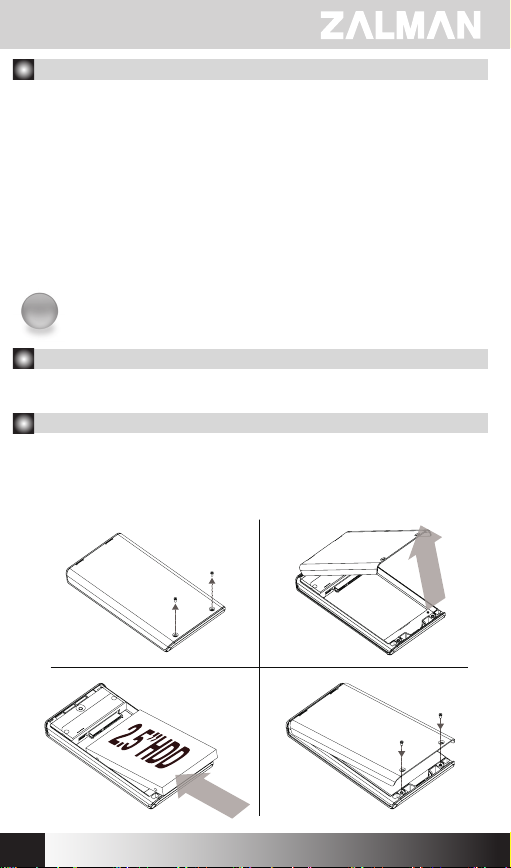
2. Assembly Order
① Detach 2 screws from rear aluminum cover
② Take out aluminum cover
③ Insert 2.5” Hard disk to the main body
④ Tighten 2 screws to the aluminum cover
①
②
③
4
④
WWW.ZALMAN.COM
Connect with USB
3
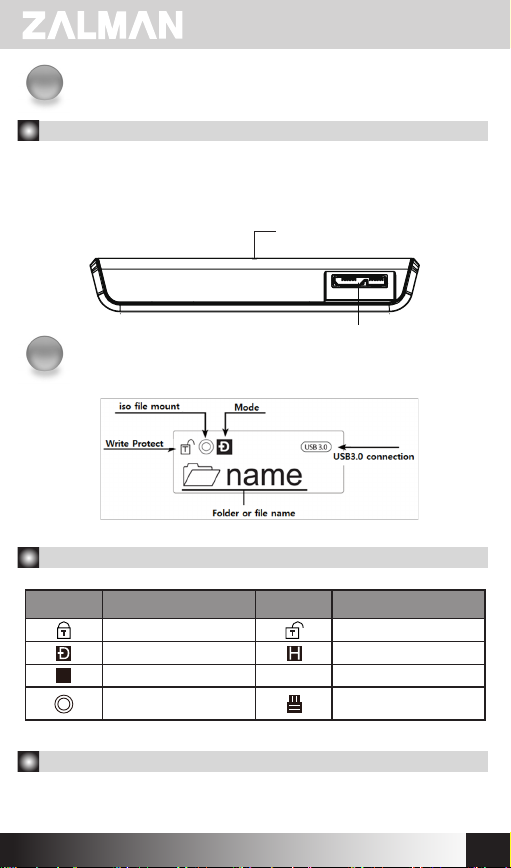
1. Connecting to PC
— Connect device to PC’s USB port using enclosed USB cable.
When disconnecting, please use “Hardware Safety Removal” on the tray.
Please press «1» on touch pad for 3 seconds to do Safe removal.
LED Indicator
USB3.0 Port
Display
4
1. Icon Description
Icon Description Icon Description
Write Protect Read & Write Enabled
Dual Mode HDD Mode
O
ODD Mode Sleep Mode
iso File Mounted to
Virtua l CD
Z
Z
Connect Virtual HDD
2. Functional description
To enter Menu mode, touch «Menu» on touch panel
WWW.ZALMAN.COM
5

Encryption
5
In Menu mode, find Encryption option (Encryption is disabled when released)
1. To use Encryption function, touch «Enter» to enter “Set Encryption”
▶Set Encryption
Reset Encryption
2. Type password (4 ~ 8 numbers), and type it again to confirm password
(* Press «Menu» to delete the wrong numbers)
Input Password
—-
3. Setting is completed
4. Delete Encryption function, touch «Enter» at below option
Set Encryption
▶Reset Encryption
5. Please confirm that all the data will be gone.
Data will be lost!
1. Yes 2. No
☞ Please beware that all the data in the hard disk will be lost
6. Password
When Encryption’s enabled, password should be typed whenever connected to PC.
If the password is typed wrong 10 times, device should be reconnected.
Also, type waiting time gets longer as each mistakes made.
7. To copy Date to device, please format hard disk first
when Set / Reset Encryption
Input Password
—-
6
Confime Password
—-
WWW.ZALMAN.COM
6
Virtual CD-ROM
■ To use Virtual ODD, iso file must be located in the “_iso” folder of the device.
■ After finding iso file with ∧ / ∨ / < / >, touch “5” to select it.
■ External HDD or CD-ROM may not be recognized according to current mode
state.
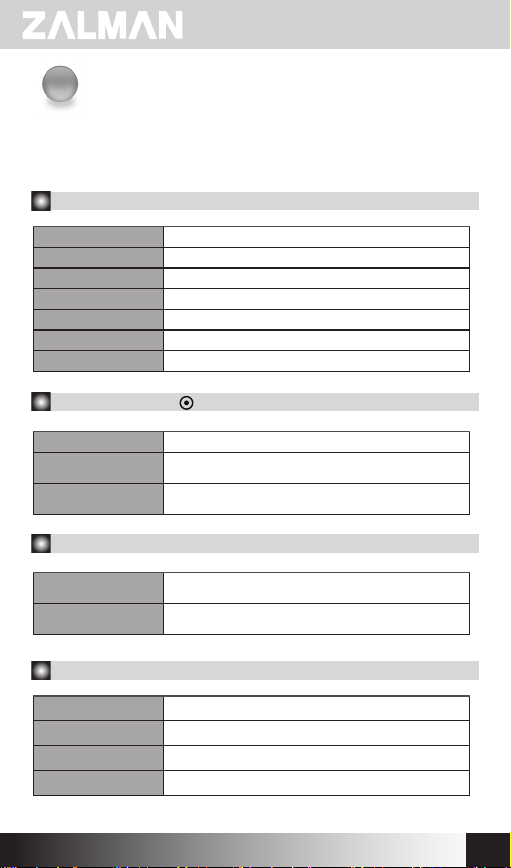
1. Main Menu
Mode Select Setting Device Mode
Encryption Set / Reset Encryption Function
Setting Setting LCD Brightness or Sleep Mode Time
Information Check HDD Information and Firmware Information
USB Connect
Advanced
Exit
Setting USB Connection
Setting Virtual HDD Mounting
Exit Menu
2. Mode Select (“ ” is shown in selected mode)
Dual Mode Both of external HDD and CD-ROM are recognized.
ODD Mode
HDD Mode
External CD-ROM is recognized.
(Useful when installing OS)
(Useful when connected to other devices except PC)
External HDD is recognized.
3. Encryption
Set Encryption
Reset Encryption
Encryption function is on. All the existed data will be lost
Delete Encryption function. All the existed data will be
after setting password
lost after resetting password
4. Setting
LCD Brightness Adjust LCD backlight brightness
Idle Brightness Adjust LCD backlight brightness in Sleep Mode
Standby Time Sleep Mode time setting
Load Default Return to default value
WWW.ZALMAN.COM
7
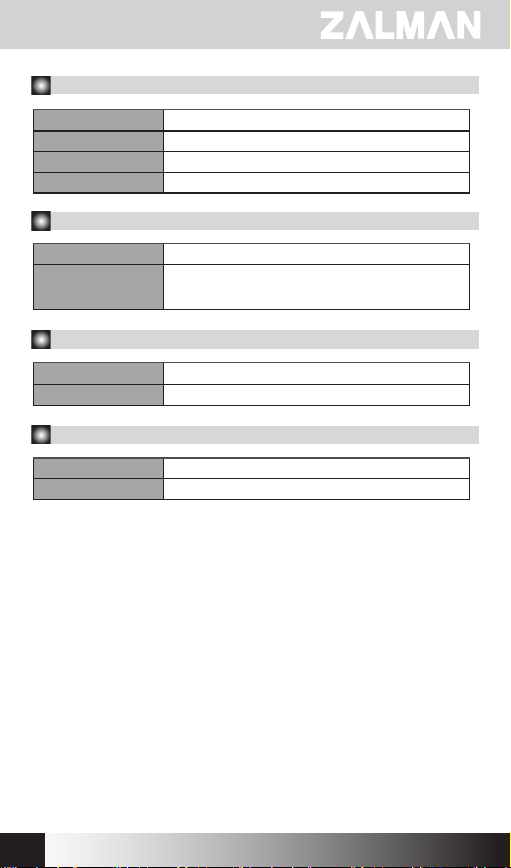
5. Information
S.M.A.R.T Hard disk SMART information
HDD Model Display Hard disk model name
HDD Serial Display Hard disk serial number
Firmware Ver. Display device firmware version
6. S.M.A.R.T
HDD Temp. Display HDD temperature
HDD Health
Display HDD health info (Good, Warning, Bad)
-If Warning or Bad is shown, please check HDD carefully
after backup data.
7. USB Connect
Refresh Refreshing device from PC
Safe Removal Safely removing from PC
8. Advanced
Write Protect ON/OFF Write protection
Umount VHDD Disable (Unmount) Virtual HDD function
8
WWW.ZALMAN.COM
Loading…
FAQ: Types of Manuals and Their Contents
ZALMAN ZM-ve400 Manuals come in various types, each serving a specific purpose to help users effectively operate and maintain their devices. Here are the common types of ZALMAN ZM-ve400 User Guides and the information they typically include:
- User Manuals: Provide comprehensive instructions on how to use the device, including setup, features, and operation. They often include troubleshooting tips, safety information, and maintenance guidelines.
- Service Instructions: Designed for technicians and repair professionals, these manuals offer detailed information on diagnosing and repairing issues with the device. They include schematics, parts lists, and step-by-step repair procedures.
- Installation Guides: Focus on the installation process of the device, providing detailed instructions and diagrams for proper setup. They are essential for ensuring the device is installed correctly and safely.
- Maintenance Manuals: Provide guidance on routine maintenance tasks to keep the device in optimal condition. They cover cleaning procedures, part replacements, and regular servicing tips.
- Quick Start Guides: Offer a concise overview of the essential steps needed to get the device up and running quickly. They are ideal for users who need immediate assistance with basic setup and operation.
Each type of ZALMAN ZM-ve400 instruction is designed to address specific needs, ensuring users have the necessary information to use, maintain, and repair their devices effectively.
Related Instructions for ZALMAN ZM-ve400:
1
OPTIMA II CNPS10X
20
251
53
3
ZM-HE130
Manual ZM-HE130 Manual — 469P12
6
390
71
4
ZM-VE200SE
Manual ZALMAN ZM-VE200SE User Guide (Manual ), @UEZPXA
6
708
135
6
ZM-VE200SE
Manual ZALMAN ZM-VE200SE Guide (Manual ), @1I5FXE
6
65
15
7
Z-MACHINE GT900
Manual Computer Accessories #HI538B
16
862
199
Storage Devices by Other Brands:
|
Seagate Barracuda ST3120211AS Installation Manual Barracuda ST3120211AS (Storage ePDF Guide, #77G89U) Barracuda 7200.9 Serial ATA Installation Guide 21 May 2025 | 2 |
|
|
Control Data Corporation Finch 9410-4 Hardware Installation/operation Manual User Manual: Control Data Corporation Finch 9410-4 (CWFG8W, Upd.23/04/2025) @ 5 CONTROL DATA 23 Apr 2025 | 29 |
|
|
Gladiator GAGB54SBJG Assembly Instructions Manual #C7FT88: GAGB54SBJG Storage Assembly instructions manual HARDWOOD STORAGE/ 06 Mar 2025 | 16 |
|
|
Compaq DL360 — ProLiant — Photon Firmware Update DL360 — ProLiant — Photon Firmware update — 7YVDAA Regular Firmware Updates Essential for Optimal Performance 23 May 2025 | 9 |
Categories:
Air Conditioner
Fan
Computer Hardware
Freezer
Laptop Accessories
Headphone
ZALMAN ZM-ve400 Storage PDF User Guides and Manuals for Free Download: Found (1) Manuals for ZALMAN ZM-ve400 Device Model (Manual )
The ZALMAN ZM-ve400 is a power supply unit that has garnered attention in the tech community, particularly among budget-conscious users seeking reliability and efficiency. Manufactured by ZALMAN, a brand known for its cooling solutions and power supply units, the ZM-ve400 presents itself as an ideal choice for those building a budget gaming rig or simply looking to upgrade their existing setup without breaking the bank.
One of the first things to note about the ZM-ve400 is its compact design. Measuring at just 150mm in depth, this power supply fits comfortably into most cases, even those that have limited space. This compactness makes it an attractive option for small form factor cases or for users who prefer minimalist setups. Additionally, the sleek finish and aesthetic design make it a visually appealing component that doesn’t compromise on style.
The ZALMAN ZM-ve400 boasts a maximum power output of 400W, which is more than sufficient for the majority of mid-tier builds. It includes various connectors including a 20+4 pin connector for the motherboard, multiple SATA and Molex connectors, and a 4+4 pin CPU connector. This wide array of connectors ensures compatibility with most modern components, making the installation process straightforward for novice builders and experienced users alike.
When it comes to performance, the ZM-ve400 excels in delivering stable and efficient power. With an 85% efficiency rating, it provides users with proper energy management, thereby reducing waste and enhancing overall system performance. This efficiency also contributes to lower operating temperatures, meaning that users can expect quieter operation when under load.
Here are some of the standout features of the ZALMAN ZM-ve400:
- Compact Size: Its small form factor is ideal for various builds.
- Efficiency: An 85% efficiency rating helps in saving on energy bills.
- Stable Output: Provides stable power delivery, reducing the risk of system crashes.
- Multiple Connectors: Compatible with a range of components enhances flexibility.
- Built-in Protection: Over-voltage, over-current, and short-circuit protection ensure the safety of your components.
In terms of noise, one of the most significant advantages of the ZALMAN ZM-ve400 is its whisper-quiet operation. Even under heavy load, the fan maintains a low noise profile, allowing users to enjoy a serene computing experience. This is particularly beneficial for gamers and content creators who require a quiet environment for focus and concentration.
On the downside, the ZM-ve400 may fall short for those looking to run high-end components or overclocked systems. While it offers reasonable power for mid-range setups, users aiming for high-performance GPUs or multiple hard drives may find the specifications limiting. Nonetheless, for typical office use and medium gaming demands, it performs admirably.
In conclusion, the ZALMAN ZM-ve400 is a solid choice for users seeking a budget-friendly power supply without compromising quality. Its well-thought-out features, efficient performance, and quiet operation make it an excellent option for entry-level to mid-tier builds. If you are in the market for a reliable power supply unit that offers excellent value for money, you would do well to consider the ZM-ve400 as a part of your setup.
ZALMAN ZM-ve400 Manual
- ZALMAN
- Storage
- Manual for ZALMAN ZM-ve400
- zalman-zm-ve400-manual-24_manual.pdf
- 24 |
Pages Preview:
Document Transcription:
See Details
Download