
| Название | Русский | English |
|---|---|---|
| A-S201 Owner’s Manual | — |
[3.2MB] |
| A-S201 Инструкция по эксплуатации |
[3.2MB] |
[3.2MB] |
| CD Player flyer for Hi-Fi Amplifier | — |
[109KB] |
| CD Player flyer for Hi-Fi Amplifier |
[109KB] |
— |
| Название | Русский | English |
|---|---|---|
| A-S201 Owner’s Manual | — |
[3.2MB] |
| A-S201 Инструкция по эксплуатации |
[3.2MB] |
[3.2MB] |
| CD Player flyer for Hi-Fi Amplifier | — |
[109KB] |
| CD Player flyer for Hi-Fi Amplifier |
[109KB] |
— |

Integrated Amplifier
Integrated Amplifier
Amplificateur Intégré
Amplificateur Intégré
G
G
© 2013 Yamaha Corporation
Printed in Malaysia ZH10680
OWNER’S MANUAL
OWNER’S MANUAL
MODE D’EMPLOI
MODE D’EMPLOI
BEDIENUNGSANLEITUNG
BEDIENUNGSANLEITUNG
BRUKSANVISNING
BRUKSANVISNING
MANUALE DI ISTRUZIONI
MANUALE DI ISTRUZIONI
MANUAL DE INSTRUCCIONES
MANUAL DE INSTRUCCIONES
GEBRUIKSAANWIJZING
GEBRUIKSAANWIJZING
ИНСТРУКЦИЯ ПО ЭКСПЛУАТАЦИИ

CAUTION: READ THIS BEFORE OPERATING YOUR UNIT.
CAUTION: READ THIS BEFORE OPERATING YOUR UNIT.
1 To assure the finest performance, please read this manual
carefully. Keep it in a safe place for future reference.
2 Install this sound system in a well ventilated, cool, dry,
clean place — away from direct sunlight, heat sources,
vibration, dust, moisture, and/or cold. For proper
ventilation, allow the following minimum clearances
around this unit.
Top: 30 cm
Rear: 20 cm
Sides: 20 cm
3 Locate this unit away from other electrical appliances,
motors, or transformers to avoid humming sounds.
4 Do not expose this unit to sudden temperature changes
from cold to hot, and do not locate this unit in an
environment with high humidity (i.e. a room with a
humidifier) to prevent condensation inside this unit,
which may cause an electrical shock, fire, damage to this
unit, and/or personal injury.
5 Avoid installing this unit where foreign object may fall
onto this unit and/or this unit may be exposed to liquid
dripping or splashing. On the top of this unit, do not
place:
– Other components, as they may cause damage and/or
discoloration on the surface of this unit.
– Burning objects (i.e. candles), as they may cause fire,
damage to this unit, and/or personal injury.
– Containers with liquid in them, as they may fall and
liquid may cause electrical shock to the user and/or
damage to this unit.
6 Do not cover this unit with a newspaper, tablecloth,
curtain, etc. in order not to obstruct heat radiation. If the
temperature inside this unit rises, it may cause fire,
damage to this unit, and/or personal injury.
7 Do not plug in this unit to an AC wall outlet until all
connections are complete.
8 Do not operate this unit upside-down. It may overheat,
possibly causing damage.
9 Do not use force on switches, knobs and/or cords.
10 When disconnecting the power cable from the AC wall
outlet, grasp the plug; do not pull the cable.
11 Do not clean this unit with chemical solvents; this might
damage the finish. Use a clean, dry cloth.
12 Only voltage specified on this unit must be used. Using
this unit with a higher voltage than specified is dangerous
and may cause fire, damage to this unit, and/or personal
injury. Yamaha will not be held responsible for any
damage resulting from use of this unit with a voltage
other than specified.
13 To prevent damage by lightning, keep the power cable
and outdoor antennas disconnected from an AC wall
outlet or this unit during a lightning storm.
14 Do not attempt to modify or fix this unit. Contact
qualified Yamaha service personnel when any service is
needed. The cabinet should never be opened for any
reasons.
15 When not planning to use this unit for long periods of
time (i.e. vacation), disconnect the AC power plug from
the AC wall outlet.
16 Be sure to read the “TROUBLESHOOTING” section on
common operating errors before concluding that this unit
is faulty.
17 Before moving this unit, press A (power) to set this unit
to standby mode, and then disconnect the AC power plug
from the AC wall outlet.
18 Condensation will form when the surrounding
temperature changes suddenly. Disconnect the power
cable from the outlet, then leave this unit alone.
19 When using this unit for a long time, this unit may
become warm. Turn the power off, then leave this unit
alone for cooling.
20 Install this unit near the AC wall outlet and where the AC
power plug can be reached easily.
21 The batteries shall not be exposed to excessive heat such
as sunshine, fire or the like.
22 Excessive sound pressure from earphones and
headphones can cause hearing loss.
This unit is not disconnected from the AC power source as long as
it is connected to the AC wall outlet, even if this unit itself is turned
off by A. This state is called the standby mode. In this state, this
unit is designed to consume a very small quantity of power.
WARNING
TO REDUCE THE RISK OF FIRE OR ELECTRIC SHOCK, DO
NOT EXPOSE THIS UNIT TO RAIN OR MOISTURE.
This label is required to be attached to a product of which
the temperature of the top cover may be hot during
operation.
■ For U.K. customers
If the socket outlets in the home are not suitable for the
plug supplied with this appliance, it should be cut off and
an appropriate 3 pin plug fitted. For details, refer to the
instructions described below.
Note
The plug severed from the mains lead must be destroyed,
as a plug with bared flexible cord is hazardous if engaged
in a live socket outlet.
■ Special Instructions for U.K. Model
IMPORTANT
THE WIRES IN MAINS LEAD ARE COLOURED IN
ACCORDANCE WITH THE FOLLOWING CODE:
Blue: NEUTRAL
Brown: LIVE
As the colours of the wires in the mains lead of this apparatus may
not correspond with the coloured markings identifying the
terminals in your plug, proceed as follows:
The wire which is coloured BLUE must be connected to the
terminal which is marked with the letter N or coloured BLACK.
The wire which is coloured BROWN must be connected to the
terminal which is marked with the letter L or coloured RED.
Make sure that neither core is connected to the earth terminal of the
three pin plug.
i En
CONTENTS
INTRODUCTION
USEFUL FEATURES …………………………………….. 1
SUPPLIED ACCESSORIES …………………………… 1
CONTROLS AND FUNCTIONS …………………….2
Front panel……………………………………………………….. 2
Rear panel………………………………………………………… 4
Remote control………………………………………………….. 5
Using the remote control …………………………………….7
PREPARATION
CONNECTIONS ……………………………………………. 8
Connecting speakers and source components…………8
Connecting power cable ……………………………………..9
BASIC OPERATION
PLAYBACK ………………………………………………….10
Playing a source………………………………………………. 10
Enjoying pure, high fidelity sound (Pure Direct) …. 11
Using the sleep timer………………………………………..11
ADVANCED OPERATION
SETTING THE OPTION MENU FOR EACH
INPUT SOURCE………………………………………..12
Option menu items……………………………………………12
ADDITIONAL INFORMATION
TROUBLESHOOTING …………………………………13
SPECIFICATIONS………………………………………..15
■ About this manual
• y indicates a tip for your operation.
• The instructions in this manual describe the operation of this unit with the supplied remote control. You can also use the buttons or
knobs on the front panel if they have the same or similar names as those on the remote control.
USEFUL FEATURES
This unit allows you to:
◆ Enjoy pure, high fidelity sound by using the Pure
Direct function (see page 11)
◆ Use the remote control of this unit to operate a Yamaha
tuner and/or CD player (see page 6)
◆ Save power by using the AUTO POWER STANDBY
function (see page 12)
PREPARATIONINTRODUCTION
OPERATION
BASIC
OPERATION
ADVANCED
SUPPLIED ACCESSORIES
Please check that you received all of the following parts.
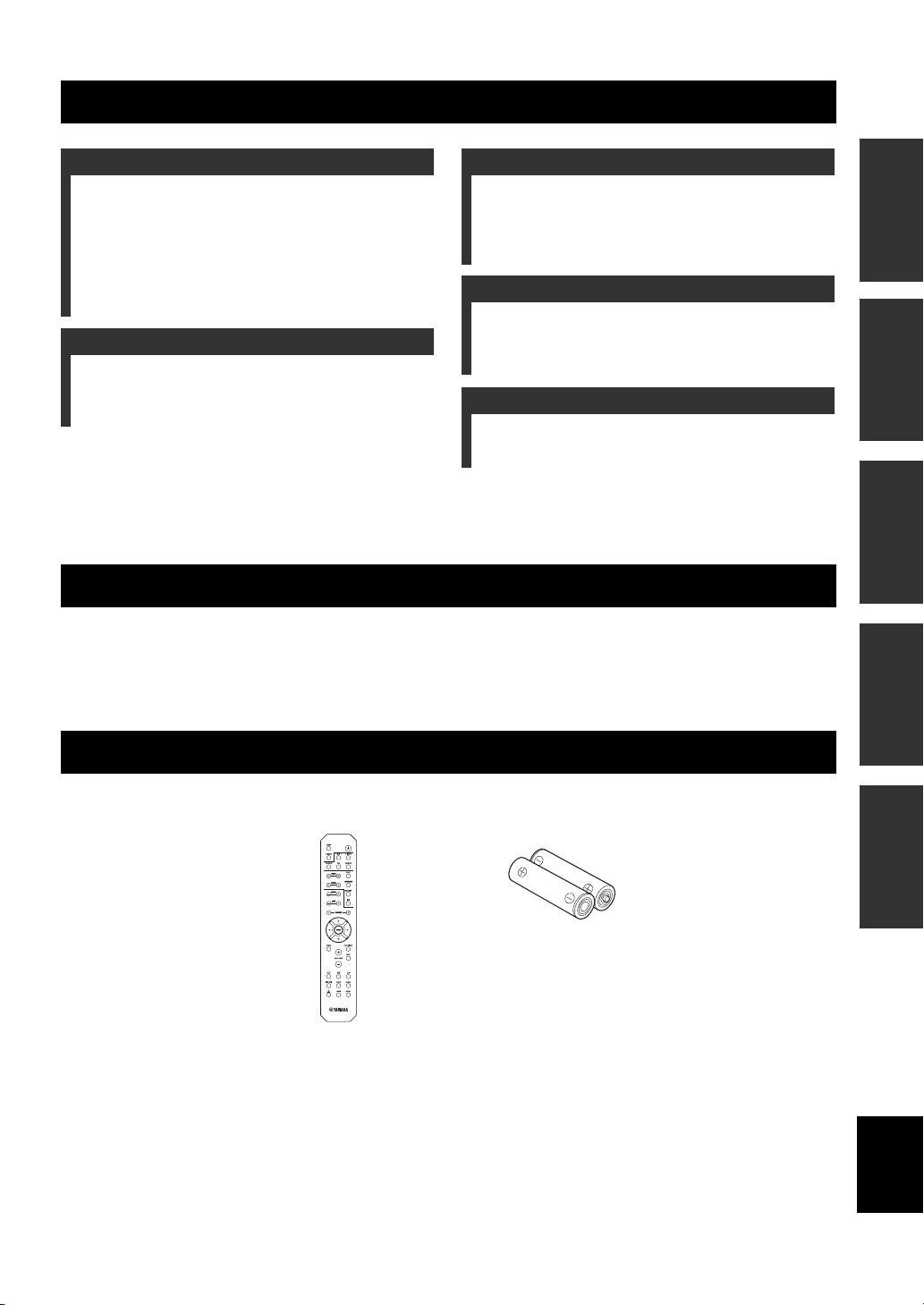
Remote control Batteries (x2)
(AA, R6, UM-3)
1 En
INFORMATION
English
ADDITIONAL

INTRODUCTION
CONTROLS AND FUNCTIONS
Front panel
1 A (power)
Turns this unit on, or sets it to standby mode.
Note
This unit consumes a small amount of power even when in
standby mode.
2 Remote control sensor
Receives infrared signals from the remote control.
3 STANDBY/ON indicator
Indicator Status
Brightly lit
Dimly lit
Off
4 SP (SPEAKERS) A/B indicators
Light up according to the set of speakers selected.
Both indicators light up when both sets of speakers are
selected.
The power of this unit is “on”.
This unit is in “standby” mode.
The power of this unit is “off”.
To turn off this unit, disconnect
the power cable from an AC
wall outlet.
5 SLEEP indicator
Lights up when the sleep timer is turned on (see
page 11).
6 Multi-information display
Shows information when adjusting or changing
settings.
7 PURE DIRECT indicator
Lights up when the Pure Direct function is on.
8 Front panel display
Shows information about the operational status of this
unit.
9 PURE DIRECT button
Reproduces any input source in the purest sound
possible. (see page 11).
2 En

CONTROLS AND FUNCTIONS
INTRODUCTION
0 PHONES jack
Outputs audio to your headphones for private
listening.
Note
Press SPEAKERS A/B so that the SP A/B indicators (see
page 2) turn off before you connect your headphones to the
PHONES jack.
A SPEAKERS A/B
Turns on or off the speaker set connected to the
SPEAKERS A and/or SPEAKERS B terminals on the
rear panel each time the corresponding button is
pressed (see page10).
B BASS –/+
Increases or decreases the low frequency response.
Control range: –10 dB to +10 dB
C TREBLE –/+
Increases or decreases the high frequency response.
Control range: –10 dB to +10 dB
D INPUT l / h
Selects the input source you want to listen to.
E VOLUME control
Increases or decreases the sound output level.
English
3 En
CONTROLS AND FUNCTIONS
Rear panel
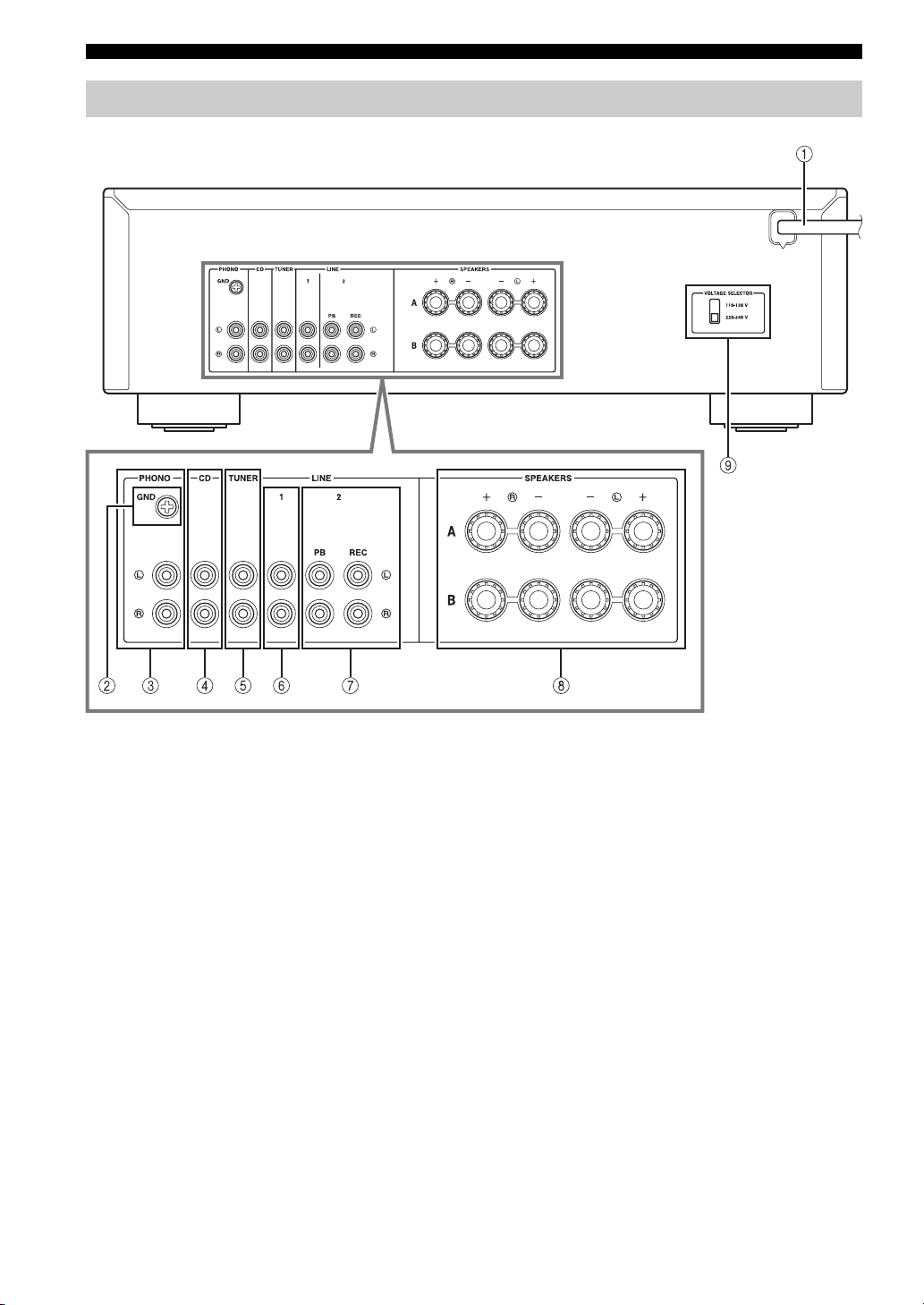
1 Power cable
For connecting this unit to an AC wall outlet (see
page 9).
2 GND terminal
Used to connect a turntable (see page 8).
3 PHONO jacks
Used to connect a turntable (see page 8).
4 CD jacks
Used to connect a CD player (see page 8).
5 TUNER jacks
Used to connect a tuner (see page 8).
6 LINE 1 jacks
Used to connect audio components (see page 8).
4 En
7 LINE 2 jacks
PB (Playback) jacks
Used to connect to audio output jacks of an audio
component.
REC (Recording) jacks
Used to connect to audio input jacks of an audio
component.
8 SPEAKERS terminals
Used to connect speakers (see page 8).
9 VOLTAGE SELECTOR (Only for General
model)

Remote control
CONTROLS AND FUNCTIONS
4 DIMMER
Select the brightness level of the front panel display
from 3 levels by pressing this button repeatedly.
y
• This setting is retained even if you turn off this unit.
• The default setting is the brightest.
5 TREBLE –/+
Increases or decreases the high frequency response.
Control range: –10 dB to +10 dB
6 BASS –/+
Increases or decreases the low frequency response.
Control range: –10 dB to +10 dB
7 B / C / D / E / ENTER
Selects and confirms items in the Option menu (see
page 12).
8 MENU
Turns the Option menu on and off (see page 12).
9 VOLUME +/–
Increases or decreases the sound output level.
0 Input selector buttons
Select the input source you want to listen to.
y
The input source names correspond to the names of the
connection jacks on the rear panel.
A BALANCE L/R
Adjusts the sound output balance of the left and right
speakers to compensate for sound imbalances.
Control range:
INTRODUCTION
■ Common controls
The following parts and controls can be used no matter
which input source is selected.
1 Infrared signal transmitter
Sends infrared signals.
2
A (power)
Turns this unit on, or sets it to standby mode.
3 SLEEP
Sets the sleep timer (see page 11).
(+20 dB) (center) (+20 dB)
The opposite side of
channel is muted.
The opposite side of
channel is muted.
B PURE DIRECT button
Reproduces any input source in the purest sound
possible (see page 11).
C MUTE
Mutes the sound output. Press again to restore the
sound output to the previous volume level.
Continued to the next page.
English
5 En

CONTROLS AND FUNCTIONS
■ Yamaha tuner control buttons
The following buttons can be used to control various
functions of a Yamaha tuner.
D TUNING jj / ii
Selects the tuning frequency.
A/B/C/D/E, PRESET j / i
Selects a preset FM/AM station.
A/B/C/D/E: Selects the preset group from A to E.
PRESET j / i: Selects the preset number.
BAND
Selects the reception band (FM/AM).
MEMORY
Stores the current FM/AM station as a preset.
INFO
Only for Europe model:
Switches information shown on the front panel
display.
Note
Even when using a Yamaha tuner, certain components and
features may not be available. Refer to your component’s owner’s
manual for more information.
■ Yamaha CD player controls
The following buttons can be used to control a Yamaha
CD player.
E Yamaha CD player control buttons
s Stops playback
e Pauses playback
p Starts playback
DISC SKIP Skips to the next disc in a CD changer
b Skips backward
a Skips forward
Ejects the disc
w Rewinds playback
f Fast-forwards playback
Note
Even when using a Yamaha CD player, certain components and
features may not be available. Refer to your component’s owner’s
manual for more information.
6 En

Using the remote control
CONTROLS AND FUNCTIONS
■ Installing batteries ■ Operation range
Point the remote control at the remote control sensor on
this unit and remain within the operating range shown
below.
Approximately
6 m
AA, R6, UM-3 batteries
Remote control
■ Notes on remote control and batteries
• The area between the remote control and this unit must be clear of large obstacles.
• Be careful not to spill water or other liquids on the remote control.
• Be careful not to drop the remote control.
• Do not leave or store the remote control in the following conditions:
– places of high humidity, such as near a bathroom
– places of high temperatures, such as near a heater or stove
– places of extremely low temperatures
– dusty places
• Change all batteries if you notice the operation range of the remote control narrows.
• If the batteries run out, immediately remove them from the remote control to prevent an explosion or acid leak.
• If you find leaking batteries, discard the batteries immediately, taking care not to touch the leaked material. If the leaked material
comes into contact with your skin or gets into your eyes or mouth, rinse it away immediately and consult a doctor. Clean the battery
compartment thoroughly before installing new batteries.
• Do not use old batteries together with new ones. This may shorten the life of the new batteries or cause old batteries to leak.
• Do not use different types of batteries (such as alkaline and manganese batteries) together. Batteries that look the same may have a
different specification.
• Before inserting new batteries, wipe the battery compartment clean.
• Dispose of batteries according to your regional regulations.
• Keep the batteries in a location out of reach of children.
Batteries can be dangerous if a child were to put in his or her mouth.
• If you plan not to use this unit for a long period of time, remove the batteries from this unit. Otherwise, the batteries will wear out,
possibly resulting in a leakage of battery liquid that may damage this unit.
INTRODUCTION
7 En
English

PREPARATION
CONNECTIONS
Connecting speakers and source components
Make sure to connect L (left) to L, R (right) to R, “+” to “+” and “–” to “–”. If the connections are faulty, no sound will
be heard from the speakers, and if the polarity of the speaker connections is incorrect, the sound will be unnatural and
lack bass. Refer to the owner’s manual for each of your components.
Make sure to use RCA cables to connect audio components.
CAUTION
• Do not connect this unit or other components to the main power until all connections between components are
complete.
• Do not let bare speaker wires touch each other or any metal part of this unit. This could damage this unit and/or the
speakers.
Speakers A
LeftRight
DVD player, etc.CD player
GND
Audio
out
Audio
out
Audio
out
Audio
out
Audio
out
Audio
in
Tuner
Turntable
CD recorder,
etc.
LeftRight
Speakers B
y
• The PHONO jacks are designed for connecting a turntable with an MM cartridge.
• Connect your turntable to the GND terminal to reduce noise in the signal. However, for some turntables, you may hear less noise
without the GND connection.
8 En
CONNECTIONS
■ REC jacks
• The REC jacks output audio signals of the currently
selected input (except when LINE 2 is selected).
• Volume level, tone control, balance and Pure Direct
settings do not affect the REC jacks.
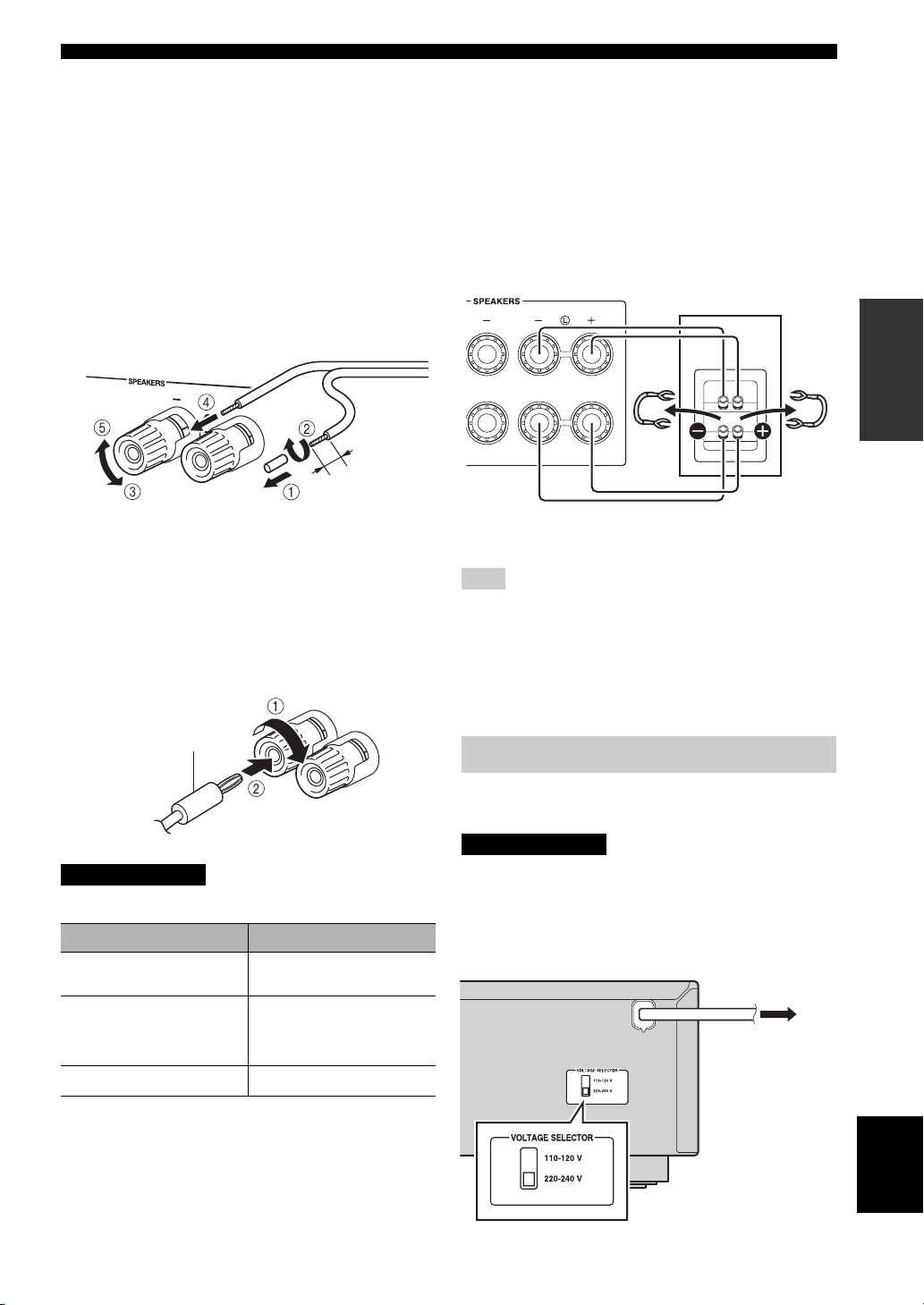
■ Connecting speaker cables
1 Remove approximately 10 mm of insulation from the
end of each speaker cable.
2 Twist the bare wires of the cable firmly together.
3 Unscrew the knob.
4 Insert one bare wire into the hole in the side of each
terminal.
5 Tighten the knob to secure the wire.
Red: positive (+)
Black: negative (–)
■ Connecting via banana plug
(Except for Asia, U.K. and Europe
models)
1 Tighten the knob.
2 Insert the banana plug into the end of the
corresponding terminal.
■ Bi-wire connection
Bi-wire connection separates the woofer from the
combined midrange and tweeter section.
A bi-wire compatible speaker has four binding post
terminals. These two sets of terminals allow the speaker to
be split into two independent sections. With these
connections, the mid and high frequency drivers are
connected to one set of terminals and the low frequency
driver to another set of terminals.
Rear panel
Speaker
PREPARATION
Connect the other speaker to the other set of terminals in
the same way.
Note
When making bi-wire connections, remove the shorting bridges
or cables on the speaker.
y
To use the bi-wire connections, press SPEAKERS A and
SPEAKERS B on the front panel so that both SP A and B light up
on the front panel display.
Banana plug
CAUTION
Speaker impedance must be set as shown below.
Speaker connection Speaker impedance
SPEAKERS A or
SPEAKERS B
SPEAKERS A and
SPEAKERS B
8 Ω or higher
16 Ω or higher
(except for North
America model)
Bi-wiring
8 Ω or higher
Connecting power cable
Plug the power cable into an AC wall outlet after all other
connections are complete.
CAUTION
Only for General model:
Before connecting the power cable, make sure you set
VOLTAGE SELECTOR of this unit according to your
local voltage. Improper setting of VOLTAGE SELECTOR
may cause fire and damage to this unit.
To the AC wall
outlet with the
power cable
English
9 En

BASIC OPERATION
PLAYBACK
Playing a source
Input selector
buttons
TREBLE –/+
BASS –/+
BALANCE L/R
VOLUME +/–
A (power)
1 Press A (power) to turn on this unit.
2 Press one of the Input selector buttons to
select the desired input source.
3 Press SPEAKERS A and/or SPEAKERS B on
the front panel to select desired speaker(s).
Notes
• When one set of speakers is connected using bi-wire
connections, or when using two sets of speakers simultaneously
(A and B), make sure SP A and SP B are displayed on the front
panel display.
• When listening with headphones, turn off the speakers.
4 Play the source.
5 Press VOLUME +/– to adjust the sound
output level.
SPEAKERS A/B
y
You can adjust the tonal quality by using BASS –/+,
TREBLE –/+, and the left/right sound balance of speakers
by using BALANCE L/R (see page 5).
6 When finished listening, press A (power) to
set this unit to standby mode.
Press A (power) to turn this unit on again.
y
• You can also use the buttons or knobs on the front panel if they
have the same or similar names as those on the remote control.
• For recording, see page 4.
10 En
PLAYBACK
Enjoying pure, high fidelity sound
(Pure Direct)
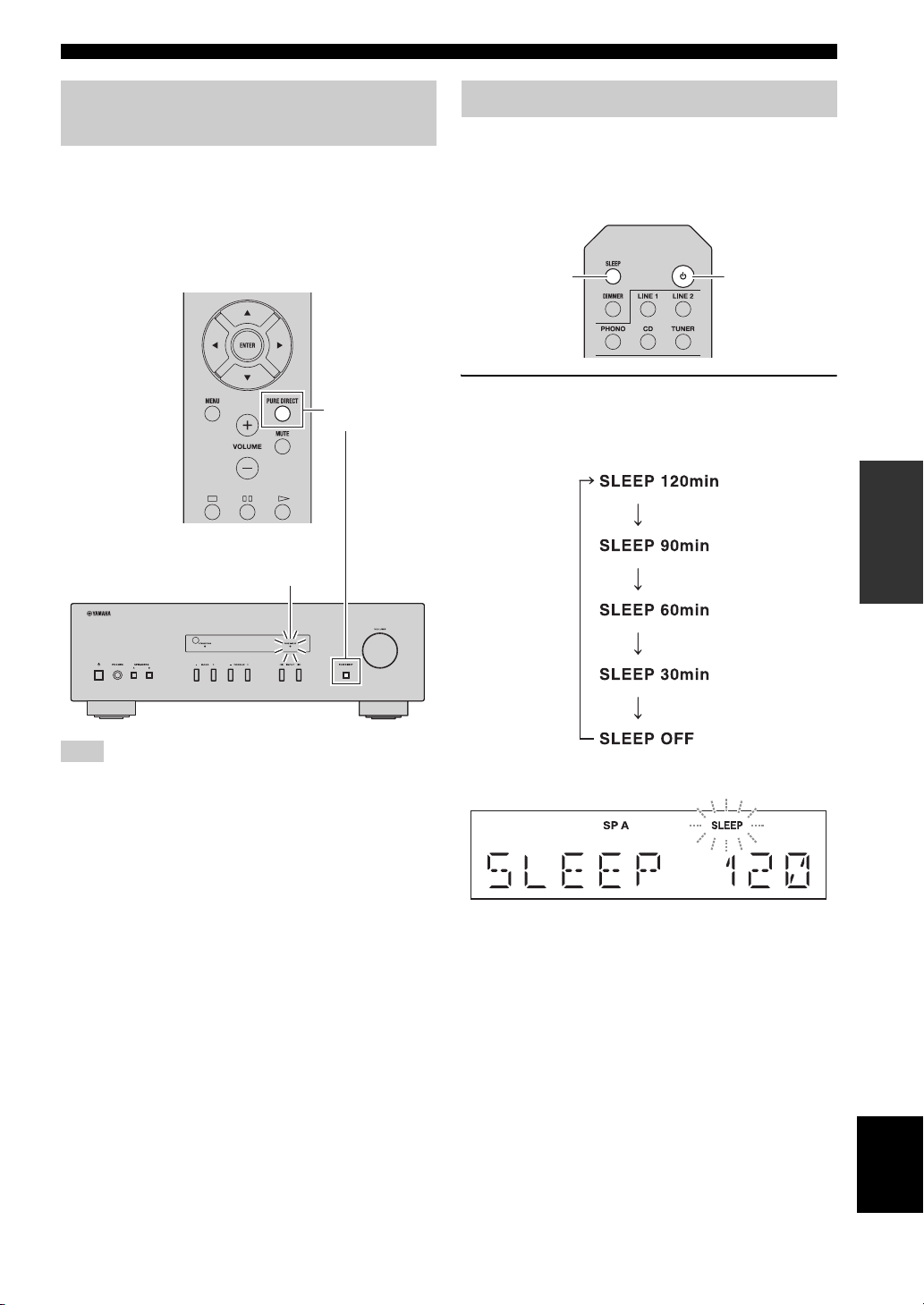
The Pure Direct function bypasses unnecessary circuitry
in this unit to reduce electrical noise when playing the
selected source. This allows you to enjoy high fidelity
sound quality.
The PURE DIRECT indicator lights up and the front panel
display turns off after a few seconds.
PURE DIRECT
button
PURE DIRECT indicator
Using the sleep timer
Use this feature to automatically set this unit to standby
mode after a certain amount of time. The sleep timer is
useful when you are going to sleep while this unit is
playing or recording a source.
SLEEP
Press SLEEP repeatedly to set the amount of
time before this unit is set to standby mode.
Each time you press SLEEP, the front panel display
changes cyclically as shown below.
A (power)
OPERATION
BASIC
Note
The BASS, TREBLE, and BALANCE controls do not function
while the PURE DIRECT feature is turned on.
The SLEEP indicator blinks while setting the amount
of time for the sleep timer.
If the sleep timer is set, the SLEEP indicator on the
front panel display lights up.
y
To cancel the sleep timer, do one of the following:
– Select “SLEEP OFF”.
– Set this unit to standby mode.
English
11 En

ADVANCED OPERATION
SETTING THE OPTION MENU FOR EACH INPUT SOURCE
The Option menu allows you to configure various settings for each input source and recall those settings automatically
when an input source is selected.
1 Press one of the Input selector buttons to
select the desired input source.
2 Press MENU.
Input selector
buttons
3 Press B / C to select the desired menu item,
and then press ENTER.
4 Press B / C to change the settings.
y
• For certain menu items, you must press ENTER to save
the new setting.
• To return to the screen where you can select menu items,
press D.
B / C / D
ENTER
MENU
5 To exit the Option menu, press MENU.
Option menu items
Menu item Description
MAX VOL Sets the maximum volume level so that the volume will not be accidentally increased above a
INITIAL VOLUME (INIT VOL) Sets the volume at the time this unit is turned on. When this parameter is set to “OFF”, the
AUTO POWER STANDBY
(AUTO STBY)
y
The default settings are marked with “*”.
certain level.
Adjustable range: 01 to 99, MAX*
volume level used when this unit was set to standby is applied.
Adjustable range: OFF*, MUTE, 01 to 99, MAX
Sets this unit to standby mode automatically if no operation is performed in the specified time.
Choices: OFF/2H/4H/8H*/12H
12 En

ADDITIONAL INFORMATION
TROUBLESHOOTING
Refer to the chart below if this unit does not function properly. If the problem you are experiencing is not listed below or
if the instructions below do not help, set this unit to standby mode, disconnect the power cable, and then contact the
nearest authorized Yamaha dealer or service center.
■ General
Problem Cause Remedy
This unit fails to turn
on.
No sound Incorrect input or output cable
The sound suddenly
goes off.
Only the speaker on
one side can be
heard.
There is a lack of bass
and no ambience.
A “humming” sound
can be heard.
The power cable is not connected or the
plug is not completely inserted.
The impedance setting of the connected
speaker is too small.
The protection circuitry has been activated
because of a short circuit, etc.
This unit has been exposed to a strong
external electric shock (such as lightning
or strong static electricity).
connections.
No appropriate input source has been
selected.
The SPEAKERS A/B switches are not set
properly.
Speaker connections are not secure. Secure the connections.
Output has been muted. Deactivate the mute function.
The MAX VOL or INITIAL VOLUME
setting is set too low.
The component corresponding to the
selected input source is turned off or is not
playing.
The protection circuitry has been activated
because of a short circuit, etc.
This unit has become too hot. Make sure the openings on the top panel are not
The AUTO POWER STANDBY or
SLEEP function has set this unit to
standby mode.
Incorrect cable connections. Connect the cables properly. If the problem persists,
Incorrect setting for the BALANCE L/R
setting.
The + and – wires are connected in
reverse at the amplifier or the speakers.
Incorrect cable connections. Connect the audio plugs firmly. If the problem
No connection from the turntable to the
GND terminal.
Connect the power cable firmly.
Use speaker(s) with proper speaker impedance.
Check that the speaker wires are not touching each
other and then turn the power of this unit back on.
Set this unit to standby mode, disconnect the power
cable, plug it back in after 30 seconds, then use it
normally.
Connect the cables properly. If the problem persists,
the cables may be defective.
Select an appropriate input source by pressing one of
the Input selector buttons on the remote control
(INPUT l / h on the front panel).
Turn on the corresponding SPEAKERS A or
SPEAKERS B.
Set the setting to a higher value.
Turn the component on and make sure it is playing.
Check that the speaker wires are not touching each
other and then turn the power of this unit back on.
blocked.
Change the AUTO POWER STANDBY setting to a
longer setting or OFF from the Option menu by
pressing MENU.
the cables may be defective.
Set the BALANCE L/R setting to the appropriate
position.
Connect the speaker wires to the correct + and –
phase.
persists, the cables may be defective.
Make the GND connection between the turntable and
this unit.
See
page
—
9
8
—
8
10
10
8
5
12
—
8
—
12
8
5
8
8
8
INFORMATION
English
ADDITIONAL
13 En

TROUBLESHOOTING
Problem Cause Remedy
The volume level
cannot be increased,
or the sound is
distorted.
The sound is
degraded when
listening with
headphones
connected to a CD
player connected to
this unit.
The BASS, TREBLE
and BALANCE
settings do not
applied to the sound.
The remote control
does not work nor
function properly.
Your tuner and/or CD
player cannot be
operated with the
remote control.
“OVER HEAT”
appears on the front
panel display.
“CHECK SP” appears
on the front panel
display.
The component connected to the LINE 2
PB/REC jacks of this unit is turned off.
This unit has been set to standby mode. Turn on the power of this unit.
The PURE DIRECT function is turned on. The PURE DIRECT function must be turned off to
Wrong distance or angle. The remote control will function within a maximum
Direct sunlight or lighting (from an
inverter type of fluorescent lamp, etc.) is
striking the remote control sensor of this
unit.
The batteries are weak. Replace all batteries.
The remote control does not support the
tuner and/or CD player.
This unit has become too hot. Make sure the openings on the top panel are not
Speaker cables got shorted out. Twist bare wires of speaker cables firmly, and then
Turn on the power of the component.
apply these settings to the sound.
range of 6 m and no more than 30 degrees off-axis
from the front panel.
Reposition this unit.
Refer to the owner’s manual supplied with the tuner
and/or CD palyer.
blocked.
connect to this unit and speakers properly.
See
page
—
10
11
7
—
7
—
—
—
14 En

SPECIFICATIONS
AUDIO SECTION
• Minimum RMS output power
(8 Ω, 40 Hz to 20 kHz, 0.2% THD)
[General, Korea, Australia, U.K. and Europe models]
………………………………………………………………… 100 W + 100 W
[China and Asia models] ……………………………….. 85 W + 85 W
• Input sensitivity/Input impedance (1 kHz, 100 W/8 Ω )
PHONO (MM) …………………………………………….. 10.0 mV/47 kΩ
CD, etc. ……………………………………………………….. 500 mV/47 kΩ
• Output level/Output impedance
CD, etc. (Input 1 kHz, 500 mV)
REC ………………………………………………………… 500 mV/2.2 kΩ
CD, etc. (Input 1 kHz, 500 mV, 8 Ω)
PHONES …………………………………………………… 470 mV/470 Ω
• Frequency response
CD, etc. (20 Hz to 20 kHz) ……………………………………. 0 ± 0.5 dB
CD, etc. (10 Hz to 100 kHz) ………………………………….. 0 ± 3.0 dB
• RIAA equalization deviation
PHONO (MM) ……………………………………………………….. ± 0.5 dB
• Total harmonic distortion
PHONO (MM) to REC (20 Hz to 20 kHz, 2 V) …. 0.025% or less
CD, etc. to SPEAKERS
(20 Hz to 20 kHz, 50 W, 8 Ω) ……………………………… 0.2% or less
• Signal to noise ratio (IHF-A network)
PHONO (MM) (10 mV input shorted) ……………… 75 dB or more
CD, etc. (500 mV input shorted) ……………………. 100 dB or more
• Residual noise (IHF-A network) …………………………………….. 70 µV
• Tone control characteristics
BASS
Boost/Cut (50 Hz) ………………………………………………… ± 10 dB
TREBLE
Boost/Cut (20 kHz) ………………………………………………. ± 10 dB
GENERAL
• Power supply
[General model] …………………. AC 110-120/220-240 V, 50/60 Hz
[China model]………………………………………………. AC 220 V, 50Hz
[Korea model] ……………………………………………….AC 220 V, 60Hz
[Australia model] ……………………………………….. AC 240 V, 50 Hz
[U.K. and Europe models] …………………………… AC 230 V, 50 Hz
[Asia model] …………………………………… AC 220-240 V, 50/60 Hz
• Power consumption
[General, Korea, Australia, U.K. and Europe models]
……………………………………………………………………………… 175 W
[China and Asia models] ……………………………………………. 140 W
• Standby power consumption
[China, Korea, Australia, U.K., Europe and Asia models]
…………………………………………………………………….. 0.5 W or less
• Dimensions (W × H × D) ………………………….. 435 × 141 × 333 mm
• Weight ………………………………………………………………………… 6.7 kg
* Specifications are subject to change without notice.
Information for Users on Collection and Disposal of Old Equipment
and Used Batteries
These symbols on the products, packaging, and/or accompanying documents mean that used electrical and
electronic products and batteries should not be mixed with general household waste.
For proper treatment, recovery and recycling of old products and used batteries, please take them to
applicable collection points, in accordance with your national legislation and the Directives 2002/96/EC
and 2006/66/EC.
By disposing of these products and batteries correctly, you will help to save valuable resources and prevent
any potential negative effects on human health and the environment which could otherwise arise from
inappropriate waste handling.
INFORMATION
ADDITIONAL
For more information about collection and recycling of old products and batteries, please contact your
local municipality, your waste disposal service or the point of sale where you purchased the items.
[Information on Disposal in other Countries outside the European Union]
These symbols are only valid in the European Union. If you wish to discard these items, please contact
your local authorities or dealer and ask for the correct method of disposal.
Note for the battery symbol (bottom two symbol examples):
This symbol might be used in combination with a chemical symbol. In this case it complies with the
requirement set by the Directive for the chemical involved.
15 En
English
ATTENTION : VEUILLEZ LIRE CE QUI SUIT AVANT D’UTILISER L’APPAREIL.
ATTENTION : VEUILLEZ LIRE CE QUI SUIT AVANT D’UTILISER
L’APPAREIL.
1 Pour utiliser l’appareil au mieux de ses possibilités, lisez
attentivement ce mode d’emploi. Conservez-le
soigneusement pour référence.
2 Installez cet ensemble audio dans un endroit bien aéré,
frais, sec et propre — veillez à ce qu’il soit à l’abri de la
lumière directe du soleil, des sources de chaleur, des
vibrations, des poussières, de l’humidité et/ou du froid.
Pour une ventilation correcte, ménagez l’espace
minimum suivant autour de cet appareil.
Au-dessus : 30 cm
À l’arrière : 20 cm
Sur les côtés : 20 cm
3 Placez l’appareil loin des équipements, moteurs et
transformateurs électriques, pour éviter les ronflements
parasites.
4 N’exposez pas l’appareil à des variations brutales de
température, ne le placez pas dans un environnement très
humide (par exemple dans une pièce contenant un
humidificateur) car cela peut entraîner la condensation
d’humidité à l’intérieur de l’appareil qui elle-même peut
être responsable de décharge électrique, d’incendie, de
dommage à l’appareil ou de blessure corporelle.
5 Evitez d’installer l’appareil dans un endroit où des objets
peuvent tomber, ainsi que là où l’appareil pourrait être
exposé à des éclaboussures ou des gouttes d’eau. Sur le
dessus de l’appareil, ne placez pas :
– d’autres appareils qui peuvent endommager la surface
de l’appareil ou provoquer sa décoloration.
– des objets se consumant (par exemple, une bougie)
qui peuvent être responsables d’incendie, de
dommage à l’appareil ou de blessure corporelle.
– des récipients contenant des liquides qui peuvent être
à l’origine de décharge électrique ou de dommage à
l’appareil.
6 Ne couvrez pas l’appareil d’un journal, d’une nappe, d’un
rideau, etc. car cela empêcherait l’évacuation de la
chaleur. Toute augmentation de la température intérieure
de l’appareil peut être responsable d’incendie, de
dommage à l’appareil ou de blessure corporelle.
7 Ne branchez pas la fiche du câble d’alimentation de
l’appareil sur une prise secteur aussi longtemps que tous
les raccordements n’ont pas été effectués.
8 Ne pas faire fonctionner l’appareil à l’envers. Il risquerait
de chauffer et d’être endommagé.
9 N’exercez aucune force excessive sur les commutateurs,
les boutons et les cordons.
10 Pour débrancher la fiche du câble d’alimentation au
niveau de la prise secteur, saisissez la fiche et ne tirez pas
sur le cordon.
11 Ne nettoyez pas l’appareil au moyen d’un solvant
chimique, ce qui pourrait endommager la finition.
Utilisez un chiffon sec et propre.
12 N’alimentez l’appareil qu’à partir de la tension prescrite.
Alimenter l’appareil sous une tension plus élevée est
dangereux et peut être responsable d’incendie, de
dommage à l’appareil ou de blessure corporelle. Yamaha
ne saurait être tenue responsable des dommages résultant
de l’alimentation de l’appareil sous une tension autre que
celle prescrite.
13 Pour empêcher tout dommage causé par les éclairs,
déconnectez le câble d’alimentation et toute antenne
extérieure de la prise murale pendant un orage.
14 Ne tentez pas de modifier ni de réparer l’appareil.
Consultez le service Yamaha compétent pour toute
réparation qui serait requise. Le coffret de l’appareil ne
doit jamais être ouvert, quelle que soit la raison.
15 Si vous envisagez de ne pas vous servir de l’appareil
pendant une longue période (par exemple, pendant les
vacances), débranchez la fiche du câble d’alimentation au
niveau de la prise secteur.
16 Lisez la section intitulée « GUIDE DE DÉPANNAGE »
où figurent une liste d’erreurs de manipulation
communes avant de conclure que l’appareil présente une
anomalie de fonctionnement.
17 Avant de déplacer l’appareil, appuyez sur
A (alimentation) pour mettre l’appareil en mode veille,
puis débranchez la fiche du cordon d’alimentation au
niveau de la prise secteur.
18 La condensation se forme lorsque la température
ambiante change brusquement. En ce cas, débranchez la
fiche du câble d’alimentation et laissez l’appareil reposer.
19 La température de l’appareil peut augmenter en raison
d’une utilisation prolongée. En ce cas, coupez
l’alimentation de l’appareil et laissez-le au repos pour
qu’il refroidisse.
20 Installez cet appareil à proximité de la prise secteur et à
un emplacement où la fiche du câble d’alimentation est
facilement accessible.
21 Les piles ne doivent pas être exposées à une chaleur
extrême, par exemple au soleil, à une flamme, etc.
22 Une pression excessive du son par les écouteurs et le
casque d’écoute peut entraîner la perte de l’ouïe.
Cet appareil n’est pas déconnecté du secteur tant qu’il reste
branché à la prise de courant, même si l’appareil en soi est éteint
par la touche A. Il se trouve alors « en veille ». En mode veille,
l’appareil consomme une très faible quantité de courant.
AVERTISSEMENT
POUR RÉDUIRE LES RISQUES D’INCENDIE OU DE
DÉCHARGE ÉLECTRIQUE, N’EXPOSEZ PAS CET
APPAREIL À LA PLUIE OU À L’HUMIDITÉ.
Cette étiquette doit être apposée sur un produit dont le
capot supérieur peut devenir chaud lorsqu’il fonctionne.
i Fr

TABLE DES MATIÈRES
INTRODUCTION
FONCTIONS UTILES……………………………………. 1
ACCESSOIRES FOURNIS…………………………….. 1
COMMANDES ET FONCTIONS …………………… 2
Panneau avant……………………………………………………2
Panneau arrière…………………………………………………. 4
Télécommande………………………………………………….. 5
Utilisation de la télécommande …………………………… 7
PRÉPARATION
RACCORDEMENTS………………………………………8
Raccordement des enceintes et des
composants source………………………………………….8
Raccordement du cordon d’alimentation………………. 9
OPÉRATIONS DE BASE
LECTURE …………………………………………………….10
Lecture d’une source………………………………………… 10
Écoutez un son pur de haute fidélité
(Pure Direct)……………………………………………….. 11
Utilisation de la minuterie de veille……………………. 11
OPÉRATIONS AVANCÉES
PARAMÉTRAGE DU MENU OPTION POUR
CHAQUE SOURCE D’ENTRÉE ………………..12
Éléments du menu Option ………………………………… 12
INFORMATIONS COMPLÉMENTAIRES
GUIDE DE DÉPANNAGE……………………………..13
CARACTÉRISTIQUES TECHNIQUES…………15
■ À propos de ce manuel
• Le symbole y attire votre attention sur un conseil d’utilisation.
• Les instructions de ce mode d’emploi décrivent les opérations de cet appareil à l’aide de la télécommande fournie avec l’appareil.
Vous pouvez également utiliser les touches ou les boutons du panneau avant s’ils portent le même nom ou un nom semblable sur la
télécommande.
FONCTIONS UTILES
Cet appareil permet d’effectuer les opérations suivantes :
◆ Écouter un son pur de haute fidélité à l’aide de la
fonction Pure Direct (voir page 11)
◆ Économiser de l’énergie grâce à la fonction AUTO
POWER STANDBY (voir page 12)
◆ Utiliser la télécommande de cet appareil pour
commander un syntoniseur et/ou un lecteur de CD
Yamaha (voir page 6)
ACCESSOIRES FOURNIS
PRÉPARATIONINTRODUCTION
OPÉRATIONS DE
BASE
OPÉRATIONS
AVANCÉES
COMPLÉMENTAIRES
INFORMATIONS
Vérifiez que vous avez reçu tous les articles suivants.
Télécommande Piles (× 2)
(AA, R6, UM-3)
Français
1 Fr
INTRODUCTION
COMMANDES ET FONCTIONS
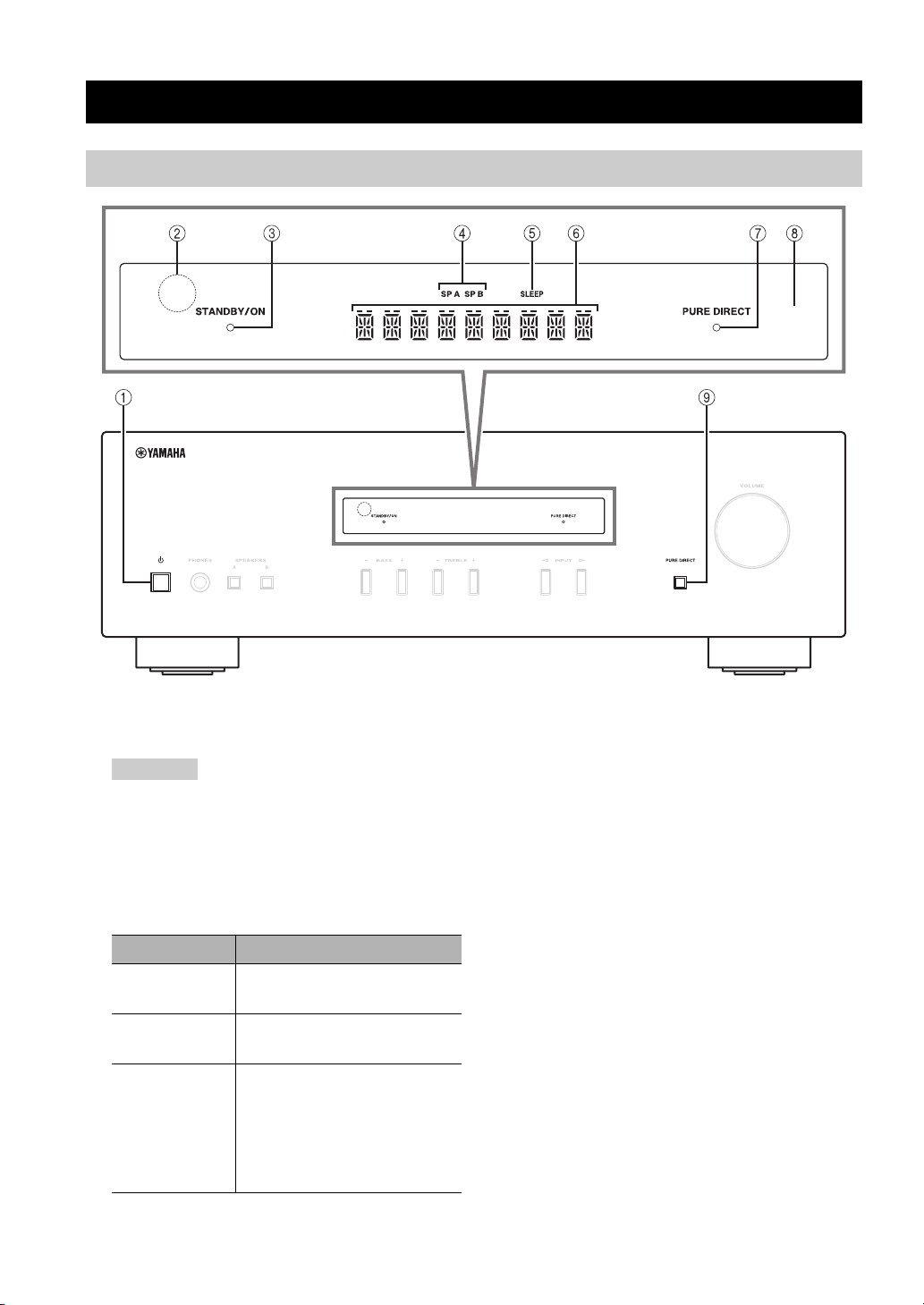
Panneau avant
1 A (alimentation)
Met l’appareil sous tension ou en mode veille.
Remarque
Cet appareil consomme une faible quantité de courant même
lorsqu’il est en mode veille.
2 Capteur de télécommande
Reçoit les signaux infrarouges émis par la
télécommande.
3 Témoin STANDBY/ON
Témoin État
Fortement
éclairé
Faiblement
éclairé
Éteint
L’alimentation de cet appareil
est « sous tension ».
Cet appareil est en mode
« veille ».
L’alimentation de cet appareil
est « hors tension ».
Pour éteindre l’appareil,
débranchez le cordon
d’alimentation de la prise
secteur.
4 Témoins SP (SPEAKERS) A/B
S’allument en fonction du jeu d’enceintes sélectionné.
Les deux témoins s’allument lorsque les deux jeux
d’enceintes sont sélectionnés.
5 Témoin SLEEP
S’allume lorsque la minuterie de veille est activée
(voir page 11).
6 Affichage multi-informations
Affiche des informations lors du réglage ou de la
modification de certains paramètres.
7 Témoin PURE DIRECT
S’allume lorsque la fonction Pure Direct est activée.
8 Afficheur du panneau avant
Indique des informations sur l’état opérationnel de
l’appareil.
9 Touche PURE DIRECT
Pour reproduire toute source d’entrée avec le son le
plus pur possible (voir page 11).
2 Fr
COMMANDES ET FONCTIONS
INTRODUCTION
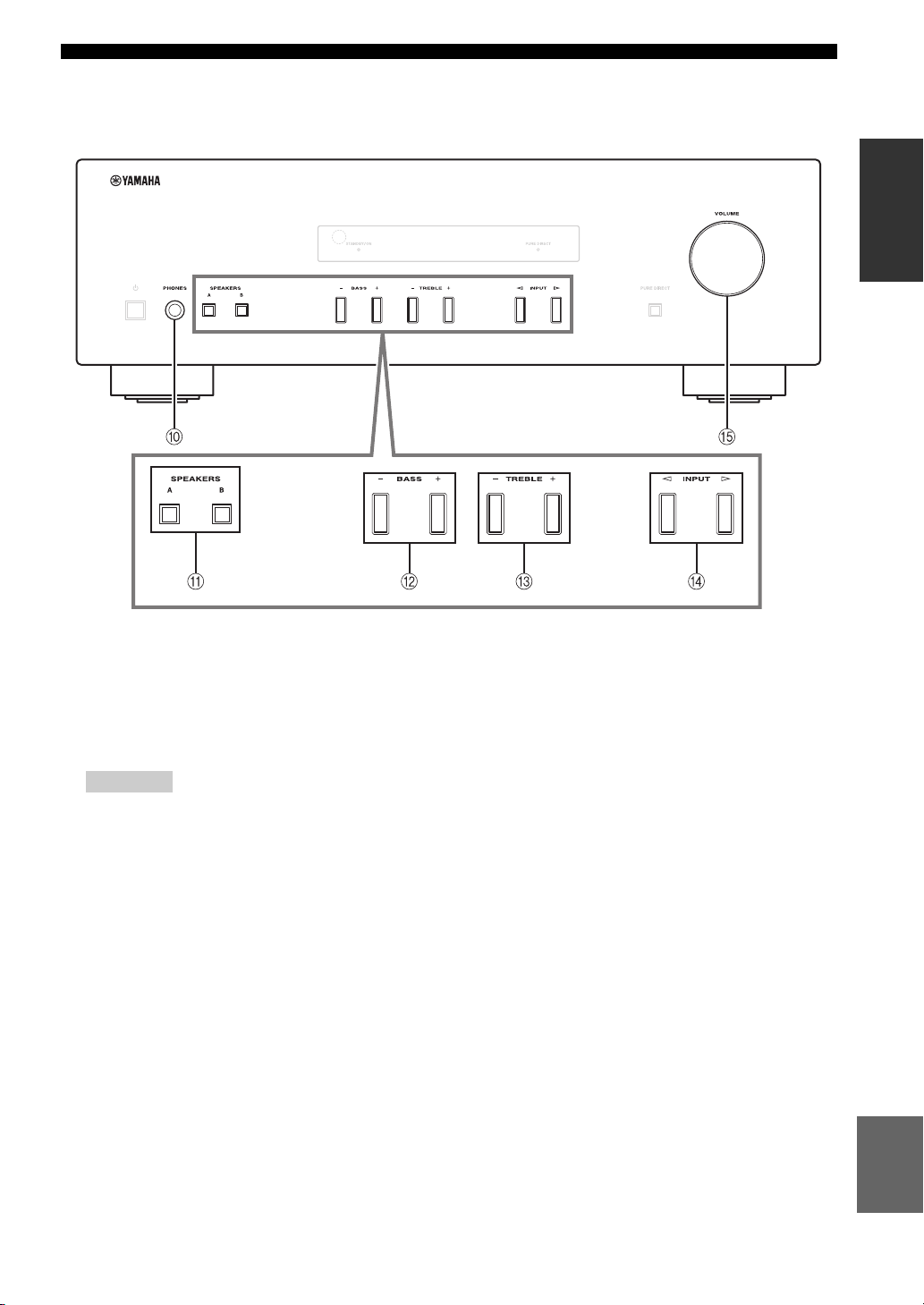
0 Prise PHONES
Dévie le son vers votre casque en vue d’une écoute
individuelle.
Remarque
Appuyez sur SPEAKERS A/B afin d’éteindre les témoins SP
A/B (voir page 2) avant de brancher votre casque sur la prise
PHONES.
A SPEAKERS A/B
Active ou désactive le jeu d’enceintes raccordées aux
bornes SPEAKERS A et/ou SPEAKERS B situées sur
le panneau arrière à chaque pression sur la touche
correspondante (voir page10).
B BASS –/+
Augmente ou réduit la réponse dans les basses
fréquences.
Plage de commande : –10 dB à +10 dB
C TREBLE –/+
Augmente ou réduit la réponse dans les hautes
fréquences.
Plage de commande : –10 dB à +10 dB
D INPUT l / h
Sélectionne la source d’entrée que vous souhaitez
écouter.
E Commande VOLUME
Augmente ou réduit le niveau sonore.
Français
3 Fr

COMMANDES ET FONCTIONS
Panneau arrière
1 Cordon d’alimentation
Utilisé pour brancher cet appareil à une prise secteur
(voir page 9).
2 Borne GND
Utilisée pour brancher un tourne-disque (voir page 8).
3 Prises PHONO
Utilisée pour brancher un tourne-disque (voir page 8).
4 Prises CD
Utilisées pour brancher un lecteur de CD (voir page 8).
5 Prises TUNER
Utilisées pour brancher un syntoniseur (voir page 8).
6 Prises LINE 1
Utilisées pour brancher des composants audio
(voir page 8).
4 Fr
7 Prises LINE 2
Prises PB (Lecture)
Utilisées pour brancher les prises de sortie audio d’un
composant audio.
Prises REC (Enregistrement)
Utilisées pour brancher les prises d’entrée audio d’un
composant audio.
8 Bornes SPEAKERS
Utilisées pour brancher des enceintes (voir page 8).
9 VOLTAGE SELECTOR (Seulement pour le
modèle général)

Télécommande
COMMANDES ET FONCTIONS
4 DIMMER
Choisissez le niveau d’éclairage sur l’afficheur du
panneau avant parmi 3 niveaux en appuyant sur cette
touche de façon répétée.
y
• Ce réglage est conservé même si vous mettez cet appareil
hors tension.
• Le réglage par défaut est le niveau le plus lumineux.
5 TREBLE –/+
Augmente ou réduit la réponse dans les hautes
fréquences.
Plage de commande : –10 dB à +10 dB
6 BASS –/+
Augmente ou réduit la réponse dans les basses
fréquences.
Plage de commande : –10 dB à +10 dB
7 B / C / D / E / ENTER
Sélectionne et confirme les articles du menu Option
(voir page 12).
8 MENU
Ouvre et ferme le menu Option (voir page 12).
9 VOLUME +/–
Augmente ou réduit le niveau sonore.
INTRODUCTION
■ Commandes communes
Il est possible d’utiliser les touches et les commandes
suivantes quelle que soit la source d’entrée sélectionnée.
1 Émetteur de signal infrarouge
Envoie des signaux infrarouges.
2
A (alimentation)
Met l’appareil sous tension ou en mode veille.
3 SLEEP
Règle la minuterie de veille (voir page 11).
0 Touches du sélecteur d’entrée
Pour sélectionner la source d’entrée que vous
souhaitez écouter.
y
Les noms des sources d’entrée correspondent à ceux des
prises de raccordement du panneau arrière.
A BALANCE L/R
Équilibre le son reproduit par les enceintes gauche et
droite afin de compenser le déséquilibre sonore.
Plage de commande :
(+20 dB) (centre) (+20 dB)
Le côté opposé du
canal est désactivé.
Le côté opposé du
canal est désactivé.
B Touche PURE DIRECT
Pour reproduire toute source d’entrée avec le son le
plus pur possible (voir page 11).
C MUTE
Désactive le son. Appuyez de nouveau sur cette
touche pour rétablir le niveau sonore antérieur.
Français
Suite page suivante.
5 Fr

COMMANDES ET FONCTIONS
■ Touches de commande d’un syntoniseur
Yama ha
Vous pouvez utiliser les touches suivantes pour
commander les différentes fonctions d’un syntoniseur
Ya ma ha .
D TUNING jj / ii
Sélectionne la fréquence de syntonisation.
A/B/C/D/E, PRESET j / i
Sélectionne une station FM/AM présélectionnée.
A/B/C/D/E : Sélectionne le groupe de présélections
de A à E.
PRESET j / i : Sélectionne le numéro de présélection.
BAND
Sélectionne la bande de réception (FM/AM).
MEMORY
Mémorise la station FM/AM actuelle sous la forme
d’une présélection.
INFO
Seulement pour le modèle pour l’Europe :
Permet de changer les informations indiquées sur
l’afficheur du panneau avant.
Remarque
Même si vous utilisez un syntoniseur Yamaha, il se peut que
certains composants et fonctions ne soient pas disponibles.
Reportez-vous au mode d’emploi des composants pour plus
d’informations.
■ Commandes d’un lecteur de CD Yamaha
Vous pouvez utiliser les touches suivantes pour
commander un lecteur de CD Yamaha.
E Touches de commande d’un lecteur de CD
Yama ha
s Arrête la lecture
e Suspend la lecture
p Démarre la lecture
DISC SKIP Passe au disque suivant dans un
chargeur multidisque
b Recule
a Avanc e
Éjecte le disque
w Rembobine
f Lecture en avance rapide
Remarque
Même si vous utilisez un lecteur de CD Yamaha, il se peut que
certains composants et certaines fonctions ne soient pas
disponibles. Reportez-vous au mode d’emploi des composants
pour plus d’informations.
6 Fr

Utilisation de la télécommande
COMMANDES ET FONCTIONS
■ Installation des piles ■ Portée de la télécommande
Dirigez la télécommande vers le capteur de télécommande
de cet appareil et restez dans zone de portée de la
télécommande indiquée ci-dessous.
Environ
6m
Piles AA, R6, UM-3
Télécommande
■ Remarques sur la télécommande et les piles
• Entre la télécommande et l’appareil, l’espace doit être libre de tout obstacle encombrant.
• Faites attention à ne pas renverser d’eau ou d’autres liquides sur la télécommande.
• Faites attention à ne pas laisser tomber la télécommande.
• Ne conservez pas ou ne rangez pas la télécommande dans les endroits suivants :
– lieux très humides, par exemple près d’une salle de bains,
– lieux très chauds, par exemple près d’un appareil de chauffage ou d’un poêle,
– lieux exposés à des températures très basses,
– endroits poussiéreux.
• Remplacez toutes les piles lorsque vous remarquez que la portée de la télécommande est plus courte.
• Retirez immédiatement les piles épuisées de la télécommande pour éviter tout risque d’explosion ou de fuite d’acide.
• Si les piles fuient, mettez-les au rebut immédiatement, en évitant de toucher le produit qui a fui. En cas de contact entre le produit qui
a fui et votre peau, vos yeux ou votre bouche, rincez-les immédiatement et consultez un médecin. Avant d’installer de nouvelles
piles, nettoyez soigneusement le logement des piles.
• Ne combinez jamais des piles neuves et des piles usagées. Cela peut réduire la durée de vie des piles neuves ou faire fuir les
anciennes.
• N’utilisez pas non plus des piles de types différents (par exemple, des piles alcalines et des piles au manganèse). Des piles
d’apparence identique peuvent présenter des caractéristiques différentes.
• Avant d’insérer des piles neuves, nettoyez leur logement.
• Les piles doivent être mises au rebut conformément à la réglementation locale.
• Conservez les piles dans un endroit hors de portée des enfants.
Les piles peuvent être dangereuses si un enfant les met dans sa bouche.
• Si vous prévoyez de ne pas utiliser cet appareil pendant un certain temps, retirez les piles. Sinon, les piles s’usent et risquent de fuir,
ce qui peut endommager l’appareil.
INTRODUCTION
7 Fr
Français

PRÉPARATION
RACCORDEMENTS
Raccordement des enceintes et des composants source
Assurez-vous de raccorder L (gauche) sur L, R (droite) sur R, « + » sur « + » et « – » sur « – ». Si le raccordement est
défectueux, aucun son n’est émis par l’enceinte, et si la polarité de la connexion est incorrecte, les sons manquent de
naturel et de composantes graves. Reportez-vous au mode d’emploi de chaque composant.
Assurez-vous d’utiliser les câbles RCA pour brancher les composants audio.
ATTENTION
• Ne raccordez pas cet appareil ou d’autres composants au secteur tant que toutes les connexions entre les composants
ne sont pas établies.
• Ne laissez pas les fils d’enceinte dénudés se toucher ni entrer en contact avec les pièces métalliques de cet appareil.
Cela risquerait d’endommager l’appareil et/ou les enceintes.
Enceintes A
GaucheDroite
Lecteur de CD
Sortie
audio
Lecteur de DVD,
etc.
Sortie
audio
GND
Tourne-disque
Sortie
audio
Sortie
audio
Syntoniseur
Sortie
audio
Enregistreur de CD,
Entrée
etc.
audio
GaucheDroite
Enceintes B
y
• Les prises PHONO sont destinées au raccordement d’un tourne-disque doté d’une cartouche MM.
• Raccordez votre tourne-disque à la borne GND afin de réduire le bruit dans le signal. Toutefois, il se peut que vous entendiez moins de
bruit en débranchant certains tourne-disques de la borne GND.
8 Fr

RACCORDEMENTS
■ Prises REC
• Les prises REC sortent des signaux audio de l’entrée
actuellement sélectionnée (sauf lorsque LINE 2 est
sélectionné).
• Les réglages du niveau de volume, du contrôle du son,
de l’équilibre et de Pure Direct n’affectent pas les
prises REC.
■ Raccordement des câbles d’enceinte
1 Retirez environ 10 mm d’isolation à l’extrémité de
chaque câble d’enceinte.
2 Torsadez fermement les fils dénudés du câble.
3 Dévissez le bouton.
4 Insérez un fil dénudé dans l’orifice situé sur le côté de
chaque borne.
5 Serrez le bouton pour fixer le fil.
Rouge : positif (+)
Noir : négatif (–)
■ Raccordement avec une fiche banane
(Sauf modèles pour l’Asie, le RoyaumeUni et l’Europe)
1 Vissez le bouton.
2 Insérez la fiche banane dans l’extrémité de la borne
correspondante.
Fiche banane
■ Connexion bifilaire
Une connexion bifilaire a pour effet de séparer les graves
des médiums et des aigus.
Une enceinte compatible avec ce type de connexion est
pourvue de quatre bornes de connexion. Ces deux jeux de
bornes permettent de diviser l’enceinte en deux sections
indépendantes. Lorsque ces connexions sont effectuées,
les circuits d’attaque des médiums et des aigus sont reliés
à un jeu de bornes et le circuit d’attaque des graves est
relié à l’autre jeu de bornes.
Panneau arrière
Enceinte
PRÉPARATION
Raccordez l’autre enceinte à l’autre jeu de bornes en
procédant de la même manière.
Remarque
Lorsque vous établissez des connexions bifilaires, retirez les
ponts de court-circuitage ou les câbles des enceintes.
y
Pour utiliser les connexions bifilaires, appuyez sur SPEAKERS A
et SPEAKERS B sur le panneau avant pour que SP A et B
s’allument sur l’afficheur du panneau avant.
Raccordement du cordon
d’alimentation
Une fois tous les raccordements effectués, branchez le
cordon d’alimentation sur une prise secteur.
ATTENTION
L’impédance de l’enceinte doit être réglée comme indiqué
ci-dessous.
Raccordement des
enceintes
SPEAKERS A ou
SPEAKERS B
SPEAKERS A et
SPEAKERS B
Impédances des
enceintes
8 Ω ou supérieur
16 Ω ou supérieur
(sauf pour le modèle pour
l’Amérique du Nord)
Bifilaire
8 Ω ou supérieur
ATTENTION
Seulement pour le modèle général :
Avant de brancher le cordon d’alimentation, assurez-vous
d’avoir réglé le VOLTAGE SELECTOR de cet appareil en
fonction de votre tension locale. Un réglage incorrect du
VOLTAGE SELECTOR peut provoquer un incendie et
endommager l’appareil.
Vers la prise
secteur avec le
cordon
d’alimentation
Français
9 Fr

OPÉRATIONS DE BASE
LECTURE
Lecture d’une source
Touches du
sélecteur
d’entrée
TREBLE –/+
BASS –/+
BALANCE L/R
VOLUME +/–
A (alimentation)
1 Appuyez sur A (alimentation) pour allumer
l’appareil.
2 Appuyez sur l’une des touches du sélecteur
d’entrée pour sélectionner la source d’entrée
voulue.
3 Appuyez sur SPEAKERS A et/ou sur
SPEAKERS B sur le panneau avant pour
sélectionner la ou les enceintes voulues.
Remarques
• Lorsqu’un jeu d’enceintes est branché à l’aide de connexions
bifilaires, ou lorsque deux jeux d’enceintes sont utilisés
simultanément (A et B), vérifiez que SP A et SP B sont affichés
sur l’afficheur du panneau avant.
• Si vous écoutez à l’aide d’un casque, désactivez les enceintes.
4 Lisez la source.
SPEAKERS A/B
5 Appuyez sur VOLUME +/– pour régler le
niveau sonore.
y
Vous pouvez régler la qualité des tonalités à l’aide de
BASS –/+, TREBLE –/+, et l’équilibre gauche/droite du son
des enceintes à l’aide de BALANCE L/R (voir page 5).
6 Une fois l’écoute terminée, appuyez sur A
(alimentation) pour mettre l’appareil en mode
veille.
Appuyez sur A (alimentation) pour remettre
l’appareil sous tension.
y
• Vous pouvez également utiliser les touches ou les boutons du
panneau avant s’ils portent le même nom ou un nom semblable
sur la télécommande.
• Pour l’enregistrement, voir page 4.
10 Fr

LECTURE
Écoutez un son pur de haute
fidélité (Pure Direct)
La fonction Pure Direct contourne les circuits inutiles de
cet appareil afin de réduire le bruit électronique pendant la
lecture de la source sélectionnée. Cela vous permet
d’écouter une qualité de son haute fidélité.
Le témoin PURE DIRECT s’allume et l’afficheur du
panneau avant s’éteint après quelques secondes.
Touche PURE
DIRECT
Témoin PURE DIRECT
Utilisation de la minuterie de
veille
Cette fonction permet de mettre automatiquement
l’appareil en mode veille après un certain laps de temps.
La minuterie de veille est utile lorsque vous allez vous
coucher alors que l’appareil lit ou enregistre une source.
SLEEP
Appuyez plusieurs fois de suite sur SLEEP pour
régler le laps de temps avant la mise en mode
veille de l’appareil.
Chaque fois que vous appuyez sur SLEEP, l’afficheur du
panneau avant change comme indiqué ci-dessous.
A (alimentation)
OPÉRATIONS DE
BASE
Remarque
Les commandes BASS, TREBLE et BALANCE ne fonctionnent
pas lorsque la fonction PURE DIRECT est activée.
Le témoin SLEEP clignote pendant le réglage de la
durée de la minuterie de veille.
Lorsque la minuterie de veille est activée, le témoin
SLEEP sur l’afficheur du panneau avant s’allume.
y
Pour annuler la minuterie de veille, exécutez l’une des actions
suivantes :
– Sélectionnez « SLEEP OFF ».
– Mettez cet appareil en mode veille.
Français
11 Fr
OPÉRATIONS AVANCÉES
PARAMÉTRAGE DU MENU OPTION POUR CHAQUE SOURCE
D’ENTRÉE
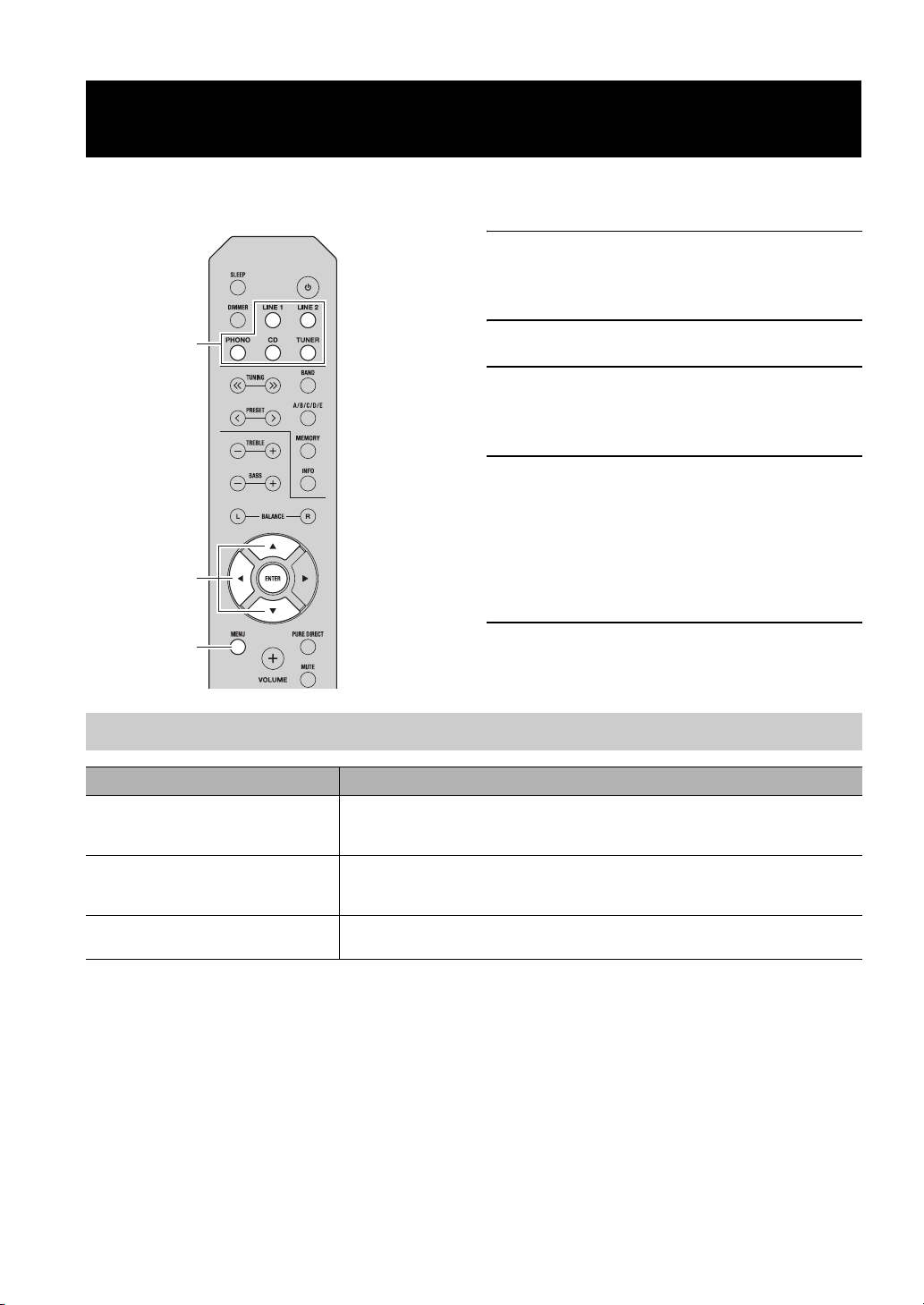
Le menu Option vous permet de configurer divers paramètres pour chaque source d’entrée et de rappeler
automatiquement ces paramètres lorsqu’une source d’entrée est sélectionnée.
1 Appuyez sur l’une des touches du sélecteur
d’entrée pour sélectionner la source d’entrée
voulue.
Touches du
sélecteur
d’entrée
2 Appuyez sur MENU.
3 Appuyez sur B / C pour sélectionner
l’élément de menu souhaité, puis appuyez
sur ENTER.
4 Appuyez sur B / C pour modifier les
paramètres.
y
• Pour certains éléments de menu, vous devez appuyer sur
B / C / D
ENTER
MENU
ENTER pour enregistrer le nouveau réglage.
• Pour revenir à l’écran où vous pouvez sélectionner les
éléments de menu, appuyez sur D.
5 Pour quitter le menu Option, appuyez sur
MENU.
Éléments du menu Option
Élément de menu Description
MAX VOL Règle le niveau sonore maximal afin que le volume ne puisse pas être accidentellement
INITIAL VOLUME (INIT VOL) Règle le volume au moment de la mise sous tension de l’appareil. Lorsque ce paramètre est
AUTO POWER STANDBY
(AUTO STBY)
augmenté au-dessus d’un certain niveau.
Plage ajustable : 01 à 99, MAX*
réglé sur « OFF », le niveau sonore utilisé lors de la mise en veille de l’appareil est appliqué.
Plage ajustable : OFF*, MUTE, 01 à 99, MAX
Règle l’appareil automatiquement en mode veille s’il reste inactif pendant la durée spécifiée.
Choix : OFF/2H/4H/8H*/12H
y
Les paramètres par défaut sont indiqués par un « * ».
12 Fr
Loading…
Document Download |
‹
›
Yamaha A-S201 Manual Online:
3.55,
2877
votes
Yamaha A-S201 User Manual
Yamaha A-S201 User Guide
Yamaha A-S201 Online Manual
Text of Yamaha A-S201 User Guide:
More Instructions:
|
Yamaha A-S201 Owner’s manual
|
DOWNLOAD |
Related Products and Documents (Amplifier):
-
Yamaha P1250 Amplifier Operating manual
P1250
yamaha/p1250.pdf, 44 -
Yamaha CA-1000 Amplifier Owner’s manual
CA-1000
yamaha/ca-1000.pdf, 27 -
Yamaha A-1 Amplifier Owner’s manual
A-1
yamaha/a-1.pdf, 20 -
Yamaha DG100-212 Amplifier Owner’s manual
DG100-212
yamaha/dg100-212.pdf, 32 -
Yamaha AST-A90M Amplifier Owner’s manual
AST-A90M
yamaha/ast-a90m.pdf, 20 -
Yamaha AP-U70 Amplifier Setup manual
AP-U70
yamaha/ap-u70.pdf, 47 -
Yamaha CA-44 Amplifier Owner’s manual
CA-44
yamaha/ca-44.pdf, 14 -
Yamaha DSP-AX2 Amplifier Owner’s manual
DSP-AX2
yamaha/dsp-ax2.pdf, 71
Comparable Devices:
| # | Manufacturer | Model | Document Type | File | Updated | Pages | Size |
|---|---|---|---|---|---|---|---|
| 1 | NetComm | RTA1320 | Operation & user’s manual | netcomm/rta1320-4M6.pdf | 18 Apr 2024 | 91 | |
| 2 | Ryobi | HD501 | Operator’s manual | ryobi/hd501-F4Q.pdf | 18 May 2024 | 16 | 0.25 Mb |
| 3 | Panasonic | KX-TCC936B | Operation & user’s manual | panasonic/kx-tcc936b-IFU.pdf | 30 Sep 2023 | 80 | 1.72 Mb |
| 4 | Hamilton Beach | 990 — 990 Commercial Food Blender | Operation manual | hamilton-beach/990-990-commercial-food-blender-2U6.pdf | 26 Dec 2024 | 34 | 1.82 Mb |
| 5 | HP | OFFICEJET PRO 8500A | Brochure & specs | hp/officejet-pro-8500a-NX8.pdf | 10 Apr 2025 | 2 | |
| 6 | Pioneer | DV-989AVi-G | Operating instructions manual | pioneer/dv-989avi-g-H67.pdf | 03 Feb 2024 | 96 |
Similar Resources:
Amplifier Instructions:
-
TQC Test Equipment VF6500
#98ZI41: VF6500 Test Equipment Operation & user’s manual
VF6500, 12
-
Team C Motorized Toy Car t4 u2
Motorized Toy Car Operation & user’s manual (Team C t4 u2)
t4 u2, 31
-
switel Two-Way Radio 1418
switel 1418 Two-Way Radio Operating instructions manual
1418, 60
-
Dell All in One Printer 3335DN
Dell 3335DN User Manual (Doc Type: All in One Printer Operation & user’s manual)
3335DN, 303
-
Reebok Other 910 Treadmill
910 Treadmill Manual — B395NL
910 Treadmill, 36
-
ETIC Firewall IPL-A
Firewall #47811B
IPL-A, 40
-
Electrolux Oven E30EW75ESS3
E30EW75ESS3 Installation instructions manual — R1VY1F
E30EW75ESS3, 20
-
Sitecom Wireless Router GREYHOUND
User Manual: Sitecom GREYHOUND (3VV7VE, Upd.Saturday 11-01-2025)
GREYHOUND, 10
-
Vive Medical Equipment RHB1038
Vive Medical Equipment Operation & user’s manual (File: vive-rhb1038-operation-user-s-manual-7, Fri 02.2025)
RHB1038, 7
-
Tornado Floor Machine 99732
Tornado Floor Machine Operation & maintenance manual (File: tornado-99732-operation-maintenance-manual-23, 08th Jan 2025)
99732, 23
-
ZyXEL Communications Network Router Prestige 480
ZyXEL Communications Prestige 480 User Manual (Operation & user’s manual), @X6DPXQ
Prestige 480, 240
-
Shimano Bicycle Accessories RD-M970
Bicycle Accessories Service instructions (Shimano RD-M970)
RD-M970, 1
Comments, Questions and Opinions:
FAQ: Types of Manuals and Their Contents
Yamaha A-S201 Manuals come in various types, each serving a specific purpose to help users effectively operate and maintain their devices. Here are the common types of Yamaha A-S201 User Guides and the information they typically include:
- User Manuals: Provide comprehensive instructions on how to use the device, including setup, features, and operation. They often include troubleshooting tips, safety information, and maintenance guidelines.
- Service Instructions: Designed for technicians and repair professionals, these manuals offer detailed information on diagnosing and repairing issues with the device. They include schematics, parts lists, and step-by-step repair procedures.
- Installation Guides: Focus on the installation process of the device, providing detailed instructions and diagrams for proper setup. They are essential for ensuring the device is installed correctly and safely.
- Maintenance Manuals: Provide guidance on routine maintenance tasks to keep the device in optimal condition. They cover cleaning procedures, part replacements, and regular servicing tips.
- Quick Start Guides: Offer a concise overview of the essential steps needed to get the device up and running quickly. They are ideal for users who need immediate assistance with basic setup and operation.
Each type of Yamaha A-S201 instruction is designed to address specific needs, ensuring users have the necessary information to use, maintain, and repair their devices effectively.
Related Instructions for Yamaha A-S201:
1
YDRE
Owner’s manual YDRE (Offroad Vehicle ePDF Manual, #G87LO2)
46
223
50
2
PSR-150
Owner’s manual PSR-150 (Electronic Keyboard ePDF User Guide, #425XI3)
24
419
88
3
CYGNUS.X NXC125
Owner’s manual CYGNUS.X NXC125 (Scooter ePDF User Guide, #DDC8ZN)
76
850
213
4
CRYPTON T105E/SE
Owner’s manual CRYPTON T105E/SE (Motorcycle ePDF User Manual, #5HN1VU)
76
1343
296
5
YZ250F(T)
Owner’s service manual Yamaha Motorcycle Owner’s service manual (File: yamaha-yz250f-t-motorcycle-668, Thursday 16-01-2025)
668
1048
179
7
YFM125S
Service manual User Manual: Yamaha YFM125S (2837H2, Upd.11/11/2024)
41
1075
172
9
YST-RSW300
Service manual PDF User Guide (@4911O5), Yamaha YST-RSW300 Subwoofer (Sun 11.2024)
19
1382
263
10
M7CL
Upgrade manual Manual: Yamaha M7CL (819113, Upd.16th Feb 2025)
7
1383
249
Amplifier Devices by Other Brands:
|
Paradigm TDA2822 Assembly Manual Paradigm TDA2822 User Guide (Assembly manual), @1O215D Illustrated assembly manual 14 Dec 2024 | 7 |
|
|
Behringer EUROPOWER EPX2000 Brochure & Specs Behringer Amplifier Brochure & specs (File: behringer-epx2000-brochure-specs-4, 23.12.2024) behringer.com 23 Dec 2024 | 4 |
|
|
Rockville KRYPTON Series Owner’s Manual PDF User Guide (@AZ1253), Rockville KRYPTON Series Amplifier (06/11/2024) Who reads manuals? 06 Nov 2024 | 28 |
|
|
Martin Roland MA-3000HD Operation Manual Martin Roland Amplifier Operation manual (File: martin-roland-ma-3000hd-operation-manual-8, 10.11.2024) MA-3000 HD 10 Nov 2024 | 8 |
Categories:
Electronic keyboards
Av receiver
Industrial Equipment
Generator
Snowmobile
Surround system