

Škoda Auto pursues a policy of constant product and model development. We trust
that you will understand that changes to models in terms of shape, equipment and
engineering, may be introduced at any time. The information about scope of
delivery, appearance, performances, dimensions, weight, fuel consumption,
standards and functions of the vehicle is only correct at the time of publication.
Certain items of equipment might only be installed later on (information given by
the local authorised Škoda Service Partner) and only envisaged for particular
markets. It is therefore not possible for legal claims to be made based on the data,
illustrations and descriptions contained in this Owner’s Manual.
Reprinting, reproduction or translation, either in whole or in part, is not permitted
without the written consent of Škoda Auto.
Škoda Auto expressly reserves all rights relating to copyright laws.
We reserve the right to make changes to this document.
Issued by: ŠKODA AUTO a.s.
© ŠKODA AUTO a.s. 2009

Contents
Contents 1
General information . . . . . . . . . . . . . . . . .
Equipment overview . . . . . . . . . . . . . . . . . . . . . . . . . .
Important information . . . . . . . . . . . . . . . . . . . . . . . .
Anti-theft protection . . . . . . . . . . . . . . . . . . . . . . . . . .
Basic setting . . . . . . . . . . . . . . . . . . . . . . . . . . . . . . . . . . .
Radio mode . . . . . . . . . . . . . . . . . . . . . . . . . . . . . . . . . . .
CD player . . . . . . . . . . . . . . . . . . . . . . . . . . . . . . . . .
Using the system . . . . . . . . . . . . . . . . . . . . . . . . . . . . . .
2
2
2
3
3
5
7
7

General information2
General information
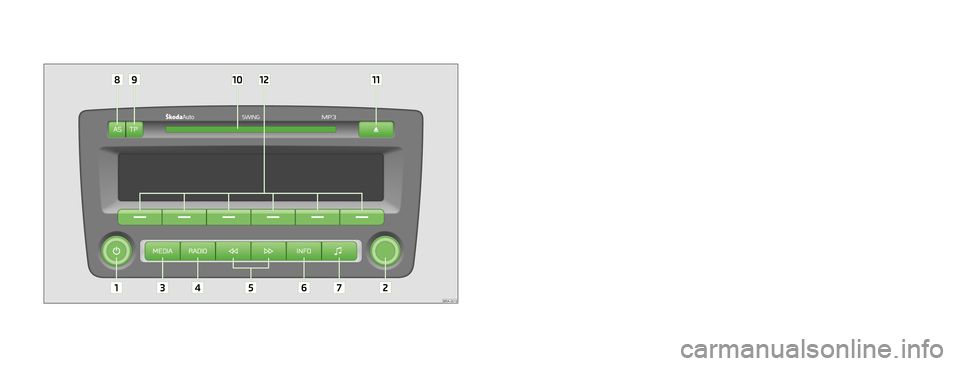
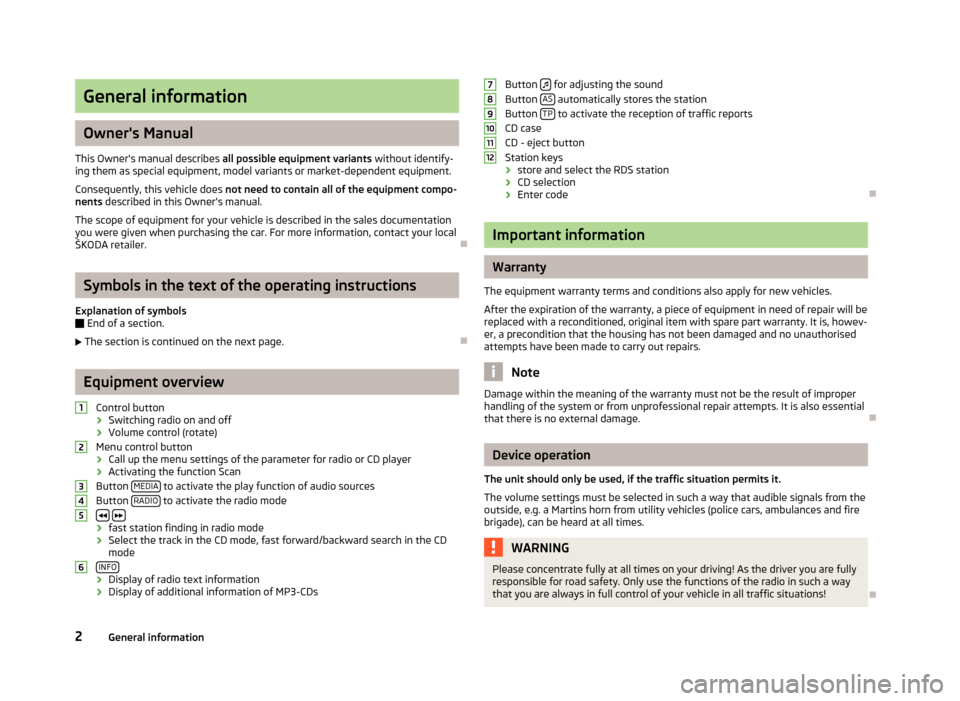
Equipment overview
Control button
− Switching radio on and off
− Volume control (rotate)
2
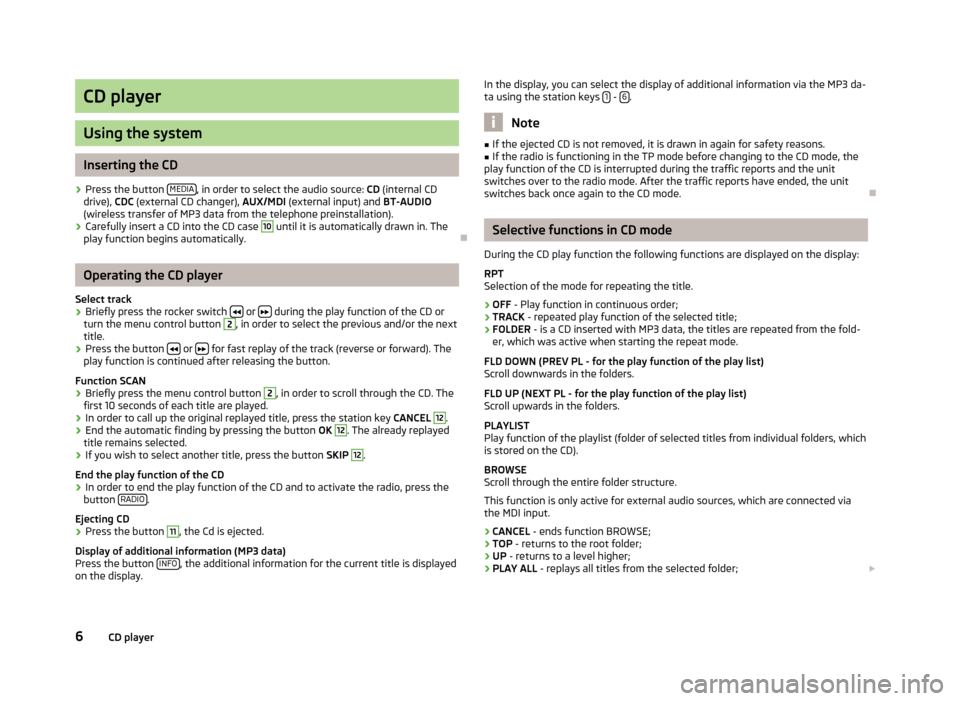
Menu control button — to call up the menu of the parameter setting for radio or
CD player
3 MEDIA
Button to activate the play function of audio sources
4 RADIO
Button to activate the radio mode
5
Buttons
− fast station finding in radio mode
− Select the track in the CD mode, fast forward/backward search in the CD
mode
6 INFO
Button
− Display of radio text information
− Display of additional information of MP3-CDs
7
Button for adjusting the sound
8 AS
Button automatically stores the station
9 TP
Button to activate the reception of traffic reports
CD case
11
CD — eject button
12
Station keys
− store and select the RDS station
− CD selection
− Enter code
Explanation of symbols
* items of equipment which are marked in such a way are only installed as standard
on certain models or are supplied as special equipment.
End of a section.
The section is continued on the next page.
Note
This Owner’s Manual describes the range of functions at the time of going to press.
The illustrations can differ in minor details from the version of your unit.
Important information
Warran ty
The equipment warranty terms and conditions also apply for new vehicles.
After the expiration of the warranty, a piece of equipment in need of repair will be
replaced with a reconditioned, original item with spare part warranty. It is, however,
a precondition that the housing has not been damaged and no unauthorised
attempts have been made to carry out repairs.
Note
Damage within the meaning of the warranty must not be the result of improper
handling of the system or from unprofessional repair attempts. It is also essential
that there is no external damage.
Device operation
The unit should only be used, if the traffic situation permits it.
The volume settings must be selected in such a way that audible signals from the
outside, e.g. a Martins horn from utility vehicles (police cars, ambulances and fire
brigade), can be heard at all times.
General information 3
WARNING
Please concentrate fully at all times on your driving! As the driver you are
fully responsible for road safety. Only use the functions of the radio in such
a way that you are always in full control of your vehicle in all traffic
situations!
Using the display
Carefully handle the display because dents and scratches can occur through pressure of the finger or contact with sharp objects.
The display can be cleaned with a soft cloth and finger marks can be wiped away
with pure alcohol.
Note
Do not use solvent such as turpentine or petrol as they will corrode the display
surface.
Anti-theft protection
Anti-theft coding
Your radio is equipped with a convenience coding. If the radio is being operated for
the first time, the safety code is not only stored in the radio but also in the vehicle.
After disconnecting and reconnecting the battery, first of all switch on the ignition
and then the radio.
If you wish to install the radio in another vehicle, the safety code must be entered.
In this case, please do not hesitate to contact an authorised Škoda Service Partner
or a Škoda importer.
As the unit only functions after entering the safety code, this practically excludes its
use after a theft — a contribution to increased anti-theft safety.
Note
The code is stored in the instrument cluster. This ensures that it is automatically
decoded (convenience coding). Manual input of the code is normally not
necessary.
Enter code
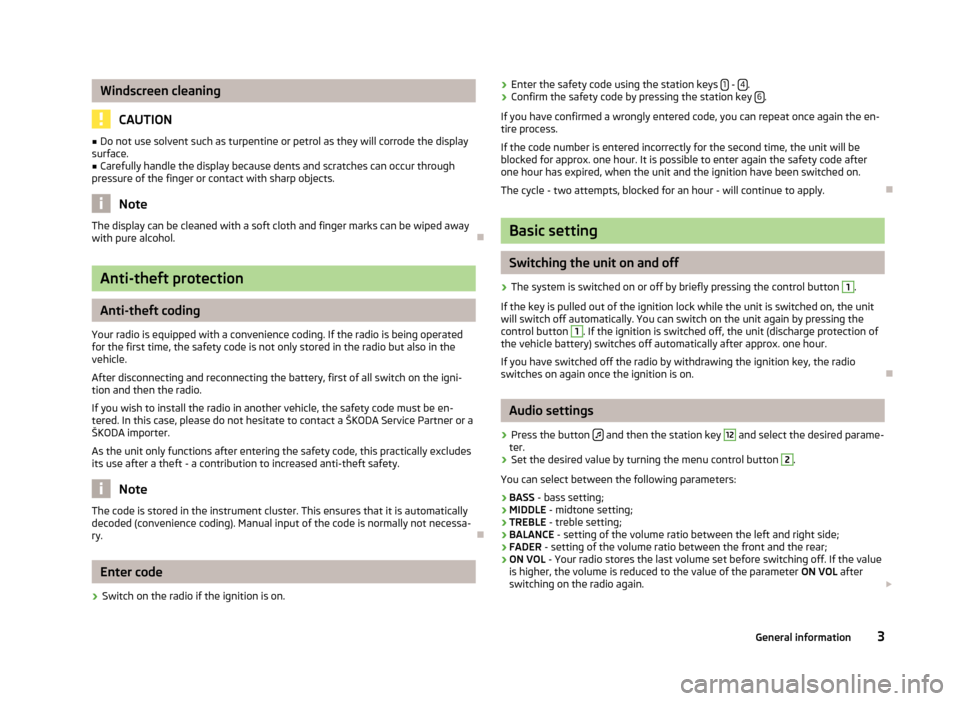
– Switch on the radio if the ignition is on.
– Enter the safety code using the station keys — .
– Confirm the safety code by pressing the station key .
If you have confirmed a wrongly entered code, you can repeat once again the entire
process.
If the code number is entered incorrectly for the second time, the unit will be
blocked for approx. one hour. It is possible to enter again the safety code after one
hour has expired, when the unit and the ignition have been switched on.
The cycle — two attempts, blocked for an hour — will continue to apply.
1 4
6
Basic setting
Switching the unit on and off
– The system is switched on or off by briefly pressing the control button
1
.
If the key is pulled out of the ignition lock while the unit is switched on, the unit will
switch off automatically. You can switch on the unit again by pressing the control
1
button . If the ignition is switched off, the unit (discharge protection of the
vehicle battery) switches off automatically after approx. one hour.
If you have switched off the radio by withdrawing the ignition key, the radio
switches on again once the ignition is on.
Manufacturer: SKODA, Model Year: 2012,
Model line: RAPID,
Model: SKODA RAPID 2012 1.G
Pages: 15, PDF Size: 2.43 MB
Trending: ECU, heating, fold seats, CD changer, AUX, key, key battery
Page 1 of 15
Page 2 of 15
Page 3 of 15
Page 4 of 15
Page 5 of 15
Page 6 of 15
Page 7 of 15
Page 8 of 15
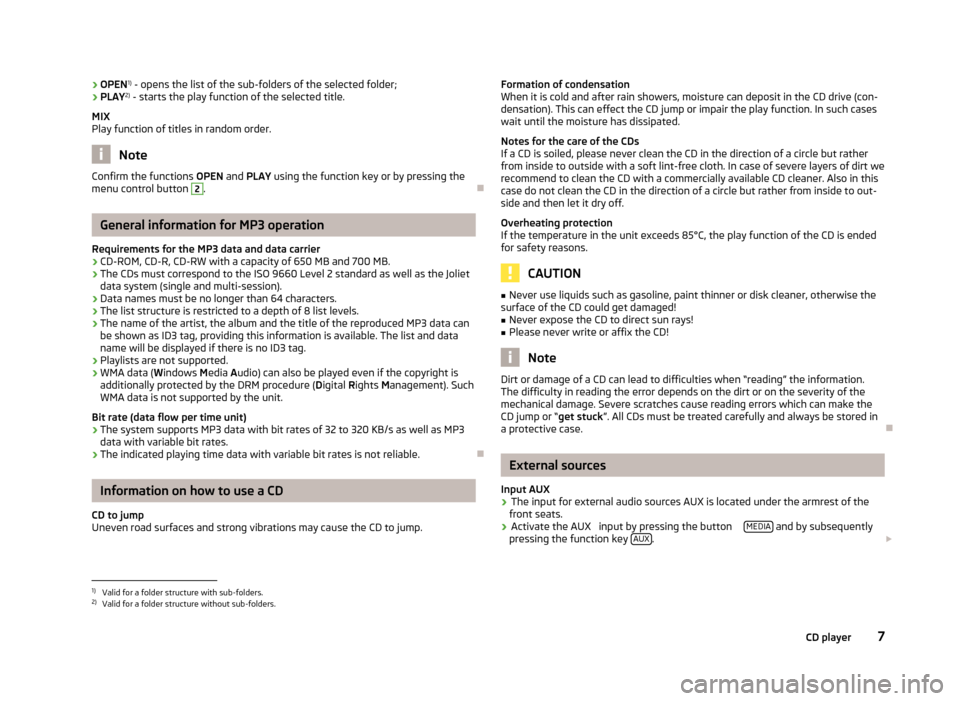
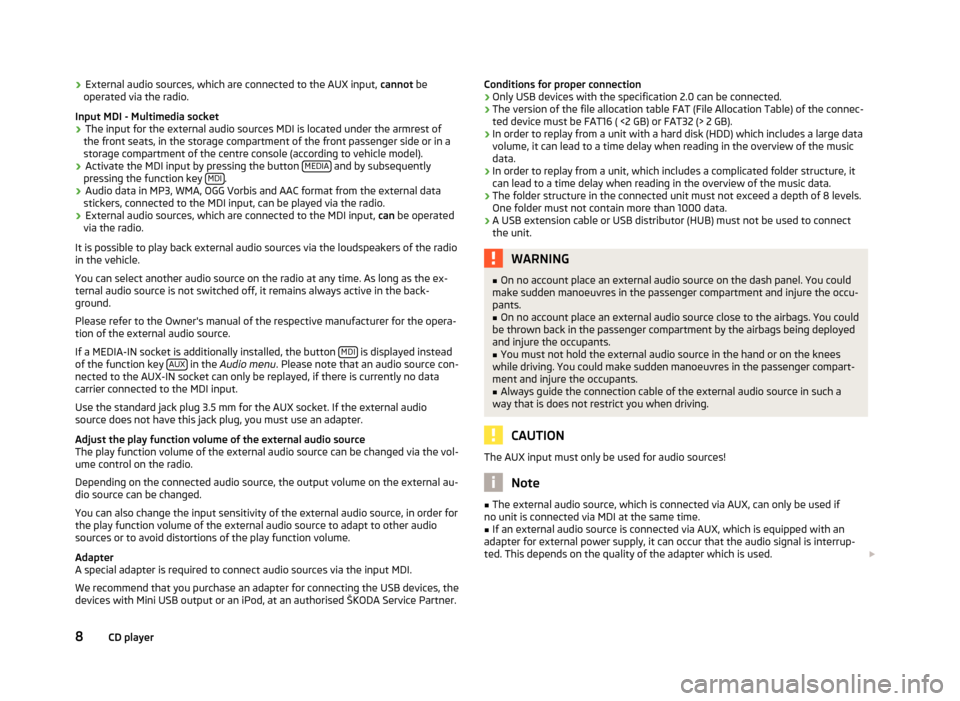
Page 9 of 15
Page 10 of 15
- Load next 10 pages
Trending: CD player, park assist, heating, oil capacity, instrument cluster, ECU, AUX
View, print and download for free: SKODA RAPID 2012 1.G Swing Car Radio Manual, 15 Pages, PDF Size: 2.43 MB. Search in SKODA RAPID 2012 1.G Swing Car Radio Manual online. CarManualsOnline.info is the largest online database of car user manuals. SKODA RAPID 2012 1.G Swing Car Radio Manual PDF Download.
All product names, logos, and brands are property of their respective owners.
Privacy Policy | About Us & Contact
Skoda Swing Infotainment
www.skoda-auto.com
Swing: Fabia, Rapid, Rapid Spaceback, Octavia, Superb
Infotainment anglicky 05.2015
S00.5614.35.20
5E0012720DF
5E0012720DF
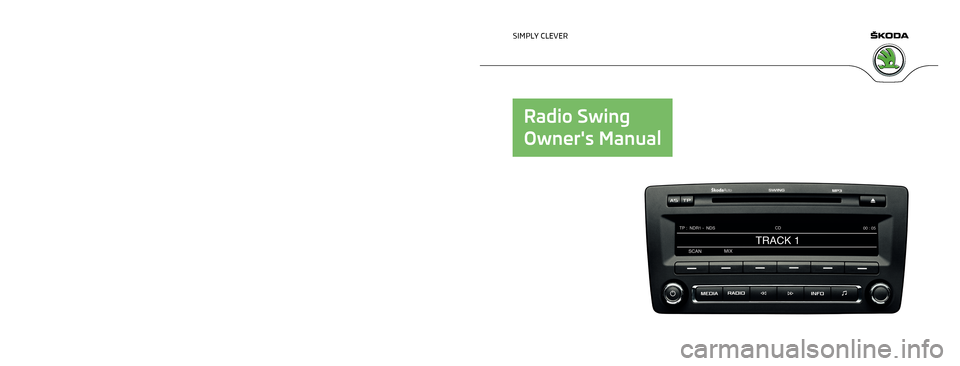
SIMPLY CLEVER
OWNER’S MANUAL
OWNER’S MANUAL
Infotainment Swing
View the manual for the Skoda Swing Infotainment here, for free. This user manual comes under the category navigators and has been rated by 3 people with an average of a 9. This manual is available in the following languages: English. Do you have a question about the Skoda Swing Infotainment?
Ask your question here
Index
- Preface
- Table of Contents
- Important information about this manual
- Notes
- Abbreviations
- Introductory information
- Device operation and settings
- Unit settings
- Radio
- Media
- Telephone
- Vehicle systems
- Index
- Reprinting, reproduction, translation, or any other use, either in whole or in part, is not permitted without the written consent of ŠKODA AUTO a.s..
Product Images (1)

Skoda Swing Infotainment specifications
Below you will find the product specifications and the manual specifications of the Skoda Swing Infotainment.
The Skoda Swing Infotainment system is a navigator designed for use in Skoda vehicles. It provides a range of features and functions that aim to enhance the driving experience.
With a user-friendly interface and clear display, the Skoda Swing Infotainment system allows drivers to easily navigate through various menus and options. It provides precise and accurate directions, ensuring that drivers can reach their destinations efficiently.
The system also includes a radio function, allowing drivers to listen to their favorite stations while on the road. Moreover, it supports various connectivity options, including Bluetooth and USB, enabling drivers to connect their smartphones or other devices and stream music or make hands-free phone calls.
The Skoda Swing Infotainment system comes with a touchscreen display, making it intuitive and easy to use. The screen size may vary depending on the specific Skoda model.
It is worth mentioning that the navigation system is continuously updated, ensuring that drivers have access to the latest maps and information. This helps to ensure accuracy and helps drivers stay on the correct route.
Overall, the Skoda Swing Infotainment system provides a reliable and functional navigator for Skoda vehicle owners. It facilitates convenient and safe navigation, along with additional entertainment features, all within an easy-to-use interface.
General
| Brand | Skoda |
| Model | Swing Infotainment |
| Product | navigator |
| Language | English |
| Filetype | Manual (PDF) |
Frequently asked questions
Can’t find the answer to your question in the manual? You may find the answer to your question in the FAQs about the Skoda Swing Infotainment below.
Do I need internet for GPS?
No, no internet is required to receive GPS.
Can I update the maps of my navigation system?
With most navigation systems it is possible to update maps. Most brands periodically update the maps.
What is GPS?
GPS is a system that can be used all over the globe to determine your location by means of satellites.
What does the abbreviation GPS stand for?
The abbreviation GPS stands for ‘Global Positioning System’.
Is the manual of the Skoda Swing Infotainment available in English?
Yes, the manual of the Skoda Swing Infotainment is available in English .
Is your question not listed? Ask your question here
Система Infotainment Swing головное устройство второго поколения (издание май 2016) руководство по эксплуатации устанавливалась на автомобили Skoda Fabia / Octavia / Rapid / Rapid Spaceback / Superb / Yeti с бензиновыми двигателями и дизельными; Мультимедийная система Свинг инструкция пользователя Шкода Фабия, Йети, Октавия, Рапид и Суперб модели выпуска с 2015 года
Skoda Superb B8 (издание май 2016) руководство по эксплуатации Здесь
Информационно-командные системы Columbus, Amundsen и Bolero руководство по эксплуатации
ЕСЛИ ВЫ ВИДИТЕ ОШИБКУ 406 Not Acceptable и не видите документ, то скорей всего у Вас IP РФ и его надо сменить, на любой другой страны, с помощью VPN ( Scribd и SlideShare блокируют посетителей с Российским IP).
Видео Skoda головное устройство Swing (Шкода с 2015)
Škoda Система Infotainment Swing общая информация
Данное руководство пользователя предназначено для разных исполнений системы Infotainment Swing (далее по тексту именуется как устройство). В зависимости от модели автомобиля, на которую установлено устройство, оно может различаться по внешнему виду и расположению органов управления.
В настоящем руководстве описаны все возможные функции, без указания в каждом конкретном случае, что то или иное оборудование является дополнительным, или устанавливается не на всех моделях или не во всех странах. То есть устройство в вашем автомобиле может содержать не все описанные в руководстве функции. Например, если автомобиль не оборудован штатной аудиосистемой, в меню настройки звука не отображаются пункты SKODA Surround и Virtual Subwoofer.
В этом руководстве по эксплуатации описываются только основные меню настройки устройства. Более полное описание всех настроек можно найти в онлайн-руководстве пользователя » стр. 6. Информацию об устройстве, например сведения о совместимости с внешними устройствами или обновлении ПО, можно найти на сайте.
Доступность некоторых функций, описанных в настоящем руководстве, зависит от типа внешних устройств (например, телефона, музыкального плеера и др.).
Рисунки данного руководства служат только в качестве иллюстраций. Приведённые рисунки в ряде второстепенных деталей могут не соответствовать вашему автомобилю и служат лишь для общей информации.
ŠKODA AUTO постоянно работает над совершенствованием своих автомобилей. Поэтому всегда возможны изменения формы, комплектации и конструкции поставляемых автомобилей. Вся информация приведена в данном руководстве по состоянию на момент подписания его в печать.
Поэтому технические данные, изображения и информация данного Руководства не могут быть основанием для каких-либо претензий.
Интернет-сайты, на которые есть ссылки в настоящем Руководстве по эксплуатации, рекомендуется отображать в классическом виде. При отображении интернет-сайтов в виде для мобильных устройств может быть воспроизведена не вся необходимая информация.
Экранные сообщения, приведённые в настоящем руководстве, могут незначительно отличаться от сообщений устройства, в зависимости от его модели и версии.
Сертификат соответствия
Настоящим фирма ŠKODA AUTO a.s. заявляет, что компоненты информационно-командной системы ŠKODA соответствуют основным требованиям и другим нормам директивы 1999/5/EG о радиооборудовании и телекоммуникационном оборудовании.
| 1.4 TSI 150 л.с. DSG-7 | 1.4 TSI 125 л.с. МКПП-6 | 1.4 TSI 150 л.с. МКПП-6 | 1.4 TSI 150 л.с. DSG-7 | 1.4 TSI 4×4 ACT 150 л.с. МКПП-6 | 1.8 TSI 180 л.с. МКПП-6 | 1.8 TSI 180 л.с. DSG-7 | 2.0 TSI 220 л.с. DSG-6 | 2.0 TSI 4×4 280 л.с. DSG-6 |
|---|---|---|---|---|---|---|---|---|
| Прайс-лист действителен с 10 июня 2016 г. Цены указаны в рублях на автомобили 2017 модельного года | ||||||||
| Active | 1 294 000 | _ | 1 378 000 | _ | _ | _ | _ | _ |
| Ambition | 1 454 000 | 1 488 000 | 1 538 000 | _ | 1 647 000 | 1 697 000 | _ | _ |
| Style | _ | 1 676 000 | 1 726 000 | _ | 1 835 000 | 1 885 000 | 2 026 000 | 2 234 000 |
| Laurin & Klement | _ | _ | 1 986 000 | 2 116 000 | _ | 2 145 000 | 2 286 000 | 2 494 000 |
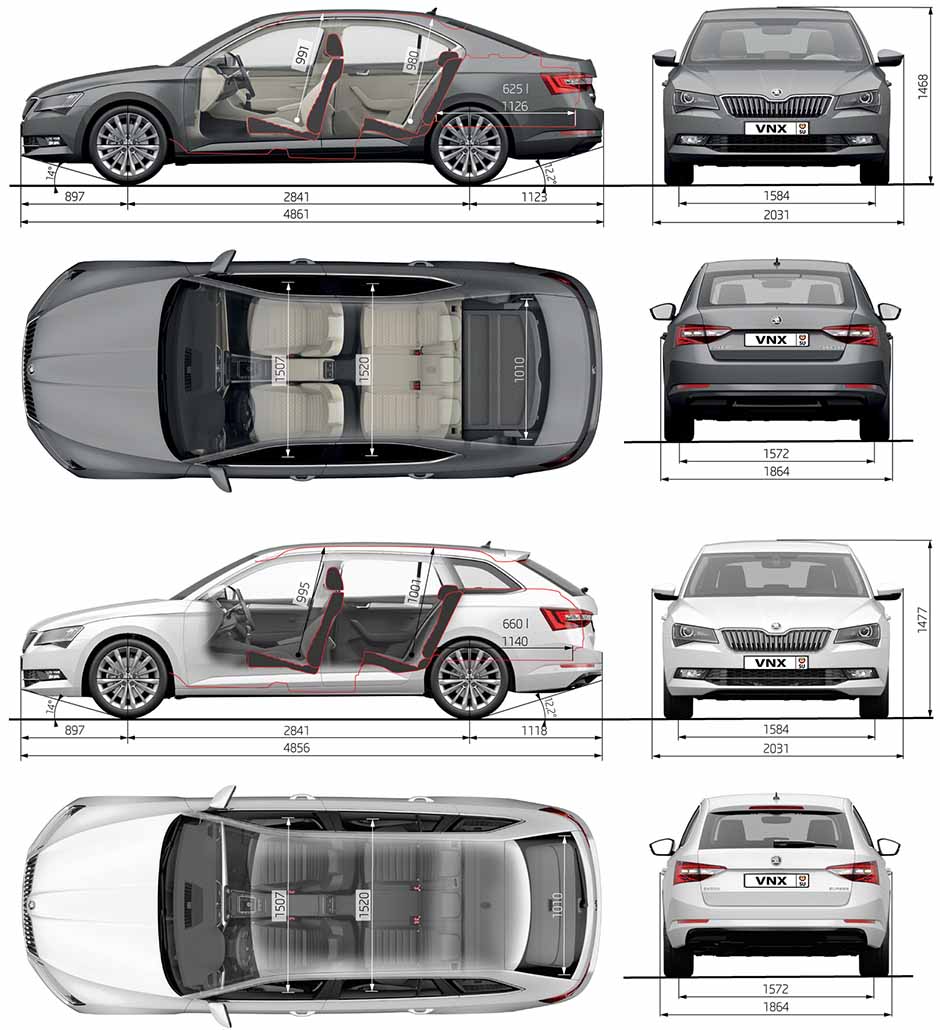
Основные технические характеристики (General technical specifications) Skoda Superb B8 2016 Laurin & Klement с мотором 2.0 литра 4×4
| № | Спецификация / Specs | Данные |
| Габариты (мм/mm) и масса (кг/kg) / Dimensions and Weight | ||
| 1 | Длина / Length | 4861 |
| 2 | Ширина (без/с зеркалами) / Width | 1864/2031 |
| 3 | Высота (загружен/пустой) / Height | 1468 |
| 4 | Колёсная база / Wheelbase | 2841 |
| 5 | Дорожный просвет (клиренс) / Ground clearance | 158⇒148 |
| 6 | Снаряжённая масса / Total (curb) weight | 1615 |
| Полная масса / Gross (max.) weight | 2220 | |
|
Двигатель / Engine |
||
| 7 | Тип / Engine Type, Code | Бензиновый, жидкостного охлаждения, четырехтактный |
| 8 | Количество цилиндров / Cylinder arrangement: Total number of cylinders, of valves | 4-цилиндровый, рядный, 16V, DOHC с верхним расположением двух распределительных валов |
| 9 | Диаметр цилиндра / Bore | 82.5 мм |
| 10 | Ход поршня / Stroke | 92.8 мм |
| 11 | Объём / Engine displacement | 1984 см³ |
| 12 | Система питания / Fuel supply, Aspiration | Непосредственный впрыск топлива с электронным управлением TCI |
| Турбонаддув и промежуточное охлаждение наддувочного воздуха | ||
| 13 | Степень сжатия / Compression ratio | 9.3:1 |
| 14 | Максимальная мощность / Max. output power kW (HP) at rpm | 206 кВт (280 л.с.) при 5600–6500 об/мин |
| 15 | Максимальный крутящий момент / Max. torque N·m at rpm | 350 Нм при 1700–5600 об/мин |
|
Трансмиссия / Transmission |
||
| 16 | Сцепление / Clutch type | Два соосных мокрых многодисковых сцепления с электрогидравлическим приводом |
| 17 | КПП / Transmission type | Роботизированная 6-ступенчатая DSG |
О Книге
- Название: Система Infotainment Swing руководство по эксплуатации
- Бензиновые и дизельные двигатели
- Выпуск с 2015 года
- Серия: «Owner Guide»
- Год издания: май 2016
- Автор: Коллектив авторов
- Издательство: «ŠKODA AUTO a.s.»
- Формат: PDF
- Страниц в книге: 44
- Размер: 51.99 МБ
- Язык: Русский
- Количество электросхем: 0
Поиск по сайту
Остались вопросы или пожелания? Пишите на почту: support@vnx.su
Report abuse
Libble takes abuse of its services very seriously. We’re committed to dealing with such abuse according to the laws in your country of residence. When you submit a report, we’ll investigate it and take the appropriate action. We’ll get back to you only if we require additional details or have more information to share.
Product:
Get your user manual by e-mail
Enter your email address to receive the manual of Skoda Swing Infotainment in the language / languages: English as an attachment in your email.
The manual is 4,93 mb in size.
You will receive the manual in your email within minutes. If you have not received an email, then probably have entered the wrong email address or your mailbox is too full. In addition, it may be that your ISP may have a maximum size for emails to receive.
The manual is sent by email. Check your email
If you have not received an email with the manual within fifteen minutes, it may be that you have a entered a wrong email address or that your ISP has set a maximum size to receive email that is smaller than the size of the manual.