
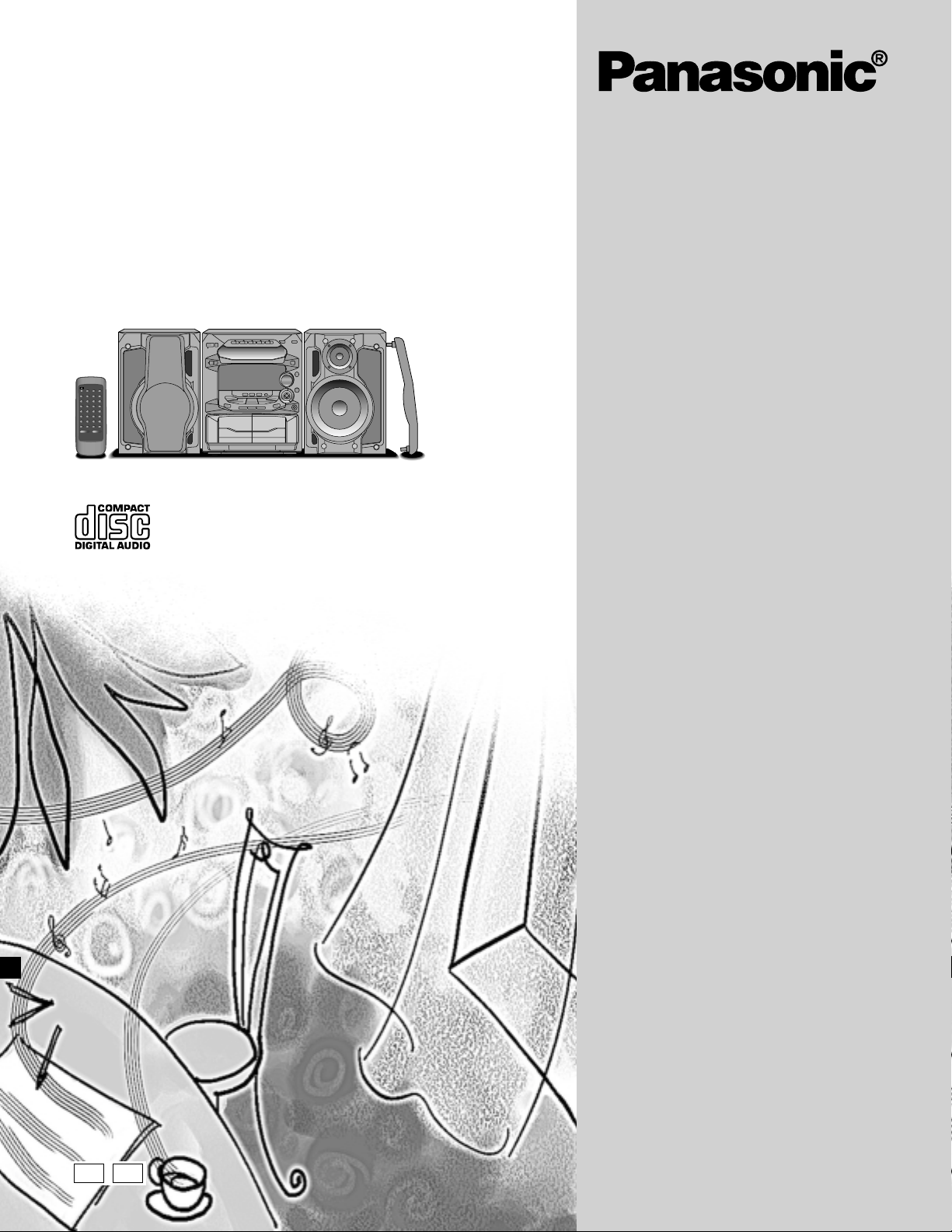
CD Stereo System
Operating Instructions
Model No. SC-AK28
SC-AK18
The illustrations show SC-AK28.
EB GN
Note:
The «EB» indication shown on the packing case
indicates United Kingdom.
Before connecting, operating or adjusting this product, please read these instructions completely.
Please keep this manual for future reference.
RQT5265-B
Dear customer
Thank you for purchasing this product.
For optimum performance and safety, please read these instructions
carefully.
These operating instructions are applicable to the following system.
These operating instructions, however, fundamentally explain the
operation of system SC-AK28.
System SC-AK28 SC-AK18
Main unit SA-AK28 SA-AK18
Speakers SB-AK28 SB-AK18
Before using
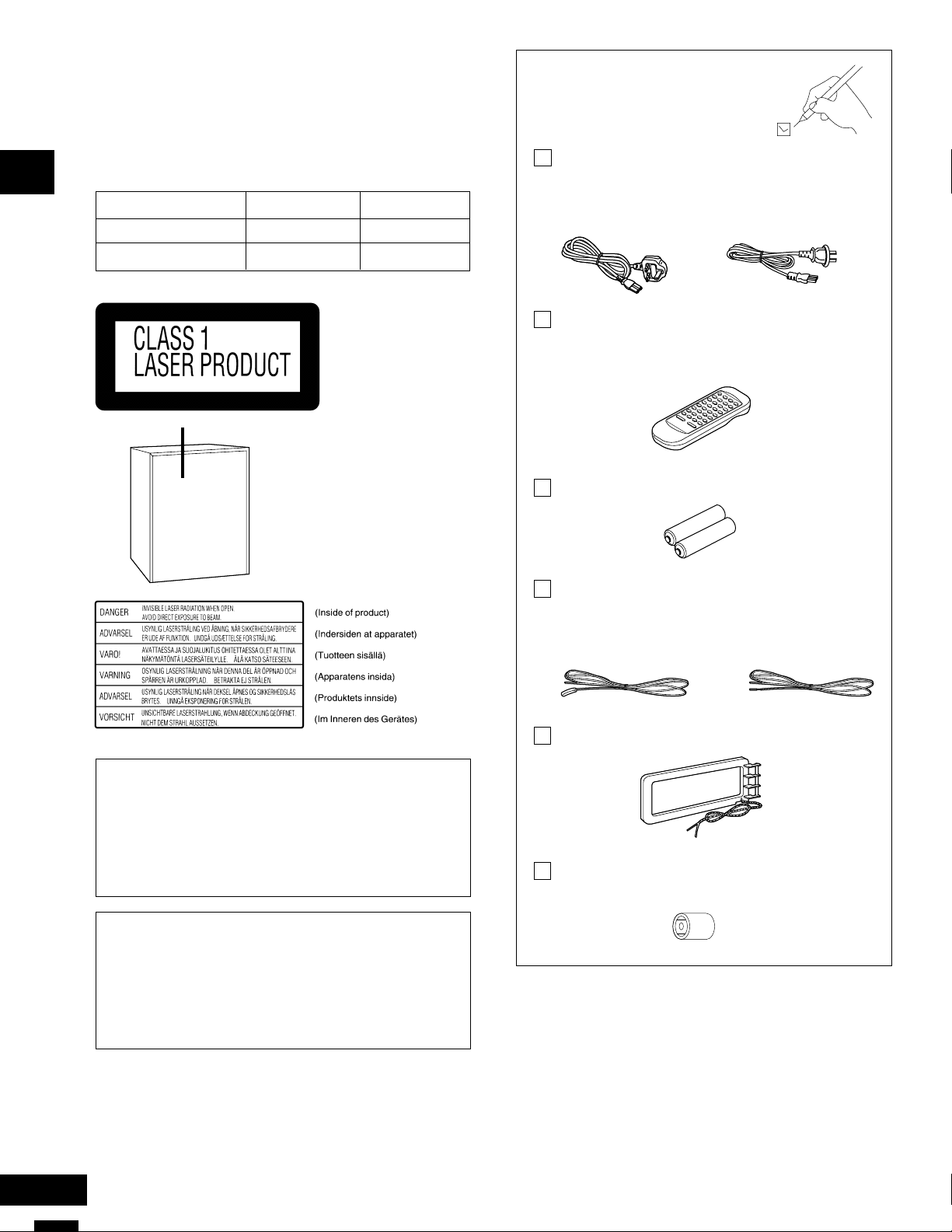
Supplied accessories
Please check and identify the
supplied accessories.
AC mains lead………………………………………. 1 pc.
For United Kingdom For Australia and New
(RJA0044-1C) Zealand
(RJA0035-X)
Remote control transmitter …………………….. 1pc.
SC-AK28: (RAK-SC957WK)
SC-AK18: (EUR648200)
(Back of product)
CAUTION!
THIS PRODUCT UTILIZES A LASER.
USE OF CONTROLS OR ADJUSTMENTS OR PERFORMANCE
OF PROCEDURES OTHER THAN THOSE SPECIFIED HEREIN
MAY RESULT IN HAZARDOUS RADIATION EXPOSURE.
DO NOT OPEN COVERS AND DO NOT REPAIR YOURSELF.
REFER SERVICING TO QUALIFIED PERSONNEL.
CAUTION!
DO NOT INSTALL OR PLACE THIS UNIT IN A BOOKCASE,
BUILT IN CABINET OR IN ANOTHER CONFINED SPACE.
ENSURE THE UNIT IS WELL VENTILATED. ENSURE THAT CURTAINS AND ANY OTHER MATERIALS DO NOT OBSTRUCT THE
VENTILATION TO PREVENT RISK OF ELECTRIC SHOCK OR
FIRE HAZARD DUE TO OVERHEATING.
Batteries for remote control………………….. 2pcs.
FM indoor antenna………………………………… 1 pc.
For United Kingdom For Australia and New
(RSA0007) Zealand
(RSA0006-J)
AM loop antenna (RSA0029) ………………….. 1 pc.
Antenna plug adaptor (SJP9009)…………….. 1pc.
(United Kingdom only)
Use numbers indicated in parentheses when asking for replacement
parts.
RQT5265
2

Table of contents
Safety precautions
Before using
Supplied accessories ………………………………………………………….. 2
Safety precautions……………………………………………………………….3
Caution for AC Mains Lead …………………………………………………. 4
Concerning the remote control ……………………………………………. 5
Battery installation ……………………………………………………………. 5
Correct method of use ………………………………………………………. 5
Placement of speakers…………………………………………………………5
Connections ……………………………………………………………………….. 6
Basic connections (for supplied accessories) ……………………….. 6
Optional antenna connections ……………………………………………. 7
External unit connection ……………………………………………………. 7
Front panel controls ……………………………………………………………. 8
Turning the demo function off …………………………………………… 10
ECO mode ………………………………………………………………………… 10
Auto-off function ………………………………………………………………. 10
Setting the time ………………………………………………………………… 11
Convenient functions ………………………………………………………… 11
Radio operations
Presetting radio broadcasts ………………………………………………. 12
Listening to radio broadcasts ……………………………………………. 13
Compact disc operations
Concerning compact discs ………………………………………………… 14
Listening to compact discs ……………………………………………….. 15
Direct access play ………………………………………………………….. 16
Repeat play …………………………………………………………………… 16
Random play …………………………………………………………………. 16
Program play …………………………………………………………………. 17
To listen to special CDs and tracks (CD Manager function) ….. 18
Cassette deck operations
Placement
Set the system up on an even surface away from direct sunlight,
high temperatures, high humidity, and excessive vibration. These
conditions can damage the cabinet and other components, thereby
shortening the unit’s service life.
Place it at least 15 cm away from wall surfaces to avoid distortion
and unwanted acoustical effects.
Do not place heavy items on the unit.
Voltage
Do not use high voltage power sources. This can overload the unit
and cause a fire.
Do not use a DC power source. Check the source carefully when
setting the unit up on a ship or other place where DC is used.
AC mains lead protection
Ensure the AC mains lead is connected correctly and not damaged.
Poor connection and lead damage can cause fire or electric shock.
Do not pull, bend, or place heavy items on the lead.
Grasp the plug firmly when unplugging the lead. Pulling the AC
mains lead can cause electric shock.
Do not handle the plug with wet hands. This can cause electric
shock.
Foreign matter
Do not let metal objects fall inside the unit. This can cause electric
shock or malfunction.
Do not let liquids get into the unit. This can cause electric shock or
malfunction. If this occurs, immediately disconnect the unit from the
power supply and contact your dealer.
Do not spray insecticides onto or into the unit. They contain
flammable gases which can ignite if sprayed into the unit.
Before using
Listening to tapes……………………………………………………………… 19
Concerning cassette tapes …………………………………………………20
Recording operations
Before recording (Deck 2 only) ………………………………………….. 21
Tape-to-tape recording………………………………………………………. 21
Recording from radio broadcasts ………………………………………. 22
Recording from compact discs ………………………………………….. 23
To record special CDs and tracks (CD Manager function)……..24
Sound quality/sound field operations
Using the built-in sound quality/sound field settings…………… 25
Boosting the super woofer SC-AK28…………………………………. 25
Adding bass SC-AK18 ……………………………………………………… 25
Varying the sound quality with the manual equalizer ………….. 26
Varying the sound quality with the acoustic image
(Al) equalizer ………………………………………………………………….. 26
Timer operations
Using the timer …………………………………………………………………. 27
Using the play/record timer ………………………………………………. 27
Using the sleep timer……………………………………………………….29
Reference
Using an external unit ……………………………………………………….. 29
Troubleshooting guide ………………………………………………………. 30
Maintenance ……………………………………………………………………… 31
Technical specifications ……………………………………… Back Cover
Service
Do not attempt to repair this unit by yourself. If sound is interrupted,
indicators fail to light, smoke appears, or any other problem that is not
covered in these instructions occurs, disconnect the AC mains lead
and contact your dealer or an authorized service center. Electric shock
or damage to the unit can occur if the unit is repaired, disassembled
or reconstructed by unqualified persons.
Extend operating life by disconnecting the unit from the power source
if it is not to be used for a long time.
3
RQT5265
Caution for AC Mains Lead
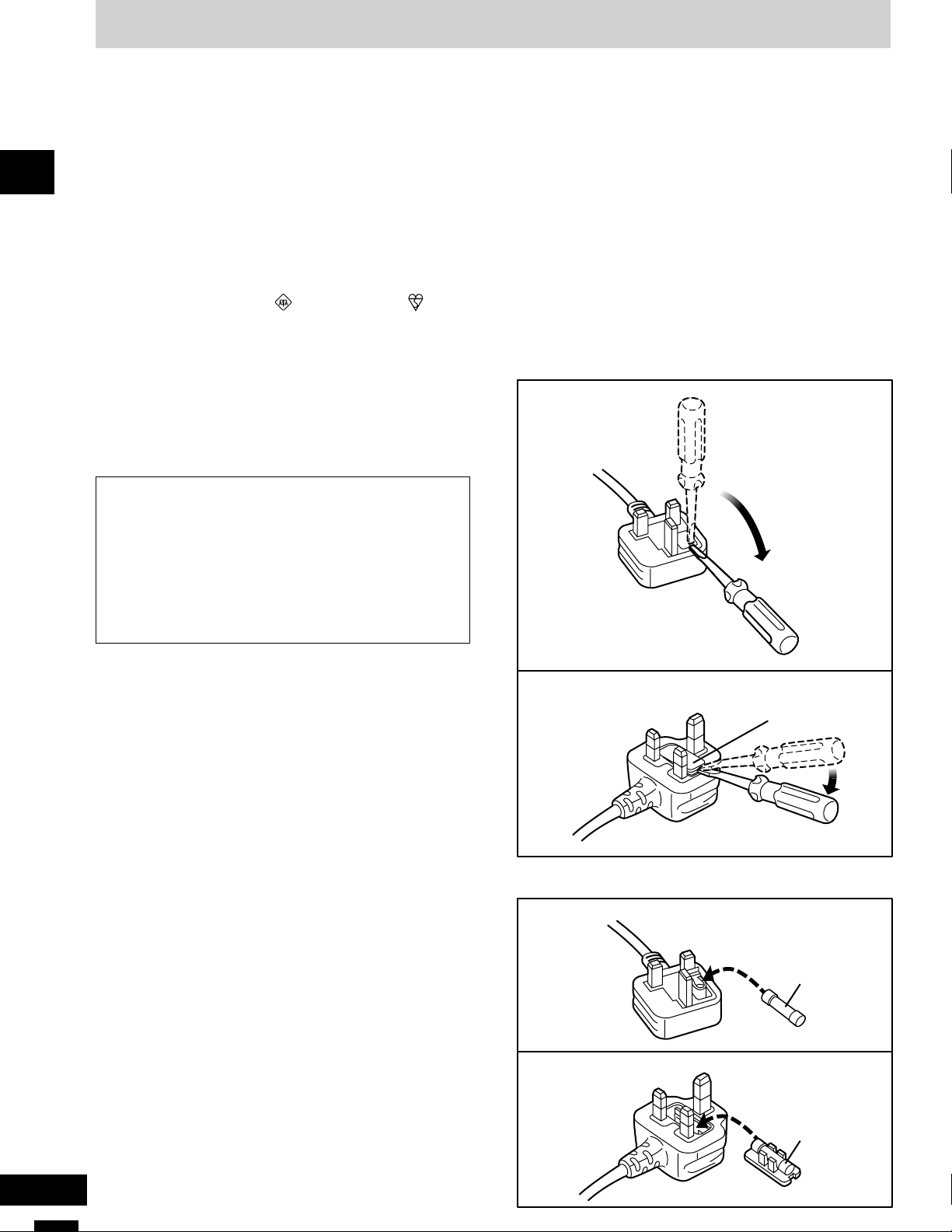
Figure A
Figure B
Figure A
Figure B
Before using
(For United Kingdom)
(“EB” area code model only)
For your safety, please read the following text carefully.
This appliance is supplied with a moulded three pin
mains plug for your safety and convenience.
A 5-ampere fuse is fitted in this plug.
Should the fuse need to be replaced please ensure that
the replacement fuse has a rating of 5-ampere and that
it is approved by ASTA or BSI to BS1362.
Check for the ASTA mark or the BSI mark on the
body of the fuse.
If the plug contains a removable fuse cover you must
ensure that it is refitted when the fuse is replaced.
If you lose the fuse cover the plug must not be used
until a replacement cover is obtained.
A replacement fuse cover can be purchased from your
local dealer.
CAUTION!
IF THE FITTED MOULDED PLUG IS UNSUITABLE
FOR THE SOCKET OUTLET IN YOUR HOME THEN
THE FUSE SHOULD BE REMOVED AND THE PLUG
CUT OFF AND DISPOSED OF SAFELY.
THERE IS A DANGER OF SEVERE ELECTRICAL
SHOCK IF THE CUT OFF PLUG IS INSERTED INTO
ANY 13-AMPERE SOCKET.
WARNING: DO NOT CONNECT EITHER WIRE TO
THE EARTH TERMINAL WHICH IS MARKED WITH
THE LETTER E, BY THE EARTH SYMBOL i
COLOURED GREEN OR GREEN/YELLOW.
THIS PLUG IS NOT WATERPROOF—KEEP DRY.
OR
Before use
Remove the connector cover.
How to replace the fuse
The location of the fuse differ according to the type of
AC mains plug (figures A and B). Confirm the AC mains
plug fitted and follow the instructions below.
Illustrations may differ from actual AC mains plug.
1. Open the fuse cover with a screwdriver.
If a new plug is to be fitted please observe the wiring
code as stated below.
If in any doubt please consult a qualified electrician.
IMPORTANT
The wires in this mains lead are coloured in accordance
with the following code:
Blue: Neutral, Brown: Live.
As these colours may not correspond with the coloured
markings identifying the terminals in your plug, proceed
as follows:
The wire which is coloured Blue must be connected to
the terminal which is marked with the letter N or coloured
Black or Blue.
The wire which is coloured Brown must be connected to
the terminal which is marked with the letter L or coloured
Brown or Red.
Fuse cover
2. Replace the fuse and close or attach the fuse cover.
Fuse
(5 ampere)
RQT5265
Fuse
(5 ampere)
4
Concerning the remote control
A
B
SC-AK28
SC-AK18
R6, AA, UM-3
R6, AA, UM-3
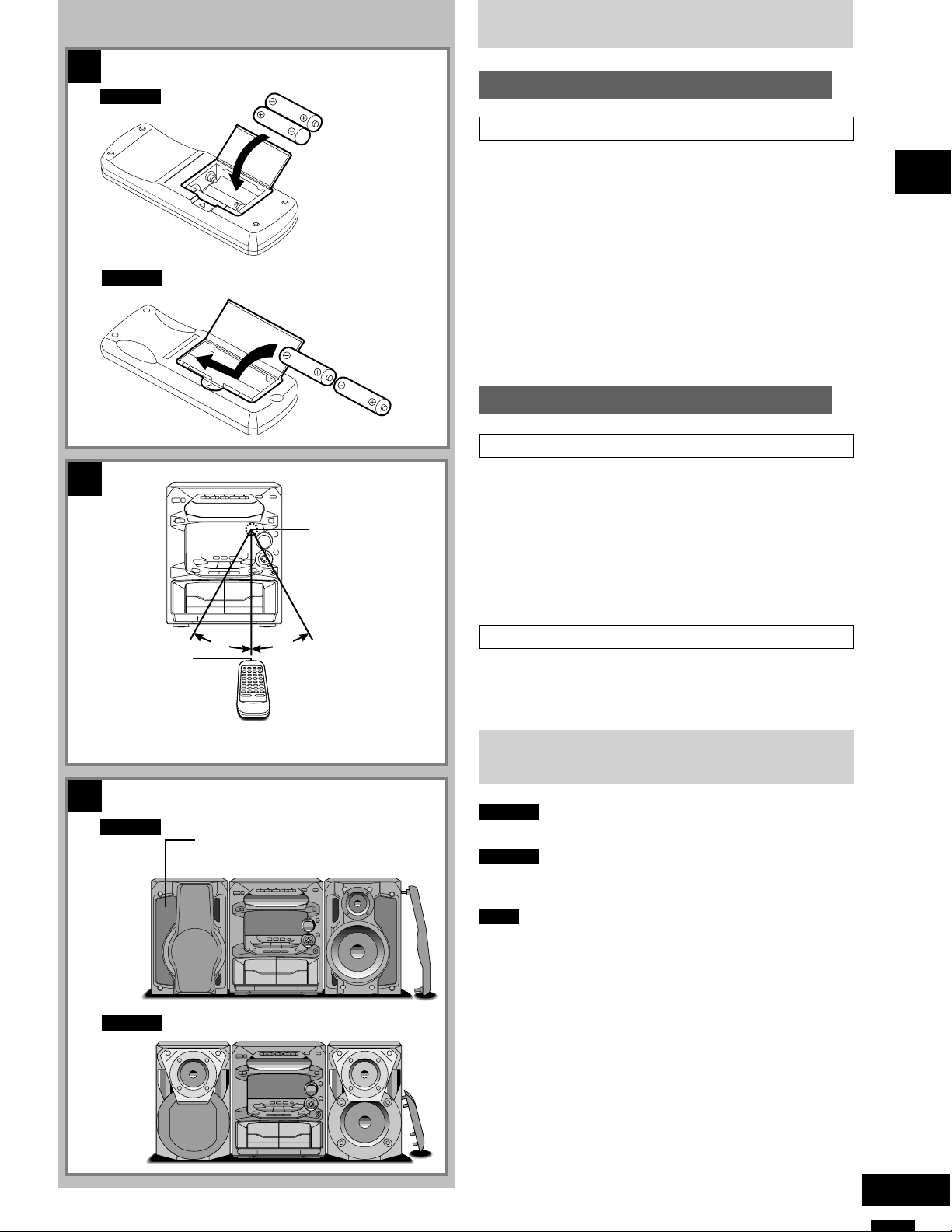
1
Remote control
signal sensor
Battery installation
Use of batteries
Align the poles (+ and –) properly when inserting the batteries.
•
Do not mix old and new batteries or different types of batteries.
•
Do not recharge ordinary dry cell batteries.
•
Do not heat or disassemble the batteries. Do not allow them to
•
contact flame or water.
Remove the batteries if the unit is not to be used for a long time.
•
Do not keep together with metallic objects such as necklaces.
•
Do not use rechargeable type batteries.
•
Mishandling of batteries can cause electrolyte leakage which can
damage items the fluid contacts and may cause a fire.
If electrolyte leaks from the batteries, consult your dealer.
Wash thoroughly with water if electrolyte comes in contact with any
part of your body.
2
Correct method of use
Operation notes
Do not place obstacles between the remote control signal sensor
•
and remote control unit.
Do not expose the remote control signal sensor to direct sunlight
•
or to the bright light of a fluorescent light.
Take care to keep the remote control signal sensor and end of the
•
remote control unit free from dust.
If this system is installed in a rack with glass doors, the glass
•
doors’ thickness or colour might make it necessary to use theremote
control a shorter distance from the system.
A
Before using
B
C
Transmission
window
SC-AK28
SC-AK18
30°
Superwoofer
30°
About 7 meters in front of
the signal sensor
To prevent damage
Never place heavy items on top of the unit.
•
Do not disassemble or reconstruct the unit.
•
Do not spill water or other liquids into the unit.
•
Placement of speakers
SC-AK28
Place the speakers so that the super woofer is on the outside.
S
SC-AK18
Speakers are designed identically so that no left or right channel
orientation is necessary.S
Notes
Keep your speakers at least 10 mm away from the system for
•
proper ventilation.
These speakers do not have magnetic shielding. Do not place
•
them near televisions, personal computers or other devices easily
influenced by magnetism.
To avoid damage to the speakers, do not touch the speaker cones
•
if you have taken the nets off.
C
5
RQT5265
Before using
1
2
3
4
To household
mains socket
Connections
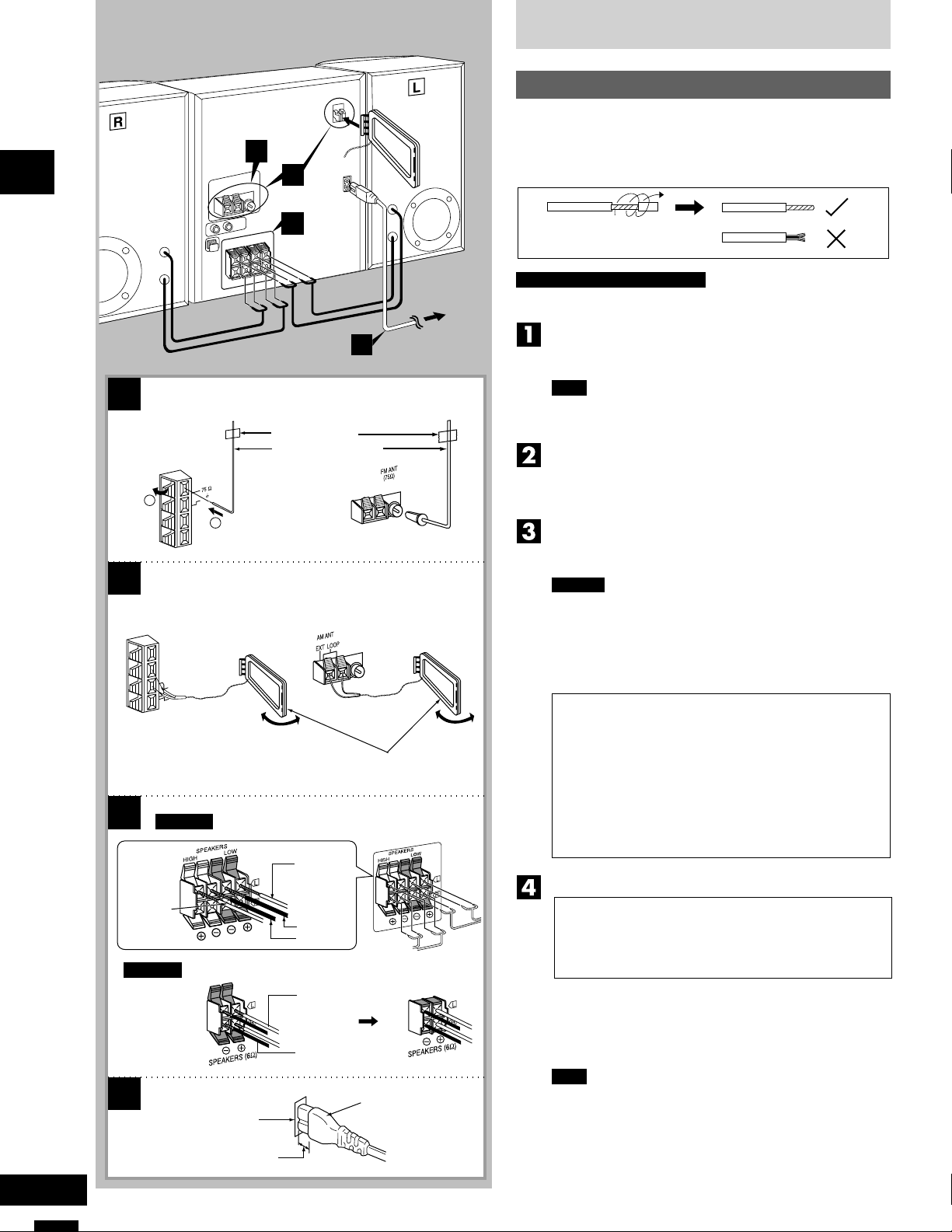
Basic connections (for supplied accessories)
Plug the AC mains lead into a household mains socket only after
•
all other connections have been made.
To prepare the antenna wires and speaker cords, twist the vinyl
•
cover tip and pull off.
For Australia and New Zealand
The configuration of the FM and AM antenna terminals are different.
Connect the FM indoor antenna.
Tape the antenna to a wall or column, in a position where radio
signals are received with the least amount of interference.
1
For Australia and New Zealand
T
N
A
M
F
( )
D
1
N
G
2
2
For Australia and New Zealand
T
N
A
M
A
P
O
O
L
T
X
E
3
SC-AK28
For United Kingdom
Adhesive tape
FM indoor antenna
For United Kingdom
AM loop antenna
Red (+)
Note
For best reception sound quality:
An FM outdoor antenna is recommended. (See page 7.)
Connect the AM loop antenna.
After attaching the antenna, turn on the system and tune in a
broadcast station. Then, turn the antenna to the angle of best
reception and least interference.
Connect the speaker cables.
Connect each end of the speaker cables to the terminal lever of
the same colour.
Caution
Use only the supplied speakers.
•
The combination of the main unit and speakers provide the
best sound. Using other speakers can damage the unit and
sound quality will be negatively affected.
To prevent damage to circuitry, never short-circuit positive (+)
•
and negative (–) speaker wires.
Caution
• Use the speakers only with the recommended
system.
Failure to do so may lead to damage to the
amplifier and/or the speakers, and may result in
the risk of fire.
Consult a qualified service person if damage has
occurred or if you experience a sudden change
in performance.
• Do not attach these speakers to walls or ceilings.
Connect the AC mains lead.
RQT5265
Grey (+)
SC-AK18
4
Black (–)
Blue (–)
Red (+)
Black (–)
Connector
Appliance inlet
Approx. 6 mm
(FOR UNITED KINGDOM ONLY)
BE SURE TO READ THE CAUTION FOR THE
AC MAINS LEAD ON PAGE 4 BEFORE
CONNECTION.
Insertion of connector
Even when the connector is perfectly inserted, depending on
the type of inlet used, the front part of the connector may jut out
as shown in the drawing.
However there is no problem using the unit.
Note
The included AC mains lead is for use with this unit only. Do
not use it with other equipment.
6
For Australia and New Zealand
A
FM outdoor antenna
(not included)
75
Ω coaxial cable (not included)
Connections
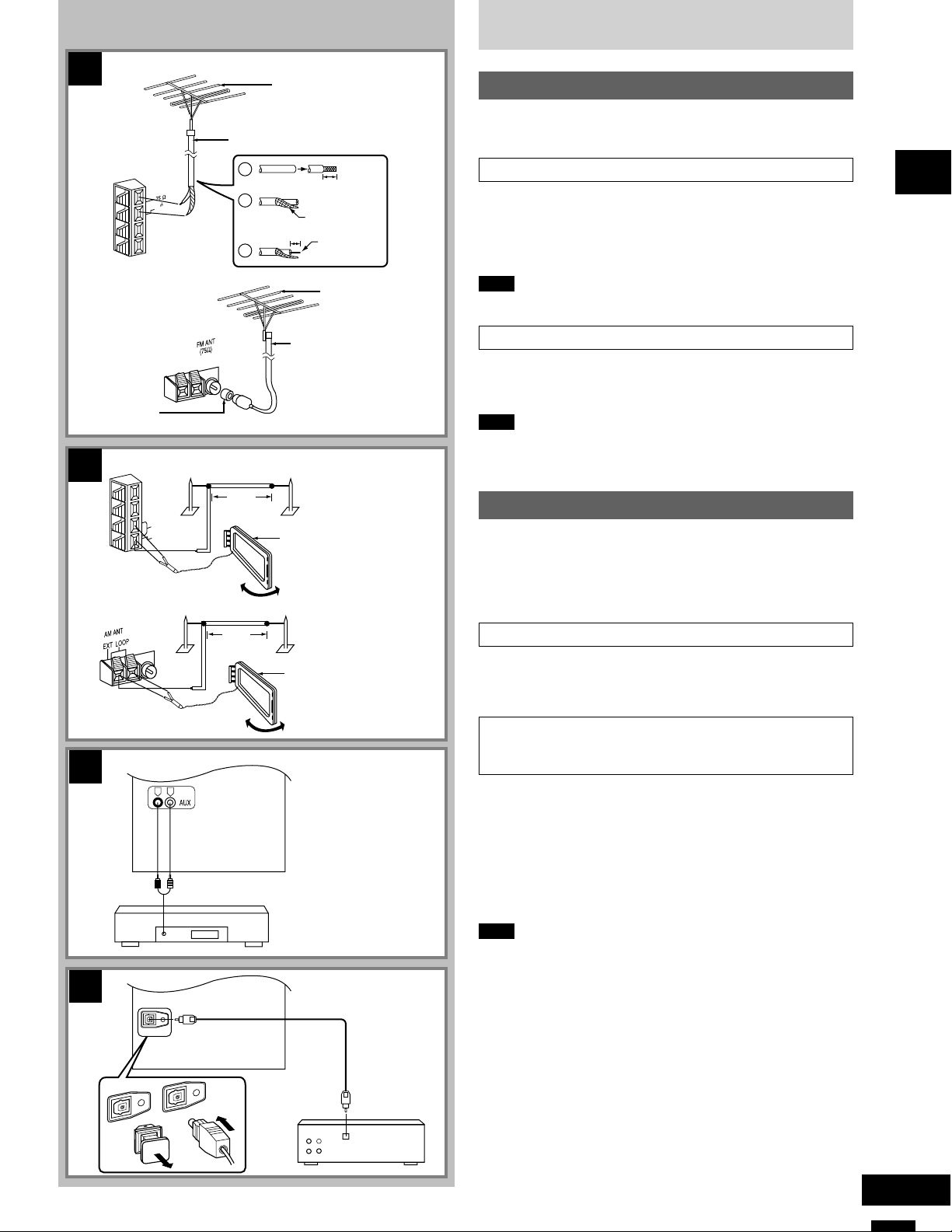
Optional antenna connections
You may need an outdoor antenna if you use this system in a
mountainous region or inside a reinforced-concrete building, etc.
T
N
A
M
F
( )
D
N
G
For United Kingdom
Antenna plug
adaptor (included)
For Australia and New Zealand
B
T
N
A
M
A
P
O
O
L
T
X
E
For United Kingdom
5 -12 m
5 -12 m
1
2
3
30 mm
Shield braid
15 mm
Core wire
FM outdoor antenna
(not included)
75
Ω coaxial cable
(not included)
AM outdoor antenna
(not included)
AM loop antenna
(included)
AM outdoor antenna
(not included)
FM outdoor antenna A
Disconnect the FM indoor antenna if an FM outdoor antenna is installed.
1 Remove a piece of the outer vinyl insulator.
2 Twist the shield braid.
3 Expose the core wire.
Note
An outdoor antenna should be installed by a qualified technician only.
AM outdoor antenna B
Connect the outdoor antenna without removing the AM loop antenna.
Run 5 to 12 m of vinyl-covered wire horizontally along a window or
other convenient location.
Note
When the unit is not in use, disconnect the outdoor antenna to prevent
possible damage that may be caused by lightning. Never use an
outdoor antenna during an electrical storm.
External unit connection
Make sure that the power supply for all components has been
•
turned off before making any connections.
For details, refer to the operating instructions of the unit which are
•
to be connected.
All peripheral components and cables sold separately.
•
Connecting analog equipment C
Before using
C
D
OPTICAL OUT
OPTICAL OUT
R L
(L)(R)
OPTICAL OUT
AM loop antenna
(included)
Rear panel of this unit
Analog player (not included)
Rear panel of this unit
Optical fiber
cable
(not included)
Receiver
(not included)
OPTICAL
IN
An analog player with a built-in phono equalizer can be connected.
When units other than those described are to be connected, please
consult your audio dealer.
Connecting digital equipment to the optical
fiber out terminal D
(For United Kingdom: model SC-AK28 only)
Remove the dust-protection cap and connect this unit to other digital
equipment with an optical fibre terminal, such as a receiver or digital
surround processor.
Leave the cap attached when this terminal is not being used.
•
For your reference
If you have DTS format CDs, you can enjoy six channel playback by
connecting this unit to a receiver or digital surround processor that
has a DTS decoder.
Note
Use only the optical fibre terminal when playing back DTS format
discs. DTS signals can only be correctly output through the digital
terminal.
¡ DTS is a trademark of Digital Theater Systems, L.P.
7
RQT5265
Front panel controls
A
1
2
3
4
5
6
Before using
7
B
18 19 20 21
10
11
12
13
15
16
17
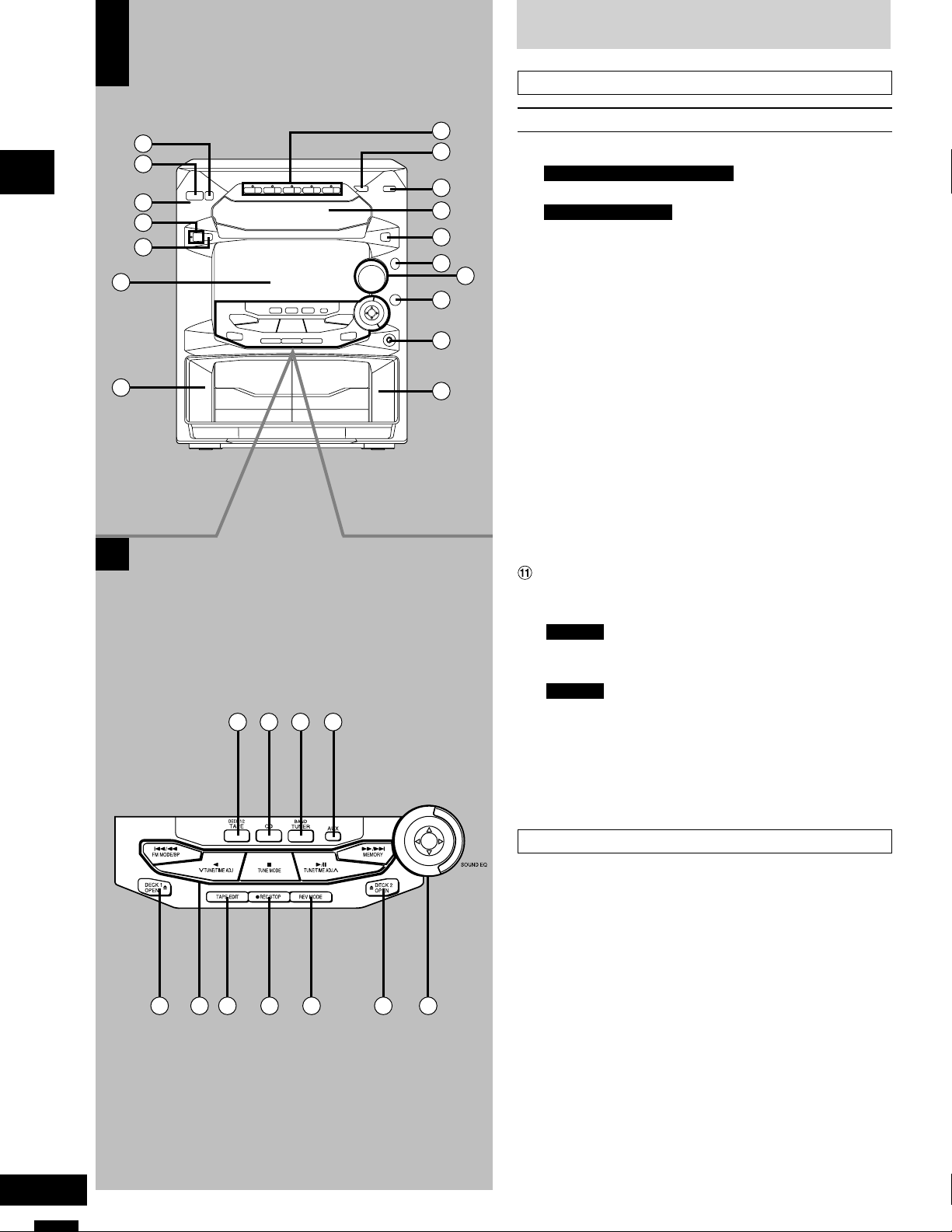
Main unit A
8
9
14
No. Name Ref. page
1 Eco button (MODE)…………………………………………….10
2 For Australia and New Zealand
Standby/on switch (f/I, POWER)……………………….. 10
For For United Kingdom
Standby/on switch (f/I) ………………………………………10
Press to switch the unit from on to standby mode or vice versa.
In standby mode, the unit is still consuming a small amount of
power.
3 AC supply indicator (AC IN)
This indicator lights when the unit is connected to the AC mains
supply.
4 Play timer/record timer button and indicator
(rPLAY/rREC) ………………………………………………….27
5 Clock/timer button
(CLOCK/TIMER)……………………………………….11, 27, 28
6 Display
7 Deck 1 cassette holder……………………………………….19
8 Disc direct play, open/close buttons and indicators
(CD 1 ~ CD 5, c) ………………………………………………..15
9 CD manager button
(CD MANAGER) ……………………………………………18, 24
! Random play button (RANDOM)………………………… 16
Disc tray
# Display select/demonstration button
(-DISP/–DEMO) ……………………………………………. 10, 11
$ SC-AK28
Super woofer on/off button
(S.WOOFER)………………………………………………………25
SC-AK18
V.BASS on/off button (V.BASS)…………………………. 25
% Volume control (VOLUME) ………………………………….13
& 3D AI EQ button (3D AI EQ) ………………………………. 26
( Headphone jack (PHONES) ……………………………….. 29
) Deck 2 cassette holder……………………………………….19
RQT5265
Center console B
~ Tape/deck select button (TAPE, DECK 1/2) ………… 19
+ CD button (CD)…………………………………………………..18
, Tuner/band select button (TUNER, BAND) …………. 12
— AUX button (AUX) ………………………………………………29
. Deck 1 open button (c DECK 1 OPEN) ……………… 19
/ Basic operating buttons
22 26252423 27 28
Functions change according to the source.
: Tape edit button (TAPE EDIT)……………………………. 21
; Recording start/stop button (a REC/STOP)………… 22
< Reverse mode select button (REV MODE)………….. 19
= Deck 2 open button (c DECK 2 OPEN) ……………… 19
> Sound equalizer control (SOUND EQ)………………… 25
8
29
32
19
15
34
30
31
18
33
13
14
Front panel controls
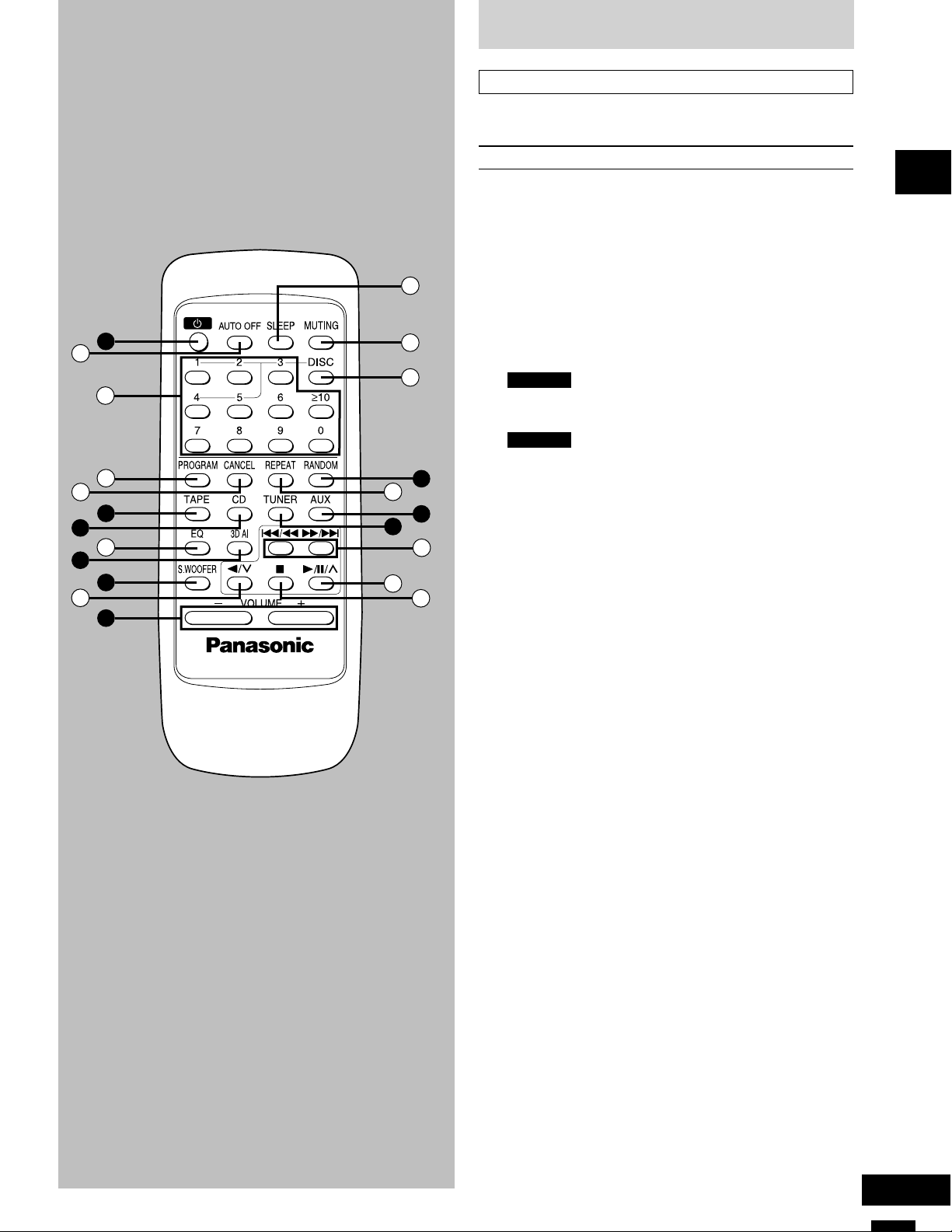
Remote control
Buttons such as 2 functions in exactly the same way as the buttons
on the main unit.
No. Name Ref. page
2 Standby/on button (f) ………………………………………..10
? Auto off button (AUTO OFF) ……………………………… 10
@ Numeric buttons (≥10, 1–0) ………………………….. 13, 16
[ Program button (PROGRAM) …………………………….. 17
35
2
36
37
10
38
21
20
39
40
41
\ Cancel button (CANCEL)…………………………………….17
~ Tape/deck select button (TAPE) ………………………… 19
+ CD button (CD)…………………………………………………..18
] EQ select button (EQ)…………………………………………25
& 3D AI EQ select button (3D AI) ………………………….. 26
$ SC-AK28
Super woofer on/off button
(S.WOOFER)………………………………………………………25
SC-AK18
V.BASS on/off button (V.BASS)…………………………. 25
^ Reverse side playback/preset channel
select button (//3)………………………………………13, 19
% Volume buttons (– VOLUME +)………………………….. 13
_ Sleep button (SLEEP) …………………………………………29
{ Muting button (MUTING) …………………………………….11
| Disc button (DISC) ……………………………………………..16
! Random button (RANDOM) ……………………………….. 16
} Repeat button (REPEAT)…………………………………….16
— AUX button (AUX) ………………………………………………29
, Tuner/band select button (TUNER) ……………………. 12
gg
((
))
V Skip/search buttons (
0 Play/pause/preset channel
select button (-/J/4) ……………………………..13, 15, 19
1 Stop button (L) …………………………………………….15, 19
g/
gg
(,
((
ff
)/
f)…….. 15, 20
))
ff
Before using
9
RQT5265
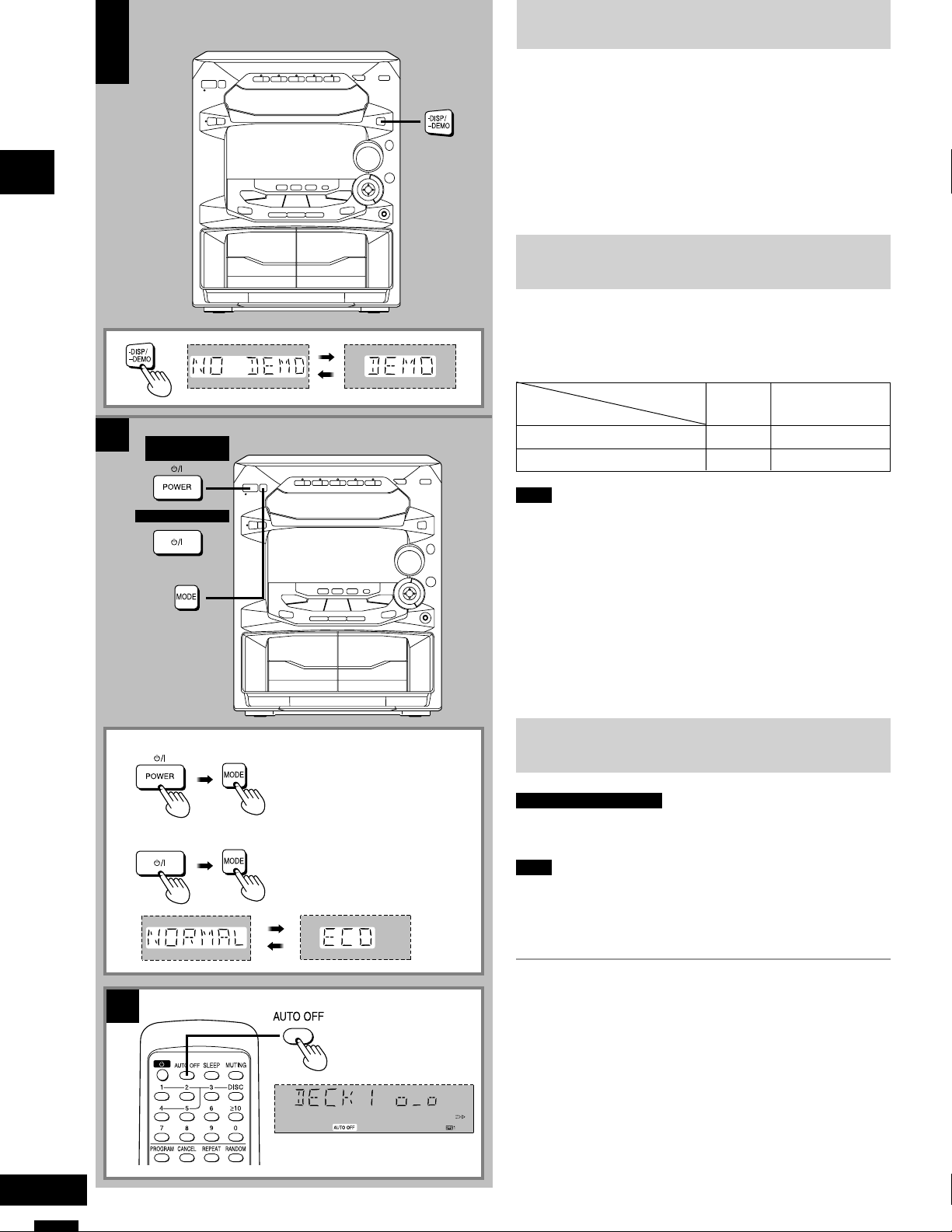
Turning the demo function off
A
A
Before using
B
For United Kingdom
For Australia and
New Zealand
If the clock has not been set, a demonstration of the display is shown
when the unit is switched to standby.
This function is set to on at the time of purchase.
Turn this function off to get the most from the eco mode (see below).
Press and hold [-DISP/–DEMO] until “NO DEMO” is displayed.
The display changes each time the button is held down.
NO DEMO (off) ↔ DEMO (on)
ECO mode
When this mode is used, the display remains blank when the unit
is switched to standby mode and the power consumed is reduced
to 0.4 W from a maximum of 12 W.
The mode is set to on at the time of purchase.
ECO mode
Note
To get the most from this mode, turn the demo function off or set the
clock.
B
Condition in standby
off clock 12 W
on blank 0.4 W
Display Power consumption
For Australia and New Zealand
For United Kingdom
C
Turning ECO on and off
Press [f/7] to turn the unit on.
Press [MODE].
The current ECO mode is displayed. Press again to change the mode.
The display changes each time the button is pressed.
NORMAL (off) ↔ ECO (on)
The eco mode can be turned on if the unit is in standby but it cannot
be turned off.
Auto-off function
by remote control only
When CD or tape is selected as the source
To save power, the unit turns off if it is left unused for four minutes.
Note
This function does not work if the source is tuner or AUX.
C
Press [AUTO OFF].
“AUTO OFF” is shown on the display.
To cancel
Press [AUTO OFF] again to clear “AUTO OFF” from the display.
For your reference
The setting is maintained even if the unit is turned off. When the unit is
turned on again, “AUTO OFF” is displayed and the unit functions as
described above.
“AUTO OFF” disappears from the display if either tuner or AUX is
selected as the source but continues to function normally.
“AUTO OFF” remains displayed if CD or tape is selected as the source.
10
RQT5265
Loading…
-
Инструкции по эксплуатации
1
Panasonic SA-AK18 инструкция по эксплуатации
(32 страницы)
- Языки:Английский
-
Тип:
PDF -
Размер:
1.85 MB
Просмотр
На NoDevice можно скачать инструкцию по эксплуатации для Panasonic SA-AK18. Руководство пользователя необходимо для ознакомления с правилами установки и эксплуатации Panasonic SA-AK18. Инструкции по использованию помогут правильно настроить Panasonic SA-AK18, исправить ошибки и выявить неполадки.
Panasonic SC-AK18
RQT5265-B
CD Stereo System
Operating Instructions
Model No. SC-AK28
Note:
The «EB» indication shown on the packing case
indicates United Kingdom.
Before connecting, operating or adjusting this pro-
duct, please read these instructions completely.
Please keep this manual for future reference.
The illustrations show SC-AK28.
EB GN
Manual
View the manual for the Panasonic SC-AK18 here, for free. This manual comes under the category hi-fi systems and has been rated by 9 people with an average of a 8.6.
This manual is available in the following languages: English. Do you have a question about the Panasonic SC-AK18 or do you need help?
Ask your question here
Product Images (1)

Panasonic SC-AK18 specifications
Below you will find the product specifications and the manual specifications of the Panasonic SC-AK18.
The Panasonic SC-AK18 hi-fi system is an audio device that offers a range of features for an enhanced listening experience. Designed with precision, this system provides quality sound reproduction for various music genres.
With its compact design, the Panasonic SC-AK18 is easy to set up and can fit into different spaces, making it versatile for any room in the house. The system includes two speakers, delivering balanced sound across the frequency spectrum.
Equipped with a built-in CD player, the Panasonic SC-AK18 allows for easy playback of your favorite CDs. Additionally, it features a tuner that allows you to listen to your preferred radio stations, expanding your options for audio entertainment.
The hi-fi system also has an auxiliary input, enabling you to connect external devices such as smartphones, tablets, or MP3 players. This feature broadens your choices for audio sources and lets you play music from your personal device collection.
The Panasonic SC-AK18 features a user-friendly interface, with intuitive controls for adjusting sound settings and selecting functions. Its clear display provides information about the current track or radio station.
Although specific technical specifications are not mentioned, the Panasonic SC-AK18 is designed to provide reliable and durable performance, ensuring that users can enjoy their favorite music for years to come.
General
Frequently Asked Questions
Can’t find the answer to your question in the manual? You may find the answer to your question in the FAQs about the Panasonic SC-AK18 below.
Why is the sound output on my Panasonic SC-AK18 not balanced between the speakers?
Ensure the balance control setting is centered. Adjust it by pressing the «Balance» button until the sound is evenly distributed between the left and right speakers.
How can I improve the bass response on my Panasonic SC-AK18?
Increase the bass level by adjusting the «Bass» control on the front panel or the remote control. Increase it gradually until you achieve the desired depth and richness in the low frequencies.
How can I connect my external device, such as a smartphone or MP3 player, to the Panasonic SC-AK18?
Utilize the «AUX IN» port on the front or rear of the system to connect your external device using a 3.5mm audio cable. Ensure the system is set to the appropriate input source by pressing the «Function» button until «AUX» is displayed on the screen.
My Panasonic SC-AK18 is not responding to the remote control. What could be the issue?
First, check if the batteries in the remote are functional and properly inserted. Make sure there are no obstacles between the remote control and the system. If the problem persists, try pointing the remote directly at the system from various distances to exclude any interference.
How can I set the clock on my Panasonic SC-AK18?
Press and hold the «Clock/Timer» button until you see the clock digits flashing on the display. Use the «Tune/Select» buttons to adjust the hours and minutes. Press the «Clock/Timer» button again to save the settings and stop the digits from flashing.
Can bluetooth devices of different brands be connected to each other?
Yes, bluetooth is a universal method that allows different devices equipped with bluetooth to connect to each other.
What is bluetooth?
Bluetooth is a way of exchanging data wirelessly between electronic devices via radio waves. The distance between the two devices that exchange data can in most cases be no more than ten metres.
What is HDMI?
HDMI stands for High-Definition Multimedia Interface. An HDMI cable is used to transport audio and video signals between devices.
When is my volume too loud?
A volume above 80 decibels can be harmful to hearing. When the volume exceeds 120 decibels, direct damage can even occur. The chance of hearing damage depends on the listening frequency and duration.
How can I best clean my hi-fi system?
A slightly damp cleaning cloth or soft, dust-free cloth works best to remove fingerprints. Dust in hard-to-reach places is best removed with compressed air.
Wat is Dolby Atmos?
Dolby Atmos is a technology that ensures that the sound is reflected from the ceiling to where you are listening. This makes it possible to create a 5.1 effect with only 1 speaker.
Is the manual of the Panasonic SC-AK18 available in English?
Yes, the manual of the Panasonic SC-AK18 is available in English .
Is your question not listed? Ask your question here
Страницы и текст этой инструкции
Инструкция — SC-AK18
Информация отображена на картинке
Информация отображена на картинке
Информация отображена на картинке
Информация отображена на картинке
Как использовать наш сайт инструкций OnlineManuals.ru
Наша цель состоит в том, чтобы предоставить вам быстрый доступ к содержанию инструкции для — SC-AK18.
С помощью онлайн просмотра, Вы можете быстро просмотреть содержимое инструкции и найти решение проблемы с — SC-AK18.
Для Вашего удобства
Если листать руководство пользователя — SC-AK18 прямо на сайте, не очень удобно для Вас, есть два возможных решения:
• Просмотр в полноэкранном режиме — легко просмотреть руководство пользователя (без загрузки его на свой компьютер), Вы можете использовать режим полноэкранного просмотра.
Для просмотра инструкции пользователя — SC-AK18 на полном экране, используйте кнопку «Открыть в Pdf-viewer».
• Загрузка на компьютер — Вы можете также скачать Инструкция — SC-AK18 на свой компьютер и сохранить его в файлах.
Многие люди предпочитают читать документы не на экране, а в печатной версии.
Возможность печати руководства пользователя также была предусмотрена на нашем сайте,
и вы можете использовать ее, нажав на иконку «печать» в Pdf-viewer.
Нет необходимости печатать все руководство — SC-AK18, можно выбрать только нужные страницы инструкции.

Dear customer
Thank you tor purchasing this product.
For optimum performance and safety, please read these instructions
carefully.
These operating instructions are applicable to the following system.
These operating instructions, however, fundamentally explain №e op
eration of system SC-AK29.
System
SC-AK29
SC-AK24
SC-AK23
SC-AK18
Main unit
SA-AK29
SA-AK24
SA-AK23
SA-AK18
Speakers
SB-AK29
SB-AK24
SB-AK24
SB-AK18
The model number and serial number of this product can be
found on either the back or the bottom of the unit.
Please note them in the space provided below and keep for
future reference.
MODEL NUMBER
SERIAL NUMBER
User memo:
DATE OF PURCHASE
DEALER NAME _______
DEALER ADDRESS _
TELEPHONE NUMBER
CAUTION!
THIS PRODUCT UTILIZES A LASER.
USE OF CONTROLS OR ADJUSTMENTS OR PERFORMANCE
OF PROCEDURES OTHER THAN THOSE SPECIFIED HEREIN
MAY RESULT IN HAZARDOUS RADIATION EXPOSURE.
DO NOT OPEN COVERS AND DO NOT REPAIR YOURSELF.
REFER SERVICING TO QUALIFIED PERSONNEL.
WARNING:
TO REDUCE THE RISK OF FIRE, ELECTRIC SHOCK OR
PRODUCT DAMAGE, DO NOT EXPOSE THIS APPLIANCE TO
RAIN, SPLASHING, DRIPPING OR MOISTURE.
CAUTION:
TO PREVENT ELECTRIC SHOCK MATCH WIDE BLADE OF
PLUG TO WIDE SLOT, FULLY INSERT.
Table of contents
Before using
Supplied accessories………………………………………….. 2
Precautions………………………………………………………… 4
Placement of speakers…………………………………………5
Concerning the remote control……………………………. 5
Battery installation……………………………………………………. 5
Correct method of use………………………………………………. 5
Connections……………………………………………………….. 6
Basic connections (for supplied accessories)………………..6
Optional antenna connections……………………………………. 7
External unit connection……………………………………………. 7
Front panel controls…………………………………………….8
Turning the demo function off……………………………..10
ECO mode…………………………………………………………..10
Auto-off function…………………………………………………10
Setting the time…………………………………………………..11
Convenient functions………………………………………….11
Presetting radio broadcasts………………………………..12
Listening to radio broadcasts…………………………….. 13
Concerning compact discs………………………………….14
Listening to compact discs………………………………… 15
Direct access play……………………………………………………16
Repeat play…………………………………………………………….16
Random play…………………………………………………………..16
Program play…………………………………………………………. 17
To listen to special CDs and tracks
(CD Manager function)………………………………………….. 18
Listening to tapes……………………………………………… 19
Concerning cassette tapes………………………………….20
Supplied accessories
Please check and identify the supplied
accessories.
Use numbers indicated in parentheses when
asking for replacement parts.
(Only for U.S.A.)
To order accessories contact 1-80(K332-6368
or web site (http:/ywww.panasonic.com).
AC power supply cord
(RJA0065-A)
1 pc.
[ I FM indoor antenna (RSA0006-J)…………………………………. 1 pc.
RQT5256