
Цифровое зарядное устройство Nitecore D4, представленное компанией NITECOREru — это практичное, небольшое по габаритам и совершенное по характеристикам с фирменным, продуманным до малейших деталей корпусом.
Nitecore D4 — универсальное интеллектуальное зарядное устройство, совместимое практически со всеми цилиндрическими аккумуляторами, тем самым устраняющее необходимость иметь несколько зарядных устройств. D4 автоматически распознает литий-ионные, никель-металл-гибридные и никель-кадмиевые аккумуляторы, а также возможна зарядка Литий-железо-фосфатных батареи через ручной выбор. Электронная схема интеллектуального зарядного устройства выбирает оптимальный режим зарядки (CC, CV и DV/DT) для данного аккумулятора, затем каждый из двух управляемых микрокомпьютером зарядных слотов контролирует и заряжает аккумулятор самостоятельно. Интегрированный цифровой LCD-дисплей четко отображает прогресс зарядки, напряжения, тока и времени, а функция интеллектуального автоматического выключения питания своевременно сработает, когда зарядка будет завершена.
Nitecore D4 — самое передовое в мире полностью автоматическое цифровое зарядное устройство. Вам нужно всего лишь подключить аккумулятор, а его определением и зарядкой автоматически займется D4!
Характеристики:
- Возможность зарядки 4-х аккумуляторов одновременно;
- Каждый из двух слотов проверяет элементы питания и заряжает их независимо от остальных;
- Совместим с литиевыми, никель-галоидными и никель-кадмиевыми аккумуляторами;
- Оптимизированное зарядное устройство разработано для IMR батарей;
- Встроенная ЖК-панель четко отображает параметры и прогресс зарядки;
- Две удобно расположенные боковые кнопки позволяют легко выбирать конкретные типы аккумуляторов и параметры зарядки;
- Интеллектуальная схема определяет тип батареи и статус еще до ввода автоматического режима заряда (CC, CV, DV / DT);
- Автоматически определяет статус заряда батареи и выбирает необходимое напряжение и режим зарядки (за исключением Литий-железофосфатных батарей, которые требуют ручной выбор);
- Совместимость с батареями малой емкости;
- Автоматическая остановка зарядки при полностью заряженном аккумуляторе;
- Система регулировки температуры для предотвращения перегрева;
- Изготовлен из прочного ABS (огнезащитный / огнестойкий);
- Защита от неправильной полярности.
Технические характеристики:
- Входное напряжение: 100-240 В переменного тока 50/60 Гц 0.25A (MAX), DC 12V 1A;
- Выходное напряжение: 4,2 В ± 1% / 3,7 ± 1% / 1,48 ± 1%;
- Выходной ток: 375mA x 4 / 750mA x 2;
- Совместимость с аккумуляторами: Li-Ion / IMR / LiFePO4: 26650, 22650, 18650, 17670, 18490, 1750 0, 18350, 16340 (RCR123), 14500, 10440 Ni-MH / Ni-Cd: AA, AAA, AAAA, C;
- Размеры: 143 мм × 74 мм × 36 мм;
- Вес: 168 г (без батарей и шнура питания).
Примечание:
D4 подходит для зарядки 3.7V литий-ионных аккумуляторов, 1.2V, никель-металл-гибридных / никель-кадмиевых аккумулятора и 3.2v литий-железо-фосфатных аккумуляторов. Смотрите описание размеров батарей выше.
Гарантия на зарядные устройства, аккумуляторы NL, и тактические кнопки 12 месяцев.
-
Артикул
11480
-
Серия
D
-
Модель
D4
-
Материал
ABS пластик
-
Назначение
Зарядное устройства Для аккумуляторов Li-Ion / IMR / LiFePO4/Ni-MH(NiCd
-
Комплектация
Зарядное устройство Nitecore Digicharger D4, сетевой кабель, инструкция пользователя, фирменная упаковка
-
Гарантия, месяцев
12
-
Количество слот
4
-
Количество батарей
4
-
Размер ДхШхВ, См
143 мм × 74 мм × 36 мм
-
Вес (нетто), Грамм
168 г (без батарей и шнура питания)
-
Защищенность
Защита от короткого замыкания / Защита от повышенного напряжения / Работа при минусовых температурах (-10°С)
-
Совместимо с:
17500 / 18650 / 26650 / RCR123 / 14500
-
Дисплей
OLED-дисплей
-
Входное напряжение, В
100-240 В переменного тока 50/60 Гц 0.25A (MAX), DC 12V 1A
-
Выходное напряжение, В
4,2 В ± 1% / 3,7 ± 1% / 1,48 ± 1%
-
Выходной ток, мА
375mA x 4 / 750mA x 2
Nitecore TINI2
(English) TINI2
Features
Specications
Accessory
Technical Data
Charging Function
Operating Instructions
(Español) TINI2 (Deutsch) TINI2 (Francais) TINI2
• Multifunctional OLED Real-Time Display
• USB-C Charging
• Advanced Power Cut-Off (APC) Technology
Dual-Core Intelligent
Keychain Light
• Utilizes 2 x OSRAM P8 LEDs with a max output of 500 lumens• Max peak beam intensity of 2,000cd and max throw of 89 meters• Utilizesatotalreectiveopticlensforuniformandsoftlight• MultifunctionalOLEDreal-timedisplayforlumens,batteryvoltageandruntime etc.• Built-in 280mAh Li-ion battery• AdvancedPowerCut-O(APC)technologyforanultra-lowstandbypowerconsumption• Built-inLi-ionbatterychargingcircuitwithaUSB-Cport
•
Highlyecientconstantcurrentcircuitprovidesastableoutputupto60hours• 2usermodesavailable(DEMOModeandDAILYMode)• Dualsideswitchdesign• 5brightnesslevelsavailablewithdirectaccesstoTURBO• Intelligentmodememoryfunction• 2lockoutmodesavailable(HalfLockoutModeandFullLockoutMode)• IncorporatedAdvancedTemperatureRegulation(ATR)module(PatentNo.ZL201510534543.6)• Metalringpullabletowithstandupto30kilogramsofweight• HAIIIhard-anodizednish• Impactresistantto1meterSize: 46.6mm×25mm×12.5mm(1.83”×0.98”×0.49”)Weight: 18.8g(0.66oz)KeyClasp
FL1
STANDARDTURBO HIGH MID LOW ULTRALOW500 Lumens 200 Lumens 65Lumens 15 Lumens 1 Lumen
*15min 45min 2h 30min 8h 60h
89m 56m 32m 14m 6m
2,000cd 800cd 260cd 55cd 9cd
1m(ImpactResistance)
IP54
Note: ThestateddataismeasuredinaccordancewiththeinternationalashlighttestingstandardsANSI/PLATOFL1-2019,usingthebuilt-inLi-ionbattery(280mAh)underlaboratoryconditions.Thedatamayvaryinrealworlduseduetodierentbatteryusageorenvironmentalconditions.*TheruntimeofTURBOistestedwithoutthetemperatureregulation.
OLED Display
Mode Button
Power Button
Q&A
Q:WhydoesmyTINI2shutdownin30seconds?A:TINI2has2usermodes,DEMOModeandDAILYMode.ThedefaultsettingisDEMOModewheretheproductwillautomaticallyshutdownifthereisnooperationin30seconds.ItisrecommendedtoswitchittoDAILYModewhenindailyuse.Pleasefollowthestepsbelowformodeswitching:1.Whenthelightison/o,longpressboththePowerButtonandtheModeButtonsimultaneouslytoswitchbetweenDEMOandDAILYMode.2.TheLEDwillashtoindicatethecurrentusermode:1ashtoindicateDEMOModeand2ashestoindicateDAILYMode.Warranty ServiceAllNITECORE
®
productsarewarrantedforquality.AnyDOA/defectiveproductcanbeexchangedforareplacementthroughalocaldistributor/dealerwithin15daysofpurchase.Afterthat,alldefective/malfunctioningNITECORE
®
productscanberepairedfreeofchargewithin24monthsfrom the date of purchase. Beyond 24 months, a limited warranty applies, coveringthecostoflaborandmaintenance,butnotthecostofaccessoriesor replacement parts.Thewarrantywillbenulliedif1.heproduct(s)is/arebrokendown,reconstructedand/ormodiedbyunauthorized parties;2.theproduct(s)is/aredamagedduetoimproperuse.ForthelatestinformationonNITECORE
®
productsandservices,pleasecontactalocalNITECORE
®
distributororsendanemailtoservice@nitecore.com※Allimages,textsandstatementsspeciedhereinthisusermanualarefor reference purposes only. Should any discrepancy occur between thismanualandinformationspeciedonwww.nitecore.com,SysmaxInnovationsCo.,Ltd.reservestherightstointerpretandamendthecontent of this document at any time without prior notice.Operating InstructionsMultifunctional OLED DisplayTINI2isequippedwithamultifunctionalOLEDdisplay.(Pleaseremovethescreenprotectorbeforetherstuse.)Whenthelightisturnedon,thescreenwillsuccessivelyshowthecurrentinfo(BrightnessLevel&Lumens,RuntimeRemaining,UserMode)beforeitgoesout.Afterthescreengoesout,shortpressingtheModeButtoncanreactivatethescreen.Display Demonstration Function• ThisfunctionisusedfordemonstrationONLY.Itdoesnotreecttheactuallightstatus.• Whenthelightiso,pressandholdthepowerbuttonevenafterthelightaccessesULTRALOWuntilthelightisturnedotoenterthedisplaydemonstration.• Inthisstatus,thescreenwillcyclethroughvariousinformationaldisplays.Short press either button to exit this status.On / OOn:Whenthelightiso,shortpressthePowerButtontoturniton.O:Whenthelightison,shortpressthePowerButtontoturnito.User ModesTINI2has2usermodes,DEMOModeandDAILYMode.DEMO Mode: Thelightwillautomaticallyshutdownifthereisnooperationin30seconds(reactivatingthescreenexcluded).Thecountdownwillbedisplayedon the screen.DAILY Mode: Thelightwillnotautomaticallyshutdownandwillneedtobeshut down manually.Note: ThedefaultsettingisDEMOMode.ItisrecommendedtoswitchittoDAILYModewhenindailyuse.Mode SwitchingWhenthelightison/o,longpressboththePowerButtonandtheModeButtonsimultaneouslytoswitchbetweenDEMOandDAILYMode.TheLEDwillashtoindicatethecurrentusermode:1ashtoindicateDEMOModeand2ashestoindicateDAILYMode.(Inthisprocess,thescreenwillshow“DEMO”or“DAILY”toindicatethecurrentusermode.)Note: Reactivatingthelightwithin3secondsafteritautomaticallyshutsdowninDEMOmodewilltemporarilyaccessDAILYModeuntilitisturnedo.Brightness LevelsWhenthelightandthescreenison,shortpresstheModeButtontocyclethrough“ULTRALOW–LOW–MID-HIGH”.Theashlightwilldirectlyaccessthepreviouslymemorizedbrightnesslevelwhenreactivated.Note:Whenthescreeniso,shortpresstheModeButtontoactivatethescreenbeforeadjustingthebrightnesslevel.Direct Access to ULTRALOWWhenthelightiso,longpressthePowerButtontodirectlyaccessULTRALOW.Direct Access to TURBOWhenthelightison/o,pressandholdtheModeButtontoaccessTURBO.Releasetoreturntopreviousstatus.Lockout / UnlockTINI2hastwolockoutmodes(HalfLockoutModeandFullLockoutMode).Half Lockout Mode (Lockout 1):• Whenthelightison,pressandholdthePowerButtonuntilthescreenshowsthe Lockout 1 icon to access Half Lockout Mode.• WheninHalfLockoutMode,thePowerButtonisunavailabletoactivatetheashlight.HoldingtheModeButtonisstillavailableforaccessingTURBO.Full Lockout Mode (Lockout 2):• Whenthelightison,pressandholdthePowerButtonevenafteraccessingHalfLockoutMode,untilthescreenshowsLockout2icontoaccessFullLockout Mode.• WheninFullLockoutMode,bothbuttonsareunavailabletoactivatetheashlight.Unlock:• IneitherLockoutMode,shortpressandthenlongpressthePowerButton,duringwhichthescreenwillshowanunlockiconandaprogressbar,untiltheashlightisactivatedtoexitLockoutMode.Thelightwillaccessthepreviousmemorizedlevel.• ThelightwillbeautomaticallyunlockedwhenbeingrechargedineitherLockout Mode.ATR (Advanced Temperature Regulation)TheintegratedATRtechnologyregulatestheoutputoftheTINI2accordingtotheworkingconditionandambientenvironmenttomaintaintheoptimalperformance.Power IndicationWhenthelightiso,shortpresstheModeButtontodisplaythebatterylevel,thebatteryvoltage,thememorizedbrightnesslevelandthecurrentusermodebeforeitgoesout.Dierentvoltagesrepresentthecorrespondingremainingbatterypowerlevels:Note: Whenthebatteryvoltageisbelow3.4V,thepowerindicatorbeneathbothbuttonswillashblueevery2secondstoinformtheusertorechargethebattery as soon as possible.Charging FunctionTINI2isequippedwithanintelligentchargingsystem.Pleasechargethebatterybeforetherstuse.Connecting to the External Power: As illustrated, use the USB cable to connectanexternalpowersupply(e.g.aUSBadapter,acomputerorotherUSBchargingdevices)totheUSBporttobeginthechargingprocess.Thechargingtime is approx. 1 hour 45 minutes.Charging Indicator:Whenthechargingstatusisnormal,thechargingindicatorwillashslowlytoinformtheuserandthescreenwillshowthecurrentbatterylevel.Whenthebatteryisfullycharged,thechargingindicatorwill become steadily turned on to inform the user and the screen will display a fullbatterylevel.Cautions1.TheTURBOBrightnessLevelof500lumenswillproducemassiveheatrapidlyduringlong-timeactivation.UsecautionwhenoperatingthelightinTURBOmodetoavoidoverheatingandstepdowntoalowerlevelifthelightbecomes too hot to handle.2.CAUTION!Possibledangerousradiation!Don’tlookintothelight!Maybedangerousforyoureyes.3.Pleaserechargetheproductevery3monthswhenleftunusedforaprolongedtime.4.Theproductcontainssmallassemblyparts.Pleasekeepitawayfromchildrentoavoiddangerofchokingorsuocation.5.Whentheashlightiskeptinthebackpack,pleaseactivatetheLockoutModetopreventaccidentalactivation.6.DONOTdisassemble,modifyorreconstructtheproduct,otherwisethewarrantywillbenullied,andtheproductmightbedamaged.
(Half Lockout Mode)(Full Lockout Mode)
3.5V 3.7V 3.9V 4.2V
Instrucciones de operaciónPantalla OLED multifuncionalLaTINI2estáequipadaconunapantallaOLEDmultifuncional.(Porfavorremuevaelprotectordelapantallaantesdelprimeruso).Cuandolalinternaestáencendida,lapantallamostrarálentaysucesivamentelasiguienteinformación(Niveldeintensidadylúmenes,tiempodebateríarestante,mododeusuario)antesdeapagarse.Despuésdeapagarselapantalla,presioneligeramenteelbotónModeparareactivarlapantalla.Función de demostración de la pantalla• EstáfunciónesusadaSÓLOparademostración.Noreejaelestadoactualde la linterna. • Cuandolaluzestáapagada,presioneymantengapresionadoelbotóndeencendido,inclusodespuésdequelalinternaentrealmodoULTRABAJOyhastaquelaluzseapague,estoparaentraralmododedemostración.• Enesteestado,lapantallacambiaráentrevariaspantallasinformativas.Presioneligeramentecualquierbotónparasalirdeesteestado.On / OEncendido:Cuandolaluzestáapagada,presioneligeramenteelbotóndeencendido para encender.Apagado:Cuandolaluzestáencendida,presioneligeramenteelbotóndeencendidoparaapagar.Modos de usuarioLaTINI2tiene2modosdeusuario,modoDEMOymodoDAILY.Modo DEMO: Laluzautomáticamenteseapagarásinoserealizaningunaoperaciónen30segundos(excluyendolareactivacióndelapantalla).Lacuentaregresivasemostraráenlapantalla.Modo DAILY: Lalinternanoseapagaráautomáticamenteytienequeapagarsemanualmente.Nota: LaconguraciónpredeterminadaeselmodoDEMO.EsrecomendablecambiarlalinternaamodoDAILYparaelusodiario.Cambio de modosCuandolalinternaestáencendida/apagada,mantengapresionadosambosbotonessimultáneamenteparacambiarentreelmodoDEMOyDAILY.ElLEDparpadearáparaindicarelmodoactual:1parpadeoindicaelmodoDEMOy2parpadeosindicanelmodoDAILY.(Enesteproceso,lapantallamostrará“DEMO”o“DAILY”paraindicarelmodoactual).Nota:Reactivarlalinternadentrodelos3segundossiguientesdespuésdequeseapagóautomáticamenteenmodoDEMO,activarátemporalmenteelmodoDAILYhastaqueseaapagada.Niveles de intensidadCuandolaluzylapantallaestánencendidas,presioneelbotónModeparacambiarentre“ULTRABAJO–BAJO–MED-ALTO”.Lalinternaaccederádirectamentealniveldeintensidadmemorizadopreviamentecuandoseareactivada.Nota:Cuandolapantallaestáapagada,presioneelbotónMODEparaactivarlapantallaantesdeajustarelniveldeintensidad.Acceso directo a ULTRABAJOCuandolaluzestáapagada,mantengapresionadoelbotóndeencendidoparaentrardirectamentealmodoULTRABAJO.Acceso directo a TURBOCuandolaluzestáencendida/apagada,presioneymantengapresionadoelbotónModeparaentrardirectamentealmodoTURBO.Suelteelbotónpararegresaralestadoanterior.Bloqueo / DesbloqueoLaTINI2tiene2modosdebloqueo(Mododemediobloqueoymododebloqueocompleto).Modo de medio bloqueo (Lockout 1):• Cuandolaluzestáencendida,presioneymantengapresionadoelbotóndeencendido hasta que la pantalla muestre el icono Lockout1 para entrar al modo de medio bloqueo.• Cuandoestáenmododemediobloqueo,elbotóndeencendidoesincapazdeactivarlalinterna.MantenerpresionadoelbotónModeestarádisponibleparaaccesaralmodoTURBO.Modo de bloqueo complete (Lockout 2):
•
Cuandolaluzestáencendida,presioneymantengapresionadoelbotóndeencendidoinclusodespuésdeaccederalmododemediobloqueo,hastaquelapantalla muestre el icono Lockout 2 para acceder al modo de bloqueo completo.• Cuandoestáenmododebloqueocompleto,ambosbotonesseránincapacesdeactivarlalinterna.Desbloqueo:
•
Encualquiermododebloqueo,presioneligeramenteydespuésmantengapresionadoelbotóndeencendido,duranteesetiempolapantallamostraráuniconodedesbloqueoyunabarradeprogreso,hastaquelalinternaseactiveysalgadelmododebloqueo.Laluzencenderáenelnivelpreviamentememorizado.• Lalinternasedesbloqueaautomáticamentecuandoserecargueencualquiera de los modos de bloqueo.ATR (Advanced Temperature Regulation)LatecnologíaATRintegradaregulalapotenciadelaTINI2deacuerdoalascondiciones de trabajo y medio ambiente para mantener un rendimiento óptimo.Indicador de bateríaCuandolaluzestáapagada,presionebrevementeelbotónModeparamostrarelniveldebatería,elvoltajedebatería,elniveldeintensidadmemorizadoyelmododeusuarioactualantesdequeseapague.Diferentesvoltajesrepresentanelniveldebateríarestantecorrespondiente:Nota:Cuandoelniveldebateríaesinferiora3.4V,elindicadordebateríadebajodeambosbotonesparpadearáconunaluzazulcada2segundosparainformaralusuarioquenecesitarecargarlabateríaloantesposible.Función de cargaLaTINI2estáequipadaconunsistemadecargainteligente.Porfavorcarguelabateríaantesdelprimeruso.Conexión a una fuente de alimentación externa:Comosemuestraenlaimagen,utiliceelcableUSBparaconectarunafuentedealimentaciónexterna(porejemplo:unadaptadorUSB,unacomputadorauotrosdispositivosdecargaUSB)alpuertoUSBparacomenzarelprocesodecarga.Eltiempodecargaesde aproximadamente 1h 45min.Indicador de carga: Cuandoelestadodecargaesnormal,elindicadordecargaparpadearálentamenteparainformaralusuarioylapantallamostraráenniveldebateríaactual.Cuandolabateríaestécompletamentecargada,elindicadordecargapermaneceráencendidoparainformaralusuarioylapantallamostraráunnivelcompletodebatería.Precauciones
1.
ElniveldeintensidadTURBOde500lúmenesproducirámuchocalorrápidamenteduranteperiodosprolongadosdeactivación.TengacuidadoaloperarlalinternaenmodoTURBOparaevitarsobrecalentamientoybajeaunnivelinferiorsilalinternasecalientademasiadocomoparanopodermanejarla.2.¡PRECAUCIÓN!Posibleradiaciónpeligrosa,NOmiredirectoalaluz,puedeserpeligrosoparasusojos.3.Porfavorrecargueelproductocada3mesescuandolodejesinusarporperiodosprolongadosdetiempo.4.Elproductocontienepartespequeñas.Porfavormanténgalofueradelalcancedelosniñosparaevitarriesgodeasxia.5.Cuandodejelalinternaenunamochila,porfavoractiveelmododebloqueoparapreveniractivaciónaccidental.6.NOdesarme,modiqueoreconstruyaelproducto,delocontrarioseanularálagarantía,yelproductopodríaresultardañado.
(Half Lockout Mode)
(Full Lockout Mode)
3.5V 3.7V 3.9V 4.2V
BedienungsanleitungMultifunktionales OLE-DisplayDieTINI2istmiteinemmultifunktionalenOLE-Displayausgestattet.(BittevordemerstenGebrauchdieSchutzfolieentfernen.)WenndasLichteingeschaltetwird,zeigtdasDisplaynacheinanderdieaktuellenInformationen(Helligkeitsstufe,Lumen,verbleibendeLeuchtzeitundBenutzer-Mode)an,bevoreserlischt.WenndasDisplayerlischt,kannesimDAILY-ModedurchkurzesDrückenderMode-Tastereaktiviertwerden.Display Demonstrations-Funktion● DieseFunktionwirdAUSSCHLIESSLICHzurDemonstrationverwendet.● WenndasLichtausist,haltenSiedenEin-/Ausschaltergedrückt,auchwenndieLampeaufULTRALOWzugreift,bisdasLichtausgeschaltetwird,umdieDisplay-Demo-Funktionzuaktivieren.● IndiesemStatusdurchläuftdasDisplayverschiedeneInformationsanzeigen.DrückenSiekurzeinederbeidenTasten,umdiesenStatuszuverlassen.Ein-/AusschaltenEinschalten:WenndasLichtausgeschaltetist,drückenSiekurzdenEin-/Ausschalter, um das Licht einzuschalten.Ausschalten:WenndasLichteingeschaltetist,drückenSiekurzdenEin-/Ausschalter, um das Licht auszuschalten.Mode-ArtenDieTINI2verfügtübereinenDEMO-ModeundeinenDAILY-Mode.DEMO-Mode:DasLichtschaltetsichautomatischaus,wenn30SekundenlangkeineEingabeerfolgtist(dasReaktivierendesBildschirmsistausgeschlossen).DerCountdownwirdaufdemDisplayangezeigt.DAILY-Mode: DasLichtwirdnichtautomatischausgeschaltetundmussmanuellausgeschaltetwerden.HINWEIS: DieStandardeinstellungistDEMO-Mode.Eswirdempfohlen,imtäglichenGebrauchaufdenDAILY-Modeumzuschalten.Mode-AuswahlDrückenSielangegleichzeitigdieEin-/Aus-TastezusammenmitderMode-Taste,umzwischenDEMO-undDAILY-Modezuwechseln.DieLEDzeigtdurchblinkenden aktuellen Benutzermode an: 1 Mal Blinken bedeutet DEMO-Mode und 2 MalBlinkenbedeutetDAILY-Mode.(IndiesemProzesswirdaufdemBildschirm»DEMO»oder»DAILY»angezeigt,umdenaktuellenBenutzermodusanzuzeigen.)HINWEIS:WennSiedasLichtinnerhalbvon3SekundennachdemautomatischenausschaltenimDEMO-Modeerneutaktivieren,wirdvorübergehendaufdenDAILY-Modezugegrien,biserausgeschaltetwird.Wechsel der HelligkeitsstufenWenndasLichtunddasDisplayeingeschaltetsind,drückenSiekurzundwiederholtdieMode-Taste,umfortlaufenddurchdieModi»ULTRALOW»-»LOW»-»MID»-»HIGH»zuschalten.DieTaschenlampewirddirektaufdiezuvorgenutzte,gespeicherteHelligkeitsstufezugreifen,wennsieerneutaktiviertwird.Hinweis: WenndasDisplayausgeschaltetist,drückenSiekurzdieMode-Taste,umdasDisplayzureaktivieren,bevorSiedieHelligkeitsstufeeinstellen.Direkter Zugang zu ULTRALOWWenndasLichtausist,drückenSielangeaufdenEin-/Ausschalter,umdirektauf»ULTRALOW»zuzugreifenDirekter Zugang zu TURBODrückenundhaltenSiedieMode-Taste,umauf»TURBO»zuzugreifen.LassenSiesielos,umzumvorherigenStatuszurückzukehren.Sperren / EntsperrenDieTINI2hatzweiSperrmodi:(HalfLockoutModeundFullLockoutMode).Halber Sperr-Mode (Lockout 1):● WenndasLichtanist,drückenundhaltenSiedieEin-/Aus-Taste,bisaufdemDisplaydasSymbol»Lockout1″angezeigtwird,umdenMode»HalfLockout»aufzurufen.● ImHalfLockout-ModeistdieEinschalttastenichtverfügbar,umdieTaschenlampezuaktivieren.DasHaltenderMode-TasteistweiterhinfürdenZugriaufTURBOverfügbar.Voller Sperr-Mode (Lockout 2):● WenndasLichtanist,drückenundhaltenSiedieEin-/Aus-TasteauchnachdemZugriaufdenMode»HalfLockout»,bisdasDisplay»Lockout2″anzeigt,umindenMode»FullLockout»zugelangen.● ImVollsperr-ModesindbeideTastenzumAktivierenderTaschenlampenichtverfügbar.Entsperren:
●
DrückenSieimLockout-ModeerstkurzunddannlangeaufdieEin-/Aus-Taste,währenddasDisplayeinEntsperr-SymbolundeinenFortschrittsbalkenanzeigt,bisdieTaschenlampeaktiviertwird,umdenSperr-Modezuverlassen.DieLampewirdaufdievorhergenutzteundgespeicherteHelligkeitsstufezuzugreifen.● DieLampewirdautomatischentriegelt,wennsieineinemderbeidenSperrmodiaufgeladenwird.ATR (Advanced Temperature Regulation)DieautomatischeTemperaturregulierung(ATR)steuertdieAusgangsleistungderTINI2entsprechenddenBedingungenderUmgebung,umeineoptimaleLeistungzugewährleisten.LeistungsanzeigeWenndasLichtausist,drückenSiekurzdieMode-Taste,umdenLadestand,dieAkkuspannung,diegespeicherteHelligkeitsstufeunddenaktuellenBenutzermodeanzuzeigen,bevordasDisplayerlischt.UnterschiedlicheSpannungenrepräsentierendieentsprechendenverbleibendenBatterieleistungspegel:Hinweis: WenndieBatteriespannungunter3,4Vliegt,blinktdieStromanzeigeunterbeidenTastenalle2Sekundenblau,umdenBenutzerzuinformieren,denAkkusobaldwiemöglichaufzuladen.LadenDieTINI2istmiteinemintelligentenLadesystemausgestattet.BitteladenSiedenAkkuvordemerstenGebrauch.Anschließen an externe Stromversorgungen:VerwendenSiewiedargestelltdasUSB-Kabel,umeineexterneStromversorgung(z.B.einenUSB-Adapter,einenComputeroderandereUSB-Ladegeräte)andenUSB-Anschlussanzuschließen,unddenLadevorgangzustarten.DieLadezeitbeträgtca.1h45min.Ladnakedeanzeige:WennderLadezustandnormalist,blinktdieLadeanzeigelangsam,unddasDisplayzeigtdenaktuellenLadezustandan.WennderAkkuvollständiggeladenist,leuchtetdieLadeanzeigestetigunddasDisplayzeigteinenvollenAkkuladestandan.VORSICHT1.DerTURBO-Helligkeitsgradvon500LumenerzeugtwährendeinerLangzeitaktivierungeinestarkeHitze.SeienSievorsichtig,wennSiedieLampeimTURBO-Modebetreiben,umeineÜberhitzungzuvermeiden,undgehenSieaufeineniedrigereStufeherunter.Esistmöglich,dassdieLampezu heiß wird, um sie in der Hand zu halten.2.ACHTUNG!MöglicherweisegefährlicheoptischeStrahlung!BeiBetriebnichtdirektindasLichtblicken.KannfürdieAugengefährlichsein.3.BitteladenSiedieLampealle3Monateauf,wennSiesielängereZeitnichtbenutzt wird.4.DieLampeenthältkleineMontageteile.BittehaltenSiesievonKindernfern,umeineErstickungsgefahrzuvermeiden.5.WennsichdieTaschenlampeimRucksacktransportiertwird,schaltenSiebitteineinenSperrmodus,umeineversehentlicheAktivierungzuverhindern.
6.
ZerlegenSiedieLampeNICHT,undmodizierenodermanipulierenSiesienicht,andernfallserlischtdieGarantieunddasProduktkönntebeschädigtwerden.
(Half Lockout Mode)
(Full Lockout Mode)
Low power Full power
3.5V 3.7V 3.9V 4.2V
SYSMAX Innovations Co., Ltd.
TEL: +86-20-83862000
FAX: +86-20-83882723
E-mail: info@nitecore.com
Web: www.nitecore.com
Address: Rm2601-06,CentralTower,
No.5XiancunRoad,TianheDistrict,
Guangzhou,510623,Guangdong,China
Please nd us on facebook : NITECORE Flashlight
Thanks for purchasing NITECORE!
TINI0601221MadeinChinaInstructionsEcran OLED multifonctionTINI2estéquipéd’unécranOLEDmultifonction.Retirerlelmprotecteuravantl’utilisation.Lorsquelalampeestallumée,l’écranachesuccessivementlesinformationsentempsréel(NiveaudeluminositéetLumens→Autonomie→Modeencours)avantdes’éteindre.Unefoisl’écranéteint,appuyezbrièvementsurleboutonModepourréactiverl’écran.Fonction DEMO• Cettefonctionestutiliséepourladémonstrationuniquement.Ilnereètepasleniveauactueldelalumière.• Lorsquelalumièreestéteinte,maintenezlonguementl’interrupteurenfoncéjusqu’àcequelalumières’éteignedenouveaupourentrerendémonstration.• Danscettefonction,l’écranacheradiversesinformations.Appuyezbrièvementsurl’undesboutonspourquittercettefonction.ON/OFFPressezl’interrupteurpourallumerlalampe,etpressezànouveaupourl’éteindre.ModesLalampeTINI2possèdedeuxmodes.L’utilisateurpeutpasserdel’unàl’autreselonsespréférences:Mode DEMO :Danscemode,lalamperestealluméependant30secondespuiss’éteintautomatiquement.Mode DAILY (quotidien) :Elleresteraalluméejusqu’àextinctionmanuelle.Note :lemodeDEMOestlemodepardéfaut,sortieusine.IlestconseillédepasserenmodeDAILY(quotidien)Changement de modeQuandlalampeTINI2estéteinte,maintenirappuyéles2interrupteurspouralternerentrelesmodesDemoetQuotidien.Laledvaclignoterpourinformerl’utilisateur:1ashpourlemodeDemo,2ashespourlemodeQuotidien.L’écranachealorsDEMOouDAILY(pourquoditien).NOTE :danslemodeDEMO,lalamperestealluméependant30secondespuiss’éteint.Rallumerlalampedansles3secondessuivantunarrêtautomatiqueconduiraàpasserenmodeDAILYmomentanément.Niveaux d’éclairageLorsquelalampeetl’écransontallumés,pressezsurleboutonmodepourajusterlaluminositéentreULTRA-LOW(Ultra-Bas),LOW(Bas),MID(Moyen)etHIGH(Fort).Lalampepossèdeunefonctionmémoirequipermetderevenirdirectementaudernierréglageutiliséaumomentoùlalampeaétééteinte.Note : quandl’écranestéteint,appuyerbrièvementsurleboutonmodepourleréactiver.Accès Direct à ULTRALOW (Ultra-bas)Quandlalampeestéteinte,appuyerlonguementsurl’interrupteurpouraccèderaumodeULTRA-LOW(ultra-bas).Accès direct au TurboPressezetmaintenezleboutonmodepouraccéderaumodeTurbo.Relâchezlesboutonspourrevenirauniveaud’éclairageprécédent.Verrouillage / déverrouillageTINI2possède2modesdeverrouillage:HalfLockoutMode(partiel)FullLockoutMode(complet)Half Lockout Mode (verrouillage partiel) (Lockout 1):• Quandlalampeestallumée,maintenirappuyél’interrupteurjusqu’àcequel’écranachel’icôneLockout1pouraccéderaumodeverrouillagepartiel.• Danscemode,l’interrupteurnepermetd’activerlalampe.LemodeTurboest accessible en appuyant sur le bouton Mode. Full Lockout mode (verrouillage complet) Lockout 2 : • Quandlalampeestallumée,maintenirappuyél’interrupteurjusqu’àcequel’écranachel’icôneLockout2pouraccéderaumodeverrouillagetotal.• Danscemode,aucunboutonnepermetd’activerlalampe.Déverrouillage : • Danschacundesmodesdeverrouillage,appuyerbrièvementpuislonguementsurl’interrupteur,l’écranacheral’icônededéverrouillageavecunebarredeprogressionjusqu’àcequelalampesortedumodedeverrouillage.Lalampereviendraaumodemémoriséprécedemment.• Lalampeseraautomatiquementdéverrouilléelorsqu’elleserarechargéedansl’undesmodesdeverrouillage.
ATR
Lesystèmeavancéderégulationdelatempérature(ATR)permetàlalamped’ajusterdefaçondynamiquesonniveaud’éclairageenfonctiondesatempérature.Celapermetd’évitertoutesurchauedelalampeetd’augmentersaduréedevie.BatterieLorsquelalampeestéteinte,appuyezbrièvementsurleboutondemodepouracherleniveaudelabatterie,latensiondelabatterie,leniveaudeluminositémémoriséetlemodeutilisateuractuelavantsonextinction.DiérentestensionsreprésententlesniveauxdechargerestantsdelabatterieNOTE : Lorsquelatensiondelabatterieestinférieureà3,4V,levoyantd’alimentationsituésouslesdeuxboutonsclignoteenbleutoutesles2secondespourinformerl’utilisateurderechargerlabatteriedèsquepossible.Charge TINI2estéquipéd’unsystèmedechargeintelligent.Veuillezchargerlabatterieavantlapremièreutilisation.1.Connectezlalampeàunesourced’alimentationvialecâbleUSBcommeillustréci-contre.Lachargecomplètedelabatterieprendenviron1heure45minutes. 2.Lorsquel’étatdechargeestnormal,levoyantdechargeclignotelentementpourinformerl’utilisateuretl’écranacheleniveauactueldelabatterie.Lorsquelabatterieestcomplètementchargée,levoyantdechargeresteallumépourinformerl’utilisateuretl’écranacheleniveaudechargedelabatterie.Avertissement1.LeniveauTURBOde500lumensvagénérerdelachaleurrapidement.FaitespreuvedeprudencelorsquevousutilisezlalampeenmodeTURBOpourévitertoutesurchaueetdescendezàunniveauinférieursilalumièredevienttropchaudepourêtremanipulée.2.ATTENTION!Rayonnementdangereuxpossible!Neregardezpaslalumièredirectement!Peut-êtredangereuxpourvosyeux.3.Rechargerleproduitauminimumtousles3mois.4.Leproduitcontientdespetitespiècesd’assemblage,éloignez-ledesenfantspourévitertoutrisqued’étouement.5.Verrouillerlalampelorsquevouslatransportezdansunsacàdospourévitertouteactivationaccidentelle.6.Nepasdésassembler,modieretreconstruireleproduitaurisqued’annulerdelagarantieetd’endommagerleproduit.
(Half Lockout Mode)
(Full Lockout Mode)
Low power Full power
3.5V 3.7V 3.9V 4.2V
Manual
View the manual for the Nitecore TINI2 here, for free. This manual comes under the category torches and has been rated by 1 people with an average of a 9.5.
This manual is available in the following languages: English. Do you have a question about the Nitecore TINI2 or do you need help?
Ask your question here
Product Images (2)


Nitecore TINI2 specifications
Below you will find the product specifications and the manual specifications of the Nitecore TINI2.
The Nitecore TINI2 is a high-quality compact flashlight that delivers outstanding performance with its powerful 500-lumen maximum output. It is constructed with strong aerospace-grade aluminum alloy, making it sturdy and durable, able to withstand rough handling and harsh environments. The flashlight is made with an innovative dual switch design, allowing for easy and intuitive operation. The primary switch turns the light on and off, while the secondary switch allows for quick access to the turbo mode or the ability to adjust the brightness levels of the light. It has a rechargeable battery with a lasting capability of up to 60 hours on the lowest brightness setting. Additionally, the flashlight comes with a built-in USB Type-C charging port that can rapidly charge the battery. This device is also water-resistant with an IP54 rating, making it ideal for outdoor activities. The slim and lightweight design also makes it easy to carry and suitable for everyday use. The Nitecore TINI2 is an excellent alternative for those who require a reliable and high-performance flashlight without having to carry around bulky equipment.
General
| Brand | Nitecore |
| Model | TINI2 | TINI2 |
| Product | torch |
| Language | English |
| Filetype | User manual (PDF) |
Frequently Asked Questions
Can’t find the answer to your question in the manual? You may find the answer to your question in the FAQs about the Nitecore TINI2 below.
How do I ensure the safe usage of the Nitecore TINI2 torch?
To ensure the safe usage of the Nitecore TINI2 torch, follow these steps:
1. Do not look directly into the light: Looking directly into the light can be dangerous for your eyes.
2. Regularly recharge the torch: If the torch is not used for a long time, it is recommended to recharge it every 3 months to maintain optimal performance.
3. Keep small parts away from children: The torch contains small assembly parts that can pose a choking hazard. Keep the torch out of reach of children to prevent accidents.
4. Use the lockout mode during transportation: When transporting the torch in a backpack, activate the lockout mode to prevent accidental activation of the torch.
5. Do not disassemble or modify the torch: It is important not to disassemble or modify the torch as it can void the warranty and potentially damage the product.
By following these safety guidelines, you can ensure the safe and proper usage of the Nitecore TINI2 torch.
How do I activate and navigate through the different information displayed on the torch’s OLED display?
To activate and navigate through the different information displayed on the Nitecore TINI2 torch’s OLED display, follow these steps:
1. Power on the torch: Press and hold the power button located on the side of the torch to turn it on.
2. Access the information menu: Once the torch is powered on, press the mode button located on the side of the torch to access the information menu.
3. Navigate through the information: Use the mode button to cycle through the different information displayed on the OLED screen. Each press of the mode button will display a different piece of information, such as brightness level, lumens, remaining battery life, and user mode.
4. Adjust the settings: If you want to adjust a specific setting, such as the brightness level, use the mode button to navigate to the desired setting and then use the power button to increase or decrease the value.
5. Exit the information menu: To exit the information menu and return to normal operation, simply stop pressing any buttons for a few seconds.
By following these steps, you can easily activate and navigate through the different information displayed on the Nitecore TINI2 torch’s OLED display.
How do I activate the demo function of the Nitecore TINI2 torch?
To activate the demo function of the Nitecore TINI2 torch, follow these steps:
1. Ensure that the torch is turned off.
2. Press and hold the power button, even after the light accesses the ULTRALOW mode.
3. Continue holding the power button until the screen displays the demo mode.
4. In the demo mode, the screen will cycle through various informational displays.
5. To exit the demo mode, simply short press either button.
By following these steps, you can easily activate and explore the demo function of the Nitecore TINI2 torch.
How do I switch between the Demo Mode and Daily Mode on the torch?
To switch between the Demo Mode and Daily Mode on the Nitecore TINI2 torch, follow these steps:
1. Ensure that the torch is turned off.
2. Press and hold both the Power Button and the Mode Button simultaneously.
3. Continue holding both buttons until the LED flashes to indicate the current user mode. One flash indicates Demo Mode, while two flashes indicate Daily Mode.
4. Release the buttons to set the desired mode.
Note: The screen will also display «DEMO» or «DAILY» to indicate the current user mode during the switching process.
To temporarily access the Daily Mode when the torch automatically shuts down in Demo Mode, reactivate the torch within 3 seconds after it turns off.
By following these steps, you can easily switch between the Demo Mode and Daily Mode on the Nitecore TINI2 torch.
How do I adjust the brightness level of the Nitecore TINI2 torch?
To adjust the brightness level of the Nitecore TINI2 torch, follow these steps:
1. Ensure that the torch is turned on.
2. Press and hold the Mode Button located on the side of the torch.
3. While holding the Mode Button, use the Power Button to increase or decrease the brightness level.
4. Release the Mode Button when the desired brightness level is reached.
Note: The torch has multiple brightness levels that can be adjusted according to your preference. The OLED display will show the current brightness level as you adjust it.
By following these steps, you can easily adjust the brightness level of the Nitecore TINI2 torch to suit your needs and lighting conditions.
Is the manual of the Nitecore TINI2 available in English?
Yes, the manual of the Nitecore TINI2 is available in English .
Is your question not listed? Ask your question here
Nitecore TINI 2
(English) TINI2
Features
Specications
Accessory
Technical Data
Charging Function
Operating Instructions
(Español) TINI2 (Deutsch) TINI2 (Francais) TINI2
TINI2
• Multifunctional OLED Real-Time Display
• USB-C Charging
• Advanced Power Cut-Off (APC) Technology
Dual-Core Intelligent
Keychain Light
• Utilizes 2 x OSRAM P8 LEDs with a max output of 500 lumens• Max peak beam intensity of 2,000cd and max throw of 89 meters• Utilizesatotalreectiveopticlensforuniformandsoftlight• MultifunctionalOLEDreal-timedisplayforlumens,batteryvoltageandruntime etc.• Built-in 280mAh Li-ion battery• AdvancedPowerCut-O(APC)technologyforanultra-lowstandbypowerconsumption• Built-inLi-ionbatterychargingcircuitwithaUSB-Cport
•
Highlyecientconstantcurrentcircuitprovidesastableoutputupto60hours• 2usermodesavailable(DEMOModeandDAILYMode)• Dualsideswitchdesign• 5brightnesslevelsavailablewithdirectaccesstoTURBO• Intelligentmodememoryfunction• 2lockoutmodesavailable(HalfLockoutModeandFullLockoutMode)• IncorporatedAdvancedTemperatureRegulation(ATR)module(PatentNo.ZL201510534543.6)• Metalringpullabletowithstandupto30kilogramsofweight• HAIIIhard-anodizednish• Impactresistantto1meterSize: 46.6mm×25mm×12.5mm(1.83”×0.98”×0.49”)Weight: 18.8g(0.66oz)KeyClasp
FL1
STANDARDTURBO HIGH MID LOW ULTRALOW500 Lumens 200 Lumens 65Lumens 15 Lumens 1 Lumen
*15min 45min 2h 30min 8h 60h
89m 56m 32m 14m 6m
2,000cd 800cd 260cd 55cd 9cd
1m(ImpactResistance)
IP54
Note: ThestateddataismeasuredinaccordancewiththeinternationalashlighttestingstandardsANSI/PLATOFL1-2019,usingthebuilt-inLi-ionbattery(280mAh)underlaboratoryconditions.Thedatamayvaryinrealworlduseduetodierentbatteryusageorenvironmentalconditions.*TheruntimeofTURBOistestedwithoutthetemperatureregulation.
OLED Display
Mode Button
Power Button
Q&A
Q:WhydoesmyTINI2shutdownin30seconds?A:TINI2has2usermodes,DEMOModeandDAILYMode.ThedefaultsettingisDEMOModewheretheproductwillautomaticallyshutdownifthereisnooperationin30seconds.ItisrecommendedtoswitchittoDAILYModewhenindailyuse.Pleasefollowthestepsbelowformodeswitching:1.Whenthelightison/o,longpressboththePowerButtonandtheModeButtonsimultaneouslytoswitchbetweenDEMOandDAILYMode.2.TheLEDwillashtoindicatethecurrentusermode:1ashtoindicateDEMOModeand2ashestoindicateDAILYMode.Warranty ServiceAllNITECORE
®
productsarewarrantedforquality.AnyDOA/defectiveproductcanbeexchangedforareplacementthroughalocaldistributor/dealerwithin15daysofpurchase.Afterthat,alldefective/malfunctioningNITECORE
®
productscanberepairedfreeofchargewithin24monthsfrom the date of purchase. Beyond 24 months, a limited warranty applies, coveringthecostoflaborandmaintenance,butnotthecostofaccessoriesor replacement parts.Thewarrantywillbenulliedif1.heproduct(s)is/arebrokendown,reconstructedand/ormodiedbyunauthorized parties;2.theproduct(s)is/aredamagedduetoimproperuse.ForthelatestinformationonNITECORE
®
productsandservices,pleasecontactalocalNITECORE
®
distributororsendanemailtoservice@nitecore.com※Allimages,textsandstatementsspeciedhereinthisusermanualarefor reference purposes only. Should any discrepancy occur between thismanualandinformationspeciedonwww.nitecore.com,SysmaxInnovationsCo.,Ltd.reservestherightstointerpretandamendthecontent of this document at any time without prior notice.Operating InstructionsMultifunctional OLED DisplayTINI2isequippedwithamultifunctionalOLEDdisplay.(Pleaseremovethescreenprotectorbeforetherstuse.)Whenthelightisturnedon,thescreenwillsuccessivelyshowthecurrentinfo(BrightnessLevel&Lumens,RuntimeRemaining,UserMode)beforeitgoesout.Afterthescreengoesout,shortpressingtheModeButtoncanreactivatethescreen.Display Demonstration Function• ThisfunctionisusedfordemonstrationONLY.Itdoesnotreecttheactuallightstatus.• Whenthelightiso,pressandholdthepowerbuttonevenafterthelightaccessesULTRALOWuntilthelightisturnedotoenterthedisplaydemonstration.• Inthisstatus,thescreenwillcyclethroughvariousinformationaldisplays.Short press either button to exit this status.On / OOn:Whenthelightiso,shortpressthePowerButtontoturniton.O:Whenthelightison,shortpressthePowerButtontoturnito.User ModesTINI2has2usermodes,DEMOModeandDAILYMode.DEMO Mode: Thelightwillautomaticallyshutdownifthereisnooperationin30seconds(reactivatingthescreenexcluded).Thecountdownwillbedisplayedon the screen.DAILY Mode: Thelightwillnotautomaticallyshutdownandwillneedtobeshut down manually.Note: ThedefaultsettingisDEMOMode.ItisrecommendedtoswitchittoDAILYModewhenindailyuse.Mode SwitchingWhenthelightison/o,longpressboththePowerButtonandtheModeButtonsimultaneouslytoswitchbetweenDEMOandDAILYMode.TheLEDwillashtoindicatethecurrentusermode:1ashtoindicateDEMOModeand2ashestoindicateDAILYMode.(Inthisprocess,thescreenwillshow“DEMO”or“DAILY”toindicatethecurrentusermode.)Note: Reactivatingthelightwithin3secondsafteritautomaticallyshutsdowninDEMOmodewilltemporarilyaccessDAILYModeuntilitisturnedo.Brightness LevelsWhenthelightandthescreenison,shortpresstheModeButtontocyclethrough“ULTRALOW–LOW–MID-HIGH”.Theashlightwilldirectlyaccessthepreviouslymemorizedbrightnesslevelwhenreactivated.Note:Whenthescreeniso,shortpresstheModeButtontoactivatethescreenbeforeadjustingthebrightnesslevel.Direct Access to ULTRALOWWhenthelightiso,longpressthePowerButtontodirectlyaccessULTRALOW.Direct Access to TURBOWhenthelightison/o,pressandholdtheModeButtontoaccessTURBO.Releasetoreturntopreviousstatus.Lockout / UnlockTINI2hastwolockoutmodes(HalfLockoutModeandFullLockoutMode).Half Lockout Mode (Lockout 1):• Whenthelightison,pressandholdthePowerButtonuntilthescreenshowsthe Lockout 1 icon to access Half Lockout Mode.• WheninHalfLockoutMode,thePowerButtonisunavailabletoactivatetheashlight.HoldingtheModeButtonisstillavailableforaccessingTURBO.Full Lockout Mode (Lockout 2):• Whenthelightison,pressandholdthePowerButtonevenafteraccessingHalfLockoutMode,untilthescreenshowsLockout2icontoaccessFullLockout Mode.• WheninFullLockoutMode,bothbuttonsareunavailabletoactivatetheashlight.Unlock:IneitherLockoutMode,shortpressandthenlongpressthePowerButton,duringwhichthescreenwillshowanunlockiconandaprogressbar,untiltheashlightisactivatedtoexitLockoutMode.Thelightwillaccessthepreviousmemorizedlevel.ATR (Advanced Temperature Regulation)TheintegratedATRtechnologyregulatestheoutputoftheTINI2accordingtotheworkingconditionandambientenvironmenttomaintaintheoptimalperformance.Power IndicationWhenthelightiso,shortpresstheModeButtontodisplaythebatterylevel,thebatteryvoltage,thememorizedbrightnesslevelandthecurrentusermodebeforeitgoesout.Dierentvoltagesrepresentthecorrespondingremainingbatterypowerlevels:Note: Whenthebatteryvoltageisbelow3.4V,thepowerindicatorbeneathbothbuttonswillashblueevery2secondstoinformtheusertorechargethebattery as soon as possible.Charging FunctionTINI2isequippedwithanintelligentchargingsystem.Pleasechargethebatterybeforetherstuse.Connecting to the External Power: As illustrated, use the USB cable to connectanexternalpowersupply(e.g.aUSBadapter,acomputerorotherUSBchargingdevices)totheUSBporttobeginthechargingprocess.Thechargingtime is approx. 1 hour 45 minutes.Charging Indicator:Whenthechargingstatusisnormal,thechargingindicatorwillashslowlytoinformtheuserandthescreenwillshowthecurrentbatterylevel.Whenthebatteryisfullycharged,thechargingindicatorwill become steadily turned on to inform the user and the screen will display a fullbatterylevel.Cautions1.TheTURBOBrightnessLevelof500lumenswillproducemassiveheatrapidlyduringlong-timeactivation.UsecautionwhenoperatingthelightinTURBOmodetoavoidoverheatingandstepdowntoalowerlevelifthelightbecomes too hot to handle.2.CAUTION!Possibledangerousradiation!Don’tlookintothelight!Maybedangerousforyoureyes.3.Pleaserechargetheproductevery3monthswhenleftunusedforaprolongedtime.4.Theproductcontainssmallassemblyparts.Pleasekeepitawayfromchildrentoavoiddangerofchokingorsuocation.5.Whentheashlightiskeptinthebackpack,pleaseactivatetheLockoutModetopreventaccidentalactivation.6.DONOTdisassemble,modifyorreconstructtheproduct,otherwisethewarrantywillbenullied,andtheproductmightbedamaged.
(Half Lockout Mode)(Full Lockout Mode)
3.5V 3.7V 3.9V 4.2V
Instrucciones de operaciónPantalla OLED multifuncionalLaTINI2estáequipadaconunapantallaOLEDmultifuncional.(Porfavorremuevaelprotectordelapantallaantesdelprimeruso).Cuandolalinternaestáencendida,lapantallamostrarálentaysucesivamentelasiguienteinformación(Niveldeintensidadylúmenes,tiempodebateríarestante,mododeusuario)antesdeapagarse.Despuésdeapagarselapantalla,presioneligeramenteelbotónModeparareactivarlapantalla.Función de demostración de la pantalla• EstáfunciónesusadaSÓLOparademostración.Noreejaelestadoactualde la linterna. • Cuandolaluzestáapagada,presioneymantengapresionadoelbotóndeencendido,inclusodespuésdequelalinternaentrealmodoULTRABAJOyhastaquelaluzseapague,estoparaentraralmododedemostración.• Enesteestado,lapantallacambiaráentrevariaspantallasinformativas.Presioneligeramentecualquierbotónparasalirdeesteestado.On / OEncendido:Cuandolaluzestáapagada,presioneligeramenteelbotóndeencendido para encender.Apagado:Cuandolaluzestáencendida,presioneligeramenteelbotóndeencendidoparaapagar.Modos de usuarioLaTINI2tiene2modosdeusuario,modoDEMOymodoDAILY.Modo DEMO: Laluzautomáticamenteseapagarásinoserealizaningunaoperaciónen30segundos(excluyendolareactivacióndelapantalla).Lacuentaregresivasemostraráenlapantalla.Modo DAILY: Lalinternanoseapagaráautomáticamenteytienequeapagarsemanualmente.Nota: LaconguraciónpredeterminadaeselmodoDEMO.EsrecomendablecambiarlalinternaamodoDAILYparaelusodiario.Cambio de modosCuandolalinternaestáencendida/apagada,mantengapresionadosambosbotonessimultáneamenteparacambiarentreelmodoDEMOyDAILY.ElLEDparpadearáparaindicarelmodoactual:1parpadeoindicaelmodoDEMOy2parpadeosindicanelmodoDAILY.(Enesteproceso,lapantallamostrará“DEMO”o“DAILY”paraindicarelmodoactual).Nota:Reactivarlalinternadentrodelos3segundossiguientesdespuésdequeseapagóautomáticamenteenmodoDEMO,activarátemporalmenteelmodoDAILYhastaqueseaapagada.Niveles de intensidadCuandolaluzylapantallaestánencendidas,presioneelbotónModeparacambiarentre“ULTRABAJO–BAJO–MED-ALTO”.Lalinternaaccederádirectamentealniveldeintensidadmemorizadopreviamentecuandoseareactivada.Nota:Cuandolapantallaestáapagada,presioneelbotónMODEparaactivarlapantallaantesdeajustarelniveldeintensidad.Acceso directo a ULTRABAJOCuandolaluzestáapagada,mantengapresionadoelbotóndeencendidoparaentrardirectamentealmodoULTRABAJO.Acceso directo a TURBOCuandolaluzestáencendida/apagada,presioneymantengapresionadoelbotónModeparaentrardirectamentealmodoTURBO.Suelteelbotónpararegresaralestadoanterior.Bloqueo / DesbloqueoLaTINI2tiene2modosdebloqueo(Mododemediobloqueoymododebloqueocompleto).Modo de medio bloqueo (Lockout 1):• Cuandolaluzestáencendida,presioneymantengapresionadoelbotóndeencendido hasta que la pantalla muestre el icono Lockout1 para entrar al modo de medio bloqueo.• Cuandoestáenmododemediobloqueo,elbotóndeencendidoesincapazdeactivarlalinterna.MantenerpresionadoelbotónModeestarádisponibleparaaccesaralmodoTURBO.Modo de bloqueo complete (Lockout 2):
•
Cuandolaluzestáencendida,presioneymantengapresionadoelbotóndeencendidoinclusodespuésdeaccederalmododemediobloqueo,hastaquelapantalla muestre el icono Lockout 2 para acceder al modo de bloqueo completo.• Cuandoestáenmododebloqueocompleto,ambosbotonesseránincapacesdeactivarlalinterna.Desbloqueo:Encualquiermododebloqueo,presioneligeramenteydespuésmantengapresionadoelbotóndeencendido,duranteesetiempolapantallamostraráuniconodedesbloqueoyunabarradeprogreso,hastaquelalinternaseactiveysalgadelmododebloqueo.Laluzencenderáenelnivelpreviamentememorizado.ATR (Advanced Temperature Regulation)LatecnologíaATRintegradaregulalapotenciadelaTINI2deacuerdoalascondiciones de trabajo y medio ambiente para mantener un rendimiento óptimo.Indicador de bateríaCuandolaluzestáapagada,presionebrevementeelbotónModeparamostrarelniveldebatería,elvoltajedebatería,elniveldeintensidadmemorizadoyelmododeusuarioactualantesdequeseapague.Diferentesvoltajesrepresentanelniveldebateríarestantecorrespondiente:Nota:Cuandoelniveldebateríaesinferiora3.4V,elindicadordebateríadebajodeambosbotonesparpadearáconunaluzazulcada2segundosparainformaralusuarioquenecesitarecargarlabateríaloantesposible.Función de cargaLaTINI2estáequipadaconunsistemadecargainteligente.Porfavorcarguelabateríaantesdelprimeruso.Conexión a una fuente de alimentación externa:Comosemuestraenlaimagen,utiliceelcableUSBparaconectarunafuentedealimentaciónexterna(porejemplo:unadaptadorUSB,unacomputadorauotrosdispositivosdecargaUSB)alpuertoUSBparacomenzarelprocesodecarga.Eltiempodecargaesde aproximadamente 1h 45min.Indicador de carga: Cuandoelestadodecargaesnormal,elindicadordecargaparpadearálentamenteparainformaralusuarioylapantallamostraráenniveldebateríaactual.Cuandolabateríaestécompletamentecargada,elindicadordecargapermaneceráencendidoparainformaralusuarioylapantallamostraráunnivelcompletodebatería.Precauciones
1.
ElniveldeintensidadTURBOde500lúmenesproducirámuchocalorrápidamenteduranteperiodosprolongadosdeactivación.TengacuidadoaloperarlalinternaenmodoTURBOparaevitarsobrecalentamientoybajeaunnivelinferiorsilalinternasecalientademasiadocomoparanopodermanejarla.2.¡PRECAUCIÓN!Posibleradiaciónpeligrosa,NOmiredirectoalaluz,puedeserpeligrosoparasusojos.3.Porfavorrecargueelproductocada3mesescuandolodejesinusarporperiodosprolongadosdetiempo.4.Elproductocontienepartespequeñas.Porfavormanténgalofueradelalcancedelosniñosparaevitarriesgodeasxia.5.Cuandodejelalinternaenunamochila,porfavoractiveelmododebloqueoparapreveniractivaciónaccidental.6.NOdesarme,modiqueoreconstruyaelproducto,delocontrarioseanularálagarantía,yelproductopodríaresultardañado.
(Half Lockout Mode)
(Full Lockout Mode)
3.5V 3.7V 3.9V 4.2V
BedienungsanleitungMultifunktionales OLE-DisplayDieTINI2istmiteinemmultifunktionalenOLE-Displayausgestattet.(BittevordemerstenGebrauchdieSchutzfolieentfernen.)WenndasLichteingeschaltetwird,zeigtdasDisplaynacheinanderdieaktuellenInformationen(Helligkeitsstufe,Lumen,verbleibendeLeuchtzeitundBenutzer-Mode)an,bevoreserlischt.WenndasDisplayerlischt,kannesimDAILY-ModedurchkurzesDrückenderMode-Tastereaktiviertwerden.Display Demonstrations-Funktion● DieseFunktionwirdAUSSCHLIESSLICHzurDemonstrationverwendet.● WenndasLichtausist,haltenSiedenEin-/Ausschaltergedrückt,auchwenndieLampeaufULTRALOWzugreift,bisdasLichtausgeschaltetwird,umdieDisplay-Demo-Funktionzuaktivieren.● IndiesemStatusdurchläuftdasDisplayverschiedeneInformationsanzeigen.DrückenSiekurzeinederbeidenTasten,umdiesenStatuszuverlassen.Ein-/AusschaltenEinschalten:WenndasLichtausgeschaltetist,drückenSiekurzdenEin-/Ausschalter, um das Licht einzuschalten.Ausschalten:WenndasLichteingeschaltetist,drückenSiekurzdenEin-/Ausschalter, um das Licht auszuschalten.Mode-ArtenDieTINI2verfügtübereinenDEMO-ModeundeinenDAILY-Mode.DEMO-Mode:DasLichtschaltetsichautomatischaus,wenn30SekundenlangkeineEingabeerfolgtist(dasReaktivierendesBildschirmsistausgeschlossen).DerCountdownwirdaufdemDisplayangezeigt.DAILY-Mode: DasLichtwirdnichtautomatischausgeschaltetundmussmanuellausgeschaltetwerden.HINWEIS: DieStandardeinstellungistDEMO-Mode.Eswirdempfohlen,imtäglichenGebrauchaufdenDAILY-Modeumzuschalten.Mode-AuswahlDrückenSielangegleichzeitigdieEin-/Aus-TastezusammenmitderMode-Taste,umzwischenDEMO-undDAILY-Modezuwechseln.DieLEDzeigtdurchblinkenden aktuellen Benutzermode an: 1 Mal Blinken bedeutet DEMO-Mode und 2 MalBlinkenbedeutetDAILY-Mode.(IndiesemProzesswirdaufdemBildschirm»DEMO»oder»DAILY»angezeigt,umdenaktuellenBenutzermodusanzuzeigen.)HINWEIS:WennSiedasLichtinnerhalbvon3SekundennachdemautomatischenausschaltenimDEMO-Modeerneutaktivieren,wirdvorübergehendaufdenDAILY-Modezugegrien,biserausgeschaltetwird.Wechsel der HelligkeitsstufenWenndasLichtunddasDisplayeingeschaltetsind,drückenSiekurzundwiederholtdieMode-Taste,umfortlaufenddurchdieModi»ULTRALOW»-»LOW»-»MID»-»HIGH»zuschalten.DieTaschenlampewirddirektaufdiezuvorgenutzte,gespeicherteHelligkeitsstufezugreifen,wennsieerneutaktiviertwird.Hinweis: WenndasDisplayausgeschaltetist,drückenSiekurzdieMode-Taste,umdasDisplayzureaktivieren,bevorSiedieHelligkeitsstufeeinstellen.Direkter Zugang zu ULTRALOWWenndasLichtausist,drückenSielangeaufdenEin-/Ausschalter,umdirektauf»ULTRALOW»zuzugreifenDirekter Zugang zu TURBODrückenundhaltenSiedieMode-Taste,umauf»TURBO»zuzugreifen.LassenSiesielos,umzumvorherigenStatuszurückzukehren.Sperren / EntsperrenDieTINI2hatzweiSperrmodi:(HalfLockoutModeundFullLockoutMode).Halber Sperr-Mode (Lockout 1):● WenndasLichtanist,drückenundhaltenSiedieEin-/Aus-Taste,bisaufdemDisplaydasSymbol»Lockout1″angezeigtwird,umdenMode»HalfLockout»aufzurufen.● ImHalfLockout-ModeistdieEinschalttastenichtverfügbar,umdieTaschenlampezuaktivieren.DasHaltenderMode-TasteistweiterhinfürdenZugriaufTURBOverfügbar.Voller Sperr-Mode (Lockout 2):● WenndasLichtanist,drückenundhaltenSiedieEin-/Aus-TasteauchnachdemZugriaufdenMode»HalfLockout»,bisdasDisplay»Lockout2″anzeigt,umindenMode»FullLockout»zugelangen.● ImVollsperr-ModesindbeideTastenzumAktivierenderTaschenlampenichtverfügbar.Entsperren: DrückenSieimLockout-ModeerstkurzunddannlangeaufdieEin-/Aus-Taste,währenddasDisplayeinEntsperr-SymbolundeinenFortschrittsbalkenanzeigt,bisdieTaschenlampeaktiviertwird,umdenSperr-Modezuverlassen.DieLampewirdaufdievorhergenutzteundgespeicherteHelligkeitsstufezuzugreifen.ATR (Advanced Temperature Regulation)DieautomatischeTemperaturregulierung(ATR)steuertdieAusgangsleistungderTINI2entsprechenddenBedingungenderUmgebung,umeineoptimaleLeistungzugewährleisten.LeistungsanzeigeWenndasLichtausist,drückenSiekurzdieMode-Taste,umdenLadestand,dieAkkuspannung,diegespeicherteHelligkeitsstufeunddenaktuellenBenutzermodeanzuzeigen,bevordasDisplayerlischt.UnterschiedlicheSpannungenrepräsentierendieentsprechendenverbleibendenBatterieleistungspegel:Hinweis: WenndieBatteriespannungunter3,4Vliegt,blinktdieStromanzeigeunterbeidenTastenalle2Sekundenblau,umdenBenutzerzuinformieren,denAkkusobaldwiemöglichaufzuladen.LadenDieTINI2istmiteinemintelligentenLadesystemausgestattet.BitteladenSiedenAkkuvordemerstenGebrauch.Anschließen an externe Stromversorgungen:VerwendenSiewiedargestelltdasUSB-Kabel,umeineexterneStromversorgung(z.B.einenUSB-Adapter,einenComputeroderandereUSB-Ladegeräte)andenUSB-Anschlussanzuschließen,unddenLadevorgangzustarten.DieLadezeitbeträgtca.1h45min.Ladnakedeanzeige:WennderLadezustandnormalist,blinktdieLadeanzeigelangsam,unddasDisplayzeigtdenaktuellenLadezustandan.WennderAkkuvollständiggeladenist,leuchtetdieLadeanzeigestetigunddasDisplayzeigteinenvollenAkkuladestandan.VORSICHT1.DerTURBO-Helligkeitsgradvon500LumenerzeugtwährendeinerLangzeitaktivierungeinestarkeHitze.SeienSievorsichtig,wennSiedieLampeimTURBO-Modebetreiben,umeineÜberhitzungzuvermeiden,undgehenSieaufeineniedrigereStufeherunter.Esistmöglich,dassdieLampezu heiß wird, um sie in der Hand zu halten.2.ACHTUNG!MöglicherweisegefährlicheoptischeStrahlung!BeiBetriebnichtdirektindasLichtblicken.KannfürdieAugengefährlichsein.3.BitteladenSiedieLampealle3Monateauf,wennSiesielängereZeitnichtbenutzt wird.4.DieLampeenthältkleineMontageteile.BittehaltenSiesievonKindernfern,umeineErstickungsgefahrzuvermeiden.5.WennsichdieTaschenlampeimRucksacktransportiertwird,schaltenSiebitteineinenSperrmodus,umeineversehentlicheAktivierungzuverhindern.
6.
ZerlegenSiedieLampeNICHT,undmodizierenodermanipulierenSiesienicht,andernfallserlischtdieGarantieunddasProduktkönntebeschädigtwerden.
(Half Lockout Mode)
(Full Lockout Mode)
Low power Full power
3.5V 3.7V 3.9V 4.2V
SYSMAX Innovations Co., Ltd.
TEL: +86-20-83862000
FAX: +86-20-83882723
E-mail: info@nitecore.com
Web: www.nitecore.com
Address: Rm2601-06,CentralTower,
No.5XiancunRoad,TianheDistrict,
Guangzhou,510623,Guangdong,China
Please nd us on facebook : NITECORE Flashlight
Thanks for purchasing NITECORE!
TINI030920MadeinChinaInstructionsEcran OLED multifonctionTINI2estéquipéd’unécranOLEDmultifonction.Retirerlelmprotecteuravantl’utilisation.Lorsquelalampeestallumée,l’écranachesuccessivementlesinformationsentempsréel(NiveaudeluminositéetLumens→Autonomie→Modeencours)avantdes’éteindre.Unefoisl’écranéteint,appuyezbrièvementsurleboutonModepourréactiverl’écran.Fonction DEMO• Cettefonctionestutiliséepourladémonstrationuniquement.Ilnereètepasleniveauactueldelalumière.• Lorsquelalumièreestéteinte,maintenezlonguementl’interrupteurenfoncéjusqu’àcequelalumières’éteignedenouveaupourentrerendémonstration.• Danscettefonction,l’écranacheradiversesinformations.Appuyezbrièvementsurl’undesboutonspourquittercettefonction.ON/OFFPressezl’interrupteurpourallumerlalampe,etpressezànouveaupourl’éteindre.ModesLalampeTINI2possèdedeuxmodes.L’utilisateurpeutpasserdel’unàl’autreselonsespréférences:Mode DEMO :Danscemode,lalamperestealluméependant30secondespuiss’éteintautomatiquement.Mode DAILY (quotidien) :Elleresteraalluméejusqu’àextinctionmanuelle.Note :lemodeDEMOestlemodepardéfaut,sortieusine.IlestconseillédepasserenmodeDAILY(quotidien)Changement de modeQuandlalampeTINI2estéteinte,maintenirappuyéles2interrupteurspouralternerentrelesmodesDemoetQuotidien.Laledvaclignoterpourinformerl’utilisateur:1ashpourlemodeDemo,2ashespourlemodeQuotidien.L’écranachealorsDEMOouDAILY(pourquoditien).NOTE :danslemodeDEMO,lalamperestealluméependant30secondespuiss’éteint.Rallumerlalampedansles3secondessuivantunarrêtautomatiqueconduiraàpasserenmodeDAILYmomentanément.Niveaux d’éclairageLorsquelalampeetl’écransontallumés,pressezsurleboutonmodepourajusterlaluminositéentreULTRA-LOW(Ultra-Bas),LOW(Bas),MID(Moyen)etHIGH(Fort).Lalampepossèdeunefonctionmémoirequipermetderevenirdirectementaudernierréglageutiliséaumomentoùlalampeaétééteinte.Note : quandl’écranestéteint,appuyerbrièvementsurleboutonmodepourleréactiver.Accès Direct à ULTRALOW (Ultra-bas)Quandlalampeestéteinte,appuyerlonguementsurl’interrupteurpouraccèderaumodeULTRA-LOW(ultra-bas).Accès direct au TurboPressezetmaintenezleboutonmodepouraccéderaumodeTurbo.Relâchezlesboutonspourrevenirauniveaud’éclairageprécédent.Verrouillage / déverrouillageTINI2possède2modesdeverrouillage:HalfLockoutMode(partiel)FullLockoutMode(complet)Half Lockout Mode (verrouillage partiel) (Lockout 1):• Quandlalampeestallumée,maintenirappuyél’interrupteurjusqu’àcequel’écranachel’icôneLockout1pouraccéderaumodeverrouillagepartiel.• Danscemode,l’interrupteurnepermetd’activerlalampe.LemodeTurboest accessible en appuyant sur le bouton Mode. Full Lockout mode (verrouillage complet) Lockout 2 : • Quandlalampeestallumée,maintenirappuyél’interrupteurjusqu’àcequel’écranachel’icôneLockout2pouraccéderaumodeverrouillagetotal.• Danscemode,aucunboutonnepermetd’activerlalampe.Déverrouillage : Danschacundesmodesdeverrouillage,appuyerbrièvementpuislonguementsurl’interrupteur,l’écranacheral’icônededéverrouillageavecunebarredeprogressionjusqu’àcequelalampesortedumodedeverrouillage.Lalampereviendraaumodemémoriséprécedemment.
ATR
Lesystèmeavancéderégulationdelatempérature(ATR)permetàlalamped’ajusterdefaçondynamiquesonniveaud’éclairageenfonctiondesatempérature.Celapermetd’évitertoutesurchauedelalampeetd’augmentersaduréedevie.BatterieLorsquelalampeestéteinte,appuyezbrièvementsurleboutondemodepouracherleniveaudelabatterie,latensiondelabatterie,leniveaudeluminositémémoriséetlemodeutilisateuractuelavantsonextinction.DiérentestensionsreprésententlesniveauxdechargerestantsdelabatterieNOTE : Lorsquelatensiondelabatterieestinférieureà3,4V,levoyantd’alimentationsituésouslesdeuxboutonsclignoteenbleutoutesles2secondespourinformerl’utilisateurderechargerlabatteriedèsquepossible.Charge TINI2estéquipéd’unsystèmedechargeintelligent.Veuillezchargerlabatterieavantlapremièreutilisation.1.Connectezlalampeàunesourced’alimentationvialecâbleUSBcommeillustréci-contre.Lachargecomplètedelabatterieprendenviron1heure45minutes. 2.Lorsquel’étatdechargeestnormal,levoyantdechargeclignotelentementpourinformerl’utilisateuretl’écranacheleniveauactueldelabatterie.Lorsquelabatterieestcomplètementchargée,levoyantdechargeresteallumépourinformerl’utilisateuretl’écranacheleniveaudechargedelabatterie.Avertissement1.LeniveauTURBOde500lumensvagénérerdelachaleurrapidement.FaitespreuvedeprudencelorsquevousutilisezlalampeenmodeTURBOpourévitertoutesurchaueetdescendezàunniveauinférieursilalumièredevienttropchaudepourêtremanipulée.2.ATTENTION!Rayonnementdangereuxpossible!Neregardezpaslalumièredirectement!Peut-êtredangereuxpourvosyeux.3.Rechargerleproduitauminimumtousles3mois.4.Leproduitcontientdespetitespiècesd’assemblage,éloignez-ledesenfantspourévitertoutrisqued’étouement.5.Verrouillerlalampelorsquevouslatransportezdansunsacàdospourévitertouteactivationaccidentelle.6.Nepasdésassembler,modieretreconstruireleproduitaurisqued’annulerdelagarantieetd’endommagerleproduit.
(Half Lockout Mode)
(Full Lockout Mode)
Low power Full power
3.5V 3.7V 3.9V 4.2V
View the manual for the Nitecore TINI 2 here, for free. This user manual comes under the category lights and has been rated by 1 people with an average of a 8.3. This manual is available in the following languages: English. Do you have a question about the Nitecore TINI 2?
Ask your question here
Product Images (8)

Nitecore TINI 2 specifications
Below you will find the product specifications and the manual specifications of the Nitecore TINI 2.
the nitecore tini 2 is a hand flashlight made of polycarbonate (pc) material. it features control buttons for ease of use and is waterproof with an international protection (ip) code of ip54. shockproof up to 1 meter, this flashlight is designed to withstand accidental drops. equipped with two led lamps, the nitecore tini 2 offers five power levels ranging from 1 to 500 lumens. with a hook for convenient hanging, this compact flashlight provides a maximum light output of 500 lumens. built for durability and functionality, the nitecore tini 2 is a reliable lighting solution for various outdoor activities.
Flashlight type
Hand flashlight
Quantity per pack
1 pc(s)
General
| Brand | Nitecore |
| Model | TINI 2 | NC-TINI2-SCHWARZ |
| Product | light |
| EAN | 6952506406357 |
| Language | English |
| Filetype | User manual (PDF) |
Design
| Flashlight type | Hand flashlight |
| Product colour | Black |
| Housing material | Polycarbonate (PC) |
| Control type | Buttons |
| Hook | Yes |
| USB charging port | Yes |
| Suitable for indoor use | Yes |
| Suitable for outdoor use | Yes |
Features
| Waterproof | Yes |
| International Protection (IP) code | IP54 |
| Shockproof up to | 1 m |
| Shockproof | Yes |
Lighting
| Lamp type | LED |
| Lamps quantity | 2 lamp(s) |
| Number of power levels | 5 |
| Luminous flux | 500 lm |
| Light output (min) | 1 lm |
| Light output (max) | 500 lm |
| Luminous intensity | 2000 cd |
| Light beam distance (min) | 6 m |
| Light beam distance (max) | 89 m |
| Flashlight modes | Candle mode, High, Low, Medium, Turbo |
| Light colour | White |
| LED type | osram P8 |
Power
| Rechargeable battery | Yes |
| Charging source | USB |
| Number of batteries supported | 1 |
| Battery type | Built-in battery |
| Battery technology | Lithium-Ion (Li-Ion) |
| Battery capacity | 280 mAh |
| Battery life (max) | 60 h |
| Battery life (boost mode) | 0.15 h |
Packaging data
| Quantity per pack | 1 pc(s) |
| Package type | Box |
| Package weight | 50 g |
| Package width | 76 mm |
| Package depth | 142 mm |
| Package height | 23 mm |
Weight & dimensions
| Weight | 18.8 g |
| Height | 46.6 mm |
| Head diameter | 12.5 mm |
show more
Frequently asked questions
Can’t find the answer to your question in the manual? You may find the answer to your question in the FAQs about the Nitecore TINI 2 below.
What is the weight of the Nitecore TINI 2?
The Nitecore TINI 2 has a weight of 18.8 g.
What is the height of the Nitecore TINI 2?
The Nitecore TINI 2 has a height of 46.6 mm.
Is the manual of the Nitecore TINI 2 available in English?
Yes, the manual of the Nitecore TINI 2 is available in English .
Is your question not listed? Ask your question here
- Цена: $31.45
- Перейти в магазин
Всем привет! Очередная новинка от NITECORE попала мне в руки. Первое что меня удивило, это название, на TINI он не похож ни разу, а вот на продолжение линейки TIP вполне, но производителю виднее. Что имеем: мелкий металлический корпус, пара светиков OSRAM P8 под TIR оптикой, 280мАч аккумулятор, разъем зарядки Type-C, дисплей, который умеет отображать текущее напряжение, режим(в том числе до включения), теоретическую яркость. Управление осталось классическим, имеется два режима работы и пять ступеней яркости. Под катом внешний вид, тестирование и внутренний мир.
Характеристики
Производитель: NITECORE
Модель: TINI 2
Максимальная яркость: 500 люмен
Максимальная дистанция освещения: 89 м
Максимальная интенсивность освещения: 2000 кд
Максимальное время работы: 60ч / 2.5д
Светодиоды: 2 x OSRAM P8
Аккумулятор: перезаряжаемый Li-ion 280мАч
Размеры: 46.6 х 12.5 мм
Вес: 18.8 г
Распаковка и внешний вид
В коробке есть отверстия под пленкой для оценки яркости и основных функций фонаря не вынимая из упаковки
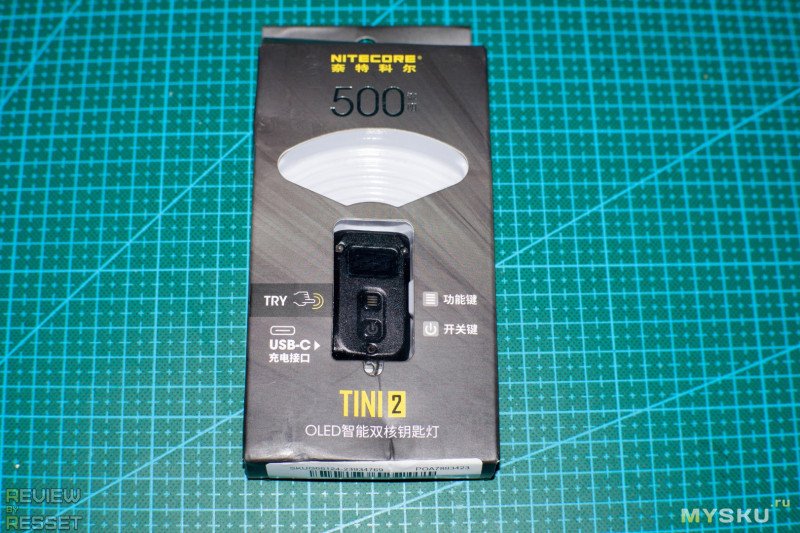
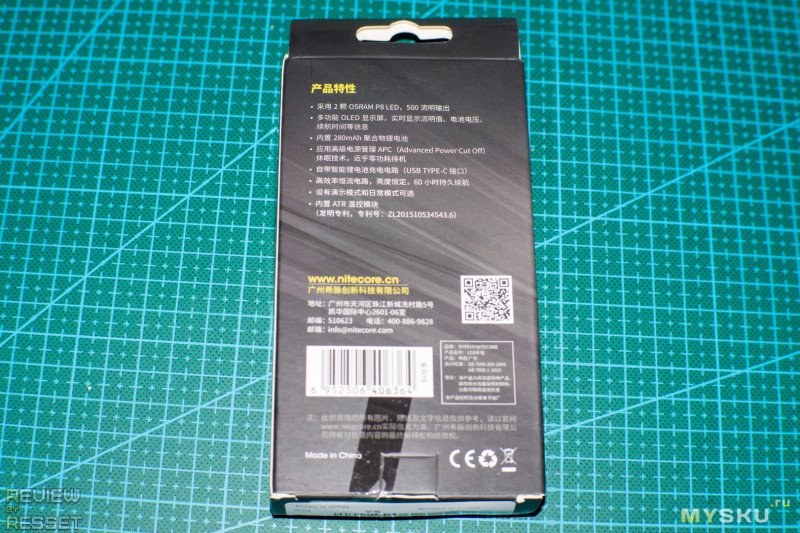
Сзади характеристики на китайском языке
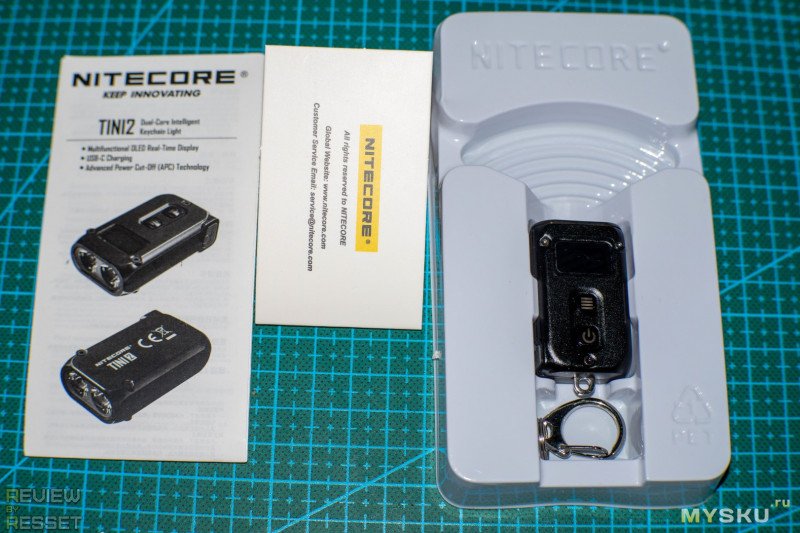
В комплекте сам фонарик с карабином и макулатура
На лицевой стороне алюминиевого корпуса расположен экран и две кнопки управления
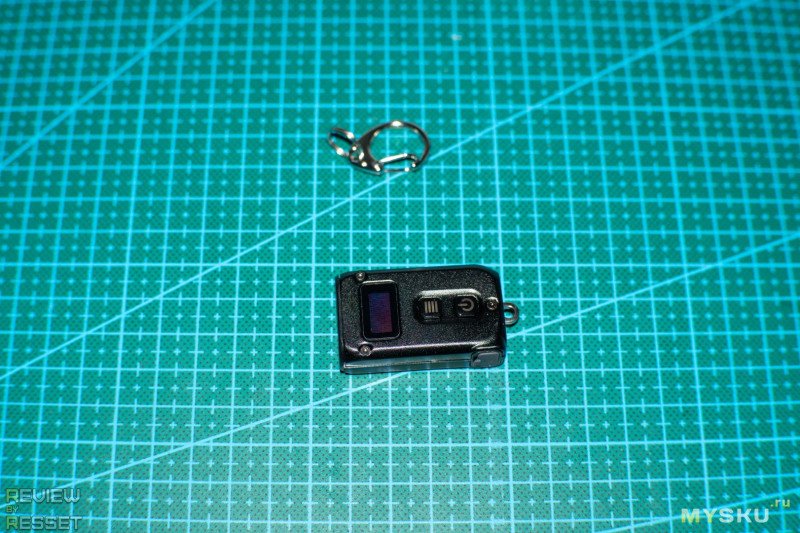
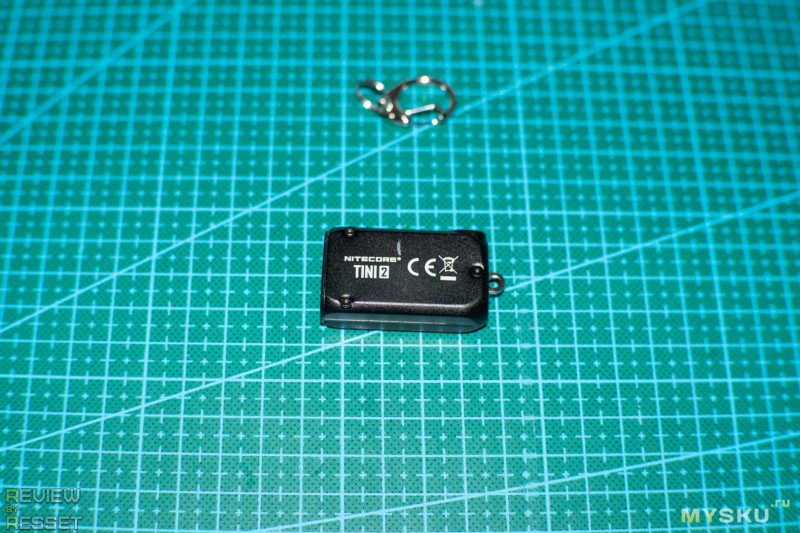
Сзади только название
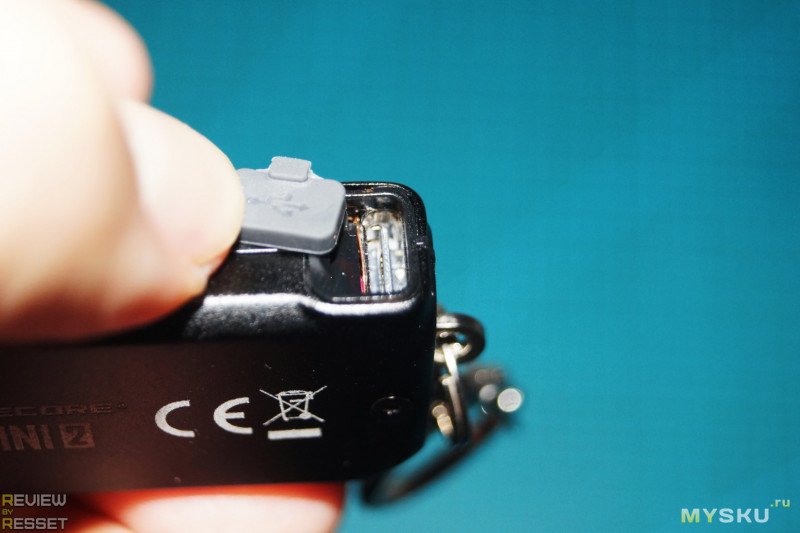
Разъем Type-C спрятан под силиконовой заглушкой с торца
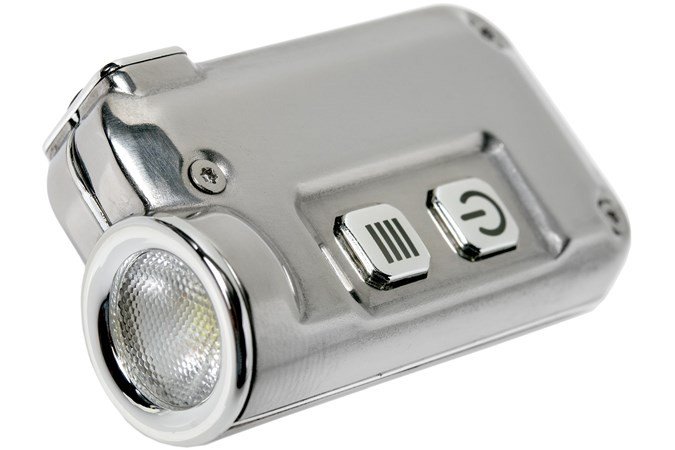
Как и писал под заголовком, на TINI он не особо похож, судите сами, вот тини
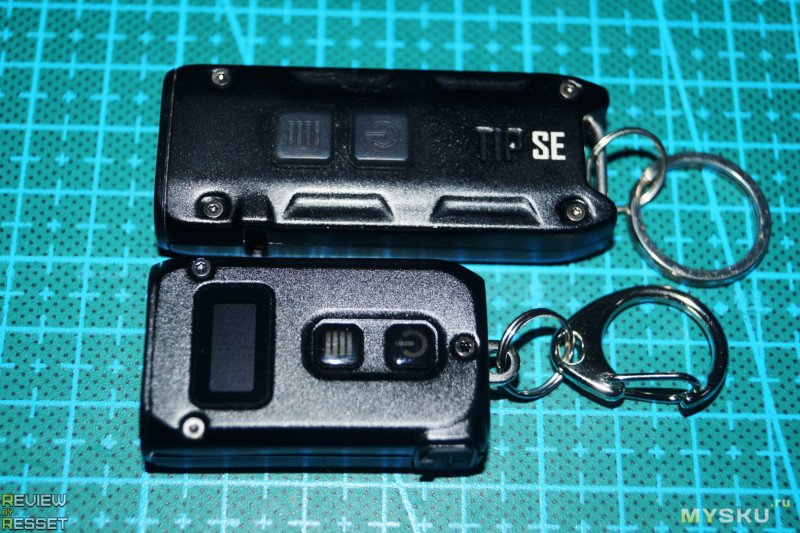
А вот TINI 2 рядом с TIP SE
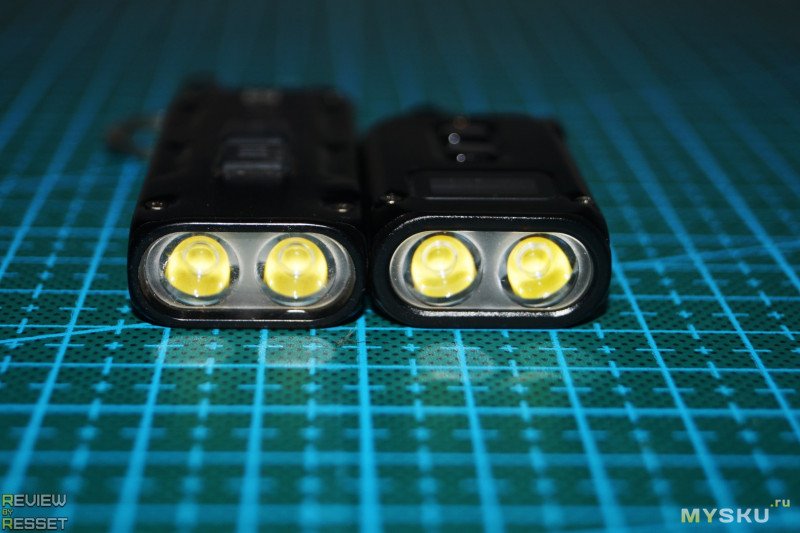
Со стороны светодиодов отличий тоже минимум
Тестирование
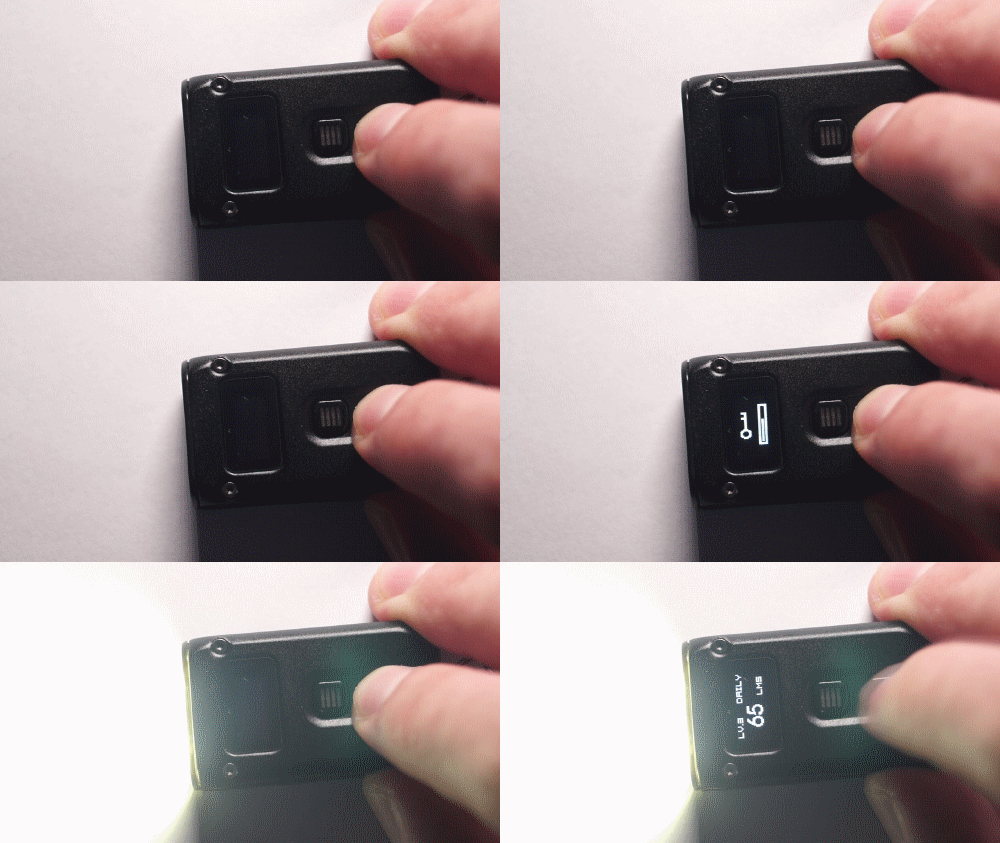
Коротким нажатием на кнопку смены режима можно вызвать информацию о заряде аккумулятора
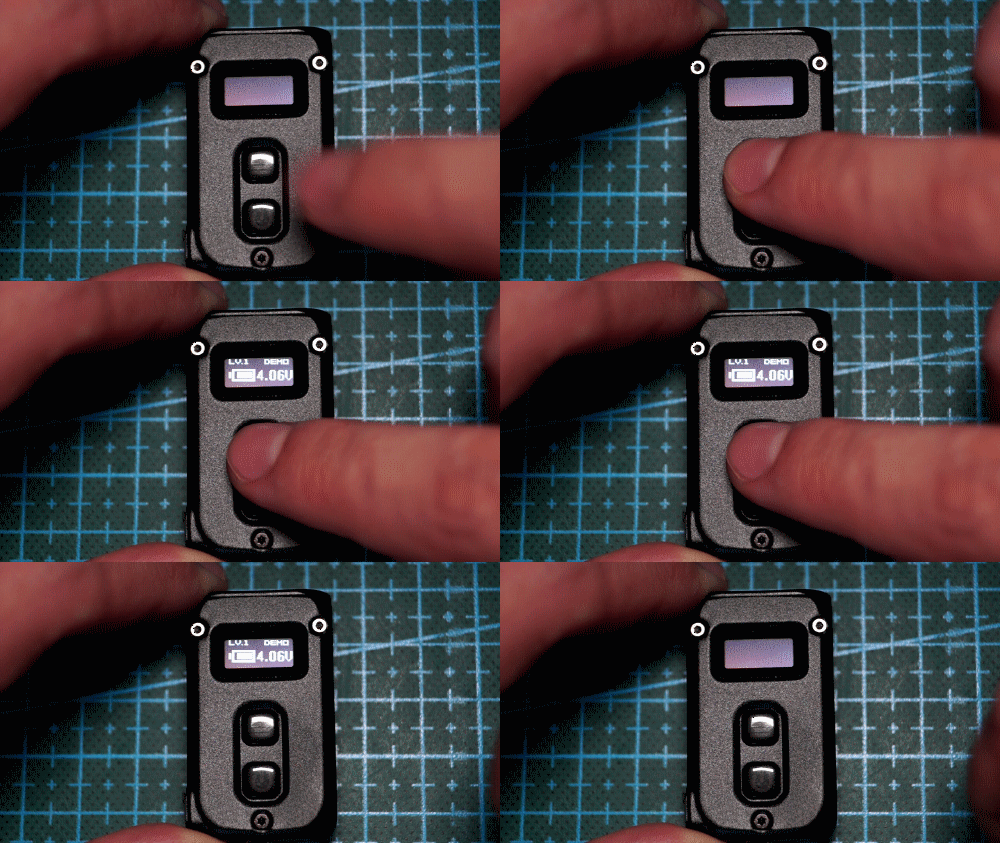
Короткое нажатие кнопки включения активирует последний выбранный режим
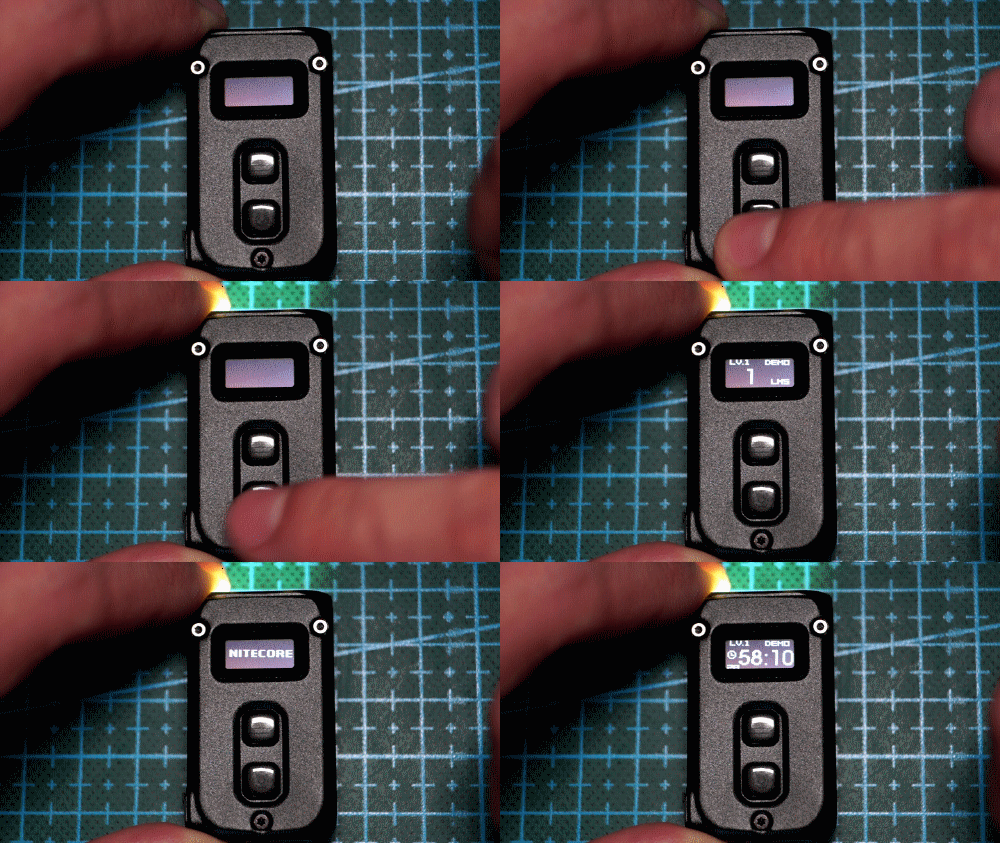
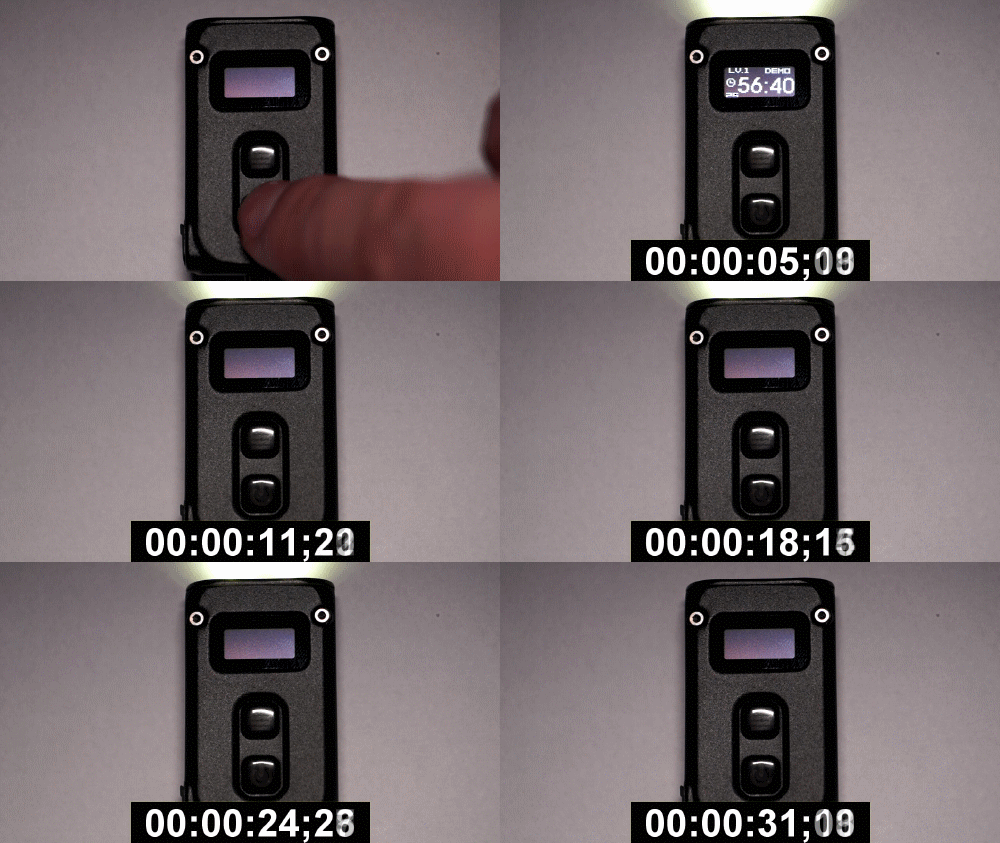
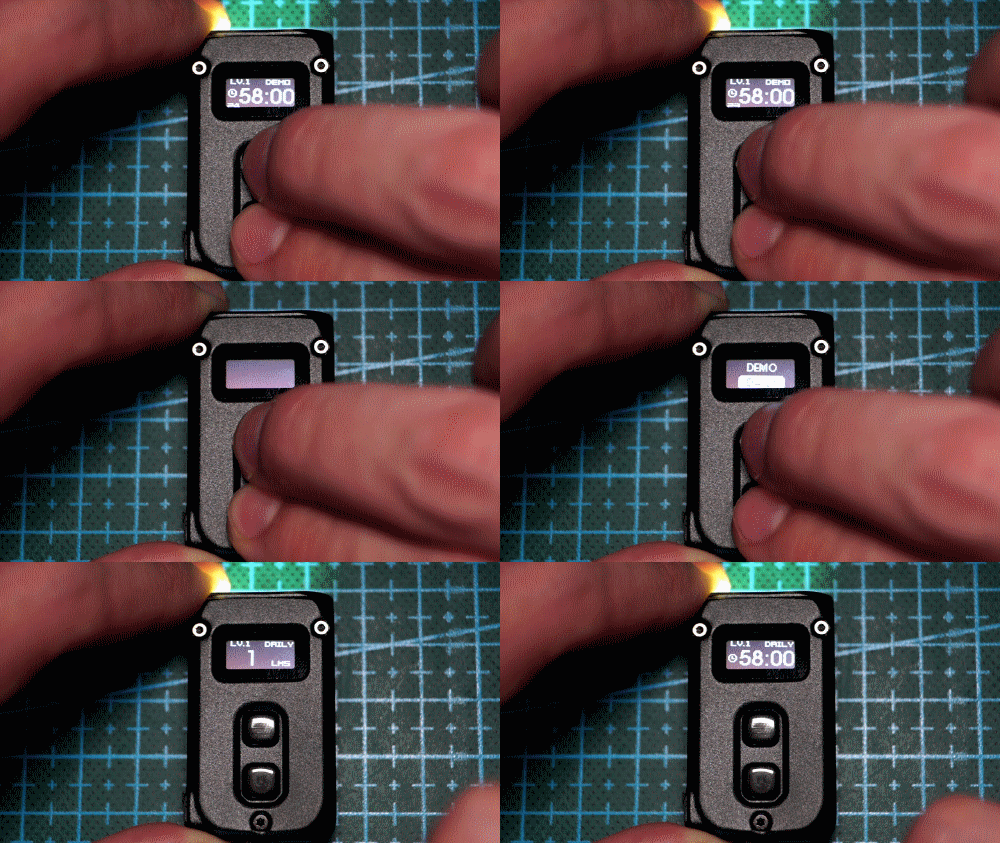
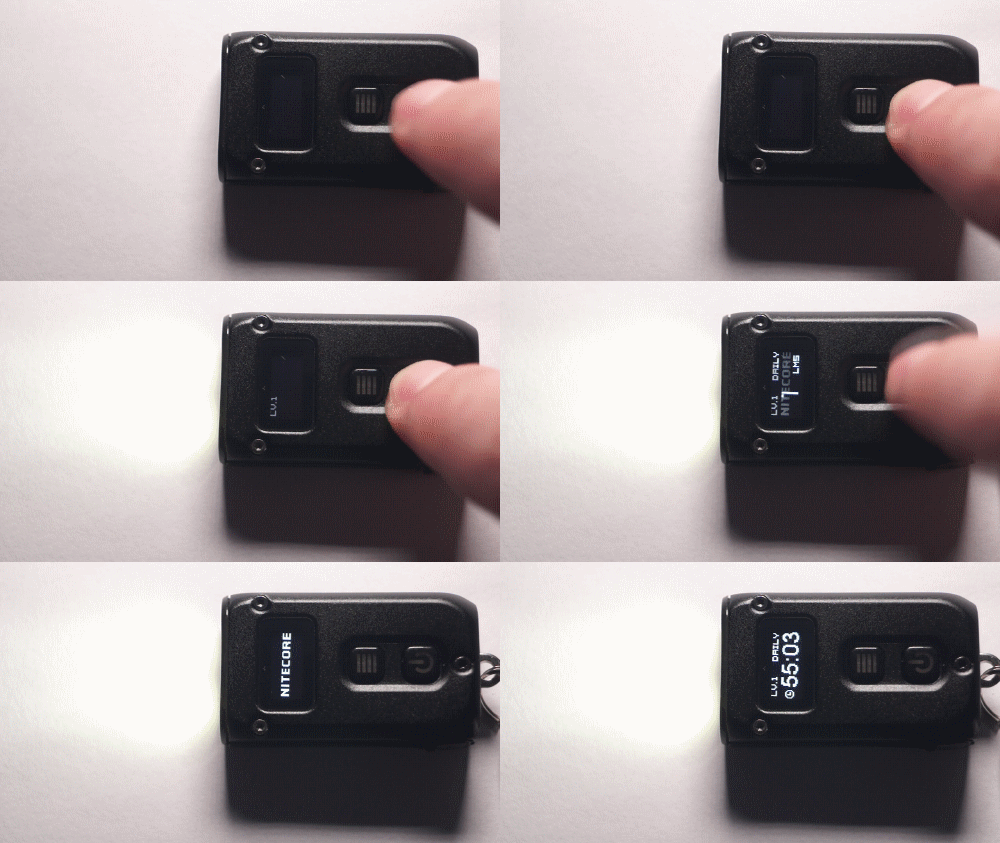
Из коробки включен режим демо, который отключает питание через 30 секунд, дабы не посадили на тестах
На повседневный и обратно переключается зажатием двух кнопок на несколько секунд
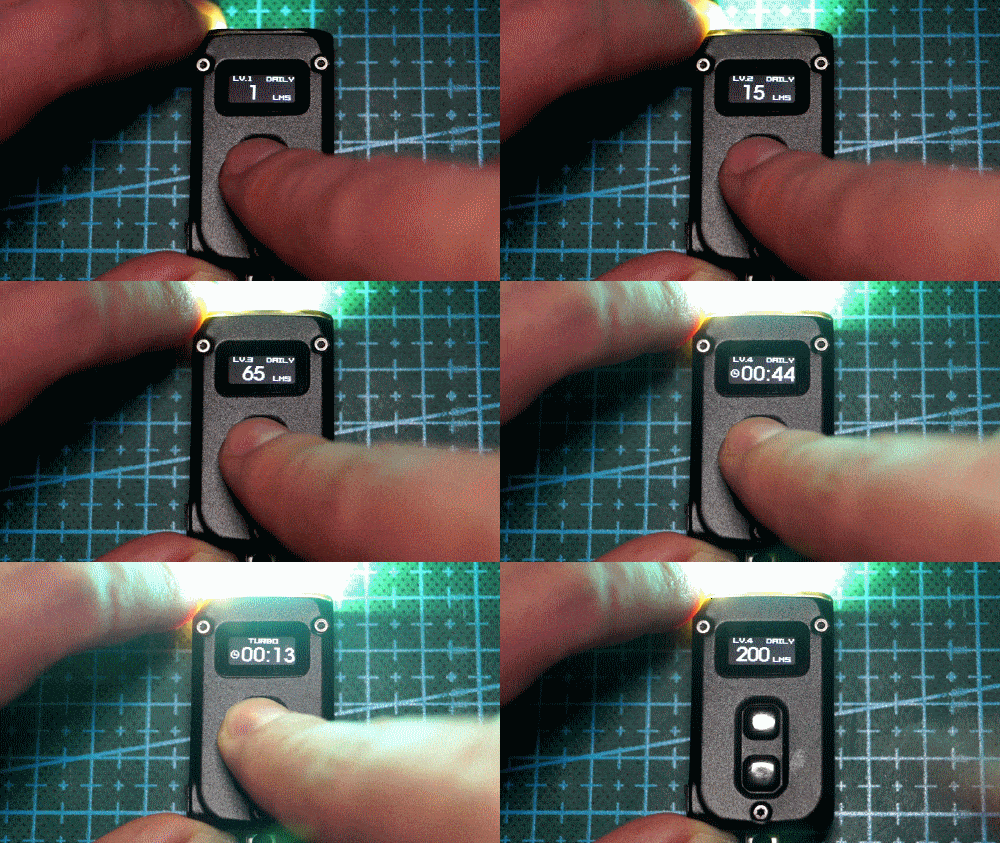
Всего предусмотрено 5 режимов яркости: 1 / 15 / 65 / 200 и 500 люмен в турбо при зажатии кнопки
По яркости аналогичен TIP SE, но у сабжа на один режим больше (второй15 люмен)
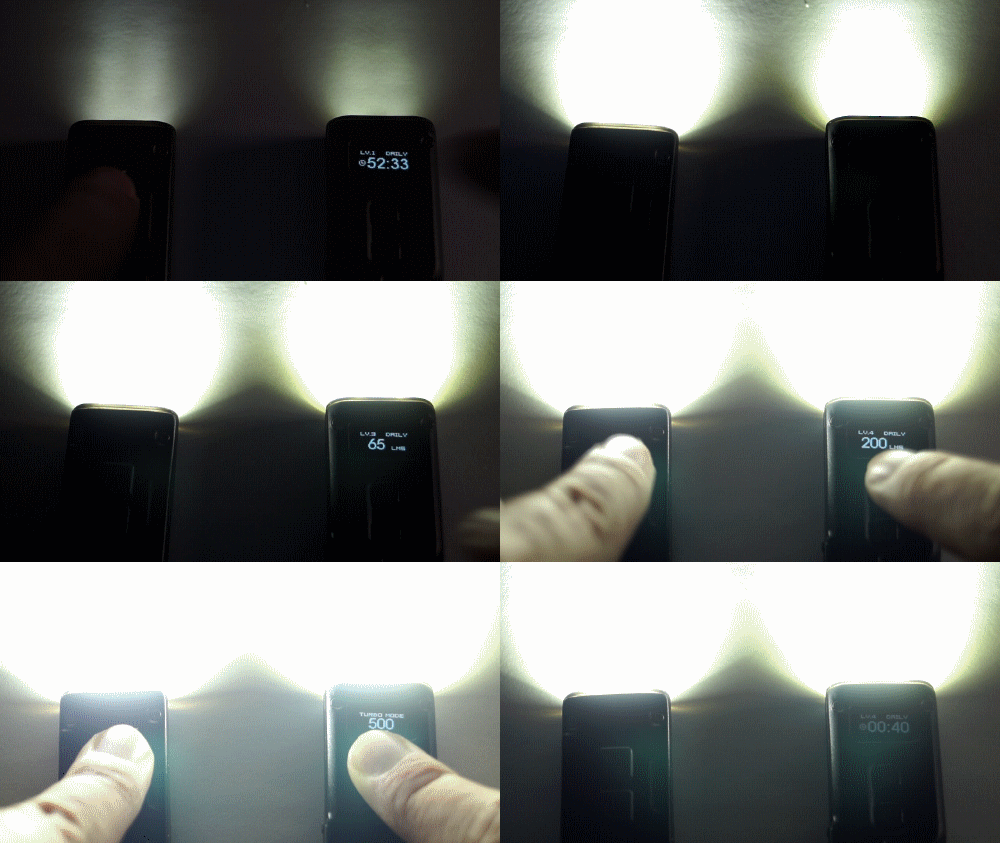
Температура света так же одинаковая, явно используются одинаковые светодиоды(как и заявлено)
Как писал выше, есть память режима, но можно сбросить его до «мунлайт» зажатием кнопки при включении
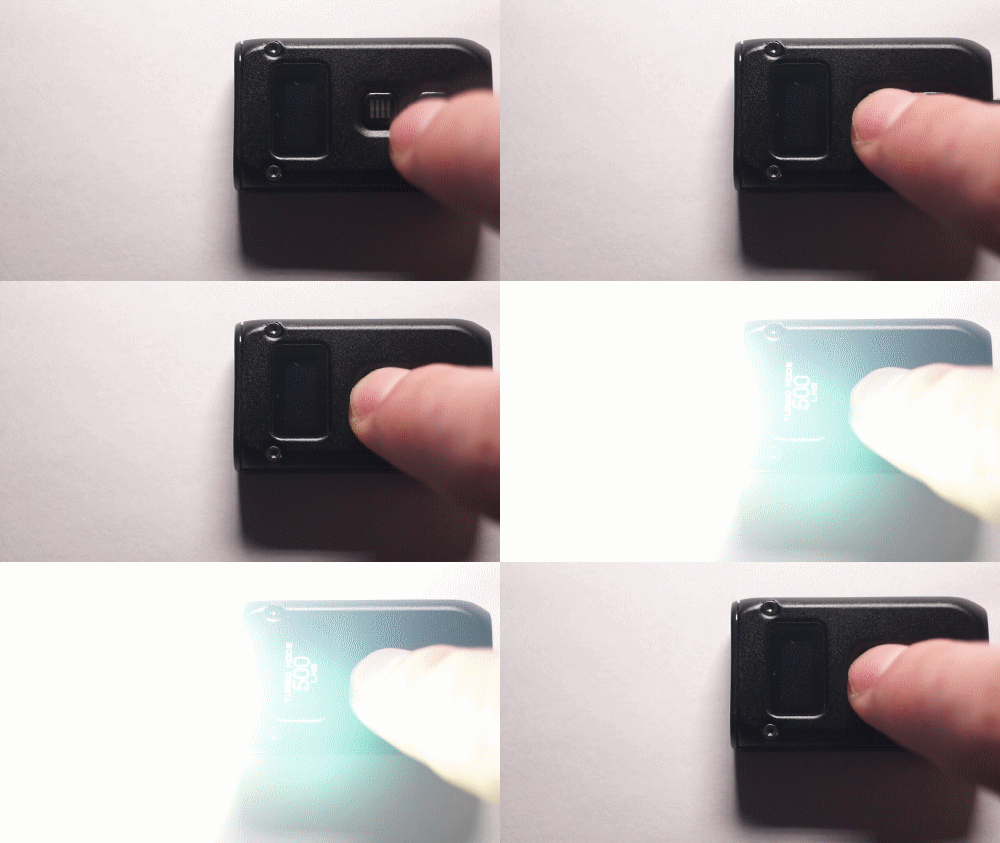
Так же можно активировать турбо зажатием кнопки выбора режимов
Если зажать кнопку выключения во включенном режиме, активируется блокировка, позволяющая только смотреть уровень заряда и актитвировать турбо режим
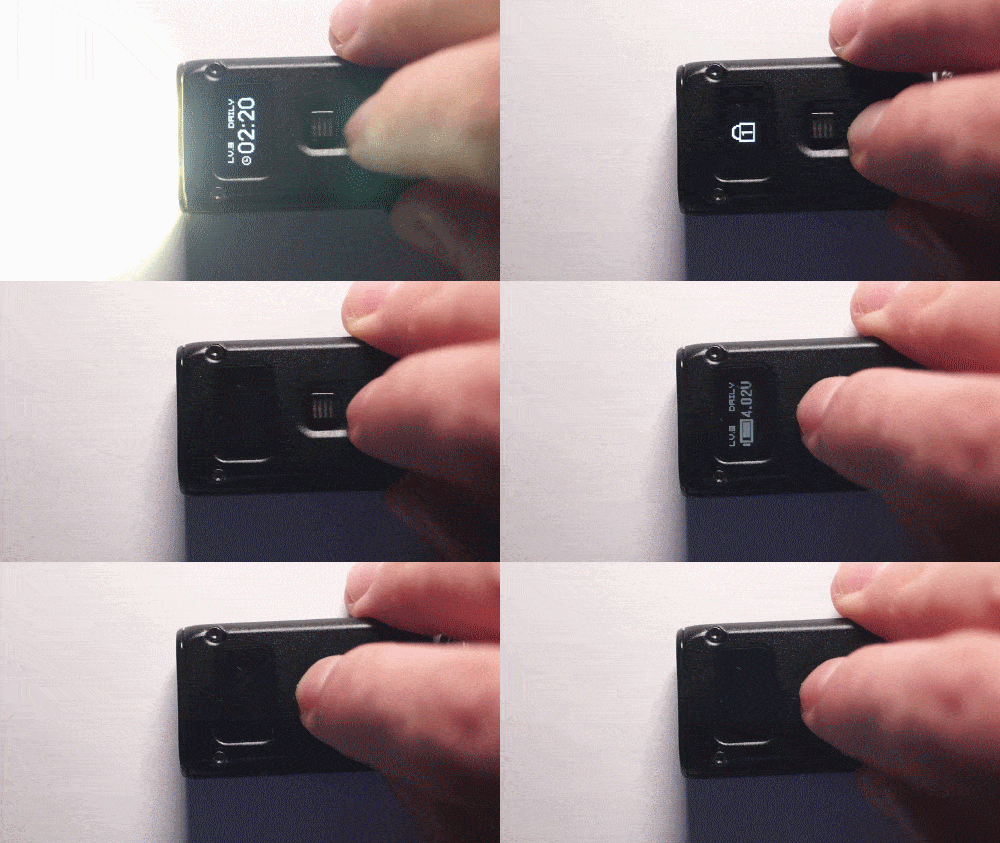
Если подержать кнопку дольше, блокировка перейдет на второй уровень, в котором ничего не работает
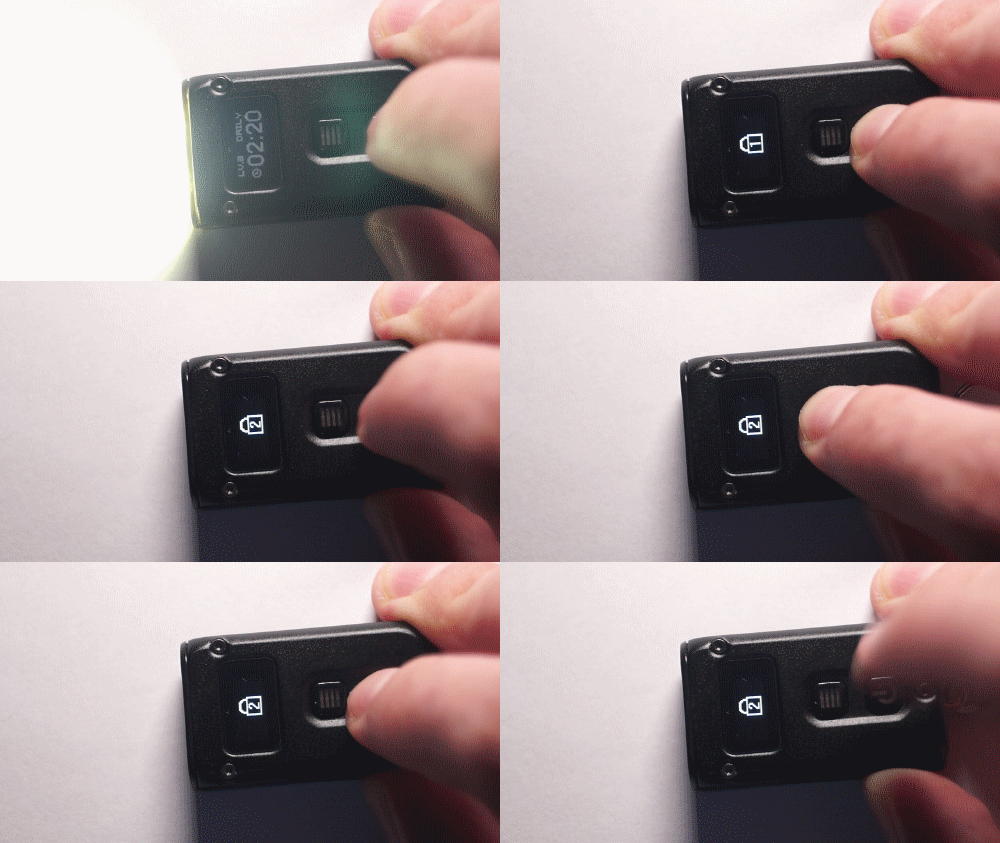
Для разблокировки нужно дважды тапнуть по кнопке и на втором клике удерживать палец до заполнения полосы
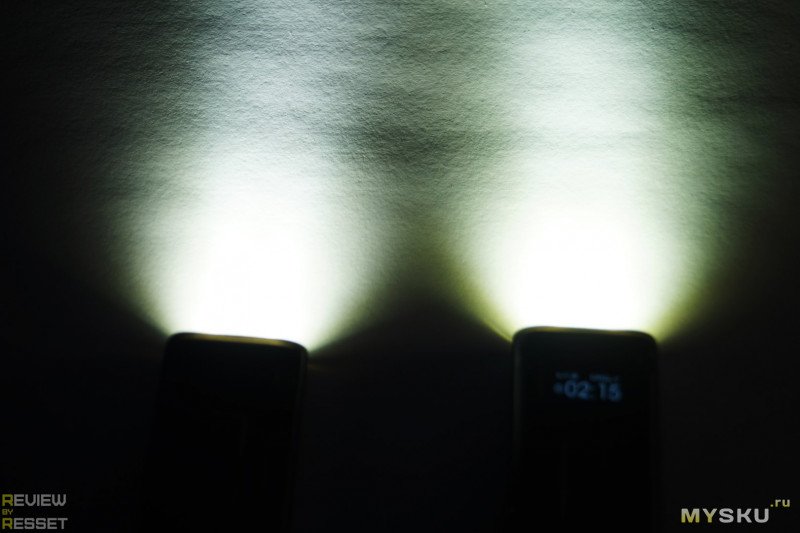
C TIP сравнивать смысла нет, он идентичен по начинке, так что взял Convoy S2+, вот снимок с метра в максимуме

А это сабж в турбо, по яркости немного уступает, при этом засветка шире, а хотспот более размыт

В 4 режиме(200лм) еще темнее

Идем в «поле». Привычное место с деревьями в 100 метрах от места съемки. Convoy S2+
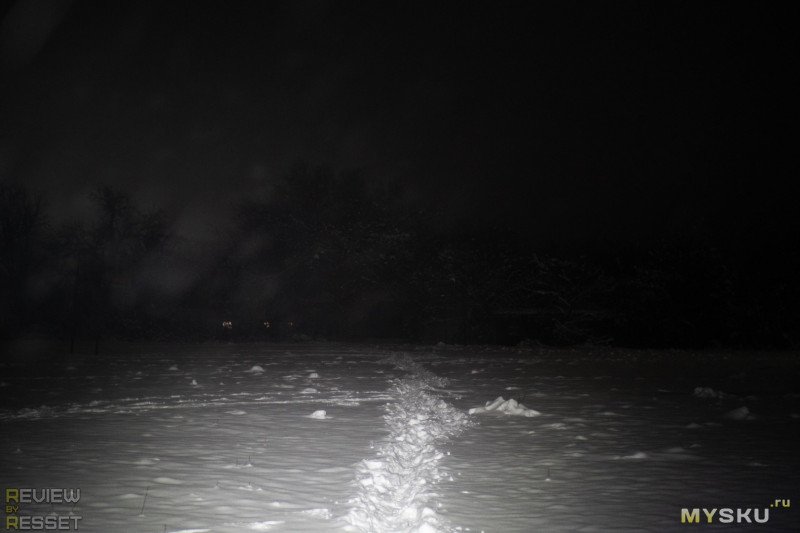
У TINI 2 заявлена дистанция освещения 90 метров, нууу… в принципе дотягивает до сотни в турбо
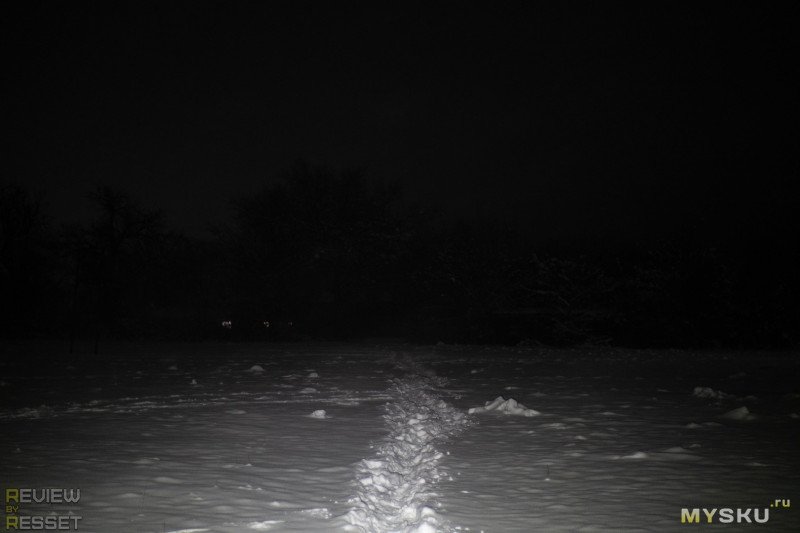
Вот во всех режимах кропнутая гифка, муунлайт пропустил, т.к. эффекта он не давал никакого )
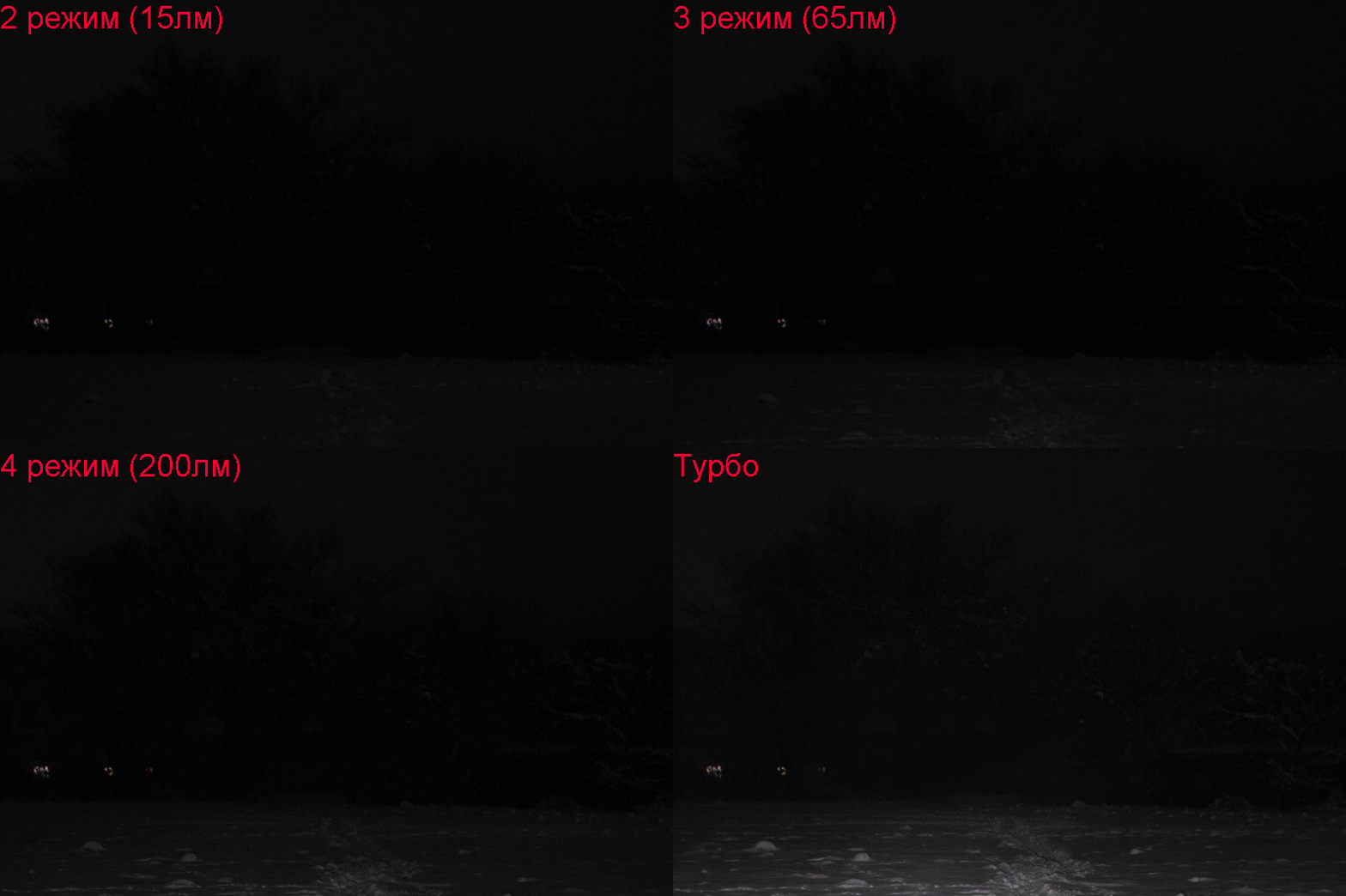
Автономность
Заявлено 60 часов работы в режиме мунлайт. Мне лень было так долго наблюдать, так что порылся в интернете и нашел такие результаты:
1 люмен: 60 часов
15 люмен: 8 часов
65 люмен: 2 часа 30 минут
200 люмен: 44 минуты 30 секунд
500 люмен: 12 минут 30 секунд
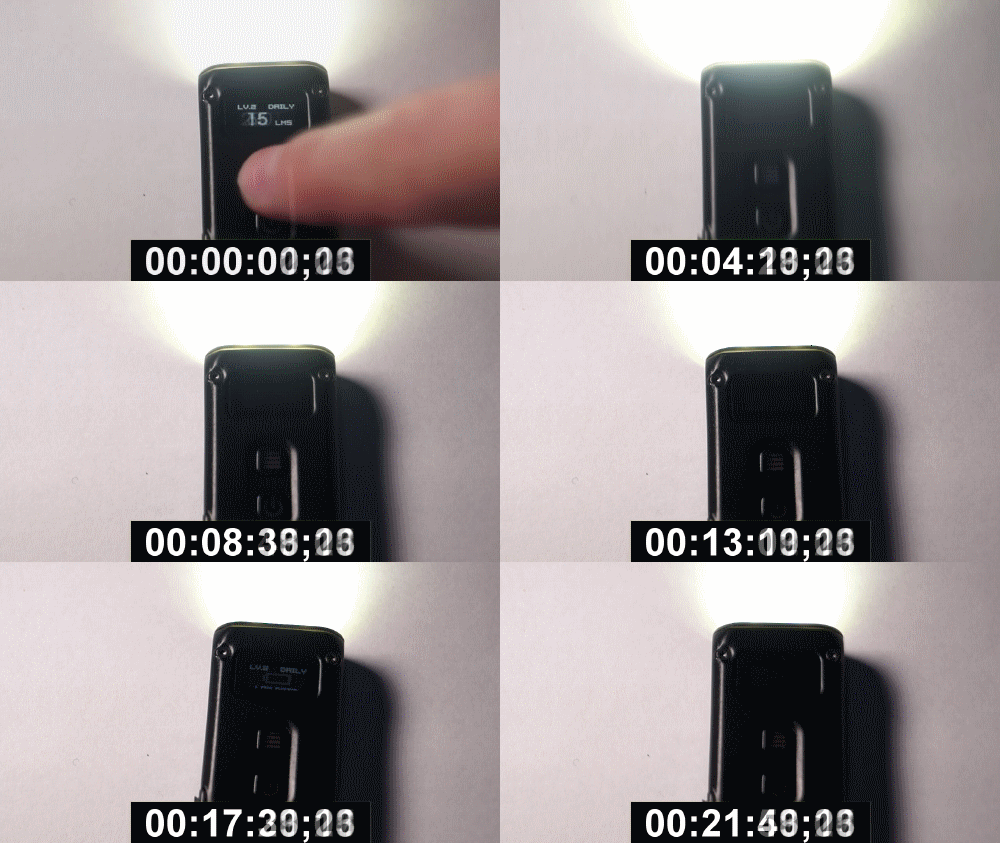
По мере разряда аккумулятора драйвер постепенно снижает уровень яркости, при этом начинает периодически мигать синий индикатор на кнопке включения. В моем случае после появления предупреждения о низком напряжении, степдаун с 4 до 3 и 2 режима составил в среднем по 10 минут на каждый шаг, во втором он провалялся около часа перед тем, как выключился. Так и не заметил, переключался он в мунлайт или нет, скорее всего нет.
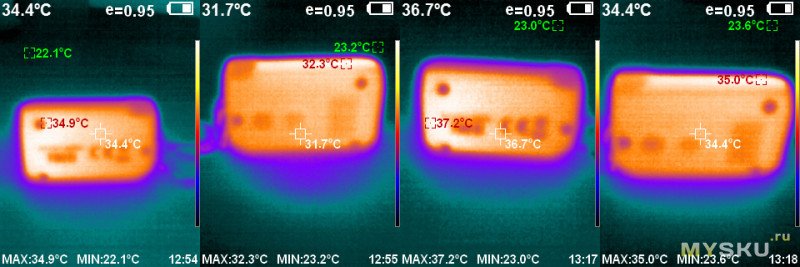
Что касается нагрева, за 20 минут в 4 режиме(200лм) корпус нагрелся с 35 до 37 градусов
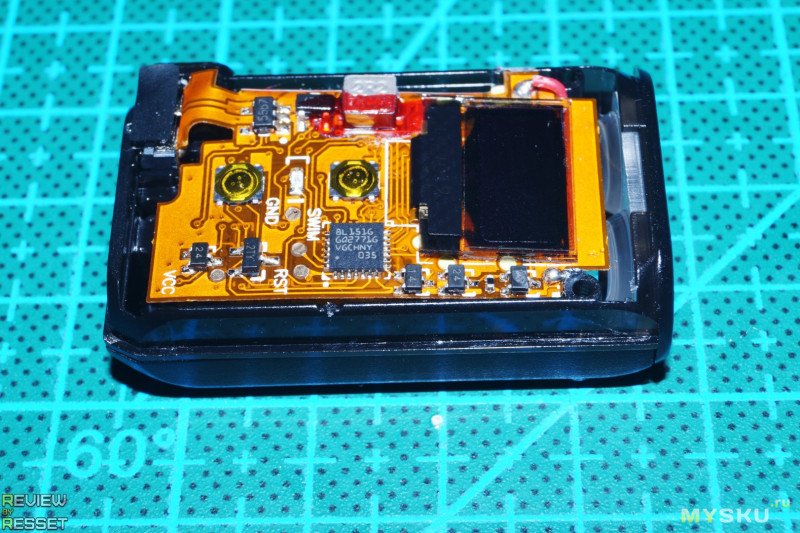
Внутренности
Корпус держится на трех винтах, при чем нижние являются гайками, так что приходится с одной стороны фиксировать, а с другой крутить. Лицевая сторона платы
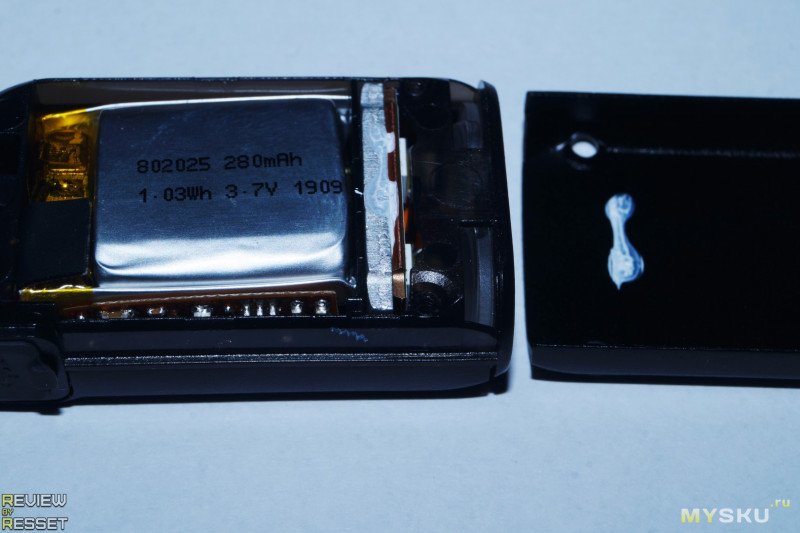
Аккумулятор разместили с обратной стороны, на заднюю крышку отводится бОльшая часть тепла от диодов
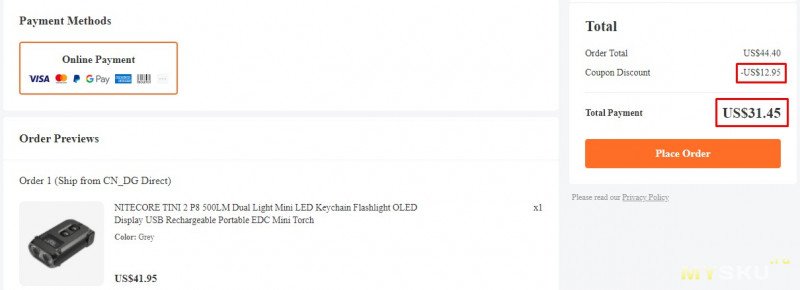
Купон
BGFN06 снижает цену до $29, доставка в РФ составляет $2.45, итого $31.45. За других не подскажу
Итоги
Думаю можно смело назвать данную модель усовершенствованным TIP SE:
Металлический корпус стал еще компактнее, правда пришлось пожертвовать почти половиной емкости аккумулятора, но для EDC фонарика компактность приоритетнее автономности, хотя благодаря второму режиму(15лм) по автономности он уже может тягаться и с TIP, у которого есть либо мунлайт, который освещает только в упор, либо сразу 65лм, которых уже может быть избыточно на небольшой дистанции, да и аккумулятор разряжается оперативнее. Разъем зарядки уже догадались прикрыть заглушкой, так что уровень защиты от пыли и влаги стал несколько выше. Ну и экран это значительный шаг вперед, не включая фонарь можно проверить уровень заряда и выбранный режим яркости, который при необходимости можно сбросить в минимум при включении, а так же следить за оставшимся временем работы, цифры поначалу прилично прыгают, но со временем успокаиваются, так что польза от этого есть. Учитывая, что с купоном ценник опускается до уровня того же TIP SE, для меня выбор фаворита очевиден. Или есть варианты получше? Делитесь своим мнением.
Как всегда, приветствуется конструктивная критика в комментариях. Всем добра =)
Планирую купить
+9
Добавить в избранное
Обзор понравился
+66
+76
(English) TINI2
Features
Specications
Accessory
Technical Data
Charging Function
Operating Instructions
TINI2
• Multifunctional OLED Real-Time Display
• USB-C Charging
• Advanced Power Cut-Off (APC) Technology
Dual-Core Intelligent
Keychain Light
• Utilizes 2 x OSRAM P8 LEDs with a max output of 500 lumens
• Max peak beam intensity of 2,000cd and max throw of 89 meters
• Utilizesatotalreectiveopticlensforuniformandsoftlight
• MultifunctionalOLEDreal-timedisplayforlumens,batteryvoltageand
runtime etc.
• Built-in 280mAh Li-ion battery
• AdvancedPowerCut-O(APC)technologyforanultra-lowstandbypower
consumption
• Built-inLi-ionbatterychargingcircuitwithaUSB-Cport
•
Highlyecientconstantcurrentcircuitprovidesastableoutputupto60hours
• 2usermodesavailable(DEMOModeandDAILYMode)
• Dualsideswitchdesign
• 5brightnesslevelsavailablewithdirectaccesstoTURBO
• Intelligentmodememoryfunction
• 2lockoutmodesavailable(HalfLockoutModeandFullLockoutMode)
• IncorporatedAdvancedTemperatureRegulation(ATR)module(PatentNo.
ZL201510534543.6)
• Metalringpullabletowithstandupto30kilogramsofweight
• HAIIIhard-anodizednish
• Impactresistantto1meter
Size: 46.6mm×25mm×12.5mm(1.83”×0.98”×0.49”)
Weight: 18.8g (0.66oz)
KeyClasp
FL1
STANDARD
TURBO HIGH MID LOW ULTRALOW
500 Lumens 200 Lumens 65Lumens 15 Lumens 1 Lumen
*15min 45min 2h 30min 8h 60h
89m 56m 32m 14m 6m
2,000cd 800cd 260cd 55cd 9cd
1m(ImpactResistance)
IP54
Note: The stated data is measured in accordance with the international
ashlighttestingstandardsANSI/PLATOFL1-2019,usingthebuilt-inLi-ion
battery (280mAh) under laboratory conditions. The data may vary in real world
use due to dierent battery usage or environmental conditions.
*TheruntimeofTURBOistestedwithoutthetemperatureregulation.
OLED Display
Mode Button
Power Button
Q&A
Q:WhydoesmyTINI2shutdownin30seconds?
A: TINI2 has 2 user modes, DEMO Mode and DAILYMode.Thedefault
settingisDEMOModewheretheproductwillautomaticallyshutdown
if there is no operation in 30 seconds. It is recommended to switch it
to DAILY Mode when in daily use. Please follow the steps below for
mode switching:
1.Whenthelightison/o,longpressboththePowerButtonandthe
ModeButtonsimultaneouslytoswitchbetweenDEMOandDAILY
Mode.
2.TheLEDwillashtoindicatethecurrentusermode:1ashto
indicate DEMO Mode and 2 ashes to indicate DAILY Mode.
Warranty Service
AllNITECORE
®
productsarewarrantedforquality.AnyDOA/defective
product can be exchanged for a replacement through a local distributor/
dealer within 15 days of purchase. After that, all defective / malfunctioning
NITECORE
®
products can be repaired free of charge within 24 months
from the date of purchase. Beyond 24 months, a limited warranty applies,
covering the cost of labor and maintenance, but not the cost of accessories
or replacement parts.
Thewarrantywillbenulliedif
1.heproduct(s)is/arebrokendown,reconstructedand/ormodiedby
unauthorized parties;
2.theproduct(s)is/aredamagedduetoimproperuse.
For the latest information on NITECORE
®
products and services, please
contactalocalNITECORE
®
distributororsendanemailtoservice@
nitecore.com
※Allimages,textsandstatementsspeciedhereinthisusermanualare
for reference purposes only. Should any discrepancy occur between
this manual and information specied on www.nitecore.com, Sysmax
Innovations Co., Ltd. reserves the rights to interpret and amend the
content of this document at any time without prior notice.
Operating Instructions
Multifunctional OLED Display
TINI2isequippedwithamultifunctionalOLEDdisplay.(Pleaseremovethe
screen protector before the rst use.) When the light is turned on, the screen
will successively show the current info (Brightness Level & Lumens, Runtime
Remaining, User Mode) before it goes out. After the screen goes out, short
pressing the Mode Button can reactivate the screen.
Display Demonstration Function
• ThisfunctionisusedfordemonstrationONLY.Itdoesnotreecttheactual
light status.
• Whenthelightiso,pressandholdthepowerbuttonevenafterthe
light accesses ULTRALOW until the light is turned o to enter the display
demonstration.
• In this status, thescreenwillcyclethroughvariousinformationaldisplays.
Short press either button to exit this status.
On / O
On:Whenthelightiso,shortpressthePowerButtontoturniton.
O: When the light is on, short press the Power Button to turn it o.
User Modes
TINI2has2usermodes,DEMOModeandDAILYMode.
DEMO Mode: The light will automatically shut down if there is no operation in
30seconds(reactivatingthescreenexcluded).Thecountdownwillbedisplayed
on the screen.
DAILY Mode: The lightwillnotautomaticallyshutdownandwillneedtobe
shut down manually.
Note: The default setting is DEMOMode.Itisrecommendedtoswitchitto
DAILYModewhenindailyuse.
Mode Switching
Whenthelightison/o,longpressboththePowerButtonandtheModeButton
simultaneously to switch between DEMO and DAILY Mode.
The LED will ash to indicate the current user mode: 1 ashtoindicateDEMO
Mode and 2 ashes to indicate DAILY Mode.
(In this process, the screen will show “DEMO”or“DAILY”toindicatethecurrent
user mode.)
Note: Reactivating the light within 3 seconds after it automatically shutsdown
inDEMOmodewilltemporarilyaccessDAILYModeuntilitisturnedo.
Brightness Levels
Whenthelightandthescreenison,shortpresstheModeButtontocycle
through “ULTRALOW – LOW – MID — HIGH”. The ashlight will directly access
the previously memorized brightness level when reactivated.
Note: When the screen is o, short press the Mode Button toactivatethe
screenbeforeadjustingthebrightnesslevel.
Direct Access to ULTRALOW
Whenthelightiso,longpressthePowerButtontodirectlyaccessULTRALOW.
Direct Access to TURBO
Whenthelightison/o,pressandholdtheModeButtontoaccessTURBO.
Release to return to previous status.
Lockout / Unlock
TINI2hastwolockoutmodes(HalfLockoutModeandFullLockoutMode).
Half Lockout Mode (Lockout 1):
• Whenthelightison,pressandholdthePowerButtonuntilthescreenshows
the Lockout 1 icon to access Half Lockout Mode.
• When in Half Lockout Mode, the Power Button is unavailabletoactivatethe
ashlight. Holding the Mode Button is still available for accessing TURBO.
Full Lockout Mode (Lockout 2):
• Whenthelightison,pressandholdthePowerButtonevenafteraccessing
HalfLockoutMode,untilthescreenshowsLockout2icontoaccessFull
Lockout Mode.
• WheninFullLockoutMode,bothbuttonsareunavailabletoactivatethe
ashlight.
Unlock:
• IneitherLockoutMode,shortpressandthenlongpressthePowerButton,
during which the screen will show an unlock icon and a progress bar, until
the ashlight is activated to exit Lockout Mode. The light will access the
previous memorized level.
• The light will be automaticallyunlockedwhenbeingrechargedineither
Lockout Mode.
ATR (Advanced Temperature Regulation)
TheintegratedATRtechnologyregulatestheoutputoftheTINI2according
to the working condition and ambient environment to maintain the optimal
performance.
Power Indication
Whenthelightiso,shortpresstheModeButtontodisplaythebatterylevel,
the battery voltage, the memorized brightness level and the current user mode
before it goes out. Dierent voltages represent the corresponding remaining
battery power levels:
Note: When the battery voltage is below 3.4V, the power indicator beneath
bothbuttonswillashblueevery2secondstoinformtheusertorechargethe
battery as soon as possible.
Charging Function
TINI2isequippedwithanintelligentchargingsystem.Pleasechargethebattery
before the rst use.
Connecting to the External Power: As illustrated, use the USB cable to
connectanexternalpowersupply(e.g.aUSBadapter,acomputerorotherUSB
charging devices) to the USB port to begin the charging process. The charging
time is approx. 1 hour 45 minutes.
Charging Indicator: When the charging status is normal, the charging
indicatorwillashslowlytoinformtheuserandthescreenwillshowthe
current battery level. When the battery is fully charged, the charging indicator
will become steadily turned on to inform the user and the screen will display a
full battery level.
Cautions
1.TheTURBOBrightnessLevelof500lumenswillproducemassiveheat
rapidly during long-time activation. Use caution when operating the lightin
TURBO mode to avoid overheating and step down to a lower level if the light
becomes too hot to handle.
2.CAUTION!Possibledangerousradiation!Don’tlookintothelight!Maybe
dangerous for your eyes.
3.Pleaserechargetheproductevery3monthswhenleftunusedfora
prolonged time.
4.Theproductcontainssmallassemblyparts.Pleasekeepitawayfromchildren
to avoid danger of choking or suocation.
5.Whentheashlightiskeptinthebackpack,pleaseactivatetheLockoutMode
to prevent accidental activation.
6.DONOTdisassemble,modifyorreconstructtheproduct,otherwisethe
warranty will be nullied, and the product might be damaged.
(Half Lockout Mode)
(Full Lockout Mode)
Low power Full power
3.5V 3.7V 3.9V 4.2V
SYSMAX Innovations Co., Ltd.
TEL: +86-20-83862000
FAX: +86-20-83882723
E-mail: info@nitecore.com
Web: www.nitecore.com
Address: Rm2601-06,CentralTower,
No.5XiancunRoad,TianheDistrict,
Guangzhou,510623,Guangdong,China
Please nd us on facebook : NITECORE Flashlight
Thanks for purchasing NITECORE!
TINI0601221
MadeinChina