

-
Описание
-
Videos
Содержание: скрывать
- 2 Восстановление заводских настроек
- 3 Первоначальный запуск
- 3.1 Bluetooth спаривание
- 4 Зарядка
- Популярные вопросы
- Руководство по эксплуатации
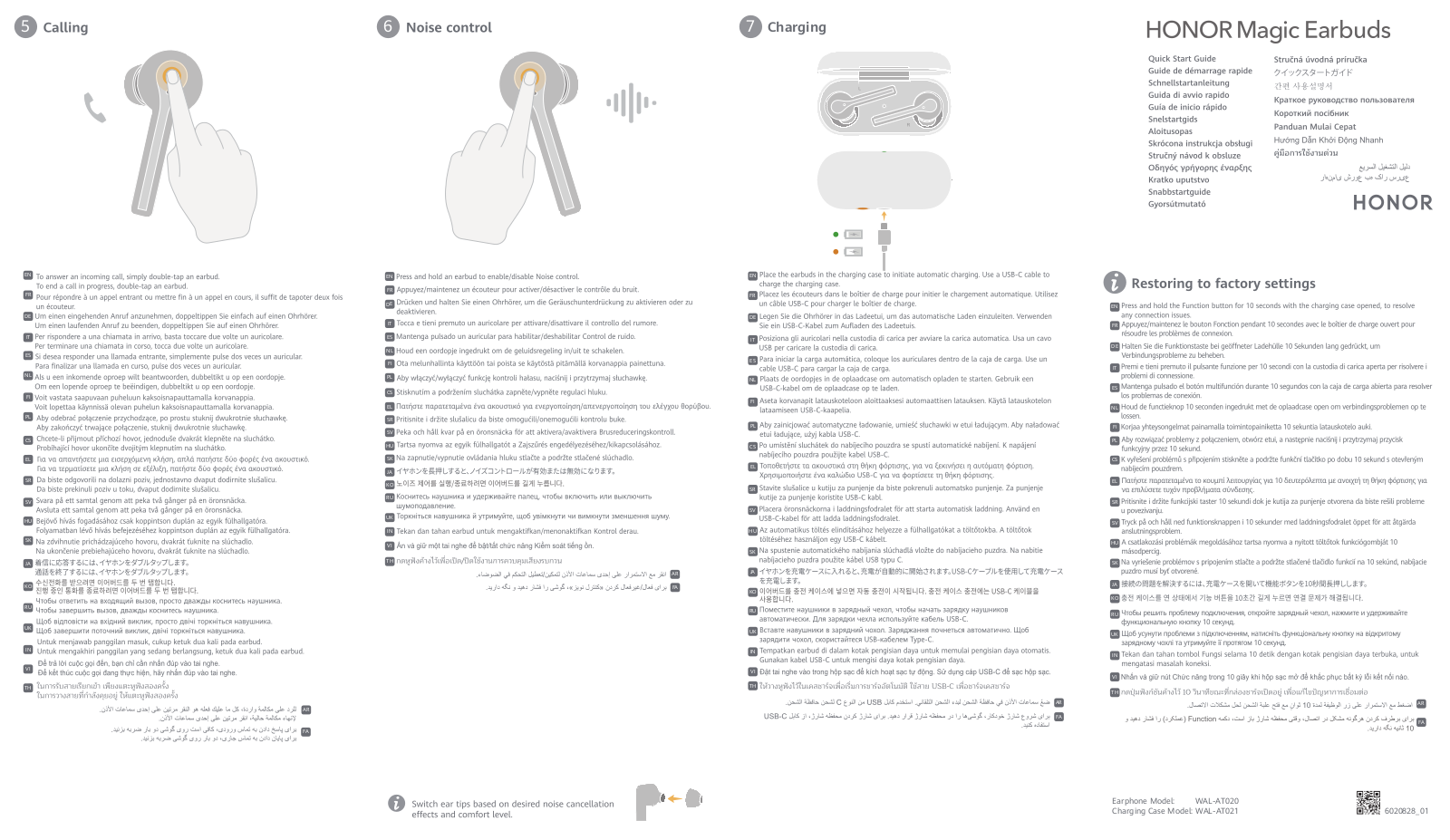
Восстановление заводских настроек
Нажмите и удерживайте функциональную кнопку в течение 10 секунд с открытым чехлом для зарядки, чтобы решить любые проблемы с подключением.
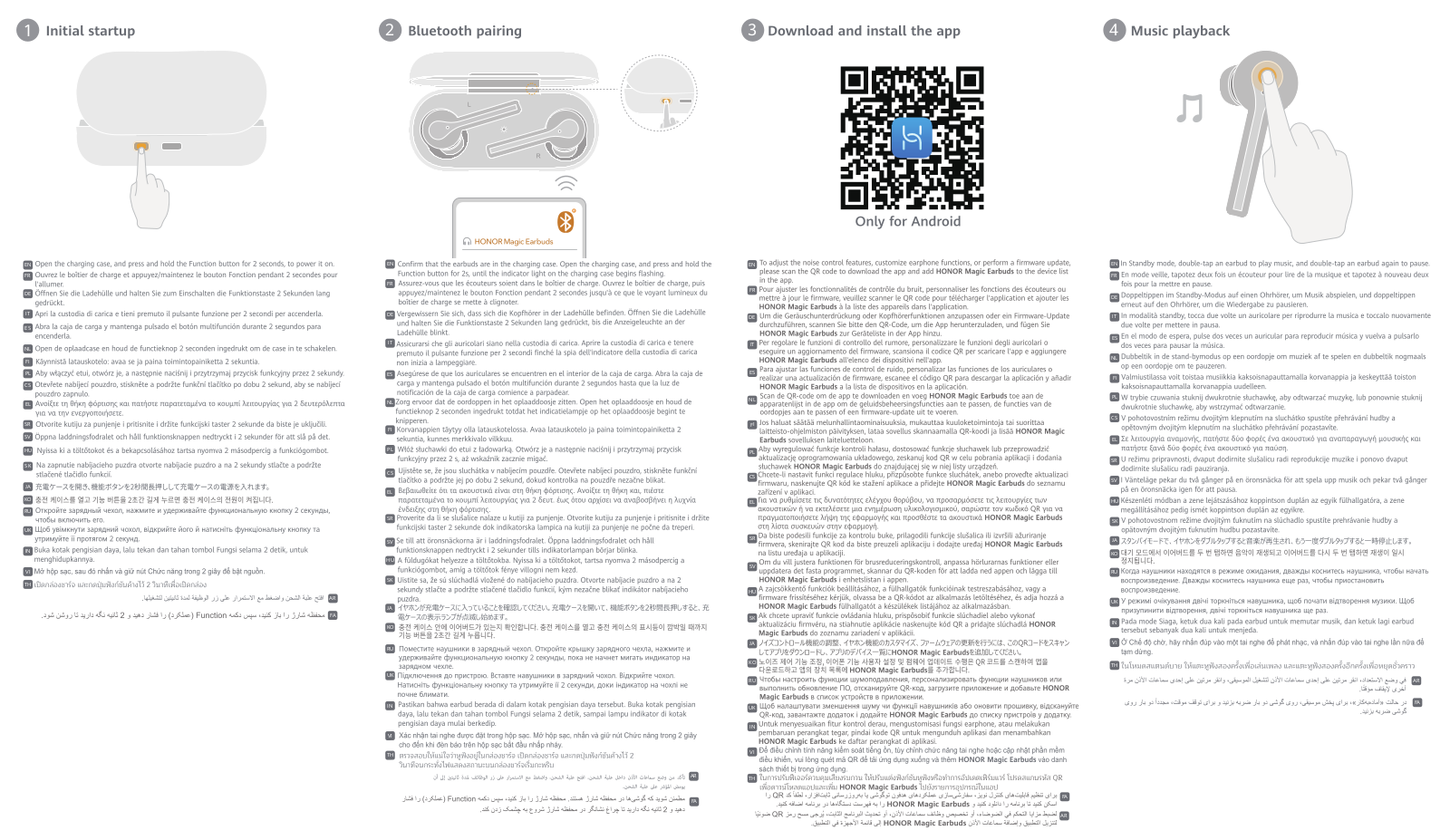
Первоначальный запуск
Откройте чехол для зарядки, нажмите и удерживайте функциональную кнопку в течение 2 секунд, чтобы включить k.
Bluetooth спаривание

Убедитесь, что наушники находятся в чехле для зарядки. Откройте зарядный футляр, нажмите и удерживайте функциональную кнопку в течение 25 секунд, пока индикатор на зарядном футляре не начнет мигать.
Загрузите и установите приложение
Чтобы настроить функции шумоподавления, адаптировать настройки наушников или обновить прошивку, отсканируйте QR-код для загрузки приложения. Затем добавьте HONOR Magic Earbuds в список устройств в приложении.
Вынимаем наушники
Откройте чехол для зарядки и поднимите наушники снизу, чтобы вынуть их.
Замена ушных вкладышей

Меняйте вкладыши в зависимости от желаемого эффекта шумоподавления и уровня комфорта.
Музыкальное воспроизведение

По умолчанию:
В режиме ожидания дважды коснитесь наушника, чтобы начать воспроизведение музыки, и дважды коснитесь снова, чтобы приостановить его.
призвание
По умолчанию:
- Чтобы ответить на входящий вызов, дважды коснитесь наушника.
- Чтобы завершить текущий вызов, дважды коснитесь наушника.
Управление шумом

По умолчанию:
- Нажмите и удерживайте наушник, чтобы включить/отключить контроль шума.
Зарядка

Поместите наушники в зарядный футляр для автоматической зарядки. Для зарядки футляра используйте кабель USB-C.
Популярные вопросы
1. Как восстановить заводские настройки наушников?
Чтобы восстановить заводские настройки, выполните следующие шаги:
- Убедитесь, что зарядный футляр открыт.
- Найдите функциональную кнопку на зарядном футляре.
- Нажмите и удерживайте эту кнопку в течение 10 секунд.
- Дождитесь, пока индикатор начнет мигать. Это сигнализирует о том, что настройки восстановлены.
2. Как запустить наушники впервые?
Для первоначального запуска следуйте этим шагам:
- Откройте зарядный футляр.
- Найдите функциональную кнопку и нажмите ее.
- Удерживайте кнопку в течение 2 секунд.
- Наушники включатся и будут готовы к сопряжению.
3. Как выполнить Bluetooth-сопряжение?
Чтобы подключить наушники по Bluetooth, выполните следующие шаги:
- Убедитесь, что наушники находятся в зарядном футляре.
- Откройте футляр.
- Нажмите и удерживайте функциональную кнопку в течение 25 секунд.
- Дождитесь, пока индикатор на футляре начнет мигать — это означает, что наушники находятся в режиме сопряжения.
4. Как зарядить наушники и футляр?
Зарядка осуществляется следующим образом:
- Поместите наушники в зарядный футляр. Они автоматически начнут заряжаться.
- Для зарядки футляра используйте кабель USB-C.
- Индикатор на футляре покажет статус зарядки: красный свет — зарядка идет, синий — зарядка завершена.
5. Как изменить ушные вкладыши для лучшего комфорта и шумоподавления?
Чтобы заменить ушные вкладыши:
- Выберите подходящий размер вкладышей для вашего уха.
- Осторожно снимите текущие вкладыши с наушников.
- Установите новые вкладыши, убедившись, что они плотно сидят.
- Повторите процесс для второго наушника. Это обеспечит максимальный комфорт и эффективность шумоподавления.
Videos: HONOR Magic Earbuds

The Honor Magic Earbuds have ANC, the IPX5 sweat and water-proof certification, 10mm dynamic driver, around 4 hours listening on a full charge with the ANC off and 3 with the ANC on, and up to 12 days of music playback with the charging case, aptX, AAC, and SBC codecs, and much more. Learn how to use them with this new Honor Magic Earbuds Manual.
What’s Inside
Honor Magic Earbuds Manual | Everything You Need To Know!
Honor Magic Earbuds Manual | How to Pair / Connect?
To iOS and Android phones
Step 1: Open the lid of the charging case. After that, they will turn on automatically.
Step 2: Press and hold the multifunction touch button on both earbuds for 2 seconds. When a light starts flashing in the earbuds, they will be ready to pair.
Step 3: Go to the device’s Bluetooth settings.
Step 4: Select “HONOR Magic Earbuds”. If a password is needed, type “0000”.
Step 5: After that, the pairing will be done.
To PC (Windows)
Step 1: Turn on Window’s Bluetooth.
Step 2: Go to the settings.
Step 3: Go to “Bluetooth and other devices”.
Step 4: Click on “Add device”.
Step 5: Click on Bluetooth.
Step 6: Open the lid of the charging case. After that, they will turn on automatically.
Step 7: Press and hold the multifunction touch button on both earbuds for 2 seconds. When a light starts flashing in the earbuds, they will be ready to pair.
Step 8: Select “HONOR Magic Earbuds”. If a password is needed, type “0000”.
Step 9: After that, the pairing will be done.

Honor Magic Earbuds Manual | How to Wear?
Step 1: Take both earbuds out of the charging case.
Step 2: Identify the left and right earbuds.
Step 3: Choose the ear tips that best suit your ears.
Step 4: Insert the headphones into the inner canal of the ears.
Step 5: Rotate for the best possible comfort and best fit, and make sure that the microphone is pointing to the mouth.

Honor Magic Earbuds Manual | How to Turn On and Off?
Turn on
Automatically: Open the lid of the charging case. After that, they will turn on automatically.
Manually: Press and hold the multifunction button on the charging case for 2 seconds.
Turn off
Automatically: Place the earbuds inside of the charging case. After that, the earbuds will turn off automatically.
Honor Magic Earbuds Manual | How to Activate the ANC?
To activate or deactivate the ANC feature in the Honor Magic Earbuds, all you have to do is to press and hold the multifunction touch button on any of the earbuds.

How to Control? / How to Operate? – Instructions
- Play or pause music: Press the multifunction touch button on any of the earbuds two times.
- Answer an incoming call: Press the multifunction touch button on any of the earbuds two times when an incoming call.
- End a call: Press the multifunction touch button on any of the earbuds two times.
Honor Magic Earbuds Manual | How to Charge
Earbuds
To charge the earbuds, all you have to do is to place them into the charging case and close the lid. The earbuds will start charging automatically.
Charging case
To charge the charging case, all you have to do is to connect the case to a USB charger or charging port with the included USB-A to C cable. It will start charging automatically.

Honor Magic Earbuds Manual | How to Reset?
Step 1: Unpair the earbuds from any paired devices.
Step 2: Open the lid of the charging case and keep the earbuds inside.
Step 3: Press and hold the multifunction touch button on both earbuds for 10 seconds.
Step 4: After that, the resetting will be done.
Honor Magic Earbuds Manual | LED Light Status
Earbuds
- Light flashing in the earbuds: Earbuds ready to pair.
Charging case
- Orange light on: Case charging.
- Green light on: Case fully charged.

A Guide To Honor Magic Earbuds APP
The Honor Magic Earbuds can be used with an application, called Honor AI Life. This application is available for iOS and Android devices.
- First page: On the first page of this application, you will be able to see the earbuds connected to the application.
- Second page: On this page, you will be able to obtain information about the earbuds, such as the percentage of their battery and the charging case, options to change the touch controls of the earbuds, firmware updates and special data about the earbuds.
- Third page: this is the page where the options to change the touch controls of the earbuds appear. You can change the controls to play and pause the music, change the songs and activate the voice assistant, both with simple touches and with long touches.

Honor Magic Earbuds Manual | How to Update the Firmware?
Step 1: Make sure your HONOR Magic Earbuds are connected to your phone or tablet. Place both earbuds into the case, and leave the case cover open. Check that both the earbuds and the case have at least 30% battery remaining.
Step 2: Open the Honor AI Life app.
Step 3: Select the HONOR Magic Earbuds card.
Step 4: Touch “Firmware update”, or just “Update”. If an update is available, touch “DOWNLOAD” and “UPDATE”.

Some Common Earbuds Problems & Troubleshooting
Left / Right / One side of the earbuds have stopped working
If this happens, it may be because it is low on battery or it did not connect correctly with the device. To fix this, you can do the following:
1. Try charging the earbud that is not working or both, placing them in the charging case.
2. Try factory resetting the earbuds.
If that doesn’t work, the earbud is probably faulty, and I can go for a refund or replacement of it.
Left / Right / One side of the earbuds has low volume
If this happens, it may be because the earbuds are dirty or the volume is set low. To fix this, you can do the following:
1. Try cleaning the earbud using a cotton swab or carefully clean the mesh with a pin.
2. Try factory resetting the earbuds.
Microphone not working
If this happens, it can be because the microphone is muted, or the earbuds are badly positioned. To fix this, you can do the following:
If the microphone is muted, check the device microphone volume. If that doesn’t work, that means that there might be a defect in the earbud, so try replacing them or get a refund.
Honor Magic Earbuds not connecting to Windows/laptop/PC
If the earbuds are earbuds not connecting, it can be because the Bluetooth on the computer has a pairing problem. To fix this, you can do the following:
1. Try disabling Bluetooth from nearby devices >>> then activate pairing mode of the earbuds, pair and connect earbuds from Settings >>> Bluetooth & other devices >>> Add a new device >>>> elect Bluetooth,
2. Try uninstalling and reinstalling the Bluetooth driver, or update the Bluetooth driver. All can be done in Manage >>> Device Manager, reset earbuds (if available), and then repeat the step.
3. Try resetting the earbuds.

FAQs
Are Honor Magic Earbuds waterproof?
The Honor Magic Earbuds have the IPX5 certification, which means they’re dustproof and protected against water projected from a nozzle.
Does Honor Magic Earbuds have a microphone?
Yes, the Honor Magic Earbuds have integrated microphones.
What is the latency of Honor Magic Earbuds?
The latency of the Honor Magic Earbuds is 160 to 180 ms in both iOS and Android devices.
Do Honor Magic Earbuds have low latency/gaming mode?
No, the Honor Magic Earbuds don’t have low latency/gaming mode.
How to know when Honor Magic Earbuds are fully charged?
The earbuds take about 1.5 hours to fully charge, so after that time, they should be fully charged.
Can Honor Magic Earbuds connect to PC and Laptop?
Yes, the Honor Magic Earbuds can connect to PCs, laptops and tablets.
We hope you now know how to operate the earphone from the above Honor Magic Earbuds Manual. Want to know anything about the earphones? Do not hesitate to ask in the comments section.
In case you want or need to contact the Honor company, all your information can be found on its Support Page, where you can find FAQs, information about the devices, and numbers and emails available for several countries!
Honor
Loading…
C
- COR-L292
- CRS-B19
- CRS-B19S
- CRS-B39S
D
- DIG-L21HN
- DIG-L22HN
- DLI-L222
- DLI-TL20
- DNN-LX93
- DRA-LX5
- DUA-L224
- DUA-LX9
- DUK-L093
E
- EBG-AN10
F
- FlyPods Lite
- FRD-L09
- FRD-L19
- FRD-L24
G
- GT2
H
- H30-U103
- H60-L04
- HBE-B19
- Hes-B09
- HES-B39
- Holly5
- Holly 2 Plus
- holly 4 plus
- Hol-U19
- HRY-LX15
- HRY-LX1MEB
- HRY-LX1T6
- HRY-LX2
- Hunter
J
- JAT-L29
- JAT-L41
- JAT-LX12
- JMM-L223
- JSN-L218
- JSN-L22
- JSN-L23
K
- KAN-B192
- KIW-L212
- KIW-L22
- KPL-W00
- KSA-LX23
- KSA-LX33
- KSA-LX94
L
- LLD-L313
- LND-L29
- LRA-LX1
M
- MagicBook 14
- MagicBook 15
- MagicBook Pro 16
- MagicBook X 14
- MagicBook X 15
- Magic Earbuds
- MagicWatch 22
- MAR-LX1H3
- MNS-B19
- MNS-B39
- MOA-LX9N2
N
- NEM-L51
- NTH-NX9
- NYX-B10
P
- PCT-L293
- PE-TL10
- Play6
- Play COR-L29
- PLK-L01
- PRA-LX1
- PRA-TL102
- P Smart2
R
- RNE-L22
- Router 3
S
- STF-L095
- STK-LX13
T
- T1
- TLS-B19
- TRT-AL00
V
- V10
- View 105
- View 206
- VLT-W50
W
- WAL-AT020
- Watch ES
- Watch GS Pro
- Watch Magic2
- Watch Magic 2
X
- x42
- XD20
Y
- YAL-L216
- YAL-L414
Loading…
Loading…
Nothing found
Magic Earbuds
User Manual [ru]
2 pgs21.16 Mb0
Table of contents
Loading…
…
Honor User Manual [ru]
Download
Specifications and Main Features
Frequently Asked Questions
User Manual
Loading…
+ hidden pages
You need points to download manuals.
1 point = 1 manual.
You can buy points or you can get point for every manual you upload.
Buy points
Upload your manuals
Юридическим лицам
Доставка
Оплата товара
Оплата кредита
Оплата рассрочки
Вопросы и ответы
Как купить товар
Доставка
Оплата
Гарантия
Защита техники
Обмен? Легко!
Покупка в кредит
Покупка в рассрочку
Советы по выбору
Наклейка пленок
О корпорации «Центр»
Контакты
Партнеры
События
Юридическим лицам
Арендодателям
Отзывы о магазине
Вакансии
Наши магазины
8-800-100-3000
Искать в kcentr
Сравнение
Избранное
Корзина
Акции
Каталог товаров
Офисная техника и мебель
Конференц-связь
Наушники и гарнитуры
Honor
Код товара: 1285968
Краткие характеристики
Вид
вставные
Тип наушников
динамические
Чувствительность
75 дБ
Перейти к характеристикам
Нет в наличии
Характеристики
Описание
Отзывы
Инструкции и документация
1
Все товары Honor
Все наушники и гарнитуры Honor
Инструкции Беспроводные наушники Honor Magic Earbuds White
Беспроводные наушники Honor Magic Earbuds White инструкция на русском языке
Адреса магазинов
С нами выгодно
Акции
С нами удобно
Сервисный центр
Установка и настройка
Оплата кредита
Оплата рассрочки
Доставка
Юридическим лицам
8-800-100-3000
8:00 — 17:00 МСК
Бесплатный звонок по России
kcentr.ru — официальный Интернет-магазин Корпорации «Центр» — российской розничной торговой сети по продаже
бытовой техники и электроники известных мировых производителей.
© 1990 — 2025, Корпорация «Центр»
Политика конфиденциальности
Информация на сайте не является публичной офертой
Перейти к контенту

Русские электронные инструкции по эксплуатации
Постоянно обновляемый большой каталог документации по эксплуатации и использованию современных устройств и оборудования на русском языке. Бесплатное скачивание файлов.
Поиск:
Главная
♥ В закладки
Просмотр инструкции в pdf
Инструкция по эксплуатации беспроводных наушников Honor Magic Earbuds Pearl White (WAL-AT020).
Скачать инструкцию к беспроводным наушникам Honor Magic Earbuds Pearl White (WAL-AT020) (20,18 МБ)
Беспроводные наушники
« Инструкция к беспроводным наушникам Honor Sport Pro AM66-L Grey
» Инструкция к беспроводным наушникам Audio-Technica ATH-ANC700BT
Вам также может быть интересно
.jpg)
Инструкция к смартфону Honor 50 6+128GB Emerald Green (NTH-NX9)
Инструкция к фитнес-браслетам Honor Band 5 Coral Pink

Инструкция к наушникам Honor Earbuds 2 Lite, полночный черный
.jpg)
Инструкция к смартфону Honor 8S Prime 64GB Midnight Black (KSA-LX9)
.jpg)
Инструкция к смартфону Honor 20S 128GB Peacock Blue (MAR-LX1H)

Инструкция к смартфону Honor 70 8+128GB Midnight Black
.jpg)
Инструкция к смартфону Honor 10I 128Gb Midnight black(HRY-LX1T)

Инструкция к смартфону Honor 7Х 64Gb
Добавить комментарий
Имя *
Email *
Сайт
Комментарий
Сохранить моё имя, email и адрес сайта в этом браузере для последующих моих комментариев.
- Добавить инструкцию
- Заказать инструкцию
- Политика конфиденциальности