

Mi Smart Compact Projector —
User Manual
Table of Contents
User Notice ……………………………………………………………………………………………………………………………………………………………………………………………………………… 4
Regulatory Compliance …………………………………………………………………………………………………………………………………………………………………………………………. 4
Safety Instructions …………………………………………………………………………………………………………………………………………………………………………………………………. 5
Package Contents ………………………………………………………………………………………………………………………………………………………………………………………………….. 7
Product Overview …………………………………………………………………………………………………………………………………………………………………………………………………… 8
Exterior ………………………………………………………………………………………………………………………………………………………………………………………………………………… 8
Connection Ports ……………………………………………………………………………………………………………………………………………………………………………………………….. 9
Power Indicator …………………………………………………………………………………………………………………………………………………………………………………………………..10
Remote Control ………………………………………………………………………………………………………………………………………………………………………………………………….. 11
Projection Distance & Screen Size……………………………………………………………………………………………………………………………………………………………………12
Quick Start Guide …………………………………………………………………………………………………………………………………………………………………………………………………… 13
Pairing the Remote …………………………………………………………………………………………………………………………………………………………………………………………….. 13
Auto Focus ………………………………………………………………………………………………………………………………………………………………………………………………………….. 14
Keystone Correction ………………………………………………………………………………………………………………………………………………………………………………………….. 14
Bluetooth Speakers ……………………………………………………………………………………………………………………………………………………………………………………………. 15
Smart Temperature Control ……………………………………………………………………………………………………………………………………………………………………………… 15
Routine Maintenance ……………………………………………………………………………………………………………………………………………………………………………………………. 16
Heat Dissipation Requirements ……………………………………………………………………………………………………………………………………………………………………….. 16
Cleaning & Maintenance …………………………………………………………………………………………………………………………………………………………………………………… 16
Product Certifications …………………………………………………………………………………………………………………………………………………………………………………………… 17
3

Read this manual carefully before use, and retain it for future reference.
User Notice
Thank you for choosing the Mi Smart Compact Projector.
Illustrations of product, accessories, and user interface in the user manual are for reference purposes only. Actual product and
functions may vary due to product enhancements.
Regulatory Compliance
WEEE
All products bearing this symbol are waste electrical and electronic equipment (WEEE as in directive 2012/19/EU) which should not
be mixed with unsorted household waste. Instead, you should protect human health and the environment by handing over your
waste equipment to a designated collection point for the recycling of waste electrical and electronic equipment, appointed by the
government or local authorities. Correct disposal and recycling will help prevent potential negative consequences to the environment
and human health. Please contact the installer or local authorities for more information about the location as well as terms and
conditions of such collection points.
CE
Hereby, Fengmi (Beijing) Technology Co., Ltd declares that the radio equipment type Mi Smart Compact Projector is in compliance
with Directive 2014/53/EU. The full text of the EU declaration of conformity is available at the following internet address: http://www.
mi.com/global/service/support/declaration.html
This device is restricted to indoor use when operating in the 5150 to 5350 MHz frequency range.
BT Maximum Transmitter Power : 100mW at 2.4 GHz – 2.4835 GHz
Wi-Fi Maximum Transmitter Power : 100mW at 2.4 GHz – 2.4835 GHz, 200 mW at 5.15 GHz – 5.35 GHz & 5.47 GHz–5.725 GHz
The product complies with “RG1 IEC 62471-5:2015”.
4

Safety Instructions
Before using the product, make sure to carefully read the following safety instructions and safety labels descriptions.
Preventing Electric Shocks and Fire Hazards:
— Only use the provided genuine power adapter.
— Unplug the projector from the electrical outlet during thunderstorms or when it is not being used for a long time, so as to avoid
damage caused by a power surge or lightning strike.
— Do not place any flammable objects near this projector so as to avoid fire.
— Do not block any of the vents as this may cause heat build-up inside the projector, and possibly result in a fire.
Do not block the lens when the projector is turned on. Any object placed close to the lens may get very hot and/or deformed, and may even cause a fire.
—
Safety Precautions:
— Do not place this projector on an unstable platform, stand or table so as to prevent it from falling and causing serious damage or
personal injuries.
— Do not look directly into the lens to avoid eye damage as the projector will emit strong light during working.
— Do not attempt to disassemble this projector as there are dangerous high voltage components inside that can cause personal
injuries. This projector must only be maintained or repaired by a highly experienced or qualified technician.
— Do not expose this projector to rain or moisture (its operating humidity is 20–80%).
— Do not immerse this projector in, nor expose it to water or other liquids. Immediately unplug the projector if any liquid or object got
into its housing, and have it checked by a qualified technician before using it again.
5

— Do not place this projector in any of the following environments:
• In poorly ventilated or narrow spaces. • Near devices that produce a strong magnetic field. • In direct sunlight.
• Close to a fire alarm. • In extremely hot, cold or humid environments.
Safety Label Description
This warning symbol informs the user that this product contains non-insulated voltage sources that can cause an electric
shock. Coming into contact with any internal component may result in an electric shock.
This symbol informs the user about important handling and maintenance related information. Please read this information
carefully to ensure proper use.
This symbol informs the user to be aware of high temperatures.
This symbol informs the user to avoid touching this part.
Transportation Instructions: It is recommended to transport this projector in its original or similar packaging.
6
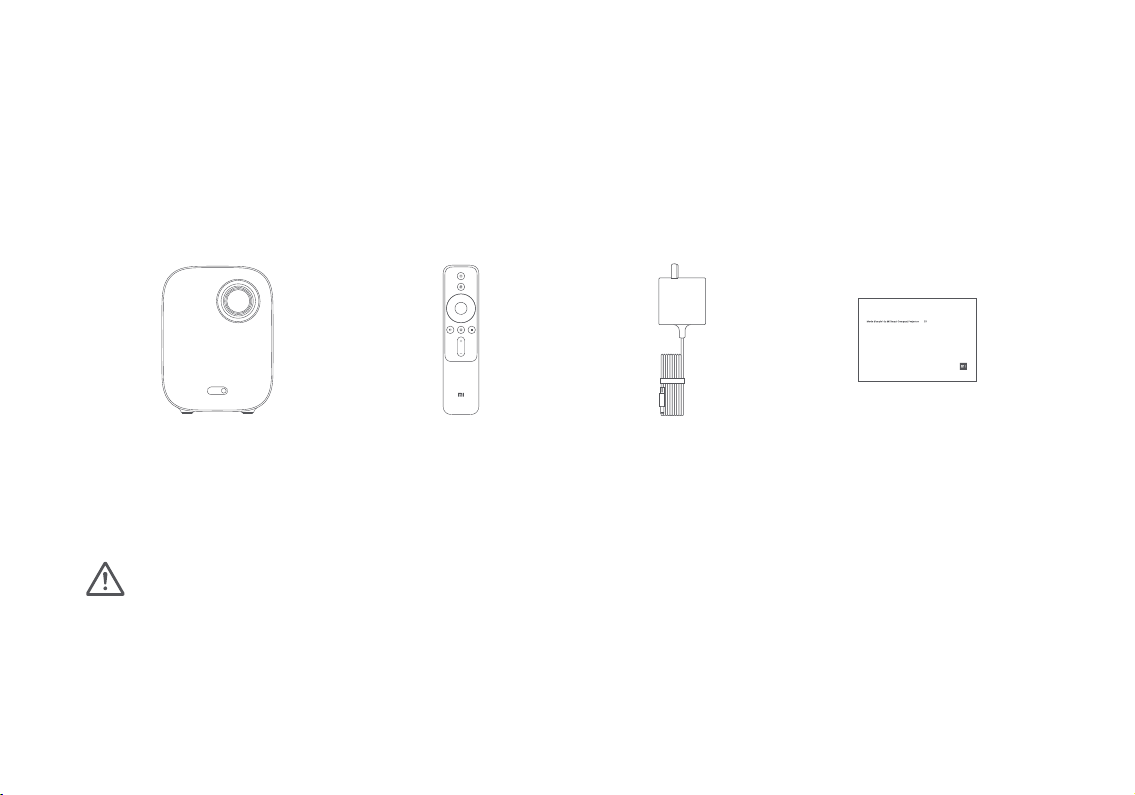
Package Contents
When opening the packaging, check the contents of the box against the list below. If there is anything missing,
please contact the seller in time.
Mi Smart Compact Projector User Manual 3
Bedienungsanleitung für Mi Smart kompakter Projektor 18
Manual de usuario de Mi Smart Compact Projector 48
Manuale dell’utente di Mi Smart Compact Projector 63
Руководство пользователя Портативного проектора Mi Smart 78
Mi 프로젝터 청춘판 사용 설명서 93
دليل مستخدم بروجكتور ذكي صغير الحجم من Mi 108
Mi Smart Compact Projector Remote Control Power Adapter
Note:
— The actual contents vary depending on the country (or region) of sale, please refer to the actual product.
— Retain the original packaging for future storage or transportation.
User Manual
7
Table of Contents
- User Notice
- Regulatory Compliance
- Safety Instructions
- Package Contents
- Product Overview
- Exterior
- Connection Ports
- Power Indicator
- Remote Control
- Projection Distance & Screen Size
- Quick Start Guide
- Auto Focus
- Keystone Correction
- Bluetooth Speakers
- Smart Temperature Control
- Routine Maintenance
- Cleaning & Maintenance **
- Product Certifications
- References
- Read User Manual Online (PDF format)
- Download This Manual (PDF format)
Mi Smart Compact Projector
User Manual
Read this manual carefully before use, and retain it for future reference.
User Notice
Thank you for choosing the Mi Smart Compact Projector.
Illustrations of product, accessories, and user interface in the user manual
are for reference purposes only. Actual product and functions may vary due to
product enhancements.
Regulatory Compliance
WEEE
All products bearing this symbol are waste electrical and electronic equipment
(WEEE as in directive 2012/19/EU) which should not be mixed with unsorted
household waste. Instead, you should protect human health and the environment
by handing over your waste equipment to a designated collection point for the
recycling of waste electrical and electronic equipment, appointed by the
government or local authorities. Correct disposal and recycling will help
prevent potential negative consequences to the environment and human health.
Please contact the installer or local authorities for more information about
the location as well as terms and conditions of such collection points.
CE
Hereby, Fengmi (Beijing) Technology Co., Ltd declares that the radio equipment
type Mi Smart Compact Projector is in compliance with Directive 2014/53/EU.
The full text of the EU declaration of conformity is available at the
following internet address:
http://www.mi.com/global/service/support/declaration.html This device is
restricted to indoor use when operating in the 5150 to 5350 MHz frequency
range.
BT Maximum Transmitter Power : 100mW at 2.4 GHz 2.4835 GHz
Wi-Fi Maximum Transmitter Power : 100mW at 2.4 GHz 2.4835 GHz, 200 mW at
5.15 GHz 5.35 GHz & 5.47 GHz5.725 GHz
The product complies with “RG1 IEC 62471-5:2015”.
Safety Instructions
Before using the product, make sure to carefully read the following safety
instructions and safety labels descriptions.
Preventing Electric Shocks and Fire Hazards:
– Only use the provided genuine power adapter.
– Unplug the projector from the electrical outlet during thunderstorms or when
it is not being used for a long time, so as to avoid damage caused by a power
surge or lightning strike.
– Do not place any flammable objects near this projector so as to avoid fire.
– Do not block any of the vents as this may cause heat build-up inside the
projector, and possibly result in a fire.
– Do not block the lens when the projector is turned on. Any object placed
close to the lens may get very hot and/or deformed, and may even cause a fire.
Safety Precautions:
– Do not place this projector on an unstable platform, stand or table so as to
prevent it from falling and causing serious damage or personal injuries.
– Do not look directly into the lens to avoid eye damage as the projector will
emit strong light during working.
– Do not attempt to disassemble this projector as there are dangerous high
voltage components inside that can cause personal injuries. This projector
must only be maintained or repaired by a highly experienced or qualified
technician.
– Do not expose this projector to rain or moisture (its operating humidity is
2080%).
– Do not immerse this projector in, nor expose it to water or other liquids.
Immediately unplug the projector if any liquid or object got into its housing,
and have it checked by a qualified technician before using it again.
– Do not place this projector in any of the following environments:
- In poorly ventilated or narrow spaces.
- Close to a fire alarm.
- Near devices that produce a strong magnetic field.
- In extremely hot, cold or humid environments.
- In direct sunlight.
Safety Label Description
| This warning symbol informs the user that this product contains non-
insulated voltage sources that can cause an electric shock. Coming into
contact with any internal component may result in an electric shock.
—|—
| This symbol informs the user about important handling and maintenance
related information. Please read this information carefully to ensure proper
use.
| This symbol informs the user to be aware of high temperatures.
| This symbol informs the user to avoid touching this part.
| Transportation Instructions: It is recommended to transport this projector
in its original or similar packaging.
Package Contents
When opening the packaging, check the contents of the box against the list
below. If there is anything missing, please contact the seller in time.
| Mi Smart Compact Projector
—|—
| Remote Control
| Power Adapter
| User Manual
Note:
– The actual contents vary depending on the country (or region) of sale,
please refer to the actual product.
– Retain the original packaging for future storage or transportation.
Product Overview
Exterior
Projection Lens
Camera
On/Off Button
Rubber Feet Air Inlet
Heat Dissipation Vent
Caution
– Do not place any flammable objects near the heat dissipation vent.
– Do not block any of the vents as this may cause heat build-up inside the
projector.
– Do not look directly into the lens to avoid eye damage as the projector will
emit strong light during working.
Connection Ports
1/4” Female Threaded Tripod Mount
Connection Ports
-
DC IN
– DC in port -
– Headphone port
-
USB2.0
– Supports the USB 2.0 protocol
– Supports USB to Ethernet adapters -
HDMI
– HDMI input port
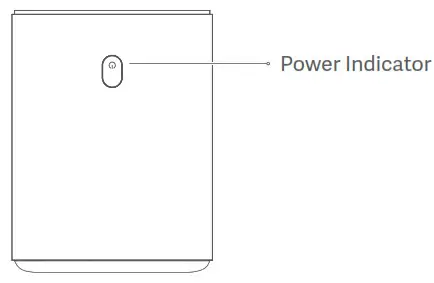
Power Indicator

The power indicator (white light) indicates the projector status as follows:
– After plugging in the power adapter, the indicator will blink and then turn
off. Press the on/off button to turn on the projector.
– While turning on the projector, the indicator light will blink.
– After loading the system, the indicator light will turn off.
– After turning off the screen, the indicator light will turn on.
– While turning off the projector, the indicator light will blink.
– After shutting down the system, the indicator light will turn off.
Remote Control

Note:
– The remote uses two AAA batteries.
– Pay attention to the positive and negative poles when installing batteries
in the remote control.
– When battery leaks, immediately wipe away any fluid with a dry cloth and
replace the batteries with new ones.
– Dispose of used batteries according to local waste disposal rules and
regulations of the country or area you live in.
Projection Distance & Screen Size

Determine the distance between the projector and the wall or screen according
to the desired screen size.
Screen Dimensions (SD)
| Projection Distance (D)| Relative Height (H)
—|—|—
60″
| 159.8 cm| 11.1 cm
80″
| 213.5 cm|
11.1 cm
100″| 267.3 cm|
11.1 cm
120″| 321 cm|
11.1 cm
Screen Dimensions (SD): The diagonal size of the projection screen (in
inches).
Projection Distance (D): The distance between the projector and the wall or
screen (in cm).
Relative Height (H): The distance from the bottom of the projector to the
bottom edge of the projected image (in cm).
Note:
The dimensions in the table above are for reference only, they are approximate
and may slightly differ from the actual values. 12
Quick Start Guide
Pairing the Remote
After installing the batteries in
the remote control, press the OK button to start pairing.
Point the remote at the bottom right
corner of the projector, then simultaneously press and hold the return and the
app button. Once you hear a beep, it indicates that the pairing process has
started. Release the buttons and wait for the process to complete.
“Remote paired successfully” will
appear on the projection screen to indicate the remote was paired with the
projector successfully.
Note: Keep the remote control within 20 cm of the projector during the
pairing process.
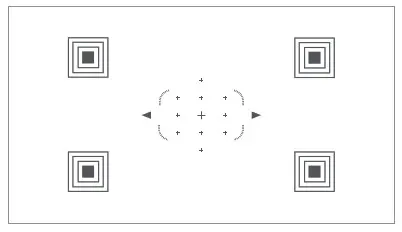
Auto Focus
Go to Settings > Image > Focus. Auto focus will complete automatically in
about 10 seconds. Afterwards, press the left and right button on the remote
control to manually fine tune.
When the projector does not focus after moving its position, there are two
possible causes: 1. Auto Focus in not enabled. Go to Settings > Projector >
Auto Focus to enable it. 2. The projector’s internal sensor was not triggered
when the projector was moved. Simply wiggle the projector to trigger its
sensor or manually focus the projector.

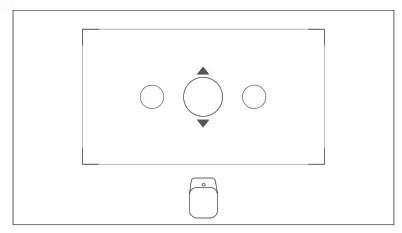
Keystone Correction
Go to Settings > Image > Keystone Correction. Use the left and right buttons
to select Coarse Tune, Fine Tune, or Reset. Use the up and down buttons to
adjust the screen shape.

Bluetooth Speakers
The projector has two high-quality built-in speakers with a total output of 10
W. These speakers can be used as stand-alone Bluetooth speakers.

Note: This projector can also be connected to other Bluetooth devices,
such as headsets, speakers, game controllers, and keyboards. When connecting
to a Bluetooth speaker or headset, Bluetooth audio needs to be set to output.
Smart Temperature Control
The LED light source and motherboard temperature are monitored by the
projector’s system and the fan speed is automatically adjusted based on the
temperature detected by the sensor. When the projector’s temperature gets too
hot, an on-screen warning will appear. When the projector’s temperature
exceeds the limit, an on-screen warning will appear, and the projector will
turn off automatically.
Routine Maintenance
Heat Dissipation Requirements

Cleaning & Maintenance **
**
Note: Do not place any objects within 20 cm of the projector’s air vents,
as this will affect the heat dissipation effect.
Turn off and unplug the projector before cleaning. Gently wipe the projector’s
housing and lens with a suitable cleaning cloth, periodically. Do not use any
abrasive cleaning products, solvents, chemicals, or other rough objects so as
to avoid scratches or corrosion.
Note:
– This projector is not water resistant. Do not allow any liquid to get
into the projector’s power indicator, air vents, connection ports, and speaker
grilles.
– Only use a cleaning cloth that is suitable for cleaning lenses.
Product Certifications
HIGH-DEFINITION MULTIMEDIA INTERFACE
The terms HDMI, HDMI High-Definition Multimedia Interface, and the HDMI Logo
are trademarks or registered trademarks of HDMI Licensing Administrator, Inc.

For DTS patents, see http://patents.dts.com. Manufactured under license from
DTS Licensing Limited. DTS, the Symbol, DTS and the Symbol together, DTS-HD,
and the DTS-HD logo are registered trademarks and/or trademarks of DTS, Inc.
in the United States and/or other countries. © DTS, Inc. All Rights Reserved.

Manufactured under license from Dolby Laboratories. Dolby, Dolby Audio, and
the double-D symbol are trademarks of Dolby Laboratories.
Model: M055MGN Net Weight: 1.3 kg
Color: White
Item Dimensions: 115 × 150 × 150 mm
Input: 19 V 3.42 A
Manufactured for: Xiaomi Communications Co., Ltd.
Manufactured by: Fengmi (Beijing) Technology Co., Ltd. (a Mi Ecosystem
company)
Address: 301, 3F, Building 3, No.10 Yard, Barracks South Street, Renhe Town,
Shunyi District, Beijing, China For further information, please go to
www.mi.com
Importer:
Beryko s.r.o.
Na Roudné 1162/76, 301 00 Plze
www.beryko.cz
References
- Patents — DTS
- Beryko.cz
- Xiaomi United States | Xiaomi Official Website
Read User Manual Online (PDF format)
Read User Manual Online (PDF format) >>
Download This Manual (PDF format)
Download this manual >>
Mi Smart Compact Projector
User Manual
Read this manual carefully before use, and retain it for future reference.
User Notice
Thank you for choosing the Mi Smart Compact Projector.
Illustrations of product, accessories, and user interface in the user manual are for reference purposes only. Actual product and functions may vary due to product enhancements.
Regulatory Compliance
WEEE
All products bearing this symbol are waste electrical and electronic equipment (WEEE as in directive 2012/19/EU) which should not be mixed with unsorted household waste. Instead, you should protect human health and the environment by handing over your waste equipment to a designated collection point for the recycling of waste electrical and electronic equipment, appointed by the government or local authorities. Correct disposal and recycling will help prevent potential negative consequences to the environment and human health. Please contact the installer or local authorities for more information about the location as well as terms and conditions of such collection points.
CE
Hereby, Fengmi (Beijing) Technology Co., Ltd declares that the radio equipment type Mi Smart Compact Projector is in compliance with Directive 2014/53/EU. The full text of the EU declaration of conformity is available at the following internet address: http://www.mi.com/global/service/support/declaration.html This device is restricted to indoor use when operating in the 5150 to 5350 MHz frequency range.
BT Maximum Transmitter Power : 100mW at 2.4 GHz 2.4835 GHz
Wi-Fi Maximum Transmitter Power : 100mW at 2.4 GHz 2.4835 GHz, 200 mW at 5.15 GHz 5.35 GHz & 5.47 GHz5.725 GHz
The product complies with “RG1 IEC 62471-5:2015”.
Safety Instructions
Before using the product, make sure to carefully read the following safety instructions and safety labels descriptions.
Preventing Electric Shocks and Fire Hazards:
– Only use the provided genuine power adapter.
– Unplug the projector from the electrical outlet during thunderstorms or when it is not being used for a long time, so as to avoid damage caused by a power surge or lightning strike.
– Do not place any flammable objects near this projector so as to avoid fire.
– Do not block any of the vents as this may cause heat build-up inside the projector, and possibly result in a fire.
– Do not block the lens when the projector is turned on. Any object placed close to the lens may get very hot and/or deformed, and may even cause a fire. Safety Precautions:
– Do not place this projector on an unstable platform, stand or table so as to prevent it from falling and causing serious damage or personal injuries.
– Do not look directly into the lens to avoid eye damage as the projector will emit strong light during working.
– Do not attempt to disassemble this projector as there are dangerous high voltage components inside that can cause personal injuries. This projector must only be maintained or repaired by a highly experienced or qualified technician.
– Do not expose this projector to rain or moisture (its operating humidity is 2080%).
– Do not immerse this projector in, nor expose it to water or other liquids. Immediately unplug the projector if any liquid or object got into its housing, and have it checked by a qualified technician before using it again.
– Do not place this projector in any of the following environments:
- In poorly ventilated or narrow spaces.
- Close to a fire alarm.
- Near devices that produce a strong magnetic field.
- In extremely hot, cold or humid environments.
- In direct sunlight.
Safety Label Description
Package Contents
When opening the packaging, check the contents of the box against the list below. If there is anything missing, please contact the seller in time.
Note:
– The actual contents vary depending on the country (or region) of sale, please refer to the actual product.
– Retain the original packaging for future storage or transportation.
Product Overview
Exterior
Projection Lens
Camera
On/Off Button
Rubber Feet Air Inlet
Heat Dissipation Vent
Caution
– Do not place any flammable objects near the heat dissipation vent.
– Do not block any of the vents as this may cause heat build-up inside the projector.
– Do not look directly into the lens to avoid eye damage as the projector will emit strong light during working.
Connection Ports
1/4” Female Threaded Tripod Mount
Connection Ports
- DC IN
– DC in port - – Headphone port
- USB2.0
– Supports the USB 2.0 protocol
– Supports USB to Ethernet adapters - HDMI
– HDMI input port
Power Indicator
The power indicator (white light) indicates the projector status as follows:
– After plugging in the power adapter, the indicator will blink and then turn off. Press the on/off button to turn on the projector.
– While turning on the projector, the indicator light will blink.
– After loading the system, the indicator light will turn off.
– After turning off the screen, the indicator light will turn on.
– While turning off the projector, the indicator light will blink.
– After shutting down the system, the indicator light will turn off.
Remote Control
Note:
– The remote uses two AAA batteries.
– Pay attention to the positive and negative poles when installing batteries in the remote control.
– When battery leaks, immediately wipe away any fluid with a dry cloth and replace the batteries with new ones.
– Dispose of used batteries according to local waste disposal rules and regulations of the country or area you live in.
Projection Distance and Screen Size
Determine the distance between the projector and the wall or screen according to the desired screen size.
| Screen Dimensions (SD) | Projection Distance (D) | Relative Height (H) |
| 60″ | 159.8 cm | 11.1 cm |
| 80″ | 213.5 cm | 11.1 cm |
| 100″ | 267.3 cm | 11.1 cm |
| 120″ | 321 cm | 11.1 cm |
Screen Dimensions (SD): The diagonal size of the projection screen (in inches).
Projection Distance (D): The distance between the projector and the wall or screen (in cm).
Relative Height (H): The distance from the bottom of the projector to the bottom edge of the projected image (in cm).
Note:
The dimensions in the table above are for reference only, they are approximate and may slightly differ from the actual values. 12
Quick Start Guide
Pairing the Remote
After installing the batteries in the remote control, press the OK button to start pairing.
Point the remote at the bottom right corner of the projector, then simultaneously press and hold the return and the app button. Once you hear a beep, it indicates that the pairing process has started. Release the buttons and wait for the process to complete.
“Remote paired successfully” will appear on the projection screen to indicate the remote was paired with the projector successfully.
Note: Keep the remote control within 20 cm of the projector during the pairing process.
Auto Focus
Go to Settings > Image > Focus. Auto focus will complete automatically in about 10 seconds. Afterwards, press the left and right button on the remote control to manually fine tune.
When the projector does not focus after moving its position, there are two possible causes: 1. Auto Focus in not enabled. Go to Settings > Projector > Auto Focus to enable it. 2. The projector’s internal sensor was not triggered when the projector was moved. Simply wiggle the projector to trigger its sensor or manually focus the projector.
Keystone Correction
Go to Settings > Image > Keystone Correction. Use the left and right buttons to select Coarse Tune, Fine Tune, or Reset. Use the up and down buttons to adjust the screen shape.
Bluetooth Speakers
The projector has two high-quality built-in speakers with a total output of 10 W. These speakers can be used as stand-alone Bluetooth speakers.
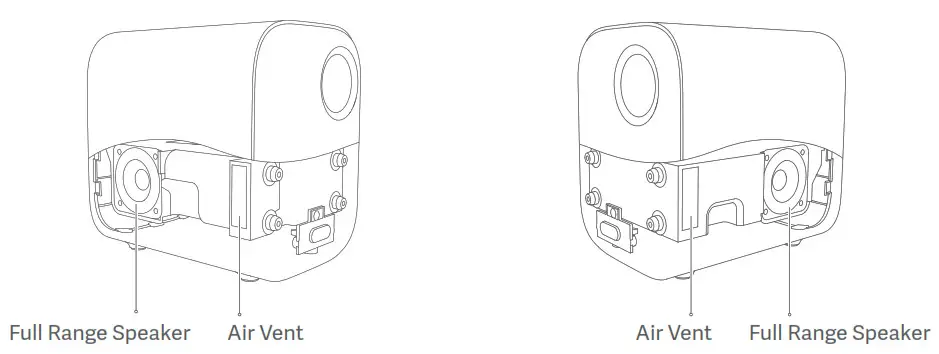
Note: This projector can also be connected to other Bluetooth devices, such as headsets, speakers, game controllers, and keyboards. When connecting to a Bluetooth speaker or headset, Bluetooth audio needs to be set to output.
Smart Temperature Control
The LED light source and motherboard temperature are monitored by the projector’s system and the fan speed is automatically adjusted based on the temperature detected by the sensor. When the projector’s temperature gets too hot, an on-screen warning will appear. When the projector’s temperature exceeds the limit, an on-screen warning will appear, and the projector will turn off automatically.
Routine Maintenance
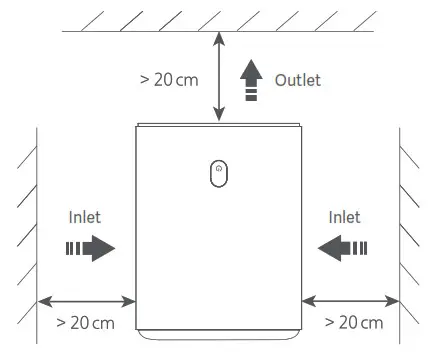
Heat Dissipation Requirements
Cleaning and Maintenance
Note: Do not place any objects within 20 cm of the projector’s air vents, as this will affect the heat dissipation effect.
Turn off and unplug the projector before cleaning. Gently wipe the projector’s housing and lens with a suitable cleaning cloth, periodically. Do not use any abrasive cleaning products, solvents, chemicals, or other rough objects so as to avoid scratches or corrosion.
Note:
– This projector is not water resistant. Do not allow any liquid to get into the projector’s power indicator, air vents, connection ports, and speaker grilles.
– Only use a cleaning cloth that is suitable for cleaning lenses.
Product Certifications
HIGH-DEFINITION MULTIMEDIA INTERFACE
The terms HDMI, HDMI High-Definition Multimedia Interface, and the HDMI Logo are trademarks or registered trademarks of HDMI Licensing Administrator, Inc.
For DTS patents, see http://patents.dts.com. Manufactured under license from DTS Licensing Limited. DTS, the Symbol, DTS and the Symbol together, DTS-HD, and the DTS-HD logo are registered trademarks and/or trademarks of DTS, Inc. in the United States and/or other countries. © DTS, Inc. All Rights Reserved.

Manufactured under license from Dolby Laboratories. Dolby, Dolby Audio, and the double-D symbol are trademarks of Dolby Laboratories.

Model: M055MGN Net Weight: 1.3 kg
Color: White
Item Dimensions: 115 × 150 × 150 mm
Input: 19 V 3.42 A
Manufactured for: Xiaomi Communications Co., Ltd.
Manufactured by: Fengmi (Beijing) Technology Co., Ltd. (a Mi Ecosystem company)
Address: 301, 3F, Building 3, No.10 Yard, Barracks South Street, Renhe Town, Shunyi District, Beijing, China For further information, please go to www.mi.com
Importer:
Beryko s.r.o.
Na Roudné 1162/76, 301 00 Plze
www.beryko.cz
Report abuse
Libble takes abuse of its services very seriously. We’re committed to dealing with such abuse according to the laws in your country of residence. When you submit a report, we’ll investigate it and take the appropriate action. We’ll get back to you only if we require additional details or have more information to share.
Product:
Get your user manual by e-mail
Enter your email address to receive the manual of Xiaomi Mi Smart Compact in the language / languages: English, German, French, Italian, Spanish as an attachment in your email.
The manual is 1,63 mb in size.
You will receive the manual in your email within minutes. If you have not received an email, then probably have entered the wrong email address or your mailbox is too full. In addition, it may be that your ISP may have a maximum size for emails to receive.
The manual is sent by email. Check your email
If you have not received an email with the manual within fifteen minutes, it may be that you have a entered a wrong email address or that your ISP has set a maximum size to receive email that is smaller than the size of the manual.
Your question is posted on this page
Would you like to receive an email when new answers and questions are posted? Please enter your email address.