

Professional Radio
GM340
User Guide
68P64110B88
Issue: July 2000
6
3
2
1
5
4

CONTENTS
RadioOverview ……………….. 3
RadioControls…………………. 3
ProgrammableButtons …………… 4
AudioSignalTones……………… 7
GettingStarted………………… 9
TurningtheRadioOn-Off………….. 9
RadioOnIndication……………… 9
AdjustingtheRadio’sVolume………. 9
SelectingaRadioChannel…………. 9
SendingaCall………………… 10
ReceivingaCall……………….. 10
CancellingaCall………………. 10
EndingaCall…………………. 10
RadioCalls………………….. 11
SelectiveCalls………………… 11
MakingaSelectiveCall………….. 11
ReceivingaSelectiveCall………… 11
EmergencyCalls………………. 12
Features……………………..13
PublicAddressMode……………..13
CarRadioMute…………………14
Utilities . . . . . . . . . . . . . …………..15
VoiceRecorder…………………16
Scan ………………………..17
CallForward …………………..19
Talkaround…………………….20
ExternalAlarm………………….21
LoneWorker…………………..22
PowerLevel……………………23
Companding …………………..24
OptionBoard…………………..25
VoiceOperatedTransmit(VOX)……..26
Stun/Unstun……………………26
CONTENTS
1
English

SafetyInformation…………….. 27
SafeandEfficientOperation………. 27
Exposure to Radio Frequency Energy. . . 27
Electromagnetic Interference/
Compatibility………………….. 28
OperationalWarnings …………… 28
CONTENTS
Potentially Explosive Atmospheres. . . 28
Blasting Caps and Areas. . . . . . . . . . . 28
Radio Operation and EME Exposure. . . . 29
Mobile Antenna Installation . . . . . . . . . . . 29
ControlStationOperation………….29
GeneralRadioCare…………….. 30
Computer Software Copyright
The productsdescribed in this manual mayinclude copyrighted computer
programmesstored in semiconductor memories or other media. Laws in the
United States of America and other countries preservefor Motorola Europe
and MotorolaInc. certain exclusive rights forcopyrighted computer
programmes,including the right to copyor reproduce in any formthe
copyrightedcomputer programme. Accordingly, any copyrighted computer
programmescontained in the products described in this manual may not be
copied or reproducedin any manner without the express written permission of
the holders of therights. Furthermore, thepurchase ofthese products shall not
be deemed to granteither directlyor byimplication, estoppel,or otherwise,any
licence under the copyrights, patents, or patent applications of the holdersof
the rights, except for the normal non-exclusive royaltyfree licence to use that
arises by operation of the law in the sale of the product.
English
2

RADIO OVERVIEW
This user guide covers the operation of the
GM340 Professional Mobile Radio.
Please read pages 27 to 30 before using this radio.
RADIO CONTROLS
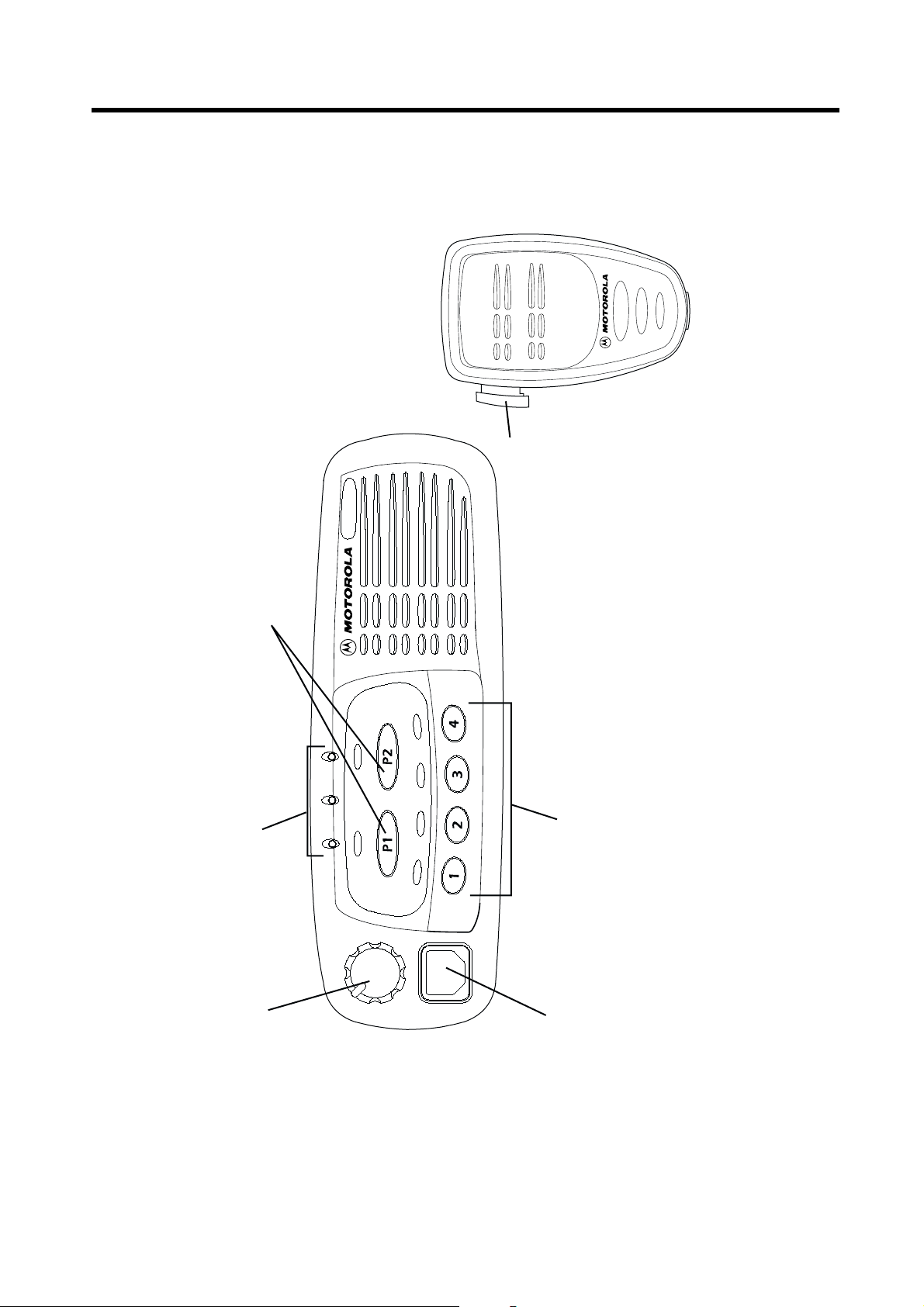
The numbers below refer to the illustrations on
the inside front cover.
1. On-Off / Volume Knob
Used to turn the radio on or off, and to adjust
the radio’s volume.
2. LED Indicators
Indicateschannel, scan, and monitor status,as
well as receipt of a selective call.
Green: Successful power up.
Green Flashing: Radio scanning.
Red: Radio transmitting.
Red Flashing: Channel busy-when receiving.
Yellow: Radio called or Monitor (lower priority).
Yellow Flashing: Radio call reminder alert.
3. Programmable Buttons
4. Mic Jack
5. Programmable Buttons VWXY
6. Push-to-talk (PTT)
Press and hold down this button to talk;
release it to listen.
gh
RADIO OVERVIEW
3
English

PROGRAMMABLE BUTTONS
Several of your radio buttons can be
programmed (by Customer Programming
Software CPS) to activate the radio features.
AboveeachbuttonisanassociatedLED.For
buttons programmed as channel selectors,
only the LED of the selected channel will be lit;
for buttons programmed as feature on/off
RADIO OVERVIEW
switches, the LED will be lit if the feature is on.
Feature Description
Monitor allows user to select between signalling squelch,
carrier squelch and unsquelch, and to suspend scan when
Monitor/Cancel
Radio Call To make an individual or group selectivecall.
landed on a channel in scan mode.
Cancel allows user to cancel current incoming or outgoing
call.
The following table shows the features that can
be assigned to the P1and P2 buttons and the
1-4 buttons.
P1 and P2 are exchangeable for customised
icon buttons to match programming.
English
Scan On/Off
Nuisance
Delete/Cancel
(Voice Storage)
4
To toggle between start and stop of the scan
operation.
To delete a nuisance (unwanted) channel when scanning,
with exception of priority channel, last channel in scan list
and home channel.
Cancel, deletes messages being played back from the
Voice Storage feature.

Feature Description
To delete a nuisance (unwanted) channel when scanning,
Nuisance Delete
with exception of priority channel, last channel in scan list
and home channel.
RADIO OVERVIEW
Cancel
(Voice Storage)
Power Level
Talkaround On/Off
Emergency Activates emergency alarm sequence.
Lone Worker
Call Forward
Companding On/Off
Option Board
On/Off
Cancel, deletes messages being played back from the
Voice Storage feature.
To toggle the radio’s transmit power level between High
and Low.
To talk directly with another radio without going through a
system or despatcher.
Toidentify user as a lone worker.Radio enters emergency
sequence unless user responds, when prompted, by
pressing any radio button.
To transfer calls automatically to another radio if user is
unable to take the call.
Totoggle between compression/expansionof audio signal
and nor mal audio signal.
Allows user to toggle the option board between on and off.
5
English
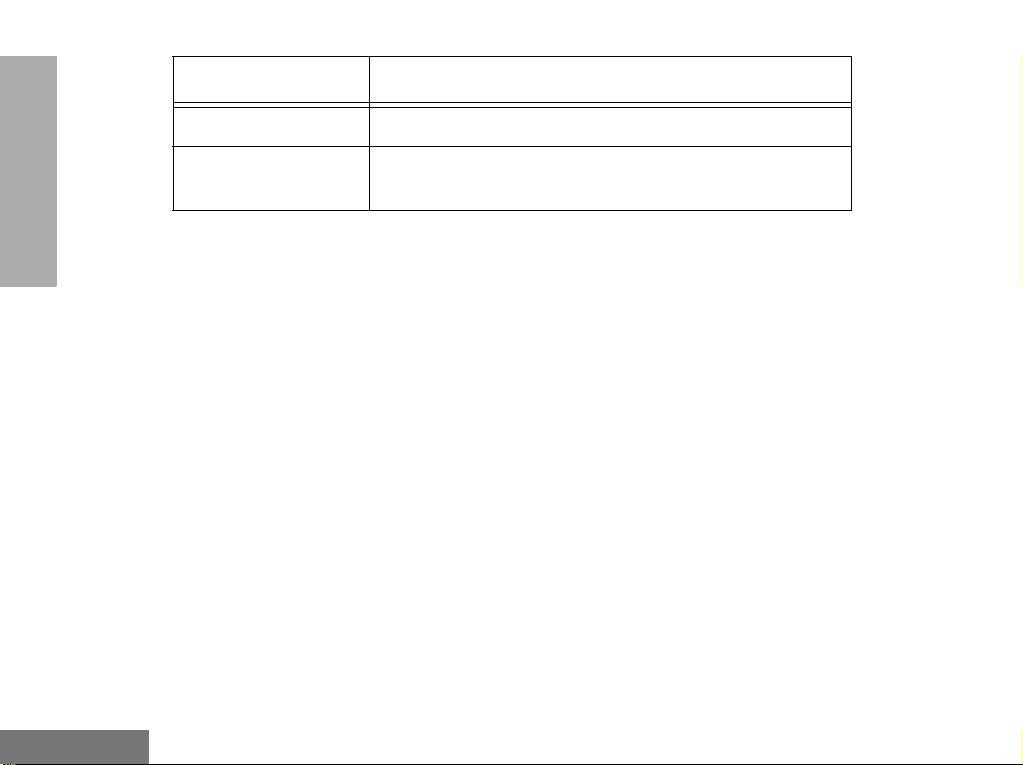
Feature Description
External Alarm To toggle the External Alarm feature on and off.
RADIO OVERVIEW
English
Record/Play-back
(Voice Recorder)
6
To record/play-back incoming calls or memos using voice
recorder feature.
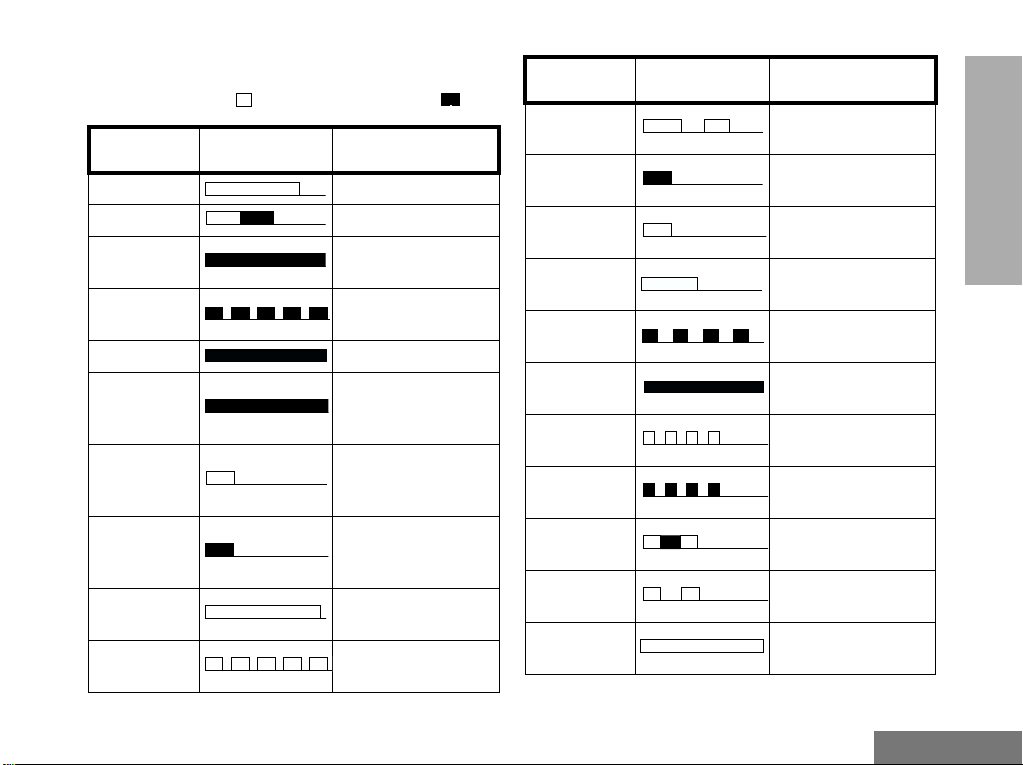
AUDIO SIGNAL TONES
High pitched tone Low pitched tone
Tone Signal Description
Power up OK Radio self-test OK.
Power up Fail Radio self-test fail.
Button Error
Engaged
Call Failed Call failed t o connect.
Force Monitor
Button
Feature
Enable
Button
Feature
Disable
Group Call
Individual Call
Button press not
permitted.
Channel busy or not
permitted to transmit.
Radio must monitor
channel before transmission permitted.
Any option button
pressed to enable a
feature.
Any option button
pressed to disable a
feature.
Radio receives a
Group Call.
Radio receives an
Individual Call.
Tone Signal Description
Call
Reminder
TOT Pre-Alert
Monitor Alert
VoiceStorage
VoiceStorage
VoiceStorage
Scan St art
Scan St op
Priority Call
Decode
Priority
Channel
Lone Worker
Reminder of
unanswered call.
Warns of expiry of
time out timer.
Alerts to change of
squelch.
VoiceStorageRecording.
VoiceStorageWarning.
VoiceStorageFull.
Radio starts
scanning.
Radio stops
scanning.
Radio detects a
priority call.
Radio landed on the
priority c hannel.
Reminds lone worker
to respond.
RADIO OVERVIEW
7
English
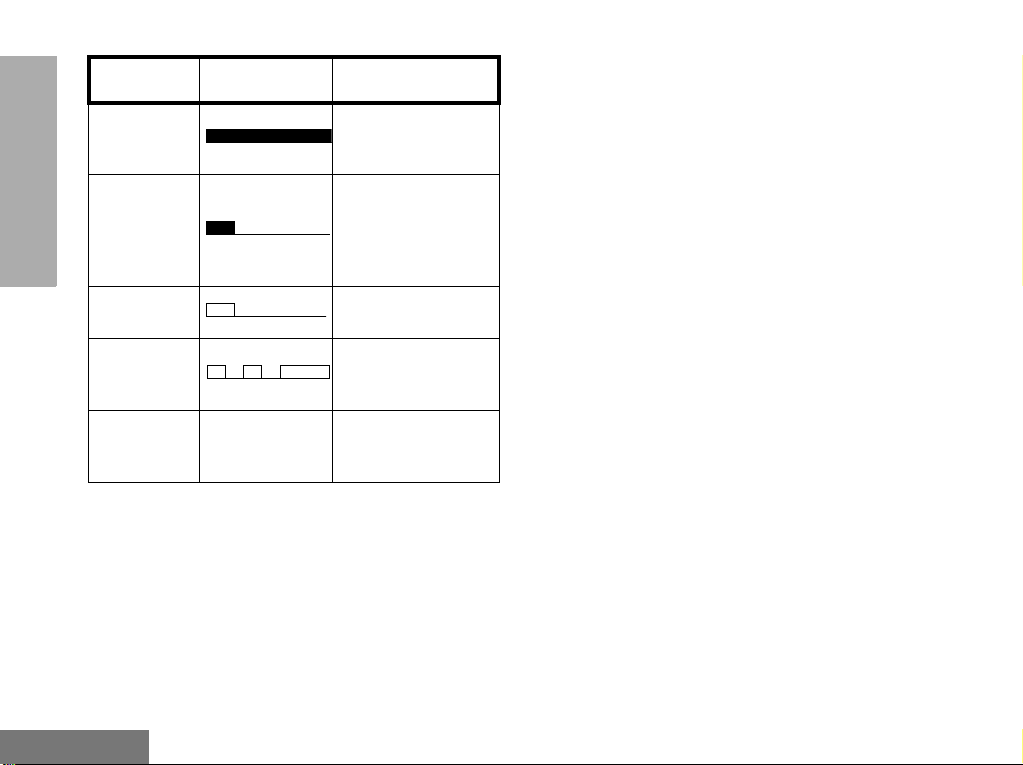
Tone Signal Description
RADIO OVERVIEW
Hardware
Error
Cancel
Message
Channel Free
Beep
Incoming
Emergency
Alert
Ringtones
English/French/
General
Hardware error, tone
continues until valid
operation.
Previous message or
message currently
being played from
VoiceStorage has
been deleted.
Indicates current
channel is free.
Indicates an
emergency situation.
Incoming calls (high
tones), outgoing calls
(low tones).
English
8
Loading…
Настройка Motorola GM340 ⇐ LPD, PMR диапазон (433 МГц 446 МГц)
Модератор: V@$il
-
Автор темы
evgtm
- Интересующийся
- Всего сообщений: 30
- Зарегистрирован: 07.07.2014
- Авто: УАЗ Патриот
- CB-радиостанция: Optim Apollo 1, v.3
- УКВ: baofeng uv-5re plus,UV-82
- Позывной: БАЛУ
- Радиолюбительский позывной: R9YBU
- Откуда: Барнаул
- Возраст: 50
Настройка Motorola GM340
В связи с приобретением GM340 открываю эту тему.
В GM340 четыре маленьких кнопочки с номерами 1 2 3 4 и две больших P1 P2. На каждую кнопку может быть запрограммирован канал памяти, либо вызов функции.
Т.к. кнопок мало, для наиболее эффективного их использования поделюсь своими соображениями:
На кнопки 1 и 2 хочу зашить частоту для АРК с субтоном и без (для прямой связи).
На большую кнопку P1 хочу установить функцию — сканирование каналов.
На большую кнопку P2 пока не знаю что назначить.
На кнопки 3 и 4 хочу зашить один из ПМР каналов, для связи с теми, у кого есть игрушечные рации и какой-нибудь ЛПД канал, например 433.100 неофициальный автомобильный для трассы или радиолюбительский вызывной 433.500.
Функция выбора уровня мощности — высокий — низкий задаётся при программировании.
Может кто-нибудь предложить как еще можно оптимально использовать эти кнопки?
-
V@$il
- Супермодератор
- Всего сообщений: 1132
- Зарегистрирован: 11.11.2013
- Авто: Москвич 412
- CB-радиостанция: maycom,alan
- УКВ: alinco,yaesu,motorola
- Позывной: Витамин
- Радиолюбительский позывной: R9YAAB
- Откуда: оттуда
Re: Настройка Motorola GM340
Сообщение
V@$il »
про каналы с тоном и без тона на АРК,я бы не заморачивался….,а еслив сильно хочется- то тогда лучше Р1 и Р2…..
ПМР 340 не получится. Уровни мощи при программировании будут НЕ переключаемы. А радиолюбительский вызывной 432…, но там глухо.
Жень, прописывай туда арк,фрн,гаишников и канал свой для связи с портативкой. Кнопки Р1 и Р2 под сканер и изменение мощности.
-
Автор темы
evgtm
- Интересующийся
- Всего сообщений: 30
- Зарегистрирован: 07.07.2014
- Авто: УАЗ Патриот
- CB-радиостанция: Optim Apollo 1, v.3
- УКВ: baofeng uv-5re plus,UV-82
- Позывной: БАЛУ
- Радиолюбительский позывной: R9YBU
- Откуда: Барнаул
- Возраст: 50
Re: Настройка Motorola GM340
Сообщение
evgtm »
Спасибо за совет. Наверное так и сделаю
Для отправки ответа, комментария или отзыва вам необходимо авторизоваться
-
- 1 Ответы
- 42071 Просмотры
-
Последнее сообщение _МАЗай_
-
- 11 Ответы
- 13181 Просмотры
-
Последнее сообщение Гость
-
- 11 Ответы
- 7793 Просмотры
-
Последнее сообщение OM_22RUS
- Инструкции и руководства
- Бренды
- Motorola
- GM340
- Справочник Пользователя
Professional Radio
GM340
User Guide
68P64110B88
Issue: July 2000
Have a look at the manual Motorola Gm340 User Manual online for free. It’s possible to download the document as PDF or print. UserManuals.tech offer 249 Motorola manuals and user’s guides for free. Share the user manual or guide on Facebook, Twitter or Google+.
							Professional Radio
GM340
User Guide
68P64110B88
Issue: J uly  20 00
							1
English
CONTENTS
CONTENTSRadioOverview .................... 3
RadioControls...................... 3
ProgrammableButtons ............... 4
AudioSignalTones .................. 7
GettingStarted..................... 9
TurningtheRadioOn-Off.............. 9
RadioOnIndication.................. 9
AdjustingtheRadio’sVolume .......... 9
SelectingaRadioChannel............. 9
SendingaCall ..................... 10
ReceivingaCall.................... 10
CancellingaCall ................... 10
EndingaCall ...................... 10
RadioCalls....................... 11
SelectiveCalls..................... 11
MakingaSelectiveCall .............. 11
ReceivingaSelectiveCall............ 11
EmergencyCalls ................... 12Features..........................13
PublicAddressMode.................13
CarRadioMute.....................14
Utilities . . . . . . . . . . . . ...............15
VoiceRecorder .....................16
Scan .............................17
CallForward .......................19
Talkaround.........................20
ExternalAlarm......................21
LoneWorker .......................22
PowerLevel........................23
Companding .......................24
OptionBoard.......................25
VoiceOperatedTransmit(VOX)........26
Stun/Unstun........................26
							2
English
CONTENTS
SafetyInformation................. 27
SafeandEfficientOperation .......... 27
Exposure to Radio Frequency Energy . . . 27
Electromagnetic Interference/
Compatibility....................... 28
OperationalWarnings ............... 28
Potentially Explosive Atmospheres . . . 28
Blasting Caps and Areas. . . . . . . . . . . 28
Radio Operation and EME Exposure . . . . 29
Mobile Antenna Installation . . . . . . . . . . . 29
ControlStationOperation............. 29
GeneralRadioCare................. 30
Computer Software Copyright
The products described in this manual may include copyrighted computer
programmes stored in semiconductor memories or other media. Laws in the
United States of America and other countries preserve for Motorola Europe
and Motorola Inc. certain exclusive rights for copyrighted computer
programmes, including the right to copy or reproduce in any form the
copyrighted computer programme. Accordingly, any copyrighted computer
programmes contained in the products described in this manual may not be
copied or reproduced in any manner without the express written permission of
the holders of the rights. Furthermore, the purchase of these products shall not
be deemed to grant either directly or by implication, estoppel, or otherwise, any
licence under the copyrights, patents, or patent applications of the holders of
the rights, except for the normal non-exclusive royalty free licence to use that
arises by operation of the law in the sale of the product.
							3
English
RADIO OVERVIEW
RADIO OVERVIEWThis user guide covers the operation of the
GM340 Professional Mobile Radio.Please read pages 27 to 30beforeusing this radio.RADIO CONTROLS
The numbers below refer to the illustrations on
the inside front cover.1. On-Off / Volume Knob
Used to turn the radio on or off, and to adjust
the radio’s volume.
2. LED Indicators
Indicates channel, scan, and monitor status, as
well as receipt of a selective call.
Green:Successful power up.
Green Flashing:Radio scanning.
Red:Radio transmitting.
Red Flashing:Channel busy-when receiving.
Yellow:Radio called or Monitor (lower priority).
Yellow Flashing:Radio call reminder alert.3. Programmable Buttons
gh
4. Mic Jack
5. Programmable ButtonsVWXY
6. Push-to-talk (PTT)
Press and hold down this button to talk;
release it to listen.
							4
English
RADIO OVERVIEW
PROGRAMMABLE BUTTONS
Several of your radio buttons can be
programmed (by Customer Programming
Software CPS) to activate the radio features.
AboveeachbuttonisanassociatedLED.For
buttons programmed as channel selectors,
only the LED of the selected channel will be lit;
for buttons programmed as feature on/off
switches, the LED will be lit if the feature is on.The following table shows the features that can
be assigned to the P1and P2 buttons and the
1-4 buttons.
P1 and P2 are exchangeable for customised
icon buttons to match programming.
Feature Description
Monitor/CancelMonitor allows user to select between signalling squelch,
carrier squelch and unsquelch, and to suspend scan when
landed on a channel in scan mode.
Cancel allows user to cancel current incoming or outgoing
call.
Radio Call To make an individual or group selective call.
Scan On/OffTo toggle between start and stop of the scan
operation.
Nuisance
Delete/Cancel
(Voice Storage)To delete a nuisance (unwanted) channel when scanning,
with exception of priority channel, last channel in scan list
and home channel.
Cancel, deletes messages being played back from the
Voice Storage feature.
							5
English
RADIO OVERVIEW
Nuisance DeleteTo delete a nuisance (unwanted) channel when scanning,
with exception of priority channel, last channel in scan list
and home channel.
Cancel
(Voice Storage)Cancel, deletes messages being played back from the
Voice Storage feature.
Pow er L evelTo toggle the radio’s transmit power level between High
and Low.
Talkaround On/OffTo talk directly with another radio without going through a
system or despatcher.
Emergency Activates emergency alarm sequence.
Lone WorkerTo identify user as a lone worker. Radio enters emergency
sequence unless user responds, when prompted, by
pressing any radio button.
Call ForwardTo transfer calls automatically to another radio if user is
unable to take the call.
Companding On/OffTo toggle between compression/expansion of audio signal
and normal audio signal.
Option Board
On/OffAllows user to toggle the option board between on and off.
Feature Description
							6
English
RADIO OVERVIEW
External Alarm To toggle the External Alarm feature on and off.
Record/Play-back
(Voice Recorder)To record/play-back incoming calls or memos using voice
recorder feature.
Feature Description
							7
English
RADIO OVERVIEW
AUDIO SIGNAL TONESHigh pitched tone Low pitched tone
Tone Signal DescriptionPower up OK Radio self-test OK.
Power up Fail Radio self-test fail.
Button ErrorButton press not
permitted.
EngagedChannel busy or not
permitted to transmit.
Call Failed Call failed to connect.
Force MonitorRadio must monitor
channel before trans-
mission permitted.
Button
Feature
EnableAny option button
pressed to enable a
feature.
Button
Feature
DisableAny option button
pressed to disable a
feature.
Group CallRadio receives a
Group Call.
Individual CallRadio receives an
Individual Call.
Call
ReminderReminder of
unanswered call.
TOT Pre- Aler tWarns of expiry of
time out timer.
Monitor AlertAlerts to change of
squelch.
Voice StorageVoice Storage-
Recording.
Voice StorageVoice Storage-
Warning.
Voice StorageVoice Storage-
Full.
Scan StartRadio starts
scanning.
Scan StopRadio stops
scanning.
Priority Call
DecodeRadio detects a
priority call.
Priority
ChannelRadio landed on the
priority channel.
Lone WorkerReminds lone worker
to respond.
Tone Signal Description
							8
English
RADIO OVERVIEW
Hardware
ErrorHardware error, tone
continues until valid
operation.
Cancel
MessagePrevious message or
message currently
being played from
Voice Storage has
been deleted.
Channel Free
BeepIndicates current
channel is free.
Incoming
Emergency
AlertIndicates an
emergency situation.
RingtonesEnglish/French/
GeneralIncoming calls (high
tones), outgoing calls
(low tones).
Tone Signal Description
All Motorola manuals
Comments (0)
Related Manuals for Motorola Gm340 User Manual