
Руководства / Спецификации
Здесь вы найдете полный перечень всех доступных на сегодняшний день руководств и спецификаций в формате pdf.
Подтвердите условия загрузки
Создание архива для загрузки
Скачать
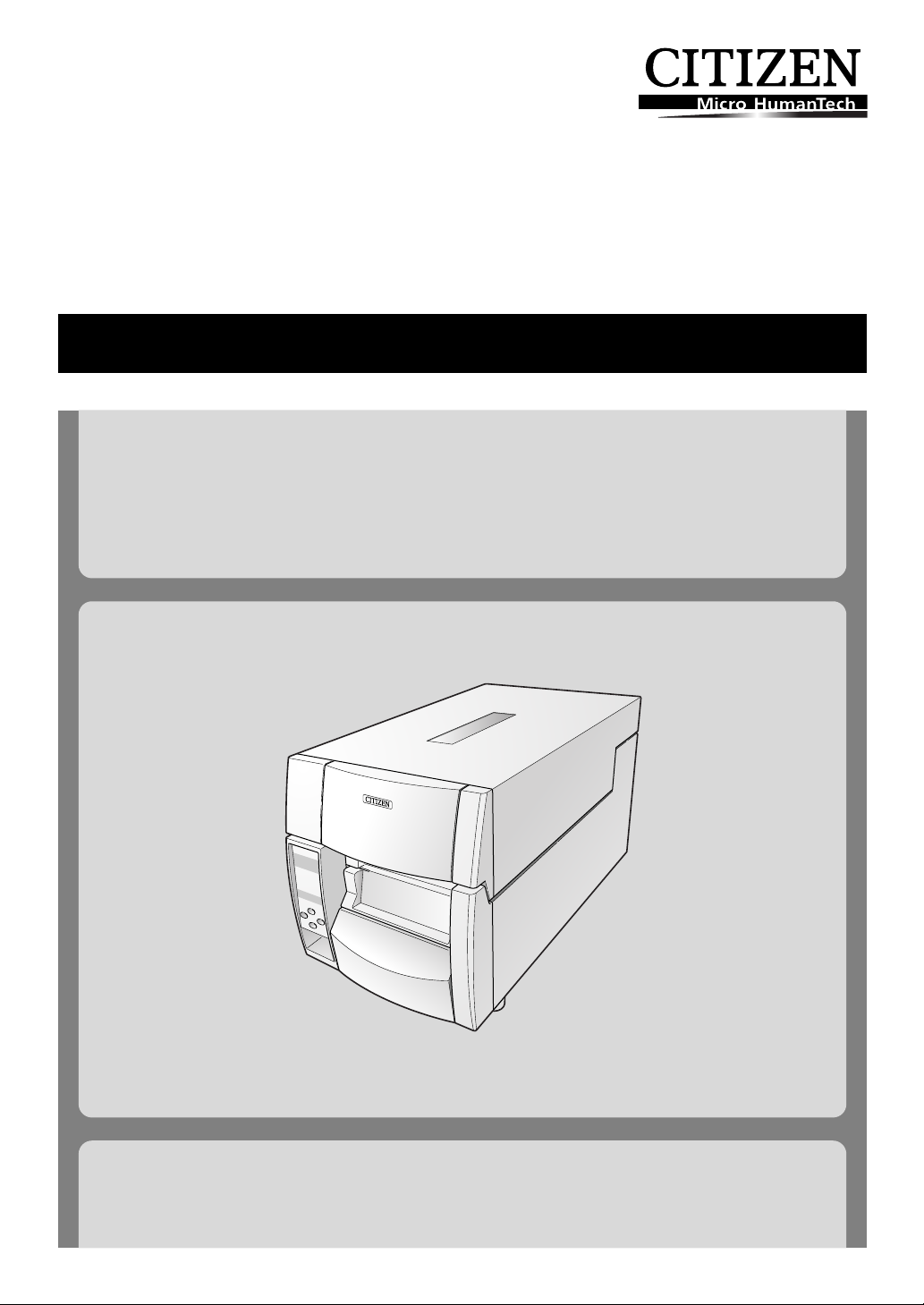
Thermal Transfer Barcode & Label Printer
CL-S700
USER’S MANUAL

CONTENTS
Before Operation
INTRODUCTION ——————————————————————— 3
COMPLIANCE STATEMENT FOR EUROPEAN USERS—————————— 4
FCC COMPLIANCE STATEMENT FOR AMERICAN USERS ———————— 4
EMI COMPLIANCE STATEMENT FOR CANADIAN USERS———————— 5
ETAT DE CONFORMITE EMI A L’USAGE DES UTILISATEURS CANADIENS —— 5
IMPORTANT SAFETY INSTRUCTIONS——————————————— 6
NOTICE ——————————————————————————- 7
SAFETY INSTRUCTIONS ————————————————————8
Chapter 1 Setup
Confirmation of Carton Contents ————————————————-10
Part Names and Functions———————————————————-11
Connection to Power ————————————————————— 17
Driver Installation ——————————————————————- 17
Connection to a Computer ——————————————————— 18
Chapter 2 Printer Operation
Power ON/OFF ———————————————————————- 19
Normal Operating Mode ———————————————————- 20
Setting the Media —————————————————————— 22
Setting the Ribbon —————————————————————— 26
Mode Settings ———————————————————————- 29
Quick Setup of the Print Method————————————————- 40
Chapter 3 Printer Adjustments
Sensor Adjustments and Calibration ——————————————— 41
Media Thickness Adjustment —————————————————— 44
Media Width Adjustment ———————————————————- 45
Adjusting the Ribbon ————————————————————— 46
Moving the Adjustable Sensor —————————————————- 48
Cleaning —————————————————————————- 49
Chapter 4 Troubleshooting ——————— 50
Appendixes
Specifications ———————————————————————- 52
Interfaces ————————————————————————— 55
Replacing the Interface Board —————————————————- 61
2

INTRODUCTION
Thank you for purchasing a Citizen CL-series label printer offering high performance printing at up to 10 inches
per second on media up to 4.65 inches wide.
❚❚❚ Main Features ❚❚❚
<Easy Access — Easy Operation>
The printer is designed for all day-to-day operations to be accessible from the front of the
printer so there is no need to move items near to the printer for access for media loading.
<Hi-OpenTM printer case>
The main printer’s case lifts directly upwards meaning that no space is needed on either side of
the printer. The power switch is located in a recessed panel at the front of the printer so it can
be easily accessed without moving the printer.
<The Easiest Media Loading>
The Hi-LiftTM metal print head mechanism opens so that it is completely clear of the media path
so that the paper and ribbons can be loaded without any part of the printer in the way.
<Easy Printer Control and Configuration>
The clear, easy-to-see backlit LCD makes both configuration and operation easy with simple
messages about the printer’s status and also the ability for quick configuration when needed.
<Flexible Media Usage>
The printer features an adjustable media sensor which allows the customer to use any type of
media. The media (label) rolls can be inside or outside would. Similarly, the ink ribbon can be
wound either way: ‘ink in’ or ‘in out’.
<Optimum Ribbon Tension>
The patented ARCPTM function — Active Ribbon Control and Positioning — maintains even ribbon
tension from beginning to end of a ribbon. This eliminates ribbon wrinkle and improves print
positioning, especially for small labels. Smudging caused by ribbon slippage is also removed.
<Interfaces and Options>
Parallel, Serial and USB interfaces are supplied as standard and optional Ethernet and Wireless
LAN boards can be fitted quickly and easily. An auto-cutter and peeler option is also available
and can be easily installed.
3

COMPLIANCE STATEMENT
FOR EUROPEAN USERS
CE marking shows conformity to the following criteria and provisions:
Low Voltage Directive (73/23/EEC)/EN60950-1
EMC Directive (89/336/EEC)/EN55022, EN55024, EN61000-3-2 & EN61000-3-3
This product has been tested under EN ISO 7779 and has an acoustic level output no higher than
55db(A).
This device is not intended for use at a video workstation in compliance with Bildscharb V.
FCC COMPLIANCE STATEMENT
FOR AMERICAN USERS
This equipment has been tested and found to comply with the limits for a Class A digital device,
pursuant to Part 15 of the FCC Rules. These limits are designed to provide reasonable protection
against harmful interference when the equipment is operated in a commercial environment. This
equipment generates, uses, and can radiate radio frequency energy and, if not installed and used in
accordance with the instruction manual, may cause harmful interference to radio communications.
Operation of this equipment in a residential area is likely to cause harmful interference in which case
the user will be required to correct the interference at his own expense.
4

EMI COMPLIANCE STATEMENT
FOR CANADIAN USERS
This Class A digital apparatus complies with Canadian ICES-003.
This equipment generates and uses radio frequency energy and if not installed and used properly,
that is, in strict accordance with the manufacturer’s instructions, may cause interference to radio and
television reception. This digital apparatus does not exceed the Class A limits for radio noise emissions
from digital apparatus set out in the Radio Interference Regulations of the Canadian Department of
Communications. This equipment is designed to provide reasonable protection against such
interference in a residential installation. However, there is no guarantee that interference will not
occur in a particular installation. If this equipment does cause interference to radio or television
reception, which can be determined by turning the equipment off and on, the user is encouraged to
try to correct the interference by one or more of the following measures:
• Reorient or relocate the receiving antenna.
• Increase the separation between the equipment and receiver.
• Connect the equipment into an outlet on a circuit different from that to which the receiver is
connected.
• Consult the dealer or an experienced radio/TV technician for help.
CAUTION: Use shielded cables to connect this device to computers.
Any changes or modifications not expressly approved by the grantee of this device could
void the user’s authority to operate the equipment.
ETAT DE CONFORMITE EMI A L’USAGE
DES UTILISATEURS CANADIENS
Cet appareil numérique de la classe A est conforme à la norme NMB-003 du Canada.
Cet équipment produit et utilise l’énergie à radiofréquences et s’iln’est pas installé et utilisé correctment,
c’esst à dire en accord strict avec les instructions du fabricant, il risque de provoquer des intérferences
avec la réception de la radio et de latélévision.
Le présent appareil numérique n’émet pas de bruite radio électriques dépassant les limites applicables
aux appareils numériques de la classe A prescrites dans le Réglement sur le brouillage radioélectrique
édicté par le ministère des Communications du Canada.
Cet équipment est conçu pour fournir une protection satisfaisante contre de telles interférences dans
une installation résidentielle. Cependant, il n’y a pas de garantie contre les interférences avec les
réceptions radio ou télévision, provoquées par la mise en et hors circuit de l’équipment; aussi, il est
demandé a l’utilisateur d’essayer de corriger l’interférence par l’une ou plus des mesures suivantes:
• Réorienter l’antenne de réception.
• Installer l’ordinateur autre part, par égard pour le récepteur.
• Brancher l’ordinateur dans une prise de courant différente de façon à ce que l’ordinateur et le
récepteur soient branchés sur des circuits différents.
5

IMPORTANT SAFETY INSTRUCTIONS
• Read all of these instructions and save them for later reference.
• Follow all warnings and instructions marked on the product.
• Unplug this product from the wall outlet before cleaning. Do not use liquid or aerosol cleaners. Use a damp
cloth for cleaning.
• Do not use this product near water.
• Do not place this product on an unstable cart, stand or table. The product may fall, causing serious damage
to the product.
• Slots and openings on the cabinet and the back or bottom are provided for ventilation.
To ensure reliable operation of the product and to protect it from overheating, do not block or cover these
openings. The openings should never be blocked by placing the product on a bed, sofa, rug or other similar
surface. This product should never be placed near or over a radiator or heat register. This product should
not be placed in a built-in installation unless proper ventilation is provided.
• This product should be operated from the type of power source indicated on the marking label.
If you are not sure of the type of power available, consult your dealer or local power company.
• This product is equipped with a three-pronged plug, a plug having a third (grounding) pin. This plug will
only fit into a grounding-type power outlet. This is a safety feature. If you are unable to insert the plug into
the outlet, contact your electrician to replace your obsolete outlet. Do not defeat the safety purpose of
the grounding-type plug.
• Do not allow anything to rest on the power cord. Do not locate this product where the cord will be walked
on.
• If an extension cord is used with this product, make sure that the total of the ampere ratings on the
products plugged into the extension cord do not exceed the extension cord ampere rating. Also, make sure
that the total of all products plugged into the wall outlet does not exceed 15 amperes for 120V outlet and
7.5 amperes for 220V-240V outlet.
• Never push objects of any kind into this product through cabinet slots as they may touch dangerous
voltage points or short out parts that could result in a risk of fire or electric shock. Never spill liquid of any
kind on the product.
• Except as explained elsewhere in this manual, don’t attempt to service this product yourself. Opening and
removing those covers that are marked «Do Not Remove» may expose you to dangerous voltage points or
other risks. Refer all servicing on those compartments to service personnel.
• The mains plug on this equipment must be used to disconnect mains power. Please ensure that the socket
outlet is installed near the equipment and shall be easily accessible.
• Unplug this product from the wall outlet and refer servicing to qualified service personnel under the following
conditions:
A. When the power cord or plug is damaged or frayed.
B. If liquid has been spilled into the product.
C. If the product has been exposed to rain or water.
D. If the product does not operate normally when the operating instructions are followed. Adjust only
those controls that are covered by the operating instructions since improper adjustment of other controls
may result in damage and will often require extensive work by a qualified technician to restore the product
to normal operation.
E. If the product has been dropped or the cabinet has been damaged.
F. If the product exhibits a distinct change in performance, indicating a need for service.
6

NOTICE
• Before use, be sure to read this manual. And keep it handy for reference when needed.
• The contents of this manual may change without prior notice.
• Reproduction, transfer, or transmission of the contents of this manual without prior consent is strictly
prohibited.
• We are not liable for any damage resulting from the use of the information contained herein, regardless of
errors, omissions, or misprints.
• We are not liable for any problems resulting from the use of optional products and consumable supplies
other than the designated products contained herein.
• Do not handle, disassemble or repair the parts other than those specified in this manual.
• We are not liable for any damage caused by user’s erroneous use of the printer and inadequate environment.
• Data residing in the printer is temporary. Therefore, all data will be lost if power is lost. We are not liable for
any damage or loss of profits caused by data loss due to failures, repairs, inspections, etc.
• Please contact us if there are any mistakes or ambiguities within this manual.
• If there are missing or incorrectly collated pages in this manual, contact us to obtain a new manual.
CITIZEN is a registered trademark of CITIZEN HOLDINGS CO., Japan.
CITIZEN es una marca registrada de CITIZEN HOLDINGS CO., Japón.
Copyright © 2007 by CITIZEN SYSTEMS JAPAN CO., LTD.
7
SAFETY INSTRUCTIONS
which must be strictly observed !
• To prevent personal injury or property damage, the following shall be strictly observed.
• The degree of possible injury and damage due to incorrect use or improperly following
instructions is described below.
Warning
Caution
: This is a mark to call attention to the reader.
Indicates a situation which, if not observed and handled
properly, could result in death or serious injury.
Indicates a situation which, if not observed and handled
properly, could result in injury.
Warning
Never perform the following. If not avoided, these may cause damage or trouble to the
printer or cause the printer to overheat and release smoke and cause burns or an electrical
shock. If the printer is damaged or is malfunctioning, be sure to turn the printer off
immediately and remove the power cord from the outlet, then consult our service
personnel.
• Do not place the printer in a poorly ventilated area, or shut off the air vent of the printer.
• Do not place the printer where chemical reactions occur, such as in laboratories or where air is mixed
with salt or gas.
• Do not use a power voltage or frequency other than those specified.
• Do not plug/unplug the power cord or attach/detach the interface cable by simply grabbing the
power cord or interface cable. Do not pull or carry the printer when the tension of the power cord or
interface cable is increased.
• Do not drop or put foreign matter such as clips and pins into the printer. This may cause problems.
• Do not plug the power cord into an outlet with many loads.
• Do not spill drinks such as tea, coffee and juice on the printer or spray insecticide on the printer. If
drink or water is spilled, first be sure to turn the power off and remove the power cord from the
outlet, then consult our service personnel.
• Do not disassemble or modify the printer.
Discard or safely store the plastic packing bag. This bag should be kept away from children.
If the bag is pulled over a child’s head, it may cause suffocation.
8
General Precautions
Caution
• Prior to operation, read the safety instructions carefully and observe them.
• Do not drop or put foreign matter such as clips and pins into the printer. This may cause problems.
• Be careful when moving or carrying the printer. Dropping the printer may cause injury or property
damage.
• Make sure if you open the top cover, it is opened all the way. If only partially open, the cover could
slam shut, possibly causing injury.
• When the cover is open, be careful of the corners of the cover. They could cause injury.
• Do not open the printer during printing.
• When cleaning the surface of the printer case, do not use the cloth that is soaked in thinner,
trichloroethylene, benzine, ketone or similar chemicals.
• Do not use the printer where there is a lot of oil, iron particles, or dust.
• Do not spill liquids or spray insecticide on the printer.
• Do not jolt or impact to the printer by stepping on, dropping or hitting the printer.
• Operate the control panel properly. A careless, rough handling may cause problems or malfunction.
Do not use such sharp-edged tool as a ballpoint pen for operation.
• Be careful of the edges of the plates so injury or property damage is possible.
• If a problem occurs during printing, stop the printer immediately and unplug the power cord from
the outlet.
• When printer trouble occurs, do not try to dissemble it. Instead, consult our service personnel.
Precautions When Installing the Printer
Caution
• Prior to operation, read the safety instructions carefully and observe them.
• Do not use or store the printer near fire, excessive moisture, in direct sunlight, near an air conditioner
or heater or other source of unusually high or low temperature or humidity or excessive dust.
• Do not place the printer where chemical reactions occur, such as in a laboratory.
• Do not place the printer where air is mixed with salt or gas.
• The printer must sit on a firm, level surface where there is ample ventilation. Never allow the printer’s
air vent to be blocked by a wall or other object.
• Do not put anything on the top of printer.
• Do not place the printer near a radio or television, and do not use the same wall outlet for the
printer and radio or television. Radio or television reception could be adversely affected.
• Use the power cord supplied with the product. Never use the power cord for other product.
• Do not put anything on the power cord or step on it.
• Do not drag or carry the printer with the power cord or interface cable.
• Avoid plugging the power cord into an outlet with many loads.
• Do not bundle the power cord when inserting the plug.
• Always grip the plug housing, not the cord, to plug/unplug the power cord.
• Make certain the power is turned off before connecting/disconnecting the interface cable.
• Avoid lengthening the signal cable or connecting it to any noise-producing device. If it is unavoidable,
use the shielded cable or twisted pair for each signal.
• Place the printer near the outlet where the power cord can be unplugged easily to shut off power.
• Use the AC outlet that accepts a three-pronged plug. Otherwise, static electricity may be generated
and there will be danger of electric shock.
9
1
Setup
Confirmation of Carton Contents
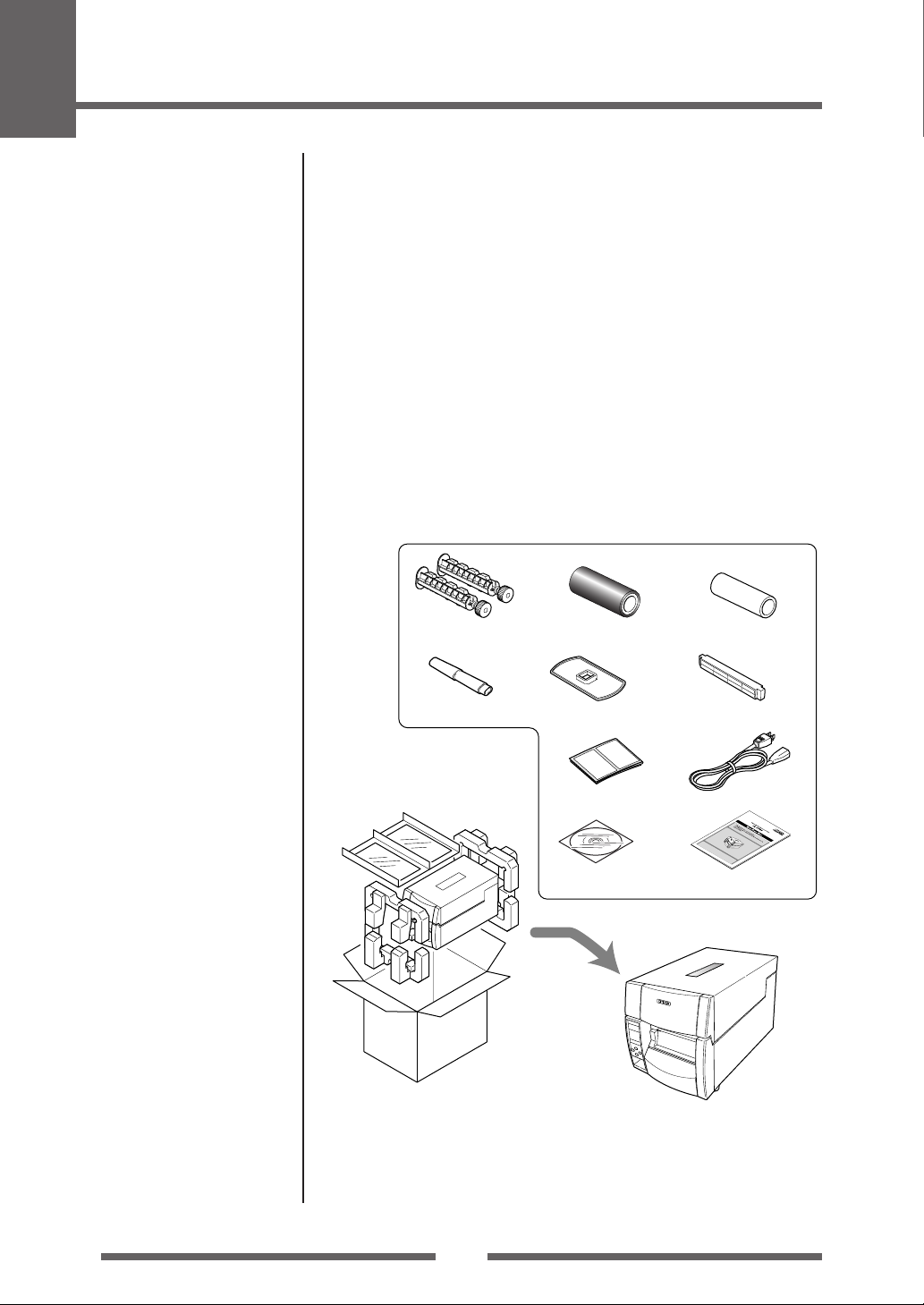
Removing the Packing Material
The printer is shipped with adhesive tape in place to hold the top cover
closed. Simply remove the two pieces of tape on either side of the top cover.
Then simply open the cover by lifting up and tipping it backwards.
There is another strip of adhesive tape that must be removed which holds
the mechanism closed for shipping. Remove the tape and attached paper by
carefully peeling from the plastic case.
Retain the tape should you need to transport the printer again. A further
piece of packing paper is inside the mechanism and you can remove this
when the head is opened as explained later in the manual.
Check that the following accessories are included with the printer
in the carton.
Head cleaner
Sample RibbonRibbon Holder
Test label media Power cord
CD-ROM
Paper Core
(for ribbon)
Media holder barMedia holder guide
Quick-start Guide
Printer
Note: The empty carton and packing materials should be stored for future
shipping of the printer.
10
Caution
• Be careful when moving or carrying the printer and when taking the
printer out of the carton. The printer may cause injury or property
damage if dropped. Be sure to grip the printer housing firmly when
taking it out of the carton. Do not grip the printer by the foam packing
material which may break, causing the printer to drop.
• When opening the cover, open it all the way. If only part way open,
the cover could slam shut, possibly causing injury.
• Be careful of the edge of the cover when the cover is opened. It may
cause injury or property damage.
• Be careful of the edges of the metal plates as injury or property
damage is possible.
Part Names and Functions
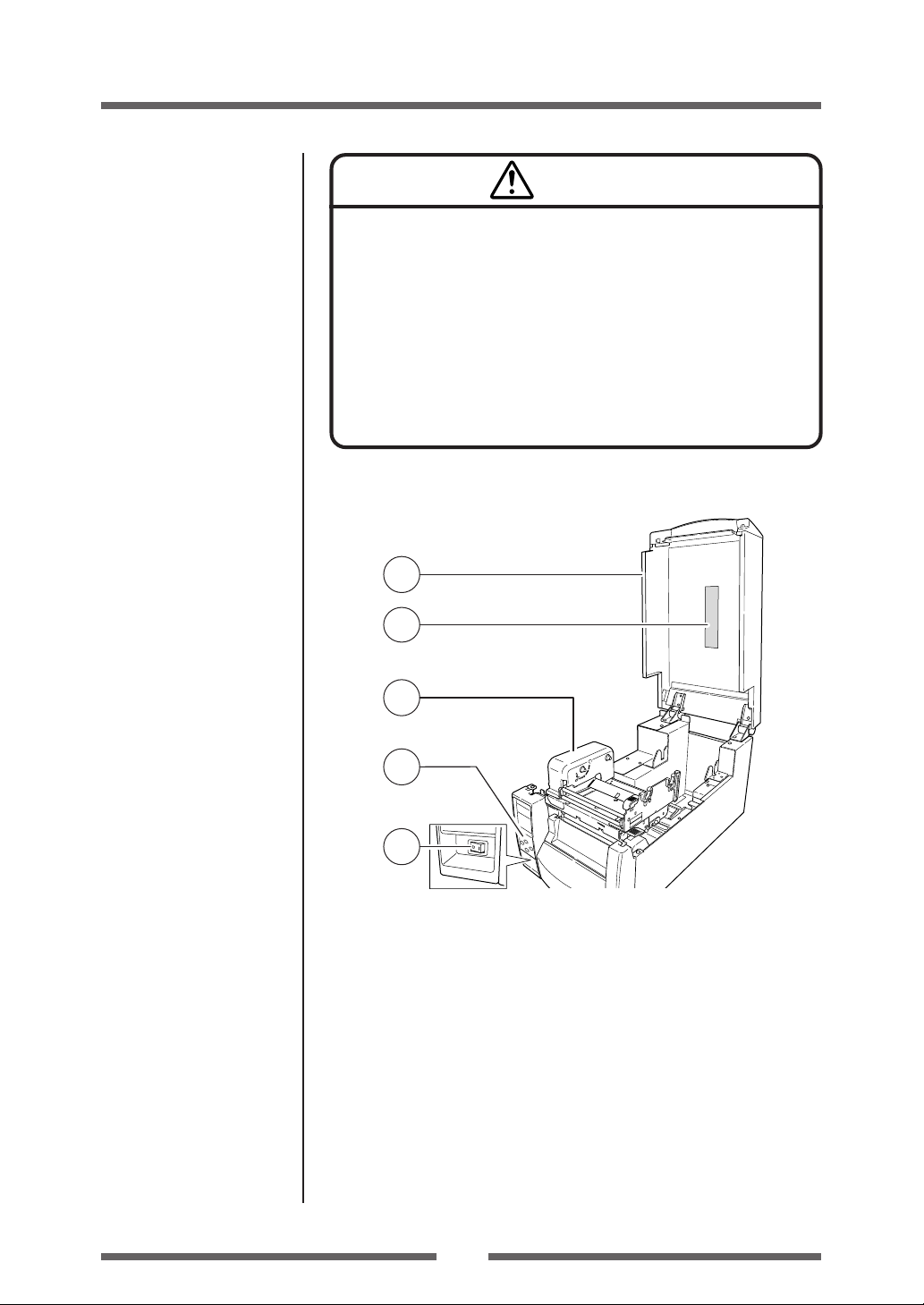
Inside the printer
1
Setup
Operation Panel (p.15)
Setting the Ribbon (p.26)
3
4
2
5
1 Top cover
Is opened vertically to set media or ribbon.
2 Operation panel
This is used to make changes and adjustments to the printer and its
configuration.
3 Top cover window
The amount of ribbon and media remaining can be checked through this
window.
4 Ribbon drive unit
Power ON/OFF (p.19)
5 Power switch
This is the power switch for the printer.
11
1
Setup
Part Names and Functions
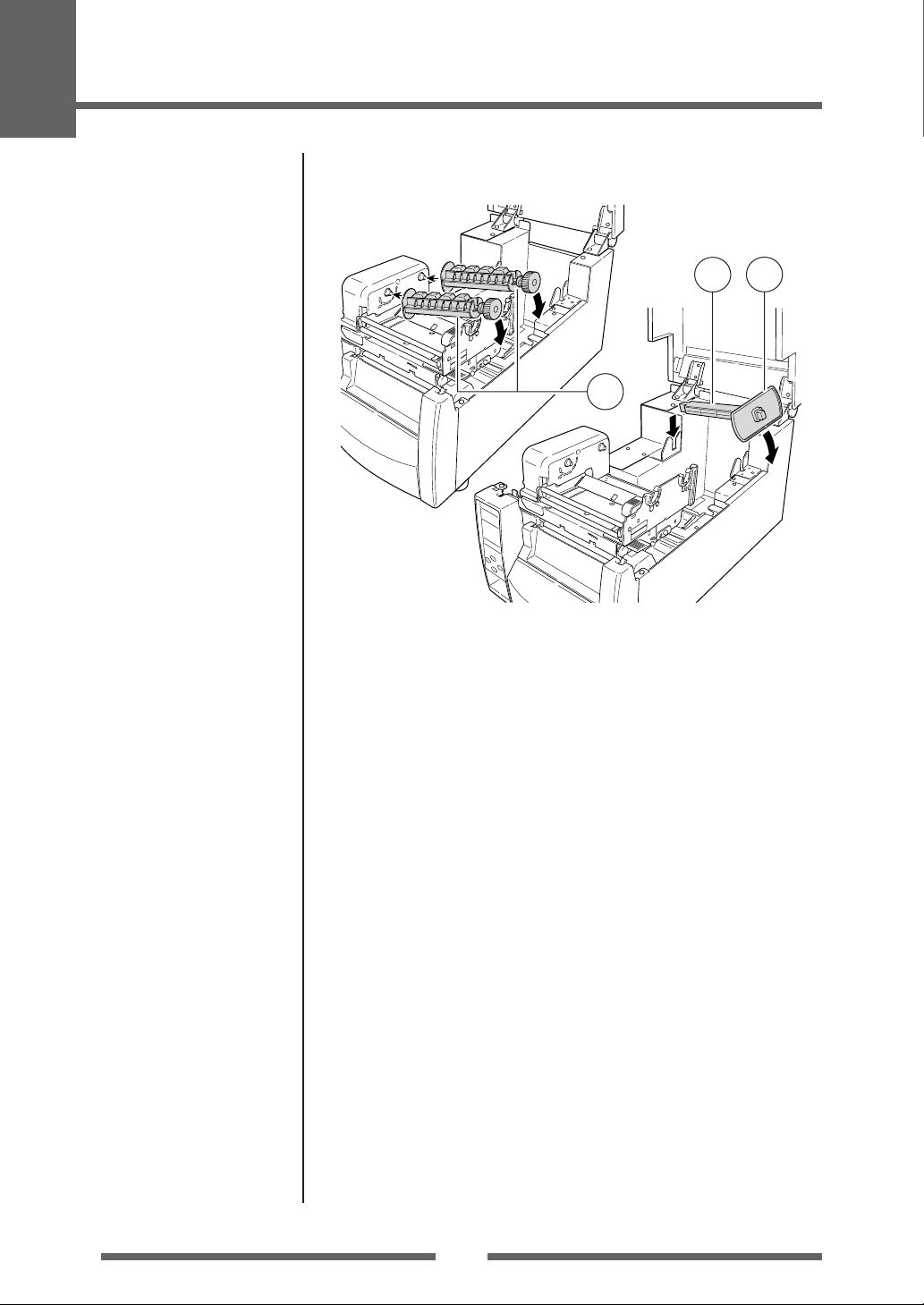
1
3
2
1 Ribbon holder
It is used to attach the ribbon and paper core.
2 Media holder guide
This guide is moved horizontally to match the media size.
The guide can be sliding it from the holder bar.
3 Media holder bar
The media is supported by the media holder bar when installed in the
printer.
12

1
Setup
Part Names and Functions
6
4
2
Media Thickness Adjustment
(p.44)
Media Width Adjustment
(p.45)
3
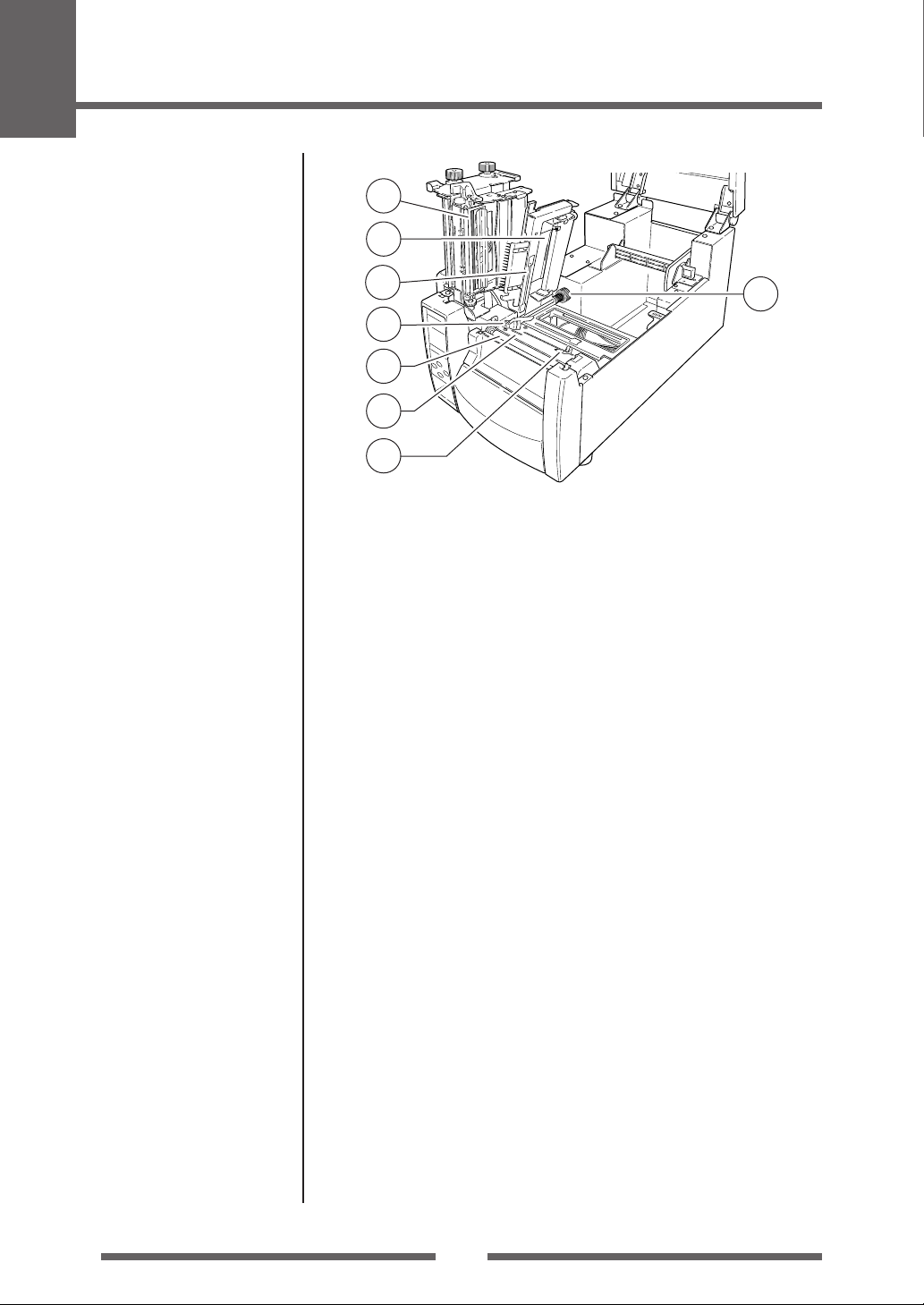
1 Media thickness adjustment screw
It is adjusted to match the thickness of the media.
2 Media width adjustment indicator
3 Media width adjustment knob
It is adjusted to match the width of the media.
4 Media thickness adjustment indicator
5 Head open lever
The head unit can be raised to install media by pushing this lever.
It locks the head unit during printing.
6 Sensor arm open lever
The sensor arm can be raised to install media by pushing this lever.
5
13
1
Setup
Part Names and Functions
1
2
Sensor Adjustments and
Calibration (p.41)
Installing the Media (p.25)
3
8
5
7
4
6
1 Thermal printhead
This is the printhead. Avoid touching this with your fingertips and leaving
grease or dirt on the printhead surface.
2 Sensor arm
The media can be installed by raising this arm.
The media can be held in place by lowering this arm.
3 Adjustable (rear) sensor
Detects the label or tag position. This sensor is switched “on” by default.
4 Fixed media sensor
Alternative method to detect the label or tag position. This sensor is
more accurate for small labels as it is closer to the print head. It is switch
“off” by default.
5 Left media guide
This is a fixed part of the printer. The left side of the media (labels, tags)
as viewed from the from of the printer should be placed against this
media guide.
6 Right, movable media guide
Slide the right media guide so that it just touches the media. It should
“guide” the media through the printer. It should not hold it firmly
otherwise the media will jam.
7 Platen
Interlocked with the thermal printhead, it feeds media backwards or
forwards.
8 Adjustable sensor position knob
This is used to change the left-to-right position of the adjustable media
sensor across the media. See Chapter 3, Printer Adjustments for more
details.
14
Operation Panel
1
Setup
Part Names and Functions
LED Functions (p.21)
Normal Operating Mode
(p.20)
2
4
5
POWER ERROR
FEED
PAUSE
MENU
STOP
3
6
7
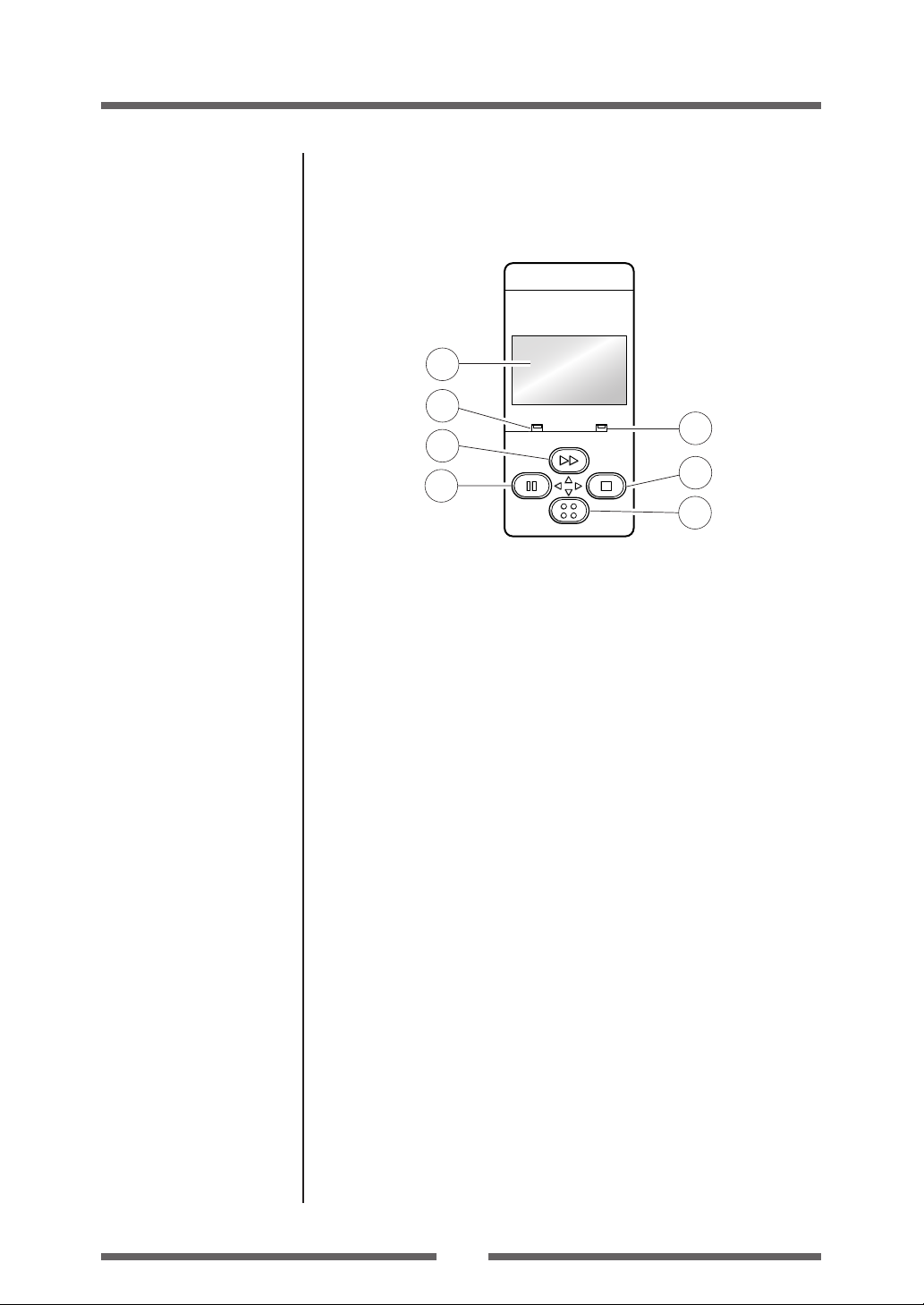
1 LCD display
This displays the operational status of the printer.
2 POWER LED
This is lit when the printer power is on. (green)
3 ERROR LED
This is lit or flashes when the printer is in an alarm or error status. (red)
4 FEED key
This key feeds the media to the top of the next label or form.
5 PAUSE key
This temporarily stops printing.
6 STOP key
This stops printing or cancels the alarm.
Menu Setup Mode (p.31)
7 MENU key
In normal operation, this key will enter the menu configuration mode.
It can be configured to repeat the previous label, if preferred.
15
1
Setup
Part Names and Functions
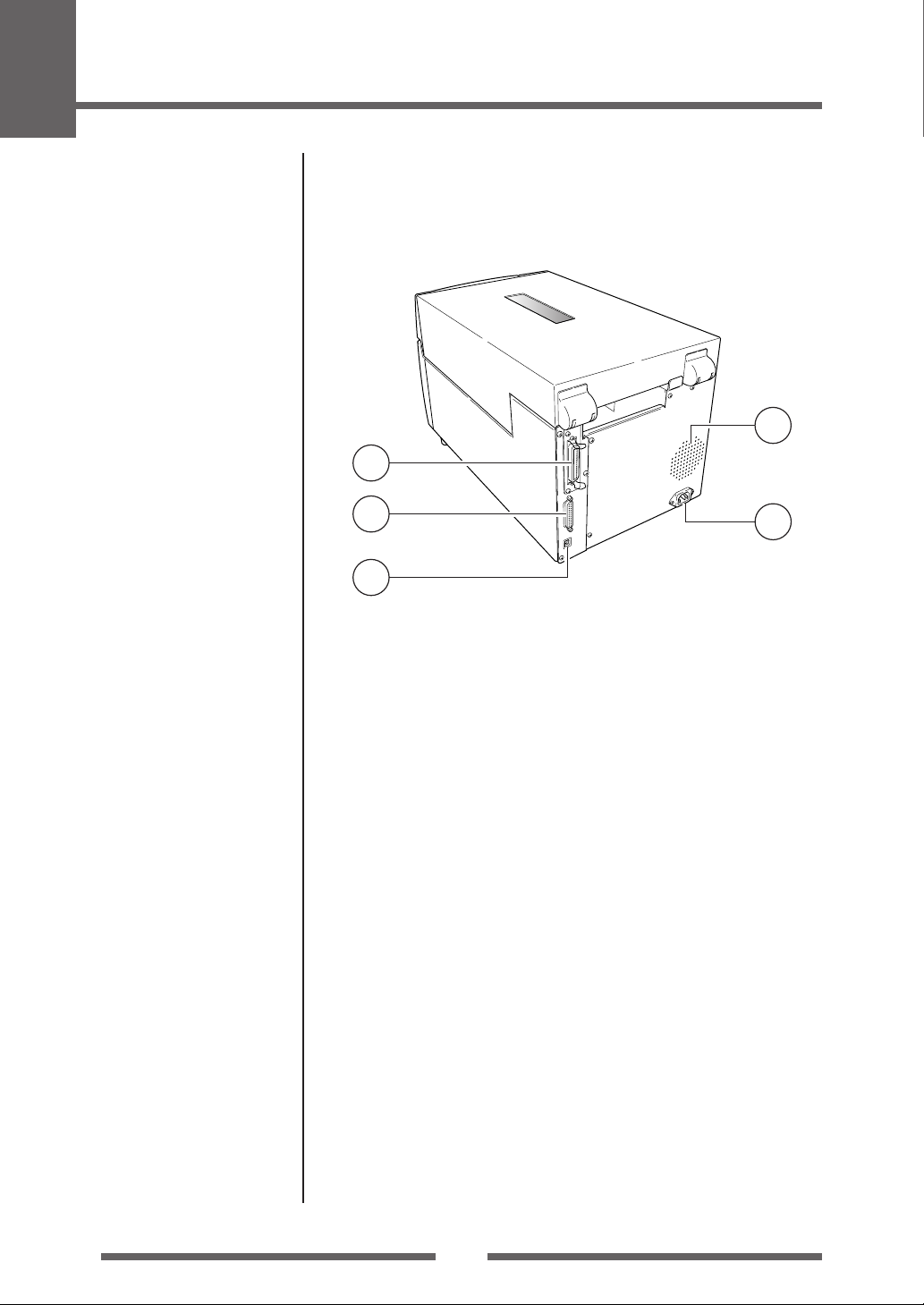
Rear View
4
1
Parallel Interface (p.57)
Serial Interface (p.55)
USB Interface (p.60)
Connection to Power (p.17)
2
3
1 Parallel interface (Centronics parallel or IEEE1284)
This receives parallel transmission of data from a host computer.
2 Serial interface (RS232C)
This receives serial transmission of data from a host computer.
3 USB interface
This receives USB transmission of data from a host computer.
4 Heat air opening
It allows warm air to vent from the printer.
Be sure not to block it with media etc.
5 Power cord inlet
The connector of the enclosed power cord is connected here.
5
16
Setup
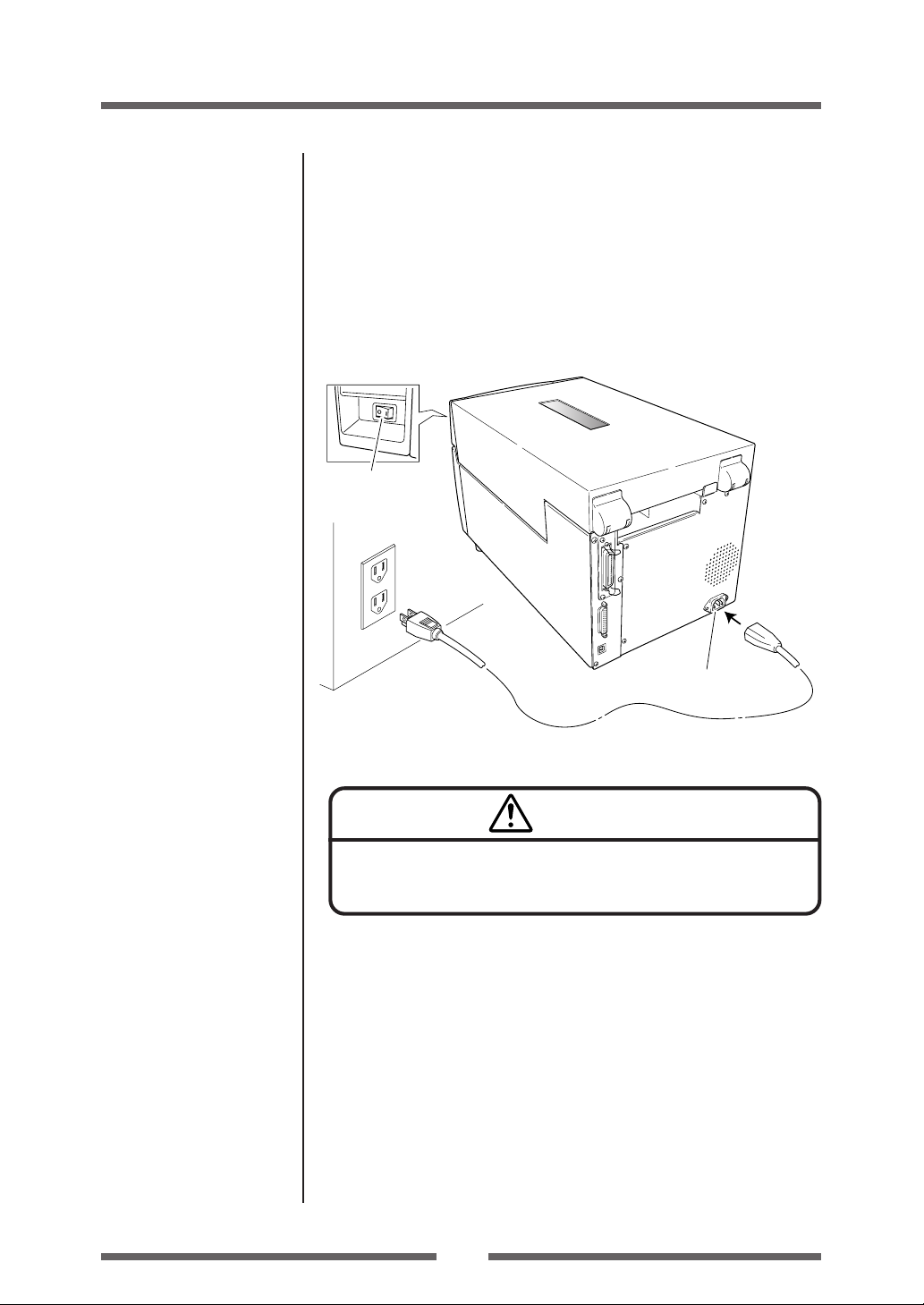
Connection to Power
1. The power switch is located on the front of the printer recessed
below the control panel. Check that the power switch is turned
OFF.
2. Insert the power cord in to the inlet on the printer.
3. Insert the plug of the power cord in the AC outlet.
Power Switch
AC Outlet
Power Cord Inlet
Caution
Use an AC outlet that accepts a three-pronged plug. Otherwise, static
electricity may be generated and there will be danger of electric shock.
Driver Installation
The computer may automatically detect the presence of the new printer when
it is first started, depending on the computer type, interface and operating
system. Follow any on-screen instruction and also instructions supplied with
any additional CD-ROM or floppy disk included with your printer.
Your supplier will assist you with the correct drivers and software which are
compatible with your particular computer system.
17
1
Setup
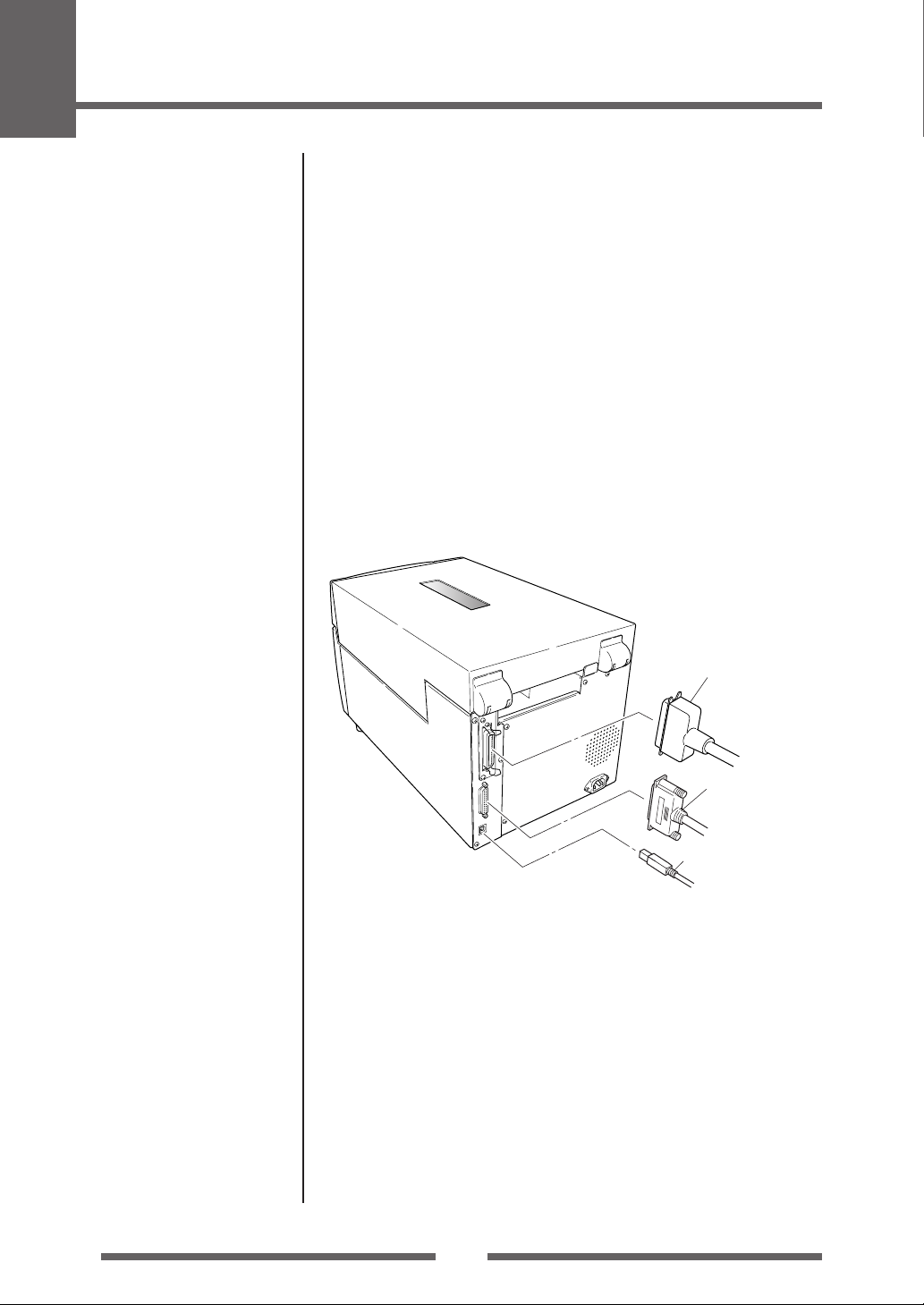
Connection to a Computer
This product has three interfaces that can be used to receive printing data: a
serial port (RS232C), parallel port (IEEE1284, Non-L. P. S.), and a USB port
(USB1.1). An optional internal network interface can be added by your
dealer.
To connect the cable, proceed as follows:
1. Turn OFF both power switches of the printer and the computer.
2. Connect one end of the interface cable to the interface
connector on the back of the printer and secure it with locks or
locking screws, where available.
3. Connect the other end of the interface cable to the interface
connector on the computer and secure it with locks or locking
screws, where available.
Serial Interface (p.55)
Parallel Interface (p.57)
USB Interface (p.60)
Replacing the Interface
Board (p.61)
Parallel Interface Cable
Serial Interface Cable
USB Interface Cable
Note: If an optional network interface is used, the standard parallel port is
removed from the printer, so the parallel interface cannot be used.
18
2
Printer Operation
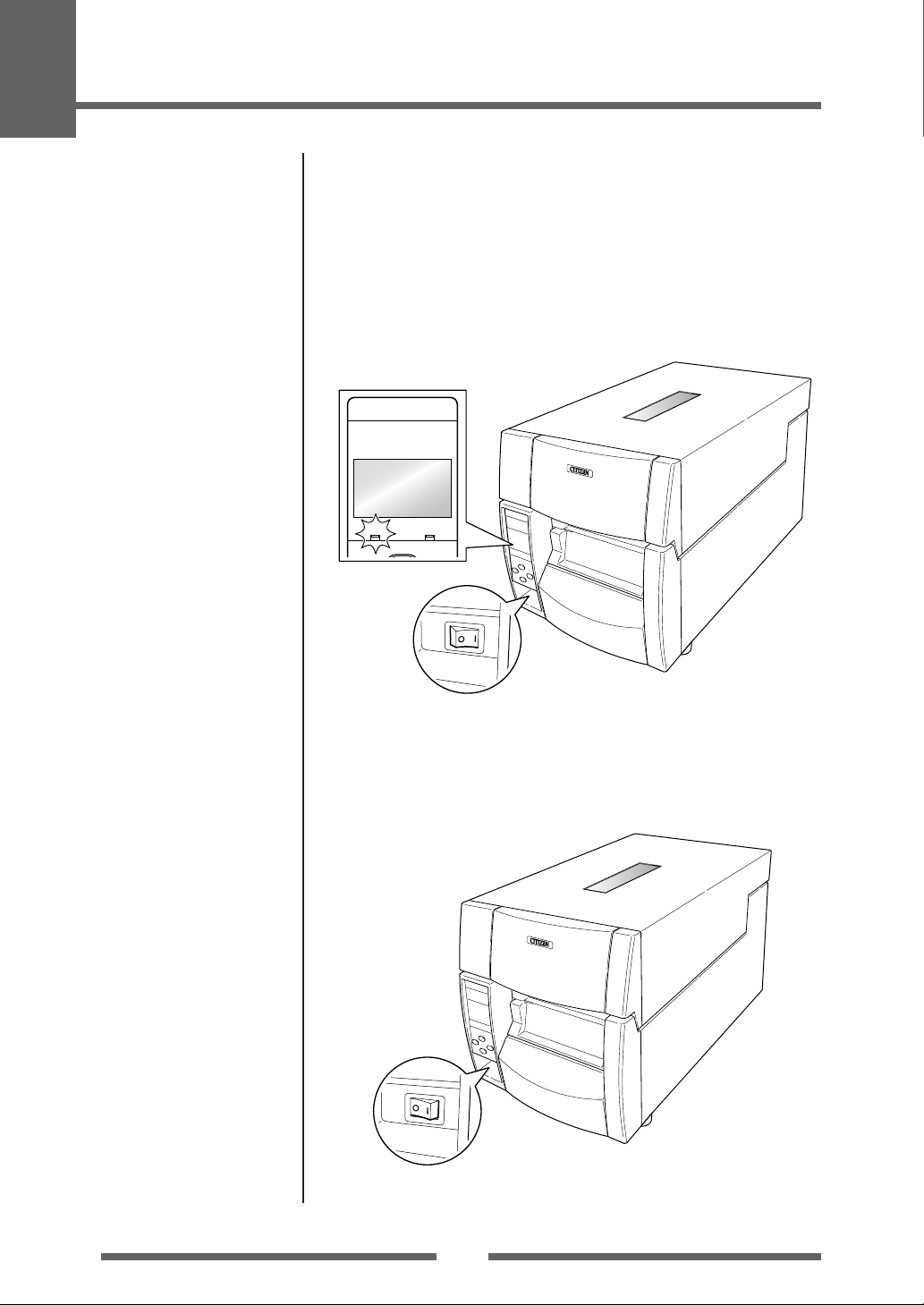
Power ON/OFF
Turning on the power
1. The power switch is conveniently located at the front of the
printer for easy access during normal operation. It is in the recess
underneath the control panel so it cannot be accidentally
operated by mistake.
2. The POWER LED is lit.
Operation Panel
POWER ERROR
FEED
Printer Operation
Power Switch
Turning off the power
1. Turn off the power switch of the printer.
2. The POWER LED goes off.
Power Switch
19
2
Printer Operation
Normal Operating Mode
Menu Setup Mode (p.31)
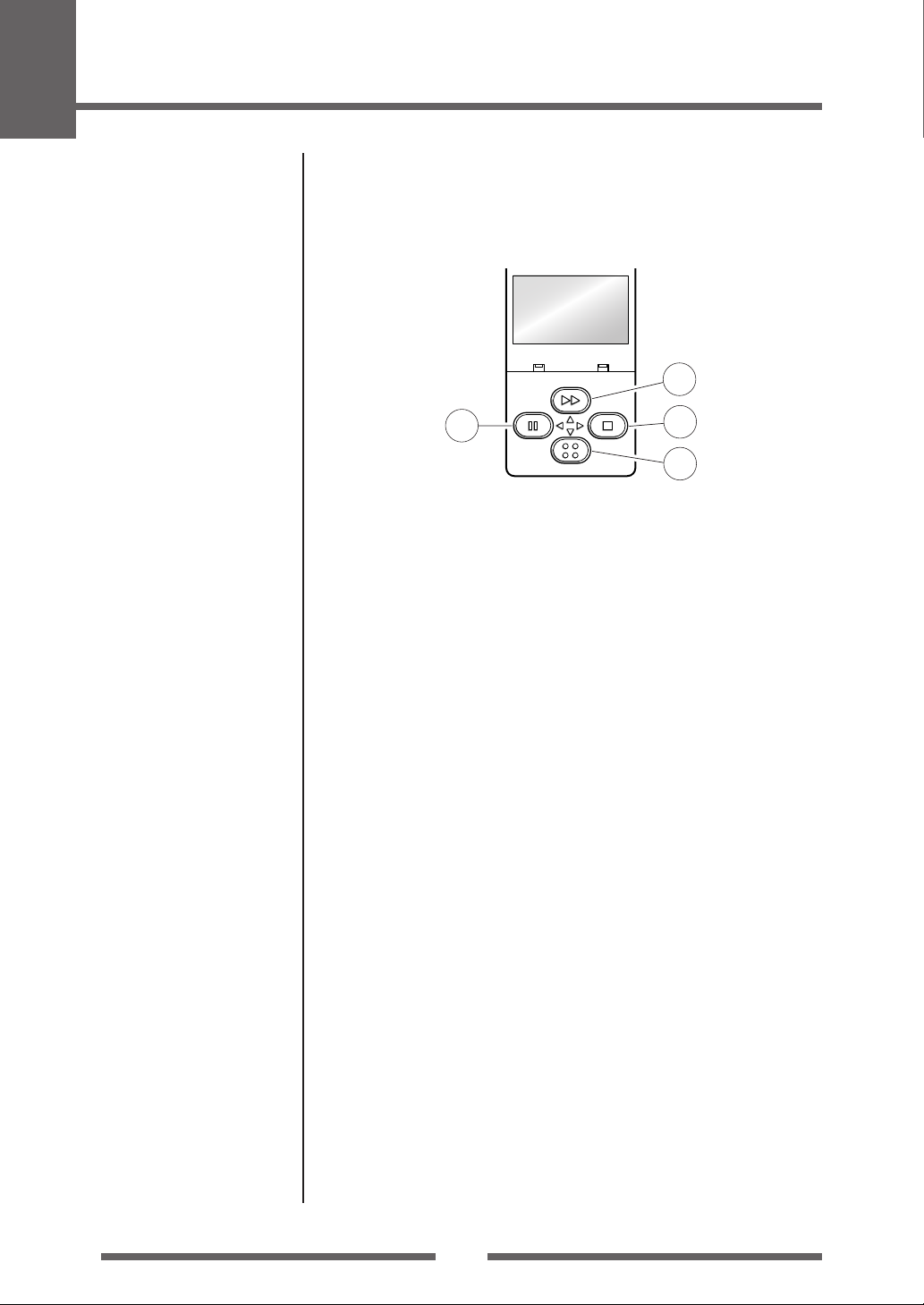
When the power is turned on, the printer enters normal operating mode.
The control keys activate the following functions.
On Line
Ready
POWER ERROR
FEED
PAUSE
STOP
1
MENU
1 PAUSE key: Temporarily pauses printing
• When this key is pushed once, the LCD indicates «Pause» and the printer
temporarily pauses.
• When it is pushed during printing, the printer pauses after the label
currently being printed is issued. Pressing the key a second time restarts
printing and the remaining number of designated labels are printed.
2 FEED key: Feeds media
• Pressing this key feeds media to the print start position. The distance
it is fed is determined by automatically detecting the front end of the
media when using label media, and when continuous media has been
designated, a fixed quantity is fed, then feeding stops.
• When the TEAR OFF setting is effective, feeding stops when the media
has been fed to the TEAR OFF location.
• When the optional cutter unit is installed, the media is fed to the cut
position then it is cut.
Regardless of whether there is or is not a cut operation setting on the
setting menu, if the unit is installed, the media is cut each time it is fed.
• If the optional peeler unit is installed, the media is fed to the peeling
location. When the media is pausing at the peeling position, feeding
does not occur, even if the FEED key is pushed.
2
3
4
Menu Setup Mode (p.31)
3 STOP key: It stops printing and cancels the alarm
Pushing this key once during printing puts the printer in pause mode
after the label is issued. It is possible to cancel 1 batch of label issuing
data by pressing the STOP key for 4 seconds or longer in pause status.
(The LCD indicates «Job Clear» during cancel.)
4 MENU key:
In normal operation, this key will enter the menu configuration mode.
It can be configured to repeat the previous label, if preferred.
20
Loading…
CT-E601 Online Manual (PSTI Act compliant)
2024/09/03Agree to licensing agreement and download
CT-S751 Online Manual (PSTI Act compliant)
2024/09/03Agree to licensing agreement and download
CT-S251 Online Manual (PSTI Act compliant)
2024/09/03Agree to licensing agreement and download
CT-D150 Online Manual (PSTI Act compliant)
2024/10/21Agree to licensing agreement and download
CT-E351 Online Manual (PSTI Act compliant)
2024/10/21Agree to licensing agreement and download
CT-D101 Online Manual (PSTI Act compliant)
2024/10/24Agree to licensing agreement and download
CT-E301 Online Manual (PSTI Act compliant)
2024/10/24Agree to licensing agreement and download
CT-S4500 Online Manual (PSTI Act compliant)
2024/09/03Agree to licensing agreement and download
CT-D151 Online Manual (PSTI Act compliant)
2024/09/03Agree to licensing agreement and download
CT-E651 Online Manual (PSTI Act compliant)
2024/09/03Agree to licensing agreement and download
CL-E300 CL-E303 Online Manual (PSTI Act compliant)
2024/09/20Agree to licensing agreement and download
CL-E321 CL-E331 Online Manual (PSTI Act compliant)
2024/09/25Agree to licensing agreement and download
CL-S70xIII Online Manual(AMER)(PSTI Act compliant)
2024/11/08Agree to licensing agreement and download
CL-S70xIII Online Manual(APAC)(PSTI Act compliant)
2024/11/08Agree to licensing agreement and download
CL-S70xIII Online Manual(EMEA)(PSTI Act compliant)
2024/11/08Agree to licensing agreement and download
CL-S70xIII Online Manual(IND)(PSTI Act compliant)
2024/11/08Agree to licensing agreement and download
CBM-910Type1 User’s Manual
(CBM910UME_13E.pdf)559.67KB2016/06/29Agree to licensing agreement and download
CBM-920Type1 User’s Manual
(CBM920UME_106.pdf)2.76MB2016/06/29Agree to licensing agreement and download
CD-S500 CD-S501 CD-S503 User’s Manual
(CD-S500UME_101.pdf)2.32MB2016/06/29Agree to licensing agreement and download
CD-S500 CD-S501 CD-S503 User’s Manual
(CD-S500UM5_101.pdf)
5 Languages(En Fr De It Es)
2.89MB2016/06/29Agree to licensing agreement and download
CBM-910II User’s Manual
(CBM910IIUME_32F.pdf)1.80MB2022/12/15Agree to licensing agreement and download
CBM-920II User’s Manual
(CBM920IIUME_12F.pdf)1.43MB2022/12/15Agree to licensing agreement and download
CBM1000II User’s Manual
(CBM1000IIUME_106.pdf)2.43MB2016/06/29Agree to licensing agreement and download
CBM1000Type1 User’s Manual
(CBM1000UME_11.pdf)1.94MB2016/06/29Agree to licensing agreement and download
CBM-230 CBM-231 User’s Manual
(CBM230UME_21E.pdf)634.71KB2016/06/29Agree to licensing agreement and download
CBM-253 User’s Manual
(CBM253UME_06.pdf)4.3MB2016/06/29Agree to licensing agreement and download
CBM-262II User’s Manual
(CBM262IIUME.pdf)2.29MB2016/06/29Agree to licensing agreement and download
CBM-262Type1 User’s Manual
(CBM262UME_02.pdf)855.34KB2016/06/29Agree to licensing agreement and download
CBM-270 User’s Manual
(CBM270UME_110.pdf)2.5MB2016/06/29Agree to licensing agreement and download
CBM-272 User’s Manual
(CBM272UME_01E.pdf)1.83MB2016/06/29Agree to licensing agreement and download
CBM-291 User’s Manual
(CBM290_291UME_108a.pdf)1.37MB2016/06/29Agree to licensing agreement and download
CBM-293 User’s Manual
(CBM292_293UME_107.pdf)2.04MB2016/06/29Agree to licensing agreement and download
CBM-510 CBM-520 User’s Manual
(CBM510_520UME.pdf)1.73MB2016/06/29Agree to licensing agreement and download
CBM-710 CBM-720 CBM-730 CBM-750 User’s Manual
(CBM710UME_27.pdf)840.28KB2016/06/29Agree to licensing agreement and download
CBM-810 User’s Manual
(CBM810UME.pdf)1.36MB2016/06/29Agree to licensing agreement and download
CBM-820 User’s Manual
(CBM820UME_109.pdf)3.1MB2016/06/29Agree to licensing agreement and download
IDP3110 User’s Manual
(iDP3110UME_20.pdf)466.34KB2016/06/29Agree to licensing agreement and download
IDP3210 User’s Manual
(iDP3210UME_15E.pdf)604.17KB2016/06/29Agree to licensing agreement and download
IDP3221 User’s Manual
(iDP3221UME_05E.pdf)1.66MB2016/06/29Agree to licensing agreement and download
IDP3240 User’s Manual
(iDP3240UME_106.pdf)2.1MB2016/06/29Agree to licensing agreement and download
IDP3310 User’s Manual
(iDP3310UME_01.pdf)731.22KB2016/06/29Agree to licensing agreement and download
IDP3410 User’s Manual
(iDP3410UME_02.pdf)1.2MB2016/06/29Agree to licensing agreement and download
IDP3420 User’s Manual
(iDP3420UME_110.pdf)2.13MB2016/06/29Agree to licensing agreement and download
IDP3530 User’s Manual
(iDP3530UME.pdf)151.66KB2016/06/29Agree to licensing agreement and download
IDP3535 User’s Manual
(iDP3535UME.pdf)224.11KB2016/06/29Agree to licensing agreement and download
IDP3540 User’s Manual
(iDP3540UME_36.pdf)466.51KB2016/06/29Agree to licensing agreement and download
IDP3545 User’s Manual
(iDP3545UME.pdf)2.09MB2016/06/29Agree to licensing agreement and download
IDP3550 User’s Manual
(iDP3550UME_112.pdf)3.3MB2016/06/29Agree to licensing agreement and download
IDP-460 User’s Manual
(iDP460UME_105.pdf)853.33KB2016/06/29Agree to licensing agreement and download
IDP-560 User’s Manual
(iDP560RSUM.pdf)962.93KB2016/06/29Agree to licensing agreement and download
IDP-562 User’s Manual
(iDP562UME_09.pdf)363.16KB2016/06/29Agree to licensing agreement and download
PMU23xxIII User’s Manual
(PMU2300III_UME100726.pdf)13.85MB2016/06/29Agree to licensing agreement and download
PPU-231II User’s Manual
(PPU231IIUME_102.pdf)1.6MB2016/06/29Agree to licensing agreement and download
PPU-231Type1 User’s Manual
(PPU231UME_107.pdf)2.23MB2016/06/29Agree to licensing agreement and download
PPU-700II User’s Manual
(PPU700_700IIUME_10F_L.pdf)1.55MB2017/03/03Agree to licensing agreement and download
PPU-700Type1 User’s Manual
(PPU-700UME_107.zip)5.67MB2018/12/26Agree to licensing agreement and download
CT-S601Type1 User’s Manual
(CT-S601_UME_TZ74916-10F_L.pdf)4.69MB2016/06/29Agree to licensing agreement and download
CT-S601Type1 User’s Manual
(CT-S601_UM5_TZ74917-10F_L.pdf)
5 Languages(En Fr De It Es)
22.1MB2016/06/29Agree to licensing agreement and download
CT-S651Type1 User’s Manual
(CT-S651_UME_TZ74948-10F_L.pdf)4.44MB2016/06/29Agree to licensing agreement and download
CT-S651Type1 User’s Manual
(CT-S651_UM5_TZ74949-10F_L.pdf)
5 Languages(En Fr De It Es)
20.8MB2016/06/29Agree to licensing agreement and download
CT-S801Type1 User’s Manual
(CT-S801_UME_TZ74902-10F_L.pdf)6.45MB2016/06/29Agree to licensing agreement and download
CT-S801Type1 User’s Manual
(CT-S801_UM5_TZ74903-10F_L.pdf)
5 Languages(En Fr De It Es)
30.4MB2016/06/29Agree to licensing agreement and download
CT-S851Type1 User’s Manual
(CT-S851_UME_TZ74930-10F_L.pdf)4.98MB2016/06/29Agree to licensing agreement and download
CT-S851Type1 User’s Manual
(CT-S851_UM5_TZ74931-10F_L.pdf)
5 Languages(En Fr De It Es)
23.3MB2016/06/29Agree to licensing agreement and download
CT-S300 User’s Manual
(CT-S300UME_201.pdf)653.98KB2016/06/29Agree to licensing agreement and download
CT-S300 User’s Manual
(CT-S300UM5_201.pdf)
5 Languages(En Fr De It Es)
1.86MB2016/06/29Agree to licensing agreement and download
CT-S310Type1 User’s Manual
(CT-S310UME_110.pdf)581.95KB2016/06/29Agree to licensing agreement and download
CT-S310Type1 User’s Manual
(CT-S310UM5_110.pdf)
5 Languages(En Fr De It Es)
1.67MB2016/06/29Agree to licensing agreement and download
CT-S280 User’s Manual
(CT-S280UME_02_L.pdf)723.12KB2017/03/03Agree to licensing agreement and download
CT-S280 User’s Manual
(CT-S280UM5_02_L.pdf)
5 Languages(En Fr De It Es)
3.45MB2017/03/03Agree to licensing agreement and download
CT-S281 User’s Manual
(CT-S281UME_05_L.pdf)1.53MB2017/03/03Agree to licensing agreement and download
CT-S281 User’s Manual
(CT-S281UM5_05_L.pdf)
5 Languages(En Fr De It Es)
5.05MB2017/03/03Agree to licensing agreement and download
CT-P291 CT-P293 User’s Manual
(CT-P29x_UME_60F.pdf)1.71MB2022/12/02Agree to licensing agreement and download
CT-S2000 User’s Manual
(CT-S2000UME_11F.pdf)1.00MB2022/12/14Agree to licensing agreement and download
CT-S2000 User’s Manual
(CT-S2000_UM5_11F.pdf)
5 Languages(En Fr De It Es)
7.76MB2022/12/14Agree to licensing agreement and download
CT-S2000L User’s Manual
(CT-S2000L_UME_100.pdf)59.09KB2016/06/29Agree to licensing agreement and download
CT-S4000 User’s Manual
(CT-S4000UME_21F.pdf)1.12MB2022/12/14Agree to licensing agreement and download
CT-S4000 User’s Manual
(CT-S4000UM5_21F.pdf)
5 Languages(En Fr De It Es)
5.64MB2022/12/14Agree to licensing agreement and download
CT-S310II User’s Manual (PSTI Act compliant)
(CT-S310II_UM_200_EN.pdf)4.56MB2024/11/05Agree to licensing agreement and download
CT-S310II User’s Manual (PSTI Act compliant)
(CT-S310II_UM_200_5L.pdf)
5 Languages(En Fr De It Es)
20.7MB2024/11/05Agree to licensing agreement and download
CT-S280II User’s Manual
(CT-S280II_UM_101_EN.pdf)1.11MB2023/02/15Agree to licensing agreement and download
CT-S280II User’s Manual
(CT-S280II_UM_101_5L.pdf)
5 Languages(En Fr De It Es)
3.16MB2023/02/15Agree to licensing agreement and download
CT-S281II User’s Manual
(CT-S281II_UM_101_EN.pdf)1.41MB2023/02/15Agree to licensing agreement and download
CT-S281II User’s Manual
(CT-S281II_UM_101_5L.pdf)
5 Languages(En Fr De It Es)
3.62MB2023/02/15Agree to licensing agreement and download
CT-S601II User’s Manual (PSTI Act compliant)
(CT-S601II_UM_201EN.pdf)7.34MB2024/09/03Agree to licensing agreement and download
CT-S601II User’s Manual (PSTI Act compliant)
(CT-S601II_UM_2015L.pdf)
5 Languages(En Fr De It Es)
35.9MB2024/09/03Agree to licensing agreement and download
CT-S651II User’s Manual (PSTI Act compliant)
(CT-S651II_UM_201EN.pdf)6.16MB2024/09/03Agree to licensing agreement and download
CT-S651II User’s Manual (PSTI Act compliant)
(CT-S651II_UM_2015L.pdf)
5 Languages(En Fr De It Es)
25.6MB2024/09/03Agree to licensing agreement and download
CT-S801II User’s Manual (PSTI Act compliant)
(CT-S801II_UM_200EN.pdf)7.85MB2024/09/03Agree to licensing agreement and download
CT-S801II User’s Manual (PSTI Act compliant)
(CT-S801II_UM_2005L.pdf)
5 Languages(En Fr De It Es)
34.5MB2024/09/03Agree to licensing agreement and download
CT-S851II User’s Manual (PSTI Act compliant)
(CT-S851II_UM_200EN.pdf)6.83MB2024/09/03Agree to licensing agreement and download
CT-S851II User’s Manual (PSTI Act compliant)
(CT-S851II_UM_2005L.pdf)
5 Languages(En Fr De It Es)
28.1MB2024/09/03Agree to licensing agreement and download
CT-E601 User’s Manual (PSTI Act compliant)
(CT-E601_UM_201_EN.pdf)6.51MB2024/09/03Agree to licensing agreement and download
CT-E601 User’s Manual (PSTI Act compliant)
(CT-E601_UM_201_5L.pdf)
5 Languages(En Fr De It Es)
23.6MB2024/09/03Agree to licensing agreement and download
CT-S751 User’s Manual (PSTI Act compliant)
(CT-S751_UM_201_EN.pdf)14.3MB2024/09/03Agree to licensing agreement and download
CT-S751 User’s Manual (PSTI Act compliant)
(CT-S751_UM_201_5L.pdf)
5 Languages(En Fr De It Es)
47.2MB2024/09/03Agree to licensing agreement and download
CT-D150 User’s Manual (PSTI Act compliant)
(CT-D150_UM_200_EN.pdf)1.33MB2024/10/21Agree to licensing agreement and download
CT-E351 User’s Manual (PSTI Act compliant)
(CT-E351_UM_200_EN.pdf)1.37MB2024/10/21Agree to licensing agreement and download
CT-E351 User’s Manual (PSTI Act compliant)
(CT-E351_UM_200_5L.pdf)
5 Languages(En Fr De It Es)
3.17MB2024/10/21Agree to licensing agreement and download
CT-S251 User’s Manual (PSTI Act compliant)
(CT-S251_UM_201EN.pdf)1.32MB2024/09/03Agree to licensing agreement and download
CT-S251 User’s Manual (PSTI Act compliant)
(CT-S251_UM_201_5L.pdf)
5 Languages(En Fr De It Es)
3.67MB2024/09/03Agree to licensing agreement and download
CT-E301 User’s Manual (PSTI Act compliant)
(CT-E301_UM_200_EN.pdf)1.93MB2024/10/24Agree to licensing agreement and download
CT-E301 User’s Manual (PSTI Act compliant)
(CT-E301_UM_200_5L.pdf)
5 Languages(En Fr De It Es)
4.33MB2024/10/24Agree to licensing agreement and download
CT-D101 User’s Manual (PSTI Act compliant)
(CT-D101_UM_200_EN.pdf)1.87MB2024/10/24Agree to licensing agreement and download
CT-S4500 User’s Manual (PSTI Act compliant)
(CT-S4500_UM_201_EN.pdf)10.8MB2024/09/03Agree to licensing agreement and download
CT-S4500 User’s Manual (PSTI Act compliant)
(CT-S4500_UM_201_5L.pdf)
5 Languages(En Fr De It Es)
48.6MB2024/09/03Agree to licensing agreement and download
CX-02/CX-02W User’s Manual (English)
(CX-02_CX-02W_UsersManual_English_Ver1.24.pdf)90.7MB2024/09/05Agree to licensing agreement and download
CT-S801III User’s Manual (PSTI Act compliant)
(CT-S801III_UM_201EN.pdf)7.16MB2024/09/03Agree to licensing agreement and download
CX-02/CX-02W User’s Manual (French)
(CX-02_CX-02W_UsersManual_French_Ver1.24.pdf)90.2MB2024/09/05Agree to licensing agreement and download
CT-S801III User’s Manual (PSTI Act compliant)
(CT-S801III_UM_2015L.pdf)
5 Languages(En Fr De It Es)
35.3MB2024/09/03Agree to licensing agreement and download
CX-02/CX-02W User’s Manual (German)
(CX-02_CX-02W_UsersManual_German_Ver1.24.pdf)90.1MB2024/09/05Agree to licensing agreement and download
CT-S851III User’s Manual (PSTI Act compliant)
(CT-S851III_UM_201EN.pdf)6.97MB2024/09/03Agree to licensing agreement and download
CX-02/CX-02W User’s Manual (Italian)
(CX-02_CX-02W_UsersManual_Italian_Ver1.24.pdf)90.1MB2024/09/05Agree to licensing agreement and download
CT-S851III User’s Manual (PSTI Act compliant)
(CT-S851III_UM_2015L.pdf)
5 Languages(En Fr De It Es)
45.0MB2024/09/03Agree to licensing agreement and download
CX-02/CX-02W User’s Manual (Spanish)
(CX-02_CX-02W_UsersManual_Spanish_Ver1.24.pdf)90.1MB2024/09/05Agree to licensing agreement and download
CT-D151 User’s Manual (PSTI Act compliant)
(CT-D151_UM_201_EN.pdf)2.06MB2024/09/03Agree to licensing agreement and download
CT-E651 User’s Manual (PSTI Act compliant)
(CT-E651_UM_201_EN.pdf)2.27MB2024/09/03Agree to licensing agreement and download
CT-E651 User’s Manual (PSTI Act compliant)
(CT-E651_UM_201_5L.pdf)
5 Languages(En Fr De It Es)
6.05MB2024/09/03Agree to licensing agreement and download
PMU3300 User’s Manual
(PMU3300_UME_V102.pdf)1.27MB2020/09/08Agree to licensing agreement and download
PHU-500 Installation manual
(PHU-500 Installation manual V102E.pdf)1.73MB2020/09/08Agree to licensing agreement and download
PD-22 User’s Manual
(PD-22_UME_PD74939-60F.pdf)678.27KB2016/06/29Agree to licensing agreement and download
PD-24 User’s Manual
(PD-24_UME_PD74948-80F.pdf)1.19MB2016/06/29Agree to licensing agreement and download
PD-04 User’s Manual
(PD04UME.pdf)1.39MB2016/06/29Agree to licensing agreement and download
CMP-10 User’s Manual
(CMP10UME_107_301.zip)3.01MB2018/12/26Agree to licensing agreement and download
CMP-20Type1 User’s Manual
(CMP-20UM_PM74901-01F_EN.pdf)5.71MB2016/06/29Agree to licensing agreement and download
CMP-30Type1 User’s Manual
(CMP-30UM_PM74902-01F_EN.pdf)5.64MB2016/06/29Agree to licensing agreement and download
CMP-20II User’s Manual
(CMP-20IIUM_101E.pdf)5.17MB2023/08/16Agree to licensing agreement and download
CMP-30II User’s Manual
(CMP-30IIUM_102E.pdf)5.94MB2023/12/21Agree to licensing agreement and download
CLP-2001 User’s Manual
(CLP2001UM.pdf)824.9KB2016/06/29Agree to licensing agreement and download
CLP-521 User’s Manual
(CLP521UME_02.pdf)1.68MB2016/06/29Agree to licensing agreement and download
CLP-6001 User’s Manual
(CLP6001UME.pdf)524.53KB2016/06/29Agree to licensing agreement and download
CLP-621 CLP-631 User’s Manual
(CLP621_631UM_JM74954-00F.pdf)3.58MB2016/06/29Agree to licensing agreement and download
CLP-7001 User’s Manual
(CLP7001UME.pdf)1.3MB2016/06/29Agree to licensing agreement and download
CLP-7001 CLP-7002 CLP-7401 User’s Manual
(CLP700xUME.pdf)1.3MB2016/06/29Agree to licensing agreement and download
CLP-7201 CLP-7202 User’s Manual
(CLP7201_7202UME.pdf)1.52MB2016/06/29Agree to licensing agreement and download
CLP-8301 User’s Manual
(CLP8301UME.pdf)5.42MB2016/06/29Agree to licensing agreement and download
CLP-9001 CLP-9301 User’s Manual
(CLP9001_9301UME.pdf)675.76KB2016/06/29Agree to licensing agreement and download
CL-S300 User’s Manual
(PXZ00082-10_UM_EN_CL-S300_L.pdf)3.04MB2017/03/03Agree to licensing agreement and download
CL-S321 CL-S331 User’s Manual
(PXZ00089-30_UM_EN_CL-S321_331_L.pdf)7.56MB2017/11/08Agree to licensing agreement and download
CL-S521 CL-S531 User’s Manual
(JM74979-30F_UM_EN_CL-S521_531_L.pdf)4.3MB2017/11/08Agree to licensing agreement and download
CL-S621 CL-S631 User’s Manual
(JM74983-21F_UM_EN_CL-S621_631.pdf)5.85MB2018/06/21Agree to licensing agreement and download
CL-S700 CL-S703 User’s Manual
(JN74923-11Fa_UM_EN_CL-S700Series.pdf)3.21MB2018/06/21Agree to licensing agreement and download
CL-S700DTType1 User’s Manual
(JN74940-21Fa_UM_CL-S700DTType1.pdf)2.07MB2018/06/21Agree to licensing agreement and download
CL-F208DT CL-F306DT User’s Manual
(CL-F208DT_306DT_UM_100CN.pdf)7.34MB2021/02/19Agree to licensing agreement and download
CL-F208 CL-F306 User’s Manual
(CL-F208_306_UM_100CN.pdf)10.7MB2021/02/19Agree to licensing agreement and download
C-D2 C-D3 User’s Manual
(C-DX_UM_100CN.pdf)7.34MB2021/02/19Agree to licensing agreement and download
C-T2 C-T3 User’s Manual
(C-TX_UM_100CN.pdf)10.7MB2021/02/19Agree to licensing agreement and download
CL-F2404II User’s Manual
(CL-F2404II_UM_100CN.pdf)5.11MB2021/06/24Agree to licensing agreement and download
CL-F3404II User’s Manual
(CL-F3404II_UM_100CN.pdf)4.93MB2021/06/24Agree to licensing agreement and download
CL-S700II CL-S703II User’s Manual
(CL-S70XII_UM_130EN.pdf)3.25MB2024/02/14Agree to licensing agreement and download
CL-S700DTII User’s Manual
(CL-S70XDTII_UM_130EN.pdf)2.29MB2024/02/14Agree to licensing agreement and download
CL-S400DT User’s Manual (PSTI Act compliant)
(PXZ00012-50_UM_EN_CL-S400DT.pdf)6.41MB2024/09/17Agree to licensing agreement and download
CL-S6621 CL-S6631 User’s Manual
(CL-S66x1_UM_121_EN.pdf)6.23MB2022/12/19Agree to licensing agreement and download
CL-S521II CL-S531II User’s Manual
(CL-S5XXII_UM_121EN.pdf)2.94MB2022/12/19Agree to licensing agreement and download
CL-S621II CL-S631II User’s Manual
(CL-S6XXII_UM_121EN.pdf)4.41MB2022/12/19Agree to licensing agreement and download
CL-E720 CL-E730 User’s Manual (PSTI Act compliant)
(CL-E7xx_UM_300EN.pdf)11.8MB2024/09/26Agree to licensing agreement and download
CL-E720DT User’s Manual (PSTI Act compliant)
(CL-E720DT_UM_200EN.pdf)8.76MB2024/09/26Agree to licensing agreement and download
CL-E300 CL-E303 User’s Manual (PSTI Act compliant)
(CL-E30X_UM_200EN.pdf)8.10MB2024/09/20Agree to licensing agreement and download
CL-E321 CL-E331 User’s Manual (PSTI Act compliant)
(CL-E3X1_UM_200EN.pdf)12.2MB2024/09/25Agree to licensing agreement and download
CL-S70xIII User’s Manual(AMER)(PSTI Act compliant)
(CL-S70XIII_UM_200_EN_AMER.pdf)4.68MB2024/11/08Agree to licensing agreement and download
CL-S70xIII User’s Manual(APAC)(PSTI Act compliant)
(CL-S70XIII_UM_200_EN_APAC.pdf)4.69MB2024/11/08Agree to licensing agreement and download
CL-S70xIII User’s Manual(EMEA)(PSTI Act compliant)
(CL-S70XIII_UM_200_EN_EMEA.pdf)4.68MB2024/11/08Agree to licensing agreement and download
CL-S70xIII User’s Manual(IND)(PSTI Act compliant)
(CL-S70XIII_UM_200_EN_IND.pdf)4.68MB2024/11/08Agree to licensing agreement and download
Cutter_Peeler User’s Manual & Installation Guide for CL-E7xx
(CL-E7xxAccessories.zip)7.10MB2022/12/27Agree to licensing agreement and download
Cutter_Peeler User’s Manual & Installation Guide for CL-S400DT
(CL-S400DTAccessories.zip)2.68MB2022/12/27Agree to licensing agreement and download
Cutter_Peeler User’s Manual & Installation Guide for CL-S521 CL-S621 CL-S631
(CL-S5xx_6xxAccessories.zip)2.59MB2022/12/27Agree to licensing agreement and download
Cutter_Peeler User’s Manual & Installation Guide for CL-S6621 CL-S6631
(CL-S6621Accessories.zip)12.2MB2022/12/27Agree to licensing agreement and download
Cutter_Peeler User’s Manual & Installation Guide for CL-S70x
(CL-S7xxAccessories.zip)1.83MB2022/12/27Agree to licensing agreement and download
Scanner SCN01-Z1D User’s Manual
(SCN01-Z1D_PM_100EN.pdf)934.79KB2018/04/03Agree to licensing agreement and download
Scanner SCN02-Z2D User’s Manual
(SCN02-Z2D_PM_100EN.pdf)919.85KB2018/04/03Agree to licensing agreement and download
CY User’s Manual (English)
(CY_UsersManual_English_Ver2.03.pdf)2.49MB2024/09/05Agree to licensing agreement and download
CZ-01 User’s Manual (English)
(CZ-01_UserGuide_English_Ver1.0.1.pdf)5.86MB2024/09/05Agree to licensing agreement and download
CY User’s Manual (German)
(CY_UsersManual_German_Ver2.03.pdf)2.43MB2024/09/05Agree to licensing agreement and download
CZ-01 User’s Manual (German)
(CZ-01_UserGuide_German_Ver1.0.1.pdf)5.88MB2024/09/05Agree to licensing agreement and download
CY User’s Manual (Italian)
(CY_UsersManual_Italian_Ver2.03.pdf)2.40MB2024/09/05Agree to licensing agreement and download
CZ-01 User’s Manual (Italian)
(CZ-01_UserGuide_Italian_Ver1.0.1.pdf)5.88MB2024/09/05Agree to licensing agreement and download
CZ-01 User’s Manual (Korean)
(CZ-01_UserGuide_Korean_Ver1.0.1.pdf)6.21MB2024/09/05Agree to licensing agreement and download
CZ-01 User’s Manual (Russian)
(CZ-01_UserGuide_Russian_Ver1.0.1.pdf)5.87MB2024/09/05Agree to licensing agreement and download
CZ-01 User’s Manual (Spanish)
(CZ-01_UserGuide_Spanish_Ver1.0.1.pdf)5.87MB2024/09/05Agree to licensing agreement and download
CT-D101 Network: Manual & Tool
(Ethernet-CT-D101.zip)516KB2022/01/18Agree to licensing agreement and download
CT-D150 Network: Manual & Tool
(Ethernet-CT-D150.zip)650.58KB2018/12/12Agree to licensing agreement and download
CT-E301 Network: Manual & Tool
(Ethernet-CT-E301.zip)517KB2022/01/18Agree to licensing agreement and download
CT-E351 Network: Manual & Tool
(Ethernet-CT-E351.zip)649.75KB2018/12/12Agree to licensing agreement and download
CT-S310II Network: Manual & Tool
(Ethernet-CT-S310II.zip)619.66KB2018/12/12Agree to licensing agreement and download
CL-E3xx Network: Manual & Tool
(Ethernet-CL-E3xx.zip)581KB2019/11/14Agree to licensing agreement and download
Built-in Network: Manual & Tool
(Ethernet-CL-E7xx_CL-S70xIII.zip)426KB2019/11/14Agree to licensing agreement and download
IF1-ET01 Network Interface board: Manual & Tool
(IF1-ET01.zip)1.02MB2018/12/11Agree to licensing agreement and download
IF1-WFXX Network Interface board: Manual & Tool
(IF1-WFXX.zip)8.76MB2018/12/11Agree to licensing agreement and download
IFx-EFXx Network Interface board: Manual & Tool
(IFx-EFXx_101EN.zip)9.29MB2019/07/31Agree to licensing agreement and download
IFx-WFxx Network Interface board: Manual & Tool
(IFx-WFxx_102EN.zip)9.39MB2019/07/31Agree to licensing agreement and download
IFx-EFXx Network Interface board: Manual & Tool
(IFx-EFXx_220EN.zip)
Target firmware V1.15 or later(IFx-EFX1), V2.30 or later(IFx-EFX2) V2.33 or later(IFx-EFX3)
10.1MB2024/08/19Agree to licensing agreement and download
IFx-WFxx Network Interface board: Manual & Tool
(IFx-WFxx_210EN.zip)
Target firmware V2.30 or later
10.5MB2024/08/19Agree to licensing agreement and download
IFx-ES0x Ethernet board: Manual&Tool
(IFx-ES0x_CL-S5xx_6xx_700_400DT_E7xx_Ethernet.zip)29.5MB2019/11/28Agree to licensing agreement and download
IFx-WS31 WLAN board: Manual&Tool
(IFx-WS31_CL-S5xx_6xx_700_400DT_E7xx_WLAN.zip)27.6MB2019/11/28Agree to licensing agreement and download
IF1-ES04 Network Interface board: Manual & Tool
(IF1-ES04_EN_CL-S400DT_70xIII_66xx_E7xx.zip)200MB2022/12/14Agree to licensing agreement and download
IF2-ES04 Network Interface board: Manual & Tool
(IF2-ES04_EN_CL-E3xxEX.zip)199MB2022/12/14Agree to licensing agreement and download
IF5-ES04 Network Interface board: Manual & Tool
(IF5-ES04_EN_CL-S5xxII_6xxII_7xxII.zip)199MB2022/12/14Agree to licensing agreement and download
IF5-EFX1 Network Interface board: Manual & Tool
(IF5-EFX1_110EN_CL-S5xxII_6xxII_7xxII.zip)9.61MB2024/08/19Agree to licensing agreement and download
CL-S70xIII Online Manual (AMER)
2024/01/16Agree to licensing agreement and download
CL-S70xIII Online Manual (APAC)
2024/01/16Agree to licensing agreement and download
CL-S70xIII Online Manual (EMEA)
2024/01/16Agree to licensing agreement and download
CL-S70xIII Online Manual (INDIA)
2024/01/16Agree to licensing agreement and download
CL-S70xIII User’s Manual(AMER)
(CL-S70XIII_UM_100_EN_AMER.pdf)4.43MB2024/01/16Agree to licensing agreement and download
CL-S70xIII User’s Manual(APAC)
(CL-S70XIII_UM_100_EN_APAC.pdf)4.44MB2024/01/16Agree to licensing agreement and download
CL-S70xIII User’s Manual(EMEA)
(CL-S70XIII_UM_100_EN_EMEA.pdf)4.43MB2024/01/16Agree to licensing agreement and download
CL-S70xIII User’s Manual(IND)
(CL-S70XIII_UM_100_EN_IND.pdf)4.47MB2024/01/16Agree to licensing agreement and download
CT-D151 Online Manual
2024/03/06Agree to licensing agreement and download
CT-S4500 Online Manual
2024/01/30Agree to licensing agreement and download
CT-D101 Online Manual
2024/01/29Agree to licensing agreement and download
CT-E301 Online Manual
2024/01/29Agree to licensing agreement and download
CT-D150 Online Manual
2024/01/23Agree to licensing agreement and download
CT-E351 Online Manual
2024/01/23Agree to licensing agreement and download
CT-S251 Online Manual
2024/01/23Agree to licensing agreement and download
CT-S751 Online Manual
2024/01/19Agree to licensing agreement and download
CT-E601 Online Manual
2023/12/25Agree to licensing agreement and download
CL-E300 CL-E303 Online Manual
2022/11/24Agree to licensing agreement and download
CL-E321 CL-E331 Online Manual
2022/09/20Agree to licensing agreement and download
CT-D151 User’s Manual
(CT-D151_UM_141_EN.pdf)8.16MB2024/03/06Agree to licensing agreement and download
CT-E651 Online Manual
2024/03/06Agree to licensing agreement and download
CT-S851III User’s Manual
(CT-S851III_UM_103EN.pdf)6.37MB2024/03/01Agree to licensing agreement and download
CT-S801III User’s Manual
(CT-S801III_UM_103EN.pdf)6.67MB2024/03/01Agree to licensing agreement and download
CT-S4500 User’s Manual
(CT-S4500_UM_120_EN.pdf)10.2MB2024/01/30Agree to licensing agreement and download
CT-D101 User’s Manual
(CT-D101_UM_121_EN.pdf)3.52MB2024/01/29Agree to licensing agreement and download
CT-E301 User’s Manual
(CT-E301_UM_121_5L.pdf)
5 Languages(En Fr De It Es)
16.9MB2024/01/29Agree to licensing agreement and download
CT-E301 User’s Manual
(CT-E301_UM_121_EN.pdf)4.06MB2024/01/29Agree to licensing agreement and download
CT-D150 User’s Manual
(CT-D150_UM_111_EN.pdf)6.21MB2024/01/23Agree to licensing agreement and download
CT-E351 User’s Manual
(CT-E351_UM_112_EN.pdf)6.22MB2024/01/23Agree to licensing agreement and download
CT-S251 User’s Manual
(CT-S251_UM_142EN.pdf)7.36MB2024/01/23Agree to licensing agreement and download
CT-S751 User’s Manual
(CT-S751_UM_122_EN.pdf)12.1MB2024/01/19Agree to licensing agreement and download
CT-E601 User’s Manual
(CT-E601_UM_121_EN.pdf)5.69MB2023/12/25Agree to licensing agreement and download
CT-S851II User’s Manual
(CT-S851II_UM_142EN.pdf)6.33MB2023/12/22Agree to licensing agreement and download
CT-S651II User’s Manual
(CT-S651II_UM_141EN.pdf)5.46MB2023/12/20Agree to licensing agreement and download
CT-S801II User’s Manual
(CT-S801II_UM_141EN.pdf)7.46MB2023/12/19Agree to licensing agreement and download
CL-E720 CL-E730 User’s Manual
(CL-E7xx_UM_241EN.pdf)8.31MB2022/12/20Agree to licensing agreement and download
CT-S310II User’s Manual
(CT-S310II_UM_130_EN.pdf)4.98MB2022/12/19Agree to licensing agreement and download
CT-E651 User’s Manual
(CT-E651_UM_142_5L.pdf)
5 Languages(En Fr De It Es)
40.4MB2024/03/06Agree to licensing agreement and download
CT-E651 User’s Manual
(CT-E651_UM_142_EN.pdf)8.85MB2024/03/06Agree to licensing agreement and download
CT-S851III User’s Manual
(CT-S851III_UM_1035L.pdf)
5 Languages(En Fr De It Es)
44.0MB2024/03/01Agree to licensing agreement and download
CT-S801III User’s Manual
(CT-S801III_UM_1035L.pdf)
5 Languages(En Fr De It Es)
33.5MB2024/03/01Agree to licensing agreement and download
CT-S4500 User’s Manual
(CT-S4500_UM_120_5L.pdf)
5 Languages(En Fr De It Es)
46.8MB2024/01/30Agree to licensing agreement and download
CT-E351 User’s Manual
(CT-E351_UM_112_5L.pdf)
5 Languages(En Fr De It Es)
25.5MB2024/01/23Agree to licensing agreement and download
CT-S251 User’s Manual
(CT-S251_UM_142_5L.pdf)
5 Languages(En Fr De It Es)
32.5MB2024/01/23Agree to licensing agreement and download
CT-S751 User’s Manual
(CT-S751_UM_122_5L.pdf)
5 Languages(En Fr De It Es)
45.8MB2024/01/19Agree to licensing agreement and download
CT-E601 User’s Manual
(CT-E601_UM_121_5L.pdf)
5 Languages(En Fr De It Es)
22.6MB2023/12/25Agree to licensing agreement and download
CT-S851II User’s Manual
(CT-S851II_UM_1425L.pdf)
5 Languages(En Fr De It Es)
27.3MB2023/12/22Agree to licensing agreement and download
CT-S601II User’s Manual
(CT-S601II_UM_1415L.pdf)
5 Languages(En Fr De It Es)
30.4MB2023/12/21Agree to licensing agreement and download
CT-S601II User’s Manual
(CT-S601II_UM_141EN.pdf)6.68MB2023/12/21Agree to licensing agreement and download
CT-S651II User’s Manual
(CT-S651II_UM_1415L.pdf)
5 Languages(En Fr De It Es)
24.6MB2023/12/20Agree to licensing agreement and download
CT-S801II User’s Manual
(CT-S801II_UM_1415L.pdf)
5 Languages(En Fr De It Es)
33.7MB2023/12/19Agree to licensing agreement and download
CL-E720DT User’s Manual
(CL-E720DT_UM_141EN.pdf)8.03MB2022/12/20Agree to licensing agreement and download
CL-E321 CL-E331 User’s Manual
(CL-E3X1_UM_141EN.pdf)11.2MB2022/12/20Agree to licensing agreement and download
CT-S310II User’s Manual
(CT-S310II_UM_130_5L.pdf)
5 Languages(En Fr De It Es)
34.1MB2022/12/19Agree to licensing agreement and download
CL-S400DT User’s Manual
(PXZ00012-41_UM_EN_CL-S400DT.pdf)4.62MB2022/12/19Agree to licensing agreement and download
CL-E300 CL-E303 User’s Manual
(CL-E30X_UM_141EN.pdf)7.96MB2022/11/24Agree to licensing agreement and download

CL-S700 Series
Thermal Transfer Barcode & Label Printer
U
SER’S
M
ANUAL
CL-S700
CL-S703
CL-S700R
Скачать
CL-S700
Thermal Transfer Barcode & Label Printer
U
SER’S
M
ANUAL