
Part numbers
- HX-KB5ME2-US
- HX-KB5ME2-US/WW
- HX-KB5ME2-NO
- HX-KB5ME2-NO/WW
- HX-KB5ME2-RU
- HX-KB5ME2-RU/WW
- HX-KB5ME2-UK
- HX-KB5ME2-UK/WW
- HX-KB5ME2-BR
- HX-KB5ME2-DE
- HX-KB5ME2-DE/WW
- HX-KB5ME2-FR
- HX-KB5ME2-FR/WW
- HX-KB5ME2-JP
- HX-KB5ME2-LA
- HX-KB5ME2-LA/WW
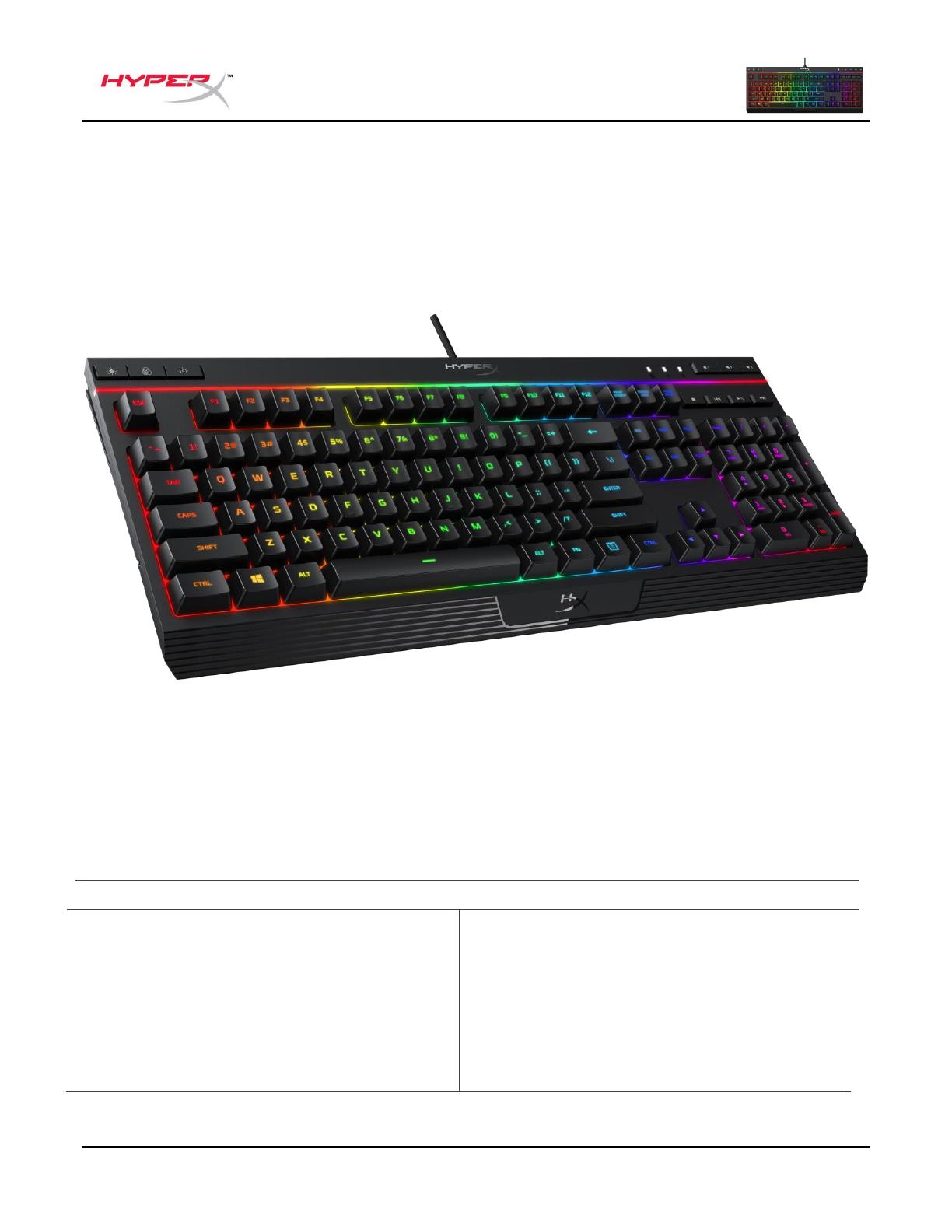
Featuring HyperX’s signature radiant light bar and smooth, dynamic RGB lighting effects, the HyperX Alloy Core RGBTM is ideal for gamers looking to enhance their keyboard’s style and performance without breaking the bank. With six different lighting effects and three brightness levels, it balances both brilliance and budget. Crafted with a durable, reinforced plastic frame, the Alloy Core RGB was constructed for stability and reliability for gamers who want a keyboard that will last. The soft-touch keys have a tactile feel, yet are tuned to be quiet, and they also feature gaming-grade anti-ghosting functionality and key rollover. It’s spill resistant, tested to withstand 120ml of liquid, so beverage accidents won’t put an end to your game. The dedicated media controls and quick-access buttons for lighting and Game Mode place control right at your fingertips. Keyboard Lock allows you to lock your keyboard down without having to put your entire system on standby. The Alloy Core RGB is stylish, nicely-featured, and durable, making it a great all-around multimedia keyboard for gamers.
What’s included
- HyperX Alloy Core RGB Keyboard
Specifications
Keyboard
- Type Membrane
- Backlight RGB (5 zones multi-colour customisation)
- Light effects 6 LED modes and 3 brightness levels
- Connection type USB 2.0
- Polling rate 1000Hz
- Anti-ghosting Multi-key anti-ghosting
- Media control Yes
- Game Mode Yes
- Spill resistance Tested up to 120ml of liquid
- OS compatibility Windows® 10, 8.1, 8, 7
Cable
- Type Attached, braided
- Length 1.8m
Dimensions
- Width 443.20mm
- Depth 175.31mm
- Height 35.68mm
- Weight (keyboard and cable) 1121g
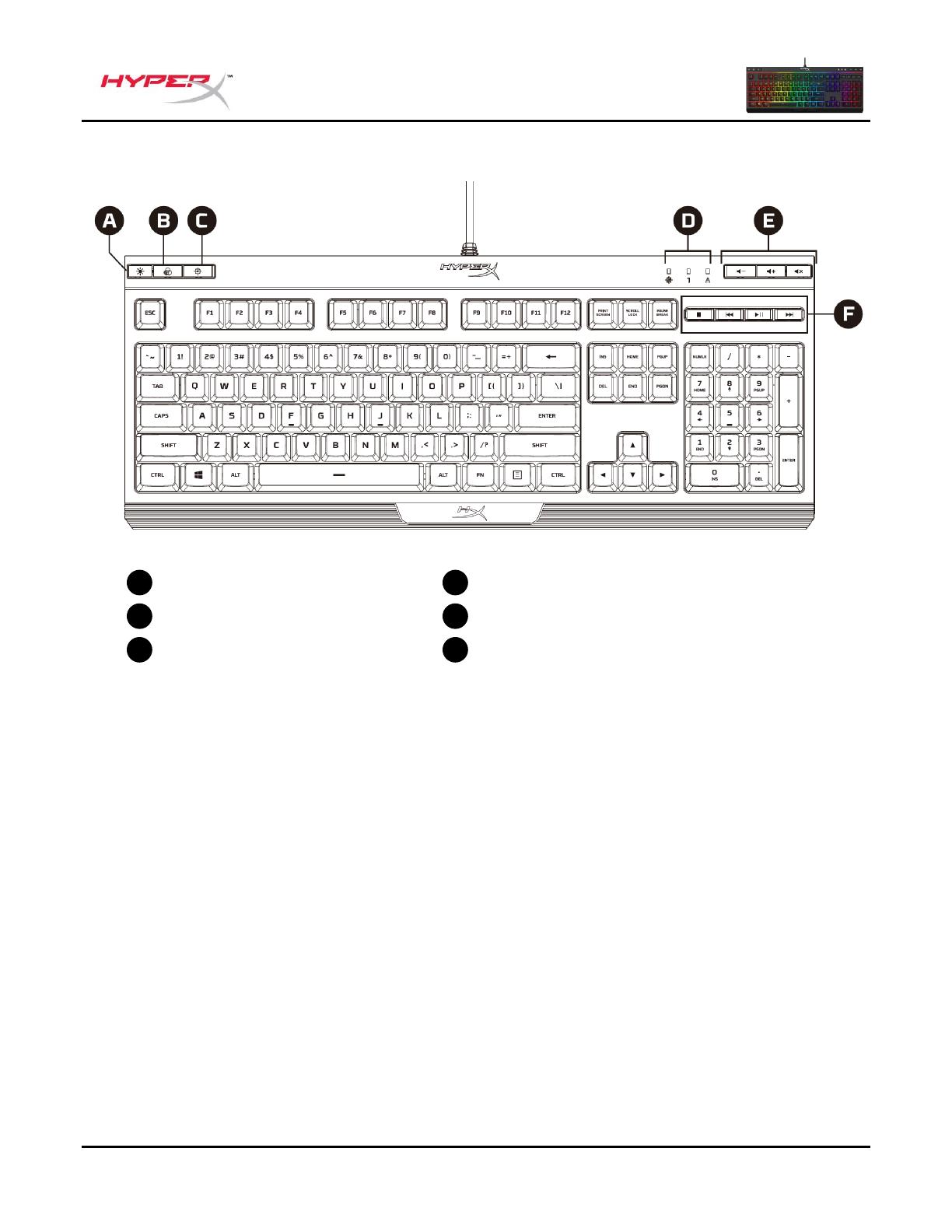
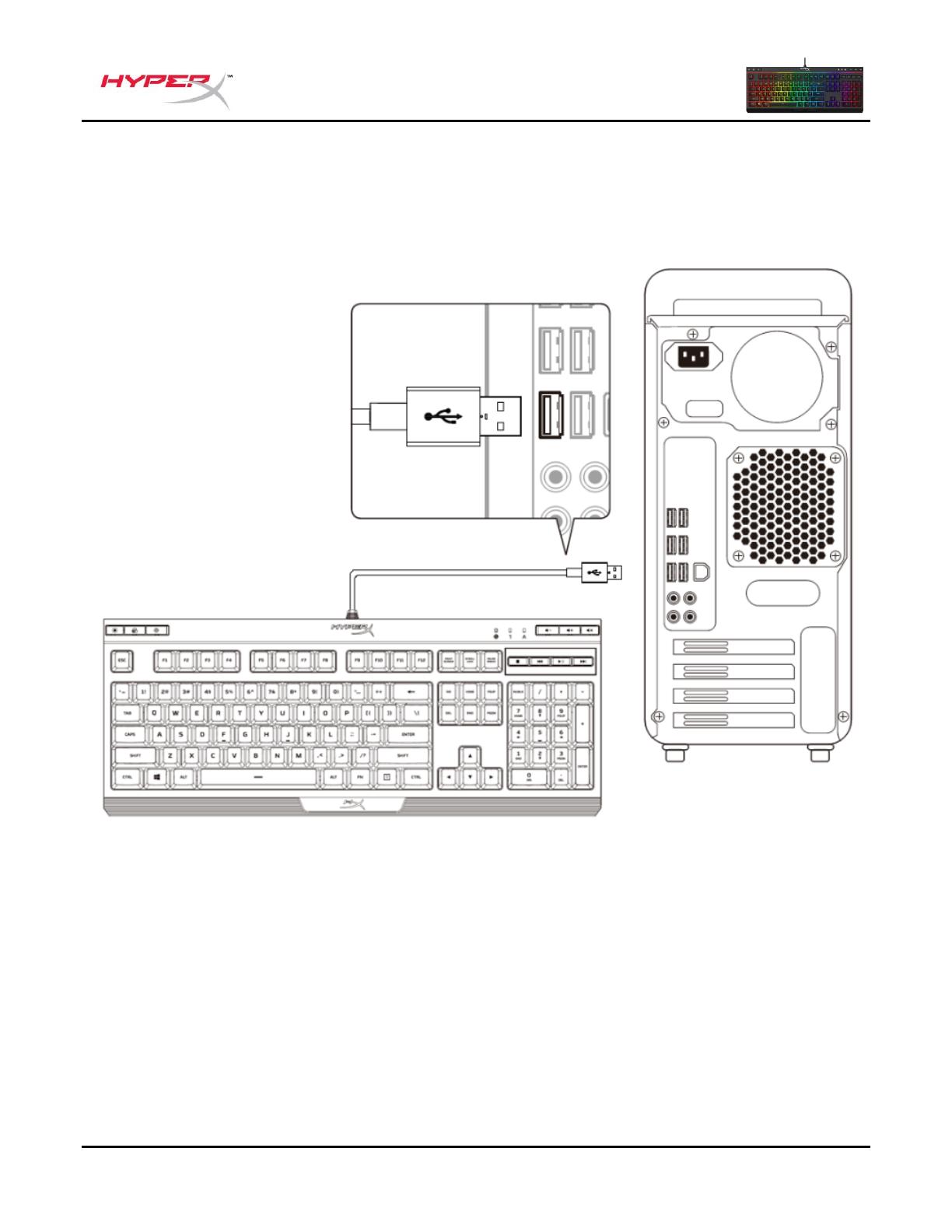
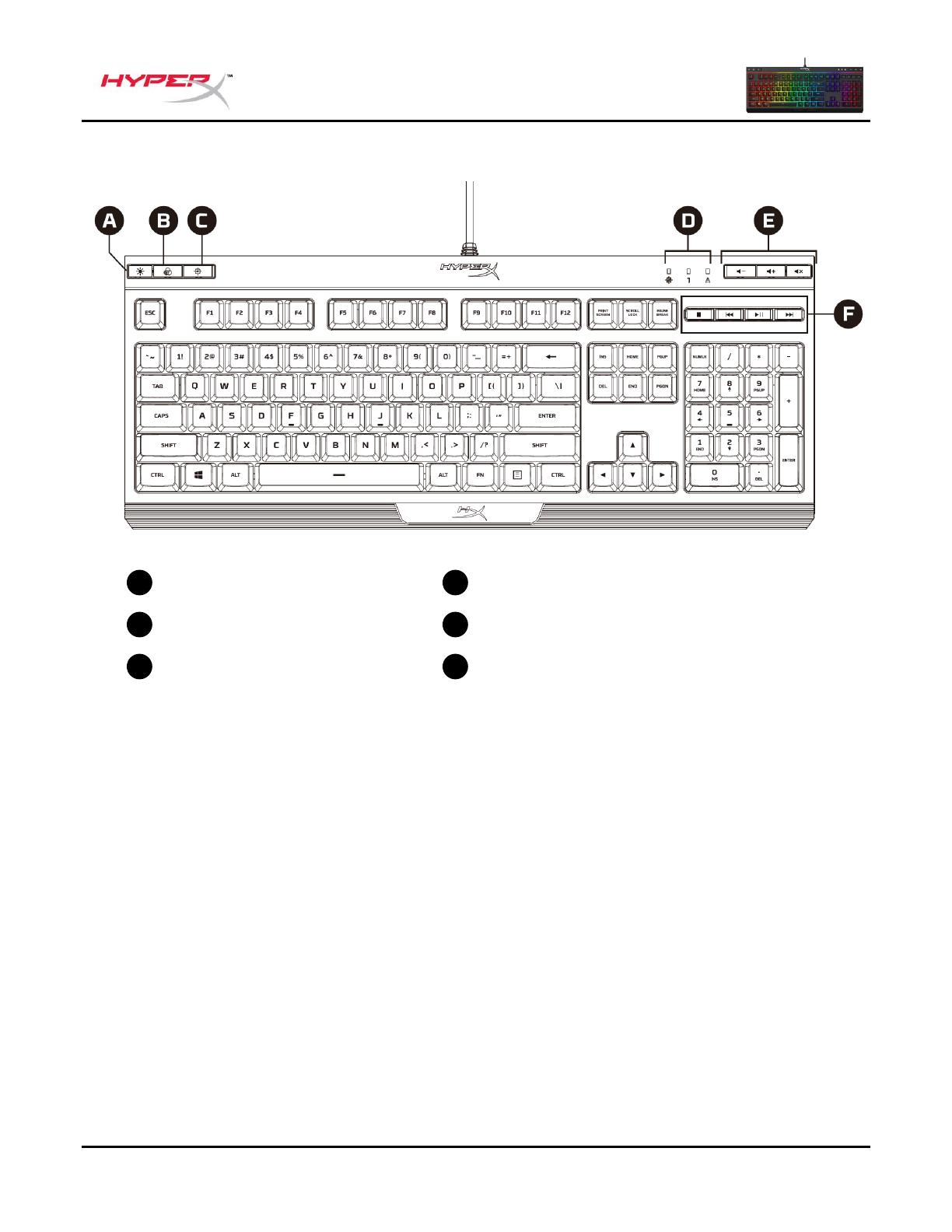
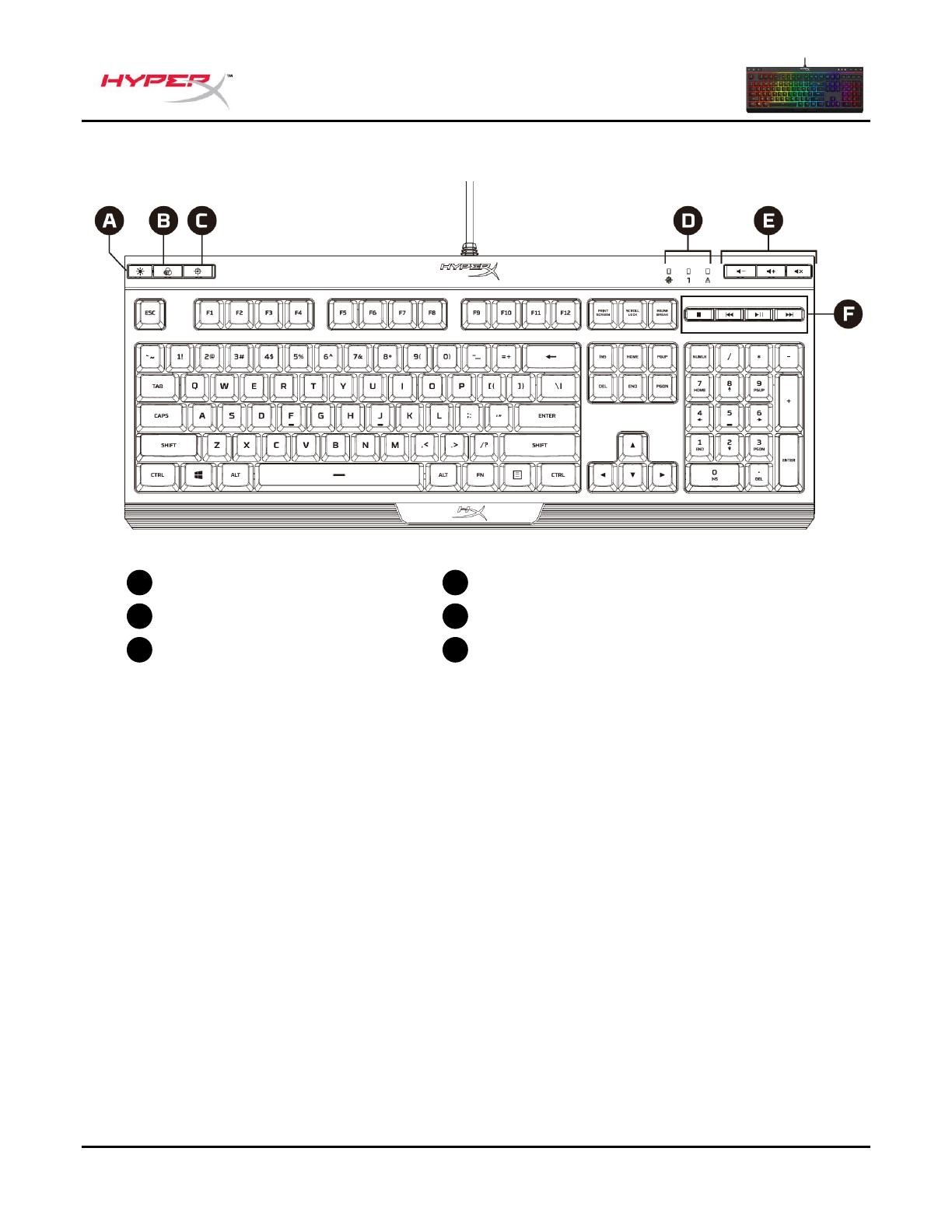
Keyboard overview
- Brightness control button
- LED mode control button
- Game Mode button
- Game Mode / Num Lock / Caps Lock indicators
- Volume control buttons
- Media control buttons
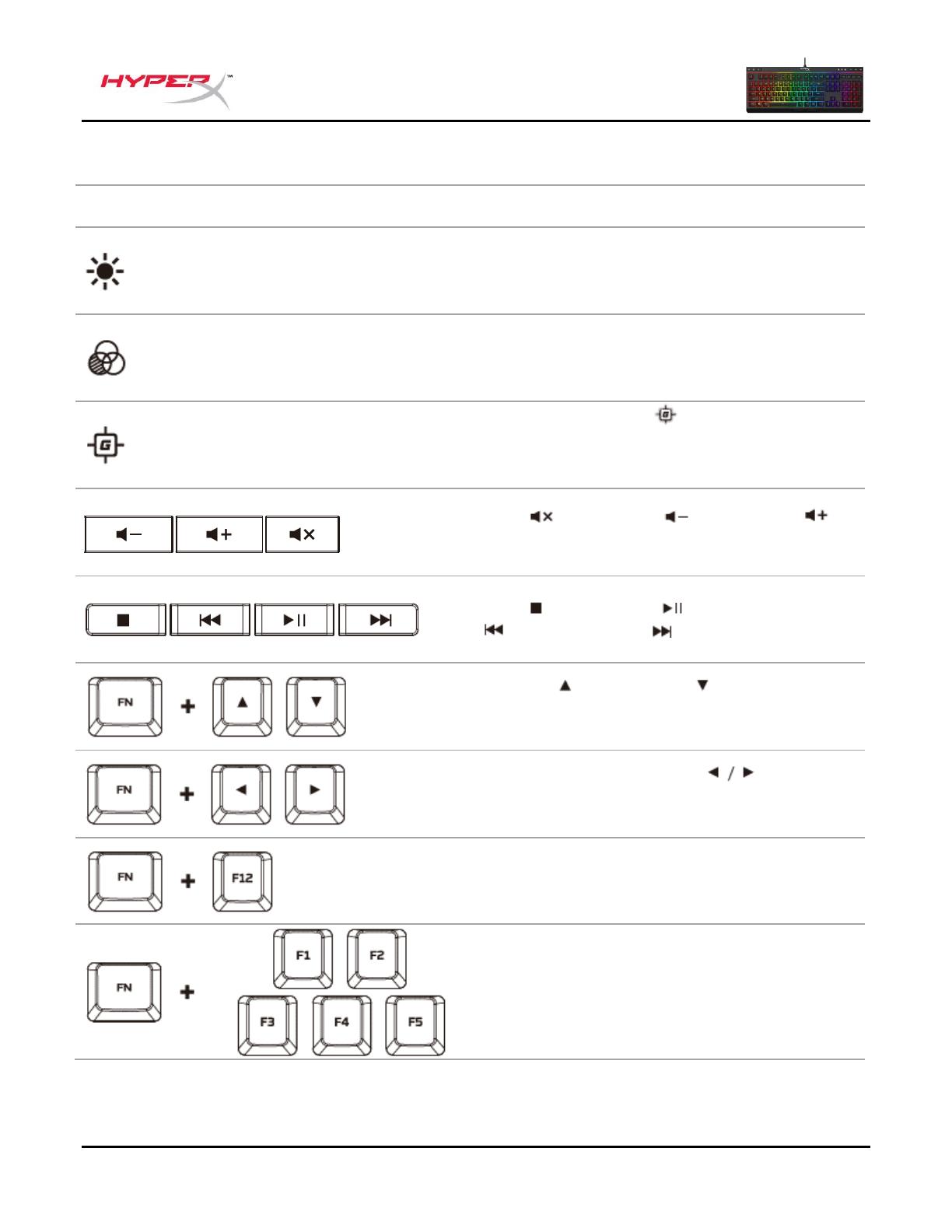
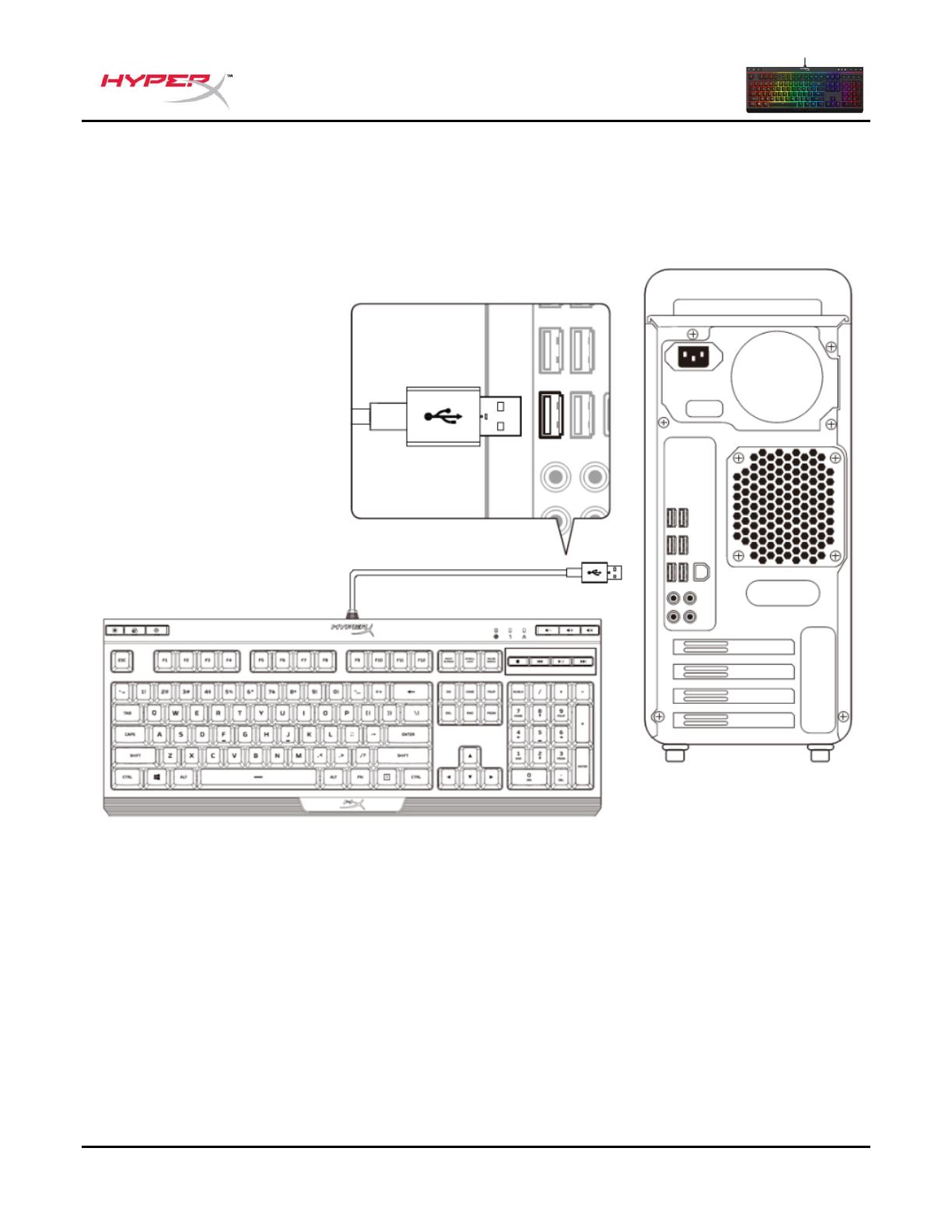
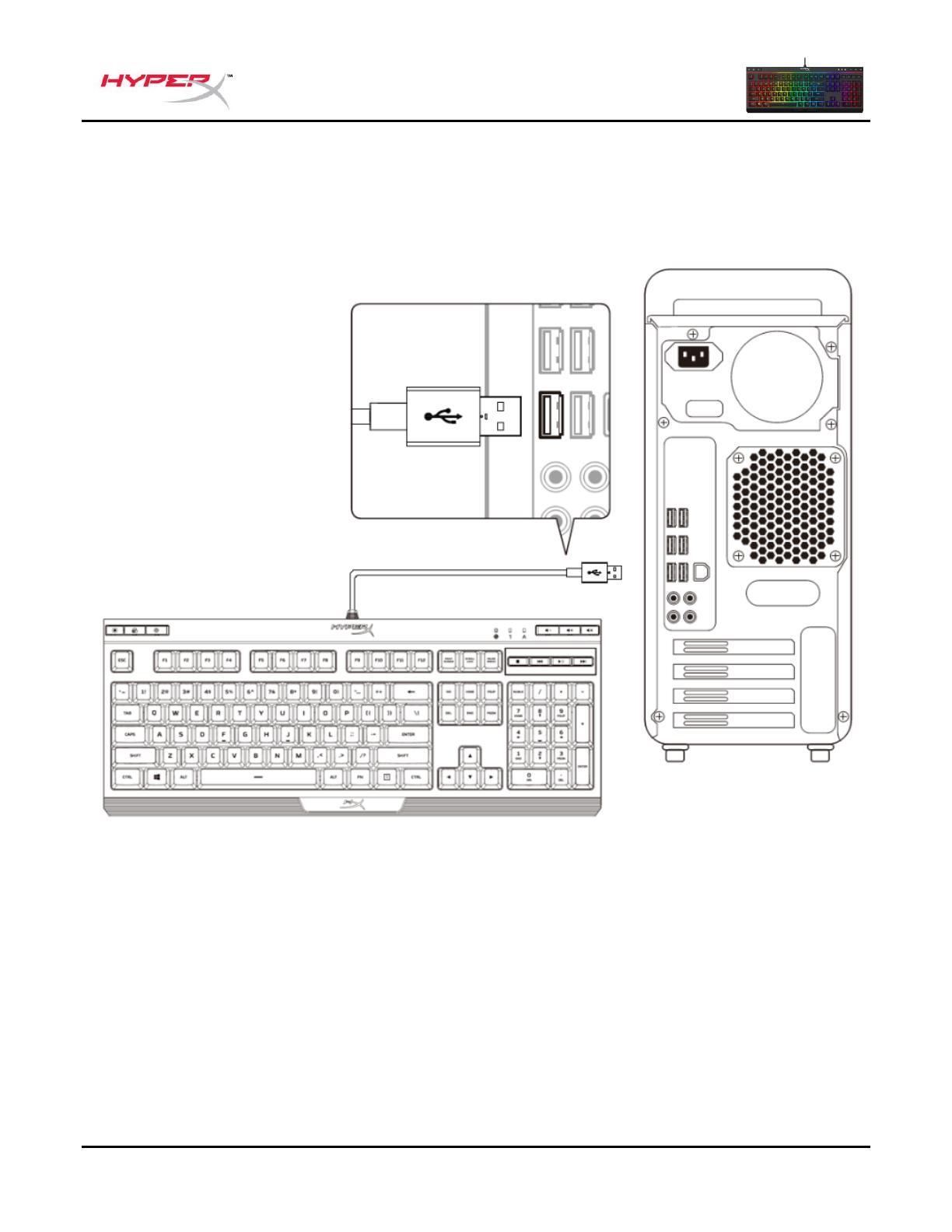
Keyboard installation
Connect the USB connector to the computer USB port.
FOR MORE MANUALS BY HyperX, VISIT ManualsLibraryy
HyperX Alloy Core RGB Membrane Gaming Keyboard-FAQ’s
FAQ: Types of Manuals and Their Contents
HyperX Alloy Core RGB Manuals come in various types, each serving a specific purpose to help users effectively operate and maintain their devices. Here are the common types of HyperX Alloy Core RGB User Guides and the information they typically include:
- User Manuals: Provide comprehensive instructions on how to use the device, including setup, features, and operation. They often include troubleshooting tips, safety information, and maintenance guidelines.
- Service Instructions: Designed for technicians and repair professionals, these manuals offer detailed information on diagnosing and repairing issues with the device. They include schematics, parts lists, and step-by-step repair procedures.
- Installation Guides: Focus on the installation process of the device, providing detailed instructions and diagrams for proper setup. They are essential for ensuring the device is installed correctly and safely.
- Maintenance Manuals: Provide guidance on routine maintenance tasks to keep the device in optimal condition. They cover cleaning procedures, part replacements, and regular servicing tips.
- Quick Start Guides: Offer a concise overview of the essential steps needed to get the device up and running quickly. They are ideal for users who need immediate assistance with basic setup and operation.
Each type of HyperX Alloy Core RGB instruction is designed to address specific needs, ensuring users have the necessary information to use, maintain, and repair their devices effectively.
Related Instructions for HyperX Alloy Core RGB:
1
Cloud Core
Quick start manual User Guide: HyperX Cloud Core (667D84, Upd.14th Feb 2025)
12
897
135
2
ChargePlay Quad
Quick start manual HyperX Battery Charger Quick start manual (File: hyperx-chargeplay-quad-quick-start-manual-8, Sat 12.2024)
8
1153
266
4
Cloud Flight S
Quick start manual PDF Manual (@8BX23C), HyperX Cloud Flight S Headsets (05.01.2025)
20
967
223
5
CloudX Flight
19
1031
155
6
Cloud Silver
151
295
45
7
Clutch
Quick start manual Clutch (Video Gaming Accessories ePDF User Manual, #B15O8V)
19
1313
316
8
Cloud Alpha
Quick start manual HyperX Headsets Quick start manual (File: hyperx-cloud-alpha-quick-start-manual-4, Wednesday 23-10-2024)
4
61
10
9
Cloud Alpha S
65
655
131
10
Pulsefire Haste
97
186
30
Keyboard Devices by Other Brands:
|
J.Burrows JBTRACKBD Instruction Manual Keyboard #6XLY4X INSTRUCTION MANUAL 22 Oct 2024 | 9 |
|
|
Ecomani MINI Operation & User’s Manual #VPAL6Q: MINI Keyboard Operation & user’s manual — 04 Dec 2024 | 13 |
|
|
Definitive Technology BP8B Test Report #17638Y: BP8B Speakers Test report efinitive Technology says 06 Feb 2025 | 2 |
|
|
Dell Latitude L400 Operation & User’s Manual Latitude L400 (Laptop ePDF User Manual, #87X145) Dell™ Latitude™ L400 User’s Guide 14 Oct 2024 | 84 |
Categories:
Mouse
Microphone
Mixer
Storage
Headsets
Video Gaming Accessories
FUNCTION KEYS
+
+
+
+
† See customization table below for more detail.
SECONDARY FEATURE
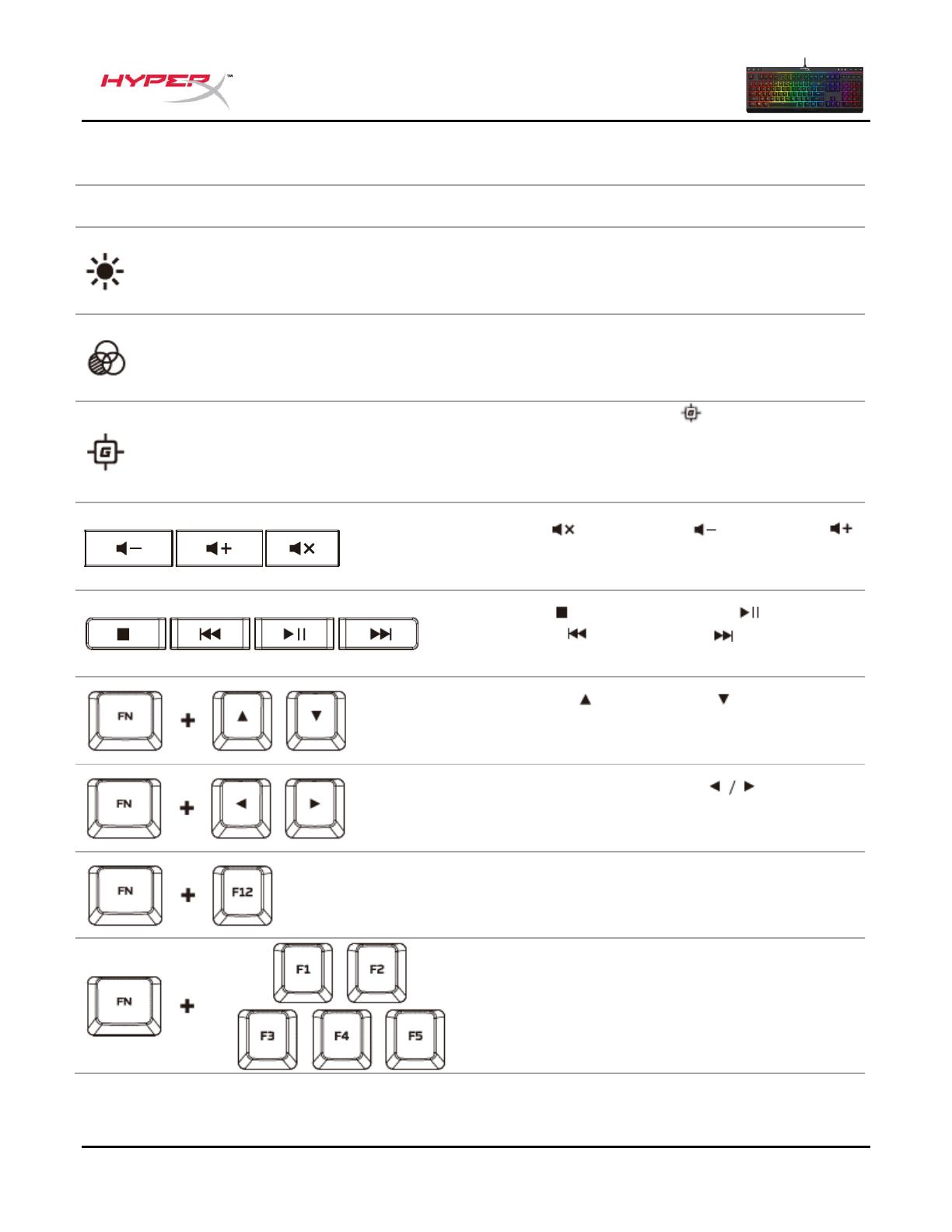
Switch between the three brightness levels: OFF, 50%
and 100%.
Switch between the LED modes. †
Enabling Game Mode (
) will disable the Windows key
to avoid any inconvenience during gaming. When Game
Mode is enabled the indicator will illuminate.
Mute (
), decrease (
) or increase (
audio.
Stop (
), play/pause (
), skip backwards (
forward (
) your music or video.
Increase (
) or decrease (
3 levels of speed: low, medium and high.
Switch between solid colors (
di erent colors: red, orange, yellow, green, teal, blue,
purple, pink and white.
Enable the keyboard Lock Mode. When Lock Mode is
enabled the light e ect will change to breathing white.
Customize colors for each zone in 5 Zones mode.
controls the zone on the left and
Press multiple time to cycle through the 9 colors or turn
the zone lighting OFF.
) your computer
) or skip
) e ect speed †. There are
/
) †. There are 9
the zone on the right.
User Manual
HyperX Alloy Core RGB™ Membrane Gaming Keyboard
Find the language and latest documentation for your HyperX Alloy Core RGB here.
HyperX Alloy Core RGB Installation Guide
Simplied Chinese …..
Traditional Chinese ….
………… For instructions in English
. . . . . . . . . . . . . . . . . . Para instrucciones en Español
……… Für Anleitungen in Deutsch
. . . . . . . . . . . . . . . . . . Pour des instructions en Français
. . . . . . . . . . . . . . . . . . Per le istruzioni in Italiano
………… Por as instruções em Português
. . . . . . . . . . . . . . . . . . Instrukcje w jezyku Polskim
. . . . . . . . . . . . . . . . . . Для инструкции на Pусском
. . . . . . . . . . . . . . . . . . Turkce talimatlar icin
. . . . . . . . . . . . . . . . . . Japanese
. . . . . . . . . . . . . . . . . . Korean
. . . . . . . . . . . . . . . . . . Thai
. . . . . . . . . . . . . . . . . . Vietnamese
Document No. 480HX-KB5ME2.A01
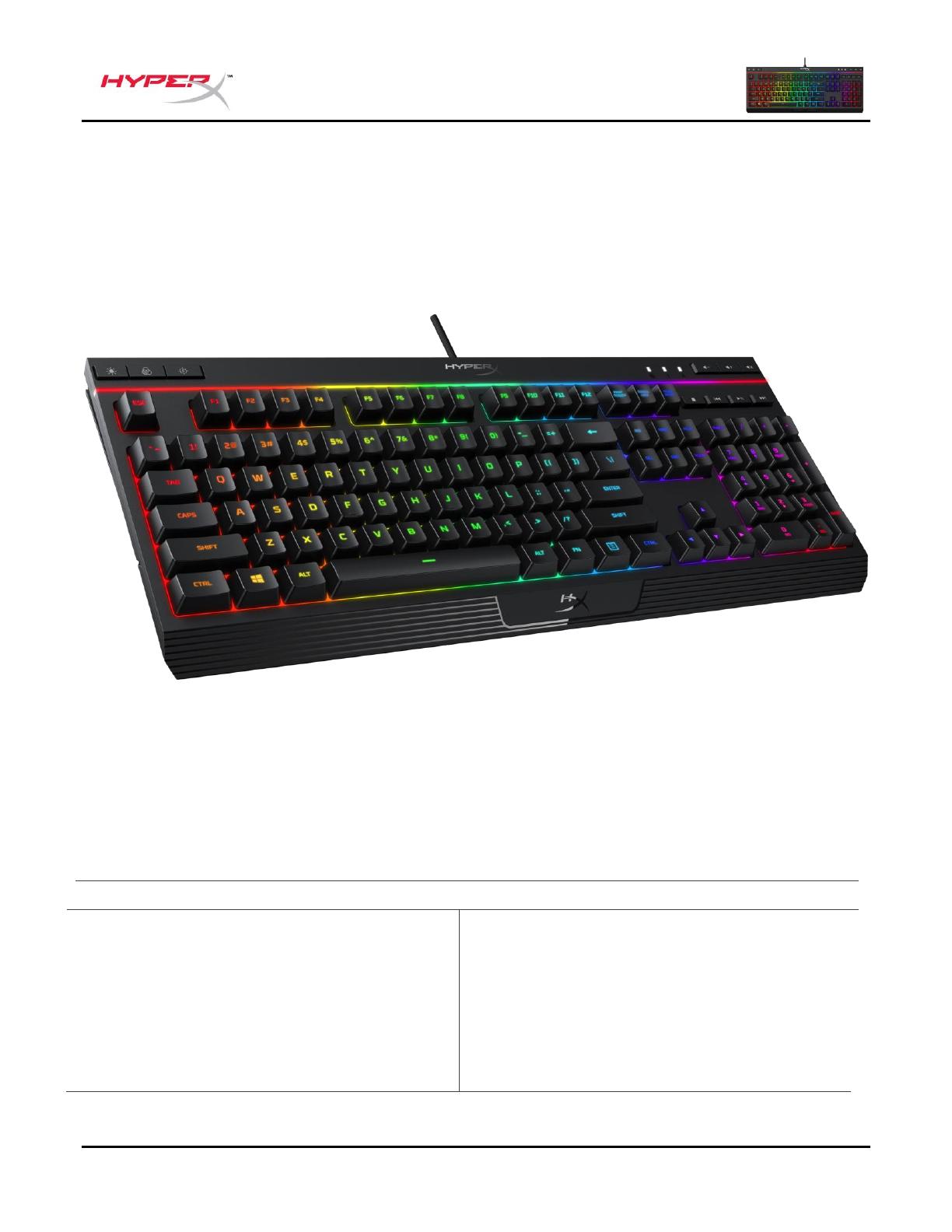
HyperX Alloy Core RGB
TM
Keyboard
HyperX Alloy Core RGB
TM
Membrane Gaming Keyboard
HX-KB5ME2-US
HX-KB5ME2-US/WW
HX-KB5ME2-NO
HX-KB5ME2-NO/WW
HX-KB5ME2-RU
HX-KB5ME2-RU/WW
HX-KB5ME2-UK
HX-KB5ME2-UK/WW
HX-KB5ME2-BR
HX-KB5ME2-DE
HX-KB5ME2-DE/WW
HX-KB5ME2-FR
HX-KB5ME2-FR/WW
HX-KB5ME2-JP
HX-KB5ME2-LA
HX-KB5ME2-LA/WW
Document No. 480HX-KB5ME2.A01
HyperX Alloy Core RGB
TM
Keyboard
What’s included:
o HyperX Alloy Core RGB Keyboard
Specifications:
Keyboard
Type Membrane
Backlight RGB (5 zones multi-colour customisation)
Light effects 6 LED modes and 3 brightness levels
Connection type USB 2.0
Polling rate 1000Hz
Anti-ghosting 100% anti-ghosting
Media control Yes
Game Mode Yes
Spill resistance Tested up to 120ml of liquid
OS compatibility Windows® 10, 8.1, 8, 7
Cable
Type Attached, braided
Length 1.8m
Dimensions
Width 443.20mm
Depth 175.31mm
Height 35.68mm
Weight (keyboard and cable) 1121g
Featuring HyperX’s signature radiant light bar and smooth, dynamic RGB lighting effects, the HyperX
Alloy Core RGB
TM
is ideal for gamers looking to enhance their keyboard’s style and performance
without breaking the bank. With six different lighting effects and three brightness levels, it balances both
brilliance and budget. Crafted with a durable, reinforced plastic frame, the Alloy Core RGB was
constructed for stability and reliability for gamers who want a keyboard that will last. The soft-touch
keys have a tactile feel, yet are tuned to be quiet, and they also feature gaming-grade anti-ghosting
functionality and key rollover. It’s spill resistant, tested to withstand 120ml of liquid, so beverage
accidents won’t put an end to your game. The dedicated media controls and quick-access buttons for
lighting and Game Mode place control right at your fingertips. Keyboard Lock allows you to lock your
keyboard down without having to put your entire system on standby. The Alloy Core RGB is stylish,
nicely-featured, and durable, making it a great all-around multimedia keyboard for gamers.
Document No. 480HX-KB5ME2.A01
HyperX Alloy Core RGB
TM
Keyboard
Brightness control button
Game Mode / Num Lock / Caps Lock indicators
Document No. 480HX-KB5ME2.A01
HyperX Alloy Core RGB
TM
Keyboard
Keyboard installation:
Connect the USB connector to the computer USB port.
Document No. 480HX-KB5ME2.A01
HyperX Alloy Core RGB
TM
Keyboard
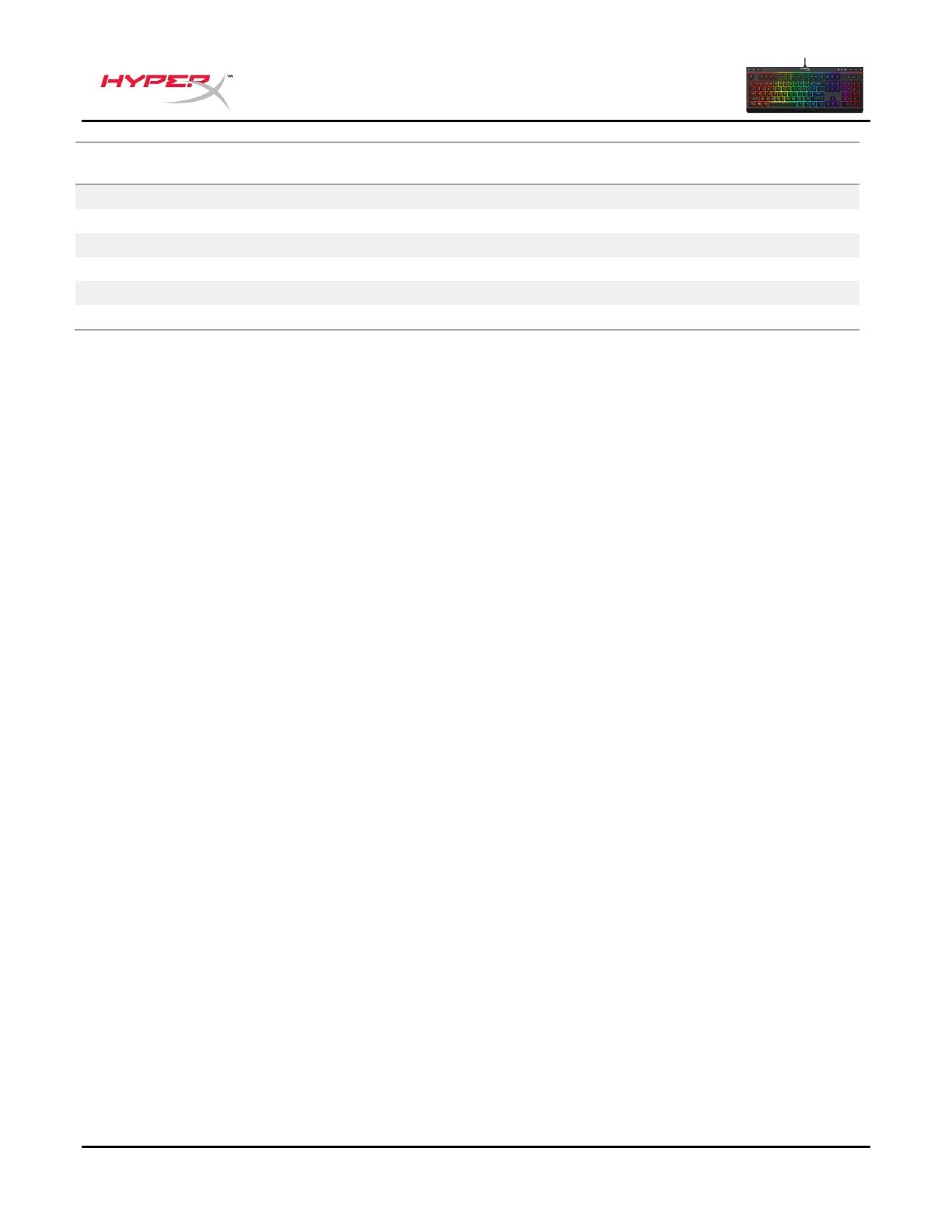
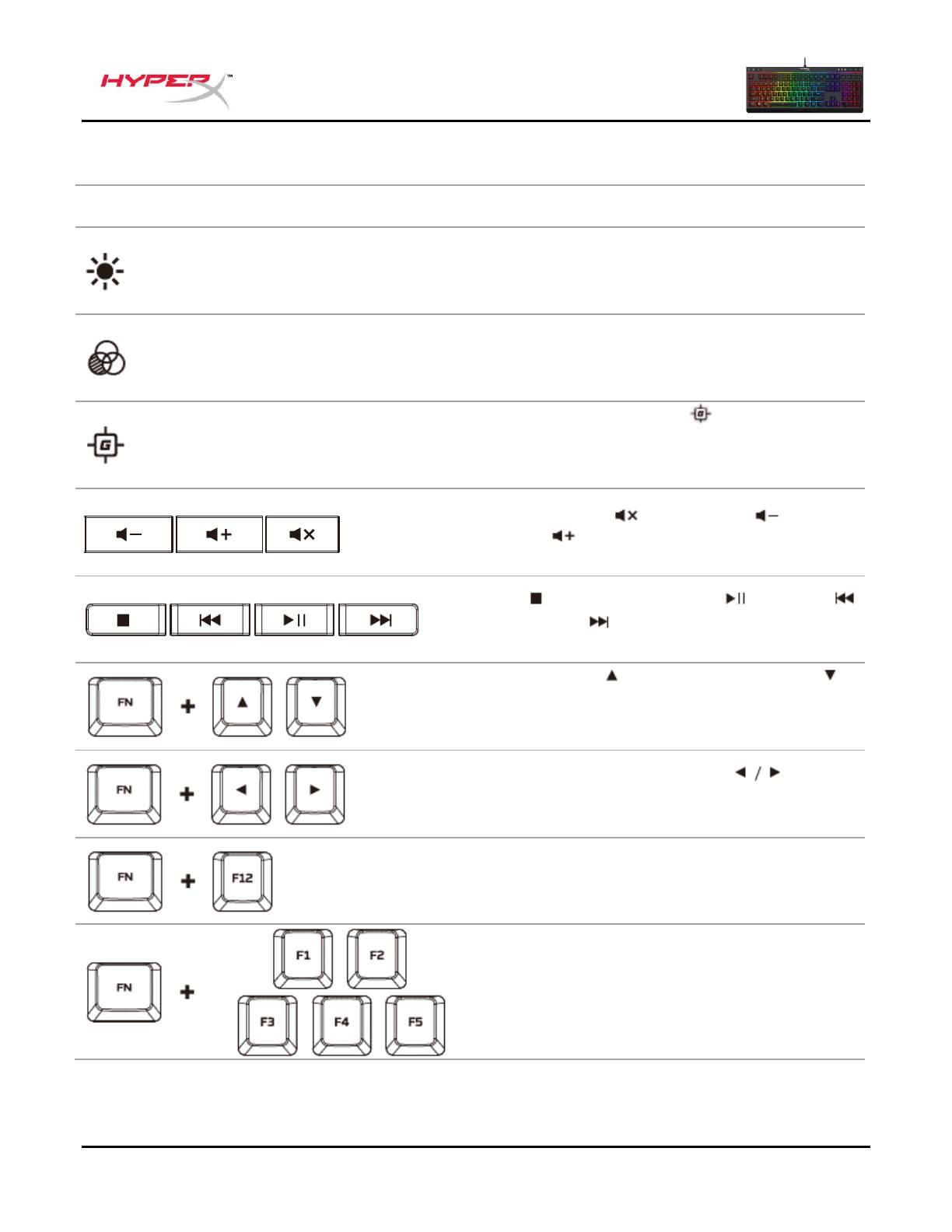
Switch between the three brightness levels: OFF,
50% and 100%.
Switch between the LED modes. †
Enabling Game Mode ( ) will disable the
Windows key to avoid any inconvenience during
gaming. When Game Mode is enabled, the
indicator will illuminate.
Mute ( ), decrease ( ) or increase ( )
your
computer audio.
Stop ( ), play/pause ( ), skip backwards
( ) or skip forward ( ) your music or video.
Increase ( ) or decrease ( ) effect speed †.
There are 3 levels of speed: low, medium and
high.
Switch between solid colours ( ) †. There
are 9 different colours: red, orange, yellow, green,
teal, blue, purple, pink and white.
Enable the keyboard Lock Mode. When Lock
Mode is enabled, the light effect will change to
breathing white.
Customise colours for each zone in 5-zone mode.
F1 controls the zone on the left and F5 the zone
on the right. Press multiple times to cycle through
the 9 colours or turn the zone lighting OFF.
† See customisation table below for more detail.
Document No. 480HX-KB5ME2.A01
HyperX Alloy Core RGB
TM
Keyboard
Questions or setup issues?
Contact the HyperX support team at: hyperxgaming.com/support/keyboards
Documento No. 480HX-KB5ME2.A01
HyperX Alloy Core RGB
TM
Teclado
HyperX Alloy Core RGB
TM
Teclado de membrana para videojuegos
HX-KB5ME2-US
HX-KB5ME2-US/WW
HX-KB5ME2-NO
HX-KB5ME2-NO/WW
HX-KB5ME2-RU
HX-KB5ME2-RU/WW
HX-KB5ME2-UK
HX-KB5ME2-UK/WW
HX-KB5ME2-BR
HX-KB5ME2-DE
HX-KB5ME2-DE/WW
HX-KB5ME2-FR
HX-KB5ME2-FR/WW
HX-KB5ME2-JP
HX-KB5ME2-LA
HX-KB5ME2-LA/WW
Documento No. 480HX-KB5ME2.A01
HyperX Alloy Core RGB
TM
Teclado
Qué está incluido:
o Teclado HyperX Alloy Core RGB
Especificaciones:
Teclado
Tipo Membrana
Iluminación posterior RGB (personalización multi-color de 5
zonas)
Efectos de iluminación 6 modos LED y 3 niveles de brillo
Tipo de conexión USB 2.0
Velocidad de polling 1000Hz
Anti-ghosting 100% anti-ghosting
Botones de control multimedia Sí
Modo juego Sí
Resistencia a los derrames probado para hasta 120ml de
líquido
Compatibilidad con sistema operativo Windows® 10, 8.1, 8, 7
Cable
Tipo Conectado, trenzado
Longitud 1,8m
Dimensiones
Ancho 443,20mm
Profundidad 175,31mm
Altura 35,68mm
Peso (con teclado y cable) 1121g
Contar con la barra de luz exclusiva de HyperX y con los efectos de iluminación dinámica RGB suave,
el HyperX Alloy Core RGB
TM
es ideal para los gamers que busquen ampliar el estilo y rendimiento de
su teclado sin tirar la casa por la ventana. Con seis efectos de iluminación diferentes y tres niveles de
brillo, representa el equilibrio ideal entre esplendor y presupuesto. Construido con una estructura
plástica reforzada, el Alloy Core RGB fue diseñado para brindar una mayor estabilidad y confiabilidad
para los gamers que deseen un teclado duradero. Las teclas de pulsación suave ofrecen una
sensación táctil, y a su vez están diseñadas para ser silenciosas y cuentan con una funcionalidad anti-
ghosting para gaming y rollover en teclas. Es resistente a los derrames, y está probado para soportar
hasta 120ml de líquido, por lo que los accidentes con bebidas no significarán el fin de tu juego. Los
controles multimedia especiales y los botones de acceso rápido para iluminación y modo Juego te
permiten tener el control al alcance de la mano. El bloqueo de teclado te permite inmovilizar tu teclado
sin tener que poner todo el sistema en standby. El Alloy Core RGB es elegante y tiene funciones
atractivas, lo cual lo convierte en una opción de teclado muy interesante para los gamers.
Documento No. 480HX-KB5ME2.A01
HyperX Alloy Core RGB
TM
Teclado
Características generales del teclado:
Botón para regular el brillo
Modo juego/Bloqueo de números/Indicadores de
mayúscula
Botón de control de los modos de
iluminación LED
Botones de control de volumen
Botones de control multimedia
Documento No. 480HX-KB5ME2.A01
HyperX Alloy Core RGB
TM
Teclado
Instalación del teclado:
Enchufa los conectores USB al puerto USB a la computadora.
Documento No. 480HX-KB5ME2.A01
HyperX Alloy Core RGB
TM
Teclado
Teclas de función:
Característica secundaria
Cambia entre los 3 niveles de brillo: APAGADO,
50% y 100%.
Elige entre los distintos modos LED. †
Si habilitas el Modo Juego ( ), se desactivará la
tecla de Windows y así se evitará una
interrupción accidental durante el juego. Cuando
el Modo Juego está activado, se ilumina el
indicador.
Silencia ( ), disminuye ( ) o aumenta (
) el
sonido de la computadora.
Detener ( ), reproducir/pausar ( ),
retroceder ( ), o adelantar ( ) su música o
video.
Incrementa ( ) o disminuye ( ) la velocidad
de los efectos †. Hay 3 niveles de velocidad:
baja, media y alta.
Cambia entre colores sólidos ( ) †. Hay 9
colores diferentes: rojo, naranja, amarillo, verde,
turquesa, azul, púrpura, rosa y blanco.
Activa el modo Bloqueo. Cuando el modo
Bloqueo está habilitado, el efecto de luz cambiará
a color blanco respiración.
Personalice los colores para cada zona en 5
modos de zona. F1 controla la zona de la
izquierda y F5 controla la zona de la derecha.
Presiona varias veces para ir variando por los 9
colores o apaga la iluminación de la zona OFF.
† Consulta la tabla de personalización que aparece debajo para obtener más detalles.

Documento No. 480HX-KB5ME2.A01
HyperX Alloy Core RGB
TM
Teclado
Personalización de
velocidad
Ciclo de color
(predeterminado)
¿Tienes alguna pregunta o consulta sobre la instalación?
Póngase en contacto con el equipo de ayuda de HyperX en hyperxgaming.com/support/keyboards.
Dokument Nr. 480HX-KB5ME2.A01
HyperX Alloy Core RGB
TM
Tastatur
HyperX Alloy Core RGB
TM
Membrane Gaming-Tastatur
HX-KB5ME2-US
HX-KB5ME2-US/WW
HX-KB5ME2-NO
HX-KB5ME2-NO/WW
HX-KB5ME2-RU
HX-KB5ME2-RU/WW
HX-KB5ME2-UK
HX-KB5ME2-UK/WW
HX-KB5ME2-BR
HX-KB5ME2-DE
HX-KB5ME2-DE/WW
HX-KB5ME2-FR
HX-KB5ME2-FR/WW
HX-KB5ME2-JP
HX-KB5ME2-LA
HX-KB5ME2-LA/WW
Dokument Nr. 480HX-KB5ME2.A01
HyperX Alloy Core RGB
TM
Tastatur
Im Lieferumfang:
o HyperX Alloy Core RGB Tastatur
Technische Daten:
Tastatur
Typ Membran
Hintergrundbeleuchtung RGB (5 Bereiche mit individueller
Farbauswahl)
Beleuchtungseffekte 6 LED-Modi und 3 Helligkeitsstufen
Verbindungstyp USB 2.0
Abfragerate 1.000 Hz
Anti-Ghosting 100 % Anti-Ghosting
Mediensteuerung Ja
Gaming-Mode Ja
Verschüttungssicher bis 120 ml Flüssigkeit getestet
OS-Kompatibilität Windows® 10, 8.1, 8, 7
Kabel
Typ Abnehmbar, textilummantelt
Länge 1,8 m
Abmessungen
Breite 443,20 mm
Tiefe 175,31 mm
Höhe 35,68 mm
Gewicht (Tastatur und Kabel) 1.121 g
Mit einzigartiger HyperX Lichtleiste und dynamischen RGB-Beleuchtungseffekten ist die HyperX Alloy
Core RGB
TM
ideal für alle Gamer, die sich noch mehr Style und Leistung für ihre Tastatur wünschen,
ohne dafür ein Vermögen auszugeben zu wollen. Mit sechs verschiedenen Beleuchtungseffekten und
drei Helligkeitsstufen ist diese Tastatur so genial wie günstig. Die Alloy Core RGB ist mit einem
widerstandsfähigen, verstärkten Kunststoffrahmen auf Stabilität und Zuverlässigkeit ausgelegt und
damit perfekt für alle Gamer, die etwas für länger suchen. Die Tasten mit Softtouch bieten ein gutes
Ansprechverhalten, sind dabei aber leise und unterstützen Anti-Ghosting-Funktionalität und Key—
Rollover für echte Gamer-Ansprüche. Die Tastatur ist spritzwassergeschützt und hielt im Test eine
Flüssigkeitsmenge von 120 ml aus. Ein umgeworfenes Glas beendet also noch kein Spiel! Die eigene
Mediensteuerung und die Schnelltasten für Helligkeit, Lichteffekte und Gaming-Modi überlassen dir die
volle Kontrolle. Die Tastatursperre ermöglicht es, deine Tastatur zu sperren, ohne das ganze System in
den Ruhezustand zu versetzen. Die Alloy Core RGB ist sehr stylisch, dabei widerstandsfähig und mit
vielen wichtigen Merkmalen ausgestattet; kurzum: eine durch und durch großartige Allrounder-
Multimedia-Tastatur für Gamer.
Dokument Nr. 480HX-KB5ME2.A01
HyperX Alloy Core RGB
TM
Tastatur
Tastatur Übersicht:
Gaming-Mode/Num Lock/Caps Lock-Anzeigen
Dokument Nr. 480HX-KB5ME2.A01
HyperX Alloy Core RGB
TM
Tastatur
Installation der Tastatur:
Verbinde den USB-Stecker mit dem USB-Anschluss des Computers.
Dokument Nr. 480HX-KB5ME2.A01
HyperX Alloy Core RGB
TM
Tastatur
Funktionstasten:
Schalte zwischen drei Helligkeitsstufen um: AUS,
50 % und 100 %.
Schalte zwischen den LED-Modi um. ††
Wenn der Gaming-Modus ( ) aktiviert wird,
wird die Windows-Taste deaktiviert, um den
Komfort beim Spielen zu verbessern. Wenn der
Gaming-Mode aktiviert ist, leuchtet die Anzeige.
Stumm schalten ( ), reduzieren( ) oder
erhöhen ( )
der Computerlautstärkeeinstellung.
Stop ( ), Wiedergabe/Pause ( ), Zurück (
) oder Weiter( ) der Musik- oder
Videowiedergabe.
Beschleunigen ( )oder verlangsamen der ( )
Effektgeschwindigkeit†. Es gibt 3
Geschwindigkeitsstufen: langsam, mittel und
hoch.
Zwischen Vollfarben umschalten ( ) †. Es
gibt 9 verschiedene Farben: Rot, Orange, Gelb,
Grün, Türkis, Blau, Lila, Pink und Weiß.
Die Tastatursperre aktivieren. Wenn der
Sperrmodus aktiv ist, ändert sich der
Beleuchtungseffekt in atmendes Weiß.
Die Farben für jeden Bereich in 5 Bereichsmodi
personalisieren. [F1] steuert den Bereich links
und [F5] den Bereich rechts. Drücke mehrmals,
um durch die 9 Farben zu wechseln oder schalte
die Bereichsbeleuchtung AUS.
† Siehe Personalisierungstabelle unten für weitere Details.
Dokument Nr. 480HX-KB5ME2.A01
HyperX Alloy Core RGB
TM
Tastatur
Geschwindigkeits
personalisierung
Bereiche
personalisierung
Fragen oder Probleme bei der Einrichtung?
Wende dich an das HyperX Support-Team unter: hyperxgaming.com/support/keyboards

Document No. 480HX-KB5ME2.A01
Clavier HyperX Alloy Core RGB
TM
HyperX Alloy Core RGB
TM
Clavier de jeu à membrane
HX-KB5ME2-US
HX-KB5ME2-US/WW
HX-KB5ME2-NO
HX-KB5ME2-NO/WW
HX-KB5ME2-RU
HX-KB5ME2-RU/WW
HX-KB5ME2-UK
HX-KB5ME2-UK/WW
HX-KB5ME2-BR
HX-KB5ME2-DE
HX-KB5ME2-DE/WW
HX-KB5ME2-FR
HX-KB5ME2-FR/WW
HX-KB5ME2-JP
HX-KB5ME2-LA
HX-KB5ME2-LA/WW