
Manual
View the manual for the Gigabyte GA-M56S-S3 here, for free. This user manual comes under the category motherboards and has been rated by 1 people with an average of a 7.5. This manual is available in the following languages: English. Do you have a question about the Gigabyte GA-M56S-S3?
Ask your question here
Gigabyte GA-M56S-S3 specifications
Below you will find the product specifications and the manual specifications of the Gigabyte GA-M56S-S3.
Maximum internal memory
16 GB
Processor manufacturer
AMD
Number of SATA connectors
4
Floppy disk drive connector
Yes
Parallel ports quantity
1
Motherboard form factor
ATX
General
| Brand | Gigabyte |
| Model | GA-M56S-S3 | GA-M56S-S3 |
| Product | motherboard |
| EAN | 4179331822158, 4719331828158 |
| Language | English |
| Filetype | User manual (PDF), Installation Guide (PDF) |
Memory
| Maximum internal memory | 16 GB |
| Number of memory slots | 4 |
Processor
| Processor manufacturer | AMD |
| Processor socket | Socket AM2 |
Internal I/O
| Number of SATA connectors | 4 |
| USB 2.0 connectors | 3 |
| S/PDIF out connector | Yes |
| CPU fan connector | Yes |
| ATX Power connector (24-pin) | Yes |
| Chassis intrusion connector | Yes |
| Number of IEEE1394 connectors | 2 |
| CD/AUX audio in | Yes |
| Number of Parallel ATA connectors | 1 |
| Front panel audio connector | Yes |
Other features
| Floppy disk drive connector | Yes |
Rear panel I/O ports
| Parallel ports quantity | 1 |
| Serial ports quantity | 1 |
| PS/2 ports quantity | 2 |
| USB 2.0 ports quantity | 4 |
| Firewire (IEEE 1394) ports | 1 |
| Ethernet LAN (RJ-45) ports | 1 |
| Headphone outputs | 1 |
| Microphone in | Yes |
| S/PDIF out port | Yes |
Features
| Motherboard form factor | ATX |
| Audio chip | Realtek ALC888 |
| Power source type | ATX |
Expansion slots
| Expansion slots | 1 x PCI Express x 16\n2 x PCI Express x 1\n4 x PCI |
Weight & dimensions
show more
Frequently asked questions
Can’t find the answer to your question in the manual? You may find the answer to your question in the FAQs about the Gigabyte GA-M56S-S3 below.
What is the width of the Gigabyte GA-M56S-S3?
The Gigabyte GA-M56S-S3 has a width of 305 mm.
What is the depth of the Gigabyte GA-M56S-S3?
The Gigabyte GA-M56S-S3 has a depth of 214 mm.
Is the manual of the Gigabyte GA-M56S-S3 available in English?
Yes, the manual of the Gigabyte GA-M56S-S3 is available in English .
Is your question not listed? Ask your question here
Manuals.eu
- Manuals.eu
- Gigabyte
- Computers & Peripherals
- Mainboards
- Socket AM2
- NVIDIA nForce 560
- GA-M56S-S3 (rev. 1.x)
- Manual
×
1
2
3
4
5
6
7
8
9
10
11
12
13
14
15
16
17
18
19
20
21
22
23
24
25
26
27
28
29
30
31
32
33
34
35
36
37
38
39
40
41
42
43
44
45
46
47
48
49
50
51
52
53
54
55
56
57
58
59
60
61
62
63
64
65
66
67
68
69
70
71
72
73
74
75
76
77
78
79
80
81
82
83
84
85
86
87
88
89
90
91
92
93
94
95
96
⟨
⟩
Copyright © Manuals.eu
Agreement
Privacy Policy
Contact us
GA-M56S-S3
AM2
AMD Athlon
TM
AMD Athlon
AMD Athlon
Rev. 1004
12MC-M56SS3-1004R
64 X2 Dual-Core /
TM
64 / AMD Sempron
TM
64 FX /
TM
Jul. 10, 2007
Motherboard
GA-M56S-S3
Jul. 10, 2007
Motherboard
GA-M56S-S3
© 2007
\ \
http://www.gigabyte.tw/
REV : X.X X.X
REV : 1.0 1.0 BIOS
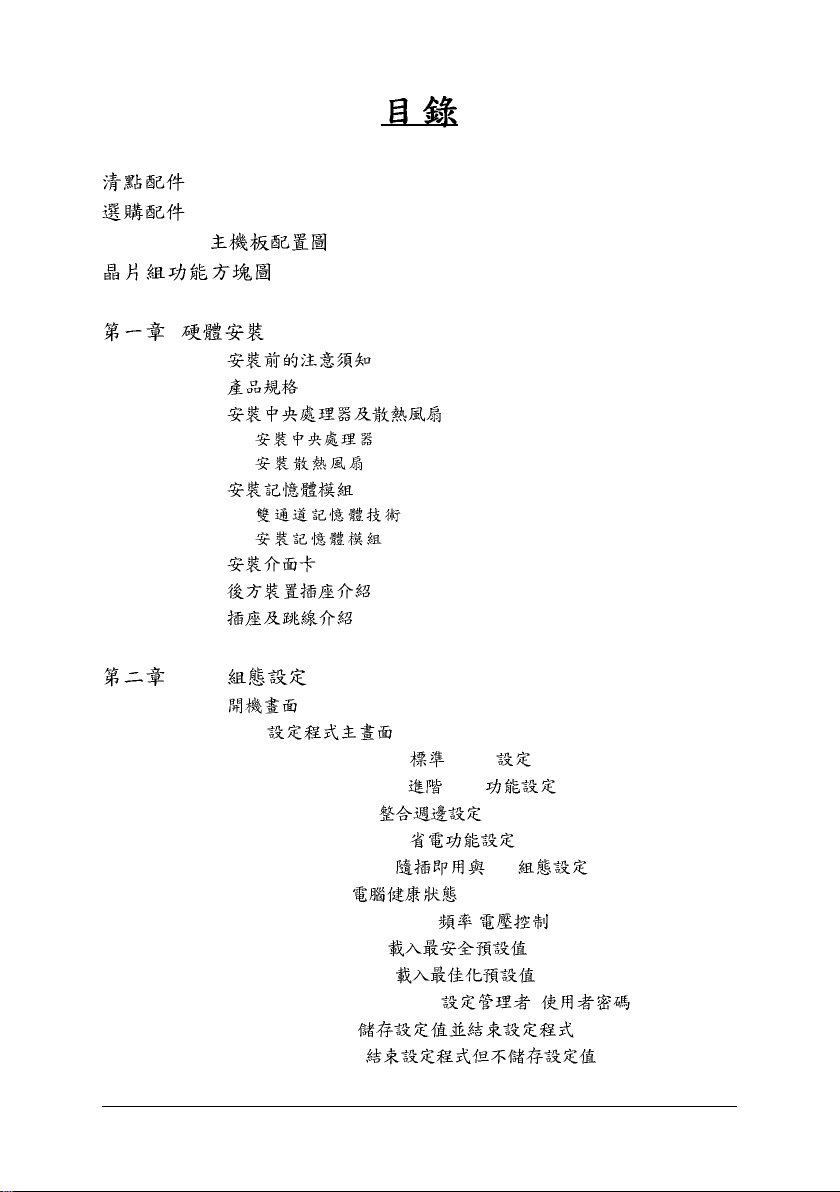
…………………………………………………………………………………………………….. 6
…………………………………………………………………………………………………….. 6
GA-M56S-S3 ………………………………………………………………………… 7
……………………………………………………………………………………. 8
……………………………………………………………………………………… 9
1-1 …………………………………………………………………………. 9
1-2
1-3
1-3-1 (CPU) ……………………………………………………………………… 12
1-3-2 ……………………………………………………………………………………. 14
1-4 …………………………………………………………………………… 15
1-4-1 …………………………………………………………………………… 15
1-4-2 ……………………………………………………………………………….. 16
1-5 ……………………………………………………………………………………. 17
1-6
1-7
……………………………………………………………………………………….. 10
………………………………………………………… 12
……………………………………………………………………….. 18
…………………………………………………………………………… 20
BIOS …………………………………………………………………………… 31
2-1 ……………………………………………………………………………………….. 32
2-2 BIOS
2-3 Standard CMOS Features (
2-4 Advanced BIOS Features (
2- 5 Integrated Peripherals ( ) ………………………………………………. 39
2- 6 Power Management Setup (
2-7 PnP/PCI Configurations (
2-8 PC Health Status (
2-9 MB Intelligent Tweaker(M.I.T.) ( / ) ……………………………….. 49
2-10 Load Fail-Safe Defaults (
2-11 Load Optimized Defaults (
2-12 Set Supervisor/User Password (
2-13 Save & Exit Setup ( ) ………………………….. 53
2-14 Exit Without Saving (
…………………………………………………………………… 33
CMOS )……………………………………. 35
BIOS )………………………………. 37
)……………………………………….. 44
PCI )……………………….. 46
)……………………………………………………. 47
) …………………………………….. 51
) …………………………………… 51
/ )………………. 52
)……………………… 53
— 4 —
…………………………………………………………………………… 55
3-1 ……………………………………………………………………. 55
3-2
……………………………………………………………………………….. 56
3-3 ……………………………………………………………………….. 56
3-4
3-5
……………………………………………………………………………………….. 57
……………………………………………………………………………………. 57
…………………………………………………………………………… 59
4-1 Xpress Recovery2 ……………………………………………………………………. 59
4-2 BIOS ………………………………………………………………………. 64
4-2-1 Q-Flash BIOS…………………………………………………………. 64
4-2-2 @BIOS BIOS ………………………………………………………………. 67
4-3 EasyTune 5 ……………………………………………………………………………… 69
4-4 Windows Vista ReadyBoost
……………………………………………………….. 70
……………………………………………………………………………………………. 71
5-1 Serial ATA ………………………………………………………………… 71
5-1-1 SATA …………………………………………………………………….. 71
5-1-2 SATA RAID/AHCI ….. 76
5-1-3 SATA RAID/AHCI …………………………………. 77
5-2 / ……………………………………………………………… 82
5-2-1 2 / 4 / 5.1 / 7.1 ……………………………………………………………………. 82
5-2-2 (S/PDIF )( )…………………………………………. 84
5-2-3 ……………………………………………………………………………….. 86
5-2-4 ……………………………………………………………………………….. 88
5-3 ……………………………………………………………………………………….. 89
5-3-1 ………………………………………………………………………………………………….89
5-3-2 …………………………………………………………………………………………….. 90
…………………………………………………………………………………………………… 92
— 5 —
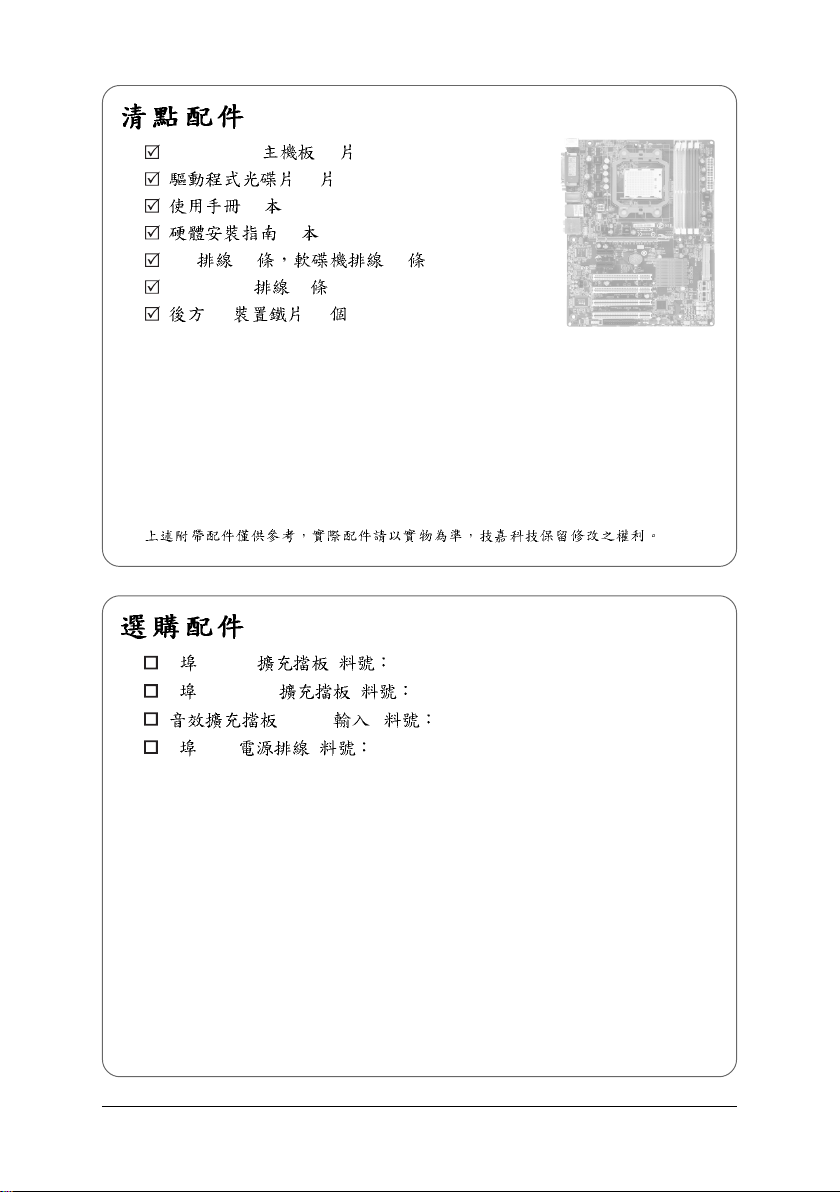
GA-M56S-S3 — 1
— 1
— 1
— 1
IDE — 1 — 1
SATA 3Gb/s — 2
I/O — 1
2 USB 2.0 ( 12CR1-1UB030-51R)
2 IEEE 1394a ( 12CF1-1IE008-01R)
(S/PDIF ) ( 12CR1-1SPDIN-01R)
2 SATA ( 12CF1-2SERPW-01R)
— 6 —
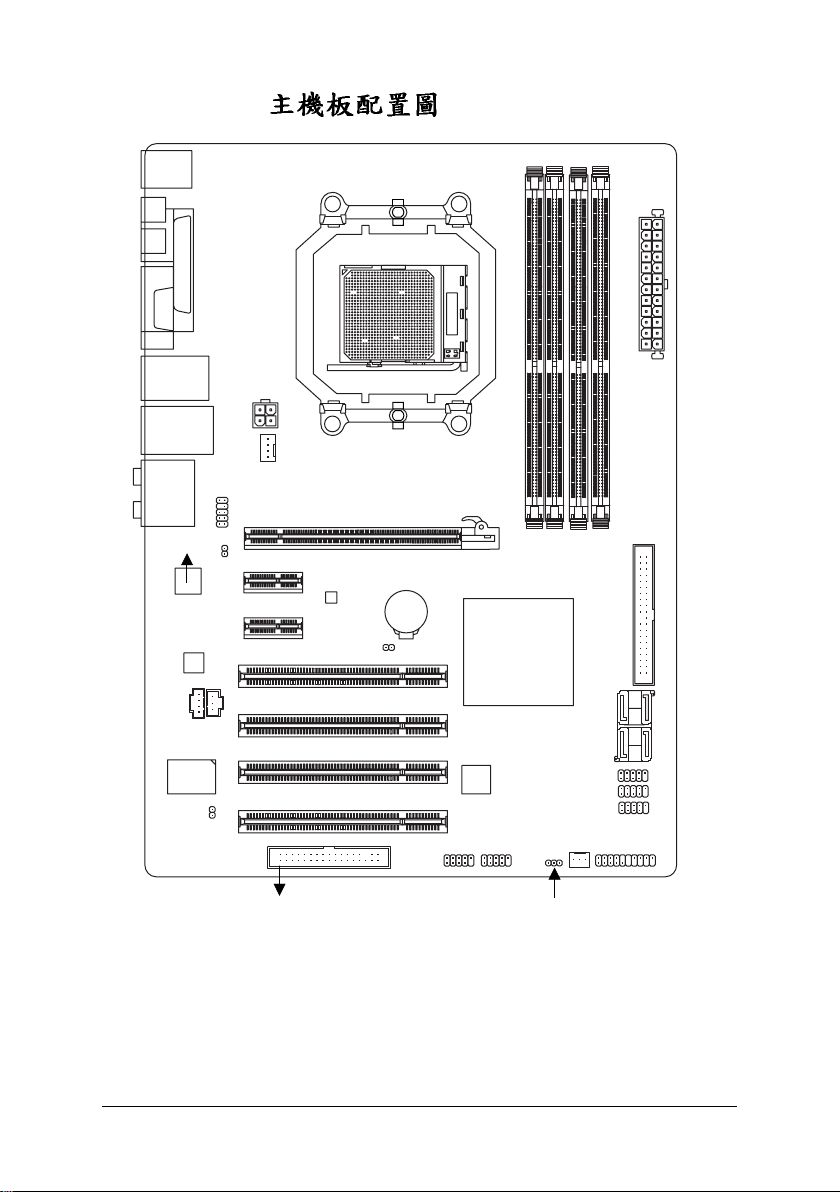
GA-M56S-S3
KB_MS
COAXIAL
OPTICAL
LPT
COMA
Socket AM2
USB
USB
AUDIO
RTL8211BL
CODEC
IT8716
1394
LAN
F_AUDIO
CD_IN
CI
ATX_12V
PCIE_16
PCIE_1
SPDIF_O
PCIE_2
PCI1
PCI2
SPDIF_I
PCI3
PCI4
CPU_FAN
FDD
GA-M56S-S3
BIOS
CLR_CMOS
BATTERY
F1_1394
nVIDIA
nForce 560
TSB43AB23
F2_1394
DDRII_1
®
PWR_LED
DDRII_3
DDRII_2
F_USB2
F_USB1
F_USB3
SYS_FAN
DDRII_4
SATAII3
SATAII2
F_PANEL
ATX
IDE
SATAII1
SATAII0
— 7 —
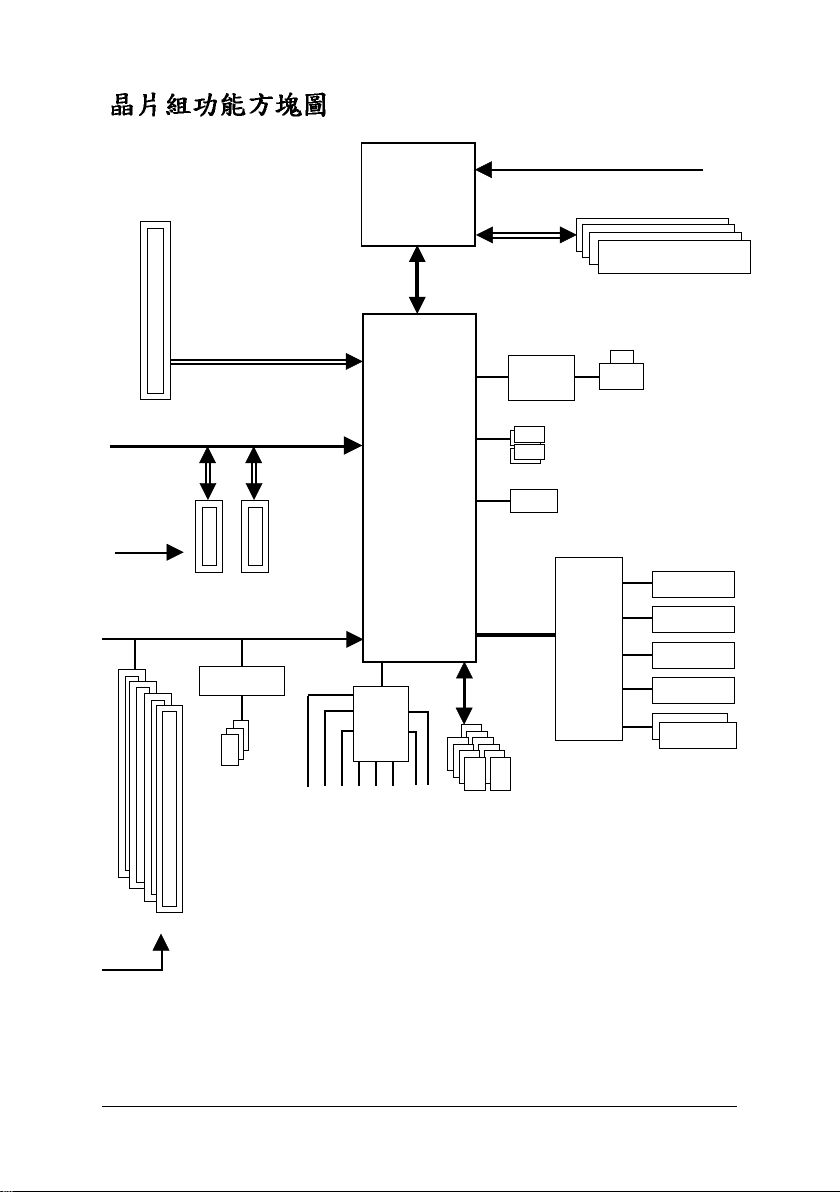
PCIe CLK
(100 MHz)
AMD
Socket AM2
CPU
Hyper Transport Bus
CPU CLK+/-(200 MHz)
DDR2 800/667/533 MHz DIMM
Dual Channel Memory
PCIe CLK
(100 MHz)
4 PCI
PCI Express x16
PCI Express Bus
x1 x1
2 PCI Express x1
PCI Bus
TSB43AB23
3 IEEE 1394a
®
nVIDIA
nForce 560
CODEC
MIC
Line-In
Line-Out
SPDIF In
SPDIF Out
Side Speaker Out
Surround Speaker Out
LPC BUS
10 USB
Ports
RTL
8211BL
4 SATA 3Gb/s
ATA-133/100/66/33
IDE Channel
IT8716
LAN
RJ45
BIOS
Floppy
LPT Port
COM Port
PS/2 KB/Mouse
PCI CLK
(33 MHz)
Center/Subwoofer Speaker Out
— 8 —
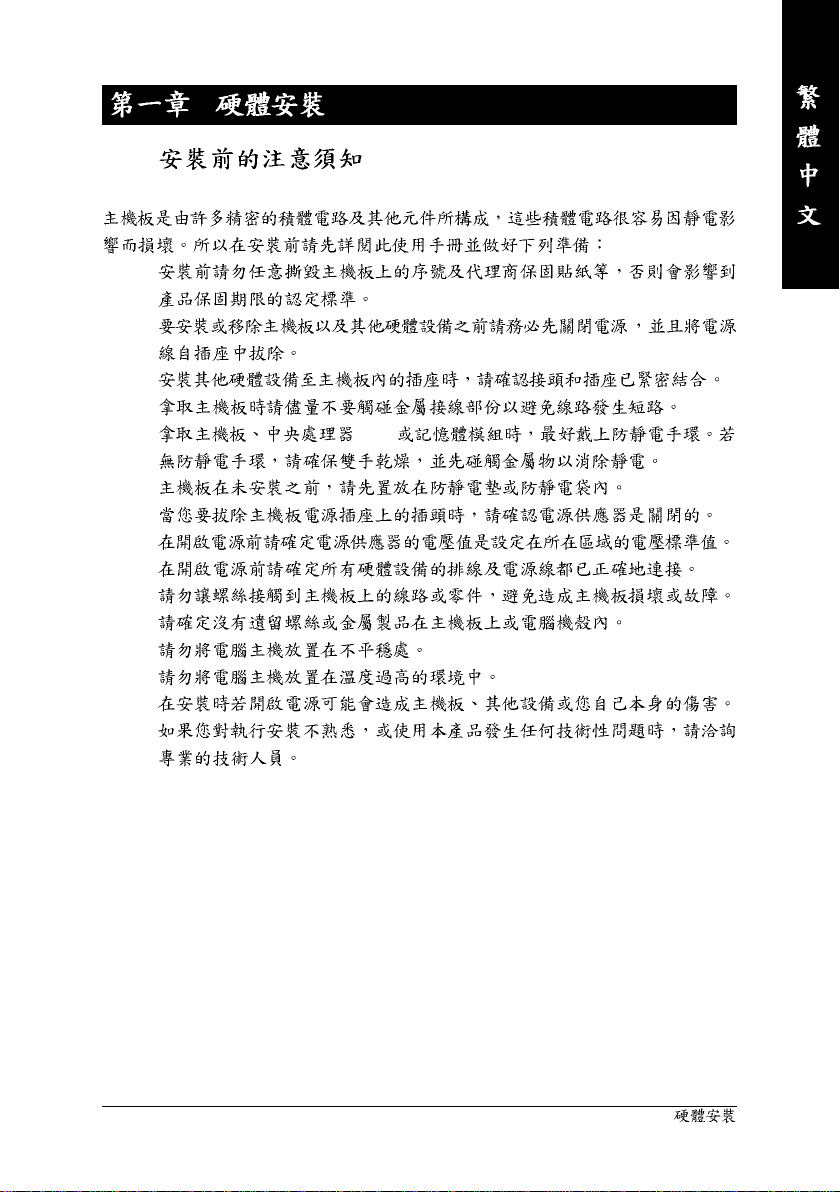
1-1
•
•
•
•
• (CPU)
•
•
•
•
•
•
•
•
•
•
— 9 —
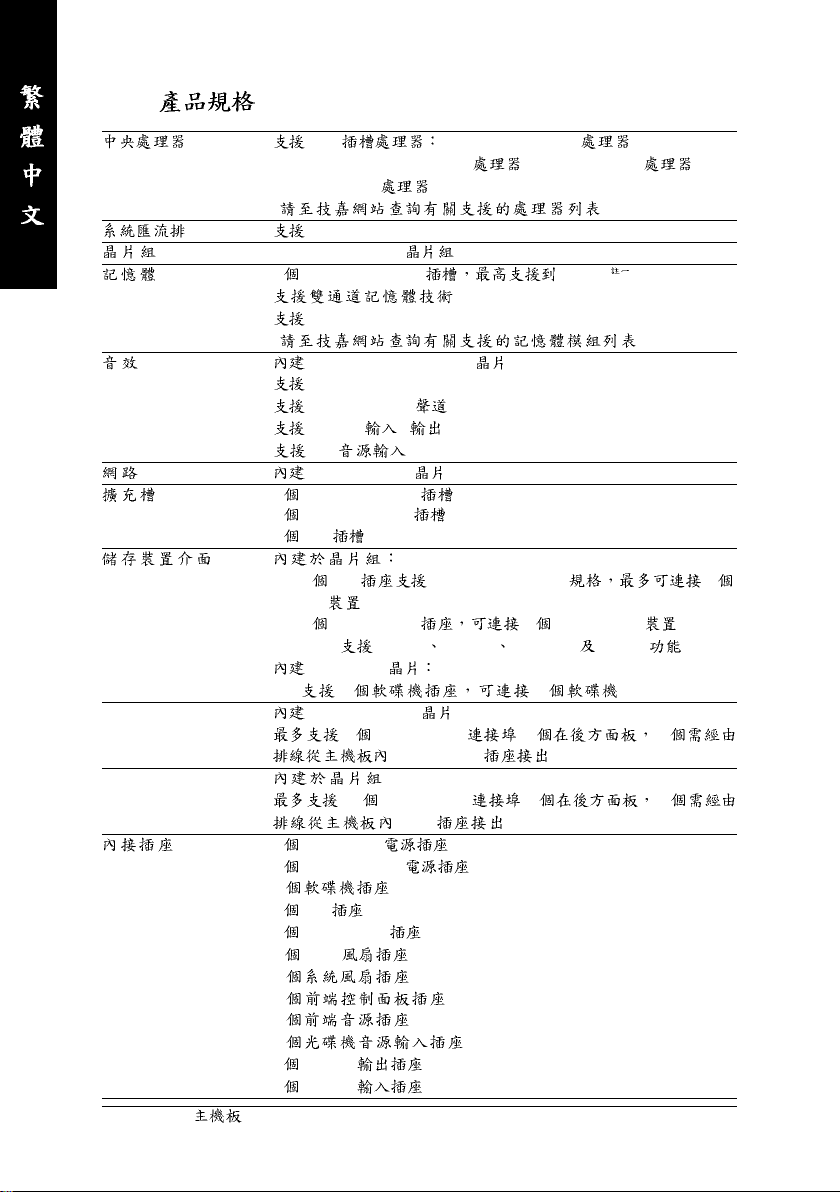
1-2
(CPU) AM2 AMD Athlon
AMD AthlonTM 64 X2 Dual-Core / AMD AthlonTM 64 /
AMD Sempron
( )
(FSB) 2000 MHz
nVIDIA® nForce 560
4 1.8V DDR2 DIMM 16 GB
DDR2 800/667/533 MHz
( )
Realtek ALC888 CODEC
High Definition Audio
2 / 4 / 5.1 / 7.1
S/PDIF /
CD
Realtek 8211BL (10/100/1000 Mbit)
1 PCI Express x16
2 PCI Express x1
4 PCI
-1IDE ATA-133/100/66/33 2
IDE
-4SATA 3Gb/s 4 SATA 3Gb/s
— SATA RAID 0 RAID 1 RAID 0+1 RAID 5
iTE IT8716
— 1 1
IEEE 1394 T.I. TSB43AB23
3 IEEE 1394a (1 2
USB
10 USB 2.0/1.1 (4 6
1 24-pin ATX
1 4-pin ATX 12V
1
1 IDE
4 SATA 3Gb/s
1 CPU
1
1
1
1
1 S/PDIF
1 S/PDIF
GA-M56S-S3 — 10 —
TM
IEEE 1394a )
USB )
TM
64 FX /
( )
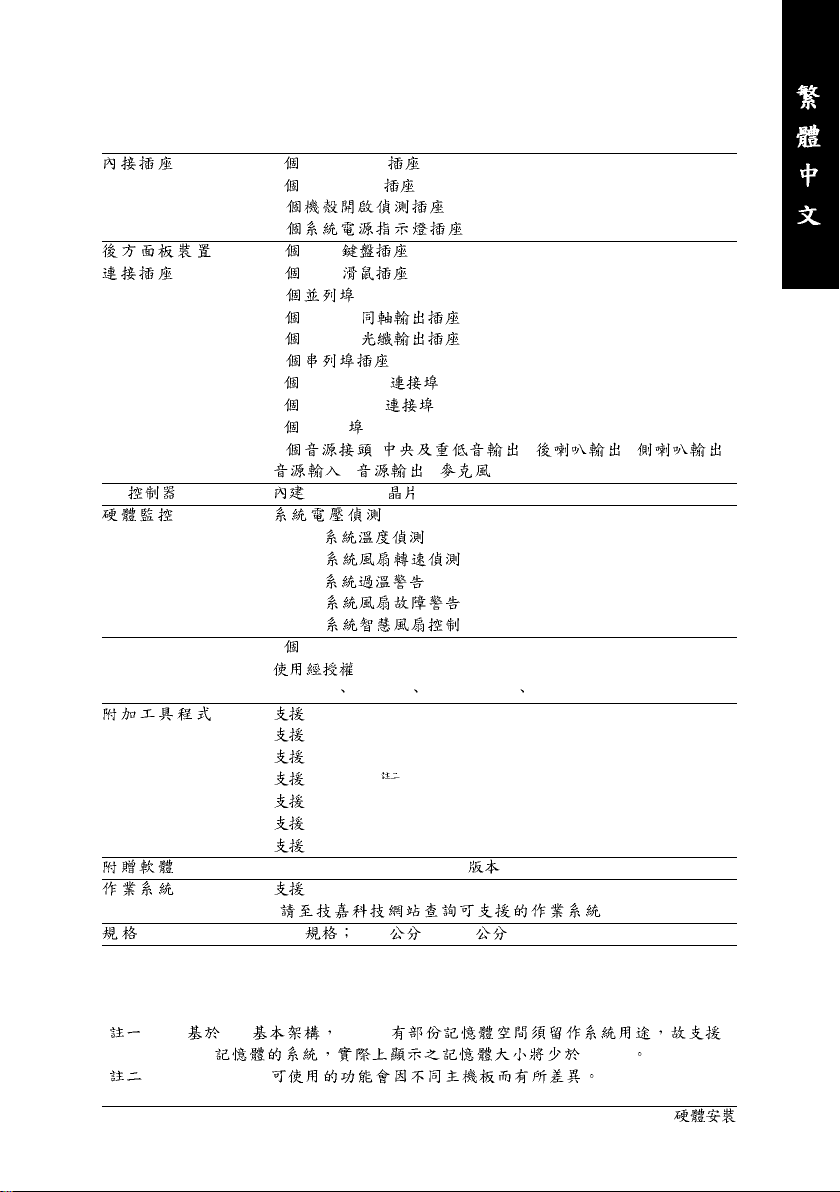
3 USB 2.0/1.1
2 IEEE 1394a
1
1
1 PS/2
1 PS/2
1
1 S/PDIF
1 S/PDIF
1
4 USB 2.0/1.1
1 IEEE 1394a
1 RJ-45
6 ( / / /
/ / )
I/O iTE IT8716
CPU /
CPU /
CPU /
CPU /
CPU /
BIOS 1 4 Mbit flash
AWARD BIOS
PnP 1.0a DMI 2.0 SM BIOS 2.4 ACPI 1.0b
@BIOS
Download Center
Q-Flash
EasyTune
Xpress Install
Xpress Recovery2
Virtual Dual BIOS
Norton Internet Security (OEM )
Microsoft® Windows® Vista/XP/2000
( )
ATX 30.5 x 21.4
( )
( ) PC 4 GB 4
GB 4 GB
( ) EasyTune
— 11 —
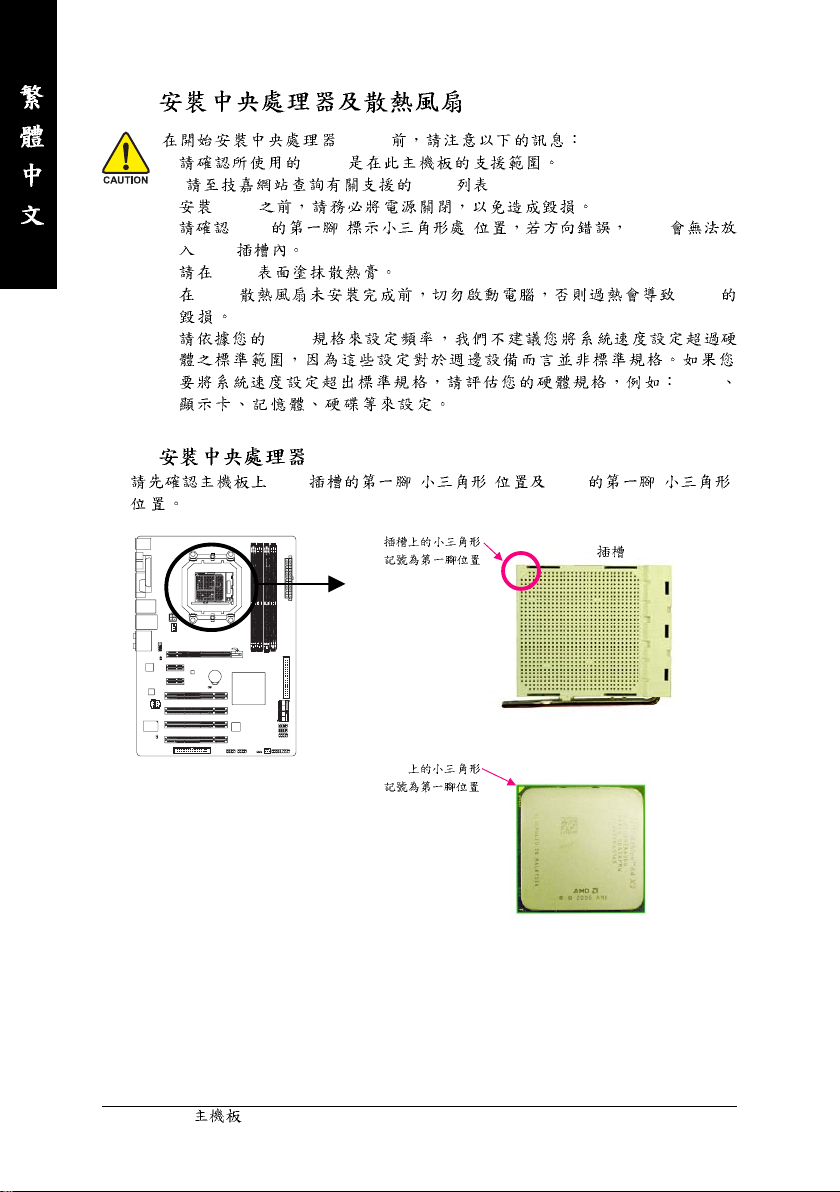
1-3
(CPU)
• CPU
( CPU )
• CPU
• CPU ( ) CPU
CPU
• CPU
• CPU CPU
• CPU
CPU
1-3-1 (CPU)
A. CPU ( ) CPU ( )
AM2 CPU
CPU
GA-M56S-S3 — 12 —
AM2 CPU
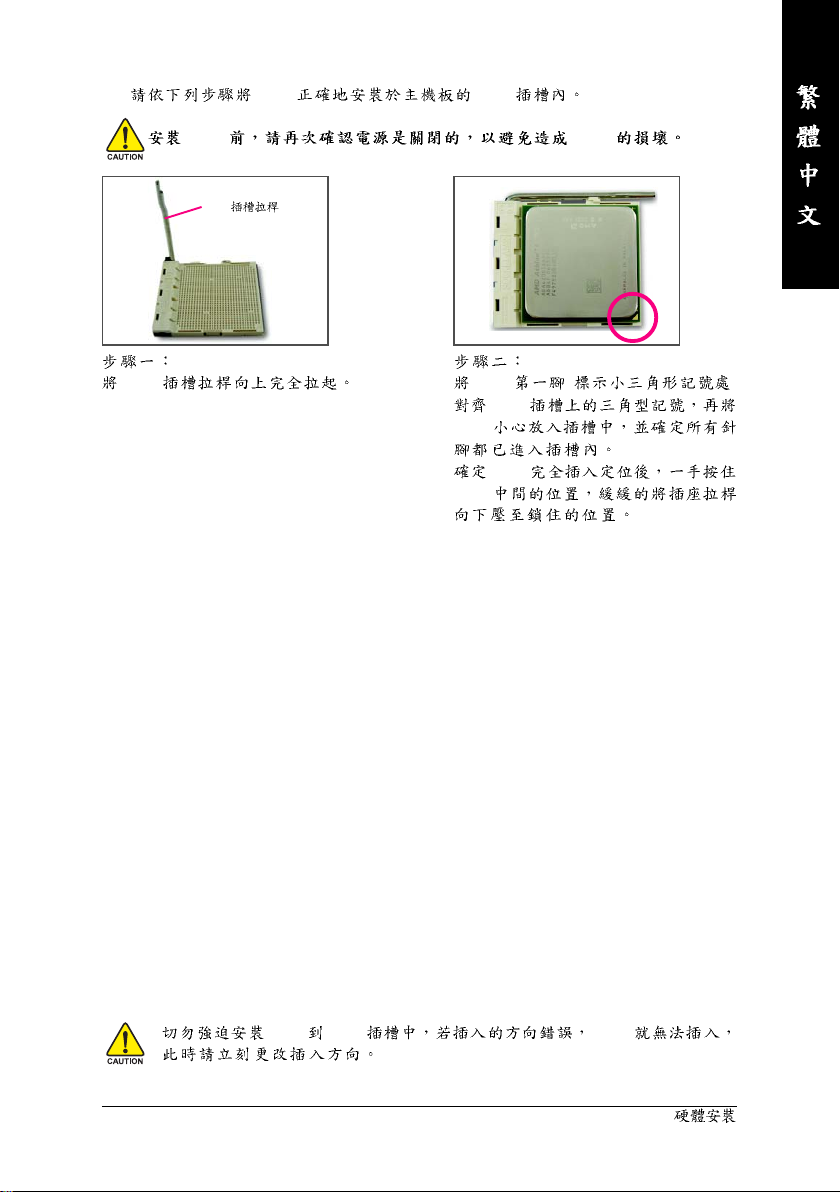
B. CPU CPU
CPU CPU
CPU
CPU
CPU ( )
CPU
CPU
CPU
CPU
CPU CPU CPU
— 13 —
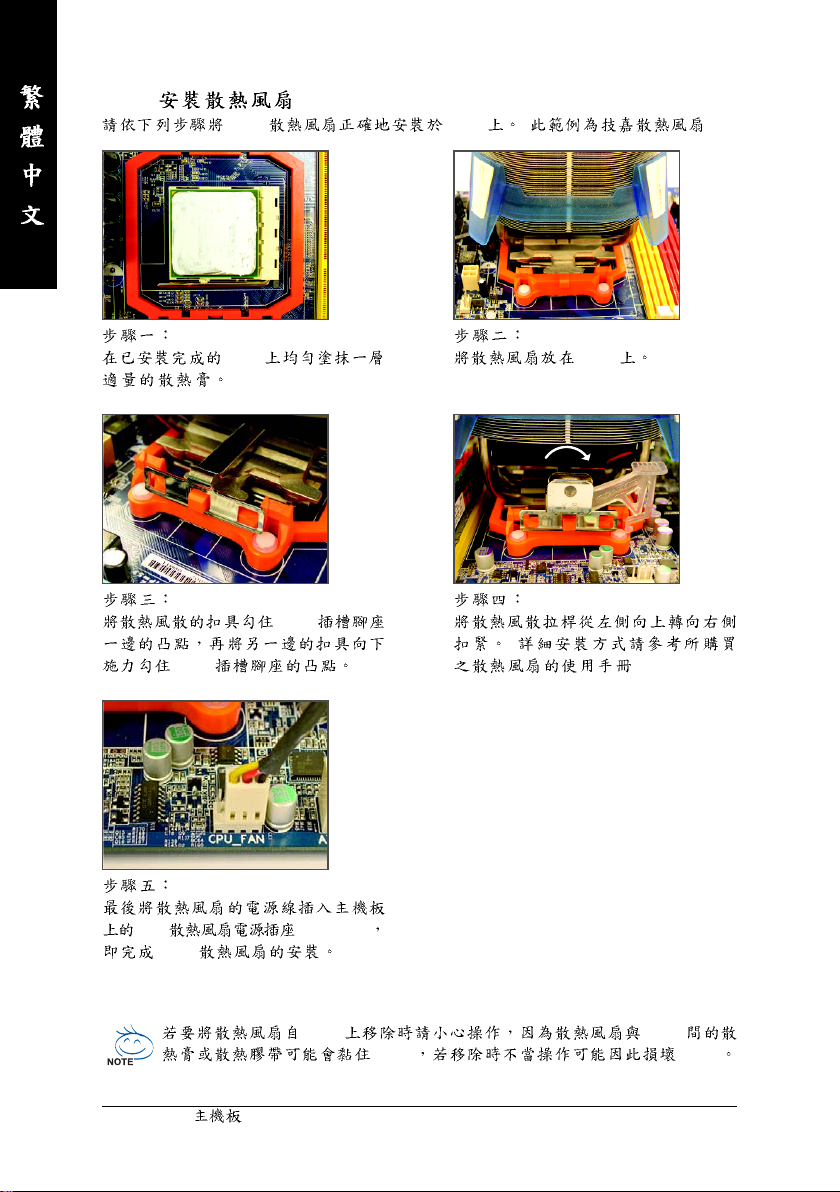
1-3-2
CPU CPU ( )
CPU CPU
CPU
(
CPU
)
CPU (CPU_FAN)
CPU
CPU CPU
CPU CPU
GA-M56S-S3 — 14 —
1-4
•
( )
•
•
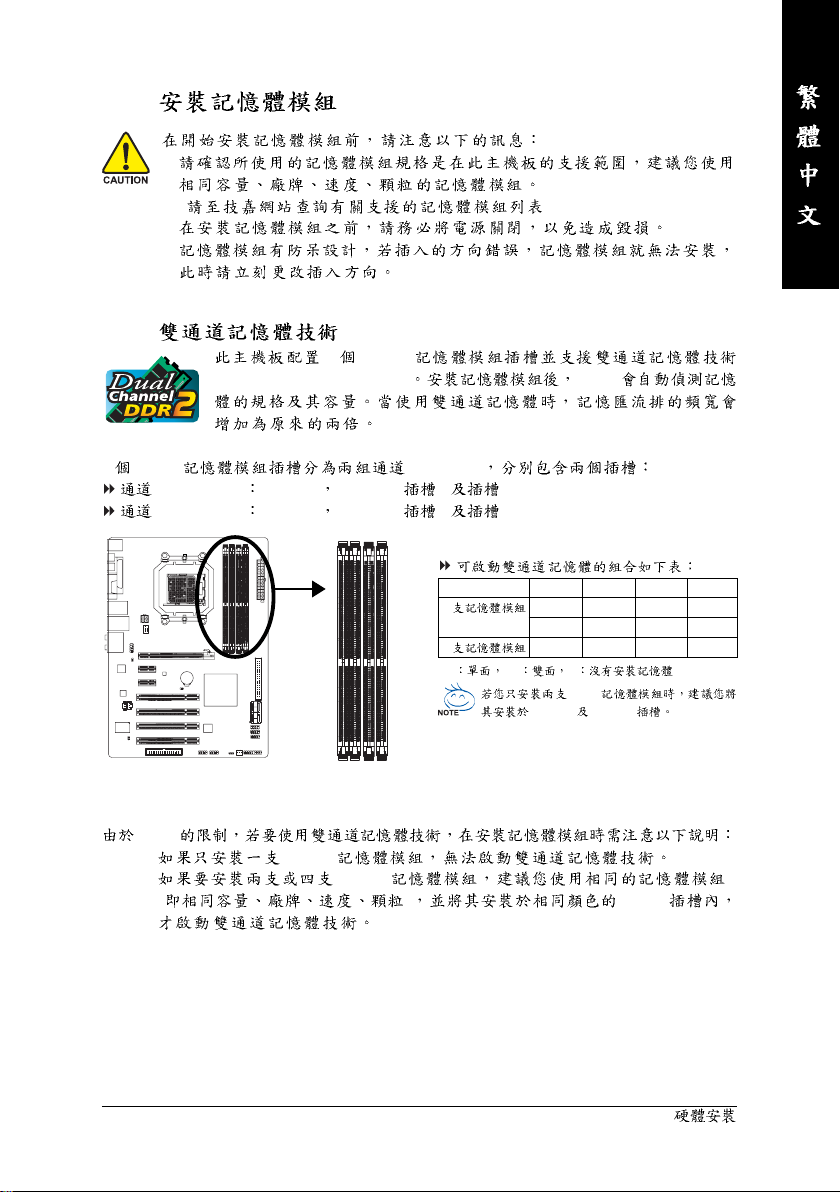
1-4-1
4 DDR2
(Dual Channel Technology) BIOS
4 DDR2 (Channel)
0 (Channel 0) DDRII_1 DDRII_3 ( 1 3)
1 (Channel 1) DDRII_2 DDRII_4 ( 2 4)
DDRII_1 DDRII_2 DDRII_3 DDRII_4
DS/SS DS/SS — — — —
— — — — DS/SS DS/SS
DS/SS DS/SS DS/SS DS/SS
DDR2
DDRII_1 DDRII_2
DDRII_1
DDRII_2
DDRII_4
DDRII_3
2
4
(SS DS — )
CPU
1. DDR2
2. DDR2
( ) DDR2
— 15 —
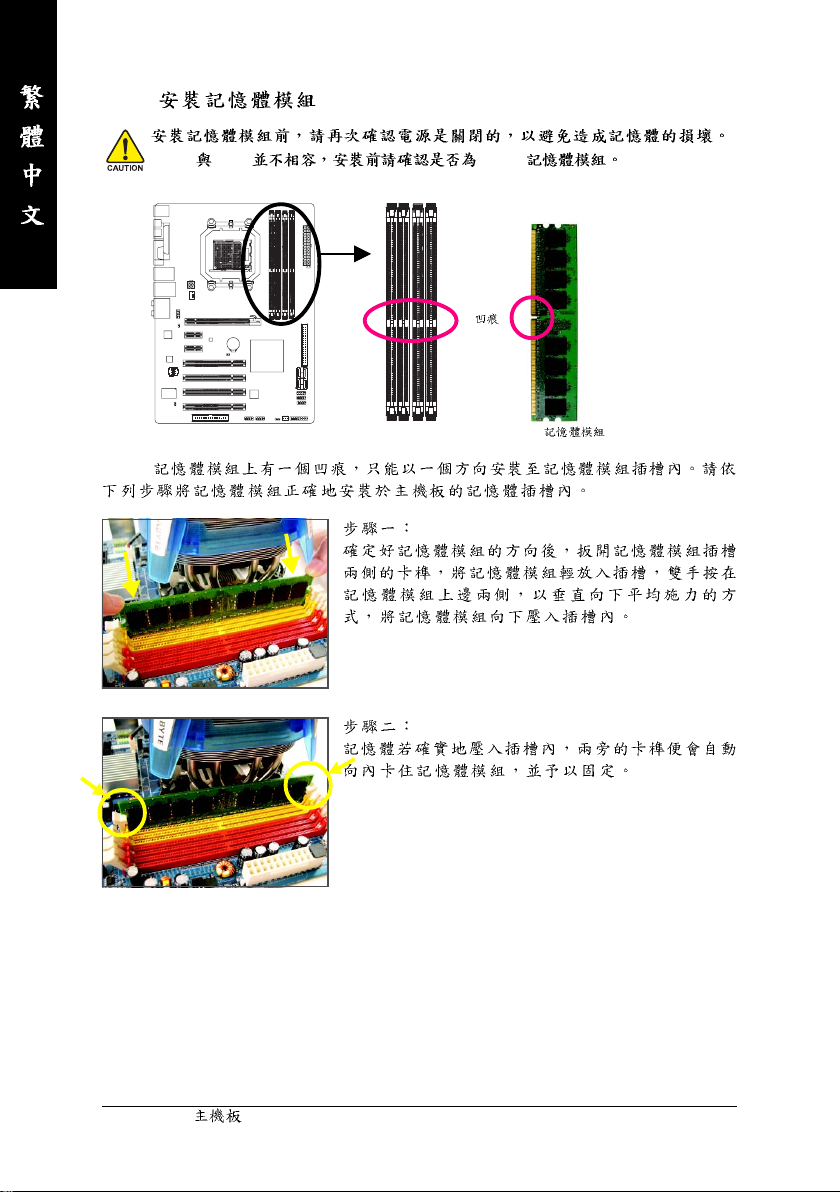
1-4-2
DDR2 DDR DDR2
DDR2
DDR2
GA-M56S-S3 — 16 —
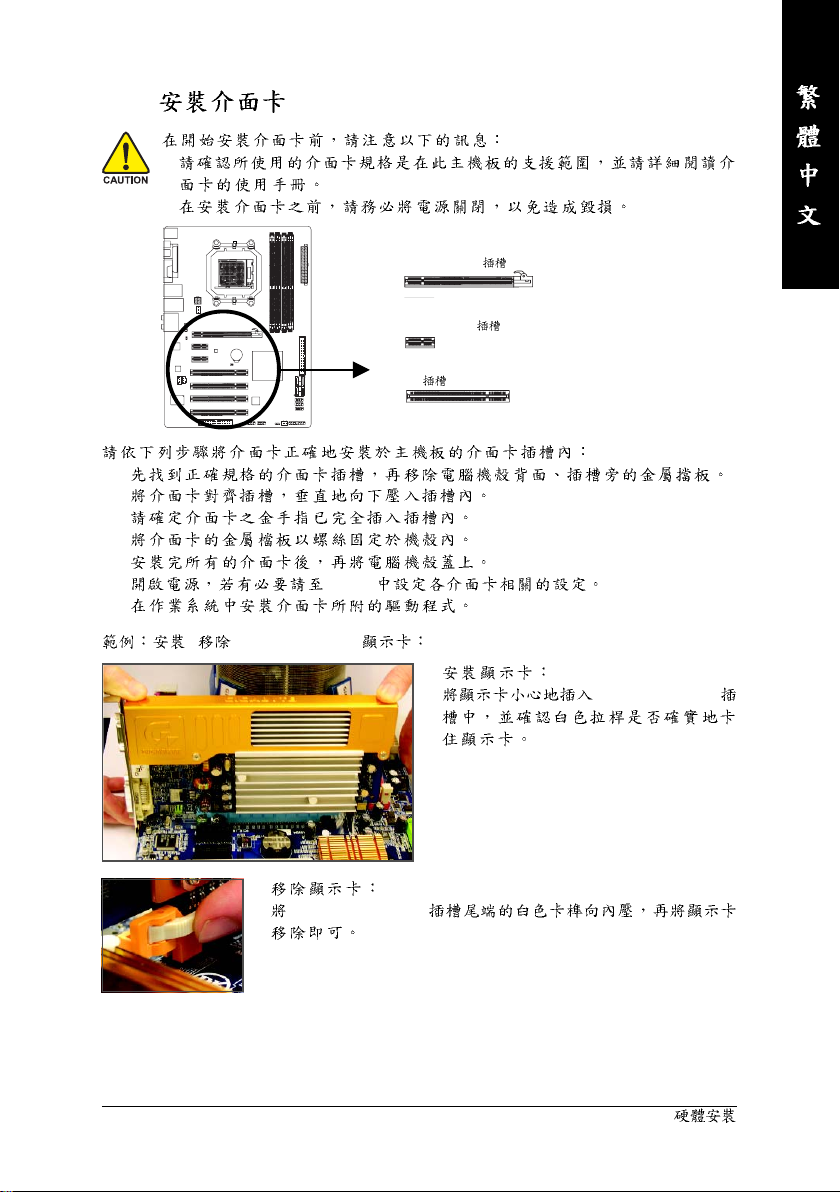
1-5
•
•
1.
2.
3.
4.
5.
6. BIOS
7.
/ PCI Express x16
PCI Express x16
PCI Express x1
PCI
•
PCI Express x16
•
PCI Express x16
— 17 —
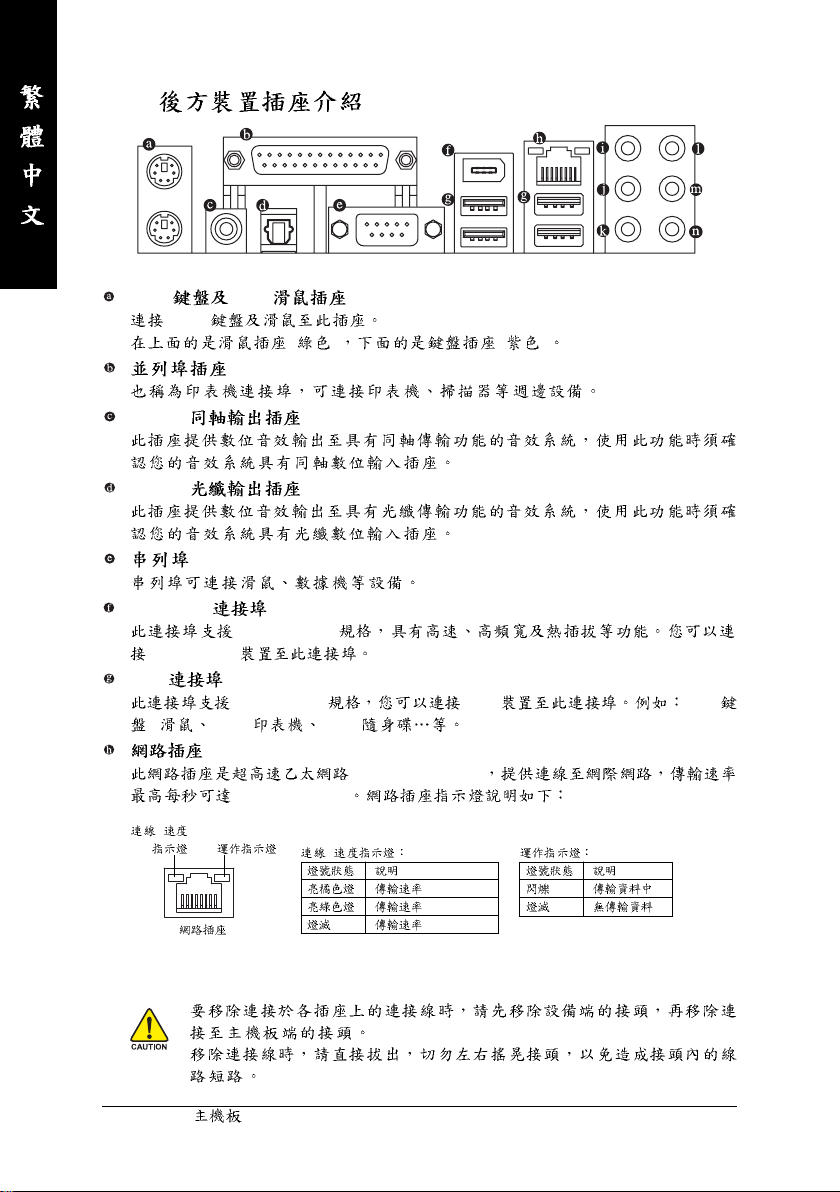
1-6
PS/2 PS/2
PS/2
S/PDIF
S/PDIF
IEEE 1394a
IEEE 1394a
IEEE 1394a
USB
USB 2.0/1.1 USB USB
/ USB USB
(RJ-45)
1 GB (1 Gbps)
/
( ) ( )
(Gigabit Ethernet)
/
•
•
GA-M56S-S3 — 18 —
1 Gpbs
100 Mpbs
10 Mpbs
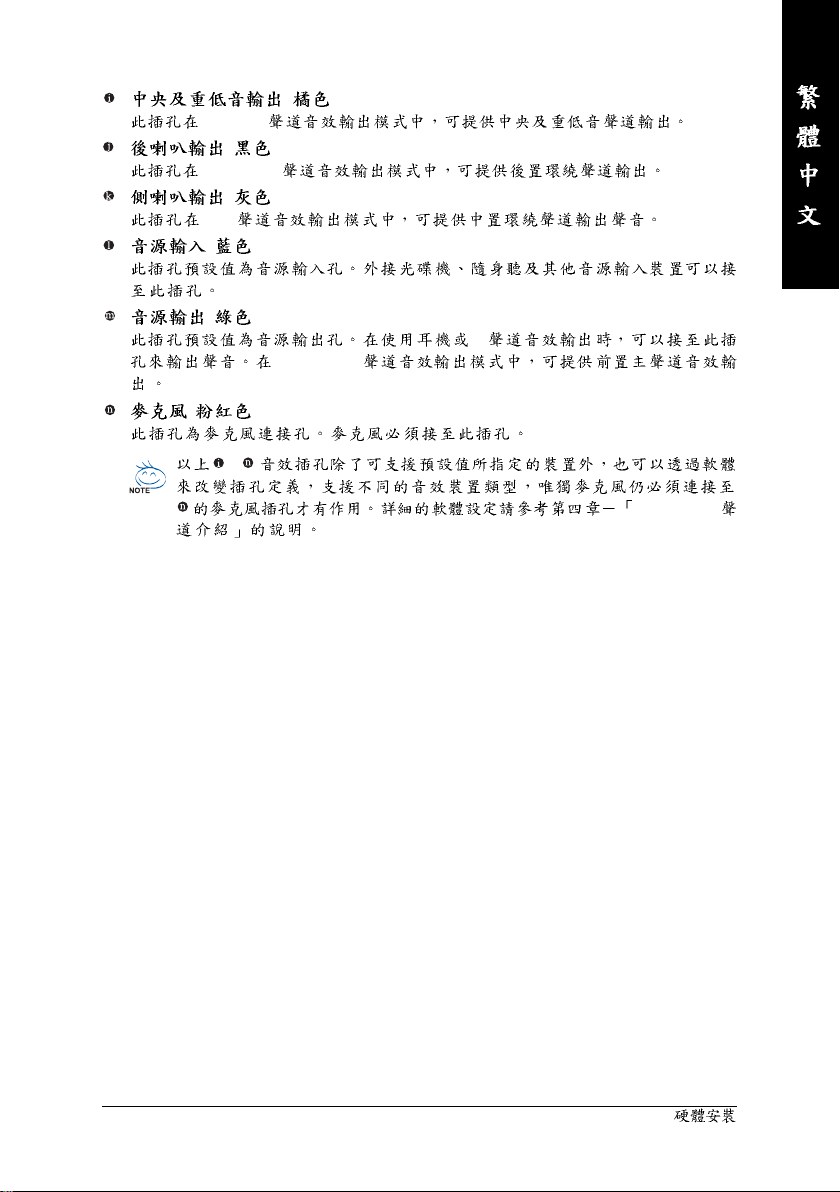
5.1/7.1
( )
4/5.1/7.1
( )
7.1
( )
( )
( )
~
( )
2
4/5.1/7.1
2/4/5.1/7.1
— 19 —
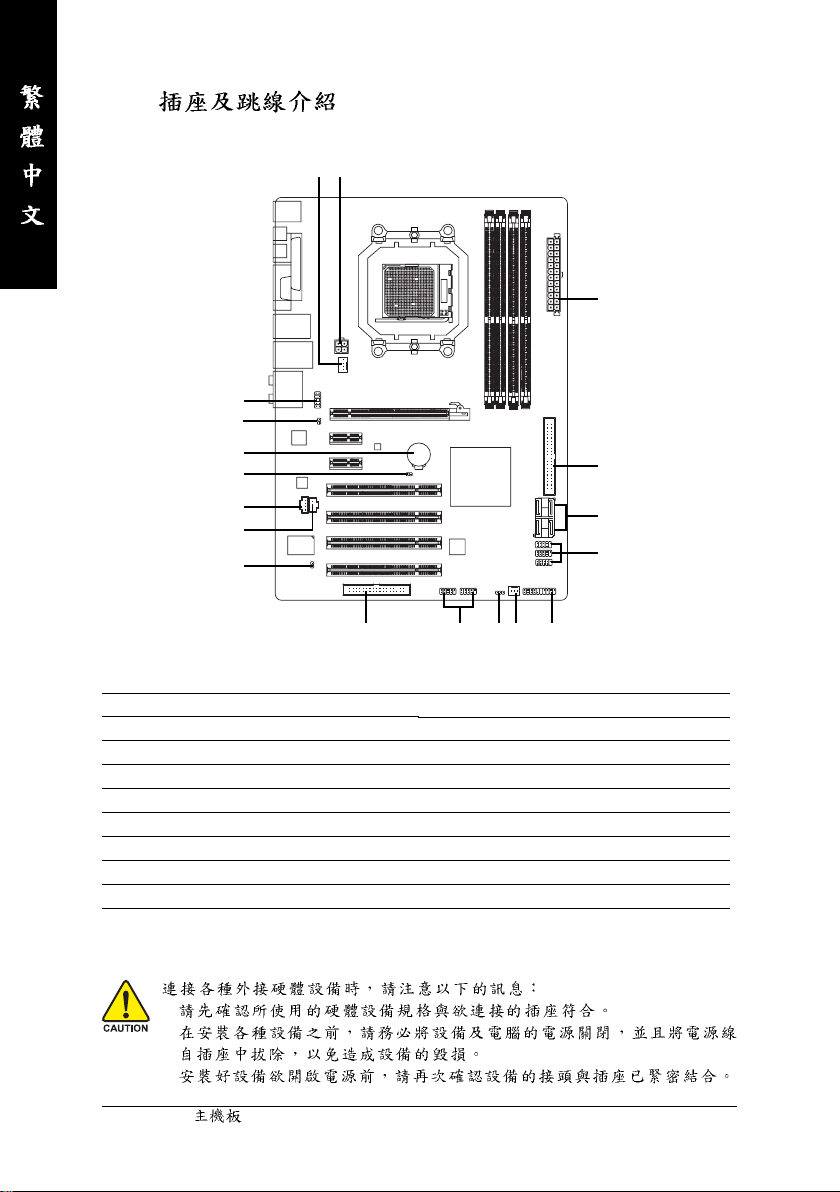
1-7
1
3
2
11
14
9
18
12
13
17
6
7
15
5
1) ATX_12V
2) ATX
3) CPU_FAN
4) SYS_FAN
5) FDD
6) ID E
7) SATAII0 / 1 / 2 / 3
 PWR_LED
9) BATTERY
•
•
•
GA-M56S-S3 — 20 —
4 10
8
16
10) F_PANEL
11) F_AUDIO
12) CD_IN
13) SPDIF_I
14) SPDIF_O
15) F_USB1 / F_USB2 / F_USB3
16) F1_1394 / F2_1394
17) CI
18) CLR_CMOS
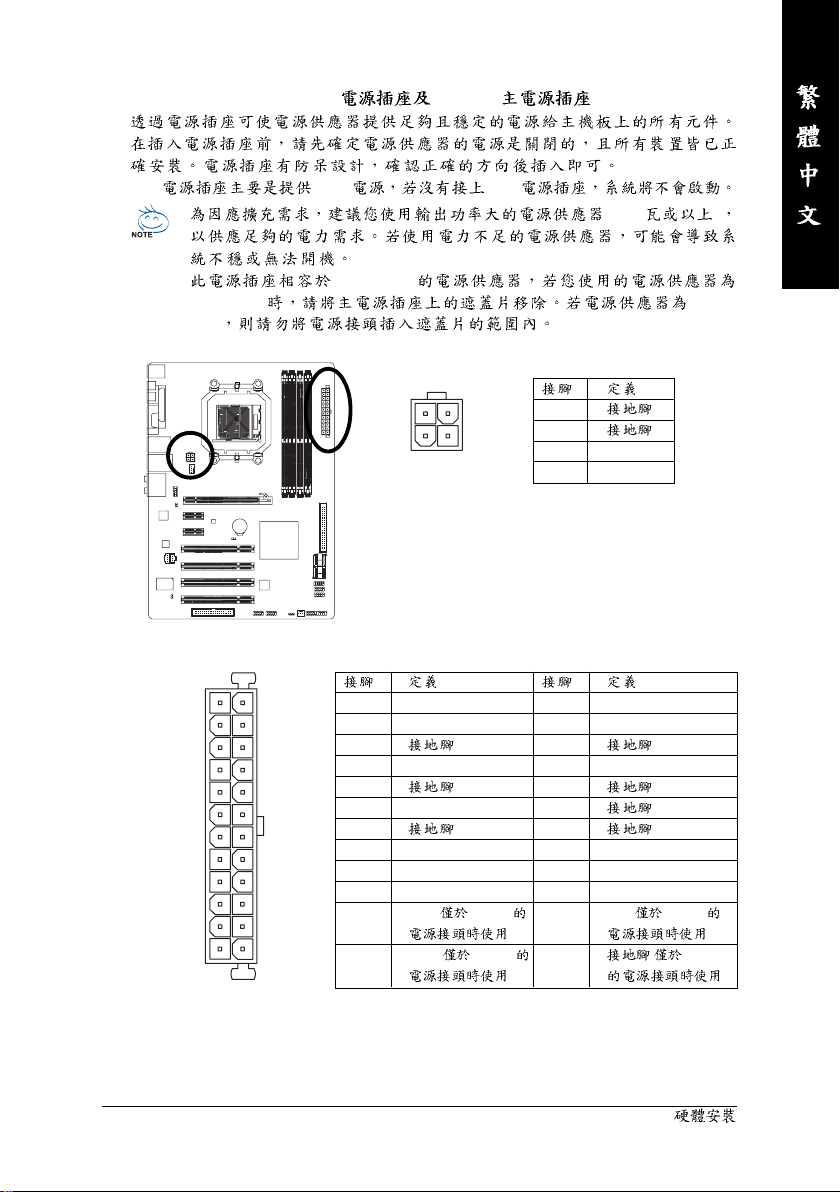
1/2) ATX_12V / ATX (2×2-pin 12V 2×12-pin )
12V CPU 12V
• (400 )
• 2×10-pin
2×12-pin 2×10pin
ATX_12V :
3
1
ATX :
12
24
1 3.3V
4
2
ATX_12V
2 3.3V
3
4 +5V
5
6 +5V
7
8 Power Good
9 5V SB(stand by +5V)
10 +12V
2×12-pin
2×12-pin
ATX
1 1 +12V (
131
12 3.3V (
1
2
3 +12V
4 +12V
13 3.3V
14 -12V
15
16 PS_ON(soft On/Off)
17
18
19
20 -5V
21 +5V
22 +5V
23 +5V (
)
24
)
2×12-pin
)
( 2×12-pin
)
— 21 —
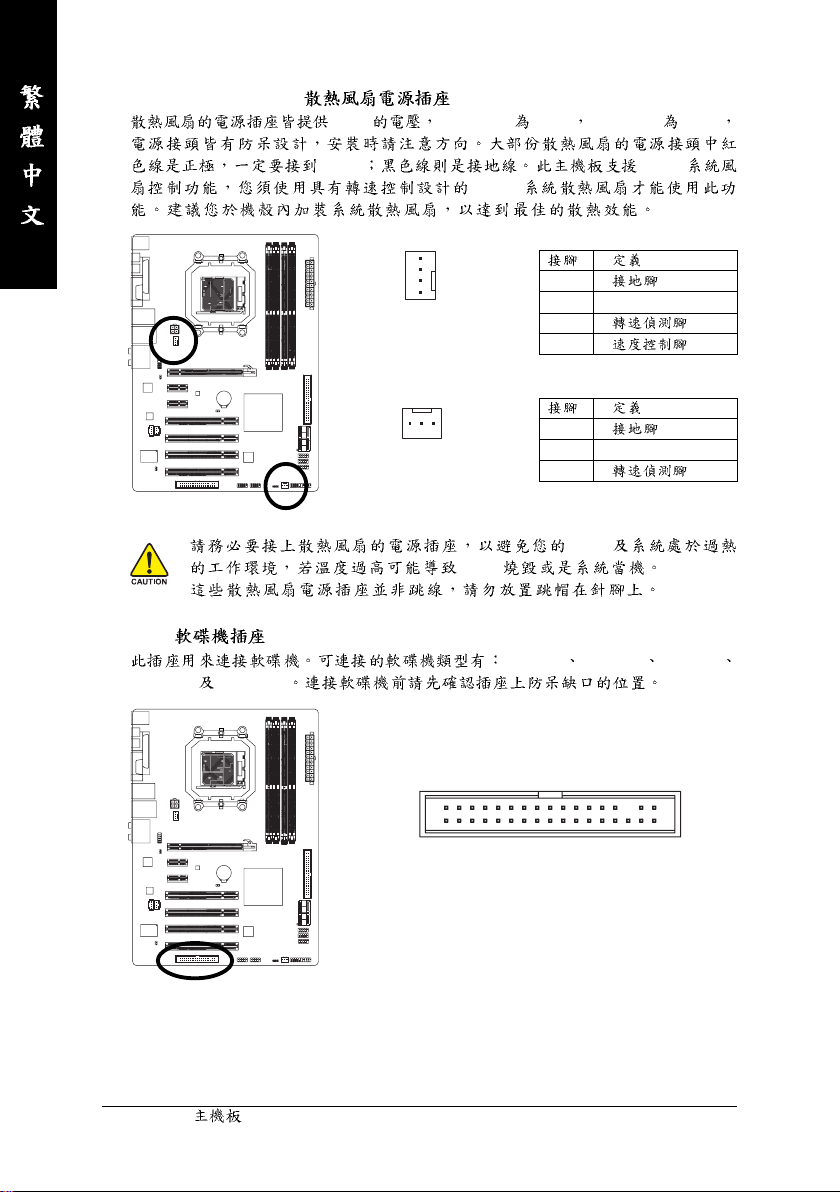
3/4) CPU_FAN / SYS_FAN ( )
+12V CPU_FAN 4-pin SYS_FAN 3-pin
+12V CPU/
1
CPU_FAN
SYS_FAN
• CPU
•
5) FDD ( )
1.44 MB 2.88 MB
CPU/
CPU_FAN :
1
2 +12V
3
4
SYS_FAN :
1
1
2 +12V
3
CPU
360 KB 720 KB 1.2 MB
GA-M56S-S3 — 22 —
33
34
1
2
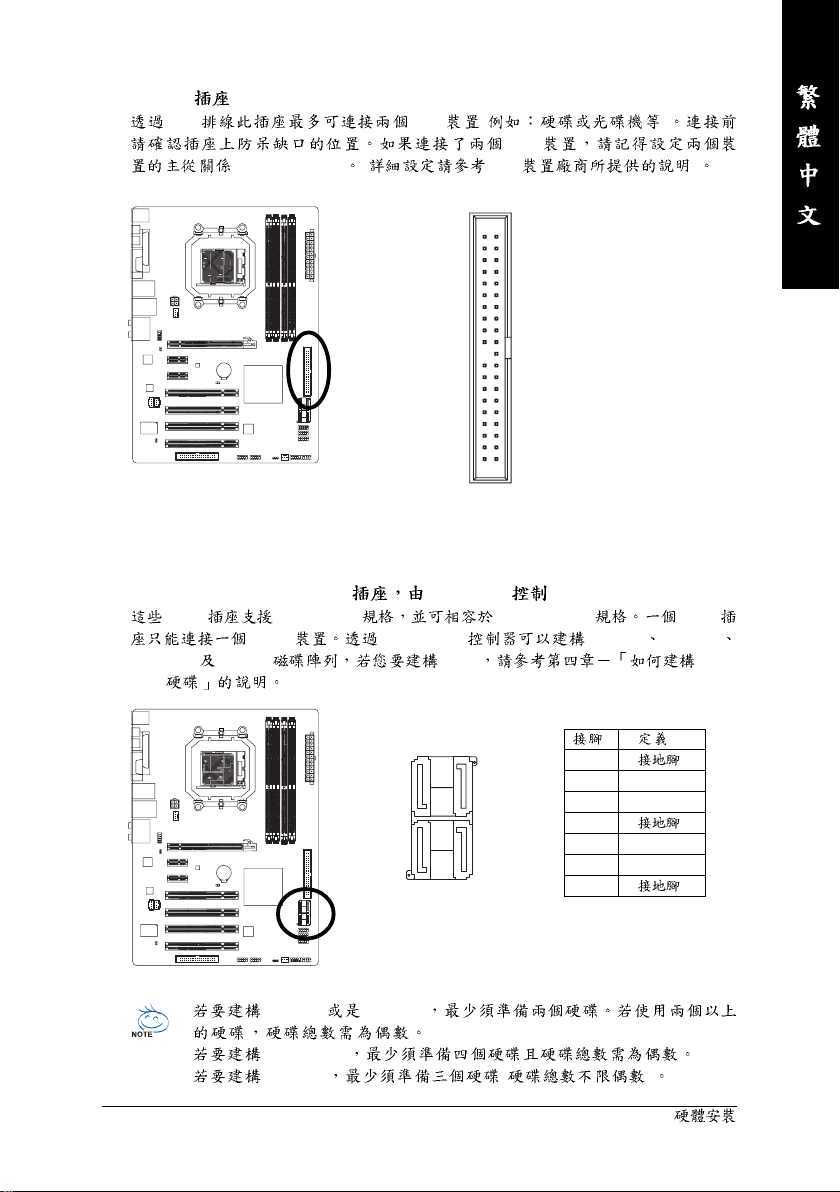
6) IDE (IDE )
IDE IDE ( )
IDE
(Master/Slave) ( IDE )
40
2
39
1
7) SATAII0 / 1 / 2 / 3 (SATA 3Gb/s nForce 560 )
SATA SATA 3Gb/s SATA 1.5Gb/s SATA
SATA nForce 560 RAID 0 RAID 1
RAID 0+1 RAID 5 RAID Serial
ATA
1
2 TXP
3 TXN
4
5 RXN
6 RXP
7
SATAII3
SATAII2
1
7
1
7
7
SATAII1
1
7
SATAII0
1
• RAID 0 RAID 1
• RAID 0+1
• RAID 5 ( )
— 23 —
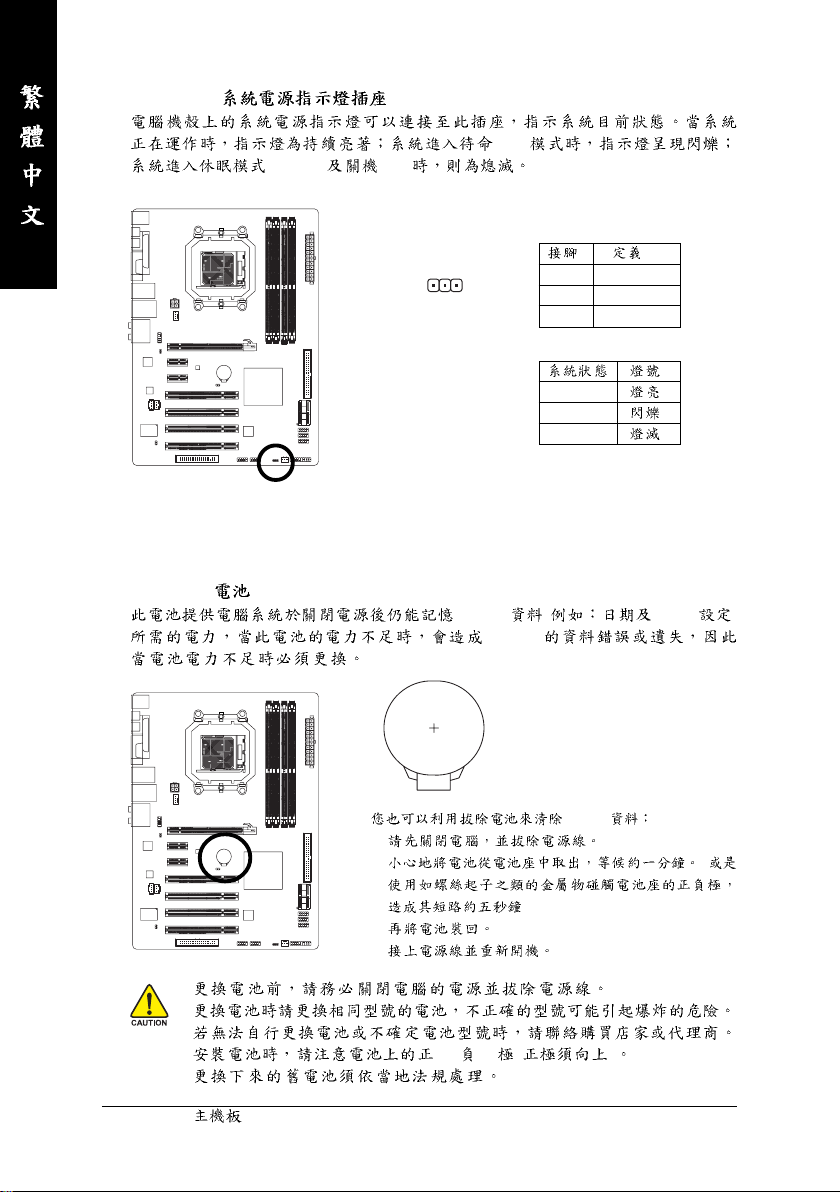
PWR_LED ( )
(S3/S4) (S5)
(S1)
9) BATTERY ( )
1
1 MPD+
2 MPD3 MPD-
S0
S1
S3/S4/S5
CMOS ( BIOS )
CMOS
CMOS
1.
2. (
3.
4.
•
•
•
• (+) (-) ( )
•
GA-M56S-S3 — 24 —
)
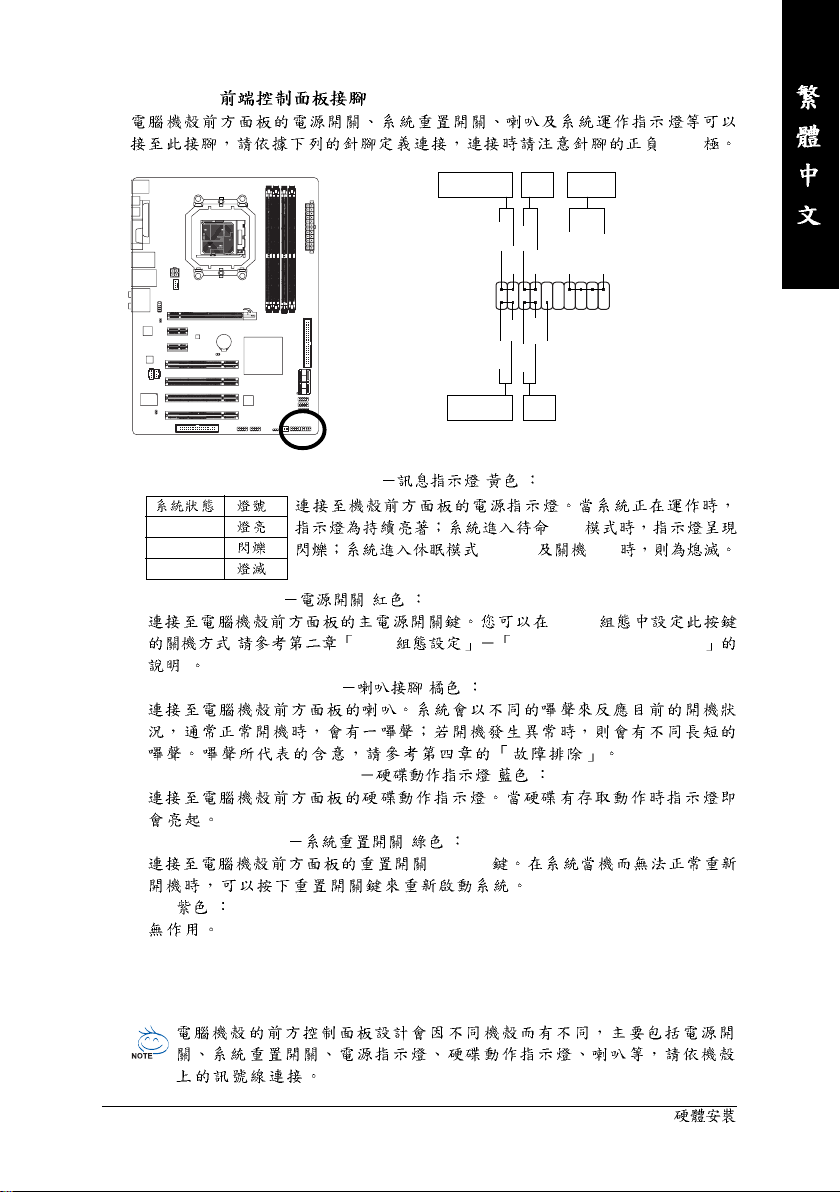
10) F_PANEL ( )
Message/Power/
Sleep LED
2
1
MSG+
HD+
MSG-
HD-
Power
Switch
PW+
RES-
PW-
RES+
NC
Speaker
Connector
SPEAK+
SPEAK-
20
19
(+/-)
IDE Hard Disk
Active LED
• MSG (Message/Power/Sleep LED) ( )
S0
S1
(S3/S4) (S5)
S3/S4/S5
• PW (Power Switch) ( )
( BIOS Power Management Setup
)
• SPEAK (Speaker Connector) ( )
• HD (IDE Hard Disk Active LED) ( )
• RES (Reset Switch) ( )
(Reset)
• NC( )
Reset
Switch
(S1)
BIOS
— 25 —
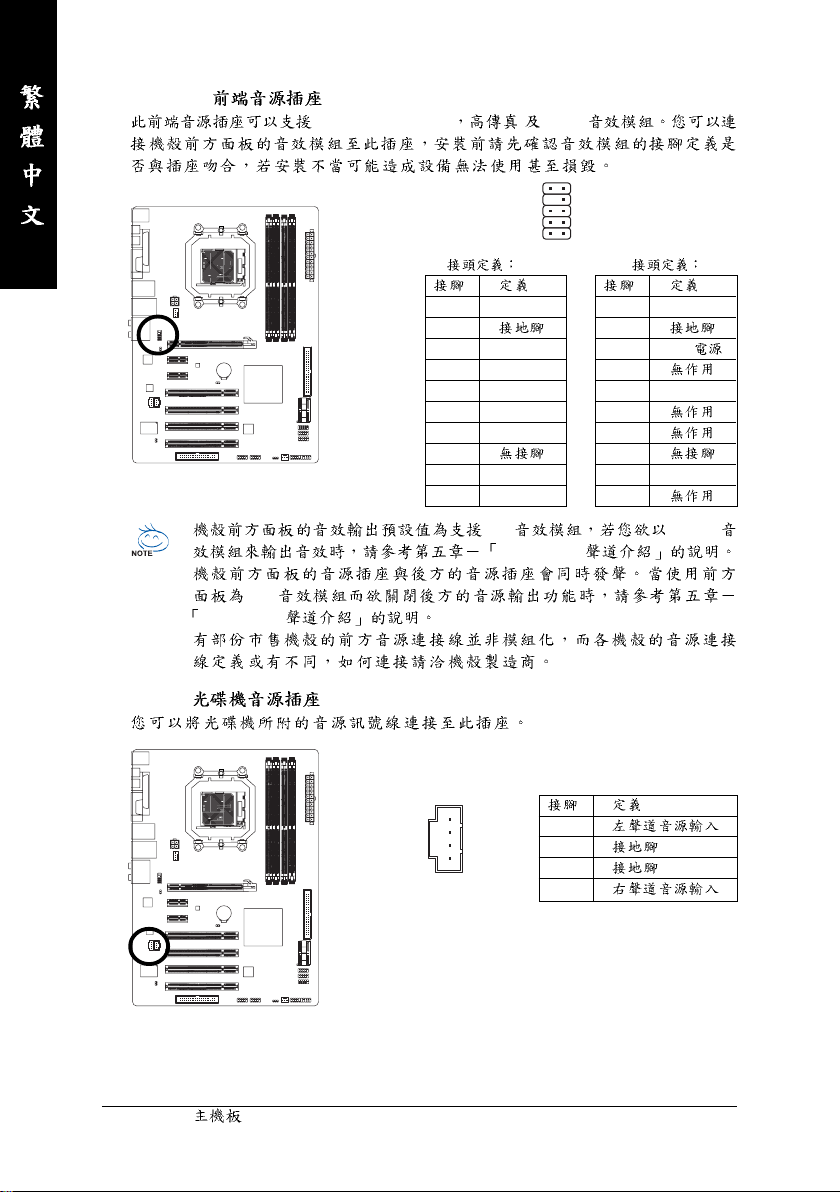
11) F_AUDIO ( )
HD (High Definition ) AC’97
10
2
HD
9
1
AC’97
• HD AC’97
•
HD
2/4/5.1/7.1
•
12) CD_IN ( )
1 MIC2_L
2
3 MIC2_R
4 -ACZ_DET
5 LINE2_R
6 FSENSE1
7 FAUDIO_JD
8
9 LINE2_L
10 FSENSE2
2/4/5.1/7.1
1
1 MIC
2
3 MIC
4
5 Line Out (R)
6
7
8
9 Line Out (L)
10
1
2
3
4
GA-M56S-S3 — 26 —
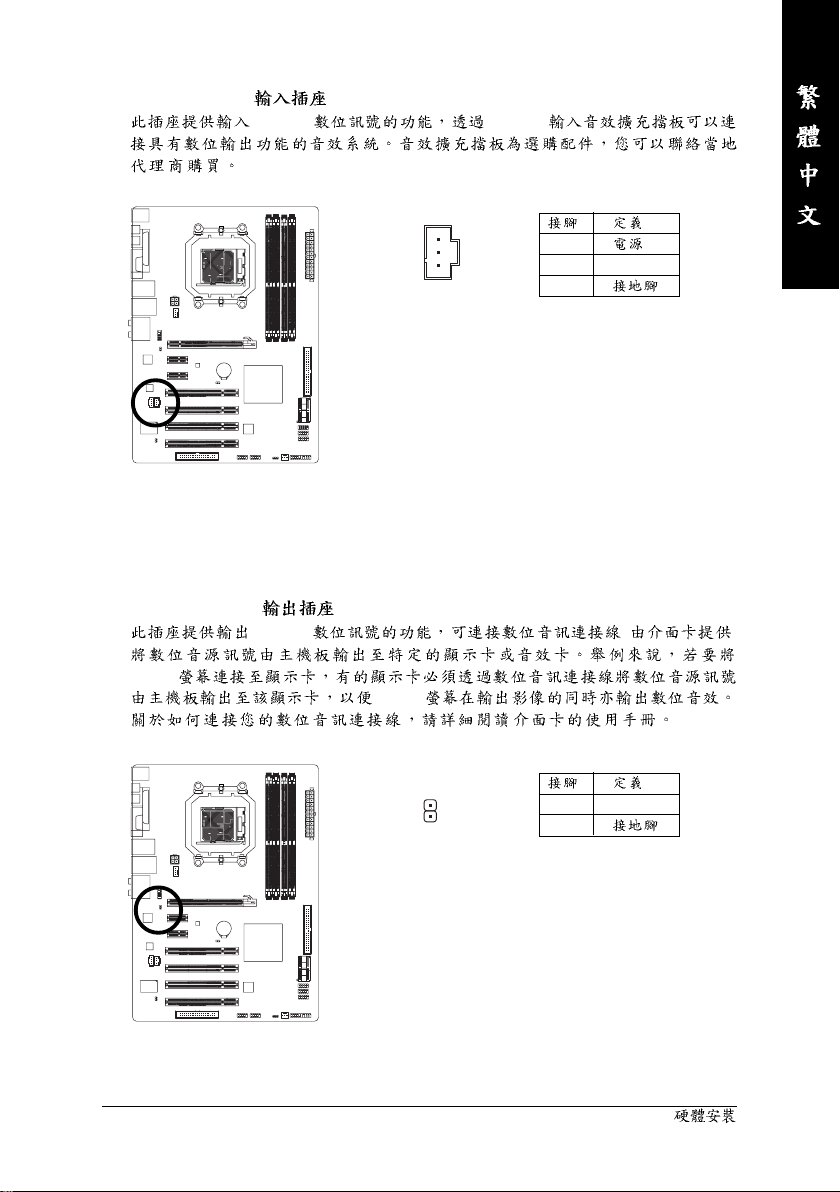
13) SPDIF_I (S/PDIF )
S/PDIF S/PDIF
14) SPDIF_O (S/PDIF )
S/PDIF ( )
HDMI
HDMI
1
2 SPDIFI
1
3
— 27 —
1 SPDIFO
1
2
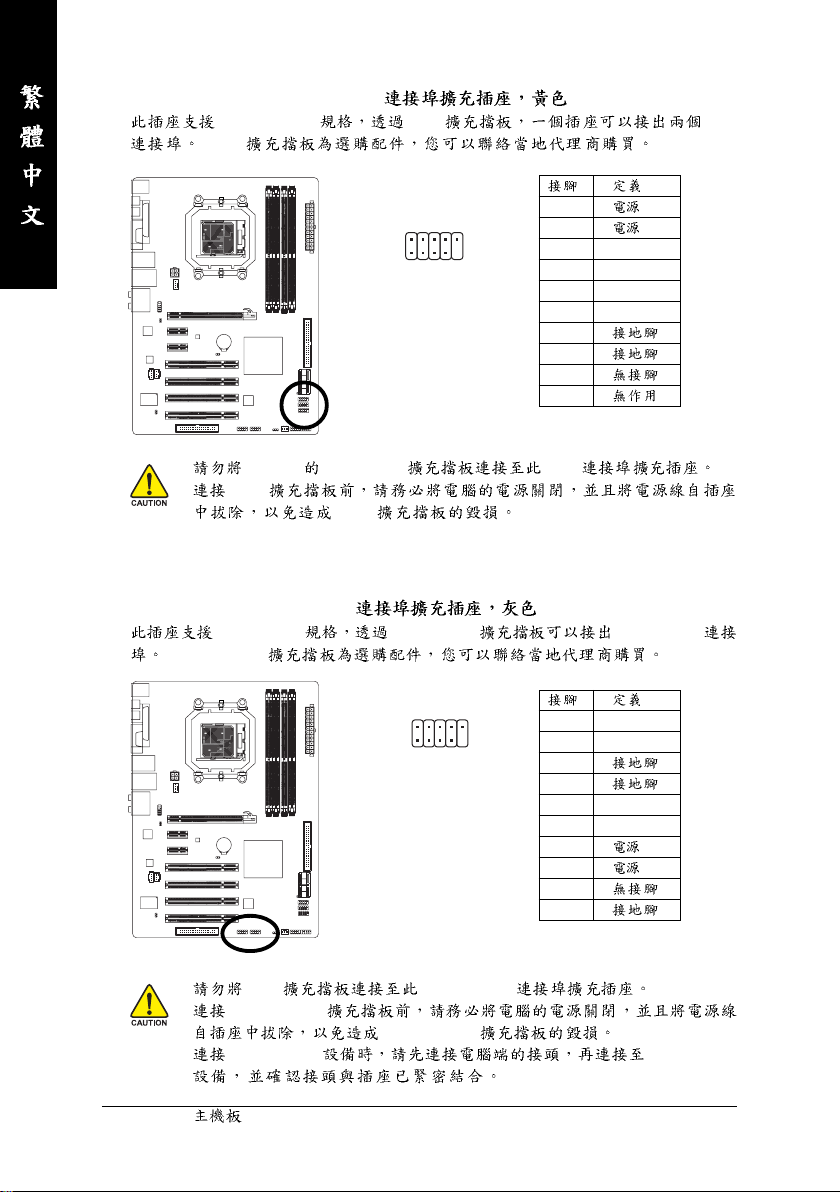
15) F_USB1 / F_USB2 / F_USB3 (USB )
USB 2.0/1.1 USB USB
USB
10
2
9
1
• 2×5-pin IEEE 1394 USB
• USB
USB
16) F1_1394 / F2_1394 (IEEE 1394a )
IEEE 1394a IEEE 1394a IEEE 1394a
IEEE 1394a
2
1
10
9
1 (5V)
2 (5V)
3 USB DX4 USB DY5 USB DX+
6 USB DY+
7
8
9
10
1 TPA+
2 TPA3
4
5 TPB+
6 TPB7 (12V)
8 (12V)
9
10
• USB IEEE 1394a
• IEEE 1394a
IEEE 1394a
• IEEE 1394a IEEE 1394a
GA-M56S-S3 — 28 —
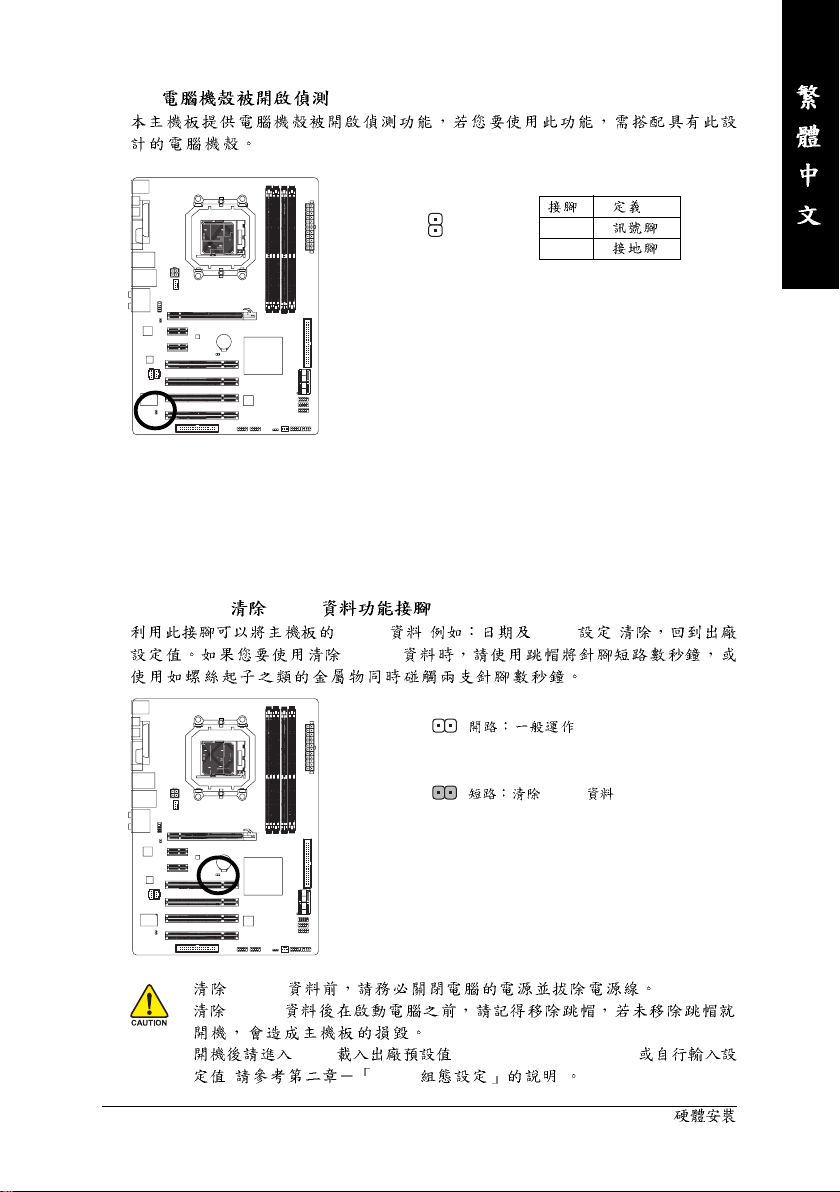
17) C I ( )
18) CLR_CMOS ( CMOS )
CMOS ( BIOS )
CMOS
1
1
2
CMOS
• CMOS
• CMOS
• BIOS (Load Optimized Defaults)
( BIOS )
— 29 —
Loading…
Gigabyte GA-M56S-S3 Motherboard PDF User Guides and Manuals for Free Download: Found (1) Manuals for Gigabyte GA-M56S-S3 Device Model (Operation & User’s Manual)
Gigabyte GA-M56S-S3 Operation & User’s Manual
Details:
- Manufacturer: Gigabyte
- Product Name/ID: Gigabyte GA-M56S-S3 / #351626
- Category: Motherboard
- File Path: gigabyte/ga-m56s-s3_351626.pdf
- Last Updated: 12 May 2025
- Description: Discover the full potential of your Gigabyte GA-M56S-S3 with this comprehensive manual, featuring step-by-step installation guides, user interface navigation tips, and essential safety precautions.
- Document Type: User Manual
- Pages: 96
Download PDF
Read Online
The Gigabyte GA-M56S-S3 motherboard is a well-structured option for users seeking a reliable board that supports a variety of computing needs. Designed for AMD’s AM2/AM2+ processors, this board stands out with its commendable performance and a range of features that cater to both mainstream and entry-level users. Whether you’re building a gaming rig or a basic office setup, the GA-M56S-S3 has something to offer.
First and foremost, one of the most appealing characteristics of the Gigabyte GA-M56S-S3 is its compatibility with a broad range of AMD processors. This versatility allows users to choose processors that best fit their budget and performance needs. The motherboard supports up to 8GB of DDR2 RAM, which is ample for everyday tasks and budget gaming. Additionally, this capacity ensures that multitasking is smooth, enabling users to run different applications simultaneously without significant lag.
Another significant feature of the GA-M56S-S3 is its integrated NVIDIA GeForce 6100 graphics card, which provides decent graphics performance for casual gaming and media consumption. While it may not rival dedicated graphics cards, it is suitable for users who do not require extensive graphical power. Additionally, the board’s support for multiple expansion slots, including PCIe x16, ensures users have the flexibility to upgrade their systems in the future.
- Key Features of Gigabyte GA-M56S-S3:
- Support for AMD AM2/AM2+ processors
- Up to 8GB of DDR2 RAM support
- Integrated NVIDIA GeForce 6100 graphics
- Multiple PCIe and PCI slots for expansion
- Support for SATA 3 Gb/s storage solutions
- Onboard audio and LAN connectivity
In terms of connectivity, the Gigabyte GA-M56S-S3 does not disappoint. It features several SATA ports to connect modern storage devices, ensuring fast data transfer speeds. The onboard audio provides an adequate listening experience for users, while the Ethernet port allows for stable network connections. Overall, the board’s connectivity options make it suitable for both home and office environments.
Installation and setup are straightforward, thanks to the clearly labeled components on the GA-M56S-S3. Gigabyte has made a commendable effort in designing an intuitive layout, which can significantly ease the process for newcomers to PC building. Coupled with quality documentation, setting up this motherboard should be a hassle-free experience for most users.
However, while the Gigabyte GA-M56S-S3 has a lot going for it, some limitations should be noted. The lack of support for newer DDR3 memory and advanced graphics cards may restrict users looking for a future-proof solution. Additionally, the performance of the integrated graphics may not satisfy hardcore gamers or professionals requiring high rendering capabilities.
Ultimately, the GA-M56S-S3 is a solid choice for budget-conscious consumers looking for reliability and decent performance in an easy-to-install package. It provides a robust foundation for basic computing tasks and casual gaming while offering users the option to upgrade components over time. For those pursuing casual usage, this motherboard stands as a commendable option in the crowded market of entry-level motherboards.
-
Драйверы
13
-
Инструкции по эксплуатации
1
Gigabyte GA-M56S-S3 инструкция по эксплуатации
(96 страниц)
- Языки:Английский
-
Тип:
PDF -
Размер:
6.59 MB
Просмотр
На NoDevice можно скачать инструкцию по эксплуатации для Gigabyte GA-M56S-S3. Руководство пользователя необходимо для ознакомления с правилами установки и эксплуатации Gigabyte GA-M56S-S3. Инструкции по использованию помогут правильно настроить Gigabyte GA-M56S-S3, исправить ошибки и выявить неполадки.