
20071112
Display Message Descriptions
Displays “Err”, if the input is invalid.
5011666101-K201
KPE-LE02
Digital Keypad for VFD-E Series
Instruction Sheet
Please thoroughly read this instruction sheet before installation and putting it into use.
The content of this instruction sheet and the driver file may be revised without prior notice. Please consult
our distributors or download the most updated instruction version at
http://www.delta.com.tw/industrialautomation.
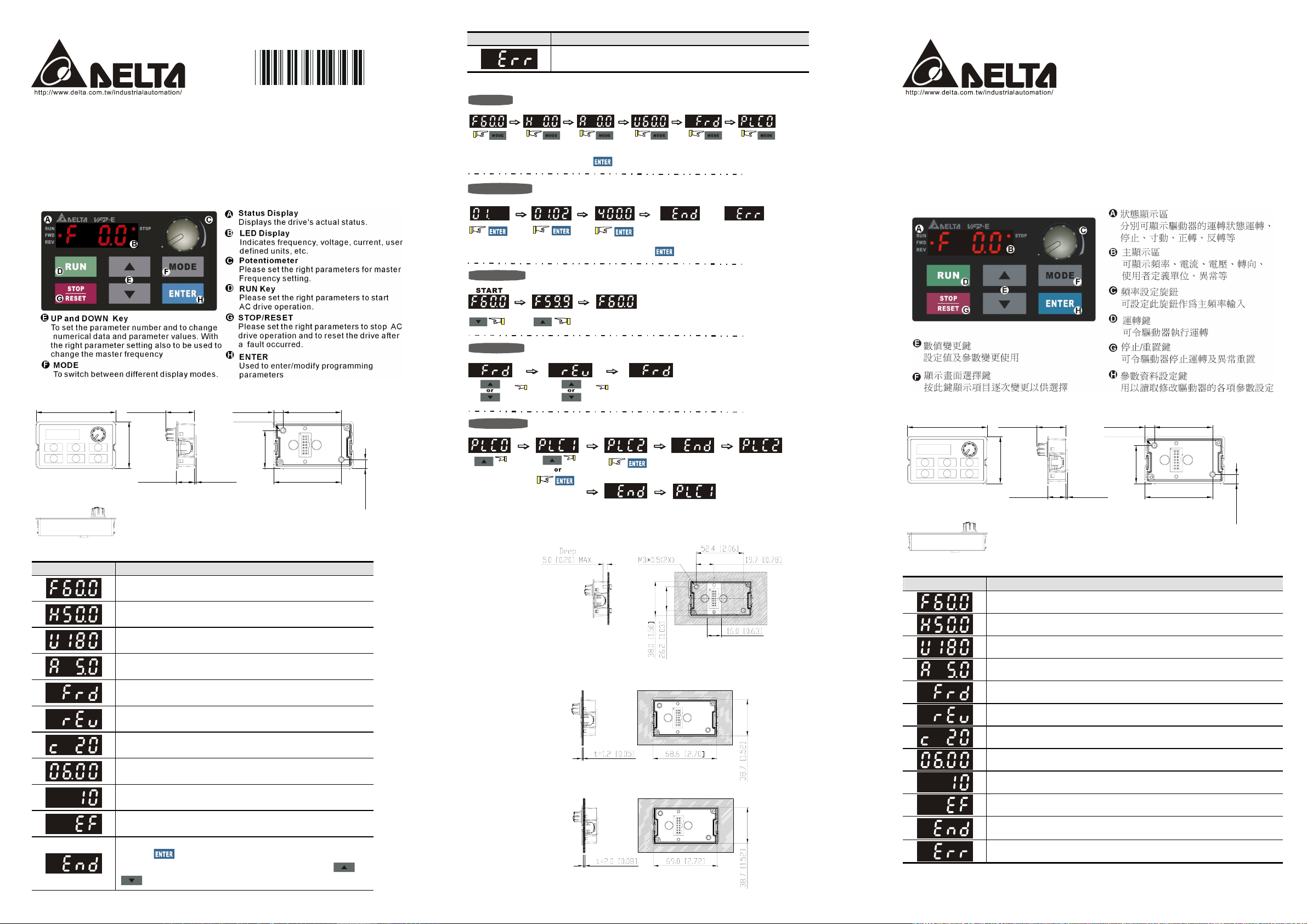
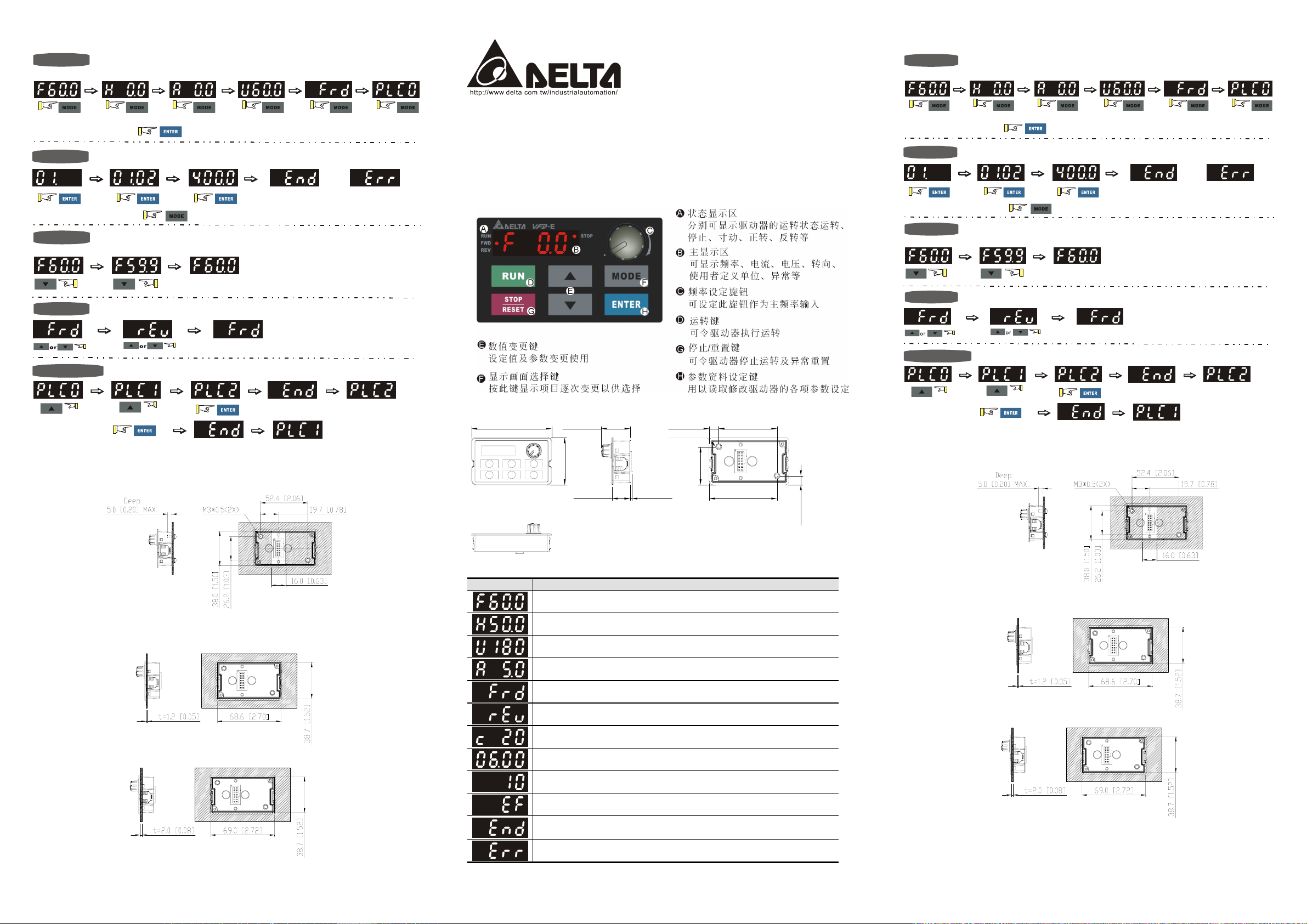
X Description of the Digital Keypad
Y Dimensions in mm [inch]
71.9 [2.83]
25.9 [1.02]
M3*0.5(2X)
52.4 [2.06]8.6 [0.34]
[ How to Operate the Digital Keypad
Setting Mode
START
In the selected mode, press
NOTE:
Setting parameters
to set the parameters.
KPE-LE02
GO START
請詳細閱讀下列說明後才使用本產品,以確保使用安全。
由於產品精益求精,當內容規格有所修正時,請洽詢代理商或至台達網站
(http://www.delta.com.tw/industrialautomation )下載最新版本。
VFD-E
說明書
系列之數位操作器
X 鍵盤面板外觀
or
Success to
set parameter.
NOTE
:
In the parameter setting mode, you can press
To change data
Setting direction
(When operation source is digital keypad)
to the selected mode.
Input data error
Y 鍵盤面板鍵盤面板尺寸
Setting PLC Mode
71.9 [2.83]
25.9 [1.02]
M3*0.5(2X)
52.4 [2.06]8.6 [0.34]
42.4 [1.67]
1.5 [0.06]16.3 [0.64]
Z Display Messages
Display Message Descriptions
Displays the AC drive Master Frequency.
Displays the actual output frequency at terminals U/T1, V/T2, and W/T3.
User defined unit (where U = F x Pr.00.05)
Displays the output current at terminals U/T1, V/T2, and W/T3.
Displays the AC motor drive forward run status.
Displays the AC motor drive reverse run status.
The counter value (C).
Displays the selected parameter.
Displays the actual stored value of the selected parameter.
External Fault.
Displays “End” for approximately 1 second if input has been accepted by
pressing
is automatically stored in memory. To modify an entry, use the
key. After a parameter value has been set, the new value
keys.
34.3 [1.35]
61.0 [2.40]
8.1 [0.32]
and
PLC2 mode active
42.4 [1.67]
1.5 [0.06]16.3 [0.64]
PLC1 mode active
\ Installation
Method 1. Direct installation (unit: mm[inch])
34.3 [1.35]
61.0 [2.40]
8.1 [0.32]
Z 功能顯示項目說明
Method 2. Mounting by the plate thickness (unit: mm[inch])
A. Thickness=1.2mm[0.05 inches]
B. Thickness=2.0mm[0.08 inches]
顯示項目
顯示驅動器目前的設定頻率
顯示驅動器實際輸出到馬達的頻率
顯示用戶定義之物理量 (U = F x 00-05)
顯示負載電流
正轉命令
反轉命令
顯示計數值
顯示參數項目
顯示參數內容值
外部異常顯示
若由顯示區讀到 End 的訊息(如左圖所示)大約一秒鐘,表示資料已被接受並
自動存入內部存貯器
若設定的資料不被接受或數值超出時即會顯示
說明
[ 鍵盤面板操作流程
畫面選擇
START
[ 鍵盤面板操作流程
畫面選擇
START
重點:在畫面選擇模式中
參數設定
重點:在參數設定模式中
資料修改
START
轉向設定
PLC
模式設定
()
or
進入參數設定
\ 安裝方法
方法 1. 直接安裝 (單位: mm[inch])
顯示輸入
資料正確
PLC1
GO START
PLC2
KPE-LE02
請詳細閱讀下列說明後才使用本產品,以確保使用安全。
由於產品精益求精,當內容規格有所修正時,請洽詢代理商或至台達網站
(http://www.delta.com.tw/industrialautomation)下載最新版本。
VFD-E
說明書
系列之數位操作器
X 鍵盤面板外觀
Y 鍵盤面板鍵盤面板尺寸
71.9 [2.83]
25.9 [1.02]
42.4 [1.67]
M3*0.5(2X)
34.3 [1.35]
1.5 [0.06]16.3 [0.64]
52.4 [2.06]8.6 [0.34]
61.0 [2.40]
重點:在畫面選擇模式中
參數設定
重點:在參數設定模式中
資料修改
START
()
轉向設定
PLC
模式設定
運轉命令來源為數位操作面版時
or
進入參數設定
可往返回畫面選擇模式
進入 模式
顯示輸入
資料正確
PLC1
或
進入 模式
GO START
顯示輸入
資料錯誤
PLC2
\ 安裝方法
方法 1. 直接安裝 (單位: mm[inch])
方法 2. 依板厚來安裝 (單位: mm[inch])
A. 板厚=1.2mm[0.05 inches]
B. 板厚=2.0mm[0.08 inches]
8.1 [0.32]
Z 功能顯示項目說明
顯示項目
顯示驅動器目前的設定頻率
顯示驅動器實際輸出到馬達的頻率
顯示用戶定義之物理量 (U = F x 00-05)
顯示負載電流
正轉命令
反轉命令
顯示計數值
顯示參數項目
顯示參數內容值
外部異常顯示
若由顯示區讀到 End 的訊息(如左圖所示)大約一秒鐘,表示資料已被接受並自
動存入內部存貯器
若設定的資料不被接受或數值超出時即會顯示
說明
方法 2. 依板厚來安裝 (單位: mm[inch])
A. 板厚=1.2mm[0.05 inches]
B. 板厚=2.0mm[0.08 inches]
Хорошее руководство по эксплуатации
Законодательство обязывает продавца передать покупателю, вместе с товаром, руководство по эксплуатации Delta Electronics KPE-LE02. Отсутствие инструкции либо неправильная информация, переданная потребителю, составляют основание для рекламации в связи с несоответствием устройства с договором. В законодательстве допускается предоставлении руководства в другой, чем бумажная форме, что, в последнее время, часто используется, предоставляя графическую или электронную форму инструкции Delta Electronics KPE-LE02 или обучающее видео для пользователей. Условием остается четкая и понятная форма.
Что такое руководство?
Слово происходит от латинского «instructio», тоесть привести в порядок. Следовательно в инструкции Delta Electronics KPE-LE02 можно найти описание этапов поведения. Цель инструкции заключается в облегчении запуска, использования оборудования либо выполнения определенной деятельности. Инструкция является набором информации о предмете/услуге, подсказкой.
К сожалению немного пользователей находит время для чтения инструкций Delta Electronics KPE-LE02, и хорошая инструкция позволяет не только узнать ряд дополнительных функций приобретенного устройства, но и позволяет избежать возникновения большинства поломок.
Из чего должно состоять идеальное руководство по эксплуатации?
Прежде всего в инструкции Delta Electronics KPE-LE02 должна находится:
— информация относительно технических данных устройства Delta Electronics KPE-LE02
— название производителя и год производства оборудования Delta Electronics KPE-LE02
— правила обслуживания, настройки и ухода за оборудованием Delta Electronics KPE-LE02
— знаки безопасности и сертификаты, подтверждающие соответствие стандартам
Почему мы не читаем инструкций?
Как правило из-за нехватки времени и уверенности в отдельных функциональностях приобретенных устройств. К сожалению само подсоединение и запуск Delta Electronics KPE-LE02 это слишком мало. Инструкция заключает ряд отдельных указаний, касающихся функциональности, принципов безопасности, способов ухода (даже то, какие средства стоит использовать), возможных поломок Delta Electronics KPE-LE02 и способов решения проблем, возникающих во время использования. И наконец то, в инструкции можно найти адресные данные сайта Delta Electronics, в случае отсутствия эффективности предлагаемых решений. Сейчас очень большой популярностью пользуются инструкции в форме интересных анимаций или видео материалов, которое лучше, чем брошюра воспринимаются пользователем. Такой вид инструкции позволяет пользователю просмотреть весь фильм, не пропуская спецификацию и сложные технические описания Delta Electronics KPE-LE02, как это часто бывает в случае бумажной версии.
Почему стоит читать инструкции?
Прежде всего здесь мы найдем ответы касательно конструкции, возможностей устройства Delta Electronics KPE-LE02, использования отдельных аксессуаров и ряд информации, позволяющей вполне использовать все функции и упрощения.
После удачной покупки оборудования/устройства стоит посвятить несколько минут для ознакомления с каждой частью инструкции Delta Electronics KPE-LE02. Сейчас их старательно готовят или переводят, чтобы они были не только понятными для пользователя, но и чтобы выполняли свою основную информационно-поддерживающую функцию.
- Topics
- manualsbase, manuals,
- Collection
- manuals_deltaelectronics; manuals; additional_collections
- Language
- English
- Item Size
- 6.1M
- Addeddate
- 2020-08-13 14:22:17
- Identifier
- manualsbase-id-227667
- Identifier-ark
- ark:/13960/t0mt2zd2b
- Ocr
- ABBYY FineReader 11.0 (Extended OCR)
- Ppi
- 600
- Scanner
- Internet Archive Python library 1.9.4
plus-circle Add Review
plus-circle Add Review
comment
Reviews
There are no reviews yet. Be the first one to
write a review.
100
Views
DOWNLOAD OPTIONS
download 1 file
ABBYY GZ download
Temporarily Unavailable
DAISY
For users with print-disabilities
Temporarily Unavailable
EPUB
download 1 file
FULL TEXT download
download 1 file
ITEM TILE download
download 1 file
PAGE NUMBERS JSON download
download 1 file
PDF download
download 1 file
SINGLE PAGE PROCESSED JP2 ZIP download
download 1 file
TORRENT download
download 12 Files
download 6 Original
SHOW ALL
IN COLLECTIONS
Manuals: Delta Electronics
The Manual Library
Additional Collections
Uploaded by
chris85
on
English
- Bedienungsanleitung Delta Electronics KPE-LE02
- Delta Electronics KPE-LE02 User Manual
- Manual Usuario Delta Electronics KPE-LE02
- Mode d’emploi Delta Electronics KPE-LE02
- Istruzioni Delta Electronics KPE-LE02
- инструкция Delta Electronics KPE-LE02
- Delta Electronics KPE-LE02の取扱説明書
- Handleiding Delta Electronics KPE-LE02
- Manual de uso Delta Electronics KPE-LE02
Need user manual? We will help you to find it and save your time.
- 2 pages
- 1.58 mb
The Delta Electronics KPE-LE02 and other products you use every day were certainly offered in the manual set. We know from our users’ experience that most of people do not really attach importance to these manuals. Many instructions, immediately after the purchase, go into the trash along with the box, which is a mistake. Get acquainted with the information concerning the manual for Delta Electronics KPE-LE02, which will help you to avoid troubles in the future.
Important note — be sure to read the Delta Electronics KPE-LE02 at least once
If you do not want to read brochures every time concerning a Delta Electronics KPE-LE02 or other products, it is enough to read them once only — just after buying the device. You will then acquire basic knowledge to maintain Delta Electronics KPE-LE02 in good operating condition to make it easily reach the intended life cycle. Then you can put away the manual on a shelf and use it again only in a situation where you’re not sure whether you perform maintenance of the product appropriately. Proper maintenance is a necessary part of your satisfaction from Delta Electronics KPE-LE02.
Once a year, clean the closet where you keep all your devices manuals and throw out the ones that you don’t use. This will help you maintain order in your home base of manuals.
Summary of Contents for Delta Electronics KPE-LE02
What does the Delta Electronics KPE-LE02 manual include? Why is it worth reading?
- Warranty and details concerning the maintenance of the product
It is a good idea to attach a document of purchase of the device to this page of the manual. If something bad happens while using a Delta Electronics KPE-LE02, you will have a set of documents that are required to obtain warranty repairs. It is in this part of the manual that you will also find information about the authorized service points of Delta Electronics KPE-LE02 as well as how you can properly maintain the device by yourself so as not to lose the warranty for the product. - Assembly guidelines and Setup
Do not lose your nerves and time for trying to assembly the product and launch it on your own. Use the instructions of the Delta Electronics KPE-LE02 manufacturer to run the product properly, without unnecessary risk of damage to the equipment. - Information concerning additional parts (included in the set and optional)
By looking through this part of the document, you will be able to verify whether your Delta Electronics KPE-LE02 has been delivered to you with a full set of accessories. You will also be able to find out what optional parts or accessories to Delta Electronics KPE-LE02 you will be able to find and buy to your device. - Troubleshooting
The most common problems that concern Delta Electronics KPE-LE02 and how to solve them. This is a very useful part of the manual which will save you a lot of time related to finding a solution. 90% of the problems with a Delta Electronics KPE-LE02 are common to many users. - Power requirements and energy class
Information concerning the amount of energy used as well as recommendations regarding the installation and supply for Delta Electronics KPE-LE02. Read to optimally use the Delta Electronics KPE-LE02 and not to consume more power than is necessary for the proper operation of the product. - Special functions of the Delta Electronics KPE-LE02
Here you can learn how to customize the product Delta Electronics KPE-LE02. You will learn what additional features can help you use the product Delta Electronics KPE-LE02 in a comfortable way and what functions of your device are the best to perform specific tasks.
As you can see, in the manual you will find information that will really help you use your product. It is good to get acquainted with it to avoid disappointments resulting from a shorter exploitation time of the product Delta Electronics KPE-LE02 than expected. However, if you cannot be convinced to collect manuals at your home, our website will provide you with help. You should find here the manuals for most of your devices, including Delta Electronics KPE-LE02.
Comments (0)
FAQ: Types of Manuals and Their Contents
Delta Electronics Digital Keypad KPE-LE02 Manuals come in various types, each serving a specific purpose to help users effectively operate and maintain their devices. Here are the common types of Delta Electronics Digital Keypad KPE-LE02 User Guides and the information they typically include:
- User Manuals: Provide comprehensive instructions on how to use the device, including setup, features, and operation. They often include troubleshooting tips, safety information, and maintenance guidelines.
- Service Instructions: Designed for technicians and repair professionals, these manuals offer detailed information on diagnosing and repairing issues with the device. They include schematics, parts lists, and step-by-step repair procedures.
- Installation Guides: Focus on the installation process of the device, providing detailed instructions and diagrams for proper setup. They are essential for ensuring the device is installed correctly and safely.
- Maintenance Manuals: Provide guidance on routine maintenance tasks to keep the device in optimal condition. They cover cleaning procedures, part replacements, and regular servicing tips.
- Quick Start Guides: Offer a concise overview of the essential steps needed to get the device up and running quickly. They are ideal for users who need immediate assistance with basic setup and operation.
Each type of Delta Electronics Digital Keypad KPE-LE02 instruction is designed to address specific needs, ensuring users have the necessary information to use, maintain, and repair their devices effectively.
Related Instructions for Delta Electronics Digital Keypad KPE-LE02:
1
Suppression Inductors LFU09V
Specification sheet #Z729OV: Suppression Inductors LFU09V Power Supply Specification sheet
1
104
18
2
Programmable Logic Controller DVP-EC3
Instruction sheet Delta Electronics Programmable Logic Controller DVP-EC3 User Guide (Instruction sheet), @758M52
2
1246
250
3
SMT Power Inductor SIW73
Specification sheet Delta Electronics Power Supply Specification sheet (File: delta-electronics-smt-power-inductor-siw73-product-specifications-1, 20.11.2024)
1
1115
257
4
SILM4015
Specification sheet Delta Electronics Network Card Specification sheet (File: delta-electronics-silm4015-specification-sheet-1, Tue 02.2025)
1
132
26
5
Analog Input/Output Mixed Module DVP06XA-S
Instruction sheet Analog Input/Output Mixed Module DVP06XA-S Instruction sheet — 2498MJ
2
1205
181
6
Exhaust Fan EHB Series
Specification Exhaust Fan EHB Series Specification — 3FD1A4
1
1414
326
7
Series H48SA
Datasheet Delta Electronics Series H48SA Manual (Datasheet), @P5SH7G
14
784
149
8
SMT Power Inductor SIA3223
Specification sheet Delta Electronics SMT Power Inductor SIA3223 Manual (Specification sheet), @1MJ9V5
1
56
14
9
92 x 92 x 15 MM Series
Specification sheet User Guide: Delta Electronics 92 x 92 x 15 MM Series (7968ZL, Upd.19/12/2024)
1
1266
292
10
DP-2616
Specification sheet Delta Electronics Projector Specification sheet (File: delta-electronics-dp-2616-specifications-2, 11.12.2024)
2
353
64
Keypad Devices by Other Brands:
|
VAT videofied XMB611 Installation Datasheet User Manual: VAT videofied XMB611 (TVWYKG, Upd.Thursday 26-12-2024) Product Summary 26 Dec 2024 | 4 |
|
|
Siemens SPCK620 Installation Instruction Siemens SPCK620 User Guide (Installation instruction), @H2TSA1 SPCK620/SPCK623 05 Apr 2025 | 8 |
|
|
Upgrading everyday security EL-2620 Introduction EL-2620 Introduction — XA7BH3 2 04 Mar 2025 | 3 |
|
|
Hamlet XKPADUSV Operation & User’s Manual Keypad #673272 NUMERIC KEYPAD 09 Dec 2024 | 2 |
Categories:
Measuring Instruments
Control Unit
Motherboard
Battery Charger
Transmitter
Stereo System