
Behringer U-Phoria UMC204HD
Quick Start Guide
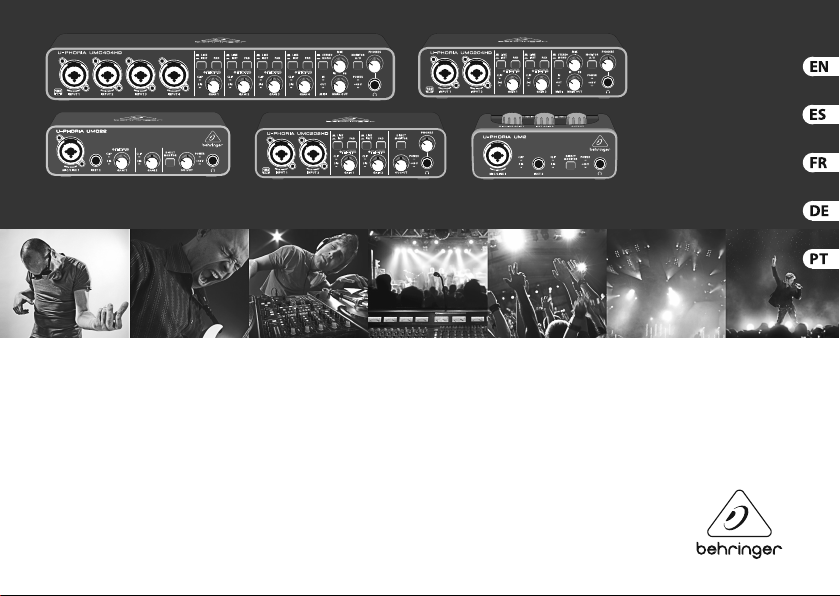
UMC404HD
Audiophile 4×4, 24-Bit/192 kHz
USB Audio/MIDI Interface with MIDAS Mic Preampli ers
UMC204HD
Audiophile 2×4, 24-Bit/192 kHz
USB Audio/MIDI Interface with MIDAS Mic Preampli ers
UMC202HD
Audiophile 2×2, 24-Bit/192 kHz
USB Audio Interface with MIDAS Mic Preampli ers
UMC22
Audiophile 2×2 USB Audio Interface with
MIDAS Mic Preampli er
UM2
Audiophile 2×2 USB Audio Interface with
XENYX Mic Preampli er
U-PHORIA
View the manual for the Behringer U-Phoria UMC204HD here, for free. This manual comes under the category DJ gear and has been rated by 21 people with an average of a 8.4.
This manual is available in the following languages: English. Do you have a question about the Behringer U-Phoria UMC204HD or do you need help?
Ask your question here
Product Images (2)


Behringer U-Phoria UMC204HD specifications
Below you will find the product specifications and the manual specifications of the Behringer U-Phoria UMC204HD.
The Behringer U-Phoria UMC204HD is a DJ gear designed for audio recording and playback. It is a compact and portable audio interface that allows for high-quality and low-latency audio performance. The UMC204HD features two combination XLR/TRS inputs with Midas-designed mic preamps, enabling professional-grade audio capture. Additionally, it offers two TRS outputs and a headphone output for monitoring purposes.
With a 24-bit/192 kHz resolution, the U-Phoria UMC204HD ensures precise and detailed audio reproduction. It also includes a dedicated switch for selecting between instrument and line level inputs, making it versatile for both vocals and instrument recording. The interface is compatible with popular recording software, providing seamless integration with your preferred digital audio workstation (DAW).
Equipped with a USB 2.0 connection, the UMC204HD offers fast and reliable data transfer. It is USB-powered, eliminating the need for an external power supply. The rugged metal chassis ensures durability and longevity, making it suitable for both studio and on-the-go use.
Overall, the Behringer U-Phoria UMC204HD is a professional audio interface that caters to the needs of DJs and recording enthusiasts. It provides high-quality audio capture, playback, and monitoring capabilities in a compact and portable package.
General
| Brand | Behringer |
| Model | U-Phoria UMC204HD |
| Product | DJ gear |
| Language | English |
| Filetype | User manual (PDF), Quickstart Guide (PDF) |
Frequently Asked Questions
Can’t find the answer to your question in the manual? You may find the answer to your question in the FAQs about the Behringer U-Phoria UMC204HD below.
How can I adjust the input levels on the U-Phoria UMC204HD?
To adjust the input levels, use the GAIN controls located on the front panel of the U-Phoria UMC204HD. Start with the knobs at their lowest setting and gradually increase the gain until your audio input reaches the desired level.
How do I connect my Behringer U-Phoria UMC204HD to my computer for recording?
Make sure to use the provided USB cable to connect the U-Phoria UMC204HD to your computer’s USB port. No additional drivers are required, as it is plug-and-play.
How can I monitor my audio while recording with the U-Phoria UMC204HD?
To monitor your audio, connect your headphones or speakers to the U-Phoria UMC204HD’s headphone output or the main output jacks. Adjust the MAIN MIX knob to set the desired blend of playback and direct monitoring.
Can I connect microphones to the Behringer U-Phoria UMC204HD?
Absolutely! The U-Phoria UMC204HD provides two XLR/TRS combo inputs with high-quality preamps that can accommodate microphones, as well as line-level and instrument-level signals.
How can I switch between different monitoring options with the U-Phoria UMC204HD?
To switch between different monitoring options, such as Direct Monitoring or DAW Monitoring, use the MONITOR MIX knob on the front panel of the U-Phoria UMC204HD. This allows you to control the balance between playback from your computer and direct monitoring of your input signals.
When is my volume too loud?
A volume above 80 decibels can be harmful to hearing. When the volume exceeds 120 decibels, direct damage can even occur. The chance of hearing damage depends on the listening frequency and duration.
Is the manual of the Behringer U-Phoria UMC204HD available in English?
Yes, the manual of the Behringer U-Phoria UMC204HD is available in English .
Is your question not listed? Ask your question here
Quick Start Guide
(Check out be hringer.com for Full Manua l)
U-PHORIA
UMC404HD
Audiophile 4×4, 24-Bit /192 kHz
USB Audio/MIDI Interface with MIDAS Mic Preampli ers
UMC204HD
Audiophile 2×4, 24-Bit/192 kHz
USB Audio/MIDI Interface with MIDAS Mic Preampli ers
UMC202HD
Audiophile 2×2, 24- Bit/192 kHz
USB Audio Inter face with MIDAS Mic Preampli ers
UMC22
Audiophile 2×2 USB Audio Interface with
MIDAS Mic Preampli er
UM2
Audiophile 2×2 USB Audio Interface with
XENYX Mic Preampli er
U-PHORIA UMC404HD/UMC204HD/UMC202HD/UMC22/UM2 Quick Start Guide 3
2
Important Safety
Instructions
Terminals marked with this
symbol carry electrical current
of su cient magnitude to
constitute risk of electric shock. Use only
high-quality professional speaker cables
with ¼» TS or twist-locking plugs
pre-installed. Allother installation or
modi cation should be performed only by
quali edpersonnel.
This symbol, wherever it
appears, alerts you to the
presence of uninsulated
dangerous voltage inside the enclosure voltage that may be su cient to constitute
a risk ofshock.
This symbol, wherever it
appears, alerts you to
important operating and
maintenance instructions in the
accompanying literature. Please read
themanual.
Caution
To reduce the risk of electric
shock, do not remove the
top cover (or the rear section). No user
serviceable parts inside. Refer servicing to
quali edpersonnel.
Caution
To reduce the risk of re or
electric shock, do not expose
this appliance to rain and moisture.
Theapparatus shall not be exposed to
dripping or splashing liquids and no
objects lled with liquids, such as vases,
shall be placed on the apparatus.
Caution
These service instructions are
for use by quali ed service
personnel only. Toreduce the risk of electric
shock do not perform any servicing other
than that contained in the operation
instructions. Repairshave to be performed
by quali ed servicepersonnel.
1. Read these instructions.
2. Keep these instructions.
3. Heed all warnings.
4. Follow all instructions.
5. Do not use this apparatus nearwater.
6. Clean only with dry cloth.
7. Do not block any ventilation
openings. Install in accordance with the
manufacturer’s instructions.
8. Do not install near any heat sources
such as radiators, heat registers, stoves,
orother apparatus (including ampli ers)
thatproduceheat.
9. Do not defeat the safety purpose of
the polarized or grounding-type plug.
Apolarized plug has two blades with one
wider than the other. A grounding-type
plug has two blades and a third grounding
prong. The wide blade or the third prong
are provided for your safety. Ifthe provided
plug does not t into your outlet, consult
an electrician for replacement of the
obsoleteoutlet.
10. Protect the power cord from being
walked on or pinched particularly at plugs,
convenience receptacles, and the point
where they exit from theapparatus.
11. Use only attachments/accessories
speci ed by themanufacturer.
12. Use only with
the cart, stand,
tripod, bracket,
ortable speci ed by
the manufacturer,
orsold with the apparatus. When a cart
is used, usecaution when moving the
cart/apparatus combination to avoid injury
from tip-over.
13. Unplug this apparatus during
lightning storms or when unused for long
periods oftime.
14. Refer all servicing to quali ed service
personnel. Servicing is required when
the apparatus has been damaged in any
way, such as power supply cord or plug
is damaged, liquid has been spilled or
objects have fallen into the apparatus,
the apparatus has been exposed to rain or
moisture, does not operate normally, orhas
beendropped.
15. The apparatus shall be connected to a
MAINS socket outlet with a protective
earthingconnection.
16. Where the MAINS
plug or an appliance
coupler is used as the
disconnect device,
thedisconnect device shall
remain readilyoperable.
17. Correct disposal of this product:
This symbol indicates that this product
must not be disposed of with household
waste, according to the WEEE Directive
(2012/19/EU) and your national law. This
product should be taken to a collection
center licensed for the recycling of waste
electrical and electronic equipment (EEE).
The mishandling of this type of waste
could have a possible negative impact on
the environment and human health due
to potentially hazardous substances that
are generally associated with EEE. At the
same time, your cooperation in the correct
disposal of this product will contribute to
the e cient use of natural resources. For
more information about where you can
take your waste equipment for recycling,
please contact your local city o ce, or your
household waste collection service.
U-PHORIA UMC404HD/UMC204HD/UMC202HD/UMC22/UM2 Quick Start Guide 5
4
LEGAL DISCLAIMER
MUSIC Group accepts no liability for
any loss which may be su ered by any
person who relies either wholly or in
part upon any description, photograph,
or statement contained herein.
Technical speci cations, appearances and
other information are subject to change
without notice. All trademarks are the
property of their respective owners.
MIDAS, KLARK TEKNIK, TURBOSOUND,
BEHRINGER, BUGERA and DDA are
trademarks or registered trademarks of
MUSIC Group IP Ltd. © MUSIC Group IP Ltd.
2014 All rights reserved.
LIMITED WARRANTY
For the applicable warranty terms and
conditions and additional information
regarding MUSIC Group’s Limited Warranty,
please see complete details online at
music-group.com/warranty.
Instrucciones de seguridad
Las terminales marcadas con
este símbolo transportan
corriente eléctrica de
magnitud su ciente como para constituir
un riesgo de descarga eléctrica. Utilicesolo
cables de altavoz profesionales y de alta
calidad con conectores TS de 6,3 mm o de
bayoneta pre jados. Cualquier otra
instalación o modi cación debe ser
realizada únicamente por un
técnicocuali cado.
Este símbolo, siempre que
aparece, leadvierte de la
presencia de voltaje peligroso
sin aislar dentro de la caja; estevoltaje
puede ser su ciente para constituir un
riesgo dedescarga.
Este símbolo, siempre que
aparece, leadvierte sobre
instrucciones operativas y de
mantenimiento que aparecen en la
documentación adjunta. Por favor,
leaelmanual.
Atención
Para reducir el riesgo de
descarga eléctrica, no quite
la tapa (olaparte posterior). Nohay
piezas en el interior del equipo que
puedan ser reparadas por el usuario.
Sies necesario, póngase en contacto con
personalcuali cado.
Atención
Para reducir el riesgo de
incendio o descarga eléctrica,
no exponga este aparato a la lluvia,
humedad o alguna otra fuente que pueda
salpicar o derramar algún líquido sobre
el aparato. Nocoloque ningún tipo de
recipiente para líquidos sobre elaparato.
Atención
Las instrucciones de servicio
deben llevarlas a cabo
exclusivamente personal cuali cado.
Paraevitar el riesgo de una descarga
eléctrica, no realice reparaciones que no
se encuentren descritas en el manual
de operaciones. Lasreparaciones deben
ser realizadas exclusivamente por
personalcuali cado.
1. Lea las instrucciones.
2. Conserve estas instrucciones.
3. Preste atención a todas
lasadvertencias.
4. Siga todas las instrucciones.
5. No use este aparato cerca del agua.
6. Limpie este aparato con un pañoseco.
7. No bloquee las aberturas de
ventilación. Instale el equipo de acuerdo
con las instrucciones del fabricante.
8. No instale este equipo cerca de
fuentes de calor tales como radiadores,
acumuladores de calor, estufas u otros
aparatos (incluyendo ampli cadores)
quepuedan producir calor.
9. No elimine o deshabilite nunca la
conexión a tierra del aparato o del cable
de alimentación de corriente. Unenchufe
polarizado tiene dos polos, uno de los
cuales tiene un contacto más ancho que
el otro. Una clavija con puesta a tierra
dispone de tres contactos: dos polos y
la puesta a tierra. El contacto ancho y el
tercer contacto, respectivamente, son los
que garantizan una mayor seguridad.
Siel enchufe suministrado con el equipo
consulte con un electricista para cambiar la
toma de corriente obsoleta.
10. Coloque el cable de suministro de
energía de manera que no pueda ser
pisado y que esté protegido de objetos
a lados. Asegúrese de que el cable de
suministro de energía esté protegido,
especialmente en la zona de la clavija y en
el punto donde sale del aparato.
11. Use únicamente los dispositivos o
accesorios especi cados por elfabricante.
12. Use únicamente
la carretilla,
plataforma, trípode,
soporte o mesa
especi cados por
el fabricante o suministrados junto
con el equipo. Altransportar el equipo,
tengacuidado para evitar daños y caídas al
tropezar con algúnobstáculo.
no concuerda con la toma de corriente,
U-PHORIA UMC404HD/UMC204HD/UMC202HD/UMC22/UM2 Quick Start Guide 7
6
13. Desenchufe el equipo durante
tormentas o si no va a utilizarlo durante un
periodo largo.
14. Confíe las reparaciones únicamente
a servicios técnicos cuali cados. Launidad
requiere mantenimiento siempre que
haya sufrido algún daño, si el cable
de suministro de energía o el enchufe
presentaran daños, sehubiera derramado
un líquido o hubieran caído objetos dentro
del equipo, si el aparato hubiera estado
expuesto a la humedad o la lluvia, si ha
dejado de funcionar de manera normal o si
ha sufrido algún golpe o caída.
15. Al conectar la unidad a la toma de
corriente eléctrica asegúrese de que la
conexión disponga de una unión a tierra.
16. Si el enchufe o conector de red
sirve como único medio de desconexión,
éste debe ser accesiblefácilmente.
17. Cómo debe
deshacerse de este
aparato: Este símbolo
indica que este aparato no
debe ser tratado como
basura orgánica,
según lo indicado en la Directiva WEEE
(2012/19/EU) y a las normativas aplicables
en su país. Enlugar de ello deberá llevarlo
al punto limpio más cercano para el
reciclaje de sus elementos eléctricos/
electrónicos (EEE). Al hacer esto estará
ayudando a prevenir las posibles
consecuencias negativas para el medio
ambiente y la salud que podrían ser
provocadas por una gestión inadecuada de
este tipo de aparatos. Además, el reciclaje
de materiales ayudará a conservar los
recursos naturales. Para más información
acerca del reciclaje de este aparato,
póngase en contacto con el Ayuntamiento
de su ciudad o con el punto limpio local.
NEGACI
N LEGAL
MUSIC Group no admite ningún tipo
de responsabilidad por cualquier daño
o pérdida que pudiera sufrir cualquier
persona por con ar total o parcialmente
en la descripciones, fotografías o
a rmaciones contenidas en este
documento. Las especi caciones técnicas,
imágenes y otras informaciones contenidas
en este documento están sujetas a
modi caciones sin previo aviso. Todas las
marcas comerciales que aparecen aquí
son propiedad de sus respectivos dueños.
MIDAS, KLARK TEKNIK, TURBOSOUND,
BEHRINGER, BUGERA y DDA son marcas
comerciales o marcas registradas de
MUSIC Group IP Ltd. © MUSIC Group IP Ltd.
2014 Reservados todos los derechos.
GARANTÍA LIMITADA
Si quiere conocer los detalles y condiciones
aplicables de la garantía así como
información adicional sobre la Garantía
limitada de MUSIC Group, consulte
online toda la información en la web
music-group.com/warranty.
Consignes de sécurité
Les points repérés par ce
symbole portent une tension
électrique su sante pour
constituer un risque d’électrocution.
Utilisez uniquement des câbles d’enceintes
professionnels de haute qualité avec ches
Jack mono 6,35 mm ou ches à
verrouillages déjà installées. Touteautre
installation ou modi cation doit être
e ectuée uniquement par un
personnelquali é.
Ce symbole avertit de la
présence d’une tension
dangereuse et non isolée à
l’intérieur de l’appareil — elle peut
provoquer des chocs électriques.
Attention
Ce symbol signale les
consignes d’utilisation
et d’entre ! Tienimportantes dans la
documentation fournie. Lisez les consignes
de sécurité du manuel d’utilisation
del’appareil.
Attention
Pour éviter tout risque de
choc électrique, ne pas
ouvrir le capot de l’appareil ni démonter
le panneau arrière. L’intérieur de l’appareil
ne possède aucun élément réparable
par l’utilisateur.
Laissertoute réparation à un
professionnelquali é.
Attention
Pour réduire les risques de
feu et de choc électrique,
n’exposez pas cet appareil à la pluie,
à la moisissure, auxgouttes ou aux
éclaboussures. Ne posez pas de récipient
contenant un liquide sur l’appareil
(unvase par exemple).
Attention
Ces consignes de sécurité et
d’entretien sont destinées à un
personnel quali é. Pour éviter tout risque
de choc électrique, n’e ectuez aucune
réparation sur l’appareil qui ne soit décrite
par le manuel d’utilisation. Les éventuelles
réparations doivent être e ectuées
uniquement par un technicienspécialisé.
1. Lisez ces consignes.
2. Conservez ces consignes.
3. Respectez tous les avertissements.
U-PHORIA UMC404HD/UMC204HD/UMC202HD/UMC22/UM2 Quick Start Guide 9
8
4. Respectez toutes les
consignesd’utilisation.
5. N’utilisez jamais l’appareil à proximité
d’un liquide.
6. Nettoyez l’appareil avec un chi onsec.
7. Veillez à ne pas empêcher la bonne
ventilation de l’appareil via ses ouïes
de ventilation. Respectezles consignes
du fabricant concernant l’installation
del’appareil.
8. Ne placez pas l’appareil à proximité
d’une source de chaleur telle qu’un
chau age, unecuisinière ou tout appareil
dégageant de la chaleur (ycompris un
ampli depuissance).
9. Ne supprimez jamais la sécurité
des prises bipolaires ou des prises terre.
Lesprises bipolaires possèdent deux
contacts de largeur di érente. Leplus
large est le contact de sécurité. Lesprises
terre possèdent deux contacts plus une
mise à la terre servant de sécurité. Si la
prise du bloc d’alimentation ou du cordon
d’ali-mentation fourni ne correspond pas à
celles de votre installation électrique, faites
appel à un électricien pour e ectuer le
changement de prise.
10. Installez le cordon d’alimentation
de telle façon que personne ne puisse
marcher dessus et qu’il soit protégé
d’arêtes coupantes. Assurez-vous que le
cordon d’alimentation est sufsamment
protégé, notamment au niveau de sa prise
électrique et de l’endroit où il est relié à
l’appareil; celaest également valable pour
une éventuelle rallongeélectrique.
11. Utilisez exclusivement des accessoires
et des appareils supplémentaires
recommandés par lefabricant.
12. Utilisez
exclusivement des
chariots, des diables,
desprésentoirs,
despieds et des
surfaces de travail recommandés par
le fabricant ou livrés avec le produit.
Déplacezprécautionneusement tout
chariot ou diable chargé pour éviter
d’éventuelles blessures en cas dechute.
13. Débranchez l’appareil de la tension
secteur en cas d’orage ou si l’appareil reste
inutilisé pendant une longue période
detemps.
14. Les travaux d’entretien de l’appareil
doivent être e ectués uniquement par
du personnel qualié. Aucunentretien
n’est nécessaire sauf si l’appareil est
endommagé de quelque façon que ce soit
(dommagessur le cordon d’alimentation
ou la prise par exemple), siun liquide
ou un objet a pénétré à l’intérieur du
châssis, si l’appareil a été exposé à la pluie
ou à l’humidité, s’il ne fonctionne pas
correctement ou à la suite d’une chute.
15. L’appareil doit être connecté à une
prise secteur dotée d’une protection par
mise à laterre.
16. La prise électrique ou la prise IEC de
tout appareil dénué de bouton marche/
arrêt doit rester accessible enpermanence.
17. Mise au rebut
appropriée de ce produit:
Ce symbole indique qu’en
accord avec la directive
DEEE (2012/19/EU) et les
lois en vigueur dans votre
pays, ce produit ne doit pas être jeté avec
les déchets ménagers. Ce produit doit être
déposé dans un point de collecte agréé
pour le recyclage des déchets
d’équipements électriques et électroniques
(EEE). Une mauvaise manipulation de ce
type de déchets pourrait avoir un impact
négatif sur l’environnement et la santé à
cause des substances potentiellement
dangereuses généralement associées à ces
équipements. En même temps, votre
coopération dans la mise au rebut de ce
produit contribuera à l’utilisation e cace
des ressources naturelles. Pour plus
d’informations sur l’endroit où vous pouvez
déposer vos déchets d’équipements pour le
recyclage, veuillez contacter votre mairie
ou votre centre local de collecte
desdéchets.
DÉNI LÉGAL
MUSIC Group ne peut être tenu pour
responsable pour toute perte pouvant
être subie par toute personne se ant en
partie ou en totalité à toute description,
photographie ou a rmation contenue
dans ce document. Les caractéristiques,
l’apparence et d’autres informations
peuvent faire l’objet de modi cations
sans noti cation. Toutes les marques
appartiennent à leurs propriétaires
respectifs. MIDAS, KLARK TEKNIK,
TURBOSOUND, BEHRINGER, BUGERA et DDA
sont des marques ou marques déposées de
MUSIC Group IP Ltd. © MUSIC Group IP Ltd.
2014 Tous droits réservés.
GARANTIE LIMIT
E
Pour connaître les termes et conditions
de garantie applicables, ainsi que
les informations supplémentaires et
détaillées sur la Garantie Limitée de
MUSIC Group, consultez le site Internet
music-group.com/warranty.
Wichtige
Sicherheitshinweise
Vorsicht
Die mit dem Symbol
markierten Anschlüsse
führen so viel Spannung, dassdie
Gefahr eines Stromschlags besteht.
Verwenden Sie nur hochwertige,
professionelle Lautsprecherkabel
U-PHORIA UMC404HD/UMC204HD/UMC202HD/UMC22/UM2 Quick Start Guide 11
10
mit vorinstallierten 6,35 mm MONOKlinkensteckern oder Lautsprecherstecker
mit Drehverriegelung. Alle anderen
Installationen oder Modi kationen sollten
nur von quali ziertem Fachpersonal
ausgeführtwerden.
Achtung
Um eine Gefährdung durch
Stromschlag auszuschließen,
darf die Geräteabdeckung bzw.
Geräterückwandnicht abgenommen
werden. ImInnern des Geräts be nden
sich keine vom Benutzer reparierbaren
Teile. Reparaturarbeiten dürfen
nur von quali ziertem Personal
ausgeführtwerden.
Achtung
Um eine Gefährdung durch
Feuer bzw. Stromschlag
auszuschließen, darf dieses Gerät weder
Regen oder Feuchtigkeit ausgesetzt
werden noch sollten Spritzwasser oder
tropfende Flüssigkeiten in das Gerät
gelangen können. Stellen Sie keine
mit Flüssigkeit gefüllten Gegenstände,
wie z. B. Vasen, aufdasGerät.
Achtung
Die Service-Hinweise sind
nur durch quali ziertes
Personal zu befolgen. Umeine Gefährdung
durch Stromschlag zu vermeiden,
führen Sie bitte keinerlei Reparaturen
an dem Gerät durch, dienicht in der
Bedienungsanleitung beschrieben sind.
Reparaturen sind nur von quali ziertem
Fachpersonaldurchzuführen.
1. Lesen Sie diese Hinweise.
2. Bewahren Sie diese Hinweise auf.
3. Beachten Sie alle Warnhinweise.
4. Befolgen Sie alle Bedienungshinweise.
5. Betreiben Sie das Gerät nicht in der
Nähe von Wasser.
6. Reinigen Sie das Gerät mit einem
trockenen Tuch.
7. Blockieren Sie nicht die
Belüftungsschlitze. BeachtenSie beim
Einbau des Gerätes die Herstellerhinweise.
8. Stellen Sie das Gerät nicht in
der Nähe von Wärmequellen auf.
SolcheWärmequellen sind z. B. Heizkörper,
Herde oder andere Wärme erzeugende
Geräte (auch Verstärker).
9. Entfernen Sie in keinem Fall die
Sicherheitsvorrichtung von Zweipol- oder
geerdeten Steckern. Ein Zweipolstecker
hat zwei unterschiedlich breite
Steckkontakte. Ein geerdeter Stecker hat
zwei Steckkontakte und einen dritten
Erdungskontakt. Derbreitere Steckkontakt
oder der zusätzliche Erdungskontakt dient
Ihrer Sicherheit. Fallsdas mitgelieferte
Steckerformat nicht zu Ihrer Steckdose
passt, wenden Sie sich bitte an
einen Elektriker, damit die Steckdose
entsprechend ausgetauscht wird.
10. Verlegen Sie das Netzkabel so, dass es
vor Tritten und schar fen Kanten geschützt
ist und nicht beschädigt werden kann.
Achten Sie bitte insbesondere im Bereich
der Stecker, Verlängerungskabel und an
der Stelle, an der das Netzkabel das Gerät
verlässt, aufausreichendenSchutz.
11. Das Gerät muss jederzeit mit
intaktem Schutzleiter an das Stromnetz
angeschlossensein.
12. Sollte der Hauptnetzstecker oder
eine Gerätesteckdose die Funktionseinheit
zum Abschalten sein, muss diese immer
zugänglichsein.
13. Verwenden Sie nur Zusatzgeräte/
Zubehörteile, dielaut Hersteller
geeignetsind.
14. Verwenden
Sie nur Wagen,
Standvorrichtungen,
Stative, Halteroder
Tische, die vom
Hersteller benannt oder im Lieferumfang
des Geräts enthalten sind. Falls Sie einen
Wagen benutzen, seien Sie vorsichtig beim
Bewegen der Wagen-Gerätkombination,
umVerletzungen durch Stolpern
zuvermeiden.
15. Ziehen Sie den Netzstecker bei
Gewitter oder wenn Sie das Gerät längere
Zeit nichtbenutzen.
16. Lassen Sie alle Wartungsarbeiten
nur von quali ziertem Service-Personal
ausführen. EineWartung ist notwendig,
wenn das Gerät in irgendeiner Weise
beschädigt wurde (z. B. Beschädigung des
Netzkabels oder Steckers), Gegenstände
oder Flüssigkeit in das Geräteinnere
gelangt sind, das Gerät Regen oder
Feuchtigkeit ausgesetzt wurde, das Gerät
nicht ordnungsgemäß funktioniert oder
auf den Boden gefallenist.
jeweiligen nationalen Gesetze nicht
zusammen mit Ihren Haushaltsabfällen zu
entsorgen. Dieses Produkt sollte bei einer
autorisierten Sammelstelle für Recycling
elektrischer und elektronischer Geräte
(EEE) abgegeben werden.
Wegenbedenklicher Substanzen,
diegenerell mit elektrischen und
elektronischen Geräten in Verbindung
stehen, könnte eine unsachgemäße
Behandlung dieser Abfallart eine negative
Auswirkung auf Umwelt und Gesundheit
haben. Gleichzeitig gewährleistet Ihr
Beitrag zur richtigen Entsorgung dieses
Produkts die e ektive Nutzung natürlicher
Ressourcen. Fürweitere Informationen zur
Entsorgung Ihrer Geräte bei einer
Recycling-Stelle nehmen Sie bitte Kontakt
zum zuständigen städtischen Büro,
17. Korrekte Entsorgung
dieses Produkts: Dieses
Symbol weist darauf hin,
dasProdukt entsprechend
der WEEE Direktive
(2012/19/EU) und der
U-PHORIA UMC404HD/UMC204HD/UMC202HD/UMC22/UM2 Quick Start Guide 13
12
Entsorgungsamt oder zu Ihrem
Haushaltsabfallentsorgerauf.
HAFTUNGSAUSSCHLUSS
MUSIC Group übernimmt keine Haftung
für Verluste, die Personen entstanden
sind, die sich ganz oder teilweise auf
hier enthaltene Beschreibungen,
Fotos oder Aussagen verlassen haben.
Technische Daten, Erscheinungsbild und
andere Informationen können ohne
vorherige Ankündigung geändert werden.
Alle Warenzeichen sind Eigentum der
jeweiligen Inhaber. MIDAS, KLARK TEKNIK,
TURBOSOUND, BEHRINGER, BUGERA
und DDA sind Warenzeichen oder
eingetragene Warenzeichen der
MUSIC Group IP Ltd. © MUSIC Group IP Ltd.
2014 Alle Rechte vorbehalten.
BESCHR
NKTE GARANTIE
Die geltenden Garantiebedingungen und
zusätzliche Informationen bezüglich der
von MUSIC Group gewährten beschränkten
Garantie nden Sie online unter
music-group.com/warranty.
Instruções de Segurança
Importantes
Aviso!
Terminais marcados com o
símbolo carregam corrente
elétrica de magnitude su ciente para
constituir um risco de choque elétrico.
Use apenas cabos de alto-falantes de
alta qualidade com plugues TS de ¼»
ou plugues com trava de torção pré-
instalados. Todas as outras instalações e
modi cações devem ser efetuadas por
pessoasquali cadas.
Este símbolo, onde quer que o
encontre, alerta-o para a
leitura das instruções de
manuseamento que acompanham o
equipamento. Por favor leia o manual
deinstruções.
Atenção
De forma a diminuir o risco de
choque eléctrico, nãoremover
a cobertura (ouasecção de trás). Não
existem peças substituíveis por parte do
utilizador no seu interior. Para esse efeito
recorrer a um técnicoquali cado.
Atenção
Para reduzir o risco de
incêndios ou choques
eléctricos o aparelho não deve ser exposto
à chuva nem à humidade. Alémdisso, não
deve ser sujeito a salpicos, nem devem ser
colocados em cima do aparelho objectos
contendo líquidos, taiscomojarras.
Atenção
Estas instruções de operação
devem ser utilizadas,
emexclusivo, por técnicos de assistência
quali cados. Para evitar choques eléc tricos
não proceda a reparações ou intervenções,
que não as indicadas nas instruções de
operação, salvo se possuir as quali -cações
necessárias. Para evitar choques eléctricos
não proceda a reparações ou intervenções,
que não as indicadas nas instruções de
operação. Só o deverá fazer se possuir as
quali caçõesnecessárias.
1. Leia estas instruções.
2. Guarde estas instruções.
3. Preste atenção a todos os avisos.
4. Siga todas as instruções.
5. Não utilize este dispositivo perto
deágua.
6. Limpe apenas com um pano seco.
7. Não obstrua as entradas de ventilação.
Instale de acordo com as instruções
dofabricante.
8. Não instale perto de quaisquer fontes
de calor tais como radiadores, bocasde
ar quente, fogões de sala ou outros
aparelhos (incluindoampli cadores)
queproduzamcalor.
9. Não anule o objectivo de segurança
das chas polarizadas ou do tipo de ligação
à terra. Uma cha polarizada dispõe de
duas palhetas sendo uma mais larga do
que a outra. Uma cha do tipo ligação à
terra dispõe de duas palhetas e um terceiro
dente de ligação à terra. A palheta larga
ou o terceiro dente são fornecidos para sua
segurança. Sea cha fornecida não encaixar
na sua tomada, consulte um electricista
para a substituição da tomadaobsoleta.
10. Proteja o cabo de alimentação de
pisadelas ou apertos, especialmente
nas chas, extensões, e no local de
saída da unidade. Certi que-se de
que o cabo eléctrico está protegido.
Veri quepar ticularmente nas chas,
nosreceptáculos e no ponto em que o cabo
sai doaparelho.
11. O aparelho tem de estar sempre
conectado à rede eléctrica com o condutor
de protecção intacto.
12. Se utilizar uma cha de rede principal
ou uma tomada de aparelhos para desligar
a unidade de funcionamento, esta deve
estar sempreacessível.
13. Utilize apenas ligações/acessórios
especi cados pelofabricante.
14. Utilize apenas
com o carrinho,
estrutura, tripé,
suporte, ou mesa
especi cados pelo
fabricante ou vendidos com o dispositivo.
Quandoutilizar um carrinho, tenha
cuidado ao mover o conjunto carrinho/
dispositivo para evitar danos provocados
pela terpidação.
U-PHORIA UMC404HD/UMC204HD/UMC202HD/UMC22/UM2 Quick Start Guide 15
14
15. Desligue este dispositivo durante
as trovoadas ou quando não for utilizado
durante longos períodos detempo.
16. Qualquer tipo de reparação deve ser
sempre efectuado por pessoal quali cado.
Énecessária uma reparação sempre que
a unidade tiver sido de alguma forma
dani cada, como por exemplo: no caso
do cabo de alimentação ou cha se
encontrarem dani cados; naeventualidade
de líquido ter sido derramado ou objectos
terem caído para dentro do dispositivo; no
caso da unidade ter estado exposta à chuva
ou à humidade; seesta não funcionar
normalmente, ou se tiver caído.
17. Correcta eliminação
deste produto: este
símbolo indica que o
produto não deve ser
eliminado juntamente
com os resíduos
domésticos, segundo a Directiva REEE
(2012/19/EU) e a legislação nacional. Este
produto deverá ser levado para um centro
de recolha licenciado para a reciclagem de
resíduos de equipamentos eléctricos e
electrónicos (EEE). Otratamento incorrecto
deste tipo de resíduos pode ter um
eventual impacto negativo no ambiente e
na saúde humana devido a substâncias
potencialmente perigosas que estão
geralmente associadas aos EEE. Aomesmo
tempo, a sua colaboração para a
eliminação correcta deste produto irá
contribuir para a utilização e ciente dos
recursos naturais. Paramais informação
acerca dos locais onde poderá deixar o seu
equipamento usado para reciclagem,
é favor contactar os serviços municipais
locais, a entidade de gestão de resíduos ou
os serviços de recolha de
resíduosdomésticos.
LEGAL RENUNCIANTE
O MUSIC Group não se responsabiliza por
perda alguma que possa ser sofrida por
qualquer pessoa que dependa, seja de
maneira completa ou parcial, de qualquer
descrição, fotogra a, ou declaração aqui
contidas. Dados técnicos, aparências
e outras informações estão sujeitas
a modi cações sem aviso prévio.
Todas as marcas são propriedade de seus
respectivos donos. MIDAS, KLARK TEKNIK,
TURBOSOUND, BEHRINGER, BUGERA e
DDA são marcas ou marcas registradas do
MUSIC Group IP Ltd. © MUSIC Group IP Ltd.
2014 Todos direitos reservados.
GARANTIA LIMITADA
Para obter os termos de garantia
aplicáveis e condições e informações
adicionais a respeito da garantia
limitada do MUSIC Group, favor veri car
detalhes na íntegra através do website
music-group.com/warranty.
Loading…
FAQ: Types of Manuals and Their Contents
Behringer UMC204HD Manuals come in various types, each serving a specific purpose to help users effectively operate and maintain their devices. Here are the common types of Behringer UMC204HD User Guides and the information they typically include:
- User Manuals: Provide comprehensive instructions on how to use the device, including setup, features, and operation. They often include troubleshooting tips, safety information, and maintenance guidelines.
- Service Instructions: Designed for technicians and repair professionals, these manuals offer detailed information on diagnosing and repairing issues with the device. They include schematics, parts lists, and step-by-step repair procedures.
- Installation Guides: Focus on the installation process of the device, providing detailed instructions and diagrams for proper setup. They are essential for ensuring the device is installed correctly and safely.
- Maintenance Manuals: Provide guidance on routine maintenance tasks to keep the device in optimal condition. They cover cleaning procedures, part replacements, and regular servicing tips.
- Quick Start Guides: Offer a concise overview of the essential steps needed to get the device up and running quickly. They are ideal for users who need immediate assistance with basic setup and operation.
Each type of Behringer UMC204HD instruction is designed to address specific needs, ensuring users have the necessary information to use, maintain, and repair their devices effectively.
Related Instructions for Behringer UMC204HD:
1
VIRTUALIZER 3D FX2000
Quick start manual Behringer VIRTUALIZER 3D FX2000 Guide (Quick start manual), @W31395
17
225
52
2
EUROPOWER PMP580S
Quick start manual #46PZ67: EUROPOWER PMP580S Music Mixer Quick start manual
18
1196
192
3
XENYX MIXER 1204USB
14
185
39
4
173 QUAD GATE/MULTIPLES
Quick start manual PDF User Manual (@8JW641), Behringer 173 QUAD GATE/MULTIPLES Recording Equipment (12/03/2025)
9
110
26
5
Eurolive B215
Technical specifications Behringer Speaker System Technical specifications (File: behringer-eurolive-b215-technical-specifications-4, Sat 01.2025)
4
214
35
6
X-TOUCH ONE
15
1264
190
7
UMC204HD
Quick start manual PDF Manual (@4GJTB2), Behringer UMC204HD Amplifier (18th Dec 2024)
39
872
201
8
Miniamp AMP800
10
957
144
9
Monitor Speakers MS16
Quick start manual PDF User Guide (@949L5C), Behringer Monitor Speakers MS16 Speakers (24th Oct 2024)
11
577
139
Recording Equipment Devices by Other Brands:
|
Roland V-Drums TD-27 Manual User Manual: Roland V-Drums TD-27 (LMK39X, Upd.12.03.2025) 1 12 Mar 2025 | 11 |
|
|
Audio enhancement MS-300 Quick Start Manual MS-300 Quick start manual — 3H95R7 IP Reset 06 Oct 2024 | 3 |
|
|
Winmate R15FA3S-PCC3-PoE Quick Start Manual Winmate Touch Panel Quick start manual (File: winmate-r15fa3s-pcc3-poe-quick-start-manual-44, Fri 04.2025) Please read these instructions carefully before using this product, and save this manual for future use. 25 Apr 2025 | 44 |
|
|
Test-Um Turbo Tone TG200 Operating Instructions #U6967W: Turbo Tone TG200 Recording Equipment Operating instructions —3— 23 Apr 2025 | 4 |
Categories:
Audio mixers
Accessories For Music Instruments
Karaoke System
Pa speaker system
Effect pedal
Network Hardware
behringer U-PHORIA UMC404HD/UMC204HD/UMC202HD/UMC22/UM2 Quick Start Guide
Important Safety Instructions
RISK OF ELECTRIC SHOCK! DO NOT OPEN!
Terminals marked with this symbol carry electrical current of sufficient magnitude to constitute risk of electric shock. Use only high-quality professional speaker cables with ¼» TS or twist-locking plugs pre-installed. All other installation or modification should be performed only by qualified personnel.
This symbol, wherever it appears, alerts you to the presence of uninsulated dangerous voltage inside the enclosure — voltage that may be sufficient to constitute a risk of shock.
This symbol, wherever it appears, alerts you to important operating and maintenance instructions in the accompanying literature. Please read the manual.
To reduce the risk of electric shock, do not remove the top cover (or the rear section). No user serviceable parts inside. Refer servicing to qualified personnel.
To reduce the risk of fire or electric shock, do not expose this appliance to rain and moisture. The apparatus shall not be exposed to dripping or splashing liquids and no objects filled with liquids, such as vases, shall be placed on the apparatus.
These service instructions are for use by qualified service personnel only. To reduce the risk of electric shock do not perform any servicing other than that contained in the operation instructions. Repairs have to be performed by qualified service personnel.
- Read these instructions.
- Keep these instructions.
- Heed all warnings.
- Follow all instructions.
- Do not use this apparatus near water.
- Clean only with dry cloth.
- Do not block any ventilation openings. Install in accordance with the manufacturer’s instructions.
- Do not install near any heat sources such as radiators, heat registers, stoves, or other apparatus (including amplifiers) that produce heat.
- Do not defeat the safety purpose of the polarized or grounding-type plug. A polarized plug has two blades with one wider than the other. A grounding-type plug has two blades and a third grounding prong. The wide blade or the third prong are provided for your safety. If the provided plug does not fit into your outlet, consult an electrician for replacement of the obsolete outlet.
- Protect the power cord from being walked on or pinched particularly at plugs, convenience receptacles, and the point where they exit from the apparatus.
- Use only attachments/accessories specified by the manufacturer.
- Use only with the cart, stand, tripod, bracket, or table specified by the manufacturer, or sold with the apparatus. When a cart is used, use caution when moving the cart/apparatus combination to avoid injury from tip-over.
- Unplug this apparatus during lightning storms or when unused for long periods of time.
- Refer all servicing to qualified service personnel. Servicing is required when the apparatus has been damaged in any way, such as power supply cord or plug is damaged, liquid has been spilled or objects have fallen into the apparatus, the apparatus has been exposed to rain or moisture, does not operate normally, or has been dropped.
- The apparatus shall be connected to a MAINS socket outlet with a protective earthing connection.
- Where the MAINS plug or an appliance coupler is used as the disconnect device, the disconnect device shall remain readily operable.
- Correct disposal of this product: This symbol indicates that this product must not be disposed of with household waste, according to the WEEE Directive (2012/19/EU) and your national law. This product should be taken to a collection center licensed for the recycling of waste electrical and electronic equipment (EEE). The mishandling of this type of waste could have a possible negative impact on the environment and human health due to potentially hazardous substances that are generally associated with EEE. At the same time, your cooperation in the correct disposal of this product will contribute to the efficient use of natural resources. For more information about where you can take your waste equipment for recycling, please contact your local city office, or your household waste collection service.
Hook-up
Mobile Recording / Mixing
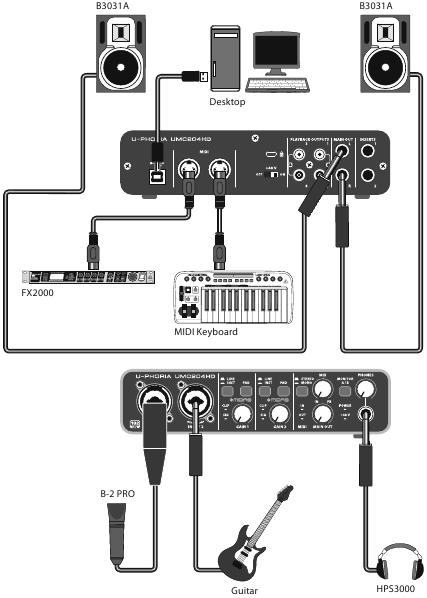
Home / Project Studio
Controls
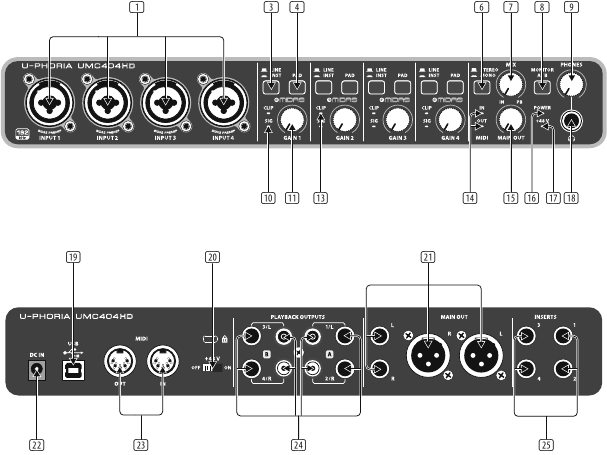
UMC404HD
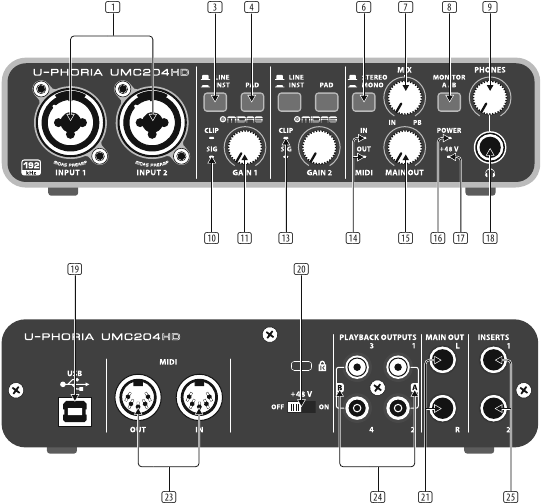
UMC204HD
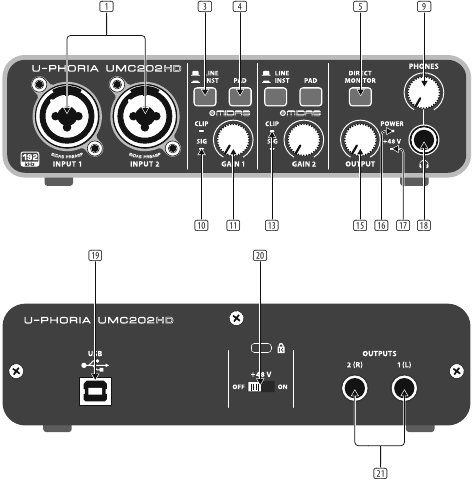
UMC202HD
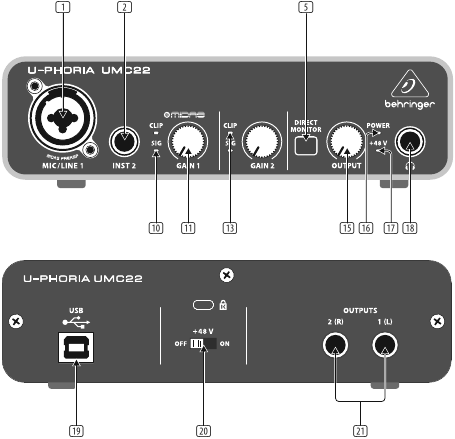
UMC22
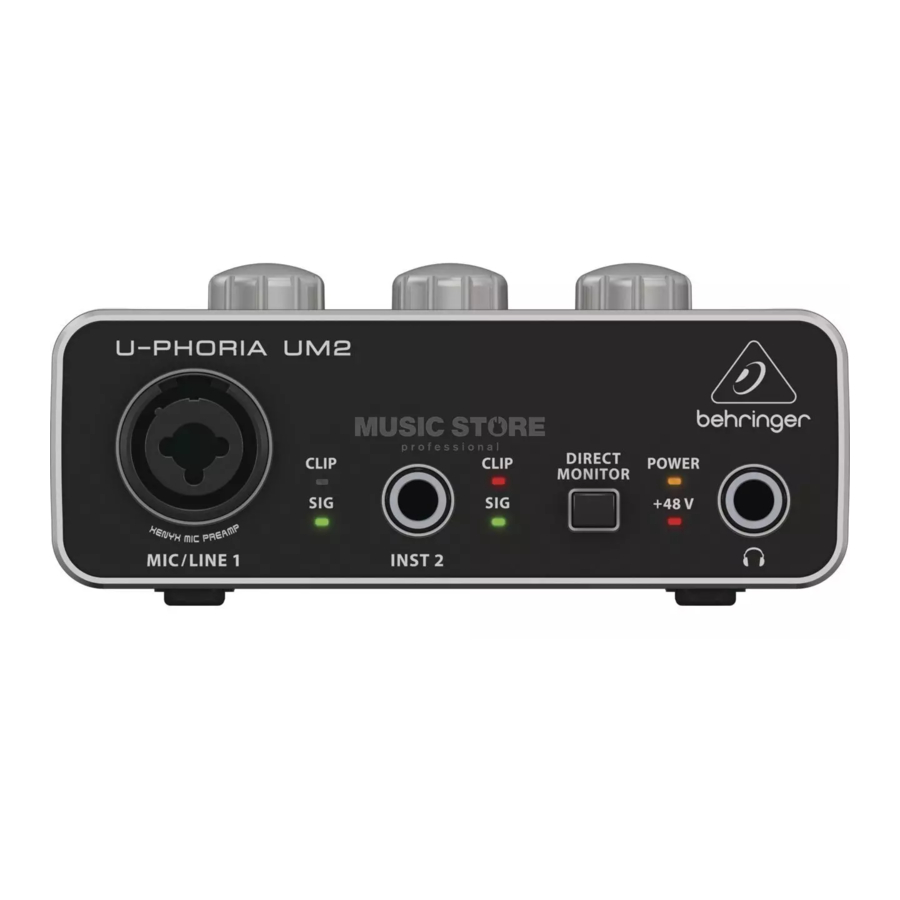
UM2
- MIC/LINE 1 (UM2 & UMC22) / INPUT 1 & 2 (UMC202HD & UMC204HD) / INPUT 1 – 4 (UMC404HD) combination XLR / ¼» connectors. Connect microphones, instruments or line level audio sources to these connectors.
- INST 2 (UM2 & UMC22) ¼» connector. Connect instrument and audio sources to this connector.
- LINE / INST(UMC202HD / UMC204HD / UMC404HD) selector designates line level or instrument level input source at combination XLR / ¼» connector(s).
- PAD (UMC202HD / UMC204HD / UMC404HD) selector reduces input level for connected sources when engaged.
- DIRECT MONITOR(UM2 / UMC22 / UMC202HD) selector activates direct monitoring of input signals with zero latency (no delay) when engaged.
- STEREO/MONO (UMC204HD & UMC404HD) selector activates mono monitoring of audio signals connected to INPUT 1 and INPUT 2 (UMC204HD) or INPUTS 1 – 4 (UMC404HD) when engaged.
- MIX (UMC204HD & UMC404HD) knob adjusts the level of input signal to playback 1-2 signal at the MAIN OUT and at the output (if MONITOR A is selected for the output).
- MONITOR A/B(UMC204HD & UMC404HD) selector designates output channels 3 & 4 at the output when engaged.
- PHONES (UMC202HD / UMC204HD / UMC404HD) knob adjusts the output level at the (headphones) output.
- SIG LEDindicates that an audio signal is present in the channel.
- MIC/LINE GAIN 1(UM2) / GAIN 1 & 2 (UMC22 / UMC202HD /UMC204HD) GAIN 1 – 4 (UMC404HD) knob adjusts the input level at MIC/LINE 1 (UM2), MIC/ LINE 1 & INST 2 (UMC22), INPUT 1 & 2 (UMC202HD & UMC204HD), or INPUT 1 – 4 (UMC404HD).
- INST GAIN 2(UM2) knob adjusts the input level at the INST 2 input.
- CLIP LED indicates that the audio signal in the channel is too loud. Turn the corresponding GAIN knob counter-clockwise until the CLIP LED no longer illuminates.
- MIDI IN/OUTLEDs (UMC204HD & UMC404HD) indicate MIDI signal activity.
- OUTPUT (UM2 / UMC22 / UMC202HD) / MAIN OUT (UMC204HD & UMC404HD) knob adjusts the output level at the 1(L) & 2(R) OUTPUTS (UM2 / UMC22 / UMC202HD) or the L & R MAIN OUT (UMC204HD & UMC404HD).
- POWER LED indicates that the unit is powered on.
- +48 V LED indicates that +48 V phantom power is engaged.
- output. Connect to headphones for playback and mixing.
- USB type B connector. Connect to a computer via this connector.
- +48 V ON/OFFselector engages +48 V phantom power (required for professional studio condenser microphones).
- 1(L) & 2(R) OUTPUTS (UM2 / UMC22 / UMC202HD) / L & R MAIN OUT (UMC204HD & UMC404HD) connect to powered studio monitors for playback and mixing.
- DC IN(UMC404HD) connect to the mains via the included power adapter.
- MIDI IN/OUT(UMC204HD & UMC404HD) connect to external MIDI controllers and modules via these connectors.
- PLAYBACK OUTPUTS A 1 & 2 / B 3 & 4 (UMC204HD) / PLAYBACK OUTPUTS A 1/L & 2/R / B 3/L & 4/R (UMC404HD) connect to external speakers for additional monitoring options.
- INSERTS 1 & 2(UMC204HD) / 1 – 4 (UMC404HD) connect to external signal processing devices via these connectors.
Getting started
- Windows operating system: Please visit www.behringer.com and download the latest USB driver for your U-Phoria interface. Unzip the file, double-click the setup.exe and follow the on-screen instructions.
Mac OS X operating system: No drivers needed, your U-Phoria interface operates class-compliant. - Connect to the mains via the provided power adapter (UMC404HD).
- Connect to a computer via the provided USB cable. Designate your U-Phoria device as your audio (UM2 / UMC22 / UMC202HD) or audio/MIDI (UMC204HD & UMC404HD) interface in your DAW software.
- Connect a pair of studio headphones to the connector to monitor input levels and playback from your audio software. Use the OUTPUT knob (UM2 & UMC22) or PHONES knob (UMC202HD / UMC204HD / UMC404HD) to adjust the headphone volume. Engage the DIRECT MONITOR button (UM2 / UMC22 / UMC202HD) or adjust the MIX knob (UMC204HD & UMC404HD) to achieve zero latency monitoring of your input signals.
- Connect instruments and audio sources to MIC/LINE 1 and INST 2 (UM2 & UMC22), INPUT 1 and INPUT 2 (UMC202HD & UMC204HD), or INPUT 1 – 4 (UMC404HD). Use the MIC/LINE GAIN 1 and INST GAIN 2 (UM2), GAIN 1 and GAIN 2 knobs (UMC22 / UMC202 / UMC204HD), or GAIN 1 – 4 (UMC404HD) knobs to adjust the input level of the connected audio sources. Engage the +48 V phantom power switch on the rear panel if you are recording with condenser microphones.
- Connect a MIDI keyboard, controller, or other MIDI device via the MIDI ports on the rear panel (UMC204HD & UMC404HD)
- Connect a pair of studio monitors to the 1(L) & 2(R) OUTPUTS (UM2 / UMC22 / UMC202HD) or L & R MAIN OUTS (UMC204HD & UMC404HD) for playback and mixing. Use the OUTPUT (UM2 / UMC22 / UMC202HD) or MAIN OUT (UMC204HD & UMC404HD) knob to adjust the volume level at the OUTPUTS or MAIN OUT.
Specifications
| Model | UMC404HD | UMC204HD | UMC202HD |
| Input | |||
| Preamp | 4 x MIDAS design | 2 x MIDAS design | |
| Type | 4 x XLR/TRS combo connector (Mic/Line/Instrument) |
2 x XLR/TRS combo connector (Mic/Line/Instrument) |
|
| Input level attenuation | 4 x Pad switch | 2 x Pad switch | |
| Frequency response | 10 Hz – 50 kHz (0 / -3 dB) | ||
| Impedance | Mic in: 3 kΩ / Instrument in: 1 MΩ | ||
| Max. input level | Mic: -4 dBu / Line: +20 dBu / Instrument: -3 dBu | ||
| Phantom power | +48 V, switchable | ||
| Output | |||
| Type | 1 x ¼» stereo (Phones), 2 x ¼» TRS (Main Line Out), 2 x XLR (Main Line Out), 4 x ¼» TRS (Playback Line Out), 4 x RCA (Playback Line Out) |
1 x ¼» stereo (Phones), 2 x ¼» TRS (Main Line Out), 4 x RCA (Playback Line Out) |
1 x ¼» stereo (Phones), 2 x ¼» TRS (Line Out) |
| Frequency response | 10 Hz – 43 kHz (0 / + 0.3 dB) | ||
| Max. output level | +3 dBu | ||
| System Data | |||
| Dynamic range | 100 dB, A-weighted | 110 dB, A-weighted | |
| Frequency response | 10 Hz – 43 kHz (0 / + 0.3 dB) | ||
| Inserts | |||
| Type | 4 x ¼» TRS | 2 x ¼» TRS | n/a |
| Impedance | 100 Ω Send / 10 kΩ Return | n/a | |
| Max. input level | +3 dBu | n/a | |
| MIDI I/O | |||
| Type | 5-pin DIN; 1 in, 1 out | n/a | |
| Monitoring | |||
| Direct monitor control | Mix Balance control (input <> playback) | Direct Monitor switch | |
| Headphones DJ cueing | Monitor A/B switch (out 1-2 / 3-4 select) | n/a | |
| Security Lock | |||
| Kensington security lock | Yes | ||
| Digital Processing | |||
| Supported sample rates | 44.1 / 48 / 88.2 / 96 / 176.4 / 192 kHz | ||
| Computer Bus Connectivity | |||
| Type | USB 2.0, type B | ||
| Software Support | |||
| Operating systems | Mac OS X*, Windows XP* or higher* | ||
| Drivers | Mac*: No driver required / CoreAudio supported Windows*: Available as download from behringer.com |
||
| Power | |||
| Power consumption | Max. 2.5 W | ||
| Power supply | USB connector (bus-powered from computer) and adapter | USB connector (bus-powered from computer) | |
| Mains voltage | 100-240 V~,50/60 Hz | n/a | |
| Dimensions | |||
| Dimensions (H x W x D) | 45.81 x 292 x 130 mm (1.78 x 11.5 x 5.1″) |
46.45 x 185 x 130 mm (1.8 x 7.3 x 5.1″) |
46.45 x 170 x 125 mm (1.8 x 6.7 x 4.9″) |
| Weight | 1.2 kg (2.7 lbs) | 0.6 kg (1.4 lbs) | 0.5 kg (1.2 lbs) |
| Model | UMC22 | UM2 |
| Input | ||
| Preamp | 1 x MIDAS design | 1 x XENYX |
| Type | 1 x XLR/TRS combo connector (Mic/Line), 1 x ¼» TRS (Instrument) | |
| Input level attenuation | n/a | |
| Frequency response | 10 Hz – 30 kHz (0 / — 0.5 dB) | |
| Impedance | Mic in: 3 kΩ / Instrument in: 1 MΩ | |
| Max. input level | Mic: +2 dBu / Line: +22 dBu / Instrument: +2 dBu | |
| Phantom power | +48 V, switchable | |
| Output | ||
| Type | 1 x ¼» stereo (Phones), 2 x ¼» TRS (Line Out) |
1 x ¼» stereo (Phones), 2 x RCA (Line Out) |
| Frequency response | 10 Hz – 30 kHz (0 / -0.5 dB) | |
| Max. output level | 0 dBu | |
| System Data | ||
| Dynamic range | 100 dB, A-weighted | |
| Frequency response | 10 Hz – 30 kHz (0 / — 3 dB) | |
| Inserts | ||
| Type | n/a | |
| Impedance | n/a | |
| Max. input level | n/a | |
| MIDI I/O | ||
| Type | n/a | |
| Monitoring | ||
| Direct monitor control | Direct Monitor switch | |
| Headphones DJ cueing | n/a | |
| Security Lock | ||
| Kensington security lock | Yes | |
| Digital Processing | ||
| Supported sample rates | 32 / 44.1 / 48 kHz | |
| Computer Bus Connectivity | ||
| Type | USB 1.1, type B | |
| Software Support | ||
| Operating systems | Mac OS X*, Windows XP* or higher* | |
| Drivers | Mac*: No driver required / CoreAudio supported Windows*: Available as download from behringer.com |
|
| Power | ||
| Power consumption | Max. 2.5 W | |
| Power supply | USB connector (bus-powered from computer) | |
| Mains voltage | n/a | |
| Dimensions | ||
| Dimensions (H x W x D) | 46.45 x 163 x 125 mm (1.8 x 6.4 x 4.9″) |
46.45 x 128 x 118 mm (1.8 x 5.1 x 4.7″) |
| Weight | 0.5 kg (1.0 lbs) | 0.3 kg (0.6 lbs) |
*Mac and OS X are trademarks of Apple Inc., registered in the U.S. and other countries. Windows and Windows XP are registered trademarks of Microsoft Corporation in the United States and other countries.
Other important information
- Register online. Please register your new MUSIC Group equipment right after you purchase it by visiting behringer. com. Registering your purchase using our simple online form helps us to process your repair claims more quickly and efficiently. Also, read the terms and conditions of our warranty, if applicable.
- Malfunction. Should your MUSIC Group Authorized Reseller not be located in your vicinity, you may contact the MUSIC Group Authorized Fulfiller for your country listed under «Support» at behringer. com. Should your country not be listed, please check if your problem can be dealt with by our «Online Support» which may also be found under «Support» at behringer. com. Alternatively, please submit an online warranty claim at behringer. com BEFORE returning the product.
FEDERAL COMMUNICATIONS COMMISSION COMPLIANCE INFORMATION

Responsible Party Name: MUSIC Group Services NV Inc.
Address: 5270 Procyon Street Las Vegas, NV 89118 USA
Phone Number: +1 702 800 8290
U-PHORIA UMC404HD/UMC204HD/UMC202HD/UMC22/UM2 complies with the FCC rules as mentioned in the following paragraph:
This equipment has been tested and found to comply with the limits for a Class B digital device, pursuant to part 15 of the FCC Rules. These limits are designed to provide reasonable protection against harmful interference in a residential installation. This equipment generates, uses and can radiate radio frequency energy and, if not installed and used in accordance with the instructions, may cause harmful interference to radio communications. However, there is no guarantee that interference will not occur in a particular installation. If this equipment does cause harmful interference to radio or television reception, which can be determined by turning the equipment off and on, the user is encouraged to try to correct the interference by one or more of the following measures:
- Reorient or relocate the receiving antenna.
- Increase the separation between the equipment and receiver.
- Connect the equipment into an outlet on a circuit different from that to which the receiver is connected.
- Consult the dealer or an experienced radio/TV technician for help.
This device complies with Part 15 of the FCC rules. Operation is subject to the following two conditions:
- this device may not cause harmful interference, and
- this device must accept any interference received, including interference that may cause undesired operation.
Changes or modifications to the equipment not expressly approved by MUSIC Group can void the user’s authority to use the equipment.
LIMITED WARRANTY
For the applicable warranty terms and conditions and additional information regarding MUSIC Group’s Limited Warranty, please see complete details online at music-group.com/warranty.
LEGAL DISCLAIMER
MUSIC Group accepts no liability for any loss which may be suffered by any person who relies either wholly or in part upon any description, photograph, or statement contained herein.
Technical specifications, appearances and other information are subject to change without notice. All trademarks are the property of their respective owners. MIDAS, KLARK TEKNIK, TURBOSOUND, BEHRINGER, BUGERA and DDA are trademarks or registered trademarks of MUSIC Group IP Ltd. © MUSIC Group IP Ltd.
2014 All rights reserved.
Documents / Resources
References
Download manual
Here you can download full pdf version of manual, it may contain additional safety instructions, warranty information, FCC rules, etc.
Download behringer U-PHORIA UMC404HD/UMC204HD/UMC202HD/UMC22/UM2 Quick Start Guide
- Главная
-
Behringer
-
Аудио-интерфейсы
-
U-PHORIA UMC204HD
На этой странице вы найдёте полный список документов на Аудио-интерфейсы Behringer U-PHORIA UMC204HD.
Выберите необходимый PDF файл.
-
Аудио-интерфейсы
Behringer U-PHORIA UMC204HD Руководство по быстрому запускуТип файла
PDFРазмер
1.93 MbКол-во страниц
26Просмотров
38849Download / Read online
-
Аудио-интерфейсы
Behringer U-PHORIA UMC204HD Информация о продуктеТип файла
PDFРазмер
4.77 MbКол-во страниц
6Просмотров
18483Download / Read online
- 1
-
Behringer U-PHORIA UMC404HD Руководство пользователя
PDF файлов
2Просмотров
151045 -
Behringer U-PHORIA UMC204HD Руководство пользователя
PDF файлов
2Просмотров
96314 -
Behringer U-PHORIA UMC22 Руководство пользователя
PDF файлов
4Просмотров
85315 -
Behringer U-PHORIA UM2 Руководство пользователя
PDF файлов
4Просмотров
65294 -
Behringer U-PHORIA UMC202HD Руководство пользователя
PDF файлов
2Просмотров
61240 -
Behringer U-PHORIA UMC404 Руководство пользователя
PDF файлов
3Просмотров
32458
Другие устройства Behringer
-
Миксеры
Behringer X AIR XR18 Руководство пользователяPDF файлов
2Просмотров
347923 -
Миксеры
Behringer X32 COMPACT Руководство пользователяPDF файлов
6Просмотров
259109 -
Миксеры
Behringer X AIR X18 Руководство пользователяPDF файлов
2Просмотров
106510 -
Микшеры
Behringer X32 Инструкция по эксплуатацииPDF файлов
1Просмотров
105631 -
Аудио
Behringer Digital Mixer X32 Руководство пользователяPDF файлов
9Просмотров
94014 -
Миксеры
Behringer X32 RACK Руководство пользователяPDF файлов
5Просмотров
93342
Вопросы
-
слабая батарея
Ноутбуки
Acer
1310
Alex 12.02.2016 17:26
Ранее вы смотрели
Производители
Apollo
Aurora Multimedia
Charnwood
Creek Audio
Easton Sports
Elk Products
Multi-Tech Systems
Swiss Diamond
Toastess
Warn Industries
Типы устройств
Утюги
Надувные игрушки-попрыгуны
Дистанционный запуск двигателя
Эквалайзеры
Ручные пилы и полотна
Жилеты, пояса, сумки для инструментов и аксессуары
Распределительные устройства для взрывоопасных зон
Пожарные сигнализаторы газовой турбины
Сетевые принт-серверы
Термосумки
Устройства
AT&T 3070
BENDIX BW2213S
Carrier TP-PAC
Hobart CE6HD ML-138010
Pioneer RCS-606H
Poulan 954 12 00-93
PYLE Audio PHST92
Snapper NZMJ25612KH
Star Manufacturing Ultra-Max 836TSCHS
Sunbeam HAP424-U-PET — Sunbeam Tower Pet Air Cleaner
freeuserguide.ru
About Us
Contacts
Disclamers
Privacy Policy
Эта страница полезна для вас? Поделитесь ссылкой:
В представленном списке руководства для конкретной модели Звуковой карты — BEHRINGER U-PHORIA UMC202. Вы можете скачать инструкции к себе на компьютер или просмотреть онлайн на страницах сайта бесплатно или распечатать.
В случае если инструкция на русском не полная или нужна дополнительная информация по этому устройству, если вам нужны
дополнительные файлы: драйвера, дополнительное руководство пользователя (производители зачастую для каждого
продукта делают несколько различных документов технической помощи и руководств), свежая версия прошивки, то
вы можете задать вопрос администраторам или всем пользователям сайта, все постараются оперативно отреагировать
на ваш запрос и как можно быстрее помочь. Ваше устройство имеет характеристики:Тип: внешняя, Тип подключения: USB 1.1, Необходимость дополнительного питания: нет, Разрядность ЦАП: 24 бит, Максимальная частота ЦАП (стерео): 48 кГц, Входных аналоговых каналов (балансных): 2 (1), полные характеристики смотрите в следующей вкладке.
Для многих товаров, для работы с BEHRINGER U-PHORIA UMC202 могут понадобиться различные дополнительные файлы: драйвера, патчи, обновления, программы установки. Вы можете скачать онлайн эти файлы для конкретнй модели BEHRINGER U-PHORIA UMC202 или добавить свои для бесплатного скачивания другим посетителями.
Если вы не нашли файлов и документов для этой модели то можете посмотреть интсрукции для похожих товаров и моделей, так как они зачастую отличаются небольшим изменениями и взаимодополняемы.
Обязательно напишите несколько слов о преобретенном вами товаре, чтобы каждый мог ознакомиться с вашим отзывом или вопросом. Проявляйте активность что как можно бльше людей смогли узнать мнение настоящих людей которые уже пользовались BEHRINGER U-PHORIA UMC202.
Все здорово
sniper
2020-05-17 18:27:45
всё супер
Основные и самые важные характеристики модели собраны из надежных источников и по характеристикам можно найти похожие модели.
| Общие характеристики | |
| Тип | внешняя |
| Тип подключения | USB 1.1 |
| Необходимость дополнительного питания | нет |
| Звуковые характеристики | |
| Разрядность ЦАП | 24 бит |
| Максимальная частота ЦАП (стерео) | 48 кГц |
| Аналоговые входы | |
| Входных аналоговых каналов (балансных) | 2 (1) |
| Входных разъемов jack 6.3 мм | 3 |
| Входных разъемов XLR | 1 |
| Фантомное питание | есть |
| Аналоговые выходы | |
| Выходных аналоговых каналов | 2 |
| Выходных аналоговых разъемов | 2 |
| Независимых выходов на наушники | 1 |
| Поддержка стандартов | |
| Поддержка EAX | нет |
| Поддержка ASIO | v. 1.0 |
Здесь представлен список самых частых и распространенных поломок и неисправностей у Звуковых карт. Если у вас такая поломка то вам повезло, это типовая неисправность для BEHRINGER U-PHORIA UMC202 и вы можете задать вопрос о том как ее устранить и вам быстро ответят или же прочитайте в вопросах и ответах ниже.
| Название поломки | Описание поломки | Действие |
|---|---|---|
| Встроенная Звуковая Карта Вышла Из Строя | ||
| Не Включается | ||
| Перегорели Процессоры | ||
| Tc Konnekt 6 | Питание Через Кабель Есть,Но Панель Управления Пишет No Device | |
| Красный Индикатор | При Подключении Загорается Красный Индикатор И Тухнет, Хотя Должен Заниматься Зеленый И Подключаться | |
| Focusrite Saffire Le | Правый Выход (Гнездо 2)Работает На 25%Тише | |
| При Проверке Колонок 1 Из Колонок Не Воспроизводит | На Виндомс 10 Захожу В Настройки Подключить 5.1 И Там Воспроизводится Левая Передняя Пр-Ва Передняя Центральная Сабвуфер Здания Пр-Ва А Левая Нет И Когда Включа | |
| Infrasonic Quartet | При Воспроизведении Звукового Файла Через Некоторое Время Появляется Хрипы В Обоих Каналах |
В нашей базе сейчас зарегестрированно 18 353 сервиса в 513 города России, Беларусии, Казахстана и Украины.
RSS
⭐
⭐
⭐
⭐
⭐
Адресс:
ул. Верхняя Масловка, д.2
Телефон:
74952762211
Сайт:
n/a
Время работы
Будни: с 0900 до 2100
Суббота: с 1000 до 1800
Воскресенье: выходной
ASUS
⭐
⭐
⭐
⭐
⭐
Адресс:
Зеленый проспект, д.81
Телефон:
74999630187
Сайт:
n/a
Время работы
Время работы не указано
RSS
⭐
⭐
⭐
⭐
⭐
Адресс:
1-й Гончарный пер., д. 4, стр. 3
Телефон:
74952762211
Сайт:
n/a
Время работы
Будни: с 0900 до 2100
Суббота: с 1000 до 1800
Воскресенье: выходной
СЕРВИС ЦЕНТР SEE-IT
⭐
⭐
⭐
⭐
⭐
Адресс:
ул.Краснобогатырская д 2 стр 2
Телефон:
74997542054
Сайт:
n/a
Время работы
Круглосуточно
REMOBI
⭐
⭐
⭐
⭐
⭐
Адресс:
ТРЦ "Вегас", МКАД 24-й км
Телефон:
74993222524
Сайт:
n/a
Время работы
Ежедневно: с 1000 до 2100
Behringer U-PHORIA UMC202HD/ UMC204HD Installation for Digitizer
Installing the Drivers for the UMC020xHD (Stereo users install 1 at a time)
1) Start the host PC.
2) Attach the supplied USB cable from the UMC20xHD into a free USB port on your PC
3) Windows will try and find the drivers for the UMC20xHD. Let the found new hardware wizard end
and it will say no suitable drivers found.
4) Insert the Disc marked ‘Behringer UMC Drivers and DT build’ disc and run the
‘BEHRINGER_UMC_DriverSetup_v3.29.0’ file from inside the ‘Windows 7, 8 and 10’ folder.
5) Follow the onscreen instructions to install the drivers. After this Windows will find the hardware
again and finish installing. Stereo users should now connect the other UMC20xHD and windows will
install the drivers automatically.
Setting the sample rate to 192khz
In order for the Digitizer to record the audio at the highest resolution, the sample rate for the UMC20xHD’s
has to be set to 192Khz. Navigate to the Windows ‘Control Panel’. Change the ‘view by’ setting in the top
left of the window from ‘Category’ to ‘Large icons’. Click on the ‘Sound’ link and this will bring up the
following window:
USB to Serial Cable Installation
If your Laptop/Tower PC does not have a serial (RS232) port you need to use the RS232 to USB adaptor
(supplied). To install…
1) Start the host computer system and insert the CD marked ‘USB to serial driver’ into the CD/DVD
drive on your PC.
2) Browse to the CDROM folder D:USB Serial AdapterWindows
3) Select the appropriate folder for your operating system and Double click on the icon
PL2303_Prolific_DriverInstaller
4) Follow the on-screen instructions to install the driver. Plug in the USB to serial adaptor, Windows
will apply the drivers automatically.
5) Check in the Windows device manager, under ports (COM & LPT) you should see Prolific USB to
serial COM port(COM??) The COM port that is emulated by the USB to serial adaptor is displayed in
the brackets.
(Windows 7, 8 and 10)
Select the ‘Recording’ tab at
the top. A double click on the
‘Line – BEHRINGER
UMC20xHD 192k’ will bring up
the ‘Properties’ window. Click
on the ‘Advanced’ tab and
select the sample rate of ‘2
channel, 24 bit, 192000 Hz,
(Studio quality)’. Click ‘Apply’
then ‘OK’ and close both
windows. Stereo users repeat
for the other soundcard too.
инструкцияBehringer U-Phoria UMC202HD

Quick Start Guide
UMC404HD
Audiophile 4×4, 24—Bit/192 kHz
USB Audio/MIDI Interface with MIDAS Mic Preampli ers
UMC204HD
Audiophile 2x4, 24-Bit/192 kHz
USB Audio/MIDI Interface with MIDAS Mic Preampli ers
UMC202HD
Audiophile 2x2, 24-Bit/192 kHz
USB Audio Interface with MIDAS Mic Preampli ers
UMC22
Audiophile 2x2 USB Audio Interface with
MIDAS Mic Preampli er
UM2
Audiophile 2x2 USB Audio Interface with
XENYX Mic Preampli er
U-PHORIA
Посмотреть инструкция для Behringer U-Phoria UMC202HD бесплатно. Руководство относится к категории DJ-система, 16 человек(а) дали ему среднюю оценку 8.1. Руководство доступно на следующих языках: английский. У вас есть вопрос о Behringer U-Phoria UMC202HD или вам нужна помощь? Задайте свой вопрос здесь
Главная
Не можете найти ответ на свой вопрос в руководстве? Вы можете найти ответ на свой вопрос ниже, в разделе часто задаваемых вопросов о Behringer U-Phoria UMC202HD.
Когда звук считается слишком громким?
Инструкция Behringer U-Phoria UMC202HD доступно в русский?
Не нашли свой вопрос? Задайте свой вопрос здесь
Behringer
U-PHORIA UMC202HD Информация о продукте
Популярность:
11581 просмотры
Подсчет страниц:
6 страницы
Тип файла:
Размер файла:
4.59 Mb
- Главная
-
Behringer
-
Аудио-интерфейсы
-
U-PHORIA UMC202HD
На этой странице вы найдёте полный список документов на Аудио-интерфейсы Behringer U-PHORIA UMC202HD.
Выберите необходимый PDF файл.
-
Аудио-интерфейсы
Behringer U-PHORIA UMC202HD Руководство по быстрому запускуТип файла
PDFРазмер
1.93 MbКол-во страниц
26Просмотров
24804Download / Read online
-
Аудио-интерфейсы
Behringer U-PHORIA UMC202HD Информация о продуктеТип файла
PDFРазмер
4.59 MbКол-во страниц
6Просмотров
11581Download / Read online
- 1
-
Behringer U-PHORIA UMC404HD Руководство пользователя
PDF файлов
2Просмотров
147968 -
Behringer U-PHORIA UMC204HD Руководство пользователя
PDF файлов
2Просмотров
93590 -
Behringer U-PHORIA UMC22 Руководство пользователя
PDF файлов
4Просмотров
83243 -
Behringer U-PHORIA UM2 Руководство пользователя
PDF файлов
4Просмотров
63816 -
Behringer U-PHORIA UMC202HD Руководство пользователя
PDF файлов
2Просмотров
59839 -
Behringer U-PHORIA UMC404 Руководство пользователя
PDF файлов
3Просмотров
32071
-
Миксеры
Behringer X AIR XR18 Руководство пользователяPDF файлов
2Просмотров
340382 -
Миксеры
Behringer X32 COMPACT Руководство пользователяPDF файлов
6Просмотров
250823 -
Миксеры
Behringer X AIR X18 Руководство пользователяPDF файлов
2Просмотров
104867 -
Микшеры
Behringer X32 Инструкция по эксплуатацииPDF файлов
1Просмотров
102994 -
Аудио
Behringer Digital Mixer X32 Руководство пользователяPDF файлов
9Просмотров
92530 -
Миксеры
Behringer X32 RACK Руководство пользователяPDF файлов
5Просмотров
90097
Вопросы
-
слабая батарея
Ноутбуки
Acer
1310
Alex 12.02.2016 17:26
Ранее вы смотрели
Производители
ADTRAN
CPG
Dice electronic
FEIN Power Tools
Gianni Industries
Great States
Luma Comfort
Marshalltown Company
Smart Technologies
Unwind
Типы устройств
Домашние тренажеры
Электронные ошейники
Масляные горелки
Садовые инструменты
Защитные фильтры на экран
Камера с установкой наклона и авторегулировкой резкости
Сабвуферы в закрытом корпусе
Эмуляторы аккумулятора
Сканеры
Устройства
Acumen HR409
Aiwa CSD-FD88
AstroStart 2101
Craftsman 11PC Standard Short Arm Hex Key Set
Edelbrock 60-7275
Fortinet FortiGate-800
GE JKS10DPBB
Genius 1200XE
Kenwood KDC-W5137Y
freeuserguide.ru
About Us
Contacts
Disclamers
Privacy Policy
Эта страница полезна для вас? Поделитесь ссылкой:

UMC404
UMC204
UMC202
UMC22
UM2
U-PHORIA
RU
Краткое практическое руководство
(полные версии ищите на сайте behringer.com)
Аудиофильский звуковой/MIDI USB-интерфейс 4×4,
24-бит/96 кГц с микрофонными предусилителями Midas
Аудиофильский звуковой/MIDI USB-интерфейс 2×4,
24-бит/96 кГц с микрофонными предусилителями Midas
Аудиофильский звуковой USB-интерфейс 2×2,
24-бит/96 кГц с микрофонными предусилителями Midas
Аудиофильский звуковой USB-интерфейс 2×2
с микрофонными предусилителями Midas
Аудиофильский звуковой USB-интерфейс 2×2
с микрофонными предусилителями XENYX
- Главная
-
Behringer
-
Аудио-интерфейсы
-
U-PHORIA UMC204HD
На этой странице вы найдёте полный список документов на Аудио-интерфейсы Behringer U-PHORIA UMC204HD.
Выберите необходимый PDF файл.
-
Аудио-интерфейсы
Behringer U-PHORIA UMC204HD Руководство по быстрому запускуТип файла
PDFРазмер
1.93 MbКол-во страниц
26Просмотров
37841Download / Read online
-
Аудио-интерфейсы
Behringer U-PHORIA UMC204HD Информация о продуктеТип файла
PDFРазмер
4.77 MbКол-во страниц
6Просмотров
17961Download / Read online
- 1
Другие Behringer Аудио-интерфейсы
-
Behringer U-PHORIA UMC404HD Руководство пользователя
PDF файлов
2Просмотров
147984 -
Behringer U-PHORIA UMC204HD Руководство пользователя
PDF файлов
2Просмотров
93603 -
Behringer U-PHORIA UMC22 Руководство пользователя
PDF файлов
4Просмотров
83248 -
Behringer U-PHORIA UM2 Руководство пользователя
PDF файлов
4Просмотров
63821 -
Behringer U-PHORIA UMC202HD Руководство пользователя
PDF файлов
2Просмотров
59854 -
Behringer U-PHORIA UMC404 Руководство пользователя
PDF файлов
3Просмотров
32071
Другие устройства Behringer
-
Миксеры
Behringer X AIR XR18 Руководство пользователяPDF файлов
2Просмотров
340414 -
Миксеры
Behringer X32 COMPACT Руководство пользователяPDF файлов
6Просмотров
250840 -
Миксеры
Behringer X AIR X18 Руководство пользователяPDF файлов
2Просмотров
104886 -
Микшеры
Behringer X32 Инструкция по эксплуатацииPDF файлов
1Просмотров
103002 -
Аудио
Behringer Digital Mixer X32 Руководство пользователяPDF файлов
9Просмотров
92538 -
Миксеры
Behringer X32 RACK Руководство пользователяPDF файлов
5Просмотров
90118
Вопросы
-
слабая батарея
Ноутбуки
Acer
1310
Alex 12.02.2016 17:26
Ранее вы смотрели
Производители
Air-O-Swiss
Altinex
Ansco
Asoka
Danby
Momentum Sales & Marketing
Owens Corning
SteelSeries
Summit
TeleAdapt
Типы устройств
Стойки и интегрированные решения
Резаки
Картплоттер/сонар
Прочие устройства хранения
Термометры
Водные лыжи
Раклеты
Термосумки
Аксессуары для освещения
Выберите издание — Electric Can
Устройства
Braun 5709
JVC GY-HMQ10U
KitchenAid KUIS18PNTB1
Peavey 13740
Sanyo PLV-HD2000E
Sonos ZonePlayer ZP80
Speed Queen Drying Tumblers JC50CSH
SUPER MICRO Computer H8SCM-F
Technicolor — Thomson SpeedTouch 510
freeuserguide.ru
About Us
Contacts
Disclamers
Privacy Policy
Эта страница полезна для вас? Поделитесь ссылкой:
- Manuals
- Brands
- Behringer Manuals
- Accessories
- U-PHORIA UMC204HD
Manuals and User Guides for Behringer U-PHORIA UMC204HD. We have 5 Behringer U-PHORIA UMC204HD manuals available for free PDF download: Quick Start Manual
behringer U-PHORIA UMC404HD/UMC204HD/UMC202HD/UMC22/UM2 Quick Start Guide
Brand: Behringer
|
Category: Recording Equipment
|
Size: 1.31 MB
Table of Contents
-
Important Safety Instructions
-
Hook-up
-
Controls
-
Getting started
-
Specifications
-
Other important information
-
FEDERAL COMMUNICATIONS COMMISSION COMPLIANCE INFORMATION
-
LIMITED WARRANTY
-
LEGAL DISCLAIMER
-
Documents / Resources
-
References
-
Advertisement
Behringer U-PHORIA UMC204HD Quick Start Manual (28 pages)
Brand: Behringer
|
Category: Accessories
|
Size: 2.05 MB
Table of Contents
-
Important Safety Instructions
2
-
Instruções de Segurança Importantes
7
-
Federal Communications Commission Compliance Information
26
Behringer U-PHORIA UMC204HD Quick Start Manual (39 pages)
Audiophile 4×4/2×4/2×2,, 24-Bit/192 kHz USB Audio/MIDI Interface with MIDAS/XENYX Mic Preamplifiers
Brand: Behringer
|
Category: Amplifier
|
Size: 3.54 MB
Advertisement
Behringer U-PHORIA UMC204HD Quick Start Manual (26 pages)
U-Phoria series USB AudioInterface with Mic Preamplifier
Brand: Behringer
|
Category: Accessories
|
Size: 2.02 MB
Table of Contents
-
Other Important Information
24
Behringer U-PHORIA UMC204HD Quick Start Manual (2 pages)
Brand: Behringer
|
Category: Recording Equipment
|
Size: 0.7 MB
Advertisement
Related Products
-
Behringer U-PHORIA UMC202HD
-
Behringer U-PHONO UFO202
-
Behringer U-CONTROL UCA222
-
BEHRINGER U-CONTROL UCA200
-
Behringer U-PHORIA UM2
-
Behringer U-PHORIA UMC404HD
-
Behringer U-PHOBIA umc404
-
Behringer U-PHORIA UMC22
-
Behringer UMC2
-
Behringer U-PHORIA UMC1820
Behringer Categories
Music Mixer
Amplifier
Music Pedal
Recording Equipment
Speakers
More Behringer Manuals
Behringer
U-PHORIA UMC204HD Информация о продукте
Популярность:
17961 просмотры
Подсчет страниц:
6 страницы
Тип файла:
Размер файла:
4.77 Mb
инструкцияBehringer U-Phoria UMC204HD

Quick Start Guide
UMC404HD
Audiophile 4×4, 24—Bit/192 kHz
USB Audio/MIDI Interface with MIDAS Mic Preampli ers
UMC204HD
Audiophile 2x4, 24-Bit/192 kHz
USB Audio/MIDI Interface with MIDAS Mic Preampli ers
UMC202HD
Audiophile 2x2, 24-Bit/192 kHz
USB Audio Interface with MIDAS Mic Preampli ers
UMC22
Audiophile 2x2 USB Audio Interface with
MIDAS Mic Preampli er
UM2
Audiophile 2x2 USB Audio Interface with
XENYX Mic Preampli er
U-PHORIA
Посмотреть инструкция для Behringer U-Phoria UMC204HD бесплатно. Руководство относится к категории DJ-система, 17 человек(а) дали ему среднюю оценку 8.6. Руководство доступно на следующих языках: английский. У вас есть вопрос о Behringer U-Phoria UMC204HD или вам нужна помощь? Задайте свой вопрос здесь
Главная
Не можете найти ответ на свой вопрос в руководстве? Вы можете найти ответ на свой вопрос ниже, в разделе часто задаваемых вопросов о Behringer U-Phoria UMC204HD.
Когда звук считается слишком громким?
Инструкция Behringer U-Phoria UMC204HD доступно в русский?
Не нашли свой вопрос? Задайте свой вопрос здесь
Behringer
U-PHORIA UMC204HD Информация о продукте
Популярность:
18483 просмотры
Подсчет страниц:
6 страницы
Тип файла:
Размер файла:
4.77 Mb
Меню
Behringer, несомненно, является лидером, когда речь заходит о бюджетном аудиооборудовании. Что бы вам ни понадобилось, скорее всего, у них найдется доступная модель. Behringer U-PHORIA UMC204HD является подтверждением этого утверждения, доказывая, что это один из самых эффективных аудиоинтерфейсов стоимостью менее 100 долларов.
Дизайн
Вся линейка аудиоинтерфейсов U-PHORIA достаточно проста, и UMC204HD ничем не отличается. Смотреть на это не особо интересно, но в равной степени весьма привлекательно. Он имеет полностью черный корпус с некоторыми светло-серыми деталями, которые разбавляют черный цвет и придают ему чрезвычайно утонченный вид.
Он также имеет очень простую компоновку, которая соответствует большинству интерфейсов в этом ценовом диапазоне. На передней панели вы найдете все входы и элементы управления каналами, а задняя часть предназначена для выходов и управления питанием. Что касается качества сборки, Behringer проделал большую работу с UMC204HD. Это устройство более чем способно выдерживать ежедневные нагрузки в загруженной домашней студии, и в то же время оно настолько же надежно, что и в рюкзаке для использования в дороге. По этой цене это примерно так же хорошо, как и получается.
Функции
Вся линейка интерфейсов U-PHORIA впечатляет количеством предлагаемых функций. Существует несколько интерфейсов, но редко какой-либо из них обладает такой универсальностью, как эта серия. В случае с бюджетным U-PHORIA UMC204HD вы видите два входа и четыре выхода. Оба входа оснащены комбинированным портом XLR/TRS — для использования как микрофона, так и инструмента — в то время как каждый из них подключен к высококачественному микрофонному предусилителю MIDAS от Behringer.
Элементы управления каналами довольно просты, с регулятором усиления для каждого отдельного входа, аттенюатором и переключателем, который позволяет выбирать между линейным и инструментальным входами. Рядом с ними мы видим кнопку Stereo/Mono, ручку Mix, ручку Main Out, а также кнопку прямого мониторинга и индикатор фантомного питания. Сзади Behringer разместил пару MIDI-выходов, стереофонический RCA-кластер и стереофонический 1/4-дюймовый TRS-кластер.
В сочетании с включенной копией Tracktion DAW и множеством загружаемых плагинов это больше, чем мы могли бы ожидать по этой цене.
Представление
Когда дело доходит до производительности, Behringer UMC204HD обеспечивает стабильные результаты с хорошим качеством звука и мониторингом с нулевой задержкой. Микрофонные предусилители MIDAS отлично зарекомендовали себя при записи вокала. Присущая им ясность на самом деле удивительна, учитывая разумную цену интерфейсов U-PHORIA.
UMC204HD уникален на рынке бюджетных устройств благодаря большому количеству вариантов ввода/вывода. Это дает вам много универсальности, сохраняя при этом свои компактные размеры. Тот факт, что он хорошо работает с горячими звукоснимателями, делает его идеальным выбором для бюджетных домашних студий звукозаписи.
Вообще говоря, UMC204HD делает почти все, что вы ожидаете от простого аудиоинтерфейса, но при гораздо более низкой цене. Наконец, UMC204HD совместим практически с любой DAW. Установка и синхронизация довольно проста и занимает всего несколько минут.
Заключение
U-PHORIA UMC204HD представляет собой еще одну замечательную модель из этой удивительной серии Behringer. Эта конкретная модель предлагает много сока по цене, которая посрамляет многих ее конкурентов. Если вам нужно надежное бюджетное решение и нужна дополнительная универсальность, эта модель определенно для вас.
1 311
2 of 6
Product Information Document
2 of 6
Product Information Document
U-PHORIA
UMC204HD
Audiophile 2×4, 24-Bit/192 kHz
USB Audio/MIDI Interface with
MIDAS Mic Preamplifi ers
Audio Interfaces
192 kHz Precision
You take your tracks seriously, and the UMC204HD respects that, providing up to 192 kHz resolution
for even the most demanding applications in music as well as video post production. Work with
confi dence and accuracy in your favorite recording software for professional results every time.
MIDAS — The Legend in Sound Quality
Ever since its formation in the 1970s,
has had a long history of innovation and leadership in the world of audio mixing consoles. Employed
by the most famous touring acts and installations world-wide, legendary MIDAS consoles such as the XL4 and Heritage H3000 quickly became
industry standards.
MIDAS has earned their impeccable reputation due to their no-compromise approach for audio and build quality and in particular for their
Award-winning Mic Preamps which are considered by industry experts as the industry’s best sounding designs. Building on this legacy, the XL8
and PRO Series of Live Mixing Systems continue this great heritage of Award-winning audio quality.
BEHRINGER is proud to incorporate a MIDAS designed mic preamp for the ultimate in high-quality audio reproduction in both live and studio
environments. Find out more about MIDAS’ amazing legacy by visiting their extensive