

ZXA10F660
UserManual
GPONONT
Version:V1.0
ZTECORPORATION
NO.55,Hi-techRoadSouth,ShenZhen,P .R.China
Postcode:518057
Tel:+86-755-26771900
Fax:+86-755-26770801
URL:http://ensupport.zte.com.cn
E-mail:support@zte.com.cn

LEGALINFORMATION
Copyright©2011ZTECORPORA TION.
Thecontentsofthisdocumentareprotectedbycopyrightlawsandinternationaltreaties.Anyreproductionor
distributionofthisdocumentoranyportionofthisdocument,inanyformbyanymeans,withoutthepriorwritten
consentofZTECORPORATIONisprohibited.Additionally,thecontentsofthisdocumentareprotectedby
contractualcondentialityobligations.
Allcompany,brandandproductnamesaretradeorservicemarks,orregisteredtradeorservicemarks,ofZTE
CORPORATIONoroftheirrespectiveowners.
Thisdocumentisprovided“asis”,andallexpress,implied,orstatutorywarranties,representationsorconditions
aredisclaimed,includingwithoutlimitationanyimpliedwarrantyofmerchantability,tnessforaparticularpurpose,
titleornon-infringement.ZTECORPORATIONanditslicensorsshallnotbeliablefordamagesresultingfromthe
useoforrelianceontheinformationcontainedherein.
ZTECORPORA TIONoritslicensorsmayhavecurrentorpendingintellectualpropertyrightsorapplications
coveringthesubjectmatterofthisdocument.ExceptasexpresslyprovidedinanywrittenlicensebetweenZTE
CORPORATIONanditslicensee,theuserofthisdocumentshallnotacquireanylicensetothesubjectmatter
herein.
ZTECORPORA TIONreservestherighttoupgradeormaketechnicalchangetothisproductwithoutfurthernotice.
UsersmayvisitZTEtechnicalsupportwebsitehttp://ensupport.zte.com.cntoinquirerelatedinformation.
TheultimaterighttointerpretthisproductresidesinZTECORPORATION.
RevisionHistory
RevisionNo.RevisionDateRevisionReason
R1.02011–07–18FirstEdition
SerialNumber:SJ-201107181 11034-001
PublishingDate:2011-07-18(R1.0)

Contents
Preface……………………………………………………………………………………………….I
Chapter1Overview…………………………………………………………………………1-1
1.1ProductIntroduction……………………………………………………………………………….1-1
1.2PackingList………………………………………………………………………………………….1-2
1.3FeaturesandSpecications……………………………………………………………………..1-2
1.4ProductAppearance……………………………………………………………………………….1-3
1.5SystemRequirements…………………………………………………………………………….1-6
1.6SystemApplicationEnvironment……………………………………………………………….1-6
Chapter2CongurationPreparation……………………………………………….2-1
2.1PreliminarySetup…………………………………………………………………………………..2-1
2.2ConguringTCP/IP………………………………………………………………………………..2-1
2.3LoggingIntotheDevice………………………………………………………………………….2-6
Chapter3DeviceStatus………………………………………………………………….3-1
3.1DeviceInformation…………………………………………………………………………………3-1
3.2NetworkConnectionInformation………………………………………………………………..3-2
3.3UserInterfaceInformation………………………………………………………………………..3-3
3.3.1WLANInterfaceInformation…………………………………………………………….3-3
3.3.2EthernetInterfaceInformation………………………………………………………….3-4
3.3.3VoIPStatusInformation………………………………………………………………….3-5
Chapter4NetworkConguration…………………………………………………….4-1
4.1ConguringWANConnection……………………………………………………………………4-1
4.2WLANConguration……………………………………………………………………………….4-5
4.2.1ConguringBasicWLANParameters………………………………………………..4-5
4.2.2ConguringMulti-SSIDParameters…………………………………………………..4-7
4.2.3ConguringSecurityProperties………………………………………………………..4-8
4.2.4ViewingAssociatedDevices………………………………………………………….4-12
4.3AddressManagementConguration…………………………………………………………4-13
4.3.1ConguringDHCPServer……………………………………………………………..4-13
4.3.2ConguringDHCPBinding…………………………………………………………….4-15
4.3.3ConguringSpecicAddressRange………………………………………………..4-16
4.4RouteManagementConguration……………………………………………………………4-17
4.4.1ConguringDefaultGateway………………………………………………………….4-17
4.4.2ConguringStaticRouting…………………………………………………………….4-18
I

Chapter5SecurityConguration…………………………………………………….5-1
5.1ConguringFirewall………………………………………………………………………………..5-1
5.2ConguringIPFilter………………………………………………………………………………..5-2
5.3ConguringURLFilter…………………………………………………………………………….5-5
5.4ConguringDMZHost…………………………………………………………………………….5-7
5.5ConguringPortForwarding…………………………………………………………………….5-9
Chapter6ServiceConguration………………………………………………………6-1
6.1SIPVoIPServiceConguration…………………………………………………………………6-1
6.1.1ConguringVoIPWANConnection……………………………………………………6-1
6.1.2ConguringSIP…………………………………………………………………………….6-2
6.1.3ConguringSIPAccounts……………………………………………………………….6-4
6.1.4ConguringVoIPAdvancedParameters…………………………………………….6-5
6.1.5ConguringVoIPMediaParameters………………………………………………….6-7
6.1.6ConguringFax…………………………………………………………………………….6-8
6.2ConguringDDNS………………………………………………………………………………..6-10
6.3ConguringUPnP…………………………………………………………………………………6-1 1
6.4DNSConguration……………………………………………………………………………….6-13
6.4.1ConguringDomainName…………………………………………………………….6-13
6.4.2ConguringHostName………………………………………………………………..6-14
6.5QoSConguration………………………………………………………………………………..6-16
6.5.1ConguringBasicQoSParameters…………………………………………………6-16
6.5.2ConguringQoSRule…………………………………………………………………..6-19
6.5.3ConguringQoSRuleType……………………………………………………………6-20
6.5.4ConguringQoSLocalApplication………………………………………………….6-22
6.5.5ConguringQoSQueueManagement……………………………………………..6-23
6.5.6ConguringQoSIngressRateLimit…………………………………………………6-25
6.6ConguringSNTPClient………………………………………………………………………..6-26
6.7IGMPConguration………………………………………………………………………………6-28
6.7.1ConguringBasicIGMPParameters……………………………………………….6-28
6.7.2ConguringMulticastVLAN…………………………………………………………..6-31
6.7.3ConguringMulticastMACLimit……………………………………………………..6-32
6.7.4ConguringMVLANT agStrip…………………………………………………………6-34
6.8ConguringFTPApplication……………………………………………………………………6-36
Chapter7DeviceManagement………………………………………………………..7-1
7.1TR069Conguration………………………………………………………………………………7-1
7.1.1ConguringBasicTR069Parameters………………………………………………..7-1
7.1.2ImportingTRO69Certicate…………………………………………………………….7-3
II

7.2UserManagement………………………………………………………………………………….7-4
7.3DeviceManagement……………………………………………………………………………….7-5
7.3.1SystemManagement……………………………………………………………………..7-5
7.3.2SoftwareUpgrade…………………………………………………………………………7-6
7.3.3CongurationManagement……………………………………………………………..7-8
7.4LogManagement…………………………………………………………………………………..7-9
7.5PingDiagnosis…………………………………………………………………………………….7-10
Chapter8FAQ…………………………………………………………………………………8-1
8.1FAQ……………………………………………………………………………………………………8-1
Glossary…………………………………………………………………………………………….I
III

IV

Preface
Purpose
ThismanualprovidesproceduresandguidelinesthatsupporttheoperationontheZXA10
F660OpticalNetworkT erminal(ZXA10F660forshort).
IntendedAudience
Thismanualisintendedforengineersandtechnicianswhoperformoperationactivitieson
ZXA10F660.
PrerequisiteSkillandKnowledge
Tousethismanualeffectively,usersshouldhaveageneralunderstandingofwireless
telecommunicationstechnology.Familiaritywiththefollowingishelpful:
lZXA10systemanditsvariouscomponents
lLocaloperatingprocedures
WhatIsinThisManual
Thismanualcontainsthefollowingchapters:
ChapterSummary
ChapterSummary
Chapter1,OverviewProvidesanoverviewoftheproduct,including
thepackinglist,productfeatures,appearance,
andsystemrequirements,andsystemapplication
environment.
Chapter2,CongurationPreparationDescribestheproceduresforconguringTCP/IP ,
andloggingintothedevice.
Chapter3,DeviceStatusDescribesthedeviceinformation,network
connectioninformation,anduserinterface
information.
Chapter4,NetworkCongurationDescribesthecongurationofWANconnection,
WLAN,addressmanagement,androute
management.
Chapter5,SecurityCongurationDescribestheproceduresforconguringthe
rewall,IPlter,URLlter,DMZ,andport
forwarding.
I
ChapterSummary
Chapter6,ServiceCongurationDescribesthecongurationofVoIP,DDNS,
UPnP ,DNSserver,QoS,SNTPclient,IGMP ,and
FTPapplication.
Chapter7,DeviceManagementDescribesTRO69conguration,user
management,devicemanagement,log
management,andpingdiagnosis.
Chapter8,FAQProvidestheFAQsandsolutions.
RelatedDocumentation
None
Conventions
ZTEdocumentsemploythefollowingtypographicalconventions.
TypographicalConventions
TypefaceMeaning
ItalicsReferencestootherManualsanddocuments.
“Quotes”Linksonscreens.
BoldMenus,menuoptions,functionnames,input
elds,radiobuttonnames,checkboxes,
drop-downlists,dialogboxnames,window
names.
CAPSKeysonthekeyboardandbuttonsonscreens
andcompanyname.
ConstantwidthTextthatyoutype,programcode,lesand
directorynames,andfunctionnames.
[]Optionalparameters
{}Mandatoryparameters
ISelectoneoftheparametersthataredelimited
byit.
Note:Providesadditionalinformationabouta
Note:
certaintopic.
Checkpoint:Indicatesthataparticularstepneeds
Checkpoint:
tobecheckedbeforeproceedingfurther.
II
TypefaceMeaning
Tip:Indicatesasuggestionorhinttomakethings
Tip:
easierormoreproductiveforthereader.
MouseOperationConventionsareasfollows:
MouseOperationConventions
TypefaceMeaning
ClickReferstoclickingtheprimarymousebutton
(usuallytheleftmousebutton)once.
Double-clickReferstoquicklyclickingtheprimarymouse
button(usuallytheleftmousebutton)twice.
Right-clickReferstoclickingthesecondarymousebutton
(usuallytherightmousebutton)once.
DragReferstopressingandholdingamousebutton
andmovingthemouse.
HowtoGetinTouch
Thefollowingsectionsprovideinformationonhowtoobtainsupportforthedocumentation
andthesoftware.
CustomerSupportIfyouhaveproblems,questions,comments,or
suggestionsregardingyourproduct,contactusby
e-mailatsupport@zte.com.cn.Y oucanalsocallour
customersupportcenterat(86)75526771900and(86)
800-9830-9830.
DocumentationSupportZTEwelcomesyourcommentsandsuggestionson
thequalityandusefulnessofthisdocument.For
furtherquestions,comments,orsuggestionsonthe
documentation,youcancontactusbye-mailat
doc@zte.com.cn;oryoucanfaxyourcommentsand
suggestionsto(86)75526772236.Youcanalsobrowse
ourwebsiteathttp://ensupport.zte.com.cn,whichcontains
variousinterestingsubjectslikedocumentation,knowledge
base,forumandservicerequest.
DeclarationofRoHSCompliance
Tominimizetheenvironmentalimpactandtakemoreresponsibilitytotheearthwe
live,thisdocumentshallserveasformaldeclarationthatZXA10F660manufacturedby
ZTECORPORA TIONisincompliancewiththeDirective2002/95/ECoftheEuropean
III

Parliament-RoHS(RestrictionofHazardousSubstances)withrespecttothefollowing
substances:
lLead(Pb)
lMercury(Hg)
lCadmium(Cd)
lHexavalentChromium(Cr(VI))
lPolyBrominatedBiphenyls(PBB’s)
lPolyBrominatedDiphenylEthers(PBDE’s)
Thisdeclarationisissuedbasedonourcurrentlevelofknowledge.Sinceconditionsofuseare
outsideourcontrol,ZTECORPORATIONmakesnowarranties,expressorimplied,andassumesno
liabilityinconnectionwiththeuseofthisinformation.
IV

Chapter1
Overview
TableofContents
ProductIntroduction………………………………………………………………………………………1-1
PackingList………………………………………………………………………………………………….1-2
FeaturesandSpecications……………………………………………………………………………1-2
ProductAppearance………………………………………………………………………………………1-3
SystemRequirements……………………………………………………………………………………1-6
SystemApplicationEnvironment……………………………………………………………………..1-6
1.1ProductIntroduction
ZXA10F660isauser-sideaccessdevicemodule.Itusesthecomputernetwork
technologyandbroadbandopticalnetworktechnologytoestablishahomenetworkcenter
fortheaccessofnetworkdevices.Itprovidesuserswithvariousservices.
Table1-1liststheportsandfunctionsofZXA10F660seriesproducts.
Table1-1ZXA10F660PortsandFunctions
ProductPortFunction
ZXA10F660FourGEports,twoPOTSports,
oneWi-Fiport,andtwoUSB
2.0ports
ZXA10F668FourGEports,twoPOTSports,
oneWi-Fiport,twoUSB2.0
ports,andoneCATVport
ZXA10F600GFourGEportsandtwoUSB2.0
ports
ZXA10F627FourGEports,twoPOTSports,
andoneWi-Fiport
ZXA10F625GFourGEports,twoPOTSport
andoneCA TVport
SupportsInternetaccess,IPTV,
VoIP,andWi-Fi.Itcanbeused
asahomegateway .
SupportsInternetaccess,IPTV ,
VoIP ,Wi-Fi,andCA TV.Itcanbe
usedasahomegateway .
SupportsInternetaccessand
IPTV.
SupportsInternetaccess,IPTV ,
VoIP ,andWi-Fi.Itcanbeused
asahomegateway .
SupportsInternetaccess,IPTV ,
VoIP ,andCATV.Itcanbeused
asahomegateway .
ZXA10F607FourGEportsandoneWi-Fi
port
1-1
SJ-20110718111034-001|2011-07-18(R1.0)ZTEProprietaryandCondential
SupportsInternetaccess,IPTV ,
andWi-Fi.Itcanbeusedasa
homegateway.

ZXA10F660UserManual
1.2PackingList
MakesurethatZXA10F660packagecontainsthefollowing:
lOneZXA10F660host
lOneAC-DCadaptor
lOneRJ-45straight-throughcable
lTwoRJ-11telephonecables
lOneZXA10F660OpticalNetworkTerminalUserManual
Ifanyoftheabovecontentsismissingordamaged,pleasecontactyourdealer.Keepthe
packingboxandcomponentsforthereplacementpurpose.
1.3FeaturesandSpecications
SystemFeatures
ZXA10F660hasthefollowingfeatures:
lMACcache:4K
lMulticastservices:1024multicastgroups
lVLANrange:1-4095
lGEMports:256
lT-CONT s:40
InterfaceFeatures
Theinterfacefeaturesareasfollows:
lGPONinterface:complieswiththePONstandardandSC/APC,incompliancewith
ITUG.984.1-G.984.5standards
lEthernetinterface:10/100/1000MbpsGEinterfaces(RJ-45),incompliancewithIEEE
802.3andIEEE802.3ustandards
lPOTSinterface:RJ-11
lWLANinterface:complyingwiththeIEEE802.11nstandardwithbuilt-inantenna
TechnicalFeatures
ZXA10F660implementsdataaccessandIPvoiceaccess.
lFordataaccess,ZXA10F660implementL2dataswitchingandforwarding.
ByworkingwithrelevantnetworkdevicesthroughsignalingprotocolssuchasH.248
andSIP,ZXA10F660implementsIPvoicefunction.
lZXA10F660providesthesecurity,QoS,andnetworkmanagementfunctions,such
asmulti-levelauthenticationbasedondevices,users,andservices.
Itsupportsdatachannelencryption,implementationofQoSrequirementsmatching
thelocaldevicesandnetworkaccordingtoserviceswithdifferentrequirements,and
networkmanagementbasedonvariousmanagementmodes.
1-2
SJ-20110718111034-001|2011-07-18(R1.0)ZTEProprietaryandCondential
Chapter1Overview
CerticationFeatures
Thisdevicecomplieswithpart15oftheFCCRules.Operationissubjecttothefollowing
twoconditions:
1.Thisdevicemaynotcauseharmfulinterference.
2.Thisdevicemustacceptanyinterferencereceived,includinginterferencethatmay
causeundesiredoperation.
RFexposureinformation:TheMaximumPermissibleExposure(MPE)levelhasbeen
calculatedbasedonadistanceofd=20cmbetweenthedeviceandthehumanbody.
TomaintaincompliancewithRFexposurerequirement,useproductthatmaintaina20cm
distancebetweenthedeviceandhumanbody.
Note:
Changesormodicationsmadetothisequipmentnotexpresslyapprovedby
(ZTE Corporation)mayvoidtheFCCauthorizationtooperatethisequipment.
ProductSpecications
ZXA10F660specicationsareasfollows:
lRatedcurrent:1.3A
lRatedvoltage:12VDC
lOperatingtemperature:-5℃-50℃
lOperatinghumidity:5%-95%
lDimensions:260mmx50mmx185mm(WidthxHeightxDepth)
1.4ProductAppearance
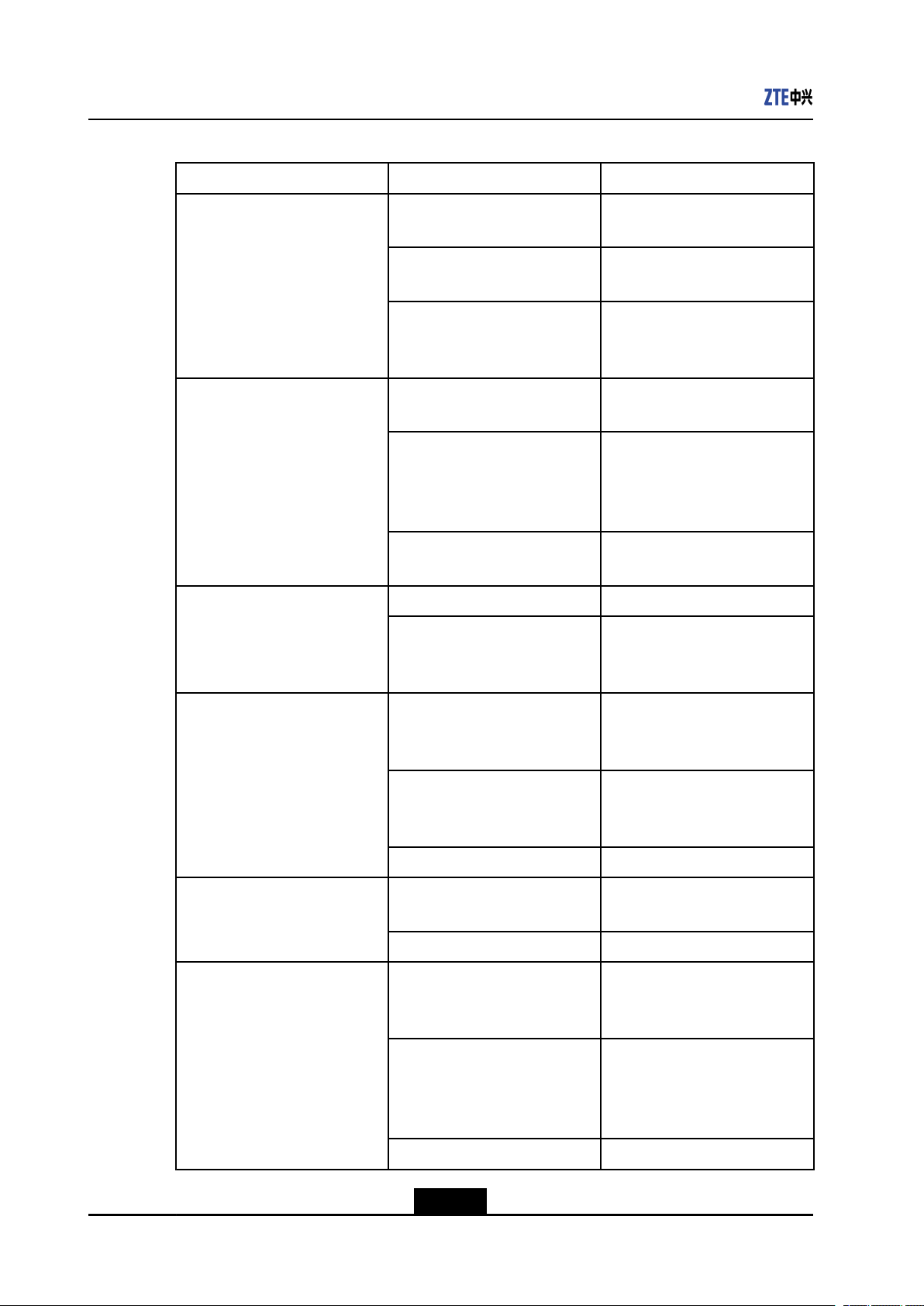
FrontPanel
Figure1-1showsthefrontpanelofZXA10F660.
Figure1-1FrontPanel
Table1-2listsLEDsonthefrontpanel.
1-3
SJ-20110718111034-001|2011-07-18(R1.0)ZTEProprietaryandCondential
ZXA10F660UserManual
Table1-2FrontPanelLEDs
LEDStatusDescription
PON
LOS
Green,ONTheONTGPONisregistered
andthelinkisactivated.
OFFTheONTisnotdiscoveredand
registered.
FlashingTheONTistryingtobe
registeredorsetupthe
connection.
Red,ONTheONUreceivestheoptical
powerabnormally.
OFFTheONUreceivestheoptical
powernormally.
TheIPaddressfortheWAN
connectionisobtained.
FlashingFailstoobtaintheIPaddress
fortheWANconnection.
Green,ONTheWLANfunctionisenabled. WLAN
OFFThedeviceisnotpowered
ONorthewirelessinterfaceis
disabled.
POTS1POTS2
Powerindicator
LAN1-LAN4
Green,ONThedeviceisregisteredon
theSS,butnodataisbeing
transmitted.
OFFThedeviceisnotpoweredON
orfailstoberegisteredonthe
SS.
FlashingDataisbeingtransmitted.
Blue,ONThedeviceispoweredON
normally.
OFFThedeviceisnotpoweredON.
Green,ONThenetworkinterfaceis
connected,butnodataisbeing
transmitted.
OFFThedeviceisnotpowered
ONorthenetworkinterfaceis
notconnectedwithanetwork
device.
FlashingDataisbeingtransmitted.
1-4
SJ-20110718111034-001|2011-07-18(R1.0)ZTEProprietaryandCondential
Chapter1Overview
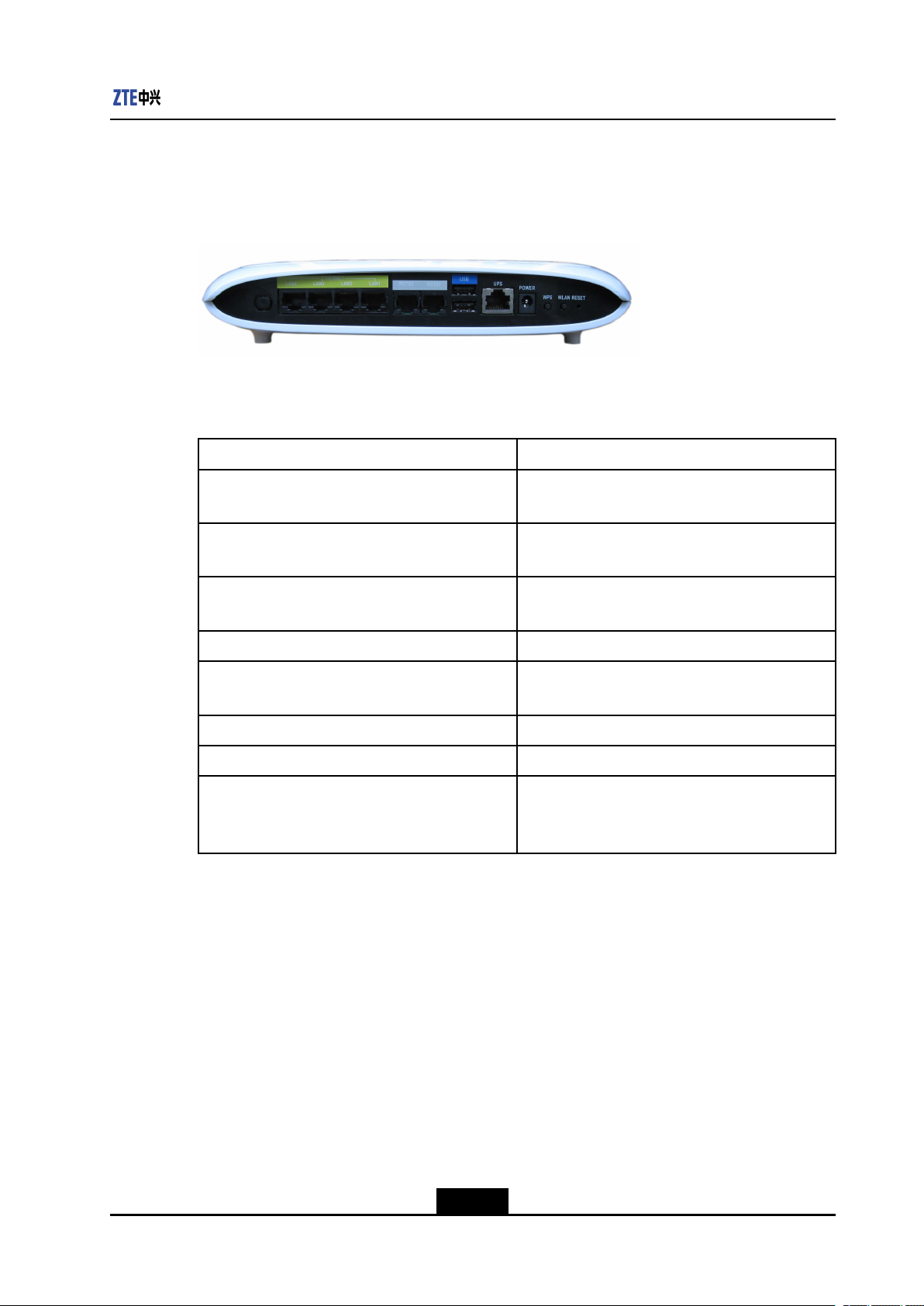
BackPanel
Figure1-2showsthebackpanel.
Figure1-2BackPanel
Table1-3liststheinterfacesandbuttonsonthebackpanel.
Table1-3InterfacesandButtonsontheBackPanel
Interface/ButtonDescription
LAN1-LAN4RJ-45LANinterface,connectstothelocal
networkthroughtheRJ-45networkcable
POTS1POTS2RJ-11telephoneinterface,connectstothe
telephonethroughtheRJ-11telephonecable
USBUSBinterface,connectstoastoragedeviceor
printerthathasaUSBinterface
UPSSecondarypowermonitoringinterface
POWERPowersocket,connectstothepoweradapter ,12
VDC
WPSWPSaccessswitch
WLANWLANbutton,toenableordisableWLAN
RESETWhenthedeviceispoweredON,pressthebutton
formorethan5secondstorestorethefactory
defaultsettings.
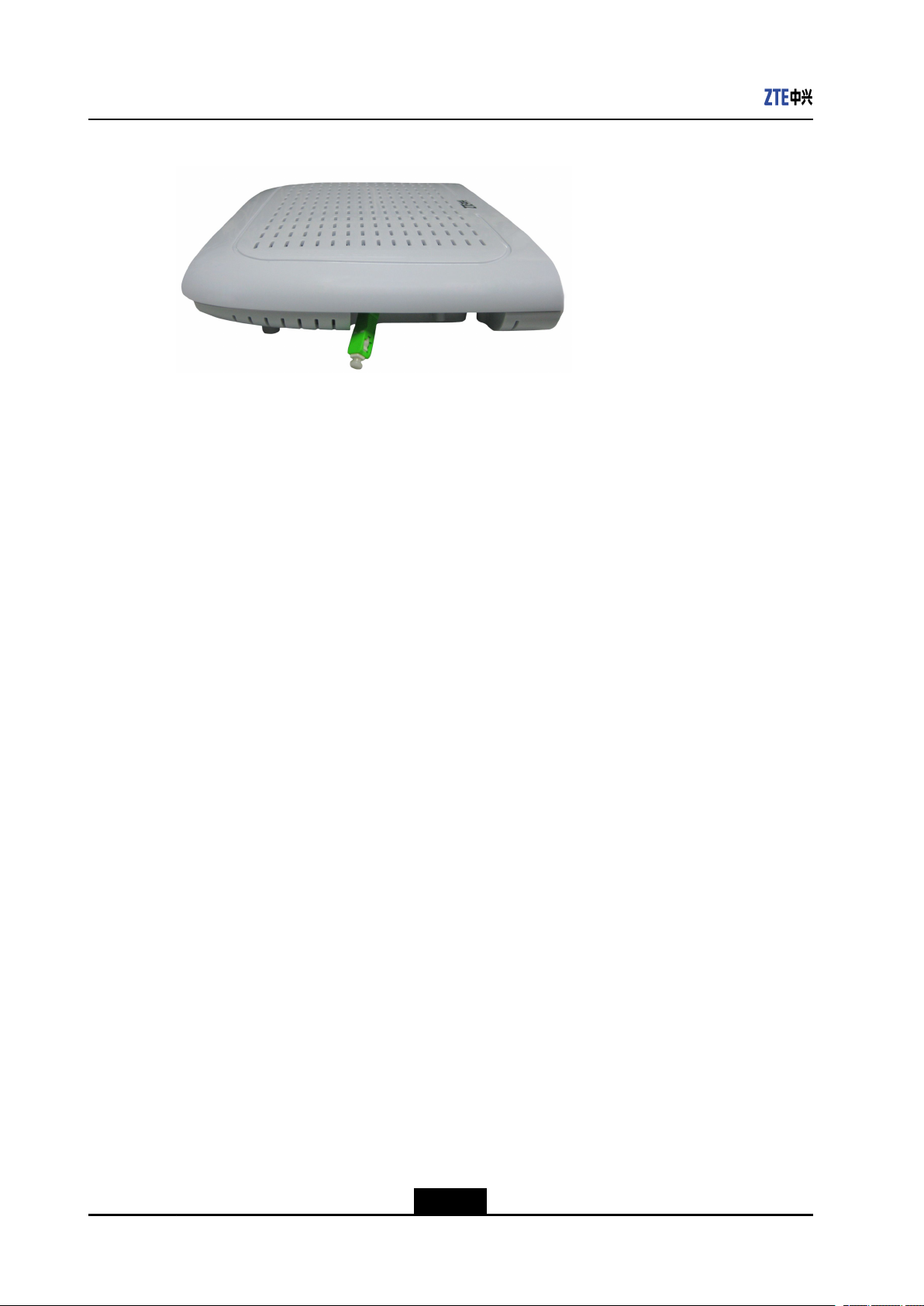
SidePanel
ThesidepanelhasanSC/APCsingle-modeberinterface,implementingtheservices
providedbytheISPinPONaccessmode.ItconnectstotheGPONinterfaceofZXA10
F660throughanSC/APCsingle-modeber.Figure1-3showsthesidepanel.
1-5
SJ-20110718111034-001|2011-07-18(R1.0)ZTEProprietaryandCondential
ZXA10F660UserManual
1.5SystemRequirements
Figure1-3SidePanel
TheZXA10F660systemrequirementsareasfollows:
lAnISPisneededsothatthedevicecanaccesstheservicesprovidedbytheISP
throughthePONaccessmode.
lAcomputerthatisinstalledwitha10Mbps/100Mbps/1000MbpsEthernetcardis
needed.
lIfnecessary,createamediumandsmallLANbyaddingEthernethubsandcables.
lTousewirelessaccess,an802.1 1g/bwirelessnetworkcardorabuilt-in802.11g/b
wirelessnetworkcardisrequired.
lThecomputerthataccessesthenetworkshouldbeinstalledwithWindows
98/Me/2000/NT/XP/Vista/7orLinux,networkcarddriverprogram,andTCP/IP
protocol,anditsnetworksettingsarecorrect.
lAcomputerintheLANisinstalledwithaWebbrowser,suchasMicrosoftInternet
Explorer6.0orhigher,NetscapeCommunicator4.0orhigher.
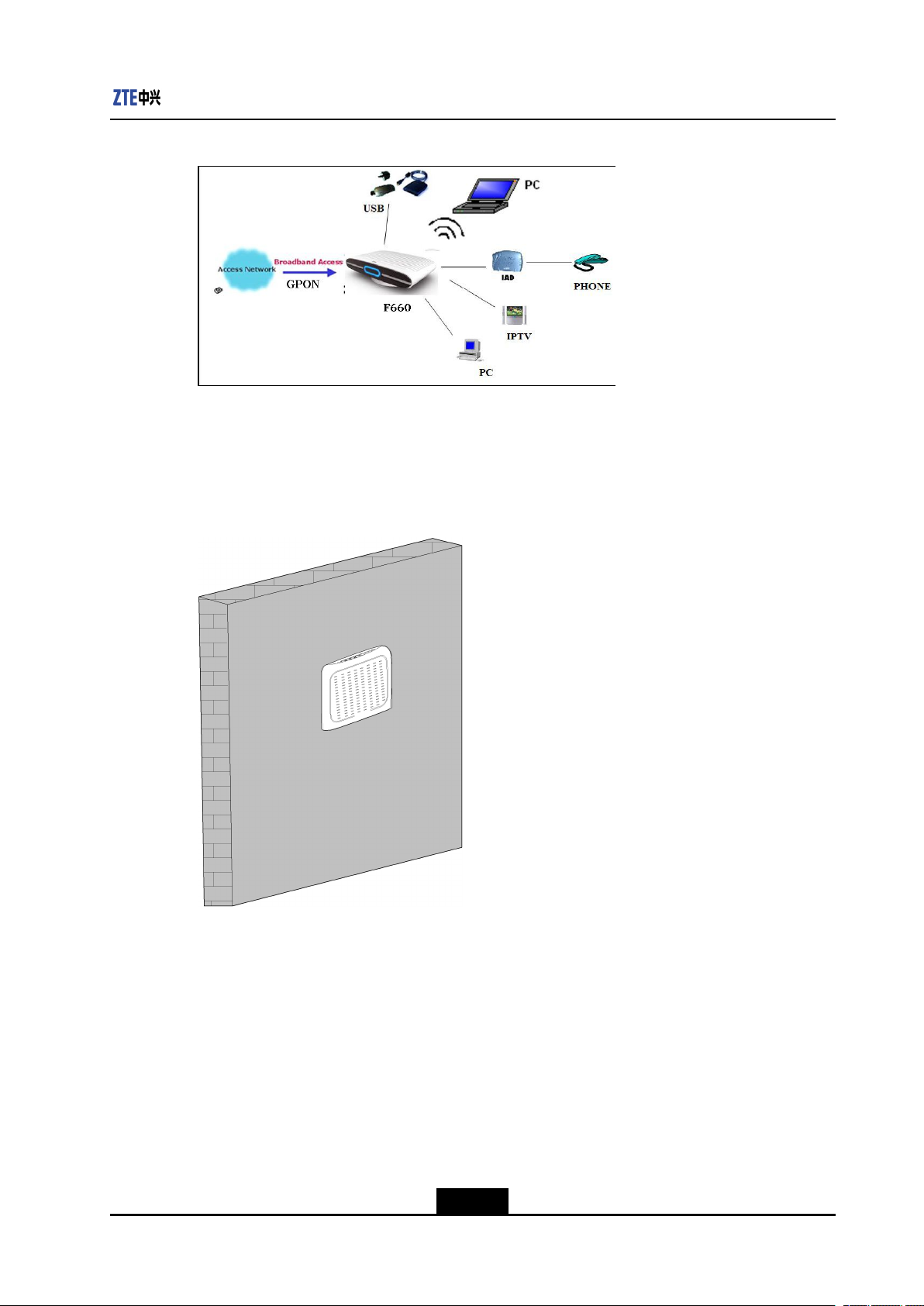
1.6SystemApplicationEnvironment
ZXA10F660isanindoordeviceofZTEseriesopticalnetworkterminalequipment.Itworks
withthePONdevicetoimplementtheFTTHapplication.
Withtheuseofmultipleuserinterfaces,hub,orEthernetswitch,ZXA10F660can
implementtheFTTO/Bapplication.
Figure1-4showstheZXA10F660applicationenvironment.
1-6
SJ-20110718111034-001|2011-07-18(R1.0)ZTEProprietaryandCondential
Chapter1Overview
Figure1-4SystemApplicationEnvironment
Asanindoordevice,ZXA10F660canbeputonthedeskwiththebaseorhungonthe
wallwithoutthebase.
Figure1-5showstheZXA10F660onawall.
Figure1-5F66xWall-Mount
1-7
SJ-20110718111034-001|2011-07-18(R1.0)ZTEProprietaryandCondential

ZXA10F660UserManual
Thispageintentionallyleftblank.
1-8
SJ-20110718111034-001|2011-07-18(R1.0)ZTEProprietaryandCondential

Chapter2
CongurationPreparation
TableofContents
PreliminarySetup………………………………………………………………………………………….2-1
ConguringTCP/IP……………………………………………………………………………………….2-1
LoggingIntotheDevice…………………………………………………………………………………2-6
2.1PreliminarySetup
Generally,theISPhasalreadyconguredthedevice.Theusercandirectlyuseitafter
hardwareconnection.However,theusermayneedtocongurethedeviceinsomespecial
situations.Theusermustconrmthefollowingpreliminarysetups:
lUseonecrossoverorstraight-throughEthernetcabletoconnectacomputertothe
lChecktheTCP/IPsettingsofthecomputer.
lDisableanyrunningrewallorsecuritysoftware.
lDisabletheproxyserveroftheInternetExplorer.
lConsulttheISPifsomedatafromtheISPisneeded.
device.
2.2ConguringTCP/IP
ShortDescription
PerformthisproceduretocongureTCP/IPofacomputerconnectedtotheZXA10F660.
Context
ThisinstancetakesWindowsXPasanexample.
ThedefaultnetworksettingsfortheZXA10F660areasfollows:
lIPaddress:192.168.1.1
lSubnetmask:255.255.255.0
lDefaultgateway:192.168.1.1
TocongureTCP/IP ,performthefollowingsteps:
Steps
1.ChooseStart>Settings>NetworkConnectionstoopentheNetworkConnections
window.
2-1
SJ-20110718111034-001|2011-07-18(R1.0)ZTEProprietaryandCondential

ZXA10F660UserManual
2.Double-clickLocalAreaConnectiontoopentheLocalAreaConnectionStatus
dialogbox,asshowninFigure2-1.
Figure2-1LocalAreaConnectionStatus
3.ClickPropertiesintheGeneraltabtoopentheLocalAreaConnectionProperties
dialogbox.
4.SelectInternetProtocol(TCP/IP),asshowninFigure2-2.
2-2
SJ-20110718111034-001|2011-07-18(R1.0)ZTEProprietaryandCondential
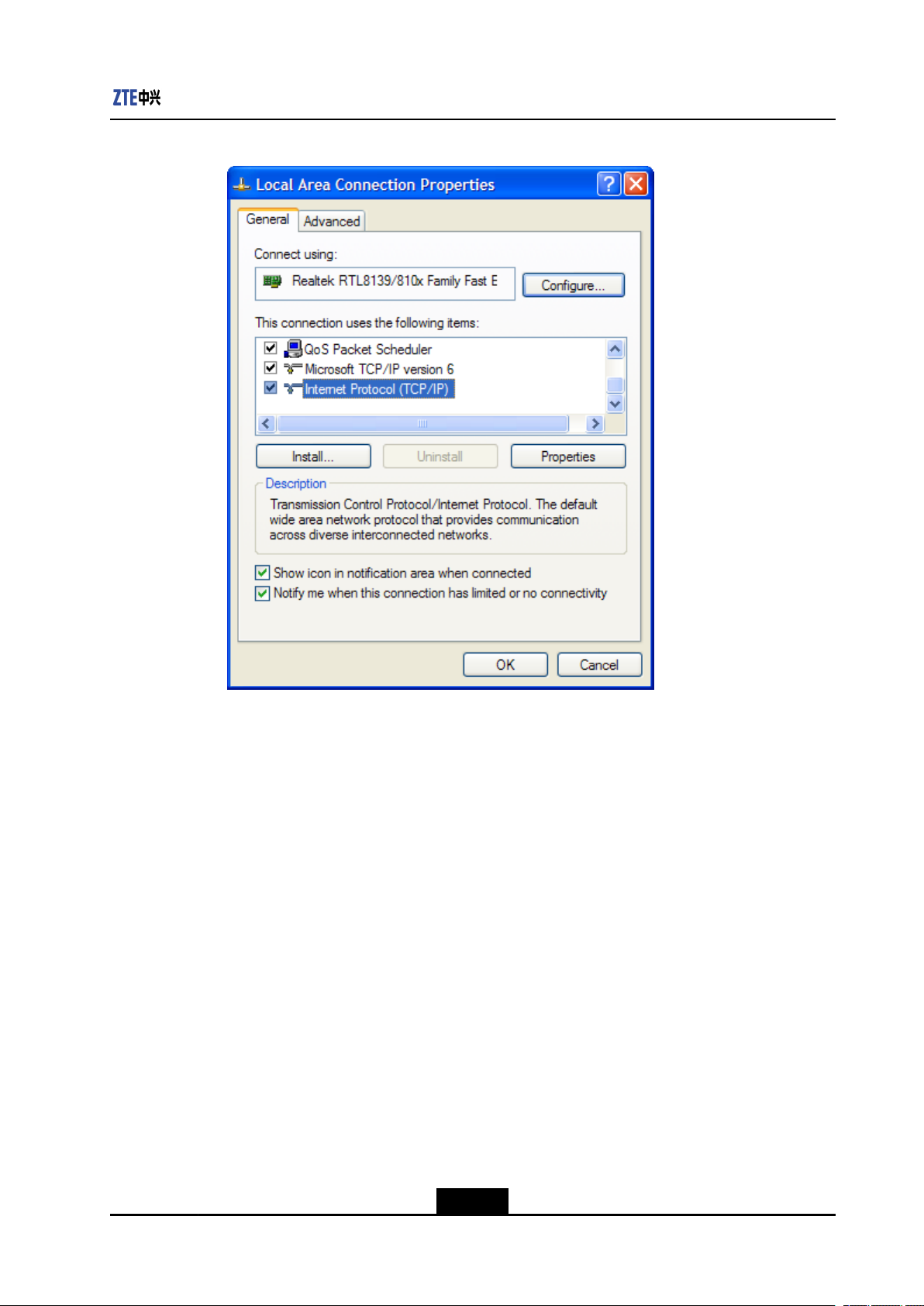
Figure2-2LocalAreaConnectionProperties
Chapter2CongurationPreparation
5.ClickPropertiestoopentheInternetProtocol(TCP/IP)Propertiesdialogbox.
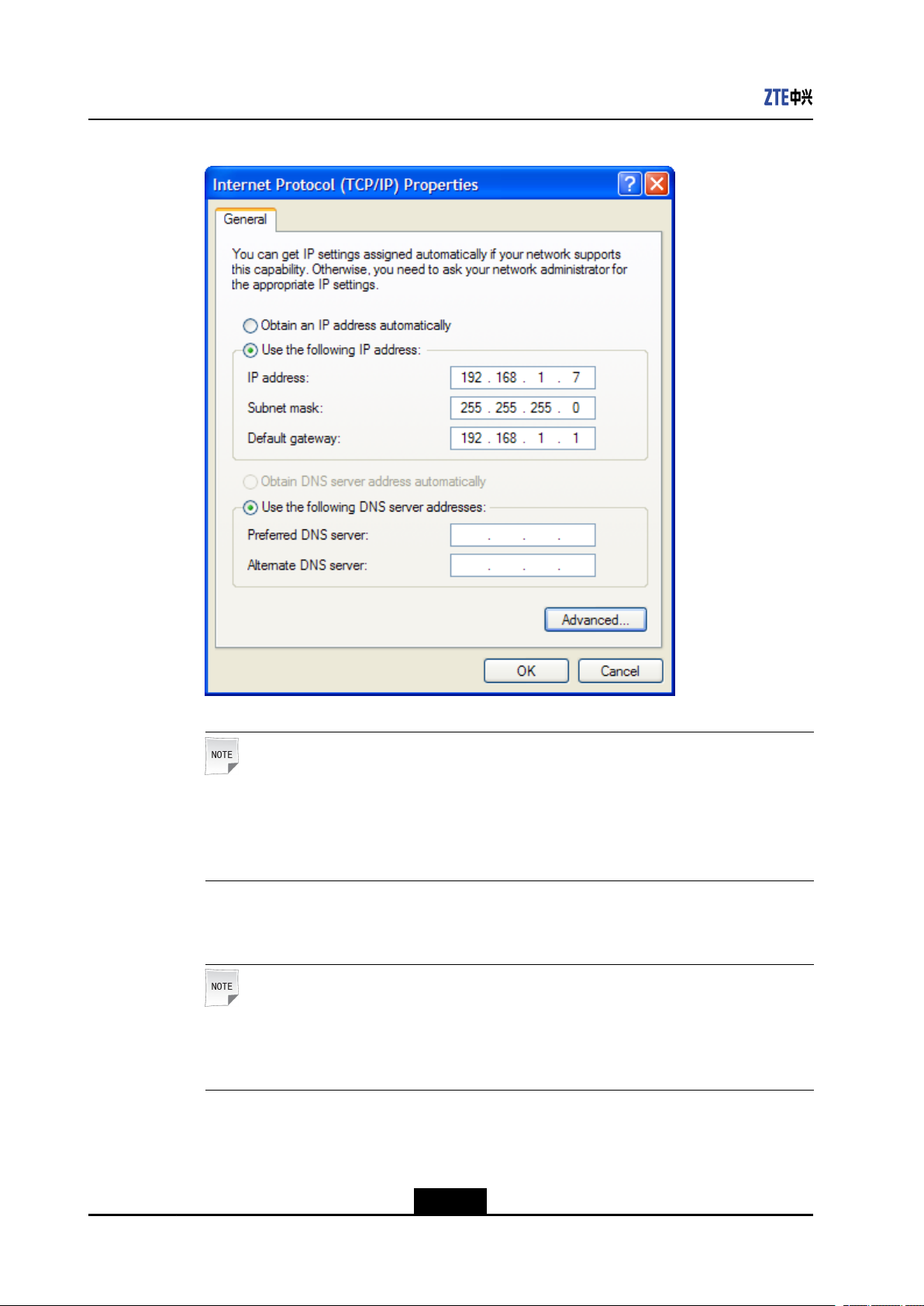
SelectUsethefollowingIPaddressandspecifytheIPaddress,Subnetmask,
andDefaultgateway.Forexample,youcansettheIPaddressto192.168.1.7,
Subnetmaskto255.255.255.0,andDefaultgatewayto192.168.1.1,as
showninFigure2-3.
2-3
SJ-20110718111034-001|2011-07-18(R1.0)ZTEProprietaryandCondential
ZXA10F660UserManual
Figure2-3SpecifyingtheIPaddressintheInternetProtocol(TCP/IP)Properties
Note:
TheIPaddressshallbeinthesamenetworksegmentasLANportaddressofthe
device,whichmeanstheIPaddressyoutypeinshouldbe“192.168.1.x”(xcanbeany
valuefrom2to254).
6.ClickOKtosaveyoursettings.
Note:
IfyouareaccessingtheWEBpageofthedeviceforthersttime,pleasecongure
thedeviceasyouaretold.
–EndofSteps–
2-4
SJ-20110718111034-001|2011-07-18(R1.0)ZTEProprietaryandCondential
Chapter2CongurationPreparation
Follow-UpAction
1.ChooseStart>RuntoopentheRundialogbox.
2.TypeCMDintheOpentextbox,andclickOK.
3.Typeping192.168.1.1inthepop-upwindowandpressEntertocarryouttheping
command.
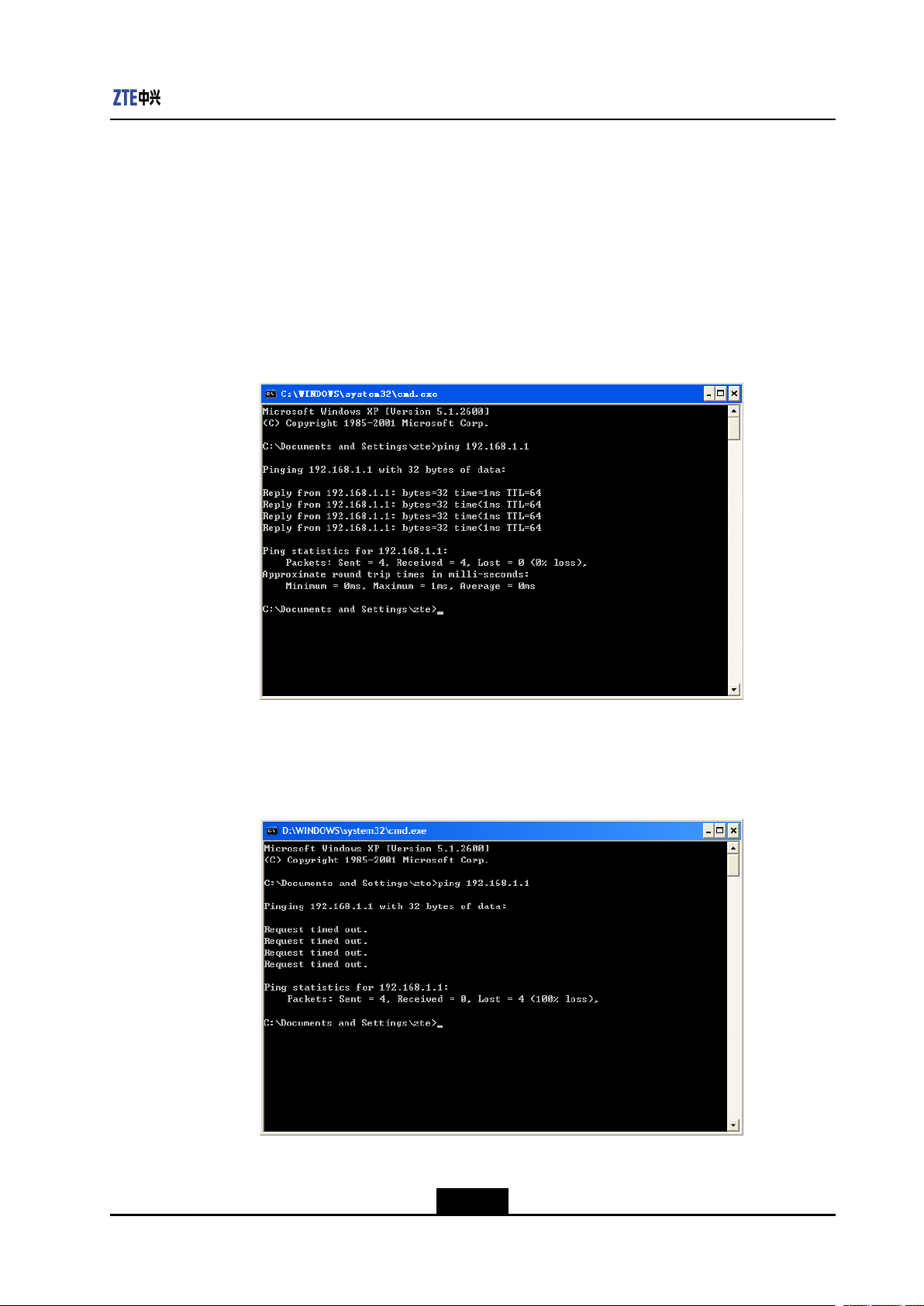
lIfthecommandwindowdisplaysthemessages,asshowninFigure2-4,it
indicatesthatthecommunicationbetweenyourPCandthedeviceisnormaland
youareabletoaccesstheInternetnow.
Figure2-4SuccessfulPingMessage
lIfthecommandwindowdisplaysthemessages,asshowninFigure2-5,it
indicatesthatthecommunicationbetweenyourPCandthedevicefails.
Figure2-5FailedPingMessage
IfthecommunicationbetweenyourPCandthedevicefails,ensurethefollowingitems:
2-5
SJ-20110718111034-001|2011-07-18(R1.0)ZTEProprietaryandCondential
ZXA10F660UserManual
lTheEthernetcablebetweenthedeviceandyourPChasbeenconnectedproperly.
lThedriverofyournetworkadapterhasbeeninstalledproperly .
lTheTCP/IPsettinghasbeenconguredcorrectlyonyourPC.
IftheZXA10F660IPaddressis192.168.1.1,theIPaddressofthecomputermust
befrom192.168.1.2to192.168.1.254.Thesubnetmaskmustbe255.255.255.0
andthedefaultgatewaymustbe192.168.1.1.
2.3LoggingIntotheDevice
ShortDescription
Performthisproceduretologintothedevice.
Prerequisites
Thedeviceisproperlyconnectedandthecomputeriscorrectlycongured.
Context
Tologintothedevice,performthefollowingsteps:
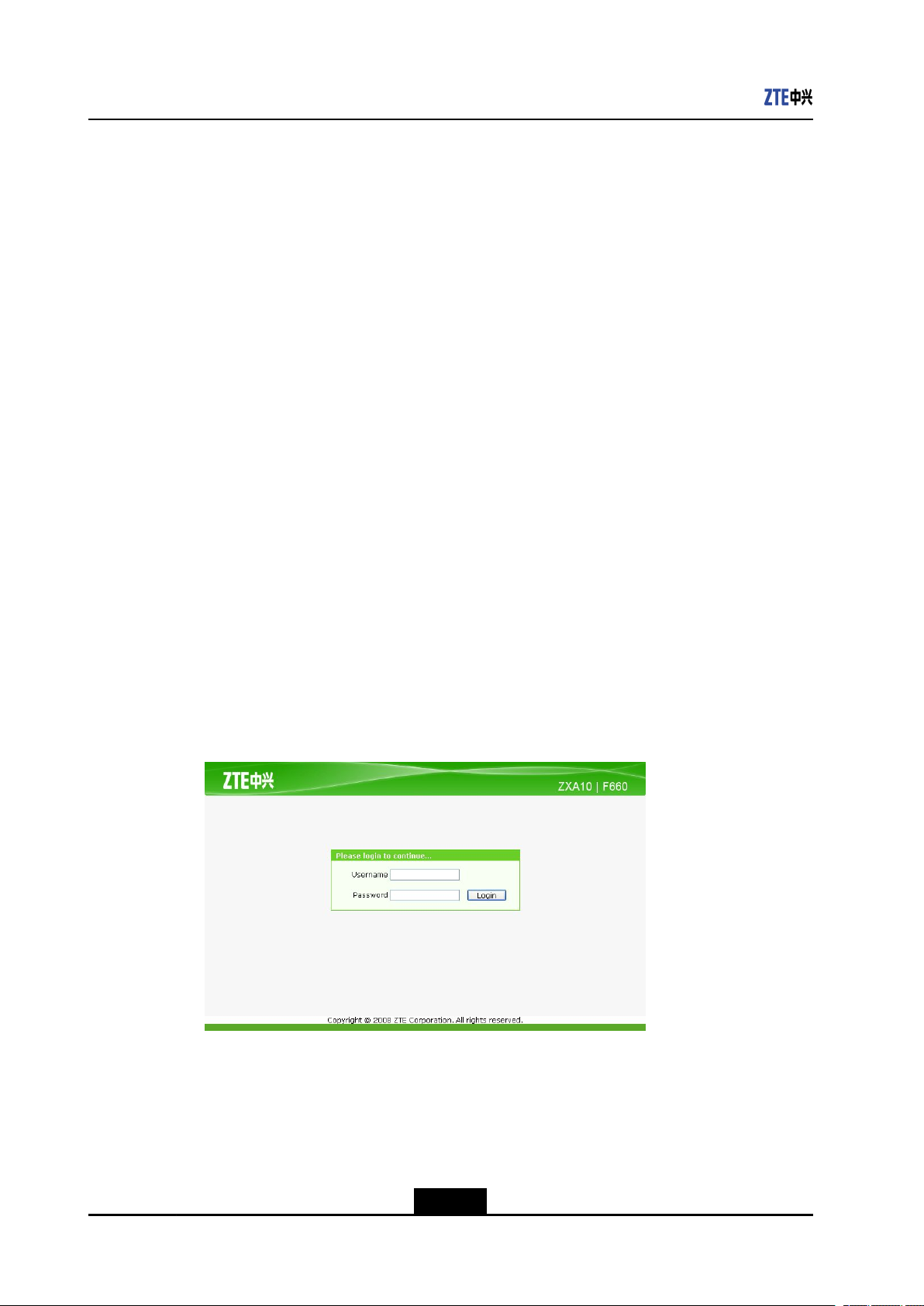
Steps
1.OpentheInternetExplorer.Enterhttp://192.168.1.1(defaultIPaddressofthe
device)ontheaddressbarandpressEnter.Thelogindialogboxisdisplayed,as
showninFigure2-6.
Figure2-6Login
2.EntertheUsernameandPassword(bydefault,bothareadmin).ClickLogin.
–EndofSteps–
Result
Loggingintothedeviceissuccessful.
2-6
SJ-20110718111034-001|2011-07-18(R1.0)ZTEProprietaryandCondential

Chapter3
DeviceStatus
TableofContents
DeviceInformation………………………………………………………………………………………..3-1
NetworkConnectionInformation………………………………………………………………………3-2
UserInterfaceInformation………………………………………………………………………………3-3
3.1DeviceInformation
OntheWebinterfaceofthedevice,clicktheStatustab.Bydefault,theDevice
Informationisselected.Therightpanedisplaysthedevicetype,serialnumber,and
versioninformation,andregistrationpassword,asshowninFigure3-1.
Figure3-1DeviceInformation
Table3-1liststheparametersforthedeviceinformation.
Table3-1DeviceInformationParameters
ParameterDescription
ModelDevicetype
SerialNumberDeviceserialnumber
HardwareVersionHardwareversionnumber
SoftwareVersionSoftwareversionnumber
BootLoaderVersionBootversionnumber
PONSerialNumberPONserialnumber
3-1
SJ-20110718111034-001|2011-07-18(R1.0)ZTEProprietaryandCondential
ZXA10F660UserManual
ParameterDescription
PasswordPasswordusedbytheONUregistrationonthe
3.2NetworkConnectionInformation
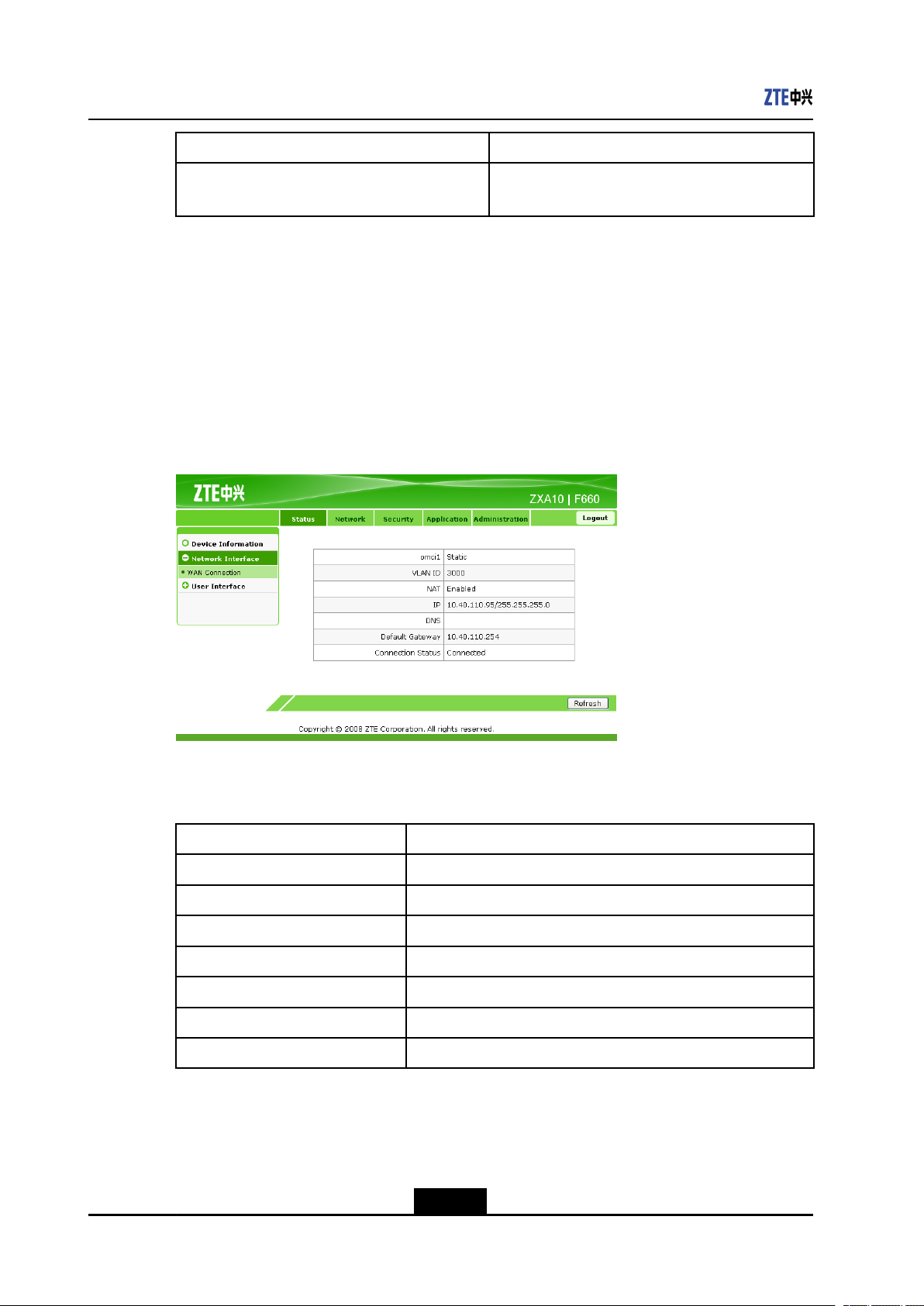
OntheStatustab,selectNetworkInterface.Bydefault,theWANConnectionsub-node
isselected.TherightpanedisplaystheWANconnectioninformation,asshowninFigure
3-2.
ClickRefreshtoviewthelatestinformation.
Figure3-2WANConnection
OLT
Table3-2liststheparametersforthenetworkconnectioninformation.
Table3-2ParametersfortheNetworkConnectionInformation
ParameterDescription
omci1WANconnectiontype
VLANIDVLANIDusedbytheWANinterfacetosendandreceivedata
NATWhethertoenabletheNATfunction
IPIPaddressusedbyZXA10F660
DNSDNSusedbyZXA10F660
DefaultGatewayGatewayusedbyZXA10F660
ConnectionStatusWANconnectionstatus
3-2
SJ-20110718111034-001|2011-07-18(R1.0)ZTEProprietaryandCondential
OMCI1istheWANconnectionname,whichiscreatedbytheOMCIinterfaceremotely.
3.3UserInterfaceInformation
Thistopicincludesthefollowing:
lWLANInterfaceInformation
lEthernetInterfaceInformation
lVoIPStatusInformation
3.3.1WLANInterfaceInformation
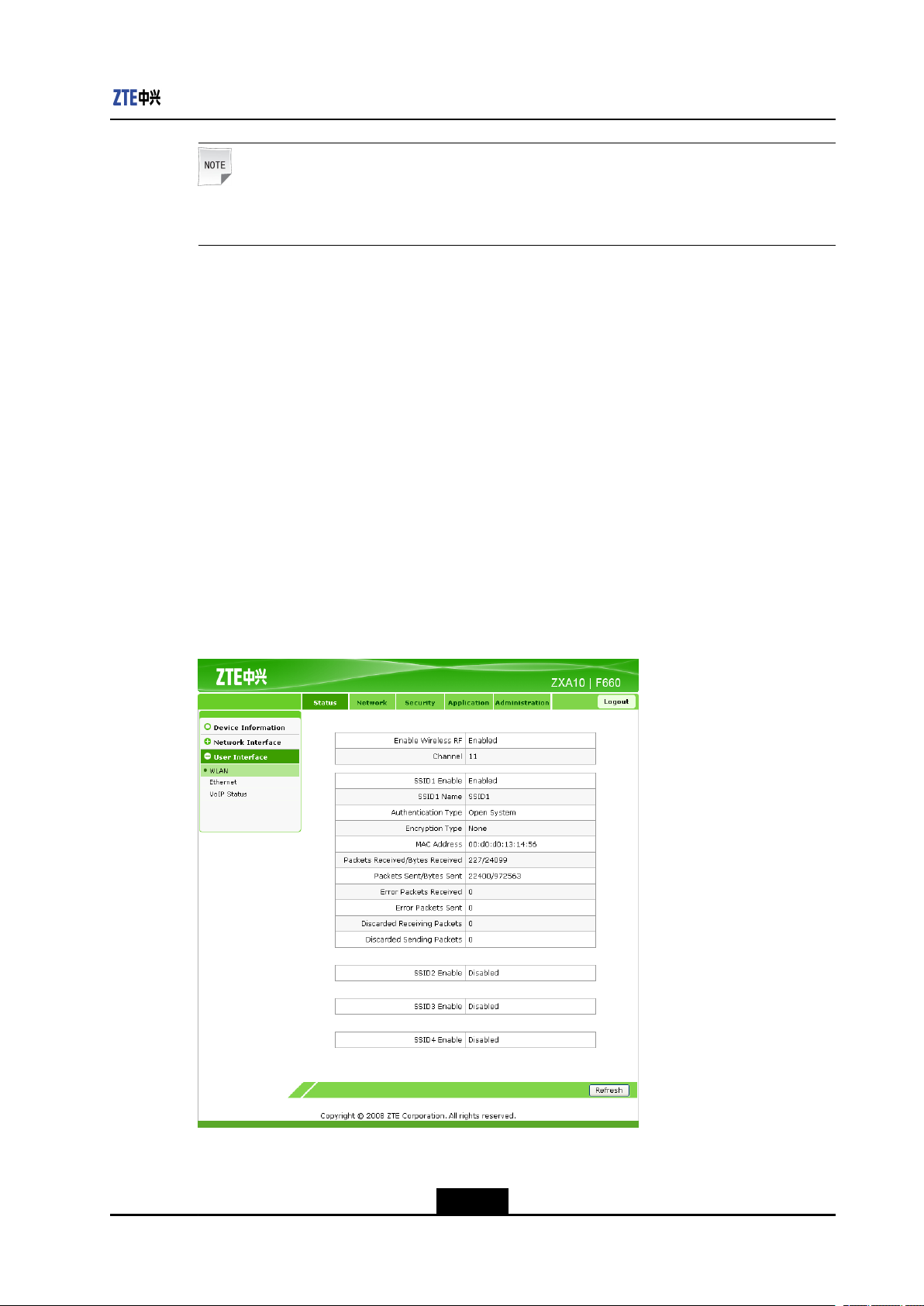
OntheStatustab,selectUserInterface.Bydefault,WLANisselected.Therightpane
displaystheWLANswitchinformation,packetreceivingandsendinginformation,and
authenticationinformation,asshowninFigure3-3.
Chapter3DeviceStatus
Note:
ClickRefreshtoviewthelatestinformation.
Figure3-3WLANInterfaceInformation
Table3-3liststheparametersfortheWLANinterfaceinformation.
3-3
SJ-20110718111034-001|2011-07-18(R1.0)ZTEProprietaryandCondential
ZXA10F660UserManual
Table3-3ParametersfortheWLANInterfaceInformation
ParameterDescription
EnableWirelessRFWhethertoenablethewirelessRF
ChannelChannel
SSID1EnableWhethertoenablethewirelessnetworkSSID1
SSID1NameSSID1name,whichidentiesthewirelessnetwork
servicearea
AuthenticationTypeAuthenticationmode
EncryptionTypeEncryptionmode
MACAddressMACaddress
PacketsReceived/BytesReceivedNumberofreceivedpacketsorbytes
PacketsSent/BytesSentNumberofsentpacketsorbytes
ErrorPacketsReceivedErrorpacketsreceived
ErrorPacketsSentErrorpacketssent
DiscardedReceivingPacketsDiscardedreceivingpackets
DiscardedSendingPacketsDiscardedsendingpackets
3.3.2EthernetInterfaceInformation
OntheStatustab,selectUserInterface.SelectEthernet.Therightpanedisplaysthe
packetreceivingandsendinginformationontheEthernetinterface,asshowninFigure
3-4.
ClickRefreshtoviewthelatestinformation.
3-4
SJ-20110718111034-001|2011-07-18(R1.0)ZTEProprietaryandCondential
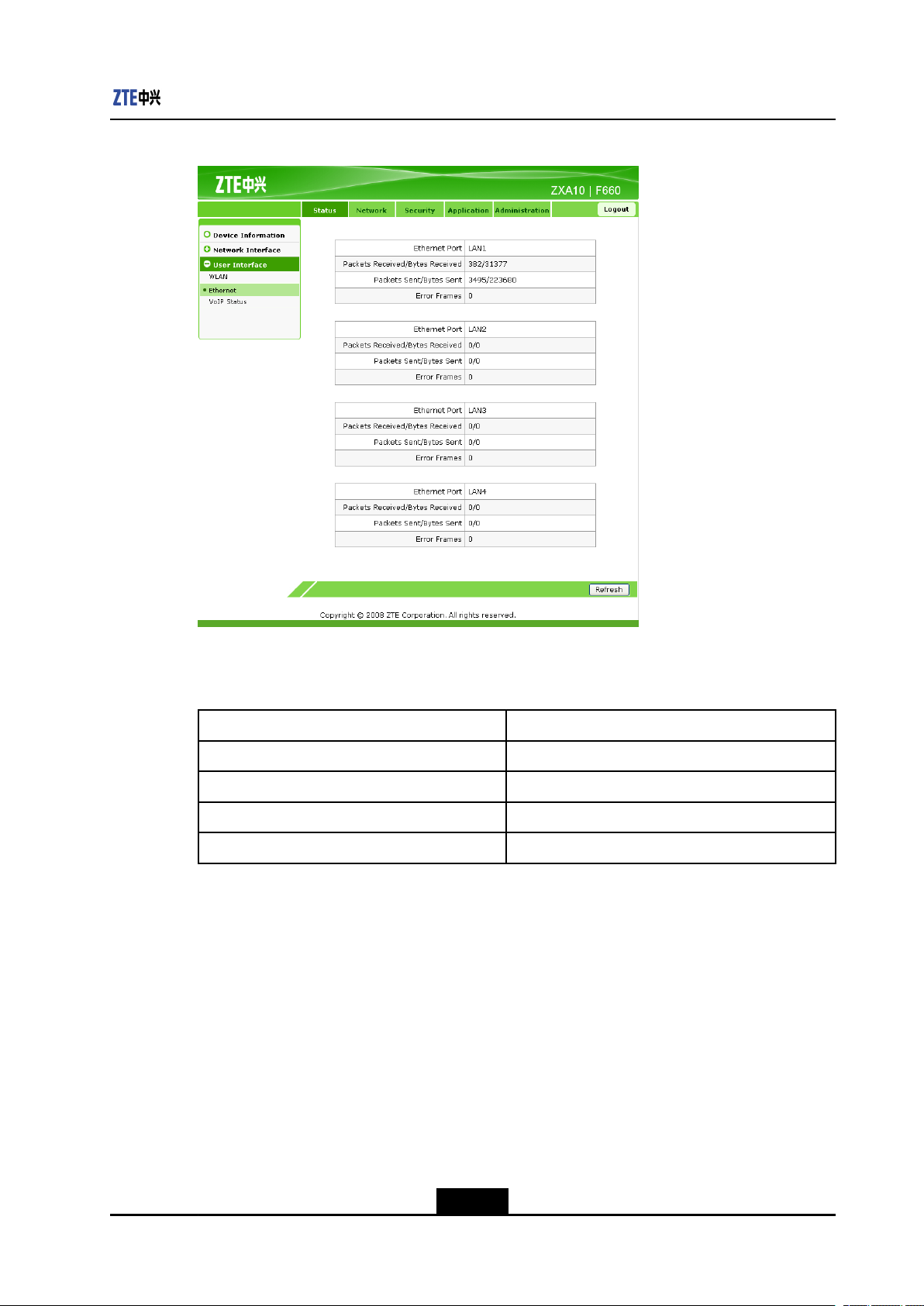
Figure3-4EthernetInterfaceInformation
Chapter3DeviceStatus
3.3.3VoIPStatusInformation
Table3-4liststheparametersfortheEthernetinterfaceinformation.
Table3-4ParametersfortheEthernetInterfaceInformation
ParameterDescription
EthernetPortPortname
PacketsReceived/BytesReceivedNumberofreceivedpacketsorbytes
PacketsSent/BytesSentNumberofsentpacketsorbytes
ErrorFramesEtherneterrorframes
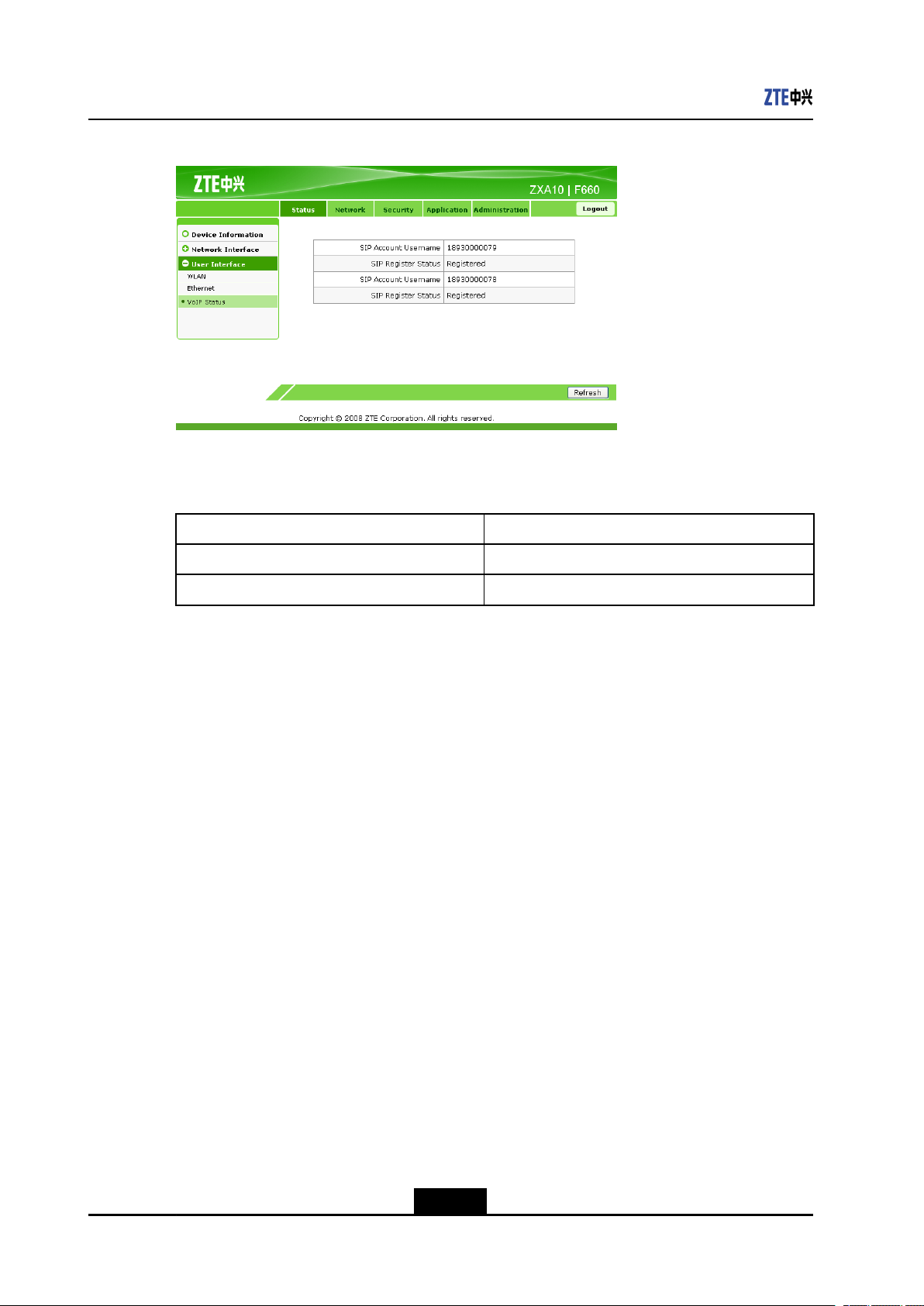
OntheStatustab,selectUserInterface.SelectV oIPStatus.Therightpanedisplays
theVoIPstatusinformation,asshowninFigure3-5.
ClickRefreshtoviewthelatestinformation.
3-5
SJ-20110718111034-001|2011-07-18(R1.0)ZTEProprietaryandCondential
ZXA10F660UserManual
Figure3-5V oIPStatusInformation
Table3-5liststheparametersfortheVoIPstatusinformation.
Table3-5ParametersfortheVoIPStatusInformation
ParameterDescription
SIPAccountUsernameTelephonenumber
SIPRegisterStatusRegistrationstatusofthevoiceservice
3-6
SJ-20110718111034-001|2011-07-18(R1.0)ZTEProprietaryandCondential
Loading…
Роутер ZTE ZXA10 F660 (ZXHN F660) – это очень популярный среди провайдеров интернет услуг маршрутизатор, который позволяет выходить в сеть одновременно нескольким разным устройствам – компьютерам, ноутбукам, планшетам и смартфонам. Далее рассмотрим возможности и характеристики роутера ZTE F660 и выясним, как настроить этот аппарат.
Содержание
- Отличительные особенности
- Технические характеристики
- Настройка
- Настраиваем как локальный WEB-сервер
- Задать вопрос автору статьи
Отличительные особенности
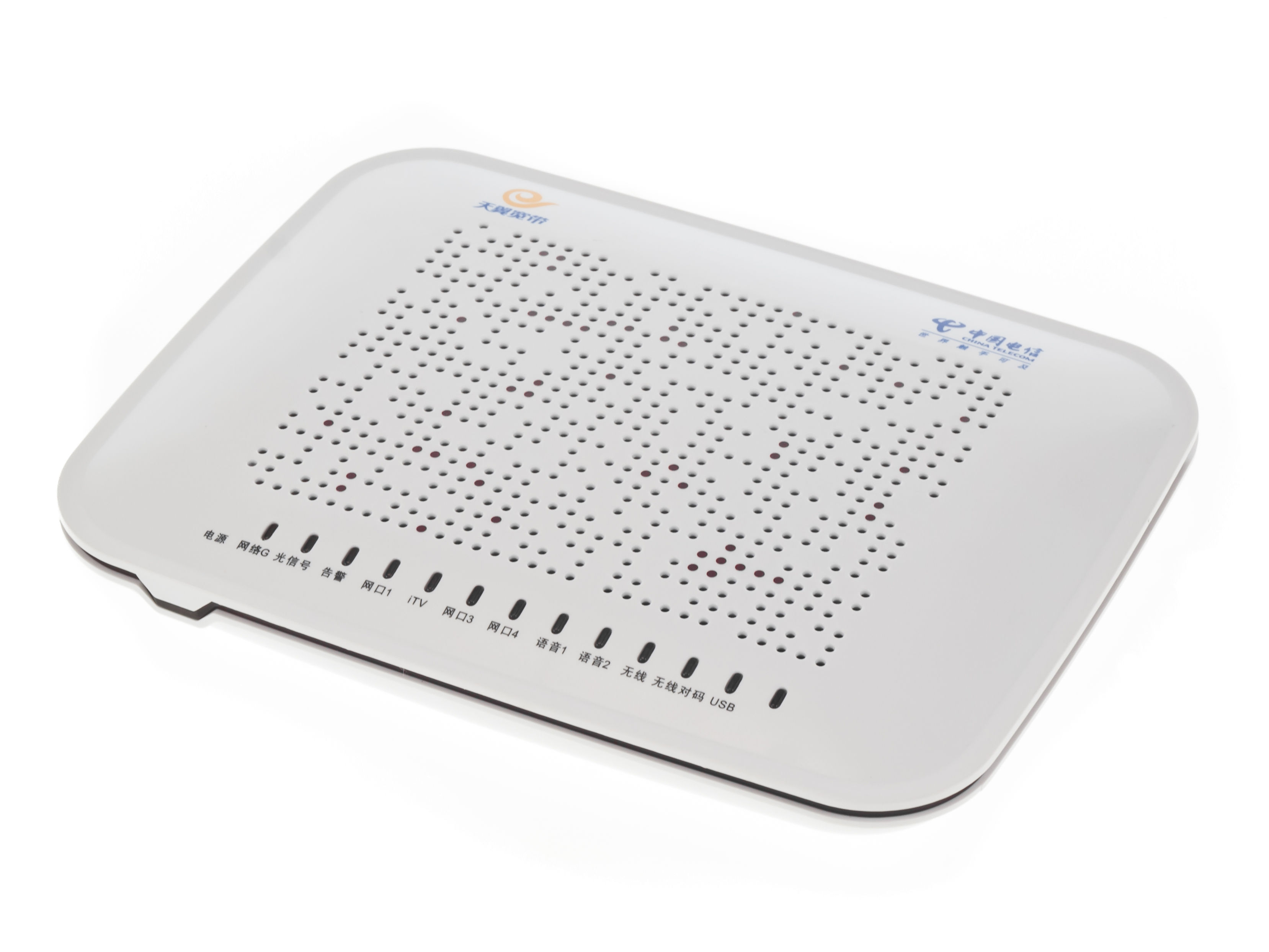
ZXA10 F660 от ZTE – это роутер и ONT терминал, который подключается к оптической сети провайдера. Он обладает очень широкими функциональными возможностями. Помимо стандартной раздачи интернета по проводной сети и Wi-Fi, к устройству можно подключить два телефонных аппарата и использовать IP-телефонию. Кроме того, имеется возможность подключения USB накопителей, есть поддержка IPTV. На базе роутера также можно организовать локальные WEB и FTP сервера.
Помимо расширенного функционала ZTE F660 обладает высокой надежностью. Это отличительная особенность всего сетевого оборудования этого китайского производителя. Но наряду с несомненными достоинствами есть и недостатки.
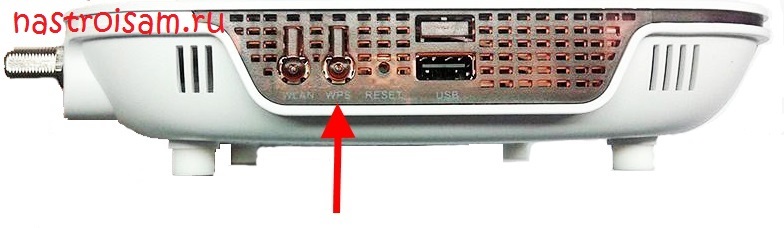
В ранних прошивках маршрутизатора ZTE был по умолчанию включен режим WPS. Если коротко – это функция упрощенного доступа пользователей сети к интернету. Работа этого режима сама по себе не так страшна. Плохо то, что пин-код WPS у большинства роутеров ZTE одинаковый. Это создавало серьезную угрозу безопасности сети. Поэтому перед началом эксплуатации маршрутизатора нужно убедиться, что этот режим выключен. Если это не так, его следует отключить с помощью соответствующей кнопки на корпусе роутера.
У этой модели есть еще одна уязвимость. Если любой пользователь наберет адрес 192.168.1.1/manager_dev_config_t.gch и кликнет «Backup Configuration», то он скачает конфигурацию в формате XML не только с настройками, но и паролями. Поэтому при наличии этого роутера следует очень избирательно пускать пользователей внутрь сети.
Технические характеристики
У ZTE ZXHN F660 есть такие интерфейсы:
- PON – предназначен для подключения одномодового оптического кабеля провайдера по SC/APC интерфейсу, поддерживает стандарт GPON. Подробно про GPON – читаем тут…
- LAN – розетки RJ-45 для подключения проводных Ethernet устройств со скоростью 10 Мбит/с, 100 Мбит/с или 1 Гб/с (4 шт.).
- Phone – розетки RJ-11 для телефонов (2 шт.).
- USB – разъемы, поддерживающие подключение устройств USB 2.0 (2 шт.).
- Power – вход для электропитания 12 В, сюда подключается входящий в комплект адаптер питания.
- Частота Wi-Fi – 2.4GHz.
- Стандарт – 802.11b/g/n.
Аппарат оборудован такими кнопками:
- ON/OFF – включение и выключение устройства.
- Reset – при кратковременном нажатии перезагружает роутер, при нажатии более 5 секунд сбрасывает аппарат в заводские настройки.
- WLAN – включение WLAN.
- WPS – включение WPS.
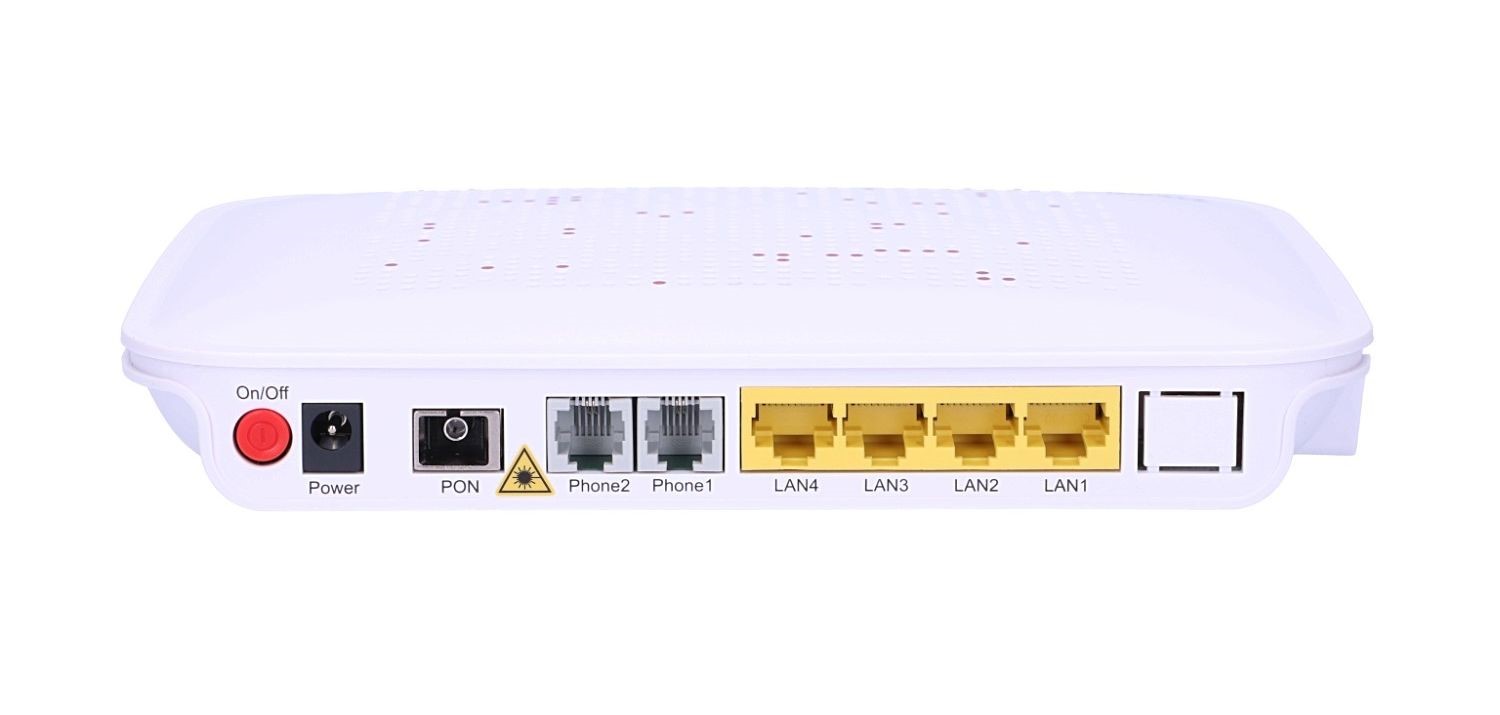
Маршрутизатор поддерживает скорость Wi-Fi до 300 Мбит/с на частоте 2,4 ГГц, до 4000 Mac адресов, до четырех SSID сетей и 128 клиентов на каждую из них. Обращаю ваше внимание, что скорость по беспроводной сети Wi-Fi в 300 Мбит в секунду доступна только на ширине канала в 40 МГц. В многоквартирном доме из-за помех соседей скорость может упасть в два раза из-за использования канал 20 МГц. Более подробно об этом – читаем тут.
Настройка
Чтобы настроить ZTE F660 GPON, сначала его нужно подключить к оптоволоконной сети оператора и к компьютеру, с которого будем производить настройку. Делается это так:
- Вилку адаптера питания подключить в обычную электрическую розетку 220 В, а другой его конец воткнуть в гнездо «Power» на роутере.
- Подключить разъем оптического кабеля провайдера к гнезду «PON».
- Разъем патч-корда (шнура) или кабеля воткнуть в соответствующий порт на компьютере или ноутбуке, а другой конец к первому порту «LAN» на роутере. При этом на маршрутизаторе должен загореться соответствующий светодиод.
Если индикатор не загорелся, то подключение компьютера не произошло. Тогда нужно проверить настройки сетевой карты на ПК, заменить патч-корд или проверить целостность кабеля.
Видео по настройке Wi-Fi смотрите тут:
Теперь все готово для настройки роутера. Параметры оптического подключения должен настроить провайдер. Приведем шаги для запуска раздачи интернета по Wi-Fi:
- Вся настройка маршрутизатора происходит с помощью обычного интернет браузера (Chrome, Internet Explorer, Opera и др.). Поэтому следует запустить эту программу и в адресной строке ввести 192.168.1.1. Это IP адрес роутера. Затем вводим логин и пароль. Они одинаковые – по умолчанию admin.
Примечание от Ботана. admin-admin – стандартные логин-пароль на заводском роутере. Одному из наших читателей пришлось иметь дело с моделью в обработке от МГТС. На нем данные для входа отличаются: логин – mgts, пароль – mtsoao.
- После этого мы попадаем на встроенный веб сервер маршрутизатора.
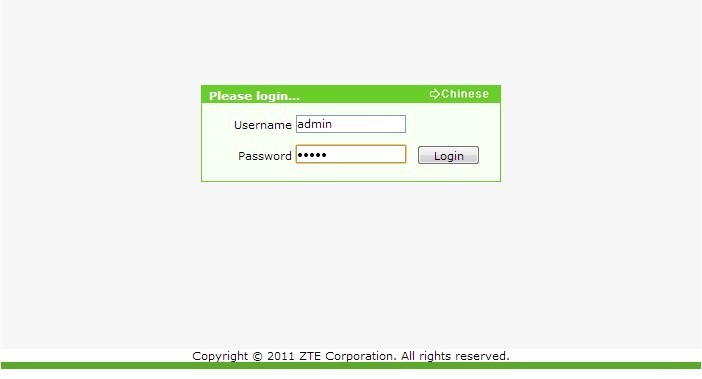
Теперь можно настраивать аппарат. Сверху мы увидим главное меню со следующими пунктами:
- «Status»
- «Network»
- «Security»
- «Application»
- «Administration»
В меню «Network» выбираем пункт «WLAN» и подпункт «Basic». Далее нужно правильно заполнить данные на этой страничке. В выпадающем списке параметра «Wireless RF Mode» нужно выбрать «Enabled». В списке «Mode» следует выбрать «Mixed (802.11b+802.11g+802.11n)».
Для России прописываем соответственно Russia. Другие поля заполняются следующим образом:
- Channel – Auto
- Transmitting Power – 100%
- Qos Type – Disabled
- RTS Threshold
- Fragment Threshold – 2346
Для сохранения всех настроек нужно обязательно нажать «Submit».
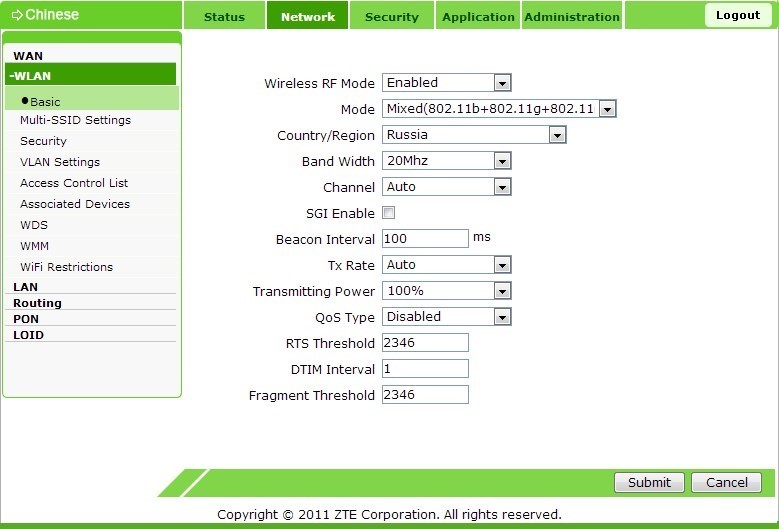
Далее нужно найти подменю «Multi SSID settings». Оно находится слева. Здесь нужно заполнить поля «Choose SSID» – SSID 1, выбрав пункт «Enable SSID», и в «SSID Name» вписать придуманное самостоятельно имя сети. И не забудьте сохранить настройки нажатием «Submit».
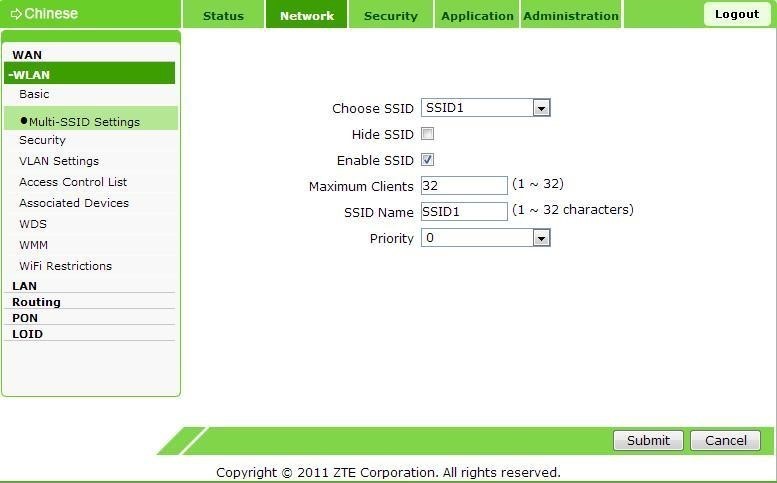
Далее чуть ниже находится подменю «Security». Здесь заполняем следующее:
- В «Choose SSID» прописываем «SSID 1».
- В «Authentication type» – «WPA/WPA2-PSK».
Здесь же нужно придумать пароль, состоящий не менее, чем из 8, и не более, чем из 63 латинских букв и цифр. Прописать его нужно в поле «WPA Passphrase». Нажмите «Submit» для сохранения настроек.
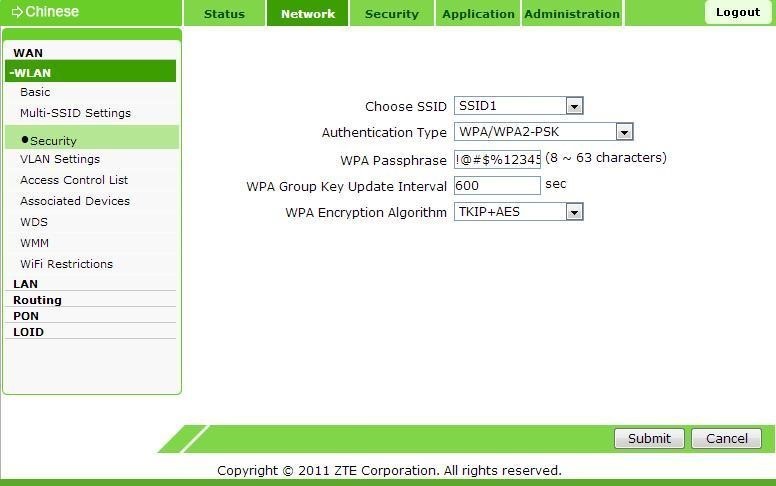
Следует избегать простых паролей для предотвращения несанкционированного доступа к сети!
Теперь роутер настроен и можно к нему подключиться по беспроводной сети.
Чтобы уменьшить вероятность взлома «админки», нужно изменить пароль администратора. Это делается в административном разделе (последний сверху), в подразделе управления пользователями. Там все просто и стандартно. Сначала нужно будет ввести старый пароль, а потом придумать и сохранить новый.
Настраиваем как локальный WEB-сервер
Роутер F660 можно использовать как простой веб-сервер. Когда подготовлен загружаемый сайт с файлом INDEX.HTM в корне, следует сделать следующее:
- переименовать INDEX.HTM в setlang.gch;
- вставить USB накопитель в соответствующий разъем роутера;
- зайти на роутер по telnet;
- выполнить команду mount –o bind/mnt/usb1_1 /home/httpd.
Пароль к telnet можно узнать, получив файл настроек с паролями, как это было описано выше в разделе «Отличительные особенности роутера». После этих манипуляций новое содержимое можно увидеть по IP адресу 192.168.1.1. Это действует пока роутер не перезагрузится.
В принципе, web и ftp серверы можно сделать доступными из интернета. Настройки зависят от наличия или отсутствия статического адреса и конкретного провайдера. Но открывать роутер вовсе не рекомендуется, поскольку для этого он имеет слабую защиту.
ZTE F660 имеет хорошие характеристики, богатый функционал и высокую надежность. Важно правильно настроить устройство, чтобы уязвимости в безопасности свести к минимуму. Тогда маршрутизатор проработает долго и беспроблемно.
Обязательно задавайте вопросы, если они возникли! Всем добра и удачных настроек!
Zte ZXA10 F660 Touch terminals PDF User Guides and Manuals for Free Download: Found (1) Manuals for Zte ZXA10 F660 Device Model (Operation & User’s Manual)
Zte ZXA10 F660 Operation & User’s Manual
Details:
- Manufacturer: Zte
- Product Name/ID: Zte ZXA10 F660 / #792457
- Category: Touch terminals
- File Path: zte/zxa10-f660_792457.pdf
- Last Updated: 13 May 2025
- Description: Ensure the best performance of your Zte ZXA10 F660 with this manual, providing detailed instructions on initial setup, daily operation, and troubleshooting techniques to avoid common problems.
- Document Type: User Manual
- Pages: 117
Download PDF
Read Online
The Zte ZXA10 F660 is a robust broadband gateway designed to meet the demands of modern internet users. With its powerful features and reliable performance, it has garnered attention in the telecommunications landscape. This device not only caters to individual users but also supports small to medium enterprises, making it a versatile choice for various applications.
One of the standout features of the ZXA10 F660 is its impressive speed capabilities. Equipped to handle both symmetric and asymmetric bandwidth, it delivers high-speed internet access that is essential for today’s data-hungry applications. The device supports a wide range of transmission technologies, enabling it to adapt to various network architectures easily.
Another essential aspect of the Zte ZXA10 F660 is its user-friendly interface. Setting up the device is relatively straightforward, thanks to its web-based management system. Users can configure settings, monitor performance, and manage connections without requiring extensive technical knowledge. This ease of use is a significant advantage for home users who may not be as tech-savvy.
Durability is also a notable feature of the ZXA10 F660. Built with high-quality materials, this device is designed to withstand typical wear and tear, offering longevity and reliability over time. The compact design does not compromise its performance, making it ideal for placements in various environments, whether at home or in an office setting.
- Speed: The ZXA10 F660 supports high-speed internet access for seamless gaming, streaming, and browsing experiences.
- User-Friendly: The intuitive management interface simplifies setup and configuration.
- Durable Design: Built for long-term use, it withstands everyday challenges.
- Multiple Connection Options: Support for various transmission technologies ensures adaptability in different network scenarios.
Furthermore, the Zte ZXA10 F660 is equipped with advanced security features to protect users’ online data and privacy. With built-in firewall capabilities and support for VPN connections, users can confidently browse the internet, knowing their information is secure. This is particularly important in an age where data breaches and cyber threats are increasingly common.
In terms of connectivity, this device impresses with multiple Ethernet ports and wireless capabilities, catering to a variety of devices. Whether connecting laptops, smartphones, or smart home devices, the ZXA10 F660 ensures reliable connections throughout the household or office. The dual-band Wi-Fi also enhances the user experience, allowing for multiple devices to operate without interference.
However, there are a few considerations to keep in mind. While the device supports various features, some users may find that they need to customize certain settings for optimal performance. Additionally, depending on the internet service provider, users may experience varying levels of functionality, primarily if they are transitioning from older technologies.
In conclusion, the Zte ZXA10 F660 stands out as a comprehensive solution for users requiring reliable and high-speed internet connectivity. Its blend of high performance, user-friendliness, and security features positions it as a strong competitor in the telecommunications market. Whether you’re a casual user or run a small business, investing in the ZXA10 F660 can provide the robust performance you need to keep your online activities running smoothly.
Скачать
ZXA10 F660
GPON ONT
User Manual
Version: V1.0
ZTE CORPORATION
NO. 55, Hi-tech Road South, ShenZhen, P.R.China
Postcode: 518057
Tel: +86-755-26771900
Fax: +86-755-26770801
URL: http://ensupport.zte.com.cn
E-mail: support@zte.com.cn

ONT-терминал ZTE ZXA10 F660 — один из самых распространенных GPON-роутеров, используемых Интернет-провайдерами, в том числе и в России. Устройство в принципе неплохое, неприхотливое и более-менее надежное. Но в процессе эксплуатации выявился неприятный косяк, который мог омрачить некоторым пользователям радость от использования высокоскоростного интернета. Вернее их даже два. Один из них — включенная технология WPS. Вроде бы чего такого? Собственно, ничего бы не было, если бы у большинства терминалов ZTE ZXA10 F660 он не был бы одинаковый, тем более что сменить его нельзя. Единственный способ отключить WPS — это кнопка на корпусе роутера.
Вторая проблема связана напрямую с человеческим фактором: монтеры при подключении не меняли ключ сети WiFi и в итоге появилось много беспроводных сетей со стандартным паролем:!@#$%12345. Некоторые инсталляторы делали его чуть сложнее — номер городского телефона. Хитрые соседи этому очень радовались и качали на радостях. А хозяева грустили и искали причину низкой скорости.
Поэтому, я сегодня расскажу как настроить беспроводную сеть на роутере ZTE ZXA10 F660 и как поменять пароль к WiFi.
IP-адрес маршрутизатора в локальной сети по-умолчанию — 192.168.1.1, URL-адрес веб-интерфейса: http://192.168.1.1, логин и пароль по умолчанию: admin / admin. В случае, если у Ваc провайдер МГТС — попробуйте: mgts / mtsoao. Если веб-интерфейс недоступен — смотрим инструкцию — как зайти на 192.168.1.1.
Стартовая страница интерфейса выглядит так:
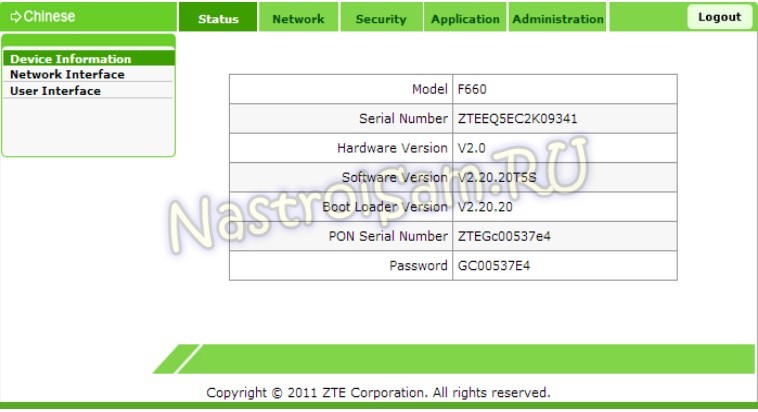
В верхнем меню выбираем пункт «Network», а в меню справа — подраздел «WLAN» => «Basic:»
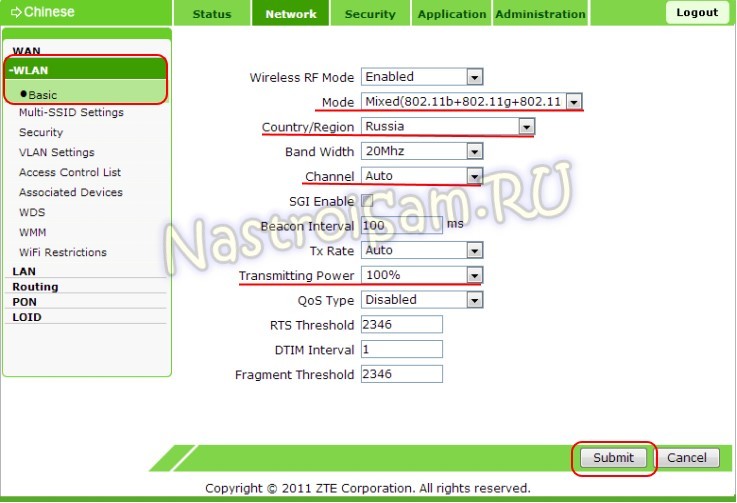
Здесь настраиваются основные параметры беспроводного адаптера. Режим — Mode — оптимальнее оставлять смешанным — 802.11b+g+n. В списке Country/Region надо выбрать Russia. Выбор используемого радиоканала — «Channel» — лучше оставить в автоматическом режиме. Мощность передатчика регулируется параметром «Transmitting Power». Если квартира большая — смело ставим 100%. Нажимаем на «Submit» и переходим к параметрам сети в подразделе «Multi-SSID Settings»:
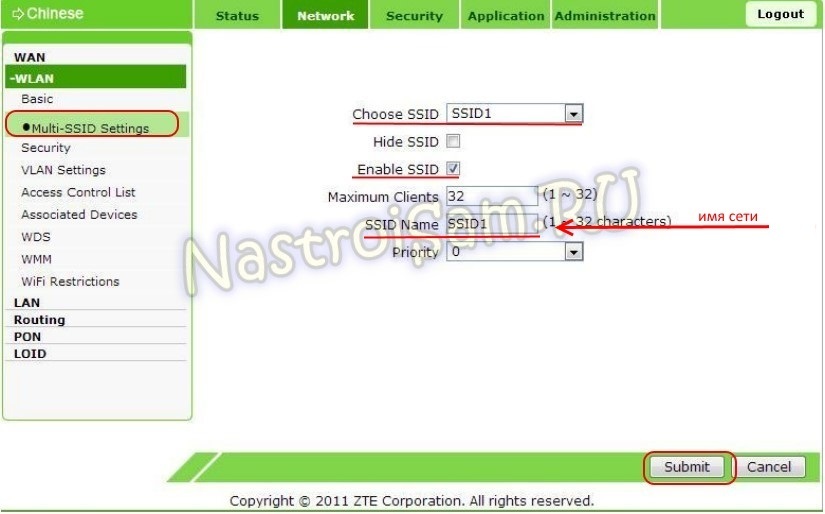
GPON терминал ZTE F660 умеет создавать несколько сетей. Нам же с Вами нужна только одна. Поэтому выбираем SSID1. Чтобы она была активна — должна стоять галочка «Enable SSID». У других её можно снять, чтобы лишнего не светило. В поле «SSID Name» прописываем имя сети . Для применения настроек нажимаем кнопку «Submit».
Нам с Вами осталось только настроить безопасность. Для этого идем в подраздел «Security»:
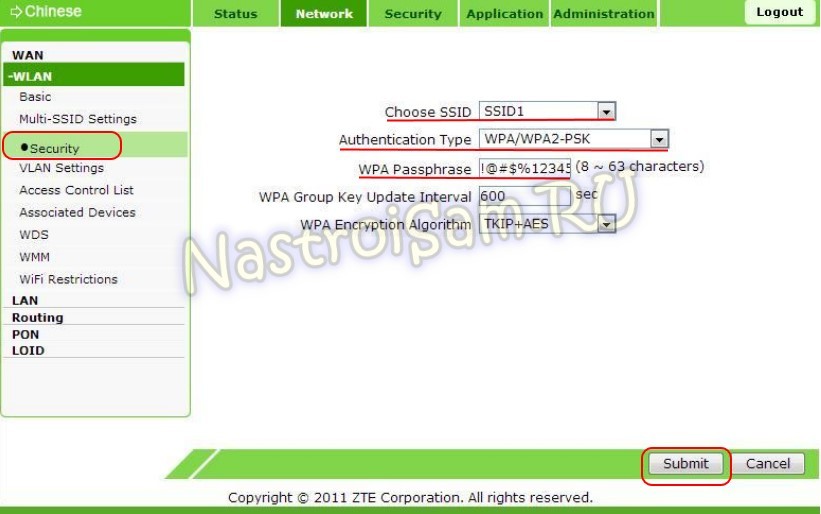
В списке «Choose SSID» опять выбираем нашу сетку. Тип шифрования указывается в поле «Authentication Type» — его оптимальнее всего ставить либо только WPA2-PSK, либо смешанный: WPA/WPA2-PSK. Остается лишь в поле «WPA Passphrase» прописать фразу- пароль. Он должен быть не короче 8 знаков и состоять из латинских букв и цифр. Это и будет ваш ключ сети.
Кликаем на «Submit».
Настройка Вай-Фай на F660 завершена.