
01
Safety Information
Read this manual carefully before use, and retain it for future reference.
Usage Restrictions
• Do not use this vacuum in outdoor, commercial, or industrial environments. It is intended for
home and in-car use only.
• Do not store the vacuum anywhere in the car to avoid high or low temperatures affecting its
battery life.
• Do not use the vacuum in environments with high humidity, or temperatures above 40°C or
below 3°C.
• Children should be supervised to ensure that they do not play with the appliance.
• This appliance is not intended for use by persons (including children) with reduced physical,
sensory or mental capabilities, or lack of experience and knowledge,unless they have been
given supervision or instruction concerning use of the appliance by a person responsible for
their safety. (CB)
• This appliance can be used by children aged from 8 years and above and persons with
reduced physical, sensory or mental capabilities or lack of experience and knowledge if they
have been given supervision or instruction concerning use of the appliance in a safe way and
understand the hazards involved. Children shall not play with the appliance. Cleaning and
user maintenance shall not be made by children without supervision. (EU)
• Keep hair, loose clothing, fingers, and all parts of body away from openings and moving parts.
• While using an electric brush head, keep limbs and pets away from the rotating brush heads
to avoid injury.
• Do not touch the power supply, nor operate the product with wet hands to prevent injuries.
• Do not vacuum any liquids (such as water, cola).
• Do not vacuum any burning or smoking substances (such as non-extinguished cigarette
butts).
• Do not vacuum any hard or pointy objects (such as building materials, glass, and nails).
• Please use this product in accordance with the instructions in the User Manual. Users are
responsible for any loss or damage that may arise from improper use of this product.
• This product is only to be used in areas below 3,000 meters above sea level.
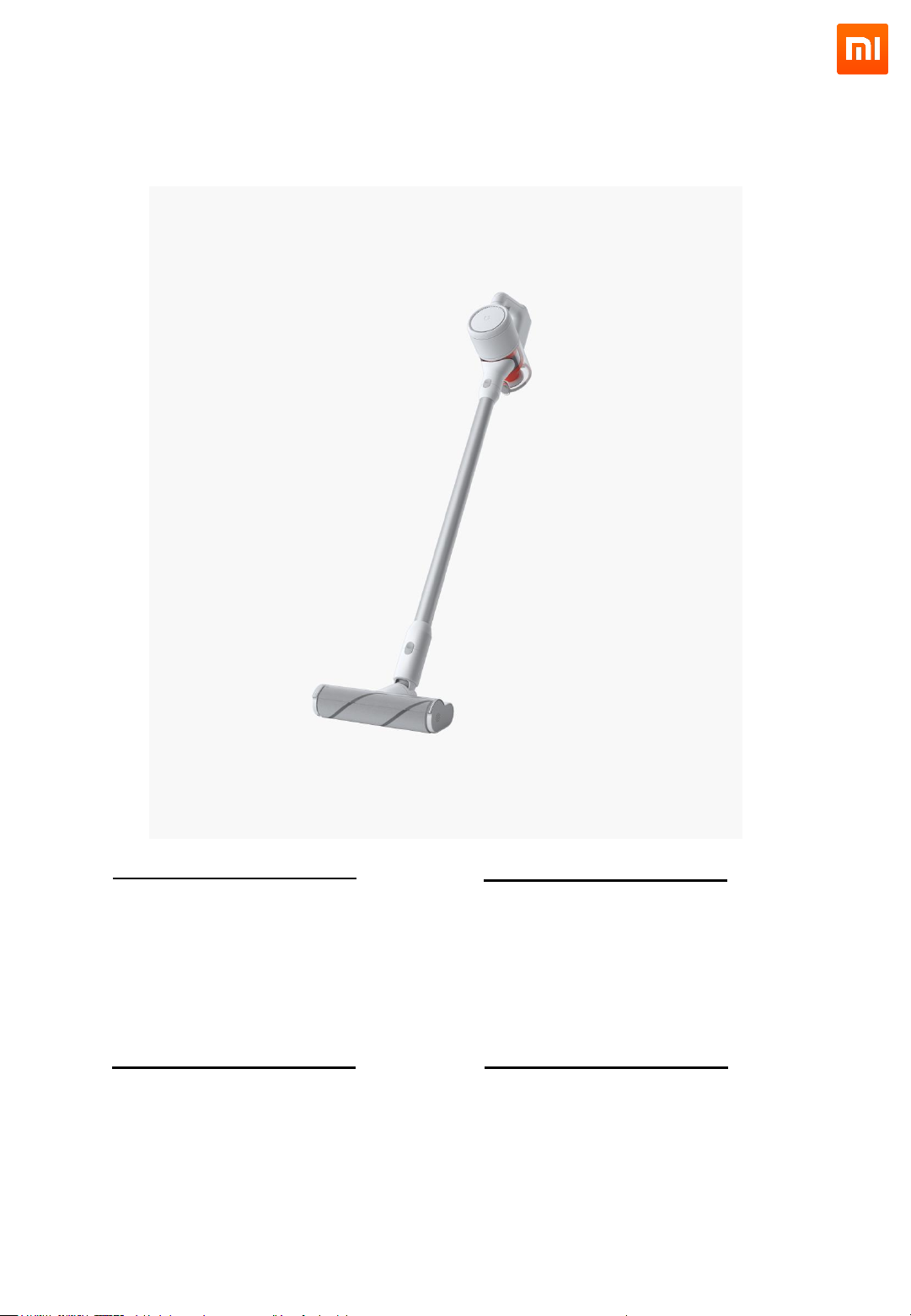
Xiaomi Mi Handheld Vacuum Cleaner
Velká sací síla bez výpadků
• Díky pokročilé turbínové technologii
sání máte garantovanou sací sílu
• 9 turbín generuje velmi silnou sací
sílu, která dokáže vysát jakékoliv
nečistoty, prach i alergeny.
• Dále brání zablokování filtrů
Max 90AW sací síla
• Vybavený střídavým DC motorem
• Až 100 000 otáček za minutu
Vydrží až 30 minut, vystačí na 160m²
• Dva režimy: Standard, Max
• Max režim generuje 4 x silnější sací
sílu než Standard
• Výdrž na baterii až 6 minut v Max
režimu a 30 minut ve Standardním
režimu
.
Snadná manipulace díky integrované baterii
Pět stupňů filtrace
• Včetně turbínových filtru a HEPA
filtru
• Vysaje 99.97% jemného prachu
(<0.3μm)
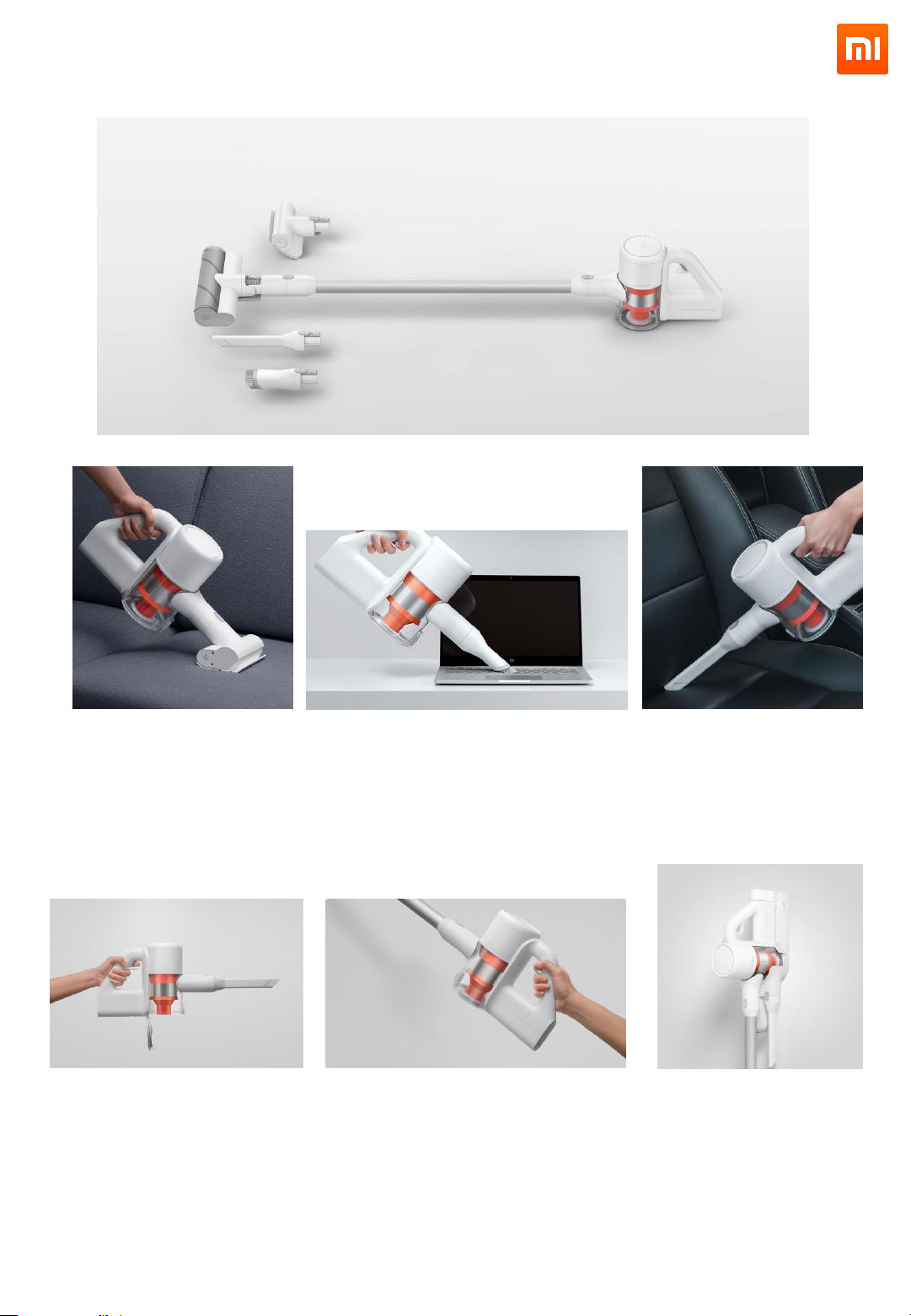
Xiaomi Mi Handheld Vacuum Cleaner
Electric kartáč na matrace
• Zabudovaný elektrický motor
• Hluboké čištění matrací a látek,
vysaje až 99.9% nečistot a
roztočů.
Extra jemný kartáč
• Čištění klávesnic, knihoven a
elektroniky.
Plochá hubice
• Různé zákoutí a prostory kam
se špatně dostává
• Čištění aut
Hygienické vysypávání koše
• Lze jednoduše vysypat pomocí
jedné ruky.
• Bez nutnosti kontaktu s odpadem
a prachem
Dokovací stanice na zeď
• Elegantní řešení skladování
vysavače a příslušenství.
• Zabudované napájení uvnitř
dokovací stanice
Elegantní design
• Jednoduchý na údržbu
Loading…
Русский
- Bedienungsanleitung XIAOMI Mi Handheld Vacuum Cleaner
- XIAOMI Mi Handheld Vacuum Cleaner User Manual
- Manual Usuario XIAOMI Mi Handheld Vacuum Cleaner
- Mode d’emploi XIAOMI Mi Handheld Vacuum Cleaner
- Istruzioni XIAOMI Mi Handheld Vacuum Cleaner
- инструкция XIAOMI Mi Handheld Vacuum Cleaner
- XIAOMI Mi Handheld Vacuum Cleanerの取扱説明書
- Handleiding XIAOMI Mi Handheld Vacuum Cleaner
- Manual de uso XIAOMI Mi Handheld Vacuum Cleaner
Вам нужна инструкция? Мы поможем Вам ее найти и сэкономить Ваше время.
- 1 stron
- 4.75 mb
Изделие XIAOMI Mi Handheld Vacuum Cleaner, а также другие, которыми Вы пользуетесь ежедневно, наверняка вы получили в комплекте с инструкцией обслуживания. Из опыта наших пользователей мы знаем, что большинство из Вас не уделили этому особого внимания. Большая часть инструкций, сразу же после покупки попадает в корзину для мусора вместе с коробкой — это ошибка. Ознакомьтесь с информацией, касающейся инструкции XIAOMI Mi Handheld Vacuum Cleaner, которая поможет Вам в будущем сэкономить нервы и избежать головной боли.
Важная подсказка — не забывайте хотя бы раз прочитать инструкцию XIAOMI Mi Handheld Vacuum Cleaner
Если вы не хотите каждый раз читать информационные брошюры, касающиеся, тех или XIAOMI Mi Handheld Vacuum Cleaner иных изделий, достаточно, прочитать их раз — сразу же после покупки устройства. Вы получите основное знания, касающиеся поддержания изделия XIAOMI Mi Handheld Vacuum Cleaner в хорошем эксплуатационном состоянии, так, чтобы без проблем достигнуть его планируемого цикла работы. Затем инструкцию можно отложить на полку и вернуться к ней только в случае, если вы не уверены, правильно ли проводится техобслуживание изделия. Правильный уход является необходимым элементом Вашего удовольствия XIAOMI Mi Handheld Vacuum Cleaner.
Раз в году пересмотрите шкафчик, в котором держите инструкции для всех устройств, — выбросите те, которыми вы уже не пользуетесься. Это поможет Вам сохранять порядок в своей домашней базе инструкций обслуживания.
Summary of Contents for XIAOMI Mi Handheld Vacuum Cleaner
Что находится в инструкции XIAOMI Mi Handheld Vacuum Cleaner? Почему стоит ее прочитать?
- Гарантия и подробности, касающиеся техобслуживания изделия
Хорошей идеей будет прикрепить чек к странице инструкции. Если что-то плохое случится во время использования XIAOMI Mi Handheld Vacuum Cleaner, у вас будет комплект документов, необходимый для гарантийного ремонта. В этой части инструкции вы найдете информацию об авторизованных сервисных центрахXIAOMI Mi Handheld Vacuum Cleaner а также, как самостоятельно правильно ухаживать за оборудованием — так, чтобы не потерять гарантийных прав. - Указания по монтажу и Setup
Не терять нервов и времени на самостоятельную попытку установки и первого запуска изделия. Воспользуйтесь рекомендациями производителя XIAOMI Mi Handheld Vacuum Cleaner чтобы правильно запустить изделие, без лишнего риска повреждения оборудования. - Информация, касающаяся дополнительных запчастей (входящих в комплект а также являющихся опцией)
Пересматривая эту часть документа вы сможете проверить, доставлен ли ваш XIAOMI Mi Handheld Vacuum Cleaner с полним комплектом аксессуаров. Вы также сможете узнать, какие дополнительные запчасти или аксессуары для XIAOMI Mi Handheld Vacuum Cleaner Вы сможете найти и докупить к своему устройству. - Troubleshooting
Самые частые проблемы, касающиеся XIAOMI Mi Handheld Vacuum Cleaner и методы их решения. Это очень полезная часть руководства по обслуживанию — она позволит Вам сэкономить много времени на поиск решений. 90% проблем с XIAOMI Mi Handheld Vacuum Cleaner повторяется у многих пользователей. - Требования, касающиеся питания и энергетический класс
Информация, касающаяся количества потребляемой энергии, а также рекомендации, касающиеся установки и питания XIAOMI Mi Handheld Vacuum Cleaner. Прочитайте, чтобы оптимально пользоваться XIAOMI Mi Handheld Vacuum Cleaner и не использовать большего количества ресурсов, нежели это необходимо для правильной работы изделия. - Специальные функции XIAOMI Mi Handheld Vacuum Cleaner
Здесь вы можешь узнать, как персонализировать изделие XIAOMI Mi Handheld Vacuum Cleaner. Вы узнаете, какие дополнительные функции могут помочь Вам удобно использовать продукт XIAOMI Mi Handheld Vacuum Cleaner а также, какие функции Вашего устройства оптимальны для выполнения конкретной деятельности.
Как видите в инструкции вы найдете информацию, которая реально поможет Вам в использовании Вашего изделия. Стоит с ней ознакомиться, чтобы избежать разочарований, возникающих из более короткого, нежели предусматривалось, периода исправности изделия XIAOMI Mi Handheld Vacuum Cleaner. Если все же вы не хотите копить инструкции в своем доме, наш сайт поможет Вам в этом — вы должны найти у нас руководство по обслуживанию большинства из своих устройств, а также XIAOMI Mi Handheld Vacuum Cleaner.
Комментарии (0)
Table of Contents
- Mi Handheld Vacuum Cleaner
- User Manual
- Safety Information
- Battery & Charging
- ATTENTION:
- Removing the Battery:
- Transportation
- Note
- Product Overview
- Vacuum Cleaner
- Accessories
- Mi Handheld Vacuum Cleaner Docking Station Installation
- Instructions
- Notes:
- Vacuum Usage
- Automatic Turn-off Feature
- Cleaning String-like Materials from the Roller Brush
- Brush Head Usage
- Product Maintenance
- Cleaning the Vacuum
- Maintenance
- Rinsing the Internal Filter and Cyclone Assembly
- Steps to Remove the Internal Filter and Cyclone Assembly
- Steps to Install the Internal Filter and Cyclone Assembly
- Rinsing the Top Fan Filter
- Cleaning the Roller
- Cleaning the Floor Attachment
- Cleaning the Bed Attachment
- Specifications
- Troubleshooting
- WEEE Information
- WARRANTY NOTICE
- Downloads
- References
- Read User Manual Online (PDF format)
- Download This Manual (PDF format)
Mi Handheld Vacuum Cleaner
User Manual
Safety Information
Read this manual carefully before use, and retain it for future reference.
Usage Restrictions
-
Do not use this vacuum in outdoor, commercial, or industrial environments. It is intended for
home and in-car use only. -
Do not store the vacuum anywhere in the car to avoid high or low temperatures affecting its
battery life. -
Do not use the vacuum in environments with high humidity, or temperatures above 40°C or
below 3°C. -
Children should be supervised to ensure that they do not play with the appliance.
-
This appliance is not intended for use by persons (including children) with reduced physical,
sensory or mental capabilities, or lack of experience and knowledge,unless
they have been
given supervision or instruction concerning use of the appliance by a person
responsible for
their safety. (CB) -
This appliance can be used by children aged from 8 years and above and persons with reduced physical, sensory or mental capabilities or lack of experience and knowledge if they have been given supervision or instruction concerning use of the appliance in a safe way and understand the hazards involved. Children shall not play with the appliance. Cleaning and user maintenance shall not be made by children without supervision. (EU)
-
Keep hair, loose clothing, fingers, and all parts of body away from openings and moving parts.
-
While using an electric brush head, keep limbs and pets away from the rotating brush heads to avoid injury.
-
Do not touch the power supply, nor operate the product with wet hands to prevent injuries.
-
Do not vacuum any liquids (such as water, cola).
-
Do not vacuum any burning or smoking substances (such as non-extinguished cigarette butts).
-
Do not vacuum any hard or pointy objects (such as building materials, glass, and nails).
-
Please use this product in accordance with the instructions in the User Manual. Users are responsible for any loss or damage that may arise from improper use of this product.
-
This product is only to be used in areas below 3,000 meters above sea level.
Battery & Charging
WARNING
- This product contains batteries that are only replaceable by skilled persons.
- This product can only be charged using an ATC01RR or BTC01RR power supply.
- Do not use any third-party batteries, power adapters or docking stations.
- Do not disassemble, repair or modify the battery, power adapter or the docking station.
- Do not charge the vacuum or install the docking station near heat sources or in humid areas (such as radiators or bathrooms).
- Do not wipe the adapter or the docking station with a wet cloth, nor touch them with wet hands.
- If the power cord is damaged or broken, immediately stop using it and contact after-sales service.
- If the vacuum is not going to be used for an extended period of time, please fully charge it, unplug its power supply, and place it in a cool and dry place. Make sure that you recharge it once every three months to avoid the battery to over-discharge.
The lithium ion battery inside this product contains substances harmful to
the environment.
ATTENTION:
- The battery must be removed from the appliance before it is scrapped.
- The appliance must be disconnected from the supply mains when removing the battery.
- The battery is to be disposed of safely.Please do not discard waste batteries. Leave them to a professional organization.
The following steps are only applicable for scrapping:
Removing the Battery:
- Remove the dust compartment and cyclone assembly, and remove the two screws on the inner wall of the vacuum near the dust compartment release switch.
- Remove the top fan filter, and remove the screw used for fixing the cover of the handle on the inner wall of the vacuum.
- Open the handle cover along the gap at the top of the handle and gently slide it up to remove the cover.
- Unplug the 3 connectors inside the handle from the battery.
- Slide out the battery pack.
Transportation
- It is recommended to transport the vacuum in its original packaging.
Note
• Rinse the filter at least once a month with tap water. For details please
refer to Maintenance.
We Beijing Roborock Technology Co., Ltd., hereby, declares that this equipment
is in compliance with the applicable Directives and European Norms, and
amendments. The full text of the EU declaration of conformity is available at
the following internet address:
http://www.mi.com/global/service/support/declaration.html
Product Overview
Vacuum Cleaner

Accessories

Mi Handheld Vacuum Cleaner Docking Station Installation
-
The docking station needs to be purchased separately, please visit: www.mi.com
- The docking station is an optional accessory, which can be purchased if necessary.
- The docking station needs to be installed in a cool and dry place that is near a power outlet but not exposed to direct sunlight.
- Use the appropriate mounting hardware for the type of wall, to securely install the docking station. Make sure the installation area is clear of any pipes (such as gas, water, air, electricity, drainage).
- It is recommended to hire a professional to install the docking station and to use protective clothing, goggles and other protective materials where necessary.
- Use a 6 mm drill, to drill holes in the wall and insert the wall plugs into them. Align the holes on the docking station with the ones in the wall, and insert and tighten the screws.
Store the vacuum on the docking station

Recommended Height: 1.06 meters from the ground
Pull the vacuum down in the docking station to charge
Instructions
Charging
LED Battery Status Indicator
Red: Battery level < 20%
Orange: Battery level of 20 – 60%
White: Battery level > 60%
Off: Battery is fully charged or the vacuum is turned off
Notes:
- When the vacuum is used for the first time, it is recommended to fully charge it before use.
- When charging, the vacuum will stop operating and automatically enter Charging mode.
- After continuous use in MAX mode, the battery will be hot and thus the battery charging time will be increased. It is recommended to allow the vacuum to cool down for 30 minutes before charging it.
Please read the Safety Instructions in this User Manual before proceeding.

Charge the vacuum by power supply
Charge the vacuum by docking station
Vacuum Usage
- Some carpets may fluff when vacuumed by the handheld vacuum cleaner or upholstery brush. If this happens, it is recommended to use the brush or crevice nozzle when vacuuming.
- Before vacuuming highly polished floors (wooden or polished tiles), check the floor brush (especially the brush head) for foreign objects to avoid scratching the floor.
- Before using the handheld vacuum cleaner, make sure the dust compartment is installed.
- Do not block the exhaust port when vacuuming.
- For fine dust such as flour, vacuum cleaners can only be used for small amounts.
- Do not use the vacuum to vacuum sharp objects, small toys, pins, paper clips, etc., to avoid damage to the vacuum cleaner and the floor.
- When using this vacuum to clean dangerous areas such as stairs and windows, make sure to pay attention to personal safety.
- Do not place the vacuum on places including tables, chairs nor lean it against items to avoid damage caused by dropping or slipping.
- The movement of the vacuum’s brush may cause an uneven gloss on waxed floors. Wipe the floor with a damp cloth and polish it with wax.
Automatic Turn-off Feature
- If any of the rotating parts get stuck, the product may automatically turn off, but can continued to be used after all foreign objects are removed.
- When the motor enters overheating protection mode, it will auto-matically turn off and stop operating. Please wait for the temperature of the electric brush head to cool down before using it again.
Cleaning String-like Materials from the Roller Brush
- When using an electric brush head, it may vacuum large foreign objects or get wrapped in too much hair, causing the roller to stop rotating. Immediately clean the roller if this happens.
- Before removing foreign objects from the roller, make sure the brush head is detached from the vacuum to prevent accidentally turning on the vacuum to avoid personal injuries.
- Be careful of sharp objects when clearing materials from the roller.
- If objects wrapped around the roller cannot be removed smoothly, please refer to the “Cleaning the Roller” section to remove the roller first and then clean it.
Brush Head Usage
- Crevice Nozzle: Suitable for vacuuming narrow crevices such as around doors, windows, dead corners of stairs.

2. Brush Nozzle: Suitable for vacuuming sofas, seats, etc.

3. Bed Attachment: Suitable for vacuuming dust and mites on textile surfaces
such as beds and curtains.

4. Floor Attachment: Suitable for vacuuming different types of floors.

Note: Brushes can also be used independently to vacuum dust from the
vacuum cleaner or electric brush heads, etc.
Product Maintenance
- Always use genuine parts, otherwise warranty may be voided.
- If the filter or nozzle is clogged, the fan will stop working shortly after turning on the vacuum. In that case please immediately rinse the filter, nozzle, etc.
- When the vacuum will not be used for an extended period of time, store it in a cool and dry place. Do not expose it to direct sunlight or store it in a humid environment.
- If the vacuum is not going to be used for an extended period of time, please fully charge it, unplug its power adapter, and place it in a cool and dry place. Make sure that you recharge it once every three months to avoid the battery to over discharge.
Cleaning the Vacuum
Wipe the vacuum with a soft dry cloth.
Maintenance
Cleaning the Dust Compartment
- It is recommended to clean the dust compartment at least once a month.
1. Before cleaning the dust compartment, disconnect the adapter and keep the
vacuum turned off. Once the dust reaches the “MAX” mark, the vacuuming effect
will be affected if continued to be used, so please empty it as soon as
possible before use.

2. To empty the dust compartment, push the switch on the dust compartment in
the direction of the arrow to open the bottom cover and empty it into a trash
can.

3. While pushing the switch next to the dust compartment in the direction of
the arrow, pull the compartment away from the vacuum to rinse it with water.

4. It is recommended to rinse the dust compartment with water at least once a
month. Wipe the contact points of the vacuum with a soft dry cloth if they are
dirty.

Caution: Do not use detergents, polishes or air fresheners to rinse the
dust compartment. Nor rinse it in a dishwasher or any other device.
5. After the dust compartment is completely dried, follow the steps shown in
the figure below to reinstall it.

Rinsing the Internal Filter and Cyclone Assembly
-
Recommended to rinse at least once a month
- Before cleaning, make sure that the product has been disconnected from the supply and be careful not to press the switch to turn on the vacuum.
- Follow the instructions to regularly inspect and rinse the internal filter and cyclone assembly to ensure optimal performance.
- When used to clean fine dust or primarily used in MAX mode, the filter may need to be rinsed more frequently.
- To rinse the internal filter and cyclone assembly, first remove the dust compartment; second rotate the cyclone assembly counter-clockwise as shown in the figure and remove it; third remove the internal filter, and rinse them with tap water.
Steps to Remove the Internal Filter and Cyclone Assembly
1. Remove the dust compartment as shown in the figure.

2. Rotate the cyclone assembly in the direction shown in the figure.

3. Remove the internal filter from cyclone assembly.
4. Rinse the filter and cyclone assembly until they are clean. Wring out the
filter after rinsing.
5. To thoroughly dry the filter and cyclone assembly, keep them in a
ventilated or cool place for at least 24 hours after cleaning.
Caution: Do not rinse the filter in a dishwasher or washing machine nor
dry it in a tumble dryer, oven, microwave or places near an open fire.
6. After drying, reinstall the filter and cyclone assembly.
Steps to Install the Internal Filter and Cyclone Assembly
1. Place the filter facing up as shown in the figure.
2. Place the filter on top of the cyclone assembly and gently push it into
place, while pushing aside the safety clip on the left side of the notch.
3. Align the cyclone assembly with the vacuum as shown in the figure, and
turn the cyclone assembly in place by turning it clockwise.

4. Slightly tilt the dust compartment when installing it on the vacuum.
5. Gently push the dust compartment in the direction as shown in the figure
until you hear a click, indicating that the compartment has been firmly
secured.
Rinsing the Top Fan Filter
* Recommended to rinse at least once a month.
1. Turn the top fan filter counterclockwise to the unlocked position and
remove it from the vacuum.
2. Rinse the inside of the top filter under the tap. Rotate the filter while
rinsing it to make sure that all the dust in the filter gaps is rinsed out.
Tap the filter several times against the sink to remove all the remaining dust
before rinsing it.
3. Repeat this process four to five times until the filter is clean.

4. To thoroughly dry the filter, keep it in a ventilated or cool place for at
least 24 hours after cleaning.
5. After drying, reinstall the filter by aligning it with the unlocked
position and turning it clockwise until it locks into place.
Cleaning the Roller
Please follow the instructions below to check and clean the roller regularly
to maintain its performance. Before removing the roller, make sure that the
brush head has been detached from the vacuum to avoid personal injuries caused
by accidentally turning on the vacuum.
Caution: The bed attachment roller must be removed and cleaned
separately.
The bed attachment and floor attachment contain electrical components, and the
floor attachment roller contains bearings, so do not clean these parts with
water.
Cleaning the Floor Attachment
1. Place the floor attachment in the direction as shown in the figure (facing
your direction). Use a coin to turn the lock counterclockwise by 90° to the
unlocked position.

2. Turn the end cap to the open position. Gently slide the roller away from
the head.

3. Separate the end cap from the roller and remove any hair wrapped around
the roller and end cap.
4. After cleaning, install the end cap back on the roller.
5. After confirming that the end cap is installed in place, put the roller
back as shown in the figure. Once the roller is installed in place, turn the
end cap to the locked position.

6. Rotate the latch clockwise by 90° to the locked position to secure the
roller.

Cleaning the Bed Attachment
1. With the side latch of the brush head facing your direction, use a coin to
turn the latch counterclockwise until it comes off.
2. After removing the latch, remove the roller from the bed attachment.

3. Rinse and clean the roller.
4. Place the roller vertically and keep it in a ventilated or cool place for
at least 24 hours to dry thoroughly.
5. After confirming that the roller is completely dry, put the roller back in
place.

6. With the side latch of the brush head facing your direction, use a coin to
turn the latch clockwise into the locked position, while making sure the
roller is in place.
Specifications
Vacuum Cleaner
Model: SCWXCQ01RR
Dimensions: 322 × 111 × 212 mm
Battery: 21.6 V/ 2500 mAh (TYP) Lithium Battery
Product Weight (incl. accessories): Approx. 1.5 kg
Rated Voltage: 21.6 V ⎓
Rated Power: 350 W
Power Supply
Model: ATC01RR or BTC01RR
Dimensions: 57 × 54 × 28 mm
Rated Power: 20.5 W
Rated Input: 100 – 240 V ~ 0.6 A
Rated Output: 25.6 V ⎓ 0.8 A
Rated Frequency: 50 – 60 Hz
Troubleshooting
When the vacuum cleaner does not work properly, please refer to the table
below to handle any rrors.
Error Condition: Status of the LED Battery Status Indicator
Solutions: Slowly Blinking Orange: Temporary protection if the battery
temperature is too high or too low, please wait for the battery temperature to
return to normal before using or charging the vacuum. Slowly Blinking Red: Low
battery, please charge before use. Quickly Blinking Red: 1. Battery charging
protection, please unplug the supply for one minute and plug it in again to
charge; 2. Hardware error status, please contact after-sales service.
Error Condition: Electric brush head does not rotate
Solutions:
- If the brush head gets stuck, remove any foreign objects and continue to use it normally.
- Please wait until the brush head temperature returns to normal before using it, if its motor entered overheating protection mode.
- Please wipe the contact points of the electric brush head with a soft dry cloth if they are dirty and try again.
Error Condition: Fan does not rotate
Solutions:
- Low battery, please charge before use.
- It entered overheating protection mode due to being used continuously for too long. Allow the vacuum to cool down, and restart it to continue using it.
Error Condition: Reduced suction
Solutions:
- If the dust compartment is full or the filter is clogged, empty the compartment and rinse them before using the vacuum again.
- Brush head is stuck, please remove any foreign objects from the brush head.
Error Condition: Fan stopped several times during use
Solutions: The filter or the nozzle is clogged, please clean them
regularly. After cleaning you can use the vacuum normally again.
Error Condition: LED light indicating battery status does not light up
while charging
Solutions:
- Check if the power supply is properly plugged in.
- The battery is fully charged and went into sleep mode.
Error Condition: Charging too slowly
Solutions: The battery temperature is too high or too low, please wait for the
battery temperature to return to normal and then recharge the vacuum.
WEEE Information
All products bearing this symbol are waste electrical and electronic equipment
(WEEE as in directive 2012/19/EU) which should not be mixed with unsorted
household waste. Instead, you should protect human health and the environment
by handing over your waste equipment to a designated collection point for the
recycling of waste electrical and electronic equipment, appointed by the
government or local authorities. Correct disposal and recycling will help
prevent potential negative consequences to the environment and human health.
Please contact the installer or local authorities for more information about
the location as well as terms and conditions of such collection points.
WARRANTY NOTICE
THIS WARRANTY GIVES YOU SPECIFIC RIGHTS, AND YOU MAY HAVE OTHER RIGHTS
CONVEYED BY LAWS OF YOUR COUNTRY, PROVINCE OR STATE. INDEED, IN SOME
COUNTRIES, PROVINCES OR STATES, CONSUMER LAW MAY IMPOSE A MINIMUM WARRANTY
PERIOD.
OTHER THAN AS PERMITTED BY LAW, XIAOMI DOES NOT EXCLUDE, LIMIT OR SUSPEND
OTHER RIGHTS YOU MAY HAVE. FOR A FULL UNDERSTANDING OF YOUR RIGHTS WE INVITE
YOU TO CONSULT THE LAWS OF YOUR COUNTRY, PROVINCE OR STATE.
1. LIMITED PRODUCT WARRANTY XIAOMI warrants that the Products are free
from defects in materials and workmanship under normal use and use in
accordance with the respective Product user manual, during the Warranty
Period.
The duration and conditions related to the legal warranties are provided by
respective local laws. For more information about the consumer warranty
benefits, please refer to Xiaomi’s official website
https://www.mi.com/en/service/warranty/.
Xiaomi warrants to the original purchaser that its Xiaomi Product will be free
from defects in materials and workmanship under normal use in the period
mentioned above. Xiaomi does not guarantee that the operation of the Product
will be uninterrupted or error free. Xiaomi is not liable for damages arising
from non-compliance with the instructions related to the use of the Product.
2. REMEDIES
If a hardware defect is found and a valid claim is received by Xiaomi within
the Warranty Period, Xiaomi will either
(1) repair the product at no charge,
(2) replace the product, or (3) refund the
Product, excluding potential shipping costs.
3. HOW TO OBTAIN WARRANTY SERVICE
To obtain warranty service, you must deliver the Product, in its original
packaging or similar packaging providing an equal degree of Product
protection, to the address specified by Xiaomi. Except to the extent
prohibited by applicable law, Xiaomi may require you to present proofs or
proof of purchase and / or comply with registration requirements before
receiving warranty service.
4. EXCLUSIONS AND LIMITATIONS
Unless otherwise stipulated by Xiaomi, this Limited Warranty applies only to
the Product manufactured by or for Xiaomi and identifiable by the trademarks,
trade name or “Xiaomi” or “Mi” logo.
The Limited Warranty does not apply to any
(a) Damage due to acts of nature or God, for example, lightning strikes,
tornadoes, flood, fire, earthquake or other external causes;
(b) Negligence;
(c) Commercial use;
(d) Alterations or modifications to any part of the Product;
(e) Damage caused by use with non-Xiaomi products; (
f) Damage caused by accident, abuse or misuse;
(g) Damage caused by operating the Product outside the permitted or intended
uses described by Xiaomi or with improper voltage or power supply; or
(h) Damage caused by service (including upgrades and expansions) performed by
anyone who is not a representative of Xiaomi.
It is your responsibility to backup any data, software, or other materials you
may have stored or preserved on the product. It is likely that the data,
software or other materials in the equipment will be lost or reformatted
during the service process, Xiaomi is not responsible for such damage or loss.
No Xiaomi reseller, agent, or employee is authorized to make any modification,
extension, or addition to this Limited Warranty. If any term is held to be
illegal or unenforceable, the legality or enforceability of the remaining
terms shall not be affected or impaired.
Except as prohibited by laws or otherwise promised by Xiaomi, the after-sales
services shall be limited to the country or region of the original purchase.
Products which were not duly imported and/or were not duly manufactured by
Xiaomi and/or were not duly acquired from Xiaomi or a Xiaomi’s official seller
are not covered by the present warranties. As per applicable law you may
benefit from warranties from the non-official retailer who sold the product.
Therefore, Xiaomi invites you to contact the retailer from whom you purchased
the product.
The present warranties do not apply in Hong Kong and Taiwan.
5. IMPLIED WARRANTIES
Except to the extent prohibited by applicable law, all implied warranties
(including warranties of merchantability and fitness for a particular purpose)
will have a limited duration up to a maximum duration of this limited
warranty. Some jurisdictions do not allow limitations on the duration of an
implied warranty, so the above limitation will not be applied in these cases.
6. DAMAGE LIMITATION
Except to the extent prohibited by applicable law, Xiaomi shall not be liable
for any damages caused by accidents, indirect, special or consequential
damages, including but not limited to loss of profits, revenue or data,
damages resulting from any breach of express or implied warranty or condition,
or under any other legal theory, even if Xiaomi has been informed of the
possibility of such damages. Some jurisdictions do not allow the exclusion or
limitation of special, indirect, or consequential damages, so the above
limitation or exclusion may not apply to you.
7. XIAOMI CONTACTS
For customers, please visit the website:
https://www.mi.com/en/service/warranty/
The contact person for the after-sale service may be any person in Xiaomi’s
authorized service network, Xiaomi’s authorized distributors or the final
vendor who sold the products to you. If in doubt please contact the relevant
person as Xiaomi may identify.
Downloads
Mi Handheld Vacuum Cleaner Manual – Download
[optimized]
Mi Handheld Vacuum Cleaner Manual – Download
References
- Xiaomi United States | Xiaomi Official Website
- Xiaomi Global Home
Read User Manual Online (PDF format)
Read User Manual Online (PDF format) >>
Download This Manual (PDF format)
Download this manual >>