
Quick Start
Thank you for purchasing the MSI® X570-A PRO motherboard. This Quick Start
section provides demonstration diagrams about how to install your computer. Some
of the installations also provide video demonstrations. Please link to the URL to watch
it with the web browser on your phone or tablet. You may have even link to the URL by
scanning the QR code.
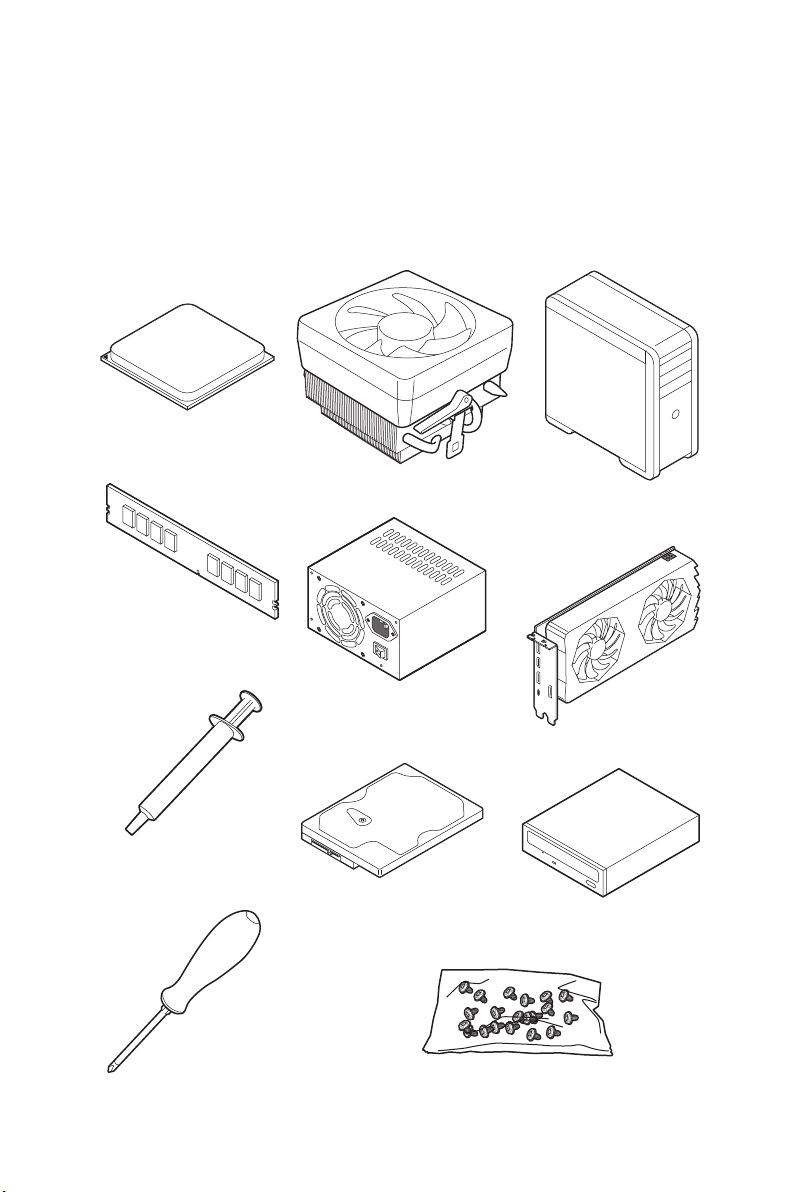
Preparing Tools and Components
AMD® AM4 CPU
CPU Fan
Chassis
DDR4 Memory
Thermal Paste
Phillips Screwdriver
Power Supply Unit
SATA Hard Disk Drive
Graphics Card
SATA DVD Drive
A Package of Screws
Quick Start
1

Safety Information
y The components included in this package are prone to damage from electrostatic
discharge (ESD). Please adhere to the following instructions to ensure successful
computer assembly.
y Ensure that all components are securely connected. Loose connections may cause
the computer to not recognize a component or fail to start.
y Hold the motherboard by the edges to avoid touching sensitive components.
y It is recommended to wear an electrostatic discharge (ESD) wrist strap when
handling the motherboard to prevent electrostatic damage. If an ESD wrist strap is
not available, discharge yourself of static electricity by touching another metal object
before handling the motherboard.
y Store the motherboard in an electrostatic shielding container or on an anti-static pad
whenever the motherboard is not installed.
y Before turning on the computer, ensure that there are no loose screws or metal
components on the motherboard or anywhere within the computer case.
y Do not boot the computer before installation is completed. This could cause
permanent damage to the components as well as injury to the user.
y If you need help during any installation step, please consult a certified computer
technician.
y Always turn off the power supply and unplug the power cord from the power outlet
before installing or removing any computer component.
y Keep this user guide for future reference.
y Keep this motherboard away from humidity.
y Make sure that your electrical outlet provides the same voltage as is indicated on the
PSU, before connecting the PSU to the electrical outlet.
y Place the power cord such a way that people can not step on it. Do not place anything
over the power cord.
y All cautions and warnings on the motherboard should be noted.
y If any of the following situations arises, get the motherboard checked by service
personnel:
Liquid has penetrated into the computer.
The motherboard has been exposed to moisture.
The motherboard does not work well or you can not get it work according to user
guide.
The motherboard has been dropped and damaged.
The motherboard has obvious sign of breakage.
y Do not leave this motherboard in an environment above 60°C (140°F), it may damage
the motherboard.
Quick Start
2
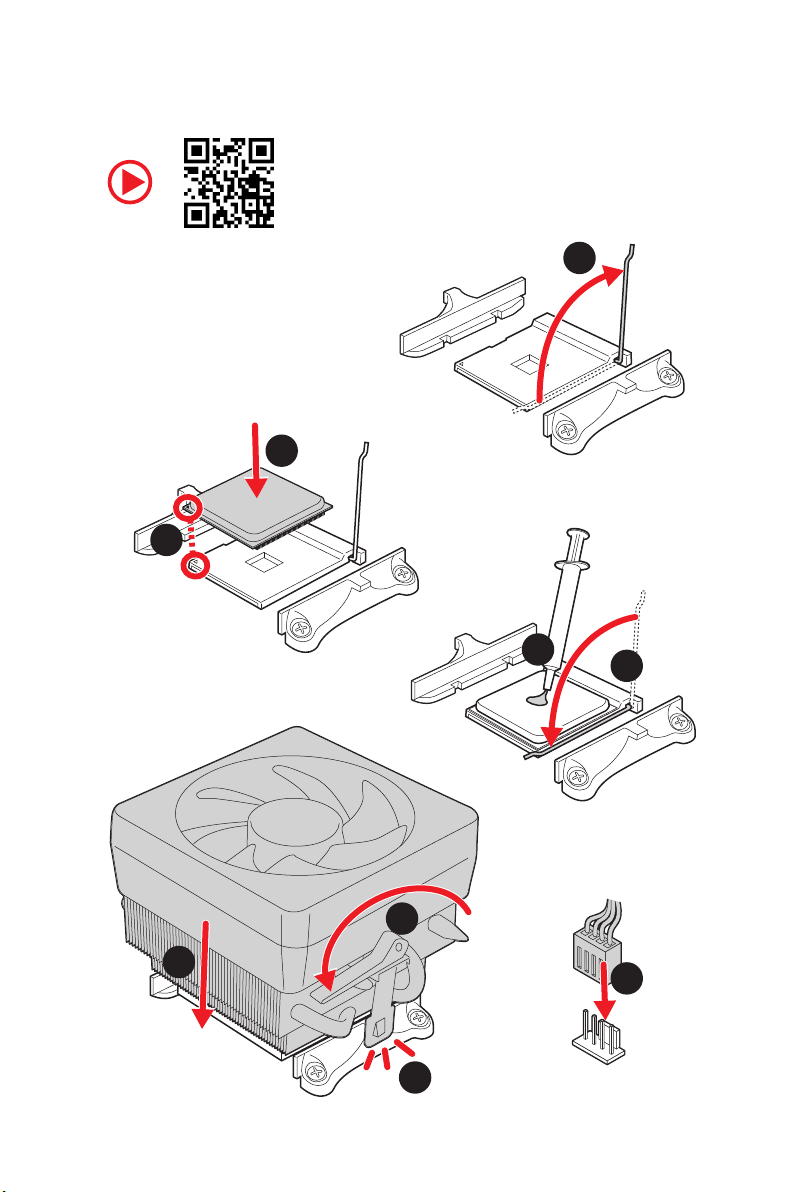
Installing a Processor
3
2
1
5
4
8
6
9
7
Quick Start
3
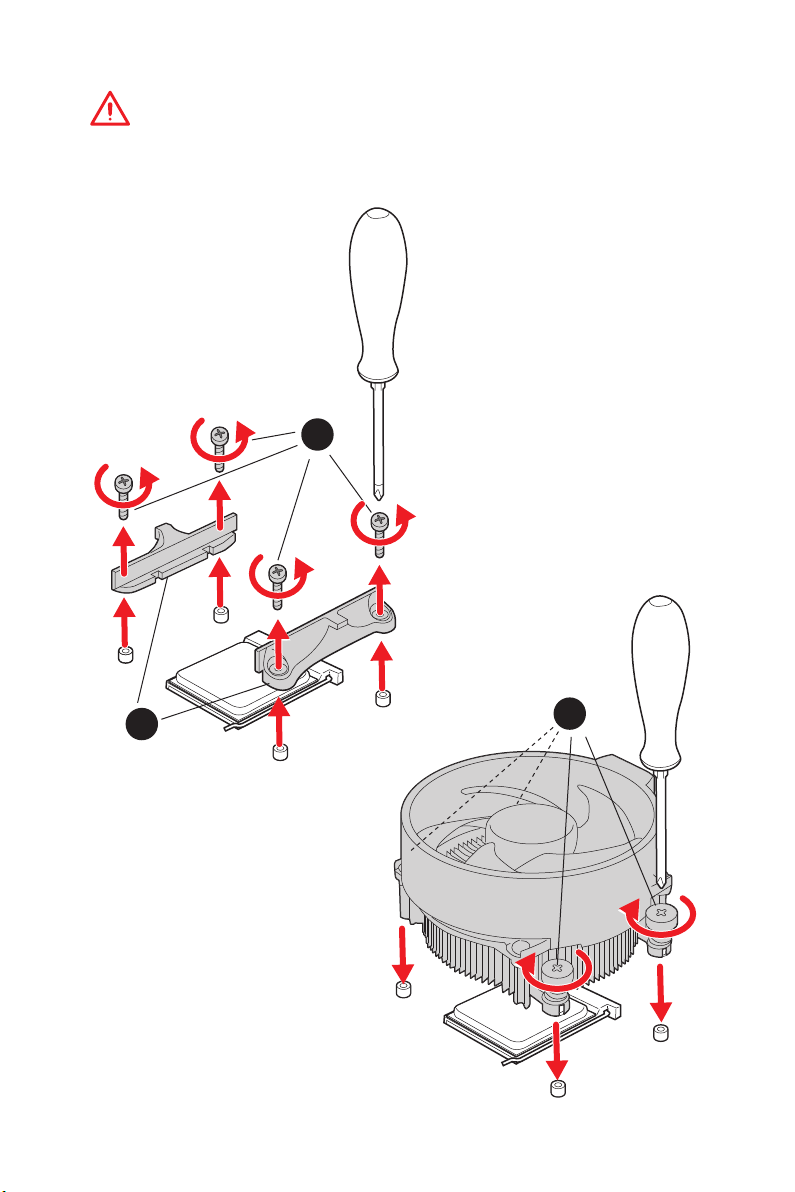
Important
If you are installing the screw-type CPU heatsink, please follow the figure below to
remove the retention module first and then install the heatsink.
1
Quick Start
4
2
3
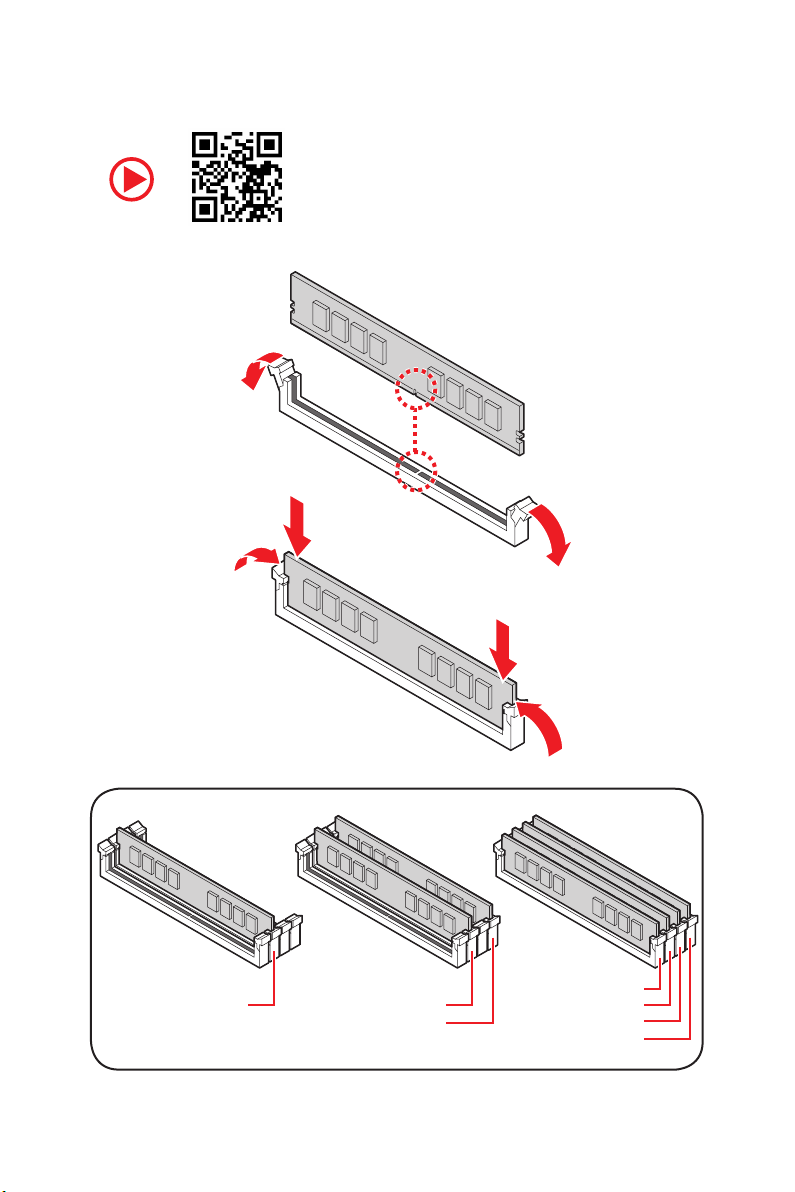
Installing DDR4 memory
DIMMA2 DIMMA2
DIMMB2
DIMMA1
DIMMA2
DIMMB1
DIMMB2
Quick Start
5
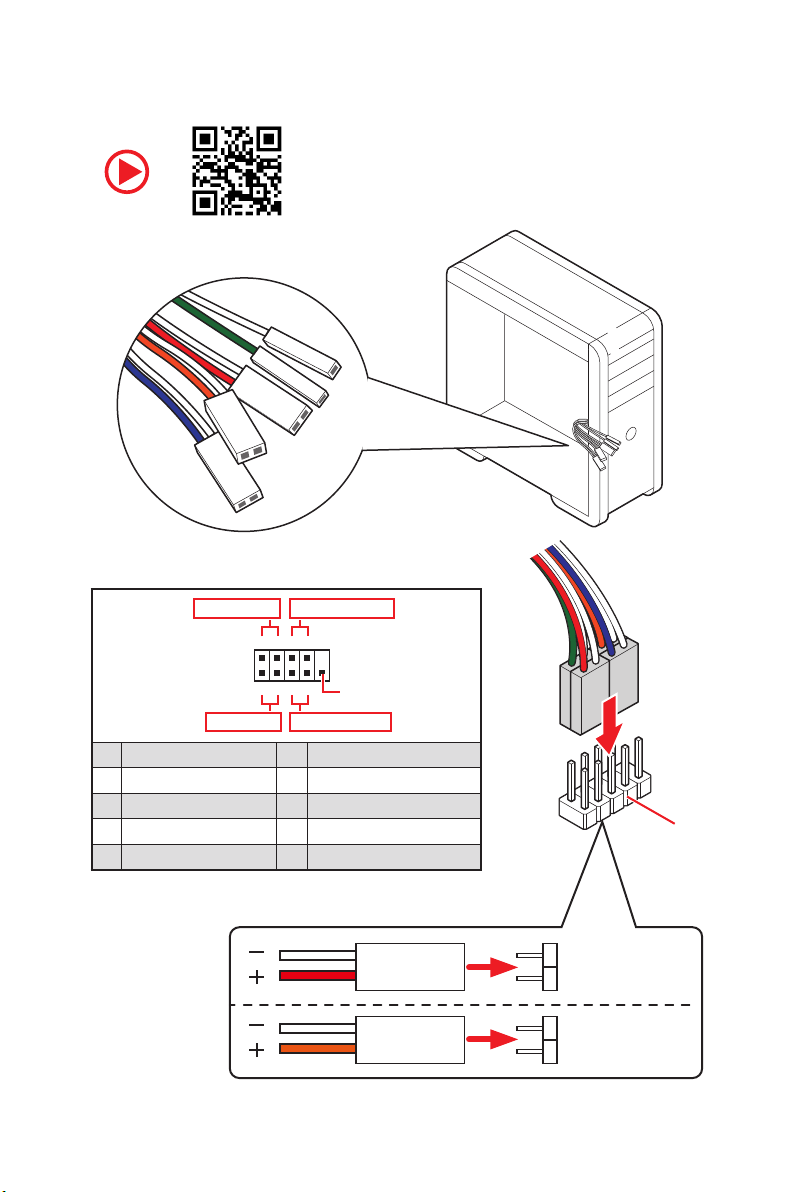
Connecting the Front Panel Header
RESET SW
POWER SW
POWER LED+
POWER LED-
HDD LED
Power LED
JFP1
Power Switch
+++—
——
2 10
1
—
+
HDD LED Reset Switch
1 HDD LED + 2 Power LED +
3 HDD LED — 4 Power LED —
5 Reset Switch 6 Power Switch
7 Reset Switch 8 Power Switch
9 Reserved 10 No Pin
Quick Start
6
9
Reserved
HDD LED
POWER LED
RESET SW
HDD LED
JFP1
HDD LED HDD LED +
POWER LED POWER LED +
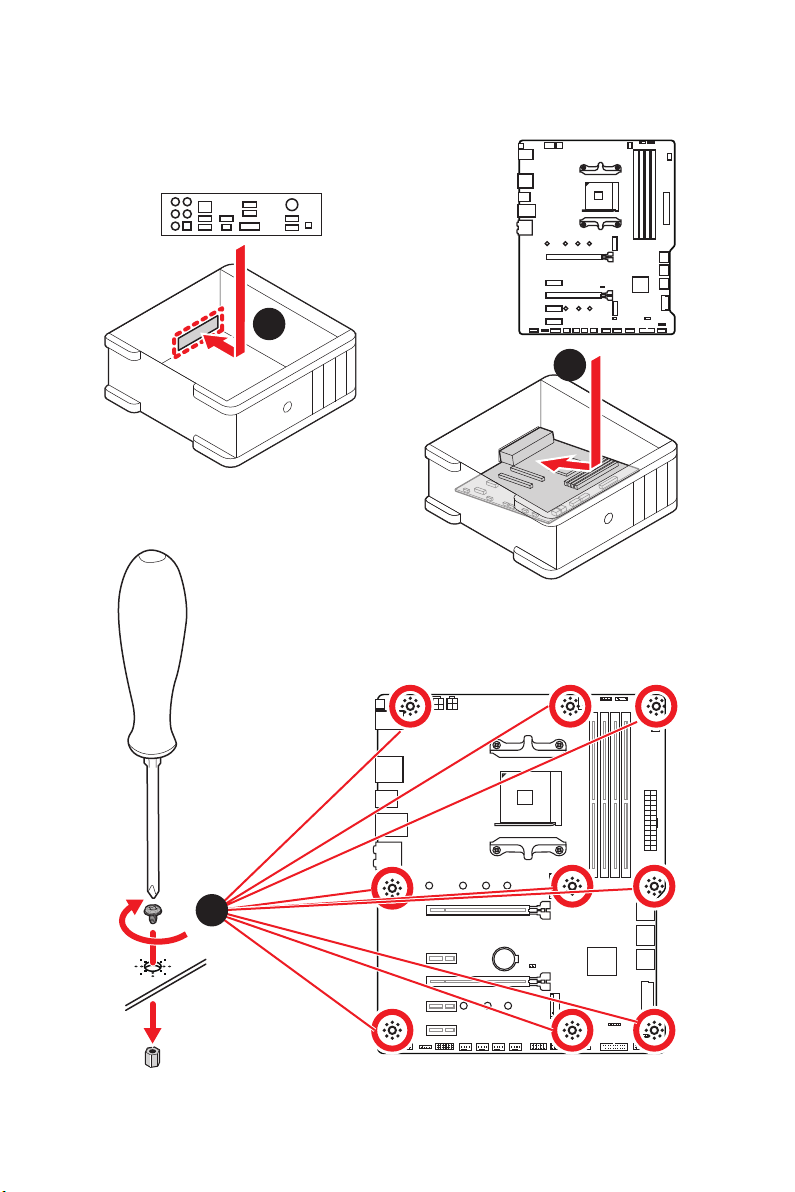
Installing the Motherboard
1
2
3
BAT1
Quick Start
7
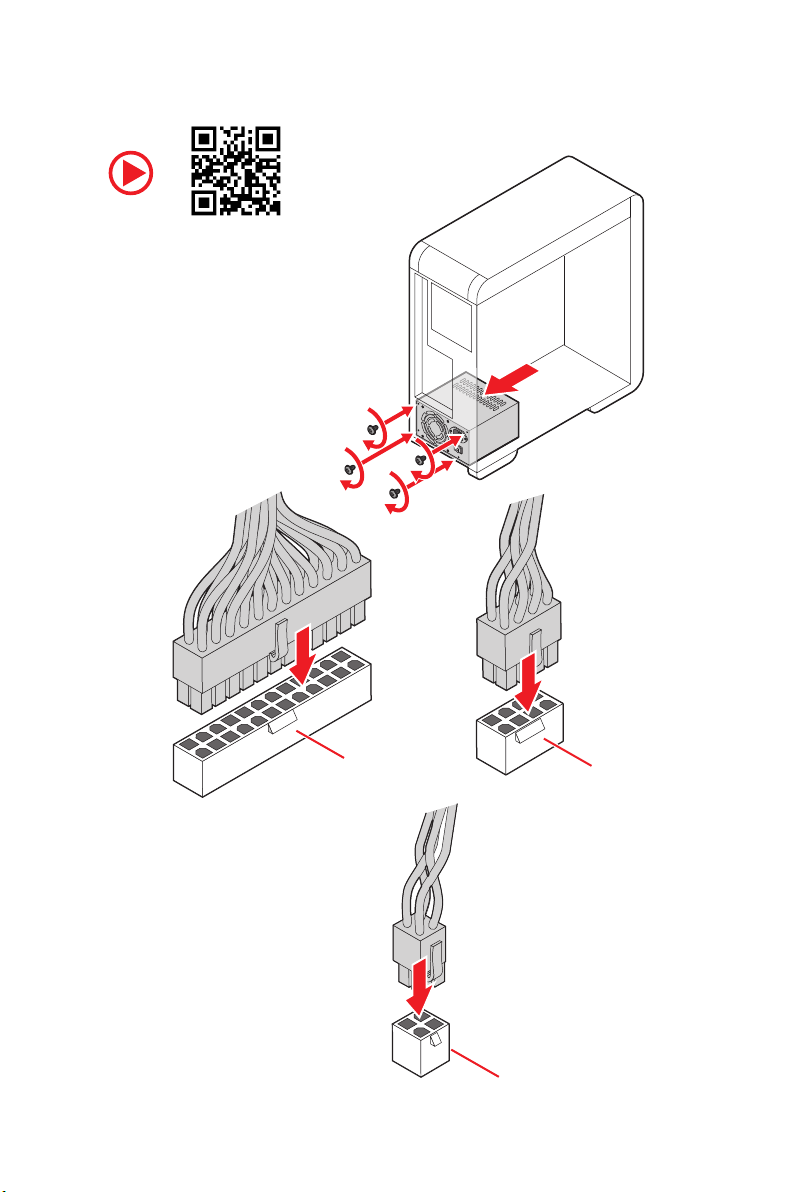
Connecting the Power Connectors
Quick Start
8
ATX_PWR1
CPU_PWR1
CPU_PWR2
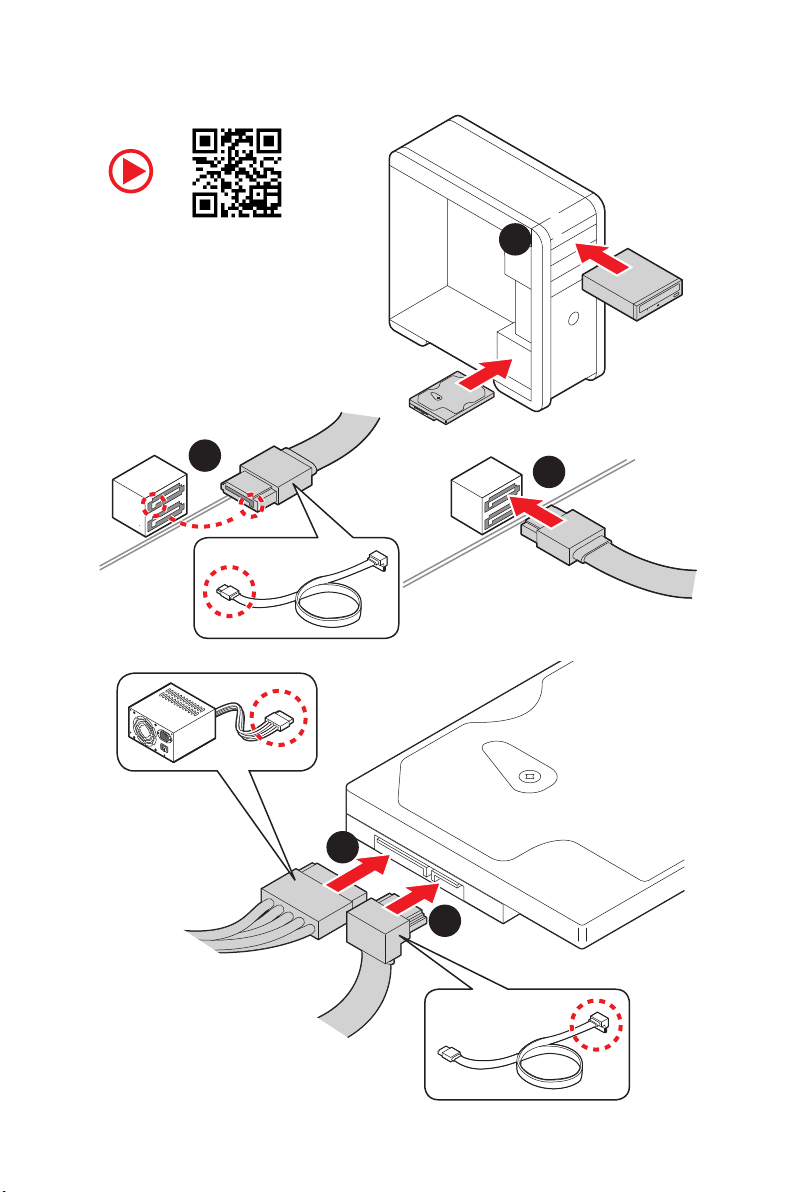
Installing SATA Drives
2
1
3
5
4
Quick Start
9
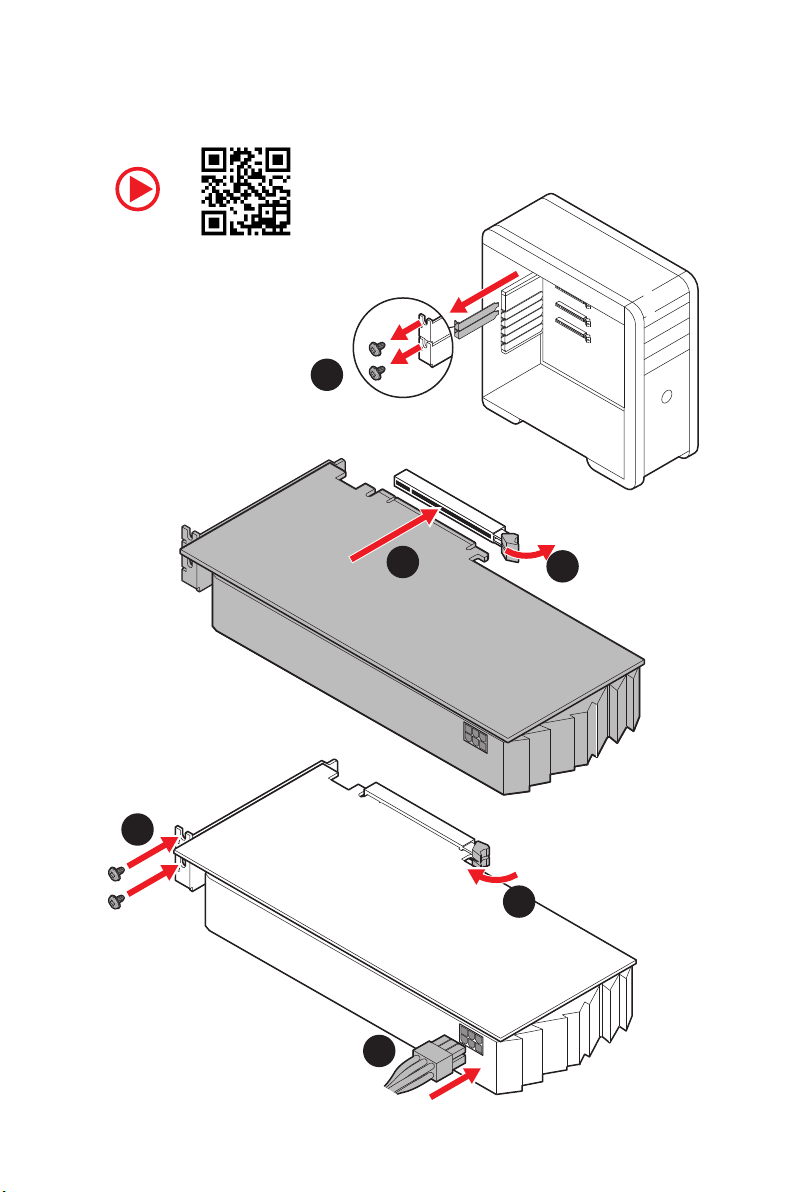
Installing a Graphics Card
1
3
2
5
4
6
10
Quick Start
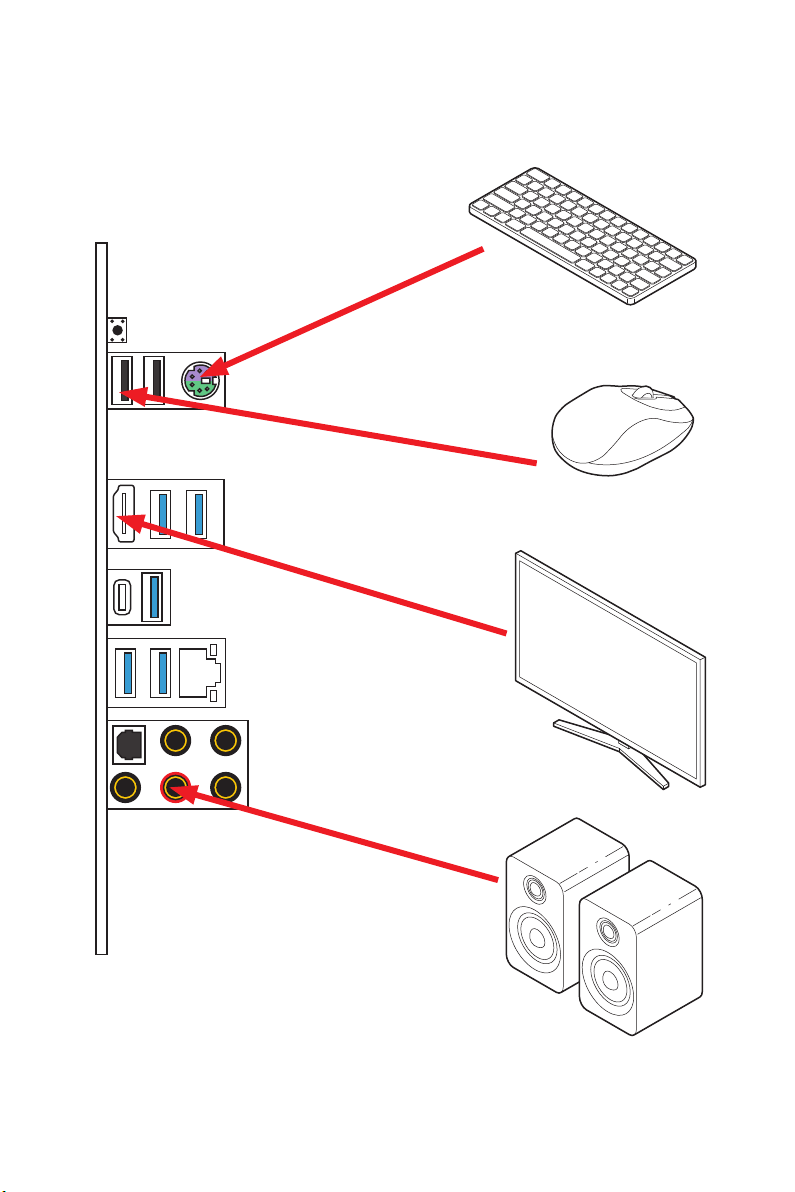
Connecting Peripheral Devices
Processor with integrated graphics
Quick Start
11
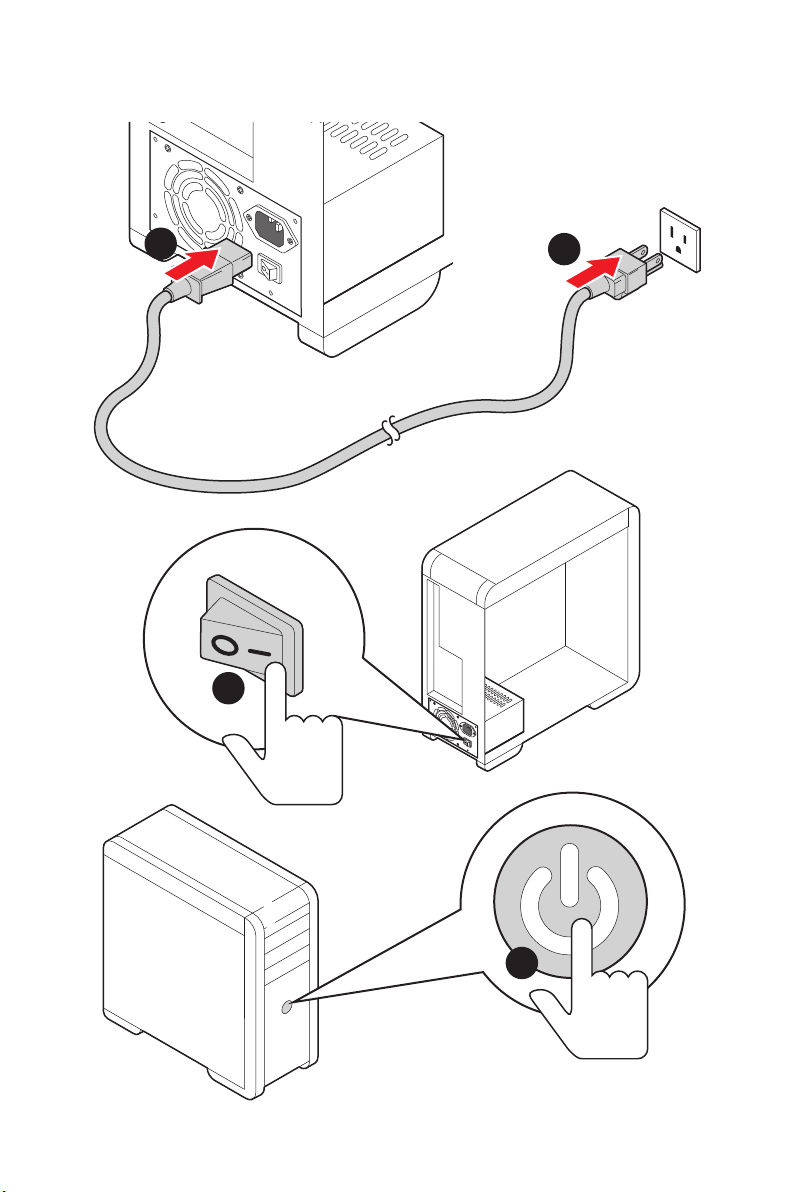
Power On
1
2
3
12
4
Quick Start

Contents
Quick Start ………………………………………………………………………………………………. 1
Preparing Tools and Components ……………………………………………………………….. 1
Safety Information …………………………………………………………………………………….. 2
Installing a Processor ………………………………………………………………………………… 3
Installing DDR4 memory ……………………………………………………………………………. 5
Connecting the Front Panel Header …………………………………………………………….. 6
Installing the Motherboard …………………………………………………………………………. 7
Connecting the Power Connectors ………………………………………………………………. 8
Installing SATA Drives………………………………………………………………………………… 9
Installing a Graphics Card ………………………………………………………………………… 10
Connecting Peripheral Devices …………………………………………………………………. 11
Power On………………………………………………………………………………………………… 12
Specifications …………………………………………………………………………………………. 15
Package contents …………………………………………………………………………………… 20
Block Diagram ………………………………………………………………………………………. 21
Rear I/O Panel ……………………………………………………………………………………….. 22
LAN Port LED Status Table……………………………………………………………………….. 22
Audio Ports Configuration ………………………………………………………………………… 22
Realtek Audio Console …………………………………………………………………………….. 23
Overview of Components ………………………………………………………………………… 25
CPU Socket …………………………………………………………………………………………….. 27
DIMM Slots ……………………………………………………………………………………………… 28
PCI_E1~5: PCIe Expansion Slots ……………………………………………………………….. 29
M2_1~2: M.2 Slots (Key M) ……………………………………………………………………….. 30
SATA1~6: SATA 6Gb/s Connectors …………………………………………………………….. 31
JFP1, JFP2: Front Panel Connectors …………………………………………………………. 31
CPU_PWR1~2, ATX_PWR1: Power Connectors …………………………………………… 32
CPU_FAN1, PUMP_FAN1, SYS_FAN1~4: Fan Connectors …………………………….. 33
JUSB3~4: USB 3.2 Gen1 Connectors …………………………………………………………. 34
JUSB1~2: USB 2.0 Connectors ………………………………………………………………….. 34
JAUD1: Front Audio Connector ………………………………………………………………….35
JCOM1: Serial Port Connector ………………………………………………………………….. 35
JCI1: Chassis Intrusion Connector …………………………………………………………….. 36
JBAT1: Clear CMOS (Reset BIOS) Jumper ………………………………………………….. 37
EZ Debug LED …………………………………………………………………………………………. 37
Contents
13

JRGB1~2: RGB LED connectors ………………………………………………………………… 38
JRAINBOW1~2: Addressable RGB LED connectors ……………………………………… 39
Installing OS, Drivers & Utilities ………………………………………………………………. 40
Installing Windows® 10 …………………………………………………………………………….. 40
Installing Drivers …………………………………………………………………………………….. 40
Installing Utilities ……………………………………………………………………………………. 40
BIOS Setup …………………………………………………………………………………………….. 41
Entering BIOS Setup ………………………………………………………………………………… 41
Resetting BIOS ………………………………………………………………………………………… 42
Updating BIOS …………………………………………………………………………………………. 42
EZ Mode …………………………………………………………………………………………………. 44
Advanced Mode ………………………………………………………………………………………. 46
SETTINGS ……………………………………………………………………………………………….. 47
Advanced ………………………………………………………………………………………………… 47
Boot ……………………………………………………………………………………………………….. 52
Security ………………………………………………………………………………………………….. 53
Save & Exit ……………………………………………………………………………………………… 54
OC ………………………………………………………………………………………………………….. 55
M-FLASH ……………………………………………………………………………………………….. 59
OC PROFILE ……………………………………………………………………………………………. 60
HARDWARE MONITOR ……………………………………………………………………………… 61
A-XMP Operation …………………………………………………………………………………….. 62
AMD RAID Configuration …………………………………………………………………………. 63
Enabling RAIDXpert2 Configuration Utility …………………………………………………. 63
Initializing Disks ……………………………………………………………………………………… 64
Creating Arrays ……………………………………………………………………………………….. 65
Deleting Arrays ……………………………………………………………………………………….. 66
Installing RAID Driver ………………………………………………………………………………. 67
Troubleshooting …………………………………………………………………………………….. 68
Regulatory Notices …………………………………………………………………………………. 69
14
Contents
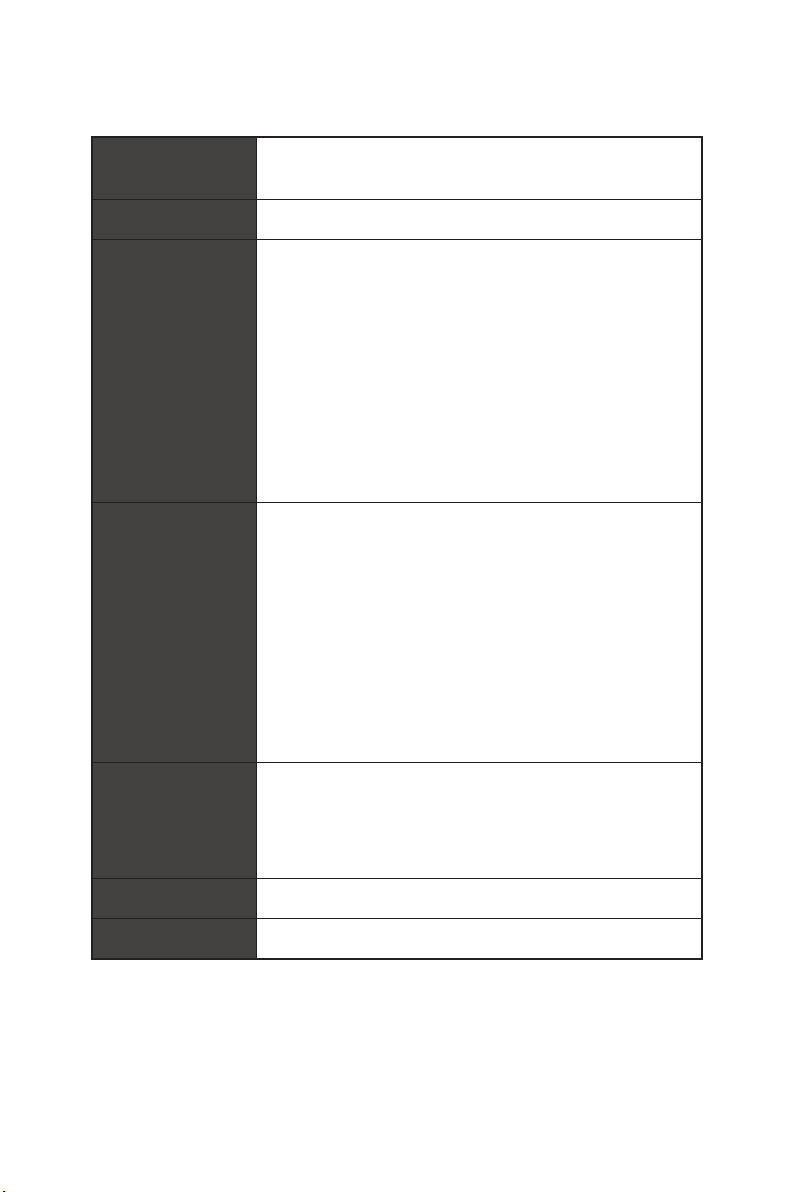
Specifications
Supports 2nd and 3rd Gen AMD Ryzen™ / Ryzen™ with
CPU
Chipset
Memory
Expansion Slot
Radeon™ Vega Graphics and 2nd Gen AMD Ryzen™ with
Radeon™ Graphics Desktop Processors for Socket AM4
AMD
on the processor)
* Please refer www.msi.com for more information on compatible memory.
* PCI_E2 will be unavailable when installing the PCIe card in PCI_E4 slot.
** The speeds may vary for different devices
®
X570 Chipset
y 4x DDR4 memory slots, support up to 128GB* (depending
Supports DDR4 1866/ 2133/ 2400/ 2666 MHz by JEDEC,
and 2666/ 2800/ 2933/ 3000/ 3066/ 3200/ 3466/ 3600/
3733/ 3866/ 4000/ 4133/ 4266/ 4400 MHz by A-XMP OC
MODE
y Dual channel memory architecture
y Supports non-ECC UDIMM memory
y Supports ECC UDIMM memory (non-ECC mode)
y Supports un-buffered memory
y 1x PCIe 4.0/ 3.0 x16 slot (PCI_E1)
3rd Gen AMD Ryzen™ support PCIe 4.0 x16 mode
2nd Gen AMD Ryzen™ support PCIe 3.0 x16 mode
Ryzen™ with Radeon™ Vega Graphics and 2nd Gen
AMD Ryzen™ with Radeon™ Graphics support PCIe 3.0
x8 mode
y 1x PCIe 4.0/ 3.0 x16 slot (PCI_E3, supports x4 mode)
y 3x PCIe 3.0 x1 slots*
Onboard Graphics
Multi-GPU
LAN
y 1x HDMI 1.4 port, supports a maximum resolution of
4096×2160 @24Hz*
* Only support when using Ryzen™ with Radeon™ Vega Graphics and 2nd Gen
AMD Ryzen™ with Radeon™ Graphics Processors
* Maximum shared memory of 2048 MB
®
y Supports 2-Way AMD
®
y 1x Realtek
8111H Gigabit LAN Controller
CrossFire™ Technology
Continued on next page
Specifications
15
Storage
RAID
Audio
Continued from previous page
y 6x SATA 6Gb/s ports
SATA3~SATA6 ports (from AMD® X570 Chipset)
SATA1~SATA2 ports (from ASMedia ASM1061)
y 2x M.2 slots (Key M)*
M2_1 slot (from AMD
®
Processor)
Supports PCIe 4.0 x4 (3rd Gen AMD Ryzen™)
Supports PCIe 3.0 x4 (2nd Gen AMD Ryzen™/ Ryzen™
with Radeon™ Vega Graphics and 2nd Gen AMD
Ryzen™ with Radeon™ Graphics)
Supports 2242/ 2260/ 2280/ 22110 storage devices
M2_2 slot (from AMD
®
X570 Chipset)
Supports PCIe 3.0 x4 and SATA 6Gb/s
Supports 2242/ 2260/ 2280 storage devices
y Supports RAID 0, RAID 1 and RAID 10 for X570 chipset
SATA storage devices
y Support RAID 0, RAID 1 and RAID 10 for M.2 NVME storage
devices
®
Realtek
ALC1220 Codec
y 7.1-Channel High Definition Audio
y Supports Optical S/PDIF output
16
USB
Specifications
®
y AMD
X570 Chipset
6x USB 3.2 Gen 1 (SuperSpeed USB) ports (2 Type-A
ports on the back panel, 4 ports available through the
internal USB 3.2 Gen 1 connectors)
6x USB 2.0 (High-speed USB) ports (2 Type-A ports on
the back panel, 4 ports available through the internal
USB 2.0 connectors)
®
y AMD
Processor
2x USB 3.2 Gen 2 (3rd Gen AMD Ryzen™) or USB 3.2
Gen1 (2nd Gen AMD Ryzen™/ Ryzen™ with Radeon™
Vega Graphics and 2nd Gen AMD Ryzen™ with Radeon™
Graphics) ports (1x Type-A & 1x Type-C) on the back
panel
2x USB 3.2 Gen1 (SuperSpeed USB) Type-A ports on the
back panel
Continued on next page
Internal Connectors
Continued from previous page
y 1x 24-pin ATX main power connector
y 1x 8-pin ATX 12V power connector
y 1x 4-pin ATX 12V power connector
y 6x SATA 6Gb/s connectors
y 2x USB 2.0 connectors (supports additional 4 USB 2.0
ports)
y 2x USB 3.2 Gen1 connectors (supports additional 4 USB 3.2
Gen1 ports)
y 1x 4-pin CPU fan connector
y 1x 4-pin water-pump connector
y 4x 4-pin system fan connectors
y 1x Front panel audio connector
y 2x System panel connectors
y 1x TPM module connector
y 1x Serial port connector
y 1x Clear CMOS jumper
y 1x Chassis Intrusion connector
y 2x 4-pin RGB LED connectors
y 2x 3-pin RAINBOW LED connectors
y 4x EZ Debug LEDs
Back Panel
Connectors
I/O Controller
y 1x Flash BIOS Button
y 1x PS/2 keyboard/ mouse combo port
y 2x USB 2.0 ports
y 4x USB 3.2 Gen 1 ports
y 1x HDMI port
y 1x USB 3.2 Gen 2/ 1 Type A port
y 1x USB 3.2 Gen 2/1 Type C port
y 1x LAN(RJ45) port
y 5x OFC audio jacks
y 1x Optical S/PDIF Out connector
NUVOTON NCT6797 Controller Chip
Continued on next page
Specifications
17
Hardware Monitor
Continued from previous page
y CPU/ System/ Chipset temperature detection
y CPU/ System/ Chipset fan speed detection
y CPU/ System/ Chipset fan speed control
Form Factor
BIOS Features
Software
Dragon Center
Features
y ATX Form Factor
y 12 in. x 9.6 in. (30.4 cm x 24.3 cm)
y 1x 256 Mb flash
y UEFI AMI BIOS
y ACPI 6.2, SM BIOS 3.2
y Multi-language
y Drivers
y DRAGON CENTER
y CPU-Z MSI GAMING
y MSI App Player (BlueStacks)
y Google Chrome™ ,Google Toolbar, Google Drive
y Norton™ Internet Security Solution
y DRAGON OPTIMIZATION
y OC Performance
y Hardware Monitor
y True Color
y Mystic Light
y Live Update
Please refer to http://download.msi.
com/manual/mb/DRAGONCENTER2.
pdf for more details.
Continued on next page
18
Specifications
Special Features
Continued from previous page
y Audio
Audio Boost 4
y Storage
Lightning Gen 4 M.2
Turbo M.2
y Fan
Pump Fan
GAMING Fan Control
y LED
Mystic Light 3
Mystic Light Extension (RGB)
Mystic Light Extension (RAINBOW)
Mystic Light Sync
EZ DEBUG LED
y Protection
PCIe Steel Armor
y Performance
Multi GPU-CrossFire Technology
DDR4 Boost
Core Boost
GAME Boost
USB with type A+C
AMD Turbo USB 3.2 Gen 2
y BIOS
Click BIOS 5
Flash BIOS
Specifications
19
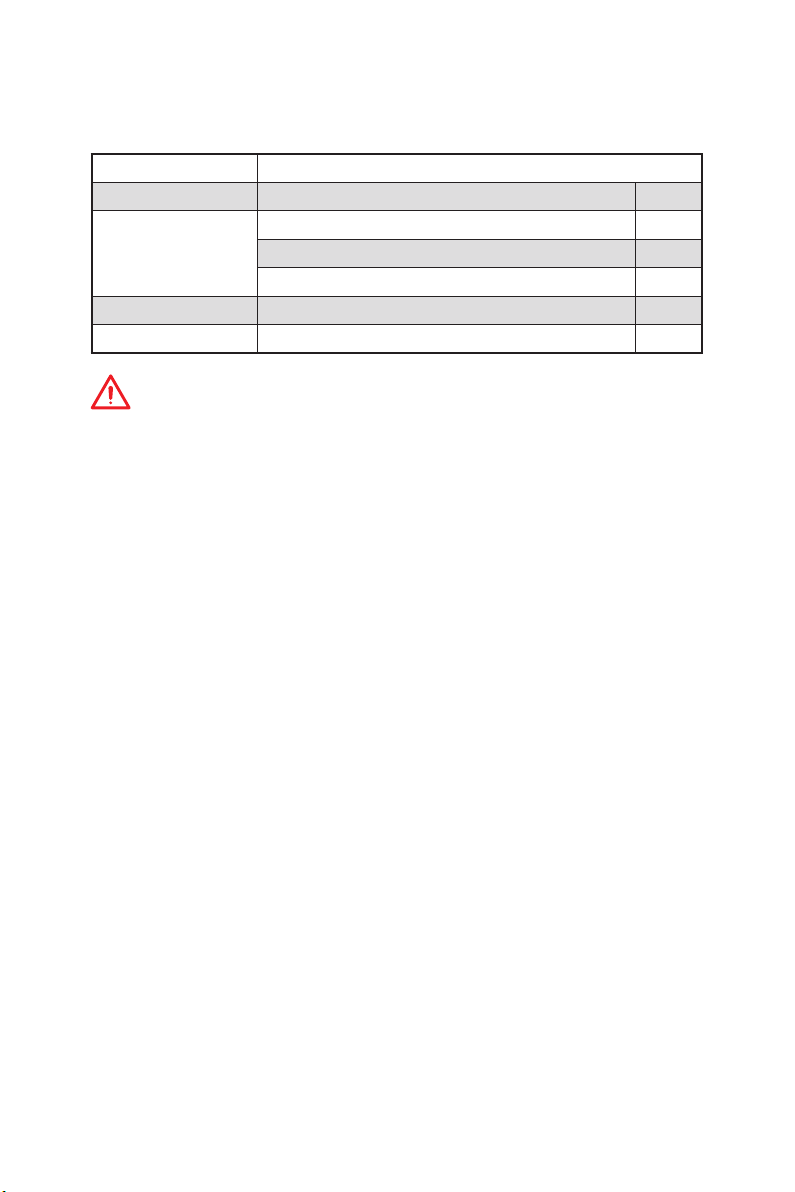
Package contents
Please check the contents of your motherboard package. It should contain:
Motherboard X570-A PRO
Cable SATA 6Gb/s Cables 2
8.5H M.2 screws 2
Accessories
Application DVD Driver DVD 1
Documentation Quick Installation Guide 1
Important
If any of the above items are damaged or missing, please contact your retailer.
Case Badge 1
Product Registration Card 1
Package contents
20
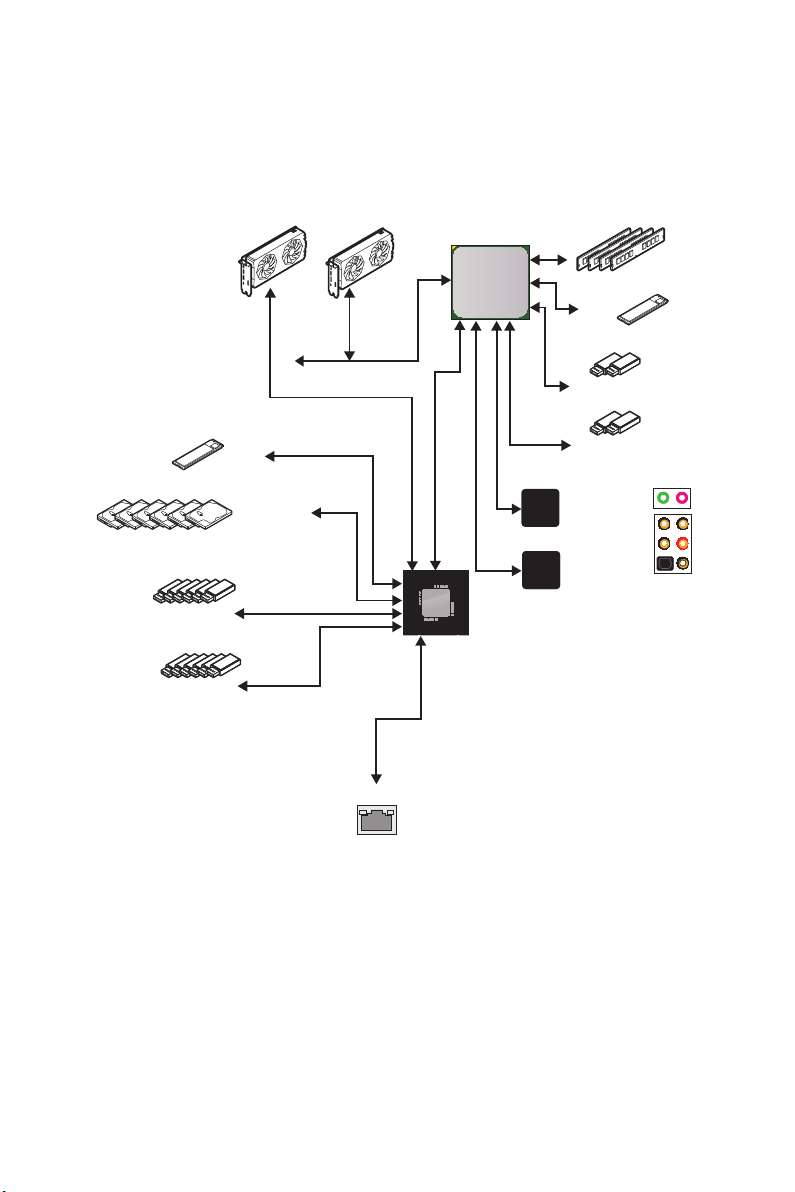
Block Diagram
2 Channel DDR4 Memory
Processor
1x M.2
6x USB 2.0
6x USB 3.2 Gen1
1x M.2
6x SATA 6Gb/s
PCI Express Bus
1x Realtek 8111H LAN
PCH
PCIE
Realtek
ALC1220
NUVOTON
6797
2x USB 3.2 Gen1
2x USB 3.2 Gen2
Front Audio Jacks
Rear Audio Jacks
Block Diagram
21
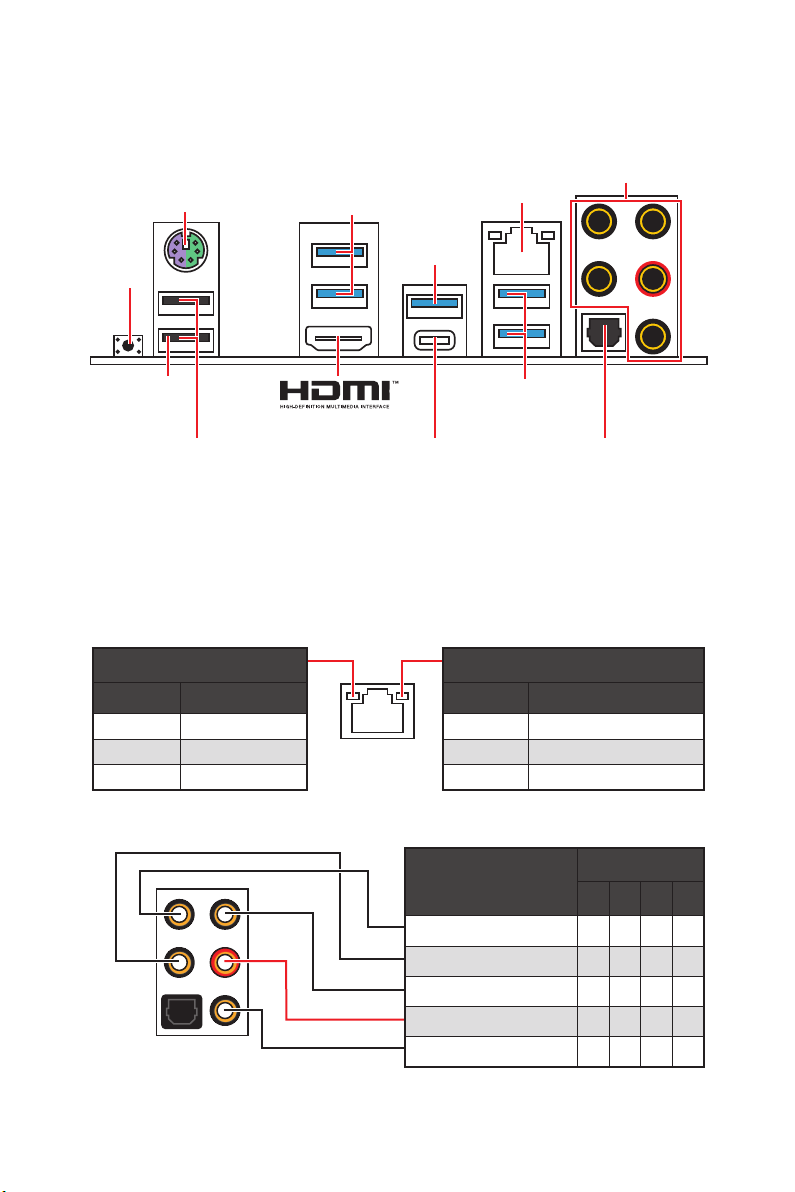
Rear I/O Panel
PS/2
USB 3.2
Gen1
Type-A
LAN
Audio Ports
USB 3.2
Gen 2
Type-A*
Flash BIOS
Button
Flash BIOS
Port
USB 3.2
Gen 1
Type-A
USB 2.0 Type-A
USB 3.2 Gen 2
Optical S/PDIF-Out
Type-C*
*USB 3.2 Gen2 (3rd Gen AMD Ryzen™) or USB 3.2 Gen1 (2nd Gen AMD Ryzen™/Ryzen™
with Radeon™ Vega Graphics and 2nd Gen AMD Ryzen™ with Radeon™Graphics)
y Flash BIOS Port/ Button — Please refer to page 43 for Updating BIOS with Flash BIOS
Button.
LAN Port LED Status Table
Link/ Activity LED
Status Description
Off No link
Yellow Linked
Blinking Data activity
Speed LED
Status Description
Off 10 Mbps connection
Green 100 Mbps connection
Orange 1 Gbps connection
Audio Ports Configuration
Rear I/O Panel
22
Audio Ports
Channel
2 4 6 8
Center/ Subwoofer Out ● ●
Rear Speaker Out ● ● ●
Line-In/ Side Speaker Out ●
Line-Out/ Front Speaker Out ● ● ● ●
Mic In
(●: connected, Blank: empty)
Loading…

I
Quick Start
Quick Start
Thank you for purchasing the MSI
®
X570-A PRO motherboard. This
Quick Start section provides demonstration diagrams about how to
install your computer. Some of the installations also provide video
demonstrations. Please link to the URL to watch it with the web
browser on your phone or tablet. You may have even link to the URL
by scanning the QR code.
Kurzanleitung
Danke, dass Sie das MSI
®
X570-A PRO Motherboard gewählt
haben. Dieser Abschnitt der Kurzanleitung bietet eine Demo zur
Installation Ihres Computers. Manche Installationen bieten auch
die Videodemonstrationen. Klicken Sie auf die URL, um diese
Videoanleitung mit Ihrem Browser auf Ihrem Handy oder Table
anzusehen. Oder scannen Sie auch den QR Code mit Ihrem Handy,
um die URL zu öffnen.
Présentation rapide
Merci d’avoir choisi la carte mère MSI
®
X570-A PRO. Ce manuel
fournit une rapide présentation avec des illustrations explicatives
qui vous aideront à assembler votre ordinateur. Des tutoriels vidéo
sont disponibles pour certaines étapes. Cliquez sur le lien fourni
pour regarder la vidéo sur votre téléphone ou votre tablette. Vous
pouvez également accéder au lien en scannant le QR code qui lui est
associé.
Быстрый старт
Благодарим вас за покупку материнской платы MSI
®
X570-A PRO.
В этом разделе представлена информация, которая поможет вам
при сборке комьютера. Для некоторых этапов сборки имеются
видеоинструкции. Для просмотра видео, необходимо открыть
соответствующую ссылку в веб-браузере на вашем телефоне или
планшете. Вы также можете выполнить переход по ссылке, путем
сканирования QR-кода.

II
Quick Start
1
2
3
6
4
5
7
8
9
Youtube
CPU_FAN1
Installing a Processor/ Installation des Prozessors/ Installer un
processeur/ Установка процессора

III
Quick Start
1
2
3
Important
If you are installing the screw-type CPU heatsink, please follow the figure below to
remove the retention module first and then install the heatsink.
Wenn Sie einen CPU-Kühler mit Schraubenbefestigung einsetzen, folgen Sie bitte
den Anweisungen unten um das Retention-Modul zu entfernen und den Kühler zu
installieren.
Si vous voulez installer un ventirad pour processeur à vis, veuillez suivre les
instructions ci-dessous pour d’abord retirer le module de rétention puis installer le
ventirad.

IV
Quick Start
Youtube
DIMMA2 DIMMA2
DIMMB2
DIMMA1
DIMMA2
DIMMB1
DIMMB2
Installing DDR4 memory/ Installation des DDR4-Speichers/
Installer une mémoire DDR4/ Установка памяти DDR4

V
Quick Start
Youtube
HDD LED
RESET SW
JFP1
HDD LED
HDD LED —
HDD LED +
POWER LED —
POWER LED +
POWER LED
1
2 10
9
+
+
+—
——
—
+
Power LED
HDD LED Reset Switch
Reserved
Power Switch
JFP1
1 HDD LED + 2 Power LED +
3 HDD LED — 4 Power LED —
5 Reset Switch 6 Power Switch
7 Reset Switch 8 Power Switch
9 Reserved 10 No Pin
RESET SW
POWER SW
POWER LED+
POWER LED-
HDD LED
Connecting the Front Panel Header/ Anschließen der
Frontpanel—Stiftleiste/ Connecter un connecteur du panneau
avant/ Подключение разъемов передней панели

VI
Quick Start
BAT1
2
3
1
Installing the Motherboard/ Installation des Motherboards/
Installer la carte mère/ Установка материнской платы

VII
Quick Start
Youtube
ATX_PWR1
CPU_PWR1
CPU_PWR2
Connecting the Power Connectors/ Stromanschlüsse
anschliessen/ Connecter les câbles du module d’alimentation/
Подключение разъемов питания

VIII
Quick Start
Youtube
1
2
3
4
5
Installing SATA Drives/ Installation der SATA-Laufwerke/
Installer le disque dur SATA/ Установка дисков SATA

IX
Quick Start
Youtube
1
2
3
4
5
6
Installing a Graphics Card/ Einbau der Grafikkarte/ Installer
une carte graphique/ Установка дискретной видеокарты

XII
Quick Start
NOTE

2
Safety Information
Safety Information
∙ The components included in this package are prone to damage from electrostatic
discharge (ESD). Please adhere to the following instructions to ensure successful
computer assembly.
∙ Ensure that all components are securely connected. Loose connections may cause
the computer to not recognize a component or fail to start.
∙ Hold the motherboard by the edges to avoid touching sensitive components.
∙ It is recommended to wear an electrostatic discharge (ESD) wrist strap when
handling the motherboard to prevent electrostatic damage. If an ESD wrist strap is
not available, discharge yourself of static electricity by touching another metal object
before handling the motherboard.
∙ Store the motherboard in an electrostatic shielding container or on an anti-static
pad whenever the motherboard is not installed.
∙ Before turning on the computer, ensure that there are no loose screws or metal
components on the motherboard or anywhere within the computer case.
∙ Do not boot the computer before installation is completed. This could cause
permanent damage to the components as well as injury to the user.
∙ If you need help during any installation step, please consult a certified computer
technician.
∙ Always turn off the power supply and unplug the power cord from the power outlet
before installing or removing any computer component.
∙ Keep this user guide for future reference.
∙ Keep this motherboard away from humidity.
∙ Make sure that your electrical outlet provides the same voltage as is indicated on
the PSU, before connecting the PSU to the electrical outlet.
∙ Place the power cord such a way that people can not step on it. Do not place
anything over the power cord.
∙ All cautions and warnings on the motherboard should be noted.
∙ If any of the following situations arises, get the motherboard checked by service
personnel:
▪ Liquid has penetrated into the computer.
▪ The motherboard has been exposed to moisture.
▪ The motherboard does not work well or you can not get it work according to user
guide.
▪ The motherboard has been dropped and damaged.
▪ The motherboard has obvious sign of breakage.
∙ Do not leave this motherboard in an environment above 60°C (140°F), it may damage
the motherboard.

3
Specifications
Specifications
CPU
Supports 2nd and 3rd Gen AMD Ryzen™ / Ryzen™ with
Radeon™ Vega Graphics and 2nd Gen AMD Ryzen™ with
Radeon™ Graphics Desktop Processors for Socket AM4
Chipset AMD
®
X570 Chipset
Memory
∙ 4x DDR4 memory slots, support up to 128GB* (depending
on the processor)
▪ Supports DDR4 1866/ 2133/ 2400/ 2666 MHz by JEDEC,
and 2666/ 2800/ 2933/ 3000/ 3066/ 3200/ 3466/ 3600/
3733/ 3866/ 4000/ 4133/ 4266/ 4400 MHz by A-XMP OC
MODE
∙ Dual channel memory architecture
∙ Supports non-ECC UDIMM memory
∙ Supports ECC UDIMM memory (non-ECC mode)
∙ Supports un-buffered memory
* Please refer www.msi.com for more information on compatible memory.
Expansion Slot
∙ 1x PCIe 4.0/ 3.0 x16 slot (PCI_E1)
▪ 3rd Gen AMD Ryzen™ support PCIe 4.0 x16 mode
▪ 2nd Gen AMD Ryzen™ support PCIe 3.0 x16 mode
▪ Ryzen™ with Radeon™ Vega Graphics and 2nd Gen
AMD Ryzen™ with Radeon™ Graphics support PCIe 3.0
x8 mode
∙ 1x PCIe 4.0/ 3.0 x16 slot (PCI_E3, supports x4 mode)
∙ 3x PCIe 3.0 x1 slots*
* PCI_E2 will be unavailable when installing the PCIe card in PCI_E4 slot.
** The speeds may vary for different devices
Onboard Graphics
∙ 1x HDMI 1.4 port, supports a maximum resolution of
4096×2160 @24Hz*
* Only support when using Ryzen™ with Radeon™ Vega Graphics and 2nd Gen
AMD Ryzen™ with Radeon™ Graphics Processors
* Maximum shared memory of 2048 MB
Multi-GPU ∙ Supports 2-Way AMD
®
CrossFire
™
Technology
LAN ∙ 1x Realtek
®
8111H Gigabit LAN Controller
Continued on next page

4
Specifications
Continued from previous page
Storage
∙ 6x SATA 6Gb/s ports
▪ SATA3~SATA6 ports (from AMD® X570 Chipset)
▪ SATA1~SATA2 ports (from ASMedia ASM1061)
∙ 2x M.2 slots (Key M)*
▪ M2_1 slot (from AMD
®
Processor)
▫ Supports PCIe 4.0 x4 (3rd Gen AMD Ryzen™)
▫ Supports PCIe 3.0 x4 (2nd Gen AMD Ryzen™/
Ryzen™ with Radeon™ Vega Graphics and 2nd Gen
AMD Ryzen™ with Radeon™ Graphics)
▫ Supports 2242/ 2260/ 2280/ 22110 storage devices
▪ M2_2 slot (from AMD
®
X570 Chipset)
▫ Supports PCIe 3.0 x4 and SATA 6Gb/s
▫ Supports 2242/ 2260/ 2280 storage devices
RAID
∙ Supports RAID 0, RAID 1 and RAID 10 for X570 chipset
SATA storage devices
∙ Support RAID 0, RAID 1 and RAID 10 for M.2 NVME storage
devices
Audio
Realtek
®
ALC1220 Codec
∙ 7.1-Channel High Definition Audio
∙ Supports Optical S/PDIF output
USB
∙ AMD
®
X570 Chipset
▪ 6x USB 3.2 Gen 1 (SuperSpeed USB) ports (2 Type-A
ports on the back panel, 4 ports available through the
internal USB 3.2 Gen 1 connectors)
▪ 6x USB 2.0 (High-speed USB) ports (2 Type-A ports
on the back panel, 4 ports available through the internal
USB 2.0 connectors)
∙ AMD
®
Processor
▪ 2x USB 3.2 Gen 2 (3rd Gen AMD Ryzen™) or USB 3.2
Gen1 (2nd Gen AMD Ryzen™/ Ryzen™ with Radeon™
Vega Graphics and 2nd Gen AMD Ryzen™ with Radeon™
Graphics) ports (1x Type-A & 1x Type-C) on the back
panel
▪ 2x USB 3.2 Gen1 (SuperSpeed USB) Type-A ports on
the back panel
Continued on next page

5
Specifications
Continued from previous page
Internal Connectors
∙ 1x 24-pin ATX main power connector
∙ 1x 8-pin ATX 12V power connector
∙ 1x 4-pin ATX 12V power connector
∙ 6x SATA 6Gb/s connectors
∙ 2x USB 2.0 connectors (supports additional 4 USB 2.0
ports)
∙ 2x USB 3.2 Gen1 connectors (supports additional 4 USB
3.2 Gen1 ports)
∙ 1x 4-pin CPU fan connector
∙ 1x 4-pin water-pump connector
∙ 4x 4-pin system fan connectors
∙ 1x Front panel audio connector
∙ 2x System panel connectors
∙ 1x TPM module connector
∙ 1x Serial port connector
∙ 1x Clear CMOS jumper
∙ 1x Chassis Intrusion connector
∙ 2x 4-pin RGB LED connectors
∙ 2x 3-pin RAINBOW LED connectors
∙ 4x EZ Debug LEDs
Back Panel
Connectors
∙ 1x Flash BIOS Button
∙ 1x PS/2 keyboard/ mouse combo port
∙ 2x USB 2.0 ports
∙ 4x USB 3.2 Gen 1 ports
∙ 1x HDMI port
∙ 1x USB 3.2 Gen 2/ 1 Type A port
∙ 1x USB 3.2 Gen 2/1 Type C port
∙ 1x LAN(RJ45) port
∙ 5x OFC audio jacks
∙ 1x Optical S/PDIF Out connector
I/O Controller NUVOTON NCT6797 Controller Chip
Continued on next page

6
Specifications
Continued from previous page
Hardware Monitor
∙ CPU/ System/ Chipset temperature detection
∙ CPU/ System/ Chipset fan speed detection
∙ CPU/ System/ Chipset fan speed control
Form Factor
∙ ATX Form Factor
∙ 12 in. x 9.6 in. (30.4 cm x 24.3 cm)
BIOS Features
∙ 1x 256 Mb flash
∙ UEFI AMI BIOS
∙ ACPI 6.2, SM BIOS 3.2
∙ Multi-language
Software
∙ Drivers
∙ DRAGON CENTER
∙ CPU-Z MSI GAMING
∙ MSI App Player (BlueStacks)
∙ Google Chrome™ ,Google Toolbar, Google Drive
∙ Norton™ Internet Security Solution
Dragon Center
Features
∙ DRAGON OPTIMIZATION
∙ OC Performance
∙ Hardware Monitor
∙ True Color
∙ Mystic Light
∙ Live Update
Please refer to http://download.msi.
com/manual/mb/DRAGONCENTER2.
pdf for more details.
Continued on next page

7
Specifications
Continued from previous page
Special Features
∙ Audio
▪ Audio Boost 4
∙ Storage
▪ Lightning Gen 4 M.2
▪ Turbo M.2
∙ Fan
▪ Pump Fan
▪ GAMING Fan Control
∙ LED
▪ Mystic Light 3
▪ Mystic Light Extension (RGB)
▪ Mystic Light Extension (RAINBOW)
▪ Mystic Light Sync
▪ EZ DEBUG LED
∙ Protection
▪ PCIe Steel Armor
∙ Performance
▪ Multi GPU-CrossFire Technology
▪ DDR4 Boost
▪ Core Boost
▪ USB with type A+C
▪ AMD Turbo USB 3.2 Gen 2
∙ BIOS
▪ Click BIOS 5
▪ Flash BIOS

8
Package contents
Package contents
Please check the contents of your motherboard package. It should contain:
Motherboard X570-A PRO
Cable SATA 6Gb/s Cables 2
Accessories
8.5H M.2 screws 2
Case Badge 1
Product Registration Card 1
Application DVD Driver DVD 1
Documentation Quick Installation Guide 1
⚠
Important
If any of the above items are damaged or missing, please contact your retailer.

9
Rear I/O Panel
Rear I/O Panel
Link/ Activity LED
Status Description
Off No link
Yellow Linked
Blinking Data activity
Speed LED
Status Description
Off 10 Mbps connection
Green 100 Mbps connection
Orange 1 Gbps connection
LAN Port LED Status Table
Audio Ports Configuration
Audio Ports
Channel
2 4 6 8
Center/ Subwoofer Out
Rear Speaker Out
Line-In/ Side Speaker Out
Line-Out/ Front Speaker Out
Mic In
(: connected, Blank: empty)
USB 3.2 Gen 2
Type-C*
USB 3.2
Gen 2
Type-A*
PS/2
LAN
USB 2.0 Type-A
Audio Ports
Optical S/PDIF-Out
Flash BIOS
Button
Flash BIOS
Port
USB 3.2
Gen 1
Type-A
*USB 3.2 Gen2 (3rd Gen AMD Ryzen™) or USB 3.2 Gen1 (2nd Gen AMD Ryzen™/Ryzen™
with Radeon™ Vega Graphics and 2nd Gen AMD Ryzen™ with Radeon™Graphics)
∙ Flash BIOS Port/ Button — Please refer to page 29 for Updating BIOS with Flash BIOS
Button.
USB 3.2
Gen1
Type-A

10
Rear I/O Panel
Realtek Audio Console
After Realtek Audio Console is installed. You can use it to change sound settings to get
better sound experience.
∙ Device Selection — allows you to select a audio output source to change the related
options. The check sign indicates the devices as default.
∙ Application Enhancement — the array of options will provide you a complete
guidance of anticipated sound effect for both output and input device.
∙ Main Volume — controls the volume or balance the right/left side of the speakers
that you plugged in front or rear panel by adjust the bar.
∙ Jack Status — depicts all render and capture devices currently connected with your
computer.
∙ Connector Settings — configures the connection settings.
Auto popup dialog
When you plug into a device at an audio jack, a dialogue window will pop up asking you
which device is current connected.
Each jack corresponds to its default setting as shown on the next page.
⚠
Important
The pictures above for reference only and may vary from the product you purchased.
Jack Status
Connector Settings
Device
Selection
Main Volume
Application Enhancement

11
Rear I/O Panel
Audio jacks to headphone and microphone diagram
Audio jacks to stereo speakers diagram
Audio jacks to 7.1-channel speakers diagram
AUDIO INPUT
AUDIO INPUT
Rear Front
Side Center/
Subwoofer
CPU
1
3
2
4
5
6
7
9
10
8
1 2
109
HDD LED + Power LED +
HDD LED — Power LED —
Reset Switch Power Switch
Reset Switch Power Switch
Reserved No Pin
RESET SW
POWER SW
POWER LED+
POWER LED-
HDD LED
HDD LED
RESET SW
JFP1
HDD LED
HDD LED +
HDD LED —
POWER LED
Power LED +
Power LED —
Front panel
Vorderseite
Panneau avant
Передняя панель
Przedni panel
Painel frontal
Painel frontal
Panel frontal
Ön panel
Frontpanel
Voorkant
Frontpanel
Čelní panel
Πρόσοψη
Frontpanel
Etupaneeli
Előlapi panel
Pannello anteriore
Алдыңғы панель
前面板
前面板
フロントパネル
전면 패널
Pa-nen trước
แผงหน้า
Panel depan
Передня панель
Panou frontal
Predný panel
Prednja tabla
Челен панел
Priekšējais panelis
Prednji panel
Sprednja plošča
Priekinis skydas
Prednja ploča
Esipaneel
Intel 20XX CPU
Memory
Speicher
Mémoire
Память
Pamięć
Memória
Memória
Memoria
Bellek
Hukommelse
Geheugen
Minne
Paměť
Μνήμη
Minne
Muisti
Memória
Memoria
Жад
記憶體
内存
メモリ
메모리
Bộ nhớ
หน่วยความจำ
Memori
Пам’ять
Memorie
Pamäť
Memorija
Памет
Atmiņa
Memorija
Pomnilnik
Atmintis
Memorija
Mälu
Intel 115X CPU AMD TR4 CPU
AMD CPU
ةﺮﻛاﺬﻟا
ﻪﻈﻓﺎﺣ
ম
েরিম
ﺔﻴﻣﺎﻣﻷا ﺔﺣﻮﻠﻟا
ﻮﻠﺟ ﻞﻨﭘ
সুখ া নে ল
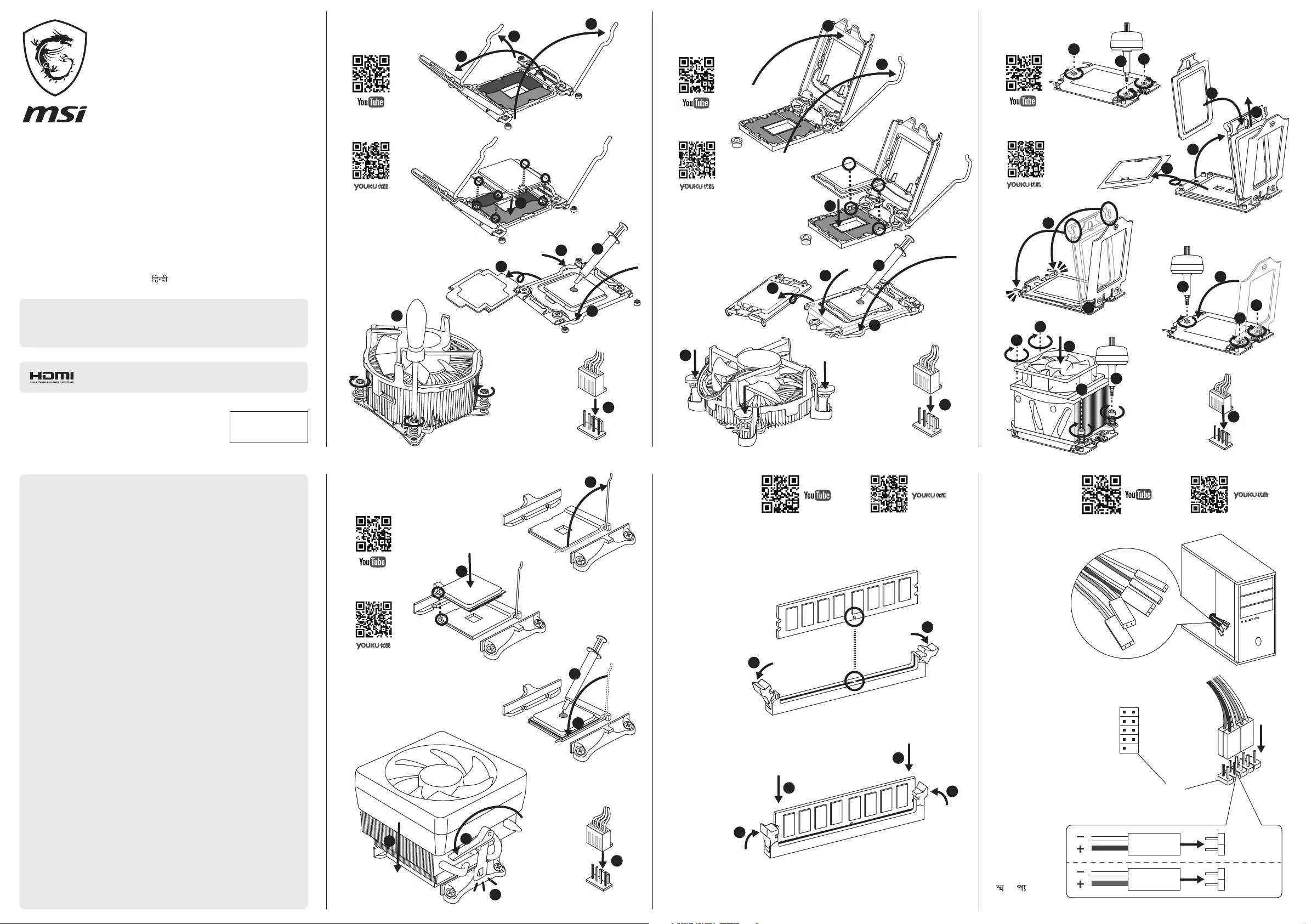
Quick Installation Guide
English ● Deutsch ● Français ● Русский ● Polski ● Português ●
BR Portuguese ● Español ● Türkçe ● Dansk ● Nederlands ● Norsk ●
Česky ● Ελληνικά ● Svenska ● Suomi ● Magyar ● Italiano ● Қазақ тілі ●
繁體中文 ● 簡体中文 ● 日本語 ● 한국어 ● Tieng Viet ● ไทย ●
Bahasa Indonesia ● Українська ● Română ● Slovensky ● Bosanski ●
Български ● Latviski ● Srpski ● Slovenščina ● Lietuvių ● Hrvatski ●
Eesti ● ﺔﻴﺑﺮﻌﻟا ● ﯽﺳرﺎﻓ ● বাঙািল ●
This quick guide is only for common personal computer assembly. For detailed
installation and information please refer to the users’ manual. The content is subject to
change without notice. All brand names are registered trademarks of their respective
owners. Please visit www.msi.com for more information.
If you purchase the motherboard with a HDMI connector, you can
connect it to HDMI compatibility Audio-Visual equipments.
TM
G52-XXXX27K
MOTHERBOARD
MSI Warranty Procedures and Conditions (This is only valid for Australia)
The terms and conditions of MSI’s warranty described herein adhere to the guidelines
set forth by the Australian Competition & Consumer Commission (“ACCC”), in addition to
the applicable provisions under the Australian Consumer Law (”ACL”). Our goods come
with guarantees that cannot be excluded under the Australian Consumer Law. You are
entitled to a replacement or refund for a major failure and for compensation for any
other reasonably foreseeable loss or damage. You are also entitled to have the goods
repaired or replaced if the goods fail to be of acceptable quality and the failure does not
amount to a major failure.
(1) Determination of the warranty period: The warranty period starts from the date you
purchase the Product with valid invoice. If the last day of the warranty period is a national
holiday, the following day shall be the last day of the warranty period.
(2) Customer-Induced-Defect (CID): If the problems or symptoms are complied with
improper usage defined as Customer-Induced-Defect (CID), shall not be accepted in
warranty claim of the product set. MSI reserves the right to determine whether the
products are operated within the scope of proper usage.
(3) Limited warranty for software: The software not pre-installed is not covered within
the Product’s warranty .The Company assumes no responsibility for any software
subsequently installed by the customer itself and any possible consequential breakdown
or damage.
(4) Screen the problems by self-checking:
• Please first review the User’s Manual and contents of the Software CD included with
the Product:The User’s Manual and Software CD provided by MSI containing a lot of
information about product use. The manual we compose from user’s perspective can
answer many of your questions. If your manual has been lost; you may download the
manual you need from the MSI website.
• Visit MSI website for support: MSI retains a group of customer service engineers with
profession and knowledge. You may post a message about the problem you encounter on
MSI’s categorized discussion forum, and our engineers will try their best to answer your
question concerning product use immediately. Or you may search on the website for FAQ,
to see whether there is any solution for similar problems.
(5) Seek support from the original store of purchase: If you cannot seek any solution for
the problem out of the above methods, you may seek support from the original store of
purchase, because the original store of purchase should best know your system
configuration and specifications, and can provide you with any necessary resource and
service.
(6) Bring the Product to the original store of purchase: If your product has been
determined by the MSI engineer or store as problematic or defective in hardware, and
may incur the need for replacement of parts, you may bring the Product for repair or
replacement to the original store of purchase to send the Product for repair or
replacement on your behalf. However, the customer must properly pack the Product
when sending it for repair, to avoid further damage in the course of shipping.
(7) Warranty receipt: The valid invoice of your purchase shall be provided for the
warranty service.
(8) Contacts: In the event that additional assistance is required, please contact MSI
Australia Pty at the following:
Unit 16, 22 Princes Rd East Auburn NSW 2144, Australia
Tel: 02 9748 0070
Email: ausrma@msi.com
For more details, please visit our website www.au.msi.com
11
1
1
1
2
2
2
2
3
3
2
3
3
4
4
3
5
5
4
6
6
5
8
8
9
9
10
10
11
12
13
16
14
17
18
15
7
7
7
6
8
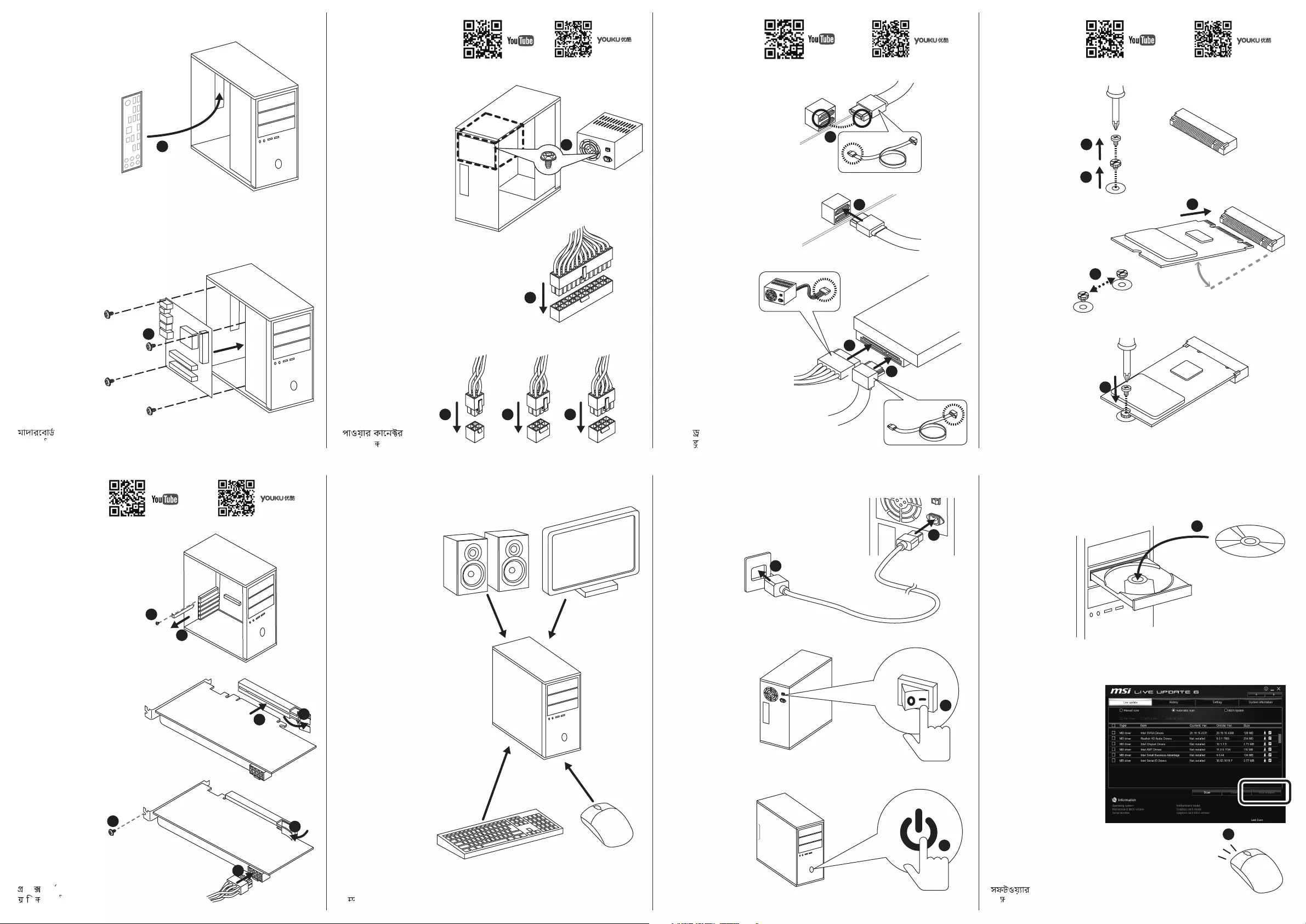
Motherboard
Motherboard
Carte mère
Материнская плата
Płyta główna
Motherboard
Placa-mãe
Placa base
Ana Kart
Systemkort
Moederbord
Hovedkort
Základní deska
Μητρική πλακέτα
Moderkort
Emolevy
Alaplap
Scheda madre
Негізгі тақта
主機板
主板
マザーボード
마더보드
Bo mạch chủ
บอร์ดหลัก
Motherboard
Материнська плата
Placă de bază
Základná doska
Matična ploča
Главна платка
Mātesplate
Matična ploča
Matična plošča
Pagrindinė plokštė
Matična ploča
Emaplaat
Graphics card
Grafikkarte
Carte graphique
Видеокарта
Karta graficzna
Placa gráfica
Placa de vídeo
Tarjeta gráfica
Grafik kartı
Grafikkort
Videokaart
Grafikkort
Grafická karta
Κάρτα γραφικών
Grafikkort
Näytönohjain
Grafikus kártya
Scheda grafica
Графикалық карта
顯示卡
显卡
グラフィックカード
그래픽 카드
Thẻ đồ họa
การ์ดกราฟิก
Kartu grafis
Графічна карта
Card video
Grafická karta
Grafička kartica
Видео карта
Grafikas karte
Grafička kartica
Grafična kartica
Grafinė plokštė
Grafička kartica
Graafikakaart
Power on
Einschalten
Allumé
Включение питания
Wł. zasilanie
Ligado
Ligar
Encendido
Güç aç
Tænde
Inschakelen
Strøm på
Zapnutí
Ενεργοποίηση
Ström på
Virta päälle
Bekapcsolás
Accensione
Қуат қосулы
開機
开机
電源オン
전원 켜기
Bật nguồn
เปิด
Daya nyala
Увімкнення живлення
Pornire alimentare
Zapnutie
Napajanje uključeno
Включване
Ieslēgt
Uključivanje
Vklop
Maitinimas įjungtas
Uključivanje
Toide sisse
পাওয়ার অন
Peripheral devices
Periphere Geräte
Périphériques
Периферийные устройства
Urządzenia zewnętrzne
Dispositivos periféricos
Dispositivos periféricos
Dispositivos periféricos
Çevresel aygıtlar
Perifere enheder
Randapparatuur
Periferenheter
Periferní zařízení
Περιφερειακές συσκευές
Kringutrustning
Oheislaitteet
Perifériák
Dispositivi periferici
Перифериялық құрылғылар
周邊設備
外围设备
周辺機器
주변 장치
Thiết bị ngoại vi
อุปกรณ์รอบข้าง
Perangkat periferal
Периферійні пристрої
Dispozitive periferice
Periférne zariadenia
Periferni uređaji
Периферни устройства
Perifērijas ierīces
Periferni uređaji
Zunanje naprave
Išoriniai įtaisai
Vanski uređaji
Välisseadmed
েপিরেফরাল িডভাইসসমূহ
Software
Software
Logiciel
Программное обеспечение
Oprogramowanie
Software
Software
Software
Yazılım
Software
Software
Programvare
Software
Λογισμικό
Program
Ohjelmisto
Szoftver
Software
Бағдарламалық жасақтама
軟體
软件
ソフトウェア
소프트웨어
Phần mềm
ซอฟต์แวร์
Perangkat lunak
Програмне забезпечення
Software
Softvér
Softver
Софтуер
Programmatūra
Softver
Programska oprema
Programinė įranga
Softver
Tarkvara
M.2 Module
M.2 Modul
Module M.2
Модуль M.2
Moduł M.2
Módulo M.2
Módulo M.2
Módulo M.2
M.2 Modülü
M.2-modul
M.2-module
M.2-modul
Modul M.2
Μονάδα Μ.2
M.2-modul
M.2-moduuli
M.2 modul
Modulo M.2
M.2 модулі
M.2模組
M.2模块
M.2モジュール
M.2 모듈
Mô-đun M.2
โมดูล M.2
Modul M.2
Модуль M.2
Modul M.2
Modul M.2
M.2 modul
Модул М.2
M.2 Modulis
M.2 modul
Modul M.2
M.2 modulis
M.2 modul
M.2 moodul
M.2
M.2
M.2 মিডউল
M.2
ةﺪﺣو
لوژﺎﻣ
مﻷا ﺔﺣﻮﻠﻟا
درﻮﺑردﺎﻣ
تﺎﻣﻮﺳﺮﻟا ﺔﻗﺎﻄﺑ
ﮏﯿﻓاﺮﮔ ترﺎﮐ
ািফ কাড
Power connectors
Stromanschlüsse
Connecteur d’alimentation
Сетевые разъемы
Złącza zasilania
Conectores de energia
Conectores de alimentação
Conectores de alimentación
Güç bağlayıcıları
Strømstik
Stroomaansluitingen
Strømkontakter
Napájecí konektory
Υποδοχές ισχύος
Kontaktdon
Virtaliittimet
Tápcsatlakozók
Connettori di alimentazione
Қуат жалғағыштары
電源接頭
电源接口
電源コネクタ
전원 커넥터
Các đầu nối điện
สายคอนเน็คเตอร์
Konektor daya
Роз’єми живлення
Conectori alimentare
Napájacie konektory
Konektori napajanja
Изводи за захранване
Strāvas savienotāji
Konektori za napajanje
Priključki za napajanje
Galios jungtys
Priključci napajanja
Toite ühendused
ﺔﻗﺎﻄﻟا تﻼﺻﻮﻣ
روﺎﭘ یﺎﻫرﻮﺘﮑﻧﺎﮐ
SATA drive
SATA Laufwerk
Lecteur SATA
Дисковод SATA
Dysk SATA
Drive SATA
Unidade SATA
Unidad SATA
SATA sürücü
SATA-drev
SATA-station
SATA-stasjon
Disk SATA
Μονάδα δίσκου SATA
SATA-enhet
SATA-asema
SATA meghajtó
Unità SATA
SATA дискі
SATA裝置
SATA驱动器
SATAドライブ
SATA 장치
Ổ SATA
ไดร้ฟว์ SATA
Drive SATA
Диск SATA
Unitate SATA
Jednotka SATA
SATA pogonska jedinica
SATA устройство
SATA dzinis
SATA disk
Pogon SATA
SATA diskas
SATA pogon
SATA draiv
SATA
SATA
SATA
SATA
كﺮﺤﻣ
ﻮﯾارد
াইভ
ﺔﻴﻓﺮﻄﻟا ةﺰﻬﺟﻷا
ﯽﺒﻧﺎﺟ یﺎﻫ هﺎﮕﺘﺳد
ﺔﻗﺎﻄﻟا ﻞﻴﻐﺸﺗ
روﺎﭘ غاﺮﭼ ﺞﻣﺎﻧﺮﺒﻟا
راﺰﻓا مﺮﻧ
5
7
6
1
2
4
1
2
3
4
3
1
2
3
4
5
30°
1
11
2
2
2
3
4
1
2
345
Инструкция
Посмотреть инструкция для MSI X570-A Pro бесплатно. Руководство относится к категории материнские платы, 16 человек(а) дали ему среднюю оценку 8.8. Руководство доступно на следующих языках: русский, английский. У вас есть вопрос о MSI X570-A Pro или вам нужна помощь?
Задайте свой вопрос здесь
Ниже вы найдете технические характеристики изделия и руководства по эксплуатации MSI X570-A Pro.
Материнская плата MSI X570-A Pro является продуктом для компьютеров, совместимым с процессорами AMD Ryzen 3 2-го поколения, AMD Ryzen 3 3-го поколения, AMD Ryzen 5 2-го поколения, AMD Ryzen 5 3-го поколения, AMD Ryzen 7 2-го поколения, AMD Ryzen 7 3-го поколения, AMD Ryzen 9 3-го поколения. Она поддерживает один SMP процессор и имеет разъем Socket AM4.
Материнская плата оснащена чипсетом AMD X570 и имеет 4 слота для памяти типа DIMM, поддерживающих технологию ECC. Количество монтажных отверстий равно 9. Плата также имеет встроенный звуковой чип Realtek ALC1220, поддерживающий 7.1 канала аудиовывода.
MSI X570-A Pro оснащена функцией мониторинга состояния ПК, включая контроль за температурой, вентилятором и ЦП. Эта материнская плата поддерживает операционные системы Windows 10 Education x64, Windows 10 Enterprise x64, Windows 10 Home x64, Windows 10 Pro x64, Windows 10 x64.
Изготовлена материнская плата MSI X570-A Pro из высококачественных материалов для обеспечения надежности и долговечности в эксплуатации.
Производитель процессора
AMD
Чипсет материнской платы
AMD X570
Поддерживаемые типы памяти
DDR4-SDRAM
Слоты PCI Express x1 (поколение 3.x)
3
Поддерживаемые интерфейсы носителя
SATA III
Объём памяти графического адаптера
2048 MB
Главная
| Бренд | MSI |
| Модель | X570-A Pro | X570-A PRO |
| Изделие | материнская плата |
| EAN | 4719072652524, 0824142189627 |
| Язык | русский, английский |
| Тип файла | Руководство пользователя (PDF) |
Процессор
| Производитель процессора | AMD |
| Сокет процессора | Разъем AM4 |
| Совместимые серии процессоров | AMD Ryzen 3 2nd Gen, AMD Ryzen 3 3rd Gen, AMD Ryzen 5 2nd Gen, AMD Ryzen 5 3rd Gen, AMD Ryzen 7 2nd Gen, AMD Ryzen 7 3rd Gen, AMD Ryzen 9 3rd Gen |
| Максимальное число процессоров для SMP | 1 |
Свойства
| Чипсет материнской платы | AMD X570 |
| Аудио чип | Realtek ALC1220 |
| Выходные звуковые каналы | 7.1 канала |
| Мониторинг состояния ПК | CPU, FAN, Temperature |
| Количество отверстий для монтажа | 9 |
| Поддерживаемые операционные системы Windows | Windows 10 Education x64, Windows 10 Enterprise x64, Windows 10 Home x64, Windows 10 Pro x64, Windows 10 x64 |
| Комплектующие для | ПК |
| Формат материнской платы | ATX |
| Семейство чипсета материнской платы | AMD |
Память
| Поддерживаемые типы памяти | DDR4-SDRAM |
| Количество слотов памяти | 4 |
| Тип слотов памяти | DIMM |
| Каналы памяти | Dual-channel |
| Поддерживаемые частоты памяти | 1866,2133,2400,2667,2800,2933,3000,3066,3200,3466,3600,3733,3866,4000,4133,4266,4400 MHz |
| Максимальная внутренняя память | 128 GB |
| Небуферизованная память | Да |
Слоты расширения
| Слоты PCI Express x1 (поколение 3.x) | 3 |
| PCI Express x16 слоты | 2 |
| Количество M.2 (M) слотов | 2 |
Контроллеры хранения данных
| Поддерживаемые интерфейсы носителя | SATA III |
| Уровни RAID | 0, 1,10 |
Графический адаптер
| Объём памяти графического адаптера | 2048 MB |
| Поддержка технологии параллельной обработки | 2-Way CrossFireX |
| Максимальное разрешение | 4096 x 2160 пикселей |
Внутренние порты
| Разъемы USB 2.0 | 2 |
| Разъемы USB 3.2 Gen 1 (3.1 Gen 1) | 2 |
| Разъемы USB 3.2 Gen 2 (3.1 Gen 2) | 0 |
| Количество разъемов SATA III | 6 |
| Количество разъемов SATA II | 0 |
| Количество параллельных разъемов ATA (PATA) | 0 |
| Аудиоразъем передней панели | Да |
| Разъем передней панели | Да |
| Разъем питания ATX (24-конт.) | Да |
| Разъем вентилятора центрального процессора | Да |
| Количество разъемов вентилятора корпуса | 4 |
| Разъем Chassis intrusion | Да |
| TPM коннектор | Да |
| 12В разъем питания | Да |
| RGB LED контактный разъем | Да |
| Коннекторы последовательного порта | 1 |
BIOS
| Тип BIOS | UEFI AMI |
| Размер памяти BIOS | 256 Mbit |
| Версия ACPI | 6.2 |
| Перемычка Clear CMOS | Да |
| Версия BIOS (SMBIOS) | 3.2 |
Порты на задней панели
| Количество портов USB 2.0 | 2 |
| Количество портов USB 3.2 Gen 1 (3.1 Gen 1) Type-A | 4 |
| Количество портов USB 3.2 Gen 1 (3.1 Gen 1) Type-С | 0 |
| Количество портов USB 3.2 Gen 2 (3.1 Gen 2) Type-A | 1 |
| Количество портов USB 3.2 Gen 2 (3.1 Gen 2) Type-С | 1 |
| Количество портов Ethernet LAN ( RJ-45) | 1 |
| Количество портов eSATA | 0 |
| Количество портов PS/2 | 1 |
| Порты FireWire | 0 |
| Количество портов VGA (D-Sub) | 0 |
| Количество HDMI портов | 1 |
| Версия HDMI | 1.4 |
| Количество портов DVI-D | 0 |
| Порт выхода S/PDIF | Да |
| Цифровой оптический аудио выход | 1 |
Сеть
| Подключение Ethernet | Да |
| Тип Ethernet интерфейса | Гигабитный Ethernet |
| Контроллер LAN | Realtek RTL8111H |
| Wi-Fi | Нет |
Вес и размеры
| Ширина | 304 mm |
| Глубина | 243 mm |
| Высота | 268 mm |
Содержимое упаковки
| Поставляемые кабели | SATA |
| Драйвера в комплекте | Да |
Прочие свойства
| Краткое руководство по установке | Да |
| Вес | 1000 g |
Логистические данные
| Код гармонизированной системы описания (HS) | 84733020 |
показать больше
Часто задаваемые вопросы
Не можете найти ответ на свой вопрос в руководстве? Вы можете найти ответ на свой вопрос ниже, в разделе часто задаваемых вопросов о MSI X570-A Pro.
Как установить материнскую плату MSI X570-A Pro в корпус компьютера?
Выравнивайте материнскую плату MSI X570-A Pro с стойками в корпусе, убедитесь, что она подходит должным образом. Затем зафиксируйте ее на месте, используя предоставленные винты.
Как я могу подключить кабели питания к материнской плате {MSI X570-A Pro}?
Найдите основное разъем питания на материнской плате (обычно 24-контактный разъем) и плотно соедините его с соответствующим кабелем от источника питания. Кроме того, если ваш источник питания имеет выделенный разъем питания для процессора (обычно 4 или 8 контактов), соедините его с соответствующим разъемом на материнской плате.
Что мне делать, если моя система не загружается или ничего не отображается на экране?
Убедитесь, что все соединения питания надежно закреплены и правильно установлены. Гарантируйте, что модули оперативной памяти плотно вставлены в соответствующие слоты, и убедитесь в правильном подключении всех необходимых соединений, таких как кабели питания ГП и кабели монитора. Также, попробуйте сбросить CMOS, удалив батарейку CMOS на несколько минут, а затем вновь вставив ее.
Как я могу обновить BIOS на материнской плате MSI X570-A Pro?
Сперва убедитесь, что у вас есть стабильный источник питания. Затем загрузите последнее обновление BIOS с веб-сайта MSI на флеш-накопитель USB. Перезагрузите компьютер и войдите в BIOS, нажав назначенную клавишу (обычно Delete или F2) во время загрузки. Затем перейдите к утилите для обновления BIOS и выберите файл обновления BIOS с флеш-накопителя USB для запуска процесса обновления.
Могу ли я разогнать компоненты при помощи материнской платы MSI X570-A Pro?
Да, материнская плата MSI X570-A Pro поддерживает разгон процессора. Однако, имейте в виду, что неправильное выполнение разгона может нанести вред вашим компонентам. Убедитесь, что у вас достаточное охлаждение и обратитесь к надежным руководствам или консультируйтесь с экспертами для безопасной практики разгона.
Совместима ли материнская плата MSI X570-A Pro с процессорами AMD Ryzen?
Да, MSI X570-A Pro совместима с процессорами AMD Ryzen. Это означает, что пользователи могут легко установить выбранные ими процессоры AMD Ryzen на эту материнскую плату без каких-либо проблем совместимости.
Поддерживает ли MSI X570-A Pro 7.1-канальный аудиовыход?
Да, материнская плата MSI X570-A Pro поддерживает звуковой вывод 7.1 канала. Это означает, что пользователи могут наслаждаться качественным объемным звуком с помощью этой материнской платы, что делает ее идеальным решением для игр или мультимедийных целей.
У MSI X570-A Pro есть функции мониторинга состояния ПК?
Да, у MSI X570-A Pro есть функции мониторинга состояния ПК. Это означает, что пользователи могут следить за важными параметрами, такими как использование ЦП, скорости вентиляторов и температура, позволяя им обеспечить оптимальную производительность и предотвратить перегрев.
Сколько слотов для памяти имеет материнская плата MSI X570-A Pro?
MSI X570-A Pro имеет 4 слота памяти. Это означает, что пользователи могут расширить объем оперативной памяти системы, установив до 4 модулей ОЗУ, что позволяет осуществлять более эффективную многозадачность и обеспечить плавную работу в целом.
Поддерживает ли MSI X570-A Pro память ECC?
Да, MSI X570-A Pro поддерживает ECC-память. Это означает, что пользователи могут использовать модули памяти с методом исправления ошибок (ECC), которые обнаруживают и исправляют ошибки данных, обеспечивая более высокую стабильность и надежность системы, особенно в критических приложениях, таких как серверы или рабочие станции.
Какой вес MSI X570-A Pro?
MSI X570-A Pro имеет вес 1000 g.
Какая высота MSI X570-A Pro?
MSI X570-A Pro имеет высоту 268 mm.
Какая ширина MSI X570-A Pro?
MSI X570-A Pro имеет ширину 304 mm.
Какая толщина MSI X570-A Pro?
MSI X570-A Pro имеет толщину 243 mm.
Инструкция MSI X570-A Pro доступно в русский?
Да, руководствоMSI X570-A Pro доступно врусский .
Не нашли свой вопрос? Задайте свой вопрос здесь