
ASCON TECNOLOGIC — TLZ 20 —
OPERATING INSTRUCTIONS — Vr. 02 – ISTR-MTLZ20IEFD02 — PAG. 1
CONTROLLORE ELETTRONICO DIGITALE A
MICROPROCESSORE PER UNITA’ REFRIGERANTI
MICROPROCESSOR-BASED DIGITAL
ELECTRONIC FREEZER CONTROLLER
CONTROLEUR ELECTRONIQUE DIGITAL A
MICROPROCESSEUR POUR UNITES
REFRIGERANTES
ELEKTRONISCHER MIKROPROZESSOR
GESTEUERTER DIGITALREGLER FÜR
KÜHLEINHEITEN
ISTRUZIONI PER L’USO
OPERATING INSTRUCTIONS
INSTRUCTIONS POUR L’UTILISATION
BEDIENUNGSANLEITUNG
SHORT vr. 02 (ITA-ENG-FRA-DEU) — cod.: ISTR-
MTLZ20IEFD02
ASCON TECNOLOGIC S.r.l.
VIA INDIPENDENZA 56 — 27029 VIGEVANO (PV) — ITALY
TEL.: +39 0381 69871 FAX: +39 0381 698730
www.ascontecnologic.com
info@ascontecnologic.com
PREMESSA
Nel presente manuale sono contenute le informazioni
necessarie ad una corretta installazione e le istruzioni
per l’utilizzo e la manutenzione del prodotto, si
raccomanda pertanto di leggerlo attentamente e di
conservarlo. La presente pubblicazione è di esclusiva
proprietà della ASCON TECNOLOGIC S.r.l. la quale pone
il divieto assoluto di riproduzione e divulgazione, anche parziale, se non
espressamente autorizzata. La ASCON TECNOLOGIC S.r.l. si riserva di
apportare modifiche estetiche e funzionali in qualsiasi momento e senza
alcun preavviso. Qualora un guasto o un malfunzionamento
dell’apparecchio possa creare situazioni pericolose o dannose per
persone, cose o animali si ricorda che l’impianto deve essere
predisposto con dispositivi aggiuntivi atti a garantire la sicurezza. La
ASCON TECNOLOGIC S.r.l. ed i suoi legali rappresentanti non si
ritengono in alcun modo responsabili per eventuali danni a persone,
cose o animali derivanti da manomissioni, uso improprio, errato o
comunque non conforme alle caratteristiche dello strumento.
FOREWORD
This manual contains the information necessary for the product to be
installed correctly and also instructions for its maintenance and use; we
therefore recommend that the utmost attention is paid to the following
instructions and to save it. This document is the exclusive property of
ASCON TECNOLOGIC S.r.l. which forbids any reproduction and
divulgation , even in part, of the document, unless expressly authorized.
ASCON TECNOLOGIC S.r.l. reserves the right to make any formal or
functional changes at any moment and without any notice. Whenever a
failure or a malfunction of the device may cause dangerous situations
for persons, thing or animals, please remember that the plant has to be
equipped with additional devices which will guarantee safety. ASCON
TECNOLOGIC S.r.l. and its legal representatives do not assume any
responsibility for any damage to people, things or animals deriving from
violation, wrong or improper use or in any case not in compliance with
the instrument’s features.
INTRODUCTION
Dans ce manuel sont contenues toutes les informations nécessaires
pour une installation correcte et les instructions pour l’utilisation et
l’entretien du produit, on recommande donc de lire bien attentivement
les instructions suivantes et de le conserver. Cette publication est de
propriété exclusive de la Société ASCON TECNOLOGIC S.r.l .qui interdit
absolument la reproduction et la divulgation, même partielle, si elle n’est
pas expressément autorisée. La Société ASCON TECNOLOGIC S.r.l. se
réserve d’apporter des modifications esthétiques et fonctionnelles à tout
moment et sans aucun préavis. Si un dommage ou un mauvais
fonctionnement de l’appareil crée des situations dangereuses aux
personnes, choses ou aux animaux, nous rappelons que l’installation
doit être prévue de dispositifs électromécaniques supplémentaires en
mesure de garantir la sécurité. La Société ASCON TECNOLOGIC S.r.l. et
ses représentants légaux ne se retiennent en aucune façon
responsables pour des dommages éventuels causés à des personnes
ou aux choses et animaux à cause de falsication, d’utilisation impropre,
erronée ou de toute façon non conforme aux caractéristiques de
l’instrument.
VORWORT
In der vorliegenden Anleitung sind alle Angaben enthalten, die für eine
einwandfreie Installation und Verwendung sowie Wartung des
Produktes erforderlich sind. Daher sollten die nachstehenden
Anweisungen aufmerksam gelesen werden. Alle Rechte der
vorliegenden Unterlagen sind vorbehalten. Nachdruck auch
auszugsweise verboten, soweit nicht ausdrücklich zuvor von ASCON
TECNOLOGIC S.r.l. genehmigt. Falls eine Betriebsstörung des Gerätes
Personen- oder Sachschäden verursachen kann, muss die Anlage mit
zusätzlichen elektromechanischen Schutzeinrichtungen abgesichert
werden. ASCON TECNOLOGIC S.r.l. behält sich das Recht vor, jederzeit
ohne besondere Anzeige jene Änderungen vorzunehmen, die sie als
notwendig erachtet. Die Firma ASCON TECNOLOGIC S.r.l. und ihre
gesetzlichen Vertreter weisen jede Haftung für Personen- oder
Sachschäden von sich, die auf Abänderungen, unsachgemäße, falsche
oder nicht den Merkmalen des Gerätes entsprechende Verwendung
zurückzuführen sind.
1 — DESCRIZIONE STRUMENTO
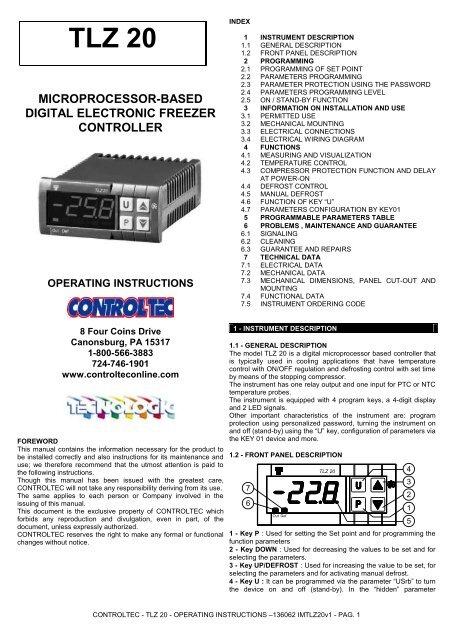
Def
TLZ 20
1
5
2
3
4
Out
6
7
1 — Tasto P : Utilizzato per l’impostazione del Set point e per la
programmazione dei parametri di funzionamento
2 — Tasto DOWN : Utilizzato per il decremento dei valori da impostare e per la
selezione dei parametri.
3 — Tasto UP/DEFROST : Utilizzato per l’incremento dei valori da impostare,
per la selezione dei parametri e per attivare sbrinamenti manuali.
4 — Tasto U : Può essere programmato tramite il par. “USrb” per eseguire la
funzione di ON/OFF(Stand-by). Nella modalità di programmazione dei
parametri “mascherati” può essere utilizzato per modificare la visibilità dei
parametri (vedi par. 2.4).
5 — Led SET : Indica l’ingresso nella modalità di programmazione e il livello di
programmazione dei parametri. Inoltre serve ad indicare lo stato di Stand-by.
6 — Led OUT : Indica lo stato dell’uscita compressore (o del dispositivo di
controllo della temperatura) on (acceso), off (spento) o inibita (lampeggiante)
7 — Led DEF : Indica lo stato dello sbrinamento in corso
2 — PROGRAMMAZIONE
2.1 — IMPOSTAZIONE DEL SET POINT — Premere il tasto P quindi rilasciarlo e
il display visualizzerà SP alternato al valore impostato. Per modificarlo agire sui
tasti UP per incrementare il valore o DOWN per decrementarlo. L’uscita dal
modo di impostazione del Set avviene alla pressione del tasto P oppure
automaticamente non agendo su alcun tasto per circa 10 secondi, trascorsi i
quali il display tornerà al normale modo di funzionamento.
TLZ 20
FAQ: Types of Manuals and Their Contents
Ascon tecnologic TLZ 20 Manuals come in various types, each serving a specific purpose to help users effectively operate and maintain their devices. Here are the common types of Ascon tecnologic TLZ 20 User Guides and the information they typically include:
- User Manuals: Provide comprehensive instructions on how to use the device, including setup, features, and operation. They often include troubleshooting tips, safety information, and maintenance guidelines.
- Service Instructions: Designed for technicians and repair professionals, these manuals offer detailed information on diagnosing and repairing issues with the device. They include schematics, parts lists, and step-by-step repair procedures.
- Installation Guides: Focus on the installation process of the device, providing detailed instructions and diagrams for proper setup. They are essential for ensuring the device is installed correctly and safely.
- Maintenance Manuals: Provide guidance on routine maintenance tasks to keep the device in optimal condition. They cover cleaning procedures, part replacements, and regular servicing tips.
- Quick Start Guides: Offer a concise overview of the essential steps needed to get the device up and running quickly. They are ideal for users who need immediate assistance with basic setup and operation.
Each type of Ascon tecnologic TLZ 20 instruction is designed to address specific needs, ensuring users have the necessary information to use, maintain, and repair their devices effectively.
Related Instructions for Ascon tecnologic TLZ 20:
1
DY-5121
Operation & user’s manual PDF Manual (@526O8S), Ascon tecnologic DY-5121 Media Converter (Monday 06-01-2025)
50
1480
341
6
X33H
Operating instructions manual Ascon tecnologic Controller Operating instructions manual (File: ascon-tecnologic-x33h-operating-instructions-manual-16, 01/02/2025)
16
1249
288
7
KM1E
Manual User Manual: Ascon tecnologic KM1E (6BX7RZ, Upd.Sun 02.2025)
2
1158
197
8
TRH 11
Manual TRH 11 Manual — FF577W
3
712
164
10
e30V
Operating instructions manual Ascon tecnologic Thermometer Operating instructions manual (File: ascon-tecnologic-e30v-operating-instructions-manual-8, Friday 14-02-2025)
8
1325
226
Computer Hardware Devices by Other Brands:
|
HP 665249-B21 Specification HP 665249-B21 User Guide (Specification), @17YS9Z The HP Ethernet 10Gb 2-port 560SFP+ Adapter features the latest Intel 82599 controller. It is a low-cost, low-power dual port PCIe v2.0 20 Nov 2024 | 12 |
|
|
tau D747M Installation Manual Control Panel #72E3XP 1 04 Nov 2024 | 48 |
|
|
swiftech MCW5000-64 Installation Manual User Manual: swiftech MCW5000-64 (991G52, Upd.Wed 02.2025) Swiftech Inc., 1703 E. 28th St., Signal Hill, CA 90755 T. (562) 595-8009 F. (562) 595-8769 05 Feb 2025 | 2 |
|
|
Datakom DKG-105 Operation & User’s Manual Manual: Datakom DKG-105 (KO9418, Upd.01.12.2024) DKG-105 User Manual V-17 01 Dec 2024 | 12 |
Categories:
Timer
Temperature Controller
Kitchen Appliances
Measuring Instruments
Controller
Control Systems
Ascon tecnologic TLZ 20 Computer Hardware PDF User Guides and Manuals for Free Download: Found (1) Manuals for Ascon tecnologic TLZ 20 Device Model (Operating Instructions Manual)
Ascon tecnologic TLZ 20 Operating Instructions Manual
Details:
- Manufacturer: Ascon tecnologic
- Product Name/ID: Ascon tecnologic TLZ 20 / #1885207
- Category: Computer Hardware
- File Path: ascon-tecnologic/tlz-20_1885207.pdf
- Last Updated: 14 May 2025
- Description: Get the most out of your Ascon tecnologic TLZ 20 with this detailed manual, which includes clear and concise setup instructions, operational tips, and maintenance advice to sustain device performance.
- Document Type: User Manual
- Pages: 11
Download PDF
Read Online
The world of industrial automation and monitoring has seen significant advancements, and one product that stands out in this landscape is the Ascon tecnologic TLZ 20. Designed with precision and reliability in mind, this device is tailored for temperature regulation in various applications, making it an indispensable tool in many industries.
One of the most appealing features of the Ascon tecnologic TLZ 20 is its versatility. It can serve a multitude of purposes, including temperature control in HVAC systems, industrial processes, and even in data logging for environmental monitoring. The adaptability of this device ensures it fits seamlessly into different operational contexts, whether in manufacturing, food processing, or climate control systems.
Key features of the TLZ 20 include:
- Multi-functionality: The device offers multiple modes of operation, catering to various control needs.
- User-friendly Interface: The intuitive display allows users to easily navigate through settings and configurations.
- High Accuracy: With advanced sensors, the TLZ 20 provides precise temperature readings essential for critical applications.
- Data Logging Capability: Users can record and analyze temperature data, which is vital for compliance and quality control.
The build quality of the TLZ 20 is another noteworthy aspect. Constructed with robust materials, it withstands the rigors of harsh industrial environments. This durability not only extends the lifespan of the equipment but also reduces maintenance costs, offering a valuable return on investment.
In terms of installation, the Ascon tecnologic TLZ 20 offers flexibility. It can be mounted easily in various configurations, allowing for straightforward integration into existing systems. This ease of installation is complemented by a comprehensive manual that guides users through the setup and operational processes.
Moreover, the Ascon tecnologic TLZ 20 excels in connectivity options. It supports various communication protocols, including RS485 and Modbus, which facilitates integration with other systems and devices. This compatibility is crucial for modern industrial systems that rely on data exchange and automation.
Customer support is another cornerstone of the Ascon tecnologic brand. Users can access extensive documentation and support services, ensuring that any questions or issues are swiftly addressed. This commitment to customer service enhances the overall user experience and instills confidence in the product.
While the TLZ 20 boasts numerous advantages, some potential users may need to consider the complexity of its features. For those new to temperature control systems, there may be a learning curve. However, the user-friendly interface and extensive resources available can mitigate this challenge.
In conclusion, the Ascon tecnologic TLZ 20 is a robust, versatile, and precise temperature controller that meets the demands of modern industrial applications. Its combination of durability, user-friendliness, and rich feature set makes it a top choice for professionals seeking reliable solutions for temperature management. Whether you are involved in manufacturing, food processing, or HVAC, the TLZ 20 is poised to deliver excellent performance and value.
Ascon tecnologic TLZ 20 Operating instructions manual
- Ascon tecnologic
- Computer Hardware
- Operating instructions manual for Ascon tecnologic TLZ 20
- ascon-tecnologic-tlz-20-operating-instructions-manual-11_manual.pdf
- 11 |
Pages Preview:
Document Transcription:
See Details
Download
Transform your PDFs into Flipbooks and boost your revenue!
Leverage SEO-optimized Flipbooks, powerful backlinks, and multimedia content to professionally showcase your products and significantly increase your reach.
-
More Magazines
-
Recommendations
-
Info
TLZ 20 MICROPROCESSOR-BASED DIGITAL ELECTRONIC FREEZER CONTROLLER OPERATING INSTRUCTIONS 8 Four Coins Drive Canonsburg, PA 15317 1-800-566-3883 724-746-1901 www.controlteconline.com FOREWORD This manual contains the information necessary for the product to be installed correctly and also instructions for its maintenance and use; we therefore recommend that the utmost attention is paid to the following instructions. Though this manual has been issued with the greatest care, CONTROLTEC will not take any responsibility deriving from its use. The same applies to each person or Company involved in the issuing of this manual. This document is the exclusive property of CONTROLTEC which forbids any reproduction and divulgation, even in part, of the document, unless expressly authorized. CONTROLTEC reserves the right to make any formal or functional changes without notice. INDEX 1 INSTRUMENT DESCRIPTION 1.1 GENERAL DESCRIPTION 1.2 FRONT PANEL DESCRIPTION 2 PROGRAMMING 2.1 PROGRAMMING OF SET POINT 2.2 PARAMETERS PROGRAMMING 2.3 PARAMETER PROTECTION USING THE PASSWORD 2.4 PARAMETERS PROGRAMMING LEVEL 2.5 ON / STAND-BY FUNCTION 3 INFORMATION ON INSTALLATION AND USE 3.1 PERMITTED USE 3.2 MECHANICAL MOUNTING 3.3 ELECTRICAL CONNECTIONS 3.4 ELECTRICAL WIRING DIAGRAM 4 FUNCTIONS 4.1 MEASURING AND VISUALIZATION 4.2 TEMPERATURE CONTROL 4.3 COMPRESSOR PROTECTION FUNCTION AND DELAY AT POWER-ON 4.4 DEFROST CONTROL 4.5 MANUAL DEFROST 4.6 FUNCTION OF KEY “U” 4.7 PARAMETERS CONFIGURATION BY KEY01 5 PROGRAMMABLE PARAMETERS TABLE 6 PROBLEMS , MAINTENANCE AND GUARANTEE 6.1 SIGNALING 6.2 CLEANING 6.3 GUARANTEE AND REPAIRS 7 TECHNICAL DATA 7.1 ELECTRICAL DATA 7.2 MECHANICAL DATA 7.3 MECHANICAL DIMENSIONS, PANEL CUT-OUT AND MOUNTING 7.4 FUNCTIONAL DATA 7.5 INSTRUMENT ORDERING CODE 1 — INSTRUMENT DESCRIPTION 1.1 — GENERAL DESCRIPTION The model TLZ 20 is a digital microprocessor based controller that is typically used in cooling applications that have temperature control with ON/OFF regulation and defrosting control with set time by means of the stopping compressor. The instrument has one relay output and one input for PTC or NTC temperature probes. The instrument is equipped with 4 program keys, a 4-digit display and 2 LED signals. Other important characteristics of the instrument are: program protection using personalized password, turning the instrument on and off (stand-by) using the “U” key, configuration of parameters via the KEY 01 device and more. 1.2 — FRONT PANEL DESCRIPTION Out Def TLZ 20 CONTROLTEC — TLZ 20 — OPERATING INSTRUCTIONS –136062 IM<strong>TLZ20</strong>v1 — PAG. 1 7 6 1 — Key P : Used for setting the Set point and for programming the function parameters 2 — Key DOWN : Used for decreasing the values to be set and for selecting the parameters. 3 — Key UP/DEFROST : Used for increasing the value to be set, for selecting the parameters and for activating manual defrost. 4 — Key U : It can be programmed via the parameter “USrb” to turn the device on and off (stand-by). In the “hidden” parameter 4 3 2 1 5
Delete template?
Are you sure you want to delete your template?