
Предпросмотр документа
· инструкция (руководство, документация) для проводного телефона Siemens Euroset 5020
·
14 ноября 2021 етырий
Руководство по эксплуатации
Файл: man3481-um_euroset-5020_rus.pdf
Размер: 565.56 Кб
Открыть файл
4 275 просмотров
добавить комментарий

euroset 5020 / IM eng-frk-rus-kro / A30350-M209-A801-2-UP19 / 5020.fm / 24.07.2006
5
RU
Функция прямого вызова
Если установлен номер для прямого вызова, то при
заблокированном телефоне (см. „Включение/
выключение блокировки телефона“) после снятия
трубки (или нажатия клавиши громкой связи) и нажатия
любой клавиши (кроме
?
,
L
,
H
и
I
)
автоматически набирается этот номер. Набор другого
номера при заблокированном телефоне невозможен,
все же можно принимать входящие звонки.
?82
Начните настройку.
o
Введите номер прямого вызова (максимум
32 цифры).
?
Нажмите клавишу сохранения.
При включенной функции прямого вызова на дисплее
вы видите символы
è
и
{
.
Отключение прямого вызова
?80
Начните настройку
?
Нажмите клавишу сохранения.
Удаление номера прямого вызова
?1253
Начните настройку.
?
Нажмите клавишу сохранения.
Включение/выключение блокировки телефона
Можно полностью заблокировать набор номеров (за
исключением установленного номера прямого вызова).
Входящие звонки можно принимать как обычно.
?8
Начните настройку.
0
/
1
0: разблокировать; 1: заблокировать
?
Нажмите клавишу сохранения.
При заблокированном телефоне на дисплее вы видите
символ
{
.
Включение/выключение индикации
продолжительности разговора
Телефон может отображать приблизительную
продолжительность разговора (максимум 99 мин. 59
сек., настройка при поставке: включено). Если данная
функция включена, то индикация времени запускается
через 8 секунд после набора последней цифры.
?18#
Начните настройку.
0
/
1
0: выключить; 1: включить
?
Нажмите клавишу сохранения.
Настройка времени паузы
Если необходимо, вы можете изменить время паузы
клавиши
;
(функция установки паузы со второй
цифры номера) на 1, 3 или 6 секунд (настройка при
поставке: 3 секунды).
?102
Начните настройку.
0
…
2
0: 1 сек.; 1: 3 сек.; 2: 6 сек..
?
Нажмите клавишу сохранения.
Переключение способа набора номера
?#
Начните настройку.
1
/
2
1: Тональный набор
2: Импульсный набор без размыкания
шлейфа.
?
Нажмите клавишу сохранения.
Переключение способа набора номера во время
соединения
Если включен импульсный набор номера и вы хотите
использовать функции, для которых необходим
тональный набор (например, дистанционное
управление автоответчиком), вы можете переключить
способ набора номера во время соединения.
*
Во время соединения: нажмите клавишу
звездочка.
o
Введите цифровой код для дистанционного
управления/передачи данных.
После того, как трубка положена, снова включается
первоначальный способ набора номера.
euroset 5020 / IM eng-fra-russ-kro / A30350-M209-A801-2—UP19 / 5020.fm / 24.07.2006
1
GB
{ Telephone locked
Euroset 5020 Quick Guide
zzzz
When trying to connect: telephone locked
1211109
1
0
–
9
Phone number
With tone dialling:
n
– * key pressed
—
– # key pressed
With additional services from public network providers:
| New call in calls list
† (Flashing) A new message has arrived
ë Call waiting
™ Call forwarding immediately
˜ Call forwarding on no reply
— Call forwarding when busy
8
š Anonymous call on
7
6
Safety precautions
When installing, connecting and operating the telephone,
45
23
always observe the following precautions:
◆ Only use the plugs and leads supplied.
Keys
◆ Only connect the connecting lead to the socket/jack
1 Repertory keys
provided for that purpose.
2 Redial key
◆ Only connect approved accessories.
3 Recall key
◆ Arrange the connecting lead where it will not cause
4Mute key
accidents.
5Shift key
◆ Position the telephone on a non-slip surface.
6Quiet key
◆ For your safety and protection, the telephone must not
be used in bath or shower rooms (wet locations).
7 Loudspeaker key (handsfree)
The telephone is not splash proof.
8Loud key
◆ Never expose the telephone to sources of heat, direct
9Set key
sunlight or other electrical devices.
10 Up key
◆ Protect your telephone from moisture, dust, corrosive
11 Down key
liquids and vapours.
12 OK key (dial number displayed)
◆ Never open up the telephone yourself.
Display symbols
◆ Do not touch the plug contact with pointed or metallic
objects.
P In setting mode
◆ Do not carry the telephone by the leads.
‡ Shift key pressed
◆ If you give your Euroset 5020 to someone else, make
— Ready for use
sure you also give them the user guide.
y Microphone off
è Baby Call (direct call) number set
o Entry mark when setting (e.g. volume)
u
Recall key pressed
P
Pause
z
No memory content
euroset 5020 / IM eng-fra-russ-kro / A30350-M209-A801-2—UP19 / 5020.fm / 24.07.2006
2
GB
All electrical and electronic products should be dis-
posed of separately from the municipal waste stream
via designated collection facilities appointed by the
government or the local authorities.
This crossed-out wheeled bin symbol on the product means
the product is covered by the European Directive 2002/96/
EC.
The correct disposal and separate collection of your old
appliance will help prevent potential negative conse-
quences for the environment and human health. It is a pre-
condition for reuse and recycling of used electrical and elec-
tronic equipment.
For more detailed information about disposal of your old
appliance, please contact your city office, waste disposal
service or the shop where you purchased the product.
Preparing the telephone for use
Recommended installation of telephone
◆ Do not expose the telephone to direct sunlight or other
Setting the internal clock
sources of heat.
?3 Initiate function.
◆ Operate at temperatures between +5°C and +40°C.
The current set time is displayed in 24-hour
◆ Maintain a distance of at least one metre between the
mode (default setting: 00:00).
telephone and radio equipment, e.g. wireless
o Enter the correct time in hours <hh> and
telephones, wireless pagers or TV sets. Otherwise,
minutes <mm> (24-hour mode).
telephone communication could be impaired.
? Press the Set key.
◆ Do not install the telephone in dusty areas as this can
shorten the service life of the telephone.
◆ To clean, wipe with a moist or antistatic cloth only, never
Making calls
with a dry cloth (risk of electrostatic charging and
discharge) or harsh cleaning agent.
Dialling a number
◆ Furniture lacquer and polish can be damaged by contact
co Lift handset, dial number.
with parts of the unit (e.g. device feet).
or …
Connecting
o Bc Dial number (you can delete wrongly entered
digits with
A and then enter the correct
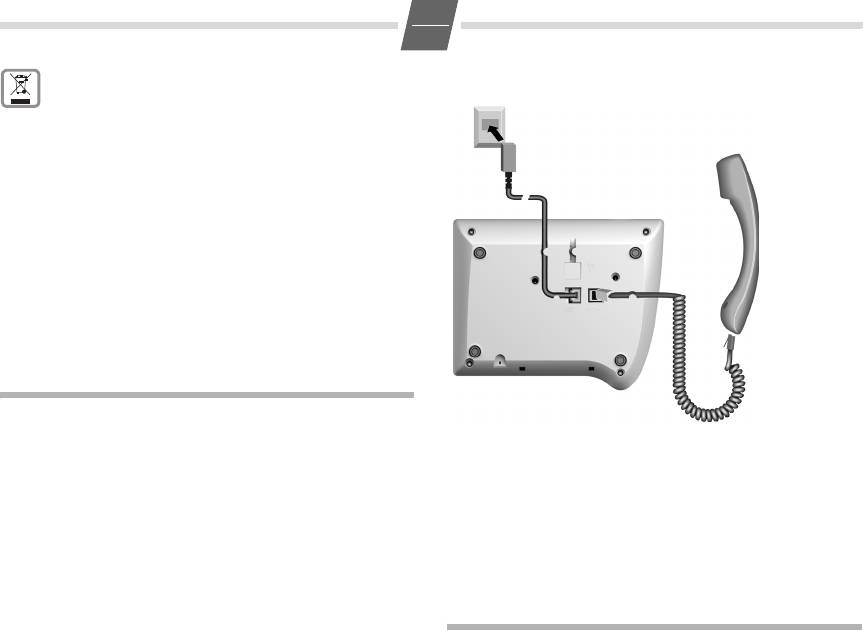
Insert the short end of the coiled handset cord in the socket
digit) and press the OK key.
provided in the handset and the long end in the socket
After 2 seconds the number is dialled.
marked with an
a on the underside of the device. Plug the
Lift the handset if you want to talk via the
phone cord into the outlet on the wall and the other end
handset.
into the socket marked with a
Y on the underside of the
device. Then your telephone is ready to use.
Any digits after the 20th digit are moved from right to left in
the display. The Last number redial key
; can be used to
insert pauses when dialling, starting from the 2nd digit.
Select phone number from the calls list (if available):
see 6.
euroset 5020 / IM eng-fra-russ-kro / A30350-M209-A801-2—UP19 / 5020.fm / 24.07.2006
3
GB
Activating/deactivating handsfree talking
Saving numbers
With this telephone you can also make calls (handsfree
Different telephone settings must be completed with the
mode) or settings without lifting the handset. The best
Set key
? so that they are available permanently.
distance from the microhone for speaking is about 50 cm.
In order to cancel without saving, e. g. after an incorrect
◆ Activating during a call via the handset
entry, replace the handset instead of pressing
? at the
L + a With the Loudspeaker key pressed replace the
end. The original setting is then retained.
handset.
Saving with notebook function
◆ Activating before dialling the number
You can also save phone numbers during a conversation
L Before dialling: hold down the Loudspeaker
with the notebook function.
key until you can hear the dialling tone.
Saving repertory numbers
Deactivating handsfree talking
You can save up to 20 phone numbers (or even functions,
c Lift the handset during the call.
see page 7) on both levels of the repertory keys.
Last number redial
? Press the Set key. (For 2nd memory level, also
The last 5 numbers dialled (up to 32 digits) are saved
press
=.)
automatically. You can retrieve these numbers from the last
: Press the repertory key under which you want
number redial list and dial them again:
to save the repertory number.
A number that has already been saved is
Redialling the last number dialled
shown in the display. If the memory for this
c; Lift the handset and press the last number
repertory key is empty,
z
appears in the display
redial key. The last number dialled is redialled
o Enter the number to be saved (up to 32 digits).
immediately.
or …
Dialling from the last number redial list
Saving from the calls list (if service is available)
; Without lifting the handset: Press the last
A…C Press the Down/Up key until the desired
number redial key.
number appears in the display.
The last number dialled is displayed. (You can
or …
leave the last number redial list at any time by
Saving from the redial list:
pressing
>.)
; Press the last number redial key.
A…C Using the Down/Up key, scroll through the list
to the desired number.
A…C If necessary, press the Down/Up key until the
desired number appears in the display.
B Press OK or L key.
After 2 seconds the number is dialled.
To terminate the process:
Lift the handset if you want to talk via the
? Press the Set key.
handset.
Saving during a call
You can also save phone numbers in the same way during a
Dialling using the repertory keys
call (notebook function).
c Lift handset. (If necessary, press = for a 2nd
Note:
level repertory key).
After the 20th digit, any following digits are moved from right to left
: Press repertory key.
in the display.
or …
Delete all repertory numbers
: Press repertory key. (If necessary, press = for
?1251
a 2nd level repertory key).
Initiate function.
Bc Press OK or L key.
? Press the Set key.
After 2 seconds the number is dialled.
Lift the handset if you want to talk via the
handset.

euroset 5020 / IM eng-fra-russ-kro / A30350-M209-A801-2—UP19 / 5020.fm / 24.07.2006
4
GB
Adjusting the telephone
Adjusting the loudspeaker
While in handsfree mode, you can set the volume to one of
Adjusting the ringer volume
7 levels and save it (default setting: 1).
H…I Adjust the volume with the Loud/Quiet key.
The volume of the ringer can be set to one of 4 levels and
can also be deactivated completely (default setting: level 4).
Activating/deactivating the mute melody
◆ To adjust when the telephone is idle:
You can activate and deactivate the mute melody for the
?5 Initiate function.
mute (default setting: on).
H…I Adjust the volume with the Loud/Quiet key.
?19 #
? Press the Set key.
Initiate function.
◆ To adjust while the telephone is ringing:
0/1 0: deactivate; 1: activate.
Press
H…I before lifting the handset.
? Press the Set key.
The last value set is saved.
Baby call (direct call) number setting
Setting the ringer frequency
If a phone number is set for the Baby Call function, it is
The frequency (speed) of the ringer can be set to one of
dialled automatically when the telephone is locked
three levels (default setting: level 3).
(s. «Activating/deactivating the telephone lock») after you
?6 Initiate function.
lift the handset (or press the Loudspeaker key) and press
1…3 Press one of the keys 1…3:
any key (except
?, L,H and I). The telephone
1: highest frequency; 3: lowest frequency.
does not allow other phone numbers to be dialled, but
incoming calls can be received.
? Press the Set key.
?82
Setting the ringtone
Initiate function.
Ten different ringtones can be set for the ringer (default
o Enter direct call number (max. 32 digits).
setting: ringtone 9).
? Press the Set key.
◆ To set with the telephone is idle:
When the baby call function is activated, you will see
è
?7 Initiate function.
and
{ in the display.
0…9 Press one of the keys 0 … 9
Deactivating
? Press the Set key.
?80
◆ To set while the telephone is ringing:
Initiate function.
0…9 Press one of the keys 0 to 9.
? Press the Set key.
Setting the handset volume
Deleting a baby call phone number
The volume on the handset can be set to one of 3 levels and
?1253
saved (default setting: level 1).
Initiate function.
?9 Initiate function.
? Press the Set key.
H…I Adjust the volume with the Loud/Quiet key.
Activating/deactivating the telephone lock
? Press the Set key.
The telephone can be locked completely (with the exception
of a baby call phone number if set) so that it cannot dial any
Mute
phone numbers, including the baby call phone number. You
You can deactivate the telephone’s handset and
can continue to receive incoming calls.
microphone. Then the other party can no longer hear you.
?8 Initiate function..
J During a call: Press the Mute key
0/ 1 0: unlock; 1: lock
Activate: Press the key again.
? Press the Set key.

euroset 5020 / IM eng-fra-russ-kro / A30350-M209-A801-2—UP19 / 5020.fm / 24.07.2006
5
GB
When the telephone is locked, you will see { in the
Operation on a PABX
display.
Activate/deactivate call duration display
Enter/delete an external line prefixe
The telephone can display the approximate call duration in
If you are using your telephone on a PABX, you may have to
the display (up to 99 min. 59 sec., default setting: on). If the
save one or more external line prefixes. A dialling pause is
call duration display is activated, the time display begins
set automatically with the external line prefixe. You can save
8 seconds after the last digit is dialled.
up to three external line prefixes.
?18#
?0 Initiate function.
Initiate function.
If no external line prefixe has been set in a
0/ 1 0: deactivate; 1: activate.
location,
z
appears in the display.
If several external line prefixes are saved, these
? Press the Set key.
are displayed next to one another; the current
Setting the pause time
external line prefixe to be edited flashes.
If necessary, use the
; key to toggle
If necessary, the pause time of the Pause key ; (pause
between the external line prefixes displayed,
function from second input position) can be changed to 1,
to edit them as follows:
3 or 6 seconds (default setting: 3 seconds).
To delete an external line prefix:
?102
Initiate function.
? Press the Set key.
0…2 0: 1 sec.; 1: 3 sec.; 2: 6 sec..
To enter an external line prefixe:
? Press the Set key.
o Enter a one- to three-digit code.
Enter additional external line prefixes:
Changing the dialling mode
; o Press the Redial key, enter next external line
?# Initiate function.
prefixe.
1/ 2 1: Tone dialling.
? Press the Set key.
2: Pulse dialling without flash function.
? Press the Set key.
Recall key (on a PABX)
During an external call, you can make a recall or divert the
Changing dialling modes during a call
call. To do this, press the Recall key
>. The subsequent
If your telephone is set to pulse dialling and you want to use
procedure depends on your PABX. By default, the Recall key
functions that require tone dialling (e.g. remote access to
is preset to a flash time (interruption time) of 90 ms for use
an answering machine), you can change the dialling mode
of new features on public telephone systems. With a
during a call.
connection to a PABX, it may be necessary to change the
* With an open connection: press the star key.
flash time (e.g. 600 ms). To do this, please refer to the
o Enter digits for remote control/data transfer.
operating instructions for your PABX.
The telephone is reset to the original dialling mode by hang-
ing up the handset.

euroset 5020 / IM eng-fra-russ-kro / A30350-M209-A801-2—UP19 / 5020.fm / 24.07.2006
6
GB
Setting the flash time for the Recall key
Calls list
?195
The calls list includes up to 50 entries. If the same subscriber
Initiate function.
calls more than once, a new entry is not created. Up to 99
0…4 Enter desired flash code:
repeated calls are displayed in the additional information.
0: 90 ms (default setting); 1: 120 ms;
Sequence of list entries: The most recent call is displayed
2: 270 ms; 3: 375 ms; 4: 600 ms.
in the first position (position number «01»). Older entries are
? Press the Set key.
moved downwards with each new incoming phone number
until they are deleted from the list.
In the calls list
Using functions for additional services of
◆ you can scroll through the phone numbers displayed,
public telephone systems
◆ query additional information:
(a) date and time, if this is transferred from the
If you want to use services that are to be triggered with the
telephone system, otherwise only the time according to
Recall key, make sure beforehand that the correct flash time
the telephone’s internal clock,
is set for the key.
(b) frequency of an incoming phone number,
◆ delete entries,
Recall key (in public telephone systems)
◆ save phone numbers from the calls list to a repertory key
In public telephone systems, this key is required to use
(see page 3),
certain additional services.
◆ dial a displayed phone number directly.
The appropriate flashtime for the specific country must be
set before using the Recall key can be used:
Viewing caller histories and dialling phone numbers
◆ Belgium, Netherlands, Switzerland: 120 ms
If there are entries in the calls list that have you have not yet
(access code 1)
seen,
| flashes in the display.
◆ France, Luxemburg, Portugal, Germany, Greece: 270 ms
You can retrieve the calls list, scroll through its entries, view
(access code 2)
additional information about a call and call back directly:
◆ other European countries: 90 ms (access code 0).
A Press the Down key.
Using Calling Line Identification
The phone number of the most recent call
appears in the display. Its position number «01»
Under the following conditions, the phone numbers of
is displayed to the left of the number.
incoming calls are
If the phone number contains more than
(a) shown on the display (up to the first 20 digits) and
17 digits, the first 17 digits will be displayed
(b) automatically saved in a calls list:
first, then the rest after one second. (You can
◆ Both your network provider and the caller’s network
leave the calls list at any time by pressing
>.)
provider must offer Calling Line Identification.
To scroll through the calls list:
◆ Both you and the caller must have requested this service
A…C Press the Down/Up key.
(if necessary) from your respective network providers.
If these conditions are met, but a caller has suppressed
To view additional information:
Calling Line Identification before making the call, you will
= Press the Shift key.
see
—P— on the display instead of the phone number. If it
The date and time of the displayed entry is dis-
has not been possible to identify the number for other (tech-
played with the number of calls (on the right).
nical) reasons, you will see
—0— or —-E— on the display.
Back to the calls list (calling line display):
Up to 20 digits can be shown on the display. Longer phone
= Press the Shift key again.
numbers are shown with the end of the number shortened.
Dial the phone number:
B Press OK or L key.
After 2 seconds the number is dialled.
Lift the handset if you want to talk via the
handset.
euroset 5020 / IM eng-fra-russ-kro / A30350-M209-A801-2—UP19 / 5020.fm / 24.07.2006
7
GB
Deleting entries in the calls list
Using the repertory keys as «function keys»
Delete all entries at the same time
Different public telephone services/functions – possibly by
A/C Press the Down/Up key.
order/request – can be selected via predetermined key com-
binations which you can obtain from your network provider.
?*?Press the Set key, star key and Set key one after
another.
You can save the necessary key combinations like normal
The calls list is deleted and closed.
phone numbers on repertory keys and similarly «select» and
also deactivate the service again.
Delete individual entries
Note:
A…C Scroll to the desired entry.
If you activate the symbol display and save the function calls
?? Press the Set key twice.
on the 2nd level of the repertory keys, you can link the
The entry is deleted.
activation and deactivation of different services for each
«function key» with the display or hiding of certain symbols
Activating/deactivating display of the area code
on the display.
You can set the telephone so that the area code is not dis-
Therefore, when setting the repertory keys on the 2nd
played for incoming calls. This can be useful, for example, if
level, bear in mind that activating and deactivating the dis-
you cannot see the last digits of a long phone number on
play symbols
™, ˜, —,ë and š is linked to very specific
the display.
keys in the 2nd level – regardless of the phone numbers or
You can deactivate the display for 2 area codes (up to
function calls stored on it!
5digits each).
?4 Initiate function.
Deactivating/activating the symbol display for additional
If no number has been set in a storage location
services
z
appears in the display.
Displaying the symbols can be activated or deactivated as
If both storage locations are in use, these are
needed. In the default setting, the display is activated.
displayed side by side; the current storage
location to be edited flashes. If necessary, use
?145
the
; key to toggle between the storage
Initiate function.
locations displayed to edit them as follows:
0/1 0: deactivate; 1: activate.
Delete a number:
? Press the Set key.
? Press the Set key.
Recommended assignment of symbols to keys
Enter a number:
When the symbol display
= is activated and you then
o Enter a one to five digit number.
press one of the following repertory keys, the display sym-
Enter another prefix:
bol assigned to each is activated or deactivated respectively
; o Press the last number redial key, enter next
(key numbering from top to bottom):
prefix.
? Press the Set key.
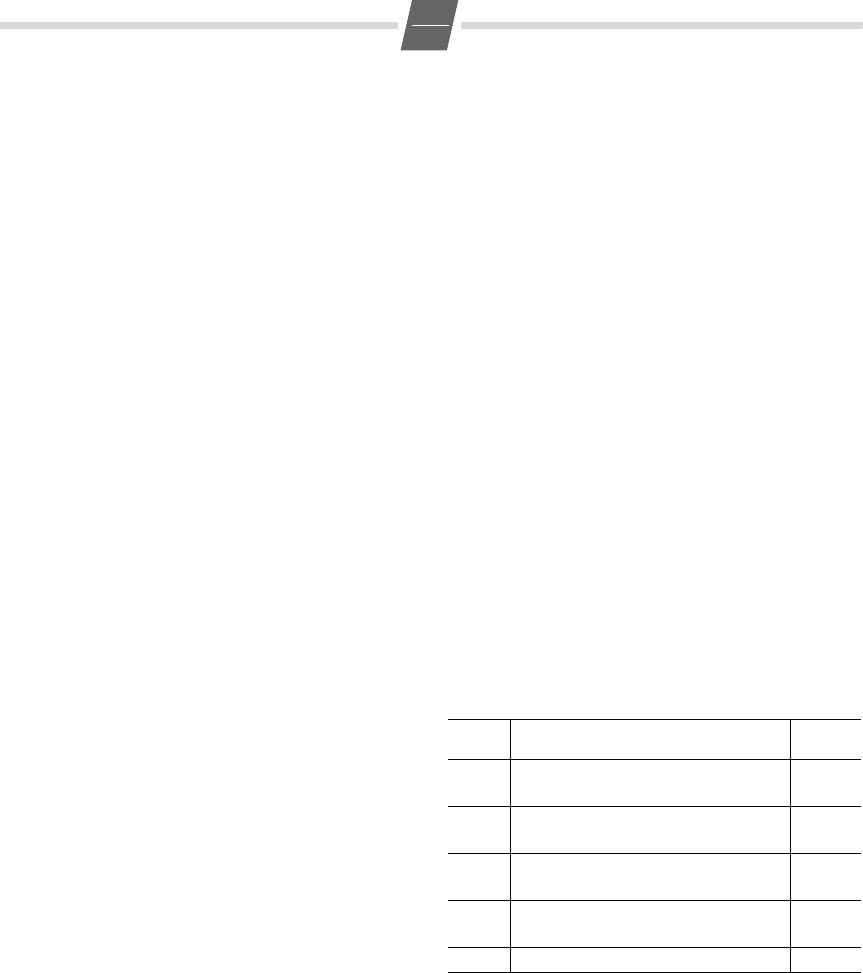
=+Assignment Display
icon
«You have a message» display
: 1
on
™
Call forwarding immediately
Different network providers offer services for saving
:
2off
messages (e.g. voice mail services).
: 3
on
˜
If one or more newly received messages have been stored
Call forwarding on no reply
with the network provider, it may inform you via your tele-
:
4off
phone. In the display, this notification from the network
: 5
on
—
provider is displayed with the flashing
† symbol and the
Call forwarding when busy
:
6off
phone number.
: 7
on
You can now dial the corresponding phone number in order
ë
Call waiting
to check the stored messages. If there are no more new
:
8off
messages for you, the
† symbol disappears.
: 9 Anonymous call (only the next call)
š
euroset 5020 / IM eng-fra-russ-kro / A30350-M209-A801-2—UP19 / 5020.fm / 24.07.2006
8
GB
Assigning/changing function keys
Saving call forwarding on a function key
?= Initiate function.
?= Initiate function.
: Press the function key (=repertory key) that is
: Press the repertory key that is designated for
to be assigned.
the symbol display «
™
on«, see «Deactivating/
If the function key is already assigned, the key
activating the symbol display for additional
assignment appears in the display. If the mem-
services» on page 7.
ory for this function key is empty,
z
appears in
A number already saved is shown in the
the display.
display. If the memory for this repertory key is
empty,
z
appears in the display.
o Enter the key combination/code for the desired
service.
*21*
Enter the select function for «Immediate call
Important!
forwarding«.
If a part of the key combination to be saved
includes numbers/characters that must be
(a) Set the phone number for the
changeable (e.g. a phone number for a
call forwarding
forwarded call destination, or a time for the
o Enter the phone number of the forwarded call
appointment reminder), the shift key
=
destination.
must be used in this place.
# Press the hash key to mark the function end.
During a later activation of the service, this key
? Press the Set key.
makes the cursor for entering the changeable
or …
part flash.
(b) Reserve changeable call forwarding
? Press the Set key.
= Press the Shift key.
Example: Call forwarding
When «Call forwarding immediately» is acti-
vated later, this key makes the cursor for enter-
In the following, you will see an example of repertory keys
ing the phone number of the forwarded call
used as «function keys». If the symbol display is activated, in
destination flash.
the «call forwarding» example when the service is activated,
the symbol provided for it is displayed, or hidden when the
# Press the hash key to mark the function end.
service is deactivated.
? Press the Set key.
The key sequence for activating the function «call forward-
Activating call forwarding with a function key
ing immediately» from your network provider consists of
e.g. three parts:
c = Lift handset, press Shift key.
: Press the repertory key for the symbol display
Select function Forwarded call destination End of
«
™
on«.
function
™
appears in the display.
*21*
Phone number of the
#
(a) Phone number for call forwarding set
forwarded call destination
You may hear an announcement that the
You now have the following options:
service is activated.
◆ You can dial the entire key sequence each time on the
a Replace the handset.
keypad.
From now on, incoming calls will be forwarded
◆ You can save the key sequence on Repertory keys as an
to the forwarded call destination. Your tele-
entire function together with the phone number of a
phone will not ring.
set forwarded call destination
or
only the select function and the function end. With
this, you still have the option to set a forwarded call
destination that may change on a case-by-case basis.
euroset 5020 / IM eng-fra-russ-kro / A30350-M209-A801-2—UP19 / 5020.fm / 24.07.2006
9
GB
(b) Changeable call forwarding
If your telephone is not working perfectly
o ; Enter the phone number of the forwarded call
No signal tone: The tone volume might be set to 0.
destination, press the last number redial key to
Lift handset, no dialling tone: Is the connecting lead
mark the end of the phone number entered.
correctly plugged into the telephone and the telephone
You may hear an announcement that the
socket?
service is activated.
Dialling tone audible but telephone will not dial:
a Replace the handset.
The connection is OK. Is the dialling mode set correctly
Incoming calls will be forwarded from now on
(see page 5)?
to the forwarded call destination. Your tele-
PABX only: No connection or incorrect connection when
phone will not ring.
dialling from memory (e.g. redial, speed dial):
Program external line prefixe.
Saving «Deactivate call forwarding» on a function key
The other party cannot hear you: Have you pressed the
The call forwarding, as described in the previous example,
Mute key? Press the key again. Is the plug from the handset
can be deactivated again with your network provider e.g.
cord inserted correctly?
with key sequence
#21#.
Recall key does not work: Set appropriate flash time.
You can save this key sequence on a dedicated repertory key
The caller’s phone number and the calls list are not
as well. If the symbol display is activated and the service is
displayed:
activated as described, the
™ symbol in the display disap-
Is the adapter connected (see page 2)?
pears after the service is deactivated.
Can Calling Line Identification be used (see page 6)?
?= Initiate function.
: Press the repertory key that is designated for
Insert strips
symbol display «
™ off«, see «Deactivating/acti-
Blank insert strips for the repertory keys can be found on the
vating the symbol display for additional serv-
Internet at http://www.siemens.com/euroset.
ices» on page 7.
Contacts
#21#
Enter the select function for «Immediate call
If you should encounter any problems when operating the
forwarding«.
telephone connected to a communication system with
? Press the Set key.
analogue network access, please contact the network
operator responsible or your dealer.
Deactivating call forwarding with a function key
Authorisation
c= Lift handset, press the Shift key.
This device is intended for analogue phone lines in your net-
:a Press the repertory key for symbol display
work.
«
™ off«. Replace handset.
Country-specific requirements have been taken into consid-
The
™ symbol disappears. You may hear an announcement
eration.
that the service is deactivated.
We, Siemens Home and Office Communication Devices
GmbH & Co. KG, declare that this device meets the essential
Appendix
requirements and other relevant regulations laid down in
Directive 1999/5/EC.
Care
A copy of the 1999/5/EC Declaration of Conformity is availa-
ble at this Internet address:
To clean, wipe with a moist or antistatic cloth only, never
http://www.siemens.com/gigasetdocs
.
with a dry cloth (risk of electrostatic charging and
discharge) or harsh cleaning agent.
Содержание
- Siemens Euroset 5020 инструкция
- Нужна помощь?
- Содержание
- О Siemens Euroset 5020
- Siemens Euroset 5020 Manuals
- 1 User Guides and Instruction Manuals found for Siemens Euroset 5020
- Siemens Euroset 5020 Manual (28 pages)
- Document Information:
- Pages Preview:
- Frequently asked Questions:
- Is registration required to download the Siemens Euroset 5020 manual?
- I did not find information, I needed, at Siemens Euroset 5020 manuals — what should I do?
- Is this Siemens Euroset 5020 manual is an official manufacturer’s documentation?
- Siemens Euroset 5020 Compatible Manuals:
- Siemens 300 Series Operating instructions manual
- Siemens Gigaset A160 User giude
- Siemens HiPath 1100 Quick reference manual
- Siemens OpenStage 60 G Operation & user’s manual
- Siemens HIPATH 2000 Operation & user’s manual
- Siemens Gigaset A200 Manual
- Related Devices:
- Siemens Euroset 5020 Optional Materials:
- инструкции на русском
- Телефон DECT Siemens Euroset 5020 IM A
- Siemens Euroset 5020 IM A инструкция на русском скачать бесплатно
- Siemens Euroset 5020 IM A характеристика
- Телефон DECT Siemens Euroset 5020 IM A видео
- gigaset 5020 инструкция на русском pdf
- Page 20: Меры предосторожности
- Описание к файлу:
Siemens Euroset 5020 инструкция

- Кол-во страниц: 44
- Тип файла: PDF

Нужна помощь?
У вас есть вопрос о Siemens Euroset 5020 или вам нужна помощь? Задайте его здесь. Полно и четко опишите проблему и сформулируйте свой вопрос. Чем больше вы сообщите о проблеме или вопросе, тем легче будет производителю Siemens Euroset 5020 вам ответить.
Как установить время ?
gigaset 5020 при поднятии трубки загорается клавиша динамика (громкая связь), пока не погаснет, сигнала в трубке нет. При входящих звонок проходит один раз, потом снова загорается клавиша динамика (громкая связь), но звонка нет. При этом определитель номера не работает.
подскажите как перезвонить на номер с которого только что звонили?
Дд. экра у теоефона перестал показывать входящие номера, как можно включить данную функцию? Спасибо.
Добрый день! Проблема, при поднятии трубки гудков нет, поэтому позвонить нет возможности. Однако звонки из вне поступают. В чем проблема?
Содержание
- ❯ Gigaset 5020 Quick Guide
- Keys
- Display symbols
- Safety precautions
- ❯ Preparing the telephone for use
- Recommended installation of telephone
- Connecting
- Setting the internal clock
- ❯ Making calls
- Dialling a number
- Activating/deactivating handsfree talking
- ❯ Last number redial
- Redialling the last number dialled
- Dialling from the last number redial list
- Dialling using the repertory keys
- ❯ Saving numbers
- Saving repertory numbers
- ❯ Adjusting the telephone
- Adjusting the ringer volume
- Setting the ringer frequency
- Setting the ringtone
- Setting the handset volume
- Mute
- Adjusting the loudspeaker
- Activating/deactivating the mute melody
- Baby call (direct call) number setting
- Activating/deactivating the telephone lock
- Activate/deactivate call duration display
- Setting the pause time
- ❯ Changing the dialling mode
- Changing dialling modes during a call
- ❯ Operation on a PABX
- Enter/delete an external line prefixe
- ❯ Recall key (on a PABX)
- Setting the flash time for the Recall key
- ❯ Using functions for additional services of public telephone systems
- Recall key (in public telephone systems)
- Using Calling Line Identification
- ❯ Calls list
- Viewing caller histories and dialling phone numbers
- Deleting entries in the calls list
- Activating/deactivating display of the area code
- «You have a message» display
- ❯ Using the repertory keys as «function keys»
- Deactivating/activating the symbol display for additional services
- Assigning/changing function keys
- ❯ Example: Call forwarding
- Saving call forwarding on a function key
- Activating call forwarding with a function key
- Saving «Deactivate call forwarding» on a function key
- Deactivating call forwarding with a function key
- ❯ Appendix
- Care
- If your telephone is not working perfectly
- Insert strips
- Contacts
- Authorisation
- ❯ Présentation Gigaset 5020
- Touches
- Icônes d’affichage
- Consignes de sécurité
- ❯ Mise en service du téléphone
- Conseils pour l’installation du téléphone
- Raccordement
- Régler l’horloge
- ❯ Téléphoner
- Composer un numéro d’appel
- Activer/Désactiver le mode mains libres
- ❯ Rappel (Bis)
- Rappel du dernier numéro appelé
- Composer un numéro à partir de la liste de numéros bis
- Composer un numéro avec les touches d’accès rapide
- ❯ Enregistrer un numéro d’appel
- Enregistrer un numéro d’accès rapide
- ❯ Réglages téléphone
- Régler le volume de la sonnerie
- Régler la fréquence de sonnerie
- Régler la mélodie de la sonnerie
- Régler le volume de l’écouteur du combiné
- Mode secret (Mute)
- Régler le haut-parleur
- Activer/Désactiver la mélodie de mode secret
- Baby call (appel direct)
- Verrouiller/Déverrouiller le téléphone
- Activer/Désactiver l’affichage de la durée de communication
- Régler une durée de pause
- ❯ Changer de mode de numérotation
- Changer de mode de numérotation pendant la communication
- ❯ Fonctionnement sur autocommutateurs privés (IP)
- Saisir/Effacer les indicatifs de sortie
- ❯ Touche de double appel (sur autocommutateurs privés)
- Réglage de la durée de flashing de la touche de double appel
- ❯ Utiliser les fonctionnalités supplémentaires proposées sur les systèmes téléphoniques publics
- Touche de double appel (sur systèmes téléphoniques publics)
- Utilisation de la présentation de numéro de l’appelant
- ❯ Journal d’appels
- Visualiser le journal d’appels et composer un numéro
- Effacer les numéros du journal d’appels
- Activer/Désactiver l’affichage des préfixes locaux
- Affichage « Nouveau message »
- ❯ Utiliser les touches d’accès rapide comme « Touches de fonction »
- Activer/Désactiver l’affichage d’icônes pour les services supplémentaires
- Attribuer une fonction aux touches de fonction/ Modifier cette fonction
- ❯ Exemple : renvoi d’appel
- Enregistrer un renvoi d’appel sur une touche de fonction
- Activer le renvoi d’appel avec une touche de fonction
- Enregistrer « Désactiver renvoi d’appel » sur une touche de fonction
- Désactiver le renvoi d’appel avec une touche de fonction
- ❯ Annexe
- Entretien
- Si votre téléphone ne fonctionne pas correctement
- Etiquettes mémoire
- Interlocuteurs
- Homologation
- ❯ Обзор телефона Gigaset 5020
- Клавиши
- Дисплейные символы
- Меры предосторожности
- ❯ Подготовка к работе
- Рекомендации по установке телефона
- Подключение
- Настройка внутренних часов телефона
- ❯ Разговор по телефону
- Набор номера
- Включение/отключение громкой связи
- ❯ Повторный набор
- Повторный набор последнего набранного номера
- Вызов из списка повторного набора
- Быстрый набор
- ❯ Сохранение номеров
- Сохранение номеров быстрого набора
- ❯ Настройки телефона
- Громкость звонка
- Настройка тональности звука
- Настройка мелодии звонка
- Настройка громкости телефона
- Отключение звука
- Настройка динамика
- Включение/отключение мелодии отключения звука
- Функция прямого вызова
- Включение/выключение блокировки телефона
- Включение/выключение индикации продолжительности разговора
- Настройка времени паузы
- Переключение способа набора номера
- Переключение способа набора номера во время соединения
- ❯ Подключение к офисной АТС
- Ввод/удаления кода выхода в город
- ❯ Клавиша наведения справки (при подключении к офисной АТС)
- Настройка времени размыкания клавиши наведения справки
- ❯ Функции дополнительных услуг телефонной сети общего пользования
- Клавиша наведения справки (при подключении к сети общего пользования)
- Использование функции передачи номера
- ❯ Список вызовов
- Просмотр списка вызова и набор номера
- Удаление записей списка вызовов
- Включение/отключение отображения кода региона
- Индикация „Поступило новое сообщение“
- ❯ Использование клавиш быстрого набора в качестве „функциональных клавиш“
- Включение/выключение индикации символов для дополнительных услуг
- Присвоение функции/изменение функциональных клавиш
- ❯ Пример: Переадресация вызова
- Сохранение переадресации вызова под функциональной клавишей
- ❯ Включение переадресации вызова при помощи функциональной клавиши
- Сохранение функции “Отключение переадресации вызова“ под функциональной клавишей
- Отключение переадресации вызова с помощью функциональной клавиши
- ❯ Приложение
- Уход
- Если телефон работает неправильно
- Вкладыши
- Контактные лица
- Допуск к эксплуатации
- ❯ Gigaset 5020 — kratke upute
- Tioke
- Simboli na ekranu
- Sigurnosni napuci
- ❯ Stavljanje telefona u rad
- Preporuka za postavljanje telefona
- Priključivanje
- ❯ Razlog napajanja strujom putem mrežnog adaptera
- Bez te opskrbe strujom morate sva podešavanja učiniti i pohraniti pri podignutoj slušalici (ili nakon pritiskanja tipke zvučnika). Osim toga je korištenje liste za ponovno biranje i prijenos broja te biranje pozivnog broja moguće samo kod priključivanja na strujnu mrežu.
- Podešavanje internog sata
- ❯ Telefoniranje
- Biranje pozivnog broja
- Aktiviranje/deaktiviranje razgovora bez korištenja ruku (handsfree)
- ❯ Ponovno biranje zadnjeg broja
- Ponovno biranje zadnje biranog broja
- Biranje iz liste ponavljanja biranja
- Biranje korištenjem tipki ciljanog biranja
- ❯ Pohranjivanje brojeva
- Pohranjivanje brojeva ciljanog biranja
- ❯ Podešavanje telefona
- Podešavanje glasnoće pozivnog tona
- Podešavanje frekvencije pozivnog tona
- Podešavanje melodije pozivnog tona
- Podešavanje glasnoće slušalice
- Isključivanje mikrofona (Mute)
- Podešavanje zvučnika
- Isklj./uključivanje melodije dok je isključen mikrofon
- Beba poziv (Direktno biranje)
- Uklj./isključivanje blokade telefona
- Uklj./isključivanje prikaza trajanja razgovora
- Podešavanje vremena pauze
- ❯ Mijenjanje načina biranja
- Mijenjanje načina biranja tijekom uspostavljene veze
- ❯ Rad na kućnim telefonskim centralama
- Unos/brisanje predbrojke vanjske linije
- ❯ Tipka povratnog upita (na kućnim telefonskim centralama)
- Podešavanje flash-vremena tipke povratnog upita
- ❯ Korištenje funkcija dopunskih usluga javnih telefonskih sustava
- Tipka povratnog upita (u javnim telefonskim sustavima)
- Korištenje prijenosa (priopćavanja) pozivnog broja
- ❯ Lista poziva
- Uvid u listu poziva i biranje pozivnog broja
- Brisanje unosa liste poziva
- Uklj./isključivanje prikaza mjesnih predbrojeva
- Prikaz „Pristigla poruka“
- ❯ Korištenje tipki ciljanog biranja kao „funkcijske tipke“
- Deaktiviranje/aktiviranje prikaza simbola za dopunske usluge
- Zauzimanje/mijenjanje funkcijske tipke
- ❯ Primjer: Prosljeđivanje poziva
- Pohranjivanje prosljeđivanja poziva na funkcijsku tipku
- ? Pritisnite tipku za pohranjivanje. Uključivanje prosljeđivanja poziva pomoću funkcijske tipke
- Pohranjivanje „Isključivanje prosljeđivanje poziva“ na funkcijsku tipku
- Isključivanje prosljeđivanja poziva s funkcijskom tipkom
- ❯ Prilog
- Održavanje
- Ako Vaš telefon ne radi besprijekorno
- Natpisne trake
- Kontakt osobe
- Odobrenje
О Siemens Euroset 5020

Посмотреть руководство для Siemens Euroset 5020 бесплатно. Руководство относится к категории Телефоны DECT / VoIP, 4 человек(а) дали ему среднюю оценку 9.1. Руководство доступно на следующих языках: русский, английский. У вас есть вопрос о Siemens Euroset 5020 или вам нужна помощь? Задайте свой вопрос здесь
Источник
Siemens Euroset 5020 Manuals
1 User Guides and Instruction Manuals found for Siemens Euroset 5020
Siemens Euroset 5020 Manual (28 pages)
Document Information:
Pages Preview:
Frequently asked Questions:
Is registration required to download the Siemens Euroset 5020 manual?
No, no required registration or other information to download the Siemens Euroset 5020 manuals.
I did not find information, I needed, at Siemens Euroset 5020 manuals — what should I do?
You can read another Siemens Euroset 5020 documentation on our website or ask your question to another users.
Is this Siemens Euroset 5020 manual is an official manufacturer’s documentation?
Yes, all Siemens Euroset 5020 manuals presented on Guidessimo website are an official documentation of device manufacturer.
Siemens Euroset 5020 Compatible Manuals:
Siemens 300 Series Operating instructions manual
300 Series / 14 Jan 2021 / #9AAFB3
Siemens Gigaset A160 User giude
Gigaset A160 / 03 Feb 2021 / #78HK27
Siemens HiPath 1100 Quick reference manual
HiPath 1100 / 28 Dec 2020 / #6T64BH
Siemens OpenStage 60 G Operation & user’s manual
OpenStage 60 G / 16 Jan 2021 / #I56V57
Siemens HIPATH 2000 Operation & user’s manual
HIPATH 2000 / 09 Nov 2020 / #98RWS4
Siemens Gigaset A200 Manual
Gigaset A200 / 22 Sep 2020 / #UC5SDO
- Siemens Gigaset M49AM
- Siemens GIGASET C470 IP
- Siemens HiPath BizIP
- Siemens Hicom 300 E
- Siemens GIGASET AL140 TRIO
- Siemens optiPoint 410 economy
- Siemens Gigaset C450 IP
- Siemens OpenStage 5
- Siemens OpenStage 40 G SIP
- Siemens OpenStage 40 HFA HiPath 4000
Siemens Euroset 5020 Optional Materials:
Telephone Pearl — Pan Euro Operation & user’s manual, #X4YO1N
Pearl — Pan Euro, 2, teledex/pearl-pan-euro.pdf
Supertooth Light Telephone — #CO3RWW
Supertooth Light, 11, blueant/supertooth-light.pdf
VoiceStation 500 Telephone — #R77EMH
VoiceStation 500, 2, polycom/voicestation-500.pdf
Ameriphone Brochure: SR100 (#ZS5R8H)
SR100, 1, ameriphone/sr100.pdf
GE Operation & user’s manual: 29385 (#598HL6)
29385, 2, ge/29385.pdf
Samsung Operation & user’s manual Telephone SCHU410 (#DOP8FG)
SCHU410, 142, samsung/schu410.pdf
Avaya Installation and user manual: Definity Callmaster VI (#4OD8L1)
Источник
инструкции на русском
Инструкцию для Siemens Euroset 5020 IM A на русском языке, в формате pdf можно скачать с нашего сайта. Наш каталог предоставляем Вам инструкцию производителя фирмы Siemens, которая была взята из открытых источников. Ознакомившись с руководством по эксплуатации от Siemens, Вы на все 100% и правильно сможете воспользоваться всеми функциями устройства.
Телефон DECT Siemens Euroset 5020 IM A
- Скачать инструкцию Siemens Euroset 5020 IM A
- Видео инструкция Siemens Euroset 5020 IM A
- Характеристика Siemens Euroset 5020 IM A
- Оставить отзыв
Siemens Euroset 5020 IM A инструкция на русском скачать бесплатно
Описание к инструкции:
- Тип устройства: Телефон DECT
- Фирма производитель: Siemens
- Модель: Siemens Euroset 5020 IM A
- Инструкция на русском языке
- Формат файла: pdf
- Размер файла: 909 Kb
Siemens Euroset 5020 IM A характеристика
Телефон DECT Siemens Euroset 5020 IM A видео
Видео скоро будет добавлено на сайт
Для сохранения инструкции «Телефон DECT Siemens Euroset 5020 IM A» на русском языке на вашем компьютере либо телефоне, нажмите кнопку «Скачать инструкцию». Если активна кнопка «Инструкция онлайн», то Вы можете просмотреть документ (manual), в своём браузере онлайн.
Если у Вас нет возможности скачать инструкцию по эксплуатации либо просмотреть её, Вы можете поделиться ссылкой на эту страницу в социальных сетях и при удобном моменте скачать инструкцию. Либо добавьте эту страницу в закладки Вашего браузера, нажав кнопку «Добавить страницу в закладки браузера».
Источник
gigaset 5020 инструкция на русском pdf
На этой странице содержится инструкция проводного телефона Siemens Gigaset_Euroset 5020. Электронное руководство от изготовителя Вы можете бесплатно скачать и всегда иметь под рукой. Чтобы открыть сохраненный файл, нужна программа Adobe Reader, ссылка на которую находиться ниже, на этой странице. Документ, который предложен изготовителем, позволит правильно понять функции техники, а соблюдение правил эксплуатации увеличит продолжительность ее работы.
Для просмотра содержания инструкции Вам понадобится программа Adobe Reader или DjVu.
Если на Вашем компьютере они не установлены, то Adobe Reader можно скачать с сайта Adobe , а DjVu с сайта DjVu
Смотрите также другие инструкции раздела Проводные:
Смотрите также другие инструкции раздела Siemens:
Page 20: Меры предосторожности

gigaset 5020 / IM eng-frk-rus-kro / A30350-M209-A801-7-UP19 / 5020.fm / 24.02.2011
Обзор телефона Gigaset 5020
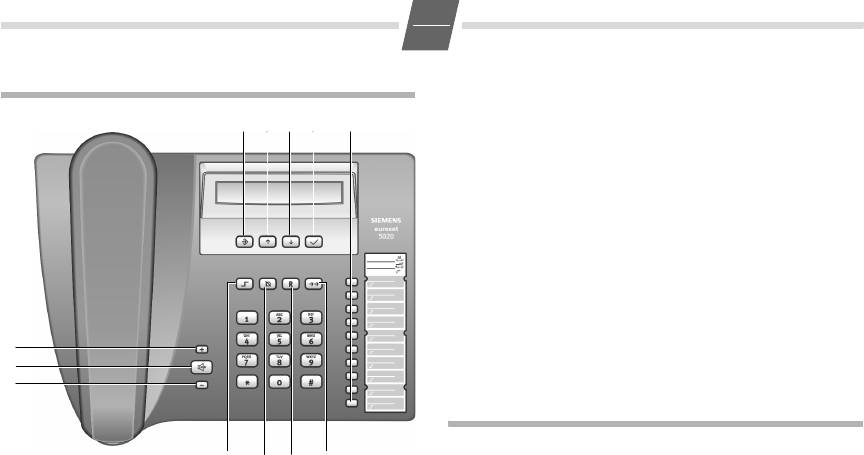
Клавиши быстрого набора
Клавиша повторного набора
Клавиша наведения справки
Клавиша отключения звука
Клавиша уменьшения громкости
Клавиша динамика (громкая связь)
Клавиша увеличения громкости
Клавиша OK (набор отображенного номера)
в режиме сохранения
нажата клавиша регистра
готовность к работе
установлен номер прямого вызова
ввод при настройке (напр. громкость)
нажата клавиша наведения справки
при попытки соединения: телефон
заблокирован
В тоновом режиме:
При дополнительных услугах городской АТС:
новый вызов в списке вызовов
мигающий) поступило новое сообщение
немедленная переадресация вызова
переадресация вызова при неответе
переадресация вызова, если занято
При установке, подключении и использовании
телефона следует обязательно выполнять следующие
требования:
Используйте только прилагаемые штекеры и шнуры!
Подключайте соединительный шнур только к
предназначенной для этого розетке.
Подключайте только разрешенные к использованию
аксессуары.
Прокладывайте соединительный шнур так, чтобы
исключить возможность несчастного случая!
Устанавливайте телефон на нескользкую
поверхность!
Инструкция GIGASET 5020 на русском языке в формате pdf для устройства: проводной телефон. Прочитайте инструкцию для ознакомления с функциями и условиями эксплуатации, характеристиками и способами исправления неисправностей. Данное руководство пользователя поможет использовать весь функционал изделия и увеличит срок службы при условии соблюдения всех правил изложенных в документе.
Описание к файлу:
Тип устройства: проводной телефон
Фирма производитель: GIGASET COMMUNICATIONS GMBH
Источник