
Report abuse
Libble takes abuse of its services very seriously. We’re committed to dealing with such abuse according to the laws in your country of residence. When you submit a report, we’ll investigate it and take the appropriate action. We’ll get back to you only if we require additional details or have more information to share.
Product:
Get your user manual by e-mail
Enter your email address to receive the manual of Samsung FINO20SE in the language / languages: English, German, Danish, French, Portuguese, Spanish as an attachment in your email.
The manual is 0,35 mb in size.
You will receive the manual in your email within minutes. If you have not received an email, then probably have entered the wrong email address or your mailbox is too full. In addition, it may be that your ISP may have a maximum size for emails to receive.
The manual is sent by email. Check your email
If you have not received an email with the manual within fifteen minutes, it may be that you have a entered a wrong email address or that your ISP has set a maximum size to receive email that is smaller than the size of the manual.
Your question is posted on this page
Would you like to receive an email when new answers and questions are posted? Please enter your email address.
Samsung FINO 20SE user guide recommended for: FINO 120 SUPER, FINO 140 SUPER, FINO 800, VEGA 700, FINO 30SE.
The Samsung FINO 20SE Film Camera manual (Samsung Operation & user’s manual, 32 pages) is completely safe to download (last scan date: 12/10/2024). You can rest assured of your safety when interacting with Samsung FINO 20SE document.
1
Zoom 80 Wide DLX
70
509
112
5
Vielzweck
Manual Vielzweck Manual — GH3C5J
46
293
74
6
Industrex M100
Specification Industrex M100 (Film Camera ePDF Guide, #T7H887)
2
458
78
7
IQZoom 105WR
53
1020
204
9
Sure Shot 115 u
Instructions manual User Guide: Canon Sure Shot 115 u (6322JR, Upd.Monday 07-10-2024)
15
630
133
10
ARRIFLEX 16 BL
Instruction manual ARRI Digital Camera Instruction manual (File: arri-arriflex-16-bl-digital-camera-24, Thu 03.2025)
24
948
162
ENGLISH / FRANÇAIS / DEUTSCH /
ESPAÑOL / ITALIANO / DUTCH /
PORTUGUÊSE / SVENSKA /
/
–”——KN… fl«‹≤K
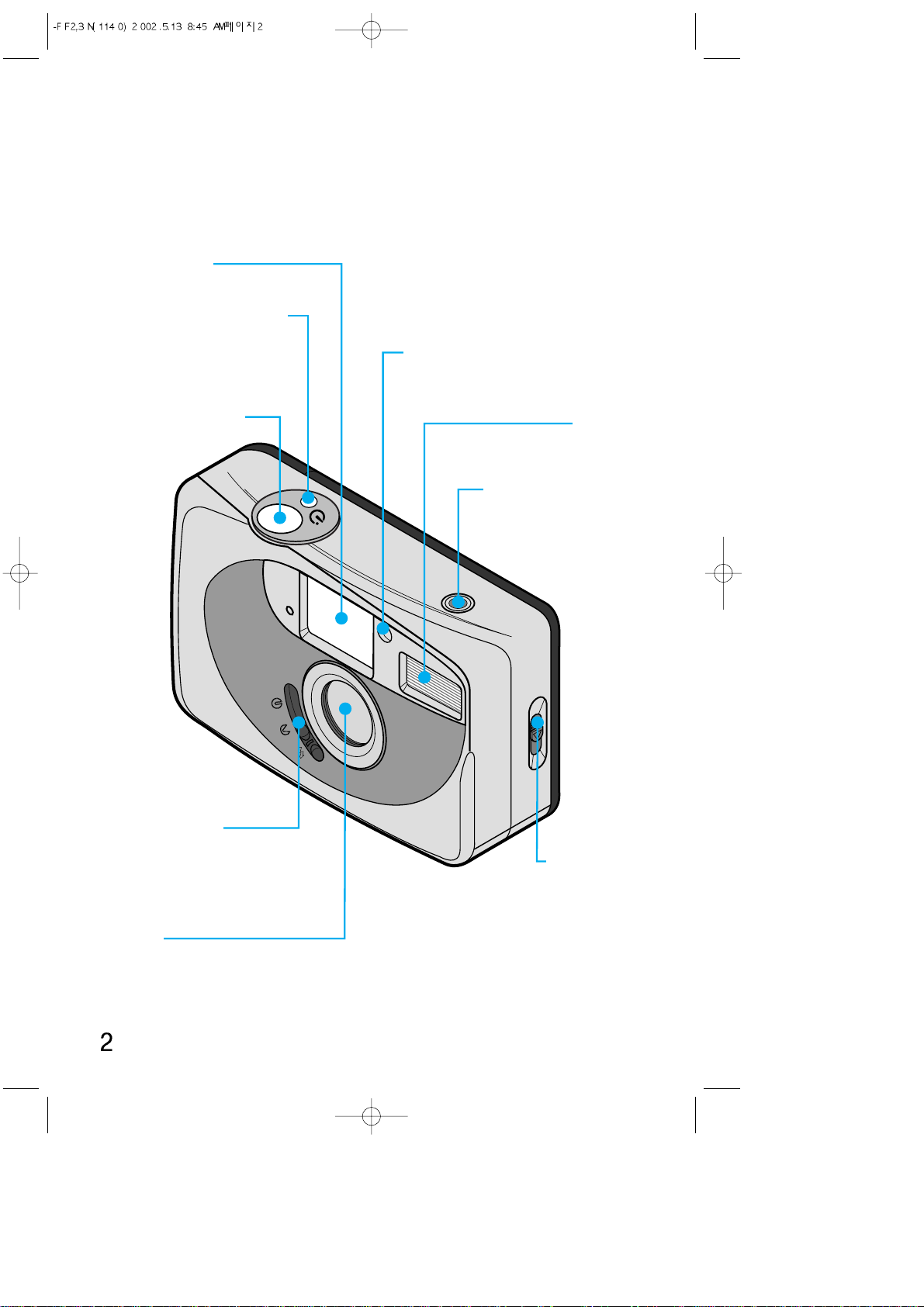
IDENTIFICATION OF FEATURES
Viewfinder
Self-timer lamp/
Red-eye reduction lamp
Shutter button
Self-timer button
(FINO 25SE/
MAXIMA 25SE only)
(on/off switch) /
Flash switch
Lens
Back cover
release
Lens cover
Flash
Frame counter
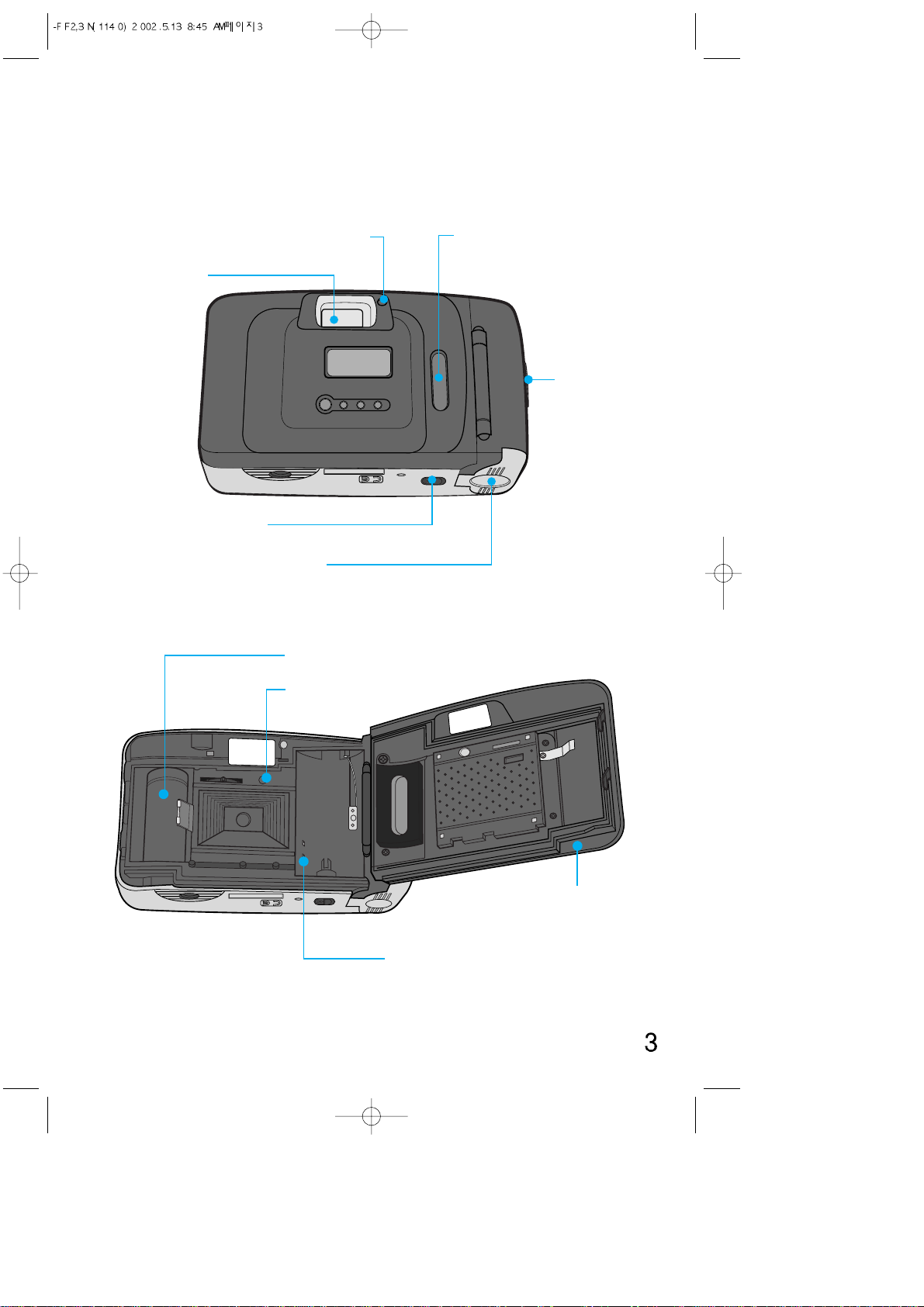
IDENTIFICATION OF FEATURES
Viewfinder
Rewind control
Battery chamber cover
Film check window
Strap
eyelet
Flash indicator (Green LED)
Spool
Film sensor
DX decoding contacts
Back cover
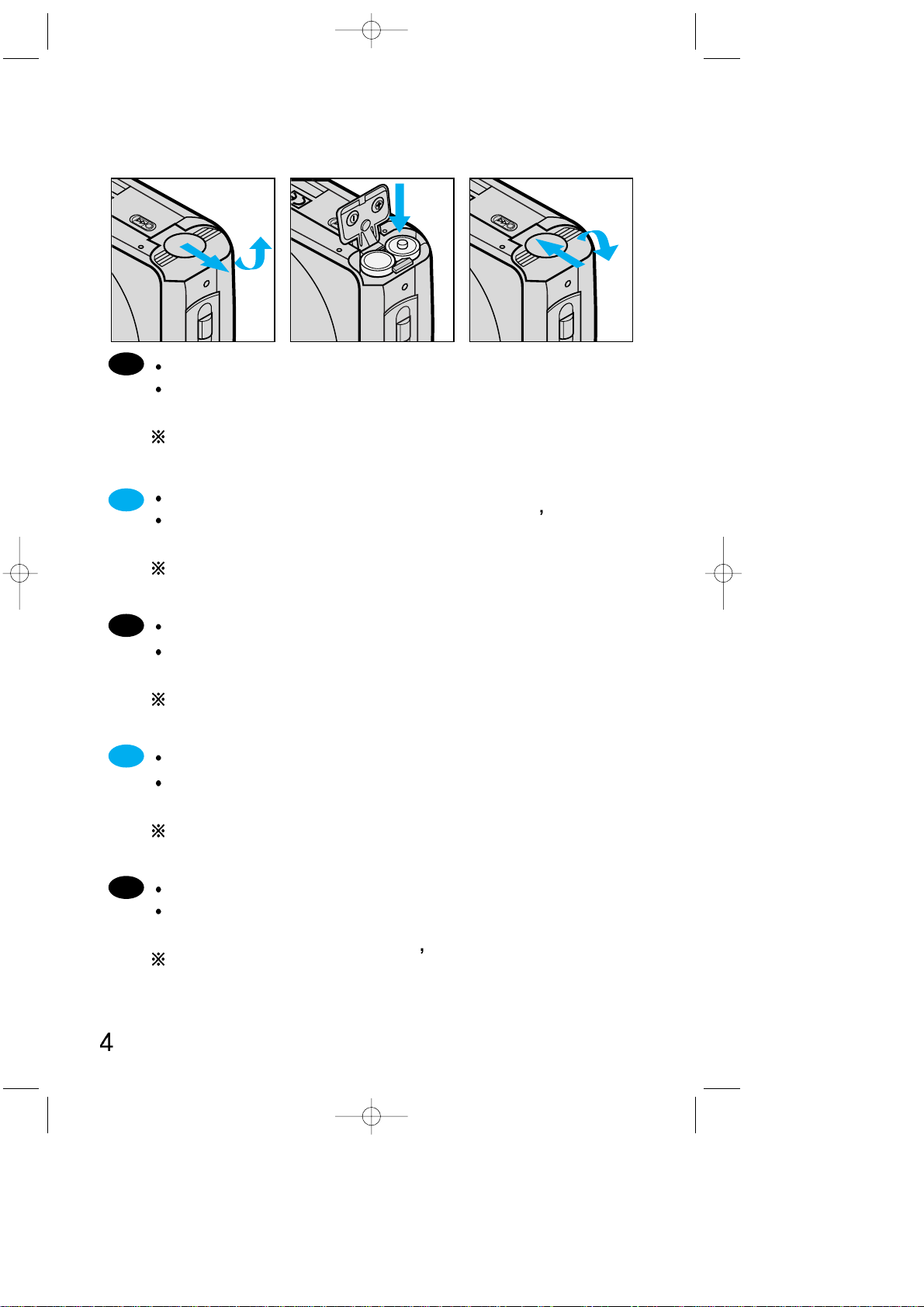
LOADING BATTERIES
Open the battery chamber cover.
Insert two new batteries and be sure to place them in
the correct position.
Remember to reset the date and time after changing
batteries. (Q.D. model )
Ouvrez la trappe du compartiment piles
Insérez deux piles neuves en vérifiant qu elles sont
bien positionnées.
N’oubliez pas de remettre à la date et à l’heure après
un changement de pile.
Öffnen Sie den Batteriefachdeckel.
Legen Sie zwei neue Batterien ein und vergewissern
Sie sich, daß sie richtig plaziert sind.
Bitte stellen Sie Datum und Uhrzeit nach einem
Batteriewechsel neu ein.
Abra la tapa del compartimiento de las pilas.
Inserte dos pilas nuevas, asegurándose de que las
coloca en la posicion correcta.
Recuerde volver a ajustar la fecha y la hora después de
cambiar la pila.
Aprire il coperchio del vano batterie.
Inserire due nuove batterie ed assicurarsi che siano
posizionate correttamente.
Regolare di nuovo la data e l ora dopo la sostituzione
della batteria.
En
Fr
It
Deu
Es
Ru
Open het deksel van het batterijcompartiment.
Steek twee nieuwe batterijen in het
batterijcompartiment. Let daarbij vooral op de juiste
stand. (+ & -)
Vergeet vooral niet om na het vervangen van de batterij
datum en tijd gelijk te zetten.
Abra a tampa do compartimento de bateria.
Insira duas baterias novas e certifique-se de que elas
foram inseridas na posição correta.
Lembre-se de reinicializar a data e a hora após trocar a
bateria.
Öppna batteri luckan.
Sätt i två nya batterier och se till så att polerna på
batteriet hamnar rätt.
Kom ihåg att ställa in datum och klockslag när batteriet
bytts.
ŒЪНУИЪВ Н˚¯НЫ ·‡Ъ‡ВИМУ„У УЪТeН‡.
¬ТЪ‡‚¸ЪВ ‰‚В МУ‚˚В ·‡Ъ‡ВИНЛ Л Ы·В‰ЛЪВТ¸, ˜ЪУ
УМЛ ЫcЪ‡МУ‚ОВМ˚ Т ТУ·О˛‰ВМЛВП ФУОˇМУТЪЛ.
ХВ Б‡·˚Ъ¸ ЫТЪ‡МУ‚ЛЪ¸ ‰‡ЪЫ Л ‚ВПˇ ФУТОВ Б‡ПВМ˚
·‡Ú‡ÂË.
Du
Po
Sw
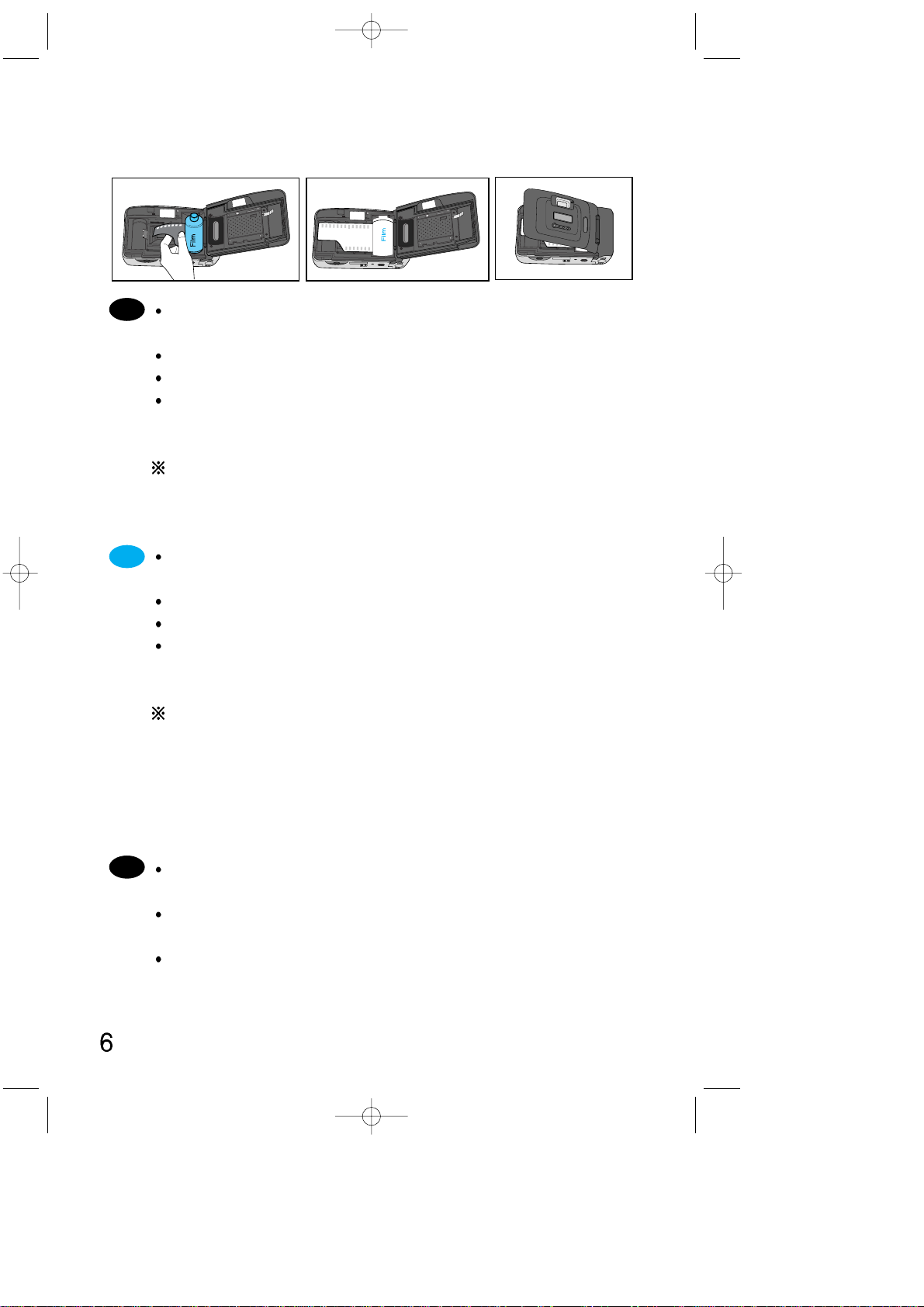
LOADING THE FILM
Open the back cover by sliding the release, as shown
above.
Insert film into the chamber. Do not use force.
The film should lie flat.
Close the back cover (you will hear a «Click»). Press the
shutter button a number of times to advance the film
until «1» appears in the frame counter.
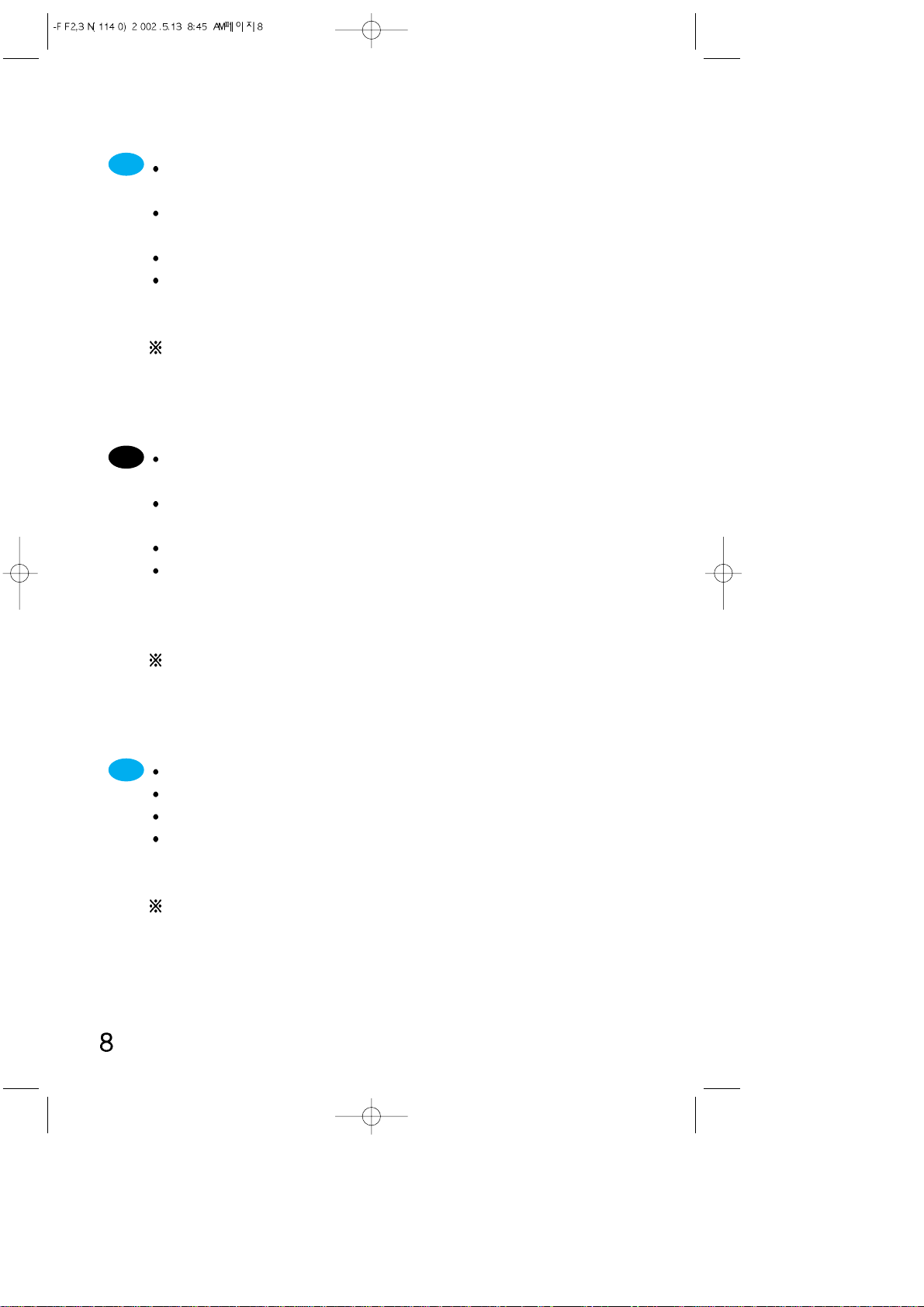
If you attempt to operate the camera without a film,
neither the shutter or flash will function. However, the
motor will still appear to be working normally.
Ouvrez le dos de l’appareil en faisant glisser son
poussoir de déverrouillage comme indiqué ci-dessus.
Placez le rouleau de film dans son logement sans forcer.
Le film doit être plat et bien tendu.
Fermez le dos en le pressant jusqu’ à ce que vous
entendiez un «click». Pressez le déclencheur jusqu’ à ce
que le chiffre «1» apparaisse au compteur de vues.
Si vous essayez de prendre une photo sans pellicule, le
flash ne fonctionnera pas, et le moteur d’avance ne
s’actionnera que lorsque vous appuyez sur le bouton
d’obturateur. Pour faire fonctionner votre appareil photo
comme d’habitude, chargez une pellicule dans le
logement de cartouche de film.
Öffnen Sie die Rückwand, indem Sie den Entriegelung
sknopf — wie oben gezeigt — verschieben.
Legen Sie einen Film in die Kammer, ohne ihn mit
Gewalt in die richtige Position zu drücken.
Der Film muß flach aufliegen.
En
Fr
Deu

It
Schließen Sie die Rückwand, bis sie hörbar einrastet.
Drücken Sie den Auslöser mehrmals solange, bis «1» im
Bildzählwerk erscheint.
Wenn Sie für eine Aufnahme den Auslöser betätigen,
ohne dass ein Film eingelegt ist, funktioniert der Blitz
nicht, sondern nur der Filmtransport. Legen Sie eine
Filmpatrone ein, damit die Kamera normal funktionieren
kann.
Deslice la palanca de apertura del respaldo para abrirlo
tal y como se muestra en el dibujo sobre estas líneas.
Inserte un rollo de película en el compartimento de la
película. No fuerce la película al introducirla.
La película deberá permanecer plana, tal y como
aparece en los dibujos de más abajo.
Cierre el respaldo hasta que oiga un clic. Presione el
disparador varias veces para avanzar la película hasta
que el contador de exposiciones indique «1».
Si usted presiona el botón del obturador sin cargar la
cámara con el rollo de película, el flash no funcionará
sino solamente el avance de película motorizado.
Cárguela con un rollo de película y la cámara operará
normalmente.
Aprire il coperchio posteriore facendo scorrere lo
sblocco come suindicato.
Inserire il rullino nello scomparto. Non forzare il rullino
durante l’inserimento.
La pellicola dovrà essere ben tesa.
Chiudere il coperchio posteriore finche’ non si sentira’ il
click dello scatto. Premere il pulsante di scatto un certo
numero di volte per far avanzare la pellicola fino
all’indicazione «1» sul contascatti.
Se si scatta una fotografia senza aver caricato la
pellicola, il flash non funziona, solo il motore funzionerà
quando si preme il pulsante dell’otturatore. Caricare un
rullino di pellicola e la fotocamera dovrebbe funzionare
normalmente.
Es
Du
Po
Sw
Open de achterwand door de sluiting ervan, als
afgebeeld opzij te schuiven.
Leg de filmcassette in het filmcompartiment. Forceer
daarbij niets.
Zorg dat de film vlak ligt.
Sluit de achterwand tot die hoorbaar dichtklikt. Druk de
ontspanknop zo vaak in tot in de opnameteller het cijfer
«1» verschijnt.
Als u een foto maakt zonder dat u een film hebt
geladen, functioneert de flitser niet en werkt alleen de
motor als u op de sluiterknop drukt. Als u een filmrolletje
laadt, zal de camera weer normaal werken.
Abra a tampa traseira deslizando sua saliência de
desengate conforme mostrado acima.
Insira o rolo de filme no compartimento. Não exerça
esforço sobre o filme para colocá-lo em sua posição.
O filme deverá se estender de maneira plana.
Feche a tampa do compartimento até ouvir um «click».
Aperte o botão do obturador diversas vezes para o
filme avançar até que apareça o «1» no contador de
exposições.
Se tirar uma fotografia sem colocar o filme, o flash não
piscará e somente o motor de enrolamento funcionará
quando pressionar o botão do obturador. Coloque o
filme e a câmera funcionará normalmente.
Öppna bakstycket genom att skjuta spärren enligt ovan.
Sätt i en film. Använd inte våld.
Filmen ska ligga plant.
Stäng bakstycket så att du hör ett «Klick». Tryck på
avtryckaren ett antal gånger tills du ser «1» på
räkneverket.
Om du exponerar utan att ha laddat kameran med film,
fungerar inte blixten. Endast motorn för filmframmatning
fungerar när du trycker på slutarknappen. Ladda en film
och kameran fungerar normalt
ŒЪНУИЪВ Б‡‰М˛˛ Н˚¯НЫ, ‚˚‰‚ЛМЫ‚ Ы˜НЫ
‰В·ОУНЛУ‚НЛ, Н‡Н ФУН‡Б‡МУ ‚˚¯В.
¬ТЪ‡‚¸ЪВ Н‡ТТВЪЫ Т ФОВМНУИ ‚ УЪ‰ВОВМЛВ. ХВ
ФЛПВМˇИЪВ ТЛОЫ ‰Оˇ ЫТЪ‡МУ‚НЛ ФОВМНЛ М‡ ПВТЪУ.
œОВМН‡ ‰УОКМ‡ ОВК‡Ъ¸ У‚МУ.
3‡НУИЪВ Б‡‰М˛˛ Н˚¯НЫ ЩУЪУ‡ФФ‡‡Ъ‡ Т ОВ„НЛП
¯ВО˜НУП. H‡КЛП‡ИЪВ НМУФНЫ ТФЫТН‡ Б‡Ъ‚У‡
ЩУЪУ‡ФФ‡‡Ъ‡ ‰У ФУˇ‚ОВМЛˇ ˆЛЩ˚ 1 ̇
Ò˜ÂÚ˜ËÍ ÍÓ΢ÂÒÚ‚‡ ͇‰Ó‚.
≈ТОЛ ‚ ЩУЪУ‡ФФ‡‡ЪВ МВЪ ФОВМНЛ, ЪУ ФЛ М‡К‡ЪЛЛ
М‡ НМУФНЫ ТФЫТН‡ Б‡Ъ‚У‡ ПУЪУ ·Ы‰ВЪ ‚‡˘‡¸Тˇ,
МУ ‚ТФ˚¯Н‡ ‡·УЪ‡Ъ¸ МВ ·Ы‰ВЪ.
¬ТЪ‡‚¸ЪВ Н‡ТТВЪЫ Т ФОВМНУИ, Л ЩУЪУ‡ФФ‡‡Ъ ·Ы‰ВЪ
‡·УЪ‡Ъ¸ МУП‡О¸МУ.
ˇ”
ˇ”
ºº
Ru

TAKING PICTURES
1.Open the lens cover to turn on the power.
2.Look through the viewfinder and compose the picture.
3.Press the shutter button gently to take a picture.
If the subject is less than 1.5m from the camera, the
picture may be out of focus.
1.Ouvrir le volet protecteur pour mettre l’appareil en marche.
2.A l’ aide du viseur, composez votre cliché.
3.Pressez le déclencheur complètement pour prendre la
photo.
Si le sujet est à moins de 1,5m, la photo peut être floue.
1.Öffnen Sie zum Einschalten die Objektivabdeckung.
2.Schauen Sie durch den Sucher und gestalten Sie das Bild.
3.Drücken Sie dann den Auslöser durch, um Ihr Motiv zu
fotografieren.
Wenn sich das Motiv näher als 1,5m enfernt befindet,
können unscharfe Fotos entstehen.
1.Abra la tapa del objetivo para conectar la corriente.
2.Mire a través del visor y encuadre la escena.
3.Presione el disparador hasta el fondo para hacer la foto.
Si el sujeto está más cerca de 1,5 metros, saldrá
desenfocado.
1.Aprire il copriobiettivo per accendere la macchina.
2.Guardare nel mirino e inquadrare.
3.Premere il pulsante di scatto completamente per
scattare la foto.
Se il soggetto e’ a meno di 1.5m, la foto potra’ risultare
fuori fuoco.
En
Fr
It
Deu
Es
Loading…
Содержание
- Пленочный фотоаппарат Samsung Fino 20 SE (date)
- Инструкция для Samsung Galaxy A20s
- FAQ по TouchWiz на Galaxy A20s
- Samsung FINO 20SE Manuals
- 1 User Guides and Instruction Manuals found for Samsung FINO 20SE
- Samsung FINO 20SE Operation & User’s Manual (32 pages)
- Document Information:
- Pages Preview:
- Frequently asked Questions:
- Can I download Samsung FINO 20SE manual from website free of charge?
- Is registration required to download the Samsung FINO 20SE manual?
- Is this Samsung FINO 20SE manual is an official manufacturer’s documentation?
- Samsung FINO 20SE Compatible Manuals:
- Samsung FINO 30SE Operation & user’s manual
- Samsung FINO 170 SUPER Operation & user’s manual
- Samsung VEGA 140S Operation & user’s manual
- Oregon Scientific ATCMini-S Operation & user’s manual
- Samsung FINO 120 SUPER Operation & user’s manual
- Concord Camera PZ3300 Instruction manual
- Related Devices:
- Samsung FINO 20SE Optional Materials:
- Samsung FINO25SE, FINO20SE User Manual [zh]
Пленочный фотоаппарат Samsung Fino 20 SE (date)
Винтажный пленочный автоматический фотоаппарат Samsung Fino 20 SE (date) c ремешком на руку в комплекте. Стартовый набор фотографа, достаточно вставить внутрь батарейки и зарядить пленку и фотоаппарат готов к использованию!
Крупные цифры счётчика кадров — хорошо видно сколько кадров снято, большой яркий видоискатель — позволяет легко создавать композицию кадра, фиксированная фокусировка — не требует настройки резкости. Отличные четкие фотографии — легко и просто! Ультра компактная камера — легкая и незаметная, можно положить в карман, взять с собой в путешествие или на прогулку.
Встроенная вспышка имеет переключатель включения / выключения. Функция уменьшения эффекта “красных глаз”.
Широкоугольный объектив 28 мм, светосила F 5.6, три элемента в трех группах.
Дистанция фокусировки от 1.5 м до бесконечности.
Скорость срабатывания затвора (выдержка) 1/125сек.
Автоматическое распознавание чувствительности пленки с помощью датчика DX.
Модель с функцией впечатывания даты.
Размер: 110 х 63 х 45 мм.
Данный набор подойдет фотографу впервые решившему прикоснуться к пленочной фотографии, это прекрасный подарок как себе, так и увлеченному фотографией другу, который еще только мечтает снимать на плёнку.
Питание от двух батареек АА — в комплект не входят.
Что входит в комплект: винтажная фотокамера Samsung Fino 20 SE (date) , ремешок на руку, крафтовая коробка, гарантийный талон.
Состояние оптики: идеальное. Состояние автоматики: идеальное. Внешнее состояние корпуса: незначительные потертости.
Источник
Инструкция для Samsung Galaxy A20s
Это официальная инструкция для Samsung Galaxy A20s на русском языке, которая подходит под Android 9.0 Pie. В случае, если Вы обновили свой смартфон Samsung до более «свежей» версии или «откатились» до более ранней, то Вам стоит попробовать другие подробные инструкции по эксплуатации, которые будут представлены ниже. Также мы предлагаем ознакомиться с быстрой инструкцией пользователя в формате вопрос — ответ.
Если руководство по эксплуатации Вам не помогло найти ответ, то, пожалуйста, задайте вопрос на этой же странице. Мы обязательно поможем.
FAQ по TouchWiz на Galaxy A20s
Краткое руководство по интерфейсу Samsung TouchWiz
Как изменить количество рабочих столов?
Разводим два пальца (поставить два пальца вместе, по центру экрана, и одновременно повести один вверх, другой — вниз). Либо можно нажать левую клавишу—> Изменить страницу
Как настроить экран блокировки?
Необходимо зайти в Настройки—> вкладка «Моё устройство»—> Экран блокировки.
Как создать папку на рабочем столе?
Нужно вызвать контекстное меню (клавишей «Меню) и выбрать «Создать папку».
Продолжаем настраивать смартфон
Как включить дополнительные опции в калькуляторе (sin/cos, корень и т.д)?
Переверните устройств в горизонтальное положение, чтобы отобразились все функции калькулятора.
Где черный список и как его настроить?
Зайдите в Настройки—> вкладка «Моё устройство»—> Режим блокировки.
Как удалить приложения?
Зайдите в Настройки—> вкладка «Опции»—> Диспетчер приложений
Где и, как настроить жесты?
Необходимо зайти в раздел Настройки—> вкладка «Моё устройство»—> Движения и жесты.
Источник
Samsung FINO 20SE Manuals
1 User Guides and Instruction Manuals found for Samsung FINO 20SE
Samsung FINO 20SE Operation & User’s Manual (32 pages)
Document Information:
Pages Preview:
Frequently asked Questions:
Can I download Samsung FINO 20SE manual from website free of charge?
Yes of course. Samsung FINO 20SE manual is absolutely free to download.
Is registration required to download the Samsung FINO 20SE manual?
No, no required registration or other information to download the Samsung FINO 20SE manuals.
Is this Samsung FINO 20SE manual is an official manufacturer’s documentation?
Yes, all Samsung FINO 20SE manuals presented on Guidessimo website are an official documentation of device manufacturer.
Samsung FINO 20SE Compatible Manuals:
Samsung FINO 30SE Operation & user’s manual
FINO 30SE / 04 Mar 2021 / #9YD1B9
Samsung FINO 170 SUPER Operation & user’s manual
FINO 170 SUPER / 21 Feb 2021 / #GH18R2
Samsung VEGA 140S Operation & user’s manual
VEGA 140S / 07 Jan 2021 / #4OQ583
Oregon Scientific ATCMini-S Operation & user’s manual
ATCMini-S / 20 Apr 2021 / #31JUT8
Samsung FINO 120 SUPER Operation & user’s manual
FINO 120 SUPER / 04 Sep 2020 / #GS7M7A
Concord Camera PZ3300 Instruction manual
PZ3300 / 14 Dec 2020 / #17P94J
- Samsung FINO 80 SUPER
- Samsung PRONTA 1200
- Samsung VEGA 1400
- Samsung FINO 800
- Samsung FINO 120 SUPER
- Samsung FINO 30SE
- Samsung FINO 15SE
- Samsung FINO 105 SUPER
- Samsung VEGA 290W
- Samsung FINO 140 SUPER
Samsung FINO 20SE Optional Materials:
Instructions manual (Sure shot AF-7, #1L3A62)
Sure shot AF-7, 9, canon/sure-shot-af-7.pdf
Technical manual (XC-EU50, #3J81NV)
XC-EU50, 27, sony/xc-eu50.pdf
Camera Accessories Manual #8173Z9
EOS 5, 12, canon/eos-5.pdf
#9QD222: 28 AFS Operation & user’s manual
28 AFS, 7, rollei/28-afs.pdf
Film Camera Service manual #M9RG83
Joshua Vision, 134, polaroid/joshua-vision.pdf
Film Camera Penelope Operation & user’s manual, #98INU9
Penelope, 66, aaton/penelope.pdf
EOS Elan II — EOS Elan II 35mm SLR Camera Film Camera — #999445
EOS Elan II — EOS Elan II 35mm SLR Camera, 99, canon/eos-elan-ii-eos-elan-ii-35mm-slr-camera.pdf
Film Camera Operation & user’s manual #AL1O7X
Источник
Samsung FINO25SE, FINO20SE User Manual [zh]
ENGLISH / FRANÇAIS / DEUTSCH / ESPAÑOL / ITALIANO / DUTCH / PORTUGUÊSE / SVENSKA /
/ –”——KN… fl«‹≤K
IDENTIFICATION OF FEATURES
MAXIMA 25SE only)
Red-eye reduction lamp
Lens cover (on/off switch) /
IDENTIFICATION OF FEATURES
Flash indicator (Green LED)
Film check window
Strap
Battery chamber cover
DX decoding contacts
L OADING BATTERIE S
Insert two new batteries and be sure to place them in the correct position.
Remember to reset the date and time after changing batteries. (Q.D. model )
Ouvrez la trappe du compartiment piles
Insérez deux piles neuves en vérifiant qu elles sont bien positionnées.
N’oubliez pas de remettre à la date et à l’heure après un changement de pile.
Deu Öffnen Sie den Batteriefachdeckel.
Legen Sie zwei neue Batterien ein und vergewissern Sie sich, daß sie richtig plaziert sind.
Bitte stellen Sie Datum und Uhrzeit nach einem Batteriewechsel neu ein.
Es Abra la tapa del compartimiento de las pilas.
Inserte dos pilas nuevas, asegurándose de que las coloca en la posicion correcta.
Recuerde volver a ajustar la fecha y la hora después de cambiar la pila.
Aprire il coperchio del vano batterie.
Inserire due nuove batterie ed assicurarsi che siano posizionate correttamente.
Regolare di nuovo la data e l ora dopo la sostituzione della batteria.
Steek twee nieuwe batterijen in het
batterijcompartiment. Let daarbij vooral op de juiste
Vergeet vooral niet om na het vervangen van de batterij
datum en tijd gelijk te zetten.
Abra a tampa do compartimento de bateria.
Insira duas baterias novas e certifique-se de que elas
foram inseridas na posição correta.
Lembre-se de reinicializar a data e a hora após trocar a
Öppna batteri luckan.
Sätt i två nya batterier och se till så att polerna på
batteriet hamnar rätt.
Kom ihåg att ställa in datum och klockslag när batteriet
ŒÚÍ ÓÈÚÂ Í ˚¯ÍÛ ·‡Ú‡ ÂÈÌÓ„Ó ÓÚÒe͇.
¬ÒÚ‡‚¸Ú ‰‚ ÌÓ‚˚ ·‡Ú‡ ÂÈÍË Ë Û·Â‰ËÚÂÒ¸, ˜ÚÓ
УМЛ ЫcЪ‡МУ‚ОВМ˚ Т ТУ·О˛‰ВМЛВП ФУОˇ МУТЪЛ.
ХВ Б‡·˚Ъ¸ ЫТЪ‡МУ‚ЛЪ¸ ‰‡ЪЫ Л ‚ ВПˇ ФУТОВ Б‡ПВМ˚
LOADING THE FILM
the release, as shown
Insert film into the chamber. Do not use force. The film should lie flat.
Close the back cover (you will hear a «Click»). Press the shutter button a number of times to advance the film until «1» appears in the frame counter.
If you attempt to operate the camera without a film, neither the shutter or flash will function. However, the motor will still appear to be working normally.
Fr Ouvrez le dos de l’appareil en faisant glisser son poussoir de déverrouillage comme indiqué ci-dessus. Placez le rouleau de film dans son logement sans forcer. Le film doit être plat et bien tendu.
Fermez le dos en le pressant jusqu’ à ce que vous entendiez un «click». Pressez le déclencheur jusqu’ à ce que le chiffre «1» apparaisse au compteur de vues.
Si vous essayez de prendre une photo sans pellicule, le flash ne fonctionnera pas, et le moteur d’avance ne s’actionnera que lorsque vous appuyez sur le bouton d’obturateur. Pour faire fonctionner votre appareil photo comme d’habitude, chargez une pellicule dans le logement de cartouche de film.
Deu Öffnen Sie die Rückwand, indem Sie den Entriegelung sknopf — wie oben gezeigt — verschieben.
Legen Sie einen Film in die Kammer, ohne ihn mit Gewalt in die richtige Position zu drücken.
Der Film muß flach aufliegen.
Источник
Samsung FINO 20SE Film Camera PDF User Guides and Manuals for Free Download: Found (1) Manuals for Samsung FINO 20SE Device Model (Operation & User’s Manual)
Samsung FINO 20SE Operation & User’s Manual
Details:
- Manufacturer: Samsung
- Product Name/ID: Samsung FINO 20SE / #239288
- Category: Film Camera
- File Path: samsung/fino-20se_239288.pdf
- Last Updated: 17 May 2025
- Description: The Samsung FINO 20SE manual offers essential guidance for mastering your device, including setup procedures, user interface navigation, and routine maintenance tips for optimal use.
- Document Type: User Manual
- Pages: 32
Download PDF
Read Online
The Samsung FINO 20SE is a remarkable addition to Samsung’s ever-expanding portfolio of smart devices designed for convenience and functionality. As we delve into the specifics of this product, it becomes clear that Samsung has put considerable thought into balancing advanced technology with user-friendly features. This review will highlight the core aspects of the FINO 20SE, examining its design, performance, features, and overall value.
First impressions matter, and the Samsung FINO 20SE certainly delivers in terms of design. With a sleek, modern aesthetic, this device emanates sophistication and elegance. Available in multiple color options, it seamlessly fits into various environments, whether at home or in an office setting. The compact size makes it highly portable, allowing users to easily transport it wherever needed. In terms of build quality, Samsung has ensured that the FINO 20SE feels sturdy and durable, ensuring longevity.
When it comes to performance, the Samsung FINO 20SE does not disappoint. Equipped with a robust processor, it offers smooth multitasking capabilities, allowing users to run multiple applications without significant lag. This is particularly beneficial for those working with complex tasks or utilizing resource-heavy applications. Additionally, the device’s battery life is impressive, easily lasting through a full day of use on a single charge, which is a crucial factor for professionals on the go.
One of the standout features of the Samsung FINO 20SE is its display quality. The vivid colors and sharp resolution contribute to an immersive viewing experience, whether you’re consuming media, conducting video calls, or simply browsing the web. Moreover, the screen is designed to be anti-glare, making it suitable for use in various lighting conditions without straining the eyes.
In addition to its performance, the Samsung FINO 20SE is packed with features that enhance user convenience. Some key features include:
- Smart Connectivity: The FINO 20SE supports various connectivity options, including Wi-Fi, Bluetooth, and USB-C, ensuring quick and easy connections with other devices.
- User-Friendly Interface: Samsung has incorporated an intuitive interface that simplifies navigation. The learning curve for new users is minimal.
- Customizability: Users can tailor the device settings to suit their preferences, enhancing overall usability.
- Enhanced Security: With various security features, including biometric authentication, the FINO 20SE prioritizes user privacy and data protection.
Considering the value the Samsung FINO 20SE offers, it stands as a worthy investment for both individuals and businesses. Its combination of performance, aesthetics, and practical features makes it an appealing choice in its category. Whether you’re a student, a professional, or someone who simply enjoys the latest technology, the FINO 20SE can meet your needs with ease.
On the downside, there are minor areas where the Samsung FINO 20SE could improve. While the device excels in many aspects, some users might find the price point slightly higher compared to similar products from other brands. Additionally, while the battery life is commendable, intensive use with demanding applications may drain it quicker than expected. However, these drawbacks are relatively minor when weighed against the overall performance and features offered.
In conclusion, the Samsung FINO 20SE is a commendable device that embodies a blend of style, performance, and functionality. It perfectly caters to the needs of modern users who seek efficiency without sacrificing aesthetics. Whether for personal or professional use, the FINO 20SE delivers a solid performance that lives up to the high standards set by Samsung. If you’re in the market for a well-rounded device that excels in various aspects, the Samsung FINO 20SE is certainly worth considering.