
- 1 Руководство пользователя Xiaomi BHR5489GL Redmi 3 Lite Buds
- 2 Продукт
- 3 Зарядка
- 4 Утомительный
- 5 Связь
- 6 Сбросить наушники
- 7 Функция
- 8 Технические характеристики
- 9 Важная информация по безопасности
- 10 FC
- Популярные вопросы
- Руководство по эксплуатации
Руководство пользователя Xiaomi BHR5489GL Redmi 3 Lite Buds
Пожалуйста, внимательно ознакомьтесь с данным руководством перед использованием устройства и сохраните его для дальнейшего обращения. Иллюстрации продукта, аксессуаров и пользовательского интерфейса в этом руководстве предоставлены исключительно для ознакомления. Реальный продукт и его функции могут отличаться в зависимости от обновлений и улучшений.
Продукт

Зарядка
- Перед первым использованием удалите защитную пленку с контактов на обоих наушниках и полностью зарядите как футляр для зарядки, так и сами наушники.

- Подключите зарядный кабель к футляру для зарядки и поместите наушники внутри футляра для одновременной зарядки. Когда зарядный футляр не полностью заряжен, его индикатор будет гореть белым цветом. После полной зарядки индикатор будет выключен.Для включения убедитесь, что в зарядном футляре есть заряд. Наушники автоматически включаются при извлечении их из футляра. Поместите оба наушника в зарядный футляр, индикаторы на них загорятся белым. Наушники начнут зарядку и автоматически отключатся, как только будут полностью заряжены.
Если наушники не подключаются к устройству в течение 10 минут после извлечения из футляра, они автоматически выключаются, чтобы сэкономить заряд батареи.

Утомительный
- Осторожно вставьте наушник в ушной канал и отрегулируйте его для достижения комфортного положения. Во время разговора убедитесь, что основной микрофон направлен к вашему рту для более четкой передачи голоса.
- Примечание: Наушники поставляются с ушными вкладышами размера M и дужками размера L. Если они не подходят, замените их на вкладыши и дужки нужного размера для более удобной посадки.


Связь
Первичное подключение: Откройте крышку зарядного кейса и извлеките наушники. Когда индикаторы на обоих наушниках начнут медленно мигать белым, значит, они готовы к подключению. Включите Bluetooth на вашем телефоне, найдите «Redmi Buds 3 Lite» в списке доступных устройств и коснитесь, чтобы подключиться.
Примечание: Если наушники не удается подключить, поместите их обратно в зарядный кейс, закройте крышку и повторите вышеописанную процедуру.
Подключение к другим устройствам: Чтобы подключить наушники к другому устройству, отключите Bluetooth-соединение с текущим телефоном или выполните сброс настроек наушников.
Сбросить наушники
Если наушники не подключаются корректно, выполните сброс настроек. Перед началом убедитесь, что зарядный футляр не разряжен. Откройте крышку футляра и поместите оба наушника внутрь. Нажмите и удерживайте сенсорные области на обоих наушниках не менее пяти секунд, затем отпустите. Индикаторы на обоих наушниках трижды мигнут белым, что подтвердит успешный сброс. После этого все записи о соединениях между наушниками и устройствами будут удалены.

Функция завершенаview

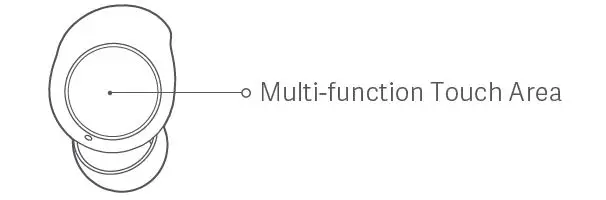
Ответ / Завершение звонка: Чтобы ответить на входящий звонок, дважды коснитесь многофункциональной сенсорной области на левом или правом наушнике. Для отклонения или завершения звонка трижды коснитесь сенсорной области наушника.
Воспроизведение / Пауза музыки: Для приостановки или воспроизведения музыки нажмите и удерживайте многофункциональную сенсорную область на левом или правом наушнике.
Переключение на следующий трек: Во время воспроизведения музыки дважды коснитесь сенсорной области наушника, чтобы перейти к следующему треку.
Ответ на второй звонок: Чтобы поставить текущий вызов на удержание и ответить на второй звонок, дважды коснитесь сенсорной области наушника. После того как вы ответили на второй звонок, дважды коснитесь сенсорной области, чтобы переключиться между вызовами. Чтобы завершить текущий звонок и ответить на удерживаемый, трижды коснитесь сенсорной области наушника.
Активировать голосового помощника: Когда наушники на вашем слухе (не во время разговора), трижды коснитесь многофункциональной сенсорной области наушника для активации голосового помощника. * Убедитесь, что ваше устройство поддерживает функцию голосового помощника.
Переключение между режимом одиночного и двойного наушников: Когда оба наушника соединены, они работают в режиме двойных наушников. Если вы поместите один наушник обратно в зарядный футляр и закроете его крышку, второй наушник автоматически перейдет в режим одиночного. Выньте второй наушник из футляра — режим двойных наушников восстановится.
Автоматическое подключение: После того как вы вынете наушники из зарядного футляра, они автоматически подключатся к последнему использовавшемуся Bluetooth-устройству. Если наушники не подключены, они перейдут в режим ожидания.
Отключение: Если Bluetooth-устройство отключается или вы вручную разъединяете наушники, они автоматически перейдут в режим ожидания. Если в течение 10 минут не будет подключено ни одно устройство, наушники выключатся.
Режим низкой задержки: Для активации режима низкой задержки при подключении наушников к телефону (кроме разговорного режима) одновременно нажмите и удерживайте сенсорные области на обоих наушниках. Чтобы отключить режим, нажмите и удерживайте сенсорные области или поместите оба наушника в зарядный футляр.
Примечание: В холодную погоду или при сухих руках сенсорные кнопки могут не реагировать должным образом.
Технические характеристики
| Имя: | Беспроводные наушники |
| Модель: | М2110Е1 |
| Диапазон частот: | 2402-2480 МГц |
| Максимальная выходная мощность RF: | < 20 мВт |
| Размеры наушников: | 24.5 × 16.7 × 24.6 мм |
| Диапазон беспроводной связи: | 10 м (в среде без препятствий) |
| Вход: | 5 В = 50 мА |
| Беспроводное подключение: | Bluetooth ® 5.2 |
| Модель зарядного устройства: | М2110Е1 |
| Размеры: | 60 × 46 × 23.7 мм |
| Вход: | 5 В = 300 мА |
| Выход: | 5 В = 150 мА |
| Температура хранения: | от 0 °С до 45 °С |
| Рабочая температура: | от 0 °С до 45 °С |
| Срок службы: | 1 год |
Важная информация по безопасности
- Изделие оснащено встроенным аккумулятором, который нельзя снять или заменить. Чтобы избежать повреждений устройства и аккумулятора, не пытайтесь разбирать или модифицировать его самостоятельно. Замену аккумулятора следует производить только авторизованным сервисным центром, используя аккумулятор того же типа. Установка батареи, отличной от рекомендованной, может привести к угрозам безопасности, включая возгорание, взрыв или утечку электролита.Не выбрасывайте использованные батареи с обычными бытовыми отходами. Утилизация изделия и старых батарей должна осуществляться в соответствии с местными законами и нормативами.
Не пытайтесь разбирать, чинить или модифицировать устройство, так как это может вызвать возгорание или привести к поломке устройства.
Во время использования держите индикатор устройства подальше от детей и животных. Избегайте попадания устройства в огонь, не разжигайте его, не прокалывайте и не раздавливайте.
Если на коже появятся признаки покраснения или отека после контакта с продуктом, немедленно прекратите его использование и обратитесь к врачу.
Для предотвращения потери слуха не устанавливайте слишком высокую громкость на длительное время.
Этот продукт не является игрушкой и может содержать мелкие детали. Храните его в недоступном для детей месте.
Не выбрасывайте батарею в огонь, горячую духовку, воду или другие жидкости. Механическое повреждение, разрезание или раздавливание батареи может привести к взрыву.
Не оставляйте батарею в местах с очень высокой температурой, так как это может вызвать взрыв или утечку горючих жидкостей или газов.
Аккумулятор не должен подвергаться воздействию крайне низкого давления воздуха, что может привести к взрыву или утечке горючих жидкостей или газов.
Информация о продукте и сертификационные знаки расположены на зарядном футляре. Символ указывает на напряжение постоянного тока (DC).
Товарные знаки и логотипы Bluetooth® являются зарегистрированными товарными знаками, принадлежащими Bluetooth SIG, Inc., и их использование компанией Xiaomi Inc. осуществляется по лицензии. Все остальные товарные знаки и торговые наименования принадлежат их соответствующим владельцам.
ДЕКЛАРАЦИЯ СОТВЕТСТВИЯ ЕС
Компания Dongguan Yingsheng Electronic Technology Co., Ltd. заявляет, что радиоустройства типа M2110E1 соответствуют Директиве 2014/53 / EU. Полный текст декларации доступен по следующему адресу: http://www.mi.com/global/service/support/declaration.htmlИнформация о WEEE
Продукты с этим символом являются отходами электрического и электронного оборудования (WEEE согласно директиве 2012/19/EU) и не должны выбрасываться с обычными бытовыми отходами. Для защиты здоровья людей и окружающей среды сдавайте отработанное оборудование в специальный пункт сбора для переработки электрического и электронного оборудования, назначенный местными властями. Правильная утилизация помогает предотвратить негативные последствия для экологии и здоровья.UKCA
Компания Dongguan Yingsheng Electronic Technology Co., Ltd. заявляет, что радиоустройства типа M2110E1 соответствуют Регламенту радиооборудования 2017 года. Полный текст декларации доступен по следующему адресу: https://www.mi.com/uk/service/support/declaration.html
FC
Это устройство соответствует требованиям части 15 Правил FCC. Его эксплуатация возможна при соблюдении двух условий: (1) устройство не должно вызывать вредных помех, и (2) оно должно принимать любые помехи, включая те, которые могут повлиять на его нормальное функционирование. Любые изменения или модификации устройства, не одобренные ответственным органом по сертификации, могут привести к утрате права на его использование.
Примечание: Оборудование было протестировано и признано соответствующим ограничениям для цифровых устройств класса B согласно части 15 Правил FCC. Эти ограничения обеспечивают разумную защиту от вредных помех в жилых помещениях. Оборудование генерирует, использует и может излучать радиочастотную энергию, и если оно будет установлено и использовано неправильно, может вызвать помехи для радиосвязи. Однако не существует гарантии, что помехи не возникнут в конкретной установке. Если устройство вызывает помехи для радио- или телевизионного приема, что можно определить, выключив и включив устройство, рекомендуется попытаться устранить помехи следующим образом:
- Переориентируйте или переместите антенну.
- Увеличьте расстояние между устройством и приемником.
- Подключите устройство к розетке в другой цепи, отличной от той, к которой подключен приемник.
- Обратитесь за помощью к дилеру или квалифицированному радио-/телевизионному технику.
Это оборудование соответствует ограничениям на радиационное воздействие FCC и ISED, установленным для неконтролируемой среды. Конечный пользователь должен соблюдать указания по эксплуатации для обеспечения соответствия требованиям радиочастотного излучения. Устройство не должно располагаться рядом с другими антеннами или передатчиками.
Портативное устройство разработано в соответствии с требованиями ISED по воздействию радиоволн. Эти требования устанавливают предел для коэффициента поглощения специфического излучения (SAR) на уровне 1,6 Вт/кг, усредненный на один грамм ткани.
Устройство включает в себя нелицензируемый передатчик(и)/приемник(и), соответствующие стандартам нелицензируемых RSS (Innovation, Science and Economic Development Canada). Эксплуатация устройства подчиняется следующим условиям:
- Устройство не должно вызывать помех.
- Устройство должно принимать любые помехи, включая те, которые могут вызвать нежелательную работу устройства.
Идентификатор FCC: 2A3OD-M2110E1
IC: 27978-M2110E1
CAN ICES-003(B)/NMB-003(B)
Соответствует стандартам IMDA DB106135
Популярные вопросы
Вопрос 1: Как правильно подключить наушники к телефону через Bluetooth?
Ответ:
Для первого подключения откройте крышку зарядного футляра и выньте наушники. Когда индикаторы на обоих наушниках начнут медленно мигать белым, это значит, что наушники готовы к подключению. Включите Bluetooth на своем телефоне и найдите в списке устройств «Redmi Buds 3 Lite», затем коснитесь, чтобы подключить. Если наушники не подключаются, поместите их обратно в зарядный футляр, закройте крышку и повторите процедуру. В дальнейшем наушники будут автоматически подключаться к последнему использованному устройству.
Вопрос 2: Что делать, если наушники не подключаются или не работают должным образом?
Ответ:
Если наушники не подключаются, попробуйте выполнить сброс устройства. Для этого убедитесь, что зарядный футляр не разряжен. Откройте крышку футляра и поместите оба наушника внутрь. Затем нажмите и удерживайте многофункциональные сенсорные области на обоих наушниках не менее 5 секунд. Индикаторы на наушниках трижды мигнут белым, подтверждая успешный сброс. После этого повторите подключение, следуя руководству для первого подключения.
Вопрос 3: Как включить или выключить наушники?
Ответ:
Наушники автоматически включаются, когда вы извлекаете их из зарядного футляра. Если зарядный футляр не разряжен, наушники начнут работать сразу же. Чтобы выключить наушники, поместите их обратно в зарядный футляр, индикаторы на наушниках погаснут, и они автоматически отключатся. Если наушники не подключаются к устройству в течение 10 минут после извлечения из футляра, они автоматически выключатся, чтобы сэкономить заряд батареи.
Вопрос 4: Что делать, если наушники не заряжаются?
Ответ:
Если наушники не заряжаются, убедитесь, что зарядный футляр полностью заряжен. Когда индикатор зарядного футляра мигает белым, это означает, что он не полностью заряжен. Подключите зарядный кабель и убедитесь, что наушники правильно размещены в футляре, индикаторы на наушниках должны начать светиться белым, что подтверждает процесс зарядки. Если зарядка все еще не происходит, проверьте, нет ли загрязнений на контактах и попробуйте использовать другой зарядный кабель.
Вопрос 5: Как управлять звонками и музыкой с помощью сенсорных панелей на наушниках?
Ответ:
Для ответа на звонок дважды коснитесь многофункциональной сенсорной области на левом или правом наушнике. Чтобы завершить звонок, также дважды коснитесь сенсорной панели. Для отклонения вызова коснитесь сенсорной области трижды. Для управления музыкой нажмите и удерживайте сенсорную область на любом наушнике, чтобы приостановить или воспроизвести трек. Для перехода к следующему треку дважды коснитесь сенсорной области. Если вы хотите активировать голосового помощника на телефоне, трижды коснитесь сенсорной области (не во время разговора).
The Redmi Buds 3 Lite have a 6mm dynamic driver, active noise cancellation for HD calls, Bluetooth 5.2, about 5 hours of battery life + 18 using the charging case, and much more. Learn how to use them with this new Redmi Buds 3 Lite Manual.
If you are interested in purchasing these earbuds, you can easily do it on the Amazon official online store. Also, if you want to give the original manual a look, you can do it here.
What’s Inside
Redmi Buds 3 Lite Specs Sheet
| Model | Redmi Buds 3 Lite |
| Weight | Earbuds: 4.2 grams Charging case: 36 grams |
| Waterproof/IP ratings | IPX4 |
| Bluetooth version | V5.2 |
| Range/Distance | 10 meters |
| Driver | 6mm |
| Connectivity Port/ Charging Cable | Type-C |
| Speaker frequency response | 20Hz – 20kHz |
| Battery Life | Earbuds: 5 hours Charging case: 18 hours |
| Charging Time | Earbuds: About 2 hours |
| App Support | No |
| Controls/Features | Play and pause a song, play the next, answer, end a call, voice assistant, gaming mode |
| Accessories | Charging case, user manual, USB cable, silicone ear tips, wing ear tips |
| Price | 30 USD |
Redmi Buds 3 Lite Accessories
The earbuds come with the following accessories:
- Charging case.
- User manual.
- USB cable.
- Silicone ear tips.
- Wing ear tips.

Redmi Buds 3 Lite Manual | Everything You Need To Know!
How To Pair The Earbuds?
To iOS and Android phones
Step 1: Open the lid of the charging case and take the earbuds out. After that, the earbuds will turn on automatically.
When a white light starts flashing on both earbuds, they will be ready to pair with any device.
Step 2: Go to the device’s Bluetooth settings.
Step 3: Select “Redmi Buds 3 Lite”. If a password is needed, type “0000”.
Step 4: After that, the pairing will be done.
To PC (Windows)
Step 1: Turn on the Window’s Bluetooth.
Step 2: Go to the settings.
Step 3: Go to “Bluetooth and other devices”.
Step 4: Click on “Add device”.
Step 5: Open the lid of the charging case and take the earbuds out. After that, the earbuds will turn on automatically.
When a white light starts flashing on both earbuds, they will be ready to pair with any device.
Step 6: Select “Redmi Buds 3 Lite”. If a password is needed, type “0000”.
Step 7: After that, the pairing will be done.

How To Wear These Earbuds?
Step 1: Take both earbuds out of the charging case.
Step 2: Identify the left and right earbuds.
Step 3: Choose the ear tips that best suit your ears.
Step 4: Insert the headphones into the inner canal of the ears.
Step 5: Rotate for the best possible comfort and best fit, and make sure that the microphone is pointing to the mouth.
How To Turn On And Off?
Turn on: Open the lid of the charging case and take the earbuds out. After that, the earbuds will turn on automatically.
Turn off: Place the earbuds into the charging case. After that, they will turn off automatically.

How to Control? / How to Operate? – Instructions
NOTE: The multifunction touch sensor is placed on the top circular part of the earbuds.
- Play or pause music: Press and hold the multifunction touch button on any of the earbuds.
- Play the next song: Press the multifunction touch button on any of the earbuds two times.
- Answer an incoming call: Press the multifunction touch button on any of the earbuds two times.
- End a current call: Press the multifunction touch button on any of the earbuds three times.
- Reject an incoming call: Press the multifunction touch button on any of the earbuds three times.
- Put the current call on hold and answer a second call: Press the multifunction touch button on any of the earbuds two times.
- Switch between two current calls: Press the multifunction touch button on any of the earbuds two times.
- End the current call and answer the call on hold: Press the multifunction touch button on any of the earbuds two times.
- Activate the voice assistant: Press the multifunction touch button on any of the earbuds three times.
How to Activate Low Latency Mode?
To activate or deactivate the low latency mode in the Redmi Buds 3 Lite, all you have to do is to press and hold the multifunction touch button on any of the earbuds.
How To Activate The Mono Mode?
To activate or deactivate the mono mode in the Redmi Buds 3 Lite, all you have to do is pair the earbuds to the device and take out one of the earbuds from the charging case. It will start working by itself.


Do These Earbuds Have An App?
Sadly, these earbuds don’t have an app support.
How To Charge The Earbuds?
Earbuds
To charge the earbuds, all you have to do is place them into the charging case and close the lid. The earbuds will start charging automatically.
Charging Case
To charge the charging case, all you have to do is connect the case to a USB charger or charging port with the included USB-A to C cable. It will start charging automatically.

How To Reset These Earbuds?
Step 1: Delete the Redmi Buds 3 Lite from the connected devices list on the device’s Bluetooth.
Step 2: Open the lid of the charging case.
Step 3: With the earbuds inside the case, press and hold the multifunction touch button on both earbuds for about 5 seconds.
When a white light flashes 3 times on both earbuds, the resetting will be done.

What Do The Lights Mean?
Earbuds
- A white light starts flashing on both earbuds: The earbuds are ready to pair with any device.
- A light turns on when placed on the charging case: The earbuds are charging.
- That light turns off: The earbuds are fully charged.
- A white light flashes 3 times on both earbuds: The earbuds are resetting.
Charging Case
- A white light on with the earbuds inside: The earbuds are charging.
- That light turns off: The earbuds are fully charged.
- A white light on while charging: The case is charging.
- That light turns off: The case is fully charged.
Some Common Problems & Troubleshooting
Left / Right / One side of the earbuds has stopped working
If this happens, it may be because it is low on battery or it did not connect correctly with the device. To fix this, you can do the following:
1. Try charging the earbud that is not working or both, placing them in the charging case.
2. Try factory resetting the earbuds.
3. Check if the earbuds are operating within a normal working range
If that doesn’t work, the earbud is probably faulty, and I can go for a refund or replacement of it.
Left / Right / One side of the earbuds has a low volume
If this happens, it may be because the earbuds are dirty or the volume is set low. To fix this, you can do the following:
1. Try cleaning the earbud using a cotton swab or carefully clean the mesh with a pin.
2. Try factory resetting the earbuds.
The microphone is not working
If this happens, it can be because the microphone is muted, or the earbuds are badly positioned. To fix this, you can do the following:
If the microphone is muted, check the device microphone volume. If that doesn’t work, that means that there might be a defect in the earbuds, so try replacing them or getting a refund.
The earbuds are not connecting to Windows/laptop/PC
If the earbuds are earbuds not connecting, it can be because the Bluetooth on the computer has a pairing problem. To fix this, you can do the following:
1. Try disabling Bluetooth from nearby devices >>> then activate the pairing mode of the earbuds, pair and connect earbuds from Settings >>> Bluetooth & other devices >>> Add a new device >>>> Select Bluetooth.
2. Try uninstalling and reinstalling the Bluetooth driver, or updating the Bluetooth driver. All can be done in Manage >>> Device Manager, reset earbuds (if available), and then repeat the step.
3. Try resetting the earbuds.

FAQs
Are Redmi Buds 3 Lite waterproof?
No, the Redmi Buds 3 Lite are not waterproof (IPX6 and up). They have a rating of IPX4, which means they’re protected against some water projected from a nozzle.
Does Redmi Buds 3 Lite have a microphone?
Yes, the Redmi Buds 3 Lite have integrated microphones.
Do Redmi Buds 3 Lite have low latency/gaming mode?
Yes, the Redmi Buds 3 Lite have low latency/gaming mode.
Are Redmi Buds 3 Lite noise cancelling?
No! These earbuds don’t come with noise-cancellation technology.
Can Redmi Buds 3 Lite connect to PC and Laptop?
Yes, the Redmi Buds 3 Lite can connect to PCs, laptops, and tablets.
How to know when Redmi Buds 3 Lite are fully charged?
When the earbuds are charging, a light on them turns on. When fully charged, that light turns off.
We hope you now know how to operate the earbuds from the above Redmi Buds 3 Lite Manual. Want to know anything about the earphones? Do not hesitate to ask in the comments section.
- June 9, 2024
- Redmi
Table of Contents
- Redmi Buds 3 Lite True Wireless Earbuds
- Product Overview
- Charging
- Connection
- Function Overview
- Specifications
- Important Safety Information
- Warranty Conditions
- References
- Read User Manual Online (PDF format)
- Download This Manual (PDF format)
Redmi Buds 3 Lite True Wireless Earbuds
Dear customer,
Thank you for purchasing our product. Please read the following instructions
carefully before first use and keep this user manual for future reference. Pay
particular attention to the safety instructions. If you have any questions or
comments about the device, please contact the customer line.
Importer: Alza.cz a.s., Jankovcova 1522/53, Holešovice, 170 00 Praha 7,
www.alza.cz
Read this manual carefully before use, and retain it for future reference.
Illustrations of product, accessories, and user interface in the user manual
are for reference purposes only. The actual product and functions may vary due
to product enhancements.
Product Overview

Charging
- Before use, please remove the protective film from the contact points on both earbuds and fully charge the charging case and the buds.

- Connect the charging cable to the charging case and keep the earbuds inside the case to charge simultaneously.
- When the charging case is not fully charged, its indicator is white. When it is fully charged, its indicator is o.
Turning on
Make sure the charging case is not out of battery with earbuds in it. The
earbuds will automatically turn on when removed from the charging case.
Turning Off
Make sure the charging case is not out of battery. Place both earbuds in the
charging case and the indicators on them will turn white. The earbuds will
automatically disconnect and start charging and turn o once being fully
charged. When the earbuds enter the pairing state and are out of the charging
case, they will be automatically turned o if not connecting to any device
within 10 minutes.
Wearing
- Gently place the earbud into your ear canal, then adjust it to a comfortable position.
- During calls, make sure to point the primary microphone towards your mouth for clearer calls.
- Note: The M-size ear tips and L-size ear hooks are pre-installed on the earbuds. If they are not suitable, please replace them with a proper size.
Connection

First-time Connection
Open the lid and take out the earbuds. When the indicators on both earbuds
slowly blink white, it means the earbuds can be connected. Enable the
Bluetooth function on your phone, and then search and tap “Redmi Buds 3 Lite”
to connect the earbuds.
Note: If the earbuds cannot be connected, place them back into the
charging case, close the lid and repeat the above operation.
Connecting to Other Devices
Disable the Bluetooth connection of the paired phone or reset the earbuds to
connect to other devices.
Reset Earbuds
following steps to reset them. Make sure the charging case is not out of
battery before reset. Open the lid of the charging case and place both earbuds
in the case. Press and hold the multi-function touch areas on both earbuds for
at least five seconds and then release. Indicators on both earbuds will blink
white three times, indicating the
earbuds have been reset successfully. (The connection records between the left
and right earbuds, and the earbuds and the phone have been cleared.)
Function Overview

Answer / End Calls:
Double tap the left/right earbud’s multi-function touch area to answer a call;
and tap the left/right earbud’s multi-function touch area three times to
decline or hang up the call.
Play / Pause Music:
Press and hold the left/right earbud’s multi-function touch area to pause/play
the audio.
Play Next Track:
When playing audio, double tap the earbud’s multi-function touch area to play
the next track. Answer a Second Call:
Double tap the left/right earbud’s multi-function touch area to put the
ongoing call on hold and answer the incoming call. After answering the second
incoming call, double tap the multi-function touch area to switch between the
two calls. And tap the left/right earbud’s multi-function touch area three
times to hang up the current call and answer the call on hold.
Wake up the Phone’s Voice Assistant:
When wearing the earbuds (not during a call), tap the multi-function touch
area three times to wake up the voice assistant.
- The device connected to the earbuds needs to support the voice assistant function.
Switch between single/dual bud mode
When both buds are connected successfully, they are in dual-bud mode. If place
one of the buds back into the charging case and close its lid, the other bud
will automatically enter the single-bud mode.
When removing the second bud from the charging case, the dual-bud mode will
automatically be restored again.
Automatic Connection
Once the earbuds are taken out of the charging case, they will automatically
connect to the most recently used Bluetooth device. If the earbuds are not
connected to any device, they will automatically enter the awaiting connection
mode.
Disconnected
When the device’s Bluetooth is disabled or when it manually disconnects from
the earbuds, the earbuds will automatically enter the awaiting connection
state. If no device is connected within 10 minutes, the earbuds will turn o
automatically.
Low Latency Mode
When the earbuds are connected to the phone (not during a call),
simultaneously press, and hold the multi-function touch areas of the left and
the right earbuds to enable the low latency mode. Once the low latency mode is
enabled, simultaneously press, and hold the multi-function touch areas of the
left and the right earbuds or put both earbuds into the charging case to
disable the low latency mode.
Note: Once the weather is cold outdoors and your hands become dry, the
buds may not function when touching them.
Specifications
- Name: Wireless Earphones
- Model: M2110E1
- Frequency Band: 2402–2480 MHz
- Max RF Output Power: < 20 mW
- Earbuds
- Dimensions: 24.5 × 16.7 × 24.6 mm
- Wireless Range: 10 m (in an obstacle-free environment)
- Input: 5 V=50 mA
- Wireless Connectivity: Bluetooth® 5.2
Charging Case
- Dimensions: 24.5 × 16.7 × 24.6 mm
- Wireless Range: 10 m (in an obstacle-free environment)
- Input: 5 V=50 mA
- Wireless Connectivity: Bluetooth® 5.2
- Storage Temperature: 0 °C to 45 °C
- Operating Temperature: 0 °C to 45 °C
- Service Life: 1 year
Important Safety Information
- The product has a built-in battery that cannot be removed or replaced. To avoid damage to the battery or the product, do not disassemble or modify the battery by yourself. The battery can only be replaced by the authorized service providers and must be replaced with the same type. Replacement of a battery with an incorrect type may defeat a safeguard (such as catching fire, explosion and leakage of corrosive electrolyte). Do not dispose of used batteries with household waste. Disposal of this product and the used batteries shall comply with local laws and regulations.
- Do not attempt to disassemble, repair, or modify the product, as this may cause fire or even completely damage the product.
- Keep the product’s indicator away from the eyes of children and animals while the product is in use.
- Do not disassemble, puncture, or crush the product nor expose it to fire.
- Please stop using the product immediately and seek medical assistance if the contact area on your skin shows signs of redness or swelling.
- To prevent possible hearing loss, do not use high volume for long periods of time.
- This product is not a toy and may contain small parts. Please keep them out of the reach of children.
- Disposal of a battery into fire or a hot oven or water or other liquids or mechanically crushing or cutting of a battery, that can result in an explosion.
- Leaving a battery in an extremely high temperature surrounding environment that can result in an explosion or the leakage of flammable liquid or gas.
- A battery subjected to extremely low air pressure that may result in an explosion or the leakage of flammable liquid or gas.
- Product information and certification marks are located in the Charging Case.
- = The symbol indicates DC voltage.
The Bluetooth® word mark and logos are registered trademarks owned by
Bluetooth SIG, Inc. and any use of such marks by Xiaomi Inc. is under license.
Other trademarks and trade names are those of their respective owners.
Warranty Conditions
A new product purchased in the Alza.cz sales network is guaranteed for 2
years. If you need repair or other services during the warranty period,
contact the product seller directly, you must provide the original proof of
purchase with the date of purchase.
The following are considered to be a conflict with the warranty conditions,
for which the claimed claim may not be recognized:
- Using the product for any purpose other than that for which the product is intended or failing to follow the instructions for maintenance, operation, and service of the product.
- Damage to the product by a natural disaster, the intervention of an unauthorized person or mechanically through the fault of the buyer (e.g., during transport, cleaning by inappropriate means, etc.).
- Natural wear and aging of consumables or components during use (such as batteries, etc.).
- Exposure to adverse external influences, such as sunlight and other radiation or electromagnetic fields, fluid intrusion, object intrusion, mains overvoltage, electrostatic discharge voltage (including lightning), faulty supply or input voltage and inappropriate polarity of this voltage, chemical processes such as used power supplies, etc.
- If anyone has made modifications, modifications, alterations to the design or adaptation to change or extend the functions of the product compared to the purchased design or use of non-original components.
EU Declaration of Conformity
This product complies with the legal requirements of the following European
Union directives: No. 2014/53/EU.
WEEE
This product must not be disposed of as normal household waste in accordance
with the EU Directive on Waste Electrical and Electronic Equipment (WEEE –
2012/19 / EU). Instead, it shall be returned to the place of purchase or
handed over to a public collection point for the recyclable waste. By ensuring
this product is disposed of correctly, you will help prevent potential
negative consequences for the environment and human health, which could
otherwise be caused by inappropriate waste handling of this product. Contact
your local authority or the nearest collection point for further details.
Improper disposal of this type of waste may result in fines in accordance with
national regulations.
- +44 (0)203 514 4411
- www.alza.co.uk/kontakt
References
- Alza.cz – rychlý a pohodlný nákup odkudkoliv | Alza.cz
- Alza.sk – rýchly a pohodlný nákup odkiaľkoľvek | alza.sk
- Alza | Alza.co.uk
- Alza.cz – rychlý a pohodlný nákup odkudkoliv | Alza.cz
- Alza.cz
- alza.de
- alza.hu
- alza.sk
Read User Manual Online (PDF format)
Read User Manual Online (PDF format) >>
Download This Manual (PDF format)
Download this manual >>
Xiaomi BHR5489GL Redmi 3 Lite Buds User Manual
Read this manual carefully before use, and retain it for future reference. Illustrations of product, accessories, and user interface in the user manual are for reference purposes only. The actual product and functions may vary due to product enhancements.
Product Overview
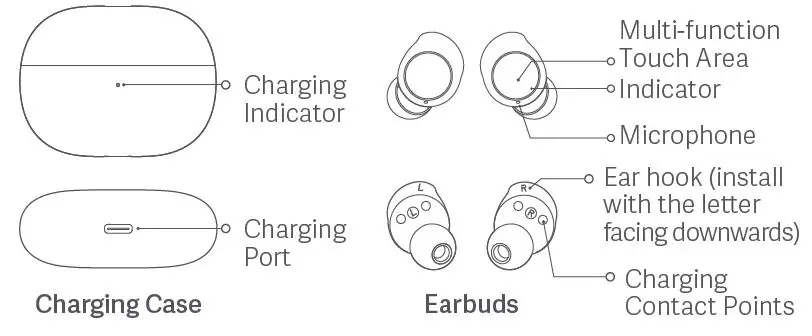
Charging
- Before use, please remove the protective film from the contact points on both earbuds and fully charge the charging case and the buds.
- Connect the charging cable to the charging case and keep the earbuds inside the case to charge simultaneously.
- When the charging case is not fully charged, its indicator is white. When it is fully charged, its indicator is off.
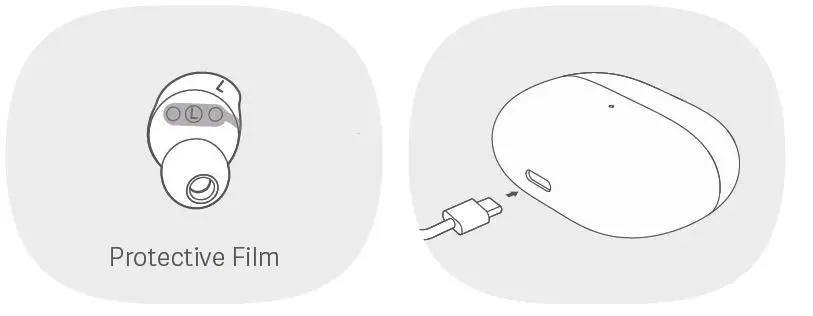
Turning On Make sure the charging case is not out of battery with earbuds in it. The earbuds will automatically turn on when removed from the charging case. Turning Off
- Make sure the charging case is not out of battery. Place both earbuds in the charging case and the indicators on them will turn white. The earbuds will automatically disconnect and start charging, and turn off once being fully charged.
- When the earbuds enter the pairing state and are out of the charging case, they will be automatically turned off if not connecting to any device within 10 minutes.
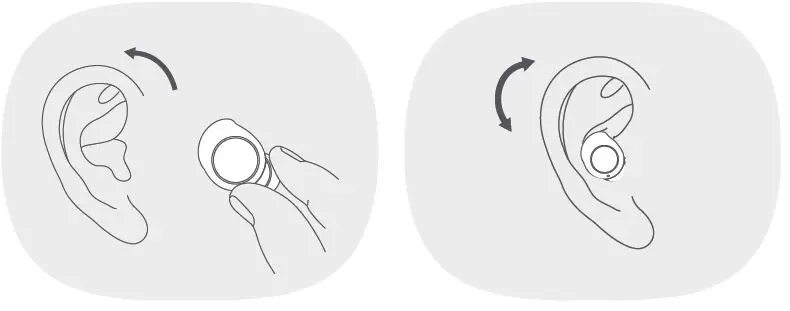
Wearing
- Gently place the earbud into your ear canal, then adjust it to a comfortable position.
- During calls, make sure to point the primary microphone towards your mouth for clearer calls. Note: The M-size ear tips and L-size ear hooks are pre-installed on the earbuds. If they are not suitable, please replace them with a proper size.
Connection
First time connection Open the lid and take out the earbuds. When the indicators on both earbuds slowly blink white, it means the earbuds can be connected. Enable the Bluetooth function on your phone, and then search and tap “Redmi Buds 3 Lite” to connect the earbuds. Note: If the earbuds cannot be connected, place them back into the charging case, close the lid and repeat the above operation. Connecting to other devices Disable the Bluetooth connection of the paired phone or reset the earbuds to connect to other devices.
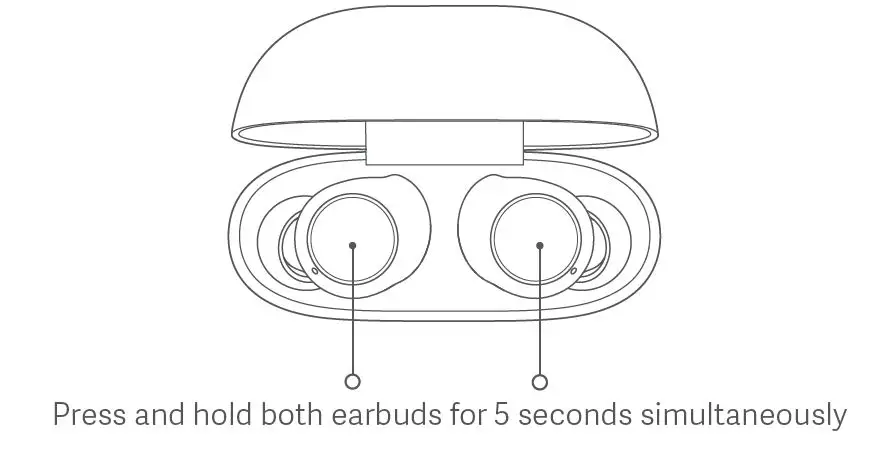
Reset Earbuds
If the earbuds cannot connect properly, please carry out the following steps to reset them. Make sure the charging case is not out of battery before reset. Open the lid of the charging case and place both earbuds in the case. Press and hold the multi-function touch areas on both earbuds for at least five seconds and then release. Indicators on both earbuds will blink white three times, indicating the earbuds have been reset successfully. (The connection records between the left and right earbuds, and the earbuds and the phone have been cleared.)
Function Overview
Answer/End calls Double tap the left/right earbud’s multi-function touch area to answer a call; and tap the left/right earbud’s multi-function touch area three times to decline or hang up the call. Play/Pause music Press and hold the left/right earbud’s multi-function touch area to pause/play the audio. Play next track When playing audio, double tap the earbud’s multi-function touch area to play the next track. Answer a second call Double-tap the left/right earbud’s multi-function touch area to put the ongoing call on hold and answer the incoming call. After answering the second incoming call, double-tap the multi-function touch area to switch between the two calls. And tap the left/right earbud’s multi-function touch area three times to hang up the current call and answer the call on hold. Wake up the phone’s voice assistant When wearing the earbuds (not during a call), tap the multi-function touch area three times to wake up the voice assistant.* * The device connected to the earbuds needs to support the voice assistant function. Switch between single/dual bud mode When both buds are connected successfully, they are in dual-bud mode. If place one of the buds back into the charging case and close its lid, the other bud will automatically enter the single-bud mode. When removing the second bud from the charging case, the dual-bud mode will automatically be restored again. Automatic connection Once the earbuds are taken out of the charging case, they will automatically connect to the most recently used Bluetooth device. If the earbuds are not connected to any device, they will automatically enter the awaiting connection mode. Disconnected When the device’s Bluetooth is disabled or when it manually disconnects from the earbuds, the earbuds will automatically enter the awaiting connection state. If no device is connected within 10 minutes, the earbuds will turn off automatically. Low latency mode When the earbuds are connected to the phone (not during a call), simultaneously press and hold the multi-function touch areas of the left and the right earbuds to enable the low latency mode. Once the low latency mode is enabled, simultaneously press and hold the multi-function touch areas of the left and the right earbuds or put both earbuds into the charging case to disable the low latency mode. Note: Once the weather is cold outdoors and your hands become dry, the buds may not function when touching them.
Specifications
Name: Wireless Earphones Model: M2110E1 Frequency Band: 2402–2480 MHz Max RF Output Power: < 20 mW Earbuds Dimensions: 24.5 × 16.7 × 24.6 mm Wireless Range: 10 m (in an obstacle-free environment) Input: 5 V=50 mA Wireless Connectivity: Bluetooth® 5.2 Charging Case Model: M2110E1 Dimensions: 60 × 46 × 23.7 mm Input: 5 V=300 mA Output: 5 V=150 mA Storage Temperature: 0 °C to 45 °C Operating Temperature: 0 °C to 45 °C Service Life: 1 year
Important Safety Information
- The product has a built-in battery that can not be removed or replaced. To avoid damage to the battery or the product, do not disassemble or modify the battery by yourself. The battery can only be replaced by the authorized service providers and must be replaced with the same type. Replacement of a battery with an incorrect type may defeat a safeguard (such as catching fire, explosion and leakage of corrosive electrolyte). Do not dispose of used batteries with household waste. Disposal of this product and the used batteries shall comply with local laws and regulations.
- Do not attempt to disassemble, repair or modify the product, as this may cause fire or even completely damage the product.
- Keep the product’s indicator away from the eyes of children and animals while the product is in use.
- Do not disassemble, puncture or crush the product nor expose it to fire.
- Please stop using the product immediately and seek medical assistance if the contact area on your skin shows signs of redness or swelling.
- To prevent possible hearing loss, do not use high volume for long periods of time.
- This product is not a toy and may contain small parts. Please keep them out of the reach of children.
- Disposal of a battery into fire or a hot oven or water or other liquids or mechanically crushing or cutting of a battery, that can result in an explosion.
- Leaving a battery in an extremely high temperature surrounding environment that can result in an explosion or the leakage of flammable liquid or gas.
- A battery subjected to extremely low air pressure that may result in an explosion or the leakage of flammable liquid or gas. Product information and certification marks are located in the Charging Case. = The symbol indicates DC voltage.
The Bluetooth® word mark and logos are registered trademarks owned by Bluetooth SIG, Inc. and any use of such marks by Xiaomi Inc. is under license. Other trademarks and trade names are those of their respective owners. EU DECLARATION OF CONFORMITY Hereby, Dongguan Yingsheng Electronic Technology Co., Ltd. declares that the radio equipment type M2110E1 is in compliance with Directive 2014/53/EU. The full text of the EU declaration of conformity is available at the following internet address: http://www.mi.com/global/service/support/declaration.html WEEE Information All products bearing this symbol are waste electrical and electronic equipment (WEEE as in directive 2012/19/EU) which should not be mixed with unsorted household waste. Instead, you should protect human health and the environment by handing over your waste equipment to a designated collection point for the recycling of waste electrical and electronic equipment, appointed by the government or local authorities. Correct disposal and recycling will help prevent potential negative consequences to the environment and human health. Please contact the installer or local authorities for more information about the location as well as terms and conditions of such collection points. UK CA Hereby, Dongguan Yingsheng Electronic Technology Co., Ltd. declares that the radio equipment type M2110E1 is in compliance with Radio Equipment Regulations 2017. The full text of the UKCA declaration of conformity is available at the following internet address: https://www.mi.com/uk/service/support/declaration.html
FC
This device complies with part 15 of the FCC Rules. Operation is subject to the following two conditions: (1) This device may not cause harmful interference, and (2) this device must accept any interference received, including interference that may cause undesired operation. Any Changes or modifications not expressly approved by the party responsible for compliance could void the user’s authority to operate the equipment. Note: This equipment has been tested and found to comply with the limits for a Class B digital device, pursuant to part 15 of the FCC Rules. These limits are designed to provide reasonable protection against harmful interference in a residential installation. This equipment generates uses and can radiate radio frequency energy and, if not installed and used in accordance with the instructions, may cause harmful interference to radio communications. However, there is no guarantee that interference will not occur in a particular installation. If this equipment does cause harmful interference to radio or television reception, which can be determined by turning the equipment off and on, the user is encouraged to try to correct the interference by one or more of the following measures:
- Reorient or relocate the receiving antenna.
- Increase the separation between the equipment and receiver.
- Connect the equipment into an outlet on a circuit different from that to which the receiver is connected.
- Consult the dealer or an experienced radio/TV technician for help.
This equipment complies with FCC/ISED radiation exposure limits set forth for an uncontrolled environment. End user must follow the specific operating instructions for satisfying RF exposure compliance. This transmitter must not be co-located or operating in conjunction with any other antenna or transmitter.
- The portable device is designed to meet the requirements for exposure to radio waves established by the ISED. These requirements set a SAR limit of 1.6 W/kg averaged over one gram of tissue.
This device contains license-exempt transmitter(s)/receiver(s) that comply with Innovation, Science and Economic Development Canada’s licence-exempt RSS(s). Operation is subject to the following two conditions:
- This device may not cause interference.
- This device must accept any interference, including interference that may cause undesired operation of the device.
FCC ID: 2A3OD-M2110E1 IC: 27978-M2110E1 CAN ICES-003(B)/NMB-003(B) Complles With IMDA Standards DB106135 Manufactured for: Xiaomi Communications Co., Ltd. Manufactured by: Dongguan Yingsheng Electronic Technology Co., Ltd. (a Mi Ecosystem company) Address: Suite 204, 4th Block, No. 86 Hongtu Road, Nancheng District,Dongguan, Guangdong, China. For further information, please go to www.mi.com User Manual Version: V1.0
FAQS
What’s in the box?
wireless earbuds 3 lite
Do they work with iphone?
Yes, they work perfectly with iPhone.
Do these bluetooth wireless earbuds work with all iPhones?
Yes it is . It’s easy to connect with all phone iPad and tablet as well.
iOS compatibility?
100 % compatibility
Son originales?
Yes, it is original. It has a code in the box. You can validate it in official Xiaomi site.
How clear are calls to the person you’re talking to?
Really good quality of voice, it have call noise cancellation
Are these also used for talking?
Yes! They have microphones but don’t work well. If you’re inside they are just fine, outside not that good and get worse when it is windy! But for the price I think that they are awesome buds! $20 and they sound reasonable good!
can u use just one in one ear?
Yes
Do these come with charging cord?
Yes, they come with a roughly 6″ USB cable. Note that the case holds a charge and can recharge the pods. So you plug the cable into the case and the pods charge in the case.
Are these real xiaomi?
Yes
Is redmi buds 3 good?
The Xiaomi Buds 3 are what I’d call a mid to high-end device. These earphones deliver high-quality audio with sound that’s well represented on the entire frequency range, from low to mid and high frequencies. In short, they sound really well.
Does redmi buds 3 Lite have noise Cancelling?
Noise cancellation for callsHigh-resolution audio for calls and anti-interference technologyEnjoy seamless, clear calls with effective anti-interference technology. Redmi Buds 3 Lite uses a noise-reduction algorithm to identify and extract human voices and reduce background noise, ensuring clarity for your calls.
Is Redmi Buds 3 waterproof?
IP54 dust and water resistantAdvanced protection features, there when you need themThe earbuds of the Redmi Buds 3 have been expertly designed to meet IP54* dust and water resistance standards (level 5 dustproof and level 4 water-resistant), making the earbuds safe from spills and sweat.
How do you know if redmi buds 3 Lite is fully charged?
Connect the charging cable to the charging case and keep the earbuds inside the case to charge simultaneously. When the charging case is not fully charged, its indicator is white. When it is fully charged, its indicator is off.
What is TWs?
It’s called True Wireless Stereo (TWS), and it’s a unique Bluetooth feature that will let you enjoy true stereo sound quality without the use of cables or wires. TWS works as follows: You pair a primary Bluetooth speaker to your preferred Bluetooth-enabled audio source.
Does redmi buds 3 Lite have mic?
Xiaomi True Wireless Earbuds Redmi Buds 3 lite, Bluetooth 5.2 Low Latency Headphones Waterproof Stereo Earphones in Ear Touch Control Headset with Mic Deep Bass for Sport, Gaming and Running, Black.
Does Redmi Buds 3 have wireless charging?
With fast charging, the earphones can charge for just 10 minutes and then allow you to listen to music for up to 3 hours. If the battery is running low, take a short break and let it power up. The charging case also supports Qi wireless charging, making charging super convenient.
Is higher TWS better?
Bigger size in dynamic drivers almost always means a more vigorous, immersive listening experience especially in the bass frequency range. A dynamic driver with 14.2mm diameter outshines an absolute majority of current TWS models on the market.
How long does redmi buds 3 take to charge?
Actual time may vary depending on usage conditions. *10-minute fast charge requires the charging case to have at least 20% battery life remaining. Use your earbuds for up to 90 minutes after a 10-minute fast charge. Tested using advanced audio coding (AAC) at 50% volume.
What is latency earbuds?
In computing terms, Latency simply means a delay. A delay in audio in comparison to the video. The device connected to your earbuds, speakers, or headphones transmits a sound. Now the delay in receiving and playing that sound is latency.
Which is better earbuds or AirPods?
Bluetooth earbuds can last for 6hrs of listening time per single charge and about 12 hours when charging. I recommend Airpods if you like listening to music or podcasts for a prolonged period of time because they provide a better listening experience overall.
Is TWS a good brand?
They are just like the airpods, have excellent battery life and sound quality, along with a nice little battery case.
How do you increase bass in TWS?
All you have to do is pull the current rubber tip off and put another on it. You know when you have the right-sized ear tip when it’s comfortable for you, and you hear a noticeably better sound. When you have the right size, you can feel the bass a bit.
Is 50 ms latency good?
In gaming, any amounts below a ping of 20 ms are considered exceptional and “low ping,” amounts between 50 ms and 100 ms range from very good to average, while a ping of 150 ms or more is less desirable and deemed “high ping.”
www.mi.com