
Razer
Loading…
A
- ABYSSUS 1800dpi
- Abyssus 20002
- Abyssus 3.5G
- Abyssus Essential2
- Abyssus Mirror
- ABYSSUS MIRROR SPECIAL EDITION
- Adaro3
- Adaro DJ2
- Adaro Stereo2
- Adaro Wireless
- Anansi4
- ARCTOSA3
- ATHERIS3
- Atrox2
B
- Banshee StarCraft 2
- Banshee StarCraft II
- Barracuda
- BARRACUDA HP-1
- Base Station Chroma
- Basilisk2
- Basilisk Mercury
- Basilisk Quartz
- Basilisk Ultimate
- Basilisk X
- BlackShark3
- BlackShark V22
- Blackshark V2 Pro
- BLACKWID GRE SWITCH
- BlackWidow4
- BlackWidow 20132
- BlackWidow 2014
- BlackWidow Chroma3
- BlackWidow Elite2
- BlackWidow Stealth
- BlackWidow Stealth 2013
- BlackWidow Stealth Edition
- BlackWidow Stealth Edition 2013
- BlackWidow Tournament 2014
- BlackWidow Tournament Chroma
- BlackWidow Tournament Edition2
- BlackWidow Tournament Edition Chroma V22
- BlackWidow Tournament SE Stealth
- BlackWidow Tournament Stealth Edition3
- BlackWidow Ultimate3
- BlackWidow Ultimate 20132
- BlackWidow Ultimate 2017
- BlackWidow Ultimate Stealth
- BlackWidow Ultimate Stealth 2013
- BlackWidow Ultimate Stealth Edition
- BlackWidow V32
- BlackWidow V3 Pro
- BlackWidow V3 Tenkeyless2
- BlackWidow X Chroma3
- BlackWidow X Tournament
- Blackwindow Tournament
- Blackwindow Ultimate
- Blackwindow X Tournament
- Blade4
- Blade 142
- Blade 14″» (2013)
- Blade 173
- Blade 17″» (2012)
- Blade Pro 177
- Blade Pro 17″» (2013)
- Blade Pro RZ09-0220
- Blade RZ09-02385
- Blade RZ09-02386
- Blade Stealth RZ09-0168
- Book 13
- BOOMSLANG
- Boomslang 1000
- Boomslang 2000
- Boomslang 2007
C
- Carcharias5
- CASQUE GAMING KRAKEN PRO VERT
- Chimaera3
- Chimaera 5.13
- Chroma2
- CHROMA HDK
- COPPERHEAD8
- Cyclosa2
- Cynosa Chroma2
- Cynosa Chroma Pro
- Cynosa Pro
- Cynosa V2
D
- Deathadder10
- DeathAdder 20132
- DeathAdder 2013 World of Tanks
- DeathAdder 3500
- DeathAdder 3.5G
- DeathAdder 3.5G Black Edition
- DeathAdder Chroma
- DEATHADDER CHROMA GAMING2
- DEATHADDER ELITE2
- DeathAdder Essential2
- DeathAdder Expert
- DeathAdder Left Hand Edition2
- Deathstalker3
- DeathStalker Chroma3
- D.va Razer Abyssus Elite
Loading…
Loading…
Nothing found
BlackWidow V3 Pro
User Manual
28 pgs3.03 Mb0
Table of contents
Loading…
…
Razer User Manual
Download
Specifications and Main Features
Frequently Asked Questions
User Manual



Loading…
+ 19 hidden pages
You need points to download manuals.
1 point = 1 manual.
You can buy points or you can get point for every manual you upload.
Buy points
Upload your manuals
Manual
View the manual for the Razer BlackWidow V3 Pro here, for free. This user manual comes under the category keyboards and has been rated by 2 people with an average of a 9.1. This manual is available in the following languages: English. Do you have a question about the Razer BlackWidow V3 Pro?
Ask your question here
Razer BlackWidow V3 Pro specifications
Below you will find the product specifications and the manual specifications of the Razer BlackWidow V3 Pro.
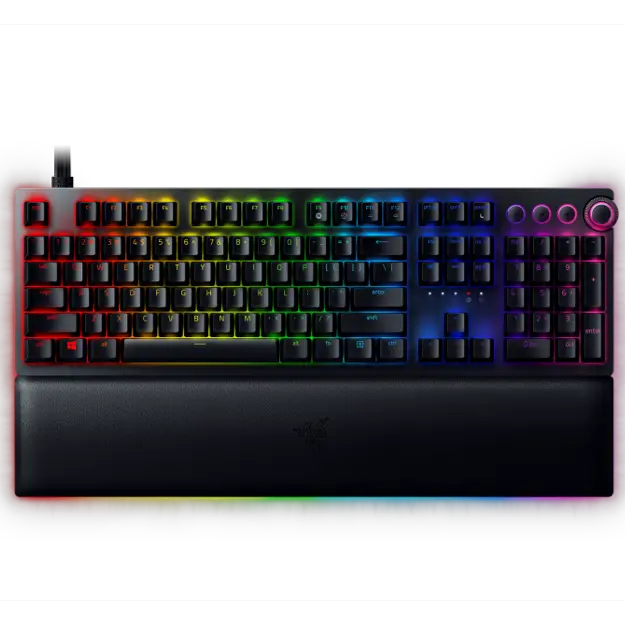
The Razer BlackWidow V3 Pro is a mechanical keyboard designed for gaming purposes. This device can be connected through USB or Bluetooth connections, providing a versatile range of options for users. Despite the keyboard language being listed as French, it is likely that English can still be chosen as an input language. The keyboard features Razer Green key switches, which are known for their tactile and audible feedback, enabling quick and precise responses during intense gaming sessions. Multimedia keys are included, allowing for easy access to volume level controls and music playback. The numeric keypad is also available, providing a seamless experience for users who work with numbers regularly. The backlight of the keyboard is LED, which is known for producing vibrant and crisp colors. Additionally, the keyboard is equipped with built-in memory, which allows users to save customized settings and access them later. The keyboard operates on a frequency band of 2.4 GHz, ensuring a stable and fast wireless connection. Overall, the Razer BlackWidow V3 Pro is a reliable and durable mechanical gaming keyboard that offers a range of features to cater to different user preferences.
Power source type
Battery, USB
Number of products included
1 pc(s)
Harmonized System (HS) code
84716060
General
| Brand | Razer |
| Model | BlackWidow V3 Pro | RZ03-03530500-R3F1 |
| Product | keyboard |
| EAN | 8886419345336 |
| Language | English |
| Filetype | User manual (PDF) |
Keyboard
| Recommended usage | Gaming |
| Device interface | USB + Bluetooth |
| Keyboard key switch | Mechanical |
| Keyboard layout | — |
| Keyboard language | French |
| Pointing device | No |
| Keyboard form factor | Full-size (100%) |
| Numeric keypad | Yes |
| Keyboard key switch technology | Razer Green |
| Multimedia keys | Yes |
| Frequency band | 2.4 GHz |
| Built-in memory | Yes |
Design
| Backlight | Yes |
| Backlight type | LED |
| Backlight colour | Multicolour |
| Adjustable backlight | Yes |
| Keyboard style | Straight |
| Wrist rest | No |
| Product colour | Black |
| Material | Acrylonitrile butadiene styrene (ABS), Aluminium, Leatherette |
| LED indicators | Yes |
Power
| Power source type | Battery, USB |
Mouse
Packaging content
| Number of products included | 1 pc(s) |
Logistics data
| Harmonized System (HS) code | 84716060 |
show more
Frequently asked questions
Can’t find the answer to your question in the manual? You may find the answer to your question in the FAQs about the Razer BlackWidow V3 Pro below.
How can I best clean my keyboard?
A slightly damp cleaning cloth or soft, dust-free cloth works best to remove fingerprints. Dust in hard-to-reach places is best removed with compressed air.
Is the manual of the Razer BlackWidow V3 Pro available in English?
Yes, the manual of the Razer BlackWidow V3 Pro is available in English .
Is your question not listed? Ask your question here
FAQ
At a Glance: Razer BlackWidow V3 Pro
The BlackWidow V3 | RZ03-03530 Pro is Razer’s first wireless mechanical gaming keyboard. It has all, with wireless HyperSpeed connectivity, media keys, and a wrist rest. The BlackWidow Pro is for those who want a feature-packed mechanical keyboard.
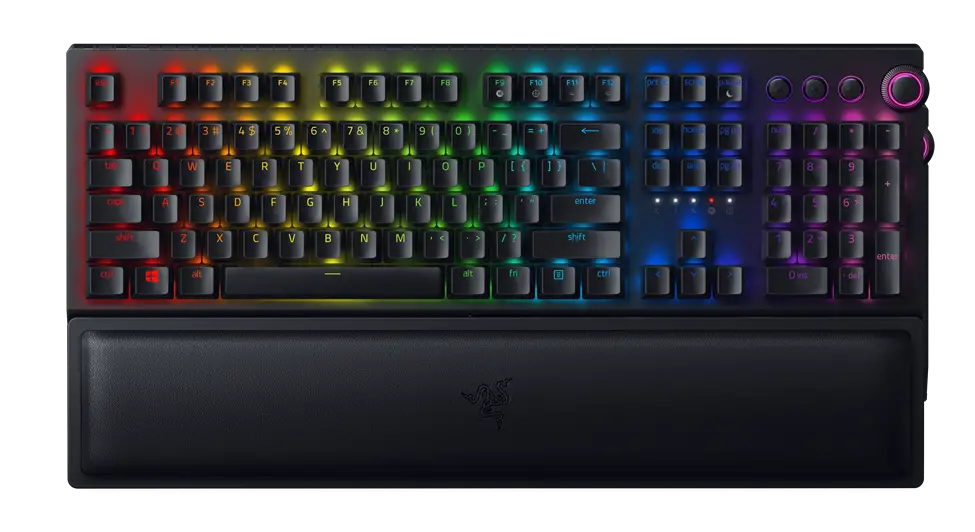
Device Layout
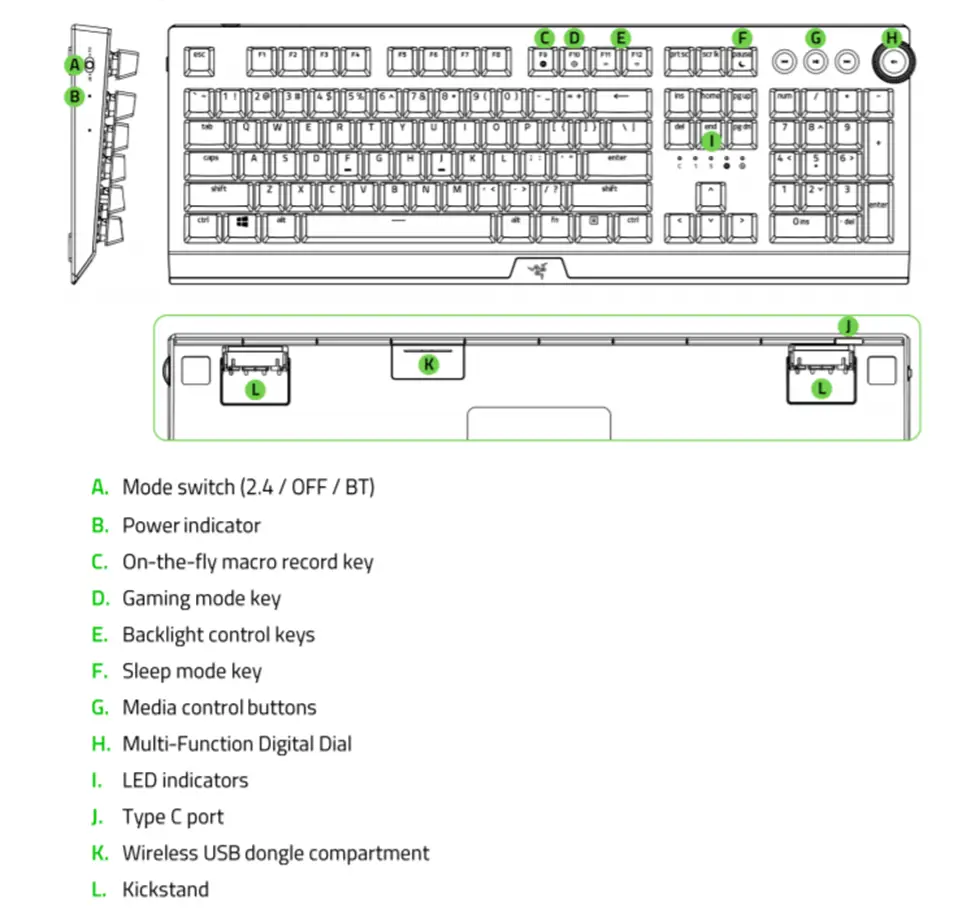
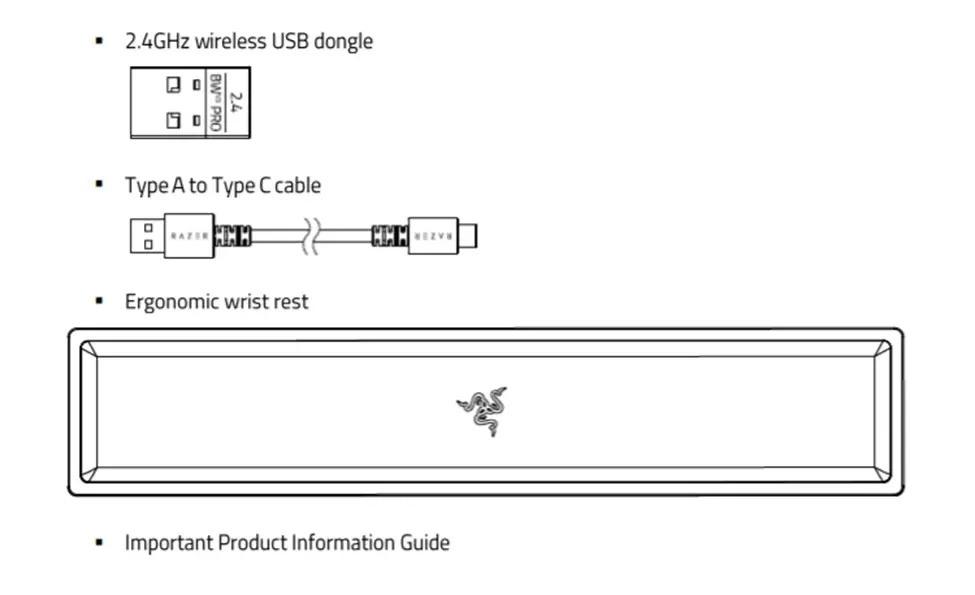
Technical Specifications
| Keyboard Type | Wireless Full-sized Mechanical Keyboard |
| Design | Aluminum top cover |
| Available switch type(s) | Razer™ Green Mechanical Switch with transparent switch housing
Razer™ Yellow Mechanical Switch with transparent switch housing |
| Switch Lifespan | 80 million clicks |
| Keycaps | Doubleshot ABS keycaps |
| Connectivity | HyperSpeed Wireless 2.4GHz, Bluetooth, and USB-C cable |
| Wireless Response Rate | 1ms |
| Battery Life |
|
| Backlighting |
|
| Key Roll-over | N-key Rollover |
| Fully Programmable Keys | Yes |
| Synapse | Synapse 3 |
| Onboard memory | 5 profiles |
| 1000Hz Ultrapolling | No |
| Additional Game Keys | No |
| Audio Pass-Through | No |
| Dedicated Media Controls | 4 + Digital dial |
| USB Pass-Through | No |
| Wrist Rest | Yes |
| Cable Type | 2m Detachable braided fiber cable |
| Approx. Dimension LxWxH (mm) | 450.70 mm x 248.40 mm x 42.30 mm |
| Approx. Weight (grams) | 1423 |
Why am I unable to connect my Razer BlackWidow V3 Pro to Windows 7 system via Bluetooth?
Windows 7 does not support Bluetooth 4.0 and higher versions. Please click here to learn more.
How long will the Razer BlackWidow V3 Pro’s battery last?
The battery can last up to 200 hrs. with backlighting turned off. With backlighting turned on, the battery life depends on the lighting effects and brightness of your backlighting. Below are examples of average battery life with backlighting:
- White backlight at 50% brightness is up to about 14hrs
- Spectrum cycling backlight at 50% brightness is up to about 25hrs
- White backlight at 100% brightness is up to about 6hrs
- Spectrum cycling backlight at 50% brightness is up to about 13hrs
Why is the lighting effect on the Razer BlackWidow V3 incomplete while on Bluetooth?
Due to inherent bandwidth limitation over Bluetooth, Razer Studio lighting effects, Audio Visualizer, and On-board memory will only be available over 2.4GHz and wired connection.
Only the following quick lighting effects are available while on Bluetooth connection:
- Breathing
- Static
- Wave
- Spectrum Cycling
- Reactive
- Starlight
Where can I find the 2.4GHz USB dongle?
The 2.4GHz USB dongle is stored in the dongle compartment behind the keyboard.
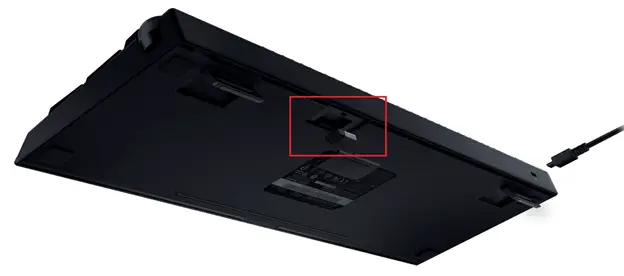
How do I clean my Razer Keyboard?
Before cleaning, we suggest unplugging the device from your computer. If you wish to clean under the keycaps, Razer suggests holding the unit upside down and/or using compressed air from a can. The overall finish can be cleaned with wipes generally used for cleaning your computer monitor or sunglasses. Please ensure that the surface is free of large dust particles or debris before wiping the surface with any product. Wiping debris into the surface can lead to minor scratches on the surface of the unit.
Note: Under no circumstances should you ever submerge the keyboard in any type of liquid. Submerging the keyboard in any liquid will void the warranty on your keyboard.
How To
How to add a device to a multi-device dongle
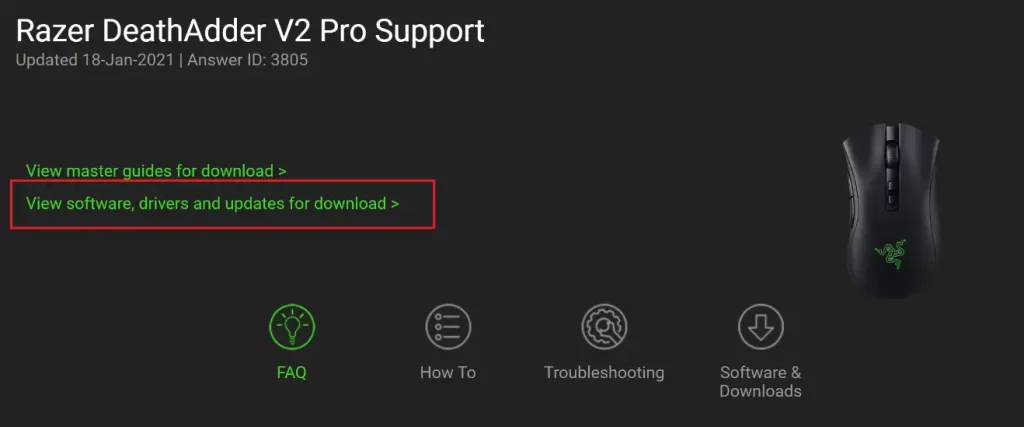
To add a device to the multi-device dongle, follow the steps below:1. Launch Synapse 3 and go to your device’s profile. If your device is not on the latest firmware, you will be prompted for an update.
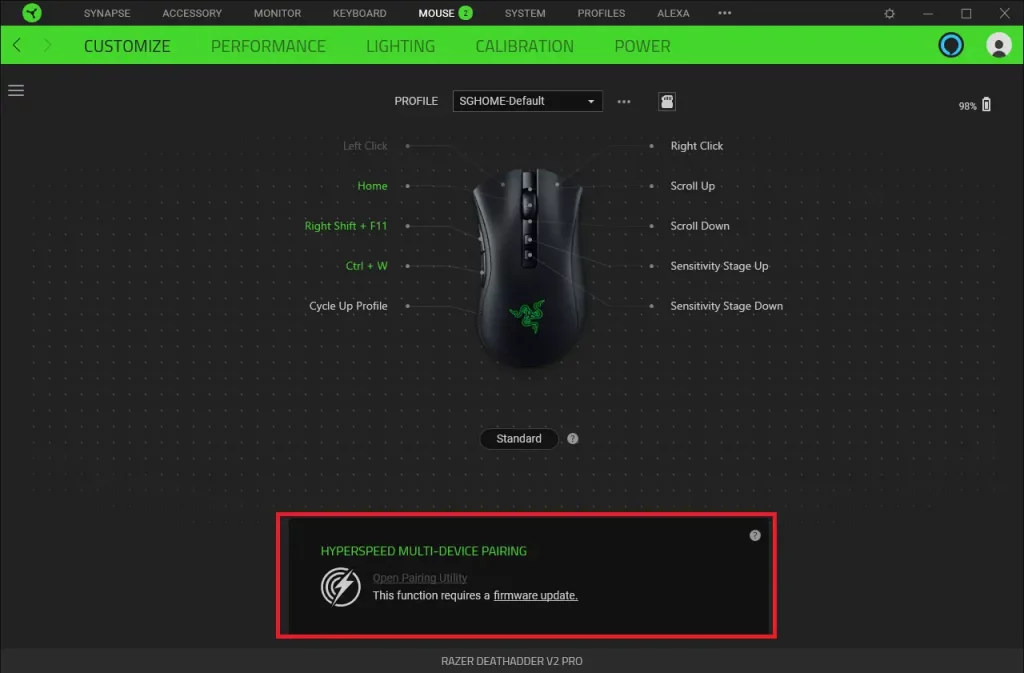
2. Update your device to the latest firmware. Visit Razer Support to check for firmware updates and make sure to download and install them on your device.
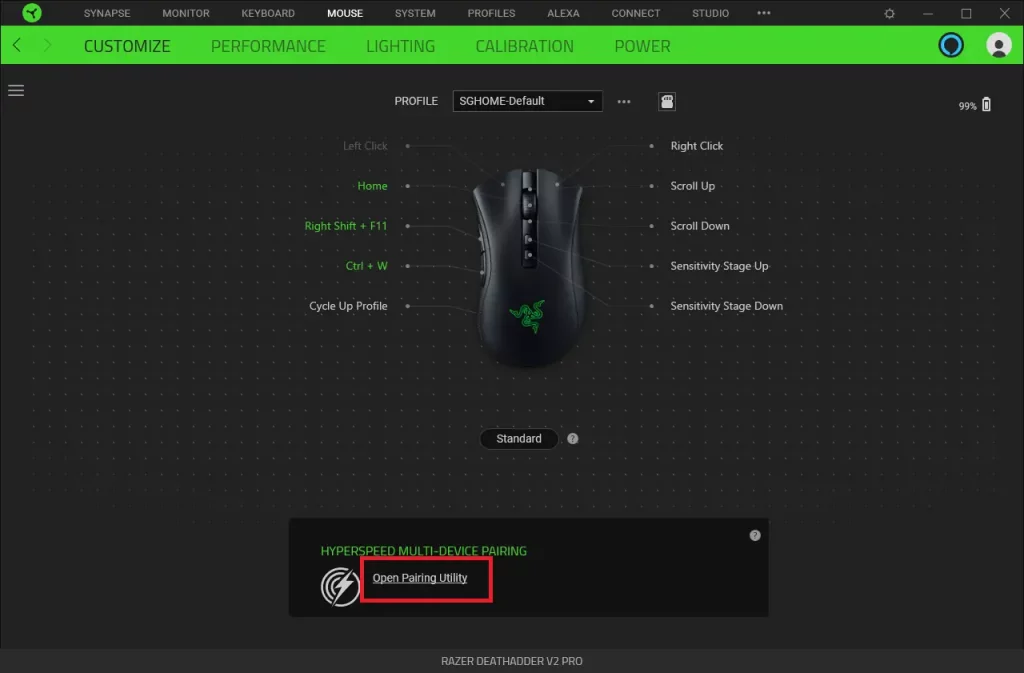
3. Click on “Open Pairing Utility”.
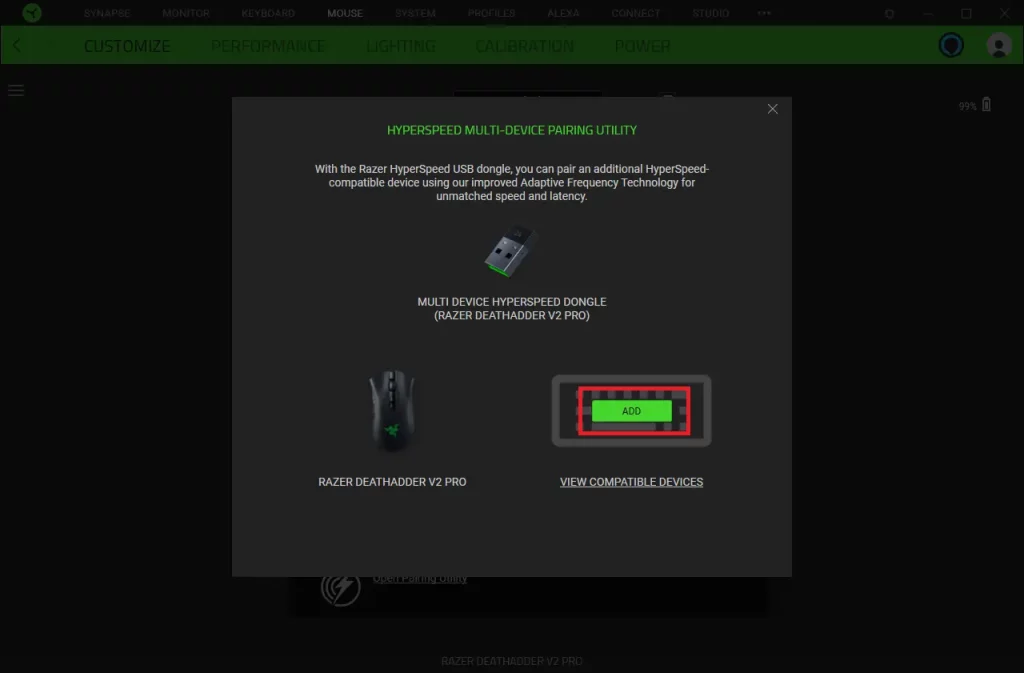
4. Click the “ADD” button to start scanning for a device.
5. Set the compatible device switch to Hyperspeed (2.4G) mode. Press and hold any key on the device you want to pair for it to remain discoverable. Wait while scanning is in progress.
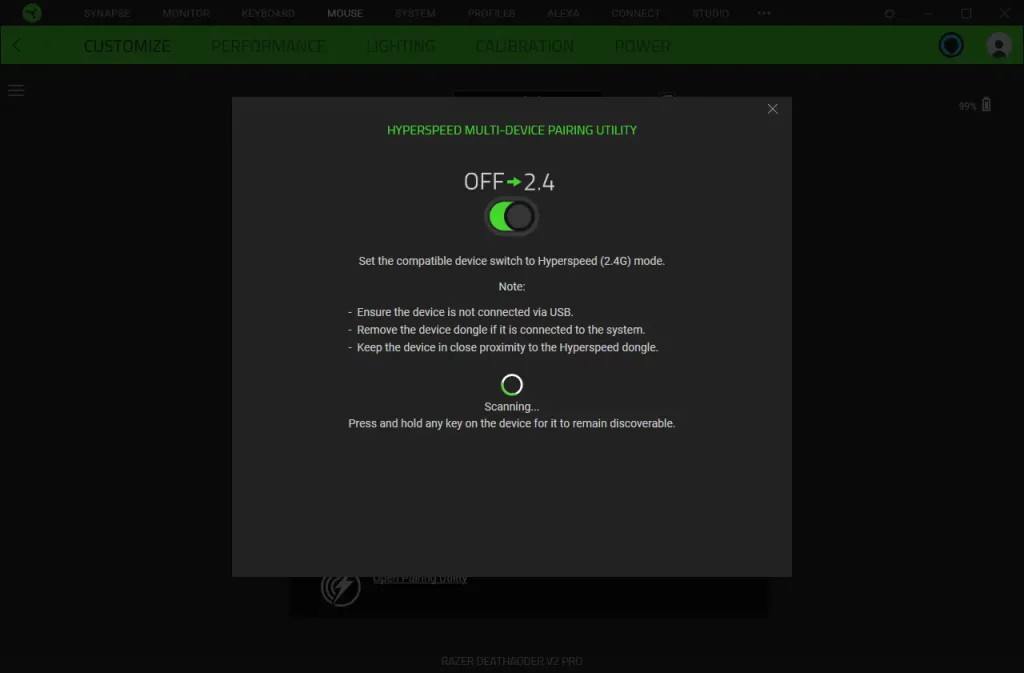
Notes:
- Ensure the device is not connected via USB cable
- Remove the additional device’s USB dongle if it is connected to the system
- Keep the device in close proximity to the Hyperspeed dongle
6. As soon as your device is found, click “PAIR”.
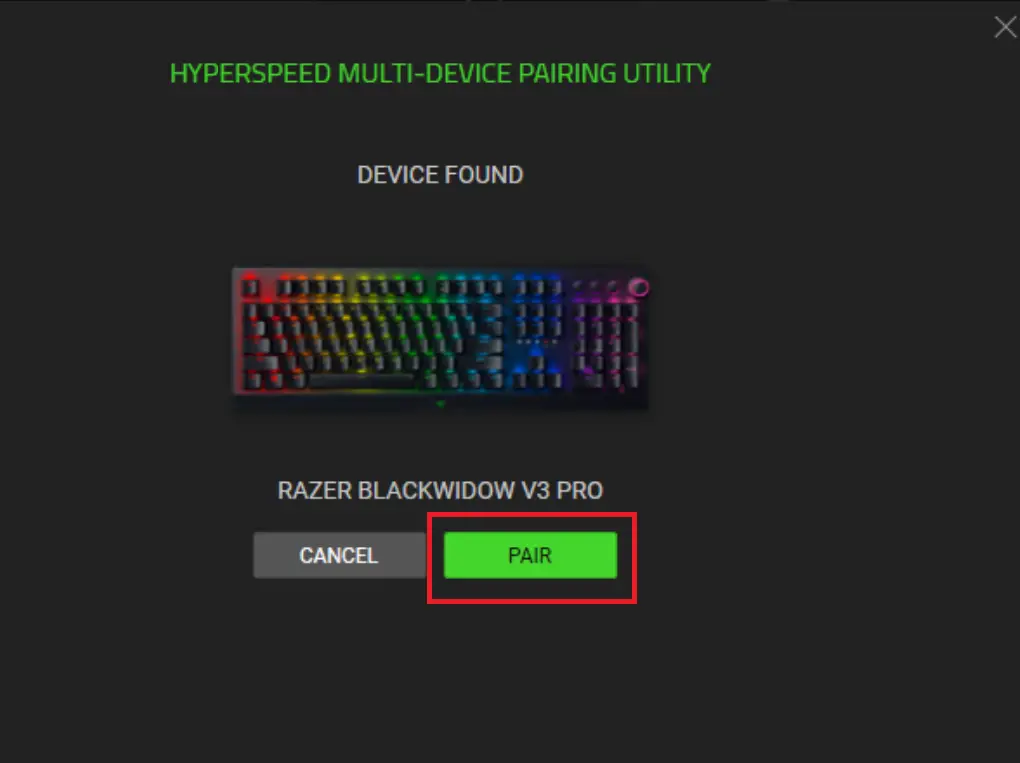
The additional paired device will now be visible.
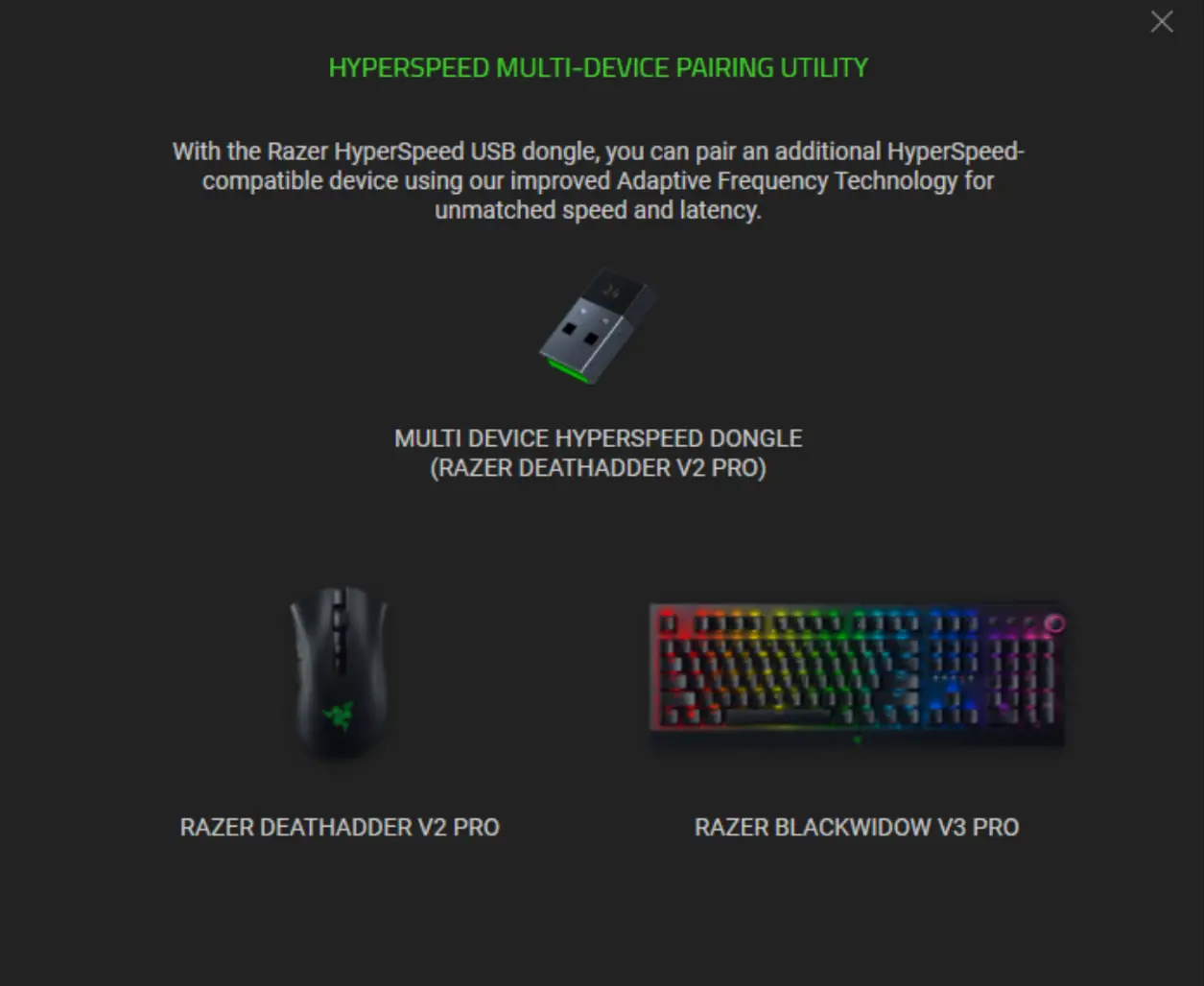
Troubleshooting
When the keyboard is paired to my laptop via Bluetooth, the connection intermittently cuts in and out. How do I fix this?
Try updating your Intel drivers by visiting: https://www.intel.com/content/www/us/en/support/intel-driver-support-assistant.html
Razer BlackWidow V3 Pro Master Guide
Pages
28
Year
2020
Language(s)
en
Share
of 28
of 28
Page 4
Page 5
Page 6
Page 7
Page 17
Page 18
Page 19