
ENGLISH
1
ENGLISH
RADIO CLOCK
Before connection, usage and adjustment
read the instruction attentively. It is necessary to observe all preventions and recommendations about operation of the device
given in this manual.
Keep the present operation manual and use
it further as a reference material.
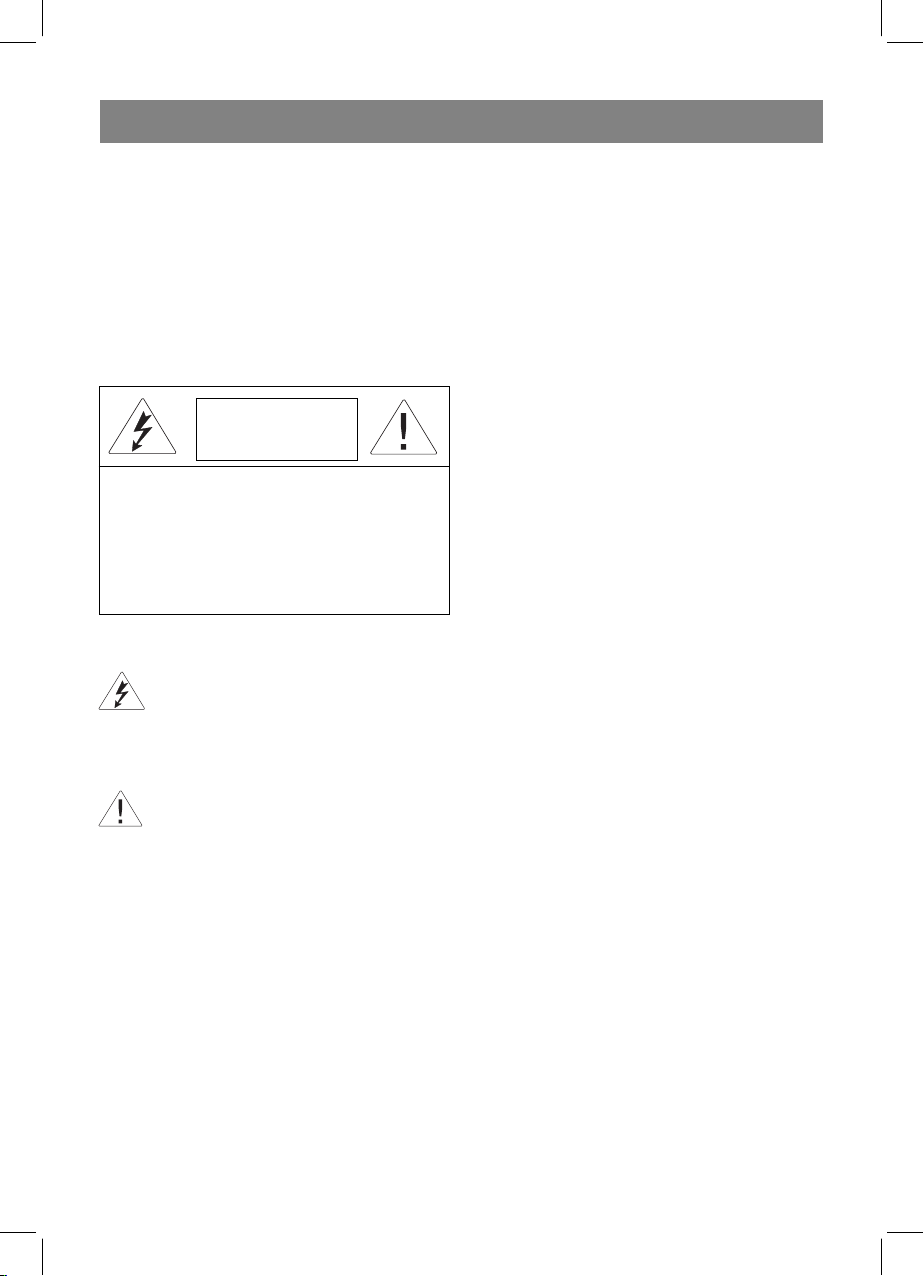
ATTENTION!
RISK OF ELECTRIC SHOCK
DO NOT OPEN
Warning: To prevent fire or shock hazard do not
expose the appliance to rain or moisture.
To prevent shock hazard do not remove the cover
yourself. Apply to a service centre for repair and
maintenance.
This lightning flash with arrowhead
symbol, within an equilateral triangle, is
intended to alert the user to the presence
of uninsulated “dangerous voltage” within
the product’s enclosure that may be of
sufficient magnitude to constitute a risk of
electric shock to persons.
The exclamation point within an equilateral
triangle is intended to alert the user to
the presence of important operating and
maintenance (servicing) instructions in the
manual accompanying the appliance.
SAFETY MEASURES
• Make sure that the voltage specified on
the unit corresponds to the voltage in your
home socket.
• To avoid fire or electric shock do not subject the device to rain or moisture influence.
• It is forbidden to immerse the device into
the water. To avoid fire or electric shock do
not place this device in the raised humidity
conditions (near baths, basins with water,
kitchen bowls, washing machines, near to
swimming pool, in crude cellars etc.) Do
not admit drops or splashes to hit the device.
• Do not admit an overload of sockets or
extension pieces as it can lead to fire or
electric shock.
• Establish this device so that the network
wire plug could be taken out from the socket
immediately in case of malfunction.
• Disconnect the device from the electric
network for additional protection during
a thunder-storm and also when you are
not going to use it for a long time. It will
prevent a device breakdown due to the
lightning strokes or voltage jumps in the
network.
• To disconnect the network cord undertake directly a network plug, do not pull
the cord.
• To avoid an electric shock do not open
the device case yourself. Do not repair the
device and do not make changes to it. In
case of malfunctions disconnect the device from the network and address to the
authorised service centre.
• Establish the device in places with sufficient ventilation. Do not close the ventilating openings of the device.
• Do not connect the FM-antenna to the external antenna.
• Do not place the device near heat sources,
e.g. radiators, electro heaters, ovens or
other devices which are sources of heat,
and also in the places subject to the influence of direct sun rays, excessive dust,
to vibration or mechanical shocks. Do not
put the open flame sources, such as candles, on the device.
• Do not admit extraneous subjects to hit in
the device openings.
• Be especially attentive, if the device is
used by children or disabled people.
• Keep the device away from children.
• Do not allow children to use the device as
a toy.
• The device is intended only for household
usage.
DESCRIPTION
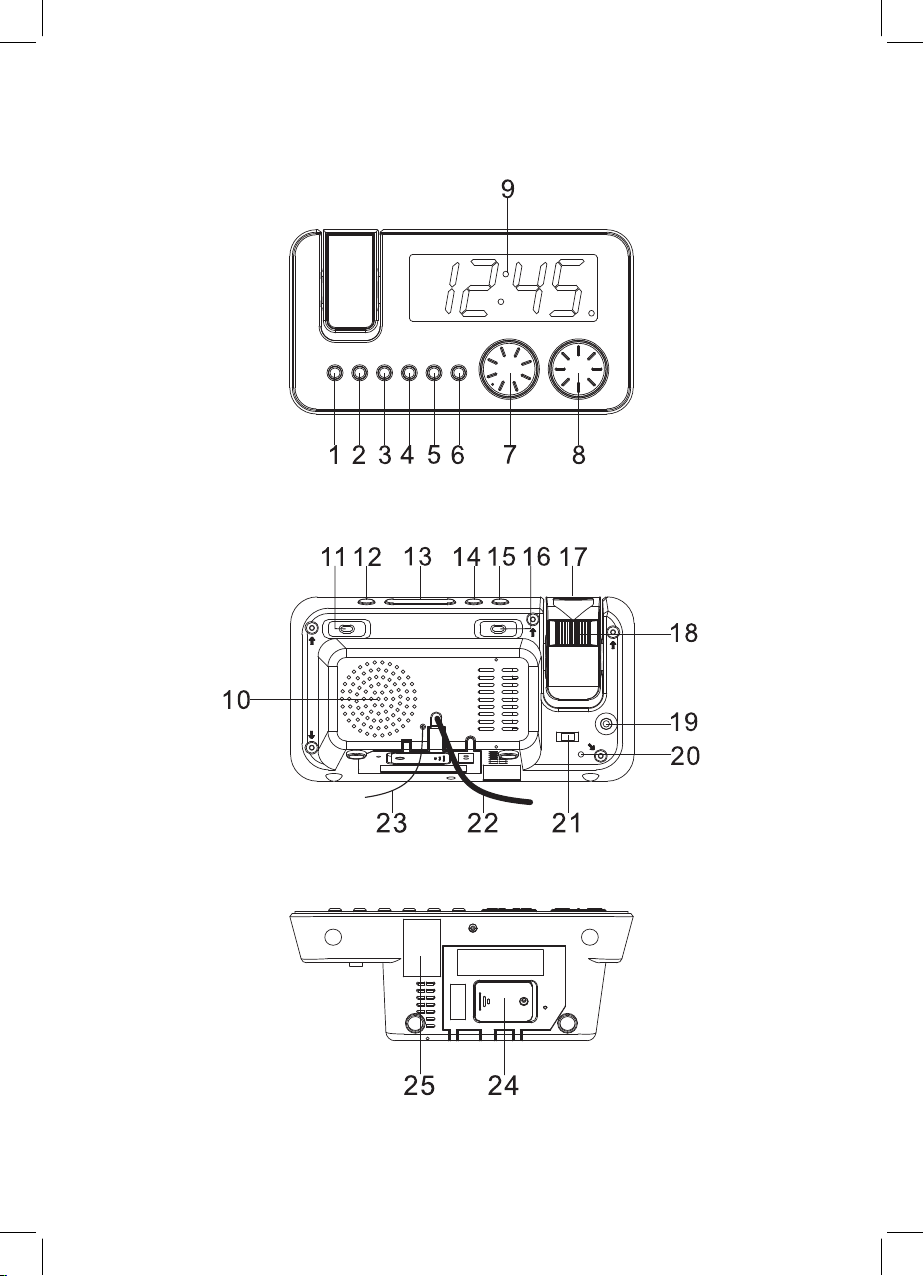
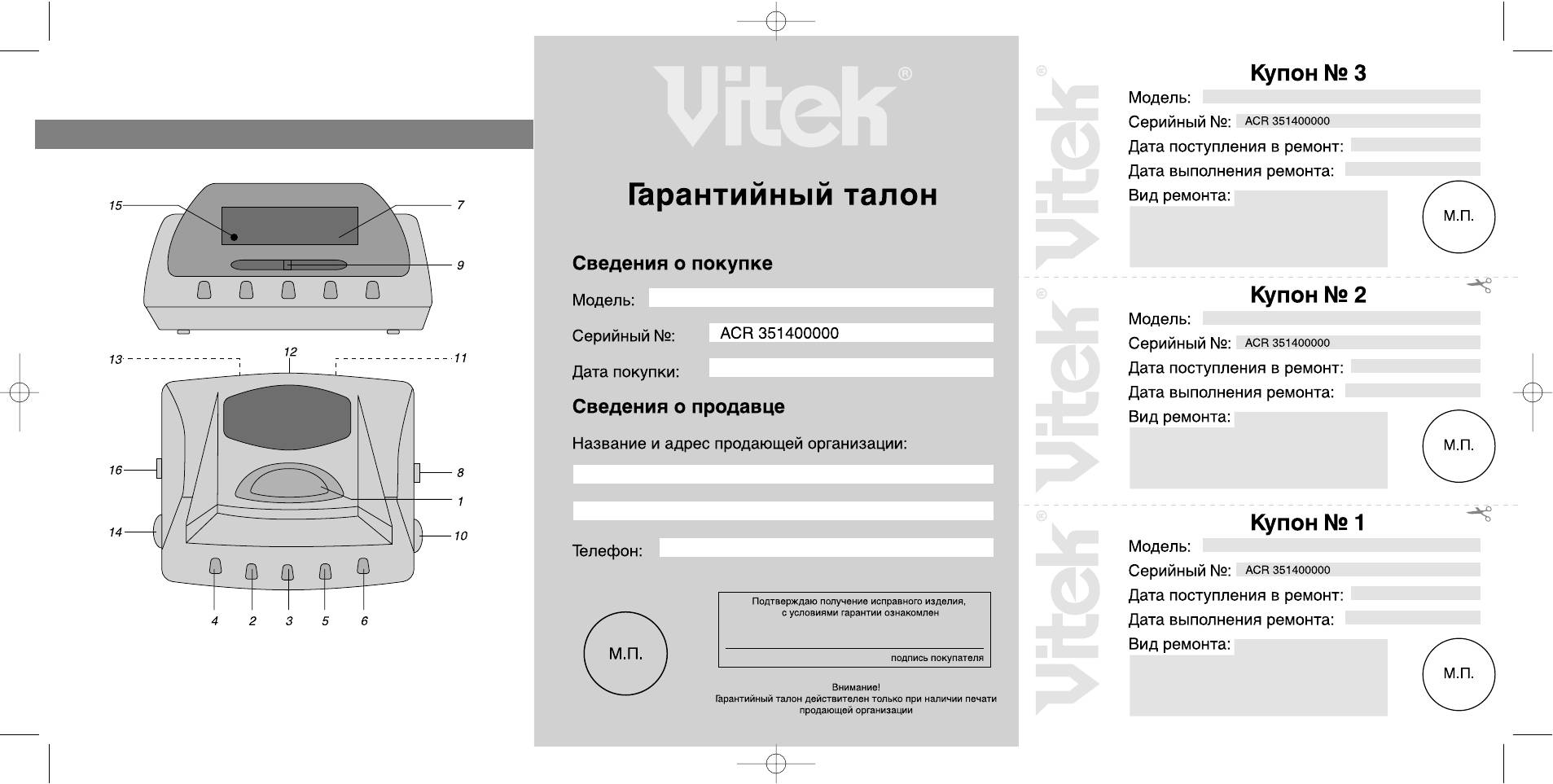
1. AL ON/OFF 1 button (of the first alarm)
2. AL.SET (and actuation time display) but-
ton
3. << /Y-M-D (year-month-day) button
4. >>/ DST(daylight saving time) button
5 MODE button
3

ENGLISH
6 AL ON/OFF 2 button (of the second
alarm)
7 VOLUME control
8 TUNING knob
9 Display
10 Speaker
11 BAND button ( FM/АМ)
12 Radio ON/OFF button
13 SNOOZE/SLEEP/NAP button
14 180° FLIP button
15 PROJECTION ON/OFF button
16 ALARM (
17 Projection
18 FOCUS control
19 AUX IN jack
20 RESET button
21 DIMMER (High/Low/Auto off) switch
22 Power cord
23 FM-antenna cord
24 Battery compartment lid
OPERATING INSTRUCTIONS
Inserting batteries
• Open the battery compartment lid and insert a 3V CR2032 battery (not supplied),
following the polarity.
• Close the battery compartment lid.
Attention! Battery leakage can lead to injuries or damages of the unit. In order to avoid
damaging of the unit follow the following instructions:
— insert the battery properly;
— remove the battery if you are not planning
to use the unit for a long time;
— do not recharge, do not dismantle, and do
not expose the battery to high temperatures;
— replace the battery in time.
Note:
The unit is intended for operation from the
mains, battery operation is a reserve option.
Batteries help to store the settings of the
current time and of the alarm in case of
power failure or absence of power. With the
preset alarm actuation time in case of power
failure when the preset time is reached you
Buzz/Radio ) switch
will hear a sound signal (even if radio is selected as alarm signal) that will be switched
off automatically in 30 seconds. To switch
off the alarm press the ON/OFF button.
Remove the battery if you are not planning to
use the unit for a long time.
Connecting the unit
Before connecting the unit, make sure, that
the electricity supply in your home sockets
corresponds to the voltage specified on the
housing of the unit.
Insert the plug into the socket and press the
RESET button, all indicator segments will be
displayed (during 2 seconds), then the unit
will switch to the current time display mode
(normal mode).
Setting the current time
In the current time mode, press and hold
the MODE button for more than 2 seconds
to enter the current time and date setting
mode.
Digits of the year will start flashing on the
display. Use the <</>> buttons to set the
year.
Press the MODE button. Digits of the month
will start flashing on the display. Use the
<</>> buttons to set the month.
Press the MODE button. Digits of the day will
start flashing on the display. Use the <</>>
buttons to set the day.
Press the MODE button. Format digits 24
hours or 12 hours will start flashing on the
display. Use the <</>> buttons to set the
time format.
Press the MODE button. Digits of the hour
will start flashing on the display. Use the
<</>> buttons to set the hour.
Press the MODE button. Digits of the minutes will start flashing on the display. Use the
<</>> buttons to set the minutes.
Note:
If during 30 seconds the <</>> buttons are
not pressed, the unit will switch back to the
current time display mode.
4

ENGLISH
Displaying the date
In the current time mode pres the << button
once to display the year, twice – to display
the date; In 5 seconds the unit will return to
the current time display mode.
Daylight saving time
Press and hold the >> button for more than
3 seconds to transfer to the daylight saving
time and back.
Setting the alarm actuation time (AL.1
and AL.2)
In the current time mode press and hold the
AL.SET button for more than 2 seconds
to enter the alarm actuation time setting
mode.
Digits of the hour will start flashing on the
display. Use the <</>> buttons to set the
hour.
Press the AL.SET button. Digits of the minutes will start flashing on the display. Use the
<</>> buttons to set the minutes.
Press the AL.SET button. Symbols of the
alarm actuation time will start flashing on the
display. Use the <</>> buttons to select the
desired mode:
1 – 5: alarm actuation from Monday to Friday;
1 -7: alarm actuation from Monday to Sunday;
6 — 7: alarm actuation on Saturday and Sunday;
1 — 1: alarm actuation once a week.
The date and time of the second alarm is set
in the same way
Note: If during 30 seconds the <</>> buttons are not pressed, the unit will switch to
the current time display mode.
Alarm signal selection, alarms on/off
As the alarm signal you can select: radio
buzz , by setting the ALARM switch to the
corresponding position.
Set the DIMMER switch to the AUTO OFF
or
position. In this case when the alarm is actuated the display will switch on as well.
To switch on the alarm press the AL ON/OFF
1 or AL ON/OFF 2 button correspondingly.
The alarm actuation symbol (AL 1 or AL 2)
will appear on the display. To switch off the
alarm press the corresponding button once
again.
Alarm snooze
Alarm signal will continue for 30 minutes if
you do not press any buttons.
You can switch off the alarm signal for 9 minutes by pressing the SNOOZE button. In 9
minutes the alarm signal will be repeated.
To switch off the alarm repeat press the ON/
OFF button. If radio is selected as the signal,
it will switch off automatically in 30 minutes.
Set the DIMMER switch to the AUTO OFF
position. When switching on the display by
means of the SNOOZE/SLEEP button,
switch on the alarm repeat function, the
alarm signal and the display will switch off.
Automatic switching off the radio
You can set the time after which the radio
will be switch off automatically. In the radio
mode press the SNOOZE/SLEEP/NAP but-
ton, “90” will start flashing on the display; it
means that the radio will be switch off automatically in 90 minutes. To reduce time,
press the SNOOZE/SLEEP/NAP button,
symbols 60-30-15 will be displayed. In the
preset time the radio will be switch off. To
switch off the radio before the preset time,
press the ON/OFF button.
Timer
In the current time mode press the SNOOZE/
SLEEP/NAP button, “n 90” will appear
on the display. To reduce the time after
which the timer will be actuated, press the
SNOOZE/SLEEP/NAP button. You can set
time from 90 to 10 minutes with a 10-minute
step. When the set time expires you will hear
a signal, which will continue for 30 minutes,
and after that will be switched off automatically. To switch off the signal press the ON/
5
ENGLISH
OFF button. If you press the SNOOZE/
SLEEP/NAP button during the signal, there
will be no reaction.
To switch off the timer, press the ON/OFF
BUTTON.
Switching off the dimmer
When the radio is off, set the DIMMER
switch to the AUTO OFF position and in 15
seconds the dimmer will be switched off automatically. Press any button to switch it on.
Listening to the radio
1. Press the ON/OFF button to switch on the
radio.
2. Select the desired band (FM or AM);
by setting the BAND switch to the corre-
sponding position. The indication of the
corresponding band (FM MHz or AM kHz)
will appear on the display.
3. Rotate the TUNING knob to tune to the
desired radio station.
4. Use the VOLUME control to set the de-
sired volume level.
5. When you stop listening to the radio press
the ON/OFF button once again.
Note: To provide better receipt of FM stations we recommend to unwinding the FMantenna cord to its full length and locating it
in optimal position. For better receipt in the
AM band try different location options of the
device.
RESET button
Use a ball-point pen to press the RESET
button when changing the batteries or if the
unit operates improperly, the unit will return
to the factory settings, all the stored data
(settings of the current time and the alarm)
will be lost.
Projection of the image
To project time, rotate the projection in the
desired direction. Press the PROJECTION
ON/OFF button to switch on the projection.
To focus the projected image, rotate the
FOCUS control. To rotate the image for 180°
press the 180° FLIP button.
Press the PROJECTION ON/OFF button to
switch off the projection.
Note: The unit projects the image on the
ceiling or the wall of a dimly lit room. The distance range is – 90 – 270cm (3-9feet).
Note: Electromagnetic interferences can
influence operation of the unit. In this case
disconnect the unit from the power source,
and after that restore the connection. If necessary change the location of the unit.
Clean and care
Unplug the unit before cleaning. Use a soft
cloth to clean the unit. Do not use liquid or
aerosol substances for cleaning.
Delivery set
Clock radio – 1 pc.
User manual – 1pc.
Specifications
Power supply AC 220-240 V, ~50 Hz
Reserve power
supply
Power consumption 3 W
Frequency range
The manufacturer reserves the right to make
changes to the characteristics of the device
without prior notice.
Service life of appliance — 3 years
Guarantee
Details regarding guarantee conditions can
be obtained from the dealer from whom the
appliance was purchased. The bill of sale or
receipt must be produced when making any
claim under the terms of this guarantee.
This product conforms to the
EMC-Requirements as laid down
by the Council Directive 89/336/
EEC and to the Low Voltage Regulation (23/73 EEC)
DC 3V reserve battery
AM: 530 – 1600 kHz
FM: 88 – 108 MHz
6
РУССКИЙ
РАДИОЧАСЫ
Перед подключением, использованием
и настройкой устройства внимательно
прочитайте инструкцию. Необходимо
соблюдать все предупреждения и рекомендации по эксплуатации устройства,
приведенные в этой инструкции.
Сохраните инструкцию, используйте ее в
дальнейшем в качестве справочного материала.
Внимание
Опасность поражения
электрическим током
Не открывать
Предупреждение: Во избежание возникновения
пожара или поражения электрическим током не
подвергайте устройство воздействию дождя или
влаги. Во избежание удара электрическим током
не открывайте корпус устройства самостоятель-
но. Сервисное обслуживание должно осущест-
вляться только квалифицированными специалис-
тами сервисных центров.
Значок молнии в равностороннем треугольнике указывает пользователю на наличие опасного напряжения внутри корпуса
устройства, которое может привести к
поражению электрическим током.
Значок восклицательного знака в равностороннем треугольнике указывает пользователю на наличие важных рекомендаций по
эксплуатации и техническому обслуживанию в инструкции по эксплуатации.
МЕРЫ ПРЕДОСТОРОЖНОСТИ
• Проверьте, соответствует ли напряжение в электрической сети рабочему напряжению устройства.
• Во избежание возникновения пожара
или поражения электрическим током
не подвергайте устройство воздействию дождя или влаги.
• Запрещается погружать прибор в воду.
Во избежание возникновения пожара
или поражения электрическим током
не размещайте это устройство в условиях повышенной влажности (около
ванн, тазов с водой, кухонных раковин,
стиральных машин, рядом с плавательным бассейном, в сырых подвалах и т.д.) Не допускайте попадания на
устройства капель или брызг.
• Не допускайте перегрузки розеток или
удлинителей, так как это может привести к пожару или поражению электрическим током.
• Установите это устройство таким образом, чтобы в случае неисправности
вилку сетевого провода можно было
немедленно вынуть из розетки.
• Для дополнительной защиты устройства во время грозы, а также в тех случаях, когда вы не собираетесь использовать его в течение длительного времени, отключите его от розетки электросети. Это исключит выход устройства из строя из-за ударов молнии или
скачков напряжения в электросети.
• Для отсоединения сетевого шнура беритесь непосредственно за сетевую
вилку, ни в коем случае не тяните за
шнур
• Во избежание удара электрическим
током не открывайте корпус устройства самостоятельно. Не ремонтируйте прибор и не вносите в него изменения. При обнаружении неисправностей
отключите прибор от сети и обратитесь
в авторизованный сервисный центр.
• Установите устройство в местах с достаточной вентиляцией. Не закрывайте
вентиляционные отверстия прибора.
• Не соединяйте FM-антенну с наружной
антенной.
• Не размещайте устройство вблизи источников тепла, например, радиаторов, электрообогревателей, духовок
или других устройств, являющихся
источниками тепла, а также в местах,
подверженных воздействию прямых
солнечных лучей, чрезмерному запылению, вибрации или механическим
ударам. Не ставьте на устройство источники открытого пламени, такие как
свечи.
• Не допускайте попадание посторонних
7

РУССКИЙ
предметов в отверстия устройства.
• Будьте особенно внимательны, если
прибор используется детьми или людьми с ограниченными возможностями.
• Храните прибор в местах, не доступных
для детей.
• Не разрешайте детям использовать
прибор в качестве игрушки
• Устройство предназначено только для
домашнего использования
ОПИСАНИЕ ПРИБОРА
Кнопка включения/выключения пер-1.
вого будильника AL ON/OFF 1
Кнопка установки и просмотра вре-2.
мени включения будильника AL.SET
Кнопка изменения параметров 3. <<
/Y-M-D (год-месяц-день)
Кнопка изменения параметров >>/ 4.
DST(переход на летнее время и обратно)
Кнопка переключения режимов 5.
MODE
Кнопка включения/выключения вто-6.
рого будильника AL ON/OFF 2
Регулятор уровня громкости 7. VOLUME
Регулятор настройки радиостанций 8.
TUNING
Дисплей9.
Динамик10.
Кнопка 11. BAND переключения диапазонов FM/АМ
Кнопка включения/выключения радио12.
ON/OFF
Кнопка 13.
/ автоматического отключения радио/
таймера SNOOZE/SLEEP/NAP
Кнопка поворота проецируемого изо-14.
бражения на 180 градусов 180° FLIP
Кнопка включения/выключения про-15.
ектора PROJECTION ON/OFF
Переключатель типа сигналов бу-16.
дильника ALARM (
Проектор17.
Регулятор фокуса 18. FOCUS
Гнездо 19. AUX IN
Кнопка сброса 20. RESET
Переключатель режимов подсветки 21.
повтора сигналов будильника
Buzz/Radio )
(яркости) дисплея DIMMER (High/
Low/Auto off)
Сетевой шнур22.
Провод FM-антенны23.
Крышка батарейного отсека24.
ИНСТРУКЦИЯ ПО ЭКСПЛУАТАЦИИ
Установка батареек
Откройте крышку батарейного отсека •
и установите элемент питания CR2032
на 3 вольта (не входит в комплект поставки), соблюдая полярность.
Закройте крышку батарейного отсека.•
Внимание! Протечка элемента питания может повредить устройство и даже
стать причиной травмы. Во избежание
повреждения устройства следуйте приведенным ниже инструкциям:
— устанавливайте элемент питания, соблюдая полярность;
— вынимайте элемент питания, если
устройство не будет использоваться в
течение длительного времени;
— не перезаряжайте элемент питания,
не разбирайте его, не подвергайте его
воздействию высокой температуры;
— своевременно заменяйте элемент питания.
Примечание:
Устройство предназначено для работы
от сети, работа от элемента питания является резервным вариантом. Наличие
элемента питания сохраняет настройки
текущего времени, а также настройки
будильника при отключении или пропадании основного питания.
При установленном времени срабатывания будильника в случае отключения питания по достижении указанного времени вы услышите звуковой сигнал (даже
если в качестве сигнала будильника было
выбрано радио), который автоматически
выключится через 30 секунд. Для выключения будильника нажмите кнопку ON/
OFF.
Вынимайте батарейку, если устройство
8

РУССКИЙ
не будет использоваться в течение длительного времени.
Подключение устройства к сети
Перед подключением устройства к сети
убедитесь, что напряжение в электрической сети соответствует рабочему напряжению устройства.
Вставьте вилку сетевого шнура в розетку
и нажмите кнопку сброса RESET, на дисплее отобразятся все сегменты индикатора (в течение 2 секунд), после чего
устройство переключится в режим отображения текущего времени (нормальный режим).
Установка текущего времени и даты
В режиме текущего времени нажмите и
удерживайте кнопку MODE более 2 секунд для входа в режим установки текущего времени и даты.
При этом на дисплее начнут мигать цифры года. При помощи кнопок <</>> установите год.
Нажмите кнопку MODE. На дисплее начнут мигать цифры месяца. Используя
кнопки <</>>, установите месяц.
Нажмите кнопку MODE. На дисплее начнут мигать цифры дня. Используя кнопки
<</>>, установите день.
Нажмите кнопку MODE. На дисплее начнут мигать символы, обозначающие формат отображаемого времени: 24 часа или
12 часов. Используя кнопки <</>>, выберите формат отображения времени.
Нажмите кнопку MODE. На дисплее начнут мигать цифры часа. Используя кнопки <</>>, выберите нужный час.
Нажмите кнопку MODE. На дисплее
начнут мигать цифры минут. Используя
кнопки <</>>, выберите нужное значение минут.
Примечание: Если в течение 30 секунд
кнопки <</>> не будут нажаты, произойдет возврат в режим отображения текущего времени.
Отображение даты
В режиме текущего времени нажмите
кнопку << один раз для отображения
года, два раза – для отображения даты;
Через 5 секунд произойдет возврат в режим отображения текущего времени.
Переход на летнее время и обратно
Нажмите и удерживайте кнопку >> в течение более 3 секунд для перехода на
летнее время и обратно.
Установка времени включения (срабатывания) будильников (AL.1 и AL.2)
В режиме текущего времени нажмите и
удерживайте кнопку AL.SET более 2 секунд для входа в режим установки времени срабатывания будильника.
На дисплее начнут мигать цифры часа.
Используя кнопки <</>>, выберите требуемый час.
Нажмите кнопку AL.SET. На дисплее нач-
нут мигать цифры минут. Используя кнопки <</>>, выберите нужные минуты.
Нажмите кнопку AL.SET. На дисплее
начнут мигать символы режима срабатывания будильника. Используя кнопки
<</>>, выберите нужный режим:
1 – 5: срабатывание будильника с понедельника по пятницу;
1 — 7: срабатывание будильника с понедельника по воскресенье;
6 — 7: срабатывание будильника в субботу
и воскресенье;
1 — 1: срабатывание будильника один раз
в неделю.
Аналогичным образом устанавливается
время и дата срабатывания второго будильника.
Примечание: Если в течение 30 секунд
кнопки <</>> не будут нажаты, произойдет возврат в режим отображения текущего времени.
9
Loading…
Инструкция и руководство для
Vitek VT-3514 RU
28 страниц подробных инструкций и пользовательских руководств по эксплуатации на русском на английском

ENGLISH
3
RADIO CLOCK
Before connection, usage and adjustment
read the instruction attentively. It is neces-
sary to observe all preventions and recom-
mendations about operation of the device
given in this manual.
Keep the present operation manual and use
it further as a reference material.
ATTENTION!
RISK OF ELECTRIC SHOCK
DO NOT OPEN
Warning: To prevent fire or shock hazard do not
expose the appliance to rain or moisture.
To prevent shock hazard do not remove the cover
yourself. Apply to a service centre for repair and
maintenance.
This lightning flash with arrowhead
symbol, within an equilateral triangle, is
intended to alert the user to the presence
of uninsulated “dangerous voltage” within
the product’s enclosure that may be of
sufficient magnitude to constitute a risk of
electric shock to persons.
The exclamation point within an equilateral
triangle is intended to alert the user to
the presence of important operating and
maintenance (servicing) instructions in the
manual accompanying the appliance.
SAFETY MEASURES
• Make sure that the voltage specified on
the unit corresponds to the voltage in your
home socket.
• To avoid fire or electric shock do not sub-
ject the device to rain or moisture influ-
ence.
• It is forbidden to immerse the device into
the water. To avoid fire or electric shock do
not place this device in the raised humidity
conditions (near baths, basins with water,
kitchen bowls, washing machines, near to
swimming pool, in crude cellars etc.) Do
not admit drops or splashes to hit the de-
vice.
• Do not admit an overload of sockets or
extension pieces as it can lead to fire or
electric shock.
• Establish this device so that the network
wire plug could be taken out from the socket
immediately in case of malfunction.
• Disconnect the device from the electric
network for additional protection during
a thunder-storm and also when you are
not going to use it for a long time. It will
prevent a device breakdown due to the
lightning strokes or voltage jumps in the
network.
• To disconnect the network cord under-
take directly a network plug, do not pull
the cord.
• To avoid an electric shock do not open
the device case yourself. Do not repair the
device and do not make changes to it. In
case of malfunctions disconnect the de-
vice from the network and address to the
authorised service centre.
• Establish the device in places with suffi-
cient ventilation. Do not close the ventilat-
ing openings of the device.
• Do not connect the FM-antenna to the ex-
ternal antenna.
• Do not place the device near heat sources,
e.g. radiators, electro heaters, ovens or
other devices which are sources of heat,
and also in the places subject to the influ-
ence of direct sun rays, excessive dust,
to vibration or mechanical shocks. Do not
put the open flame sources, such as can-
dles, on the device.
• Do not admit extraneous subjects to hit in
the device openings.
• Be especially attentive, if the device is
used by children or disabled people.
• Keep the device away from children.
• Do not allow children to use the device as
a toy.
• The device is intended only for household
usage.
DESCRIPTION
1. AL ON/OFF 1 button (of the first alarm)
2. AL.SET (and actuation time display) but-
ton
3. << /Y-M-D (year-month-day) button
4. >>/ DST(daylight saving time) button
5 MODE button

ENGLISH
4
6 AL ON/OFF 2 button (of the second
alarm)
7 VOLUME control
8 TUNING knob
9 Display
10 Speaker
11 BAND button ( FM/АМ)
12 Radio ON/OFF button
13 SNOOZE/SLEEP/NAP button
14 180° FLIP button
15 PROJECTION ON/OFF button
16 ALARM ( Buzz/Radio ) switch
17 Projection
18 FOCUS control
19 AUX IN jack
20 RESET button
21 DIMMER (High/Low/Auto off) switch
22 Power cord
23 FM-antenna cord
24 Battery compartment lid
OPERATING INSTRUCTIONS
Inserting batteries
• Open the battery compartment lid and in-
sert a 3V CR2032 battery (not supplied),
following the polarity.
• Close the battery compartment lid.
Attention! Battery leakage can lead to inju-
ries or damages of the unit. In order to avoid
damaging of the unit follow the following in-
structions:
— insert the battery properly;
— remove the battery if you are not planning
to use the unit for a long time;
— do not recharge, do not dismantle, and do
not expose the battery to high tempera-
tures;
— replace the battery in time.
Note:
The unit is intended for operation from the
mains, battery operation is a reserve option.
Batteries help to store the settings of the
current time and of the alarm in case of
power failure or absence of power. With the
preset alarm actuation time in case of power
failure when the preset time is reached you
will hear a sound signal (even if radio is se-
lected as alarm signal) that will be switched
off automatically in 30 seconds. To switch
off the alarm press the ON/OFF button.
Remove the battery if you are not planning to
use the unit for a long time.
Connecting the unit
Before connecting the unit, make sure, that
the electricity supply in your home sockets
corresponds to the voltage specified on the
housing of the unit.
Insert the plug into the socket and press the
RESET button, all indicator segments will be
displayed (during 2 seconds), then the unit
will switch to the current time display mode
(normal mode).
Setting the current time
In the current time mode, press and hold
the MODE button for more than 2 seconds
to enter the current time and date setting
mode.
Digits of the year will start flashing on the
display. Use the <</>> buttons to set the
year.
Press the MODE button. Digits of the month
will start flashing on the display. Use the
<</>> buttons to set the month.
Press the MODE button. Digits of the day will
start flashing on the display. Use the <</>>
buttons to set the day.
Press the MODE button. Format digits 24
hours or 12 hours will start flashing on the
display. Use the <</>> buttons to set the
time format.
Press the MODE button. Digits of the hour
will start flashing on the display. Use the
<</>> buttons to set the hour.
Press the MODE button. Digits of the min-
utes will start flashing on the display. Use the
<</>> buttons to set the minutes.
Note:
If during 30 seconds the <</>> buttons are
not pressed, the unit will switch back to the
current time display mode.

ENGLISH
5
Displaying the date
In the current time mode pres the << button
once to display the year, twice – to display
the date; In 5 seconds the unit will return to
the current time display mode.
Daylight saving time
Press and hold the >> button for more than
3 seconds to transfer to the daylight saving
time and back.
Setting the alarm actuation time (AL.1
and AL.2)
In the current time mode press and hold the
AL.SET button for more than 2 seconds
to enter the alarm actuation time setting
mode.
Digits of the hour will start flashing on the
display. Use the <</>> buttons to set the
hour.
Press the AL.SET button. Digits of the min-
utes will start flashing on the display. Use the
<</>> buttons to set the minutes.
Press the AL.SET button. Symbols of the
alarm actuation time will start flashing on the
display. Use the <</>> buttons to select the
desired mode:
1 – 5: alarm actuation from Monday to Fri-
day;
1 -7: alarm actuation from Monday to Sun-
day;
6 — 7: alarm actuation on Saturday and Sun-
day;
1 — 1: alarm actuation once a week.
The date and time of the second alarm is set
in the same way
Note: If during 30 seconds the <</>> but-
tons are not pressed, the unit will switch to
the current time display mode.
Alarm signal selection, alarms on/off
As the alarm signal you can select: radio or
buzz , by setting the ALARM switch to the
corresponding position.
Set the DIMMER switch to the AUTO OFF
position. In this case when the alarm is actu-
ated the display will switch on as well.
To switch on the alarm press the
AL ON/OFF
1 or AL ON/OFF 2 button correspondingly.
The alarm actuation symbol (AL 1 or AL 2)
will appear on the display. To switch off the
alarm press the corresponding button once
again.
Alarm snooze
Alarm signal will continue for 30 minutes if
you do not press any buttons.
You can switch off the alarm signal for 9 min-
utes by pressing the SNOOZE button. In 9
minutes the alarm signal will be repeated.
To switch off the alarm repeat press the ON/
OFF button. If radio is selected as the signal,
it will switch off automatically in 30 minutes.
Set the DIMMER switch to the AUTO OFF
position. When switching on the display by
means of the SNOOZE/SLEEP button,
switch on the alarm repeat function, the
alarm signal and the display will switch off.
Automatic switching off the radio
You can set the time after which the radio
will be switch off automatically. In the radio
mode press the SNOOZE/SLEEP/NAP but-
ton, “90” will start flashing on the display; it
means that the radio will be switch off au-
tomatically in 90 minutes. To reduce time,
press the SNOOZE/SLEEP/NAP button,
symbols 60-30-15 will be displayed. In the
preset time the radio will be switch off. To
switch off the radio before the preset time,
press the ON/OFF button.
Timer
In the current time mode press the SNOOZE/
SLEEP/NAP button, “n 90” will appear
on the display. To reduce the time after
which the timer will be actuated, press the
SNOOZE/SLEEP/NAP button. You can set
time from 90 to 10 minutes with a 10-minute
step. When the set time expires you will hear
a signal, which will continue for 30 minutes,
and after that will be switched off automati-
cally. To switch off the signal press the ON/

ENGLISH
6
OFF button. If you press the SNOOZE/
SLEEP/NAP button during the signal, there
will be no reaction.
To switch off the timer, press the ON/OFF
BUTTON.
Switching off the dimmer
When the radio is off, set the DIMMER
switch to the AUTO OFF position and in 15
seconds the dimmer will be switched off au-
tomatically. Press any button to switch it on.
Listening to the radio
1. Press the ON/OFF button to switch on the
radio.
2. Select the desired band (FM or AM);
by setting the BAND switch to the corre-
sponding position. The indication of the
corresponding band (FM MHz or AM kHz)
will appear on the display.
3. Rotate the TUNING knob to tune to the
desired radio station.
4. Use the VOLUME control to set the de-
sired volume level.
5. When you stop listening to the radio press
the ON/OFF button once again.
Note: To provide better receipt of FM sta-
tions we recommend to unwinding the FM-
antenna cord to its full length and locating it
in optimal position. For better receipt in the
AM band try different location options of the
device.
RESET button
Use a ball-point pen to press the RESET
button when changing the batteries or if the
unit operates improperly, the unit will return
to the factory settings, all the stored data
(settings of the current time and the alarm)
will be lost.
Projection of the image
To project time, rotate the projection in the
desired direction. Press the PROJECTION
ON/OFF button to switch on the projection.
To focus the projected image, rotate the
FOCUS control. To rotate the image for 180°
press the 180° FLIP button.
Press the PROJECTION ON/OFF button to
switch off the projection.
Note: The unit projects the image on the
ceiling or the wall of a dimly lit room. The dis-
tance range is – 90 – 270cm (3-9feet).
Note: Electromagnetic interferences can
influence operation of the unit. In this case
disconnect the unit from the power source,
and after that restore the connection. If nec-
essary change the location of the unit.
Clean and care
Unplug the unit before cleaning. Use a soft
cloth to clean the unit. Do not use liquid or
aerosol substances for cleaning.
Delivery set
Clock radio – 1 pc.
User manual – 1pc.
Specifications
Power supply
AC 220-240 V, ~50 Hz
Reserve power
supply
DC 3V reserve battery
Power consumption
3 W
Frequency range
AM: 530 – 1600 kHz
FM: 88 – 108 MHz
The manufacturer reserves the right to make
changes to the characteristics of the device
without prior notice.
Service life of appliance — 3 years
Guarantee
Details regarding guarantee conditions can
be obtained from the dealer from whom the
appliance was purchased. The bill of sale or
receipt must be produced when making any
claim under the terms of this guarantee.
This product conforms to the
EMC-Requirements as laid down
by the Council Directive 89/336/
EEC and to the Low Voltage Regu-
lation (23/73 EEC)

РУССКИЙ
7
РАДИОЧАСЫ
Перед подключением, использованием
и настройкой устройства внимательно
прочитайте инструкцию. Необходимо
соблюдать все предупреждения и реко-
мендации по эксплуатации устройства,
приведенные в этой инструкции.
Сохраните инструкцию, используйте ее в
дальнейшем в качестве справочного ма-
териала.
Внимание
Опасность поражения
электрическим током
Не открывать
Предупреждение: Во избежание возникновения
пожара или поражения электрическим током не
подвергайте устройство воздействию дождя или
влаги. Во избежание удара электрическим током
не открывайте корпус устройства самостоятель-
но. Сервисное обслуживание должно осущест-
вляться только квалифицированными специалис-
тами сервисных центров.
Значок молнии в равностороннем треу-
гольнике указывает пользователю на нали-
чие опасного напряжения внутри корпуса
устройства, которое может привести к
поражению электрическим током.
Значок восклицательного знака в равносто-
роннем треугольнике указывает пользова-
телю на наличие важных рекомендаций по
эксплуатации и техническому обслужива-
нию в инструкции по эксплуатации.
МЕРЫ ПРЕДОСТОРОЖНОСТИ
• Проверьте, соответствует ли напряже-
ние в электрической сети рабочему на-
пряжению устройства.
• Во избежание возникновения пожара
или поражения электрическим током
не подвергайте устройство воздей-
ствию дождя или влаги.
• Запрещается погружать прибор в воду.
Во избежание возникновения пожара
или поражения электрическим током
не размещайте это устройство в усло-
виях повышенной влажности (около
ванн, тазов с водой, кухонных раковин,
стиральных машин, рядом с плава-
тельным бассейном, в сырых подва-
лах и т.д.) Не допускайте попадания на
устройства капель или брызг.
• Не допускайте перегрузки розеток или
удлинителей, так как это может приве-
сти к пожару или поражению электри-
ческим током.
• Установите это устройство таким об-
разом, чтобы в случае неисправности
вилку сетевого провода можно было
немедленно вынуть из розетки.
• Для дополнительной защиты устрой-
ства во время грозы, а также в тех слу-
чаях, когда вы не собираетесь исполь-
зовать его в течение длительного вре-
мени, отключите его от розетки элек-
тросети. Это исключит выход устрой-
ства из строя из-за ударов молнии или
скачков напряжения в электросети.
• Для отсоединения сетевого шнура бе-
ритесь непосредственно за сетевую
вилку, ни в коем случае не тяните за
шнур
• Во избежание удара электрическим
током не открывайте корпус устрой-
ства самостоятельно. Не ремонтируй-
те прибор и не вносите в него измене-
ния. При обнаружении неисправностей
отключите прибор от сети и обратитесь
в авторизованный сервисный центр.
• Установите устройство в местах с до-
статочной вентиляцией. Не закрывайте
вентиляционные отверстия прибора.
• Не соединяйте FM-антенну с наружной
антенной.
• Не размещайте устройство вблизи ис-
точников тепла, например, радиато-
ров, электрообогревателей, духовок
или других устройств, являющихся
источниками тепла, а также в местах,
подверженных воздействию прямых
солнечных лучей, чрезмерному запы-
лению, вибрации или механическим
ударам. Не ставьте на устройство ис-
точники открытого пламени, такие как
свечи.
• Не допускайте попадание посторонних

РУССКИЙ
8
предметов в отверстия устройства.
• Будьте особенно внимательны, если
прибор используется детьми или людь-
ми с ограниченными возможностями.
• Храните прибор в местах, не доступных
для детей.
• Не разрешайте детям использовать
прибор в качестве игрушки
• Устройство предназначено только для
домашнего использования
ОПИСАНИЕ ПРИБОРА
Кнопка включения/выключения пер-
1.
вого будильника AL ON/OFF 1
Кнопка установки и просмотра вре-
2.
мени включения будильника AL.SET
Кнопка изменения параметров
3.
<<
/Y-M-D (год-месяц-день)
Кнопка изменения параметров >>/
4.
DST(переход на летнее время и об-
ратно)
Кнопка переключения режимов
5.
MODE
Кнопка включения/выключения вто-
6.
рого будильника AL ON/OFF 2
Регулятор уровня громкости
7.
VOLUME
Регулятор настройки радиостанций
8.
TUNING
Дисплей
9.
Динамик
10.
Кнопка
11.
BAND переключения диапа-
зонов FM/АМ
Кнопка включения/выключения радио
12.
ON/OFF
Кнопка
13.
повтора
сигналов будильника
/ автоматического отключения радио/
таймера SNOOZE/SLEEP/NAP
Кнопка поворота проецируемого изо-
14.
бражения на 180 градусов 180° FLIP
Кнопка включения/выключения про-
15.
ектора PROJECTION ON/OFF
Переключатель типа сигналов бу-
16.
дильника ALARM ( Buzz/Radio )
Проектор
17.
Регулятор фокуса
18.
FOCUS
Гнездо
19.
AUX IN
Кнопка сброса
20.
RESET
Переключатель режимов подсветки
21.
(яркости) дисплея DIMMER (High/
Low/Auto off)
Сетевой шнур
22.
Провод FM-антенны
23.
Крышка батарейного отсека
24.
ИНСТРУКЦИЯ ПО ЭКСПЛУАТАЦИИ
Установка батареек
Откройте крышку батарейного отсека
•
и установите элемент питания CR2032
на 3 вольта (не входит в комплект по-
ставки), соблюдая полярность.
Закройте крышку батарейного отсека.
•
Внимание! Протечка элемента пита-
ния может повредить устройство и даже
стать причиной травмы. Во избежание
повреждения устройства следуйте при-
веденным ниже инструкциям:
— устанавливайте элемент питания, со-
блюдая полярность;
—
вынимайте элемент питания, если
устройство не будет использоваться в
течение длительного времени;
— не перезаряжайте элемент питания,
не разбирайте его, не подвергайте его
воздействию высокой температуры;
— своевременно заменяйте элемент пи-
тания.
Примечание:
Устройство предназначено для работы
от сети, работа от элемента питания яв-
ляется резервным вариантом. Наличие
элемента питания сохраняет настройки
текущего времени, а также настройки
будильника при отключении или пропа-
дании основного питания.
При установленном времени срабатыва-
ния будильника в случае отключения пи-
тания по достижении указанного време-
ни вы услышите звуковой сигнал (даже
если в качестве сигнала будильника было
выбрано радио), который автоматически
выключится через 30 секунд. Для выклю-
чения будильника нажмите кнопку ON/
OFF.
Вынимайте батарейку, если устройство

РУССКИЙ
9
не будет использоваться в течение дли-
тельного времени.
Подключение устройства к сети
Перед подключением устройства к сети
убедитесь, что напряжение в электри-
ческой сети соответствует рабочему на-
пряжению устройства.
Вставьте вилку сетевого шнура в розетку
и нажмите кнопку сброса RESET, на дис-
плее отобразятся все сегменты инди-
катора (в течение 2 секунд), после чего
устройство переключится в режим ото-
бражения текущего времени (нормаль-
ный режим).
Установка текущего времени и даты
В режиме текущего времени нажмите и
удерживайте кнопку MODE более 2 се-
кунд для входа в режим установки теку-
щего времени и даты.
При этом на дисплее начнут мигать циф-
ры года. При помощи кнопок <</>> уста-
новите год.
Нажмите кнопку MODE. На дисплее нач-
нут мигать цифры месяца. Используя
кнопки <</>>, установите месяц.
Нажмите кнопку MODE. На дисплее нач-
нут мигать цифры дня. Используя кнопки
<</>>, установите день.
Нажмите кнопку MODE. На дисплее нач-
нут мигать символы, обозначающие фор-
мат отображаемого времени: 24 часа или
12 часов. Используя кнопки <</>>, выбе-
рите формат отображения времени.
Нажмите кнопку MODE. На дисплее нач-
нут мигать цифры часа. Используя кноп-
ки <</>>, выберите нужный час.
Нажмите кнопку MODE. На дисплее
начнут мигать цифры минут. Используя
кнопки <</>>, выберите нужное значе-
ние минут.
Примечание: Если в течение 30 секунд
кнопки <</>> не будут нажаты, произой-
дет возврат в режим отображения теку-
щего времени.
Отображение даты
В режиме текущего времени нажмите
кнопку << один раз для отображения
года, два раза – для отображения даты;
Через 5 секунд произойдет возврат в ре-
жим отображения текущего времени.
Переход на летнее время и обратно
Нажмите и удерживайте кнопку >> в те-
чение более 3 секунд для перехода на
летнее время и обратно.
Установка времени включения (сра-
батывания) будильников (AL.1 и AL.2)
В режиме текущего времени нажмите и
удерживайте кнопку AL.SET более 2 се-
кунд для входа в режим установки вре-
мени срабатывания будильника.
На дисплее начнут мигать цифры часа.
Используя кнопки <</>>, выберите тре-
буемый час.
Нажмите кнопку AL.SET. На дисплее нач-
нут мигать цифры минут. Используя кноп-
ки <</>>, выберите нужные минуты.
Нажмите кнопку AL.SET. На дисплее
начнут мигать символы режима сраба-
тывания будильника. Используя кнопки
<</>>, выберите нужный режим:
1 – 5: срабатывание будильника с поне-
дельника по пятницу;
1 — 7: срабатывание будильника с поне-
дельника по воскресенье;
6 — 7: срабатывание будильника в субботу
и воскресенье;
1 — 1: срабатывание будильника один раз
в неделю.
Аналогичным образом устанавливается
время и дата срабатывания второго бу-
дильника.
Примечание: Если в течение 30 секунд
кнопки <</>> не будут нажаты, произой-
дет возврат в режим отображения теку-
щего времени.

РУССКИЙ
10
Выбор типа сигнала будильников,
включение/выключение будильников
В качестве сигнала будильника можно
выбрать радио (Radio) или звуковой
сигнал
(Buzz), установив переключа-
тель ALARM в соответствующее положе-
ние.
Установите переключатель режимов
подсветки дисплея DIMMER в положе-
ние AUTO OFF. В этом случае при сраба-
тывании будильника также включится и
дисплей.
Для включения будильника нажмите
кнопку
AL ON/OFF 1 или AL ON/OFF 2
соответственно. При этом на дисплее
отобразится символ включения будиль-
ника (AL 1 или AL 2). Для выключения
будильника нажмите соответствующую
кнопку еще раз.
Повтор сигнала будильника
Сигнал будильника будет звучать в тече-
ние 30 минут, если вы не нажмете ника-
ких кнопок.
Сигнал будильника можно отключить на 9
минут нажатием кнопки SNOOZE. Через
9 минут сигнал будильника повторится.
Для отключения повтора звукового сиг-
нала будильника нажмите кнопку ON/
OFF, а если в качестве звукового сигна-
ла выбрано радио, то оно автоматически
выключится через 30 минут.
Установите переключатель режимов под-
светки дисплея DIMMER в положение
AUTO OFF. Во время включения дисплея
при нажатии кнопки SNOOZE/SLEEP
включится функцию повтора сигнала бу-
дильника, сигнал будильника и дисплей
выключатся.
Автоматическое отключение радио
Вы можете установить время, по исте-
чении которого радио автоматически
выключится. В режиме прослушивания
радио нажмите кнопку SNOOZE/SLEEP/
NAP, на дисплее начнут мигать символы
«90», что означает автоматическое от-
ключение радио через 90 минут. Чтобы
уменьшить время, нажимайте кнопку
SNOOZE/SLEEP/NAP, на дисплее будут
отображаться символы 60-30-15. Через
установленное время радио выключит-
ся. Для отключения радио до истечения
ранее установленного времени нажмите
кнопку ON/OFF.
Таймер
В режиме текущего времени нажмите
кнопку SNOOZE/SLEEP/NAP, на дис-
плее отобразятся символы «n 90». Что-
бы уменьшить время, через которое
включится таймер, нажимайте кнопку
SNOOZE/SLEEP/NAP. Вы можете уста-
новить время в интервале от 90 до 10
минут с шагом 10 минут. По истечении
установленного времени вы услышите
звуковой сигнал, который будет продол-
жаться в течение 30 минут, после чего
автоматически выключится. Для выклю-
чения звукового сигнала нажмите кнопку
ON/OFF. При нажатии кнопки SNOOZE/
SLEEP/NAP во время звукового сигнала
никаких действий происходить не будет.
Для отключения таймера нажмите кнопку
ON/OFF.
Выключение подсветки дисплея
Когда радио выключено, установите
переключатель режимов подсветки дис-
плея DIMMER в положение AUTO OFF, и
через 15 секунд подсветка дисплея авто-
матически выключится. Для ее включе-
ния нажмите любую кнопку.
Прослушивание радио
1. Для включения радио нажмите кнопку
ON/OFF.
2.
Выберите желаемый диапазон (FM
или AM), установив переключатель
BAND в соответствующее положение.
На дисплее отобразится индикация
соответствующего диапазона (FM
MHz или AM kHz).
3. Вращая ручку настройки радиостан-
ций TUNING, настройтесь на желае-
мую радиостанцию.

00:57
Миксер VITEK VT-1430
04:29
Unboxing VITEK VT-3514
01:51
#VITEK как настроить часы от компании VITEK.
23:34
Кофеварка VITEK VT-1517(BN)
00:55
Кухонная машина VITEK VT-1439
02:22
Распаковка триммера Vitek VT-2549 / Unboxing Vitek VT-2549
Нажмите на кнопку для помощи
Перейти к контенту
Часы Vitek
- Размер инструкции: 1.18 Мб
- Формат файла: pdf
Если вы потеряли инструкцию от часов Vitek VT-3514 BK, можете скачать файл для просмотра на компьютере или печати.
Инструкция для часов Vitek VT-3514 BK на русском языке. В руководстве описаны возможности и полезные функции, а также правила эксплуатации. Перед использованием внимательно ознакомьтесь с инструкцией.
Чтобы не читать всю инструкцию вы можете выполнить поиск по содержимому внутри инструкции и быстро найти необходимую информацию. Рекомендации по использованию помогут увеличить срок службы часов Vitek VT-3514 BK. Если у вас появилась проблема, то найдите раздел с описанием неисправностей и способами их решения. В нем указаны типичные поломки и способы их решения.
Просмотр
Доступно к просмотру 26 страниц. Рекомендуем вам скачать файл инструкции, поскольку онлайн просмотр документа может сильно отличаться от оригинала.
-
ENGLISH
RADIO CLOCK                            wire plug could be taken out from the socket
Before connection, usage and adjustment   immediately in case of malfunction.
read the instruction attentively. It is neces-  • Disconnect the device from the electric
sary to observe all preventions and recom-  network for additional protection during
mendations about operation of the device   a thunder-storm and also when you are
given in this manual.                  not going to use it for a long time. It will
Keep the present operation manual and use   prevent a device breakdown due to the
it further as a reference material.    lightning strokes or voltage jumps in the
network.
• To disconnect the network cord under-
ATTENTION!
RISK OF ELECTRIC SHOCK       take directly a network plug, do not pull
DO NOT OPEN              the cord.
• To avoid an electric shock do not open
Warning: To prevent fire or shock hazard do not   the device case yourself. Do not repair the
expose the appliance to rain or moisture.   device and do not make changes to it. In
To prevent shock hazard do not remove the cover
yourself. Apply to a service centre for repair and   case of malfunctions disconnect the de-
maintenance.                          vice from the network and address to the
This lightning flash with arrowhead   authorised service centre.
symbol, within an equilateral triangle, is   • Establish the device in places with suffi-
intended to alert the user to the presence   cient ventilation. Do not close the ventilat-
of uninsulated “dangerous voltage” within
the product’s enclosure that may be of   ing openings of the device.
sufficient magnitude to constitute a risk of   • Do not connect the FM-antenna to the ex-
electric shock to persons.     ternal antenna.
• Do not place the device near heat sources,
The exclamation point within an equilateral   e.g. radiators, electro heaters, ovens or
triangle is intended to alert the user to
the presence of important operating and   other devices which are sources of heat,
maintenance (servicing) instructions in the   and also in the places subject to the influ-
manual accompanying the appliance.  ence of direct sun rays, excessive dust,
to vibration or mechanical shocks. Do not
SAFETY MEASURES                        put the open flame sources, such as can-
• Make sure that the voltage specified on   dles, on the device.
the unit corresponds to the voltage in your   • Do not admit extraneous subjects to hit in
home socket.                         the device openings.
• To avoid fire or electric shock do not sub-  • Be especially attentive, if the device is
ject the device to rain or moisture influ-  used by children or disabled people.
ence.                              • Keep the device away from children.
• It is forbidden to immerse the device into   • Do not allow children to use the device as
the water. To avoid fire or electric shock do   a toy.
not place this device in the raised humidity   • The device is intended only for household
conditions (near baths, basins with water,   usage.
kitchen bowls, washing machines, near to
swimming pool, in crude cellars etc.) Do    DESCRIPTION
not admit drops or splashes to hit the de-  1. AL ON/OFF 1 button (of the first alarm)
vice.                              2. AL.SET (and actuation time display) but-
• Do not admit an overload of sockets or   ton
extension pieces as it can lead to fire or   3. << /Y-M-D (year-month-day) button
electric shock.                    4. >>/ DST(daylight saving time) button
•  Establish this device so that the network   5 MODE button
3
-
ENGLISH
6  AL ON/OFF 2 button (of the second   will hear a sound signal (even if radio is se-
alarm)                             lected as alarm signal) that will be switched
7 VOLUME control                     off automatically in 30 seconds. To switch
8 TUNING knob                        off the alarm press the ON/OFF button.
9 Display                            Remove the battery if you are not planning to
10 Speaker                           use the unit for a long time.
11 BAND button ( FM/АМ)
12 Radio ON/OFF button               Connecting the unit
13 SNOOZE/SLEEP/NAP button           Before connecting the unit, make sure, that
14 180° FLIP button                  the electricity supply in your home sockets
15 PROJECTION ON/OFF button          corresponds to the voltage specified on the
16 ALARM (  Buzz/Radio  )  switch    housing of the unit.
17 Projection                        Insert the plug into the socket and press the
18 FOCUS control                     RESET button, all indicator segments will be
19 AUX IN jack                       displayed (during 2 seconds), then the unit
20     RESET button                  will switch to the current time display mode
21 DIMMER (High/Low/Auto off) switch  (normal mode).
22 Power cord
23 FM-antenna cord                   Setting the current time
24 Battery compartment lid           In the current time mode, press and hold
the MODE button for more than 2 seconds
OPERATING INSTRUCTIONS               to enter the current time and date setting
Inserting batteries                  mode.
• Open the battery compartment lid and in-  Digits of the year will start flashing on the
sert a 3V CR2032 battery (not supplied),   display. Use the <> buttons to set the
following the polarity.            year.
• Close the battery compartment lid.  Press the MODE button. Digits of the month
will start flashing on the display. Use the
Attention! Battery leakage can lead to inju-  <> buttons to set the month.
ries or damages of the unit. In order to avoid   Press the MODE button. Digits of the day will
damaging of the unit follow the following in-  start flashing on the display. Use the <>
structions:                          buttons to set the day.
-  insert the battery properly;      Press the  MODE  button.  Format digits 24
-  remove the battery if you are not planning   hours or 12 hours will start flashing on the
to use the unit for a long time;   display. Use the <> buttons to set the
-  do not recharge, do not dismantle, and do   time format.
not expose the battery to high tempera-  Press the MODE button. Digits of the hour
tures;                             will start flashing on the display. Use the
-  replace the battery in time.      <> buttons to set the hour.
Press the MODE button. Digits of the min-
Note:                                utes will start flashing on the display. Use the
The unit is intended for operation from the   <> buttons to set the minutes.
mains, battery operation is a reserve option.
Batteries help to store the settings of the   Note:
current time and of the alarm in case of   If during 30 seconds the <> buttons are
power failure or absence of power. With the   not pressed, the unit will switch back to the
preset alarm actuation time in case of power   current time display mode.
failure when the preset time is reached you
4
-
ENGLISH
Displaying the date                  position. In this case when the alarm is actu-
In the current time mode pres the << button   ated the display will switch on as well.
once to display the year, twice – to display   To switch on the alarm press the AL ON/OFF
the date; In 5 seconds the unit will return to   1 or AL ON/OFF 2 button correspondingly.
the current time display mode.       The alarm actuation symbol (AL 1 or AL 2)
will appear on the display. To switch off the
Daylight saving time                 alarm press the corresponding button once
Press and hold the >> button for more than   again.
3 seconds to transfer to the daylight saving
time and back.                       Alarm snooze
Alarm signal will continue for 30 minutes if
Setting the alarm actuation time (AL.1   you do not press any buttons.
and AL.2)                            You can switch off the alarm signal for 9 min-
In the current time mode press and hold the   utes by pressing the SNOOZE button. In 9
AL.SET  button for more than 2 seconds   minutes the alarm signal will be repeated.
to enter the alarm actuation time setting   To switch off the alarm repeat press the ON/
mode.                                OFF button. If radio is selected as the signal,
Digits of the hour will start flashing on the   it will switch off automatically in 30 minutes.
display. Use the <> buttons to set the   Set the DIMMER switch to the AUTO OFF
hour.                                position. When switching on the display by
Press the AL.SET button. Digits of the min-  means of the  SNOOZE/SLEEP button,
utes will start flashing on the display. Use the   switch on the alarm repeat function, the
<> buttons to set the minutes.    alarm signal and the display will switch off.
Press the  AL.SET  button. Symbols of the
alarm actuation time will start flashing on the   Automatic switching off the radio
display. Use the <> buttons to select the   You can set the time after which the radio
desired mode:                        will be switch off automatically. In the radio
mode press the SNOOZE/SLEEP/NAP but-
1 – 5: alarm actuation from Monday to Fri-  ton, “90” will start flashing on the display; it
day;                                 means that the radio will be switch off au-
1 -7: alarm actuation from Monday to Sun-  tomatically in 90 minutes. To reduce time,
day;                                 press the  SNOOZE/SLEEP/NAP  button,
6 - 7: alarm actuation on Saturday and Sun-  symbols 60-30-15 will be displayed. In the
day;                                 preset time the radio will be switch off.  To
1 - 1: alarm actuation once a week.  switch off the radio before the preset time,
press the ON/OFF button.
The date and time of the second alarm is set
in the same way                      Timer
In the current time mode press the SNOOZE/
Note: If during 30 seconds the <> but-  SLEEP/NAP  button,  “n 90” will appear
tons are not pressed, the unit will switch to   on the display. To reduce the time after
the current time display mode.       which the timer will be actuated, press the
SNOOZE/SLEEP/NAP button. You can set
Alarm signal selection, alarms on/off  time from 90 to 10 minutes with a 10-minute
As the alarm signal you can select: radio   or   step. When the set time expires you will hear
buzz   , by setting the ALARM switch to the   a signal, which will continue for 30 minutes,
corresponding position.              and after that will be switched off automati-
Set the  DIMMER switch to the AUTO OFF   cally. To switch off the signal press the ON/
5
- 1
- 2
- 3
- 4
- 26
Раздел: Бытовая, кухонная техника, электроника и оборудование
Тип: Радиочасы
Характеристики, спецификации
Тип:
радиоприемник с часами
Радио тюнер:
цифровой FM приемник
Будильник:
единовременное срабатывание
Специальные функции:
включение по таймеру
Батареи:
необходима щелочная (alcaline) батарея
Электропитание:
встроен. блок питания
Инструкция к Радиочасам Vitek VT-3514
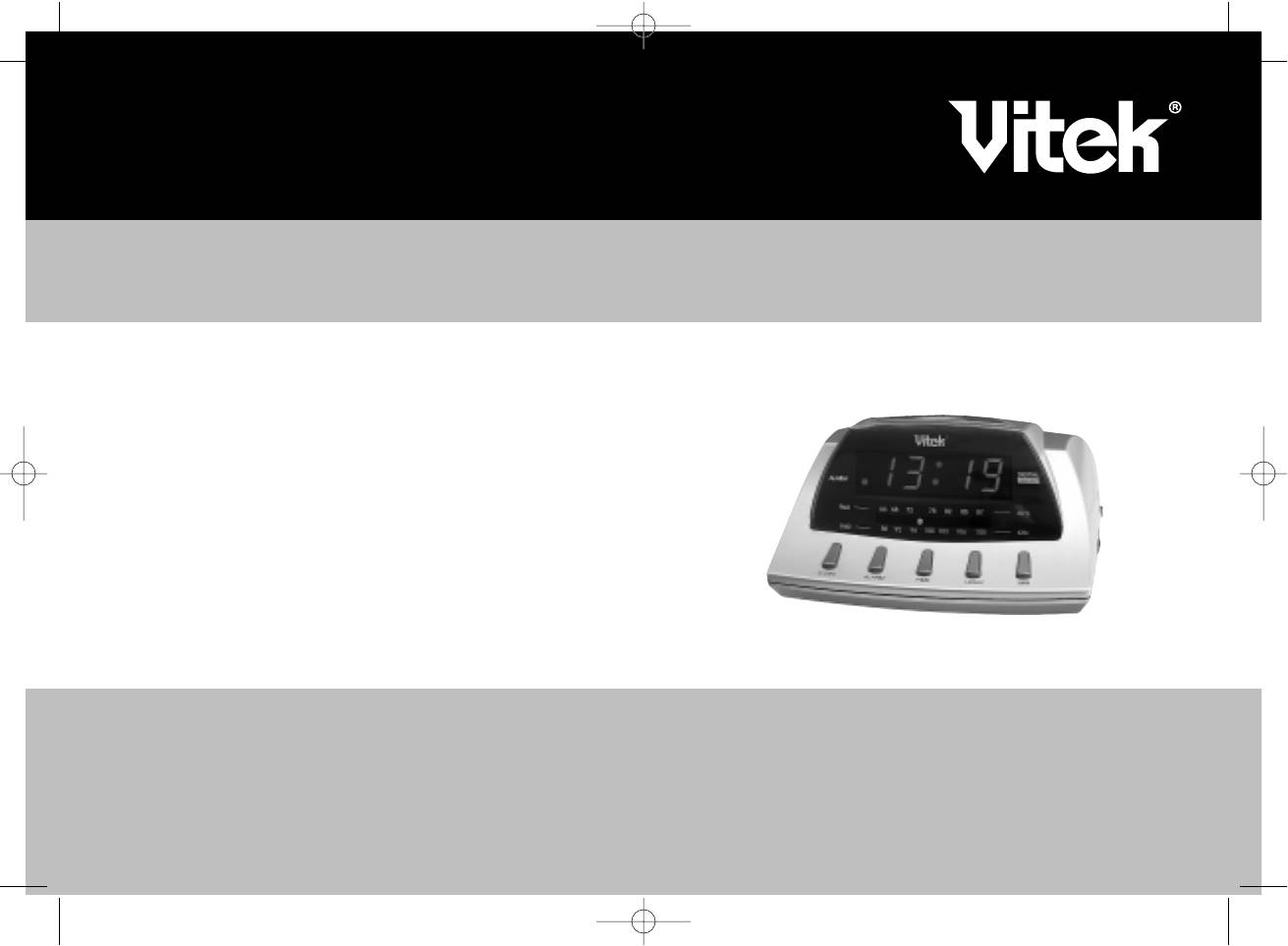
ИНСТРУКЦИЯ ПО ЭКСПЛУАТАЦИИ
MANUAL INSTRUCTION
ALARM CLOCK RADIO
РАДИОЧАСЫ
МОДЕЛЬ VT3514
3514-1.qxd 13.03.03 1:08 Page 2
3514-1.qxd 13.03.03 1:08 Page 4
Аннотация для Радиочасов Vitek VT-3514 в формате PDF
Топ 10 инструкций
Другие инструкции