

TS5100 series
Онлайн-руководство
Основные операции
Сеть
Обращение с бумагой, оригиналами, картриджами FINE и т. д.
Обслуживание
Обзор устройства
Сведения о бумаге
Печать
Копирование
Сканирование
Часто задаваемые вопросы
Список кодов поддержки для ошибок
Русский (Russian)

Содержание
Использование документа Онлайн-руководство. . . . . . . . . . . . . . . . . . . . . . 10
Обозначения, используемые в настоящем документе. . . . . . . . . . . . . . . . . . . . . . . . . 11
Пользователи устройства с активированными сенсорными функциями (Windows). . 12
Товарные знаки и лицензии. . . . . . . . . . . . . . . . . . . . . . . . . . . . . . . . . . . . . . . . . . . . . . . 13
Основные операции. . . . . . . . . . . . . . . . . . . . . . . . . . . . . . . . . . . . . . . . . . . . . . 24
Печать фотографий с компьютера. . . . . . . . . . . . . . . . . . . . . . . . . . . . . . . . . . . . . . . . . 25
Печать фотографий со смартфона или планшета. . . . . . . . . . . . . . . . . . . . . . . . . . . . . 30
Копирование. . . . . . . . . . . . . . . . . . . . . . . . . . . . . . . . . . . . . . . . . . . . . . . . . . . . . . . . . . . 33
Сеть. . . . . . . . . . . . . . . . . . . . . . . . . . . . . . . . . . . . . . . . . . . . . . . . . . . . . . . . . . . 37
Ограничения. . . . . . . . . . . . . . . . . . . . . . . . . . . . . . . . . . . . . . . . . . . . . . . . . . . . . . . . . . . 40
Рекомендации по сетевому подключению. . . . . . . . . . . . . . . . . . . . . . . . . . . . . . . . . . . 42
Параметры сети по умолчанию. . . . . . . . . . . . . . . . . . . . . . . . . . . . . . . . . . . . . . . . . . . . . . . . . . . . . . 43
Обнаружен еще один принтер с таким же именем. . . . . . . . . . . . . . . . . . . . . . . . . . . . . . . . . . . . . . . 45
Подключение к другому компьютеру через локальную сеть/Изменение способа подключения с
USB на локальную сеть. . . . . . . . . . . . . . . . . . . . . . . . . . . . . . . . . . . . . . . . . . . . . . . . . . . . . . . . . . . . . 46
Печать параметров сети. . . . . . . . . . . . . . . . . . . . . . . . . . . . . . . . . . . . . . . . . . . . . . . . . . . . . . . . . . . . 47
Изменение способа подключения по беспроводной сети. . . . . . . . . . . . . . . . . . . . . . . . . . . . . . . . . 52
Обращение с бумагой, оригиналами, картриджами FINE и т. д.. . . . . . . . . . 53
Загрузка бумаги. . . . . . . . . . . . . . . . . . . . . . . . . . . . . . . . . . . . . . . . . . . . . . . . . . . . . . . . . 54
Источники бумаги. . . . . . . . . . . . . . . . . . . . . . . . . . . . . . . . . . . . . . . . . . . . . . . . . . . . . . . . . . . . . . . . . . 55
Загрузка бумаги в задний лоток. . . . . . . . . . . . . . . . . . . . . . . . . . . . . . . . . . . . . . . . . . . . . . . . . . . . . . 56
Загрузка бумаги в кассету. . . . . . . . . . . . . . . . . . . . . . . . . . . . . . . . . . . . . . . . . . . . . . . . . . . . . . . . . . . 61
Загрузка конвертов. . . . . . . . . . . . . . . . . . . . . . . . . . . . . . . . . . . . . . . . . . . . . . . . . . . . . . . . . . . . . . . . 66
Загрузка оригиналов. . . . . . . . . . . . . . . . . . . . . . . . . . . . . . . . . . . . . . . . . . . . . . . . . . . . . 70
Загрузка оригиналов на Стекло рабочей поверхности. . . . . . . . . . . . . . . . . . . . . . . . . . . . . . . . . . . . 71
Загрузка, исходя из использования. . . . . . . . . . . . . . . . . . . . . . . . . . . . . . . . . . . . . . . . . . . . . . . . . . . 73
Поддерживаемые оригиналы. . . . . . . . . . . . . . . . . . . . . . . . . . . . . . . . . . . . . . . . . . . . . . . . . . . . . . . . 77
Закрепление/отсоединение крышки сканера. . . . . . . . . . . . . . . . . . . . . . . . . . . . . . . . . . . . . . . . . . . . 78
Замена картриджа FINE. . . . . . . . . . . . . . . . . . . . . . . . . . . . . . . . . . . . . . . . . . . . . . . . . . 79
Замена картриджа FINE. . . . . . . . . . . . . . . . . . . . . . . . . . . . . . . . . . . . . . . . . . . . . . . . . . . . . . . . . . . . 80
Проверка состояния чернил на ЖК-дисплее. . . . . . . . . . . . . . . . . . . . . . . . . . . . . . . . . . . . . . . . . . . . 86

Советы по чернилам. . . . . . . . . . . . . . . . . . . . . . . . . . . . . . . . . . . . . . . . . . . . . . . . . . . . . . . . . . . . . . . 87
Обслуживание. . . . . . . . . . . . . . . . . . . . . . . . . . . . . . . . . . . . . . . . . . . . . . . . . . 88
Если печать стала бледной или неравномерной. . . . . . . . . . . . . . . . . . . . . . . . . . . . . . 89
Процедура обслуживания. . . . . . . . . . . . . . . . . . . . . . . . . . . . . . . . . . . . . . . . . . . . . . . . . . . . . . . . . . . 90
Печать образца для проверки сопел. . . . . . . . . . . . . . . . . . . . . . . . . . . . . . . . . . . . . . . . . . . . . . . . . . 93
Оценка образца для проверки сопел. . . . . . . . . . . . . . . . . . . . . . . . . . . . . . . . . . . . . . . . . . . . . . . . . . 95
Очистка печатающей головки. . . . . . . . . . . . . . . . . . . . . . . . . . . . . . . . . . . . . . . . . . . . . . . . . . . . . . . . 97
Глубокая очистка печатающих головок. . . . . . . . . . . . . . . . . . . . . . . . . . . . . . . . . . . . . . . . . . . . . . . . 99
Выравнивание печатающей головки. . . . . . . . . . . . . . . . . . . . . . . . . . . . . . . . . . . . . . . . . . . . . . . . . 101
Очистка. . . . . . . . . . . . . . . . . . . . . . . . . . . . . . . . . . . . . . . . . . . . . . . . . . . . . . . . . . . . . . 105
Очистка подающих роликов. . . . . . . . . . . . . . . . . . . . . . . . . . . . . . . . . . . . . . . . . . . . . . . . . . . . . . . . 106
Очистка внутренних компонентов принтера (очистка поддона). . . . . . . . . . . . . . . . . . . . . . . . . . . . 108
Обзор. . . . . . . . . . . . . . . . . . . . . . . . . . . . . . . . . . . . . . . . . . . . . . . . . . . . . . . . 111
Безопасность. . . . . . . . . . . . . . . . . . . . . . . . . . . . . . . . . . . . . . . . . . . . . . . . . . . . . . . . . . 112
Меры предосторожности. . . . . . . . . . . . . . . . . . . . . . . . . . . . . . . . . . . . . . . . . . . . . . . . . . . . . . . . . . . 113
Нормативная информация. . . . . . . . . . . . . . . . . . . . . . . . . . . . . . . . . . . . . . . . . . . . . . . . . . . . . . . . . 115
WEEE (EU&EEA). . . . . . . . . . . . . . . . . . . . . . . . . . . . . . . . . . . . . . . . . . . . . . . . . . . . . . . . . . . . . . . . . 116
Предосторожности при обращении. . . . . . . . . . . . . . . . . . . . . . . . . . . . . . . . . . . . . . . . 117
Юридические ограничения на сканирование/копирование. . . . . . . . . . . . . . . . . . . . . . . . . . . . . . . 118
Меры предосторожности при обращении с принтером. . . . . . . . . . . . . . . . . . . . . . . . . . . . . . . . . . 119
Перемещение принтера. . . . . . . . . . . . . . . . . . . . . . . . . . . . . . . . . . . . . . . . . . . . . . . . . . . . . . . . . . . 120
При ремонте, предоставлении во временное пользование или утилизации принтера. . . . . . . . . 122
Сохранение высокого качества печати. . . . . . . . . . . . . . . . . . . . . . . . . . . . . . . . . . . . . . . . . . . . . . . 123
Основные компоненты и их использование. . . . . . . . . . . . . . . . . . . . . . . . . . . . . . . . . 124
Основные компоненты. . . . . . . . . . . . . . . . . . . . . . . . . . . . . . . . . . . . . . . . . . . . . . . . . . . . . . . . . . . . . 125
Вид спереди. . . . . . . . . . . . . . . . . . . . . . . . . . . . . . . . . . . . . . . . . . . . . . . . . . . . . . . . . . . . . . . . . 126
Вид сзади. . . . . . . . . . . . . . . . . . . . . . . . . . . . . . . . . . . . . . . . . . . . . . . . . . . . . . . . . . . . . . . . . . . 128
Вид внутренних частей. . . . . . . . . . . . . . . . . . . . . . . . . . . . . . . . . . . . . . . . . . . . . . . . . . . . . . . . 129
Панель управления. . . . . . . . . . . . . . . . . . . . . . . . . . . . . . . . . . . . . . . . . . . . . . . . . . . . . . . . . . . 130
Электропитание. . . . . . . . . . . . . . . . . . . . . . . . . . . . . . . . . . . . . . . . . . . . . . . . . . . . . . . . . . . . . . . . . . 131
Проверка включения питания. . . . . . . . . . . . . . . . . . . . . . . . . . . . . . . . . . . . . . . . . . . . . . . . . . . 132
Включение и выключение Принтера. . . . . . . . . . . . . . . . . . . . . . . . . . . . . . . . . . . . . . . . . . . . . 133
Проверка штепселя и кабеля питания. . . . . . . . . . . . . . . . . . . . . . . . . . . . . . . . . . . . . . . . . . . . 135

Отключение принтера. . . . . . . . . . . . . . . . . . . . . . . . . . . . . . . . . . . . . . . . . . . . . . . . . . . . . . . . . 136
ЖК-дисплей и панель управления. . . . . . . . . . . . . . . . . . . . . . . . . . . . . . . . . . . . . . . . . . . . . . . . . . . 137
Изменение параметров. . . . . . . . . . . . . . . . . . . . . . . . . . . . . . . . . . . . . . . . . . . . . . . . . 139
Изменение параметров принтера с компьютера (Windows). . . . . . . . . . . . . . . . . . . . . . . . . . . . . . . 140
Изменение параметров печати. . . . . . . . . . . . . . . . . . . . . . . . . . . . . . . . . . . . . . . . . . . . . . . . . . 141
Регистрация профиля часто используемой конфигурации печати. . . . . . . . . . . . . . . . . . . . . 143
Выбор используемого картриджа FINE. . . . . . . . . . . . . . . . . . . . . . . . . . . . . . . . . . . . . . . . . . . 145
Управление питанием Принтера. . . . . . . . . . . . . . . . . . . . . . . . . . . . . . . . . . . . . . . . . . . . . . . . 146
Изменение режима работы Принтера. . . . . . . . . . . . . . . . . . . . . . . . . . . . . . . . . . . . . . . . . . . . 148
Изменение параметров с помощью панели управления. . . . . . . . . . . . . . . . . . . . . . . . . . . . . . . . . 150
Изменение параметров с помощью панели управления. . . . . . . . . . . . . . . . . . . . . . . . . . . . . 151
Настройка элементов на панели управления. . . . . . . . . . . . . . . . . . . . . . . . . . . . . . . . . . . . . . 153
Парам.печати. . . . . . . . . . . . . . . . . . . . . . . . . . . . . . . . . . . . . . . . . . . . . . . . . . . . . . . . . . . . . . . . 154
Настройки сети. . . . . . . . . . . . . . . . . . . . . . . . . . . . . . . . . . . . . . . . . . . . . . . . . . . . . . . . . . . . . . . 155
Польз. параметры устройства. . . . . . . . . . . . . . . . . . . . . . . . . . . . . . . . . . . . . . . . . . . . . . . . . . 160
Выбор языка. . . . . . . . . . . . . . . . . . . . . . . . . . . . . . . . . . . . . . . . . . . . . . . . . . . . . . . . . . . . . . . . . 162
Обновление микропрограммы. . . . . . . . . . . . . . . . . . . . . . . . . . . . . . . . . . . . . . . . . . . . . . . . . . 163
Настройки подачи. . . . . . . . . . . . . . . . . . . . . . . . . . . . . . . . . . . . . . . . . . . . . . . . . . . . . . . . . . . . 164
Сброс настройки. . . . . . . . . . . . . . . . . . . . . . . . . . . . . . . . . . . . . . . . . . . . . . . . . . . . . . . . . . . . . 165
Настройка веб-службы. . . . . . . . . . . . . . . . . . . . . . . . . . . . . . . . . . . . . . . . . . . . . . . . . . . . . . . . 166
Сведения о системе. . . . . . . . . . . . . . . . . . . . . . . . . . . . . . . . . . . . . . . . . . . . . . . . . . . . . . . . . . . 167
Параметры ECO. . . . . . . . . . . . . . . . . . . . . . . . . . . . . . . . . . . . . . . . . . . . . . . . . . . . . . . . . . . . . . 168
Параметры бесшумного режима. . . . . . . . . . . . . . . . . . . . . . . . . . . . . . . . . . . . . . . . . . . . . . . . 170
Технические характеристики. . . . . . . . . . . . . . . . . . . . . . . . . . . . . . . . . . . . . . . . . . . . . 171
Сведения о бумаге. . . . . . . . . . . . . . . . . . . . . . . . . . . . . . . . . . . . . . . . . . . . . 176
Поддерживаемые типы носителей. . . . . . . . . . . . . . . . . . . . . . . . . . . . . . . . . . . . . . . . 177
Предел загрузки бумаги. . . . . . . . . . . . . . . . . . . . . . . . . . . . . . . . . . . . . . . . . . . . . . . . . . . . . . . . . . . 180
Неподдерживаемые типы носителей. . . . . . . . . . . . . . . . . . . . . . . . . . . . . . . . . . . . . . 182
Обращение с бумагой. . . . . . . . . . . . . . . . . . . . . . . . . . . . . . . . . . . . . . . . . . . . . . . . . . 183
Печать. . . . . . . . . . . . . . . . . . . . . . . . . . . . . . . . . . . . . . . . . . . . . . . . . . . . . . . . 184
Печать с компьютера. . . . . . . . . . . . . . . . . . . . . . . . . . . . . . . . . . . . . . . . . . . . . . . . . . . 185
Печать с помощью прикладной программы (драйвер принтера Windows). . . . . . . . . . . . . . . . . . . 186
Настройка основной печати. . . . . . . . . . . . . . . . . . . . . . . . . . . . . . . . . . . . . . . . . . . . . . . . . . . . 187

Параметры бумаги в драйвере принтера и в принтере (тип носителя). . . . . . . . . . . . . 191
Параметры бумаги в драйвере принтера и в принтере (размер бумаги). . . . . . . . . . . . 193
Различные способы печати. . . . . . . . . . . . . . . . . . . . . . . . . . . . . . . . . . . . . . . . . . . . . . . . . . . . . 194
Настройка «Размер стр.» и «Ориентация». . . . . . . . . . . . . . . . . . . . . . . . . . . . . . . . . . . . . . 195
Настройка количества копий и порядка печати страниц. . . . . . . . . . . . . . . . . . . . . . . . . 197
Выполнение печати без полей. . . . . . . . . . . . . . . . . . . . . . . . . . . . . . . . . . . . . . . . . . . . . . 199
Печать с масштабированием. . . . . . . . . . . . . . . . . . . . . . . . . . . . . . . . . . . . . . . . . . . . . . . 202
Печать на развороте. . . . . . . . . . . . . . . . . . . . . . . . . . . . . . . . . . . . . . . . . . . . . . . . . . . . . . 205
Печать в виде плитки/постера. . . . . . . . . . . . . . . . . . . . . . . . . . . . . . . . . . . . . . . . . . . . . . 207
Двухсторонняя печать. . . . . . . . . . . . . . . . . . . . . . . . . . . . . . . . . . . . . . . . . . . . . . . . . . . . . 210
Настройка печати конверта. . . . . . . . . . . . . . . . . . . . . . . . . . . . . . . . . . . . . . . . . . . . . . . . 214
Печать на открытках. . . . . . . . . . . . . . . . . . . . . . . . . . . . . . . . . . . . . . . . . . . . . . . . . . . . . . 216
Общие сведения о драйвере принтера. . . . . . . . . . . . . . . . . . . . . . . . . . . . . . . . . . . . . . . . . . . 218
Драйвер принтера Canon IJ. . . . . . . . . . . . . . . . . . . . . . . . . . . . . . . . . . . . . . . . . . . . . . . . 219
Открытие экрана настройки драйвера принтера. . . . . . . . . . . . . . . . . . . . . . . . . . . 220
Монитор состояния Canon IJ. . . . . . . . . . . . . . . . . . . . . . . . . . . . . . . . . . . . . . . . . . . . . . . . 221
Проверка состояния чернил с компьютера. . . . . . . . . . . . . . . . . . . . . . . . . . . . . . . . 223
Инструкции по эксплуатации (Драйвер принтера). . . . . . . . . . . . . . . . . . . . . . . . . . . . . . 224
Описание драйвера принтера. . . . . . . . . . . . . . . . . . . . . . . . . . . . . . . . . . . . . . . . . . . . . . . . . . . 226
Описание вкладки «Быстрая установка». . . . . . . . . . . . . . . . . . . . . . . . . . . . . . . . . . . . . . 227
Описание вкладки «Главная». . . . . . . . . . . . . . . . . . . . . . . . . . . . . . . . . . . . . . . . . . . . . . . 235
Описание вкладки «Страница». . . . . . . . . . . . . . . . . . . . . . . . . . . . . . . . . . . . . . . . . . . . . . 242
Описание вкладки «Обслуживание». . . . . . . . . . . . . . . . . . . . . . . . . . . . . . . . . . . . . . . . . . 257
Описание функции «Монитор состояния Canon IJ». . . . . . . . . . . . . . . . . . . . . . . . . . . . . . 259
Установка MP Drivers. . . . . . . . . . . . . . . . . . . . . . . . . . . . . . . . . . . . . . . . . . . . . . . . . . . . . . 262
Печать со смартфона или планшета. . . . . . . . . . . . . . . . . . . . . . . . . . . . . . . . . . . . . . 263
Печать/сканирование в режиме беспроводного прямого подключения. . . . . . . . . . . . . . . . . . . . . 264
Печать с помощью панели управления. . . . . . . . . . . . . . . . . . . . . . . . . . . . . . . . . . . . 269
Печать шаблонов в виде линованной или миллиметровой бумаги. . . . . . . . . . . . . . . . . . . . . . . . . 270
Параметры бумаги. . . . . . . . . . . . . . . . . . . . . . . . . . . . . . . . . . . . . . . . . . . . . . . . . . . . . 274
Копирование. . . . . . . . . . . . . . . . . . . . . . . . . . . . . . . . . . . . . . . . . . . . . . . . . . . 279
Создание копий. . . . . . . . . . . . . . . . . . . . . . . . . . . . . . . . . . . . . . . . . . . . . . . . . . . . . . . . 280
Настройка элементов для копирования. . . . . . . . . . . . . . . . . . . . . . . . . . . . . . . . . . . . . . . . . . . . . . . 283

Сканирование. . . . . . . . . . . . . . . . . . . . . . . . . . . . . . . . . . . . . . . . . . . . . . . . . . 286
Сканирование с компьютера (Windows). . . . . . . . . . . . . . . . . . . . . . . . . . . . . . . . . . . . 287
Сканирование в соответствии с типом или целью исходного документа (IJ Scan Utility). . . . . . . 288
Возможности IJ Scan Utility. . . . . . . . . . . . . . . . . . . . . . . . . . . . . . . . . . . . . . . . . . . . . . . . . . . . . 289
Легкое сканирование (автоматическое сканирование). . . . . . . . . . . . . . . . . . . . . . . . . . . . . . . 291
Сканирование документов и фотографий. . . . . . . . . . . . . . . . . . . . . . . . . . . . . . . . . . . . . . . . . 292
Сканирование с помощью приложения (ScanGear). . . . . . . . . . . . . . . . . . . . . . . . . . . . . . . . . . . . . 293
Назначение программы ScanGear (драйвера сканера). . . . . . . . . . . . . . . . . . . . . . . . . . . . . . 294
Запуск программы ScanGear (драйвер сканера). . . . . . . . . . . . . . . . . . . . . . . . . . . . . . . . . . . . 296
Сканирование в основном режиме. . . . . . . . . . . . . . . . . . . . . . . . . . . . . . . . . . . . . . . . . . . . . . . 297
Окна программы ScanGear (драйвер сканера). . . . . . . . . . . . . . . . . . . . . . . . . . . . . . . . . . . . . 300
Вкладка Основной режим. . . . . . . . . . . . . . . . . . . . . . . . . . . . . . . . . . . . . . . . . . . . . . . . . . 301
Вкладка Расш. режим. . . . . . . . . . . . . . . . . . . . . . . . . . . . . . . . . . . . . . . . . . . . . . . . . . . . . 310
Общие замечания (драйвер сканера). . . . . . . . . . . . . . . . . . . . . . . . . . . . . . . . . . . . . . . . . . . . 317
Рекомендации по сканированию. . . . . . . . . . . . . . . . . . . . . . . . . . . . . . . . . . . . . . . . . . . . . . . . . . . . 319
Размещение оригиналов (сканирование с компьютера). . . . . . . . . . . . . . . . . . . . . . . . . . . . . 320
Параметры сетевого сканирования. . . . . . . . . . . . . . . . . . . . . . . . . . . . . . . . . . . . . . . . . . . . . . 322
Часто задаваемые вопросы. . . . . . . . . . . . . . . . . . . . . . . . . . . . . . . . . . . . . . 326
Параметры сети и распространенные неполадки. . . . . . . . . . . . . . . . . . . . . . . . . . . . 328
Проблемы сетевого взаимодействия. . . . . . . . . . . . . . . . . . . . . . . . . . . . . . . . . . . . . . 330
Не удается обнаружить принтер в сети. . . . . . . . . . . . . . . . . . . . . . . . . . . . . . . . . . . . . . . . . . . . . . . 331
Не удается обнаружить принтер на экране Проверить параметры принтера во время
настройки (Windows). . . . . . . . . . . . . . . . . . . . . . . . . . . . . . . . . . . . . . . . . . . . . . . . . . . . . . . . . . 332
Не удается обнаружить принтер на экране Проверить параметры принтера во время
настройки беспроводной сети (Windows) — проверка состояния питания. . . . . . . . . . . . 333
Не удается обнаружить принтер на экране Проверить параметры принтера во время
настройки беспроводной сети (Windows) — проверка подключения компьютера к сети 334
Не удается обнаружить принтер на экране Проверить параметры принтера во время
настройки беспроводной сети (Windows) — проверка настроек беспроводной сети
принтера. . . . . . . . . . . . . . . . . . . . . . . . . . . . . . . . . . . . . . . . . . . . . . . . . . . . . . . . . . . . . . . . 335
Не удается обнаружить принтер на экране Проверить параметры принтера во время
настройки беспроводной сети (Windows) — проверка среды беспроводной сети. . . . . . 336
Не удается обнаружить принтер на экране Проверить параметры принтера во время
настройки беспроводной сети (Windows) — проверка IP-адреса принтера. . . . . . . . . . 338

Не удается обнаружить принтер на экране Проверить параметры принтера во время
настройки беспроводной сети (Windows) — проверка параметров защитного программного
обеспечения. . . . . . . . . . . . . . . . . . . . . . . . . . . . . . . . . . . . . . . . . . . . . . . . . . . . . . . . . . . . . 339
Не удается обнаружить принтер на экране Проверить параметры принтера во время
настройки беспроводной сети (Windows) — проверка параметров маршрутизатора
беспроводной сети. . . . . . . . . . . . . . . . . . . . . . . . . . . . . . . . . . . . . . . . . . . . . . . . . . . . . . . 341
Невозможно продолжить работу после появления экрана Подключение принтера. . . . . . . 342
Не удается найти Принтер при использовании беспроводной локальной сети. . . . . . . . . . . 344
Проблемы сетевого подключения. . . . . . . . . . . . . . . . . . . . . . . . . . . . . . . . . . . . . . . . . . . . . . . . . . . 347
Неожиданное прекращение работы принтера. . . . . . . . . . . . . . . . . . . . . . . . . . . . . . . . . . . . . 348
Неизвестный ключ сети. . . . . . . . . . . . . . . . . . . . . . . . . . . . . . . . . . . . . . . . . . . . . . . . . . . . . . . . 354
Не удается использовать принтер после замены маршрутизатора беспроводной сети или
изменения его параметров. . . . . . . . . . . . . . . . . . . . . . . . . . . . . . . . . . . . . . . . . . . . . . . . . . . . . 357
Другие проблемы с сетью. . . . . . . . . . . . . . . . . . . . . . . . . . . . . . . . . . . . . . . . . . . . . . . . . . . . . . . . . . 359
Проверка сведений о сети. . . . . . . . . . . . . . . . . . . . . . . . . . . . . . . . . . . . . . . . . . . . . . . . . . . . . 360
Восстановление заводских настроек по умолчанию. . . . . . . . . . . . . . . . . . . . . . . . . . . . . . . . 363
Проблемы с печатью. . . . . . . . . . . . . . . . . . . . . . . . . . . . . . . . . . . . . . . . . . . . . . . . . . . 364
Печать не начинается. . . . . . . . . . . . . . . . . . . . . . . . . . . . . . . . . . . . . . . . . . . . . . . . . . . . . . . . . . . . . 365
Чернила не поступают. . . . . . . . . . . . . . . . . . . . . . . . . . . . . . . . . . . . . . . . . . . . . . . . . . . . . . . . . . . . . 367
Бумага подается неправильно, или появилось сообщение об отсутствии бумаги. . . . . . . . . . . . 369
Неудовлетворительные результаты печати. . . . . . . . . . . . . . . . . . . . . . . . . . . . . . . . . . . . . . . . . . . 372
Пустая бумага/Нечеткая печать/Неверные цвета/Белые полосы. . . . . . . . . . . . . . . . . . . . . . 374
Неверные цвета. . . . . . . . . . . . . . . . . . . . . . . . . . . . . . . . . . . . . . . . . . . . . . . . . . . . . . . . . . . . . . 377
Линии не выровнены. . . . . . . . . . . . . . . . . . . . . . . . . . . . . . . . . . . . . . . . . . . . . . . . . . . . . . . . . . 379
Бумага испачкана / Отпечатанная поверхность поцарапана. . . . . . . . . . . . . . . . . . . . . . . . . . 380
Вертикальная линия рядом с изображением. . . . . . . . . . . . . . . . . . . . . . . . . . . . . . . . . . . . . . 384
Проблемы при сканировании (Windows). . . . . . . . . . . . . . . . . . . . . . . . . . . . . . . . . . . . 385
Проблемы при сканировании. . . . . . . . . . . . . . . . . . . . . . . . . . . . . . . . . . . . . . . . . . . . . . . . . . . . . . . 386
Сканер не работает. . . . . . . . . . . . . . . . . . . . . . . . . . . . . . . . . . . . . . . . . . . . . . . . . . . . . . . . . . . 387
ScanGear (драйвер сканера) не запускается. . . . . . . . . . . . . . . . . . . . . . . . . . . . . . . . . . . . . . . 388
Механические неисправности. . . . . . . . . . . . . . . . . . . . . . . . . . . . . . . . . . . . . . . . . . . . 389
Питание не подается. . . . . . . . . . . . . . . . . . . . . . . . . . . . . . . . . . . . . . . . . . . . . . . . . . . . . . . . . . . . . . 390
Питание выключается автоматически. . . . . . . . . . . . . . . . . . . . . . . . . . . . . . . . . . . . . . . . . . . . . . . . 391
Проблемы подключения USB. . . . . . . . . . . . . . . . . . . . . . . . . . . . . . . . . . . . . . . . . . . . . . . . . . . . . . . 393
Не удается подключиться к принтеру по USB. . . . . . . . . . . . . . . . . . . . . . . . . . . . . . . . . . . . . . . . . . 394

Проблемы при установке и загрузке. . . . . . . . . . . . . . . . . . . . . . . . . . . . . . . . . . . . . . . 395
Не удается установить драйверы MP Drivers (Windows). . . . . . . . . . . . . . . . . . . . . . . . . . . . . . . . . 396
Обновление MP Drivers в сетевом окружении (Windows). . . . . . . . . . . . . . . . . . . . . . . . . . . . . . . . . 398
Ошибки и сообщения. . . . . . . . . . . . . . . . . . . . . . . . . . . . . . . . . . . . . . . . . . . . . . . . . . . 399
Произошла ошибка. . . . . . . . . . . . . . . . . . . . . . . . . . . . . . . . . . . . . . . . . . . . . . . . . . . . . . . . . . . . . . . 400
Отображается сообщение (код поддержки). . . . . . . . . . . . . . . . . . . . . . . . . . . . . . . . . . . . . . . . . . . . 401
Список кодов поддержки для ошибок. . . . . . . . . . . . . . . . . . . . . . . . . . . . . . 409
Список кодов поддержки для ошибок (замятия бумаги). . . . . . . . . . . . . . . . . . . . . . . 411
1300. . . . . . . . . . . . . . . . . . . . . . . . . . . . . . . . . . . . . . . . . . . . . . . . . . . . . . . . . . . . . . . . . . . . . . . . . . . . 412
1303. . . . . . . . . . . . . . . . . . . . . . . . . . . . . . . . . . . . . . . . . . . . . . . . . . . . . . . . . . . . . . . . . . . . . . . . . . . . 414
1304. . . . . . . . . . . . . . . . . . . . . . . . . . . . . . . . . . . . . . . . . . . . . . . . . . . . . . . . . . . . . . . . . . . . . . . . . . . . 415
1313. . . . . . . . . . . . . . . . . . . . . . . . . . . . . . . . . . . . . . . . . . . . . . . . . . . . . . . . . . . . . . . . . . . . . . . . . . . . 416
Бумага замялась внутри принтера. . . . . . . . . . . . . . . . . . . . . . . . . . . . . . . . . . . . . . . . . . . . . . . . . . . 417
Удаление застрявшей бумаги с задней стороны. . . . . . . . . . . . . . . . . . . . . . . . . . . . . . . . . . . 420
1000. . . . . . . . . . . . . . . . . . . . . . . . . . . . . . . . . . . . . . . . . . . . . . . . . . . . . . . . . . . . . . . . . 424
1003. . . . . . . . . . . . . . . . . . . . . . . . . . . . . . . . . . . . . . . . . . . . . . . . . . . . . . . . . . . . . . . . . 425
1200. . . . . . . . . . . . . . . . . . . . . . . . . . . . . . . . . . . . . . . . . . . . . . . . . . . . . . . . . . . . . . . . . 426
1401. . . . . . . . . . . . . . . . . . . . . . . . . . . . . . . . . . . . . . . . . . . . . . . . . . . . . . . . . . . . . . . . . 427
1430. . . . . . . . . . . . . . . . . . . . . . . . . . . . . . . . . . . . . . . . . . . . . . . . . . . . . . . . . . . . . . . . . 428
1485. . . . . . . . . . . . . . . . . . . . . . . . . . . . . . . . . . . . . . . . . . . . . . . . . . . . . . . . . . . . . . . . . 429
1682. . . . . . . . . . . . . . . . . . . . . . . . . . . . . . . . . . . . . . . . . . . . . . . . . . . . . . . . . . . . . . . . . 430
1686. . . . . . . . . . . . . . . . . . . . . . . . . . . . . . . . . . . . . . . . . . . . . . . . . . . . . . . . . . . . . . . . . 431
1687. . . . . . . . . . . . . . . . . . . . . . . . . . . . . . . . . . . . . . . . . . . . . . . . . . . . . . . . . . . . . . . . . 432
1688. . . . . . . . . . . . . . . . . . . . . . . . . . . . . . . . . . . . . . . . . . . . . . . . . . . . . . . . . . . . . . . . . 433
1890. . . . . . . . . . . . . . . . . . . . . . . . . . . . . . . . . . . . . . . . . . . . . . . . . . . . . . . . . . . . . . . . . 434
2110. . . . . . . . . . . . . . . . . . . . . . . . . . . . . . . . . . . . . . . . . . . . . . . . . . . . . . . . . . . . . . . . . 435
2900. . . . . . . . . . . . . . . . . . . . . . . . . . . . . . . . . . . . . . . . . . . . . . . . . . . . . . . . . . . . . . . . . 438
2901. . . . . . . . . . . . . . . . . . . . . . . . . . . . . . . . . . . . . . . . . . . . . . . . . . . . . . . . . . . . . . . . . 439
4103. . . . . . . . . . . . . . . . . . . . . . . . . . . . . . . . . . . . . . . . . . . . . . . . . . . . . . . . . . . . . . . . . 440
5011. . . . . . . . . . . . . . . . . . . . . . . . . . . . . . . . . . . . . . . . . . . . . . . . . . . . . . . . . . . . . . . . . 441
5012. . . . . . . . . . . . . . . . . . . . . . . . . . . . . . . . . . . . . . . . . . . . . . . . . . . . . . . . . . . . . . . . . 442
5100. . . . . . . . . . . . . . . . . . . . . . . . . . . . . . . . . . . . . . . . . . . . . . . . . . . . . . . . . . . . . . . . . 443

5200. . . . . . . . . . . . . . . . . . . . . . . . . . . . . . . . . . . . . . . . . . . . . . . . . . . . . . . . . . . . . . . . . 444
5B02. . . . . . . . . . . . . . . . . . . . . . . . . . . . . . . . . . . . . . . . . . . . . . . . . . . . . . . . . . . . . . . . . 445
6000. . . . . . . . . . . . . . . . . . . . . . . . . . . . . . . . . . . . . . . . . . . . . . . . . . . . . . . . . . . . . . . . . 446
C000. . . . . . . . . . . . . . . . . . . . . . . . . . . . . . . . . . . . . . . . . . . . . . . . . . . . . . . . . . . . . . . . . 447

Использование документа Онлайн-руководство
Условия эксплуатации
Обозначения, используемые в настоящем документе
Пользователи устройства с активированными сенсорными функциями
(Windows)
Печать онлайн-руководства
Товарные знаки и лицензии
Снимки экранов в данном руководстве
10

Обозначения, используемые в настоящем документе
Предупреждение!
Несоблюдение этих указаний может привести к тяжелым травмам, вплоть до смертельного
исхода, вследствие неправильной эксплуатации оборудования. Обязательно следуйте этим
указаниям в целях безопасной эксплуатации.
Осторожно!
Несоблюдение этих указаний может привести к травмам или материальному ущербу вследствие
неправильной эксплуатации оборудования. Обязательно следуйте этим указаниям в целях
безопасной эксплуатации.
Внимание!
Инструкции, содержащие важные сведения. Во избежание причинения повреждений и нанесения
травмы или ненадлежащего использования изделия обязательно прочтите эти указания.
Примечание.
Инструкции, в том числе примечания о работе устройства и дополнительные пояснения.
Основные сведения
Инструкции, разъясняющие основные операции с продуктом.
Примечание.
• Значки могут быть другими — это зависит от модели продукта.
11

Пользователи устройства с активированными сенсорными
функциями (Windows)
Для касаний необходимо заменить действие «щелчок правой кнопкой мыши» в этом документе на
действие, установленное в операционной системе. Например, если в операционной системе
установлено действие «нажатие и удерживание», замените «щелчок правой кнопкой мыши» на
«нажатие и удерживание».
12

Товарные знаки и лицензии
• Microsoft является охраняемым товарным знаком Microsoft Corporation.
• Windows является товарным знаком или зарегистрированным товарным знаком Microsoft
Corporation в США и других странах.
• Windows Vista является товарным знаком или зарегистрированным товарным знаком Microsoft
Corporation в США и других странах.
• Internet Explorer является товарным знаком или зарегистрированным товарным знаком Microsoft
Corporation в США и других странах.
• Mac, Mac OS, AirPort, App Store, AirPrint, логотип AirPrint, Safari, Bonjour, iPad, iPhone и iPod touch
являются товарными знаками компании Apple Inc., зарегистрированными в США и других
странах. macOS является товарным знаком компании Apple Inc.
• IOS является товарным знаком или зарегистрированным товарным знаком компании Cisco в
США, других странах и используется по лицензии.
• Google Cloud Print, Google Chrome, Chrome OS, Chromebook, Android, Google Play, Google Drive,
Google Apps и Google Analytics являются зарегистрированными товарными знаками или
товарными знаками компании Google Inc.
• Adobe, Flash, Photoshop, Photoshop Elements, Lightroom, Adobe RGB и Adobe RGB (1998)
являются зарегистрированными товарными знаками или товарными знаками компании Adobe
Systems Incorporated в США и/или других странах.
• Bluetooth является товарным знаком корпорации Bluetooth SIG, Inc. в США, предоставленным по
лицензии корпорации Canon Inc.
• Autodesk и AutoCAD являются зарегистрированными товарными знаками или товарными знаками
компании Autodesk, Inc. и/или ее дочерних компаний и/или филиалов в США и/или других
странах.
Примечание.
• Официальное название Windows Vista — операционная система Microsoft Windows Vista.
Copyright (c) 2003-2015 Apple Inc. All rights reserved.
Redistribution and use in source and binary forms, with or without modification, are permitted provided
that the following conditions are met:
1. Redistributions of source code must retain the above copyright notice, this list of conditions and the
following disclaimer.
2. Redistributions in binary form must reproduce the above copyright notice, this list of conditions and
the following disclaimer in the documentation and/or other materials provided with the distribution.
3. Neither the name of Apple Inc. («Apple») nor the names of its contributors may be used to endorse or
promote products derived from this software without specific prior written permission.
THIS SOFTWARE IS PROVIDED BY APPLE AND ITS CONTRIBUTORS «AS IS» AND ANY EXPRESS
OR IMPLIED WARRANTIES, INCLUDING, BUT NOT LIMITED TO, THE IMPLIED WARRANTIES OF
MERCHANTABILITY AND FITNESS FOR A PARTICULAR PURPOSE ARE DISCLAIMED. IN NO
EVENT SHALL APPLE OR ITS CONTRIBUTORS BE LIABLE FOR ANY DIRECT, INDIRECT,
INCIDENTAL, SPECIAL, EXEMPLARY, OR CONSEQUENTIAL DAMAGES (INCLUDING, BUT NOT
LIMITED TO, PROCUREMENT OF SUBSTITUTE GOODS OR SERVICES; LOSS OF USE, DATA, OR
PROFITS; OR BUSINESS INTERRUPTION) HOWEVER CAUSED AND ON ANY THEORY OF
LIABILITY, WHETHER IN CONTRACT, STRICT LIABILITY, OR TORT (INCLUDING NEGLIGENCE OR
13

OTHERWISE) ARISING IN ANY WAY OUT OF THE USE OF THIS SOFTWARE, EVEN IF ADVISED OF
THE POSSIBILITY OF SUCH DAMAGE.
Apache License
Version 2.0, January 2004
http://www.apache.org/licenses/
TERMS AND CONDITIONS FOR USE, REPRODUCTION, AND DISTRIBUTION
1. Definitions.
«License» shall mean the terms and conditions for use, reproduction, and distribution as defined by
Sections 1 through 9 of this document.
«Licensor» shall mean the copyright owner or entity authorized by the copyright owner that is granting
the License.
«Legal Entity» shall mean the union of the acting entity and all other entities that control, are controlled
by, or are under common control with that entity. For the purposes of this definition, «control» means
(i) the power, direct or indirect, to cause the direction or management of such entity, whether by
contract or otherwise, or (ii) ownership of fifty percent (50%) or more of the outstanding shares, or (iii)
beneficial ownership of such entity.
«You» (or «Your») shall mean an individual or Legal Entity exercising permissions granted by this
License.
«Source» form shall mean the preferred form for making modifications, including but not limited to
software source code, documentation source, and configuration files.
«Object» form shall mean any form resulting from mechanical transformation or translation of a Source
form, including but not limited to compiled object code, generated documentation, and conversions to
other media types.
«Work» shall mean the work of authorship, whether in Source or Object form, made available under
the License, as indicated by a copyright notice that is included in or attached to the work (an example
is provided in the Appendix below).
«Derivative Works» shall mean any work, whether in Source or Object form, that is based on (or
derived from) the Work and for which the editorial revisions, annotations, elaborations, or other
modifications represent, as a whole, an original work of authorship. For the purposes of this License,
Derivative Works shall not include works that remain separable from, or merely link (or bind by name)
to the interfaces of, the Work and Derivative Works thereof.
«Contribution» shall mean any work of authorship, including the original version of the Work and any
modifications or additions to that Work or Derivative Works thereof, that is intentionally submitted to
Licensor for inclusion in the Work by the copyright owner or by an individual or Legal Entity
authorized to submit on behalf of the copyright owner. For the purposes of this definition, «submitted»
means any form of electronic, verbal, or written communication sent to the Licensor or its
representatives, including but not limited to communication on electronic mailing lists, source code
control systems, and issue tracking systems that are managed by, or on behalf of, the Licensor for
the purpose of discussing and improving the Work, but excluding communication that is
conspicuously marked or otherwise designated in writing by the copyright owner as «Not a
Contribution.»
14

«Contributor» shall mean Licensor and any individual or Legal Entity on behalf of whom a Contribution
has been received by Licensor and subsequently incorporated within the Work.
2. Grant of Copyright License. Subject to the terms and conditions of this License, each Contributor
hereby grants to You a perpetual, worldwide, non-exclusive, no-charge, royalty-free, irrevocable
copyright license to reproduce, prepare Derivative Works of, publicly display, publicly perform,
sublicense, and distribute the Work and such Derivative Works in Source or Object form.
3. Grant of Patent License. Subject to the terms and conditions of this License, each Contributor hereby
grants to You a perpetual, worldwide, non-exclusive, no-charge, royalty-free, irrevocable (except as
stated in this section) patent license to make, have made, use, offer to sell, sell, import, and
otherwise transfer the Work, where such license applies only to those patent claims licensable by
such Contributor that are necessarily infringed by their Contribution(s) alone or by combination of
their Contribution(s) with the Work to which such Contribution(s) was submitted. If You institute patent
litigation against any entity (including a cross-claim or counterclaim in a lawsuit) alleging that the
Work or a Contribution incorporated within the Work constitutes direct or contributory patent
infringement, then any patent licenses granted to You under this License for that Work shall terminate
as of the date such litigation is filed.
4. Redistribution. You may reproduce and distribute copies of the Work or Derivative Works thereof in
any medium, with or without modifications, and in Source or Object form, provided that You meet the
following conditions:
1. You must give any other recipients of the Work or Derivative Works a copy of this License; and
2. You must cause any modified files to carry prominent notices stating that You changed the files;
and
3. You must retain, in the Source form of any Derivative Works that You distribute, all copyright,
patent, trademark, and attribution notices from the Source form of the Work, excluding those
notices that do not pertain to any part of the Derivative Works; and
4. If the Work includes a «NOTICE» text file as part of its distribution, then any Derivative Works that
You distribute must include a readable copy of the attribution notices contained within such
NOTICE file, excluding those notices that do not pertain to any part of the Derivative Works, in at
least one of the following places: within a NOTICE text file distributed as part of the Derivative
Works; within the Source form or documentation, if provided along with the Derivative Works; or,
within a display generated by the Derivative Works, if and wherever such third-party notices
normally appear. The contents of the NOTICE file are for informational purposes only and do not
modify the License. You may add Your own attribution notices within Derivative Works that You
distribute, alongside or as an addendum to the NOTICE text from the Work, provided that such
additional attribution notices cannot be construed as modifying the License.
You may add Your own copyright statement to Your modifications and may provide additional or
different license terms and conditions for use, reproduction, or distribution of Your modifications,
or for any such Derivative Works as a whole, provided Your use, reproduction, and distribution of
the Work otherwise complies with the conditions stated in this License.
5. Submission of Contributions. Unless You explicitly state otherwise, any Contribution intentionally
submitted for inclusion in the Work by You to the Licensor shall be under the terms and conditions of
this License, without any additional terms or conditions. Notwithstanding the above, nothing herein
shall supersede or modify the terms of any separate license agreement you may have executed with
Licensor regarding such Contributions.
15

6. Trademarks. This License does not grant permission to use the trade names, trademarks, service
marks, or product names of the Licensor, except as required for reasonable and customary use in
describing the origin of the Work and reproducing the content of the NOTICE file.
7. Disclaimer of Warranty. Unless required by applicable law or agreed to in writing, Licensor provides
the Work (and each Contributor provides its Contributions) on an «AS IS» BASIS, WITHOUT
WARRANTIES OR CONDITIONS OF ANY KIND, either express or implied, including, without
limitation, any warranties or conditions of TITLE, NON-INFRINGEMENT, MERCHANTABILITY, or
FITNESS FOR A PARTICULAR PURPOSE. You are solely responsible for determining the
appropriateness of using or redistributing the Work and assume any risks associated with Your
exercise of permissions under this License.
8. Limitation of Liability. In no event and under no legal theory, whether in tort (including negligence),
contract, or otherwise, unless required by applicable law (such as deliberate and grossly negligent
acts) or agreed to in writing, shall any Contributor be liable to You for damages, including any direct,
indirect, special, incidental, or consequential damages of any character arising as a result of this
License or out of the use or inability to use the Work (including but not limited to damages for loss of
goodwill, work stoppage, computer failure or malfunction, or any and all other commercial damages
or losses), even if such Contributor has been advised of the possibility of such damages.
9. Accepting Warranty or Additional Liability. While redistributing the Work or Derivative Works thereof,
You may choose to offer, and charge a fee for, acceptance of support, warranty, indemnity, or other
liability obligations and/or rights consistent with this License. However, in accepting such obligations,
You may act only on Your own behalf and on Your sole responsibility, not on behalf of any other
Contributor, and only if You agree to indemnify, defend, and hold each Contributor harmless for any
liability incurred by, or claims asserted against, such Contributor by reason of your accepting any
such warranty or additional liability.
END OF TERMS AND CONDITIONS
—- Part 1: CMU/UCD copyright notice: (BSD like) ——
Copyright 1989, 1991, 1992 by Carnegie Mellon University
Derivative Work — 1996, 1998-2000
Copyright 1996, 1998-2000 The Regents of the University of California
All Rights Reserved
Permission to use, copy, modify and distribute this software and its documentation for any purpose and
without fee is hereby granted, provided that the above copyright notice appears in all copies and that both
that copyright notice and this permission notice appear in supporting documentation, and that the name of
CMU and The Regents of the University of California not be used in advertising or publicity pertaining to
distribution of the software without specific written permission.
CMU AND THE REGENTS OF THE UNIVERSITY OF CALIFORNIA DISCLAIM ALL WARRANTIES
WITH REGARD TO THIS SOFTWARE, INCLUDING ALL IMPLIED WARRANTIES OF
MERCHANTABILITY AND FITNESS. IN NO EVENT SHALL CMU OR THE REGENTS OF THE
UNIVERSITY OF CALIFORNIA BE LIABLE FOR ANY SPECIAL, INDIRECT OR CONSEQUENTIAL
DAMAGES OR ANY DAMAGES WHATSOEVER RESULTING FROM THE LOSS OF USE, DATA OR
PROFITS, WHETHER IN AN ACTION OF CONTRACT, NEGLIGENCE OR OTHER TORTIOUS ACTION,
ARISING OUT OF OR IN CONNECTION WITH THE USE OR PERFORMANCE OF THIS SOFTWARE.
16

—- Part 2: Networks Associates Technology, Inc copyright notice (BSD) ——
Copyright (c) 2001-2003, Networks Associates Technology, Inc
All rights reserved.
Redistribution and use in source and binary forms, with or without modification, are permitted provided
that the following conditions are met:
* Redistributions of source code must retain the above copyright notice, this list of conditions and the
following disclaimer.
* Redistributions in binary form must reproduce the above copyright notice, this list of conditions and the
following disclaimer in the documentation and/or other materials provided with the distribution.
* Neither the name of the Networks Associates Technology, Inc nor the names of its contributors may be
used to endorse or promote products derived from this software without specific prior written permission.
THIS SOFTWARE IS PROVIDED BY THE COPYRIGHT HOLDERS AND CONTRIBUTORS «AS IS»
AND ANY EXPRESS OR IMPLIED WARRANTIES, INCLUDING, BUT NOT LIMITED TO, THE IMPLIED
WARRANTIES OF MERCHANTABILITY AND FITNESS FOR A PARTICULAR PURPOSE ARE
DISCLAIMED. IN NO EVENT SHALL THE COPYRIGHT HOLDERS OR CONTRIBUTORS BE LIABLE
FOR ANY DIRECT, INDIRECT, INCIDENTAL, SPECIAL, EXEMPLARY, OR CONSEQUENTIAL
DAMAGES (INCLUDING, BUT NOT LIMITED TO, PROCUREMENT OF SUBSTITUTE GOODS OR
SERVICES; LOSS OF USE, DATA, OR PROFITS; OR BUSINESS INTERRUPTION) HOWEVER
CAUSED AND ON ANY THEORY OF LIABILITY, WHETHER IN CONTRACT, STRICT LIABILITY, OR
TORT (INCLUDING NEGLIGENCE OR OTHERWISE) ARISING IN ANY WAY OUT OF THE USE OF
THIS SOFTWARE, EVEN IF ADVISED OF THE POSSIBILITY OF SUCH DAMAGE.
—- Part 3: Cambridge Broadband Ltd. copyright notice (BSD) ——
Portions of this code are copyright (c) 2001-2003, Cambridge Broadband Ltd.
All rights reserved.
Redistribution and use in source and binary forms, with or without modification, are permitted provided
that the following conditions are met:
* Redistributions of source code must retain the above copyright notice, this list of conditions and the
following disclaimer.
* Redistributions in binary form must reproduce the above copyright notice, this list of conditions and the
following disclaimer in the documentation and/or other materials provided with the distribution.
* The name of Cambridge Broadband Ltd. may not be used to endorse or promote products derived from
this software without specific prior written permission.
THIS SOFTWARE IS PROVIDED BY THE COPYRIGHT HOLDER «AS IS» AND ANY EXPRESS OR
IMPLIED WARRANTIES, INCLUDING, BUT NOT LIMITED TO, THE IMPLIED WARRANTIES OF
MERCHANTABILITY AND FITNESS FOR A PARTICULAR PURPOSE ARE DISCLAIMED. IN NO
EVENT SHALL THE COPYRIGHT HOLDER BE LIABLE FOR ANY DIRECT, INDIRECT, INCIDENTAL,
SPECIAL, EXEMPLARY, OR CONSEQUENTIAL DAMAGES (INCLUDING, BUT NOT LIMITED TO,
PROCUREMENT OF SUBSTITUTE GOODS OR SERVICES; LOSS OF USE, DATA, OR PROFITS; OR
BUSINESS INTERRUPTION) HOWEVER CAUSED AND ON ANY THEORY OF LIABILITY, WHETHER
IN CONTRACT, STRICT LIABILITY, OR TORT (INCLUDING NEGLIGENCE OR OTHERWISE) ARISING
IN ANY WAY OUT OF THE USE OF THIS SOFTWARE, EVEN IF ADVISED OF THE POSSIBILITY OF
SUCH DAMAGE.
17

—- Part 4: Sun Microsystems, Inc. copyright notice (BSD) ——
Copyright c 2003 Sun Microsystems, Inc., 4150 Network Circle, Santa Clara, California 95054, U.S.A. All
rights reserved.
Use is subject to license terms below.
This distribution may include materials developed by third parties.
Sun, Sun Microsystems, the Sun logo and Solaris are trademarks or registered trademarks of Sun
Microsystems, Inc. in the U.S. and other countries.
Redistribution and use in source and binary forms, with or without modification, are permitted provided
that the following conditions are met:
* Redistributions of source code must retain the above copyright notice, this list of conditions and the
following disclaimer.
* Redistributions in binary form must reproduce the above copyright notice, this list of conditions and the
following disclaimer in the documentation and/or other materials provided with the distribution.
* Neither the name of the Sun Microsystems, Inc. nor the names of its contributors may be used to
endorse or promote products derived from this software without specific prior written permission.
THIS SOFTWARE IS PROVIDED BY THE COPYRIGHT HOLDERS AND CONTRIBUTORS «AS IS»
AND ANY EXPRESS OR IMPLIED WARRANTIES, INCLUDING, BUT NOT LIMITED TO, THE IMPLIED
WARRANTIES OF MERCHANTABILITY AND FITNESS FOR A PARTICULAR PURPOSE ARE
DISCLAIMED. IN NO EVENT SHALL THE COPYRIGHT HOLDERS OR CONTRIBUTORS BE LIABLE
FOR ANY DIRECT, INDIRECT, INCIDENTAL, SPECIAL, EXEMPLARY, OR CONSEQUENTIAL
DAMAGES (INCLUDING, BUT NOT LIMITED TO, PROCUREMENT OF SUBSTITUTE GOODS OR
SERVICES; LOSS OF USE, DATA, OR PROFITS; OR BUSINESS INTERRUPTION) HOWEVER
CAUSED AND ON ANY THEORY OF LIABILITY, WHETHER IN CONTRACT, STRICT LIABILITY, OR
TORT (INCLUDING NEGLIGENCE OR OTHERWISE) ARISING IN ANY WAY OUT OF THE USE OF
THIS SOFTWARE, EVEN IF ADVISED OF THE POSSIBILITY OF SUCH DAMAGE.
—- Part 5: Sparta, Inc copyright notice (BSD) ——
Copyright (c) 2003-2012, Sparta, Inc
All rights reserved.
Redistribution and use in source and binary forms, with or without modification, are permitted provided
that the following conditions are met:
* Redistributions of source code must retain the above copyright notice, this list of conditions and the
following disclaimer.
* Redistributions in binary form must reproduce the above copyright notice, this list of conditions and the
following disclaimer in the documentation and/or other materials provided with the distribution.
* Neither the name of Sparta, Inc nor the names of its contributors may be used to endorse or promote
products derived from this software without specific prior written permission.
THIS SOFTWARE IS PROVIDED BY THE COPYRIGHT HOLDERS AND CONTRIBUTORS «AS IS»
AND ANY EXPRESS OR IMPLIED WARRANTIES, INCLUDING, BUT NOT LIMITED TO, THE IMPLIED
WARRANTIES OF MERCHANTABILITY AND FITNESS FOR A PARTICULAR PURPOSE ARE
DISCLAIMED. IN NO EVENT SHALL THE COPYRIGHT HOLDERS OR CONTRIBUTORS BE LIABLE
FOR ANY DIRECT, INDIRECT, INCIDENTAL, SPECIAL, EXEMPLARY, OR CONSEQUENTIAL
DAMAGES (INCLUDING, BUT NOT LIMITED TO, PROCUREMENT OF SUBSTITUTE GOODS OR
18

SERVICES; LOSS OF USE, DATA, OR PROFITS; OR BUSINESS INTERRUPTION) HOWEVER
CAUSED AND ON ANY THEORY OF LIABILITY, WHETHER IN CONTRACT, STRICT LIABILITY, OR
TORT (INCLUDING NEGLIGENCE OR OTHERWISE) ARISING IN ANY WAY OUT OF THE USE OF
THIS SOFTWARE, EVEN IF ADVISED OF THE POSSIBILITY OF SUCH DAMAGE.
—- Part 6: Cisco/BUPTNIC copyright notice (BSD) ——
Copyright (c) 2004, Cisco, Inc and Information Network Center of Beijing University of Posts and
Telecommunications.
All rights reserved.
Redistribution and use in source and binary forms, with or without modification, are permitted provided
that the following conditions are met:
* Redistributions of source code must retain the above copyright notice, this list of conditions and the
following disclaimer.
* Redistributions in binary form must reproduce the above copyright notice, this list of conditions and the
following disclaimer in the documentation and/or other materials provided with the distribution.
* Neither the name of Cisco, Inc, Beijing University of Posts and Telecommunications, nor the names of
their contributors may be used to endorse or promote products derived from this software without specific
prior written permission.
THIS SOFTWARE IS PROVIDED BY THE COPYRIGHT HOLDERS AND CONTRIBUTORS «AS IS»
AND ANY EXPRESS OR IMPLIED WARRANTIES, INCLUDING, BUT NOT LIMITED TO, THE IMPLIED
WARRANTIES OF MERCHANTABILITY AND FITNESS FOR A PARTICULAR PURPOSE ARE
DISCLAIMED. IN NO EVENT SHALL THE COPYRIGHT HOLDERS OR CONTRIBUTORS BE LIABLE
FOR ANY DIRECT, INDIRECT, INCIDENTAL, SPECIAL, EXEMPLARY, OR CONSEQUENTIAL
DAMAGES (INCLUDING, BUT NOT LIMITED TO, PROCUREMENT OF SUBSTITUTE GOODS OR
SERVICES; LOSS OF USE, DATA, OR PROFITS; OR BUSINESS INTERRUPTION) HOWEVER
CAUSED AND ON ANY THEORY OF LIABILITY, WHETHER IN CONTRACT, STRICT LIABILITY, OR
TORT (INCLUDING NEGLIGENCE OR OTHERWISE) ARISING IN ANY WAY OUT OF THE USE OF
THIS SOFTWARE, EVEN IF ADVISED OF THE POSSIBILITY OF SUCH DAMAGE.
—- Part 7: Fabasoft R&D Software GmbH & Co KG copyright notice (BSD) ——
Copyright (c) Fabasoft R&D Software GmbH & Co KG, 2003 oss@fabasoft.com
Author: Bernhard Penz <bernhard.penz@fabasoft.com>
Redistribution and use in source and binary forms, with or without modification, are permitted provided
that the following conditions are met:
* Redistributions of source code must retain the above copyright notice, this list of conditions and the
following disclaimer.
* Redistributions in binary form must reproduce the above copyright notice, this list of conditions and the
following disclaimer in the documentation and/or other materials provided with the distribution.
* The name of Fabasoft R&D Software GmbH & Co KG or any of its subsidiaries, brand or product names
may not be used to endorse or promote products derived from this software without specific prior written
permission.
THIS SOFTWARE IS PROVIDED BY THE COPYRIGHT HOLDER «AS IS» AND ANY EXPRESS OR
IMPLIED WARRANTIES, INCLUDING, BUT NOT LIMITED TO, THE IMPLIED WARRANTIES OF
19

MERCHANTABILITY AND FITNESS FOR A PARTICULAR PURPOSE ARE DISCLAIMED. IN NO
EVENT SHALL THE COPYRIGHT HOLDER BE LIABLE FOR ANY DIRECT, INDIRECT, INCIDENTAL,
SPECIAL, EXEMPLARY, OR CONSEQUENTIAL DAMAGES (INCLUDING, BUT NOT LIMITED TO,
PROCUREMENT OF SUBSTITUTE GOODS OR SERVICES; LOSS OF USE, DATA, OR PROFITS; OR
BUSINESS INTERRUPTION) HOWEVER CAUSED AND ON ANY THEORY OF LIABILITY, WHETHER
IN CONTRACT, STRICT LIABILITY, OR TORT (INCLUDING NEGLIGENCE OR OTHERWISE) ARISING
IN ANY WAY OUT OF THE USE OF THIS SOFTWARE, EVEN IF ADVISED OF THE POSSIBILITY OF
SUCH DAMAGE.
—- Part 8: Apple Inc. copyright notice (BSD) ——
Copyright (c) 2007 Apple Inc. All rights reserved.
Redistribution and use in source and binary forms, with or without modification, are permitted provided
that the following conditions are met:
1. Redistributions of source code must retain the above copyright notice, this list of conditions and the
following disclaimer.
2. Redistributions in binary form must reproduce the above copyright notice, this list of conditions and
the following disclaimer in the documentation and/or other materials provided with the distribution.
3. Neither the name of Apple Inc. («Apple») nor the names of its contributors may be used to endorse or
promote products derived from this software without specific prior written permission.
THIS SOFTWARE IS PROVIDED BY APPLE AND ITS CONTRIBUTORS «AS IS» AND ANY EXPRESS
OR IMPLIED WARRANTIES, INCLUDING, BUT NOT LIMITED TO, THE IMPLIED WARRANTIES OF
MERCHANTABILITY AND FITNESS FOR A PARTICULAR PURPOSE ARE DISCLAIMED. IN NO
EVENT SHALL APPLE OR ITS CONTRIBUTORS BE LIABLE FOR ANY DIRECT, INDIRECT,
INCIDENTAL, SPECIAL, EXEMPLARY, OR CONSEQUENTIAL DAMAGES (INCLUDING, BUT NOT
LIMITED TO, PROCUREMENT OF SUBSTITUTE GOODS OR SERVICES; LOSS OF USE, DATA, OR
PROFITS; OR BUSINESS INTERRUPTION) HOWEVER CAUSED AND ON ANY THEORY OF
LIABILITY, WHETHER IN CONTRACT, STRICT LIABILITY, OR TORT (INCLUDING NEGLIGENCE OR
OTHERWISE) ARISING IN ANY WAY OUT OF THE USE OF THIS SOFTWARE, EVEN IF ADVISED OF
THE POSSIBILITY OF SUCH DAMAGE.
—- Part 9: ScienceLogic, LLC copyright notice (BSD) ——
Copyright (c) 2009, ScienceLogic, LLC
All rights reserved.
Redistribution and use in source and binary forms, with or without modification, are permitted provided
that the following conditions are met:
* Redistributions of source code must retain the above copyright notice, this list of conditions and the
following disclaimer.
* Redistributions in binary form must reproduce the above copyright notice, this list of conditions and the
following disclaimer in the documentation and/or other materials provided with the distribution.
* Neither the name of ScienceLogic, LLC nor the names of its contributors may be used to endorse or
promote products derived from this software without specific prior written permission.
THIS SOFTWARE IS PROVIDED BY THE COPYRIGHT HOLDERS AND CONTRIBUTORS «AS IS» AND
ANY EXPRESS OR IMPLIED WARRANTIES, INCLUDING, BUT NOT LIMITED TO, THE IMPLIED
20

WARRANTIES OF MERCHANTABILITY AND FITNESS FOR A PARTICULAR PURPOSE ARE
DISCLAIMED. IN NO EVENT SHALL THE COPYRIGHT HOLDERS OR CONTRIBUTORS BE LIABLE
FOR ANY DIRECT, INDIRECT, INCIDENTAL, SPECIAL, EXEMPLARY, OR CONSEQUENTIAL
DAMAGES (INCLUDING, BUT NOT LIMITED TO, PROCUREMENT OF SUBSTITUTE GOODS OR
SERVICES; LOSS OF USE, DATA, OR PROFITS; OR BUSINESS INTERRUPTION) HOWEVER
CAUSED AND ON ANY THEORY OF LIABILITY, WHETHER IN CONTRACT, STRICT LIABILITY, OR
TORT (INCLUDING NEGLIGENCE OR OTHERWISE) ARISING IN ANY WAY OUT OF THE USE OF
THIS SOFTWARE, EVEN IF ADVISED OF THE POSSIBILITY OF SUCH DAMAGE.
LEADTOOLS
Copyright (C) 1991-2009 LEAD Technologies, Inc.
CMap Resources
————————————————————
Copyright 1990-2009 Adobe Systems Incorporated.
All rights reserved.
Copyright 1990-2010 Adobe Systems Incorporated.
All rights reserved.
Redistribution and use in source and binary forms, with or
without modification, are permitted provided that the
following conditions are met:
Redistributions of source code must retain the above
copyright notice, this list of conditions and the following
disclaimer.
Redistributions in binary form must reproduce the above
copyright notice, this list of conditions and the following
disclaimer in the documentation and/or other materials
provided with the distribution.
Neither the name of Adobe Systems Incorporated nor the names
of its contributors may be used to endorse or promote
products derived from this software without specific prior
written permission.
THIS SOFTWARE IS PROVIDED BY THE COPYRIGHT HOLDERS AND
CONTRIBUTORS «AS IS» AND ANY EXPRESS OR IMPLIED WARRANTIES,
INCLUDING, BUT NOT LIMITED TO, THE IMPLIED WARRANTIES OF
MERCHANTABILITY AND FITNESS FOR A PARTICULAR PURPOSE ARE
DISCLAIMED. IN NO EVENT SHALL THE COPYRIGHT HOLDER OR
CONTRIBUTORS BE LIABLE FOR ANY DIRECT, INDIRECT, INCIDENTAL,
SPECIAL, EXEMPLARY, OR CONSEQUENTIAL DAMAGES (INCLUDING, BUT
NOT LIMITED TO, PROCUREMENT OF SUBSTITUTE GOODS OR SERVICES;
LOSS OF USE, DATA, OR PROFITS; OR BUSINESS INTERRUPTION)
HOWEVER CAUSED AND ON ANY THEORY OF LIABILITY, WHETHER IN
CONTRACT, STRICT LIABILITY, OR TORT (INCLUDING NEGLIGENCE OR
21

OTHERWISE) ARISING IN ANY WAY OUT OF THE USE OF THIS
SOFTWARE, EVEN IF ADVISED OF THE POSSIBILITY OF SUCH DAMAGE.
————————————————————
MIT License
Copyright (c) 1998, 1999, 2000 Thai Open Source Software Center Ltd
Permission is hereby granted, free of charge, to any person obtaining a copy of this software and
associated documentation files (the «Software»), to deal in the Software without restriction, including
without limitation the rights to use, copy, modify, merge, publish, distribute, sublicense, and/or sell copies
of the Software, and to permit persons to whom the Software is furnished to do so, subject to the following
conditions:
The above copyright notice and this permission notice shall be included in all copies or substantial
portions of the Software.
THE SOFTWARE IS PROVIDED «AS IS», WITHOUT WARRANTY OF ANY KIND, EXPRESS OR
IMPLIED, INCLUDING BUT NOT LIMITED TO THE WARRANTIES OF MERCHANTABILITY, FITNESS
FOR A PARTICULAR PURPOSE AND NONINFRINGEMENT. IN NO EVENT SHALL THE AUTHORS OR
COPYRIGHT HOLDERS BE LIABLE FOR ANY CLAIM, DAMAGES OR OTHER LIABILITY, WHETHER
IN AN ACTION OF CONTRACT, TORT OR OTHERWISE, ARISING FROM, OUT OF OR IN
CONNECTION WITH THE SOFTWARE OR THE USE OR OTHER DEALINGS IN THE SOFTWARE.
Written by Joel Sherrill <joel@OARcorp.com>.
COPYRIGHT (c) 1989-2000.
On-Line Applications Research Corporation (OAR).
Permission to use, copy, modify, and distribute this software for any purpose without fee is hereby
granted, provided that this entire notice is included in all copies of any software which is or includes a
copy or modification of this software.
THIS SOFTWARE IS BEING PROVIDED «AS IS», WITHOUT ANY EXPRESS OR IMPLIED WARRANTY.
IN PARTICULAR, THE AUTHOR MAKES NO REPRESENTATION OR WARRANTY OF ANY KIND
CONCERNING THE MERCHANTABILITY OF THIS SOFTWARE OR ITS FITNESS FOR ANY
PARTICULAR PURPOSE.
(1) Red Hat Incorporated
Copyright (c) 1994-2009 Red Hat, Inc. All rights reserved.
This copyrighted material is made available to anyone wishing to use, modify, copy, or redistribute it
subject to the terms and conditions of the BSD License. This program is distributed in the hope that it will
be useful, but WITHOUT ANY WARRANTY expressed or implied, including the implied warranties of
MERCHANTABILITY or FITNESS FOR A PARTICULAR PURPOSE. A copy of this license is available at
http://www.opensource.org/licenses. Any Red Hat trademarks that are incorporated in the source code or
documentation are not subject to the BSD License and may only be used or replicated with the express
permission of Red Hat, Inc.
(2) University of California, Berkeley
Copyright (c) 1981-2000 The Regents of the University of California.
22

All rights reserved.
Redistribution and use in source and binary forms, with or without modification, are permitted provided
that the following conditions are met:
* Redistributions of source code must retain the above copyright notice, this list of conditions and the
following disclaimer.
* Redistributions in binary form must reproduce the above copyright notice, this list of conditions and the
following disclaimer in the documentation and/or other materials provided with the distribution.
* Neither the name of the University nor the names of its contributors may be used to endorse or promote
products derived from this software without specific prior written permission.
THIS SOFTWARE IS PROVIDED BY THE COPYRIGHT HOLDERS AND CONTRIBUTORS «AS IS» AND
ANY EXPRESS OR IMPLIED WARRANTIES, INCLUDING, BUT NOT LIMITED TO, THE IMPLIED
WARRANTIES OF MERCHANTABILITY AND FITNESS FOR A PARTICULAR PURPOSE ARE
DISCLAIMED. IN NO EVENT SHALL THE COPYRIGHT OWNER OR CONTRIBUTORS BE LIABLE FOR
ANY DIRECT, INDIRECT, INCIDENTAL, SPECIAL, EXEMPLARY, OR CONSEQUENTIAL DAMAGES
(INCLUDING, BUT NOT LIMITED TO, PROCUREMENT OF SUBSTITUTE GOODS OR SERVICES;
LOSS OF USE, DATA, OR PROFITS; OR BUSINESS INTERRUPTION) HOWEVER CAUSED AND ON
ANY THEORY OF LIABILITY, WHETHER IN CONTRACT, STRICT LIABILITY, OR TORT (INCLUDING
NEGLIGENCE OR OTHERWISE) ARISING IN ANY WAY OUT OF THE USE OF THIS SOFTWARE,
EVEN IF ADVISED OF THE POSSIBILITY OF SUCH DAMAGE.
Следующая информация относится только к продуктам, поддерживающим Wi-Fi.
(c) 2009-2013 by Jeff Mott. All rights reserved.
Redistribution and use in source and binary forms, with or without modification, are permitted provided
that the following conditions are met:
* Redistributions of source code must retain the above copyright notice, this list of conditions, and the
following disclaimer.
* Redistributions in binary form must reproduce the above copyright notice, this list of conditions, and the
following disclaimer in the documentation or other materials provided with the distribution.
* Neither the name CryptoJS nor the names of its contributors may be used to endorse or promote
products derived from this software without specific prior written permission.
THIS SOFTWARE IS PROVIDED BY THE COPYRIGHT HOLDERS AND CONTRIBUTORS «AS IS,»
AND ANY EXPRESS OR IMPLIED WARRANTIES, INCLUDING, BUT NOT LIMITED TO, THE IMPLIED
WARRANTIES OF MERCHANTABILITY AND FITNESS FOR A PARTICULAR PURPOSE, ARE
DISCLAIMED. IN NO EVENT SHALL THE COPYRIGHT HOLDER OR CONTRIBUTORS BE LIABLE
FOR ANY DIRECT, INDIRECT, INCIDENTAL, SPECIAL, EXEMPLARY, OR CONSEQUENTIAL
DAMAGES (INCLUDING, BUT NOT LIMITED TO, PROCUREMENT OF SUBSTITUTE GOODS OR
SERVICES; LOSS OF USE, DATA, OR PROFITS; OR BUSINESS INTERRUPTION) HOWEVER
CAUSED AND ON ANY THEORY OF LIABILITY, WHETHER IN CONTRACT, STRICT LIABILITY, OR
TORT (INCLUDING NEGLIGENCE OR OTHERWISE) ARISING IN ANY WAY OUT OF THE USE OF
THIS SOFTWARE, EVEN IF ADVISED OF THE POSSIBILITY OF SUCH DAMAGE.
23

Основные операции
Печать фотографий с компьютера
Печать фотографий со смартфона или планшета
Копирование
24

Печать фотографий с компьютера
В данном разделе описано, как печатать фотографии с помощью приложения My Image Garden.
1. Откройте крышку заднего лотка (A) и затем выдвиньте упор для бумаги (B).
2.
Откройте крышку отверстия для подачи (C).
3. Загрузите бумагу вертикально СТОРОНОЙ ДЛЯ ПЕЧАТИ ВВЕРХ.
4. Выровняйте направляющие бумаги (D) по ширине бумаги.
25
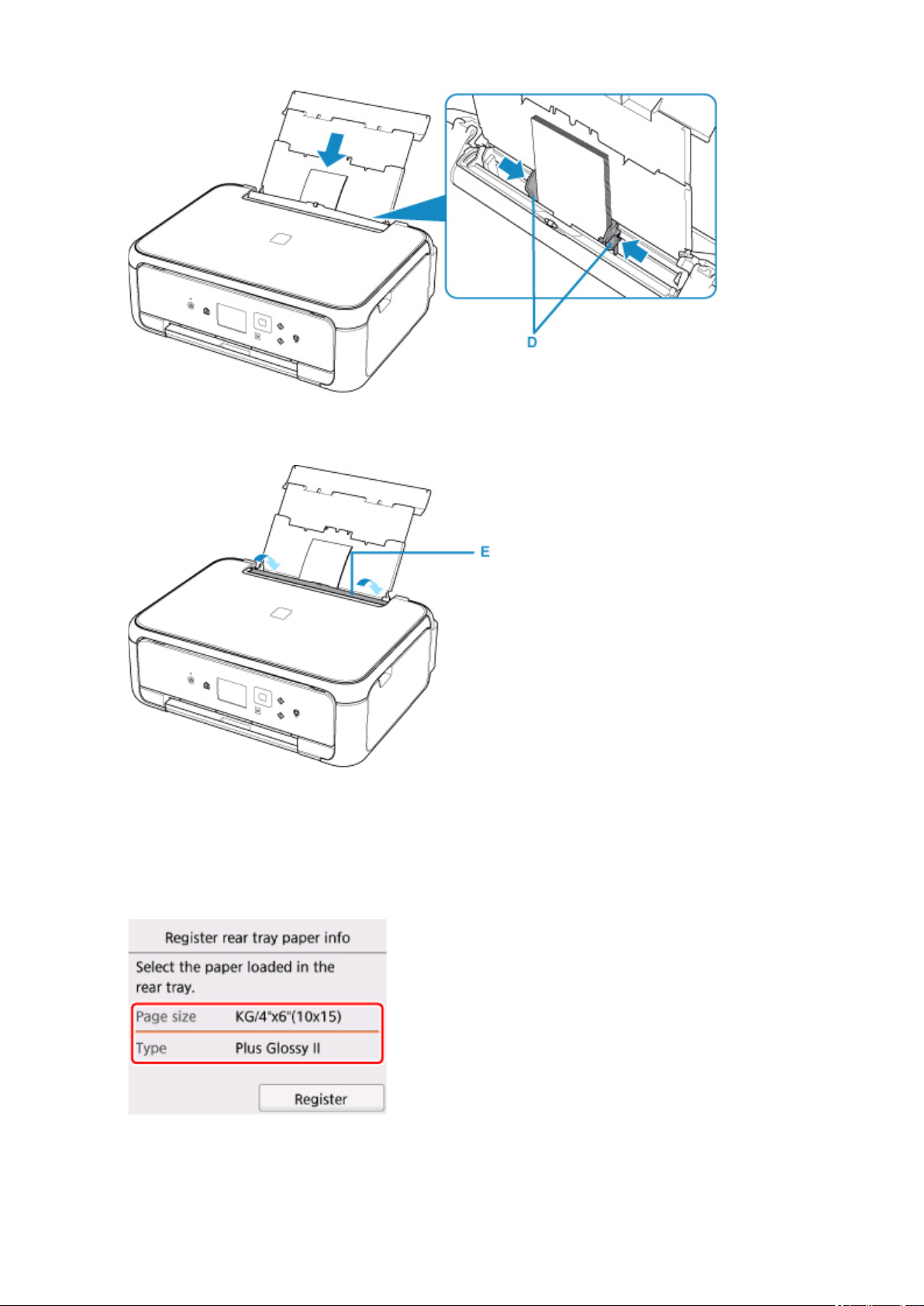
5.
Осторожно закройте крышку отверстия для подачи (E).
После закрытия крышки отверстия для подачи на ЖК-дисплее отображается экран регистрации
информации о бумаге для заднего лотка.
6.
Укажите размер и тип загруженной в задний лоток бумаги в разделах Разм. с. (Page
size) и Тип (Type), а затем выберите Зарегистрир. (Register).
26
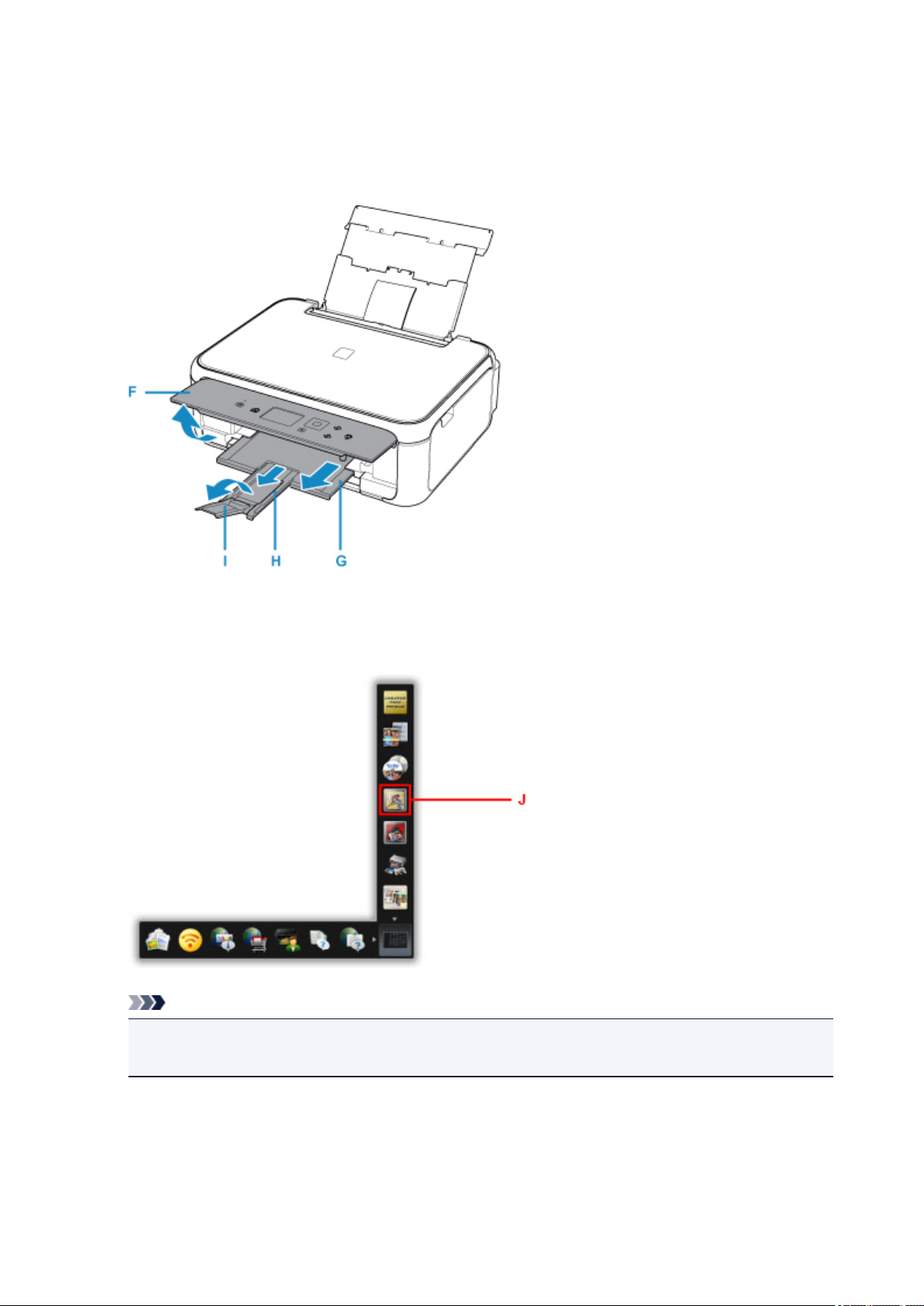
7. Откройте панель управления (F), выдвиньте лоток приема бумаги (G) и упор для
выходящей бумаги (H), затем откройте дополнительный лоток приема бумаги (I).
Перед печатью обязательно откройте панель управления. Если панель управления закрыта,
принтер не начинает печать.
8.
Щелкните значок My Image Garden (J) в меню Quick Menu.
Отобразится экран Меню навигации (Guide Menu).
Примечание.
•
Количество и тип отображаемых значков зависят от региона, зарегистрированной модели
принтера/сканера и установленных приложений.
9. Щелкните значок Фотопечать (Photo Print) (K).
27
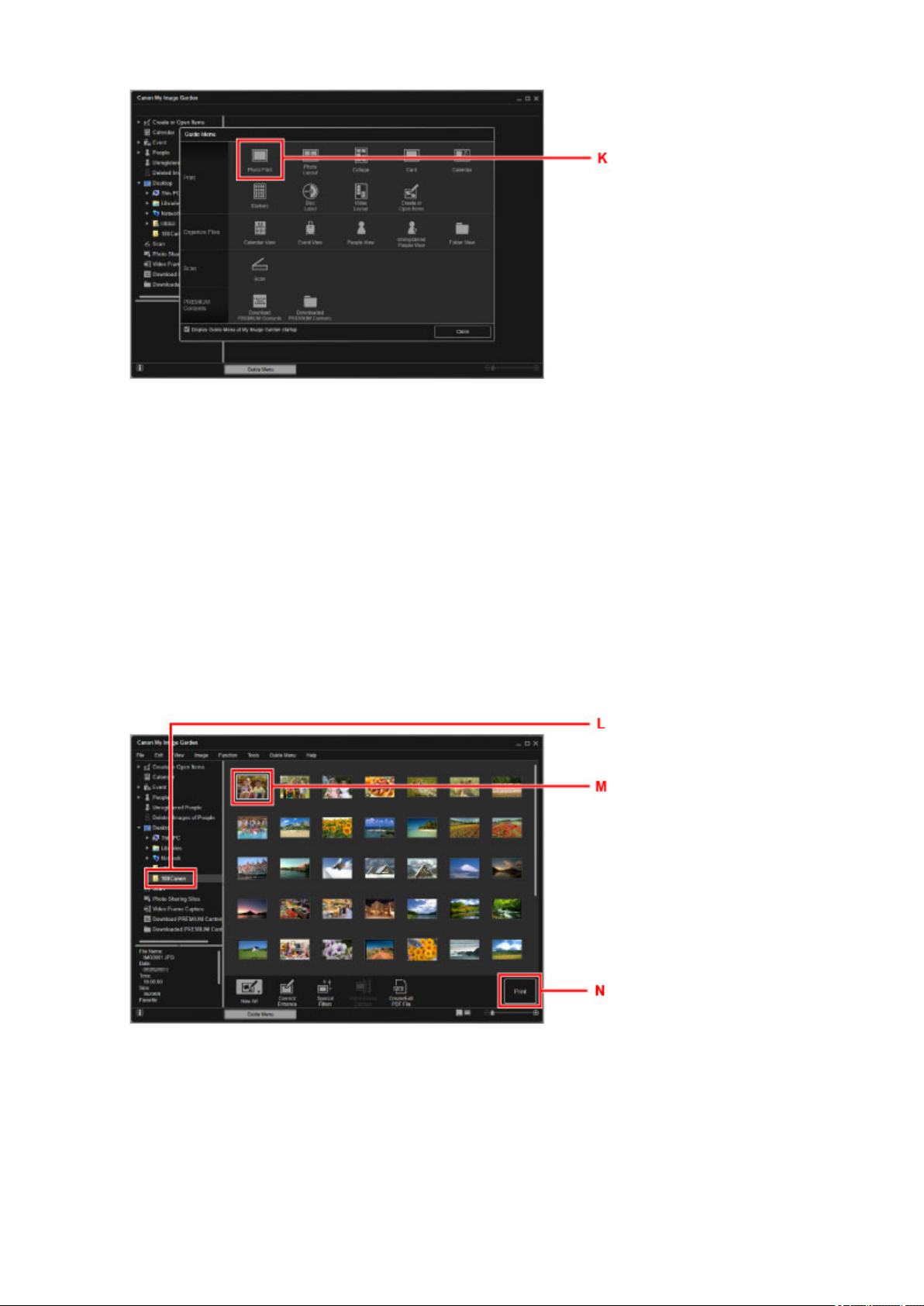
10.
Щелкните папку (L) с фотографиями, которые нужно напечатать.
11.
Щелкните фотографии (M), которые нужно напечатать.
Для Windows:
Чтобы выбрать несколько фотографий одновременно, щелкните их, удерживая клавишу Ctrl.
Для Mac OS:
Чтобы выбрать несколько фотографий одновременно, щелкните их, удерживая клавишу
управления.
12.
Щелкните Печать (Print) (N).
13. Задайте число копий и другие параметры.
Для Windows:
Укажите число копий, имя принтера, тип носителя и т. п.
28

Для Mac OS:
Задайте число копий.
14.
Запустите печать.
Для Windows:
Щелкните Печать (Print).
Для Mac OS:
Щелкните Печать (Print).
Когда появится диалоговое окно печати, укажите имя принтера, размер бумаги и щелкните
Печать (Print).
Примечание.
• Программа My Image Garden позволяет по-разному использовать на компьютере изображения, в
том числе фотографии с цифрового фотоаппарата.
• Для Windows:
Руководство по My Image Garden
• Для Mac OS:
Руководство по My Image Garden
• Если принтер не отображается в системе Mac OS, возможно, настройки AirPrint в приложении My
Image Garden являются неправильными. Сведения о правильной настройке см. в заголовке,
который касается принтера, поддерживающего функцию AirPrint, на странице ниже.
Создание параметров в соответствии с состоянием принтера
29
Печать фотографий со смартфона или планшета
Данный раздел содержит описание печати фотографий с помощью приложения Canon PRINT Inkjet/
SELPHY.
Подробные сведения о загрузке Canon PRINT Inkjet/SELPHY см. ниже.
Простая печать со смартфона или планшета с помощью Canon PRINT Inkjet/SELPHY
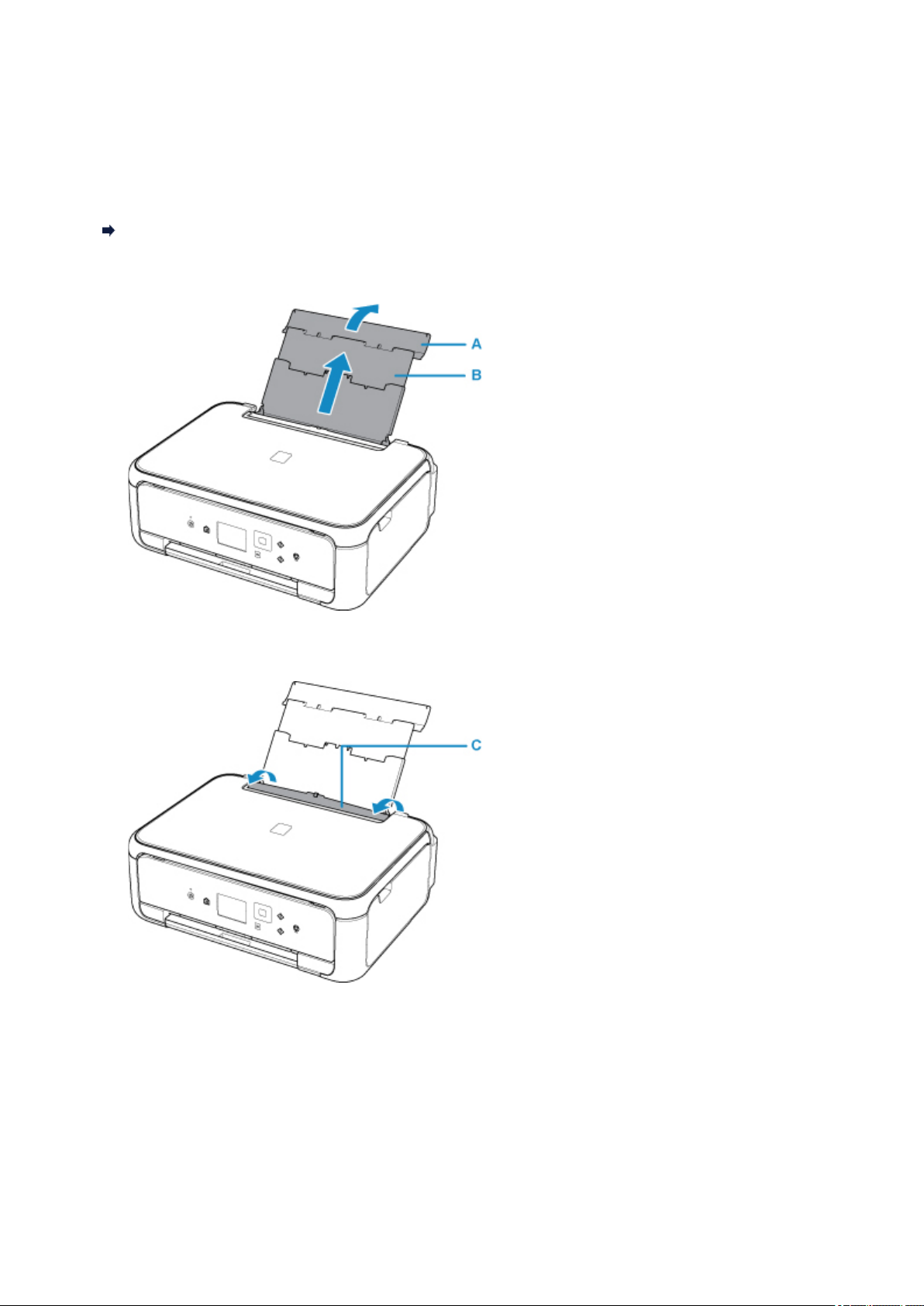
Откройте крышку заднего лотка (A) и затем выдвиньте упор для бумаги (B).
1.
2.
Откройте крышку отверстия для подачи (C).
3. Загрузите бумагу вертикально СТОРОНОЙ ДЛЯ ПЕЧАТИ ВВЕРХ.
4. Выровняйте направляющие бумаги (D) по ширине бумаги.
30
Loading…
-
Драйверы
4
-
Руководства по ремонту
2
-
Инструкции по эксплуатации
12
Языки:
Canon PIXMA TS5140 инструкция по эксплуатации
(100 страниц)
- Языки:Английский, Греческий, Датский, Испанский, Итальянский, Немецкий, Нидерландский, Португальский, Финский, Французский, Шведский
-
Тип:
PDF -
Размер:
21.22 MB -
Описание:
This pdf manual is a Getting Started Guide.
Canon PIXMA TS5140 инструкция по эксплуатации
(100 страниц)
- Языки:Болгарский, Венгерский, Латышский, Литовский, Польский, Румынский, Словацкий, Словенский, Турецкий, Хорватский, Чешский, Эстонский
-
Тип:
PDF -
Размер:
20.93 MB -
Описание:
This pdf manual is a Getting Started Guide.
На NoDevice можно скачать инструкцию по эксплуатации для Canon PIXMA TS5140. Руководство пользователя необходимо для ознакомления с правилами установки и эксплуатации Canon PIXMA TS5140. Инструкции по использованию помогут правильно настроить Canon PIXMA TS5140, исправить ошибки и выявить неполадки.
- Вернуться к приложению
- Содержание
- Замечания по использованию сайта и файлов cookie
- Рекомендации по поиску
-
Page 1: Canon Pixma TS5140
[…]
-
Page 2: Canon Pixma TS5140
[…]
-
Page 3: Canon Pixma TS5140
[…]
-
Page 4: Canon Pixma TS5140
[…]
-
Page 5: Canon Pixma TS5140
[…]
-
Page 6: Canon Pixma TS5140
[…]
-
Page 7: Canon Pixma TS5140
[…]
-
Page 8: Canon Pixma TS5140
[…]
-
Page 9: Canon Pixma TS5140
[…]
-
Page 10: Canon Pixma TS5140
[…]
-
Page 11: Canon Pixma TS5140
[…]
-
Page 12: Canon Pixma TS5140
[…]
-
Page 13: Canon Pixma TS5140
[…]
-
Page 14: Canon Pixma TS5140
[…]
-
Page 15: Canon Pixma TS5140
[…]
-
Page 16: Canon Pixma TS5140
[…]
-
Page 17: Canon Pixma TS5140
[…]
-
Page 18: Canon Pixma TS5140
[…]
-
Page 19: Canon Pixma TS5140
[…]
-
Page 20: Canon Pixma TS5140
[…]
-
Page 21: Canon Pixma TS5140
[…]
-
Page 22: Canon Pixma TS5140
[…]
-
Page 23: Canon Pixma TS5140
[…]
-
Page 24: Canon Pixma TS5140
[…]
-
Page 25: Canon Pixma TS5140
[…]
-
Page 26: Canon Pixma TS5140
[…]
-
Page 27: Canon Pixma TS5140
[…]
-
Page 28: Canon Pixma TS5140
[…]
-
Page 29: Canon Pixma TS5140
[…]
-
Page 30: Canon Pixma TS5140
[…]
-
Page 31: Canon Pixma TS5140
[…]
-
Page 32: Canon Pixma TS5140
[…]
-
Page 33: Canon Pixma TS5140
[…]
-
Page 34: Canon Pixma TS5140
[…]
-
Page 35: Canon Pixma TS5140
[…]
-
Page 36: Canon Pixma TS5140
[…]
-
Page 37: Canon Pixma TS5140
[…]
-
Page 38: Canon Pixma TS5140
[…]
-
Page 39: Canon Pixma TS5140
[…]
-
Page 40: Canon Pixma TS5140
[…]
-
Page 41: Canon Pixma TS5140
[…]
-
Page 42: Canon Pixma TS5140
[…]
-
Page 43: Canon Pixma TS5140
[…]
-
Page 44: Canon Pixma TS5140
[…]
-
Page 45: Canon Pixma TS5140
[…]
-
Page 46: Canon Pixma TS5140
[…]
-
Page 47: Canon Pixma TS5140
[…]
-
Page 48: Canon Pixma TS5140
[…]
-
Page 49: Canon Pixma TS5140
[…]
-
Page 50: Canon Pixma TS5140
[…]
-
Page 51: Canon Pixma TS5140
[…]
-
Page 52: Canon Pixma TS5140
[…]
-
Page 53: Canon Pixma TS5140
[…]
-
Page 54: Canon Pixma TS5140
[…]
-
Page 55: Canon Pixma TS5140
[…]
-
Page 56: Canon Pixma TS5140
[…]
-
Page 57: Canon Pixma TS5140
[…]
-
Page 58: Canon Pixma TS5140
[…]
-
Page 59: Canon Pixma TS5140
[…]
-
Page 60: Canon Pixma TS5140
[…]
-
Page 61: Canon Pixma TS5140
[…]
-
Page 62: Canon Pixma TS5140
[…]
-
Page 63: Canon Pixma TS5140
[…]
-
Page 64: Canon Pixma TS5140
[…]
-
Page 65: Canon Pixma TS5140
[…]
-
Page 66: Canon Pixma TS5140
[…]
-
Page 67: Canon Pixma TS5140
[…]
-
Page 68: Canon Pixma TS5140
[…]
-
Page 69: Canon Pixma TS5140
[…]
-
Page 70: Canon Pixma TS5140
[…]
-
Page 71: Canon Pixma TS5140
[…]
-
Page 72: Canon Pixma TS5140
[…]
-
Page 73: Canon Pixma TS5140
[…]
-
Page 74: Canon Pixma TS5140
[…]
-
Page 75: Canon Pixma TS5140
[…]
-
Page 76: Canon Pixma TS5140
[…]
-
Page 77: Canon Pixma TS5140
[…]
-
Page 78: Canon Pixma TS5140
[…]
-
Page 79: Canon Pixma TS5140
[…]
-
Page 80: Canon Pixma TS5140
[…]
-
Page 81: Canon Pixma TS5140
[…]
-
Page 82: Canon Pixma TS5140
[…]
-
Page 83: Canon Pixma TS5140
[…]
-
Page 84: Canon Pixma TS5140
[…]
-
Page 85: Canon Pixma TS5140
[…]
-
Page 86: Canon Pixma TS5140
[…]
-
Page 87: Canon Pixma TS5140
[…]
-
Page 88: Canon Pixma TS5140
[…]
-
Page 89: Canon Pixma TS5140
[…]
-
Page 90: Canon Pixma TS5140
[…]
-
Page 91: Canon Pixma TS5140
[…]
-
Page 92: Canon Pixma TS5140
[…]
-
Page 93: Canon Pixma TS5140
[…]
-
Page 94: Canon Pixma TS5140
[…]
-
Page 95: Canon Pixma TS5140
[…]
-
Page 96: Canon Pixma TS5140
[…]
-
Page 97: Canon Pixma TS5140
[…]
-
Page 98: Canon Pixma TS5140
[…]
-
Page 99: Canon Pixma TS5140
[…]
-
Page 100: Canon Pixma TS5140
[…]
-
Page 101: Canon Pixma TS5140
[…]
-
Page 102: Canon Pixma TS5140
[…]
-
Page 103: Canon Pixma TS5140
[…]
-
Page 104: Canon Pixma TS5140
[…]
-
Page 105: Canon Pixma TS5140
[…]
-
Page 106: Canon Pixma TS5140
[…]
-
Page 107: Canon Pixma TS5140
[…]
-
Page 108: Canon Pixma TS5140
[…]
-
Page 109: Canon Pixma TS5140
[…]
-
Page 110: Canon Pixma TS5140
[…]
-
Page 111: Canon Pixma TS5140
[…]
-
Page 112: Canon Pixma TS5140
[…]
-
Page 113: Canon Pixma TS5140
[…]
-
Page 114: Canon Pixma TS5140
[…]
-
Page 115: Canon Pixma TS5140
[…]
-
Page 116: Canon Pixma TS5140
[…]
-
Page 117: Canon Pixma TS5140
[…]
-
Page 118: Canon Pixma TS5140
[…]
-
Page 119: Canon Pixma TS5140
[…]
-
Page 120: Canon Pixma TS5140
[…]
-
Page 121: Canon Pixma TS5140
[…]
-
Page 122: Canon Pixma TS5140
[…]
-
Page 123: Canon Pixma TS5140
[…]
-
Page 124: Canon Pixma TS5140
[…]
-
Page 125: Canon Pixma TS5140
[…]
-
Page 126: Canon Pixma TS5140
[…]
-
Page 127: Canon Pixma TS5140
[…]
-
Page 128: Canon Pixma TS5140
[…]
-
Page 129: Canon Pixma TS5140
[…]
-
Page 130: Canon Pixma TS5140
[…]
-
Page 131: Canon Pixma TS5140
[…]
-
Page 132: Canon Pixma TS5140
[…]
-
Page 133: Canon Pixma TS5140
[…]
-
Page 134: Canon Pixma TS5140
[…]
-
Page 135: Canon Pixma TS5140
[…]
-
Page 136: Canon Pixma TS5140
[…]
-
Page 137: Canon Pixma TS5140
[…]
-
Page 138: Canon Pixma TS5140
[…]
-
Page 139: Canon Pixma TS5140
[…]
-
Page 140: Canon Pixma TS5140
[…]
-
Page 141: Canon Pixma TS5140
[…]
-
Page 142: Canon Pixma TS5140
[…]
-
Page 143: Canon Pixma TS5140
[…]
-
Page 144: Canon Pixma TS5140
[…]
-
Page 145: Canon Pixma TS5140
[…]
-
Page 146: Canon Pixma TS5140
[…]
-
Page 147: Canon Pixma TS5140
[…]
-
Page 148: Canon Pixma TS5140
[…]
-
Page 149: Canon Pixma TS5140
[…]
-
Page 150: Canon Pixma TS5140
[…]
-
Page 151: Canon Pixma TS5140
[…]
-
Page 152: Canon Pixma TS5140
[…]
-
Page 153: Canon Pixma TS5140
[…]
-
Page 154: Canon Pixma TS5140
[…]
-
Page 155: Canon Pixma TS5140
[…]
-
Page 156: Canon Pixma TS5140
[…]
-
Page 157: Canon Pixma TS5140
[…]
-
Page 158: Canon Pixma TS5140
[…]
-
Page 159: Canon Pixma TS5140
[…]
-
Page 160: Canon Pixma TS5140
[…]
-
Page 161: Canon Pixma TS5140
[…]
-
Page 162: Canon Pixma TS5140
[…]
-
Page 163: Canon Pixma TS5140
[…]
-
Page 164: Canon Pixma TS5140
[…]
-
Page 165: Canon Pixma TS5140
[…]
-
Page 166: Canon Pixma TS5140
[…]
-
Page 167: Canon Pixma TS5140
[…]
-
Page 168: Canon Pixma TS5140
[…]
-
Page 169: Canon Pixma TS5140
[…]
-
Page 170: Canon Pixma TS5140
[…]
-
Page 171: Canon Pixma TS5140
[…]
-
Page 172: Canon Pixma TS5140
[…]
-
Page 173: Canon Pixma TS5140
[…]
-
Page 174: Canon Pixma TS5140
[…]
-
Page 175: Canon Pixma TS5140
[…]
-
Page 176: Canon Pixma TS5140
[…]
-
Page 177: Canon Pixma TS5140
[…]
-
Page 178: Canon Pixma TS5140
[…]
-
Page 179: Canon Pixma TS5140
[…]
-
Page 180: Canon Pixma TS5140
[…]
-
Page 181: Canon Pixma TS5140
[…]
-
Page 182: Canon Pixma TS5140
[…]
-
Page 183: Canon Pixma TS5140
[…]
-
Page 184: Canon Pixma TS5140
[…]
-
Page 185: Canon Pixma TS5140
[…]
-
Page 186: Canon Pixma TS5140
[…]
-
Page 187: Canon Pixma TS5140
[…]
-
Page 188: Canon Pixma TS5140
[…]
-
Page 189: Canon Pixma TS5140
[…]
-
Page 190: Canon Pixma TS5140
[…]
-
Page 191: Canon Pixma TS5140
[…]
-
Page 192: Canon Pixma TS5140
[…]
-
Page 193: Canon Pixma TS5140
[…]
-
Page 194: Canon Pixma TS5140
[…]
-
Page 195: Canon Pixma TS5140
[…]
-
Page 196: Canon Pixma TS5140
[…]
-
Page 197: Canon Pixma TS5140
[…]
-
Page 198: Canon Pixma TS5140
[…]
-
Page 199: Canon Pixma TS5140
[…]
-
Page 200: Canon Pixma TS5140
[…]
-
Page 201: Canon Pixma TS5140
[…]
-
Page 202: Canon Pixma TS5140
[…]
-
Page 203: Canon Pixma TS5140
[…]
-
Page 204: Canon Pixma TS5140
[…]
-
Page 205: Canon Pixma TS5140
[…]
-
Page 206: Canon Pixma TS5140
[…]
-
Page 207: Canon Pixma TS5140
[…]
-
Page 208: Canon Pixma TS5140
[…]
-
Page 209: Canon Pixma TS5140
[…]
-
Page 210: Canon Pixma TS5140
[…]
-
Page 211: Canon Pixma TS5140
[…]
-
Page 212: Canon Pixma TS5140
[…]
-
Page 213: Canon Pixma TS5140
[…]
-
Page 214: Canon Pixma TS5140
[…]
-
Page 215: Canon Pixma TS5140
[…]
-
Page 216: Canon Pixma TS5140
[…]
-
Page 217: Canon Pixma TS5140
[…]
-
Page 218: Canon Pixma TS5140
[…]
-
Page 219: Canon Pixma TS5140
[…]
-
Page 220: Canon Pixma TS5140
[…]
-
Page 221: Canon Pixma TS5140
[…]
-
Page 222: Canon Pixma TS5140
[…]
-
Page 223: Canon Pixma TS5140
[…]
-
Page 224: Canon Pixma TS5140
[…]
-
Page 225: Canon Pixma TS5140
[…]
-
Page 226: Canon Pixma TS5140
[…]
-
Page 227: Canon Pixma TS5140
[…]
-
Page 228: Canon Pixma TS5140
[…]
-
Page 229: Canon Pixma TS5140
[…]
-
Page 230: Canon Pixma TS5140
[…]
-
Page 231: Canon Pixma TS5140
[…]
-
Page 232: Canon Pixma TS5140
[…]
-
Page 233: Canon Pixma TS5140
[…]
-
Page 234: Canon Pixma TS5140
[…]
-
Page 235: Canon Pixma TS5140
[…]
-
Page 236: Canon Pixma TS5140
[…]
-
Page 237: Canon Pixma TS5140
[…]
-
Page 238: Canon Pixma TS5140
[…]
-
Page 239: Canon Pixma TS5140
[…]
-
Page 240: Canon Pixma TS5140
[…]
-
Page 241: Canon Pixma TS5140
[…]
-
Page 242: Canon Pixma TS5140
[…]
-
Page 243: Canon Pixma TS5140
[…]
-
Page 244: Canon Pixma TS5140
[…]
-
Page 245: Canon Pixma TS5140
[…]
-
Page 246: Canon Pixma TS5140
[…]
-
Page 247: Canon Pixma TS5140
[…]
-
Page 248: Canon Pixma TS5140
[…]
-
Page 249: Canon Pixma TS5140
[…]
-
Page 250: Canon Pixma TS5140
[…]
-
Page 251: Canon Pixma TS5140
[…]
-
Page 252: Canon Pixma TS5140
[…]
-
Page 253: Canon Pixma TS5140
[…]
-
Page 254: Canon Pixma TS5140
[…]
-
Page 255: Canon Pixma TS5140
[…]
-
Page 256: Canon Pixma TS5140
[…]
-
Page 257: Canon Pixma TS5140
[…]
-
Page 258: Canon Pixma TS5140
[…]
-
Page 259: Canon Pixma TS5140
[…]
-
Page 260: Canon Pixma TS5140
[…]
-
Page 261: Canon Pixma TS5140
[…]
-
Page 262: Canon Pixma TS5140
[…]
-
Page 263: Canon Pixma TS5140
[…]
-
Page 264: Canon Pixma TS5140
[…]
-
Page 265: Canon Pixma TS5140
[…]
-
Page 266: Canon Pixma TS5140
[…]
-
Page 267: Canon Pixma TS5140
[…]
-
Page 268: Canon Pixma TS5140
[…]
-
Page 269: Canon Pixma TS5140
[…]
-
Page 270: Canon Pixma TS5140
[…]
-
Page 271: Canon Pixma TS5140
[…]
-
Page 272: Canon Pixma TS5140
[…]
-
Page 273: Canon Pixma TS5140
[…]
-
Page 274: Canon Pixma TS5140
[…]
-
Page 275: Canon Pixma TS5140
[…]
-
Page 276: Canon Pixma TS5140
[…]
-
Page 277: Canon Pixma TS5140
[…]
-
Page 278: Canon Pixma TS5140
[…]
-
Page 279: Canon Pixma TS5140
[…]
-
Page 280: Canon Pixma TS5140
[…]
-
Page 281: Canon Pixma TS5140
[…]
-
Page 282: Canon Pixma TS5140
[…]
-
Page 283: Canon Pixma TS5140
[…]
-
Page 284: Canon Pixma TS5140
[…]
-
Page 285: Canon Pixma TS5140
[…]
-
Page 286: Canon Pixma TS5140
[…]
-
Page 287: Canon Pixma TS5140
[…]
-
Page 288: Canon Pixma TS5140
[…]
-
Page 289: Canon Pixma TS5140
[…]
-
Page 290: Canon Pixma TS5140
[…]
-
Page 291: Canon Pixma TS5140
[…]
-
Page 292: Canon Pixma TS5140
[…]
-
Page 293: Canon Pixma TS5140
[…]
-
Page 294: Canon Pixma TS5140
[…]
-
Page 295: Canon Pixma TS5140
[…]
-
Page 296: Canon Pixma TS5140
[…]
-
Page 297: Canon Pixma TS5140
[…]
-
Page 298: Canon Pixma TS5140
[…]
-
Page 299: Canon Pixma TS5140
[…]
-
Page 300: Canon Pixma TS5140
[…]
-
Page 301: Canon Pixma TS5140
[…]
-
Page 302: Canon Pixma TS5140
[…]
-
Page 303: Canon Pixma TS5140
[…]
-
Page 304: Canon Pixma TS5140
[…]
-
Page 305: Canon Pixma TS5140
[…]
-
Page 306: Canon Pixma TS5140
[…]
-
Page 307: Canon Pixma TS5140
[…]
-
Page 308: Canon Pixma TS5140
[…]
-
Page 309: Canon Pixma TS5140
[…]
-
Page 310: Canon Pixma TS5140
[…]
-
Page 311: Canon Pixma TS5140
[…]
-
Page 312: Canon Pixma TS5140
[…]
-
Page 313: Canon Pixma TS5140
[…]
-
Page 314: Canon Pixma TS5140
[…]
-
Page 315: Canon Pixma TS5140
[…]
-
Page 316: Canon Pixma TS5140
[…]
-
Page 317: Canon Pixma TS5140
[…]
-
Page 318: Canon Pixma TS5140
[…]
-
Page 319: Canon Pixma TS5140
[…]
-
Page 320: Canon Pixma TS5140
[…]
-
Page 321: Canon Pixma TS5140
[…]
-
Page 322: Canon Pixma TS5140
[…]
-
Page 323: Canon Pixma TS5140
[…]
-
Page 324: Canon Pixma TS5140
[…]
-
Page 325: Canon Pixma TS5140
[…]
-
Page 326: Canon Pixma TS5140
[…]
-
Page 327: Canon Pixma TS5140
[…]
-
Page 328: Canon Pixma TS5140
[…]
-
Page 329: Canon Pixma TS5140
[…]
-
Page 330: Canon Pixma TS5140
[…]
-
Page 331: Canon Pixma TS5140
[…]
-
Page 332: Canon Pixma TS5140
[…]
-
Page 333: Canon Pixma TS5140
[…]
-
Page 334: Canon Pixma TS5140
[…]
-
Page 335: Canon Pixma TS5140
[…]
-
Page 336: Canon Pixma TS5140
[…]
-
Page 337: Canon Pixma TS5140
[…]
-
Page 338: Canon Pixma TS5140
[…]
-
Page 339: Canon Pixma TS5140
[…]
-
Page 340: Canon Pixma TS5140
[…]
-
Page 341: Canon Pixma TS5140
[…]
-
Page 342: Canon Pixma TS5140
[…]
-
Page 343: Canon Pixma TS5140
[…]
-
Page 344: Canon Pixma TS5140
[…]
-
Page 345: Canon Pixma TS5140
[…]
-
Page 346: Canon Pixma TS5140
[…]
-
Page 347: Canon Pixma TS5140
[…]
-
Page 348: Canon Pixma TS5140
[…]
-
Page 349: Canon Pixma TS5140
[…]
-
Page 350: Canon Pixma TS5140
[…]
-
Page 351: Canon Pixma TS5140
[…]
-
Page 352: Canon Pixma TS5140
[…]
-
Page 353: Canon Pixma TS5140
[…]
-
Page 354: Canon Pixma TS5140
[…]
-
Page 355: Canon Pixma TS5140
[…]
-
Page 356: Canon Pixma TS5140
[…]
-
Page 357: Canon Pixma TS5140
[…]
-
Page 358: Canon Pixma TS5140
[…]
-
Page 359: Canon Pixma TS5140
[…]
-
Page 360: Canon Pixma TS5140
[…]
-
Page 361: Canon Pixma TS5140
[…]
-
Page 362: Canon Pixma TS5140
[…]
-
Page 363: Canon Pixma TS5140
[…]
-
Page 364: Canon Pixma TS5140
[…]
-
Page 365: Canon Pixma TS5140
[…]
-
Page 366: Canon Pixma TS5140
[…]
-
Page 367: Canon Pixma TS5140
[…]
-
Page 368: Canon Pixma TS5140
[…]
-
Page 369: Canon Pixma TS5140
[…]
-
Page 370: Canon Pixma TS5140
[…]
-
Page 371: Canon Pixma TS5140
[…]
-
Page 372: Canon Pixma TS5140
[…]
-
Page 373: Canon Pixma TS5140
[…]
-
Page 374: Canon Pixma TS5140
[…]
-
Page 375: Canon Pixma TS5140
[…]
-
Page 376: Canon Pixma TS5140
[…]
-
Page 377: Canon Pixma TS5140
[…]
-
Page 378: Canon Pixma TS5140
[…]
-
Page 379: Canon Pixma TS5140
[…]
-
Page 380: Canon Pixma TS5140
[…]
-
Page 381: Canon Pixma TS5140
[…]
-
Page 382: Canon Pixma TS5140
[…]
-
Page 383: Canon Pixma TS5140
[…]
-
Page 384: Canon Pixma TS5140
[…]
-
Page 385: Canon Pixma TS5140
[…]
-
Page 386: Canon Pixma TS5140
[…]
-
Page 387: Canon Pixma TS5140
[…]
-
Page 388: Canon Pixma TS5140
[…]
-
Page 389: Canon Pixma TS5140
[…]
-
Page 390: Canon Pixma TS5140
[…]
-
Page 391: Canon Pixma TS5140
[…]
-
Page 392: Canon Pixma TS5140
[…]
-
Page 393: Canon Pixma TS5140
[…]
-
Page 394: Canon Pixma TS5140
[…]
-
Page 395: Canon Pixma TS5140
[…]
-
Page 396: Canon Pixma TS5140
[…]
-
Page 397: Canon Pixma TS5140
[…]
-
Page 398: Canon Pixma TS5140
[…]
-
Page 399: Canon Pixma TS5140
[…]
-
Page 400: Canon Pixma TS5140
[…]
-
Page 401: Canon Pixma TS5140
[…]
-
Page 402: Canon Pixma TS5140
[…]
-
Page 403: Canon Pixma TS5140
[…]
-
Page 404: Canon Pixma TS5140
[…]
-
Page 405: Canon Pixma TS5140
[…]
-
Page 406: Canon Pixma TS5140
[…]
-
Page 407: Canon Pixma TS5140
[…]
-
Page 408: Canon Pixma TS5140
[…]
-
Page 409: Canon Pixma TS5140
[…]
-
Page 410: Canon Pixma TS5140
[…]
-
Page 411: Canon Pixma TS5140
[…]
-
Page 412: Canon Pixma TS5140
[…]
-
Page 413: Canon Pixma TS5140
[…]
-
Page 414: Canon Pixma TS5140
[…]
-
Page 415: Canon Pixma TS5140
[…]
-
Page 416: Canon Pixma TS5140
[…]
-
Page 417: Canon Pixma TS5140
[…]
-
Page 418: Canon Pixma TS5140
[…]
-
Page 419: Canon Pixma TS5140
[…]
-
Page 420: Canon Pixma TS5140
[…]
-
Page 421: Canon Pixma TS5140
[…]
-
Page 422: Canon Pixma TS5140
[…]
-
Page 423: Canon Pixma TS5140
[…]
-
Page 424: Canon Pixma TS5140
[…]
-
Page 425: Canon Pixma TS5140
[…]
-
Page 426: Canon Pixma TS5140
[…]
-
Page 427: Canon Pixma TS5140
[…]
-
Page 428: Canon Pixma TS5140
[…]
-
Page 429: Canon Pixma TS5140
[…]
-
Page 430: Canon Pixma TS5140
[…]
-
Page 431: Canon Pixma TS5140
[…]
-
Page 432: Canon Pixma TS5140
[…]
-
Page 433: Canon Pixma TS5140
[…]
-
Page 434: Canon Pixma TS5140
[…]
-
Page 435: Canon Pixma TS5140
[…]
-
Page 436: Canon Pixma TS5140
[…]
-
Page 437: Canon Pixma TS5140
[…]
-
Page 438: Canon Pixma TS5140
[…]
-
Page 439: Canon Pixma TS5140
[…]
-
Page 440: Canon Pixma TS5140
[…]
-
Page 441: Canon Pixma TS5140
[…]
-
Page 442: Canon Pixma TS5140
[…]
-
Page 443: Canon Pixma TS5140
[…]
-
Page 444: Canon Pixma TS5140
[…]
Canon PIXMA TS5140 — это универсальный принтер «все в одном», совместимый с устройствами Windows, macOS, iOS, Android и Chrome OS. Ниже приведено подробное руководство по настройке и использованию принтера TS5140 на этих платформах.
1. Окна:
- Установка драйвера:
- Загрузки драйверов доступны в нижней части страницы.
- Загрузите «Полный пакет драйверов и программного обеспечения серии TS5100 (Windows)», подходящий для вашей версии Windows.
- Запустите загруженный файл и следуйте инструкциям на экране…
Доступно полное руководство и драйверы
Зарегистрируйтесь, чтобы загрузить и подключиться
Чтобы гарантировать себе наивысший уровень поддержки и доступ к необходимым ресурсам, вам нужно будет зарегистрироваться у нас. Как Премиум-пользователь, вы получите эксклюзивный доступ к последним загрузкам драйверов, подробным руководствам и приоритетной поддержке в чате. Это обновление необходимо для оптимизации вашего опыта и эффективного устранения неполадок.
Зарегистрируйте и подключите принтер/сканер