
MA0809-EA
HS-80TW
ENGLISH
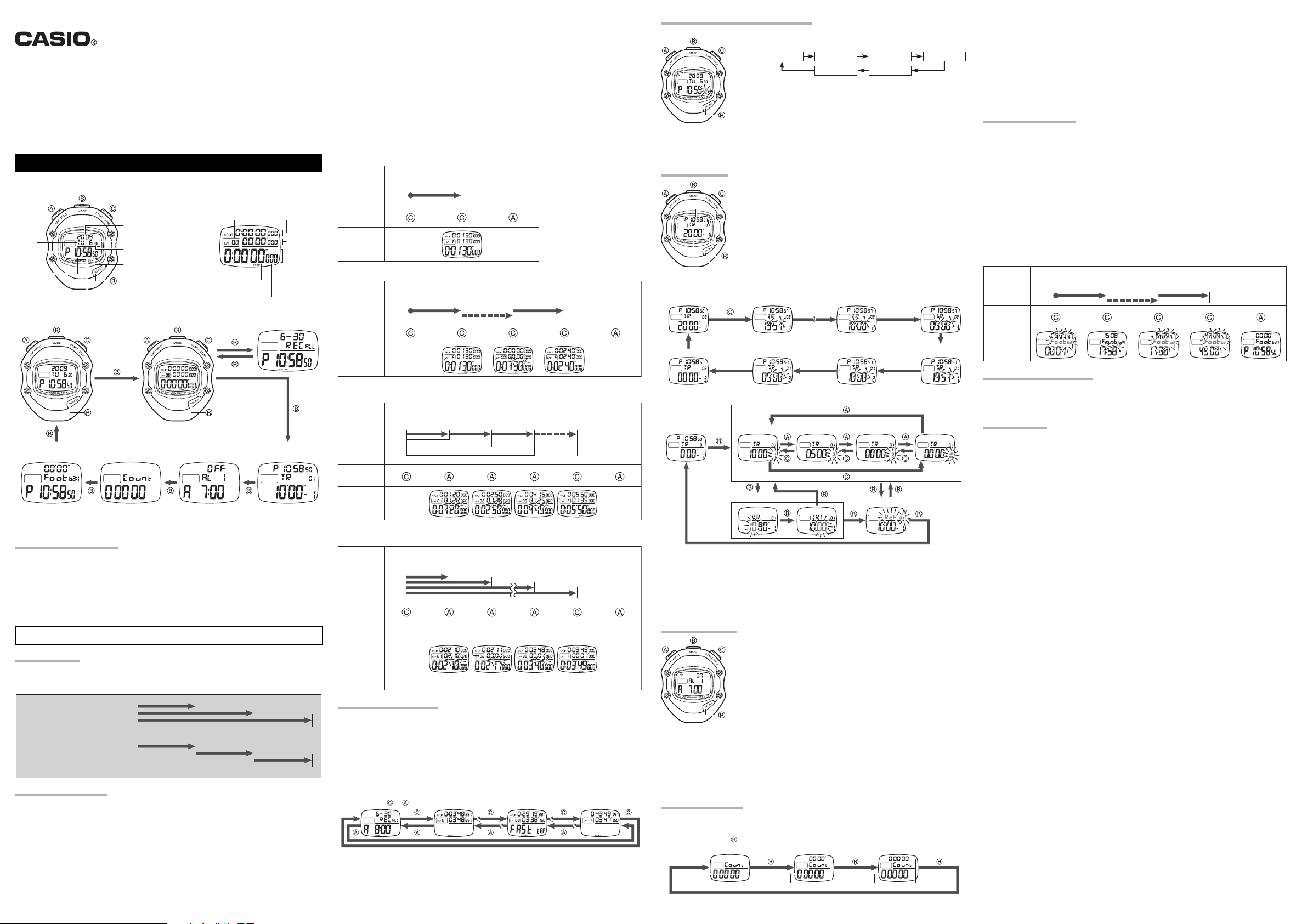
Time Display Stopwatch Display
Day of the week
Year
Month
PM
Hour
Day
Second
Minute
Timekeeping Mode
Stopwatch Mode Recall Mode
Mode
• A sticker is affixed to the glass of this stopwatch when you purchase it. Be sure to remove the sticker before using
the stopwatch.
• Depending on its model, the configuration of your stopwatch may differ somewhat from that shown in the
illustration.
OPERATING PRECAUTIONS
• A battery is installed at the factory. Have it replaced by a CASIO distributor at the first sign of low power (dim
display).
• Do not use or store this stopwatch in areas exposed to temperature extremes, strong magnetism, strong
vibration, or strong impact.
• Heat can shorten battery life and cause malfunction. Keep the stopwatch away from heaters and direct sunlight
when using it.
• Never try to take the stopwatch apart. Doing so can cause malfunction.
• To clean the stopwatch, use a soft, dry cloth or a cloth moistened in a solution of water and a mild neutral
detergent. Wring out all excess moisture from the cloth. Never use thinner, benzene, alcohol or other similar
agents.
• Be sure to keep all user documentation handy for future reference.
CASIO COMPUTER CO., LTD. assumes no responsibility for any loss, or any claims by third parties that may
arise through the use of this stopwatch.
GENERAL GUIDE
C button …. Starts and stops timing.
B button …. Cycles between: Stopwatch, Timer, Alarm, Counter, Football Stopwatch, and Timekeeping Modes.
A button ….. Performs lap/split and reset operation (stopwatch beeps).
R button ….. Recalls lap/split time records and total elapsed time.
SPLIT TIME AND LAP TIME
Split time (SPLIT) is the time
elapsed from the start to a
specific point.
Lap time (LAP) is the time
elapsed from one point to another
or for one lap around a track.
1ST SPLIT
START
1ST LAP
START
USING THE STOPWATCH
The stopwatch beeps to signal C and A button operations.
Working range
The total elapsed time and split time display is limited to 9 hours 59 minutes 59.999 seconds. Lap time display is
limited to 59 minutes 59.999 seconds.
Thereafter it will be reset and started again. The lap counter starts from 1 to 99 and repeats from 0.
While the stopwatch is reset to all zeros, holding down the A button will toggle the lower display area between
display of lap time and split time.
• 100 (indicating the number of laps) will flash on the display when memory is full (100 lap times in the current
group).
Lap counter Split time
Hours
Seconds
Minutes
Alarm ModeCounter ModeFootball Stopwatch
2ND SPLIT
2ND LAP
Lap time
Total
elapsed time
1/1000th of a second
Timer Mode
3RD SPLIT
3RD LAP
NORMAL TIME
START STOP RESET
CHART
BUTTON
OPERATION
0
(a)
a
DISPLAY
NET TIME
START STOP START STOP RESET
CHART
BUTTON
OPERATION
0
(a) (a) (a + b)
ab
(Stoppage time)
DISPLAY
After stopping a net time operation by pressing C, you can resume it by pressing C again.
LAP/SPLIT TIMES
START STOP RESET
1ST LAP 2ND LAP 3RD LAP
CHART
BUTTON
OPERATION
0
1ST SPLIT (a
a
(a)
b
)
2ND SPLIT (a+b
(a + b)c(a + b + c) (t)
)
3RD SPLIT (a+b+c
)
DISPLAY
MULTIPLE FINISHING TIMES
Example : To record the times of 100 different runners.
RESET
CHART
BUTTON
OPERATION
START 1ST
RUNNER
FINISHES
2ND
RUNNER
FINISHES
99TH
RUNNER
FINISHES
Difference between current finisher
and previous finisher
100TH
RUNNER
FINISHES
DISPLAY
Finishing position
USING THE RECALL MODE
You can use the recall mode to view data in stopwatch memory.
• There is enough memory to store a total of up to 200 records, divided between two record groups of 100 each. If
you record 100 times, the 100th time will not be stored in memory until you reset the stopwatch to all zeros.
• Starting a new stopwatch elapsed time operation will cause the older of the two record groups to be deleted
automatically in order to make room for a new group of records.
• There is also a FAST LAP record that displays the fastest lap from among all of the lap times currently in memory.
• Record 1 (the newest record) will always be displayed first whenever you press the R button to switch from the
Stopwatch Mode to the Recall Mode.
• In the Recall Mode, each press of the B button will toggle the display between record group 1 and record group
2.
• Lap time records in memory can be recalled while an elapsed time operation is in progress or stopped.
• Memory records are cleared whenever a new Stopwatch Mode elapsed time operation is stared by pressing the
C button after pressing the A button to reset the stopwatch to all zeros.
Holding down the or button scrolls at high speed.
SETTING THE CURRENT TIME AND DATE
MUTE
Beeper On/Off
In the Timekeeping Mode, hold down the A button for about two seconds to toggle the beeper on or off.
Auto Return
The stopwatch returns to the Timekeeping Mode if left unused for a few minutes.
1. In the Timekeeping Mode, hold down R for about two seconds.
2. Press C on a time signal to correct the seconds.
3. Flashing setting can be changed. Press B to move the flashing.
SECONDS HOUR MINUTES YEAR
MONTHDAY
4. Use C (+) and A (–) to change the flashing setting.
• Holding down the C or A button scrolls at high speed.
5. Press R to exit the setting mode.
Year digits can be set up to the year 2099.
*
12/24-hour Timekeeping
In the Timekeeping Mode, press C to toggle between 12-hour and 24-hour
timekeeping.
USING THE TIMER
You can set start times for up to 10 intervals, which are counted
down in sequence one after the other. You can configure the timer
interval sequence to repeat up to 100 times.
• When the timer sequence reaches the end of the final interval, it
Current time
Number of
repeats
restarts from the beginning of the first interval.
Timer number
Timer start tim
Example:
Timer 1 20’00»
Timer 2 10’00»
Timer 3 05’00
Repeat 2
Timer 1,
Repeat 1 start
Timer 2 end,
Timer 3 startTimer 3 end
Timer 1 end,
Timer 2 start
Timer 1 end,
Timer 2 start
Timer 2 end,
Timer 3 start
Timer 3 end,
Timer 1 start
To set an interval start time
Reset Timer Selection
Timer Interval Setting
1. In the Timer Mode, hold down the R button for about 2 seconds until the displayed interval time starts to flash.
2. Use the C and A buttons to scroll through the 10 interval times until the one you want to change is displayed.
• Interval timers count down in sequence from Timer 1 to Timer 10. Any timer with a starting time of 00’00» is
skipped.
3. Use the B button to move the flashing between the minute and second digits.
• You can specify a start time within the range of 0 to 59 minutes 59 seconds.
• You can repeat steps 2 and 3 to set other interval timer start times, if you want.
4. Press the R button to move the flashing to the number of repeats settings, and then use the C (+) and A (–)
buttons to change the setting to a value from 1 to 100.
5. After the number of repeats setting is the way you want, press the R button to exit the setting screen.
• Holding down C or A in steps 2, 3, or 4 of the above procedure will change the setting at high speed.
Repeat Setting
USING THE ALARMS
You can set up to 12 alarm times. The stopwatch beeps for 10 seconds when
an alarm time is reached.
• Press any button to stop the beeper after it starts to sound.
To turn a specific alarm on or off
1. In the Alarm Mode, use the C button to display the alarm (AL 1 to AL 12)
you want.
2. Press the A button to toggle the alarm on or off.
To turn all alarms off
In the Alarm Mode, hold down the A button until “ALL OFF” appears on the
display. This turns off all 12 alarms.
To test the alarm
To set the alarm time
1. In the Alarm Mode, use the C button to scroll through the alarm screen
(1 through 12), until the one you want to set is displayed.
2. Hold down the R button for about 2 seconds until the hour digits of the alarm time start to flash.
3. Use the B button to move the flashing between the hour and minute digits. Use the C (+) and A (–) buttons to
change the currently flashing digits.
4. After the setting is the way you want, press the R button to exit the setting screen.
• The alarm will not sound if the time on a flashing setting screen arrives.
The stopwatch will exit the setting screen automatically if you do not perform any operation for two or three minutes.
•
• Displaying the setting screen for an alarm will cause that alarm to turn on.
Hold down the C button to sound the alarm.
USING THE COUNTER
• The stopwatch is equipped with three types of counters, which can be used to maintain a count from 0 to 99,999.
• Each press of the R button cycles through the three counter types described below. Note that you can switch
between counter types only when the current counter is reset to zero.
Hold down the button for about two seconds to reset the count to zero.
Standard Counter Stopwatch Counter Dual Counter
Standard Counter
C button ………… counter (+)
A button …………. counter (–)
R button hold ….. counter reset
Stopwatch Counter
Stopwatch: 00’00» to 59’59»
C button ………… counter (+)
A button …………. stopwatch start/stop
R button hold ….. counter reset, stopwatch reset
Dual Counter
C button ………… counter 1 (+)
A button …………. counter 2 (+)
R button hold ….. counter 1 reset, counter 2 reset
FOOTBALL STOPWATCH
This stopwatch can be used to time a football match, and even allows for stoppage time.
To set the match time
1. In the Football Stopwatch Mode, hold down the R button for about two seconds until the minute digits of the
match time start to flash. This is the setting screen.
2. Use the C (+) button and A (–) button to change the match time setting in one-minute increments.
• You can set a match time of 1 to 99 minutes. There is also a “– –” setting which means that the match time is
unlimited.
• Holding down the C or A button scrolls at high speed.
3. After the time setting is the way you want, press the R button to exit the setting screen.
To time a match
• Press the C button to start timing of the match in the upper and lower display areas (“Football” flashes on the
display).
• Press the C button again to stop match timing in the upper display area (“Football” stops flashing). The match
timing in the lower display area continues at this time. Pressing C again will resume timing in the upper display
area.
• The stopwatch will beep for 10 seconds when the preset match time is reached in the lower display area. The
lower display area will start measuring elapsed time from zero and the upper display area will continue measuring
time. The end of stoppage time is reached when the upper display area indicates the preset match time.
• To stop match timing, make sure that match timing is stopped (“Football” not flashing), and then hold down the A
button until the watch beeps and the current time appears in the lower display area.
START STOP START STOP RESET
CHART
BUTTON
OPERATION
0
(a) (a) (a + b)
ab
(Stoppage time)
DISPLAY
CARE OF YOUR STOPWATCH
• This stopwatch is water resistant up to five bars (atmospheres), which means you can use it in the rain or in
areas where splashing water is present.
Never, however, operate the buttons of the stopwatch while it is immersed in water.
• You should have the rubber seal that keeps out water and dust replaced every 2 to 3 years.
• Should moisture appear inside the stopwatch, have it checked immediately by your dealer or a CASIO distributor.
SPECIFICATIONS
Accuracy at a normal temperature (TIME): ±30 seconds per month
Display capacity:
• Time Display: Hour, minutes, seconds, am/pm, year, month, day and day of the week
Calendar system: Pre-programmed until the year 2099
• Stopwatch Display:
Measuring capacity: (Total elapsed time display) 9 hours 59 minutes 59.999 seconds
Measuring unit: 1/1000 second
Measuring modes: Net time, lap time, split time, 1st-100th place time, lap counter (up to 99)
Memory capacity: 2 sets of 100 records each
Timer
10 intervals
Measuring capacity: 59 minutes 59 seconds
Measuring unit: 1 second
Number of repeats: 100
Beeper duration: 10 seconds
Alarm
Number of alarms: 12
Beeper duration: 10 seconds
Setting unit: 1 minute
Counter
Standard Counter: 0 to 99999
Stopwatch Counter: 0 to 99999
Measuring capacity: 59 minutes 59 seconds
Dual Counter: 0 to 99999
Football Stopwatch
Measuring capacity: 59 minutes 59 seconds
Measuring unit: 1 second
Beeper duration: 10 seconds
Battery: One lithium battery (type: CR2032)
Approx. 5 years continuous operation on type CR2032
(includes an average of 30 presses of button per day.)
Operating Temperature: 0°C to 40°C (32°F to 104°F)
(STOPWATCH): 99.9988%
(Lap time display) 59 minutes 59.999 seconds
(Split time display) 9 hours 59 minutes 59.999 seconds
Counter Counter Stopwatch Counter 1 Counter 2
Перейти к контенту

Русские электронные инструкции по эксплуатации
Постоянно обновляемый большой каталог документации по эксплуатации и использованию современных устройств и оборудования на русском языке. Бесплатное скачивание файлов.
Поиск:
Главная
♥ В закладки
Просмотр инструкции в pdf
Инструкция по эксплуатации наручных часов Casio HS-80TW-1E.
Скачать инструкцию к наручным часам Casio HS-80TW-1E (827,34 КБ)
Инструкции наручных часов Casio
« Инструкция к наручным часам Casio Edifice EFR-552GL-2A
» Инструкция к наручным часам Casio LTP-2069D-7A2
Вам также может быть интересно

Инструкция к наручным часам Casio G-SHOCK GG-1000-1A5
Инструкция к наручным часам Casio SHE-4050D-9A
Инструкция к наручным часам Casio DB-36-1

Инструкция к наручным часам Casio Pro Trek PRG-240-1E

Инструкция к наручным часам Casio Edifice EFR-552GL-2A
Инструкция к наручным часам Casio A-159WGEA-1E
Инструкция к наручным часам Casio MTP-1290D-2A
Инструкция к наручным часам Casio LA-670WEA-7E
Добавить комментарий
Имя *
Email *
Сайт
Комментарий
Сохранить моё имя, email и адрес сайта в этом браузере для последующих моих комментариев.
- Добавить инструкцию
- Заказать инструкцию
- Политика конфиденциальности
- Addeddate
- 2022-04-28 18:13:31
- Identifier
- manuallib-id-2629536
- Identifier-ark
- ark:/13960/s25zths9wdb
- Ocr
- tesseract 5.0.0-1-g862e
- Ocr_autonomous
- true
- Ocr_detected_lang
- en
- Ocr_detected_lang_conf
- 1.0000
- Ocr_detected_script
- Latin
- Ocr_detected_script_conf
- 1.0000
- Ocr_module_version
- 0.0.15
- Ocr_parameters
- -l eng+Latin
- Ppi
- 300
comment
Reviews
There are no reviews yet. Be the first one to
write a review.
46
Views
DOWNLOAD OPTIONS
Temporarily Unavailable
DAISY
For users with print-disabilities
Temporarily Unavailable
EPUB
Uploaded by
chris85
on
Артикул: HS-80TW-1E
В наличии
ПАМЯТЬ ИЗМЕРЕНИЙ
100 РЕЗУЛЬТАТОВ
ВОДОЗАЩИТА
50 М (5 БАР не нажимать кнопки под водой)
ТАЙМЕР ОБРАТНОГО ОТСЧЕТА
есть
ВЫСОКАЯ ТОЧНОСТЬ 1/1000 сек
есть
БУДИЛЬНИК, КАЛЕНДАРЬ
есть
Секундомер с точностью в 1/1000 секунды. Пределы измерения 10 часов.
Количество временных замеров — 100.
Память на 200 временных событий(100LAP/100SPLIT).
Функция секундомера футбольного судьи. Позволяет измерять общее и добавленное время матча.
Таймер обратного отсчета с 10 интервалами и на 100 повторений. Время одного интервала — 60 мин. Память на 200 временных событий.
12 независимых будильников.
Отображение текущего времени: часы, минуты, секунды.
Автоматический календарь всегда отображает точную дату.
12/24-часовое отображение времени
Включение/выключение звука
Можно отключить звук при нажатии кнопок.
Корпус из полимерного пластика
Капроновый шнурок подвеса с регулятором длинны.
Водозащита 50м(5бар) — возможно работать под дождем.
Батарея CR2032 срок службы 5 лет.
Габариты 64 x 83 x 24мм (Ш x В x Г)
Вес 82г
Секундомер с точностью в 1/1000 секунды. Пределы измерения 10 часов.
Количество временных замеров — 100.
Память на 200 временных событий(100LAP/100SPLIT).
Функция секундомера футбольного судьи. Позволяет измерять общее и добавленное время матча.
Таймер обратного отсчета с 10 интервалами и на 100 повторений. Время одного интервала — 60 мин. Память на 200 временных событий.
12 независимых будильников.
Отображение текущего времени: часы, минуты, секунды.
Автоматический календарь всегда отображает точную дату.
12/24-часовое отображение времени
Включение/выключение звука
Можно отключить звук при нажатии кнопок.
Корпус из полимерного пластика
Капроновый шнурок подвеса с регулятором длинны.
Водозащита 50м(5бар) — возможно работать под дождем.
Батарея CR2032 срок службы 5 лет.
Габариты 64 x 83 x 24мм (Ш x В x Г)
Вес 82г
-
Описание
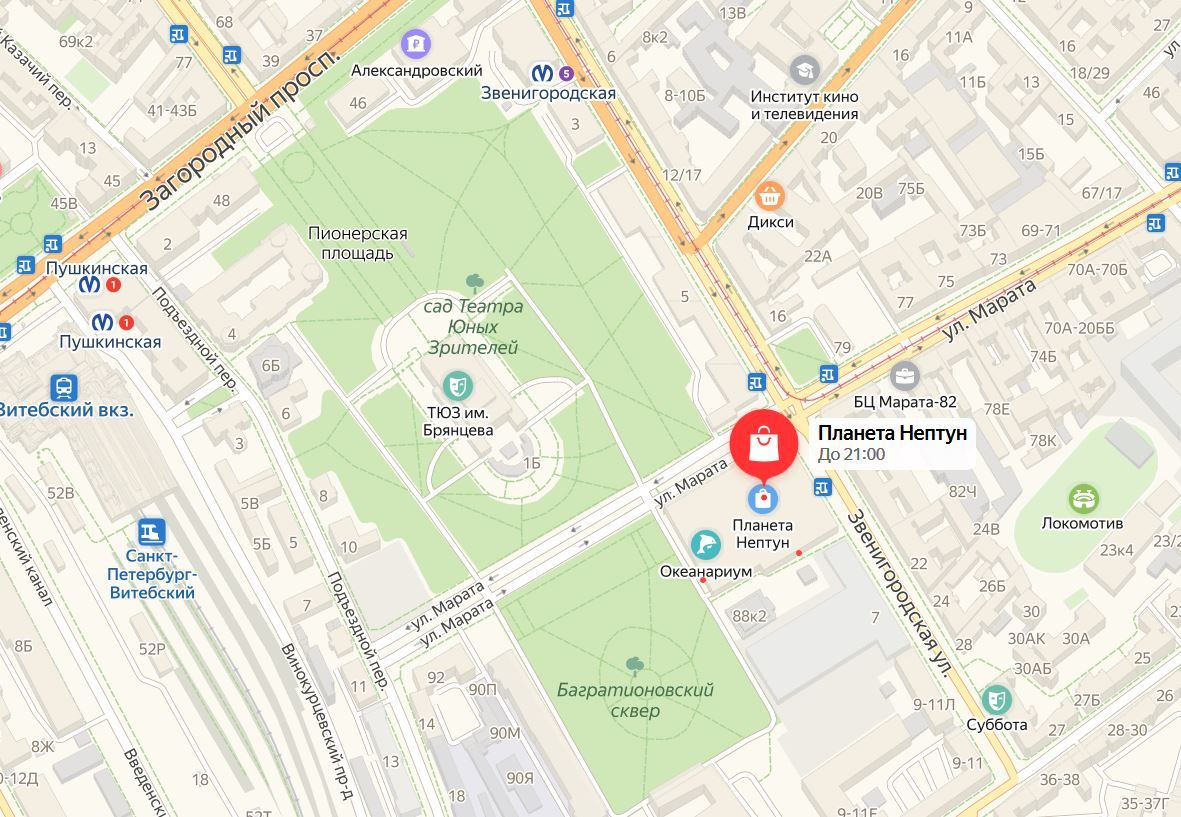
Забрать прямо сейчас в Санкт-Петербурге, ул. Марата 86 ,
ТРК «Планета Нептун», 1 этаж, отдел «Часовой», с 10 до 21, без выходных.

-
Документы
-
Характеристики
ПАМЯТЬ ИЗМЕРЕНИЙ
100 РЕЗУЛЬТАТОВ
ВОДОЗАЩИТА
50 М (5 БАР не нажимать кнопки под водой)
ТАЙМЕР ОБРАТНОГО ОТСЧЕТА
есть
ВЫСОКАЯ ТОЧНОСТЬ 1/1000 сек
есть
БУДИЛЬНИК, КАЛЕНДАРЬ
есть
Забрать прямо сейчас в Санкт-Петербурге, ул. Марата 86 ,
ТРК «Планета Нептун», 1 этаж, отдел «Часовой», с 10 до 21, без выходных.
ПАМЯТЬ ИЗМЕРЕНИЙ
100 РЕЗУЛЬТАТОВ
ВОДОЗАЩИТА
50 М (5 БАР не нажимать кнопки под водой)
ТАЙМЕР ОБРАТНОГО ОТСЧЕТА
есть
ВЫСОКАЯ ТОЧНОСТЬ 1/1000 сек
есть
БУДИЛЬНИК, КАЛЕНДАРЬ
есть
Похожие товары
Document Download |
‹
›
Casio HS-80TW Manual Online:
3.4,
834
votes
Casio HS-80TW User Manual
Casio HS-80TW User Guide
Casio HS-80TW Online Manual
Text of Casio HS-80TW User Guide:
Related Products and Documents (Other):
-
Casio HR-8TE Other Operation & user’s manual
HR-8TE
casio/hr-8te.pdf, 5 -
Casio CTK-520L Other Operation manual
CTK-520L
casio/ctk-520l.pdf, 21 -
Casio 1301 Other Operation & user’s manual
1301
casio/1301.pdf, 50 -
Casio CTK-485 Other Operation & user’s manual
CTK-485
casio/ctk-485.pdf, 13 -
Casio FX-8000G Other Owner’s manual
FX-8000G
casio/fx-8000g.pdf, 140 -
Casio E-10 Other Getting started manual
E-10
casio/e-10.pdf, 23 -
Casio PV-S1600 Other Operation & user’s manual
PV-S1600
casio/pv-s1600.pdf, 189 -
Casio QW-437 Other Manual
QW-437
casio/qw-437.pdf, 1
Comparable Devices:
| # | Manufacturer | Model | Document Type | File | Updated | Pages | Size |
|---|---|---|---|---|---|---|---|
| 1 | Samsung | MW1150WA | Service manual | samsung/mw1150wa-226.pdf | 10 Feb 2024 | 23 | 6.09 Mb |
| 2 | Beretta | SV10 Prevail III | Operation & user’s manual | beretta/sv10-prevail-iii-HZ8.pdf | 08 May 2024 | 32 | 4.99 Mb |
| 3 | Ricoh | GX5050N — Aficio Color Inkjet Printer | Brochure & specs | ricoh/gx5050n-aficio-color-inkjet-printer-6SC.pdf | 21 May 2024 | 16 | 1.58 Mb |
| 4 | Cooper Tools | Cleco | Operation & service manual | cooper-tools/cleco-Z3W.pdf | 20 Nov 2024 | 12 | |
| 5 | AXIOMTEK | GOT615-801 | Operation & user’s manual | axiomtek/got615-801-SQY.pdf | 18 Feb 2025 | 79 | |
| 6 | Technics | SX-KN200 | Owner’s manual | technics/sx-kn200-62O.pdf | 22 Feb 2024 | 19 |
Similar Resources:
Other Instructions:
-
Dayton Stereo System WT-01
#842X4W: WT-01 Stereo System Operation & user’s manual
WT-01, 2
-
Motion Sound Amplifier KP-500SN
Operation & user’s manual for Motion Sound KP-500SN Amplifier
KP-500SN, 6
-
Andis Hair Dryer AC-5
Hair Dryer PDF Use & care instructions manual
AC-5, 16
-
Phoenix Model Toy Stinson Reliant
Phoenix Model Product Guide: Stinson Reliant PDF Instruction manual — DT7GXE
Stinson Reliant, 16
-
Zibro Dehumidifier D8
Zibro D8 Guide (Doc Type: Dehumidifier Operating manual)
D8, 68
-
LG Plasma TV 42PX3DBV
42PX3DBV Service manual — TCGD61
42PX3DBV, 28
-
Planar Flat Panel TV XP17WSA
Planar Product Guide: XP17WSA PDF Manual — BG1S9N
XP17WSA, 31
-
Pioneer Car Stereo System DEH-6350SD
Car Stereo System #TO3SE9
DEH-6350SD, 100
-
TERK Technologies Radio Antenna TRK-SR1
TRK-SR1 (Radio Antenna ePDF User Manual, #KG2552)
TRK-SR1, 16
-
Sony Laptop VAIO VGN-SR100 Series
Sony VAIO VGN-SR100 Series Laptop Quick start manual
VAIO VGN-SR100 Series, 2
-
EAW Speaker System FR300
EAW FR300 Manual (Doc Type: Speaker System Specifications)
FR300, 1
-
German pool Laboratory Equipment DS-15L
PDF Manual (@26HZF7), German pool DS-15L Laboratory Equipment (30th Jan 2025)
DS-15L, 24