
Nous vous remercions pour cet achat d’un produit Pioneer. Nous vous demandons
de lire soigneusement ce mode d’emploi ; vous serez ainsi à même de faire fonctionner l’appareil correctement.
Caractéristiques principales
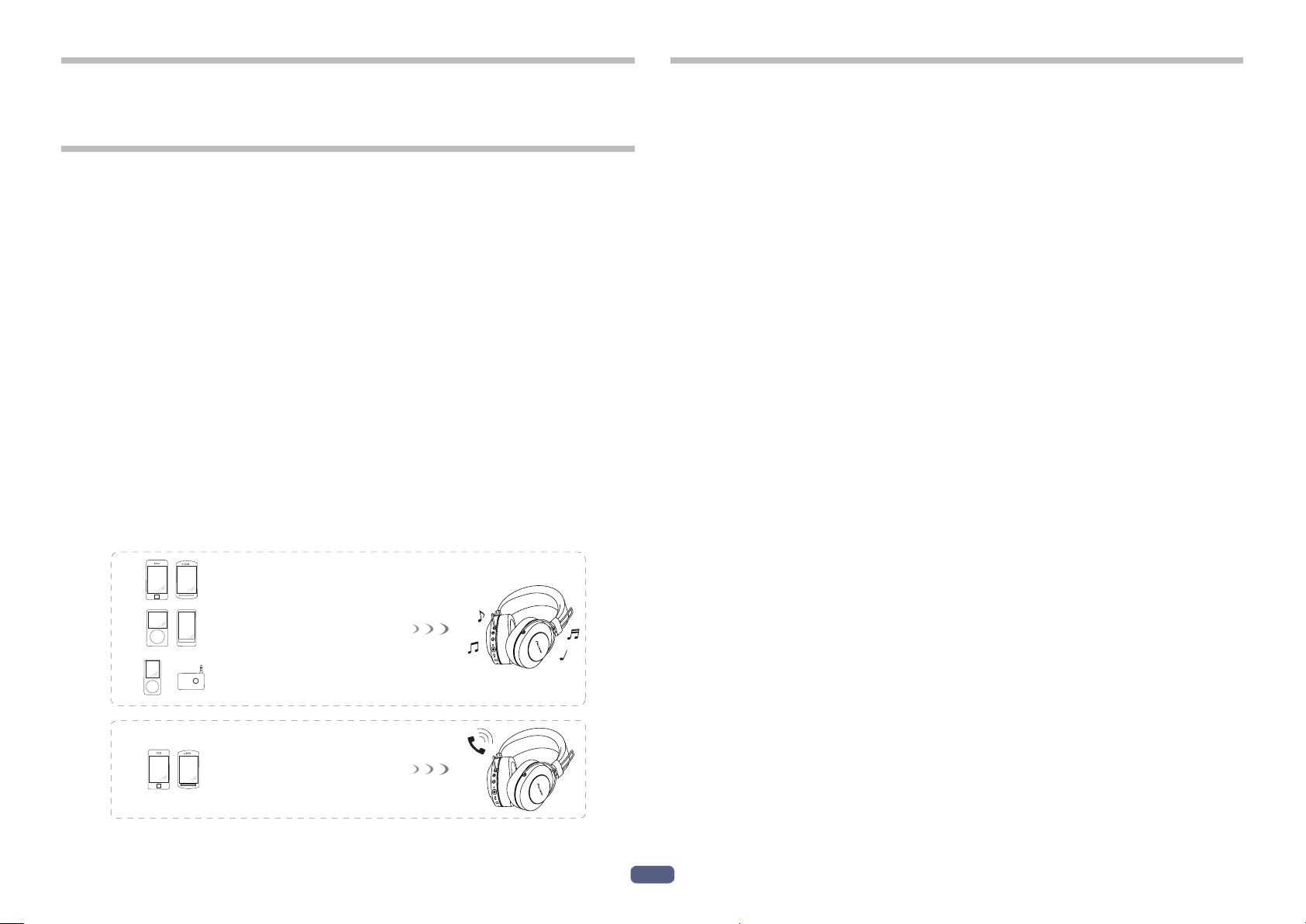
Distraction musicale par communication sans l
• Distraction musicale par liaison sans fil sur les périphériques Bluetooth
(smartphones et tous les autres téléphones cellulaires, lecteurs de musique
numérique, etc.) *1
Pour tous détails relatifs aux commandes, consultez le mode d’emploi d’utilisateur à propos de l’appareil qui doit être connecté.
• Autorise la commande de lecture, d’arrêt, la sélection d’avance et la commande
en sens inverse. *2
Communication en mode mains libres
• La communication en mode mains libres est possible même avec un téléphone
Bluetooth placé dans votre sac ou votre serviette. *3
*1 Le périphérique Bluetooth correspondant doit prendre en charge le profil A2DP.
*2 Le périphérique Bluetooth correspondant doit prendre en charge le profil AVRCP.
En outre, la commande par télécommande ne peut pas être garantie pour tous
les appareils.
*3 Le périphérique Bluetooth correspondant doit prendre en charge le profil HSP ou
HFP.
Glossaire
A2DP : Profil de transmission de contenu musical de haute qualité
HSP : Profil de commande de communication/de téléphone cellulaire
HFP : Profil de commande de communication mains libres/de téléphone cellulaire
AVRCP : Profil de télécommande de composants AV
NFC : Technologie de pointe pour communication à courte portée entre les appareils
électroniques
Périphérique Bluetooth :
Smartphone
Périphérique Bluetooth :
Lecteur de musique numérique
Autre lecteur de musique numérique +
émetteur audio Bluetooth (disponible
+
dans le commerce)
Périphérique Bluetooth :
Smartphone
2
Fr
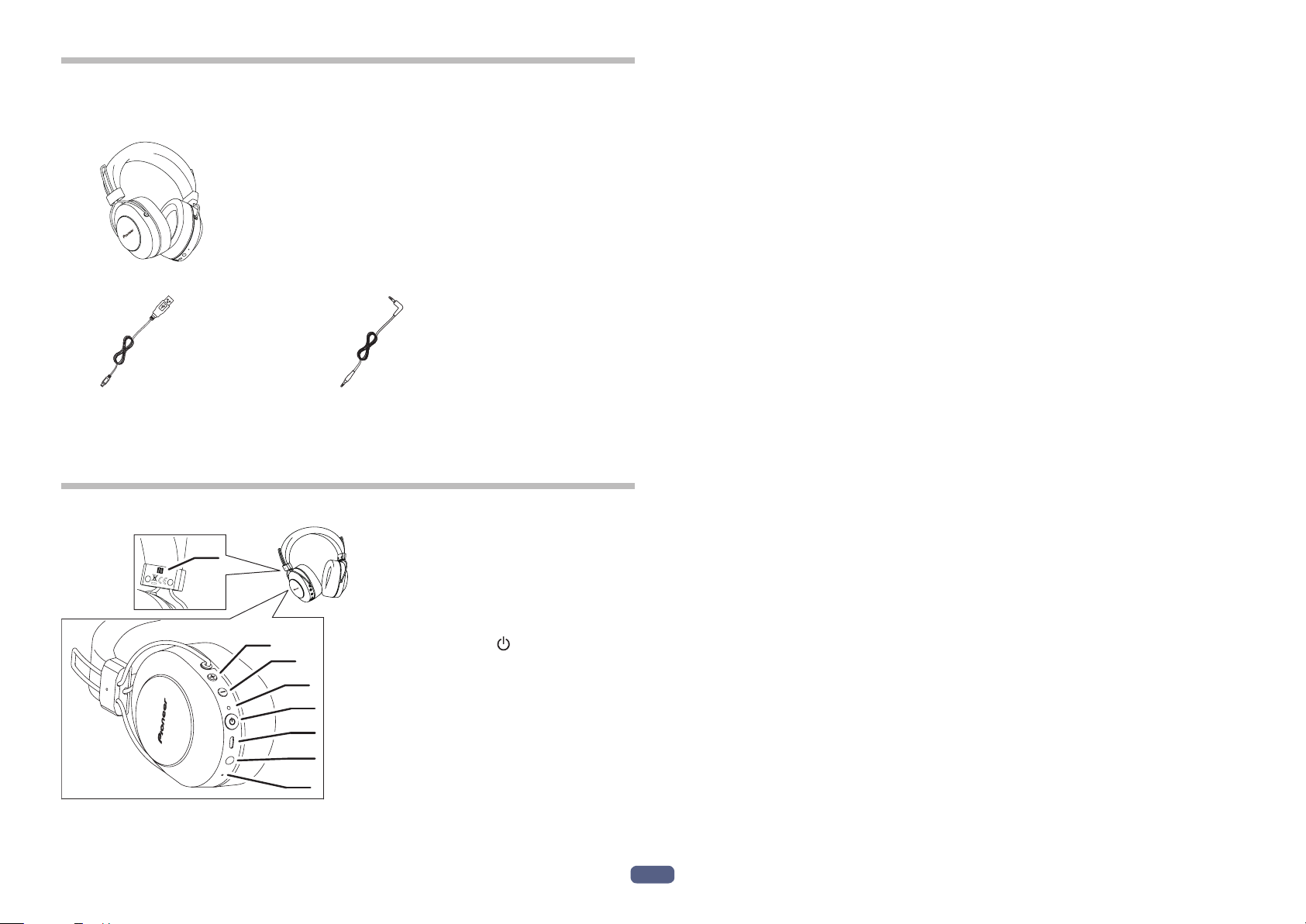
1. Accessoires fournis
Vérifiez la présence de tous les éléments et composants avant l’utilisation.
1 : Casque d’écoute
2 : Câble micro-USB 3 : Cordon de casque d’écoute
4 : Garantie (Europe / États-Unis et Canada / Japon)
5 : Guide de démarrage rapide
6 : Guide de sécurité
2. Appellation des pièces
1
L
2
3
4
5
6
7
8
1 : Marque N
2 : Bouton ( + )
3 : Bouton (
–
)
4 : Indicateur à diode
électroluminescente
5 : Bouton (
)
6 : Port de micro-USB
7 : Prise casque
8 : Microphone
3
Fr
3. Recharge des piles
La batterie de l’appareil doit être rechargée avant emploi.
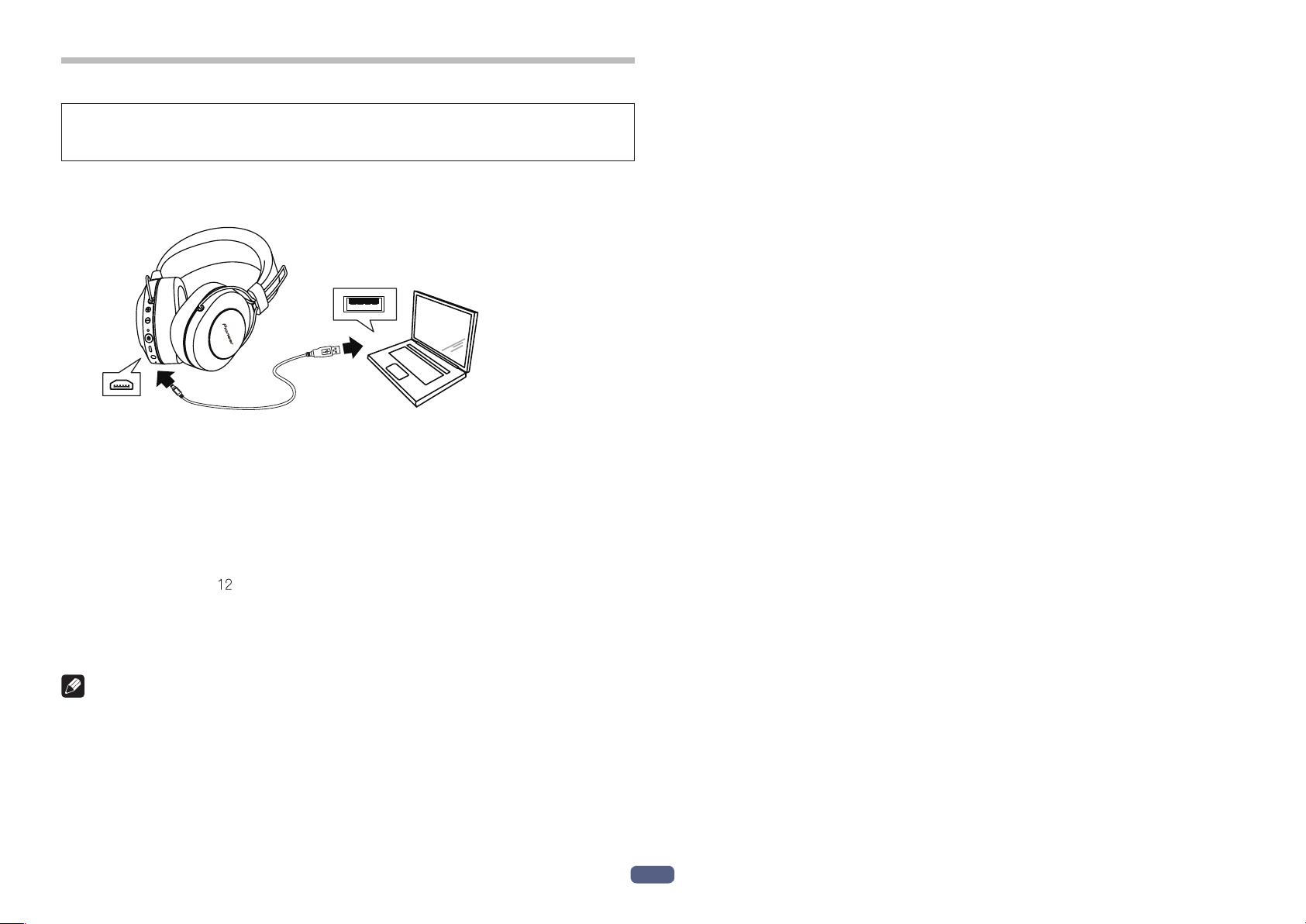
Le câble accessoire de micro-USB doit être utilisé pour recharger la batterie de
l’appareil.
Connectez le connecteur approprié sur le câble accessoire micro-USB au port
micro-USB sur le casque d’écoute audio et la prise USB sur l’autre extrémité à
un port USB sur un ordinateur.
• Quand la recharge commence, l’indicateur à diode électroluminescente sur
casque d’écoute audio s’allume en rouge.
• Si la recharge est effectuée alors que l’alimentation est appliquée à l’appareil,
l’alimentation électrique sera automatiquement coupée. L’appareil ne peut pas
être utilisé pendant la recharge.
• La recharge totale nécessite environ 4 heures; lorsque la recharge est terminée,
l’indicateur à diode électroluminescente s’éteindra.
• Avec une pleine charge de la batterie, la durée utilisable en mode continu maximum est d’environ heures.
• Quand la puissance de la batterie rechargeable devient faible, des bips sonores
peuvent être entendus de l’appareil une fois toutes les 3 minutes et l’indicateur à
diode électroluminescente clignote en rouge. Dans ce cas, rechargez la batterie
avant d’utiliser l’appareil.
Remarque
le
Remarques sur la recharge des piles
• Cet appareil ne peut pas être utilisé pendant sa charge.
• Les performances des piles dépendent de la température ambiante. Rechargez
les piles rechargeables fournies dans une plage de température allant de 10 à 35
degrés.
• Ne chargez pas excessivement les piles. Pour la protection de vos piles, ne prolongez pas leur recharge losrqu’elles sont déjà complètement rechargées.
• Les piles deviennent légèrement chaudes pendant leur recharge. Ce phénomène
est normal.
• Veuillez utiliser le câble accessoire micro-USB pour recharger la batterie; le fait
d’utiliser d’autres câbles peut avoir comme conséquence de provoquer une
panne.
• La recharge risque de ne pas être possible si l’ordinateur est en mode de veille.
• Confirmez toujours la forme et l’orientation appropriées des fiches de câble
micro-USB avant d’essayer de se connecter au casque d’écoute audio et à
l’ordinateur.
• N’utilisez pas les câbles micro-USB lorsqu’ils sont fortement torsadés ou
attachés, étant donné que cela peut engendrer une déclaration de feu voire provoquer une décharge électrique.
• Si vous ne prévoyez pas d’utiliser ce produit pendant une période prolongée,
évitez de le stocker dans un endroit chaud ou humide (comme dans un véhicule
ou à la lumière directe du soleil). Le stockage dans de tels endroits peut endommager la batterie rechargeable et diminuer son autonomie.
• Si vous ne prévoyez pas d’utiliser ce produit pendant une période prolongée,
chargez-le pendant environ une heure avant de le stocker. Le stockage pendant de longues périodes avec une batterie pleine ou une batterie complètement déchargée peut endommager la batterie rechargeable et diminuer son
autonomie.
• La durée de recharge de la batterie et la durée utilisable de la batterie peuvent
varier suivant la température ambiante et la fréquence d’utilisation.
• Ne placez pas d’objets métalliques près des contacts de recharge du casque car
un courtcircuit dangereux et/ou une surchauffe anormale pourrait en résulter.
4
Fr
A good user manual
The rules should oblige the seller to give the purchaser an operating instrucion of Pioneer SE-MS7BT, along with an item. The lack of an instruction or false information given to customer shall constitute grounds to apply for a complaint because of nonconformity of goods with the contract. In accordance with the law, a customer can receive an instruction in non-paper form; lately graphic and electronic forms of the manuals, as well as instructional videos have been majorly used. A necessary precondition for this is the unmistakable, legible character of an instruction.
What is an instruction?
The term originates from the Latin word „instructio”, which means organizing. Therefore, in an instruction of Pioneer SE-MS7BT one could find a process description. An instruction’s purpose is to teach, to ease the start-up and an item’s use or performance of certain activities. An instruction is a compilation of information about an item/a service, it is a clue.
Unfortunately, only a few customers devote their time to read an instruction of Pioneer SE-MS7BT. A good user manual introduces us to a number of additional functionalities of the purchased item, and also helps us to avoid the formation of most of the defects.
What should a perfect user manual contain?
First and foremost, an user manual of Pioneer SE-MS7BT should contain:
— informations concerning technical data of Pioneer SE-MS7BT
— name of the manufacturer and a year of construction of the Pioneer SE-MS7BT item
— rules of operation, control and maintenance of the Pioneer SE-MS7BT item
— safety signs and mark certificates which confirm compatibility with appropriate standards
Why don’t we read the manuals?
Usually it results from the lack of time and certainty about functionalities of purchased items. Unfortunately, networking and start-up of Pioneer SE-MS7BT alone are not enough. An instruction contains a number of clues concerning respective functionalities, safety rules, maintenance methods (what means should be used), eventual defects of Pioneer SE-MS7BT, and methods of problem resolution. Eventually, when one still can’t find the answer to his problems, he will be directed to the Pioneer service. Lately animated manuals and instructional videos are quite popular among customers. These kinds of user manuals are effective; they assure that a customer will familiarize himself with the whole material, and won’t skip complicated, technical information of Pioneer SE-MS7BT.
Why one should read the manuals?
It is mostly in the manuals where we will find the details concerning construction and possibility of the Pioneer SE-MS7BT item, and its use of respective accessory, as well as information concerning all the functions and facilities.
After a successful purchase of an item one should find a moment and get to know with every part of an instruction. Currently the manuals are carefully prearranged and translated, so they could be fully understood by its users. The manuals will serve as an informational aid.
FAQ: Types of Manuals and Their Contents
Pioneer SE-MS7BT Manuals come in various types, each serving a specific purpose to help users effectively operate and maintain their devices. Here are the common types of Pioneer SE-MS7BT User Guides and the information they typically include:
- User Manuals: Provide comprehensive instructions on how to use the device, including setup, features, and operation. They often include troubleshooting tips, safety information, and maintenance guidelines.
- Service Instructions: Designed for technicians and repair professionals, these manuals offer detailed information on diagnosing and repairing issues with the device. They include schematics, parts lists, and step-by-step repair procedures.
- Installation Guides: Focus on the installation process of the device, providing detailed instructions and diagrams for proper setup. They are essential for ensuring the device is installed correctly and safely.
- Maintenance Manuals: Provide guidance on routine maintenance tasks to keep the device in optimal condition. They cover cleaning procedures, part replacements, and regular servicing tips.
- Quick Start Guides: Offer a concise overview of the essential steps needed to get the device up and running quickly. They are ideal for users who need immediate assistance with basic setup and operation.
Each type of Pioneer SE-MS7BT instruction is designed to address specific needs, ensuring users have the necessary information to use, maintain, and repair their devices effectively.
Related Instructions for Pioneer SE-MS7BT:
1
PDP-433CMX
Service manual #8VSO1Y: PDP-433CMX Monitor Service manual
177
1308
223
4
HTS-560
Specifications Pioneer Home Theater System Specifications (File: pioneer-hts-560-brochure-2, 08th Nov 2024)
2
1433
230
5
WYT Inverter Series
46
230
42
7
DV-353-K
Service manual Pioneer DV-353-K Manual (Service manual), @8P5FD9
4
1456
248
8
DVR-RT604H-S
136
224
34
9
DCS-585
Setup manual User Manual: Pioneer DCS-585 (I8CHD8, Upd.Mon 01.2025)
2
341
79
10
VSX-D511-K
80
1421
256
Headphone Devices by Other Brands:
|
Philips SBCHP195 Technical Specifications Philips Headphone Technical specifications (File: philips-ct1628-000apmea-operation-user-s-manual-2, Sunday 09-03-2025) For preview purpose only 09 Mar 2025 | 2 |
|
|
ZALMAN ZM-RS6F Operation & User’s Manual ZALMAN Headphone Operation & user’s manual (File: zalman-zm-rs6f-headphone-13, 01st May 2025) ZM-RS6F USB (USB Surround Sound Headphones) User’s Manual 01 May 2025 | 13 |
|
|
Jabra JX-10 — Bluetooth Headset Faq Jabra JX-10 — Bluetooth Headset Manual (Faq), @V32IN2 www.jabra.com 18 May 2025 | 5 |
|
|
Sony ICD-SX733 Quick Start Manual Voice Recorder #8FNCH2 IC Recorder 13 May 2025 | 2 |
Categories:
Powered subwoofer
Home theater audio system
Air Handlers
Home cinema system
Smart TV
Farm Equipment
Pioneer SE-MS7BT Headphone PDF User Guides and Manuals for Free Download: Found (3) Manuals for Pioneer SE-MS7BT Device Model (Operating Instructions Manual, Manual )
The Pioneer SE-MS7BT headphones have recently gained attention in the audio community for their impressive sound quality and stylish design. With a combination of Bluetooth technology and proprietary Pioneer audio engineering, these headphones offer both convenience and audio performance, making them a potential go-to choice for music enthusiasts and casual listeners alike.
One of the standout features of the SE-MS7BT is its impressive audio quality. With a well-balanced sound signature that emphasizes clarity across the spectrum, users can enjoy a diverse range of music genres. Whether it’s the deep lows of electronic music, the intricate mids of acoustic compositions, or the crisp highs of vocal performances, the SE-MS7BT holds its own, providing an immersive listening experience. The headphones come equipped with 40mm drivers that contribute to a dynamic sound that is both rich and nuanced.
User comfort is another area where the Pioneer SE-MS7BT shines. The headphones feature soft ear cushions that give a snug fit without causing discomfort during long listening sessions. The adjustable headband allows for a customized fit, ensuring that they sit comfortably on the head. This attention to comfort makes them suitable for extended use, whether for hours of music listening, gaming, or casual phone calls.
Battery life is crucial for wireless headphones, and the SE-MS7BT does not disappoint. With up to 18 hours of playback time on a full charge, users can enjoy their favorite tracks without worrying about frequent recharging. Additionally, the headphones feature quick charging capabilities, providing several hours of playtime with just a short charging period.
In terms of connectivity, the Bluetooth performance of the SE-MS7BT is commendable. The headphones support a range of Bluetooth profiles and ensure a strong, stable connection to various devices, including smartphones, tablets, and laptops. This versatility means that whether you’re commuting, exercising, or simply relaxing at home, the SE-MS7BT seamlessly integrates into your lifestyle.
Another impressive aspect of the Pioneer SE-MS7BT is the built-in microphone that delivers clear call quality. This feature is particularly useful for users who actively use smartphones for calls or virtual meetings. The one-touch controls on the earcups allow for easy management of playback, volume, and calls, enhancing the overall user experience.
Here’s a brief summary of the key features of the Pioneer SE-MS7BT:
- High-quality audio with well-balanced sound signature
- Comfortable ear cushions and adjustable headband
- Up to 18 hours of playback time
- Quick charging capability
- Stable Bluetooth connectivity
- Built-in microphone for clear calls
- User-friendly one-touch controls
However, no product is without its drawbacks. While the battery life is decent, some users may find that it doesn’t match up to similar products in the market, especially for those who frequently use their headphones for long stretches without access to charging. Furthermore, the design, while stylish, might not be everyone’s preference, as those who lean towards a more understated aesthetic might find them a bit bold.
Overall, the Pioneer SE-MS7BT headphones are an excellent option for those who prioritize sound quality and comfort in a wireless format. They excel in various environments, offering a premium audio experience that appeals to a wide range of listeners. While they may not be perfect, the key features and performance of the SE-MS7BT make them a worthy investment for anyone seeking reliable, high-quality headphones.
Are you looking for the manual for Pioneer SE-MS7BT? You are in the right place. Below the document viewer for Pioneer SE-MS7BT manual in PDF format. To save your time, we say that the most common problems with Pioneer SE-MS7BT can be found in the manual in the «Troubleshooting» section. Check the appropriate page number in the table of contents, and then enter it in the page number box on the right side of the document viewer for Pioneer SE-MS7BT.
If you have questions about the Pioneer SE-MS7BT device, use the form at the bottom of the page and ask our community a question.
Remember! Reading the Pioneer SE-MS7BT user manual and adhering to the rules of using the device provided there, greatly help in its effective use. It is important to correctly configure Pioneer SE-MS7BT, it will save resources needed to use it. In case of problems, you will also find recommended companies that can properly fix Pioneer SE-MS7BT. One of the most important reasons why you should read the Pioneer SE-MS7BT user manual is that to take advantage of the warranty provided on Pioneer SE-MS7BT — the device must be used in accordance with the manufacturer’s recommendations presented in user manual.
If you want to download Pioneer SE-MS7BT manual, use the «Download» button below. You can easily view the downloaded version and print selected manual pages Pioneer SE-MS7BT. All manuals on our website are available in PDF format, which is the most universal format that is as easy to use as possible on all operating systems.