
Инструкции по эксплуатации
N-70A/N-50A
Программный звуковой драйвер для USB (для Mac)
О настоящих инструкциях по эксплуатации
Установка программного драйвера
Подсоединив с помощью USB-кабеля порт
воспроизводить файлы, хранящиеся на компьютере.
Если данная функция используется для воспроизведения данных в формате ИКМ (PCM),
нет необходимости устанавливать программный драйвер на компьютер. Однако если вы
желаете использовать данную функцию для DoP-воспроизведения аудиоисточников DSD, вам
понадобится установить на компьютер специальный программный драйвер.
Наст
оящие
инструкции по эксплуатации содержат важную информацию, необходимую для
воспроизведения файлов, хранящихся на компьютере, в том числе инструкции по установке
драйвера, а также по поиску и устранению неполадок в случае возникновения проблем.
USB DAC
устройства к компьютеру, вы сможете
Компьютерная среда
Для использования данного драйвера компьютер должен быть оснащен USB-портом,
поддерживающим USB Rev2.0 HS.
За информацией относительно поддерживаемых компьютерных операционных систем и
программного обеспечения для воспроизведения обращайтесь на веб-сайт компании Pioneer
(страница загрузки данного драйвера).
Примечание
• При воспроизведении музыкальных файлов с компьютера рекомендуется закрыть все компьютерные
приложения, кроме приложения для воспроизведения музыки.
• Чтобы воспроизводить аудиоисточники DSD, на вашем компьютере должна быть установлена
программа AudirvanaPlus (платная).
• Частоты дискретизации и число битов квантования сигналов, которые могут выводиться
компьютером, могут отличаться в зависимости от установленной на компьютере операционной
системы и версии использу
• Число битов, отображаемое на дисплее устройства, является не числом битов музыкального файла, а
значением, устанавливаемым компьютером.
емого программного обеспечения для воспроизведения.
1 Загрузите программный драйвер.
Вы можете загрузить программный драйвер с веб-сайта компании Pioneer.
• При загрузке программного драйвера укажите папку, в которую вы хотите сохранить программу.
• В зависимости от используемого браузера или его настроек может оказаться невозможным
указать папку для сохранения загружаемых файлов. В этом случае файл будет сохранен в папку,
предварительно назначенную браузером.
• Программный драйвер будет загружен в формате сжатых данных ZIP.
Загруженный сжатый файл будет
zip”, где “****” будет указывать номер пакета программы.
иметь имя, такое как “Pioneer_N70A_N50A_MacDriver_****.
2 После завершения загрузки распакуйте сжатый файл.
Сделайте двойной щелчок мышью и т. п. на загруженном сжатом файле (программный
драйвер) и распакуйте его в любое удобное место на компьютере.
После распаковки папка, содержащая программный драйвер будет иметь имя “Pioneer_
N70A_N50A_MacDriver_****”, где “****” будет указывать номер пакета программы.
• После того как сжатый файл будет распакован, будет создана папка. Инсталлятор (Pioneer
N70A N50A.dmg) сохраняется внутри эт
• За более подробной информацией относительно программного обеспечения, используемого для
открытия сжатого файла, обращайтесь к издателю программного обеспечения или продавцу
компьютера.
ой папки.
Процедура продолжается.
Apple, Macintosh, Mac OS и Mac OSX являются торговыми знаками компании Apple Inc.,
зарегистрированными в США и других странах.
2
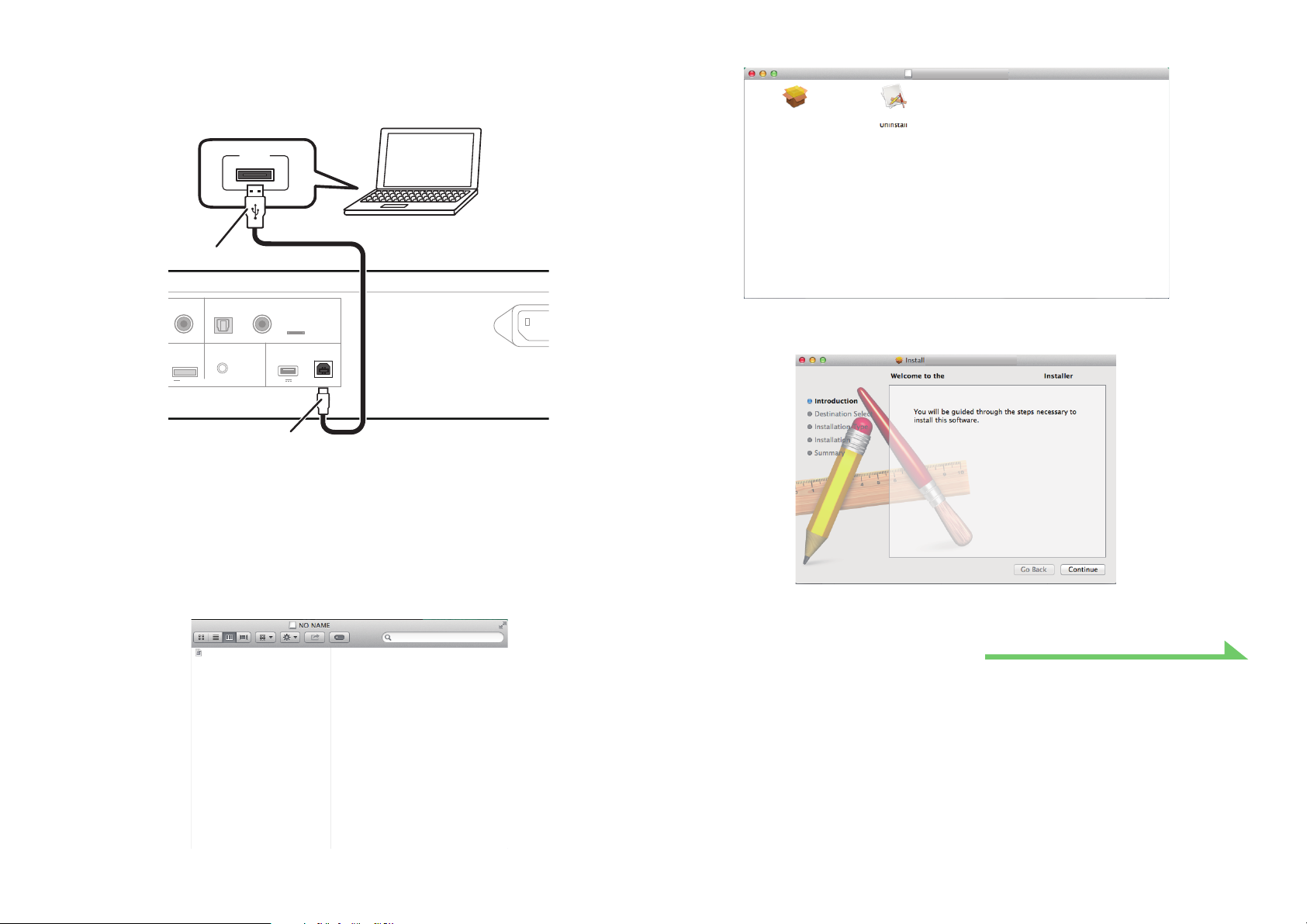
3 С помощью соответствующего USB-кабеля подсоедините компьютер к
OPTICAL COAXIAL
12
DIGITAL IN
DIGITAL IN
USB DAC
AC IN
COAXIAL
5V 1A
For
5V 0.6A MAX)
WIRELESS
LAN
iPod/iPhone
CONTROL
OUT
устройству, оснащенному разъемом USB DAC, и включите питание.
За более подробной информацией относительно соединений обращайтесь к инструкциям по
эксплуатации для используемого устройства.
USB
Тип А
6 Сделайте двойной щелчок на “Pioneer N-70A N-50A USB Audio”.
Pioneer N-70A N-50A USB Audio
Pioneer N-70A N-50A USB Audio Pioneer N-70A N-50A USB Audio
Тип B
* В зависимости от используемой модели, иллюстрация может отличаться от реального вида.
4 Переключите вход для подсоединенного устройства на источник,
поддерживающий порт USB DAC (USB DAC In).
5 Сделайте двойной щелчок на файле “Pioneer N70A N50A.dmg”,
расположенном внутри распакованной папки.
Pioneer N-70A N-50A.dmg
Отобразятся файл инсталлятора и файл деинсталлятора.
Запустится инсталлятор.
7 Щелкните на [Continue].
Pioneer N-70A N-50A USB Audio
Pioneer N-70A N-50A USB Audio
Отобразится экран «Выбор места назначения» (“Destination Select”).
Процедура продолжается.
3
View the manual for the Pioneer N-50A here, for free. This manual comes under the category hi-fi systems and has been rated by 2 people with an average of a 7.7.
This manual is available in the following languages: English. Do you have a question about the Pioneer N-50A or do you need help?
Ask your question here
Pioneer N-50A specifications
Below you will find the product specifications and the manual specifications of the Pioneer N-50A.
The Pioneer N-50A is a hi-fi system that offers a range of features for audio enthusiasts. This system allows users to stream music wirelessly from their smartphones or tablets, providing convenience and flexibility in listening to their favorite tunes. It supports a variety of audio formats, including high-resolution files, ensuring that music is reproduced with exceptional clarity and fidelity.
Equipped with a high-quality digital-to-analog converter (DAC), the Pioneer N-50A is capable of delivering accurate and precise audio reproduction. It also features an asynchronous USB input, allowing for direct connection to a computer for streaming and playback of digital music files. With its built-in Wi-Fi capability, users can easily connect the system to their home network for seamless streaming from popular online music services.
The N-50A boasts a sleek and stylish design, with a user-friendly interface for easy navigation and control. It includes a full-color LCD display, providing clear information and feedback on track details, playback settings, and more. Additionally, the system supports multi-room audio playback, allowing users to enjoy music in multiple rooms simultaneously.
In terms of connectivity, the Pioneer N-50A offers a range of inputs and outputs, including analog, digital, and even a dedicated headphone output for private listening. This ensures compatibility with a variety of audio devices and systems. Overall, the Pioneer N-50A is a versatile and reliable hi-fi system, perfect for those who seek high-quality audio playback and convenient wireless streaming.
General
Frequently Asked Questions
Can’t find the answer to your question in the manual? You may find the answer to your question in the FAQs about the Pioneer N-50A below.
How do I connect the Pioneer N-50A hi-fi system to my home network?
To connect the Pioneer N-50A hi-fi system to your home network, follow these steps:
1. Register your product online at the Pioneer website (http://www.pioneer.co.uk or http://www.pioneer.eu) to access additional benefits.
2. Install the Pioneer ControlApp on your mobile device. If you have an iPhone or iPod touch, go to the App Store and install the Pioneer ControlApp. If you have an Android device, go to Google Play and install the Pioneer ControlApp.
3. Press the STANDBY/ON button on the Pioneer N-50A hi-fi system to turn it on.
4. Enable Wi-Fi on your mobile device and connect it to your home network.
5. Launch the Pioneer ControlApp on your mobile device.
Note: For detailed instructions on using the Pioneer ControlApp, you can refer to the documentation provided at http://pioneer.jp/support/soft/iapp_controlapp/en.html (for iPhone/iPod touch) or http://pioneer.jp/support/soft/aapp_controlapp/en.html (for Android).
By following these steps, you will be able to successfully connect your Pioneer N-50A hi-fi system to your home network and enjoy network audio playback.
Why is the Pioneer N-50A hi-fi system not playing audio from my network sources?
There could be several reasons why the Pioneer N-50A hi-fi system is not playing audio from your network sources. Here are some troubleshooting steps you can follow:
1. Check the connection status: Ensure that the Pioneer N-50A hi-fi system is properly connected to your home network. Verify that the network cables are securely plugged in and that the LAN connection is active.
2. Verify the presence of playable audio files: Make sure that there are audio files stored on the component connected to the network. Check the audio files to ensure they are in a format supported by the Pioneer N-50A hi-fi system.
3. Check the network settings: Confirm that the IP address is properly set and that the DHCP server function of your router is turned on. If necessary, set up the network manually according to your network environment.
4. Install Windows Media Player: If you are using Windows Media Player 11 or 12 to play audio files, ensure that it is installed on your computer. If not, install the appropriate version of Windows Media Player.
5. Verify component operation: Check if the component connected to the network is properly operated. Ensure that it is not affected by special circumstances or in sleep mode. Reboot the component if necessary.
By following these steps, you can troubleshoot and resolve issues related to the Pioneer N-50A hi-fi system not playing audio from your network sources.
How do I register the Pioneer N-50A hi-fi system online?
To register the Pioneer N-50A hi-fi system online, follow these steps:
1. Ensure that you have a stable internet connection.
2. Open a web browser on your computer or mobile device.
3. Go to the Pioneer website (http://www.pioneer.co.uk or http://www.pioneer.eu).
4. Look for the «Support» or «Product Registration» section on the website.
5. Click on the «Product Registration» link.
6. Fill in the required information, such as your name, email address, and product details.
7. Enter the serial number of your Pioneer N-50A hi-fi system. You can find the serial number on the back or bottom of the unit.
8. Complete any additional fields or questions as prompted.
9. Review the terms and conditions, and if you agree, check the box to indicate your acceptance.
10. Click on the «Submit» or «Register» button to complete the registration process.
By following these steps, you can easily register your Pioneer N-50A hi-fi system online and access any additional benefits or support provided by Pioneer.
What are the recommended cleaning instructions for the Pioneer N-50A hi-fi system?
To clean the Pioneer N-50A hi-fi system, follow these recommended instructions:
1. Ensure that the power cord is unplugged from the power outlet before cleaning.
2. Use a soft cloth to clean the exterior of the unit. For tough dirt, you can apply a small amount of neutral detergent diluted in 5 to 6 parts water to the cloth. Wring out the cloth thoroughly before wiping the unit to avoid excess moisture.
3. After wiping off the dirt, use a soft, dry cloth to wipe the unit again and remove any remaining moisture.
4. Avoid using alcohol, thinner, benzene, insecticides, or any other chemical substances, as they may cause the print or paint to peel off.
5. Do not leave rubber or vinyl products in contact with the unit for extended periods, as they may mar the cabinet.
6. If using chemical-impregnated wipes, carefully read the cautions included with the wipes before using them on the unit.
By following these cleaning instructions, you can keep your Pioneer N-50A hi-fi system in good condition and maintain its appearance.
Why is the Pioneer N-50A hi-fi system not recognized by Windows Media Player?
There could be several reasons why the Pioneer N-50A hi-fi system is not recognized by Windows Media Player. Here are some troubleshooting steps you can follow:
1. Check the audio output settings on your operating system. Ensure that the audio output is not set to mute and adjust the volume settings if necessary.
2. Close any other applications that may be running simultaneously, as they could be conflicting with Windows Media Player.
3. Verify that the Pioneer N-50A hi-fi system is selected as the audio output device in the Windows Media Player settings. Go to the settings menu of Windows Media Player and ensure that «Pioneer N-70A N-50A USB Audio» is selected as the sound device.
4. Ensure that the firmware of the Pioneer N-50A hi-fi system is up to date. You can update the firmware by downloading the update file from the Pioneer website and following the instructions provided.
5. If the issue persists, check if there are any network connection or security software settings that may be blocking the communication between the Pioneer N-50A hi-fi system and Windows Media Player.
By following these steps, you can troubleshoot and resolve issues related to the Pioneer N-50A hi-fi system not being recognized by Windows Media Player.
How do I set up a DLNA server software with the Pioneer N-50A hi-fi system?
To set up a DLNA server software with the Pioneer N-50A hi-fi system, follow these steps:
1. If you are using a NAS (Network Attached Storage) that supports DLNA, change the NAS settings to allow access to the NAS. Refer to the user manual of your NAS for more details.
2. If you are using a computer with Windows Media Player 12 installed, perform share settings for the media stored on the computer. Go to Control Panel > Network and Internet > Select options relating to home group and sharing > Select media streaming options. From the product name’s dropdown list, select «Permitted» and then press «OK».
3. Press the MUSIC SERVER button on the Pioneer N-50A hi-fi system.
4. Select the computer or NAS for which share settings were performed.
5. Use the navigation buttons to select the server that has the file you want to play, then press ENTER.
6. Use the navigation buttons to select the file you want to play, then press ENTER. Playback will start.
Note: The above steps are based on the information provided in the manual for the Pioneer N-50A hi-fi system.
What file formats are supported for network playback on the Pioneer N-50A hi-fi system?
The Pioneer N-50A hi-fi system supports various file formats for network playback. Here are the supported file formats:
— WAV: Supports LPCM (Linear Pulse Code Modulation) with sampling frequencies of 32 kHz, 44.1 kHz, 48 kHz, 88.2 kHz, 96 kHz, 176.4 kHz, and 192 kHz. It supports quantization bitrates of 16 bit and 24 bit, and 2 channels.
— WMA: Supports WMA2/7/8/9b with sampling frequencies of 32 kHz, 44.1 kHz, and 48 kHz. It supports a quantization bitrate of 16 bit, 2 channels, and a bitrate range of 5 kbps to 320 kbps (VBR/CBR).
— AAC: Supports MPEG-4 AAC and MPEG-4 HE AAC (aacPlus v1/2) with sampling frequencies of 32 kHz, 44.1 kHz, and 48 kHz. It supports a quantization bitrate of 16 bit, 2 channels, and a bitrate range of 16 kbps to 320 kbps (VBR/CBR).
— Apple Lossless: Supports ALAC (Apple Lossless Audio Codec) with sampling frequencies of 32 kHz, 44.1 kHz, 48 kHz, 88.2 kHz, and 96 kHz. It supports quantization bitrates of 16 bit and 24 bit, and 2 channels.
— FLAC: Supports FLAC (Free Lossless Audio Codec) with sampling frequencies of 32 kHz, 44.1 kHz, 48 kHz, 88.2 kHz, 96 kHz, 176.4 kHz, and 192 kHz. It supports quantization bitrates of 16 bit and 24 bit, and 2 channels.
— AIFF: Supports AIFF (Audio Interchange File Format) with sampling frequencies of 32 kHz, 44.1 kHz, 48 kHz, 88.2 kHz, 96 kHz, 176.4 kHz, and 192 kHz. It supports quantization bitrates of 16 bit and 24 bit, and 2 channels.
— DSD: Supports DSD (Direct Stream Digital) with sampling frequencies of 2.8224 MHz and 5.6448 MHz. It has a quantization bitrate of 1 bit and 2 channels.
These file formats allow you to enjoy high-quality audio playback on the Pioneer N-50A hi-fi system.
Why is the Pioneer N-50A hi-fi system not able to play certain files over the network?
The Pioneer N-50A hi-fi system may not be able to play certain files over the network due to various reasons. Here are some possible causes and troubleshooting steps:
1. Unsupported file format: Check if the file format of the audio files is supported by the Pioneer N-50A hi-fi system. Refer to the manual for a list of supported file formats.
2. Copyright protection: Some files may be copyright-protected and cannot be played on the Pioneer N-50A hi-fi system. Ensure that the files are not protected by DRM (Digital Rights Management).
3. Network connection issues: Verify that the network connection is stable and properly set up. Check the LAN cable connection and ensure that there are no restrictions on the router’s MAC address.
4. Software compatibility: If using Windows Media Player, ensure that the version installed on your computer is compatible with the file format you are trying to play. Install the appropriate version if necessary.
5. File corruption or damage: Check if the audio files are corrupted or damaged. Try playing different files to see if the issue persists.
By following these troubleshooting steps, you can identify and resolve the reasons why the Pioneer N-50A hi-fi system is not able to play certain files over the network.
Can bluetooth devices of different brands be connected to each other?
Yes, bluetooth is a universal method that allows different devices equipped with bluetooth to connect to each other.
What is bluetooth?
Bluetooth is a way of exchanging data wirelessly between electronic devices via radio waves. The distance between the two devices that exchange data can in most cases be no more than ten metres.
What is HDMI?
HDMI stands for High-Definition Multimedia Interface. An HDMI cable is used to transport audio and video signals between devices.
When is my volume too loud?
A volume above 80 decibels can be harmful to hearing. When the volume exceeds 120 decibels, direct damage can even occur. The chance of hearing damage depends on the listening frequency and duration.
How can I best clean my hi-fi system?
A slightly damp cleaning cloth or soft, dust-free cloth works best to remove fingerprints. Dust in hard-to-reach places is best removed with compressed air.
Wat is Dolby Atmos?
Dolby Atmos is a technology that ensures that the sound is reflected from the ceiling to where you are listening. This makes it possible to create a 5.1 effect with only 1 speaker.
Is the manual of the Pioneer N-50A available in English?
Yes, the manual of the Pioneer N-50A is available in English .
Is your question not listed? Ask your question here
- Topics
- manualzz, manuals, N-70A, N-50A, N-50, Pioneer user manuals, Pioneer service manuals, N-70A pdf download, N-70A instructions, Pioneer N-70A manual, null guides,
- Collection
- manuals_pioneer; manuals; additional_collections
- Item Size
- 6.8M
- Addeddate
- 2021-02-08 15:00:21
- Identifier
- manualzz-id-1224721
- Identifier-ark
- ark:/13960/t2z422z11
- Ocr
- tesseract 5.0.0-alpha-20201231-7-gc75f
- Ocr_autonomous
- true
- Ocr_detected_lang
- en
- Ocr_detected_lang_conf
- 1.0000
- Ocr_detected_script
- Latin
- Ocr_detected_script_conf
- 1.0000
- Ocr_module_version
- 0.0.11
- Ocr_parameters
- -l eng+afr+Latin
- Ppi
- 600
comment
Reviews
There are no reviews yet. Be the first one to
.
125
Views
DOWNLOAD OPTIONS
Temporarily Unavailable
DAISY
For users with print-disabilities
Temporarily Unavailable
EPUB
Uploaded by
chris85
on
Хорошее руководство по эксплуатации
Законодательство обязывает продавца передать покупателю, вместе с товаром, руководство по эксплуатации Pioneer N-50A. Отсутствие инструкции либо неправильная информация, переданная потребителю, составляют основание для рекламации в связи с несоответствием устройства с договором. В законодательстве допускается предоставлении руководства в другой, чем бумажная форме, что, в последнее время, часто используется, предоставляя графическую или электронную форму инструкции Pioneer N-50A или обучающее видео для пользователей. Условием остается четкая и понятная форма.
Что такое руководство?
Слово происходит от латинского «instructio», тоесть привести в порядок. Следовательно в инструкции Pioneer N-50A можно найти описание этапов поведения. Цель инструкции заключается в облегчении запуска, использования оборудования либо выполнения определенной деятельности. Инструкция является набором информации о предмете/услуге, подсказкой.
К сожалению немного пользователей находит время для чтения инструкций Pioneer N-50A, и хорошая инструкция позволяет не только узнать ряд дополнительных функций приобретенного устройства, но и позволяет избежать возникновения большинства поломок.
Из чего должно состоять идеальное руководство по эксплуатации?
Прежде всего в инструкции Pioneer N-50A должна находится:
— информация относительно технических данных устройства Pioneer N-50A
— название производителя и год производства оборудования Pioneer N-50A
— правила обслуживания, настройки и ухода за оборудованием Pioneer N-50A
— знаки безопасности и сертификаты, подтверждающие соответствие стандартам
Почему мы не читаем инструкций?
Как правило из-за нехватки времени и уверенности в отдельных функциональностях приобретенных устройств. К сожалению само подсоединение и запуск Pioneer N-50A это слишком мало. Инструкция заключает ряд отдельных указаний, касающихся функциональности, принципов безопасности, способов ухода (даже то, какие средства стоит использовать), возможных поломок Pioneer N-50A и способов решения проблем, возникающих во время использования. И наконец то, в инструкции можно найти адресные данные сайта Pioneer, в случае отсутствия эффективности предлагаемых решений. Сейчас очень большой популярностью пользуются инструкции в форме интересных анимаций или видео материалов, которое лучше, чем брошюра воспринимаются пользователем. Такой вид инструкции позволяет пользователю просмотреть весь фильм, не пропуская спецификацию и сложные технические описания Pioneer N-50A, как это часто бывает в случае бумажной версии.
Почему стоит читать инструкции?
Прежде всего здесь мы найдем ответы касательно конструкции, возможностей устройства Pioneer N-50A, использования отдельных аксессуаров и ряд информации, позволяющей вполне использовать все функции и упрощения.
После удачной покупки оборудования/устройства стоит посвятить несколько минут для ознакомления с каждой частью инструкции Pioneer N-50A. Сейчас их старательно готовят или переводят, чтобы они были не только понятными для пользователя, но и чтобы выполняли свою основную информационно-поддерживающую функцию.
-
Инструкции по эксплуатации
1
Pioneer N-50A инструкция по эксплуатации
(8 страниц)
- Языки:Русский
-
Тип:
PDF -
Размер:
2.27 MB -
Описание:
Сетевой аудиоплеер с vTuner
Просмотр
На NoDevice можно скачать инструкцию по эксплуатации для Pioneer N-50A. Руководство пользователя необходимо для ознакомления с правилами установки и эксплуатации Pioneer N-50A. Инструкции по использованию помогут правильно настроить Pioneer N-50A, исправить ошибки и выявить неполадки.