
Данная лицензия не предназначена для продажи этого Руководства и Вы не становитесь владельцем этого Руководства после приобретения любого продукта, загрузки и/или использования. Nikon сохраняет за собой право владения данным Руководством и, следовательно, всеми копиями и все соответствующие права, относящиеся к интеллектуальной собственности, и сохраняет за собой все права, которые явно не предоставлены Вам в рамках данного Соглашения. Данное Соглашение представляет собой полное и эксклюзивное соглашение, устное и письменное, между Вами и Nikon.
1. РУКОВОДСТВО
Руководство предназначено для клиентов, которые приобрели наши продукты. Мы можем не иметь возможности ответить на запрос физических лиц, которые не приобрели наши продукты. Пожалуйста, имейте в виду, что данное руководство и контактная информация, указанные здесь, могут быть изменены без уведомления.
Данное Руководство защищено Законом об авторском праве Японии и международными законами об авторском праве и международными договорами. Вам необходимо воспроизвести на каждой копии уведомление об авторском праве Nikon и любую другую информацию о праве собственности, которые присутствовали на оригинале.
2. ОГРАНИЧЕНИЯ
Кроме случаев, когда в данном Соглашении указано иное, нельзя делать или передавать копии данного Руководства другим или передавать в электронной форме Руководство с одного компьютера на другой по сети. НЕЛЬЗЯ ИЗМЕНЯТЬ ИЛИ УДАЛЯТЬ ЛЮБЫЕ УВЕДОМЛЕНИЯ ОБ АВТОРСКОМ ПРАВЕ, ТОРГОВОЙ МАРКЕ ИЛИ ДРУГИЕ ЗАЩИТНЫЕ УВЕДОМЛЕНИЯ, СОДЕРЖАЩИЕСЯ В ДАННОМ РУКОВОДСТВЕ. НЕЛЬЗЯ ПРИСВАИВАТЬ ИЛИ ИНЫМ ОБРАЗОМ ИЗБАВЛЯТЬСЯ, МОДИФИЦИРОВАТЬ, НАСТРАИВАТЬ, ПЕРЕВОДИТЬ, АРЕНДОВАТЬ, БРАТЬ В НАЕМ, ЗАНИМАТЬ, ПЕРЕПРОДАВАТЬ, РАСПРОСТРАНЯТЬ, ПЕРЕДАВАТЬ ПО СЕТИ ИЛИ СОЗДАВАТЬ ИЛИ ИМЕТЬ СОЗДАННЫЕ ПРОИЗВОДСТВЕННЫЕ РАБОТЫ, ОСНОВАННЫЕ НА ДАННОМ РУКОВОДСТВЕ ИЛИ ЛЮБОЙ ЧАСТИ ТАКОВОГО.
3. ОГРАНИЧЕННАЯ ГАРАНТИЯ И ОТКАЗ
В НАИБОЛЬШЕЙ СТЕПЕНИ, РАЗРЕШЕННОЙ В СИЛУ ДЕЙСТВУЮЩЕГО ЗАКОНОДАТЕЛЬСТВА, ДАННОЕ РУКОВОДСТВО ПРЕДОСТАВЛЕНО НА ОСНОВЕ ПРИНЦИПА «КАК ЕСТЬ», БЕЗ ГАРАНТИИ В ЛЮБОЙ ФОРМЕ, И КОМПАНИЯ NIKON, ЕЕ СОТРУДНИКИ, РАСПРОСТРАНИТЕЛИ, ДИЛЕРЫ И АГЕНТЫ ПРЯМО НЕ ПРИЗНАЮТ ЛЮБУЮ ГАРАНТИЮ В ЛЮБОЙ ФОРМЕ, ВЫРАЖЕННУЮ ИЛИ ПОДРАЗУМЕВАЕМУЮ, ВКЛЮЧАЯ, НО НЕ ОГРАНИЧИВАЯСЬ, ЛЮБОЙ ПОДРАЗУМЕВАЕМОЙ ГАРАНТИЕЙ ПРИГОДНОСТИ ДЛЯ ТОРГОВЛИ, ПРИГОДНОСТИ ДЛЯ ОПРЕДЕЛЕННОГО НАЗНАЧЕНИЯ ИЛИ ОТСУТСТВИЯ НАРУШЕНИЙ. В НАИБОЛЬШЕЙ СТЕПЕНИ, РАЗРЕШЕННОЙ В СИЛУ ДЕЙСТВУЮЩЕГО ЗАКОНОДАТЕЛЬСТВА, КОМПАНИЯ NIKON, ЕЕ СОТРУДНИКИ, РАСПРОСТРАНИТЕЛИ, ДИЛЕРЫ И АГЕНТЫ НЕ ГАРАНТИРУЮТ ИСПОЛНЕНИЕ ИЛИ РЕЗУЛЬТАТЫ, КОТОРЫЕ ВЫ МОЖЕТЕ ПОЛУЧИТЬ ИЗ ДАННОГО РУКОВОДСТВА, ИЛИ ЧТО ДАННОЕ РУКОВОДСТВО БУДЕТ СООТВЕТСТВОВАТЬ ВАШИМ ТРЕБОВАНИЯМ ИЛИ ЧТО РАБОТА РУКОВОДСТВА БУДЕТ БЕСПЕРЕБОЙНОЙ, БЕЗОШИБОЧНОЙ ИЛИ НЕ БУДЕТ СОДЕРЖАТЬ ВИРУСОВ. В НАИБОЛЬШЕЙ СТЕПЕНИ, РАЗРЕШЕННОЙ В СИЛУ ДЕЙСТВУЮЩЕГО ЗАКОНОДАТЕЛЬСТВА, НИ КОМПАНИЯ NIKON, НИ ЕЕ СОТРУДНИКИ, РАСПРОСТРАНИТЕЛИ, ДИЛЕРЫ И АГЕНТЫ НЕ ДОЛЖНЫ НЕСТИ ПЕРЕД ВАМИ ОТВЕТСТВЕННОСТЬ ЗА ЛЮБЫЕ КОСВЕННЫЕ, ПОСЛЕДУЮЩИЕ ИЛИ НЕПРЕДНАМЕРЕННЫЕ УБЫТКИ, ПОТЕРИ ИЛИ ИЗДЕРЖКИ ЛЮБОГО ТИПА, БУДЬ ТО ПОТЕРЯ ПРИБЫЛИ, ПЕРЕРЫВ В ДЕЯТЕЛЬНОСТИ ИЛИ ИНЫМ СПОСОБОМ ВОЗНИКАЮЩИЙ ИЛИ ЯВЛЯЮЩИЙСЯ СЛЕДСТВИЕМ ДАННОГО РУКОВОДСТВА, ВЫЗВАННЫЙ КАКИМ-ЛИБО СПОСОБОМ, ДАЖЕ ЕСЛИ КОМПАНИЯ NIKON, ЕЕ СОТРУДНИКИ, РАСПРОСТРАНИТЕЛИ, ДИЛЕРЫ ИЛИ АГЕНТЫ УВЕДОМЛЕНЫ О ВОЗМОЖНОСТИ ВОЗНИКНОВЕНИЯ ТАКИХ УБЫТКОВ, ПОТЕРЬ ИЛИ ИЗДЕРЖЕК. ЭТОТ ОТКАЗ СОСТАВЛЯЕТ СУЩЕСТВЕННУЮ ЧАСТЬ ДАННОГО СОГЛАШЕНИЯ, И НЕИСПОЛЬЗОВАНИЕ ДАННОГО РУКОВОДСТВА УПОЛНОМОЧЕНО, КРОМЕ СЛУЧАЕВ В РАМКАХ ДАННОГО ОТКАЗА.
4. ОБЩИЕ СВЕДЕНИЯ
Данное соглашение регулируется и должно истолковываться в соответствии с законами Японии независимо от его принципов коллизионного права. В случае возникновения спора в рамках или в связи с данным соглашением Вы, таким образом, даете согласие на персональную юрисдикцию Японии и отказываетесь от любого возражения, что такая дискуссия вызывает затруднение. Далее Вы соглашаетесь на получение судебных извещений в любом действии, возникающем из данного Соглашения по обычной почте или другими коммерчески оправданными способами доставки расписки в получении. Если любое положение данного Соглашения должно быть определено недействительным по какой-либо причине, то оставшиеся положения не должны быть признаны недействительными и должны остаться в силе без изменений. Данное Соглашение устанавливает в дальнейшем целое соглашение и понимание между Вами и компанией Nikon, и замещает собой и заменяет любые другие соглашения, относящиеся к сути дела данного Соглашения. Неуспех любой стороны в настаивании на строгом исполнении любого правила или положения данного соглашения, или выполнение любой опции, права или защиты прав, содержащихся в данном документе, не должны толковаться в качестве отказа от любого применения такого правила, положения, опции, права или защиты прав в будущем, и такое правило, положение, опция, право или защита прав должны продолжиться и сохранить полную юридическую силу и действие. Заголовки разделов данного Соглашения вставлены только для удобства и не должны составлять часть данного документа или влиять каким-либо образом на значение или толкование данного Соглашения. Кроме случаев, когда иначе явно указано в данном документе, положения раздела 3 и раздела 4 вместе с любыми положениями, которые с помощью своих прямо выраженных условий относятся к периодам после прекращения срока действия данного Соглашения, должны оставаться в силе после прекращения действия данного Соглашения по какой-либо причине.
Руководства для продуктов Nikon/ 2018/02/15/ Вер. 2.0.0
ЦИФРОВАЯ ФОТОКАМЕРА
Подробное руководство пользователя
Ru

Описание функций COOLPIX S3500
Функции, которые помогут получать нужные изображения и видеоролики
Расширенные функции для съемки превосходных
изображений
Благодаря богатому набору высокоэффективных функций, включая широкий выбор режимов
съемки, присутствующих только на фотокамерах COOLPIX, 7-кратному оптическому зуму, а
также эффективному разрешению 20,1 мегапикселей, данная фотокамера позволяет снимать
нужные вам изображения. Функция расширенного подавления вибраций (VR) гарантирует
съемку ультрачетких изображений даже в ситуациях, когда возможно дрожание фотокамеры.
Кроме того, можно записывать видеоролики простым нажатием кнопки видеосъемки.
Эффекты редактирования изображений, которые легко и просто применить во время съемки
p Быстрые эффекты ………………………………………..
A30, 39
Создавайте изображения с эффектами в три шага: снимайте, выбирайте и сохраняйте.
Доступно тридцать эффектов. Можно предварительно просмотреть результаты применения
каждого эффекта на изображении и выбрать подходящий эффект в соответствии с сюжетом или
настроением.
Кроме того, эффекты для изображений можно применить позже, нажав кнопку
k во время
воспроизведения (
A33).
Эффекты редактирования изображений, улучающие вид лица
«Глянцевое» ретуширование …………………………………
A78
Редактирование изображений с помощью восьми эффектов, разработанных для повышения
привлекательности лиц. Кроме уменьшения размера лица и увеличения размера глаз функция
«глянцевого» ретуширования позволяет осветлить кожу, удалить мешки под глазами, осветлить
глаза и зубы. С помощью данных эффектов можно легко сделать людей на снимках более
красивыми и молодыми.


ii
В
в
ед
ен
ие
Введение
Перед началом работы прочитайте данное руководство
Благодарим вас за приобретение цифровой фотокамеры Nikon COOLPIX S3500. Перед
использованием фотокамеры прочитайте информацию в разделе «Меры предосторожности»
(
Aviii-x) и ознакомьтесь с инструкциями данного руководства. После прочтения сохраните
руководство для справки, чтобы успешно пользоваться функциями новой фотокамеры.

iii
В
в
ед
ен
ие
О настоящем руководстве
Если вы хотите начать использование фотокамеры незамедлительно, см. раздел «Основные
действия при съемке и просмотре» (
A13).
Для получения информации об элементах фотокамеры и сведениях, отображаемых на
мониторе, см. раздел «Основные элементы фотокамеры» (
A1).

iv
В
в
ед
ен
ие
Дополнительная информация
• Символы и обозначения
Для облегчения поиска необходимой информации в данном руководстве используются
следующие символы и обозначения.
• В данном руководстве карты памяти SD, SDHC, и SDXC называются «картами памяти».
• Настройки на момент покупки далее называются «настройками по умолчанию».
• Пункты меню, отображаемые на мониторе фотокамеры, названия кнопок и текст
сообщений, отображаемых на мониторе компьютера, обозначены полужирным шрифтом.
• На примерах в данном руководстве мониторы иногда показаны без изображений. Это
позволяет лучше видеть символы на мониторах.
• Рисунки и текст на экране, приведенные в данном руководстве, могут отличаться от
отображаемых фактически.
Символ
Описание
B
Этим символом обозначены предупреждения, с которыми необходимо
ознакомиться во избежание повреждения фотокамеры.
C
Этим символом обозначены примечания, с которыми необходимо ознакомиться
перед использованием фотокамеры.
A/E/
F
Этими символами обозначены другие страницы, содержащие дополнительную
информацию;
E: раздел «Справка», F: «Технические примечания и алфавитный указатель».

v
В
в
ед
ен
ие
Информация и меры предосторожности
Концепция «постоянного совершенствования»
В рамках развиваемой компанией Nikon концепции «постоянного совершенствования» пользователям
предоставляется регулярно обновляемая информация о поддержке выпущенных изделий и учебные
материалы на следующих веб-сайтах:
• Для пользователей в США: http://www.nikonusa.com/
• Для пользователей в Европе и Африке: http://www.europe-nikon.com/support/
• Для пользователей в странах Азии, Океании и Ближнего Востока: http://www.nikon-asia.com/
Посетите один из этих веб-сайтов для получения последних сведений об изделиях, советов, ответов на
часто задаваемые вопросы и общих рекомендаций по фотосъемке и обработке цифровых
изображений. Дополнительные сведения можно получить у региональных представителей компании
Nikon. Для получения контактных сведений посетите следующий веб-сайт.
http://imaging.nikon.com/
Используйте только фирменные электронные принадлежности Nikon
Фотокамеры Nikon COOLPIX отвечают самым современным стандартам и имеют сложную электронную
схему. Только фирменные электронные принадлежности Nikon (в том числе зарядные устройства,
батареи, сетевые зарядные устройства и сетевые блоки питания), одобренные компанией Nikon
специально для использования с данной моделью цифровой фотокамеры Nikon, полностью
соответствуют необходимым эксплуатационным параметрам и требованиям техники безопасности для
данной электронной схемы.
И
СПОЛЬЗОВАНИЕ ЭЛЕКТРОННЫХ ПРИНАДЛЕЖНОСТЕЙ ДРУГИХ ПРОИЗВОДИТЕЛЕЙ (НЕ
N
IKON)
МОЖЕТ ПРИВЕСТИ К ПОВРЕЖДЕНИЮ ФОТОКАМЕРЫ И АННУЛИРОВАНИЮ ГАРАНТИИ
N
IKON.
Использование литий-ионных аккумуляторных батарей стороннего
производителя, на которых нет голографической наклейки Nikon, может
стать причиной нарушения нормальной работы фотокамеры или
перегрева, воспламенения, разрыва или протекания батареи.
Для получения сведений о фирменных принадлежностях Nikon обратитесь к
местному официальному торговому представителю компании Nikon.
Перед съемкой важных событий
Перед съемкой важных событий, например свадьбы, или перед тем как взять фотокамеру в
путешествие, сделайте пробный снимок, чтобы убедиться в правильности работы фотокамеры.
Компания Nikon не несет ответственности за убытки или упущенную выгоду, возникшие в результате
неправильной работы изделия.
Голографическая наклейка:
подтверждает, что данное устройство
является изделием компании Nikon.

vi
В
в
ед
ен
ие
О руководствах
• Никакая часть документации, включенной в комплект поставки данного продукта, не может быть
воспроизведена, передана, переписана, сохранена в поисковой системе или переведена на любой язык в
любой форме любыми средствами без предварительного письменного разрешения Nikon.
• Компания Nikon сохраняет за собой право изменять любые характеристики аппаратного и
программного обеспечения, описанного в данной документации в любое время и без
предварительного уведомления.
• Компания Nikon не несет ответственности за какой бы то ни было ущерб, вызванный применением
данного изделия.
• Были приложены все усилия для того, чтобы обеспечить точность и полноту информации, приведенной в
документации. Компания Nikon будет благодарна за любую информацию о замеченных ошибках и
упущениях, переданную в ближайшее представительство компании (адрес сообщается отдельно).
Уведомление о запрещении копирования или воспроизведения
Необходимо помнить, что даже простое обладание материалом, скопированным или
воспроизведенным цифровым способом с помощью сканера, цифровой фотокамеры или другого
устройства, может преследоваться по закону.
• Материалы, копирование или воспроизведение которых запрещено законом
Не копируйте и не воспроизводите денежные банкноты, монеты, ценные бумаги, государственные
ценные бумаги и ценные бумаги органов местного самоуправления, даже если такие копии и
репродукции отмечены штампом «образец». Запрещено копирование и воспроизведение денежных
банкнот, монет и ценных бумаг других государств. Запрещено копирование и воспроизведение
негашеных почтовых марок и почтовых открыток, выпущенных государством, без письменного
разрешения государственных органов. Запрещено копирование и воспроизведение печатей
государственных учреждений и документов, заверенных в соответствии с законодательством.
• Предупреждения относительно копирования и воспроизведения
Копии и репродукции ценных бумаг, выпущенных частными компаниями (акции, векселя, чеки,
подарочные сертификаты и т. д.), сезонных билетов или купонов помечаются предупреждениями
согласно требованиям государственных органов, кроме минимального числа копий, необходимых для
использования компанией в деловых целях. Не копируйте и не воспроизводите государственные
паспорта; лицензии, выпущенные государственными учреждениями и частными компаниями;
удостоверения личности и билеты, а также такие документы, как пропуска или талоны на питание.
• Уведомления о соблюдении авторских прав
Копирование или воспроизведение книг, музыкальных произведений, произведений живописи, гравюр,
печатной продукции, географических карт, чертежей, фильмов и фотографий с зарегистрированным авторским
правом охраняется государственным и международным законодательством об авторском праве. Не
используйте изделие для изготовления незаконных копий, нарушающих законодательство об авторском праве.

vii
В
в
ед
ен
ие
Утилизация устройств хранения данных
Обратите внимание, что при удалении изображений или форматировании устройств хранения
данных, таких как карты памяти или внутренняя память фотокамеры, исходные данные изображений
уничтожаются не полностью. В некоторых случаях файлы, удаленные с отслуживших свой срок
устройств хранения данных, можно восстановить с помощью имеющихся в продаже программных
средств, что может привести к злоумышленному использованию персональных данных изображений.
Ответственность за обеспечение конфиденциальности любой подобной информации лежит
исключительно на пользователе.
Прежде чем избавиться от неиспользуемых устройств хранения данных или передать право
собственности на них другому лицу, следует стереть всю информацию с помощью имеющегося в
продаже специального программного обеспечения или отформатировать устройство, а затем
заполнить его изображениями, не содержащими личной информации (например, видами ясного
неба). Не забудьте также заменить снимки, выбранные для параметра Выбрать снимок настройки
Экран приветствия (
A98). При физическом уничтожении устройств хранения данных соблюдайте
меры предосторожности, чтобы не нанести ущерба здоровью или имуществу.

viii
В
в
ед
ен
ие
Меры предосторожности
Перед началом работы с устройством внимательно изучите следующие меры безопасности во
избежание получения травм и повреждения изделия Nikon. Всем лицам, использующим данное
изделие, следует ознакомиться с инструкциями по безопасности.
Возможные последствия нарушения указанных мер безопасности обозначены следующим
символом:
ПРЕДУПРЕЖДЕНИЯ
В случае неисправности
выключите фотокамеру
При появлении дыма или необычного запаха,
исходящего из фотокамеры или сетевого
зарядного устройства, отсоедините сетевое
зарядное устройство от сети и немедленно
извлеките батарею, стараясь не допустить
ожогов. Продолжение работы с устройством
может привести к травме. После извлечения
батареи и отключения источника питания
доставьте изделие для проверки в
ближайший авторизованный сервисный
центр Nikon.
Не разбирайте фотокамеру
Прикосновение к внутренним частям
фотокамеры или сетевого зарядного
устройства может привести к травмам. Ремонт
должен производиться только
квалифицированными специалистами. В случае
повреждения корпуса фотокамеры или
сетевого зарядного устройства в результате
падения или другого происшествия отключите
сетевое зарядное устройство и (или) извлеките
батарею и доставьте изделие для проверки в
ближайший авторизованный сервисный центр
Nikon.
Не пользуйтесь фотокамерой или
сетевым зарядным устройством
при наличии в воздухе
легковоспламеняющихся газов.
Не работайте с электронным оборудованием
и с фотокамерой при наличии в воздухе
легковоспламеняющихся газов: это может
привести к взрыву или пожару.
Меры предосторожности при
обращении с ремнем фотокамеры
Запрещается надевать ремень фотокамеры
на шею младенца или ребенка.
Храните в недоступном для детей
месте
Примите особые меры предосторожности во
избежание попадания батарей и других
небольших предметов детям в рот.
Данным символом отмечены предупреждения и сведения, с которыми необходимо
ознакомиться до начала работы с изделием Nikon во избежание травм.

04:20
Видеообзор Nikon CoolPix S3500
06:45
Nikon Coolpix S3500 Review Hands on full HD
05:23
Câmera Digital Nikon Coolpix S3500
03:59
Видео-обзор фотоаппарата Nikon Coolpix S3500
10:38
Désassemblage Nikon Coolpix S3500
10:24
NIKON COOLPIX S3500 обзор
04:44
Обзор Nikon Coolpix S3500
03:31
Nikon s3500 Обзор на русском
Нажмите на кнопку для помощи
DIGITAL CAMERA
Reference Manual
En
Highlight Features of the COOLPIX S3500
Features that help you capture the images and movies you want
Advanced features for capturing beautiful images
Packed with a wealth of high-performance features, including a wide selection of shooting
modes unique to COOLPIX cameras, a 7x optical zoom, and an effective resolution of 20.1
megapixels, the camera enables you to capture the images you desire. The camera’s
advanced lens-shift vibration reduction (VR) function ensures that you capture ultra-sharp
images, even in situations where camera shake is likely to occur. In addition, you can record
movies with the simple press of the movie-record button.
Image editing effects that are fun and easy to apply while shooting
p Quick effects ………………………………………………A30, 39
Create images with effects in three easy steps, simply by shooting, selecting, and saving.
Thirty effects are available. You can preview the results of each effect on the image and
choose your favorite one to suit the scene or your mood.
You can also apply effects to images later by pressing the k button during playback (A33).
Image editing effects that enhance facial beauty
Glamour retouch…………………………………………………. A78
Edit images using eight effects designed to enhance the attractiveness of human faces. In
addition to reducing face size and increasing eye size, the glamour retouch function enables
you to brighten skin, eliminate eye bags, and whiten eyes and teeth. These effects make it fun
and easy to enhance the beauty and youth of the people in your images.
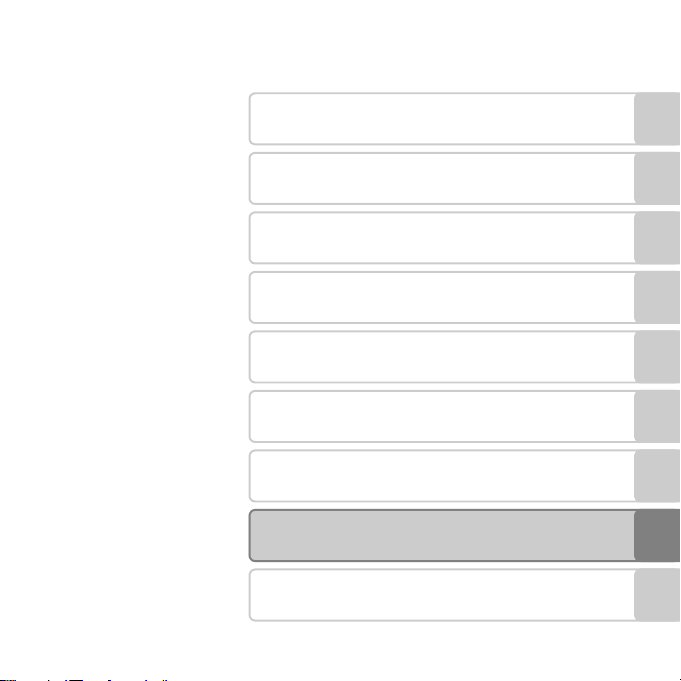
Introduction
Parts of the Camera
Basic Steps for Shooting and Playback
Shooting Features
Playback Features
Recording and Playing Back Movies
General Camera Setup
Reference Section
Technical Notes and Index
i

Introduction
Read This First
Thank you for purchasing the Nikon COOLPIX S3500 digital camera. Before using the camera,
please read the information in “For Your Safety” (Aviii-x) and familiarize yourself with the
information provided in this manual. After reading, please keep this manual handy and refer
to it to enhance your enjoyment of your new camera.
Introduction
ii

About This Manual
If you want to start using the camera right away, see “Basic Steps for Shooting and Playback”
(A13).
To learn about the parts of the camera and information that is displayed in the monitor, see
“Parts of the Camera” (A1).
Introduction
iii
Other Information
• Symbols and Conventions
To make it easier to find the information you need, the following symbols and
conventions are used in this manual:
Symbol Description
B
Introduction
C This icon marks notes, information that should be read before using the camera.
A/E/FThese icons indicate other pages containing relevant information;
This icon marks cautions, information that should be read before use, to prevent
damage to the camera.
E: “Reference Section”, F: “Technical Notes and Index.”
• SD, SDHC, and SDXC memory cards are referred to as “memory cards” in this manual.
• The setting at the time of purchase is referred to as the “default setting.”
• The names of menu items displayed in the camera monitor, and the names of buttons or
messages displayed on a computer monitor appear in bold.
• In this manual, images are sometimes omitted from monitor display samples so that
monitor indicators can be more clearly shown.
• Illustrations and text displays shown in this manual may differ from actual display.
iv

Information and Precautions
Life-Long Learning
As part of Nikon’s “Life-Long Learning” commitment to ongoing product support and education,
continually updated information is available online at the following sites:
• For users in the U.S.A.: http://www.nikonusa.com/
• For users in Europe and Africa: http://www.europe-nikon.com/support/
• For users in Asia, Oceania, and the Middle East: http://www.nikon-asia.com/
Visit these sites to keep up-to-date with the latest product information, tips, answers to frequently
asked questions (FAQs), and general advice on digital imaging and photography. Additional
information may be available from the Nikon representative in your area. Visit the site below for
contact information.
http://imaging.nikon.com/
Use Only Nikon Brand Electronic Accessories
Nikon COOLPIX cameras are designed to the highest standards and include complex electronic
circuitry. Only Nikon brand electronic accessories (including battery chargers, batteries, Charging AC
Adapter, and AC adapters) certified by Nikon specifically for use with this Nikon digital camera are
engineered and proven to operate within the operational and safety requirements of this electronic
circuitry.
THE USE OF NON-NIKON ELECTRONIC ACCESSORIES COULD DAMAGE THE CAMERA AND MAY
VOID YOUR
The use of third-party rechargeable Li-ion batteries not bearing the
Nikon holographic seal could interfere with normal operation of the
camera or result in the batteries overheating, igniting, rupturing, or
leaking.
For more information about Nikon brand accessories, contact a local
authorized Nikon dealer.
Before Taking Important Images
Before taking images on important occasions (such as at weddings or before taking the camera on a
trip), take a test shot to ensure that the camera is functioning normally. Nikon will not be held liable
for damages or lost profits that may result from product malfunction.
NIKON WARRANTY.
Holographic seal:
Identifies this device as an
authentic Nikon product.
Introduction
v

About the Manuals
• No part of the documentation included with this product may be reproduced, transmitted,
transcribed, stored in a retrieval system, or translated into a ny language in any form, by any means,
without Nikon’s prior written permission.
• Nikon reserves the right to change the specifications of the hardware and software described in
the documentation at any time and without prior notice.
• Nikon will not be held liable for any damages resulting from the use of this product.
Introduction
• While every effort was made to ensure that the information in the documentation is accurate and
complete, we would appreciate it were you to bring any errors or omissions to the atten tion of the
Nikon representative in your area (address provided separately).
Notice Concerning Prohibition of Copying or Reproduction
Note that simply being in possession of material that was digitally copied or reproduced by means
of a scanner, digital camera or other device may be punishable by law.
• Items prohibited by law from being copied or reproduced
Do not copy or reproduce paper money, coins, securities, government bonds or local government
bonds, even if such copies or reproductions are stamped “Sample.” The copying or reproduction of
paper money, coins, or securities which are circulated in a foreign country is prohibited. Unless the
prior permission of the government was obtained, the copying or reproduction of unused postage
stamps or post cards issued by the government is prohibited. The copying or reproduction of
stamps issued by the government and of certified documents stipulated by law is prohibited.
• Cautions on certain copies and reproductions
The government has issued cautions on copies or reproductions of securities issued by private
companies (shares, bills, checks, gift certificates, etc.), commuter passes or coupon tickets, except
when a minimum of necessary copies are to be provided for business use by a company. Also, do
not copy or reproduce passports issued by the government, licenses issued by public agencies and
private groups, ID cards and tickets, such as passes and meal coupons.
• Comply with copyright notices
The copying or reproduction of copyrighted creative works such as books, music, paintings,
woodcut prints, maps, drawings, movies and photographs is governed by national and international
copyright laws. Do not use this product for the purpose of making illegal copies or to infringe
copyright laws.
vi

Disposing of Data Storage Devices
Please note that deleting images or formatting data storage devices such as memory cards or builtin camera memory does not completely erase the original image data. Deleted files can sometimes
be recovered from discarded storage devices using commercially available software, potentially
resulting in the malicious use of personal image data. Ensuring the privacy of such data is the user’s
responsibility.
Before discarding a data storage device or transferring ownership to another person, erase all data
using commercial deletion software, or format the device and then completely refill it with images
containing no private information (for example, images of empty sky). Be sure to also replace any
images selected for the Select an image option in the Welcome screen setting (A98). Care
should be taken to avoid injury or damage to property when physically destroying data storage
devices.
Introduction
vii
For Your Safety
To pr event da mage to y our Niko n product or injury t o yourself or to others, read t he follo wing
safety precautions in their entirety before using this equipment. Keep these safety
instructions where all those who use the product will read them.
The consequences that could result from failure to observe the precautions listed in this
section are indicated by the following symbol:
Introduction
This icon marks warnings, information that should be read before using this Nikon
product, to prevent possible injury.
WARNINGS
Turn off in the event of
malfunction
Should you notice smoke or an unusual
smell coming from the camera or Charging
AC Adapter, unplug the Charging AC
Adapter and remove the battery
immediately, taking care to avoid burns.
Continued operation could result in injury.
After removing or disconnecting the power
source, take the equipment to a Nikonauthorized service representative for
inspection.
Do not disassemble
Touching the internal parts of the camera or
Charging AC Adapter could result in injury.
Repairs should be performed only by
qualified technicians. Should the camera or
Charging AC Adapter break open as the
result of a fall or other accident, take the
product to a Nikon-authorized service
representative for inspection, after
viii
unplugging the product and/or removing
the battery.
Do not use the camera or Charging
AC Adapter in the presence of
flammable gas
Do not use electronic equipment in the
presence of flammable gas, as this could
result in explosion or fire.
Handle the camera strap with care
Never place the strap around the neck of an
infant or child.
Keep out of reach of children
Particular care should be taken to prevent
infants from putting the battery or other
small parts into their mouths.
Do not remain in contact with the
camera, battery charger, or AC
adapter for extended periods
while the devices are on or in use.
Parts of the devices become hot. Leaving
the devices in direct contact with the skin
for extended periods may result in lowtemperature burns.
Observe caution when handling
the battery
The battery may leak, overheat or explode if
improperly handled. Observe the following
precautions when handling the battery for
use in this product:
• Before replacing the battery, turn the
product off. If you are using the Charging
AC Adapter/AC adapter, be sure it is
unplugged.
• Use only a Rechargeable Li-ion Battery
EN-EL19 (included). Charge the battery
by using a camera that supports battery
charging. To perform this operation, use
either Charging AC Adapter EH-70P
(included) or the Charge by computer
function. The Battery Charger MH-66
(available separately) is also available to
charge the battery without using a
camera.
• When inserting the battery, do not
attempt to insert it upside down or
backwards.
• Do not short or disassemble the battery
or attempt to remove or break the
battery insulation or casing.
• Do not expose the battery to flame or to
excessive heat.
• Do not immerse in or expose to water.
• Put the battery in the battery case before
transporting it. Do not transport or store
with metal objects such as necklaces or
hairpins.
• The battery is prone to leakage when
fully discharged. To avoid damage to the
product, be sure to remove the battery
when no charge remains.
• Discontinue use immediately should you
notice any change in the battery, such as
discoloration or deformation.
• If liquid from the damaged battery
comes in contact with clothing or skin,
rinse immediately with plenty of water.
Observe the following precautions
when handling the Charging AC
Adapter
• Keep dry. Failure to observe this
precaution could result in fire or electric
shock.
• Dust on or near the metal parts of the
plug should be removed with a dry cloth.
Continued use could result in fire.
• Do not handle the plug or go near the
Charging AC Adapter during lightning
storms. Failure to observe this precaution
could result in electric shock.
• Do not damage, modify, forcibly tug or
bend the USB cable, place it under heavy
objects, or expose it to heat or flames.
Should the insulation be damaged and
the wires become exposed, take it to a
Nikon-authorized service representative
for inspection. Failure to observe these
Introduction
ix
precautions could result in fire or electric
shock.
• Do not handle the plug or Charging AC
Adapter with wet hands. Failure to
observe this precaution could result in
electric shock.
• Do not use with travel converters or
adapters designed to convert from one
Introduction
voltage to another or with DC-to-AC
inverters. Failure to observe this
precaution could damage the product or
cause overheating or fire.
Use appropriate cables
When connecting cables to the input and
output jacks, use only the cables provided
or sold by Nikon for the purpose, to
maintain compliance with product
regulations.
Handle moving parts with care
Be careful that your fingers or other objects
are not pinched by the lens cover or other
moving parts.
CD-ROMs
The CD-ROMs included with this device
should not be played back on audio CD
equipment. Playing CD-ROMs on an audio
CD player could cause hearing loss or
damage the equipment.
Observe caution when using the
flash
Using the flash close to your subject’s eyes
could cause temporary visual impairment.
Particular care should be observed if
photographing infants, when the flash
x
should be no less than one meter (3 ft 4 in.)
from the subject.
Do not operate the flash with the
flash window touching a person or
object
Failure to observe this precaution could
result in burns or fire.
Avoid contact with liquid crystal
Should the monitor break, care should be
taken to avoid injury caused by broken glass
and to prevent liquid crystal from the
monitor touching the skin or entering the
eyes or mouth.
Turn the power off when using
inside an airplane or the hospital
Turn the power off while inside the airplane
during take off or landing. Follow the
instructions of the hospital when using
while in a hospital. The electromagnetic
waves given out by this camera may disrupt
the electronic systems of the airplane or the
instruments of the hospital. Remove the
Eye-Fi card, which can be the cause of the
disruption, beforehand if inserted in the
camera.
Notices
Notices for Customers in the
U.S.A.
IMPORTANT SAFETY INSTRUCTIONS–
SAVE THESE INSTRUCTIONS.
DANGER — TO REDUCE THE RISK OF FIRE
OR ELECTRIC SHOCK, CAREFULLY
FOLLOW THESE INSTRUCTIONS
For connection to a supply not in the U.S.A.,
use an attachment plug adapter of the
proper configuration for the power outlet if
needed.
The power supply unit is intended to be
correctly orientated in a vertical or floor
mount position.
Federal Communications Commission
(FCC) Radio Frequency Interference
Statement
This equipment has been tested and found
to comply with the limits for a Class B digital
device, pursuant to Part 15 of the FCC rules.
These limits are designed to provide
reasonable protection against harmful
interference in a residential installation. This
equipment generates, uses, and can radiate
radio frequency energy and, if not installed
and used in accordance with the
instructions, may cause harmf ul interference
to radio communications. However, there is
no guarantee that interference will not
occur in a particular installation. If this
equipment does cause harmful interference
to radio or television reception, which can
be determined by turning the equipment
off and on, the user is encouraged to try to
correct the interference by one or more of
the following measures:
• Reorient or relocate the receiving
antenna.
• Increase the separation between the
equipment and receiver.
• Connect the equipment into an outlet on
a circuit different from that to which the
receiver is connected.
• Consult the dealer or an experienced
radio/television technician for help.
CAUTIONS
Modifications
The FCC requires the user to be notified that
any changes or modifications made to this
device that are not expressly approved by
Nikon Corporation may void the user’s
authority to operate the equipment.
Interface Cables
Use the interface cables sold or provided by
Nikon for your equipment. Using other
interface cables may exceed the limits of
Class B Part 15 of the FCC rules.
Introduction
xi
Notice for customers in the State of
California
WARNING
Handling the cord on this product will
expose you to lead, a chemical known to
the State of California to cause birth defects
or other reproductive harm.
Introduction
Wash hands after ha ndling.
Nikon Inc.,
1300 Walt Whitman Road
Melville, New York 11747-3064
USA
Tel: 631-547-4200
Notice for customers in Canada
CAUTION
This Class B digital apparatus complies with
Canadian ICES-003.
ATTENTION
Cet appareil numérique de la classe B est
conforme à la norme NMB-003 du Canada.
Notices for customers in Europe
CAUTIONS
RISK OF EXPLOSION IF BATTERY IS
REPLACED BY AN INCORRECT TYPE.
DISPOSE OF USED BATTERIES
ACCORDING TO THE INSTRUCTIONS.
This symbol indicates that this
product is to be collected
separately.
The following apply only to users
in European countries:
xii
• This product is designated for separate
collection at an appropriate collection
point. Do not dispose of as household
waste.
• For more information, contact the retailer
or the local authorities in charge of waste
management.
This symbol on the battery
indicates that the battery is to be
collected separately. The
following apply only to users in
European countries:
• All batteries, whether marked with this
symbol or not, are designated for
separate collection at an appropriate
collection point. Do not dispose of as
household waste.
• For more information, contact the retailer
or the local authorities in charge of waste
management.

Table of Contents
Introduction …………………………………………… ii
Read This First ………………………………………………. ii
About This Manual ………………………………………….. iii
Information and Precautions ……………………….. v
For Your Safety …………………………………………. viii
WARNINGS ………………………………………………………. viii
Notices ………………………………………………………….. xi
Parts of the Camera ………………………………. 1
The Camera Body…………………………………………. 2
Attaching the Camera Strap …………………………. 5
Using Menus (the d Button)………………….. 6
The Monitor ………………………………………………….. 8
Shooting Mode …………………………………………………. 8
Playback Mode ……………………………….. ……………… 10
Basic Steps for Shooting and Playback
………………………………………………………………… 13
Preparation 1 Insert the Battery ……………… 14
Preparation 2 Charge the Battery …………… 16
Preparation 3 Insert a Memory Card ………. 18
Internal Memory and Memory Cards……… 19
Preparation 4 Setting the Display Language,
Date and Time………………………… …………………. 20
Step 1 Turn the Camera On ……………………… 24
Turning the Camera On and Off ………………. 25
Step 2 Select a Shooting Mode……………….. 26
Available Shooting Modes …………………………. 27
Step 3 Frame a Picture ……………………………… 28
Using the Zoom ……………………………………………… 29
Step 4 Focus and Shoot ……………………………. 30
The Shutter-release Button ………………………… 31
Step 5 Play Back Images …………………………… 32
Step 6 Delete Images………………………………… 34
Shooting Features ………………………………. 37
A (Auto) Mode ………………………………………… 38
Using Quick Effects………………………………………… 39
Scene Mode (Shooting Suited to Scenes)
……………………………………………………………………… 40
Displaying a Description of Each Scene
Mode (Help Display) ……………………………………… 41
Scene Mode and Features ………………………….. 41
Special Effects Mode (Applying Effects
When Shooting) ………………………………………… 47
Smart Portrait Mode (Capturing Images of
Smiling Faces) ……………………………………………. 49
Using Skin Softening …………………………………….. 51
Functions That Can Be Set Using the Multi
Selector……………………………………………………….. 52
Functions Available for Each Shooting
Mode…………………………………………………………………… 52
Using the Flash (Flash Modes)…………………… 53
Using the Self-timer ………………………………………. 55
Using Macro Mode ………………………………………… 57
Adjusting Brightness (Exposure
Compensation) ……………………………………………….. 59
Default Settings ………………………………………………. 60
Introduction
xiii

Functions That Can Be Set Using the d
Button (Shooting Menu) ………………………….. 62
Shooting Menu Options ……………………………… 63
Functions That Cannot Be Used
Simultaneously ………………………………………….. 65
Focusing……………………………………………………… 67
Introduction
AF Area ………………………………………………………………. 67
Face Detection………………………………………………… 68
Focus Lock………………………………………………………… 70
Playback Features………………………………… 73
Playback Zoom ………………………………………….. 74
Image Thumbnail Display/Calendar Display
……………………………………………………………………… 75
Selecting Certain Types of Images for
Playback ……………………………………………………… 76
Available Playback Modes ………………………….. 76
Switching Between Playback Modes……… 77
Functions That Can Be Set Using the d
Button (Playback Menu) …………………………… 78
Connectin g the Camera to a TV, Computer,
or Printer …………………………………………………….. 80
Using ViewNX 2 …………………………………………. 82
Installing ViewNX 2 ……………………………………….. 82
Transferring Images to the Computer …… 85
Viewing Images………………………………………………. 88
Recording and Playing Back Movies…. 89
Recording Movies ……………………………………… 90
Functions That Can Be Set Using the d
Button (Movie Menu) …………………………………… 94
Movie Playback………………………………………….. 95
General Camera Setup ……………………….. 97
Functions That Can Be Set Using the d
Button (Setup Menu) ………………………………… 98
Reference Section…………………………… E1
Using Panorama Assist…………………………. E2
Favorite Pictures Mode………………………… E5
Adding Images to Albums…………………….. E5
Viewing Images in an Album ………………. E6
Removing Images from Albums …………. E7
Changing Icons Assigned to Albums
…………………………………………………………………………. E8
Auto Sort Mode …………………………………….. E9
Auto Sort Mode Categories ………………….. E9
List by Date Mode ……………………………….. E11
Editing Images (Still Images) …………….. E12
Editing Functions …………………………………… E12
Quick Effects …………………………………………….. E14
Quick Retouch: Enhancing Contrast and
Saturation………………………………………………….. E16
D-Lighting: Enhancing Brightness and
Contrast …………………………………………………….. E16
Glamour Retouch: Enhancing Human Faces
with Eight Effects……………………………………. E17
Small Picture: Reducing Image Size… E19
Crop: Creating a Cropped Copy……….. E20
Connecting the Camera to a TV (Playback
on a TV)…………………………………………………. E22
Connecting the Camera to a Printer (Direct
Print) ……………………………………………………… E24
xiv

Connecting the Camera to a Printer
………………………………………………………………………. E25
Printing Images One at a Time …………. E27
Printing Multiple Images …………………….. E29
The Shooting Menu (for A (Auto) Mode)
……………………………………………………………….. E32
Image Mode (Image Size and Quality)
………………………………………………………………………. E32
White Balance (Adjusting Hue) ………… E34
Continuous ………………………………………………. E37
ISO Sensitivity ………………………………………….. E39
Color Options ………………………………………….. E41
AF Area Mode………………………………………….. E42
Autofocus Mode …………………………………….. E46
Quick Effects…………………………………………….. E47
Smart Portrait Menu …………………………… E48
Skin Softening ………………………………………… E48
Smile Timer ………………………………………………. E49
Blink Proof…………………………………………………. E50
The Playback Menu …………………………….. E51
Print Order (Creating a DPOF Print Order)
………………………………………………………………………. E51
Slide Show………………………………………………… E55
Protect ………………………………………………………. E56
Rotate Image……………………………………………. E58
Voice Memo …………………………………………….. E59
Copy (Copy Between Internal Memory and
Memory Card) …………………………………………. E61
The Movie Menu …………………………………. E63
Movie Options…………………………………………. E63
Autofocus Mode …………………………………….. E65
Wind Noise Reduction ………………………… E65
The Setup Menu ………………………………….. E66
Welcome Screen…………………………………….. E66
Time Zone and Date……………………………… E67
Monitor Settings …………………………………….. E70
Print Date (Imprinting Date and Time)
……………………………………………………………………….
Vibration Reduction ………………………………. E73
Motion Detection…………………………………… E75
AF Assist …………………………………………………….. E76
Digital Zoom ……………………………………………. E77
Sound Settings………………………………………… E78
Auto Off ……………………………………………………… E79
Format Memory/Format Card …………… E80
Language…………………………………………………… E81
Video Mode………………………………………………. E82
Charge by Computer ……………………………. E83
Blink Warning…………………………………………… E85
Eye-Fi Upload…………………………………………… E87
Reset All ……………………………………………………… E88
Firmware Version …………………………………… E91
Image/Sound File and Folder Names
……………………………………………………………….. E92
Optional Accessories ………………………….. E94
Error Messages…………………………………….. E95
E72
Technical Notes and Index ……………… F1
Maximizing Camera Life and Performance
…………………………………………………………………… F2
The Camera …………………………………………………… F2
The Battery…………………………………………………….. F4
Charging AC Adapter………………………………… F5
Memory Cards ……………………………………………… F5
Cleaning and Storage…………………………….. F6
Introduction
xv

Cleaning…………………………………………………………. F6
Storage …………………………………………………………… F6
Troubleshooting …………………………………….. F7
Specifications ……………………………………….. F17
Supported Standards……………………………… F21
Approved Memory Cards……………………… F22
Index………………………………………………………. F24
Introduction
xvi

Parts of the Camera
This chapter describes the parts of the camera and explains information that is displayed in
the monitor.
The Camera Body ……………………………………………………….2
Attaching the Camera Strap ………………………………………………………………………………5
Using Menus (the d Button) ……………………………………6
The Monitor ……………………………………………………………….8
Shooting Mode …………………………………………………………………………………………………….8
Playback Mode ………………………………………………………………………………………………….10
If you want to start using the camera right away, see “Basic Steps for Shooting and
Playback” (A13).
Parts of the Camera
1
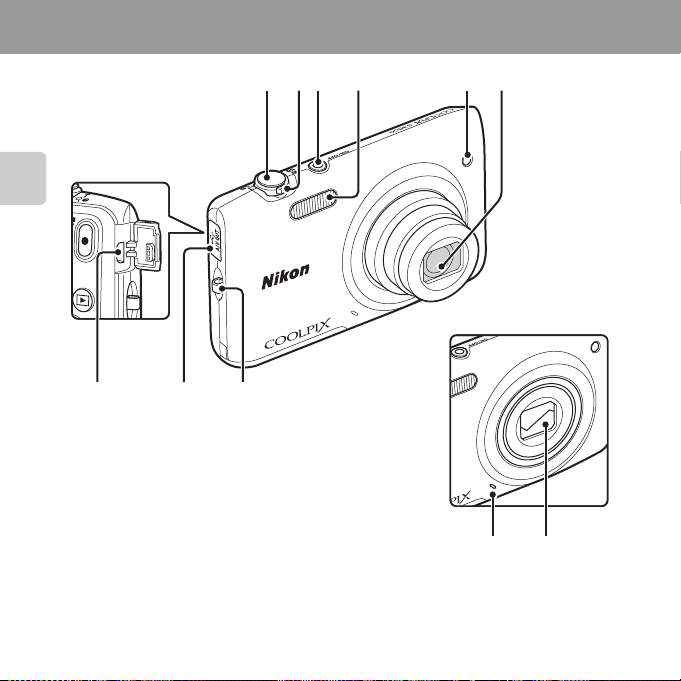
The Camera Body
Parts of the Camera
11 910
1 23 4 65
Lens cover closed
8
7
2
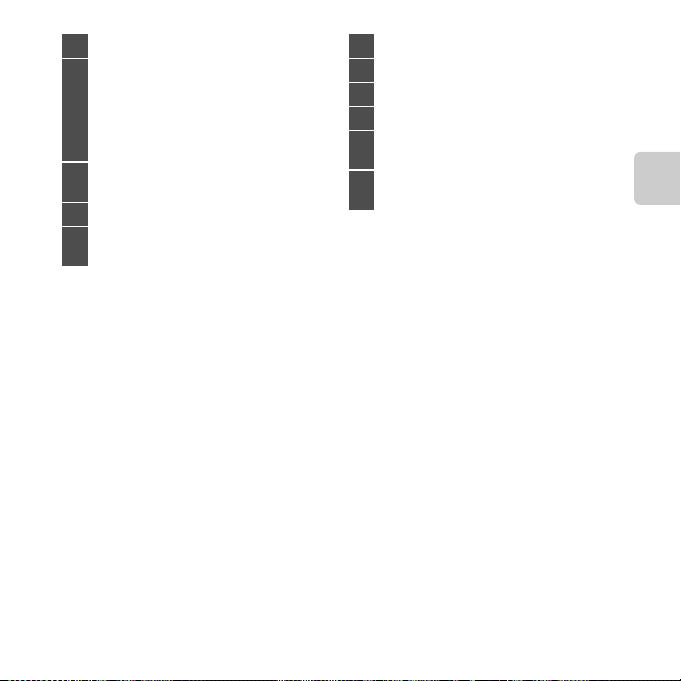
1 Shutter-release button……………………………… 30
Zoom control……………………………………………….. 29
f: Wide-angle………………………………………… 29
g: Telephoto……………………………………………. 29
2
h: Thumbnail playback…………………….. 74
i: Playback zoom………………………………….. 75
j: Help………………………………………………………. 40
Power switch/power-on lamp
3
……………………………………………………………………. 24, 25
4 Flash…………………………………………………………………. 53
Self-timer lamp ……………………………………………. 55
5
AF-assist illuminator…………………………………… 98
6 Lens
7 Lens cover …………………………………………………..F2
8 Built-in microphone ……………………..90, E59
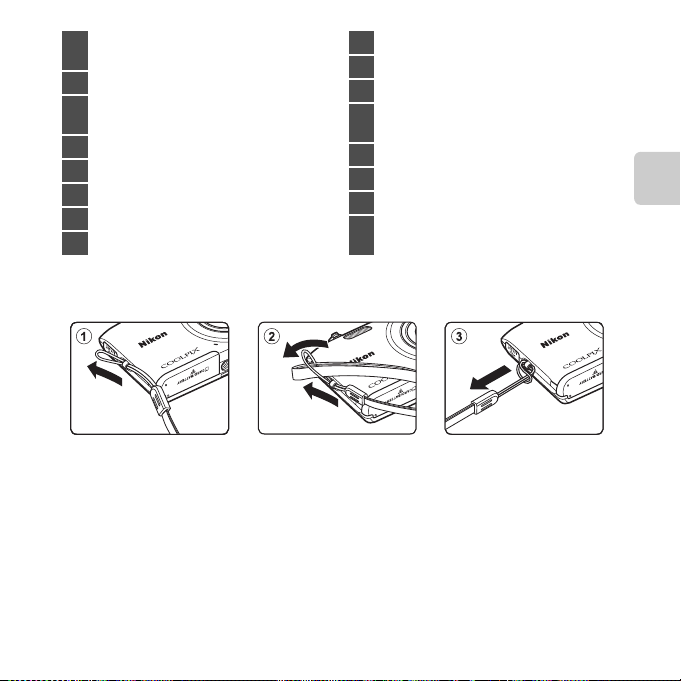
9 Eyelet for camera strap………………………………… 5
Connector cover
10
……………………………………….. 16, 80, E22, E26
USB/audio/video output connector
11
……………………………………….. 16, 80, E22, E26
Parts of the Camera
3
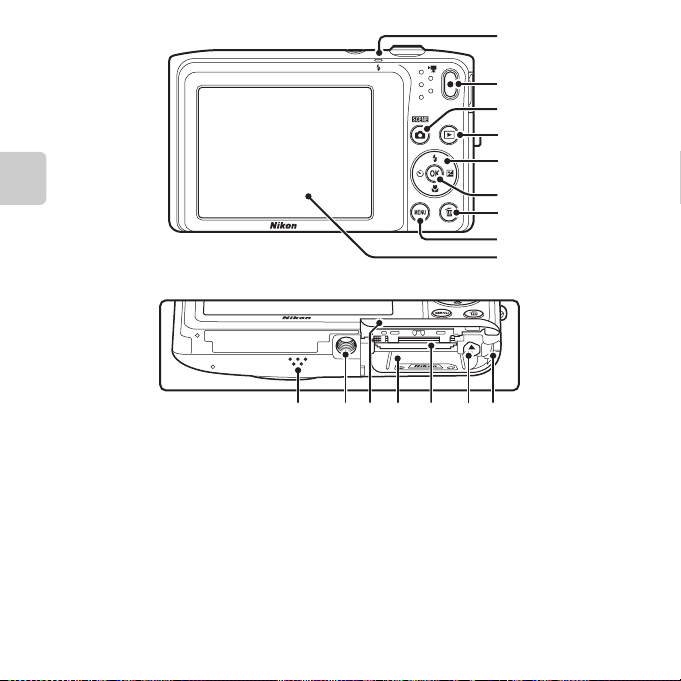
1
2
3
4
5
Parts of the Camera
6
7
8
9
10 11 12 13 14 15 16
4
Charge lamp ……………………………………17, E84
1
Flash lamp………………………………………….. ………….53
2 b (e movie-record) button………………… 90
A (shooting mode) button
3
………………………………………………..26, 38, 40, 47, 49
4 c (playback) button ………………………… 32, 77
5 Multi selector
6 k (apply selection) button
7 l (delete) button …………………. 34, 95, E60
8 d button…………………………..6, 62, 78, 94, 98
Attaching the Camera Strap
9 Monitor ………………………………………………………………8
10 Speaker………………………………………………95, E60
11 Tripod socket…………………………………………..F19
Battery-chamber/
12
memory card slot cover…………………….. 14, 15
13 Battery chamber…………………………………………..14
14 Memory card slot…………………………………………18
15 Battery latch ………………………………………………….. 14
Power connector cover (for connection
16
with optional AC adapter)……………….. E94
Parts of the Camera
5
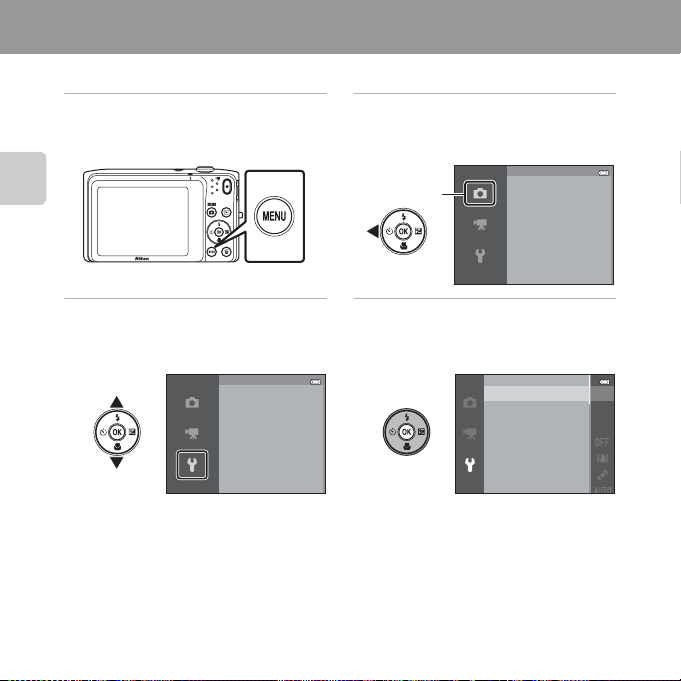
Using Menus (the d Button)
Use the multi selector and the k button to navigate the menus.
1 Press the d button.
• The menu is displayed.
Parts of the Camera
3 Press H or I to select the
desired menu icon.
• The menu is changed.
6
Set up
Welcome screen
Time zone and date
Monitor settings
Print date
Vibration reduction
Motion detection
2 Press the multi selector J.
• The current menu icon is displayed in
yellow.
Menu icons
Shooting menu
Image mode
White balance
Continuous
ISO sensitivity
Color options
AF area mode
4 Press the k button.
• The menu options become selectable.
Welcome screen
Time zone and date
Monitor settings
Print date
Vibration reduction
Motion detection
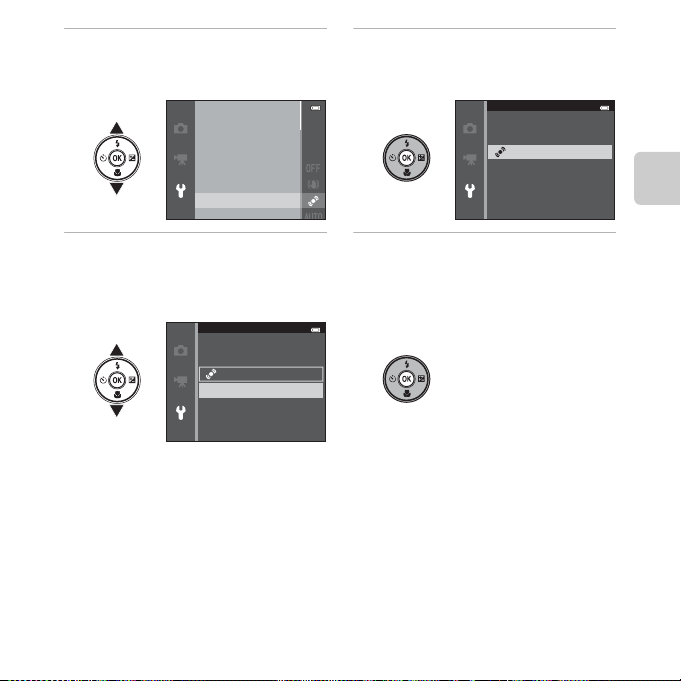
5 Press H or I to select a menu
option.
Welcome screen
Time zone and date
Monitor settings
Print date
Vibration reduction
Motion detection
6 Press the k button.
• The settings for the option you
selected are displayed.
Motion detection
Auto
Off
Parts of the Camera
7 Press H or I to select a
setting.
Motion detection
Auto
Off
8 Press the k button.
• The setting you selected is applied.
• When you are finished using the menu,
press the d button.
C Setting the Menu Options
• Certain menu items cannot be set depending on the current shooting mode or the state of the
camera. Unavailable items are displayed in gray and cannot be selected.
• When a menu is displayed, you can switch to shooting mode by pressing the shutter-release
button, the A (shooting mode) button, or the b (e movie-record) button.
7
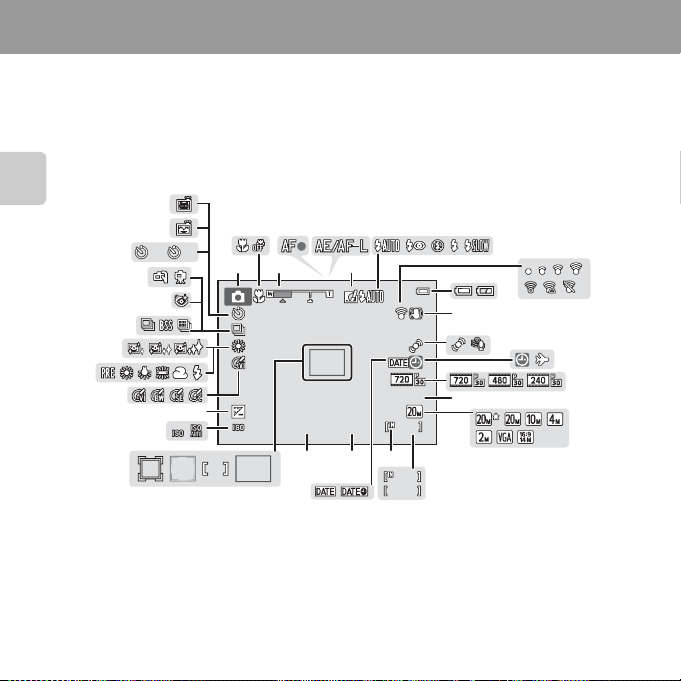
The Monitor
The information that is displayed in the monitor changes depending on the camera’s settings
and state of use.
At the default setting, the indicators below are displayed when the camera is turned on or is
in operation, and they disappear after a few seconds elapse (when Photo info is set to Auto
info in Monitor settings (A98)).
Shooting Mode
31
29
35
32
34
27
37
36
33
2
2
1 3 6
28
242526
10
+1.0
1600
23
4 5
1/250
21
F3.5
2022
7
29m
19
18
999
999
9999
9
10
12
11
0s
16
13
14
Parts of the Camera
30
8
15
17
8
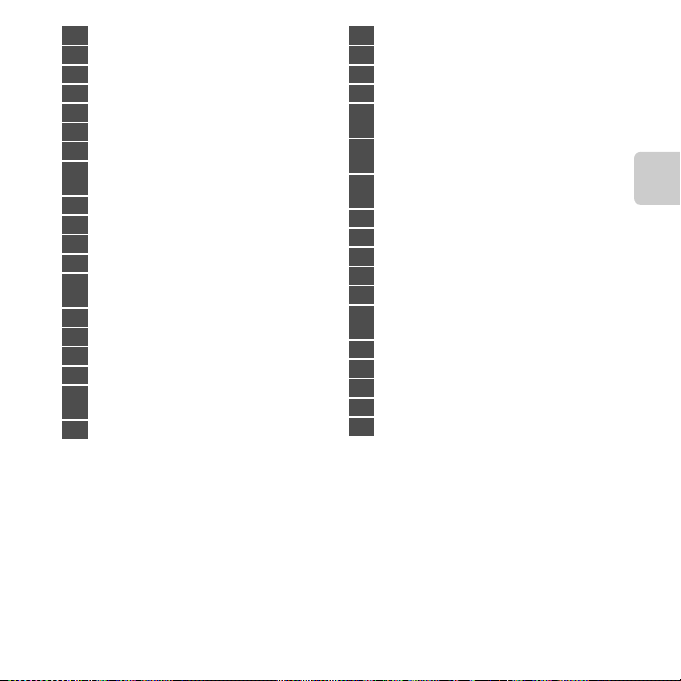
1 Shooting mode ……………….26, 38, 40, 47, 49
2 Macro mode …………………………………………………. 57
3 Zoom indicator …………………………………….. 29, 57
4 Focus indicator ……………………………………………. 30
5 AE/AF-L indicator…………………………………….E4
6 Quick effects icon…………………………. 64, E47
7 Flash mode……………………………………………………. 53
Eye-Fi communication indicator
8
…………………………………………………………….. 99, E87
9 Battery level indicator ……………………………….. 24
10 Vibration reduction icon …………….98, E73
11 Motion detection icon ………………..98, E75
12 Wind noise reduction ………………….94, E65
“Date not set” indicator
13
……………………………………………… 20, E67, E95
14 Travel destination ………………………….98, E67
15 Movie options…………………………………94, E63
16 Movie length …………………………………..90, E64
17 Image mode ……………………………………63, E32
Number of exposures remaining
18
(still images) …………………………………….24, E33
19 Internal memory indicator……………….. 24, 90
20 Aperture value……………………………………………… 30
21 Print date…………………………………………..98, E72
22 Shutter speed………………………………………………..30
23 Focus area (auto)…………………….30, 63, E42
Focus area (for manual or center)
24
………………………………………………………………63, E43
Focus area (face detection, pet detection)
25
…………………………………………30, 46, 49, 63, E42
Focus area (subject tracking)
26
………………………………………………………………63, E43
27 ISO sensitivity ………………………………….63, E39
28 Exposure compensation value………………. 59
29 Color options…………………………………..63, E41
30 White balance mode ……………………63, E34
31 Skin softening …………………………………64, E48
Continuous shooting mode
32
………………………………………………………………63, E37
33 Blink proof ………………………………………..64, E50
34 Hand-held/tripod ……………………………………….. 43
35 Self-timer indicator …………………………………….. 55
36 Smile timer……………………………………….64, E49
37 Pet portrait auto release …………………….46, 55
Parts of the Camera
9
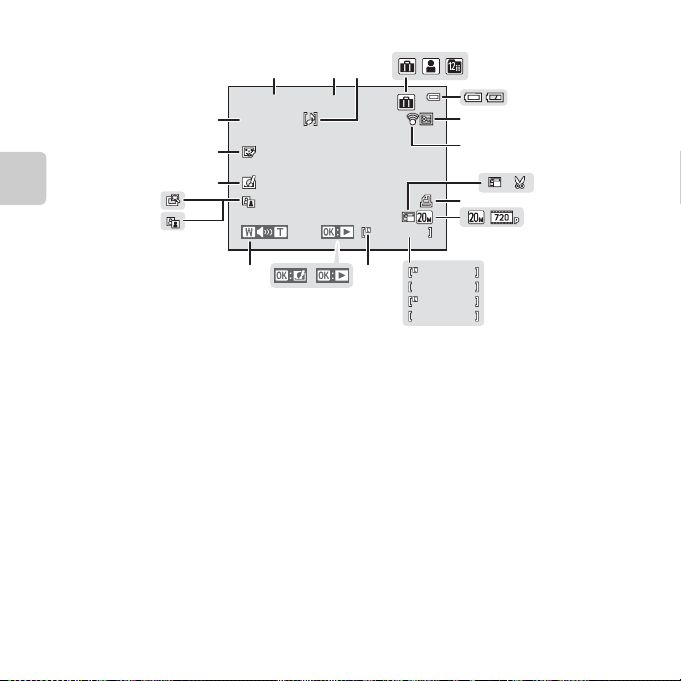
Playback Mode
4
5
6
7
9
8
15 / 05 / 2013 15:30
9999. JPG
21
20
1 2
3
19
999
999 /
9999 / 9999
29m
29m
10
999
0s
0s
11
Parts of the Camera
18
17
16
15
14
13
999 /
a
b
12
10
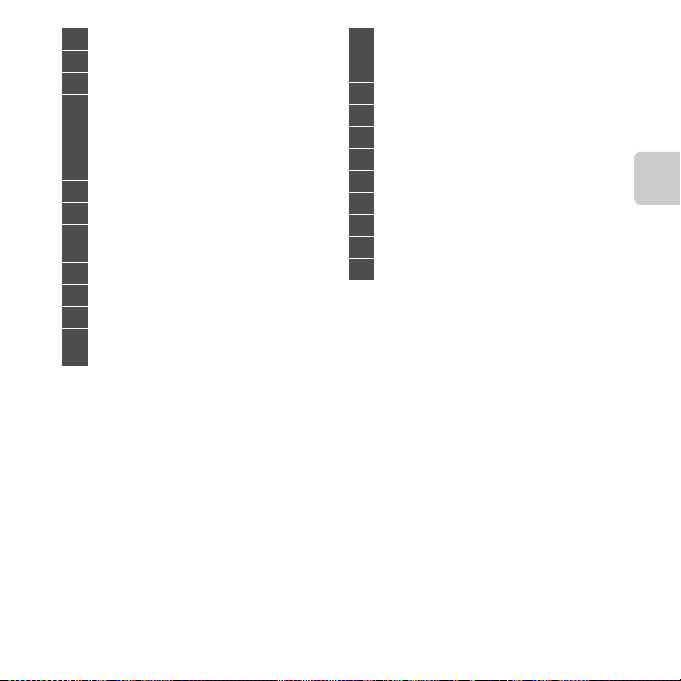
1 Date of recording ……………………………………….. 20
2 Time of recording……………………………………….. 20
3 Voice memo icon ………………………….78, E60
Album icon in
favorite pictures mode …………………..76, E5
4
Category icon in
auto sort mode …………………………………76, E9
List by date icon …………………………….76, E11
5 Battery level indicator ……………………………….. 24
6 Protect icon…………………………………….. 78, E56
Eye-Fi communication indicator
7
…………………………………………………………….. 99, E87
8 Small picture icon …………………………78, E19
9 Crop icon ………………………………………….74, E20
10 Print order icon ………………………………78, E51
Image mode ……………………………………63, E32
11
Movie options…………………………………94, E63
a Current frame number/
12
total number of frames ………………………… 32
b Movie length…………………………………………….. 95
13 Internal memory indicator ……………………….32
14 Movie playback guide……………………………….. 95
15 Quick effects guide …………………………………….. 33
16 Volume indicator …………………………..95, E60
17 D-Lighting icon………………………………78, E16
18 Quick retouch icon ……………………….78, E16
19 Quick effects icon ………………………….33, E14
20 Glamour retouch icon …………………78, E17
21 File number and type………………………… E92
Parts of the Camera
11

12
Loading…
-
Инструкции по эксплуатации
11
Языки:
Nikon COOLPIX S3500 инструкция по эксплуатации
(248 страниц)
- Языки:Русский
-
Тип:
PDF -
Размер:
11.63 MB
Просмотр
Nikon COOLPIX S3500 инструкция по эксплуатации
(248 страниц)
- Языки:Португальский
-
Тип:
PDF -
Размер:
11.5 MB -
Описание:
Brasil
Просмотр
Nikon COOLPIX S3500 инструкция по эксплуатации
(248 страниц)
- Языки:Нидерландский
-
Тип:
PDF -
Размер:
11.69 MB
Просмотр
Nikon COOLPIX S3500 инструкция по эксплуатации
(248 страниц)
- Языки:Исландский
-
Тип:
PDF -
Размер:
11.51 MB
Просмотр
Nikon COOLPIX S3500 инструкция по эксплуатации
(248 страниц)
- Языки:Индонезийский
-
Тип:
PDF -
Размер:
11.4 MB
Просмотр
Nikon COOLPIX S3500 инструкция по эксплуатации
(248 страниц)
- Языки:Персидский
-
Тип:
PDF -
Размер:
6.18 MB
Просмотр
Nikon COOLPIX S3500 инструкция по эксплуатации
(248 страниц)
- Языки:Португальский
-
Тип:
PDF -
Размер:
11.5 MB
Просмотр
Nikon COOLPIX S3500 инструкция по эксплуатации
(248 страниц)
- Языки:Итальянский
-
Тип:
PDF -
Размер:
11.71 MB
Просмотр
Nikon COOLPIX S3500 инструкция по эксплуатации
(248 страниц)
- Языки:Немецкий
-
Тип:
PDF -
Размер:
11.73 MB
Просмотр
Nikon COOLPIX S3500 инструкция по эксплуатации
(248 страниц)
- Языки:Испанский
-
Тип:
PDF -
Размер:
11.76 MB
Просмотр
Nikon COOLPIX S3500 инструкция по эксплуатации
(248 страниц)
- Языки:Арабский
-
Тип:
PDF -
Размер:
6.13 MB
Просмотр
На NoDevice можно скачать инструкцию по эксплуатации для Nikon COOLPIX S3500. Руководство пользователя необходимо для ознакомления с правилами установки и эксплуатации Nikon COOLPIX S3500. Инструкции по использованию помогут правильно настроить Nikon COOLPIX S3500, исправить ошибки и выявить неполадки.
Nikon COOLPIX S3500 Digital Camera PDF User Guides and Manuals for Free Download: Found (3) Manuals for Nikon COOLPIX S3500 Device Model (Reference Manual, Operation & User’s Manual)
The Nikon COOLPIX S3500 is a compact digital camera catering to both amateurs and novice photographers seeking a lightweight yet capable device. With its sleek design, this camera easily fits inside a pocket or handbag, making it an ideal companion for everyday photography, travel, and special occasions. The combination of user-friendly features and decent specifications makes it a popular choice for those looking to capture high-quality images without the hassle of complicated settings.
At first glance, the Nikon COOLPIX S3500 catches the eye with its stylish appearance and vibrant color options. Available in various colors, including red, blue, and black, it appeals to a wide range of users. Moreover, its compact design means you can take it anywhere, ensuring you never miss a moment worth capturing.
One of the standout features of the COOLPIX S3500 is its powerful 20.1-megapixel sensor. This high resolution allows for incredibly detailed photographs, making it easy to print larger images without losing quality. Additionally, the camera is equipped with a 7x optical zoom lens, which allows users to capture distant subjects with clarity. Whether you’re shooting landscapes or portraits, the impressive zoom capability ensures you get the shot you want.
Another appealing aspect of the Nikon COOLPIX S3500 is its ease of use. The camera features a simple menu system and a 2.7-inch LCD screen, giving users a clear view of their subjects and settings. The intuitive interface makes it accessible for all skill levels, allowing even the most inexperienced photographers to take stunning photos with minimal effort.
In terms of performance, the COOLPIX S3500 excels in various lighting conditions, thanks to its ISO range of 80 to 1600. This flexibility allows for fantastic low-light performance, minimizing noise and ensuring your nighttime shots remain crisp. Furthermore, the built-in image stabilization feature significantly reduces blurriness caused by camera shake, making every shot as clear as possible.
For those who love to capture moments on the go, the Nikon COOLPIX S3500 also offers a variety of shooting modes. These modes include Portrait, Landscape, Night Portrait, and more, helping users achieve the best shots regardless of the situation. The camera also features a Smart Portrait Mode, which includes advanced facial recognition technology, auto red-eye correction, and skin softening functions, ensuring your portraits are always flattering.
Here are some notable features of the Nikon COOLPIX S3500:
- 20.1-megapixel sensor for detailed images
- 7x optical zoom for versatile shooting
- 2.7-inch LCD display for easy navigation
- ISO range of 80 to 1600 for low-light shooting
- Multiple shooting modes for creative flexibility
- Image stabilization for sharp photos
- Smart Portrait Mode for beautiful people shots
While the Nikon COOLPIX S3500 offers a multitude of features, it’s essential to recognize its limitations. The camera lacks advanced manual controls, which may deter photography enthusiasts seeking complete creative freedom. Additionally, the video recording capability is capped at 720p, which may not satisfy users looking for high-definition video options.
In conclusion, the Nikon COOLPIX S3500 is an excellent choice for anyone looking for a straightforward and effective compact camera. Its impressive specifications, user-friendly interface, and various features make it especially suitable for beginners and casual photographers. While it may not have the extensive capabilities of higher-end models, it undoubtedly delivers excellent performance for everyday photography, making it a solid option for anyone wanting to document their life beautifully.