
Help Guide
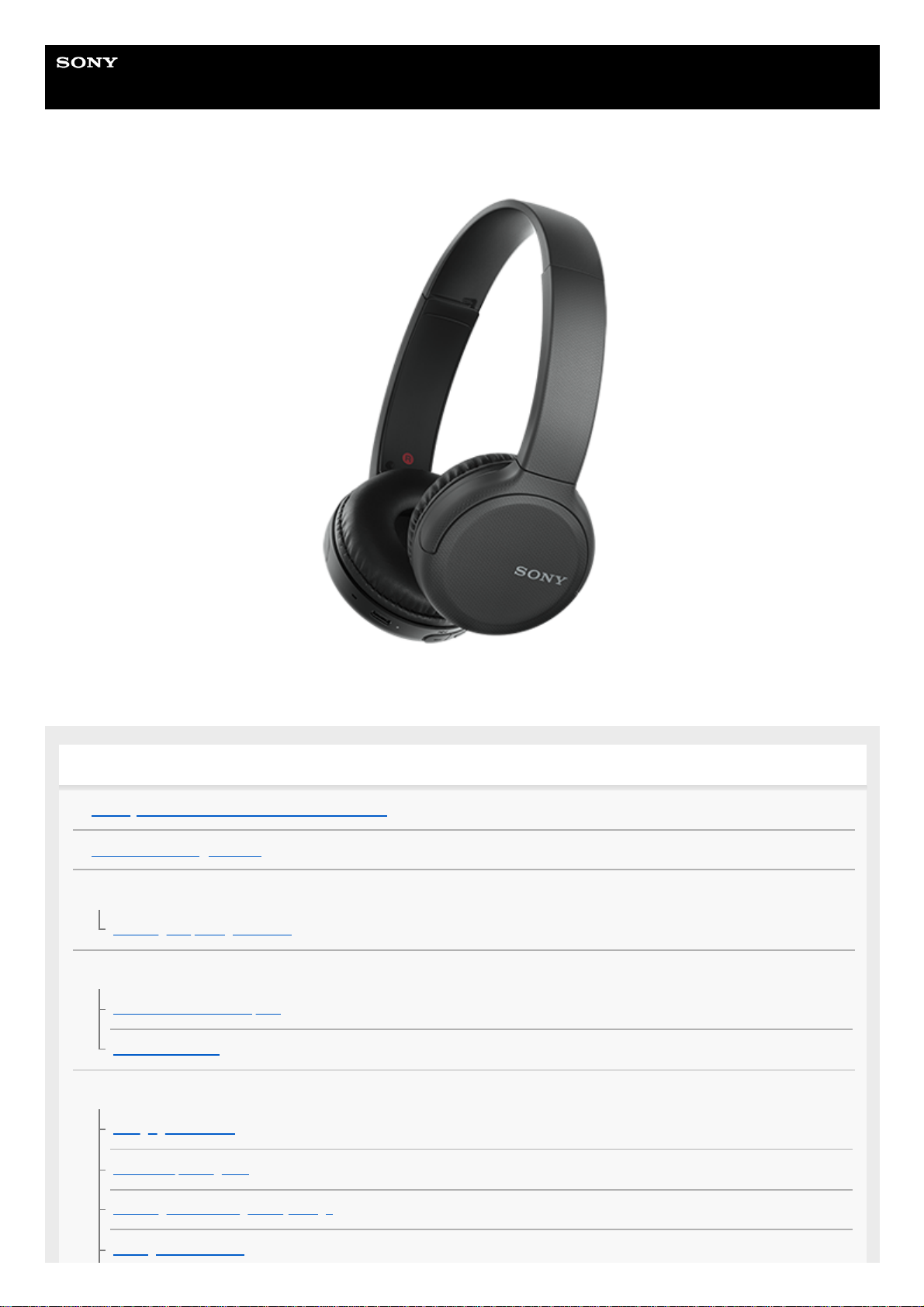
Wireless Stereo Headset
WH-CH510
Use this manual if you encounter any problems, or have any questions.
Getting started
What you can do with the Bluetooth function
About the voice guidance
Supplied accessories
Checking the package contents
Parts and controls
Location and function of parts
About the indicator
Power/Charging
Charging the headset
Available operating time
Checking the remaining battery charge
Turning on the headset
Turning off the headset
Making connections
How to make a wireless connection to Bluetooth devices
Android smartphone
Pairing and connecting with an Android smartphone
Connecting to a paired Android smartphone
iPhone (iOS devices)
Pairing and connecting with an iPhone
Connecting to a paired iPhone
Computers
Pairing and connecting with a computer (Windows 10)
Pairing and connecting with a computer (Windows 8.1)
Pairing and connecting with a computer (Windows 7)
Pairing and connecting with a computer (Mac)
Connecting to a paired computer (Windows 10)
Connecting to a paired computer (Windows 8.1)
Connecting to a paired computer (Windows 7)
Connecting to a paired computer (Mac)
Other Bluetooth devices
Pairing and connecting with other Bluetooth devices
Connecting to a paired Bluetooth device
Multipoint connection
Connecting the headset to both a music player and a smartphone / mobile phone (multipoint connection)
Connecting the headset to 2 Android smartphones (multipoint connection)
Connecting the headset to an Android smartphone and an iPhone (multipoint connection)
Disconnecting Bluetooth connection (after use)
Listening to music
Listening to music via a Bluetooth connection
Listening to music from a device via Bluetooth connection
Controlling the audio device (Bluetooth connection)
Disconnecting Bluetooth connection (after use)
Supported codecs
Making phone calls
Receiving a call
Making a call
Functions for a phone call
Disconnecting Bluetooth connection (after use)
Using the voice assist function
Using the voice assist function (Google app)
Using the voice assist function (Siri)
Important information
Precautions
Trademarks
Customer support websites
Troubleshooting
What can I do to solve a problem?
Power/Charging
Unable to turn on the headset.
Charging cannot be done.
Charging time is too long.
The headset cannot be charged even if connecting the headset to a computer.
The remaining battery charge of the headset is not displayed on the screen of smartphone.
Sound
No sound
Low sound level
Low sound quality
Sound skips frequently.
Bluetooth
Pairing cannot be done.
5-004-978-11(1) Copyright 2019 Sony Corporation
Unable to make a Bluetooth connection.
Distorted sound
The Bluetooth
wireless communication range is short, or the sound skips.
The headset does not operate properly.
Cannot hear a person on a call.
Low voice from callers
Resetting or initializing the headset
Resetting the headset
Initializing the headset to restore factory settings
Help Guide
Wireless Stereo Headset
WH-CH510
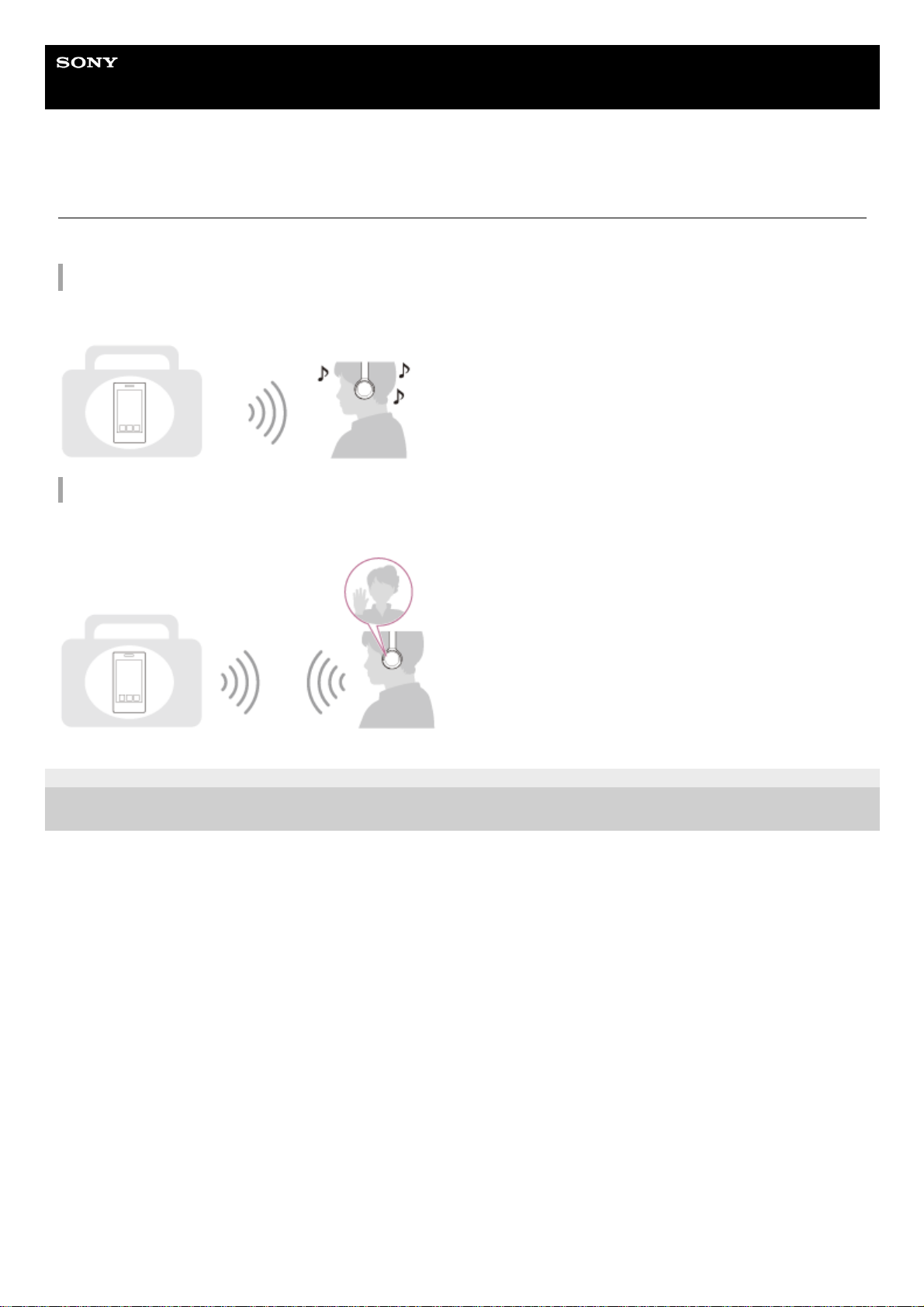
What you can do with the Bluetooth function
The headset uses BLUETOOTH® wireless technology, allowing you to do the following.
Listening to music
You can receive audio signals from a smartphone or music player to enjoy music wirelessly.
Talking on the phone
You can make and receive calls hands-free, while leaving your smartphone or mobile phone in your bag or pocket.
5-004-978-11(1) Copyright 2019 Sony Corporation
Help Guide
Wireless Stereo Headset
WH-CH510
About the voice guidance
You will hear the voice guidance in the following situations via the headset.
When the headset is turned on: “Power on”
When the headset is turned off: “Power off”
When entering pairing mode: “Bluetooth pairing”
When establishing a Bluetooth connection: “Bluetooth connected”
When disconnecting a Bluetooth connection: “Bluetooth disconnected”
When informing the remaining battery charge: “Battery about XX %” (The “XX” value indicates the approximate
remaining charge. Use it as a rough estimate.) / “Battery fully charged”
When the remaining battery charge is low: “Low battery, please recharge headset”
When automatically turning off due to low battery: “Please recharge headset. Power off”
5-004-978-11(1) Copyright 2019 Sony Corporation
Help Guide
Wireless Stereo Headset
WH-CH510
Checking the package contents
After opening the package, check that all of the items in the list are included. If any items are missing, contact your
dealer.
Numbers in ( ) indicate the item amount.
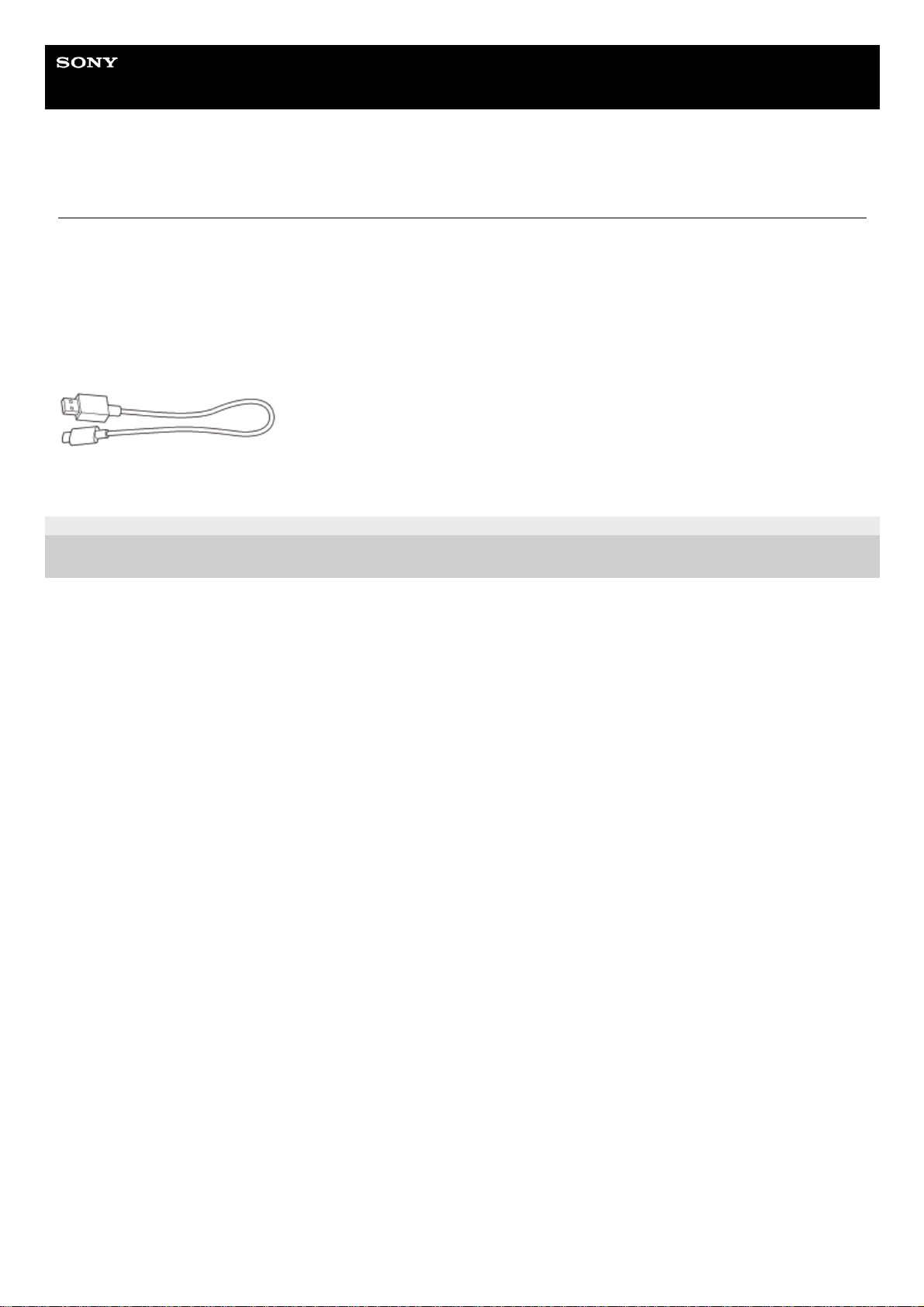
Wireless Stereo Headset
USB Type-C™ cable (USB-A to USB-C™) (approx. 20 cm (7.88 in.)) (1)
5-004-978-11(1) Copyright 2019 Sony Corporation
Help Guide
Wireless Stereo Headset
WH-CH510
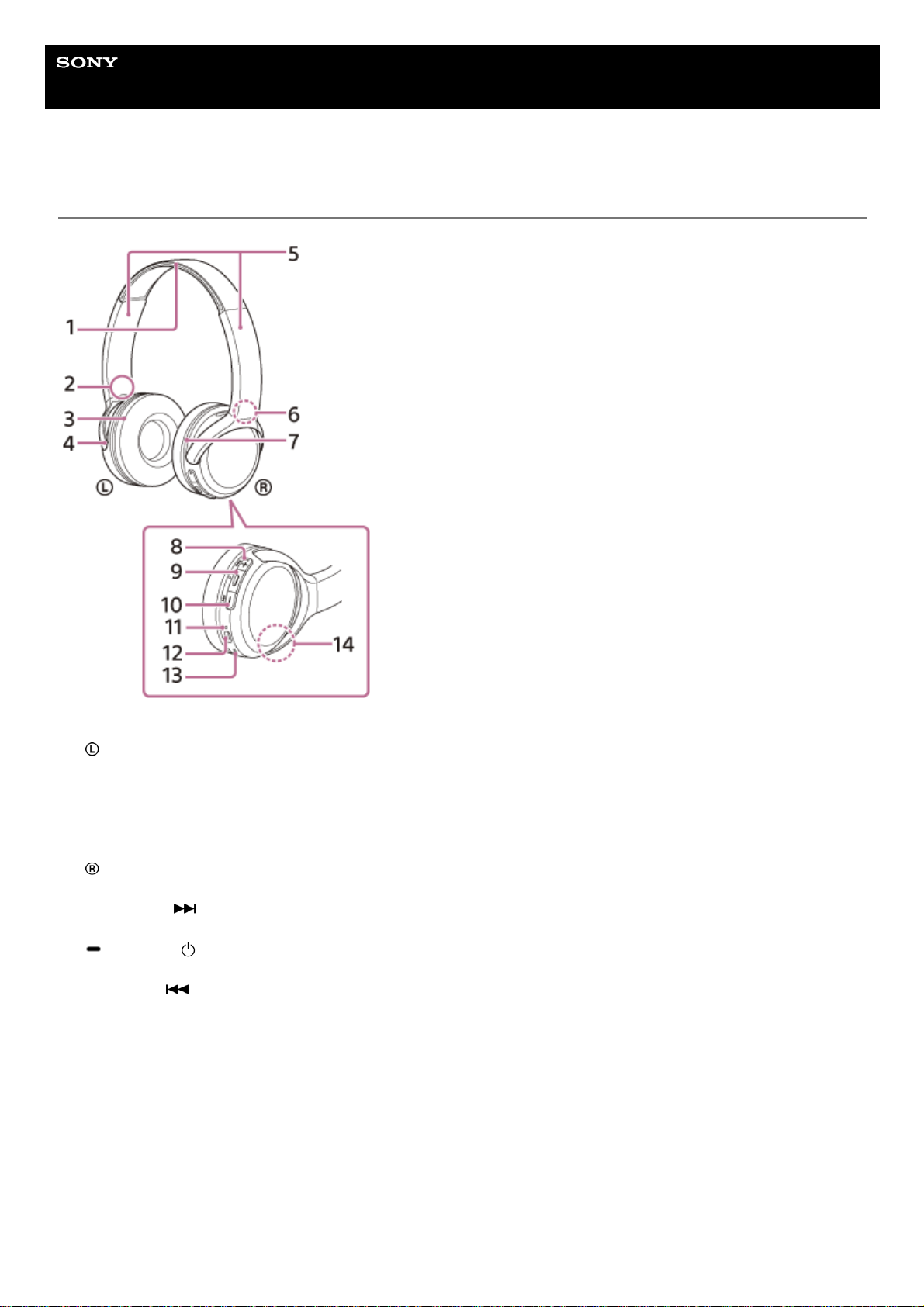
Location and function of parts
Headband1.
(left) mark2.
Left unit3.
Tactile dot
There is a tactile dot on the left unit.
4.
Slider
Slide to adjust the length of the headband.
5.
(right) mark6.
Right unit7.
+ (volume +)/
(next) button
There is a tactile dot on the + button. Use this dot as a guide when operating the headset.
8.
(play/call)/ (power) button
Use to play music, make a call, or turn the headset on/off.
9.
— (volume -)/
(previous) button10.
Indicator (blue/red)
Lights up in red while charging.
Lights up in red or blue to indicate the power or communication status of the headset.
11.
USB Type-C port
Connect the headset to an AC outlet via a commercially available USB AC adaptor or to a computer with the supplied
USB Type-C cable to charge the headset.
12.
Microphone
Picks up the sound of your voice when talking on the phone.
13.
Built-in antenna
A Bluetooth antenna is built into the headset.
14.

Related Topic
About the indicator
Checking the remaining battery charge
5-004-978-11(1) Copyright 2019 Sony Corporation
Help Guide
Wireless Stereo Headset
WH-CH510
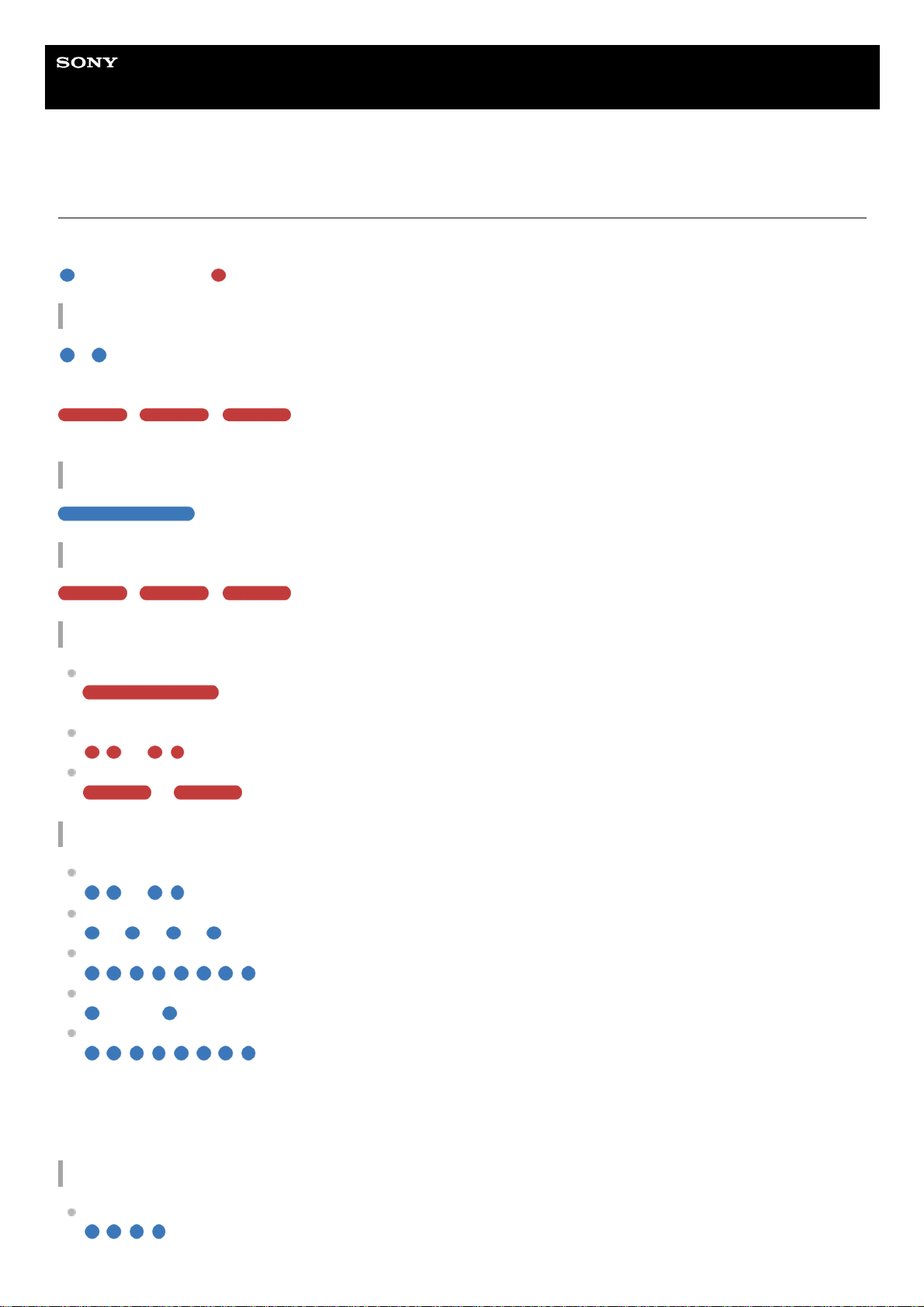
About the indicator
You can check various statuses of the headset by the indicator.
: Turns on in blue / : Turns on in red / -: Turns off
Turning on
— (flashes twice in blue)
In this case, when the remaining battery charge is 20% or lower (requires charging), the indicator lights successively as
follows.
— — (repeatedly flashes slowly in red for about 15 seconds)
For details, see “Checking the remaining battery charge”.
Turning off
(lights up in blue for about 2 seconds)
When the remaining battery charge becomes low
— — (repeatedly flashes slowly in red for about 15 seconds)
Charging
While charging
(lights up in red)
The indicator turns off after charging is complete.
Abnormal temperature
— — — — (repeatedly flashes twice in red)
Abnormal charging
— — — — (repeatedly flashes slowly in red)
Bluetooth function
Device registration (pairing) mode
— — — — (repeatedly flashes twice in blue)
Not connected
— — — — — — — — (repeatedly flashes in blue at about 1-second intervals)
Connection process completed
(repeatedly flashes quickly in blue for about 5 seconds)
Connected
— — — — — — — — — — — — (repeatedly flashes in blue at about 5-second intervals)
Incoming call
(repeatedly flashes quickly in blue)
The not connected and connected status indications automatically turn off after a period of time has passed. They start
flashing again for a period of time when some operation is performed. When the remaining battery charge becomes low,
the indicator (red) starts flashing.
Other
Initialization completed
(flashes 4 times in blue)
For details, see “Initializing the headset to restore factory settings”.

5-004-978-11(1) Copyright 2019 Sony Corporation
Help Guide
Wireless Stereo Headset
WH-CH510
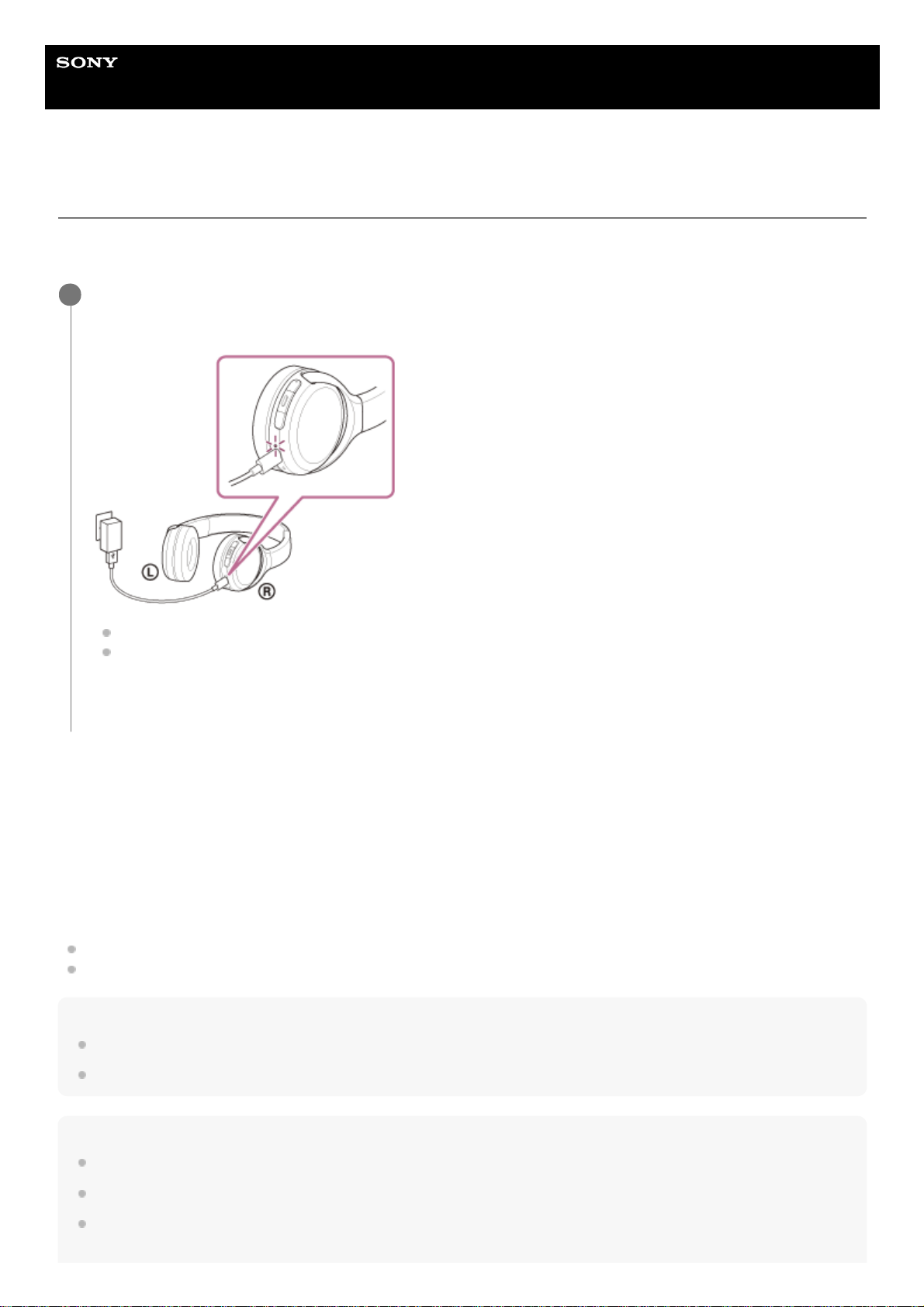
Charging the headset
The headset contains a built-in lithium-ion rechargeable battery. Use the supplied USB Type-C cable to charge the
headset before use.
System requirements for battery charge using USB
USB AC adaptor
A commercially available USB AC adaptor capable of supplying an output current of 0.5 A (500 mA)
Personal computer
Personal computer with a standard USB port
We do not guarantee operation on all computers.
Operations using a custom-built or homebuilt computer are not guaranteed.
Hint
The headset can be also charged by connecting the headset to a running computer using the supplied USB Type-C cable.
If charging starts while the headset is turned on, the headset will turn off automatically.
Note
Charging may not be successful with cables other than the supplied USB Type-C cable.
Charging may not be successful depending on the type of USB AC adaptor.
When the headset is connected to an AC outlet or computer, all operations such as turning on the headset, registering or
connecting to Bluetooth devices, and music playback cannot be performed.
Connect the headset to an AC outlet.
Use the supplied USB Type-C cable and a commercially available USB AC adaptor.
The indicator (red) of the headset lights up.
Charging is completed in about 4.5 hours (*) and the indicator (red) turns off automatically.
After charging is complete, disconnect the USB Type-C cable.
1
Time required for charging the empty battery to its full capacity. The charging time may differ depending on the conditions of use.
*

The headset cannot be charged when the computer goes into standby (sleep) or hibernation mode. In this case, change the
computer settings, and start charging the headset once again.
If the headset is not used for a long time, the rechargeable battery usage hours may be reduced. However, the battery life will
improve after a few recharges. If you store the headset for a long time, charge the battery to its full capacity once every 6 months
to avoid over-discharge.
If the headset is not used for a long time, it may take longer to charge the battery.
If the headset detects a problem while charging due to the following causes, the indicator (red) flashes. In this case, charge once
again within the charging temperature range. If the problem persists, consult your nearest Sony dealer.
Ambient temperature exceeds the charging temperature range of 5 °C — 35 °C (41 °F — 95 °F).
There is a problem with the rechargeable battery.
If the headset is not used for a long time, the indicator (red) may not immediately light up when charging. Please wait a moment
until the indicator (red) lights up.
If the usage hours of the built-in rechargeable battery decrease significantly, the battery should be replaced. Consult your nearest
Sony dealer to replace the rechargeable battery.
Avoid exposure to extreme temperature changes, direct sunlight, moisture, sand, dust, and electrical shock. Never leave the
headset in a parked vehicle.
When connecting the headset to a computer, use only the supplied USB Type-C cable, and be sure to directly connect them.
Charging will not be properly completed when the headset is connected through a USB hub.
5-004-978-11(1) Copyright 2019 Sony Corporation
Help Guide
Wireless Stereo Headset
WH-CH510
Available operating time
The available operating times of the headset with the battery fully charged are as follows:
Bluetooth connection
Music playback time (AAC): Max. 35 hours
Music playback time (SBC): Max. 32 hours
About 90 minutes of music playback is possible after 10 minutes charging.
Communication time: Max. 30 hours
Standby time: Max. 200 hours
Note
Usage hours may be different depending on the conditions of use.
Related Topic
Supported codecs
5-004-978-11(1) Copyright 2019 Sony Corporation
Help Guide
Wireless Stereo Headset
WH-CH510
Checking the remaining battery charge
You can check the remaining battery charge of the rechargeable battery.
When you turn on the headset, the voice guidance indicating the remaining battery charge can be heard.
“Battery about XX %” (The “XX” value indicates the approximate remaining charge.)
“Battery fully charged”
The remaining battery charge indicated by the voice guidance may differ from the actual remaining charge in some
cases. Please use it as a rough estimate.
In addition, the indicator (red) flashes for about 15 seconds if the remaining battery charge is 20% or lower when the
headset is turned on.
When the remaining charge becomes low
The currently operating indicator display changes to red. If you hear the voice guidance say, “Low battery, please
recharge headset”, charge the headset as soon as possible.
When the battery becomes completely empty, the headset sounds a warning beep, the voice guidance says, “Please
recharge headset. Power off”, and the headset automatically turns off.
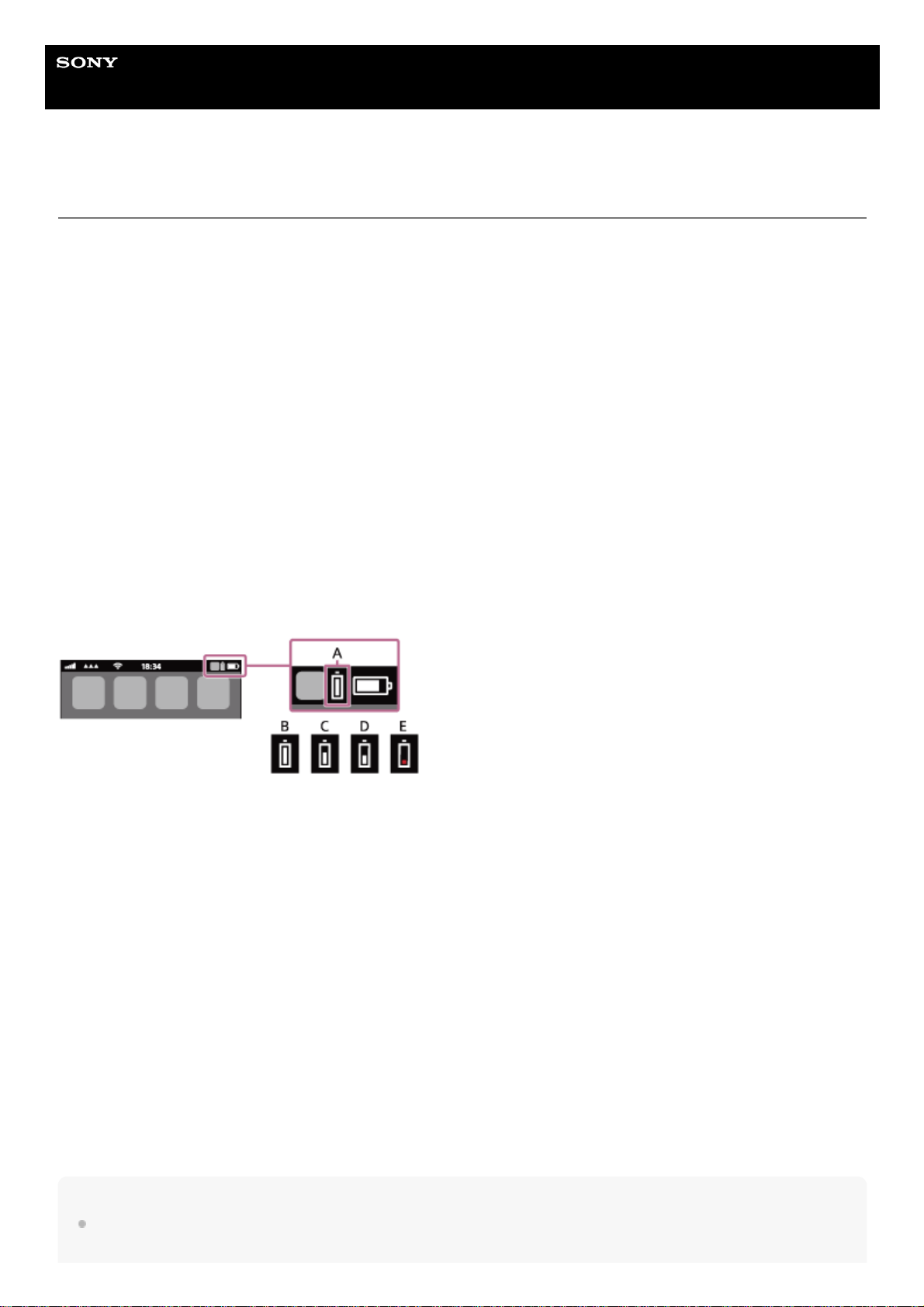
When you are using iPhone or iPod touch
When the headset is connected to an iPhone or iPod touch over an HFP Bluetooth connection, it will show an icon that
indicates the remaining battery charge of the headset on the screen of the iPhone or iPod touch.
A: Remaining battery charge of the headset
B: 100% — 70%
C: 70% — 50%
D: 50% — 20%
E: 20% or lower (requires charging)
The remaining battery charge of the headset is also displayed on the widget of an iPhone or iPod touch running iOS 9 or
later. For more details, refer to the operating instructions supplied with the iPhone or iPod touch.
The remaining charge which is displayed may differ from the actual remaining charge in some cases. Please use it as a
rough estimate.
When you are using an Android smartphone (OS 8.1 or later)
When the headset is connected to an Android smartphone via HFP Bluetooth connection, select [Settings] — [Device
connection] — [Bluetooth] to display the remaining battery charge of the headset where the paired Bluetooth device is
displayed on the smartphone’s screen. It is displayed as “100%”, “70%”, “50%”, or “20%”. For details, refer to the
operating instructions of the Android smartphone.
The remaining charge which is displayed may differ from the actual remaining charge in some cases. Please use it as a
rough estimate.
Note
If you connect the headset to an iPhone, iPod touch, or Android smartphone with “Media audio” (A2DP) only in a multipoint
connection, the remaining battery charge will not be displayed correctly.

The remaining battery charge may not be properly displayed if the headset has not been used for a long time. In this case,
repeatedly charge and discharge the battery multiple times to properly display the remaining battery charge.
5-004-978-11(1) Copyright 2019 Sony Corporation
Help Guide
Wireless Stereo Headset
WH-CH510
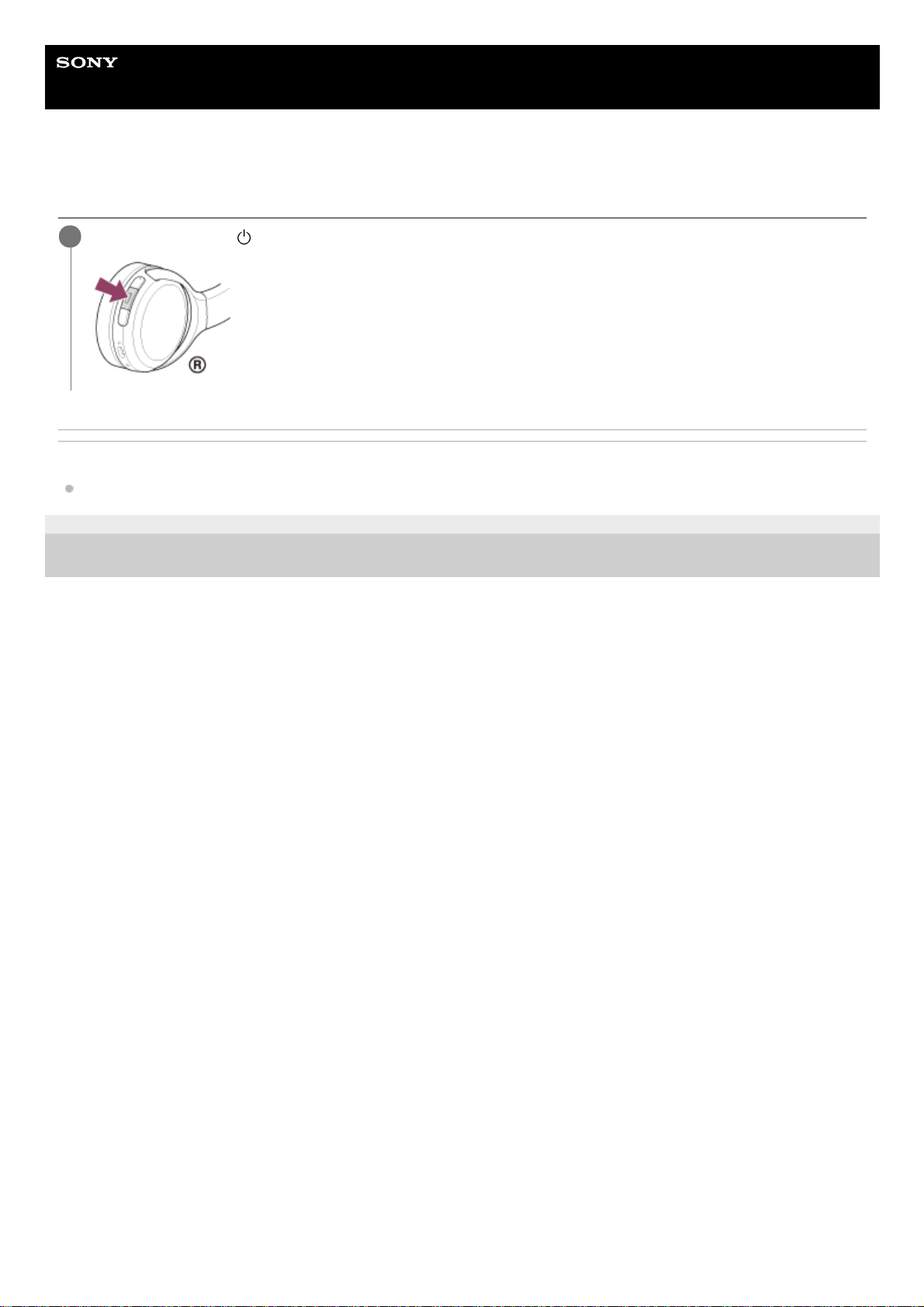
Turning on the headset
Related Topic
Turning off the headset
5-004-978-11(1) Copyright 2019 Sony Corporation
Press and hold the
(power) button for about 2 seconds until the indicator (blue) flashes.
1
Help Guide
Wireless Stereo Headset
WH-CH510
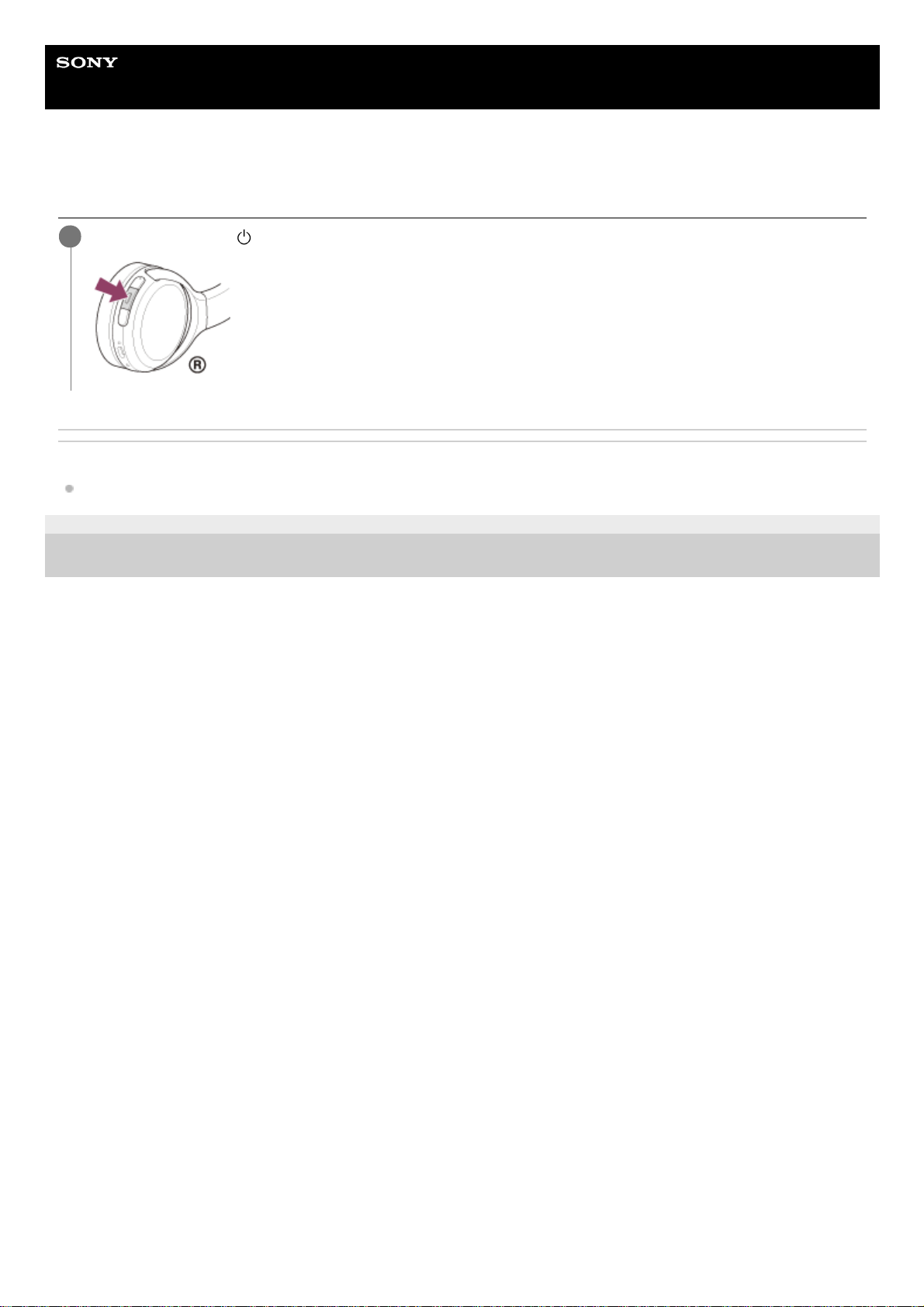
Turning off the headset
Related Topic
Turning on the headset
5-004-978-11(1) Copyright 2019 Sony Corporation
Press and hold the
(power) button for about 2 seconds until the indicator (blue) turns off.
1
Help Guide
Wireless Stereo Headset
WH-CH510
How to make a wireless connection to Bluetooth devices
You can enjoy music and hands-free calling with the headset wirelessly by using your Bluetooth device’s Bluetooth
function.
Device registration (pairing)
To use the Bluetooth function, both of the connecting devices must be registered in advance. The operation to register a
device is called “device registration (pairing)”.
Pair the headset and the device manually.
Connecting to a paired device
Once a device and the headset are paired, there is no need to pair them again. Connect to devices already paired with
the headset using the methods necessary for each device.
5-004-978-11(1) Copyright 2019 Sony Corporation
Help Guide
Wireless Stereo Headset
WH-CH510
Pairing and connecting with an Android smartphone
The operation to register the device that you wish to connect to is called “pairing”. First, pair a device to use it with the
headset for the first time.
Before starting the operation, make sure of the following:
The Android smartphone is placed within 1 m (3 feet) of the headset.
The headset is charged sufficiently.
The operating instructions of the Android smartphone is in hand.
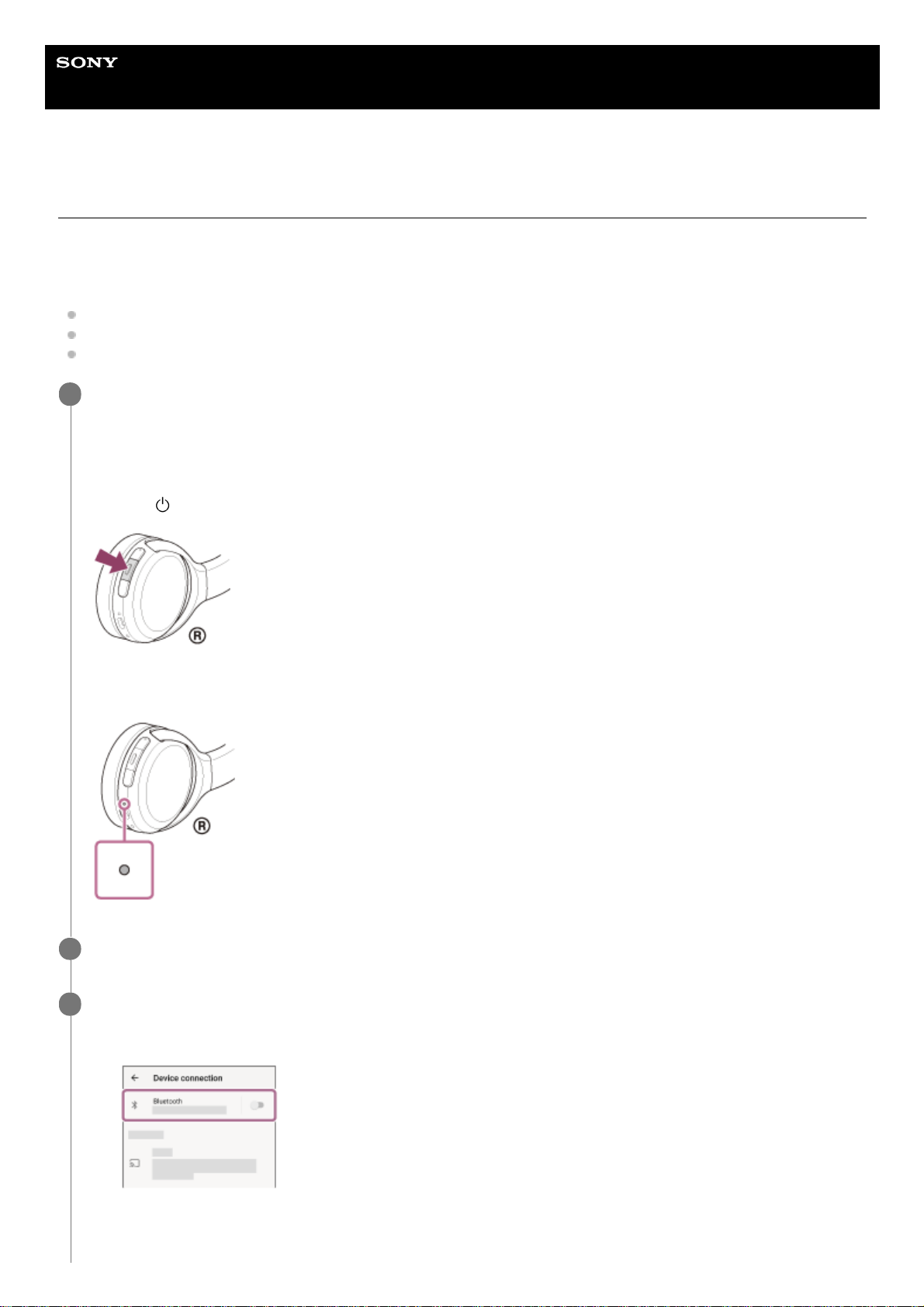
Enter pairing mode on this headset.
Turn on the headset when you pair the headset with a device for the first time after you bought it or after you
initialized the headset (the headset has no pairing information). The headset enters pairing mode automatically. In
this case, proceed to step 2.
When you pair a second or subsequent device (the headset has pairing information for other devices), press and
hold the
(power) button for about 7 seconds.
Check that the indicator (blue) repeatedly flashes twice in a row. You will hear the voice guidance say, “Bluetooth
pairing”.
1
Unlock the screen of the Android smartphone if it is locked.
2
Find the headset on the Android smartphone.
3
Select [Settings] — [Device connection] — [Bluetooth].
1.
Touch the switch to turn on the Bluetooth function.
2.
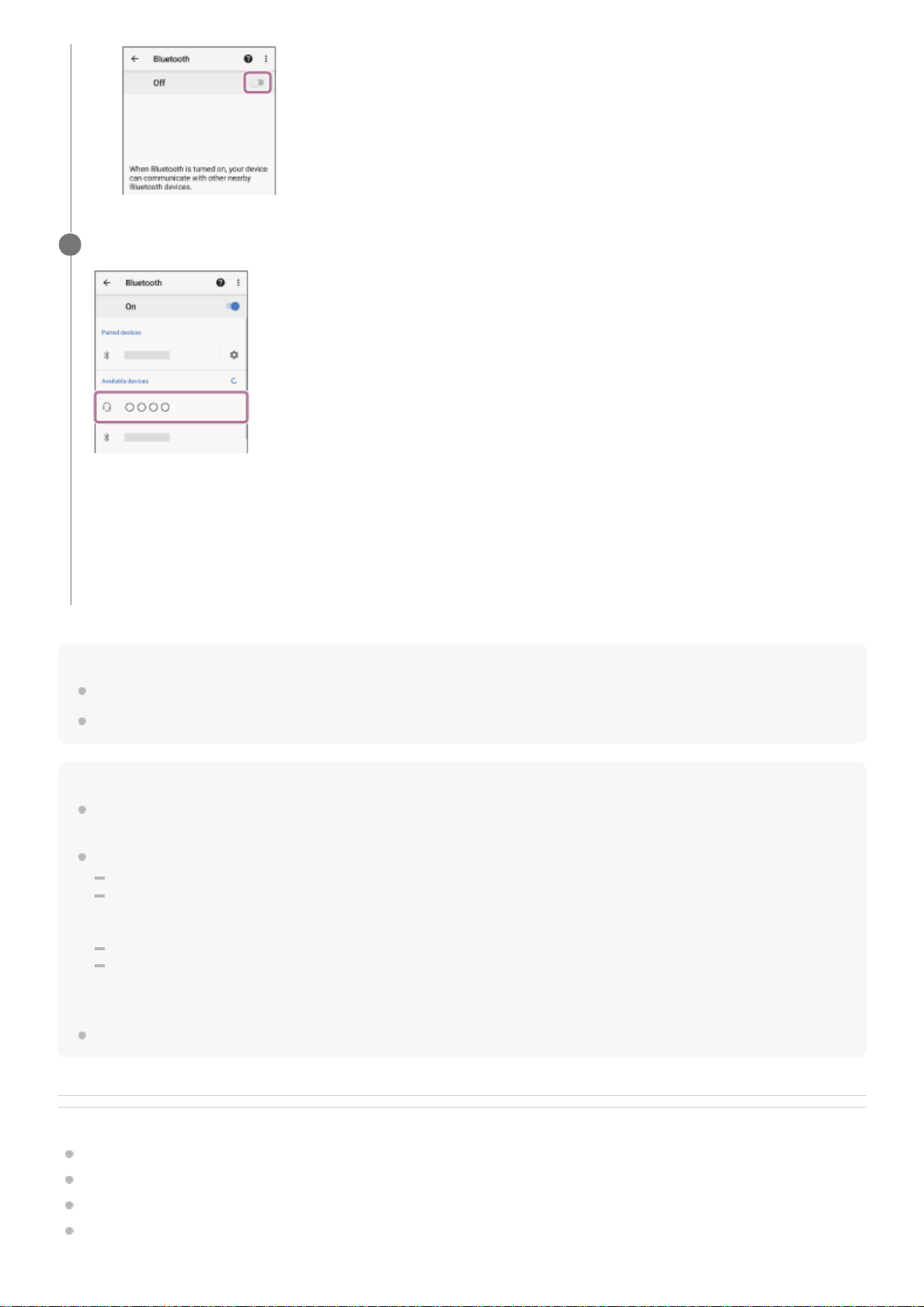
Hint
The operation above is an example. For more details, refer to the operating instructions supplied with the Android smartphone.
To delete all Bluetooth pairing information, see “Initializing the headset to restore factory settings”.
Note
If pairing is not established within 5 minutes, pairing mode is canceled, and the headset turns off. In this case, start the operation
over from step 1.
Once Bluetooth devices are paired, there is no need to pair them again, except in the following cases:
Pairing information has been deleted after repair, etc.
When a 9th device is paired.
The headset can be paired with up to 8 devices. If a new device is paired after 8 devices are already paired, the registration
information of the paired device with the oldest connection date is overwritten with the information for the new device.
When the pairing information for the headset has been deleted from the Bluetooth device.
When the headset is initialized.
All of the pairing information is deleted. In this case, delete the pairing information for the headset from the device and then pair
them again.
The headset can be paired with multiple devices, but can only play music from 1 paired device at a time.
Related Topic
How to make a wireless connection to Bluetooth devices
Connecting to a paired Android smartphone
Listening to music from a device via Bluetooth connection
Disconnecting Bluetooth connection (after use)
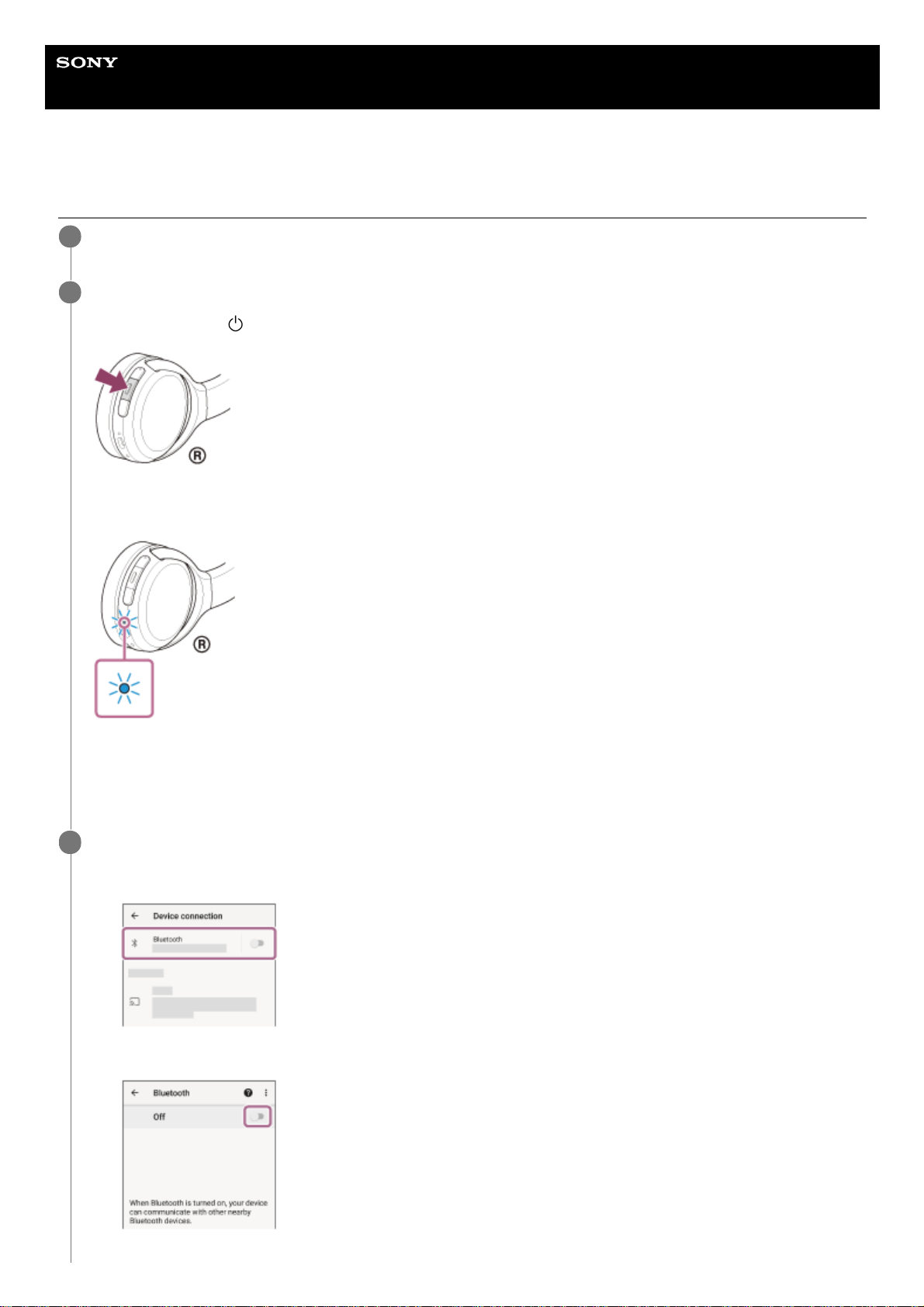
Touch [WH-CH510].
If Passkey (*) input is required, input “0000”.
The headset and smartphone are paired and connected with each other. You will hear the voice guidance say,
“Bluetooth connected”.
If they are not connected, see “Connecting to a paired Android smartphone”.
If [WH-CH510] does not appear on the Android smartphone screen, try again from the beginning of step 3.
4
A Passkey may be called “Passcode”, “PIN code”, “PIN number”, or “Password”.
*

Initializing the headset to restore factory settings
5-004-978-11(1) Copyright 2019 Sony Corporation
Help Guide
Wireless Stereo Headset
WH-CH510
Connecting to a paired Android smartphone
Unlock the screen of the Android smartphone if it is locked.
1
Turn on the headset.
Press and hold the
(power) button for about 2 seconds.
Check that the indicator (blue) continues to flash after you release your finger from the button. You will hear the
voice guidance say, “Power on”.
If it has automatically connected to the last connected device, you will hear the voice guidance say, “Bluetooth
connected”.
Check the connection status on the Android smartphone. If it is not connected, proceed to step 3.
2
Display the devices paired with the Android smartphone.
3
Select [Settings] — [Device connection] — [Bluetooth].
1.
Touch the switch to turn on the Bluetooth function.
2.
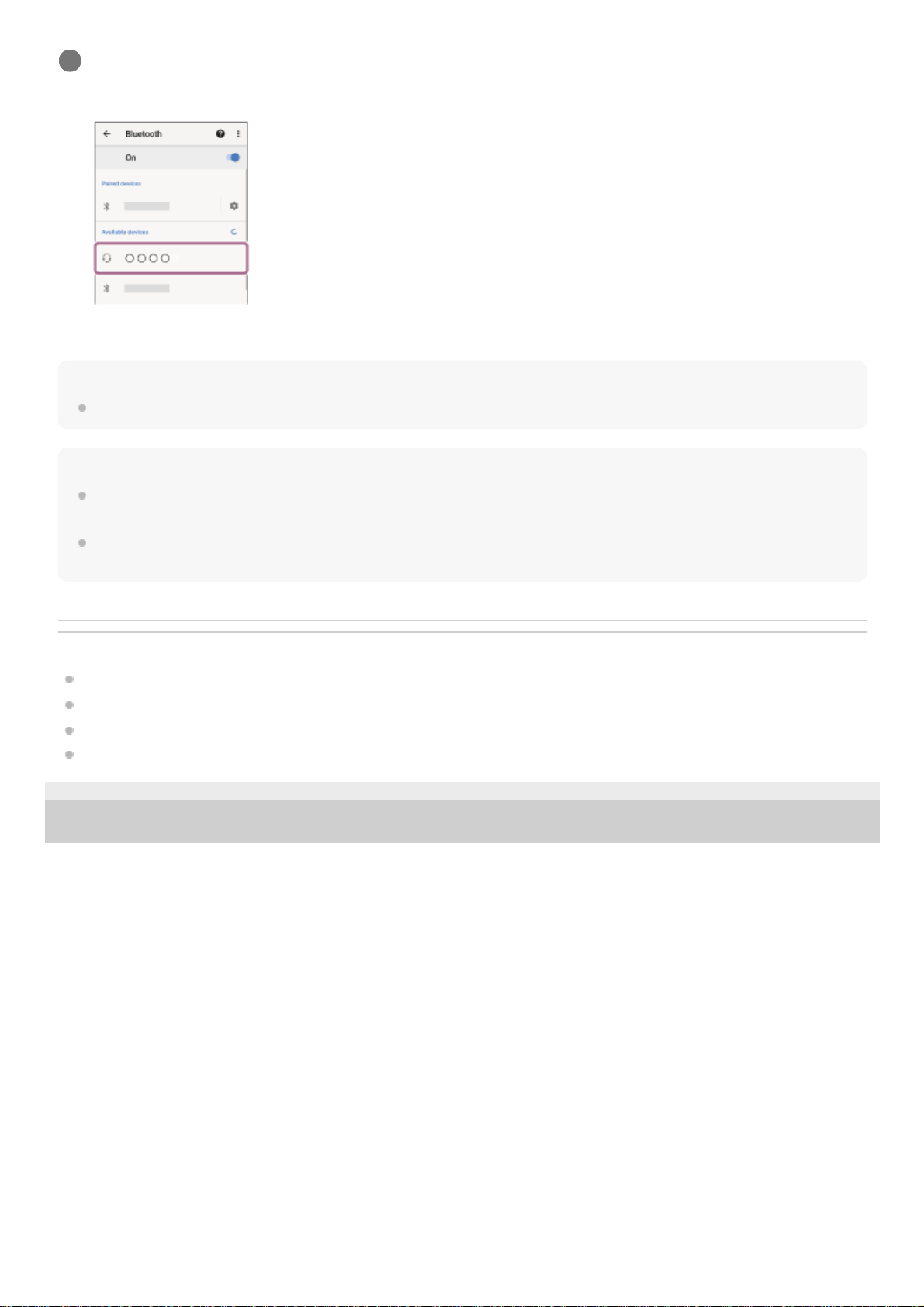
Hint
The operation above is an example. For more details, refer to the operating instructions supplied with the Android smartphone.
Note
If the last-connected Bluetooth device is placed near the headset, the headset may connect automatically to the device by simply
turning on the headset. In that case, deactivate the Bluetooth function on the last-connected device or turn off the power.
If you cannot connect your smartphone to the headset, delete the headset pairing information on your smartphone and perform
the pairing again. As for the operations on your smartphone, refer to the operating instructions supplied with the smartphone.
Related Topic
How to make a wireless connection to Bluetooth devices
Pairing and connecting with an Android smartphone
Listening to music from a device via Bluetooth connection
Disconnecting Bluetooth connection (after use)
5-004-978-11(1) Copyright 2019 Sony Corporation
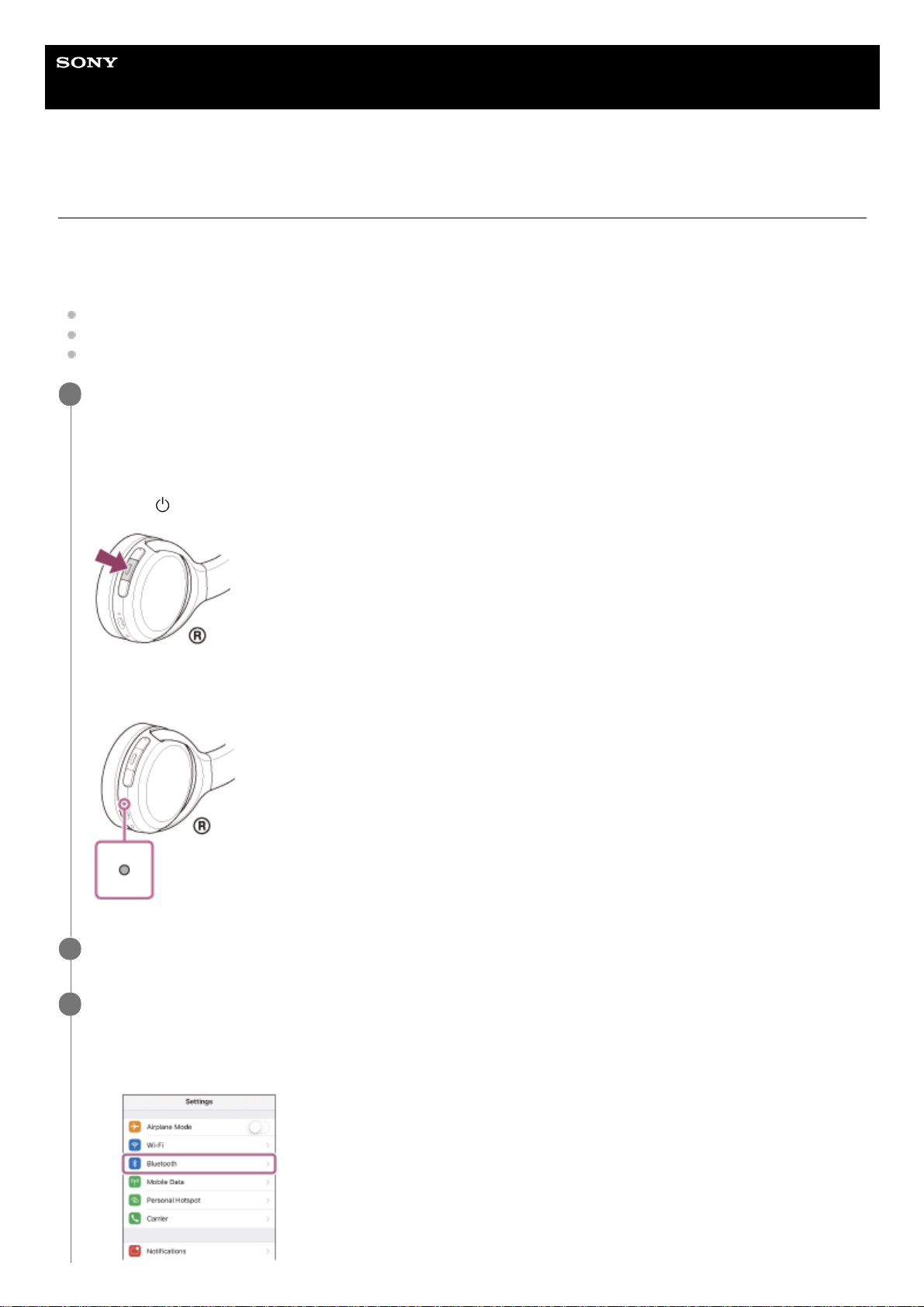
Touch [WH-CH510].
You will hear the voice guidance say, “Bluetooth connected”.
4
Help Guide
Wireless Stereo Headset
WH-CH510
Pairing and connecting with an iPhone
The operation to register the device that you wish to connect to is called “pairing”. First, pair a device to use it with the
headset for the first time.
Before starting the operation, make sure of the following:
The iPhone is placed within 1 m (3 feet) of the headset.
The headset is charged sufficiently.
The operating instructions of the iPhone is in hand.
Enter pairing mode on this headset.
Turn on the headset when you pair the headset with a device for the first time after you bought it or after you
initialized the headset (the headset has no pairing information). The headset enters pairing mode automatically. In
this case, proceed to step 2.
When you pair a second or subsequent device (the headset has pairing information for other devices), press and
hold the
(power) button for about 7 seconds.
Check that the indicator (blue) repeatedly flashes twice in a row. You will hear the voice guidance say, “Bluetooth
pairing”.
1
Unlock the screen of the iPhone if it is locked.
2
Find the headset on the iPhone.
3
Select [Settings].
1.
Touch [Bluetooth].
2.
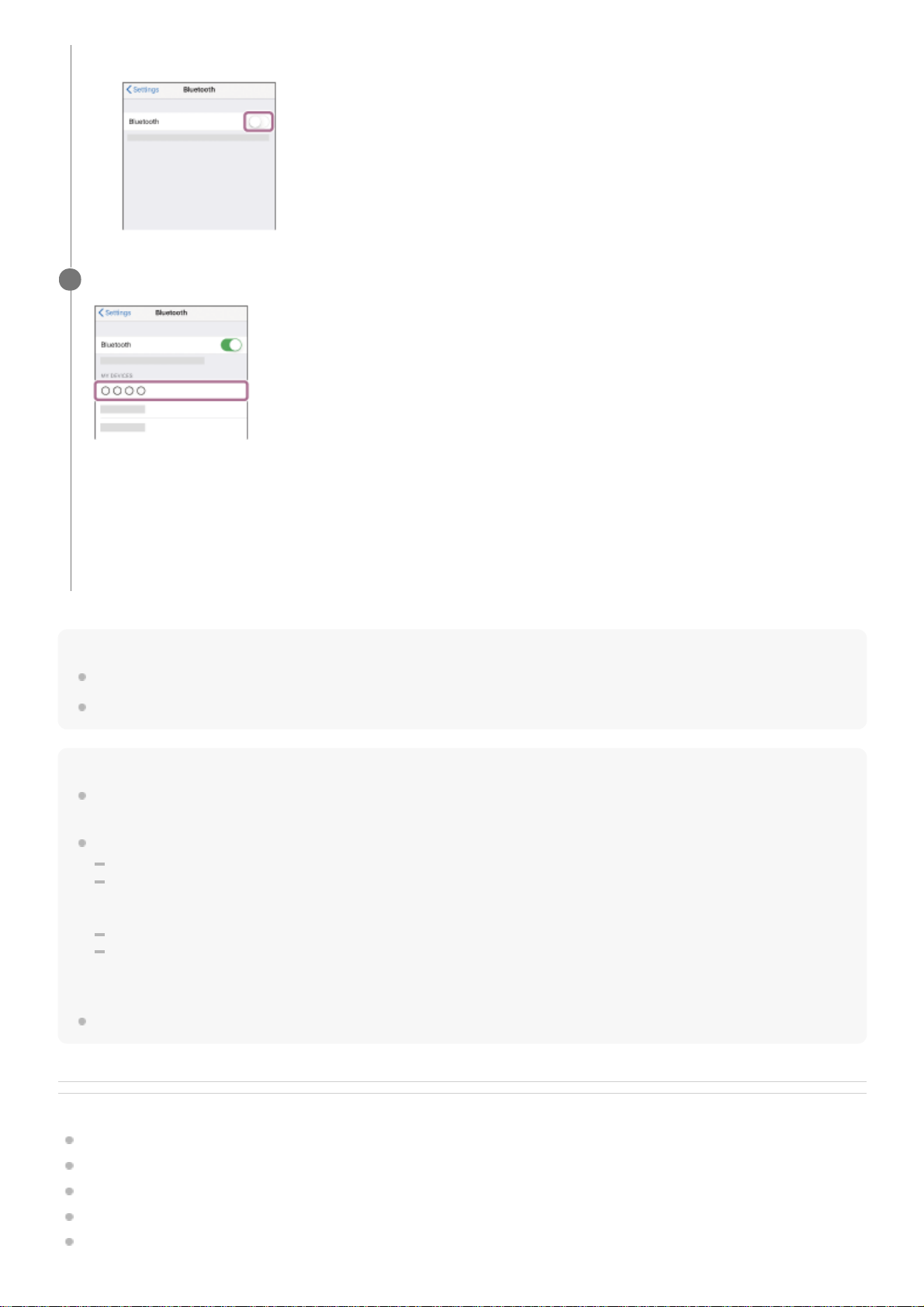
Hint
The operation above is an example. For more details, refer to the operating instructions supplied with your iPhone.
To delete all Bluetooth pairing information, see “Initializing the headset to restore factory settings”.
Note
If pairing is not established within 5 minutes, pairing mode is canceled, and the headset turns off. In this case, start the operation
over from step 1.
Once Bluetooth devices are paired, there is no need to pair them again, except in the following cases:
Pairing information has been deleted after repair, etc.
When a 9th device is paired.
The headset can be paired with up to 8 devices. If a new device is paired after 8 devices are already paired, the registration
information of the paired device with the oldest connection date is overwritten with the information for the new device.
When the pairing information for the headset has been deleted from the Bluetooth device.
When the headset is initialized.
All of the pairing information is deleted. In this case, delete the pairing information for the headset from the device and then pair
them again.
The headset can be paired with multiple devices, but can only play music from 1 paired device at a time.
Related Topic
How to make a wireless connection to Bluetooth devices
Connecting to a paired iPhone
Listening to music from a device via Bluetooth connection
Disconnecting Bluetooth connection (after use)
Initializing the headset to restore factory settings
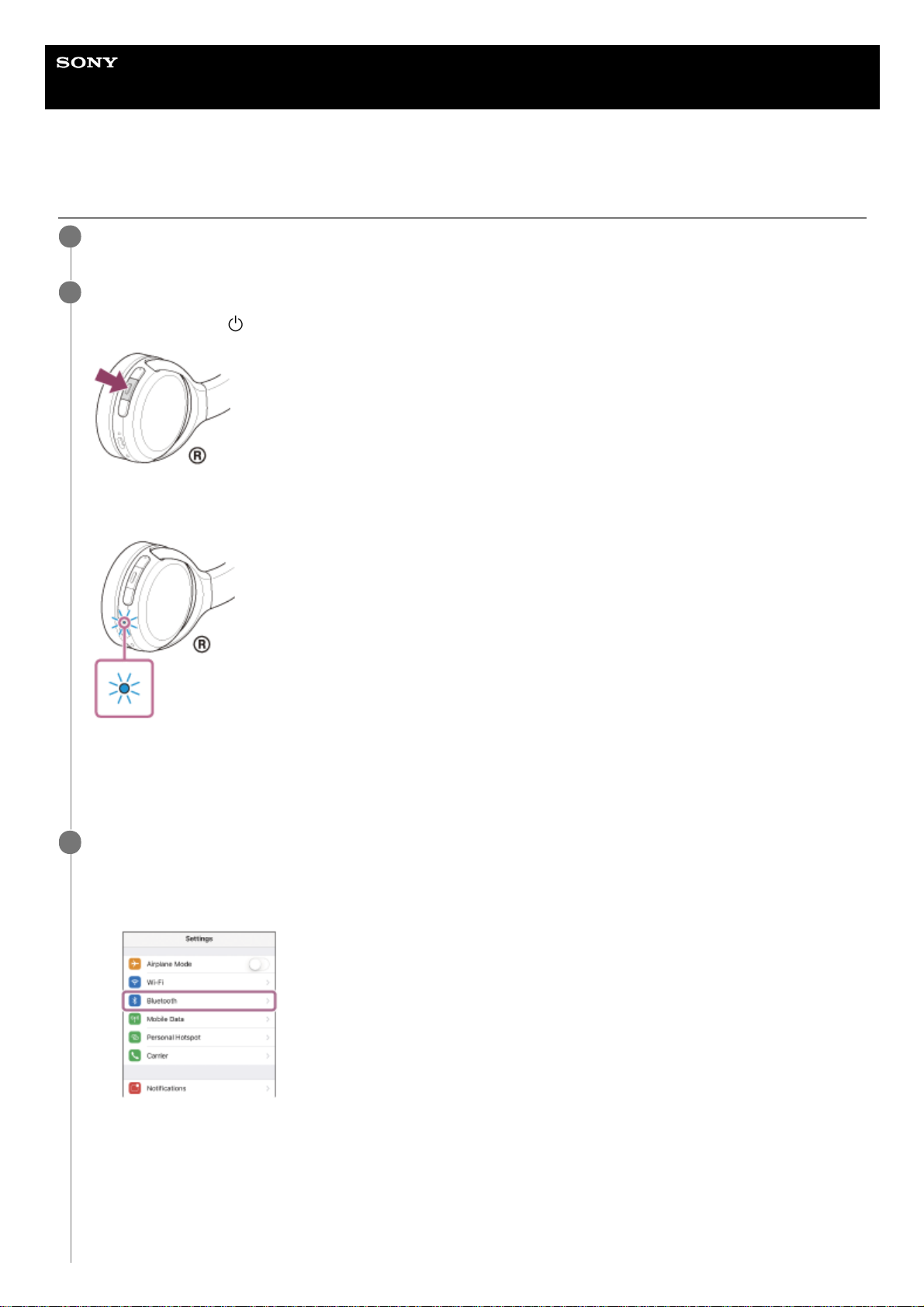
Touch the switch to turn on the Bluetooth function.
3.
Touch [WH-CH510].
If Passkey (*) input is required, input “0000”.
The headset and iPhone are paired and connected with each other. You will hear the voice guidance say,
“Bluetooth connected”.
If they are not connected, see “Connecting to a paired iPhone ”.
If [WH-CH510] does not appear on the display of the iPhone, try again from the beginning of step 3.
4
A Passkey may be called “Passcode”, “PIN code”, “PIN number”, or “Password”.
*

5-004-978-11(1) Copyright 2019 Sony Corporation
Help Guide
Wireless Stereo Headset
WH-CH510
Connecting to a paired iPhone
Unlock the screen of the iPhone if it is locked.
1
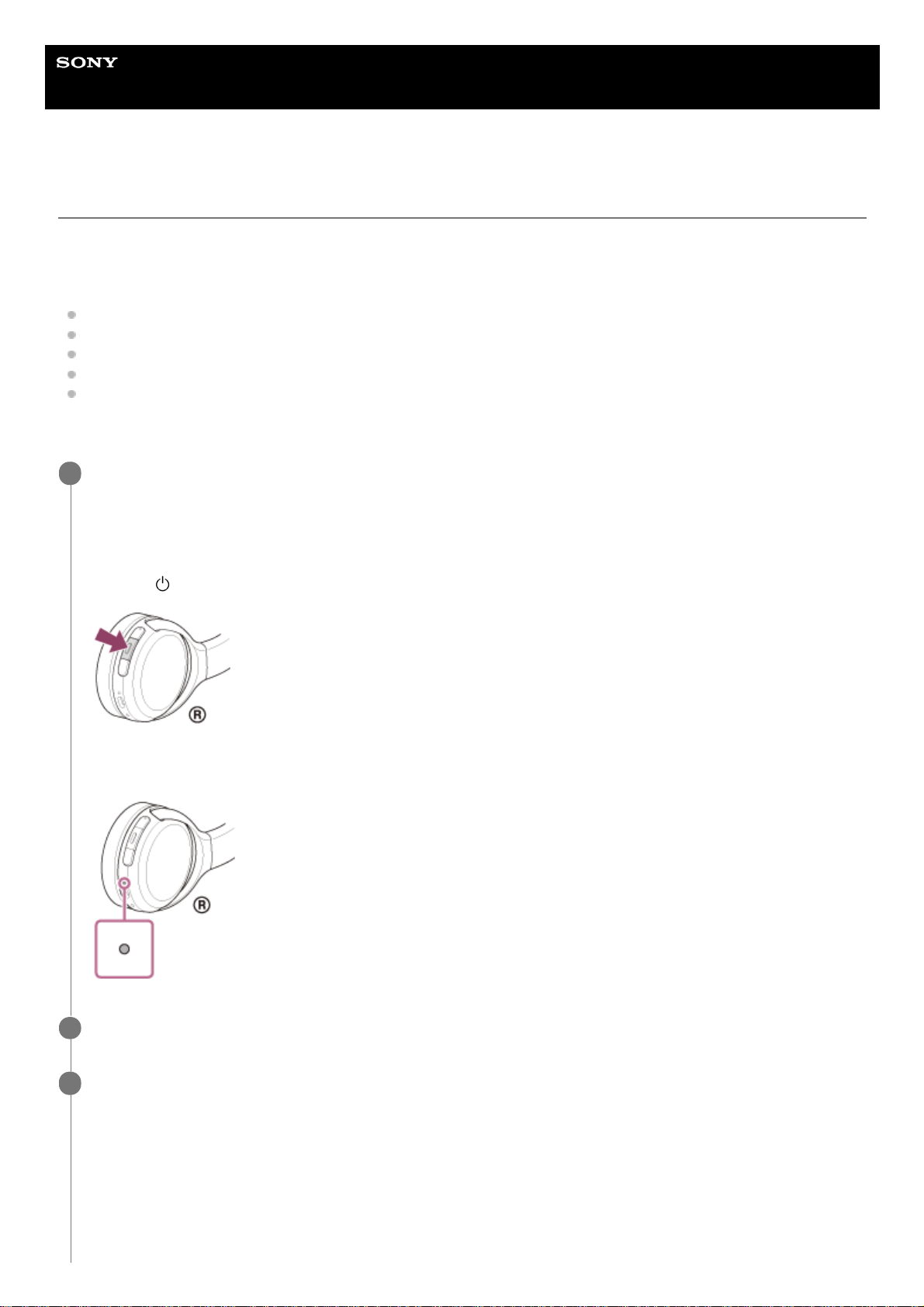
Turn on the headset.
Press and hold the
(power) button for about 2 seconds.
Check that the indicator (blue) continues to flash after you release your finger from the button. You will hear the
voice guidance say, “Power on”.
If it has automatically connected to the last connected device, you will hear the voice guidance say, “Bluetooth
connected”.
Check the connection status on the iPhone. If it is not connected, proceed to step 3.
2
Display the devices paired with the iPhone.
3
Select [Settings].
1.
Touch [Bluetooth].
2.
Touch the switch to turn on the Bluetooth function.
3.
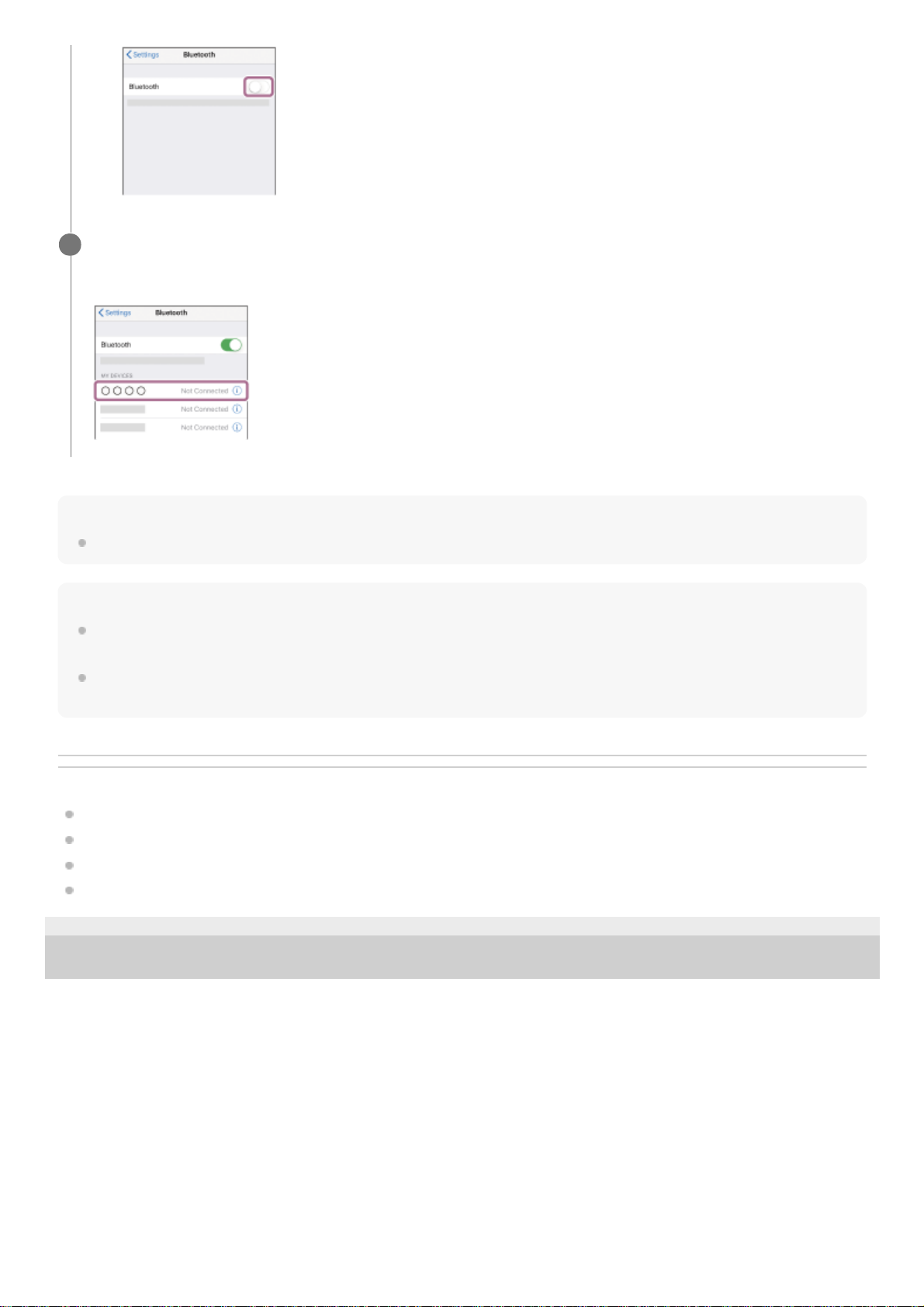
Hint
The operation above is an example. For more details, refer to the operating instructions supplied with your iPhone.
Note
If the last-connected Bluetooth device is placed near the headset, the headset may connect automatically to the device by simply
turning on the headset. In that case, deactivate the Bluetooth function on the last-connected device or turn off the power.
If you cannot connect your iPhone to the headset, delete the headset pairing information on your iPhone and perform the pairing
again. As for the operations on your iPhone, refer to the operating instructions supplied with the iPhone.
Related Topic
How to make a wireless connection to Bluetooth devices
Pairing and connecting with an iPhone
Listening to music from a device via Bluetooth connection
Disconnecting Bluetooth connection (after use)
5-004-978-11(1) Copyright 2019 Sony Corporation
Touch [WH-CH510].
You will hear the voice guidance say, “Bluetooth connected”.
4
Help Guide
Wireless Stereo Headset
WH-CH510
Pairing and connecting with a computer (Windows 10)
The operation to register the device that you wish to connect to is called “pairing”. First, pair a device to use it with the
headset for the first time.
Before starting the operation, make sure of the following:
Your computer has a Bluetooth function that supports music playback connections (A2DP).
The computer is placed within 1 m (3 feet) of the headset.
The headset is charged sufficiently.
The operating instructions of the computer is in hand.
Depending on the computer you are using, the built-in Bluetooth adaptor may need to be turned on. If you do not
know how to turn on the Bluetooth adaptor or are unsure if your computer has a built-in Bluetooth adaptor, refer to
the operating instructions supplied with the computer.
Enter pairing mode on this headset.
Turn on the headset when you pair the headset with a device for the first time after you bought it or after you
initialized the headset (the headset has no pairing information). The headset enters pairing mode automatically. In
this case, proceed to step 2.
When you pair a second or subsequent device (the headset has pairing information for other devices), press and
hold the
(power) button for about 7 seconds.
Check that the indicator (blue) repeatedly flashes twice in a row. You will hear the voice guidance say, “Bluetooth
pairing”.
1
Wake the computer up if the computer is on standby (sleep) or hibernation mode.
2
Register the headset using the computer.
3
Click the [Start] button, then [Settings].
1.
Click [Devices].
2.
Loading…

WH-CH510
Wireless Stereo
Headset
http://rd1.sony.net/help/mdr/whch510/h_zz/
5-004-975-41(1)
©2019 Sony Corporation
Printed in Vietnam
https://www.sony.net/
Reference Guide GB
Guide de référence FR
Referenzanleitung DE
Guía de referencia ES
Guida di riferimento IT
Referentiegids NL
Guia de referência PT
Referencevejledning DK
Viiteopas FI
Referanseveiledning NO
A
B
− ()
( )
C
English
Wireless Stereo Headset
Do not install the appliance in a confined space,
such as a bookcase or built-in cabinet.
Do not expose the batteries (battery pack or
batteries installed) to excessive heat such as
sunshine, fire or the like for a long time.
Do not subject the batteries to extreme low
temperature conditions that may result in
overheating and thermal runaway.
Do not dismantle, open or shred secondary cells
or batteries.
Do not expose cells or batteries to heat or fire.
Avoid storage in direct sunlight.
In the event of a cell leaking, do not allow the
liquid to come in contact with the skin or eyes. If
contact has been made, wash the affected area
with copious amounts of water and seek medical
advice.
Secondary cells and batteries need to be charged
before use. Always refer to the manufacturer’s
instructions or equipment manual for proper
charging instructions.
After extended periods of storage, it may be
necessary to charge and discharge the cells or
batteries several times to obtain maximum
performance.
Dispose of properly.
This equipment has been tested and found to
comply with the limits set out in the EMC
regulation using a connection cable shorter than
3 meters.
Notice for customers: the following
information is only applicable to equipment
sold in countries applying EU directives
This product has been manufactured by or
on behalf of Sony Corporation.
EU Importer: Sony Europe B.V.
Inquiries to the EU Importer or related to
product compliance in Europe should be sent
to the manufacturer’s authorized
representative, Sony Belgium, bijkantoor van
Sony Europe B.V., Da Vincilaan 7-D1, 1930
Zaventem, Belgium.
Hereby, Sony Corporation declares that this
equipment is in compliance with Directive
2014/53/EU.
The full text of the EU declaration of
conformity is available at the following
internet address:
http://www.compliance.sony.de/
Disposal of waste batteries and
electrical and electronic equipment
(applicable in the European Union
and other countries with separate
collection systems)
This symbol on the product, the battery or on
the packaging indicates that the product and
the battery shall not be treated as household
waste. On certain batteries this symbol might
be used in combination with a chemical
symbol. The chemical symbol for lead (Pb) is
added if the battery contains more than
0.004% lead. By ensuring that these products
and batteries are disposed of correctly, you
will help to prevent potentially negative
consequences for the environment and
human health which could be caused by
inappropriate waste handling. The recycling
of the materials will help to conserve natural
resources. In case of products that for safety,
performance or data integrity reasons require
a permanent connection with an
incorporated battery, this battery should be
replaced by qualified service staff only. To
ensure that the battery and the electrical and
electronic equipment will be treated properly,
hand over these products at end-of-life to
the appropriate collection point for the
recycling of electrical and electronic
equipment. For all other batteries, please
view the section on how to remove the
battery from the product safely. Hand the
battery over to the appropriate collection
point for the recycling of waste batteries. For
more detailed information about recycling of
this product or battery, please contact your
local Civic Office, your household waste
disposal service or the shop where you
purchased the product or battery.
The validity of the CE marking is restricted to only
those countries where it is legally enforced,
mainly in the countries EEA (European Economic
Area) and Switzerland.
High volume may affect your hearing.
Do not use the unit while walking, driving or
cycling. Doing so may cause traffic accidents.
Do not use at a dangerous place unless the
surrounding sound can be heard.
The unit is not waterproof. If water or foreign
objects enter the unit, it may result in fire or
electric shock. If water or a foreign object enters
the unit, stop use immediately and consult your
nearest Sony dealer. In particular, be careful in
the following cases.
– When using the unit around a sink, etc.
Be careful that the unit does not fall into a sink
or container filled with water.
– When using the unit in the rain or snow, or in
humid locations
– When using the unit while you are sweaty
If you touch the unit with wet hands, or put the
unit in the pocket of a damp article of clothing,
the unit may get wet.
For details on the effect of contact to the human
body from the mobile phone or other wireless
devices connected to the unit, refer to the
instruction manual of the wireless device.
Never insert the USB plug when the main unit or
charging cable is wet. If the USB plug is inserted
while the main unit or charging cable is wet, a
short circuit may occur due to the liquid (tap
water, seawater, soft drink, etc.) attached to the
main unit or charging cable or due to foreign
matter, and cause abnormal heat generation or
malfunction.
Note on static electricity
Static electricity accumulated in the body may
cause mild tingling in your ears. To reduce the
effect, wear clothes made from natural materials,
which suppress the generation of static
electricity.
Precautions
On BLUETOOTH® communications
•Bluetooth wireless technology operates within
a range of about 10 m. The maximum
communication distance may vary depending
on the presence of obstacles (people, metal
objects, walls, etc.) or the electromagnetic
environment.
•Bluetooth communications may not be
possible, or noise or audio dropout may occur
under the following conditions:
– When there is a person between the unit and
the Bluetooth device. This situation may be
improved by positioning the Bluetooth device
so that it faces the aerial of the unit.
– When there is an obstacle, such as a metal
object or a wall, between the unit and the
Bluetooth device.
– When a Wi-Fi device or microwave oven is in
use, or microwaves are emitted near the unit.
– Compared to use indoors, use outdoors is
subjected little to signal reflection from walls,
floors, and ceilings, which results in audio
dropout occurring more frequently than use
indoors.
– The aerial is built into the unit as indicated by
the dotted line in the illustration (Fig. ). The
sensitivity of the Bluetooth communications
can be improved by removing any obstacles
between the connected Bluetooth device and
the aerial of this unit.
•Bluetooth and Wi-Fi (IEEE802.11b/g/n) devices
use the same frequency (2.4 GHz). When using
the unit near a Wi-Fi device, electromagnetic
interference may occur, resulting in noise,
audio dropout, or the inability to connect. If this
happens, try performing the following
remedies:
– Establish a connection between the unit and
the Bluetooth device when they are at least
10 m away from the Wi-Fi device.
– Turn off the Wi-Fi device when using the unit
within 10 m of the Wi-Fi device.
– Position the unit and the Bluetooth device as
near as possible to each other.
•Microwaves emitting from a Bluetooth device
may affect the operation of electronic medical
devices. Turn off this unit and other Bluetooth
devices in the following locations, as it may
cause an accident:
– in hospitals, near priority seating in trains,
locations where inflammable gas is present,
near automatic doors, or near fire alarms.
•The audio playback on this unit may be
delayed from that on the transmitting device,
due to the characteristics of Bluetooth wireless
technology. As a result, the sound may not be
in sync with the image when viewing movies or
playing games.
•This product emits radio waves when used in
wireless mode.
When used in wireless mode on an airplane,
follow flight crew directions regarding
permissible use of products in wireless mode.
•The unit supports security functions that
comply with the Bluetooth standard as a
means of ensuring security during
communication using Bluetooth wireless
technology. However, depending on the
configured settings and other factors, this
security may not be sufficient. Be careful when
communicating using Bluetooth wireless
technology.
•Sony shall assume no responsibility for any
damages or loss resulting from information
leaks that occur when using Bluetooth
communications.
•Connection with all Bluetooth devices cannot
be guaranteed.
– Bluetooth devices connected with the unit
must comply with the Bluetooth standard
prescribed by Bluetooth SIG, Inc., and must
be certified as compliant.
– Even when a connected device complies with
the Bluetooth standard, there may be cases
where the characteristics or specifications of
the Bluetooth device make it unable to
connect, or result in different control
methods, display, or operation.
– When using the unit to perform hands-free
talking on the phone, noise may occur
depending on the connected device or the
communication environment.
•Depending on the device to be connected, it
may require some time to start
communications.
If sound skips frequently during playback
•The situation may be improved by changing
the wireless playback quality settings or fixing
the wireless playback mode to SBC on the
transmitting device. For details, refer to the
operating instructions supplied with the
transmitting device.
•When listening to music from a smartphone,
the situation may be improved by closing
unnecessary apps or restarting the
smartphone.
On the use of calling apps for smartphones
and computers
•This unit supports normal incoming calls only.
Calling apps for smartphones and computers
are not supported.
On charging the unit
•This unit can be charged using USB only. A
computer with a USB port or a USB AC adaptor
is required for charging.
•Be sure to use the supplied USB Type-C cable.
•When charging, the unit cannot be turned on
and the Bluetooth function cannot be used.
•If the unit is not used for a long time, the
rechargeable battery may become depleted
quickly. The battery will be able to hold a
proper charge after it is discharged and
recharged several times. When storing the unit
for a long time, charge the battery once every
six months to prevent over-discharge.
•If the rechargeable battery becomes depleted
extremely quickly, it should be replaced with a
new one. Please contact your nearest Sony
dealer for a battery replacement.
If the unit does not operate properly
•Follow the procedure below to reset the unit
(Fig. ).
Press the and − buttons simultaneously
while the unit is charging. The unit is reset.
When the unit is reset, the pairing information
in the unit is not deleted.
•If the problem persists even after the unit is
reset, perform the procedure below to initialize
the unit.
Disconnect the USB Type-C cable and turn off
the unit. Press and hold the and − buttons
simultaneously for at least 7 seconds. The
indicator (blue) flashes 4 times, the unit is
initialized, and the unit is reset to the factory
settings. When the unit is initialized, all pairing
information is deleted.
•After the unit is initialized, it may not connect
to your iPhone or computer. If this happens,
delete the pairing information of the unit from
the iPhone or computer, and then pair them
again.
Notes on wearing the unit
•Because the headphones achieve a tight seal
over the ears, forcibly pressing them against
your ears or quickly pulling them off can result
in eardrum damage.
Pressing the headphones against your ears
may cause the speaker diaphragm to produce
a click sound. This is not a malfunction.
Other notes
•Do not subject the unit to excessive shock.
•The Bluetooth function may not work with a
mobile phone, depending on the signal
conditions and the surrounding environment.
•Do not apply weight or pressure to the unit for
long periods, including when it is stored, as it
may cause deformation.
•If you experience discomfort while using the
unit, stop using it immediately.
•The earpads may be damaged or deteriorate
with long-term use and storage.
Cleaning the unit
•When the outside of the unit is dirty, clean it by
wiping with a soft dry cloth. If the unit is
particularly dirty, soak a cloth in a dilute
solution of neutral detergent, and wring it well
before wiping. Do not use solvents such as
thinner, benzene, or alcohol, as they may
damage the surface.
•If you have any questions or problems
concerning this unit that are not covered in this
manual, please consult your nearest Sony
dealer.
Replacement parts: earpads
Please consult your nearest Sony dealer for
information about replacement parts.
Location of the serial number label
See Fig.
Specifications
Headset
Power source:
DC 3.7 V: Built-in lithium-ion rechargeable
battery
DC 5 V: When charged using USB
Operating temperature:
0 °C to 40 °C
Rated power consumption:
0.7 W
Usage hours:
When connecting via the Bluetooth device
Music playback time: Max. 35 hours
Communication time: Max. 30 hours
Standby time: Max. 200 hours
Note: Usage hours may be shorter
depending on the Codec and the
conditions of use.
Charging time:
Approx. 4.5 hours
(About 90 minutes of music playback is
possible after 10 minutes charging.)
Note: Charging and usage hours may be
different depending on the conditions of
use.
Charging temperature:
5°C to 35°C
Mass:
Approx. 132 g
Included items:
Wireless Stereo Headset (1)
USB Type-C™ cable (USB-A to USB-C™)
(approx. 20 cm) (1)
Communication specification
Communication system:
Bluetooth Specification version 5.0
Output:
Bluetooth Specification Power Class 2
Maximum communication range:
Line of sight approx. 10 m1)
Frequency band:
2.4 GHz band (2.4000 GHz — 2.4835 GHz)
Operating frequency:
Bluetooth: 2,400 MHz — 2,483.5 MHz
Maximum output power:
Bluetooth: < 4 dBm
Compatible Bluetooth profiles2):
A2DP / AVRCP / HFP / HSP
Supported Codec3):
SBC / AAC
Transmission range (A2DP):
20 Hz — 20,000 Hz (Sampling frequency 44.1
kHz)
1) The actual range will vary depending on
factors such as obstacles between devices,
magnetic fields around a microwave oven,
static electricity, reception sensitivity, aerial’s
performance, operating system, software
application, etc.
2) Bluetooth standard profiles indicate the
purpose of Bluetooth communications
between devices.
3) Codec: Audio signal compression and
conversion format
Design and specifications are subject to change
without notice.
System requirements for
battery charge using USB
USB AC adaptor
A commercially available USB AC adaptor
capable of supplying an output current of 0.5 A
(500 mA) or more
Trademarks
•iPhone and iPod touch are trademarks of Apple
Inc., registered in the U.S. and other countries.
•Android is a trademark of Google LLC.
•The Bluetooth® word mark and logos are
registered trademarks owned by the Bluetooth
SIG, Inc. and any use of such marks by Sony
Corporation is under license.
•USB Type-C™ and USB-C™ are trademarks of
USB Implementers Forum.
•Other trademarks and trade names are those of
their respective owners.
Notes on the License
This product contains software that Sony uses
under a licensing agreement with the owner of
its copyright. We are obligated to announce the
contents of the agreement to customers under
requirement by the owner of copyright for the
software.
Please access the following URL and read the
contents of the license.
http://rd1.sony.net/help/mdr/sl/19/
Français
Casque stéréo sans fil
Ne pas installer l’appareil dans un espace clos,
comme une bibliothèque ou une armoire
encastrée.
Ne pas exposer les piles (bloc-batterie ou
batteries installées) à une chaleur excessive
comme les rayons du soleil, le feu ou tout autre
élément analogue pendant une longue durée.
Ne pas exposer les piles à des conditions de
température extrêmement basses pouvant
entraîner une surchauffe et un emballement
thermique.
Ne pas démonter, ouvrir ou déchiqueter des piles
ou des batteries secondaires.
Ne pas exposer les piles ou les batteries à la
chaleur ou au feu. Éviter tout entreposage au
contact direct de la lumière du soleil.
En cas de fuite de pile, ne pas laisser le liquide
entrer en contact avec la peau ou les yeux. En
cas de contact avec la peau ou les yeux, laver la
région touchée abondamment à l’eau, puis
consulter un médecin.
Les piles et batteries secondaires doivent être
chargées avant toute utilisation. Toujours se
reporter aux instructions du fabricant ou au
guide du matériel pour prendre connaissance
des instructions de chargement appropriées.
Après toutes longues périodes d’entreposage, il
peut être nécessaire de charger et de décharger
les piles ou les batteries à plusieurs reprises afin
d’obtenir des performances optimales.
Détruire selon la réglementation en vigueur.
Cet équipement a été testé et déclaré conforme
aux limites de la loi CEM en utilisant un câble de
connexion de moins de 3 mètres.
Avis aux clients : les informations suivantes
ne s’appliquent qu’au matériel vendu dans
les pays appliquant les directives de l’UE
Ce produit a été fabriqué par ou pour le
compte de Sony Corporation.
Importateur dans l’UE : Sony Europe B.V.
Les questions basées sur la législation
européenne pour l’importateur ou relatives à
la conformité des produits doivent être
adressées au mandataire : Sony Belgium,
bijkantoor van Sony Europe B.V., Da Vincilaan
7-D1, 1930 Zaventem, Belgique.
Le soussigné, Sony Corporation, déclare que
cet équipement est conforme à la Directive
2014/53/UE.
Le texte complet de la déclaration UE de
conformité est disponible à l’adresse internet
suivante :
http://www.compliance.sony.de/
Elimination des piles et
accumulateurs et des équipements
électriques et électroniques usagés
(applicable dans les pays de l’Union
Européenne et dans les autres pays
disposant de systèmes de collecte sélective)
Ce symbole apposé sur le produit, la pile ou
l’accumulateur, ou sur l’emballage, indique
que le produit et les piles et accumulateurs
fournis avec ce produit ne doivent pas être
traités comme de simples déchets ménagers.
Sur certains types de piles, ce symbole
apparaît parfois combiné avec un symbole
chimique. Le symbole pour le plomb (Pb) est
rajouté lorsque ces piles contiennent plus de
0,004 % de plomb. En vous assurant que les
produits, piles et accumulateurs sont mis au
rebut de façon appropriée, vous participez
activement à la prévention des
conséquences négatives que leur mauvais
traitement pourrait provoquer sur
l’environnement et sur la santé humaine. Le
recyclage des matériaux contribue par
ailleurs à la préservation des ressources
naturelles. Pour les produits qui, pour des
raisons de sécurité, de performance ou
d’intégrité des données, nécessitent une
connexion permanente à une pile ou à un
accumulateur intégré(e), il conviendra de
vous rapprocher d’un Service Technique
qualifié pour effectuer son remplacement. En
rapportant votre appareil électrique, les piles
et accumulateurs en fin de vie à un point de
collecte approprié vous vous assurez que le
produit, la pile ou l’accumulateur intégré sera
traité correctement. Pour tous les autres cas
de figure et afin d’enlever les piles ou
accumulateurs en toute sécurité de votre
appareil, reportez-vous au manuel
d’utilisation. Rapportez les piles et
accumulateurs, et les équipements
électriques et électroniques usagés au point
de collecte approprié pour le recyclage. Pour
toute information complémentaire au sujet
du recyclage de ce produit ou des piles et
accumulateurs, vous pouvez contacter votre
municipalité, votre déchetterie locale ou le
point de vente où vous avez acheté ce
produit.
La validité du marquage CE est limitée aux seuls
pays dans lesquels il est légalement en vigueur,
principalement dans les pays de l’EEE (Espace
économique européen) et en Suisse.
Un volume élevé peut nuire à votre audition.
Ne pas utiliser l’appareil lorsque vous marchez,
conduisez ou faites du vélo. Cela pourrait
provoquer des accidents de la circulation.
Ne pas utiliser l’appareil dans un endroit
dangereux à moins que les bruits environnants
puissent être entendus.
L’appareil n’est pas étanche. Si de l’eau ou des
corps étrangers pénètrent dans l’appareil, cela
pourrait provoquer un incendie ou une
électrocution. Si de l’eau ou un corps étranger
pénètre dans l’appareil, arrêter immédiatement
de l’utiliser, puis consulter votre revendeur Sony
le plus proche. En particulier, ne pas oublier de
suivre les mesures de précaution ci-dessous.
– Utilisation à côté d’un évier, etc.
Veiller à ce que l’appareil ne tombe pas dans
un évier ou un récipient rempli d’eau.
– Utilisation sous la pluie ou la neige, voire dans
des lieux humides
– Utilisation en cas de transpiration
Si vous touchez l’appareil avec des mains
mouillées ou si vous rangez l’appareil dans la
poche d’un vêtement humide, il pourra être
mouillé également.
Pour obtenir de plus amples informations sur
l’effet du contact entre le corps humain et le
téléphone portable ou d’autres périphériques
sans fil connectés à l’appareil, se reporter au
mode d’emploi du périphérique sans fil.
N’insérez jamais la fiche USB lorsque l’appareil
principal ou le câble de charge est humide. Si
vous insérez la fiche USB quand l’appareil
principal ou le câble de charge est humide, vous
risquez de provoquer un court-circuit à cause du
liquide (eau du robinet, eau de mer, soda, etc.)
qui adhère à l’appareil principal ou au câble de
charge ou en raison de la présence d’un corps
étranger, ce qui génère une chaleur anormale ou
un dysfonctionnement.
Remarque sur l’électricité statique
L’électricité statique accumulée dans le corps
peut provoquer de légers picotements dans les
oreilles. Pour réduire tout effet connexe, porter
des vêtements fabriqués à partir de matériaux
naturels, qui entravent la production d’électricité
statique.
Précautions
Sur les communications BLUETOOTH®
•La technologie sans fil Bluetooth fonctionne
dans un rayon d’environ 10m. La distance de
communication maximale peut varier en
fonction de la présence d’obstacles (personnes,
objets métalliques, murs, etc.) ou de tout
environnement électromagnétique.
•La communication par Bluetooth peut se
révéler impossible, voire des nuisances sonores
ou des pertes audio peuvent se produire dans
les circonstances suivantes:
– Lorsqu’une personne se trouve entre le
dispositif et l’appareil Bluetooth. Il est
possible de remédier à une telle situation en
orientant l’appareil Bluetooth de sorte qu’il
soit face à l’antenne du dispositif.
– Lorsqu’un obstacle, comme un objet
métallique ou un mur, se trouve entre le
dispositif et l’appareil Bluetooth.
– En cas d’utilisation de tout appareil Wi-Fi ou
four à micro-ondes, voire en cas d’émission
de micro-ondes à proximité du dispositif.
– Par comparaison avec l’utilisation en intérieur,
l’utilisation en extérieur est peu soumise à la
réflexion des signaux des murs, planchers et
plafonds, ce qui entraîne une perte de signal
audio plus fréquente que dans les utilisations
en intérieur.
– L’antenne est intégrée au dispositif, comme
indiqué par la ligne pointillée de l’illustration
(Fig.). La sensibilité de la communication
Bluetooth peut être affinée en retirant tout
obstacle entre l’appareil Bluetooth connecté
et l’antenne de ce dispositif.
•Les appareils Bluetooth et Wi-Fi (IEEE802.11b/
g/n) utilisent la même fréquence (à savoir,
2,4GHz). En cas d’utilisation du dispositif à
proximité d’un appareil Wi-Fi, des interférences
électromagnétiques peuvent se produire,
entraînant ainsi des nuisances sonores, une
perte de signal audio ou l’impossibilité de se
connecter. Le cas échéant, essayez d’appliquer
les solutions suivantes:
– Établissez une connexion entre le dispositif et
l’appareil Bluetooth lorsqu’ils se trouvent à au
moins 10m de l’appareil Wi-Fi.
– Éteignez l’appareil Wi-Fi en cas d’utilisation
du dispositif dans un rayon de 10m de
l’appareil Wi-Fi.
– Placez le dispositif et l’appareil Bluetooth le
plus près possible l’un de l’autre.
•Les micro-ondes émises par tout appareil
Bluetooth peuvent affecter le fonctionnement
des dispositifs médicaux électroniques.
Éteignez le dispositif et tout autre appareil
Bluetooth dans les lieux suivants afin d’éviter
tout accident:
– dans les hôpitaux, à proximité des sièges
prioritaires de train, des endroits accueillant
tout gaz inflammable, ainsi que près des
alarmes incendie ou des portes
automatiques.
•La lecture audio sur ce dispositif peut être
différée par rapport à celle de tout appareil
émetteur, en raison des caractéristiques de la
technologie sans fil Bluetooth. Par conséquent,
il se peut que l’audio ne soit pas synchronisé
avec l’image de vos films ou jeux vidéo.
•Ce produit émet des ondes radio lorsqu’il est
utilisé en mode sans fil.
Lorsqu’il est utilisé en mode sans fil dans un
avion, suivez les instructions de l’équipage
concernant les conditions d’utilisation des
produits en mode sans fil.
•Le dispositif prend en charge des fonctions de
sécurité conformes à la norme Bluetooth afin
de garantir la sécurité pendant la
communication à l’aide de la technologie sans
fil Bluetooth. Toutefois, en fonction des
paramètres configurés et d’autres facteurs, ces
mesures de sécurité peuvent se révéler
insuffisantes. Soyez prudent lors de toute
communication utilisant la technologie sans fil
Bluetooth.
•Sony décline toute responsabilité en cas de
dommages ou de pertes découlant de fuites
d’informations survenues lors de l’exploitation
de la communication Bluetooth.
•La connexion à toutes sortes d’appareils
Bluetooth ne peut être garantie.
– Les appareils Bluetooth connectés à l’appareil
doivent être conformes à la norme Bluetooth
prescrite par Bluetooth SIG, Inc. et doivent
être certifiés conformes.
– Même lorsqu’un appareil connecté est
conforme à la norme Bluetooth, il se peut
qu’il existe des circonstances où les
caractéristiques ou les spécifications
empêchent toute connexion de l’appareil
Bluetooth, voire débouchent sur divers
affichages, opérations ou méthodes de
contrôle.
– En cas d’utilisation du mode mains libres de
l’appareil, des nuisances sonores peuvent
être émises en fonction de l’appareil
connecté ou de l’environnement de
communication pertinent.
•Selon l’appareil à connecter, il peut s’écouler un
certain temps avant que la communication ne
démarre.
Si le son saute fréquemment pendant la
lecture
•La situation pourra s’améliorer en modifiant les
paramètres de qualité de lecture sans fil ou en
réparant le mode lecture sans fil sur SBC du
dispositif de transmission. Pour de plus amples
renseignements, consultez le mode d’emploi
fourni avec l’appareil de transmission.
•En cas d’écoute de musique depuis un
smartphone, la situation pourra s’améliorer en
fermant les applications inutiles ou en
redémarrant le smartphone.
Utilisation des applications d’appel pour
smartphones et ordinateurs
•Ce dispositif prend en charge uniquement les
appels entrants normaux. Les applications
d’appel pour smartphones et ordinateurs ne
sont pas prises en charge.
Chargement du dispositif
•Ce dispositif ne peut être rechargé qu’à l’aide
d’un port USB. Un ordinateur muni d’un port
USB ou un adaptateur secteur USB est
nécessaire pour le chargement.
•Assurez-vous d’utiliser le câble USB Type-C
fourni.
•Lors du chargement, le dispositif ne peut être
allumé et la fonction Bluetooth ne peut être
utilisée.
•En l’absence d’utilisation du dispositif pendant
une longue période, la batterie rechargeable
pourra s’épuiser rapidement. La batterie pourra
conserver une capacité de charge appropriée
après avoir été déchargée et rechargée à
plusieurs reprises. En cas d’entreposage du
dispositif pendant une longue période, chargez
la batterie une fois tous les six mois afin
d’éviter toute décharge excessive.
•Si la batterie rechargeable s’épuise
extrêmement vite, il conviendra de la remplacer
par un modèle neuf. Veuillez contacter votre
revendeur Sony le plus proche pour procéder
au remplacement de la batterie.
Si le dispositif présente un
dysfonctionnement
•Suivez la procédure ci-dessous pour réinitialiser
le dispositif (Fig. ).
Appuyez simultanément sur les boutons et
− pendant le chargement de l’appareil. Le
dispositif est réinitialisé. Après réinitialisation
du dispositif, les informations d’appariement
de celui-ci ne sont pas supprimées.
•Si le problème persiste même après
réinitialisation du dispositif, suivez la procédure
ci-dessous pour le faire démarrer.
Débranchez le câble USB Type-C, puis éteignez
le dispositif. Appuyez simultanément sur les
touches et − pendant au moins 7secondes.
L’indicateur (bleu) clignote 4fois, le dispositif
démarre et se réinitialise selon les réglages
d’usine. Au démarrage du dispositif, toutes les
informations d’appariement sont supprimées.
•Après démarrage du dispositif, il se peut que
celui-ci ne se connecte pas à votre iPhone ou à
votre ordinateur. Le cas échéant, supprimez les
informations d’appariement du dispositif de
l’iPhone ou de l’ordinateur, puis appariez-les de
nouveau.
Remarques sur le port du dispositif
•Le casque d’écoute permettant d’établir un
joint étanche sur les oreilles, le fait de le
presser avec vigueur sur vos oreilles ou de le
retirer rapidement peut entraîner des lésions
des tympans.
Si vous appuyez sur le casque d’écoute contre
vos oreilles, le diaphragme du haut-parleur
risque de produire un cliquetis. Il ne s’agit pas
d’un dysfonctionnement.
Autres remarques
•Ne soumettez pas l’appareil à des chocs
excessifs.
•La fonction Bluetooth peut ne pas fonctionner
avec un téléphone portable, en fonction des
circonstances du signal et de l’environnement.
•N’appliquez pas de poids ou de pression sur le
dispositif pendant de longues périodes, y
compris lors de son entreposage, car cela
pourrait provoquer des déformations.
•Si vous ressentez une gêne lors de l’utilisation
du dispositif, arrêtez de l’utiliser
immédiatement.
•Les oreillettes peuvent être endommagées ou
se détériorer en cas d’utilisation et
d’entreposage à long terme.
Nettoyage du dispositif
•Lorsque l’extérieur de l’appareil est sale,
nettoyez-le en l’essuyant à l’aide d’un chiffon
doux et sec. Si l’appareil est particulièrement
sale, faites tremper un chiffon dans une
solution diluée de détergent neutre, puis
essorez-le bien avant d’essuyer. N’utilisez pas
de solvants comme du diluant, du benzène ou
de l’alcool, car ils pourraient endommager la
surface du dispositif.
•Pour obtenir des réponses à toutes questions
ou des solutions pour tous problèmes
concernant le dispositif, qui ne sont pas
abordés dans ce manuel, veuillez consulter
votre revendeur Sony le plus proche.
Pièces de rechange: oreillettes
Veuillez consulter votre revendeur Sony le
plus proche pour obtenir de plus amples
informations sur les pièces de rechange.
Emplacement de l’étiquette du numéro de
série
Voir la figure
Spécifications
Casque
Source d’alimentation:
3,7 VCC: batterie au lithium-ion
rechargeable intégrée
5VCC: en cas de charge par USB
Température de fonctionnement:
0°C à 40°C
Consommation électrique à la puissance
nominale:
0,7W
Durée d’utilisation:
En cas de connexion via le périphérique
Bluetooth
Durée de lecture de musique: max.
35heures
Durée de communication: max.
30heures
Durée de veille: max. 200heures
Remarque: la durée d’utilisation peut être
plus courte selon le codec et les conditions
d’utilisation.
Durée de chargement:
Environ 4,5heures
(Il est possible d’écouter environ
90minutes de musique après 10minutes
de charge.)
Remarque: les durées de charge et
d’utilisation peuvent varier selon les
conditions d’utilisation.
Température de chargement:
5°C à 35°C
Masse:
Environ 132g
Éléments fournis:
Casque stéréo sans fil (1)
Câble USB Type-C™ (USB-A vers USB-C™)
(environ 20cm) (1)
Spécifications de
communication
Système de communication:
Spécification Bluetooth version5.0
Sortie:
Spécification Bluetooth classe de puissance
2
Portée de communication maximale:
Ligne de visée d’environ 10m1)
Gamme de fréquences:
Bande de 2,4GHz (2,4000GHz —
2,4835GHz)
Fréquence de fonctionnement:
Bluetooth: 2400MHz — 2483,5MHz
Puissance de sortie maximale:
Bluetooth: < 4dBm
Profils Bluetooth compatibles2):
A2DP / AVRCP / HFP / HSP
Codecs pris en charge3):
SBC / AAC
Plage de transmission (A2DP):
20 Hz — 20 000 Hz (fréquence
d’échantillonnage 44,1 kHz)
1) La portée réelle varie selon des facteurs tels
que les obstacles entre les appareils, les
champs magnétiques entourant un four à
micro-ondes, l’électricité statique, la sensibilité
de la réception, les performances de l’antenne,
le système d’exploitation, l’application
logicielle, etc.
2) Les profils standard Bluetooth indiquent
l’objectif des communications Bluetooth entre
les appareils.
3) Codec: format de conversion et de
compression du signal audio
La conception et les spécifications peuvent être
modifiées sans préavis.
Configuration système pour la
charge de la batterie par USB
Adaptateur secteur USB
Adaptateur secteur USB disponible dans le
commerce capable de fournir un courant de
sortie de 0,5A (500mA) minimum
Marques
•iPhone et iPod touch sont des marques
commerciales d’Apple Inc., déposées aux
États-Unis et dans d’autres pays.
•Android est une marque de commerce de
Google LLC.
•La marque et les logos Bluetooth® sont des
marques déposées appartenant à Bluetooth
SIG, Inc. et toute exploitation de ces marques
par Sony Corporation fait l’objet d’une licence.
•USB Type-C™ et USB-C™ sont des marques
commerciales d’USB Implementers Forum.
•Les autres marques de commerce et
appellations commerciales sont celles de leurs
propriétaires respectifs.
Remarques sur la licence
Ce produit contient des logiciels utilisés par Sony
dans le cadre d’un contrat de licence conclu avec
le propriétaire de ses droits d’auteur. Nous
sommes tenu d’annoncer le contenu du contrat
aux clients, conformément à l’accord passé avec
le propriétaire des droits d’auteur du logiciel.
Veuillez cliquer sur le lien et lire le contenu de la
licence.
http://rd1.sony.net/help/mdr/sl/19/
Deutsch
Funk—Stereo-Headset
Stellen Sie das Gerät nicht in einem
geschlossenen Bücherregal, einem
Einbauschrank o. Ä. auf, wo keine ausreichende
Luftzufuhr gegeben ist.
Setzen Sie Batterien (eingesetzte Akkus oder
Trockenbatterien) nicht über längere Zeit
übermäßiger Hitze, wie z. B. direktem
Sonnenlicht, Feuer o. Ä., aus.
Schützen Sie die Batterien vor extrem niedrigen
Temperaturen. Andernfalls besteht die Gefahr
von Überhitzung und thermischem Durchgehen.
Zerlegen, öffnen und zerstören Sie
Sekundärzellen oder Batterien nicht.
Schützen Sie Zellen oder Batterien vor Hitze oder
Feuer. Bewahren Sie sie möglichst nicht in
direktem Sonnenlicht auf.
Falls Flüssigkeit aus einer Zelle austritt, achten
Sie darauf, dass diese nicht auf die Haut oder in
die Augen gelangt. Andernfalls waschen Sie den
betroffenen Bereich mit reichlich Wasser und
holen Sie ärztlichen Rat ein.
Legen Sie vor Gebrauch geladene
Sekundärzellen oder Batterien ein. Informationen
zum richtigen Laden finden Sie in den
Herstelleranweisungen oder in der
Geräteanleitung.
Nach längerer Aufbewahrungsdauer müssen die
Zellen oder Akkus unter Umständen einige Male
aufgeladen und entladen werden, um die
optimale Leistung zu erzielen.
Entsorgen Sie sie ordnungsgemäß.
Dieses Gerät wurde getestet und entspricht bei
der Verwendung mit einem Verbindungskabel,
das kürzer als 3 Meter ist, den Grenzwerten, die
in der EMV-Vorschrift festgelegt wurden.
Hinweis für Kunden: Die folgenden
Informationen gelten nur für Geräte, die in
Ländern verkauft werden, in denen
EU-Richtlinien gelten
Dieses Produkt wurde von oder für die Sony
Corporation hergestellt.
EU Importeur: Sony Europe B.V.
Anfragen an den Importeur oder zur
Produktkonformität auf Grundlage der
Gesetzgebung in Europa senden Sie bitte an
den Bevollmächtigten Sony Belgium,
bijkantoor van Sony Europe B.V., Da Vincilaan
7-D1, 1930 Zaventem, Belgien.
Hiermit erklärt Sony Corporation, dass diese
Funkanlage der Richtlinie 2014/53/EU
entspricht.
Der vollständige Text der EU-
Konformitätserklärung ist unter der
folgenden Internetadresse verfügbar:
http://www.compliance.sony.de/
Entsorgung von gebrauchten
Batterien und Akkus und
gebrauchten elektrischen und
elektronischen Geräten
(anzuwenden in den Ländern der
Europäischen Union und anderen Ländern
mit einem separaten Sammelsystem für
diese Produkte)
Das Symbol auf dem Produkt, der Batterie/
dem Akku oder der Verpackung weist darauf
hin, dass das Produkt oder die Batterie/der
Akku nicht als normaler Haushaltsabfall zu
behandeln sind. Ein zusätzliches chemisches
Symbol Pb (Blei) unter der durchgestrichenen
Mülltonne bedeutet, dass die Batterie/der
Akku einen Anteil von mehr als 0,004 % Blei
enthält. Durch Ihren Beitrag zum korrekten
Entsorgen des Produktes und der Batterie/
des Akkus schützen Sie die Umwelt und die
Gesundheit Ihrer Mitmenschen. Umwelt und
Gesundheit werden durch falsches Entsorgen
gefährdet. Materialrecycling hilft, den
Verbrauch von Rohstoffen zu verringern. Bei
Produkten, die auf Grund ihrer Sicherheit, der
Funktionalität oder als Sicherung vor
Datenverlust eine ständige Verbindung zur
eingebauten Batterie/zum eingebauten Akku
benötigen, sollte die Batterie/der Akku nur
durch qualifiziertes Servicepersonal
ausgetauscht werden. Um sicherzustellen,
dass das Produkt und die Batterie/der Akku
korrekt entsorgt werden, geben Sie das
Produkt zwecks Entsorgung an einer
geeigneten Annahmestelle für das Recycling
von elektrischen und elektronischen Geräten
ab. Für alle anderen Batterien/Akkus
entnehmen Sie die Batterie/den Akku bitte
entsprechend dem Kapitel über die sichere
Entfernung der Batterie/des Akkus. Geben
Sie die Batterie/den Akku an einer
geeigneten Annahmestelle für das Recycling
von Batterien/Akkus ab. Weitere
Informationen über das Recycling dieses
Produkts oder der Batterie/des Akkus
erhalten Sie von Ihrer Gemeinde, den
kommunalen Entsorgungsbetrieben oder
dem Geschäft, in dem Sie das Produkt
gekauft haben. Hinweis für Lithiumbatterien:
Bitte geben Sie nur entladene Batterien an
den Sammelstellen ab. Wegen
Kurzschlussgefahr überkleben Sie bitte die
Pole der Batterie mit Klebestreifen. Sie
erkennen Lithiumbatterien an den
Abkürzungen Li oder CR.
Die Gültigkeit des CE-Zeichens beschränkt sich
ausschließlich auf die Länder, in denen es
gesetzlich erforderlich ist, vor allem im EWR
(Europäischer Wirtschaftsraum) und in der
Schweiz.
Eine zu hohe Lautstärke kann zu Gehörschäden
führen.
Verwenden Sie das Gerät nicht, wenn Sie als
Fußgänger, Auto- oder Fahrradfahrer am
Straßenverkehr teilnehmen. Andernfalls besteht
die Gefahr eines Verkehrsunfalls.
Verwenden Sie das Gerät an potenziell
gefährlichen Orten nur so, dass Sie
Umgebungsgeräusche noch wahrnehmen
können.
Das Gerät ist nicht wasserfest. Wenn Wasser oder
Fremdkörper in das Gerät gelangen, besteht
Feuergefahr und die Gefahr eines elektrischen
Schlags. Wenn Wasser oder Fremdkörper in das
Gerät gelangen, verwenden Sie es auf keinen Fall
weiter und wenden Sie sich an den nächsten
Sony-Händler. Befolgen Sie insbesondere die
folgenden Vorsichtsmaßnahmen.
– Gebrauch in der Nähe eines Waschbeckens o. Ä.
Lassen Sie das Gerät auf keinen Fall in ein
Waschbecken oder einen mit Wasser gefüllten
Behälter fallen.
– Gebrauch bei Regen oder Schnee oder in
feuchter Umgebung
requieran una conexión permanente con la
batería incorporada, esta batería deberá
reemplazarse únicamente por personal
técnico cualificado para ello. Para asegurarse
de que la batería se desecha correctamente,
entregue estos productos al final de su vida
útil en un punto de recogida adecuado para
el reciclado de aparatos eléctricos y
electrónicos. Para el resto de baterías,
consulte la sección donde se indica cómo
extraer la batería del producto de forma
segura. Deposite la batería en el
correspondiente punto de recogida para el
reciclado de baterías. Si desea obtener
información detallada sobre el reciclaje de
este producto o de la batería, póngase en
contacto con el ayuntamiento, el punto de
recogida más cercano o el establecimiento
donde ha adquirido el producto o la batería.
La validez de la marca CE se limita únicamente a
los países donde lo dicta la ley, principalmente
en los países del EEE (Espacio Económico
Europeo) y Suiza.
El volumen alto puede afectar a la audición.
No utilice la unidad mientras camina, conduce o
anda en bicicleta. De hacerlo, podrían producirse
accidentes de tráfico.
No la utilice en lugares peligrosos a menos que
pueda oír los sonidos que lo rodean.
La unidad no es resistente al agua. La unidad
puede incendiarse o producir una descarga
eléctrica si entran agua u objetos extraños en
ella. Si entran agua o un objeto extraño en la
unidad, deje de utilizarla inmediatamente y
consúltelo con su distribuidor de Sony más
cercano. En especial, recuerde seguir las
siguientes precauciones.
– Uso junto a una pileta, etc.
Tenga cuidado de que la unidad no caiga en la
pileta o en un recipiente lleno de agua.
– Uso en la lluvia, en la nieve o en lugares
húmedos
– Uso cuando está sudoroso
Si toca la unidad con las manos mojadas o la
mete en el bolsillo de una prenda de ropa
húmeda, es posible que la unidad se moje.
Para obtener más información acerca del efecto
del contacto con el cuerpo humano del teléfono
móvil o de otros dispositivos inalámbricos
conectados a la unidad, consulte el manual de
instrucciones del dispositivo inalámbrico.
Nunca inserte la clavija USB si la unidad principal
o el cable de carga están húmedos. Si se inserta
la clavija USB mientras la unidad principal o el
cable de carga están húmedos, puede producirse
un cortocircuito a causa de la presencia de
líquido (agua del grifo, agua del mar, refresco,
etc.) en la unidad principal o en el cable de carga
o a causa de sustancias extrañas, lo que podría
provocar un aumento anómalo de la
temperatura o una avería.
Nota sobre la electricidad estática
La electricidad estática acumulada en el cuerpo
puede provocar un ligero hormigueo en los
oídos. Para reducir el efecto, utilice ropa
fabricada con materiales naturales, que reprimen
la generación de electricidad estática.
Precauciones
Sobre las comunicaciones BLUETOOTH®
•La tecnología inalámbrica de Bluetooth
funciona en un rango de 10m
aproximadamente. Es posible que la distancia
máxima de comunicación varíe en función de
la presencia de obstáculos (gente, objetos
metálicos, paredes, etc.) o del entorno
electromagnético.
•Es posible que no se puedan realizar las
comunicaciones por Bluetooth o que se
produzca ruido o pérdida de audio en las
siguientes condiciones:
– Cuando hay una persona entre la unidad y el
dispositivo Bluetooth. Esta situación puede
mejorar colocando el dispositivo Bluetooth
frente a la antena de la unidad.
– Cuando hay un obstáculo, como un objeto
metálico o una pared, entre la unidad y el
dispositivo Bluetooth.
– Cuando se está utilizando un dispositivo
Wi-Fi o un horno microondas, o cuando se
están emitiendo microondas cerca de la
unidad.
– Comparado con el uso en interiores, el uso en
exteriores no depende en gran medida del
rebote de la señal en las paredes, el suelo y el
techo, lo que da lugar a una pérdida de audio
más frecuente que en interiores.
– La antena está integrada en la unidad como
se indica en la línea de puntos de la siguiente
ilustración (Imagen ). La sensibilidad de las
comunicaciones por Bluetooth puede mejorar
eliminando los obstáculos que se encuentren
entre el dispositivo Bluetooth conectado y la
antena de esta unidad.
•Los dispositivos Bluetooth y Wi-Fi
(IEEE802.11b/g/n) utilizan la misma frecuencia
(2,4GHz). Cuando se utiliza la unidad cerca de
un dispositivo Wi-Fi pueden producirse
interferencias electromagnéticas, lo que
ocasiona ruido, pérdida de audio o
imposibilidad de conexión. Si sucede eso,
pruebe con las siguientes soluciones:
– Establezca una conexión entre la unidad y el
dispositivo Bluetooth cuando estén por lo
menos a 10m de distancia del dispositivo
Wi-Fi.
– Apague el dispositivo Wi-Fi cuando utilice la
unidad a 10m o menos del dispositivo Wi-Fi.
– Acerque la unidad y el dispositivo Bluetooth
lo máximo posible.
•Las microondas que se emiten desde un
dispositivo Bluetooth pueden afectar al
funcionamiento de dispositivos médicos
electrónicos. Apague esta unidad y otros
dispositivos Bluetooth si se encuentra en las
siguientes ubicaciones, ya que puede causar
un accidente:
– en hospitales, cerca de asientos prioritarios
en los trenes, en ubicaciones donde haya gas
inflamable, cerca de puertas automáticas o
cerca de alarmas de incendios.
•La reproducción de audio en esta unidad
puede tener retraso con respecto a la del
dispositivo de transmisión a causa de las
características de la tecnología inalámbrica
Bluetooth. Como consecuencia, el sonido
puede no estar sincronizado con la imagen al
ver películas o jugar a videojuegos.
•Este producto emite ondas de radio cuando se
utiliza en el modo inalámbrico.
Si se utiliza en el modo inalámbrico en un
avión, siga las instrucciones del personal de
cabina en relación con el uso permitido de los
productos en el modo inalámbrico.
•La unidad admite funciones de seguridad que
cumplen con el estándar Bluetooth para
garantizar la seguridad durante la
comunicación al utilizar tecnología inalámbrica
Bluetooth. Sin embargo, es posible que esta
seguridad no sea suficiente en función de los
ajustes configurados y otros factores. Tenga
cuidado al comunicarse utilizando tecnología
inalámbrica Bluetooth.
•Sony no se hará responsable de los daños o
pérdidas que resulten de las filtraciones de
información que se produzcan al utilizar las
comunicaciones Bluetooth.
•No se puede garantizar la conexión con todos
los dispositivos Bluetooth.
– Los dispositivos Bluetooth conectados con la
unidad deben cumplir con el estándar
Bluetooth indicado por Bluetooth SIG, Inc. y
contar con la certificación de cumplimiento.
– Aunque un dispositivo conectado cumpla con
el estándar Bluetooth, es posible que haya
casos en que las características o
especificaciones del dispositivo Bluetooth
hagan que no sea posible la conexión o
resulten en diferentes métodos de control,
visualización o funcionamiento.
– Cuando se utiliza la unidad para hablar con
manos libres por el teléfono, es posible que
se produzca ruido en función del dispositivo
conectado o del entorno de comunicación.
•Según el dispositivo que se va a conectar, el
inicio de las comunicaciones puede tardar
algún tiempo.
Si el sonido salta con frecuencia durante la
reproducción
•La situación se puede mejorar al cambiar los
ajustes de la calidad de reproducción
inalámbrica o al fijar el modo de reproducción
inalámbrica en SBC en el dispositivo transmisor.
Para obtener más información, consulte las
instrucciones de uso suministradas con el
dispositivo transmisor.
•Cuando se escucha música con un smartphone,
la situación se puede mejorar cerrando las
aplicaciones innecesarias o reiniciando el
smartphone.
Acerca del uso de aplicaciones de llamada
para smartphones y ordenadores
•Esta unidad admite solo llamadas entrantes
normales. No se admiten las aplicaciones de
llamada para smartphones y ordenadores.
Acerca de cargar la unidad
•Esta unidad solo se puede cargar mediante
USB. Para cargar, se requiere un ordenador con
puerto USB o un adaptador USB de CA.
•Asegúrese de utilizar el cable USB Type-C
suministrado.
•No se puede encender la unidad ni utilizar la
función Bluetooth durante la carga.
•Si no se utiliza la unidad por un largo tiempo, la
batería recargable puede agotarse
rápidamente. La batería podrá mantener una
carga adecuada después de descargarla y
volver a cargarla varias veces. Cuando
almacene la unidad por un largo tiempo,
cargue la batería una vez cada seis meses para
evitar la descarga excesiva.
•Si la batería recargable se agota
extremadamente rápido, debe reemplazarla
por una nueva. Póngase en contacto con su
distribuidor Sony más cercano para el
reemplazo de la batería.
Si la unidad no funciona correctamente
•Siga el siguiente procedimiento para
restablecer la unidad (Imagen ).
Presione los botones y − a la vez mientras se
esté cargando la unidad. La unidad se
restablecerá. Cuando se restablece la unidad,
su información de emparejamiento no se
elimina.
•Si el problema persiste incluso tras restablecer
la unidad, siga el siguiente procedimiento para
inicializar la unidad.
Desconecte el cable USB Type-C y apague la
unidad. Mantenga pulsados los botones y
− a la vez durante por lo menos 7segundos. El
indicador (azul) parpadeará 4veces, la unidad
se inicializará y se restablecerán los ajustes de
fábrica de la unidad. Cuando se inicialice la
unidad, se eliminará toda la información de
emparejamiento.
•Tras inicializar la unidad, es posible que no se
conecte a su iPhone o al ordenador. En ese
caso, elimine la información de
emparejamiento de la unidad del iPhone o del
ordenador y vuelva a emparejarlos.
Notas acerca de la colocación de la unidad
•Como los auriculares se ajustan bien en las
orejas, si los presiona en exceso en el oído o si
tira de ellos rápido hacia afuera, puede
provocar daños en el tímpano.
Al presionar los auriculares hacia el oído, el
diafragma del altavoz puede producir un clic.
No se trata de un error de funcionamiento.
Otras notas
•No someta la unidad a impactos excesivos.
•Es posible que la función Bluetooth no
funcione con un teléfono móvil, en función del
estado de la señal y del entorno circundante.
•No someta la unidad a pesos ni a presión
durante largos períodos, incluido cuando esté
almacenada, ya que puede deformarse.
•Si siente algún malestar mientras utiliza la
unidad, deje de utilizarla inmediatamente.
•Las almohadillas pueden dañarse o
deteriorarse con el uso y el almacenamiento
prolongados.
Limpieza de la unidad
•Cuando la parte externa de la unidad esté
sucia, límpiela con un paño seco y suave. Si la
unidad está sucia, empape un paño con una
solución diluida de detergente neutro y
escúrralo bien antes de la limpieza. No utilice
productos como disolventes, bencenos o
alcohol, ya que pueden dañar la superficie.
•Si tiene dudas o problemas relacionados con
esta unidad que no se traten en este manual,
consúltelos con su distribuidor Sony más
cercano.
Piezas de repuesto: almohadillas
Póngase en contacto con su distribuidor Sony
más cercano para obtener información acerca
de las piezas de repuesto.
Ubicación de la etiqueta del número de
serie
Vea la imagen
Especificaciones
Auriculares
Alimentación:
CC 3,7 V: batería recargable integrada de
ion-litio
CC 5V: con carga mediante USB
Temperatura de funcionamiento:
De 0°C a 40°C
Consumo nominal:
0,7 W
Horas de utilización:
Con conexión mediante el dispositivo
Bluetooth
Tiempo de reproducción de música:
máx. 35 horas
Tiempo de comunicación: máx. 30 horas
Tiempo en reposo: máx. 200 horas
Nota: las horas de utilización pueden ser
inferiores, en función del códec y de las
condiciones de uso.
Tiempo de carga:
Aprox. 4,5 horas
(Después de una carga de 10 minutos es
posible reproducir música durante
aproximadamente 90 minutos.)
Nota: las horas de utilización y el tiempo de
carga pueden variar, en función de las
condiciones de uso.
Temperatura de carga:
De 5°C a 35°C
Peso:
Aprox. 132 g
Artículos incluidos:
Auriculares estéreo inalámbricos (1)
Cable USB Type-C™ (De USB-A a USB-C™)
(aprox. 20 cm) (1)
Especificaciones de
comunicación
Sistema de comunicación:
Especificación Bluetooth versión 5.0
Potencia:
Especificación de clase de potencia
Bluetooth 2
Alcance máximo de comunicación:
Línea de visión de aprox. 10 m1)
Banda de frecuencia:
Banda de 2,4GHz (2,4000GHz-2,4835GHz)
Frecuencia operativa:
Bluetooth: 2.400MHz-2.483,5MHz
Potencia de salida máxima:
Bluetooth: < 4dBm
Perfiles Bluetooth compatibles2):
A2DP / AVRCP / HFP / HSP
Códecs compatibles3):
SBC / AAC
Intervalo de transmisión (A2DP):
20 Hz-20.000 Hz (frecuencia de muestreo:
44,1 kHz)
1) El intervalo real puede variar en función de
factores como la presencia de obstáculos entre
los dispositivos, los campos magnéticos
alrededor de un horno microondas, la
electricidad estática, la sensibilidad de la
recepción, el rendimiento de la antena, el
sistema operativo, la aplicación de software,
etc.
2) Los perfiles estándar Bluetooth indican la
finalidad de las comunicaciones Bluetooth
entre los dispositivos.
3) Códec: formato de compresión y conversión
de señales de audio
El diseño y las especificaciones están sujetos a
cambios sin previo aviso.
Requisitos del sistema para la
carga de la batería mediante
USB
Adaptador de CA USB
Un adaptador USB de CA disponible en el
mercado capaz de suministrar una salida de
corriente de 0,5A (500mA) o más
Marcas comerciales
•iPhone y iPod touch son marcas comerciales de
Apple Inc., registradas en Estados Unidos y
otros países.
•Android es una marca comercial de Google LLC.
•La marca denominativa y los logotipos
Bluetooth® son marcas comerciales registradas
propiedad de Bluetooth SIG, Inc., y Sony
Corporation posee licencia para utilizar
cualquiera de dichas marcas.
•USB Type-C™ y USB-C™ son marcas
comerciales de USB Implementers Forum.
•Las demás marcas comerciales y nombres
comerciales pertenecen a sus respectivos
propietarios.
Notas sobre la licencia
El producto contiene software que Sony utiliza
en virtud de un acuerdo de licencia con el
propietario del copyright correspondiente.
Tenemos la obligación de anunciar el contenido
del acuerdo a los clientes a petición del titular
del copyright del software.
Acceda a la URL siguiente y lea el contenido de
la licencia.
http://rd1.sony.net/help/mdr/sl/19/
Italiano
Cuffie stereo senza fili
Non installare l’apparecchio in uno spazio
ristretto, come una libreria o un armadietto a
incasso.
Non esporre le batterie (il gruppo batterie o le
batterie installate) a calore eccessivo, come luce
solare diretta, fuoco o simili, per un lungo
periodo di tempo.
Non sottoporre le batterie a temperature
eccessivamente basse, che possono provocare
surriscaldamento ed esplosione termica.
Non disassemblare, aprire o danneggiare in altro
modo le celle o le batterie secondarie.
Non esporre le celle o le batterie al calore o al
fuoco. Evitare l’esposizione prolungata alla luce
solare diretta.
In caso di perdite dalle celle, evitare il contatto
del liquido con la pelle o gli occhi. Se il contatto è
avvenuto, lavare la parte interessata con
abbondanti quantità di acqua e consultare un
medico.
Le celle e le batterie secondarie devono essere
caricate prima dell’uso. Fare sempre riferimento
alle istruzioni del produttore o al manuale
dell’apparecchiatura per le corrette istruzioni per
la ricarica.
Dopo un periodo di inutilizzo prolungato può
essere necessario caricare e scaricare più volte le
celle o le batterie per ottenere prestazioni
ottimali.
Smaltire in modo corretto.
Questa apparecchiatura è stata testata usando
un cavo di lunghezza inferiore a 3 metri ed è
risultata conforme ai limiti imposti dalla
normativa EMC.
– Gebrauch bei starkem Schwitzen
Wenn Sie das Gerät mit feuchten Händen
berühren oder in die Tasche eines feuchten
Gegenstands oder Kleidungsstücks stecken,
kann es nass werden.
Einzelheiten dazu, wie sich ein Mobiltelefon oder
ein anderes mit diesem Gerät verbundenes,
drahtloses Gerät bei Kontakt mit dem Körper
auswirkt, finden Sie in der Bedienungsanleitung
zum drahtlosen Gerät.
Stecken Sie den USB-Stecker auf keinen Fall ein,
wenn das Hauptgerät oder das Ladekabel nass
ist. Wird der USB-Stecker bei nassem Hauptgerät
oder Ladekabel eingesteckt, kann es aufgrund
der Flüssigkeit (Leitungswasser, Meerwasser,
Getränk usw.) am Hauptgerät oder Ladekabel
oder aufgrund von Fremdkörpern zu einem
Kurzschluss kommen, der möglicherweise zu
abnormaler Hitzeentwicklung oder
Fehlfunktionen führt.
Hinweis zur statischen Aufladung
Wenn sich im Körper statische Aufladung bildet,
führt dies möglicherweise zu einem leichten
Kribbeln in den Ohren. Der Effekt lässt sich
verringern, indem Sie Kleidungsstücke aus
Naturfasern tragen, die die Bildung statischer
Aufladung unterbinden.
Sicherheitshinweise
Hinweise zur BLUETOOTH®-Kommunikation
•Die Reichweite der Bluetooth-Funktechnologie
beträgt ca. 10m. Die maximale
Kommunikationsreichweite kann je nach dem
Vorhandensein von Hindernissen (Personen,
Metallgegenständen, Wänden usw.) oder der
elektromagnetischen Umgebung variieren.
•Unter den folgenden Bedingungen ist unter
Umständen keine Bluetooth-Kommunikation
möglich oder Störrauschen bzw. Tonaussetzer
können auftreten:
– Zwischen diesem Gerät und dem
Bluetooth-Gerät befindet sich eine Person. In
dieser Situation kann der Empfang eventuell
verbessert werden, indem Sie das
Bluetooth-Gerät auf die Seite dieses Geräts
stellen, an der sich die Antenne befindet.
– Zwischen diesem Gerät und dem
Bluetooth-Gerät befindet sich ein Hindernis,
wie z.B. ein Metallgegenstand oder eine
Wand.
– Ein Wi-Fi-Gerät oder ein Mikrowellenherd
wird in der Nähe dieses Geräts verwendet
oder in der Nähe dieses Geräts werden
Mikrowellen abgestrahlt.
– Beim Gebrauch im Freien werden die Signale
anders als in Räumen kaum von Wänden,
Böden und Decken reflektiert, weshalb es
häufiger zu Tonaussetzern kommt als in
Räumen.
– Die Antenne ist wie mit der gepunkteten Linie
in der Abbildung dargestellt in das Gerät
integriert (Abb. ). Sie können die
Empfangsqualität bei der Bluetooth-
Kommunikation verbessern, indem Sie
etwaige Hindernisse zwischen dem
verbundenen Bluetooth-Gerät und der
Antenne dieses Geräts entfernen.
•Bluetooth- und Wi-Fi-Geräte (IEEE802.11b/g/n)
arbeiten mit derselben Frequenz (2,4GHz).
Wenn Sie dieses Gerät in der Nähe eines
Wi-Fi-Geräts verwenden, kann es aufgrund von
elektromagnetischen Interferenzen zu
Störrauschen oder Tonaussetzern kommen
oder es kann keine Verbindung hergestellt
werden. Falls dies passiert, versuchen Sie es
mit folgenden Abhilfemaßnahmen:
– Stellen Sie eine Verbindung zwischen diesem
Gerät und dem Bluetooth-Gerät her. Dabei
sollten sich diese in einem Abstand von
mindestens 10m vom Wi-Fi-Gerät befinden.
– Schalten Sie das Wi-Fi-Gerät aus, wenn Sie
dieses Gerät innerhalb von 10 m vom
Wi-Fi-Gerät verwenden.
– Positionieren Sie dieses Gerät und das
Bluetooth-Gerät möglichst nahe beieinander.
•Von einem Bluetooth-Gerät ausgehende
Mikrowellen können den Betrieb von
elektronischen medizinischen Geräten
beeinflussen. Schalten Sie dieses Gerät und
andere Bluetooth-Geräte an folgenden Orten
aus. Andernfalls besteht Unfallgefahr:
– In Krankenhäusern, in der Nähe von
Behindertenplätzen in Zügen, an Orten wie
beispielsweise Tankstellen, wo brennbare
Gase vorhanden sein können, in der Nähe
von automatischen Türen oder in der Nähe
von Feuermeldern.
•Aufgrund der Merkmale der Bluetooth-
Funktechnologie wird der Ton von diesem
Gerät gegenüber dem Ton vom Sendegerät
möglicherweise verzögert ausgegeben.
Folglich sind Bild und Ton bei der
Filmwiedergabe oder beim Spielen unter
Umständen nicht synchron.
•Dieses Produkt strahlt Funkwellen ab, wenn es
im Drahtlosmodus verwendet wird.
Wenn Sie es im Drahtlosmodus in einem
Flugzeug verwenden wollen, befolgen Sie in
Bezug auf die zulässige Verwendung von
Produkten im Drahtlosmodus die Anweisungen
der Flugbesatzung.
•Dieses Gerät unterstützt dem Bluetooth-
Standard entsprechende Sicherheitsfunktionen,
um die Sicherheit bei der Kommunikation mit
Bluetooth-Funktechnologie zu gewährleisten.
Je nach den konfigurierten Einstellungen und
anderen Faktoren bieten diese jedoch
möglicherweise keinen ausreichenden Schutz.
Seien Sie bei der Kommunikation mit
Bluetooth-Funktechnologie also vorsichtig.
•Sony übernimmt keinerlei Haftung für Schäden
oder Verluste, die auf Sicherheitslücken bei der
Übertragung von Informationen während der
Bluetooth-Kommunikation zurückzuführen
sind.
•Eine Verbindung mit allen Bluetooth-Geräten
kann nicht garantiert werden.
– Bluetooth-Geräte, die mit diesem Gerät
verbunden werden, müssen den von
Bluetooth SIG, Inc. vorgegebenen
Bluetooth-Standard unterstützen und
entsprechend zertifiziert sein.
– Auch wenn ein verbundenes Gerät dem
Bluetooth-Standard entspricht, kann es
vorkommen, dass die Merkmale oder
Spezifikationen des Bluetooth-Geräts eine
Verbindung unmöglich machen bzw. zu
Abweichungen bei Steuerungsmethoden,
Anzeige oder Betrieb führen.
– Wenn Sie dieses Gerät als
Freisprecheinrichtung beim Telefonieren
nutzen, kann es je nach dem verbundenen
Gerät oder der Kommunikationsumgebung
zu Störgeräuschen kommen.
•Je nach dem Gerät, zu dem eine Verbindung
hergestellt werden soll, kann es eine Weile
dauern, bis die Kommunikation beginnt.
Bei häufigen Tonaussetzern während der
Wiedergabe
•Die Wiedergabequalität lässt sich eventuell
verbessern, indem Sie die
Qualitätseinstellungen für die drahtlose
Wiedergabe ändern oder den drahtlosen
Wiedergabemodus am Sendegerät fest auf SBC
einstellen. Näheres finden Sie in der
Bedienungsanleitung zum Sendegerät.
•Falls Sie mit einem Smartphone Musik
wiedergeben, lässt sich die Wiedergabequalität
möglicherweise verbessern, indem Sie nicht
benötigte Apps beenden oder das Smartphone
neu starten.
Hinweis zu Telefon-Apps für Smartphones
und Computer
•Dieses Gerät unterstützt nur normal
eingehende Anrufe. Telefon-Apps für
Smartphones und Computer werden nicht
unterstützt.
Hinweise zum Laden des Geräts
•Dieses Gerät kann nur über USB geladen
werden. Zum Laden ist ein Computer mit
USB-Anschluss oder ein USB-Netzteil
erforderlich.
•Verwenden Sie unbedingt das mitgelieferte
USB Type-C-Kabel.
•Während des Ladens lässt sich das Gerät nicht
einschalten und die Bluetooth-Funktion kann
nicht verwendet werden.
•Wenn das Gerät lange Zeit nicht verwendet
wurde, entlädt sich der Akku möglicherweise
rasch. Der Akku hält die Ladung wieder länger,
nachdem Sie ihn einige Male entladen und
wieder aufgeladen haben. Falls Sie das Gerät
über einen langen Zeitraum aufbewahren,
laden Sie den Akku alle sechs Monate auf, um
ihn vor einer Tiefentladung zu schützen.
•Wenn sich die Betriebsdauer des Akkus stark
verkürzt, muss er gegen einen neuen
ausgetauscht werden. Wenden Sie sich für
einen Ersatzakku bitte an den nächsten
Sony-Händler.
Wenn das Gerät nicht richtig funktioniert
•Setzen Sie das Gerät wie in den folgenden
Schritten erläutert zurück (Abb. ).
Drücken Sie beim Laden des Geräts gleichzeitig
die Tasten und −. Das Gerät wird
zurückgesetzt. Beim Zurücksetzen des Geräts
werden die Kopplungsinformationen im Gerät
nicht gelöscht.
•Wenn das Problem auch nach dem
Zurücksetzen des Geräts bestehen bleibt,
initialisieren Sie das Gerät wie in den folgenden
Schritten erläutert.
Lösen Sie das USB Type-C-Kabel und schalten
Sie das Gerät aus. Halten Sie die Tasten und
− gleichzeitig mindestens 7 Sekunden lang
gedrückt. Die (blaue) Anzeige blinkt 4-mal und
das Gerät wird initialisiert und auf die
Werkseinstellungen zurückgesetzt. Bei der
Initialisierung des Geräts werden alle
Kopplungsinformationen gelöscht.
•Nach der Initialisierung des Geräts kann sich
das Gerät eventuell nicht mehr mit Ihrem
iPhone oder Computer verbinden. Löschen Sie
in diesem Fall die Kopplungsinformationen des
Geräts vom iPhone oder Computer und führen
Sie die Kopplung dann erneut durch.
Hinweise zum Tragen des Geräts
•Da die Kopfhörer die Ohren dicht abschließen,
kann das Trommelfell verletzt werden, wenn
Sie die Kopfhörer mit Gewalt gegen die Ohren
drücken oder abrupt abnehmen.
Wenn Sie die Kopfhörer gegen die Ohren
drücken, ist möglicherweise ein klickendes
Geräusch von der Lautsprechermembran zu
hören. Dies ist keine Fehlfunktion.
Sonstige Hinweise
•Schützen Sie das Gerät vor starken Stößen.
•Je nach Signalqualität und
Umgebungsbedingungen ist die Bluetooth-
Funktion bei einem Mobiltelefon
möglicherweise nicht verfügbar.
•Achten Sie darauf, dass nicht längere Zeit
Gewicht oder Druck auf dem Gerät lastet, auch
nicht beim Aufbewahren. Andernfalls kann es
sich verformen.
•Wenn Sie sich beim Verwenden des Geräts
unwohl fühlen, verwenden Sie es auf keinen
Fall weiter.
•Bei langer Verwendung oder Aufbewahrung
werden die Ohrpolster möglicherweise
beschädigt oder nutzen sich ab.
Reinigen des Geräts
•Wenn das Gerät außen verschmutzt ist,
reinigen Sie es mit einem weichen, trockenen
Tuch. Bei hartnäckiger Verschmutzung tauchen
Sie ein Tuch in eine verdünnte Lösung mit
Neutralreiniger und wringen dieses vor dem
Abwischen gut aus. Verwenden Sie keine
Lösungsmittel wie Verdünner, Benzin oder
Alkohol, da diese die Oberfläche angreifen
könnten.
•Sollten an dem Gerät Probleme auftreten oder
sollten Sie Fragen haben, auf die in dieser
Anleitung nicht eingegangen wird, wenden Sie
sich bitte an den nächsten Sony-Händler.
Ersatzteile: Ohrpolster
Für Informationen zu Ersatzteilen wenden Sie
sich bitte an den nächsten Sony-Händler.
Position des Aufklebers mit der
Seriennummer
Siehe Abb.
Technische Daten
Headset
Stromversorgung:
3,7 V Gleichstrom: Integrierter
Lithium-Ionen-Akku
5 V Gleichstrom: Beim Laden über USB
Betriebstemperatur:
0 °C bis 40 °C
Nennleistungsaufnahme:
0,7 W
Betriebsdauer:
Bei Verbindung mit Bluetooth-Gerät
Musikwiedergabedauer: max.
35Stunden
Kommunikationsdauer: max.
30Stunden
Bereitschaftsdauer: max. 200 Stunden
Hinweis: Die Betriebsdauer ist je nach
verwendetem Codec und den
Betriebsbedingungen möglicherweise
kürzer.
Ladedauer:
Ca. 4,5 Stunden
(Nach einer Ladedauer von 10 Minuten
kann etwa 90 Minuten lang Musik
wiedergegeben werden.)
Hinweis: Die Lade- und Betriebsdauer
können je nach den Betriebsbedingungen
von diesen Angaben abweichen.
Ladetemperatur:
5°C bis 35°C
Gewicht:
Ca. 132 g
Mitgelieferte Teile:
Funk-Stereo-Headset (1)
USB Type-C™-Kabel (USB-A auf USB-C™)
(ca. 20 cm) (1)
Technische Daten zur
Kommunikation
Kommunikationssystem:
Bluetooth-Spezifikation Version 5.0
Sendeleistung:
Bluetooth-Spezifikation Leistungsklasse 2
Maximale Kommunikationsreichweite:
Sichtlinie ca. 10 m1)
Frequenzband:
2,4-GHz-Frequenzband (2,4000GHz —
2,4835GHz)
Betriebsfrequenz:
Bluetooth: 2.400 MHz — 2.483,5 MHz
Maximale Ausgangsleistung:
Bluetooth: < 4 dBm
Kompatible Bluetooth-Profile2):
A2DP / AVRCP / HFP / HSP
Unterstützter Codec3):
SBC / AAC
Übertragungsbereich (A2DP):
20 Hz — 20.000 Hz (Abtastfrequenz
44,1kHz)
1) Die tatsächliche Reichweite hängt von
verschiedenen Faktoren ab, wie z. B.
Hindernissen zwischen Geräten,
Magnetfeldern um einem Mikrowellenherd,
statischer Elektrizität,
Empfangsempfindlichkeit, Leistung der
Antenne, Betriebssystem, Softwareanwendung
usw.
2) Bluetooth-Standardprofile geben den Zweck
der Bluetooth-Kommunikation zwischen den
Geräten an.
3) Codec: Format für die
Audiosignalkomprimierung und
-konvertierung
Änderungen, die dem technischen Fortschritt
dienen, bleiben vorbehalten.
Systemvoraussetzungen für
das Laden des Akkus über USB
USB-Netzteil
Handelsübliches USB-Netzteil mit einer
Ausgangsstromstärke von mindestens 0,5A
(500mA)
Markenzeichen
•iPhone und iPod touch sind in den USA und in
anderen Ländern eingetragene Markenzeichen
von Apple Inc.
•Android ist ein Markenzeichen von Google LLC.
•Der Bluetooth®-Schriftzug und die Logos sind
eingetragene Markenzeichen und Eigentum
der Bluetooth SIG, Inc., und ihre Verwendung
durch die Sony Corporation erfolgt in Lizenz.
•USB Type-C™ und USB-C™ sind Markenzeichen
von USB Implementers Forum.
•Andere Markenzeichen und Markennamen sind
Eigentum der jeweiligen Rechteinhaber.
Hinweise zur Lizenz
Dieses Produkt umfasst Software, die Sony
gemäß einer Lizenzvereinbarung mit dem
Eigentümer des Urheberrechts verwendet. Wir
sind dazu verpflichtet, den Inhalt der
Vereinbarung den Kunden gemäß den
Anforderungen des Urheberrechteinhabers der
Software bekannt zu geben.
Bitte lesen Sie den Inhalt der Lizenz unter
folgender URL durch.
http://rd1.sony.net/help/mdr/sl/19/
Español
Auriculares estéreo inalámbricos
No instale el dispositivo en un espacio reducido,
como una estantería o un armario empotrado.
No exponga las baterías (bloque de baterías o
baterías instaladas) a un calor excesivo, como la
luz solar, el fuego o similares durante un período
largo de tiempo.
No exponga las pilas o baterías a temperaturas
extremadamente bajas, que pueden provocar un
recalentamiento y perforaciones por efecto
térmico.
No desmonte, abra ni destruya baterías o pilas
secundarias.
No exponga las pilas o baterías al calor ni al
fuego. Evite almacenarlas directamente bajo la
luz del sol.
En caso de que una pila pierda líquido, no deje
que ese líquido entre en contacto con la piel ni
los ojos. Si ha habido contacto, lave la zona
afectada con grandes cantidades de agua y
consúltelo con el médico.
Es necesario cargar las baterías y pilas
secundarias antes de usarlas. Consulte siempre
el manual del equipo o de instrucciones del
fabricante para saber cómo realizar la carga
correctamente.
Tras largos períodos de almacenamiento, es
posible que tenga que cargar y descargar las
pilas o baterías varias veces para obtener el
máximo rendimiento.
Deséchelas del modo adecuado.
Las pruebas realizadas en este equipo acreditan
su conformidad con los límites definidos por la
normativa EMC utilizando un cable de conexión
de una longitud inferior a 3 metros.
Aviso para los clientes: la siguiente
información se aplica únicamente a los
equipos vendidos en países donde se
apliquen las directivas de la UE
Este producto ha sido fabricado por, o en
nombre de Sony Corporation.
Importador UE: Sony Europe B.V.
Las consultas relacionadas con el Importador
a la UE o con la conformidad del producto en
Europa deben dirigirse al representante
autorizado por el fabricante, Sony Belgium,
bijkantoor van Sony Europe B.V., Da Vincilaan
7-D1, 1930 Zaventem, Bélgica.
Por la presente, Sony Corporation declara
que este equipo es conforme con la Directiva
2014/53/UE.
El texto completo de la declaración UE de
conformidad está disponible en la dirección
Internet siguiente:
http://www.compliance.sony.de/
Tratamiento de las baterías y
equipos eléctricos y electrónicos al
final de su vida útil (aplicable en la
Unión Europea y otros países con
sistemas de tratamiento selectivo de
residuos)
Este símbolo en el producto, la batería o el
embalaje indica que el producto y la batería
no pueden tratarse como un residuo
doméstico normal. En algunas baterías este
símbolo puede utilizarse en combinación con
un símbolo químico. Se añadirá el símbolo
químico del plomo (Pb) si la batería contiene
más del 0,004 % de plomo. Al asegurarse de
que estos productos y baterías se desechan
correctamente, ayudará a prevenir las
posibles consecuencias negativas para la
salud y el medio ambiente que podrían
derivarse de su incorrecta manipulación. El
reciclaje de los materiales ayuda a preservar
los recursos naturales. En el caso de
productos, que por razones de seguridad,
rendimiento o mantenimiento de datos,
Avviso per i clienti: le seguenti informazioni
sono applicabili solo alle apparecchiature
vendute in Paesi in cui si applicano le
direttive UE
Questo prodotto è stato fabbricato da o per
conto di Sony Corporation.
Importatore UE: Sony Europe B.V.
Richieste all’importatore UE o relative alla
conformità di prodotto in Europa devono
essere indirizzate al rappresentante
autorizzato del costruttore, Sony Belgium,
bijkantoor van Sony Europe B.V., Da Vincilaan
7-D1 1930 Zaventem, in Belgio.
Con la presente, Sony Corporation dichiara
che questo apparecchio è conforme alla
Direttiva 2014/53/UE.
Il testo completo della dichiarazione di
conformità UE è disponibile al seguente
indirizzo Internet:
http://www.compliance.sony.de/
Smaltimento delle batterie (pile e
accumulatori) esauste e delle
apparecchiature elettriche ed
elettroniche a fine vita (applicabile
in tutti i Paesi dell’Unione Europea e negli
altri Paesi con sistema di raccolta
differenziata)
Questo simbolo sul prodotto, batteria o
imballo indica che il prodotto non deve
essere considerato come un normale rifiuto
domestico. Su talune batterie questo simbolo
può essere utilizzato in combinazione con un
simbolo chimico. Il simbolo chimico del
piombo (Pb) è aggiunto se la batteria
contiene più dello 0,004% di piombo.
Assicurandovi che questi prodotti e le
batterie siano smaltiti correttamente,
contribuirete a prevenire potenziali
conseguenze negative per l’ambiente e per
la salute che potrebbero essere causate dal
trattamento inappropriato dei medesimi
prodotti o batterie. Il riciclo dei materiali
aiuterà a preservare le risorse naturali. Nel
caso di prodotti che per ragioni di sicurezza,
prestazioni o integrità dei dati richiedano una
connessione permanente con una batteria in
essi incorporata, la stessa dovrà essere
sostituita esclusivamente da personale
qualificato. Per assicurarsi che la batteria sia
trattata correttamente, si prega di
consegnare i prodotti a fine vita in un centro
di raccolta idoneo per il riciclo di
apparecchiature elettriche ed elettroniche.
Per tutte le altre batterie, si prega di
consultare la sezione relativa alla rimozione
sicura della batteria dal prodotto. Si prega di
consegnare le batterie in un centro di
raccolta idoneo per il riciclo delle batterie
esauste. Per informazioni più dettagliate sul
riciclo di questi prodotti o batterie, si prega di
contattare il vostro Comune, il servizio di
smaltimento rifiuti ovvero il punto vendita
presso il quale è stato acquistato il prodotto
o la batteria.
La validità del marchio CE è limitata ai soli Paesi
in cui esso è obbligatorio per legge,
principalmente nei paesi del SEE (Spazio
Economico Europeo) e in Svizzera.
Il volume ad alto livello può compromettere
l’udito.
Non utilizzare l’unità mentre si cammina, si guida
o si utilizza la bicicletta. Questo potrebbe causare
incidenti stradali.
Non utilizzare in un luogo pericoloso a meno che
i suoni circostanti non possano essere uditi
chiaramente.
L’unità non è impermeabile. Se acqua o corpi
estranei dovessero penetrare nell’unità,
potrebbero provocare incendi o scosse elettriche.
Se acqua o un corpo estraneo dovesse penetrare
nell’unità, interrompere immediatamente
l’utilizzo e consultare il rivenditore Sony più
vicino. In particolare, ricordarsi di seguire le
precauzioni elencate di seguito.
– Uso in prossimità di un lavandino, ecc.
Prestare attenzione affinché l’unità non cada in
un lavandino o in un recipiente colmo d’acqua.
– Uso in condizioni di pioggia o neve, oppure in
luoghi umidi
– Uso quando si è sudati
Se si tocca l’unità con le mani bagnate, o se si
ripone l’unità nella tasca di un capo di
abbigliamento umido, l’unità potrebbe
bagnarsi.
Per informazioni dettagliate sugli effetti del
contatto tra il corpo umano e un telefono
cellulare o altri dispositivi wireless collegati
all’unità, fare riferimento al manuale di istruzioni
del dispositivo wireless.
Non collegare mai la spina USB se l’unità
principale o il cavo di ricarica sono bagnati. Se la
spina USB viene inserita quando l’unità
principale o il cavo di ricarica sono bagnati, può
verificarsi un cortocircuito causato dal liquido
(acqua del rubinetto, acqua di mare, bibita o
simili) presente sull’unità principale o sul cavo di
ricarica o da un corpo estraneo, il che a sua volta
potrebbe generare riscaldamento anomalo o
malfunzionamento.
Nota sull’elettricità statica
L’elettricità statica accumulata nel corpo può
causare un lieve formicolio nelle orecchie. Per
ridurne l’effetto, indossare abiti realizzati con
materiali naturali, che inibiscono la generazione
di elettricità statica.
Precauzioni
Informazioni sulle comunicazioni
BLUETOOTH®
•La tecnologia wireless Bluetooth può essere
utilizzata entro un raggio di circa 10 m. La
distanza massima di comunicazione può
variare in funzione della presenza di ostacoli
(persone, oggetti metallici, pareti, ecc.) o
dell’ambiente elettromagnetico.
•Nelle seguenti condizioni è possibile che non si
riescano a stabilire comunicazioni Bluetooth,
oppure che si verifichino disturbi o problemi di
interruzione dell’audio:
– Quando è presente una persona tra l’unità e il
dispositivo Bluetooth. Questa situazione può
essere risolta posizionando il dispositivo
Bluetooth in modo che sia rivolto verso
l’antenna dell’unità.
– Quando è presente un ostacolo, come un
oggetto metallico o una parete, tra l’unità e il
dispositivo Bluetooth.
– Quando è in funzione un dispositivo Wi-Fi o
un forno a microonde, o in caso di emissione
di microonde vicino all’unità.
– Rispetto all’uso in ambienti interni, in caso di
l’uso all’aperto il segnale è scarsamente
soggetto alla riflessione del segnale da parte
di pareti, pavimenti e soffitti: questo si
traduce in più frequenti problemi di
interruzione dell’audio rispetto all’uso in
ambienti interni.
– L’antenna è integrata nell’unità come indicato
dalla linea tratteggiata nell’illustrazione (fig.
). La sensibilità delle comunicazioni
Bluetooth può essere migliorata rimuovendo
gli eventuali ostacoli tra il dispositivo
Bluetooth connesso e l’antenna di questa
unità.
•I dispositivi Bluetooth e Wi-Fi (IEEE802.11b/g/n)
utilizzano la stessa frequenza (2,4 GHz).
Quando si utilizza l’unità vicino a un dispositivo
Wi-Fi, potrebbero verificarsi interferenze
elettromagnetiche che possono causare
disturbi, problemi di interruzione dell’audio o
impedire la connessione. In questo caso,
provare a eseguire le seguenti procedure:
– Stabilire una connessione tra l’unità e il
dispositivo Bluetooth quando sono
posizionati ad almeno 10 m dal dispositivo
Wi-Fi.
– Spegnere il dispositivo Wi-Fi quando si
utilizza l’unità entro 10 m dal dispositivo
Wi-Fi.
– Posizionare l’unità e il dispositivo Bluetooth
quanto più vicini possibile.
•Le microonde emesse da un dispositivo
Bluetooth possono interferire con il
funzionamento dei dispositivi medici
elettronici. Spegnere questa unità e tutti gli altri
dispositivi Bluetooth nei seguenti luoghi,
perché potrebbero causare incidenti:
– In ospedali, vicino ai posti a sedere prioritari
sui treni, in luoghi ove sia presente gas
infiammabile, vicino a porte automatiche o
allarmi antincendio.
•La riproduzione audio su questa unità potrebbe
essere in ritardo rispetto al dispositivo di
trasmissione a causa delle caratteristiche della
tecnologia wireless Bluetooth. Di conseguenza,
è possibile che l’audio non sia sincronizzato
con le immagini durante la visione di filmati o
l’utilizzo di giochi.
•Quando utilizzato in modalità wireless, questo
prodotto emette onde radio.
Quando utilizzato in modalità wireless su un
aereo, seguire le istruzioni del personale di volo
relativamente all’uso consentito dei prodotti in
modalità wireless.
•L’unità supporta funzioni di sicurezza conformi
allo standard Bluetooth per garantire la
sicurezza durante le comunicazioni con la
tecnologia wireless Bluetooth. Tuttavia, a
seconda delle impostazioni configurate e di
altri fattori, questa sicurezza potrebbe non
essere sufficiente. Prestare attenzione quando
si comunica usando la tecnologia wireless
Bluetooth.
•Sony declina ogni responsabilità per eventuali
danni o perdite derivanti da fughe di
informazioni avvenute durante l’utilizzo delle
comunicazioni Bluetooth.
•Non è possibile garantire la connessione con
tutti i dispositivi Bluetooth.
– I dispositivi Bluetooth connessi con l’unità
devono essere conformi allo standard
Bluetooth previsto da Bluetooth SIG, Inc. e
devono essere dotati di certificazione di
conformità.
– Anche quando un dispositivo connesso è
conforme allo standard Bluetooth, in alcuni
casi le caratteristiche o le specifiche del
dispositivo Bluetooth potrebbero impedirne
al connessione o dare origine a modalità di
controllo, visualizzazione o funzionamento
diverse.
– Quando si utilizza l’unità per conversazioni in
vivavoce sul telefono, potrebbero verificarsi
disturbi a seconda del dispositivo connesso o
dell’ambiente di comunicazione.
•A seconda del dispositivo da connettere, l’avvio
delle comunicazioni potrebbe richiedere del
tempo.
Se durante la riproduzione il suono è
spesso intermittente
•La situazione può essere migliorata cambiando
le impostazioni della qualità di riproduzione
wireless o impostando la modalità di
riproduzione wireless del dispositivo
trasmittente su SBC. Per i dettagli, consultare le
istruzioni per l’uso in dotazione con il
dispositivo trasmittente.
•Quando si ascolta musica da uno smartphone,
la situazione può essere migliorata chiudendo
le app non necessarie o riavviando lo
smartphone.
Informazioni sull’utilizzo di app di
chiamata per smartphone e computer
•Questa unità supporta esclusivamente le
normali chiamate in arrivo. Le app di chiamata
per smartphone e computer non sono
supportate.
Informazioni sulla ricarica dell’unità
•Questa unità può essere ricaricata
esclusivamente tramite USB. Per la ricarica è
necessario un computer con una porta USB o
un adattatore CA USB.
•Accertarsi di utilizzare il cavo USB Type-C in
dotazione.
•Durante la ricarica non è possibile accendere
l’unità né utilizzare la funzione Bluetooth.
•Se l’unità non viene utilizzata per un lungo
periodo di tempo, la batteria ricaricabile
potrebbe scaricarsi rapidamente. Dopo essere
stata scaricata e ricaricata più volte, la batteria
sarà di nuovo in grado di mantenere una carica
adeguata. Quando si ripone l’unità per un
lungo periodo di tempo, caricare la batteria una
volta ogni sei mesi per evitare che si scarichi
eccessivamente.
•Se la batteria ricaricabile si scarica molto
rapidamente, deve essere sostituita con una
nuova. Contattare il rivenditore Sony più vicino
per la sostituzione della batteria.
Funzionamento non corretto dell’unità
•Attenersi alla seguente procedura per
ripristinare l’unità (fig. ).
Premere contemporaneamente i pulsanti e
− durante la ricarica dell’unità. L’unità viene
ripristinata. Quando l’unità viene ripristinata, le
informazioni di associazione nell’unità non
sono eliminate.
•Se il problema persiste anche dopo il ripristino
dell’unità, attenersi alla seguente procedura
per inizializzare l’unità.
Scollegare il cavo USB Type-C e spegnere
l’unità. Tenere premuti contemporaneamente i
pulsanti e − per almeno 7 secondi.
L’indicatore (blu) lampeggia 4 volte, l’unità
viene inizializzata e vengono ripristinate le
impostazioni di fabbrica. Quando l’unità viene
inizializzata, tutte le informazioni di
associazione sono eliminate.
•Dopo che l’unità è stata inizializzata, è possibile
che non si connetta all’iPhone o al computer. In
tal caso, eliminare le informazioni di
associazione dell’unità dall’iPhone o dal
computer, quindi eseguire nuovamente
l’associazione.
Note su come indossare l’unità
•Poiché le cuffie aderiscono saldamente alle
orecchie, premerle con forza contro le orecchie
o rimuoverle rapidamente può causare danni ai
timpani.
Premendo le cuffie contro le orecchie il
diaframma dell’altoparlante potrebbe generare
il rumore di uno scatto. Questo fenomeno non
è indice di un problema di funzionamento.
Altre note
•Non sottoporre l’unità a urti eccessivi.
•A seconda delle condizioni del segnale e
dell’ambiente circostante, è possibile che la
funzione Bluetooth non funzioni con un
telefono cellulare.
•Non appoggiare oggetti pesanti né esercitare
pressione per lunghi periodi di tempo
sull’unità, anche quando è riposta e non
utilizzata, per evitare deformazioni.
•Se durante l’uso dell’unità si avverte fastidio,
interrompere immediatamente l’uso.
•I cuscinetti per cuffie possono danneggiarsi o
deteriorarsi con l’uso o l’inutilizzo prolungati.
Pulizia dell’unità
•Quando l’esterno dell’unità è sporco, pulirlo
con un panno morbido e asciutto. Se l’unità è
particolarmente sporca, inumidire un panno
con una soluzione delicata di detergente
neutro e strizzarlo bene prima di pulire l’unità.
Non utilizzare solventi come diluenti, benzene
o alcol poiché potrebbero danneggiare la
superficie.
•In caso di domande o problemi relativi a questa
unità non trattati in questo manuale, rivolgersi
al rivenditore Sony più vicino.
Parti di ricambio: cuscinetti per cuffie
Per informazioni sulle parti di ricambio,
rivolgersi al rivenditore Sony più vicino.
Posizione dell’etichetta del numero di serie
Vedere fig.
Caratteristiche tecniche
Cuffie
Alimentazione:
CC 3,7 V: batteria ricaricabile agli ioni di litio
integrata
CC 5 V: quando caricata tramite USB
Temperatura di esercizio:
Da 0 °C a 40 °C
Potenza nominale assorbita:
0,7 W
Ore di utilizzo:
Durante la connessione tramite dispositivo
Bluetooth
Tempo di riproduzione musicale: max.
35 ore
Autonomia in comunicazione: max.
30ore
Autonomia in standby: max. 200 ore
Nota: le ore di utilizzo potrebbero essere
inferiori in base al codec e alle condizioni
d’uso.
Tempo di ricarica:
Circa 4,5 ore
(Dopo 10 minuti di ricarica sono possibili
circa 90 minuti di riproduzione di musica)
Nota: le ore di utilizzo e di ricarica
potrebbero essere diverse in base alle
condizioni d’uso.
Temperatura di ricarica:
Da 5°C a 35°C
Massa:
Circa 132 g
Articoli in dotazione:
Cuffie stereo senza fili (1)
Cavo USB Type-C™ (da USB-A a USB-C™)
(circa 20 cm) (1)
Caratteristiche tecniche di
comunicazione
Sistema di comunicazione:
Caratteristiche tecniche Bluetooth versione
5.0
Uscita:
Caratteristiche tecniche Bluetooth classe di
potenza 2
Distanza massima di comunicazione:
In linea d’aria circa 10 m1)
Banda di frequenza:
Banda 2,4 GHz (2,4000 GHz — 2,4835 GHz)
Frequenza operativa:
Bluetooth: 2.400 MHz — 2.483,5 MHz
Massima potenza di uscita:
Bluetooth: < 4 dBm
Profili Bluetooth compatibili2):
A2DP / AVRCP / HFP / HSP
Codec supportati3):
SBC / AAC
Raggio di trasmissione (A2DP):
20 Hz — 20.000 Hz (frequenza di
campionamento 44,1 kHz)
1) Il range effettivo varia in base a fattori quali
ostacoli tra i dispositivi, campi magnetici nei
pressi di un forno a microonde, elettricità
statica, sensibilità di ricezione, prestazioni
dell’antenna, sistema operativo, applicazione
software, ecc.
2) I profili standard Bluetooth indicano lo scopo
delle comunicazioni Bluetooth tra i dispositivi.
3) Codec: formato di compressione e conversione
del segnale audio
Il design e le caratteristiche tecniche sono
soggetti a modifica senza preavviso.
Requisiti di sistema per il
caricamento della batteria
tramite il collegamento USB
Adattatore CA USB
Un adattatore CA USB disponibile in commercio
in grado di erogare una corrente in uscita di 0,5A
(500mA) o superiore
Marchi
•iPhone e iPod touch sono marchi di proprietà di
Apple Inc., registrati negli Stati Uniti d’America
e in altri Paesi.
•Android è un marchio di Google LLC.
•Il marchio denominativo e i loghi Bluetooth®
sono marchi registrati di proprietà di Bluetooth
SIG, Inc. e l’utilizzo di tali marchi da parte di
Sony Corporation è concesso in licenza.
•USB Type-C™ e USB-C™ sono marchi di USB
Implementers Forum.
•Gli altri marchi e nomi commerciali
appartengono ai rispettivi proprietari.
Note sulla licenza
Questo prodotto contiene software utilizzato da
Sony ai sensi di un accordo di licenza con il
titolare del copyright. Sony è tenuta a presentare
il contenuto dell’accordo ai clienti secondo
quanto richiesto dal titolare del copyright per il
software.
Accedere al seguente URL e leggere il contenuto
della licenza.
http://rd1.sony.net/help/mdr/sl/19/
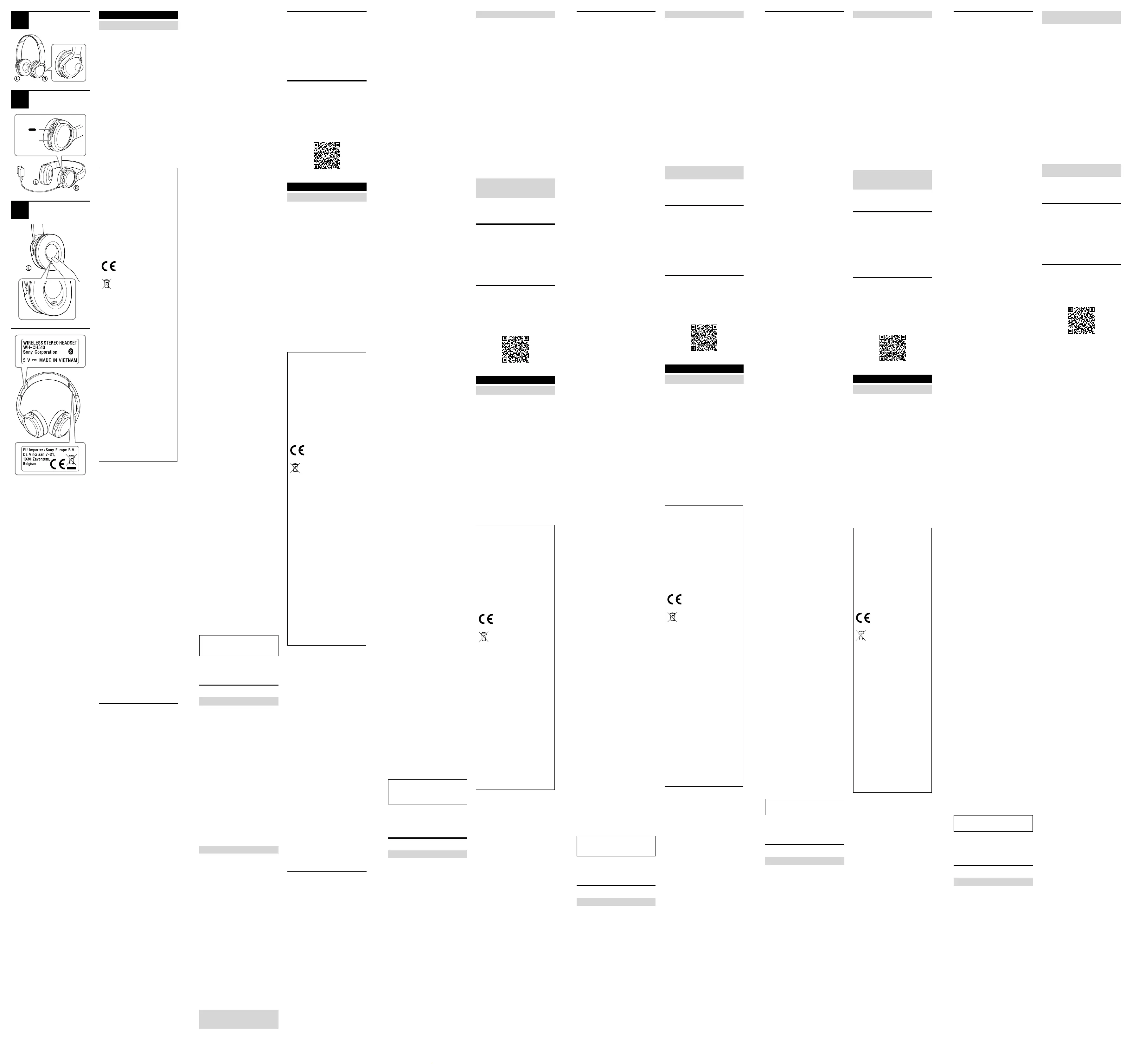
•Het toestel ondersteunt beveiligingsfuncties
die voldoen aan de Bluetooth-standaard om de
beveiliging tijdens communicatie via draadloze
Bluetooth-technologie te waarborgen.
Afhankelijk van de geconfigureerde instellingen
en andere factoren is deze beveiliging echter
mogelijk niet voldoende. Wees voorzichtig bij
communicatie via draadloze Bluetooth-
technologie.
•Sony aanvaardt geen verantwoordelijkheid
voor eventuele schade of verlies als gevolg van
informatielekken die zich voordoen tijdens
Bluetooth-communicatie.
•Verbinding met alle Bluetooth-apparaten kan
niet worden gegarandeerd.
– Bluetooth-apparaten die verbonden zijn met
het toestel moeten voldoen aan de
Bluetooth-standaard voorgeschreven door
Bluetooth SIG, Inc. en moeten als conform
gecertificeerd zijn.
– Zelfs wanneer een verbonden apparaat
voldoet aan de Bluetooth-standaard, kunnen
er gevallen zijn waarin de eigenschappen of
specificaties van het Bluetooth-apparaat
verbinding onmogelijk maken of leiden tot
andere bedieningsmethodes, weergave of
werking.
– Wanneer het toestel wordt gebruikt om
handenvrij te bellen, kan er afhankelijk van
het verbonden apparaat of de
communicatieomgeving ruis optreden.
•Afhankelijk van het te verbinden apparaat kan
het even duren voordat de communicatie
wordt gestart.
Als het geluid regelmatig hapert tijdens
het afspelen
•De situatie kan worden verbeterd door de
instellingen voor de kwaliteit van het draadloos
afspelen te wijzigen of de modus voor het
draadloos afspelen op het zendapparaat vast in
te stellen op SBC. Raadpleeg voor meer
informatie de bedieningsinstructies die bij het
zendapparaat zijn geleverd.
•Wanneer u muziek beluistert via een
smartphone, kan de situatie worden verbeterd
door onnodige apps te sluiten of de
smartphone opnieuw op te starten.
Over het gebruik van bel-apps voor
smartphones en computers
•Dit toestel ondersteunt alleen normale
binnenkomende oproepen. Bel-apps voor
smartphones en computers worden niet
ondersteund.
Over het opladen van het toestel
•Dit toestel kan alleen worden opgeladen via
USB. Een computer met een USB-poort of een
USB-netstroomadapter is vereist voor het
opladen.
•Gebruik altijd de bijgeleverde USB
Type-C-kabel.
•Tijdens het opladen kan het toestel niet
worden ingeschakeld en kan de Bluetooth-
functie niet worden gebruikt.
•Als het toestel voor langere tijd niet wordt
gebruikt, kan de oplaadbare batterij snel leeg
raken. De batterij zal goed opgeladen blijven
nadat ze verschillende keren is ontladen en
opgeladen. Wanneer u het toestel voor langere
tijd opbergt, dient u de batterij om de zes
maanden op te laden om overontlading te
voorkomen.
•Als de oplaadbare batterij heel snel leeg raakt,
moet deze vervangen worden door een
nieuwe. Neem contact op met uw
dichtstbijzijnde Sony-verdeler om de batterij te
vervangen.
Als het toestel niet correct werkt
•Volg de onderstaande procedure om het
toestel te resetten (afb. ).
Druk tegelijk op de knoppen en − terwijl het
toestel wordt opgeladen. Het toestel wordt
gereset. Wanneer het toestel wordt gereset,
worden de koppelingsgegevens niet van het
toestel verwijderd.
•Als het probleem zich blijft voordoen, zelfs
nadat het toestel is gereset, voert u de
onderstaande procedure uit om het toestel te
initialiseren.
Koppel de USB Type-C-kabel los en schakel het
toestel uit. Houd de knoppen en −
gedurende minstens 7 seconden tegelijk
ingedrukt. Het indicatielampje (blauw) knippert
4 keer, het toestel wordt geïnitialiseerd en de
fabrieksinstellingen van het toestel worden
hersteld. Wanneer het toestel wordt
geïnitialiseerd, worden alle
koppelingsgegevens verwijderd.
•Nadat het toestel is geïnitialiseerd, kan het
mogelijk geen verbinding meer maken met uw
iPhone of computer. Verwijder in dat geval de
koppelingsgegevens van het toestel van de
iPhone of computer en koppel ze vervolgens
opnieuw.
Opmerkingen over het opzetten van het
toestel
•Aangezien de hoofdtelefoon de oren goed
afsluit, kunt u schade aan het trommelvlies
veroorzaken door deze hard tegen uw oren te
drukken of snel af te nemen.
Door de hoofdtelefoon tegen uw oren te
drukken, kan het luidsprekermembraan een
klikgeluid produceren. Dat is geen storing.
Andere opmerkingen
•Stel het toestel niet bloot aan hevige schokken.
•De Bluetooth-functie werkt mogelijk niet met
een mobiele telefoon, afhankelijk van de
signaalomstandigheden en de nabije
omgeving.
•Oefen nooit gedurende langere tijd gewicht of
druk uit op het toestel, ook niet wanneer het is
opgeborgen. Dit kan namelijk vervormingen
veroorzaken.
•Als u ongemak ondervindt tijdens het gebruik
van het toestel, staak dan onmiddellijk het
gebruik.
•De oorschelpen kunnen beschadigd raken of
verslijten bij langdurig gebruik en langdurige
opslag.
Het toestel reinigen
•Wanneer de buitenkant van het toestel vuil is,
veeg het dan schoon met een zachte droge
doek. Als het toestel bijzonder vuil is, drenk dan
een doek in een milde oplossing van neutraal
reinigingsmiddel en wring deze goed uit
alvorens te vegen. Gebruik geen
oplosmiddelen zoals verdunner, benzeen of
alcohol aangezien deze het oppervlak kunnen
beschadigen.
•Als u vragen hebt over of problemen
ondervindt met dit toestel die niet in deze
handleiding worden behandeld, neem dan
contact op met uw dichtstbijzijnde
Sony-verdeler.
Vervangingsonderdelen: oorschelpen
Neem contact op met uw dichtstbijzijnde
Sony-verdeler voor informatie over
vervangingsonderdelen.
Locatie van het serienummerlabel
Zie afb.
Technische gegevens
Headset
Voeding:
3,7 V DC: ingebouwde oplaadbare
lithium-ionbatterij
5 V DC: bij opladen via USB
Bedrijfstemperatuur:
0 °C tot 40 °C
Nominaal vermogensverbruik:
0,7 W
Gebruiksuren:
Bij verbinding via een Bluetooth-apparaat
Afspeeltijd voor muziek: max. 35 uur
Communicatietijd: max. 30 uur
Stand-bytijd: max. 200 uur
Opmerking: de gebruiksuren kunnen lager
liggen afhankelijk van de codec en de
gebruiksomstandigheden.
Oplaadtijd:
Ong. 4,5 uur
(Na 10 minuten opladen kan er gedurende
ongeveer 90 minuten muziek afgespeeld
worden.)
Opmerking: de oplaadtijd en gebruiksuren
kunnen verschillen afhankelijk van de
gebruiksomstandigheden.
Oplaadtemperatuur:
5 °C tot 35 °C
Gewicht:
Ong. 132 g
Bijgeleverde items:
Draadloze stereoheadset (1)
USB Type-C™-kabel (USB-A tot USB-C™)
(ong. 20 cm) (1)
Communicatiespecificatie
Communicatiesysteem:
Bluetooth-specificatie versie 5.0
Uitvoer:
Bluetooth-specificatie vermogensklasse 2
Maximaal communicatiebereik:
In een rechte lijn zonder obstakels ong.
10m1)
Frequentieband:
2,4 GHz-band (2,4000 GHz — 2,4835 GHz)
Werkingsfrequentie:
Bluetooth: 2.400 MHz — 2.483,5 MHz
Maximaal uitvoervermogen:
Bluetooth: < 4 dBm
Compatibele Bluetooth-profielen2):
A2DP / AVRCP / HFP / HSP
Ondersteunde codec3):
SBC / AAC
Transmissiebereik (A2DP):
20 Hz — 20.000 Hz
(bemonsteringsfrequentie 44,1 kHz)
1) Het werkelijke bereik verschilt afhankelijk van
factoren zoals obstakels tussen apparaten,
magnetische velden rond een magnetron,
statische elektriciteit, ontvangstgevoeligheid,
prestaties van de antenne, het
besturingssysteem, software enz.
2) Bluetooth-standaardprofielen geven het doel
van Bluetooth-communicatie tussen apparaten
aan.
3) Codec: formaat voor geluidssignaalcompressie
en -conversie
Het ontwerp en de technische gegevens kunnen
zonder voorafgaande kennisgeving worden
gewijzigd.
Systeemvereisten voor het
opladen van de batterij via
USB
USB-netvoedingsadapter
Een in de winkel verkrijgbare USB-
netstroomadapter die een minimale
uitgangsstroom van 0,5 A (500 mA) kan leveren
Handelsmerken
•iPhone en iPod touch zijn handelsmerken van
Apple Inc., gedeponeerd in de Verenigde
Staten en andere landen.
•Android is een handelsmerk van Google LLC.
•Het Bluetooth®-woordmerk en de
Bluetooth®-logo’s zijn geregistreerde
handelsmerken in eigendom van Bluetooth
SIG, Inc. en elk gebruik van deze merken door
Sony Corporation gebeurt onder licentie.
•USB Type-C™ en USB-C™ zijn handelsmerken
van USB Implementers Forum.
•Andere handelsmerken en handelsnamen zijn
het eigendom van hun respectieve eigenaars.
Opmerkingen over de
licentie
Dit product bevat software die door Sony wordt
gebruikt in het kader van een
licentieovereenkomst met de eigenaar van het
overeenstemmende auteursrecht. Wij worden
door de eigenaar van het auteursrecht voor deze
software verplicht de inhoud van deze
overeenkomst vrij te geven aan onze klanten.
Open de volgende URL en lees de inhoud van de
licentie.
http://rd1.sony.net/help/mdr/sl/19/
Português
Auscultadores estéreo sem fios
Não instale o aparelho num local confinado
como, por exemplo, uma estante ou um armário
embutido.
Não exponha as baterias (bateria ou baterias
instaladas) a calor excessivo como, por exemplo,
luz solar, fogo ou outra fonte de calor durante
um longo período de tempo.
Não sujeite as baterias a temperaturas
extremamente baixas que possam resultar em
sobreaquecimento e aquecimento cíclico em
cadeia.
Não desmonte, abra nem destrua pilhas
secundárias ou baterias.
Não exponha as pilhas ou as baterias ao calor ou
ao fogo. Evite armazenar sob luz solar direta.
Se ocorrerem fugas das pilhas, não permita que
o líquido entre em contacto com a pele ou os
olhos. Em caso de contacto, lave a área afetada
com água em abundância e consulte um médico.
As pilhas secundárias e baterias devem ser
carregadas antes da utilização. Consulte sempre
as instruções do fabricante ou o manual do
equipamento para obter as instruções de
carregamento adequadas.
Após longos períodos de armazenamento,
poderá ser necessário carregar e descarregar as
pilhas ou baterias várias vezes para obter o
máximo desempenho.
Elimine de forma adequada.
Este equipamento foi testado e demonstrou que
cumpre os limites definidos nos regulamentos
de Compatibilidade Eletromagnética (CEM)
quando utilizado com um cabo de ligação com
comprimento inferior a 3 metros.
Aviso para clientes: as informações
seguintes só se aplicam a equipamentos
vendidos em países sujeitos às diretivas da
UE
Este produto foi fabricado por ou em nome
da Sony Corporation.
Importador na UE: Sony Europe B.V.
Questões ao importador na UE ou
relacionadas com a conformidade do
produto na Europa devem ser enviadas ao
representante autorizado do fabricante, Sony
Belgium, bijkantoor van Sony Europe B.V., Da
Vincilaan 7-D1, 1930 Zaventem, Bélgica.
O(a) abaixo assinado(a) Sony Corporation
declara que o presente equipamento está
em conformidade com a Diretiva 2014/53/UE.
O texto integral da declaração de
conformidade está disponível no seguinte
endereço de Internet:
http://www.compliance.sony.de/
Tratamento de pilhas, baterias e
equipamentos elétricos e
eletrónicos no final da sua vida útil
(aplicável na União Europeia e em
países com sistemas de recolha seletiva de
resíduos)
Este símbolo, colocado no produto, na pilha
ou bateria ou na embalagem, indica que o
produto e a pilha ou bateria não devem ser
tratados como resíduos urbanos
indiferenciados. Em determinadas pilhas e
baterias, este símbolo pode ser utilizado em
combinação com um símbolo químico. O
símbolo químico para chumbo (Pb) é
adicionado se a pilha ou bateria contiver
mais de 0,004% de chumbo. Ao garantir uma
eliminação adequada destes produtos e
destas pilhas ou baterias, irá ajudar a evitar
potenciais consequências negativas para o
meio ambiente e para a saúde pública que
poderiam ser provocadas por um tratamento
incorreto destes resíduos. A reciclagem dos
materiais contribuirá para a conservação dos
recursos naturais. Se, por motivos de
segurança, desempenho ou proteção de
dados, os produtos necessitarem de uma
ligação permanente a uma pilha ou bateria
integrada, esta só deve ser substituída por
profissionais qualificados. Acabado o período
de vida útil dos produtos, coloque-os num
ponto de recolha de produtos elétricos/
eletrónicos, de forma a garantir o tratamento
adequado dos produtos e da pilha ou bateria
integrada. Para todas as outras pilhas ou
baterias, consulte as instruções do produto
sobre a remoção da mesma. Deposite a pilha
ou bateria num ponto de recolha destinado à
reciclagem de resíduos de pilhas e baterias.
Para informações mais detalhadas sobre a
reciclagem deste produto ou desta pilha ou
bateria, contacte o município onde reside, os
serviços de recolha de resíduos da sua área
ou a loja onde adquiriu o produto ou a pilha
ou bateria.
A validade das marcas CE está limitada aos
países em que for imposta por lei, sobretudo nos
países do EEE (Espaço Económico Europeu) e
Suíça.
O volume elevado pode afetar a sua audição.
Não utilize a unidade enquanto estiver a
caminhar, a conduzir ou a andar de bicicleta. Se
o fizer, pode causar acidentes na estrada.
Não utilize num local perigoso, exceto se
conseguir ouvir o som circundante.
A unidade não é à prova de água. Se água ou
objetos estranhos entrarem na unidade, pode
ocorrer um incêndio ou choque elétrico. Se água
ou um objeto estranho entrar na unidade, pare
de imediato a sua utilização e contacte o agente
Sony mais próximo. Em particular, siga sempre as
precauções abaixo apresentadas.
– Utilização junto de um lavatório, etc.
Tenha cuidado para que a unidade não caia
num lavatório ou num recipiente cheio de
água.
– Utilização à chuva ou na neve ou em locais
húmidos
– Utilização enquanto estiver transpirado
Se tocar na unidade com as mãos molhadas ou
se colocar a unidade no bolso de uma peça de
roupa molhada, a unidade pode ficar molhada.
Para obter mais informações sobre o efeito do
contacto do corpo humano com o telemóvel ou
outros dispositivos sem fios ligados à unidade,
consulte o manual de instruções do dispositivo
sem fios.
Nunca insira uma ficha USB quando a unidade
principal ou o cabo de carregamento estiverem
molhados. Se a ficha USB for inserida enquanto a
unidade principal ou o cabo de carregamento
estiverem molhados, pode ocorrer um
curto-circuito devido ao líquido (água da
torneira, água do mar, bebida, etc.) que entra na
unidade principal ou no cabo de carregamento
ou devido a qualquer corpo estranho e causar
um aumento de temperatura anormal ou avaria.
Nota sobre eletricidade estática
A eletricidade estática acumulada no corpo pode
provocar um ligeiro formigueiro nos ouvidos.
Para reduzir o efeito, utilize roupas feitas com
materiais naturais que suprimam a geração de
eletricidade estática.
Precauções
Notas sobre as comunicações por
BLUETOOTH®
•A tecnologia sem fios Bluetooth funciona num
alcance de cerca de 10m. A distância máxima
de comunicação poderá variar, dependendo da
presença de obstáculos (pessoas, objetos
metálicos, paredes, etc.) ou do ambiente
eletromagnético.
•As comunicações por Bluetooth poderão não
ser possíveis ou poderá ocorrer ruído ou falha
do áudio nas seguintes condições:
– Quando estiver uma pessoa entre a unidade
e o dispositivo Bluetooth. Esta situação
poderá ser melhorada se colocar o dispositivo
Bluetooth de frente para a antena da
unidade.
– Quando existir um obstáculo como, por
exemplo, um objeto metálico ou uma parede,
entre a unidade e o dispositivo Bluetooth.
– Quando existir um dispositivo Wi-Fi, forno de
micro-ondas ou outro dispositivo a emitir
micro-ondas perto da unidade.
– Comparativamente à utilização em interiores,
a utilização em exteriores está pouco sujeita
a reflexão do sinal proveniente de paredes,
pavimentos e tetos, o que resulta na
ocorrência da quebra de áudio mais
frequentemente do que na utilização em
interiores.
– A antena está incorporada na unidade
conforme ilustrado pela linha tracejada na
imagem (Fig. ). A sensibilidade das
comunicações por Bluetooth pode ser
melhorada se forem removidos todos os
obstáculos entre o dispositivo Bluetooth
ligado e a antena desta unidade.
•Os dispositivos Bluetooth e Wi-Fi (IEEE802.11b/
g/n) utilizam a mesma frequência (2,4GHz). Ao
utilizar a unidade perto de um dispositivo
Wi-Fi, poderá ocorrer interferência
eletromagnética resultando em ruído, falha do
áudio ou impossibilidade de estabelecer
ligação. Neste caso, tente efetuar as seguintes
ações:
– Estabeleça uma ligação entre a unidade e o
dispositivo Bluetooth quando estiverem a,
pelo menos, uma distância de 10m do
dispositivo Wi-Fi.
– Desligue o dispositivo Wi-Fi quando utilizar a
unidade a uma distância até 10 m do
dispositivo Wi-Fi.
– Posicione a unidade e o dispositivo Bluetooth
o mais próximo possível um do outro.
•As micro-ondas emitidas por um dispositivo
Bluetooth poderão afetar o funcionamento de
dispositivos médicos eletrónicos. Desligue esta
unidade e outros dispositivos Bluetooth nos
locais a seguir apresentados, uma vez que
poderão provocar acidentes:
– Em hospitais, próximo de lugares prioritários
em comboios, locais onde haja gás
inflamável, perto de portas automáticas ou
perto de alarmes de incêndio.
•A reprodução de áudio nesta unidade poderá
apresentar algum atraso relativamente à do
dispositivo de transmissão. Tal acontece devido
às características da tecnologia sem fios
Bluetooth. Consequentemente, o som poderá
não estar sincronizado com a imagem durante
a visualização de filmes ou em jogos.
•Este produto emite ondas de rádio quando
utilizado no modo sem fios.
Quando utilizado no modo sem fios num avião,
siga as indicações da tripulação relativamente
à utilização de produtos no modo sem fios.
•A unidade suporta funções de segurança que
são compatíveis com a norma Bluetooth. Estas
funcionam como um meio para garantir a
segurança durante a comunicação utilizando a
tecnologia sem fios Bluetooth. No entanto,
dependendo das definições configuradas e de
outros fatores, esta segurança poderá não ser
suficiente. Tenha cuidado quando comunicar
através da tecnologia sem fios Bluetooth.
•A Sony não assumirá a responsabilidade por
quaisquer danos ou perdas resultantes de
fugas de informação aquando da utilização de
ligações Bluetooth.
•A ligação com todos os dispositivos Bluetooth
não pode ser garantida.
– Os dispositivos Bluetooth ligados à unidade
têm de cumprir a norma Bluetooth prescrita
pela Bluetooth SIG, Inc. e a sua conformidade
tem de estar certificada.
– Mesmo quando um dispositivo ligado está
em conformidade com a norma Bluetooth,
poderão existir situações em que as
características ou especificações do
dispositivo Bluetooth impossibilitam-no de
efetuar a ligação ou resultam em métodos de
controlo, visualização ou operação diferentes.
– Ao utilizar a unidade para efetuar chamadas
telefónicas no modo mãos-livres, poderá
ocorrer ruído dependendo do dispositivo
ligado ou do ambiente da comunicação.
•Dependendo do dispositivo a ser ligado,
poderá ser necessário algum tempo para iniciar
as comunicações.
Se o som falhar frequentemente durante a
reprodução
•A situação poderá ser melhorada se alterar as
definições de qualidade de reprodução sem
fios ou se corrigir o modo de reprodução sem
fios para SBC no dispositivo transmissor. Para
obter mais informações, consulte o manual de
instruções fornecido com o dispositivo
transmissor.
•Ao ouvir música a partir de um smartphone, a
situação poderá ser melhorada se fechar as
aplicações desnecessárias ou se reiniciar o
smartphone.
Notas sobre a utilização de aplicações de
chamadas para smartphones e
computadores
•Esta unidade suporta apenas as chamadas
recebidas normais. As aplicações de chamadas
para smartphones e computadores não são
suportadas.
Notas sobre o carregamento da unidade
•Esta unidade só pode ser carregada através de
dispositivos USB. Para carregar, é necessário
um computador com uma porta USB ou um
transformador de CA USB.
•Certifique-se de que utiliza o cabo USB Type-C
fornecido.
•Quando estiver a carregar, a unidade não pode
ser ligada e a função Bluetooth não pode ser
utilizada.
•Se a unidade não for utilizada durante um
longo período de tempo, a bateria recarregável
poderá esgotar-se rapidamente. A bateria
recuperará a capacidade de carga depois de
ser descarregada e carregada várias vezes. Ao
armazenar a unidade durante um longo
período de tempo, carregue a bateria uma vez
a cada 6 meses para evitar a descarga
excessiva.
•Se a carga da bateria recarregável se esgotar
muito rapidamente, deve ser substituída por
uma nova. Contacte o agente Sony mais
próximo para obter uma bateria de
substituição.
Se a unidade não funcionar corretamente
•Siga o procedimento abaixo para repor a
unidade (Fig. ).
Prima simultaneamente os botões e
− enquanto a unidade estiver a carregar. A
unidade é reposta. Quando a unidade for
reposta, as informações de emparelhamento
da unidade não são apagadas.
•Se o problema persistir mesmo depois de a
unidade ser reposta, efetue o procedimento
abaixo para inicializar a unidade.
Retire o cabo USB Type-C e desligue a unidade.
Prima sem soltar e em simultâneo os botões
e − durante, pelo menos, 7 segundos. O
indicador (azul) pisca 4 vezes e a unidade é
inicializada e reposta para as definições de
fábrica. Quando a unidade é inicializada, todas
as informações de emparelhamento são
apagadas.
•Depois de a unidade ser inicializada, poderá
não ligar ao iPhone ou ao computador. Se
assim for, apague as informações de
emparelhamento da unidade a partir do
iPhone ou do computador e, em seguida,
efetue novamente o emparelhamento.
Notas sobre a utilização da unidade
•Uma vez que os auscultadores ficam bastante
justos quando são colocados, exercer pressão
forte contra os ouvidos ou puxá-los
rapidamente poderá resultar em lesões nos
tímpanos.
Pressionar os auscultadores contra os ouvidos
poderá causar estalidos na caixa acústica. Isto
não significa uma avaria.
Notas adicionais
•Não submeta a unidade a impactos excessivos.
•A função Bluetooth poderá não funcionar com
um telemóvel, dependendo das condições do
sinal e do ambiente circundante.
•Não exerça peso ou pressão sobre a unidade
durante longos períodos de tempo, incluindo
durante o armazenamento, pois poderá causar
deformações.
•Se sentir algum desconforto durante a
utilização da unidade, pare imediatamente de
a utilizar.
•As almofadas de auriculares podem sofrer
danos ou deterioração se forem utilizadas ou
armazenadas durante um longo período de
tempo.
Limpar a unidade
•Quando o exterior da unidade estiver sujo,
limpe-o com um pano seco e macio. Se a
unidade estiver particularmente suja, molhe
um pano com uma solução de detergente
neutro e torça-o bem antes de limpar. Não
utilize solventes como diluente, benzina ou
álcool, pois estes produtos podem danificar a
superfície.
•Se tiver dúvidas ou problemas relativos a esta
unidade que não sejam referidos neste
manual, consulte o agente Sony mais próximo.
Peças de substituição: almofadas de
auriculares
Consulte o agente Sony mais próximo para
obter informações sobre as peças de
substituição.
Localização da etiqueta com o número de
série
Consulte a Fig.
Especificações
Auscultadores
Fonte de alimentação:
3,7 V CC: Bateria recarregável de iões de
lítio incorporada
5 V CC: Quando carregados através de USB
Temperatura de funcionamento:
0 °C a 40 °C
Consumo de energia nominal:
0,7 W
Horas de utilização:
Com ligação através do dispositivo
Bluetooth
Tempo de reprodução de música: máx.
de 35 horas
Tempo de comunicação: máx. de
30horas
Tempo de suspensão: máx. de
200horas
Nota: o número de horas de utilização
pode ser inferior, dependendo do Codec e
das condições de utilização.
Tempo de carregamento:
Aprox. 4,5 horas
(Após 10 minutos de carregamento, é
possível reproduzir música durante
aproximadamente 90 minutos.)
Nota: os tempos de carregamento e
utilização dependem das condições de
utilização.
Temperatura de carregamento:
5°C a 35°C
Massa:
Aprox. 132 g
Itens incluídos:
Auscultadores estéreo sem fios (1)
Cabo USB Type-C™ (USB-A para USB-C™)
(aprox. 20 cm) (1)
Especificação da comunicação
Sistema de comunicação:
Versão 5.0 da especificação de Bluetooth
Emissão:
Classe de potência 2 da especificação de
Bluetooth
Alcance de comunicação máximo:
Aprox. 10 m em linha de visão1)
Banda de frequências:
Banda de 2,4GHz (2,4000GHz-
2,4835GHz)
Frequência de funcionamento:
Bluetooth: 2.400MHz — 2.483,5MHz
Potência de emissão máxima:
Bluetooth: < 4 dBm
Perfis Bluetooth compatíveis2):
A2DP / AVRCP / HFP / HSP
Codec suportado3):
SBC / AAC
Intervalo de transmissão (A2DP):
20 Hz — 20.000 Hz (frequência de
amostragem de 44,1 kHz)
1) A gama real depende de vários fatores, como
obstáculos entre os dispositivos, campos
magnéticos em torno de um forno
micro-ondas, eletricidade estática,
sensibilidade da receção, desempenho da
antena, sistema operativo, aplicação de
software, etc.
2) Os perfis standard de Bluetooth indicam a
finalidade das comunicações entre os
dispositivos através de Bluetooth.
3) Codec: formato de conversão e compressão do
sinal de áudio
O desenho e as especificações estão sujeitos a
alteração sem aviso prévio.
Requisitos de sistema para
carregar a bateria através de
USB
Transformador de CA USB
Um transformador de CA USB comercialmente
disponível, capaz de fornecer uma corrente de
saída de 0,5A (500mA) ou superior
Marcas comerciais
•iPhone e iPod touch são marcas comerciais da
Apple Inc., registadas nos EUA e outros países.
•Android é uma marca comercial da Google LLC.
•A marca e os logótipos Bluetooth® são marcas
comerciais registadas pertencentes à Bluetooth
SIG, Inc. e qualquer utilização dessas marcas
pela Sony Corporation é efetuada sob licença.
•USB Type-C™ e USB-C™ são marcas comerciais
do USB Implementers Forum.
•Outras marcas e nomes comerciais pertencem
aos respetivos proprietários.
Notas sobre licenciamento
Este produto contém software que a Sony utiliza
sob acordo de licenciamento com o proprietário
dos respetivos direitos de autor. Estamos
obrigados a divulgar o conteúdo deste acordo
aos clientes por exigência do proprietários dos
direitos de autor do software.
Aceda ao seguinte URL e leia o conteúdo da
licença.
http://rd1.sony.net/help/mdr/sl/19/
Dansk
Trådløse stereoheadset
Anbring ikke apparatet et trangt sted, f.eks. i en
bogreol eller i et indbygget skab.
Udsæt ikke batterierne (installeret batteripakke
eller batterier) for kraftig varme, f.eks. solskin, ild
eller lignende i længere tid ad gangen.
Udsæt ikke batterierne for ekstremt lave
temperaturer, da dette kan medføre
overophedning og termisk runaway.
Undlad at afmontere, åbne eller dele sekundære
celler eller batterier.
Udsæt ikke celler eller batterier for varme eller
ild. Undgå opbevaring i direkte sollys.
Hvis et batteri lækker, skal du sikre, at væsken
ikke kommer i kontakt med huden eller øjnene.
Hvis du har rørt ved væsken, skal du vaske det
berørte område med rigelige mængder vand og
kontakte en læge. Sekundære batterier skal
oplades før brug. Følg altid producentens
instruktioner eller udstyrets brugervejledning
mht. korrekte opladningsinstruktioner.
Efter lang tids opbevaring kan det være
nødvendigt at oplade og aflade celler eller
batterier flere gange for at opnå maksimal
ydeevne.
Skal bortskaffes på forsvarlig vis.
Dette udstyr er blevet testet og overholder de
grænser, der er fastsat i EMC-bestemmelserne,
ved hjælp af et forbindelseskabel på maks.
3meter.
Meddelelse til kunderne: Følgende
oplysninger gælder kun for udstyr, som er
solgt i lande, der er underlagt EU-direktiver
Dette produkt er fremstillet af eller på vegne
af Sony Corporation.
EUImportør: Sony Europe B.V.
Forespørgsler til EUImportøren eller
vedrørende overholdelse af produktgaranti i
Europa skal sendes til fabrikantens
repræsentant, Sony Belgium, bijkantoor van
Sony Europe B.V., Da Vincilaan 7-D1, 1930
Zaventem, Belgien.
Herved erklærer Sony Corporation, at dette
udstyr er i overensstemmelse med direktiv
2014/53/EU.
Den fulde ordlyd af EU-
overensstemmelseserklæringen er
tilgængelig på følgende internetadresse:
http://www.compliance.sony.de/
Bortskaffelse af udtjente batterier
samt elektriske og elektroniske
produkter (gælder for den
Europæiske Union og andre lande
med separate indsamlingssystemer)
Dette symbol på produktet, batteriet eller
emballagen betyder, at produktet og
batteriet ikke må bortskaffes som
husholdningsaffald. På visse batterier kan
dette symbol anvendes i kombination med et
kemisk symbol. Det kemiske symbol for bly
(Pb) er anført, hvis batteriet indeholder mere
end 0,004% bly. Ved at sikre at disse
produkter og batterier bortskaffes korrekt,
forebygges de mulige negative konsekvenser
for miljø og sundhed, som en ukorrekt
affaldshåndtering kan forårsage.
Genanvendelse af materialer bidrager til at
bevare naturlige ressourcer. Hvis et produkt
kræver vedvarende elektricitetsforsyning af
hensyn til sikkerhed, ydeevne eller
dataintegritet, må batteriet kun fjernes af
dertil uddannet personale. For at sikre en
korrekt håndtering af batteriet og det
elektriske og elektroniske udstyr skal de
udtjente produkter afleveres på en
genbrugsplads specielt indrettet til
genanvendelse af elektriske og elektroniske
produkter. Med hensyn til øvrige batterier, se
venligst afsnittet der omhandler sikker
fjernelse af batterier. Batteriet skal afleveres
på et indsamlingssted beregnet til
affaldshåndtering og genanvendelse af
batterier. Yderligere information om
genanvendelse af dette produkt eller batteri
kan fås ved at kontakte den kommunale
genbrugsstation eller den butik, hvor
produktet eller batteriet blev købt.
CE-mærkningen gælder kun for de lande, hvor
den håndhæves juridisk. Den gælder
hovedsageligt i EØS-landene (Det Europæiske
Økonomiske Samarbejdsområde) og Schweiz.
Høj lydstyrke kan påvirke din hørelse.
Brug ikke enheden, mens du går, kører eller
cykler. Det kan medføre trafikulykker.
Brug ikke på et farligt sted, medmindre den
omgivende lyd kan høres.
Enheden er ikke vandtæt. Hvis der trænger vand
eller fremmedlegemer ind i enheden, kan det
medføre brand eller elektrisk stød. Hvis der
trænger vand eller fremmedlegemer ind i
enheden, skal du straks holde op med at bruge
den og kontakte din nærmeste Sony-forhandler.
Husk især at følge forholdsreglerne nedenfor.
– Anvendelse omkring en vask osv.
Pas på, at enheden ikke falder ned i en vask
eller beholder fyldt med vand.
– Anvendelse i regn eller sne eller på fugtige
steder.
– Anvendelse, når du er svedig.
Hvis du rører ved enheden med våde hænder
eller lægger enheden i lommen i en fugtig
beklædningsgenstand, kan enheden blive våd.
Nærmere oplysninger om virkningen af, at
mobiltelefonen eller andre trådløse enheder, der
er tilsluttet enheden, berører kroppen, findes i
brugsanvisningen for den trådløse enhed.
Tilslut aldrig USB-stikket, hvis hovedenheden
eller opladningskablet er våde. Hvis USB-stikket
tilsluttes, mens hovedenheden eller
opladningskablet er våde, kan det medføre
kortslutning på grund af væsken (postevand,
havvand, læskedrik osv.) på hovedenheden eller
opladningskablet eller på grund af anden
kontaminering og medføre unormal
varmeproduktion eller fejlfunktion.
Bemærkning om statisk elektricitet
Statisk elektricitet, der akkumuleres i kroppen,
kan forårsage en mild prikken i ørerne. For at
reducere denne effekt kan du bære tøj, der er
fremstillet af naturmaterialer, hvilket dæmper
dannelsen af statisk elektricitet.
Forholdsregler
Om BLUETOOTH®-kommunikation
•Trådløs Bluetooth-teknologi fungerer inden for
en rækkevidde på ca. 10 meter. Det maksimale
kommunikationsområde kan variere afhængigt
af forhindringer (mennesker, metal, væg osv.)
eller det elektromagnetiske miljø.
•Bluetooth-kommunikation er muligvis ikke
mulig, eller der kan forekomme støj eller
lydafbrydelse under følgende forhold:
– Når der er en person mellem enheden og
Bluetooth-enheden. Denne situation kan
forbedres ved at placere Bluetooth-enheden,
så den vender mod enhedens antenne.
– Når der er en hindring som f.eks. et
metalobjekt eller en væg mellem enheden og
Bluetooth-enheden.
– Når en wi-fi-enhed eller mikrobølgeovn er i
brug, eller når der udsendes mikrobølger i
nærheden af enheden.
– Sammenlignet med indendørsbrug påvirkes
udendørsbrug kun lidt af signalrefleksion fra
vægge, gulve og lofter, hvilket resulterer i, at
lydafbrydelse forekommer hyppigere end ved
brug indendørs.
– Antennen er indbygget i enheden som vist
med den stiplede linje i illustrationen (Fig.
). Bluetooth-kommunikationens følsomhed
kan forbedres ved at fjerne hindringer mellem
den tilsluttede Bluetooth-enhed og antennen
på denne enhed.
•Bluetooth- og wi-fi-enheder (IEEE802.11b/g/n)
bruger den samme frekvens (2,4 GHz). Når
enheden bruges i nærheden af en wi-fi-enhed,
kan der forekomme elektromagnetisk
interferens, hvilket resulterer i støj,
lydafbrydelse eller manglende evne til at
oprette forbindelse. Hvis dette sker, kan du
prøve at udføre følgende:
– Opret forbindelse mellem enheden og
Bluetooth-enheden, når de er mindst 10 m
væk fra wi-fi-enheden.
– Sluk for wi-fi-enheden, når du bruger
enheden inden for 10 m af wi-fi-enheden.
– Placér enheden og Bluetooth-enheden så tæt
på hinanden som muligt.
•Mikrobølger, der kommer fra en Bluetooth-
enhed, kan påvirke brugen af elektronisk
medicinsk udstyr. Sluk for denne enhed eller
andre Bluetooth-enheder på følgende steder,
da brugen kan medføre ulykker:
– på hospitaler; nær forbeholdte siddepladser i
tog; steder, hvor brændbar gas er til stede;
nær automatiske døre eller nær
brandalarmer.
•Lydafspilningen på denne enhed kan forsinkes
fra den på transmissionsenheden på grund af
egenskaberne ved trådløs Bluetooth-teknologi.
Som følge heraf er lyden muligvis ikke
synkroniseret med billedet, når du ser film eller
spiller spil.
•Dette produkt udsender radiobølger, når det
bruges i trådløs tilstand.
Når det bruges i trådløs tilstand på et fly, skal
du følge anvisningerne fra flybesætningen
vedrørende tilladt brug af produkter i trådløs
tilstand.
•Enheden understøtter sikkerhedsfunktioner,
der overholder Bluetooth-standarden, som et
middel til at sørge for sikkerhed under
kommunikation ved hjælp af trådløs
Bluetooth-teknologi. Afhængigt af de
konfigurerede indstillinger og andre faktorer er
denne sikkerhed muligvis ikke tilstrækkelig.
Vær forsigtig, når du kommunikerer via trådløs
Bluetooth-teknologi.
•Sony påtager sig intet ansvar for skader eller
tab som følge af informationslækage, der
opstår ved brug af Bluetooth-kommunikation.
•Der kan ikke garanteres forbindelse med alle
Bluetooth-enheder.
– Bluetooth-enheder, der er tilsluttet til
enheden, skal overholde Bluetooth-
standarden, der er foreskrevet af Bluetooth
SIG, Inc. og skal certificeres som værende
kompatibel.
– Selv når en tilsluttet enhed overholder
Bluetooth-standarden, kan der være tilfælde,
hvor Bluetooth-enhedens egenskaber eller
specifikationer ikke gør det muligt at oprette
forbindelse eller resulterer i forskellige
kontrolmetoder, visning eller drift.
– Når enheden bruges til at udføre håndfri tale i
telefonen, kan der opstå støj afhængigt af
den tilsluttede enhed eller
kommunikationsmiljøet.
•Afhængigt af den enhed, der skal tilsluttes, kan
det tage lidt tid at starte kommunikationen.
Hvis lyden ofte springer under afspilning
•Situationen kan forbedres ved at ændre
kvalitetsindstillingen for trådløs afspilning eller
ved at ændre den trådløse afspilningstilstand
til SBC på den transmitterende enhed. Hvis du
ønsker flere oplysninger, kan du se den
betjeningsvejledning, der fulgte med den
transmitterende enhed.
•Når du lytter til musik fra en smartphone, kan
situationen forbedres ved at lukke
unødvendige apps eller genstarte
smartphonen.
Om brug af telefoni-apps til smartphones
og computere
•Denne enhed understøtter kun almindelige
indgående opkald. Telefoni-apps til
smartphones og computere understøttes ikke.
Om opladning af enheden
•Denne enhed kan kun oplades via USB. Til
opladning kræves der en computer med en
USB-port eller en USB-vekselstrømsadapter.
•Sørg for at bruge det medfølgende USB
Type-C-kabel.
•Under opladningen kan enheden ikke tændes,
og Bluetooth-funktionen kan ikke bruges.
•Hvis enheden ikke bruges i lang tid, kan det
genopladelige batteri blive udtømt hurtigt.
Batteriet vil kunne holde en ordentlig
opladning, efter at den er afladet og opladet
flere gange. Når du opbevarer enheden i
længere tid, skal du oplade batteriet en gang
hvert halve år for at forhindre overladning.
•Hvis det genopladelige batteri bliver meget
udtømt, skal det udskiftes med et nyt. Kontakt
venligst din nærmeste Sony-forhandler for
udskiftning af batterier.
Hvis enheden ikke fungerer korrekt
•Følg nedenstående fremgangsmåde for at
nulstille enheden (Fig. ).
Tryk på knapperne og − samtidigt, mens
enheden oplader. Enheden er nulstillet. Når
enheden er nulstillet, slettes
parringsoplysningerne i enheden ikke.
•Hvis problemet fortsætter, selvom enheden er
nulstillet, skal du udføre proceduren nedenfor
for at initialisere enheden.
Tag USB Type-C-kablet ud, og sluk for enheden.
Tryk og hold og −-knapperne nede på
samme tid i mindst 7 sekunder. Indikatoren
(blå) blinker 4 gange, enheden initialiseres, og
enheden er nulstillet til fabriksindstillingerne.
Når enheden initialiseres, slettes alle
parringsoplysninger.
•Når enheden er initialiseret, kan den ikke
oprette forbindelse til din iPhone eller
computer. Hvis dette sker, skal du slette
parringsoplysningerne for enheden fra iPhonen
eller computeren og derefter parre dem igen.
Bemærkninger om at bære enheden
•Eftersom hovedtelefonerne giver en tæt
forsegling over ørerne, kan det at trykke dem
mod dine ører eller hurtigt trække dem af
resultere i trommehindebeskadigelse.
Hvis du trykker på hovedtelefonerne mod dine
ører, kan højttalermembranen frembringe en
kliklyd. Dette er ikke en fejl.
Andre bemærkninger
•Udsæt ikke enheden for meget stød.
•Bluetooth-funktionen fungerer muligvis ikke
med en mobiltelefon afhængigt af
signalforholdene og omgivelserne.
•Anvend ikke vægt eller tryk på enheden i
længere tid, herunder når det opbevares, da
det kan medføre deformering.
•Hvis du oplever ubehag under brug af
enheden, skal du omgående holde op med at
bruge den.
•Ørepuderne kan blive beskadiget eller forringes
med langvarig brug og opbevaring.
Rengøring af enheden
•Når ydersiden af enheden er snavset, skal du
rengøre den ved at tørre den af med en blød,
tør klud. Hvis enheden er særligt snavset, så
blødgør en klud i en fortyndet opløsning af
neutralt rengøringsmiddel og vrid den godt,
inden det tørres. Brug ikke opløsningsmidler
som fortynder, benzen eller sprit, da de kan
beskadige overfladen.
•Kontakt nærmeste Sony-forhandler, hvis du har
spørgsmål eller problemer i forbindelse med
denne enhed, som ikke er beskrevet i denne
vejledning.
Reservedele: ørepuder
Kontakt venligst din nærmeste Sony-
forhandler for at få oplysninger om
reservedele.
Placering af serienummeretiketten
Se Fig.
Specifikationer
Headset
Strømkilde:
DC 3,7 V: Indbygget, genopladeligt
litiumionbatteri
DC 5 V: Ved opladning via USB
Driftstemperatur:
0 °C til 40 °C
Nominelt strømforbrug:
0,7 watt
Timer i brug:
Ved tilslutning via Bluetooth-enheden
Afspilningstid for musik: Maks. 35 timer
Kommunikationstid: Maks. 30 timer
Standbytid: Maks. 200 timer
Bemærk! Antallet af timer i brug kan være
kortere afhængigt af codec og
anvendelsesforholdene.
Opladningstid:
Ca. 4,5 timer
(Ca. 90 minutters afspilningstid for musik er
mulig efter 10 minutters opladning).
Bemærk! Opladningstiden og antallet af
timer i brug kan være anderledes
afhængigt af anvendelsesforholdene.
Opladningstemperatur:
5 °C til 35 °C
Vægt:
Ca. 132 g
Medfølgende dele:
Trådløst stereoheadset (1)
USB Type-C™-kabel (USB-A til USB-C™) (ca.
20 cm) (1)
Kommunikationsspecifikation
Kommunikationssystem:
Bluetooth-specifikation version 5.0
Udgang:
Bluetooth-specifikation strømklasse 2
Maksimal kommunikationsrækkevidde:
Synslinje ca. 10 m1)
Frekvensbånd:
2,4 GHz bånd (2,4000 GHz — 2,4835 GHz)
Driftsfrekvens:
Bluetooth: 2.400 MHz — 2.483,5 MHz
Maksimal udgangseffekt:
Bluetooth: < 4 dBm
Kompatible Bluetooth-profiler2):
A2DP / AVRCP / HFP / HSP
Understøttet codec3):
SBC / AAC
Transmissionsområde (A2DP):
20 Hz — 20.000 Hz (samplingfrekvens
44,1kHz)
1) Den faktiske rækkevidde afhænger af faktorer
som f.eks. forhindringer mellem enheder,
magnetfelter i nærheden af en mikrobølgeovn,
statisk elektricitet, modtagefølsomhed,
antennens ydeevne, operativsystem, software
mv.
2) Bluetooth-standardprofiler angiver formålet
med Bluetooth-kommunikation mellem
enheder.
3) Codec: Komprimerings- og
konverteringsformat for lydsignaler
Design og specifikationer kan ændres uden
varsel.
Systemkrav for en
batteriopladning via USB
USB AC-adapter
Et USB AC-adapterkabel, som fås i almindelig
handel, med forsyning af udgangsstrøm på 0,5 A
(500 mA) eller mere
Varemærker
•iPhone og iPod touch er varemærker tilhørende
Apple Inc., der er registreret i USA og andre
lande.
•Android er et varemærke tilhørende Google
LLC.
•Bluetooth®-ordmærket og logoer er
registrerede varemærker tilhørende Bluetooth
SIG, Inc. og enhver brug af sådanne mærker af
Sony Corporation sker under licens.
•USB Type-C™ og USB-C™ er varemærker
tilhørende USB Implementers Forum.
•Andre varemærker og handelsmærker tilhører
de respektive ejere.
Bemærkninger vedrørende
licens
Dette produkt indeholder software, som Sony
bruger i henhold til en licensaftale med
opretshaveren. Vi er forpligtet til at formidle
aftalens indhold til kunder som påkrævet af
softwarens opretshaver.
Gå til følgende URL for at læse licensens indhold.
http://rd1.sony.net/help/mdr/sl/19/
Suomi
Langattomat stereokuulokkeet
Älä asenna laitetta suljettuun tilaan, kuten
kirjahyllyyn tai suljettuun kaappiin.
Älä altista akkuja tai paristoja (akkuja tai paristoja
sisältävää laitetta) pitkäksi aikaa lämmönlähteille,
kuten suoralle auringonvalolle tai tulelle.
Älä altista akkuja äärimmäisen alhaisille
lämpötiloille, jotka voivat aiheuttaa
ylikuumenemisen tai lämpökarkaamisen.
Älä pura, avaa tai hajota akkuja tai paristoja.
Älä altista akkuja tai paristoja lämmölle tai tulelle.
Vältä säilyttämistä suorassa auringonvalossa.
Jos akku vuotaa, vältä vuotavan aineen
joutumista iholle tai silmiin. Jos ainetta pääsee
iholle tai silmiin, pese aine pois heti runsaalla
vedellä ja käänny välittömästi lääkärin puoleen.
Akut ja paristot on ladattava ennen käyttöä.
Katso aina asianmukaisen lataamisen ohjeet
valmistajan ohjeista tai laiteoppaasta. Jos laite on
ollut pitkään varastoituna, sen akut tai paristot
on mahdollisesti ladattava ja varaus purettava
useita kertoja, ennen kuin laite toimii parhaalla
mahdollisella tavalla.
Hävitä asianmukaisesti.
Tämän laitteen on testeissä todettu olevan
EMC-direktiivin rajoitusten mukainen
käytettäessä liitäntäkaapelia, joka on enintään
3metriä pitkä.
Huomautus asiakkaille: seuraavat tiedot
koskevat ainoastaan laitteita, joita myydään
EU:n direktiivejä noudattavissa maissa.
Tämä tuote on valmistettu Sony Corporation
toimesta tai puolesta.
EU-maahantuoja: Sony Europe B.V.
EU-maahantuojalle osoitetut tiedustelut tai
tuotteen Euroopan
vaatimustenmukaisuuteen liittyvät
tiedustelut tulee osoittaa valmistajan
valtuutetulle edustajalle: Sony Belgium,
bijkantoor van Sony Europe B.V., Da Vincilaan
7-D1, 1930 Zaventem, Belgia.
Sony Corporation vakuuttaa, että tämä laite
on direktiivin 2014/53/EU mukainen.
EU-vaatimustenmukaisuusvakuutuksen
täysimittainen teksti on saatavilla
seuraavassa internetosoitteessa:
http://www.compliance.sony.de/
Käytöstä poistettujen paristojen/
akkujen ja sähkö- ja
elektroniikkalaitteiden hävittäminen
(koskee Euroopan unionia sekä
muita maita, joissa on käytössä jätteiden
lajittelujärjestelmä)
Tämä laitteeseen, paristoon/akkuun tai
pakkaukseen merkitty symboli tarkoittaa, että
laitetta ja paristoa/akkua ei saa käsitellä
kotitalousjätteenä. Tietyissä paristoissa/
akuissa tätä symbolia voidaan käyttää
yhdessä kemikaalia ilmaisevan symbolin
kanssa. Lyijyn (Pb) kemikaalinen symboli on
lisätty, jos paristo/akku sisältää enemmän
kuin 0,004 % lyijyä. Varmistamalla näiden
laitteiden ja paristojen/akkujen
asianmukaisen hävittämisen voit auttaa
estämään luonnolle ja ihmisten terveydelle
aiheutuvia negatiivisia vaikutuksia, joita
näiden tuotteiden epäasianmukainen
hävittäminen saattaa aiheuttaa. Materiaalien
kierrätys auttaa säästämään luonnonvaroja.
Mikäli tuotteen turvallisuus, suorituskyky tai
tietojen eheys vaatii, että paristo/akku on
kiinteästi kytketty laitteeseen, valtuutetun
huollon on vaihdettava paristo/akku.
Käytöstä poistetun pariston/akun ja sähkö- ja
elektroniikkalaitteen asianmukaisen
käsittelyn varmistamiseksi nämä tuotteet on
vietävä käytöstä poistettujen sähkö- ja
elektroniikkalaitteiden kierrätyksestä
huolehtivaan vastaanottopisteeseen. Muiden
paristojen/akkujen kohdalla tarkista
käyttöohjeesta, miten paristo/akku
poistetaan tuotteesta turvallisesti. Toimita
käytöstä poistettu paristo/akku niiden
kierrätyksestä huolehtivaan
vastaanottopisteeseen. Lisätietoja tuotteiden
ja paristojen/akkujen kierrätyksestä saa
paikallisilta viranomaisilta, jäteyhtiöistä tai
liikkeestä, josta tuote tai paristo/akku on
ostettu.
CE-merkintä on voimassa vain niissä maissa,
joissa se pannaan oikeudellisesti täytäntöön,
lähinnä Euroopan talousalueen (ETA) maissa ja
Sveitsissä.
Suuri äänenvoimakkuus voi vaikuttaa kuuloosi.
Älä käytä laitetta, kun kävelet, ajat autoa tai
pyöräilet. Tämä saattaa aiheuttaa
liikenneonnettomuuksia.
Älä käytä vaarallisessa paikassa, ellei ympäristön
ääniä voida kuulla.
Laite ei ole vedenpitävä. Jos vettä tai
vierasesineitä pääsee laitteeseen, seurauksena
voi olla tulipalo tai sähköisku. Jos vettä tai
vierasesineitä pääsee laitteeseen, lopeta käyttö
välittömästi ja ota yhteys lähimpään
Sony-jälleenmyyjään. Muista erityisesti
noudattaa edellä mainittuja varotoimia.
– Käyttö altaan tms. lähellä
Ole varovainen, ettei laite putoa altaaseen tai
vesiastiaan.
– Käyttö vesi- tai lumisateessa tai kosteissa
paikoissa
– Käyttö hikisenä
Jos kosket laitteeseen märillä käsillä tai asetat
sen märän vaatteen taskuun, laite saattaa
kastua.
Tietoja laitteeseen yhdistetyn matkapuhelimen
tai muun langattoman laitteen kosketuksen
vaikutuksesta ihmiskehoon on annettu
langattoman laitteen käyttöohjeessa.
Älä koskaan työnnä USB-pistoketta paikalleen,
kun päälaite tai latauskaapeli on märkä. Jos
USB-pistoke työnnetään paikalleen päälaitteen
tai latauskaapelin ollessa märkä, päälaitteeseen
tai latauskaapeliin tarttunut neste (vesijohtovesi,
merivesi, virvoitusjuoma jne.) tai vieras aine voi
aiheuttaa oikosulun, josta on seurauksena
epänormaalia lämmönmuodostusta tai
toimintahäiriö.
Huomautus staattisesta sähköstä
Kehoon kertynyt staattinen sähkö voi aiheuttaa
lievää pistelyä korvissa. Käytä vaikutuksen
vähentämiseksi luonnonmateriaaleista
valmistettuja vaatteita, jotka ehkäisevät
staattisen sähkön syntymistä.
Forsiktighetsregler
Om BLUETOOTH®-kommunikasjon
•Trådløs Bluetooth-teknologi opererer innenfor
et område på omtrent 10 meter. Maksimal
kommunikasjonsrekkevidde kan variere
avhengig av hindringer (personer, metall,
vegger o.l.) eller elektromagnetiske omgivelser.
•Under følgende forhold er Bluetooth-
kommunikasjon kanskje ikke mulig, eller støy
eller lydutfall kan skje:
– Når det er en person mellom enheten og
Bluetooth-enheten. Denne situasjonen kan
forbedres ved å posisjonere Bluetooth-
enheten slik at den vender mot enhetens
antenne.
– Når det er en hindring, som en
metallgjenstand eller en vegg, mellom
enheten og Bluetooth-enheten.
– Når en Wi-Fi-enhet eller mikrobølgeovn
brukes, eller mikrobølger stråles ut nær
enheten.
– Sammenlignet med bruk innendørs er bruk
utendørs mindre utsatt for signalrefleksjon fra
vegger, gulv og tak, som kan føre til at
lydutfall skjer oftere enn når enheten brukes
innendørs.
– Antennen er bygd inn i enheten som vist av
den stiplede linjen i illustrasjonen under (Fig.
). Følsomheten til Bluetooth-
kommunikasjon kan forbedres ved å fjerne
eventuelle hindringer mellom den tilkoblede
Bluetooth-enheten og denne enhetens
antenne.
•Bluetooth- og Wi-Fi-enheter (IEEE802.11b/g/n)
bruker den samme frekvensen (2,4 GHz). Når
du bruker enheten nær en Wi-Fi-enhet kan
elektromagnetisk forstyrrelse oppstå, som kan
føre til støy, lydutfall eller manglende evne til å
koble til. Prøv følgende løsninger hvis dette
skjer:
– Etabler en tilkobling mellom enheten og
Bluetooth-enheten når de er minst 10 m unna
Wi-Fi-enheten.
– Slå av Wi-Fi-enheten når du bruker enheten
innen 10 m fra Wi-Fi-enheten.
– Plasser enheten og Bluetooth-enheten så
nært hverandre som mulig.
•Mikrobølger som stråles ut fra en Bluetooth-
enhet kan innvirke på operasjonen til
elektroniske medisinske enheter. Slå av denne
enheten og andre Bluetooth-enheter på
følgende steder da dette kan forårsake en
ulykke:
– på sykehus, nær prioriterte seter på tog,
steder med brannfarlig gass, nær automatiske
dører eller nær brannalarmer.
•Lydavspillingen på denne enheten kan
forsinkes i forhold til overføringsenheten på
grunn av egenskapene til Bluetooth trådløs
teknologi. Lyden er derfor kanskje ikke
synkronisert med bildet under visning av filmer
eller spilling av spill.
•Dette produktet avgir radiobølger når det
brukes i trådløs modus.
Når du bruker trådløs modus ombord på et fly,
følg flybesetningens instruksjoner om når det
er tillatt å bruke produkter i trådløs modus.
•Enheten støtter sikkerhetsfunksjoner som
overholder Bluetooth-standarden for å sørge
for sikkerheten under kommunikasjon med
Bluetooth trådløs teknologi. Avhengig av de
konfigurerte innstillingene og andre faktorer,
kan det derimot hende at denne sikkerheten
ikke er tilstrekkelig. Vær forsiktig når du
kommuniserer med Bluetooth trådløs
teknologi.
•Sony påtar seg ikke noe ansvar for eventuelle
skader eller tap som skyldes at informasjon
lekkes under bruk av Bluetooth-
kommunikasjoner.
•Tilkobling med alle Bluetooth-enheter kan ikke
garanteres.
– Bluetooth-enheter som er koblet til enheten
må overholde Bluetooth-standardene pålagt
av Bluetooth SIG, Inc., og må være sertifisert
som kompatibel.
– Selv når en tilkoblet enhet overholder
Bluetooth-standarden kan det hende at
egenskapene eller spesifikasjonene til
Bluetooth-enheten gjør tilkobling umulig eller
gir andre kontrollmetoder, visning eller drift.
– Når du bruker enheten til håndsfrie
telefonsamtaler kan støy oppstå avhengig av
den tilkoblede enheten eller
kommunikasjonsmiljøet.
•Avhengig av enheten som skal kobles til, kan
det kreve litt tid å starte kommunikasjonen.
Hvis lyden ofte hopper under avspilling
•Situasjonen kan bedres ved å endre
innstillingene for trådløs avspillingskvalitet eller
feste den trådløse avspillingsmodusen til SBC
på senderenheten. Se bruksanvisningen som
fulgte med senderenheten for informasjon.
•Når du hører på musikk fra en smarttelefon kan
situasjonen forbedres ved å lukke unødvendige
apper eller starte smarttelefonen på nytt.
Om bruken av ringeapplikasjoner for
smarttelefoner og datamaskiner
•Denne enheten støtter kun normale
innkommende anrop. Ringeapplikasjoner for
smarttelefoner og datamaskiner støttes ikke.
Om lading av enheten
•Denne enheten kan kun lades over USB. En
datamaskin med en USB-port eller USB
AC-adapter kreves for lading.
•Husk å bruke den inkluderte USB Type-C-
kabelen.
•Under lading kan ikke enheten slås på og
Bluetooth-funksjonen kan ikke brukes.
•Hvis enheten ikke brukes på lengre tid kan det
oppladbare batteriet raskt tømmes. Batteriet
kan holde en passende lading etter at den er
ladet ut og opp igjen flere ganger. Når enheten
oppbevares over lengre tid, lad opp batteriet
én gang hvert halvår for å forhindre
overutlading.
•Hvis det oppladbare batteriet tappes ekstremt
raskt, bør det skiftes ut med et nytt batteri.
Kontakt din nærmeste Sony-forhandler for å
skifte ut batteriet.
Hvis enheten ikke fungerer som den skal
•Følg fremgangsmåten under for å nullstille
enheten (Fig. ).
Trykk samtidig på knappene og − mens
enheten lader. Enheten er nullstilt. Når enheten
er nullstilt slettes ikke paringsinformasjon i
enheten.
•Hvis problemet vedvarer selv etter at enheten
er nullstilt utfører du fremgangsmåten under
for å initialisere enheten.
Koble fra USB Type-C-kabelen og slå av
enheten. Trykk og hold knappene og −
samtidig i minst 7 sekunder. Indikatoren (blå)
blinker 4 ganger, enheten er initialisert og
tilbakestilt til fabrikkinnstillinger. All
paringsinformasjon slettes når enheten er
initialisert.
•Etter at enheten er initialisert kan den kanskje
ikke koble til din iPhone eller datamaskin. Hvis
dette skjer må du slette paringsinformasjonen
til enheten fra iPhone eller datamaskinen og
deretter pare dem igjen.
Om bæring av enheten
•Hodetelefonene sørger for en tett forsegling
over ørene. Derfor kan det føre til skade på
trommehinnen hvis de presses mot ørene med
makt eller fjernes raskt.
Pressing av hodetelefonene mot ørene kan føre
til at høyttalermembranen lager en klikkelyd.
Dette er ikke en feil.
Andre merknader
•Ikke utsett enheten for ekstreme støt.
•Bluetooth-funksjonen fungerer kanskje ikke
med en mobiltelefon, avhengig av
signalforholdene og omgivelsene.
•Ikke utsett enheten for vekt eller trykk over
lengre perioder, inkludert under oppbevaring,
da dette kan forårsake deformering.
•Slutt straks å bruke enheten hvis du opplever
ubehag.
•Øreputene kan skades eller forringes ved bruk
over lengre tid og oppbevaring.
Rengjøre enheten
•Hvis utsiden på enheten er skitten rengjør du
den ved å tørke av med en myk, tørr klut. Hvis
enheten er spesielt skitten kan du dyppe en
klut i en uttynnet løsning av naturlig
vaskemiddel og vri den godt opp før du tørker
av enheten. Ikke bruk løsemidler som tynner,
benzen eller alkohol da disse kan skade
overflaten.
•Hvis du har spørsmål eller problemer angående
denne enheten som ikke er dekket i denne
håndboken, må du kontakte din nærmeste
Sony-forhandler.
Reservedeler: øreputer
Ta kontakt med nærmeste Sony-forhandler
for informasjon om reservedeler.
Plasseringen til etiketten med
serienummer
Se Fig.
Spesifikasjoner
Hodesett
Strømkilde:
DC 3,7 V: Innebygd oppladbart
litiumionbatteri
DC 5 V: Ved USB-lading
Driftstemperatur:
0°C-40 °C
Nominelt strømforbruk:
0,7 W
Driftstimer:
Hvis tilkoblet en Bluetooth-enhet
Musikkavspillingstid: maks. 35 timer
Kommunikasjonstid: maks. 30 timer
Standbytid: maks. 200 timer
Merk: Brukstiden kan være kortere
avhengig av kodeken og bruksforholdene.
Ladetid:
ca. 4,5 timer
(ca. 90 minutters musikkavspilling er mulig
etter 10 minutters lading.)
Merk: Ladetiden og brukstiden kan variere
avhengig av bruksforholdene.
Ladetemperatur:
5 °C–35 °C
Vekt:
ca. 132 g
Inkluderte elementer:
Trådløst stereohodesett (1)
USB Type-C™-kabel (USB-A til USB-C™) (ca.
20 cm) (1)
Spesifikasjon for
kommunikasjon
Kommunikasjonssystem:
Bluetooth-spesifikasjon, versjon 5.0
Utgang:
Bluetooth-spesifikasjon, strømklasse 2
Maksimal kommunikasjonsrekkevidde:
Synslinje på omtrent 10 m1)
Frekvensbånd:
2,4 GHz-bånd (2,4000 GHz–2,4835 GHz)
Driftsfrekvens:
Bluetooth: 2400 MHz–2483,5 MHz
Maksimal utgangseffekt:
Bluetooth: < 4 dBm
Kompatible Bluetooth-profiler2):
A2DP / AVRCP / HFP / HSP
Støttet kodek3):
SBC / AAC
Overføringsområde (A2DP):
20 Hz–20 000 Hz (samplingsrate 44,1 kHz)
1) Den faktiske rekkevidden varierer avhengig av
faktorer som blant annet hindringer mellom
enhetene, magnetiske felt rundt en
mikrobølgeovn, statisk elektrisitet,
mottaksfølsomhet, antenneytelse,
operativsystem, programvare osv.
2) Bluetooth-standardprofiler angir formålet med
Bluetooth-kommunikasjon mellom enheter.
3) Kodek: Lydsignalkompresjon og
konverteringsformat
Design og spesifikasjoner kan bli endret uten
varsel.
Systemkrav for batterilading
med USB
USB-nettadapter
En kommersielt tilgjengelig USB AC-adapter som
kan forsyne en utgangsstrøm på 0,5 A (500 mA)
eller mer
Varemerker
•iPhone og iPod touch er varemerker for Apple
Inc., registrert i USA og andre land.
•Android er et varemerke for Google LLC.
•Bluetooth®-merket og -logoene er registrerte
varemerker som eies av Bluetooth SIG, Inc., og
enhver bruk av slike merker av Sony
Corporation er under lisens.
•USB Type-C™ og USB-C™ er varemerker for
USB Implementers Forum.
•Andre varemerker og -navn tilhører sine
respektive eiere.
Lisensmerknader
Dette produktet inneholder programvare som
Sony bruker i henhold til en lisensavtale med
eieren av opphavsretten. Vi er forpliktet til å
kunngjøre innholdet i avtalen til kunder etter krav
fra eieren av opphavsretten til programvaren.
Gå til følgende URL og les innholdet i lisensen.
http://rd1.sony.net/help/mdr/sl/19/
Varotoimet
BLUETOOTH®-tiedonsiirto
•Langattoman Bluetooth-tekniikan kantama on
noin 10 metriä. Enimmäisyhteysalue voi
vaihdella esteiden (esim. ihmiskehon,
metallipinnan tai seinän) tai
sähkömagneettisen ympäristön mukaan.
•Bluetooth-viestintä ei ehkä ole mahdollista, tai
häiriöitä tai äänen häviämistä voi esiintyä
seuraavissa olosuhteissa:
– Kun laitteen ja Bluetooth-laitteen välillä on
henkilö. Tilannetta voidaan parantaa
asettamalla Bluetooth-laite siten, että se on
laitteen antennia kohti.
– Kun laitteen ja BLUETOOTH-laitteen välissä on
este, kuten metalliesine tai seinä.
– Kun käytössä on WiFi-laite tai mikroaaltouuni
tai mikroaaltoja lähetetään laitteen lähellä.
– Sisäkäyttöön verrattuna ulkona käytettäessä
esiintyy vähän heijastuksia pinnoista, kuten
seinistä, lattioista ja katoista, mikä johtaa
äänen häviämiseen useammin kuin
sisätiloissa.
– Antenni on sisäänrakennettu yksikköön, kuten
alla olevan kuvan katkoviiva osoittaa (kuva
). Bluetooth-viestinnän herkkyyttä voidaan
parantaa poistamalla mahdolliset esteet
yhdistetyn Bluetooth-laitteen ja tämän
laitteen antennin väliltä.
•Bluetooth- ja WiFi-laitteet (IEEE802.11b/g/n)
käyttävät samaa taajuutta (2,4 GHz). Kun
laitetta käytetään WiFi-laitteen lähellä, voi
esiintyä sähkömagneettista häiriötä, joka
aiheuttaa häiriöitä, äänen häviämistä tai
kyvyttömyyden muodostaa yhteys. Jos näin
käy, kokeile tilanteen korjaamista seuraavasti:
– Muodosta yhteys laitteen ja Bluetooth-
laitteen välille, kun ne ovat vähintään 10 m:n
päässä WiFi-laitteesta.
– Sammuta WiFi-laite, kun laitetta käytetään
alle 10 m:n päässä WiFi-laitteesta.
– Aseta laite ja Bluetooth-laite mahdollisimman
lähelle toisiaan.
•Bluetooth-laitteesta säteilevät mikroaallot
voivat vaikuttaa lääketieteellisten elektronisten
laitteiden toimintaan. Katkaise virta tästä
laitteesta ja muista Bluetooth-laitteista
seuraavissa paikoissa, sillä muuten
seurauksena voi olla onnettomuus:
– sairaaloissa, junien erityispaikkojen
läheisyydessä, paikoissa, joissa on syttyviä
kaasuja, automaattiovien tai palohälyttimien
lähellä.
•Laite saattaa toistaa äänen hieman lähettävää
laitetta myöhemmin langattoman
Bluetooth-tekniikan ominaisuuksien vuoksi.
Tämän vuoksi ääni ei ehkä ole synkronoituna
kuvan kanssa elokuvia katsottaessa tai pelejä
pelattaessa.
•Tämä tuote lähettää radioaaltoja, kun sitä
käytetään langattomassa tilassa.
Kun sitä käytetään langattomassa tilassa
lentokoneessa, noudata
matkustamohenkilökunnan ohjeita tuotteiden
sallitusta käytöstä langattomassa tilassa.
•Laite tukee Bluetooth-standardin mukaisia
turvatoimintoja tietoliikenteen tietoturvan
takaamiseksi, kun käytetään langatonta
Bluetooth-tekniikkaa. Määritetyistä asetuksista
ja muista tekijöistä riippuen tämä suojaus ei
ehkä ole riittävä. Ole varovainen, kun käytät
tiedonsiirtoon langatonta Bluetooth-
teknologiaa.
•Sony ei vastaa vahingoista tai menetyksistä,
jotka johtuvat Bluetooth-tiedonsiirron aikana
tapahtuneista tietovuodoista.
•Yhteyttä kaikkien Bluetooth-laitteiden kanssa ei
voida taata.
– Laitteeseen yhdistettyjen Bluetooth-laitteiden
on oltava Bluetooth SIG, Inc:n määrittämän
Bluetooth-standardin mukaisia ja niiden on
oltava vaatimustenmukaisiksi sertifioituja.
– Vaikka yhdistetty laite on Bluetooth-
standardin mukainen, Bluetooth-laitteen
ominaisuudet tai tekniset erittelyt eivät
mahdollista yhdistämistä tai ne johtavat
poikkeaviin ohjausmenetelmiin tai
toimintaan.
– Kun laitetta käytetään handsfree-puheluihin,
voi esiintyä häiriöitä yhdistetystä laitteesta tai
viestintäympäristöstä riippuen.
•Yhdistettävästä laitteesta riippuen tiedonsiirron
aloittaminen voi kestää jonkin aikaa.
Jos ääni hyppii usein toiston aikana
•Voit lieventää ongelmaa muuttamalla
langattoman toiston laatuasetuksia tai
valitsemalla lähettävässä laitteessa
langattomaksi toistotilaksi SBC-tilan. Lisätietoja
on lähettävän laitteen mukana toimitetussa
käyttöohjeessa.
•Kun kuunnellaan musiikkia älypuhelimesta,
tilannetta voidaan parantaa sulkemalla
tarpeettomat sovellukset ja käynnistämällä
älypuhelin uudelleen.
Älypuhelinten ja tietokoneiden
puhelusovellusten käyttö
•Tämä laite tukee vain tavanomaisia saapuvia
puheluita. Laite ei tue älypuhelinten ja
tietokoneiden puhelusovelluksia.
Laitteen lataaminen
•Tämä laite voidaan ladata vain USB:n kautta.
Lataamiseen tarvitaan USB-liitännällä
varustettu tietokone tai USB-verkkolaite.
•Muista käyttää toimitettua USB Type C
-kaapelia.
•Laitetta ei voida kytkeä päälle latauksen aikana
eikä Bluetooth-toimintoa voida käyttää.
•Jos laite on pitkään käyttämättömänä,
ladattava akku voi tyhjentyä nopeasti. Akku
pystyy säilyttämään oikean varauksen sen
jälkeen, kun se on tyhjentynyt ja ladattu useita
kertoja. Kun laite varastoidaan pitkäksi ajaksi,
lataa akku kuuden kuukauden välein
ylilatautumisen estämiseksi.
•Jos ladattava akku tyhjenee erittäin nopeasti,
se on vaihdettava uuteen. Ota akun
vaihtamiseksi yhteys lähimpään Sony-
jälleenmyyjään.
Jos laite ei toimi oikein
•Palauta laitteen tehdasasetukset
noudattamalla alla olevia ohjeita (kuva ).
Paina samanaikaisesti painikkeita ja −, kun
laitetta ladataan. Laitteen tehdasasetukset
palautetaan. Tehdasasetusten palautus ei
poista laitteen laiteparitietoja.
•Jos ongelma on jäljellä tehdasasetusten
palautuksen jälkeen, alusta laite seuraavien
ohjeiden mukaan.
Irrota USB Type C -kaapeli ja sammuta laite.
Paina painikkeita ja − samanaikaisesti
vähintään 7 sekuntia. Ilmaisin (sininen) vilkkuu
4 kertaa, laite alustetaan ja laitteen
tehdasasetukset palautetaan. Kun laite
alustetaan, kaikki laiteparitiedot poistetaan.
•Kun laite on alustettu, se ei ehkä yhdistä
iPhone-puhelimeesi tai tietokoneeseen. Jos
näin käy, poista laitteen laiteparitiedot
iPhonesta tai tietokoneesta ja muodosta
laiteparit uudelleen.
Laitteen käyttöä koskevia huomautuksia
•Koska kuulokkeet ovat tiiviisti korvissa, niiden
painaminen väkisin korviin tai nopea
vetäminen korvista voi aiheuttaa
tärykalvovaurion.
Kuulokkeiden painaminen korvia vasten voi
saada kaiutinkalvon tuottamaan naksahtavan
äänen. Se ei ole toimintahäiriö.
Muita huomautuksia
•Älä kohdista laitteeseen voimakkaita iskuja.
•Bluetooth-toiminto ei ehkä toimi
matkapuhelimen kanssa signaaliolosuhteista ja
ympäristöstä riippuen.
•Älä kohdista painoa tai painetta laitteeseen
pitkiä aikoja, säilytys mukaan lukien, sillä se voi
aiheuttaa muodonmuutoksia.
•Jos tunnet epämukavuutta käyttäessäsi laitetta,
lopeta käyttö välittömästi.
•Korvapehmusteet voivat vahingoittua tai
heikentyä pitkäaikaisessa käytössä ja
säilytyksessä.
Yksikön puhdistaminen
•Kun laitteen ulkopinnat ovat likaiset, puhdista
ne pyyhkimällä pehmeällä, kuivalla liinalla. Jos
laite on erittäin likainen, kastele liina miedossa
puhdistusaineliuoksessa ja väännä liina hyvin
ennen pyyhkimistä. Älä käytä liuotteita, kuten
ohentimia, bentseeniä tai alkoholia, sillä ne
voivat vahingoittaa pintaa.
•Jos sinulla on laitteeseen liittyviä kysymyksiä tai
ongelmia, joita ei ole käsitelty tässä oppaassa,
ota yhteyttä lähimpään Sony-jälleenmyyjään.
Vaihto-osat: korvapehmusteet
Tietoja vaihto-osista saat lähimmältä
valtuutetulta Sony-jälleenmyyjältä.
Sarjanumerotarran sijainti
Katso kuva
Tekniset tiedot
Kuulokkeet
Virtalähde:
DC 3,7 V: sisäänrakennettu ladattava
litiumioniakku
DC 5 V: USB-liitännän kautta ladattaessa
Käyttölämpötila:
0 °C–40 °C
Nimellinen virrankulutus:
0,7 W
Käyttöaika:
Kun yhteys muodostetaan Bluetooth-
laitteen kautta
Musiikin toistoaika: enintään 35 tuntia
Tietoliikenneaika: enintään 30 tuntia
Valmiusaika: enintään 200 tuntia
Huomautus: käyttöaika voi olla lyhyempi
koodekin ja käyttöolosuhteiden mukaan.
Latausaika:
Noin 4,5 tuntia
(10 minuutin lataamisen jälkeen laitteesta
voidaan toistaa musiikkia noin 90 minuutin
ajan.)
Huomautus: lataus- ja käyttöajat voivat
vaihdella käyttöolosuhteiden mukaan.
Latauslämpötila:
5 °C–35 °C
Paino:
Noin 132 g
Pakkauksen sisältö:
Langattomat stereokuulokkeet (1)
USB Type-C™ -kaapeli (USB-A / USB-C™)
(noin 20 cm) (1)
Yhteyden tiedot
Yhteysjärjestelmä:
Bluetooth-määrityksen versio 5.0
Teho:
Bluetooth-määrityksen mukainen
teholuokka 2
Suurin toimintaetäisyys:
Näköyhteys noin 10 m1)
Taajuuskaista:
2,4 GHz:n kaista (2,4000 GHz – 2,4835 GHz)
Käyttötaajuus:
Bluetooth: 2 400 MHz – 2 483,5 MHz
Suurin teho:
Bluetooth: < 4 dBm
Yhteensopivat Bluetooth-profiilit2):
A2DP / AVRCP / HFP / HSP
Tuettu koodekki3):
SBC / AAC
Lähetysalue (A2DP):
20 Hz – 20 000 Hz (näytteenottotaajuus
44,1 kHz)
1) Todellinen toimintaetäisyys riippuu eri
tekijöistä, kuten laitteiden välillä olevat esteet,
mikroaaltouunia ympäröivät olevat
magneettikentät, staattinen sähkö,
vastaanottoherkkyys, antennin teho,
käyttöjärjestelmä, ohjelmisto jne.
2) Bluetooth-standardiprofiilit määrittävät
laitteiden välisen Bluetooth-tiedonsiirron
tarkoituksen.
3) Koodekki: äänisignaalin pakkaus- ja
muutosmuoto
Rakennetta ja teknisiä tietoja voidaan muuttaa
ilman erillistä ilmoitusta.
Järjestelmävaatimukset akkua
USB-liitännän kautta
ladattaessa
USB-verkkolaite
Kaupallisesti saatavilla oleva USB-verkkolaite,
jonka lähtövirta on vähintään 0,5 A (500 mA)
Tavaramerkit
•iPhone ja iPod touch ovat Apple Inc:n
tavaramerkkejä, jotka on rekisteröity
Yhdysvalloissa ja muissa maissa.
•Android on Google LLC:n tavaramerkki.
•Bluetooth®-sanamerkki ja -logot ovat Bluetooth
SIG, Inc:n omistamia rekisteröityjä
tavaramerkkejä, joita Sony Corporation käyttää
lisenssillä.
•USB Type-C™ ja USB-C™ ovat USB
Implementers Forumin tavaramerkkejä.
•Muut tavaramerkit ja kauppanimet ovat
omistajiensa omaisuutta.
Lisenssiä koskevia
huomautuksia
Tämä tuote sisältää ohjelmiston, jota Sony
käyttää sen tekijäoikeuksien omistajan kanssa
solmitulla lisenssisopimuksella. Meillä on
velvollisuus ilmoittaa sopimuksen sisältö
asiakkaille ohjelmiston tekijäoikeuksien
omistajan vaatimuksesta.
Siirry seuraavaan URL-osoitteeseen ja lue
käyttöoikeussopimuksen sisältö.
http://rd1.sony.net/help/mdr/sl/19/
Norsk
Trådløst stereohodesett
Ikke plasser apparatet på et trangt sted, for
eksempel en bokhylle eller et innebygd kabinett.
Ikke eksponer batteriene (batteripakken eller
innsatte batterier) for høy varme (f.eks., fra
direkte sollys, åpne flammer eller lignende) over
lengre tid.
Ikke utsett batteriene for ekstremt lave
temperaturforhold som kan føre til
overoppheting og ukontrollert varme.
Ikke ta fra hverandre, åpne eller riv opp
sekundære celler eller batterier.
Ikke utsett celler eller batterier for varme eller ild.
Unngå oppbevaring i direkte sollys.
Hvis det oppstår en cellelekkasje, må du ikke la
væsken komme i kontakt med hud eller øyne.
Hvis dette skjer, må du vaske det berørte
området med rikelige mengder vann og oppsøke
lege.
Sekundære celler og batterier må lades opp før
bruk. Les alltid instruksjonene fra produsenten
eller utstyrshåndbøker for å få riktige
instruksjoner om lading.
Etter lengre perioder uten bruk kan det være
nødvendig å lade opp og lade ut cellene eller
batteriene flere ganger for å oppnå maksimal
ytelse.
Avhend dem på riktig måte.
Dette utstyret er testet og funnet i overholdelse
av grensene lagt frem i EMC-bestemmelsen med
en tilkoblingskabel som er kortere enn 3 meter.
Merknad til kunder: Den følgende
informasjonen gjelder bare utstyr som er
solgt i land som er underlagt EU-direktiver.
Dette produktet har blitt produsert av eller på
vegne av Sony Corporation.
EU-importør: Sony Europe B.V.
Spørsmål til EU-importøren eller spørsmål
vedrørende produktets overensbestemmelse
i Europa skal sendes til produsentens
autoriserte represetant, Sony Belgium,
bijkantoor van Sony Europe B.V., Da Vincilaan
7-D1, 1930 Zaventem, Belgia.
Herved erklærer Sony Corporation at
utstyrstypen er i samsvar med direktiv
2014/53/EU.
EU-erklæring fulltekst finner du på Internett
under:
http://www.compliance.sony.de/
Kassering av gamle batterier og
elektriske og elektroniske apparater
(gjelder i Den europeiske union og
andre land med separat
innsamlingssystem)
Dette symbolet på produktet, batteriet eller
emballasjen indikerer at dette produktet og
batteriene ikke må behandles som
husholdningsavfall. På noen batterier er
dette symbolet brukt i kombinasjon med et
kjemisk symbol. Du ser det kjemiske
symbolet for bly (Pb) dersom batteriet
inneholder mer enn 0,004 % bly. Når du
sørger for at disse produktene og batteriene
avhendes på korrekt måte, er du med på å
forhindre mulige negative følger for miljøet
og helse, som kunne vært forårsaket av
feilaktig avfallshåndtering av dette produktet.
Gjenvinning av disse materialene bidrar til å
ta vare på naturressurser. Hvis det er
produkter som av sikkerhets-, ytelses — eller
dataintegritetsgrunner krever en permanent
tilkobling til et inkorporert batteri, bør dette
batteriet bare skiftes av autorisert
servicepersonell. For å sikre at batteriet og
det elektriske og elektroniske utstyret blir
behandlet korrekt, må du levere disse
produktene til en passende
gjenvinningsstasjon for elektrisk og
elektronisk utstyr ved endt levetid. For alle
andre batterier kan du se informasjonen om
hvordan du fjerner batterier på riktig måte.
Lever batteriene ved en passende
gjenvinningsstasjon for brukte batterier. Hvis
du vil ha mer informasjon om gjenvinning av
dette produktet eller batteriet, kan du
kontakte lokale myndigheter,
renovasjonsverket der du bor, eller butikken
der du kjøpte produktet eller batteriet.
Gyldigheten til CE-merkingen er begrenset kun til
de landene hvor dette er påbudt ved lov,
hovedsakelig i EØS-land (Det europeiske
økonomiske samarbeidsområdet) og Sveits.
Høyt volum kan påvirke hørselen din.
Ikke bruk enheten mens du går, kjører eller
sykler. Dette kan forårsake trafikkuhell.
Ikke bruk enheten på et farlig sted med mindre
lyder fra miljøet kan høres.
Enheten er ikke vannsikker. Hvis vann eller
fremmedgjenstander trenger inn i enheten kan
det føre til brann eller elektrisk støt. Hvis vann
eller en fremmedgjenstand kommer inn i
enheten, opphør bruk umiddelbart og ta kontakt
med nærmeste Sony-forhandler. Vær spesielt
oppmerksom på forholdsreglene under.
– Bruk rundt en vask, e.l.
Vær forsiktig så enheten ikke faller i en vask
eller beholder fylt med vann.
– Bruk i regn eller snø, eller på fuktige steder
– Bruk mens du svetter
Hvis du tar på enheten med våte hender, eller
legger enheten i en lomme på klær som er
fuktige, kan enheten bli våt.
For detaljer om effekten av kontakt med
mobiltelefonen eller andre trådløse enheter
tilkoblet enheten har på menneskekroppen, se
den trådløse enhetens bruksanvisning.
Sett aldri inn USB-pluggen når hovedenheten
eller ladekabelen er våt. Hvis USB-pluggen settes
inn mens hovedenheten eller ladekabelen er våt,
kan væsken (springvann, sjøvann, brus, osv.) på
hovedenheten eller ladekabelen eller
fremmedlegemer forårsake kortslutning, og
forårsake unormal varmegenerering eller
feilfunksjon.
Merknad om statisk elektrisitet
Statisk elektrisitet bygd opp i kroppen kan føre til
mindre kribling i ørene. For å redusere effekten
av dette kan du ha på klær laget av naturlige
materialer som undertrykker genereringen av
statisk elektrisitet.
A
B
− ()
( )
C
Nederlands
Draadloze stereoheadset
Installeer het toestel niet in een krappe ruimte
zoals een boekenrek of ingebouwde kast.
Stel de batterijen (accu of geïnstalleerde
batterijen) niet langdurig bloot aan overmatige
hitte zoals van de zon, vuur en dergelijke.
Stel de batterijen niet bloot aan extreem lage
temperaturen. Deze kunnen namelijk
oververhitting en thermische doorslag
veroorzaken.
Demonteer, open of vernietig accu’s of batterijen
niet.
Stel accu’s of batterijen niet bloot aan hitte of
vuur. Vermijd opslag in direct zonlicht.
Als een accu zou lekken, laat de vloeistof dan
niet in contact komen met de huid of ogen. Als
er contact heeft plaatsgevonden, was de
getroffen zone dan overvloedig met water en
roep medische hulp in.
Accu’s en batterijen moeten worden opgeladen
voor gebruik. Raadpleeg altijd de instructies van
de fabrikant of de apparaathandleiding voor de
juiste oplaadinstructies.
Na lange opslagperiodes kan het nodig zijn om
de accu’s of batterijen meerdere keren op te
laden en te ontladen om optimale prestaties te
verkrijgen.
Verwijder op de correcte wijze.
Deze apparatuur is getest en voldoet aan de
beperkingen vastgelegd in de EMC richtlijnen
voor het gebruik van een verbindingskabel korter
dan 3 meter.
Kennisgeving voor klanten: de volgende
informatie is alleen van toepassing voor
apparatuur die wordt verkocht in landen
waar de EU-richtlijnen van kracht zijn
Dit product werd vervaardigd door of in
opdracht van Sony Corporation.
EU-importeur: Sony Europe B.V.
Vragen aan de EU-importeur of met
betrekking tot Europese productconformiteit
kunnen worden gericht aan de gemachtigde
vertegenwoordiger, Sony Belgium, bijkantoor
van Sony Europe B.V., Da Vincilaan 7-D1, 1930
Zaventem, België.
Hierbij verklaart Sony Corporation dat deze
radioapparatuur conform is met Richtlijn
2014/53/EU.
De volledige tekst van de EU-
conformiteitsverklaring kan worden
geraadpleegd op het volgende internetadres:
http://www.compliance.sony.de/
Verwijdering van oude batterijen,
elektrische en elektronische
apparaten (van toepassing in de
Europese Unie en andere landen
met afzonderlijke inzamelingssystemen)
Dit symbool op het product, de batterij of op
de verpakking wijst erop dat het product en
de batterij, niet als huishoudelijk afval
behandeld mogen worden. Op sommige
batterijen kan dit symbool gebruikt worden
in combinatie met een chemisch symbool.
Het chemisch symbool voor lood (Pb) wordt
toegevoegd wanneer de batterij meer dan
0,004% lood bevat. Door deze producten en
batterijen op juiste wijze af te voeren,
vermijdt u mogelijke negatieve gevolgen
voor mens en milieu die zijn gekoppeld aan
verkeerde afvalbehandeling. Het recyclen van
materialen draagt bij aan het behoud van
natuurlijke bronnen. In het geval dat de
producten om redenen van veiligheid,
prestaties dan wel in verband met
data-integriteit een permanente verbinding
met een ingebouwde batterij vereisen, mag
deze batterij enkel door gekwalificeerd
servicepersoneel worden vervangen. Om
ervoor te zorgen dat de batterij, elektrische
en elektronische apparaten op een juiste
wijze zal worden behandeld, dienen deze
producten aan het eind van hun levenscyclus
worden ingeleverd bij het juiste
inzamelingspunt voor het recyclen van
elektrisch en elektronisch materiaal. Voor alle
andere batterijen verwijzen we u naar het
hoofdstuk over het veilig verwijderen van
batterijen. Lever de batterijen in bij het juiste
inzamelingspunt voor het recyclen van
batterijen. Voor meer informatie over het
recyclen van dit product of de batterij, kunt u
contact opnemen met de gemeentelijke
instanties, de organisatie belast met de
verwijdering van huishoudelijk afval of de
winkel waar u het product of batterij hebt
gekocht.
De geldigheid van de CE-markering is beperkt tot
de landen waar deze wettelijk verplicht is,
hoofdzakelijk in de landen van de EER (Europese
Economische Ruimte) en Zwitserland.
Een hoog volume kan uw gehoor beschadigen.
Gebruik het toestel niet tijdens het wandelen,
rijden of fietsen. Als u dat wel doet, kan dat
leiden tot ongevallen.
Gebruik het toestel niet op een gevaarlijke
plaats, tenzij u de omgevingsgeluiden kunt
horen.
Het toestel is niet waterdicht. Als er water of
verontreinigingen in het toestel terechtkomen,
kan dat brand of een elektrische schok
veroorzaken. Als er water of verontreinigingen in
het toestel terechtkomen, stop dan onmiddellijk
met het gebruik ervan en neem contact op met
uw dichtstbijzijnde Sony-verdeler. Zorg vooral
dat u de onderstaande voorzorgsmaatregelen in
acht neemt.
– Gebruik rond een gootsteen enz.
Zorg dat het toestel niet in een gootsteen of
een bak met water valt.
– Gebruik in de regen of sneeuw, of op vochtige
plaatsen
– Gebruik wanneer u zweet
Als u het toestel aanraakt met natte handen of
in de zak van een vochtig kledingstuk steekt,
kan het nat worden.
Raadpleeg de gebruiksaanwijzing van het
draadloze apparaat voor meer informatie over
het effect van contact tussen het menselijk
lichaam en de mobiele telefoon of andere
draadloze apparaten die verbonden zijn met het
toestel.
Sluit de USB-stekker nooit aan wanneer het
hoofdtoestel of de oplaadkabel nat is. Als u de
USB-stekker aansluit wanneer het hoofdtoestel
of de oplaadkabel nat is, kan er een kortsluiting
optreden als gevolg van de vloeistof
(leidingwater, zeewater, frisdrank enz.) die
aanwezig is op het hoofdtoestel of de
oplaadkabel, of door vreemde materies. Dit kan
leiden tot abnormale warmteontwikkelingen of
storingen.
Opmerking over statische elektriciteit
Opgestapelde statische elektriciteit in het
lichaam kan een lichte tinteling in uw oren
veroorzaken. Draag om dat effect te verminderen
kleren gemaakt van natuurlijke materialen, die
de opwekking van statische elektriciteit
beperken.
Voorzorgsmaatregelen
Over BLUETOOTH®-communicatie
•Draadloze Bluetooth-technologie werkt binnen
een bereik van ongeveer 10 m. De maximale
communicatieafstand kan variëren naargelang
de aanwezigheid van obstakels (mensen,
metalen voorwerpen, muren enz.) of de
elektromagnetische omgeving.
•Bluetooth-communicatie werkt mogelijk niet of
er kan ruis of geluidsverlies optreden in de
volgende omstandigheden:
– Wanneer een persoon zich tussen het toestel
en het Bluetooth-apparaat bevindt. Deze
situatie kan worden verbeterd door het
Bluetooth-apparaat zo te positioneren dat het
naar de antenne van het toestel is gericht.
– Wanneer er zich een obstakel, zoals een
metalen voorwerp of een muur, tussen het
toestel en het Bluetooth-apparaat bevindt.
– Wanneer er een Wi-Fi-apparaat of
magnetronoven in gebruik is of er
microgolven worden uitgestraald in de buurt
van het toestel.
– In vergelijking met gebruik binnenshuis
treedt er bij gebruik buitenshuis weinig
signaalreflectie op van muren, vloeren en
plafonds, waardoor verlies van audiosignaal
frequenter voorkomt dan bij gebruik
binnenshuis.
– De antenne is ingebouwd in het toestel zoals
aangegeven door de stippellijn op de
afbeelding (afb. ). De gevoeligheid van de
Bluetooth-communicatie kan worden
verbeterd door eventuele obstakels tussen
het verbonden Bluetooth-apparaat en de
antenne van dit toestel te verwijderen.
•Bluetooth- en Wi-Fi (IEEE802.11b/g/n)-
apparaten gebruiken dezelfde frequentie
(2,4GHz). Wanneer het toestel in de buurt van
een Wi-Fi-apparaat wordt gebruikt, kan er
elektromagnetische interferentie optreden, wat
ruis of geluidsverlies kan veroorzaken of
verbinding onmogelijk kan maken. In dat geval
kunt u het volgende proberen:
– Maak verbinding tussen het toestel en het
Bluetooth-apparaat wanneer deze minstens
10 m van het Wi-Fi-apparaat verwijderd zijn.
– Schakel het Wi-Fi-apparaat uit wanneer u het
toestel op minder dan 10 m van het
Wi-Fi-apparaat gebruikt.
– Plaats het toestel en het Bluetooth-apparaat
zo dicht mogelijk bij elkaar.
•Microgolven die afkomstig zijn van een
Bluetooth-apparaat kunnen de werking van
elektronische medische apparatuur
beïnvloeden. Schakel dit toestel en andere
Bluetooth-apparaten op de volgende locaties
uit, aangezien dit een ongeluk kan
veroorzaken:
– In ziekenhuizen, in de buurt van zitplaatsen
voor mindervaliden in treinen, op locaties
waar ontvlambaar gas aanwezig is, in de
buurt van automatische deuren of in de buurt
van brandalarmen.
•Het afspelen van audio op dit toestel kan
vertraagd zijn in vergelijking met het afspelen
van audio op het zendapparaat, wat het gevolg
is van de eigenschappen van draadloze
Bluetooth-technologie. Daardoor is het geluid
mogelijk niet synchroon met de beelden bij het
bekijken van films of het spelen van games.
•Dit product produceert radiogolven wanneer
het in de draadloze modus wordt gebruikt.
Wanneer u het in de draadloze modus aan
boord van een vliegtuig gebruikt, dient u de
instructies van het boordpersoneel met
betrekking tot het gebruik van producten in de
draadloze modus te volgen.

Sony Wireless Headphones WH-CH510 Headphones
Specifications
- DIMENSIONS: 7.75 x 6.75 x 1.63 inches,
- WEIGHT: 11.2 ounces,
- FREQUENCY RANGE: 20Hz-20kHz,
- DRIVER UNIT: 30mm,
- MANUFACTURER: Sony
Sony is a well-known Japanese and one of the largest manufacturers of consumer and professional electronics. It is famous mainly for its image sensing and processing device and holds a 55 percent share in that market. The Sony wireless headphones WH-CH510 are decent headphones that have an upgraded quality of sound and a better audio performance at a decent budget as compared to previous models.
DESIGN
The design of these headphones is very basic. They come in all black, white and blue colors. They have the on-ear simple design and they don’t have luxurious look. They are lightweight with no padding on the headband and the padding on the ears is also moderate. They are made of a cheap material and have an adjustable headband. These headphones are mediocrely stable for people who wish to work out while wearing these, which makes them not the best option for working out. In addition to this these also have three large buttons to control the various features of the headphones.
SOUND QUALITY
Despite their low price, the bass produced by them is clear. The high levels are a bit louder than they should be and the mids. are a little suppressed, however they still provide an over all good sound.
BATTERY
These headphones have an outstanding battery life of about 31 to 32 hours on a single charge. They support quick charging using the type C USB charging cable.
OTHER FEATURES
The Sony Wireless Headphones also have noise isolation feature. However, this noise isolation is passive which means they don’t have any electronically built noise cancellation features. They also have a built-in microphone which does the job finely. It also has some physical controls in the form of large buttons on the earcup to carry out the different activities.
What’s in the Box?
- Sony Wireless Headphones x 1
- USB Charging Cable x 1
- User Manual x 1
How to Turn On
Press and hold for 2 seconds the Power button. The headphones will enter pairing mode and can be connected to your device using the steps mentioned later. The LED will flash blue light indicating the device has turned on.
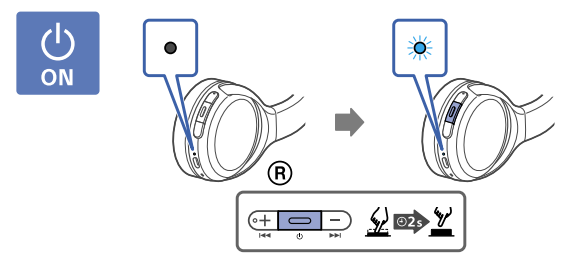
How to Charge
You can charge the headphones by simply connecting the provided USB charging cable to the wall charger. When charging the LED will show red light. Once completely charged the light will go off. The headphones take about 4 hours and 30 minutes to fully charge.
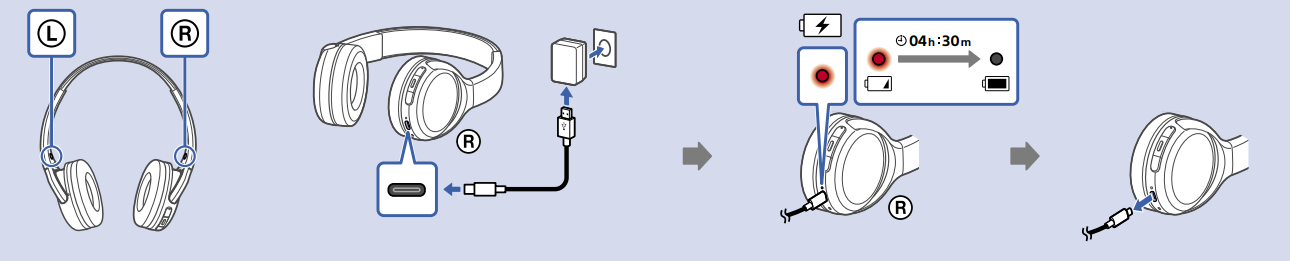
How to Connect Using Bluetooth
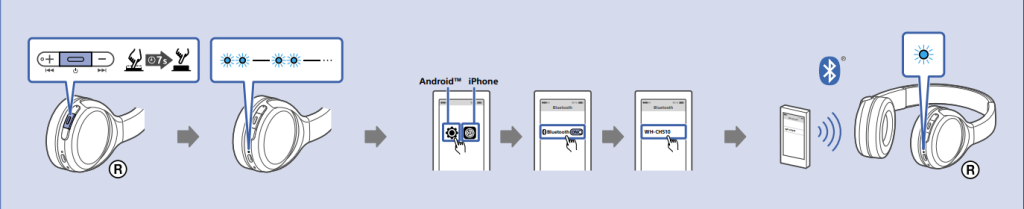
- Press the power button and hold for 7 seconds. The LEDs will flash blue light twice.
- Turn on the Bluetooth of your device and look for “WH-CH510” and connect to it.
- Once connected the LED will turn solid blue.
How to Adjust Volume and Control Tracks
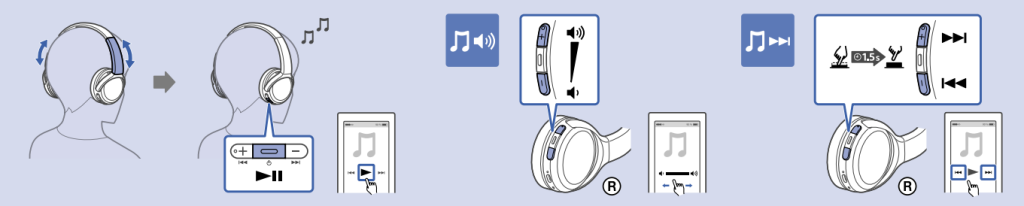
- To Play/Pause tracks: Press once the Power button.
- To adjust the Volume: Use the + and – buttons.
- To go to Next Track: Press and hold the + button for 1.5 seconds.
- To go to Previous Track: Press and hold the – button for 1.5 seconds.
How to Turn Off
- Press the Power button and hold for 2 seconds. The LED will turn off.
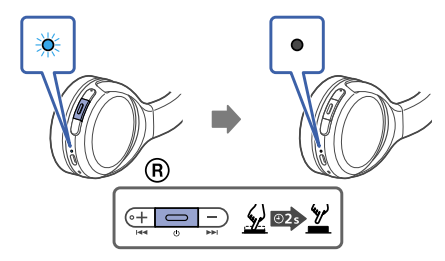
How to Answer/Hang-up Calls
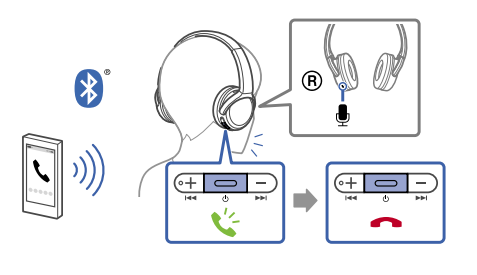
- Press the power button once to answer an incoming call.
- Press the power button once to hang up the call.
How to activate the Voice Assistant?
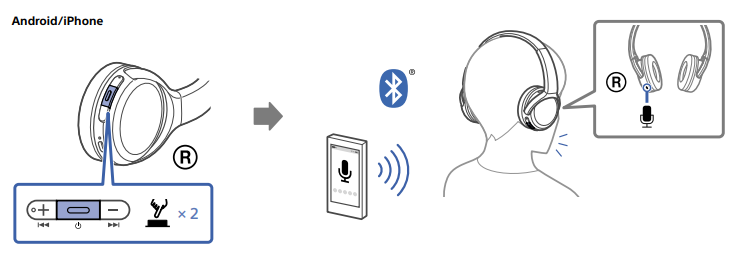
PROS
- Good Sound Quality
- Good Battery Life
- Good Stability
- Lightweight
CONS
- Lacks padding on the headband
- Cheap Look and Feel
VERDICT
If you are a Sony user and looking for some high-end Sony headphones, it is suggested to look for other options. If you are interested in budget friendly Sony headphones that provide the basics as well as some additional features of headphones such as easy control and good sound quality these headphones are a good option for you.
FAQs
- What version of Bluetooth does this have?
The Bluetooth version of these headphones is 5.0. - Do these have a 3.5 headphone jack?
No, these headphones are purely wireless and don’t support a 3.5mm audio jack. - Do these support wideband HFP?
Yes, they support wideband HFP. - How much playtime with a full charge?
The playtime depends on the usage, but the following is the claimed provided playtime when fully charged- Bluetooth connection
- Music playback time (AAC): Max. 35 hours
- Music playback time (SBC): Max. 32 hours
- About 90 minutes of music playback is possible after 10 minutes of charging.
- Communication time: Max. 30 hours
- Standby time: Max. 200 hours
- Do these headphones pair with a Sony home stereo system that has NFC?|
Yes, they pair with Sony Home Stereo.
Sony WH-CH510
Help Guide
Wireless Stereo Headset
WH-CH510
Use this manual if you encounter any problems, or have any questions.
Getting started
What you can do with the Bluetooth function
About the voice guidance
Supplied accessories
Checking the package contents
Parts and controls
Location and function of partsAbout the indicator
Power/Charging
Charging the headsetAvailable operating timeChecking the remaining battery chargeTurning on the headset
View the manual for the Sony WH-CH510 here, for free. This manual comes under the category headphones and has been rated by 11 people with an average of a 8.6.
This manual is available in the following languages: English. Do you have a question about the Sony WH-CH510 or do you need help?
Ask your question here
Index
- Pairing and connecting with a computer (Windows 10)
- Pairing and connecting with a computer (Windows 8.1)
- Pairing and connecting with a computer (Windows 7)
- Connecting to a paired computer (Windows 10)
- Connecting to a paired computer (Windows 8.1)
- Connecting to a paired computer (Windows 7)
- Connecting the headset to 2 Android smartphones (multipoint connection)
Product Images (7)

Sony WH-CH510 specifications
Below you will find the product specifications and the manual specifications of the Sony WH-CH510.
The Sony WH-CH510 headphone is a lightweight audio accessory, weighing 132 grams, that offers a standby time of up to 200 hours. Featuring a driver unit of 30 millimeters and a magnet type of ferrite, this headphone provides a stable and consistent sound experience.
With Bluetooth version 5.0, the Sony WH-CH510 headphone allows for seamless wireless connectivity to various devices. It supports Bluetooth profiles such as A2DP, AVRCP, HFP, and HSP, enabling easy pairing and control options.
Equipped with buttons for volume control, this headphone allows for convenient adjustment of audio levels. It features a rechargeable battery, ensuring hassle-free and portable usage. The wireless range of the Sony WH-CH510 headphone extends up to 10 meters, providing freedom of movement while still maintaining audio connectivity.
Operating within the 2.4 GHz frequency band, this headphone delivers a stable and reliable connection. It supports audio formats like AAC and SBC, ensuring compatibility with a wide range of media sources.
In summary, the Sony WH-CH510 headphone is a lightweight audio accessory that offers a long standby time and utilizes Bluetooth 5.0 for seamless wireless connectivity. With convenient volume control buttons and a rechargeable battery, this headphone provides a wireless range of up to 10 meters. It operates within the 2.4 GHz frequency band and supports audio formats such as AAC and SBC, delivering a stable and versatile audio experience.
Headphone frequency
20 — 20000 Hz
Cables included
USB Type-C
General
| Brand | Sony |
| Model | WH-CH510 | WHCH510W.CE7 |
| Product | headphone |
| EAN | 4548736101487 |
| Language | English |
| Filetype | User manual (PDF) |
Headphones
| Headphone frequency | 20 — 20000 Hz |
| Driver unit | 30 mm |
| Magnet type | Ferrite |
| Ear coupling | Supraaural |
Weight & dimensions
Packaging content
| Cables included | USB Type-C |
Battery
| Standby time | 200 h |
| Battery type | Built-in battery |
| Rechargeable battery | Yes |
| Battery recharge time | 4.5 h |
| Continuous audio playback time | 35 h |
| Battery operated | Yes |
Ports & interfaces
| Bluetooth version | 5.0 |
| Bluetooth profiles | A2DP, AVRCP, HFP, HSP |
| Wireless range | 10 m |
| Frequency band | 2.4 GHz |
| USB connector | USB Type-C |
| Connectivity technology | Wireless |
| Bluetooth | Yes |
| USB connectivity | Yes |
Performance
| Volume control | Buttons |
| Product type | Headphones |
| Product color | White |
| Headset type | Binaural |
| Wearing style | Head-band |
| Recommended usage | Calls/Music |
Music player
| Audio formats supported | AAC, SBC |
Other features
Microphone
Logistics data
| Harmonized System (HS) code | 85183000 |
show more
Frequently Asked Questions
Can’t find the answer to your question in the manual? You may find the answer to your question in the FAQs about the Sony WH-CH510 below.
How do I pair my Sony WH-CH510 headphones with a device?
To pair your Sony WH-CH510 headphones, simply turn on the Bluetooth on your device, and press and hold the power button on the headphones until the LED light starts blinking. Then, search for available devices on your device’s Bluetooth settings and select the WH-CH510 to complete the pairing process.
Is it possible to adjust the volume directly on the headphones?
Yes, you can easily adjust the volume on your Sony WH-CH510 headphones. On the right earcup, you will find the volume control buttons. Use the «+» button to increase the volume and the «-» button to decrease it.
How can I check the battery status of my headphones?
To check the battery status of your Sony WH-CH510 headphones, simply press and hold the power button for a few seconds. The LED light will then change color or blink to indicate the remaining battery level. Green light indicates a good charge, orange light indicates a moderate charge, and red light indicates that the battery is low and needs to be charged.
Can I use my Sony WH-CH510 headphones while they are being charged?
Yes, you can use your Sony WH-CH510 headphones while they are being charged. Simply connect the included USB cable to a power source and to the charging port on the headphones. You can enjoy uninterrupted music playback or calls while the headphones are charging.
How do I enable/disable the voice assistant feature on my Sony WH-CH510 headphones?
To enable or disable the voice assistant feature on your Sony WH-CH510 headphones, press and hold the power button and the volume down button simultaneously for a few seconds. This will activate or deactivate the voice assistant functionality.
Does the Sony WH-CH510 have a standby time of 200 hours?
Yes, the Sony WH-CH510 has a standby time of 200 hours. This means that the headphones can remain in standby mode for up to 200 hours before needing to be recharged.
What is the driver unit size of the Sony WH-CH510?
The Sony WH-CH510 has a driver unit size of 30 mm. This is a standard size for headphones and should provide decent sound quality.
Is the magnet type of the Sony WH-CH510 ferrite?
Yes, the magnet type of the Sony WH-CH510 is ferrite. Ferrite magnets are commonly used in headphones and offer a good balance of magnet strength and cost.
Does the Sony WH-CH510 have Bluetooth version 5.0?
Yes, the Sony WH-CH510 has Bluetooth version 5.0. This is the latest version of Bluetooth and offers improved connectivity and audio quality compared to older versions.
Can the Sony WH-CH510 be controlled using volume buttons?
Yes, the Sony WH-CH510 can be controlled using volume buttons. This allows for easy adjustment of the volume without needing to reach for a separate device.
What is the weight of the Sony WH-CH510?
The Sony WH-CH510 has a weight of 132 g.
What is bluetooth?
Bluetooth is a way of exchanging data wirelessly between electronic devices via radio waves. The distance between the two devices that exchange data can in most cases be no more than ten metres.
When is my volume too loud?
A volume above 80 decibels can be harmful to hearing. When the volume exceeds 120 decibels, direct damage can even occur. The chance of hearing damage depends on the listening frequency and duration.
What is noise cancelling?
Noise cancelling ensures that ambient noise is reduced.
How long does it take to charge the battery of the Sony WH-CH510?
It takes 4.5 h to charge the battery of the Sony WH-CH510.
Can I make hands-free calls with my headphone?
The newer headphones generally have a small microphone built in which allows for calling.
Is the manual of the Sony WH-CH510 available in English?
Yes, the manual of the Sony WH-CH510 is available in English .
Is your question not listed? Ask your question here