
JBL Tune 225TWS — удобные и функциональные беспроводные наушники с качественной звукоизоляцией. Наушники надежно фиксруются в ушах благодаря особенной конструкции устройства, а подключение устройства осуществляется при помощи скоростной технологии — Bluetooth 5.0.
Аккумулятор позволяет наушникам непрерывно вопроизводить музыку до 5 ч. В автономном режиме время работы повышается до 25 ч. Устройство поставляется в чехле эргономичной формы, который выполняет функцию зарядной станции.
Как подключить к смартфону JBL Tune 225TWS
Для этого необходимо включить Bluetooth на телефоне. Далее в списке найти и нажать на имя «JBL Tune225TWS». Затем ввести пароль по умолчанию.
По умолчанию в качестве пароля используются значения «0000» или «1234»
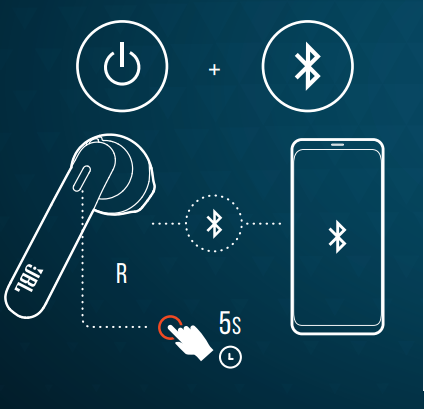
Как включить наушники и подключиться к устройству
Чтобы включить и подключить JBL TUNE 225 TWS к устройству нажмите и удерживайте правый наушник в течение 5 секунд.
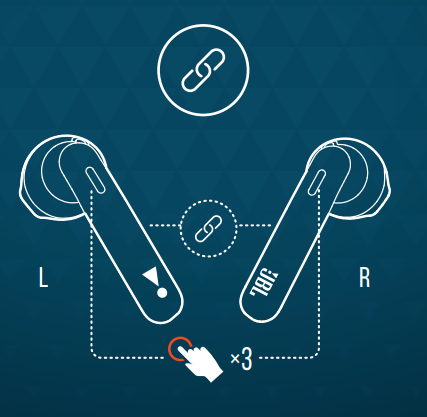
Как переподключать левый и правый наушник
Для переподключения левого и правого наушника коснитесь три раза левый/правый наушник.
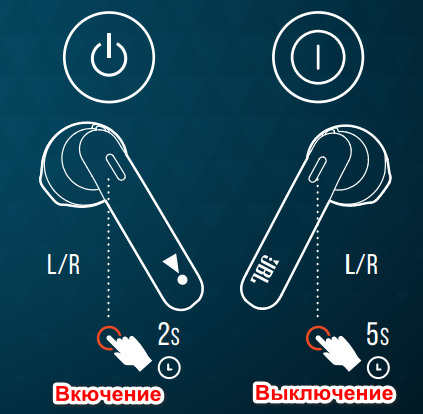
Как включить или выключить наушник
Для включения наушника необходимо удерживать кнопку более 2 секунд, для выключения — 5 секунд.
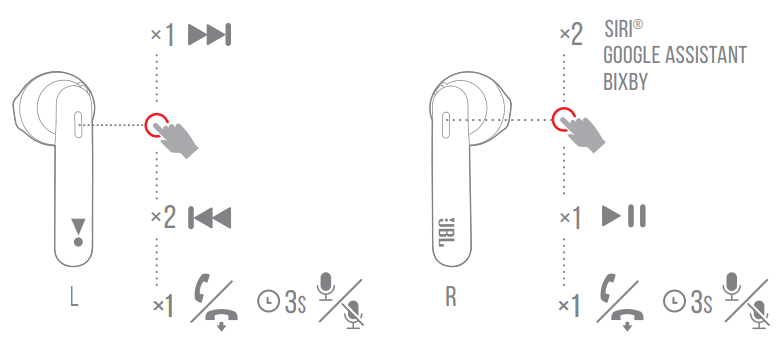
Управление наушниками в режиме стерео
- Следующий трек — одно касание левого наушника
- Предыдущий трек — два касания левого наушника
- Воспроизведение/пауза — одно касание правого наушника
- Ответ на звонок/завершить вызов — одно касание левого/правого наушника
- Включить/выключить микрофон — удерживать нажатым 3 секунды левый наушник
- Голосовой помощник — два касания правого наушника
JBL Tune 225TWS
WHAT’S
IN THE
BOX
quick
start
guide
First
time
use
Pairing
Charging
TUNE
225
TWS
L/R
Manual Controls
power onRECONNECTING LEFT & RIGHTpower on & connect to device
+
5S
L
×3
RR
2S
L/R
power off5SChargingfully chargedlow Battery
R
POWER ONBT CONNECTINGBT CONNECTEDLOW BATTERYCHARGINGFULLY CHARGED1. Stereo Mode 2. Mono Mode L/RL R
×2
×1
×2
×1
Siri
®
Google Assistant BixbySeamless automatic switchRL L/R
TECH
SPEC
Driver Size: 12 mm Dynamic driverFrequency Response: 20 Hz – 20 kHzSensitivity: 105 dB SPLMaximum SPL: 98 dB SPL
Microphone sensitivity: -30 dBV@1 kHz/Pa
Impedance: 32 ohm
Bluetooth transmitted power: <12 dBm
Bluetooth transmitted modulation: GFSK/ π/4DQPSK/ 8DPSK
Bluetooth frequency: 2.402 GHz – 2.48 GHz
Bluetooth profile version: A2DP 1.3, AVRCP 1.5, HFP 1.7
Bluetooth version: 5.0
Headset battery type: Lithium-ion battery (22 mAh / 3.85 V )
Charging case battery type: Lithium-ion battery (410 mAh / 3.85 V )
Power supply: 5 V 1.0 A
Charging time: <2 hrs from empty
Music playtime with BT on: up to 5 hrs
Total music playtime with charging case: up to 25 hrs Weight: 57 g
×1
×1
3S
×1
×1
3S
×2
×1
Siri
®
Google Assistant Bixby
×1
×1
3S
power on &
connect
BUTTON COMMAND
ON
Choose «JBL TUNE225TWS« to connect
JBL TUNE225TWS
Tap to pair. Device will be tied to
Your Google Account
Settings
Bluetooth
Bluetooth
DEVICES
Now Discoverable
Connected
JBL TUNE225TWS
OTHERS Android 6.0+
HOW TO WEAR
power
off
led
behaviors
View the manual for the JBL Tune 225TWS here, for free. This manual comes under the category headset and has been rated by 167 people with an average of a 8.3. This manual is available in the following languages: English. Do you have a question about the JBL Tune 225TWS or do you need help?
Ask your question here
Product Images (12)

JBL Tune 225TWS specifications
Below you will find the product specifications and the manual specifications of the JBL Tune 225TWS.
The JBL Tune 225TWS is a binaural headset with intraaural earbuds. With Bluetooth version 5.0, it has a reliable connectivity technology for True Wireless Stereo (TWS). Having A2DP, AVRCP, and HFP Bluetooth profiles, it offers a good range of options for Bluetooth audio transmission. Its 12mm driver unit delivers audio with a headphone sensitivity of 105 dB and an impedance of 32 Ω, which ensures clear and high-quality audio output. Weighing 57g, it’s a lightweight and comfortable option for audio streaming and video calling. The JBL Tune 225TWS lacks a 3.5mm connector, so it primarily operates with Bluetooth wireless technology. This model is engineered to offer an ergonomic fit and exceptional durability while remaining compact and stylish. It’s easy to wear for long periods and seal your ear canal to block out external noise. The earbuds come with different sizes of ear tips to offer optimal noise isolation to fit the user’s ears. The JBL Tune 225TWS comes in a sleek design, and will be an excellent accessory for anyone who wants to enjoy great audio on-the-go.
General
| Brand | JBL |
| Model | Tune 225TWS | JBLT225TWSBLK |
| Product | headset |
| EAN | 6925281975035, 6925281975059 |
| Language | English |
| Filetype | User manual (PDF), Datasheet (PDF) |
Performance
| Wearing style | In-ear |
| Headset type | Binaural |
| Product colour | Black |
| Product type | Headset |
| Recommended usage | Calls/Music |
| Operating keys | Play/pause, Track <, Track > |
| Works with the Google Assistant | Yes |
Headphones
| Ear coupling | Intraaural |
| Intraaural headphones type | Earbuds |
| Driver unit | 12 mm |
| Headphone sensitivity | 105 dB |
| Headphone frequency | 20 — 20000 Hz |
| Impedance | 32 Ω |
| Driver type | Dynamic |
Ports & interfaces
| Bluetooth | Yes |
| Bluetooth version | 5.0 |
| Bluetooth profiles | A2DP, AVRCP, HFP |
| Connectivity technology | True Wireless Stereo (TWS) |
| 3.5 mm connector | No |
| USB connectivity | — |
Weight & dimensions
Battery
| Battery operated | Yes |
| Battery type | Built-in battery |
| Battery technology | Lithium-Ion (Li-Ion) |
| Battery charge indicator | Yes |
| Battery voltage | 3.85 V |
| Battery capacity | 22 mAh |
| Battery capacity (charging case) | 410 mAh |
Microphone
| Microphone type | Built-in |
| Microphone mute | Yes |
Packaging content
| Cables included | USB Type-C |
| Warranty card | Yes |
| Quick start guide | Yes |
| Quantity | 1 |
Packaging data
| Package width | 100 mm |
| Package depth | 160 mm |
| Package height | 45 mm |
| Package weight | 166 g |
| Package type | Box |
show more
Frequently Asked Questions
Can’t find the answer to your question in the manual? You may find the answer to your question in the FAQs about the JBL Tune 225TWS below.
How to Connect JBL Tune 225TWS Headset to Computer
How do I connect my JBL Tune 225TWS headphones to my device?
To connect your JBL Tune 225TWS with your device, begin by removing both earbuds from the charging case. They should enter pairing mode automatically. Go to the Bluetooth settings on your device and choose «JBL Tune 225TWS» from the list of available devices. Once connected, you can enjoy wireless audio.
How can I control the playback functions of my JBL Tune 225TWS headset?
The JBL Tune 225TWS provides convenient playback controls. To pause or play music, simply tap once on either earbud. To skip to the next track, double-tap the right earbud, and to go back to the previous track, double-tap the left earbud. Adjusting the volume can be done by long-pressing either the left or right earbud.
How do I answer or end calls with my JBL Tune 225TWS headset?
Answering or ending calls with your JBL Tune 225TWS is straightforward. When a call comes in, a single tap on either earbud will answer it. To hang up, perform another single tap on either earbud. Enjoy the convenience of hands-free communication.
How can I charge my JBL Tune 225TWS headset?
To charge your JBL Tune 225TWS, make sure both earbuds are securely placed in the charging case. Connect the charging case to a power source using the provided USB-C cable. The LED indicators on the front of the case will show the charging progress of both the case and the earbuds.
How can I activate the voice assistant feature on my JBL Tune 225TWS headphones?
The JBL Tune 225TWS enables you to effortlessly activate the voice assistant on your device. Simply triple-tap the right earbud to activate the voice assistant function on your paired device. From there, you can request information, make calls, or carry out different tasks without physically interacting with your device.
Does the JBL Tune 225TWS have Bluetooth?
Yes, the JBL Tune 225TWS supports Bluetooth 5.0.
What is the driver unit size of the JBL Tune 225TWS?
The JBL Tune 225TWS has a 12 mm driver unit size.
Is the JBL Tune 225TWS a true wireless stereo (TWS) headset?
Yes, the JBL Tune 225TWS utilises True Wireless Stereo (TWS) connectivity technology.
Does the JBL Tune 225TWS have a 3.5 mm connector?
No, the JBL Tune 225TWS does not have a 3.5 mm connector.
What is the impedance of the JBL Tune 225TWS?
The JBL Tune 225TWS has an impedance of 32 Ω. This means it can effectively convert electrical signals into sound, guaranteeing excellent audio quality and compatibility with a broad range of devices.
What is the weight of the JBL Tune 225TWS?
The JBL Tune 225TWS has a weight of 57 g.
When is my volume too loud?
A volume above 80 decibels can be harmful to hearing. When the volume exceeds 120 decibels, direct damage can even occur. The chance of hearing damage depends on the listening frequency and duration.
What is noise cancelling?
Noise cancelling ensures that ambient noise is reduced.
Can I make hands-free calls with my headset?
The newer headset generally have a small microphone built in which allows for calling.
Is the manual of the JBL Tune 225TWS available in English?
Yes, the manual of the JBL Tune 225TWS is available in English .
Is your question not listed? Ask your question here
Вот пять популярных вопросов о наушниках и ответы на них:
1. Как долго держит заряд батареи наушников?
Наушники обеспечивают до 25 часов воспроизведения музыки с учетом зарядного кейса. Без кейса время работы составляет около 5-6 часов на одном заряде. Это делает их отличным выбором для длительных поездок или активного использования.
2. Как подключить наушники к устройству?
Чтобы подключить наушники, достаточно включить Bluetooth на вашем устройстве и открыть крышку зарядного кейса. Наушники автоматически войдут в режим сопряжения, и вы сможете выбрать их в списке доступных устройств. После первого подключения наушники будут автоматически подключаться при открытии кейса.
3. Подходят ли наушники для занятий спортом?
Да, наушники отлично подходят для занятий спортом. Они имеют удобную и надежную конструкцию, что позволяет им оставаться на месте во время движения. Кроме того, они обладают водо- и потоотталкивающими свойствами, что делает их идеальными для активного образа жизни.
4. Как управлять воспроизведением музыки и вызовами?
Управление наушниками осуществляется с помощью сенсорных панелей. Вы можете воспроизводить или приостанавливать музыку, касаясь панели, а также отвечать на звонки. Для переключения треков нужно дважды коснуться панели управления.
5. Есть ли возможность настройки звука через приложение?
Да, с помощью специального приложения вы можете настроить звуковые параметры наушников под свои предпочтения. Приложение также предоставляет доступ к обновлениям и дополнительным функциям, позволяя вам максимизировать возможности наушников.
Table of Contents
- JBL TUNE 225TWS Manual **
- HOW TO WEAR
- FIRST TIME USE
- POWER ON AND CONNECT
- PAIRING
- POWER OFF
- MANUAL CONTROLS
- BUTTON COMMAND
- 1. Stereo Mode
- 2. Mono Mode
- CHARGING
- LED BEHAVIORS
- TECH SPEC
- IC RF Exposure Information and Statement
- Head operation
- FAQ’S
- VIDEO
- Read User Manual Online (PDF format)
- Download This Manual (PDF format)
The JBL TUNE 225TWS Manual provides comprehensive instructions on how to use
and operate the wireless earbuds. The manual covers a range of topics,
including how to wear the earbuds, power on and connect, pairing, manual
controls, charging, LED behaviors, and technical specifications. Additionally,
the manual includes frequently asked questions (FAQs) that address common
issues and concerns. Customers can learn about the differences between the JBL
TUNE 225TWS and TUNE 205TWS, how to connect their phone to the earbuds via
Bluetooth, and whether the earbuds are noise-canceling. The manual also
provides guidance on how to reset the earbuds, how to pair the left earbud
with the right one, and how to adjust the volume. Overall, the JBL TUNE 225TWS
Manual is an essential resource for anyone looking to get the most out of
their wireless earbuds.
JBL TUNE 225TWS Manual **
**
JBL TUNE 225TWS Manual
HOW TO WEAR
FIRST TIME USE
POWER ON AND CONNECT
PAIRING
POWER OFF
MANUAL CONTROLS
BUTTON COMMAND
1. Stereo Mode
2. Mono Mode
CHARGING
LED BEHAVIORS
TECH SPEC
Driver Size: 12 mm Dynamic driver
Frequency Response: 20 Hz – 20 kHz
Sensitivity: 105 dB SPL
Maximum SPL: 98 dB SPL
Microphone sensitivity: -30 dBV@1 kHz/Pa
Impedance: 32 ohm
Bluetooth transmitted power: <12 dBm
Bluetooth transmitted modulation: GFSK/ π/4DQPSK/ 8DPSK
Bluetooth frequency: 2.402 GHz – 2.48 GHz
Bluetooth profile version: A2DP 1.3, AVRCP 1.5, HFP 1.7
Bluetooth version: 5.0
Headset battery type: Lithium-ion battery (22 mAh / 3.85 V )
Charging case battery type: Lithium-ion battery (410 mAh / 3.85 V )
Power supply: 5 V 1.0 A
Charging time: <2 hrs from empty
Music playtime with BT on: up to 5 hrs
Total music playtime with charging case: up to 25 hrs
Weight: 57 g
TO PROLONG BATTERY LIFESPAN, FULLY CHARGE AT LEAST ONCE EVERY 3 MONTHS.
BATTERY LIFE VARIES BY USE AND SETTINGS
IC RF Exposure Information and Statement
The SAR limit of Canada (C) is 1.6 W/kg averaged over one gram of tissue.
Device types: (6132A-TUNE225TWS) has also been tested against this SAR limit
According to this standard, the highest SAR value reported during product
certification for head use is 0.049 W / kg.The device was tested for typical
bodily operations where the product was kept 5 mm from the head. To maintain
compliance with IC RF exposure requirements, use accessories that maintain a
separation distance of 0mm between the user›s head and the back of the
headset. The use of belt clips, holsters and similar accessories shall not
contain metal parts in its assembly. Use of accessories that do not meet these
requirements may not comply with IC RF exposure requirements and should be
avoided.
Head operation
The device was subjected to a typical head manipulation test. In order to
comply with RF exposure requirements, a minimum separation distance of 0 cm
must be maintained between the user›s ear and the product (including the
antenna). Head exposure that do not meet these requirements may not meet RF
exposure requirements and should be avoided. Use only the supplied or approved
antenna. C: 6132A-TUNE225TWS
FAQ’S
What is the difference between TUNE 225TWS and TUNE 205TWS?
TUNE 225TWS is a Bluetooth speaker with built-in microphone. It can be used
for phone calls, voice assistant, and other applications.
Why does the charging case have a USB port?
The USB port allows you to charge your phone with the charging case.
How do I connect my phone to TUNE 225TWS via Bluetooth?
You can find the detailed steps in the user manual. Please download it from
our website.
Are there any gels available they don’t fit my ear tightly enough.
Unfortunately, we don’t have ear tips available for our JBL Tune 225TWS.
Please make sure to twist the earbuds away from the earlobes for a better fit.
what is the meaning of the sound it makes while listening to music? does it
mean battery is low? (sounds like a guitar )
When you hear the guitar tune it means that the earbuds are successfully
connected to your Bluetooth device.
Will these work with iphone 7?
An iPhone 7 with bluetooth function on is fully compatible with the JBL
earbuds.
World Wide Stereo is 43 years old and a proud authorized JBL dealer.
What is the difference between jbl 125 & jbl225?
These to headphones have a lot of differences. Starting from the design,
driver size of Tune 225TWS is larger than the Tune 125. However, Tune 125 has
more playtime hours. They both have Bluetooth 5.0.
how to pair the left ear bud with the right one? ( For me either the right
or the left would work) but they don’t work together.
To pair the right and left ear buds together, press the buttons on each ear
bud three times after pulling it out of the charging case.
is it noise canceling?
Our JBL Tune 225TWS doesn’t have noise canceling.
What is wrong with one of my ear buds if the ear bud is flashing white and
blue?
If after the reset procedure your JBL headphones are still flashing blue,
there may be a connection bug between the two devices and this requires a
complete re-pairing. For this, you will then need delete JBL headphones from
Bluetooth memory of the device you are trying to connect it to
How are they charged?
JBL Tune 225TWS comes with a Type-C USB charging cable and Charging case.
What to do if one isn’t connecting
You may try to reset the earbuds: Place both ear pods in the charging box,
while the charging box is plugged into a power source. Press and hold the
button on the Right pod for about 5 seconds. The LED on the pod will turn off
and then turn back on again. This restores factory defaults. (Please note that
charging must take place for a reset to work.) It also may be necessary to
remove or forget the earbuds from the list of paired Bluetooth devices in
order to pair again. if you’ve had this product for not more than 30 days, you
can always return it and get a full refund. Please use the link to contact our
customer support. https://support.jbl.com/us/en/#call
Can you listen to one bud at a time?
Yes. You could listen to either of the earbuds of our JBL Tune 225TWS at a
time.
noise cancelling?
The JBL Tune 225TWS does not have a noise-canceling feature.
How well do the ear buds fit in your ear
The fit is similar to the apple earbuds
Can you sleep with these in (on side with ear pressed on pillow)?
Sleeping while using the ear buds for an extended period of time might cause
discomfort to your ears.
How do you adjust the volume?
Our JBL Tune 225 TWS has no volume button. You can adjust the volume depending
on the source you’re using.
VIDEO
JBL TUNE 225TWS Manual – Optimized PDF
JBL TUNE 225TWS Manual – Original PDF
www.jbl.com
Read User Manual Online (PDF format)
Read User Manual Online (PDF format) >>
Download This Manual (PDF format)
Download this manual >>
Наушники JBL Tune 225 TWS. Инструкция на русском. Как пользоваться. Обзор
Комплект коробки наушников JBL TUNE 225 TWS
В комплект коробки наушников JBL TUNE 225 TWS входят два наушника, кейс, зарядный кабель, руководство по эксплуатации.
Как носить Bluetooth наушники JBL TUNE 225 TWS
Расположите наушники в ушах наиболее комфортным способом, как показано на рисунке.
Первое использование беспроводных наушников JBL TUNE 225 TWS
Перед первым использованием наушников JBL TUNE 225 TWS поместите их в зарядный кейс и выполните зарядку.
Включение и выключение наушников JBL TUNE 225 TWS
Чтобы включить наушники, извлеките их из зарядного футляра.
Чтобы включить наушник вне кейса, удерживайте нажатым левый/правый наушник в течение 2-х секунд. Чтобы выключить наушник вне кейса, удерживайте нажатым левый/правый наушник в течение 5-ти секунд.
Выключение наушников
Поместите Bluetooth наушники JBL TUNE 225 TWS в зарядный кейс, чтобы их выключить.
Подключение к телефону наушников JBL TUNE 225 TWS
Извлеките наушники из кейса. Индикатор наушников JBL TUNE 225 TWS будет мигать голубым цветом.
В режиме сопряжения наушников включите Bluetooth на Вашем смартфоне и выполните подключение к наушникам «JBL TUNE225TWS».
Устройства Android 6.0+
Как пользоваться наушниками JBL TUNE 225 TWS
Чтобы включить и подключить JBL TUNE 225 TWS нажмите и удерживайте правый наушник в течение 5 секунд.
Для переподключения левого и правого наушника коснитесь три раза левый/правый наушник.
Управление наушниками JBL TUNE 225 TWS в режиме стерео
Следующий трек — одно касание левого наушника
Предыдущий трек — два касания левого наушника
Воспроизведение/пауза — одно касание правого наушника
Ответ на звонок/завершить вызов — одно касание левого/правого наушника
Включить/выключить микрофон — удерживать нажатым 3 секунды левый наушник
Голосовой помощник — два касания правого наушника
Управление наушниками в режиме моно
Голосовой помощник — два касания наушника
Воспроизведение/пауза — одно касание наушника
Ответ на вызов/завершить разговор — одно касание наушника
Включить/выключить микрофон — удерживать нажатым наушник 3 секунды
Как заряжать беспроводные наушники JBL TUNE 225 TWS
Чтобы зарядить наушники JBL TUNE 225 TWS, поместите их в зарядный кейс и подключите его к блоку питания USB с помощью зарядного кабеля USB. Время полной зарядки — около 2-х часов.
Индикаторы заряда наушников
Технические характеристики наушников JBL TUNE 225 TWS
Размер драйвера 12 мм
Частота 20 Гц — 20 кГц
Чувствительность 105 Дб
Чувствительность микрофона 30 dBV@1 kHz/Pa
Сопротивление 32 Ом
Bluetooth 5.0
Тип аккумулятора наушников Литий-ионный аккумулятор (22 мАч / 3.85 В )
Тип аккумулятора кейса Литий-ионный аккумулятор (410 мАч / 3.85 В )
Питание 5 В 1.0 А
Время зарядки до 2 часов
Прослушивание музыки без подзарядки до 5 часов
Время прослушивания с подзарядкой от кейса до 25 часов
Вес 57г
Как чистить наушники JBL Tune 225 TWS
Для чистки беспроводных наушников JBL Tune 225 TWS можно использовать спирт или перекись водорода.
Чистка наушников может осуществляться ватными палочками.
При чистке наушников нельзя пользоваться моющими средствами, стиральным порошком, ацетоном или другими агрессивными средствами.
Читайте подробнее – как чистить беспроводные наушники серы, грязи и бактерий
JBL Tune 225TWS — удобные и функциональные беспроводные наушники с качественной звукоизоляцией. Наушники надежно фиксруются в ушах благодаря особенной конструкции устройства, а подключение устройства осуществляется при помощи скоростной технологии — Bluetooth 5.0.
Аккумулятор позволяет наушникам непрерывно вопроизводить музыку до 5 ч. В автономном режиме время работы повышается до 25 ч. Устройство поставляется в чехле эргономичной формы, который выполняет функцию зарядной станции.
Как подключить к смартфону JBL Tune 225TWS
Для этого необходимо включить Bluetooth на телефоне. Далее в списке найти и нажать на имя «JBL Tune225TWS». Затем ввести пароль по умолчанию.
По умолчанию в качестве пароля используются значения «0000» или «1234»
Как включить наушники и подключиться к устройству
Чтобы включить и подключить JBL TUNE 225 TWS к устройству нажмите и удерживайте правый наушник в течение 5 секунд.
Как переподключать левый и правый наушник
Для переподключения левого и правого наушника коснитесь три раза левый/правый наушник.
Как включить или выключить наушник
Для включения наушника необходимо удерживать кнопку более 2 секунд, для выключения — 5 секунд.
Управление наушниками в режиме стерео
- Следующий трек — одно касание левого наушника
- Предыдущий трек — два касания левого наушника
- Воспроизведение/пауза — одно касание правого наушника
- Ответ на звонок/завершить вызов — одно касание левого/правого наушника
- Включить/выключить микрофон — удерживать нажатым 3 секунды левый наушник
- Голосовой помощник — два касания правого наушника
quick
start
guide
WHAT’S
IN THE
BOX
HOW TO WEAR
First
time
use
power on &
connect
Pairing
power
off
Manual Controls
power on & connect to device
+
R
5
BUTTON COMMAND
1. Stereo Mode
×1
×2
L
×1 ×1
Charging
led
behaviors
low Battery
Charging
fully charged
TECH
SPEC
L
Settings
Bluetooth
DEVICES
JBL TUNE225TWS
Now Discoverable
«JBL TUNE225TWS»
Choose
RECONNECTING LEFT & RIGHT
L
S
R
3
S
Driver Size:
Frequency Response:
Sensitivity:
Maximum SPL:
Microphone sensitivity:
Impedance:
Bluetooth transmitted power:
Bluetooth transmitted modulation:
Bluetooth frequency:
Bluetooth profile version:
Bluetooth version:
Headset battery type:
Charging case battery type:
Power supply:
Charging time:
Music playtime with BT on:
Total music playtime with charging case:
Weight:
R
OTHERS
Bluetooth
Connected
to connect
R
×3
×2
Siri
®
Google Assistant
Bixby
Seamless
×1
automatic
3
×1 ×1
S
R
12 mm Dynamic driver
20 Hz – 20 kHz
105 dB SPL
98 dB SPL
-30 dBV@1 kHz/Pa
32 ohm
<12 dBm
GFSK/ π/4DQPSK/ 8DPSK
2.402 GHz – 2.48 GHz
A2DP 1.3, AVRCP 1.5, HFP 1.7
5.0
Lithium-ion battery (22 mAh / 3.85 V )
Lithium-ion battery (410 mAh / 3.85 V )
5 V
<2 hrs from empty
up to 5 hrs
up to 25 hrs
57 g
ON
JBL TUNE225TWS
Tap to pair. Device will be tied to
Your Google Account
power on
L/R
2
S
2. Mono Mode
×2
×1
switch
L/R
×1 ×1
POWER ON
BT CONNECTING
BT CONNECTED
LOW BATTERY
CHARGING
FULLY CHARGED
1.0 A
L/R
Android 6.0+
power off
L/R
5
S
Siri
®
Google Assistant
Bixby
3
S