
REFERENCE MANUAL
INTEGRATED AMPLIFIERS
SUPERNAIT 2 • NAIT XS 2 • NAIT 5si
ENGLISH

Contents
Section Page
Contents
1 Connections 1
1.1 Interconnect Cables 1
1.2 Loudspeaker Cables 1
2 Mains Power 1
2.1 Mains Plug Wiring 1
2.2 Equipment Fuses 1
2.3 Non-rewirable Mains Plugs 1
2.4 Mains Circuits and Cables 1
3 General Installation 2
3.1 Siting The Equipment 2
3.2 Switching On 2
3.3 Running In 2
3.4 Radio Interference 2
3.5 Lightning Precautions 2
3.6 Problems? 2
3.7 Service and Updates 2
4 SUPERNAIT 2
Introduction, Installation and Connection 3
4.1 Mains Power Connection 3
4.2 Signal Inputs 3
4.3 Speaker Outputs 3
4.4 av and hdd Outputs 3
4.5 Headphone Output 3
4.6 AV Bypass 4
4.7 Other Signal Inputs and Outputs 4
4.8 Power Supply Upgrades 4
4.9 General Connections Notes 4
4.10 External Control and Interface 4
5 Controls and Connections 5
5.1 Front Panel Controls 5
5.2 Rear Panel Connections 5
6 System Connections 6
6.1 SUPERNAIT 2 with Hi-Cap Power Supply 6
6.2 SUPERNAIT 2 with additional
NAP 200 Power Amplifier 6
6.3 SUPERNAIT 2 with Hi-Cap Power Supply
and NAP 200 Power Amplifier 7
7 Amplifier Operation
and Programmable Functions 8
7.1 Automatic Input Switching 8
7.2 Handset Volume and Balance Control 8
7.3 Mute 8
7.4 Display 8
7.5 Switch-on 8
7.6 Remote Control 8
7.7 Defaults 8
7.8 Fault Conditions 8
8 Specifications 9
9 NAIT XS 2
Introduction, Installation and Connection 10
9.1 Mains Power Connection 10
9.2 Signal Inputs 10
9.3 Speaker Outputs 10
9.4 av and hdd Outputs 10
9.5 Headphone Output 10
9.6 AV Bypass 11
9.7 Other Signal Inputs and Outputs 11
9.8 Power Supply Upgrades 11
9.9 General Connections Notes 11
9.10 External Control and Interface 11
10 Controls and Connections 12
10.1 Front Panel Controls 12
10.2 Rear Panel Connections 12
11 System Connections 13
11.1 Nait XS 2 with FlatCap XS Power Supply 13
11.2 Nait XS 2 with Hi-Cap Power Supply
and NAP 200 Power Amplifier 13
12 Amplifier Operation
and Programmable Functions 14
12.1 Automatic Input Switching 14
12.2 Handset Volume Control 14
12.3 Mute 14
12.4 Display 14
12.5 Switch-on 14
12.6 Remote Control 14
12.7 Defaults 14
12.8 Fault Conditions 14
13 Specifications 15
14 NAIT 5si
Introduction, Installation and Connection 16
14.1 Mains Power Connection 16
14.2 Signal Inputs 16
14.3 Speaker Outputs 16
14.4 hdd Output 16
14.5 Headphone Output 16
15 Controls and Connections 17
15.1 Front Panel Controls 17
15.2 Rear Panel Connections 17
16 Amplifier Operation
and Programmable Functions 18
16.1 Automatic Input Switching 18
16.2 AV Bypass 18
16.3 Handset Volume Control 18
16.4 Mute 18
16.5 Display 18
16.6 Remote Control 18
16.7 Defaults 18
16.8 Fault Conditions 18
17 Specifications 19
18 NARCOM 4 Remote Handset 20
18.1 Using NARCOM 4 20
18.2 NARCOM 4 Keys 20
19 Declaration of Conformity 21
20 Statutory Safety Warnings 21

Introduction
Naim Audio products are conceived with performance as the top priority. Careful
installation will help ensure that their full potential is achieved. This manual covers all
integrated amplifiers. It begins with some general installation notes. Product specific
information begins in Section 4.
Note: Please read the
Statutory Safety Warnings
found at the end of this
manual.
1 Connections
It is important for both safety and performance that
the standard cables supplied are not modified.
1.1 Interconnect Cables
If options are available with your equipment and
installation, DIN interconnect sockets should be used in
preference to RCA Phono sockets. One end of each Naim
interconnect cable is marked with a band to establish
its correct orientation. The band denotes the end that
connects to the signal source. Naim Hi-Line interconnect
cable will provide the best results.
Interconnect plugs and sockets should be kept clean
and free from corrosion. The easiest way to clean them
is to switch off the equipment, pull the plugs out of their
sockets, and push them back in again. Contact cleaners
and “enhancers” should not be used as the film they
deposit may degrade the sound.
1.2 Loudspeaker Cables
Loudspeaker cables are vitally important. They should
each be at least 3.5 metres long and of equal length. The
recommended maximum is normally 20 metres although
longer cables may be viable with some Naim amplifiers.
Some Naim amplifiers are designed only to work with
Naim loudspeaker cable and using alternatives may
degrade the performance or even damage the amplifier.
Other Naim amplifiers can be used with any high quality
loudspeaker cable although we recommend that Naim
loudspeaker cable is used. Naim loudspeaker cable is
directional and should be oriented so that the printed
arrow points towards the speakers. The Naim loudspeaker
connectors supplied are designed to comply with
European safety legislation and must be used.
Contact your local retailer or distributor for further advice
on loudspeaker cables and connectors.
2 Mains Power
Where fused plugs are used 13 amp fuses should be
fitted. Fuses of a lower rating will fail after a period
of use. Do not wire voltage dependent resistors or
noise suppressors into mains plugs. They degrade the
mains supply and the sound.
2.1 Mains Plug Wiring
In some territories a mains plug may need to be fitted to
the supplied mains lead. As the colours of the wires in the
mains lead may not correspond with the coloured markings
identifying the terminals in the plug proceed as follows:
The wire coloured GREEN-AND-YELLOW must be
connected to the terminal in the plug marked by the
letter E or by the safety earth symbol or coloured GREEN or
GREEN and YELLOW.
The wire coloured BLUE must be connected to the terminal
in the plug marked with the letter N or coloured BLACK.
The wire coloured BROWN must be connected to the
terminal in the plug marked with the letter L or coloured
RED.
2.2 Equipment Fuses
Mains powered Naim Audio equipment is fitted with a
mains fuse on the rear panel adjacent to the mains input
socket. Replace it if necessary only with the spare fuse
supplied or with an identical fuse. Repeated failure of the
fuse points to a fault that should be investigated by your
retailer or Naim itself.
2.3 Non-rewirable Mains Plugs
If a non-rewirable plug is cut from a mains lead (for
whatever purpose) the plug MUST be disposed of in a way
to render it totally useless. Considerable shock hazard exists
if the cut-off plug is inserted into a mains outlet.
2.4 Mains Circuits and Cables
A hi-fi system usually shares a mains circuit with other
household equipment some of which can cause distortion
of the mains waveform. This distortion can in turn lead to
mechanical hum from mains transformers. Some Naim
transformers are large in size, making them relatively
sensitive to such distortion, and it may be necessary to take
account of transformer hum when siting your equipment.
Transformer hum is not transmitted through the speakers
and has no effect on the performance of the system;
however, a separate mains circuit may reduce it. Such
a circuit (ideally with a 30 or 45 Amp rating) will also
generally improve system performance. Advice on the
installation of a separate mains circuit should be sought
from a qualified electrician.
Use only the mains leads and plugs supplied or the Naim
PowerLine mains cable.
E1

Introduction
3 General Installation
Naim equipment is designed to offer the finest
performance possible avoiding compromise
wherever practical. This can lead to circumstances
that may be unfamiliar. The notes that follow contain
advice specifically related to Naim equipment as
well as more general warnings about the use of
domestic audio products. Please read them carefully.
3.1 Siting The Equipment
In order to reduce the risk of hum audible from the
loudspeakers, power supplies and power amplifiers
should be located a reasonable distance away from
other equipment. The maximum separation distance for
connected equipment is that allowed by the standard
interconnect lead.
Some Naim equipment is extremely heavy. Check the
weight of the equipment prior to lifting and if necessary
use more than one person so that it can be moved safely.
Ensure that your equipment rack or table can easily
support the weight and is stable.
3.2 Switching On
Source components and power supplies should be
switched on before the power amplifiers. Always switch
amplifiers off and wait a minute before connecting or
disconnecting any leads. Always use the power switch on
the product rather than a mains outlet switch.
A “thump” may be heard from the loudspeakers as power
amplifiers are switched on. This is normal, will not cause
any loudspeaker damage and does not point to any fault
or problem. A mild “pop” may also be heard shortly after
equipment is switched off.
3.4 Radio Interference
In some circumstances, depending on where you live
and the earthing arrangements in your home, you may
experience radio frequency interference. Controls on
broadcasting in some territories allow very high levels of
radio frequency radiation and both the choice and exact
siting of equipment may be critical. Susceptibility to radio
frequency interference is related to the wide internal
bandwidth necessary for high sound quality. A radio
frequency filter kit is available for some Naim equipment
but sound quality will be progressively compromised as
more elements of the kit are fitted.
3.5 Lightning Precautions
Your Naim hi-fi system can be damaged by lightning
and should be turned off and disconnected from the
mains when there is risk of lightning strike. For complete
protection all mains plugs and any aerial cables should be
disconnected when not in use.
3.6 Problems?
Consumer protection varies from country to country. In
most territories a retailer must be prepared to take back
any equipment he has sold if it cannot be made to work
satisfactorily. A problem may be due to a fault in the
system or its installation so it is essential to make full use of
your dealer’s diagnostic skills. Please contact your local
distributor, or Naim Audio directly, if any difficulties cannot
be resolved.
Some Naim equipment is made in special versions for
different territories and this makes it impracticable to
arrange international guarantees. Please establish the
local guarantee arrangements with your retailer. Contact
Naim Audio directly for help and advice if necessary.
3.3 Running In
Naim equipment takes a considerable time to run in
before it performs at its best. The duration varies, but under
some conditions the sound may continue to improve for
over a month. Better and more consistent performance
will be achieved if the system is left switched on for long
periods. It is worth remembering however that equipment
left connected to the mains can be damaged by
lightning.
3.7 Service and Updates
It is essential that repairs and updates are only carried
out by an authorised Naim retailer or at the factory by
Naim itself. Many components are custom made, tested
or matched and appropriate replacements are often
unobtainable from other sources.
Direct contact to Naim for service or update information
should be made initially through Customer Services:
Tel: +44 (0)1722 426600
Email: info@naimaudio.com
Please quote the product serial number (found on its rear
panel) in all correspondence.
E2

SUPERNAIT 2
4 SUPERNAIT 2 Introduction, Installation and Connection
The Supernait 2 is a very high performance stereo integrated amplifier that combines a
preamplifier providing six line-level analogue inputs with a power amplifier rated at 80
Watts per channel. The Supernait 2 can be controlled by either its remote handset or by
front panel mounted volume and balance knobs, and mute and input selection buttons.
The Supernait 2 remote handset is described in Section 18 of this manual. A front panel
6.3mm jack socket enables the use of headphones with the Supernait 2.
A variety of power supply upgrade, alternative preamplifier and alternative or additional
power amplifier options are possible for the Supernait 2. Diagrams illustrating the
connection of some of these are shown in Section 6. If no power supply or alternative
amplifier options are to be employed, the Supernait 2 preamp/power amp link plug,
supplied in the accessory pack, must be fitted to the rear panel “preamp out” and
“power amp in” sockets. The link plug is shown fitted in Diagram 5.2.
Your Supernait 2 should be installed on a dedicated equipment stand intended for
the purpose. Do not stand it directly on top of another item of equipment. Care should
be taken to ensure that it is level. The amplifier should be installed in its final location
before connecting cables or switching on. Ensure that the volume is turned down before
switching on.
4.1 Mains Power Connection
Connect the Supernait 2 to a mains power socket using
either the mains cable supplied or a Naim Power-Line.
Note: The Supernait 2
incorporates an AV
Bypass switch on its rear
panel. The switch should
only be set to “On” if the
amplifier is to be used
in conjunction with an
AV processor in a home
theatre system. In all
other installations the
AV Bypass switch should
be set to “Off”. Speaker
and amplifier damage
may occur if a signal is
inadvertently connected
to the Supernait 2 av
input while the AV
Bypass switch is “On”.
4.2 Signal Inputs
The Supernait 2 front panel input buttons select the source
input signal to be routed to the integral power amplifier
and the loudspeakers or headphones. The six buttons are
labelled cd, tuner, hdd (hard disk drive), av, aux 1 and aux 2.
The cd, tuner, hdd and av input buttons correspond to
parallel DIN and RCA phono input sockets on the rear
panel, while the aux 1 input button corresponds only to a
pair of RCA phono sockets.
Note: The hdd and av sockets carry both inputs and
outputs. See Section 4.4 for more information.
The aux 2 input button corresponds to a DIN input socket
on the rear panel. The aux 2 DIN socket also carries a
power supply output intended to power a Naim Stageline
or SuperLine phono preamplifier.
Note: For optimum sound quality DIN sockets should be
used in preference to RCA phono sockets.
Note: Where an input has DIN and phono socket options
only one should be connected at any one time.
Always use high quality interconnect cables to connect
sources to inputs. The Naim Hi-Line will produce the best
results.
4.3 Speaker Outputs
A set of stereo speaker connection sockets is provided on
the rear panel. Custom Naim loudspeaker connectors are
supplied to make the connection and in order to comply
with current European safety regulations these should
always be used. Naim speaker cable will provide the best
results, however, a wide range of speaker cable types can
be used without risk of damage to the amplifier.
Ensure when connecting speakers that they are “in
phase”. That is, the positive and negative connection
orientation at both the speaker and amplifier ends of the
cable is the same for both channels.
4.4 av and hdd Outputs
The Supernait 2 av and hdd inputs have associated
outputs that enable the selected input signal to be routed
externally; to an audio recording component for example.
Note: The av and hdd outputs remain active while
their corresponding inputs are selected. Take care that
a feedback loop is not inadvertently created by the
simultaneous selection of input and output.
4.5 Headphone Output
The Supernait 2 headphone output is able to drive the
majority of headphone types. The 6.3mm (1/4”) jack
socket, rather than the smaller 3.5mm jack socket, provides
more reliable connection and potentially higher sound
quality. Most high-quality headphones are supplied with
an adaptor that enables use with either 3.5mm or 6.3mm
jack sockets. Inserting a headphone plug will mute the
Supernait 2 speaker outputs. Removing the headphone
plug will restore the outputs.
E3

SUPERNAIT 2
4.6 AV Bypass
The Supernait 2 can be integrated within a multi-channel
home theatre system, driving the front left and right
channel speakers, by engaging its AV Bypass mode.
AV Bypass mode enables a home theatre processor to
take over volume control of signals connected to the
Supernait 2 av input. It is engaged using the switch on the
rear panel. The Supernait 2 volume control indicator will
extinguish when AV Bypass mode is engaged and the av
input is selected. The remote handset volume control will
also be disabled.
Note: The AV Bypass feature must be used with care. It
bypasses the Supernait 2 volume control leaving any signal
connected to the av input to be passed to the speakers at
full volume.
Note: Inserting a headphone plug while AV Bypass mode
is selected temporarily returns the Supernait 2 to normal
operation. Removing the headphone plug will return the
Supernait 2 to AV Bypass mode.
Note: The mute function is disabled when AV Bypass mode
is engaged.
4.7 Other Signal Inputs and Outputs
The Supernait 2 incorporates DIN bi-amp (output), RCA
phono sub out, DIN pre-amp out, and DIN power-amp in
sockets on its rear panel. In normal use the pre-amp out
and power-amp in sockets are connected by a link plug.
The link plug should be removed only in the following
circumstances:
Diagrams 6.1, 6.2 and 6.3 illustrate some applications of
the Supernait 2 preamp out, power amp in and bi-amp
sockets.
4.8 Power Supply Upgrades
The Supernait 2 preamplifier can be upgraded through the
connection of an external Flatcap, Hi-Cap or Supercap
power supply. Diagrams illustrating power supply upgrades
are shown in Section 6. The Supernait 2 and external power
supply must be switched off when connections are made.
Switch on the external power supply first followed by the
Supernait 2 when all connections are complete.
4.9 General Connections Notes
The Supernait 2 negative input and output connections
for each channel are common. The mains earth (ground)
should always be connected regardless of what other
equipment is used in conjunction with the amplifier. The
mains earth only grounds the case and the electrostatic
screen within the transformer, and is not connected to the
signal negative. In order to avoid hum loops, the signal
negative of the whole system should be connected to the
mains earth (ground) in one place.
A signal ground connection is fitted to the Supernait 2 rear
panel. This is intended to be used to connect a turntable
pick-up arm signal earth only.
4.10 External Control and Interface
The Supernait 2 is fitted on its rear panel with a 3.5mm jack
Remote In socket and a mini-USB interface socket.
• A power supply upgrade is to be used.
• An alternative preamplifier is to be used with the
Supernait 2 power amplifier.
• An alternative power amplifier is to be used with the
Supernait 2 preamplifier.
Note: When an external preamplifier is connected to the
Supernait 2 power-amp in socket, a fault will initially be
indicated by the Supernait 2 mute button flashing. To clear
the fault, press and hold the flashing mute button. This will
un-mute the amplifier and turn off the display and volume
indicator.
Note: The power amp in socket carries a 24V DC power
supply output intended for Naim preamplifiers that require
an external power supply.
The Supernait 2 DIN bi-amp output socket provides a
preamp output signal that enables a second power
amplifier to be used in conjunction with the Supernait 2
power amplifier.
The RCA phono sub out sockets provide a stereo output
intended for connection to an active subwoofer. The
output signal is a duplicate of the preamplifier output. No
low-pass filtering is applied.
The Remote In socket can be used for RC5 remote control
of the Supernait 2 via a wired connection or a remote IR
repeater.
The mini-USB socket enables firmware upgrades and
diagnostic tests to be carried out. Contact your Naim
retailer for more information if required.
Note: The mini-USB interface is not intended for the
connection of USB memory devices.
E4
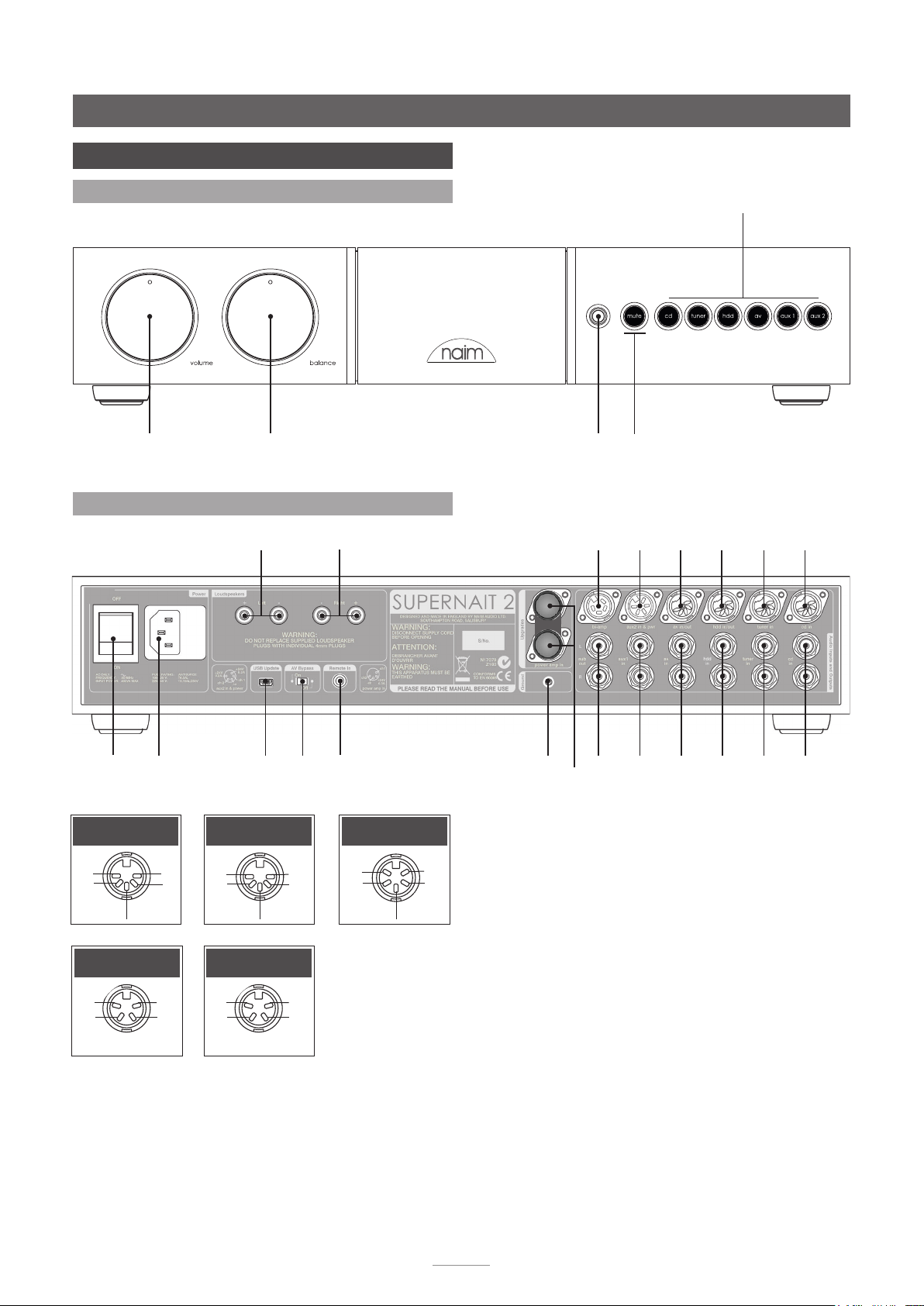
SUPERNAIT 2
5 Controls and Connections
5.1 Front Panel Controls
source selection
volume
balance
5.2 Rear Panel Connections
power
mains
input
and fuse
cd and tuner
Inputs
ch1
ch2
-ve
nc
nc
left
speaker
USB
update
interface
av and hdd
Inputs
ch1
ch2
-ve
right
speaker
av
bypass
switch
ch1
(out)
ch2
(out)
remote in
aux 2 input
+ve
ch2
-ve
+ve
ch1
headphone
mute
socket
aux 2
bi-amp out
signal ground
preamp out and
sub
out
in &
power
out
aux 1
in RCA
av in
& out
av in
RCA
hdd in
& out
hdd
in RCA
tuner
in
tuner
in RCA
power amp in. Link
plug tted.
Note: The link plug should be removed only if a power
supply upgrade is to be used or an alternative preamplifier
is to use the Supernait 2 power amplifier section. It should
remain fitted in all other circumstances.
cd in
cd
in RCA
preamp and
bi-amp out
ch2 ch2
-ve -ve
ch1 ch1
nc +ve
power amp in
E5
Loading…
Page doesn’t exist.
Instruction/ maintenance manual of the product SUPERNAIT 2 Naim
- File size: 2.86 mb
- Number of pages: 22
Read the Naim SUPERNAIT 2 manual — avoid problems
An important point after buying a device Naim SUPERNAIT 2 (or even before the purchase) is to read its user manual. We should do this for several simple reasons:
- to know how to properly use the device
- to know how to perform maintenance/ periodic checks of correct operation of the product Naim SUPERNAIT 2
- to know what to do in case of failure Naim SUPERNAIT 2
If you have not bought Naim SUPERNAIT 2 yet, this is a good time to familiarize yourself with the basic data on the product. First of all view first pages of the manual, you can find above. You should find there the most important technical data Naim SUPERNAIT 2 — thus you can check whether the hardware meets your expectations. When delving into next pages of the user manual, Naim SUPERNAIT 2 you will learn all the available features of the product, as well as information on its operation. The information that you get Naim SUPERNAIT 2 will certainly help you make a decision on the purchase.
If you already are a holder of Naim SUPERNAIT 2, but have not read the manual yet, you should do it for the reasons described above. You will learn then if you properly used the available features, and whether you have not made any mistakes, which can shorten the lifetime Naim SUPERNAIT 2.
However, one of the most important roles played by the user manual is to help in solving problems with Naim SUPERNAIT 2. Almost always you will find there Troubleshooting, which are the most frequently occurring failures and malfunctions of the device Naim SUPERNAIT 2 along with tips on how to solve them. Even if you fail to solve the problem, the manual will show you a further procedure – contact to the customer service center or the nearest service center

R E F E R E N C E M A N U A L
I N T E G R A T E D A M P L I F I E R S
S U P E R N A I T 2 • N A I T X S 2 • N A I T 5 s i
ENGLISH
Хорошее руководство по эксплуатации
Законодательство обязывает продавца передать покупателю, вместе с товаром, руководство по эксплуатации Naim SUPERNAIT 2. Отсутствие инструкции либо неправильная информация, переданная потребителю, составляют основание для рекламации в связи с несоответствием устройства с договором. В законодательстве допускается предоставлении руководства в другой, чем бумажная форме, что, в последнее время, часто используется, предоставляя графическую или электронную форму инструкции Naim SUPERNAIT 2 или обучающее видео для пользователей. Условием остается четкая и понятная форма.
Что такое руководство?
Слово происходит от латинского «instructio», тоесть привести в порядок. Следовательно в инструкции Naim SUPERNAIT 2 можно найти описание этапов поведения. Цель инструкции заключается в облегчении запуска, использования оборудования либо выполнения определенной деятельности. Инструкция является набором информации о предмете/услуге, подсказкой.
К сожалению немного пользователей находит время для чтения инструкций Naim SUPERNAIT 2, и хорошая инструкция позволяет не только узнать ряд дополнительных функций приобретенного устройства, но и позволяет избежать возникновения большинства поломок.
Из чего должно состоять идеальное руководство по эксплуатации?
Прежде всего в инструкции Naim SUPERNAIT 2 должна находится:
— информация относительно технических данных устройства Naim SUPERNAIT 2
— название производителя и год производства оборудования Naim SUPERNAIT 2
— правила обслуживания, настройки и ухода за оборудованием Naim SUPERNAIT 2
— знаки безопасности и сертификаты, подтверждающие соответствие стандартам
Почему мы не читаем инструкций?
Как правило из-за нехватки времени и уверенности в отдельных функциональностях приобретенных устройств. К сожалению само подсоединение и запуск Naim SUPERNAIT 2 это слишком мало. Инструкция заключает ряд отдельных указаний, касающихся функциональности, принципов безопасности, способов ухода (даже то, какие средства стоит использовать), возможных поломок Naim SUPERNAIT 2 и способов решения проблем, возникающих во время использования. И наконец то, в инструкции можно найти адресные данные сайта Naim, в случае отсутствия эффективности предлагаемых решений. Сейчас очень большой популярностью пользуются инструкции в форме интересных анимаций или видео материалов, которое лучше, чем брошюра воспринимаются пользователем. Такой вид инструкции позволяет пользователю просмотреть весь фильм, не пропуская спецификацию и сложные технические описания Naim SUPERNAIT 2, как это часто бывает в случае бумажной версии.
Почему стоит читать инструкции?
Прежде всего здесь мы найдем ответы касательно конструкции, возможностей устройства Naim SUPERNAIT 2, использования отдельных аксессуаров и ряд информации, позволяющей вполне использовать все функции и упрощения.
После удачной покупки оборудования/устройства стоит посвятить несколько минут для ознакомления с каждой частью инструкции Naim SUPERNAIT 2. Сейчас их старательно готовят или переводят, чтобы они были не только понятными для пользователя, но и чтобы выполняли свою основную информационно-поддерживающую функцию.
FAQ: Types of Manuals and Their Contents
NAIM SUPERNAIT 2 Manuals come in various types, each serving a specific purpose to help users effectively operate and maintain their devices. Here are the common types of NAIM SUPERNAIT 2 User Guides and the information they typically include:
- User Manuals: Provide comprehensive instructions on how to use the device, including setup, features, and operation. They often include troubleshooting tips, safety information, and maintenance guidelines.
- Service Instructions: Designed for technicians and repair professionals, these manuals offer detailed information on diagnosing and repairing issues with the device. They include schematics, parts lists, and step-by-step repair procedures.
- Installation Guides: Focus on the installation process of the device, providing detailed instructions and diagrams for proper setup. They are essential for ensuring the device is installed correctly and safely.
- Maintenance Manuals: Provide guidance on routine maintenance tasks to keep the device in optimal condition. They cover cleaning procedures, part replacements, and regular servicing tips.
- Quick Start Guides: Offer a concise overview of the essential steps needed to get the device up and running quickly. They are ideal for users who need immediate assistance with basic setup and operation.
Each type of NAIM SUPERNAIT 2 instruction is designed to address specific needs, ensuring users have the necessary information to use, maintain, and repair their devices effectively.
Related Instructions for NAIM SUPERNAIT 2:
1
HDX — REMOTE CONTROL CODE
Quick start manual HDX — REMOTE CONTROL CODE (Turntable ePDF Manual, #3HWXDE)
12
387
82
2
UNITISERVE —
Reference manual NAIM Other Reference manual (File: naim-unitiserve-reference-manual-27, 16/02/2025)
27
696
168
4
AMPLIFIERS
Owner’s manual PDF User Guide (@6F183N), NAIM AMPLIFIERS Amplifier (Thursday 20-03-2025)
40
306
62
6
HDX-SSD —
Reference manual NAIM Server Reference manual (File: naim-hdx-ssd-reference-manual-30, Wed 03.2025)
30
806
178
7
ND5 XS —
Quick start manual User Manual: NAIM ND5 XS — (R6P626, Upd.Thursday 26-12-2024)
32
80
17
Amplifier Devices by Other Brands:
|
Yamaha AA5 Owner’s Manual AA5 (Amplifier ePDF User Guide, #I6HFIC) G 01 Mar 2025 | 4 |
|
|
Laird LTM-DVDA5 Operation & User’s Manual #6712W4: LTM-DVDA5 Amplifier Operation & user’s manual LTM-DVDA5 21 Dec 2024 | 4 |
|
|
KV2 Audio VHD5000 Operation & User’s Manual KV2 Audio Amplifier Operation & user’s manual (File: kv2-audio-vhd5000-operation-user-s-manual-48, 24th Apr 2025) User Guide 24 Apr 2025 | 48 |
|
|
Fine Audio Instruments ECP1 MC Owner’s Manual ECP1 MC (Amplifier ePDF User Guide, #YO2GRK) ECP1 MC / MM 11 Jan 2025 | 6 |
Categories:
Stereo Receiver
Home Theater System
Media Converter
Recording Equipment
Storage
Crossover