
Mini Hi-Fi
Component
System
Operating Instructions
3-862-011-12(1)
f
MHC-GRX8 / RX88 / RX99 / R800
©1997 by Sony Corporation
1
WARNING
To prevent fire or shock hazard, do not
expose the unit to rain or moisture.
To avoid electrical shock, do not open the cabinet.
Refer servicing to qualified personnel only.
Do not install the appliance in a confined space,
such as a bookcase or built-in cabinet.
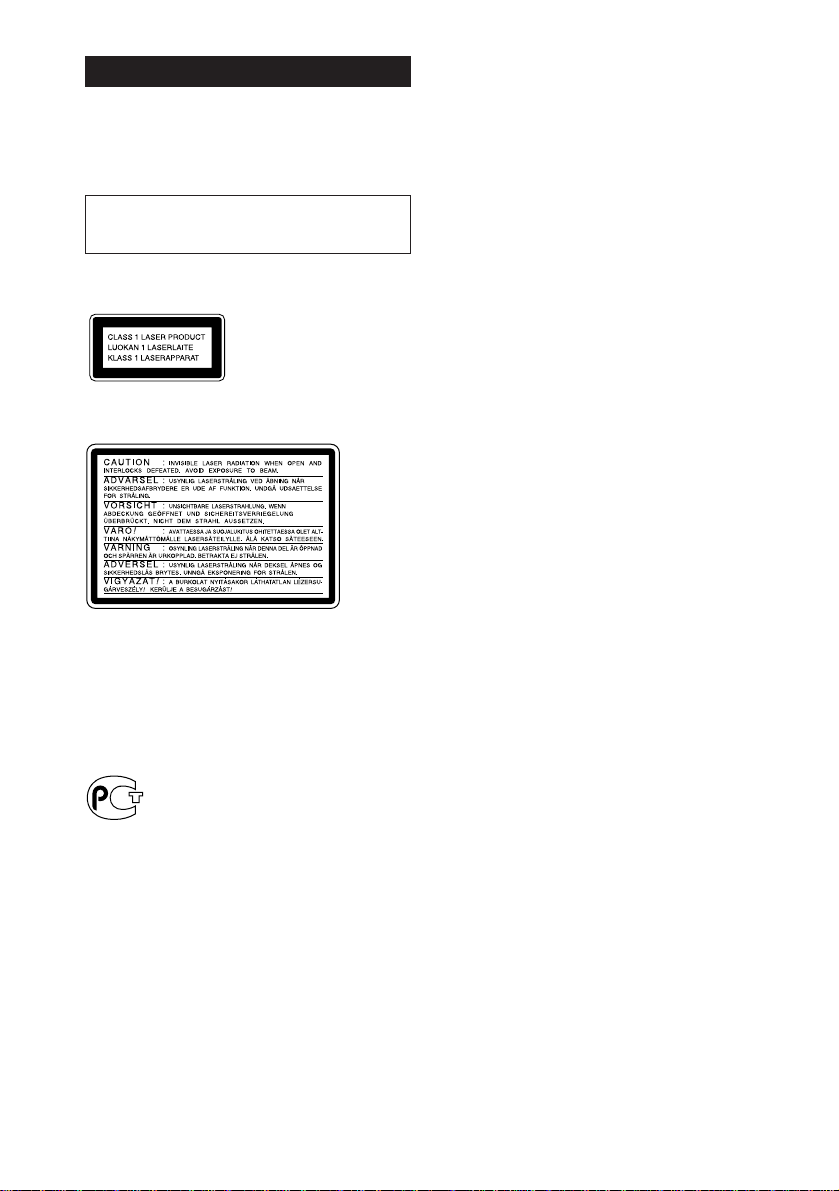
Laser component in this product is capable of
emitting radiation exceeding the limit for Class 1.
This appliance is classified
as a CLASS 1 LASER
product. The CLASS 1
LASER PRODUCT
MARKING is located on
the rear exterior.
This caution label is located inside the unit.
This stereo system is equipped with the Dolby Btype noise reduction system*.
* Manufactured under license from Dolby
Laboratories Licensing Corporation.
DOLBY and the double-D symbol a are
trademarks of Dolby Laboratories Licensing
Corporation.
2
Table of Contents
Getting Started
Step 1: Hooking up the system………… 4
Step 2: Setting the time ……………………. 6
Step 3: Presetting radio stations ………. 7
Connecting optional AV components . 9
Basic Operations
Playing a CD ………………………………….. 12
Recording a CD ……………………………… 14
Listening to the radio……………………… 15
Recording from the radio ……………….. 16
Playing a tape…………………………………. 17
Recording from a tape ……………………. 19
The CD Player
Using the CD display……………………… 20
Playing the CD tracks repeatedly …… 21
Playing the CD tracks in random
order ………………………………………… 22
Programming the CD tracks …………… 23
Playing CDs without interruption ….. 24
Sound Adjustment
Adjusting the sound ………………………. 32
Selecting the audio emphasis …………. 33
Selecting surround effects ………………. 34
Adjusting the graphic equalizer……… 34
Making a personal audio emphasis
file ……………………………………………. 35
Switching the speaker formation*…… 36
Other Features
Using the Radio Data System
(RDS)** …………………………………….. 38
Singing along: Karaoke …………………. 40
Falling asleep to music …………………… 42
Waking up to music ……………………….. 42
Timer-recording radio programs ……. 44
Additional Information
Precautions …………………………………….. 45
Troubleshooting …………………………….. 46
Specifications …………………………………. 49
Index………………………………………………. 51
The Tape Deck
Recording on a tape manually ……….. 25
Recording a CD by specifying track
order ………………………………………… 26
DJ Effects
Looping part of a CD ……………………… 28
Flashing part of a CD ……………………… 28
Using the drum pads ……………………… 29
Using the beat functions…………………. 30
* MHC-GRX8/RX99/R800 only
**European model only
3
Getting Started
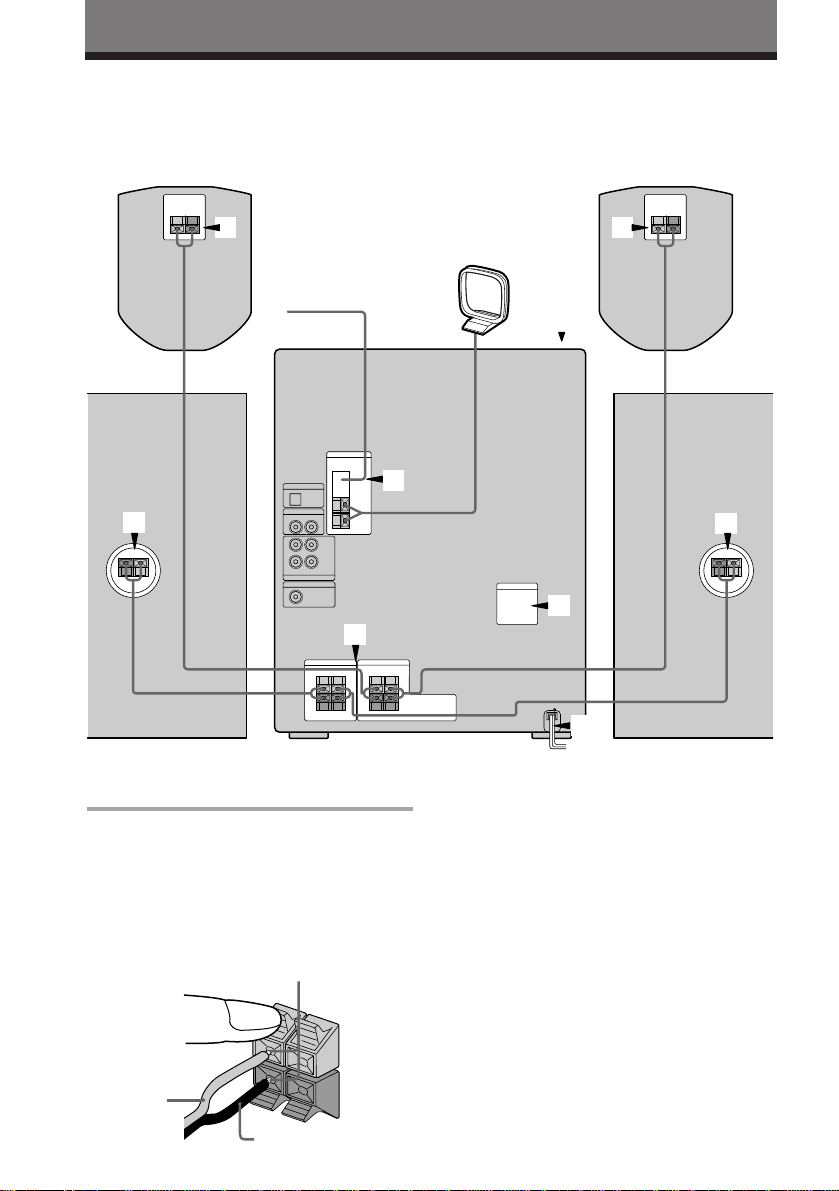
Step 1: Hooking up the system
Do the following procedure 1 to 5 to hook up your system using the supplied cords and
accessories.
Surround speaker* (Left)Surround speaker* (Right)
1
FM antenna
1
* MHC-GRX8/RX99/R800 only
Connect the speakers.
1
1 Connect the speaker cords of front
speakers to the SPEAKER jacks of the
same color .
Keep the speaker cords away from the
antennas to prevent noise.
Insert only the stripped portion.
R
+
AM loop antenna
5
2
1
3
1
4
Front speaker (Left)Front speaker (Right)
Note
The type of speakers supplied vary
according to the model you purchased
(see “Specifications” on page 49).
2 (MHC-GRX8/RX99/R800 only)
Connect the speaker cords from the
surround speakers to the appropriate
SURROUND SPEAKER jacks. Connect
1
L
+
the solid cords to the red jacks and
connect the striped cords to the black
jacks.
Red (‘)
4
Black (’)
–
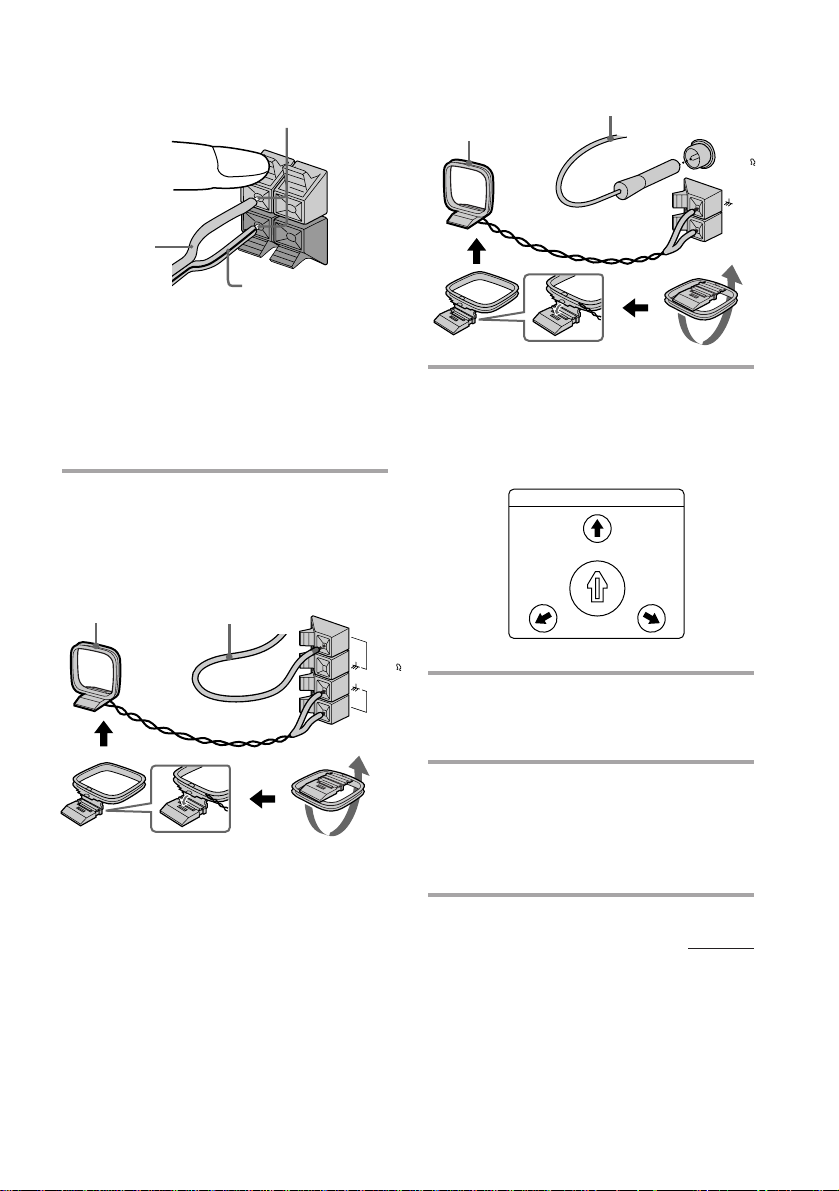
Keep the speaker cords away from the
antennas to prevent noise.
Insert only the stripped portion.
+
Solid (‘)
Stripe (’)
Notes
• Do not place the surround speakers
on top of a TV. This may cause
distortion of the colors in the TV
screen.
• Be sure to connect both left and
right surround speakers. Otherwise,
the sound will not be heard.
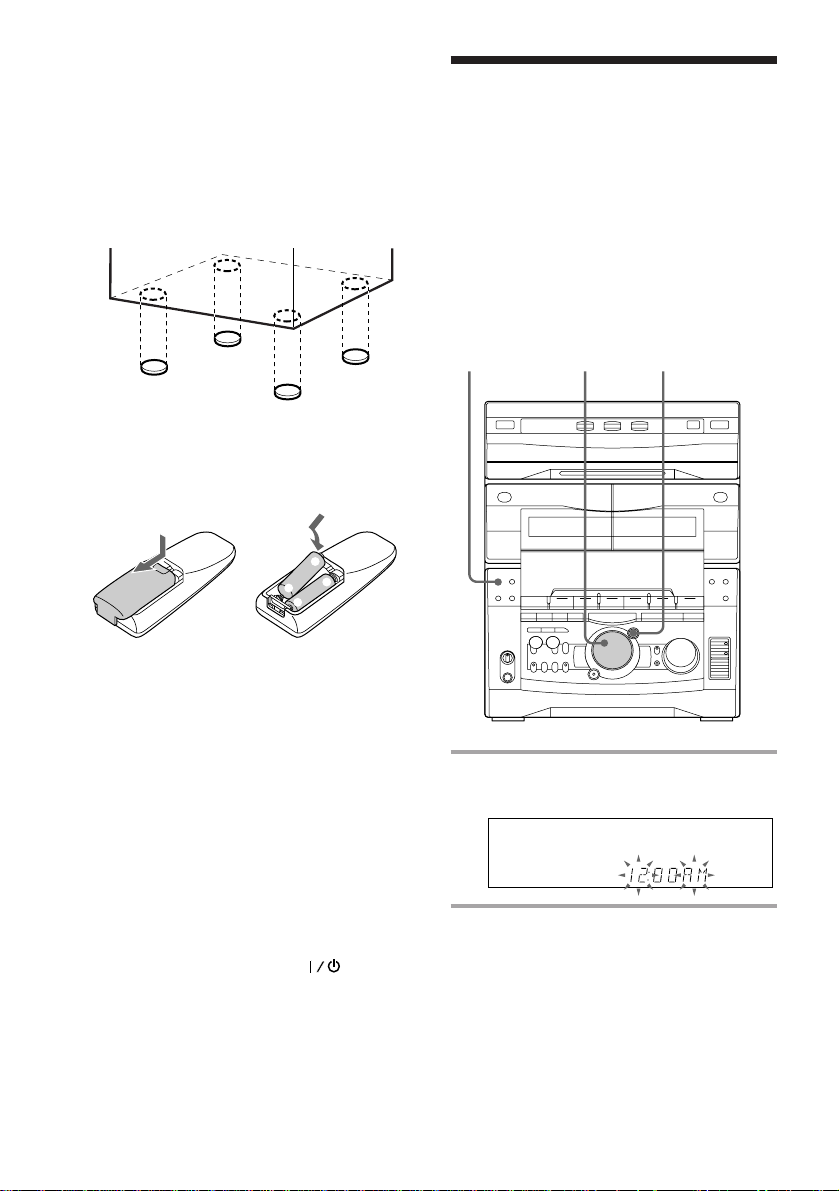
Connect the FM/AM antennas.
2
Set up the AM loop antenna, then
connect it.
Jack type A
Extend the FM lead
AM loop antenna
antenna horizontally.
Jack type B
Extend the FM lead
antenna horizontally.
R
L
+
–
AM loop antenna
Set VOLTAGE SELECTOR to
3
FM75
COAXIAL
AM
position of your local power line
voltage (for models with a voltage
selector).
VOLTAGE SELECTOR
240V
—
230
120V
220V
FM75
AM
Connect the power cord to a wall
4
outlet.
Demo mode appears in the display.
Deactivate the demo mode by
5
pressing DEMO when the system
power is turned off.
The demo mode is also deactivated
when you set the time.
continued
5
Step 1: Hooking up the system
(continued)
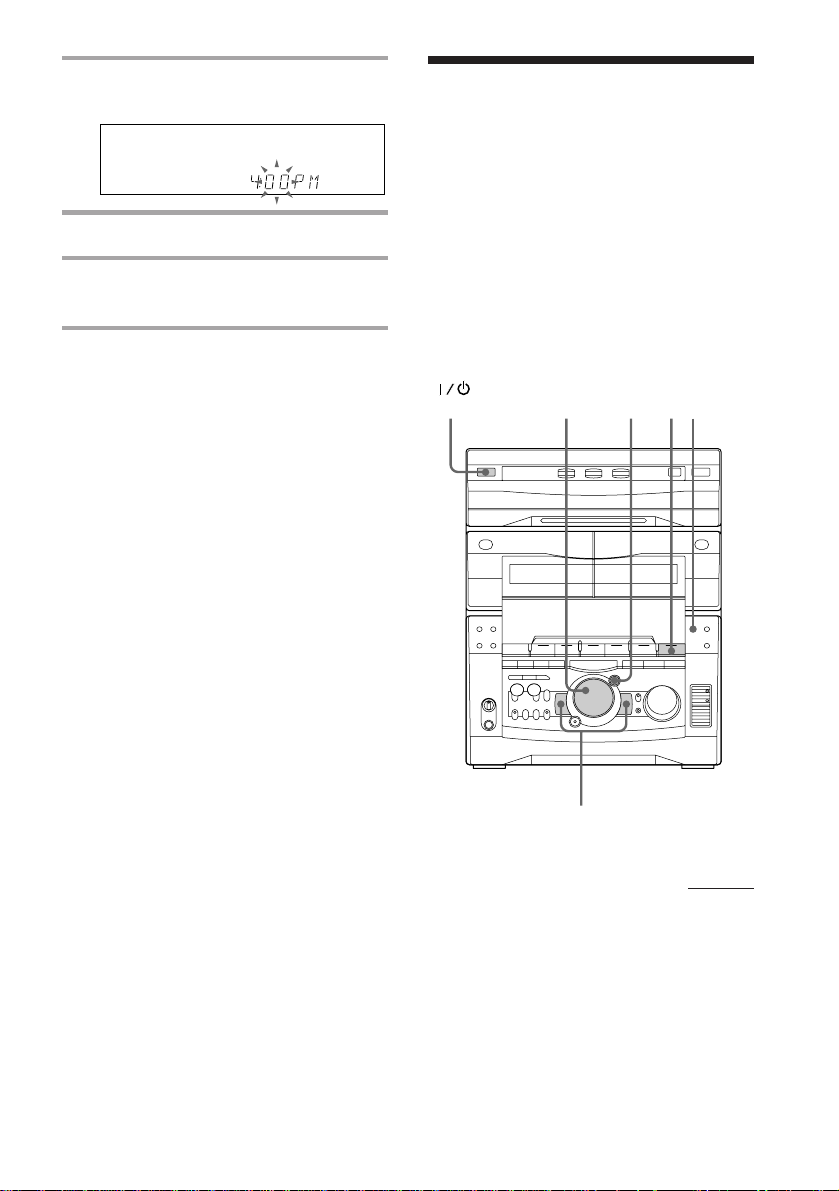
To attach the front speaker pads
Attach the supplied front speaker pads to the
bottom of the speakers to stabilize the
speakers and prevent them from slipping.
Step 2: Setting the
time
You must set the time before using the timer
functions.
The clock is on a 24-hour system for the
European and Russian models, and a 12-hour
system for other models.
The 12-hour system model is used for
illustration purposes.
Inserting two size AA (R6)
batteries into the remote
]
}
}
]
Tip
With normal use, the batteries should last for about
six months. When the remote no longer operates
the system, replace both batteries with new ones.
Note
If you do not use the remote for a long period of
time, remove the batteries to avoid possible damage
from battery leakage.
When carrying this system
Do the following to protect the CD
mechanism.
1 Press FUNCTION repeatedly until “CD”
appears in the display.
2 Hold down LOOP and press so that
“LOCK” appears in the display.
1
3,52,4
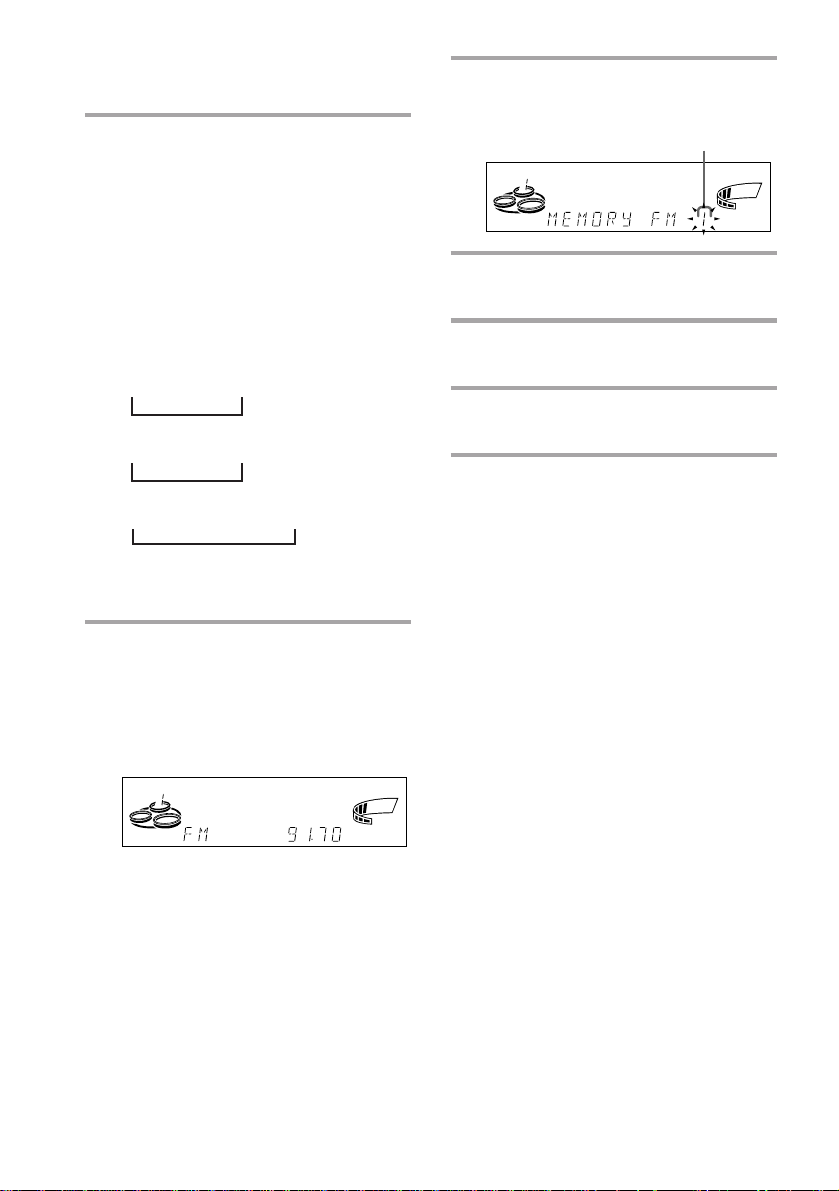
1 Press CLOCK/TIMER SET.
The hour indication flashes.
2 Turn the jog dial to set the hour.
6
3 Press ENTER/NEXT.
The minute indication flashes.
4 Turn the jog dial to set the minute.
5 Press ENTER/NEXT.
The clock starts working.
Tips
• If you’ve made a mistake, start over from step 1.
• Setting the time deactivates the demo mode.
If you want to display the demo mode, press
DEMO when the power is off.
Note
The previous explanation shows you how to set the
time while the power is off. To change the time
while the power is on, do the following:
1 Press CLOCK/TIMER SET.
2 Turn the jog dial to select SET CLOCK.
3 Press ENTER/NEXT.
4 Perform steps 2 through 5 above.
Step 3: Presetting
radio stations
You can preset the following number of
stations:
– 2 band model: 20 for FM, 10 for AM.
– 3 band model: 20 for FM, 10 for MW, and
10 for SW (or LW, depending on the model
you purchased).
– 4 band model: 20 for FM, 10 for MW, 10 for
LW, and 5 for UKV.
(Power)
4
5
1
3
2
continued
7
Step 3: Presetting radio stations
(continued)
1 Press TUNER/BAND repeatedly
until the band you want appears in
the display.
The bands you can receive vary
depending on the model you purchased.
Be sure to check which bands you can
receive.
Every time you press this button, the
band changes as follows:
2 band model:
FM ˜ AM
3 band model:
FM n MW n SW
n
or
FM n MW n LW
n
4 band model:
FM n MW n LW n UKV*
n
* “STEREO PLUS” is displayed when
you select UKV.
2 Press and hold + or – until the
frequency indication starts to
change, then release.
Scanning stops when the system tunes in
a station. “TUNED” and “STEREO” (for
a stereo program) appear.
TUNED
MONO
STEREO
ALL DISCS
kHz
MHz
VOLUME
3 Press TUNER MEMORY.
A preset number appears in the display.
Preset number
ALL DISCS
4 Turn the jog dial to select the preset
number you want.
5 Press ENTER/NEXT.
The station is stored.
6 Repeat steps 1 to 5 to store other
stations.
To tune in a station with a weak
signal
Press + or – repeatedly in step 2 to tune in the
station manually.
To change the preset number
Start over from step 1.
To change the AM tuning interval
(Except for the European, Russian and
Middle Eastern models)
The AM tuning interval is factory set to 9 kHz (10
kHz in some areas). To change the AM tuning
interval, tune in any AM station first, then turn off
the power. While holding down the ENTER/NEXT
button, turn the power back on. When you change
the interval, AM preset stations will be erased. To
reset the interval, repeat the same procedure.
Tip
ß
The preset stations are retained for half a day even if
you unplug the power cord or if a power failure
occurs.
VOLUME
ß
8
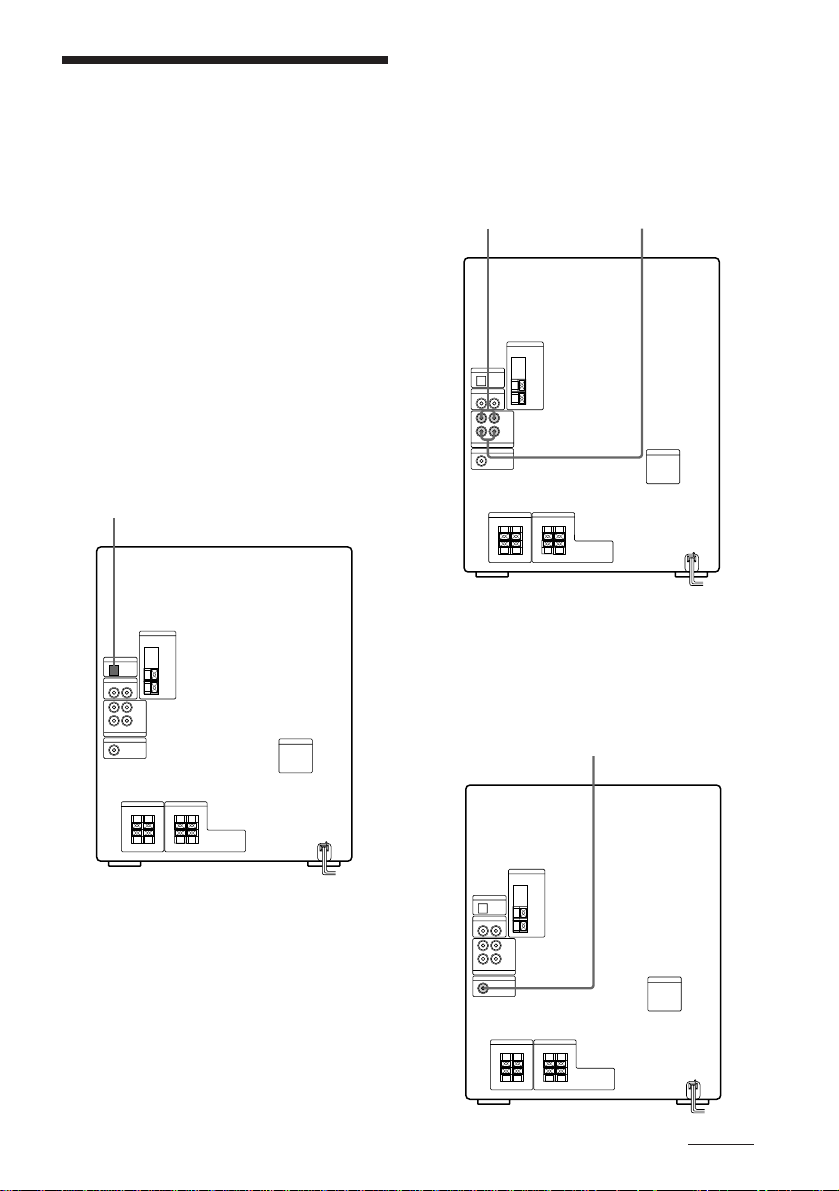
Connecting optional
AV components
To enhance your system, you can connect
optional components. Refer to the
instructions of each component.
Connecting audio
components
Select one of the following two connections,
depending on the equipment to be connected
and method of connecting.
Connecting an MD deck for digital
recording
You can record from CD into the MD deck
digitally by connecting an optical cable.
To the DIGITAL IN jack of the MD deck
Connecting an MD deck for analog
recording
Make sure to match the color of the plugs and
the connectors. To listen to the sound of the
connected MD deck, press FUNCTION
repeatedly until “MD” appears.
To the audio output
of the MD deck
Tip
When you connect a Sony MD deck, you can use the
MD (, P, and p buttons on this unit’s remote to
perform play, pause, and stop operations.
To the audio input
of the MD deck
Connecting a super woofer speaker
You can connect an optional super woofer speaker.
To super woofer
continued
9
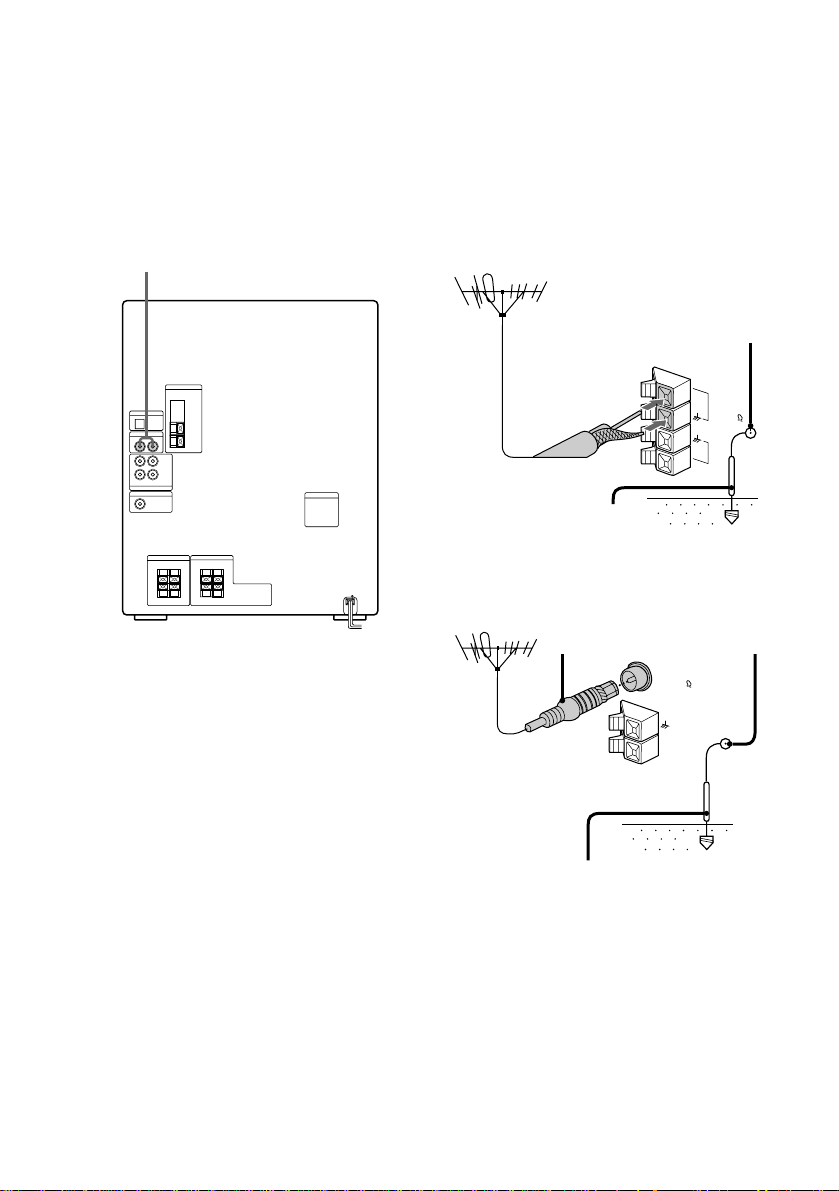
Connecting optional AV
components (continued)
Connecting a VCR
Make sure to match the color of the plugs and
the connectors. To listen to the sound of the
connected VCR, press FUNCTION repeatedly
until “VIDEO” appears.
To the audio output of the VCR
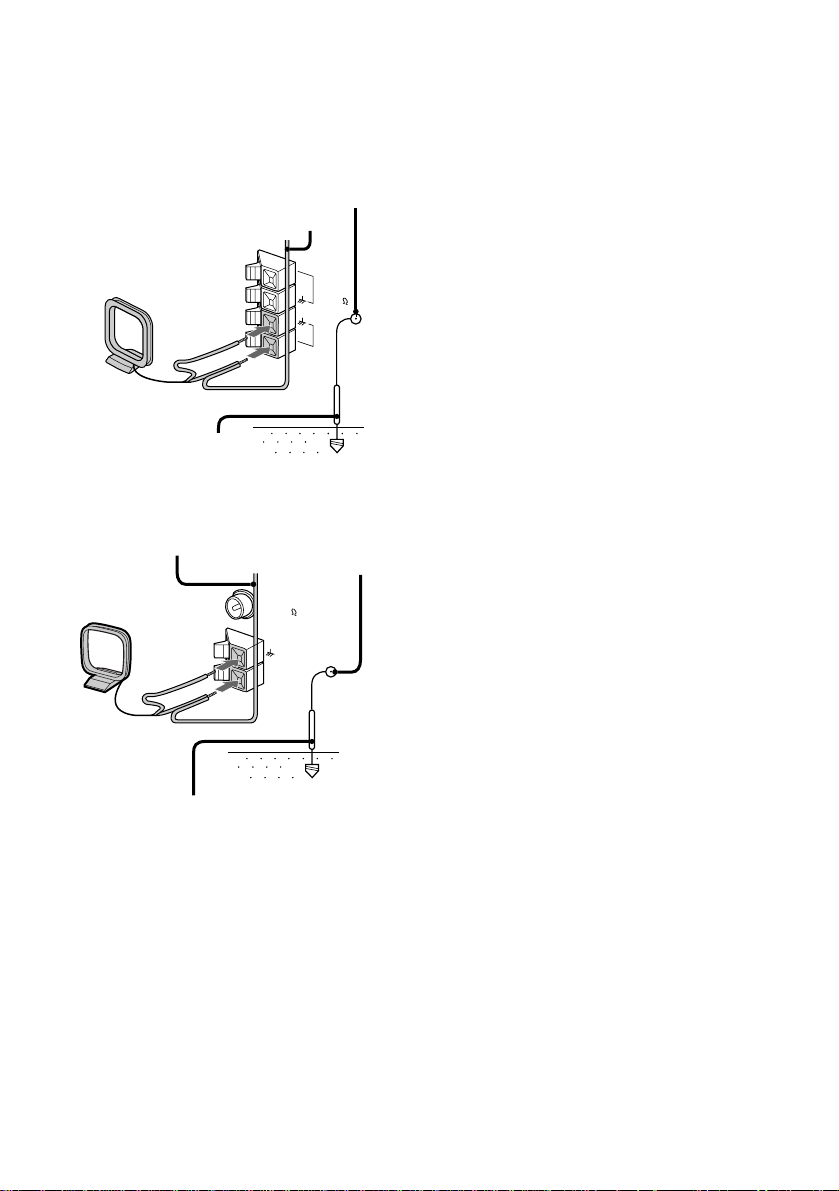
Connecting outdoor
antennas
Connect the outdoor antenna to improve the
reception.
FM antenna
Connect the optional FM outdoor antenna.
You can also use the TV antenna instead.
Jack type A
Screw clamp
75-ohm coaxial cable
(not supplied)
FM75
y
AM
Ground wire (not supplied)
Jack type B
IEC standard socket
connector
(not supplied)
Screw clamp
10
FM75
COAXIAL
AM
Ground wire (not supplied)
y
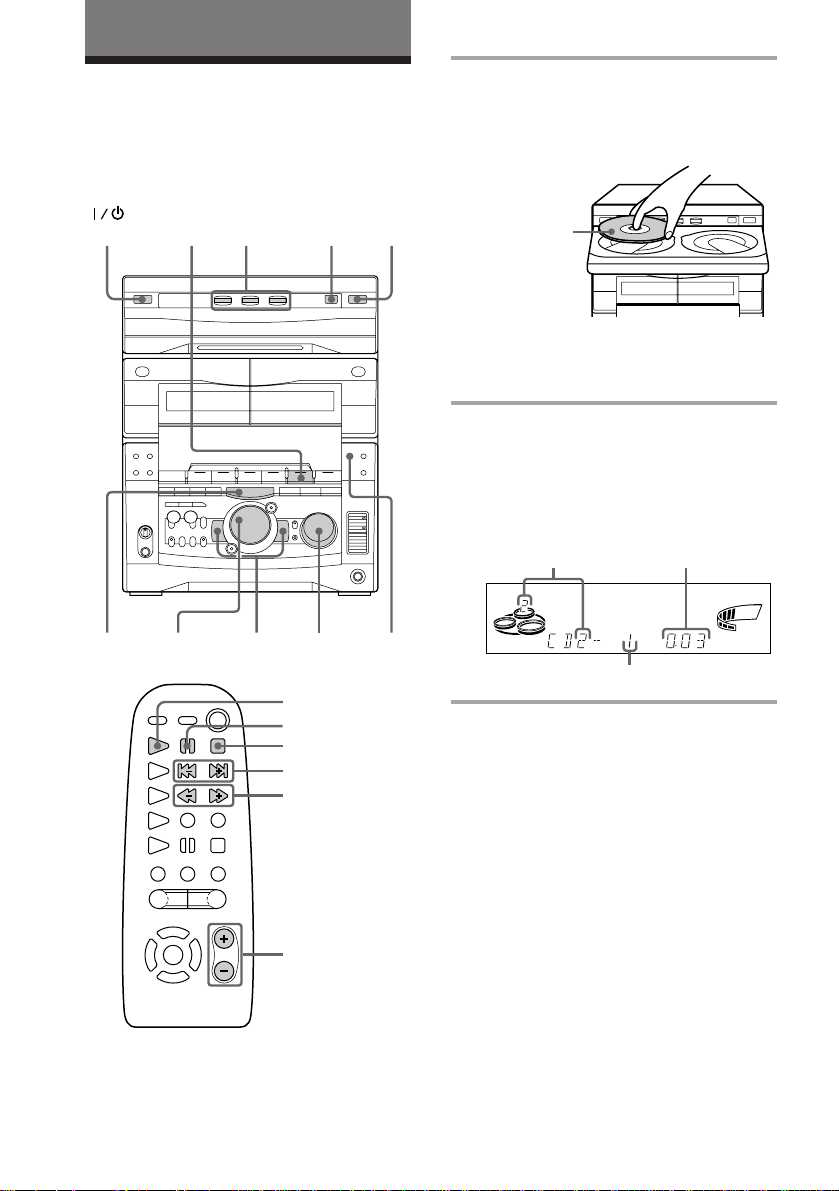
AM antenna
Connect a 6- to 15- meter (20- to 50- feet)
insulated wire to the AM antenna terminal.
Leave the supplied AM loop antenna
connected.
Jack type A
Screw clamp
Insulated wire (not supplied)
FM75
y
AM
Ground wire (not supplied)
Jack type B
Insulated wire
(not supplied)
Screw clamp
FM75
COAXIAL
AM
y
Ground wire (not supplied)
Important
If you connect an outdoor antenna, ground
from y terminal with the screw clamp. To
prevent a gas explosion, do not connect the
ground wire to a gas pipe.
11
Basic Operations
Playing a CD
— Normal play
You can play up to three CDs in a row.
(Power)
p
CD
(P
2
DISC SKIP/
EX-CHANGE
VOLUME0 )= +
CD (
P
p
= +
0 )
1
PLAY
MODE
1 Press § and place up to two CDs on
the disc tray.
If a disc is not placed properly it will not
be recognized.
With the label
side up. When
you play a single
CD, place it on
the inner circle
of the tray.
To insert a third disc, press DISC SKIP/
EX-CHANGE to rotate the disc tray.
2 Press one of the DISC 1~3 buttons.
The disc tray closes and play starts.
If you press CD (P (or CD ( on the
remote) when the disc tray is closed,
play starts from the CD loaded on the
tray whose button is lit green.
Disc tray number
SYNC
ALL1 DISCS PROGRAM
SHUFFLE REPEAT1
Track number
Playing time
STEP
VOLUME
ß
12
◊
√
◊
√
VOL +/–
To Do this
Stop play Press p.
Pause Press CD (P (P on the
remote). Press again to resume
play.
Select a track During play or pause, turn the
jog dial clockwise (to go
forward) or counterclockwise
(to go back) and release it
when you reach the desired
track. (Or press + (to go
forward) or = (to go back)
on the remote.)
Find a point in Press and hold down ) or
a track 0 during play and
release it at the desired point.
Select a CD Press a DISC 1~3 button or
in stop mode DISC SKIP/EX-CHANGE.
Play only the Press PLAY MODE
CD you have repeatedly until “1 DISC”
selected appears.
Play all CDs Press PLAY MODE repeatedly
until “ALL DISCS” appears.
Remove the CD Press §.
Exchange other Press DISC SKIP/
CDs while EX-CHANGE.
playing
Adjust the Turn VOLUME (or press VOL
volume +/– on the remote).
Tips
• Pressing CD (P when the power is off
automatically turns the power on and starts CD
playback if there is a CD in the tray (One Touch
Play).
• You can switch from another source to the CD
player and start playing a CD just by pressing
CD (P or the DISC 1~3 buttons (Automatic
Source Selection).
• If there is no CD in the player, “CD NO DISC”
appears in the display.
• When a disc tray holding a CD is selected (or
playing), the DISC 1~3 button for that tray lights
green. When a disc tray holding a CD is not
selected, the DISC 1~3 button for that tray lights
orange. When all disc trays are empty, the DISC
1~3 buttons all light green.
Basic Operations
13
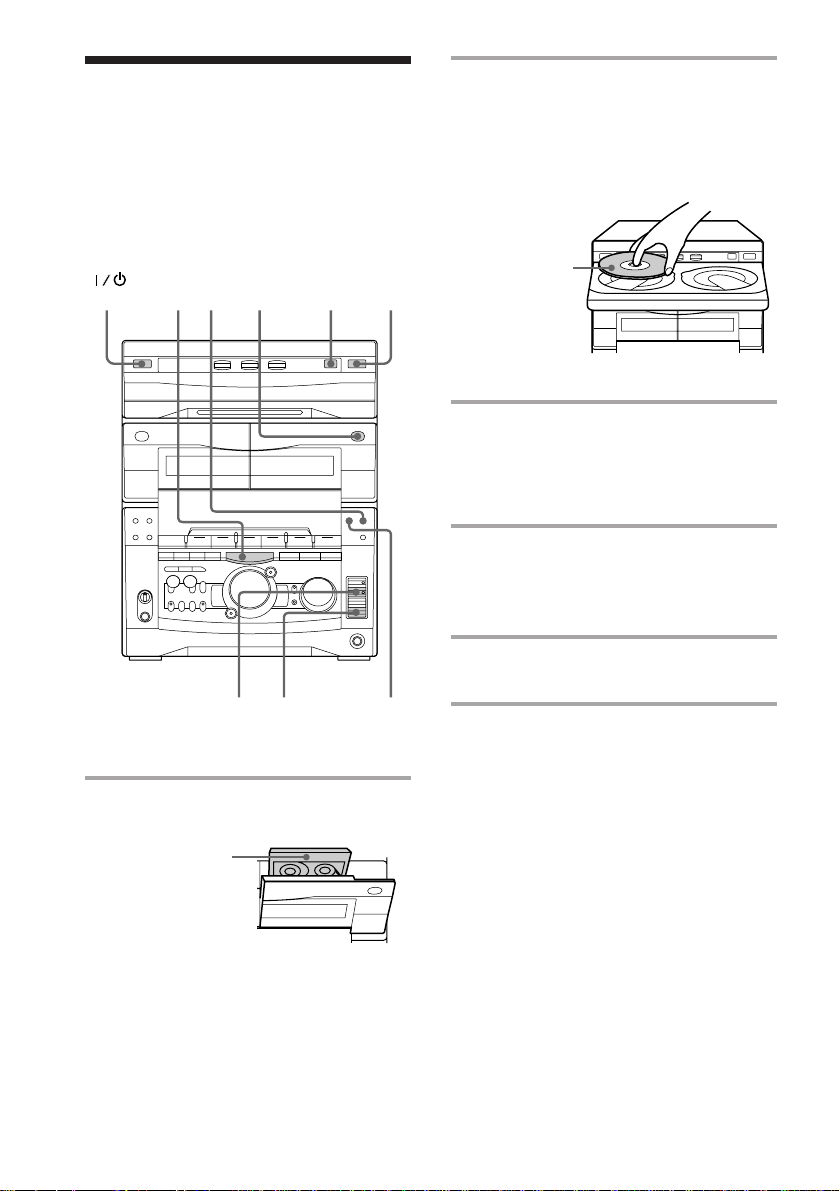
Recording a CD
— CD Synchro Recording
The CD SYNC button lets you record from a
CD to a tape easily. You can use TYPE I
(normal) or TYPE II (CrO2) tapes. The
recording level is adjusted automatically.
(Power)
4
p
1
DISC SKIP/
EX-CHANGE
DOLBY NR
2
53
1 Press § and insert a blank tape into
deck B.
With the side
you want to
record facing
forward
2Press § and place a CD.
Then press again to close the disc tray.
If the indicator for the tray you want to
record is not lit green, press DISC SKIP/
EX-CHANGE repeatedly so that it lights
green.
With the label
side up. When
you play a single
CD, place it on
the inner circle
of the tray.
3 Press CD SYNC.
Deck B stands by for recording and the
CD player stands by for playback. The
indicator on TAPE B ( (for front side)
lights up.
4 Press DIRECTION repeatedly to
select A to record on one side.
Select ß (or RELAY) to record on
both sides.
5 Press P PAUSE.
Recording starts.
To stop recording
Press p.
Tips
• If you want to record from the reverse side, press
TAPE B 9 to light its indicator after pressing CD
SYNC.
• When you record on both sides, be sure to start
from the front side. If you start from the reverse
side, recording stops at the end of the reverse side.
• When you want to reduce the hiss noise in lowlevel high-frequency signals, press DOLBY NR so
that “DOLBY NR” appears after pressing CD
SYNC.
Note
You cannot listen to other sources while recording.
14
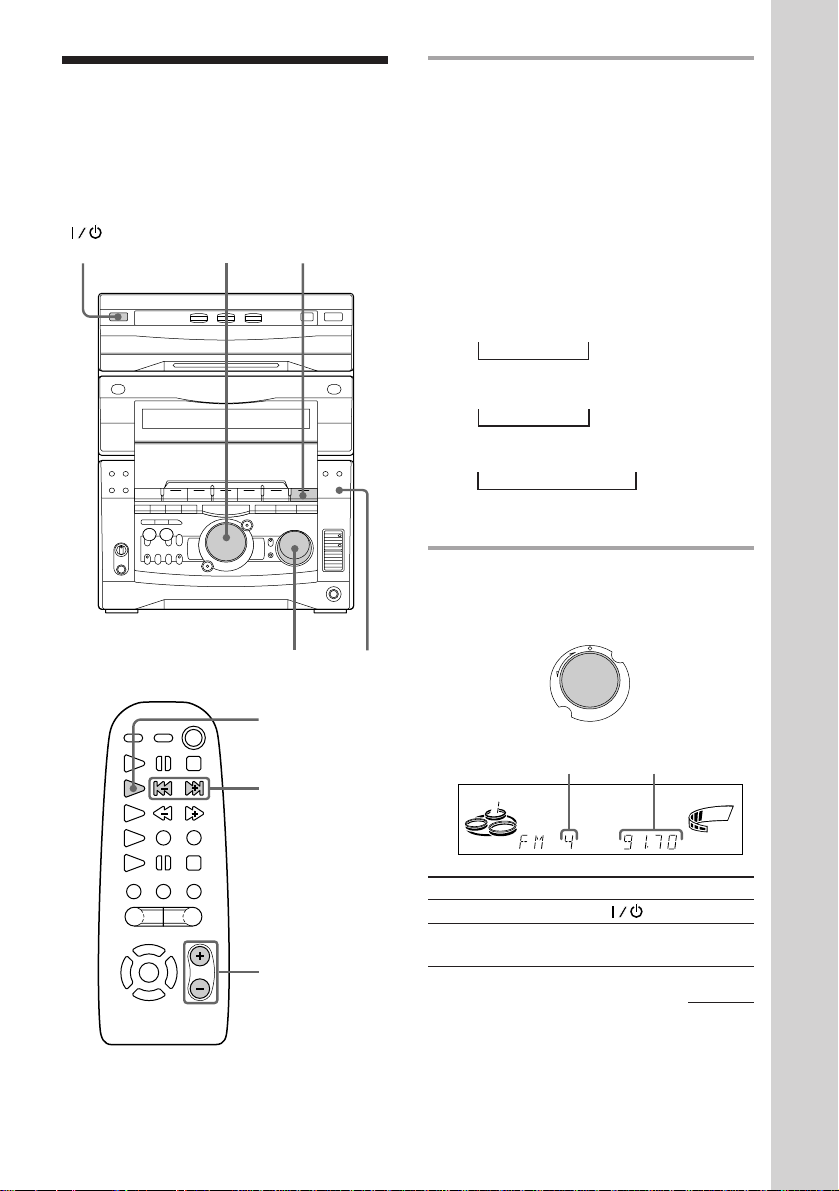
Listening to the radio
–– Preset Tuning
Preset radio stations in the tuner’s memory
first (see “Step 3: Presetting radio stations”).
(Power)
2
1
VOLUME STEREO/
MONO
TUNER/BAND
= +
1 Press TUNER/BAND repeatedly
until the band you want appears in
the display.
The bands you can receive vary
depending on the model you purchased.
Be sure to check which bands you can
receive.
Every time you press the button, the
band changes as follows:
2 band model:
FM ˜ AM
3 band model:
FM n MW n SW
n
or
FM n MW n LW
n
4 band model:
FM n MW n LW n UKV*
n
* “STEREO PLUS” is displayed when
you select UKV.
2 Turn the jog dial (or press = or
+ on the remote) to tune in the
desired preset station.
Turn counterclockwise
(or press =
on the remote)
for lower preset
numbers.
Preset number
+
=
Turn clockwise
(or press +
on the remote)
for higher
preset numbers.
Frequency
Basic Operations
ALL DISCS
To Do this
Turn off the radio Press .
◊
√
◊
√
VOL +/–
Adjust the volume Turn VOLUME (or press
VOL +/– on the remote).
VOLUME
kHz
MHz
continued
ß
15
Listening to the radio (continued)
VOLUME
MHz
kHz
ALL DISCS
ß
To listen to non-preset radio
stations
Use manual or automatic tuning in step 2.
For manual tuning, press + or – repeatedly.
For automatic tuning, press and hold + or –.
Tips
• Pressing TUNER/BAND when the power is off
automatically turns the power on and tunes to the
last received station (One Touch Play).
• You can switch from another source to the radio
just by pressing TUNER/BAND (Automatic
Source Selection).
• When an FM program is noisy, press
STEREO/MONO so that “MONO” appears in the
display. There will be no stereo effect, but the
reception will improve. Press the button again to
restore the stereo effect.
• To improve broadcast reception, reorient the
supplied antennas.
Recording from the
radio
You can record the radio program on a tape
by calling up a preset station. You can use
TYPE I (normal) or TYPE II (CrO2) tapes. The
recording level is automatically adjusted.
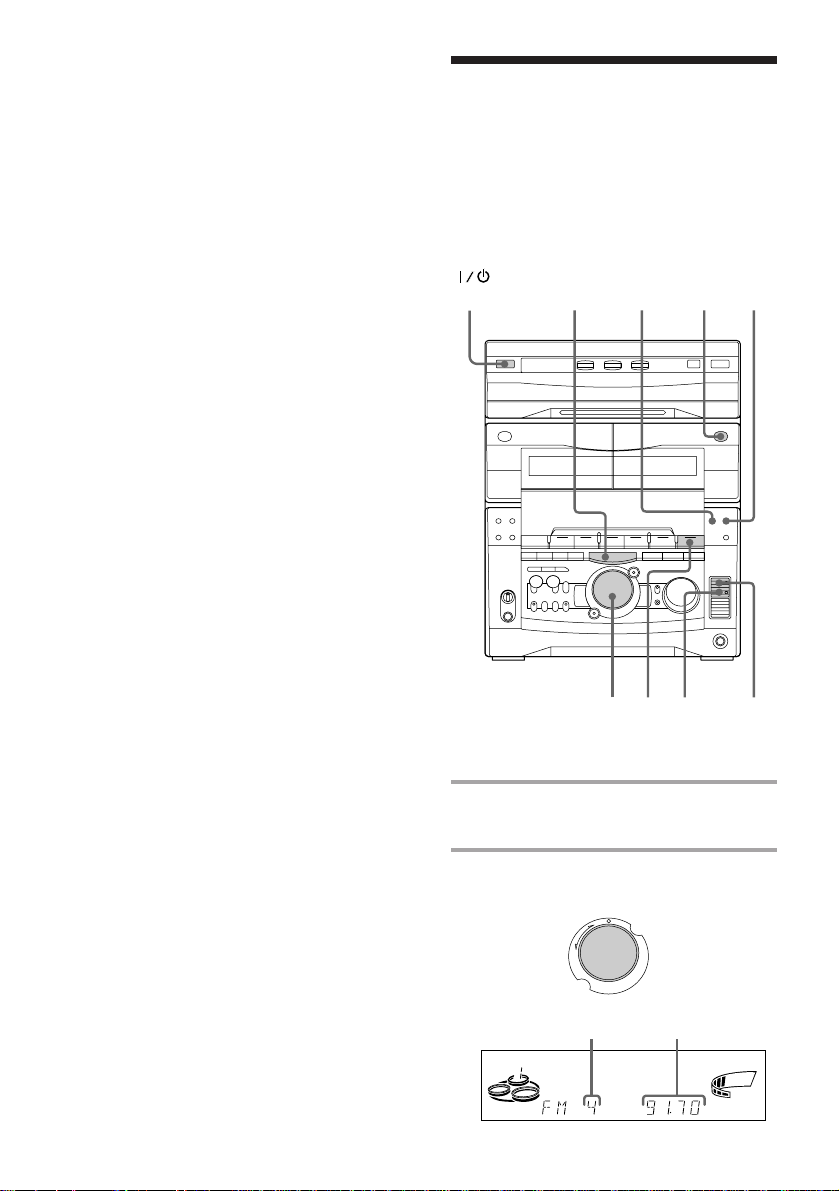
(Power)
DOLBY NRp
3
5
16
2
1
6
4
1 Press TUNER/BAND to select the
band you want.
2 Turn the jog dial to tune in a preset
station.
Turn counterclockwise for
lower preset
numbers.
Preset number
+
=
Turn clockwise
for higher
preset numbers.
Frequency
Loading…
Скачать
1
Mini Hi-Fi
Component
System
©1998 by Sony Corporation
Operating Instructions
3-862-015-11(1)
f
MHC-GRX8 / RX88 / RX99 / R800
- Topics
- manualsbase, manuals,
- Collection
- manuals_sony; manuals; additional_collections
- Language
- English
- Item Size
- 13.7M
- Addeddate
- 2020-08-16 04:58:41
- Identifier
- manualsbase-id-430795
- Identifier-ark
- ark:/13960/t2z410k7s
- Ocr
- ABBYY FineReader 11.0 (Extended OCR)
- Page_number_confidence
- 98.04
- Ppi
- 300
- Scanner
- Internet Archive Python library 1.9.4
plus-circle Add Review
plus-circle Add Review
comment
Reviews
There are no reviews yet. Be the first one to
write a review.
87
Views
DOWNLOAD OPTIONS
download 1 file
ABBYY GZ download
Temporarily Unavailable
DAISY
For users with print-disabilities
Temporarily Unavailable
EPUB
download 1 file
FULL TEXT download
download 1 file
ITEM TILE download
download 1 file
PAGE NUMBERS JSON download
download 1 file
PDF download
download 1 file
SINGLE PAGE PROCESSED JP2 ZIP download
download 1 file
TORRENT download
download 12 Files
download 6 Original
SHOW ALL
IN COLLECTIONS
Manuals: Sony
The Manual Library
Additional Collections
Uploaded by
chris85
on
Page doesn’t exist.
Instruction/ maintenance manual of the product MHC-RX99 Sony
- File size: 1.02 mb
- Number of pages: 52
Summary of contents each page of manual
Read the Sony MHC-RX99 manual — avoid problems
An important point after buying a device Sony MHC-RX99 (or even before the purchase) is to read its user manual. We should do this for several simple reasons:
- to know how to properly use the device
- to know how to perform maintenance/ periodic checks of correct operation of the product Sony MHC-RX99
- to know what to do in case of failure Sony MHC-RX99
If you have not bought Sony MHC-RX99 yet, this is a good time to familiarize yourself with the basic data on the product. First of all view first pages of the manual, you can find above. You should find there the most important technical data Sony MHC-RX99 — thus you can check whether the hardware meets your expectations. When delving into next pages of the user manual, Sony MHC-RX99 you will learn all the available features of the product, as well as information on its operation. The information that you get Sony MHC-RX99 will certainly help you make a decision on the purchase.
If you already are a holder of Sony MHC-RX99, but have not read the manual yet, you should do it for the reasons described above. You will learn then if you properly used the available features, and whether you have not made any mistakes, which can shorten the lifetime Sony MHC-RX99.
However, one of the most important roles played by the user manual is to help in solving problems with Sony MHC-RX99. Almost always you will find there Troubleshooting, which are the most frequently occurring failures and malfunctions of the device Sony MHC-RX99 along with tips on how to solve them. Even if you fail to solve the problem, the manual will show you a further procedure – contact to the customer service center or the nearest service center
Other manuals from the category Stereo System
-
Dual XD5125
Stereo System
12 pages
1.02 mb -
Bose 3.2.1 GS Series III
Stereo System
108 pages
1.02 mb -
Sony 2-661-374-11(4)
Stereo System
40 pages
1.02 mb -
Sony 3-097-194-15(1)
Stereo System
112 pages
1.02 mb -
Sony 3-097-196-14(1)
Stereo System
243 pages
1.02 mb -
Sony 3-287-077-14(2)
Stereo System
48 pages
1.02 mb -
Sony 3-293-639-11(1)
Stereo System
36 pages
1.02 mb -
Sony 3-294-663-11(2)
Stereo System
2 pages
1.02 mb -
Sony 3-300-703-11(2)
Stereo System
56 pages
1.02 mb -
Sony 3-452-364-11(1)
Stereo System
36 pages
1.02 mb
- Главная
-
Sony
-
Стереосистемы
-
MHC-RX99
-
Инструкция по эксплуатации
Вы можете бесплатно скачать Инструкция по эксплуатации для Sony MHC-RX99.
Также вы сможете прочесть онлайн этот документ без скачивания.
Скачать Инструкция по эксплуатации для Sony MHC-RX99
Тип файла
PDF
Размер
1.02 Mb
Кол-во страниц
52
Просмотров
3542
Вы не робот?
60
Скачать файл:
sony-mhc-rx99-user-s-manual.pdf
Читать онлайн Инструкция по эксплуатации для Sony MHC-RX99 (Страница 1)

Next →
- 1
- 2
- 3
- 4
- 5
- 6
- 7
- 8
- 9
- 10
- 11
- 12
- 13
- 14
- 15
- 16
- 17
- 18
- 19
- 20
- 21
- 22
- 23
- 24
- 25
- 26
- 27
- 28
- 29
- 30
- 31
- 32
- 33
- 34
- 35
- 36
- 37
- 38
- 39
- 40
- 41
- 42
- 43
- 44
- 45
- 46
- 47
- 48
- 49
- 50
- 51
- 52
Другие Стереосистемы Sony MHC-RX99
Топ Sony Стереосистемы
-
CDP-CE375 Руководство пользователя
PDF файлов
2Просмотров
1756 -
CDP-CX210 Руководство пользователя
PDF файлов
2Просмотров
1212 -
CDP-XE400 Руководство пользователя
PDF файлов
2Просмотров
1705 -
CDP-CX235 Руководство пользователя
PDF файлов
2Просмотров
8636 -
CDP-CX90ES Руководство пользователя
PDF файлов
2Просмотров
9016 -
LBT-D890AV Руководство пользователя
PDF файлов
2Просмотров
4859
Ранее вы смотрели
Производители
Bethesda
Cadillac
Dual
HSM
Kangol
Landice
Pirelli
Sierra Products
SmartBridges
Sunfire
Типы устройств
Устройства индивидуального перемещения
Аксессуары для мобильных телефонов
Тележки
Электрические точилки для карандашей
Медиастанции Connect Station
Часы
Реноваторы
ИБП для компьютеров и периферии
Заварники
Устройства
Cabletron Systems TRXI-42
Canon Printer ip4200
Fujitsu N6000
Kenmore 100.12934
KWC GASTRO K.24.42.74
Lexmark 382
Multiquip GA-3.6RZ2
Philips TSU3000
freeuserguide.ru
About Us
Contacts
Disclamers
Privacy Policy
Эта страница полезна для вас? Поделитесь ссылкой: