
Mtk Easy Su
Welcome to Mtk Easy Su, an application designed to set up bootless super user access using Magisk and Mtk-su on MediaTek Android devices. This tool is particularly useful for those interested in leveraging the security breach Mtk-su by Diplomatic.
Features
- Easily establish bootless super user access on your MediaTek Android device.
- Seamlessly integrates Magisk and Mtk-su for enhanced functionality.
- Empowers advanced users with greater control over the rooting process through terminal-based mtk-su.
Getting Started
To get started with Mtk Easy Su, follow these simple steps:
-
Download the latest version here, but please be aware that you are doing so at your own risk.
-
Ensure you have Magisk Manager installed to manage root access for each application.
-
Before installing the app, disable Google Play Protect as recent updates have flagged the app as harmful without valid reasons.
Important Notes
-
Stay informed about the critical MediaTek rootkit affecting millions of Android devices. Check out the XDA article here.
-
Be cautious with firmware updates released after March 2020, as they may block the methods utilized by Mtk Easy Su or mtk-su.
-
To confirm if you’ve been granted super user access, check the exit value returned by the log. A value of 0 indicates success and root access.
/data/data/juniojsv.mtk.easy.su/files
UID: 0  cap: 3fffffffff  selinux: permissive
Load policy from: /sys/fs/selinux/policy
20.4:MAGISK (20400)
client: launching new main daemon process
Exit value 0
Tested devices
| Device | Model | Chipset | Result |
|---|---|---|---|
| Lg X Power2 | M320N | MediaTek MT6750 | Success |
| Lg K10 | M250DS | MediaTek MT6750 | Success |
| Lg K10 Power | M320TV | MediaTek MT6750 | Success |
| Lg K10 TV | K430DSF | MediaTek MT6753 | Success |
| Lg K8 | K350 | Mediatek MT6735 | Fail |
| Lg K4 | X230DS | MediaTek MT6737M | Success |
| Motorola Moto C | XT1756 | Mediatek MT6737M | Success |
| Motorola Moto E4 | XT1773 | Mediatek MT6737 | Success |
| Alcatel A3 LX | 9008X | Mediatek MT8735B | Success |
| Alcatel 1 | 5033T | Mediatek MT6739 | Success |
| Alcatel U5 3G | 4047A | Mediatek MT6580M | Fail |
| Blu Studio X8 HD | S532 | Mediatek MT6580 | Fail |
| Nook Tablet 10.1 | BNTV650 | Mediatek A35-MT8167A | Success |
| ZTE Blade A7 Prime | OEM | Mediatek A22-MT6761 | Success |
| Oppo F7 | CPH1821 | Mediatek MT6771 | Fail |
| Oppo F3 | CPH1609 | Mediatek MT6750T | Fail |
| Lenovo Vibe K5 Note | A7020a48 | Mediatek MT6755 | Fail |
| Lenovo Tab E8 | TB-8304F1 | Mediatek MT8163 | Success |
| Vernee Mix 2 | Mix 2 | Mediatek MT6757CD | Success |
| Nokia 1 | TA-1130 | Mediatek MT6739WW | Fail |
| Sony Xperia C5 Ultra | E5553 | Mediatek MT6752 | Success |
| Redmi 6 | Cerus | Mediatek MT6762 | Success |
| Ark Elf S8 | Elf S8 | MediaTek MT6580 | Success |
| Sony Xperia L3 | I4312 | MediaTek MT6762 | Success |
| GIONEE S10 | GIONEE_SW17G04 | MediaTek MT6767 | Success |
| GIONEE M7 | GIONEE_SW17G07 | MediaTek MT6758 | Success |
| Southern Telecom PB1009 | PB1009 | MediaTek MT8167B | Success |
| Meizu MX6 | MX6 | MediaTek MT6797 | Success |
Acknowledgments
-
Special thanks to Diplomatic for developing the mtk-su tool that powers this application.
-
Gratitude to all contributors on the LG K10 XDA Forum for their valuable insights and support.
-
Shoutout to John Wu for his invaluable contribution to the rooting community with Magisk. @topjohnwu
Warning
DO NOT UPDATE MAGISK THROUGH MAGISK MANAGER ON A LOCKED BOOTLOADER OR YOU WILL BRICK YOUR DEVICE.
Remember, while this tool aims to simplify the rooting process, I’m not responsible for any mishaps that may occur during or after its usage. Proceed with caution! 😊
SuperSU
Начнём нашу подборку с, пожалуй, самого известного и распространённого решения, которое называется SuperSU. Строго говоря, с помощью этого приложения невозможно получить рут-доступ, оно является лишь управляющим средством для этой возможности.
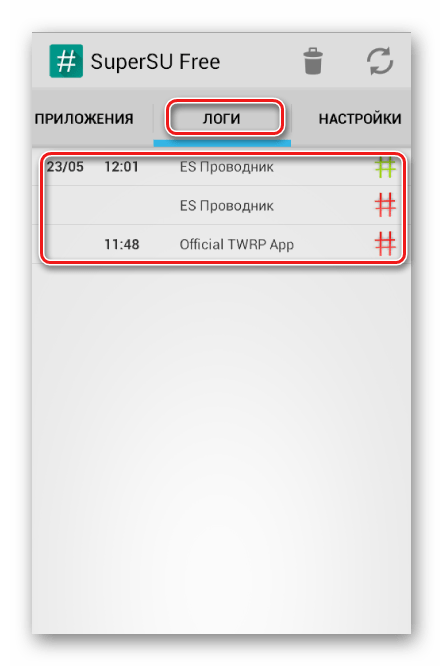
В этом смысле у СуперСУ почти нет равных благодаря удобному и интуитивно понятному интерфейсу, а также опции ведения журнала выданных прав. Присутствуют и расширенные средства вроде переноса приложения в категорию системных плюс настройка обращения ОС с полученными правами. Минус у SuperSU только один – некоторые функции можно разблокировать только покупкой Pro-версии.
Скачать SuperSU
Framaroot
Одним из приложений, предназначенных именно для получения рута без компьютера, является Framaroot. С его помощью открыть требуемый доступ можно буквально в пару тапов, посредством одного или нескольких эксплойтов – уязвимостей, которые позволяют получить Root. Таковых представлено немало для широкого спектра устройств и версий прошивки.
Однако рассчитывать на чудо не стоит – Фрамарут поддерживается далеко не на всех Android-девайсах плюс несовместим с вариантами, вышедшими после 2016 года. Также для управления рутом понадобится загрузить специальный менеджер, вроде упомянутого выше SuperSU. В остальном же это вполне пригодное решение.
Скачать Framaroot
MTK Easy SU
На большинстве современных устройств повышенные привилегии доступа не получить без разблокировки загрузчика, однако программа MTK Easy SU позволяет обойтись без этой небезопасной процедуры. Приложение посредством эксплойта открывает встроенный в драйвера процессоров MTK рут-доступ. Конкретная функциональность решения зависит от устройства и прошивки, которая на нём установлена.
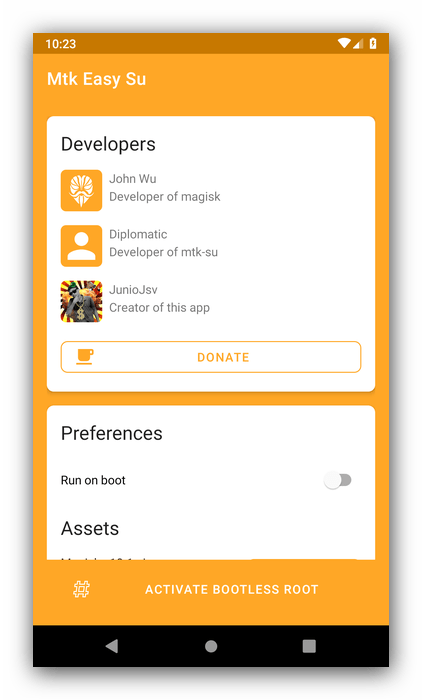
Для работы этого приложения понадобится доустановить Magisk Manager версии 7.1.1 и выше. У MTK Easy SU присутствует ряд недостатков: например, менеджер root нельзя обновлять на смартфоне с заблокированным загрузчиком плюс совместимо оно лишь с ограниченным числом гаджетов и не сработает на прошивках, выпущенных после марта 2020 года.
Скачать MTK Easy SU с официального сайта
Root Genius
Популярная Windows-программа для предоставления прав Суперпользователя Root Genius обзавелась и Android-версией. Возможности выполнения своей основной задачи ничем не отличаются от настольного варианта: всего несколько тапов и на вашем устройстве появится доступ к корневому каталогу и системным файлам. Механизм работы Рут Джиниус, как и у большинства представленного здесь софта, также основан на использовании эксплойтов.
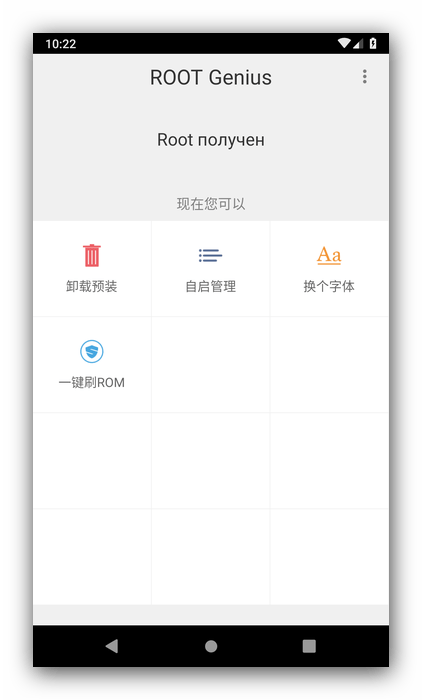
Благодаря этому список совместимости впечатляет – по заверениям разработчиков, их продукт поддерживается на более чем 15 тысячах девайсов. Минусы программы идентичны «большой» версии: интерфейс только на китайском языке, присутствие лишних функций, а также отображение рекламы.
Скачать Root Genius с официального сайта
Magisk
Более актуальную альтернативу устаревающему уже SuperSU представляет средство Magisk. Его уникальной особенностью является внесистемный Root, когда все изменения происходят за пределами корневого каталога. С одной стороны, это позволяет скрывать наличие повышенных привилегий, с другой – пользоваться почти всеми их преимуществами.
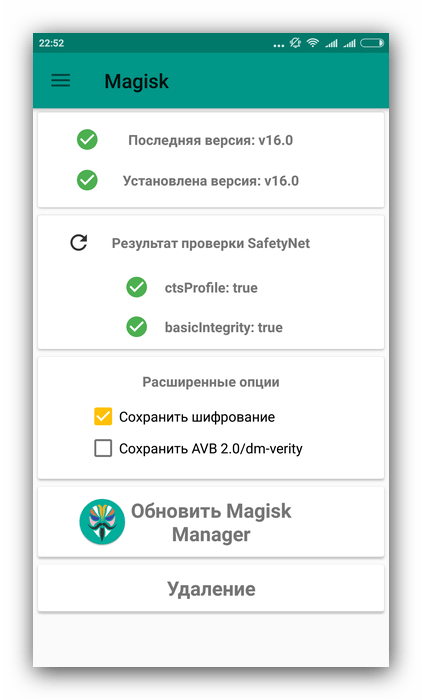
Появился Магиск относительно недавно, поэтому 100% совместим только с девайсами, вышедшими в 2017 году или позже. Вообще, совместимость – это главный недостаток данной программы, поскольку механизм эксплойта, который она использует, постоянно меняется. Впрочем, для популярных устройств и прошивок обычно есть инструкции по установке Magisk.
Скачать Magisk с сайта разработчика
Наша группа в TelegramПолезные советы и помощь
In the realm of Android customization and development, MTK (MediaTek) devices have gained significant popularity. Performance and price come together in a sweet spot, making these options an automatic consideration for many. However, to unlock the full potential of these devices, users often seek solutions that enable root access and advanced modifications. MTK Easy SU emerges as a prominent tool that simplifies the rooting process for MTK devices, making it accessible even to those with limited technical knowledge. What makes MTK Easy SU tick? The moment of truth has arrived — we’re going to dissect the features that make this tool tick, lay out the simple steps to get it up and running, and reveal the rewards that make it so compelling. By the time you’re done reading, you’ll be well on your way to an Android experience that’s smoother, faster, and more powerful than ever.
What is MTK Easy SU?
MTK Easy SU is a powerful tool designed specifically for MediaTek devices, enabling users to obtain root access effortlessly. Now you can determine which apps get special clearance, selectively granting elevated privileges to those that require it. Unlike traditional rooting methods, which often involve complex procedures and potential risks, MTK Easy SU streamlines the process, ensuring a safe and efficient experience. The possibilities are endless when you’ve got this tool on your side — armed with a dazzling array of features and customization options, you can transform your devices into productivity powerhouses.
Key Features of MTK Easy SU
1. Simplified Rooting Process
One of the standout features of MTK Easy SU is its simplified approach to rooting. For users tired of battling traditional rooting methods, this application is a breath of fresh air — it radically simplifies the process, no pro degree required. By minimizing the technical hurdle, anyone can dive into the world of root access, minus the steep learning curve.
2. Superuser Management
After successfully rooting their devices, users need an effective way to manage superuser permissions. MTK Easy SU provides a user-friendly interface that allows users to grant or revoke permissions for individual applications. Say goodbye to root access Concerns — this feature gives users a hands-on approach to managing app permissions, resulting in a safer and more personalized experience.
3. Support for Multiple MTK Devices
MTK Easy SU is compatible with a wide range of MediaTek devices, making it a versatile solution for users across various models. It doesn’t matter if you’re rocking a basic smartphone or a top-of-the-line device — this app is designed to work in harmony with your hardware, giving you total control over root access.
4. No PC Required
Unlike many traditional rooting methods that necessitate a connection to a PC, MTK Easy SU operates entirely on the device. With this feature, say goodbye to the hassle of additional gadgets and tedious setup procedures — you can now root your device with ease.
5. Regular Updates and Community Support
The developers of MTK Easy SU are committed to providing regular updates and improvements. Imagine constantly tidying up behind the scenes, plugging in enhancements, and exorcising gremlins – that’s our Maintenance Mojo. As a result, you get to enjoy a smoothly guided experience, plus a side of bugs begone. With MTK Easy SU, you’re not alone – its community is buzzing with users who are eager to lend a hand, share their expertise, or simply offer a word of encouragement.
How to Install MTK Easy SU
Installing MTK Easy SU is a straightforward process. Follow this straightforward roadmap to securely install and root your device without a hitch.
Step 1: Prerequisites
Before proceeding with the installation, ensure that you have the following:
-
A MediaTek device running Android.
-
USB debugging enabled on your device (Settings > Developer Options > USB Debugging).
-
A stable internet connection to download the application.
Step 2: Download MTK Easy SU
-
Module Name: MTK Easy SU
-
Format: apk
-
Size: Unable to calculate for the moment.
-
Version: Always the last one, up to date.
-
Web page:
-
Donate:
-
Support:
-
Minimum Magisk Version: Not Specified
-
Last Updated: 2024-07-08
-
Downloads Total: 2.5M
-
Average Rating:
Download Link: mtk-easy-su-v2.2.0.apk
- Download the APK file to your device.
Step 3: Enable Installation from Unknown Sources
-
Navigate to Settings on your device.
-
Go to Security (or Privacy, depending on your device).
-
Enable the option for Install unknown apps for your preferred browser or file manager.
Step 4: Install the APK
-
Locate the downloaded MTK Easy SU APK file in your device’s file manager.
-
Tap on the APK file to begin the installation.
-
Follow the on-screen prompts to complete the installation process.
Step 5: Launch MTK Easy SU
Once the installation is complete, you will find the MTK Easy SU app in your app drawer. Tap on the app icon to launch it.
How to Root Your MTK Device Using MTK Easy SU
After installing MTK Easy SU, follow these steps to root your MTK device:
Step 1: Open MTK Easy SU
Launch the MTK Easy SU app from your app drawer. You will be greeted with a simple and intuitive interface.
Step 2: Initiate the Rooting Process
-
Tap on the Root button within the app.
-
The application will begin the rooting process. This may take a few moments, so be patient.
Step 3: Grant Superuser Access
Once the rooting process is complete, you will receive a prompt asking you to grant superuser access to the MTK Easy SU app. Tap Allow to proceed.
Step 4: Verify Root Access
To ensure that your device has been successfully rooted, download a root checker app from the Google Play Store. Open the app and tap Verify Root. If your device is rooted, you will receive a confirmation message.
Step 5: Manage Superuser Permissions
After successful root verification, return to the MTK Easy SU app to manage superuser permissions for other applications. You can grant or revoke access as needed.
Benefits of Using MTK Easy SU
1. Enhanced Customization Options
Rooting your MTK device with MTK Easy SU unlocks a world of customization possibilities. Device manufacturers can be quite restrictive, but there’s a way to cut loose – by installing custom ROMs, users can reinvent their mobile experience, gaining the freedom to adjust system settings and exploring apps that cater to those with administrative authority. Because users can fine-tune their devices to precise specifications, the payoff is an experience that’s ridiculously closer to their vision of perfect.
2. Improved Performance and Battery Life
Rooting your device often leads to performance enhancements and better battery management. -strip away unwanted programs, fiddle with settings to get the most out of your device, andHarness the power of performance-boosting apps that tap into root access. With a slicker, more efficient system, you’ll notice a major difference in how long your battery lasts — and how happy you are using your device.
3. Access to Exclusive Apps
Many apps available on the Google Play Store offer advanced features exclusively for rooted devices. By rooting with MTK Easy SU, users gain access to these applications, enabling them to take full advantage of their devices’ capabilities.
4. Enhanced Security Features
While rooting may seem counterintuitive to security, the ability to manage superuser permissions provides an additional layer of security. Think of your system’s sensitive features like a restricted area – you get to choose which apps are allowed in, and that means you can keep the bad guys out.
Common Issues and Troubleshooting
1. Rooting Process Fails
If the rooting process fails, consider the following troubleshooting steps:
-
Ensure that you have a compatible MTK device.
-
Reboot your device and try the rooting process again.
-
Check for any pending updates for MTK Easy SU and install the latest version.
2. Apps Not Recognizing Root Access
If certain applications do not recognize root access after successful rooting, follow these steps:
-
Open the MTK Easy SU app and check for any app permissions that need to be granted.
-
Restart the affected applications or reboot your device.
3. Device Boot Loop
In the event of a boot loop after rooting:
-
Boot your device into recovery mode.
-
Clear the cache partition.
-
If the issue persists, consider flashing a stock ROM or restoring from a backup.
Conclusion
Rooting a MediaTek device can be a real hurdle, but MTK Easy SU levels the playing field, empowering users to customize their experience with unmatched freedom. When you need an app that’s got your back, MTK Easy SU delivers. This potent toolbox and regular updates take the uncertainty out of Android customization, letting you tap into its full potential. Users will be well on their way to becoming power users when they follow the straightforward instructions outlined here for rooting their MTK devices. Embrace the potential of your device and enjoy the benefits of rooting with MTK Easy SU.
Introduction to MTK Easy SU
MTK Easy SU Learn about MTK Easy , a robust Android application designed to provide root access to MediaTek devices running Android versions up to March 2020. Discover its compatibility with a wide range of devices spanning Android 5.0 to Android 10.
Utilizing Magisk and Mtk-su
Explore the functionalities of MTK Easy , which leverages Magisk and Mtk-su to establish bootless superuser access on MediaTek Android devices. Understand how this approach enhances the user experience for those aiming to exploit the Mtk security vulnerability uncovered by Diplomatic.
Magisk Manager Requirement
Delve into the significance of Magisk Manager as a requirement for managing root access to individual applications. Uncover the role it plays in optimizing the functionality of MTK Easy and ensuring seamless control over root permissions.
Precautions and Considerations
Navigate through essential precautions and considerations before installing MTK Easy . Gain insights into the need to disable Google Play Protect temporarily, as recent security changes may flag the app as harmful. Stay informed about the critical MediaTek rootkit affecting millions of Android devices and its potential implications.
Firmware Update Warning
Understand the potential impact of firmware updates released after March 2020 on MTK Easy functionality. Evaluate whether to retain MTK Easy or Mtk-features before updating your device. This section provides users with crucial information to make informed decisions regarding firmware updates and root access on their MediaTek Android devices.
Conclusion: Unlocking MediaTek Power with MTK Easy SU
In summary, MTK Easy is a versatile tool, empowering MediaTek Android users with seamless root access. Leveraging Magisk and Mtk- it caters to devices from Android 5.0 to 10. Users should exercise caution by temporarily disabling Google Play Protect, being mindful of the MediaTek rootkit, and considering firmware updates’ impact post-March 2020. By staying informed and following guidelines, users can confidently enhance their MediaTek Android experience with MTK Easy .
Others Tools List
FD Tool 3.3 With KeyGen
Unlocking Key Qualcomm Tool 1.0 With KeyGen Free Download
MRT Key v3.53 Tool Free Version Download
MUNCRAT All IN One AIO FRP Tool V1.0 Free Download
Qualcomm Tool V1.1 Pro Tool Free Download
Samsung Frp Download Mode Tool
World Mobile Tool V1.2 Free Download
Download Link: Link1 Link2
Password: No Password
Size: 7.1 MB
File Name :MTK Easy SU: Root Your MediaTek Android Device(www.gsmtoolpack.com)
Click Here For More Info About MTK Easy SU Official Specification
| Info | Details |
|---|---|
| Software Name | MTK Easy SU |
| Version | v2023 |
| File Size | Only 7 MB |
| Release Date | 03 December 2023 |
| Password | WWW.FIRMWAREFOREST.COM |
| File Hosted By | www.FirmwareForest.Com |
| File Price | 100% Free File (NO PAID) |
| Compress | ZIP/Compress |
| Windows Compatible | Windows 7/8/8.1/10 32 & 64 bit |
| Upload Source | Google Drive/MEGA |
Features OF MTK Easy SU
MTK Easy SU is a powerful Android app that grants root access to MediaTek Android devices running on Android OS versions released before March 2020. It’s compatible with a wide range of devices running Android 5.0 to Android 10.
Magisk Manager Requirement
To manage root access for individual applications, you’ll need to install Magisk Manager.
Disable Google Play Protect
Before installing MTK Easy SU, temporarily disable Google Play Protect, as it may flag the app as harmful due to recent security changes.
Critical MediaTek Rootkit
Be aware of a critical MediaTek rootkit affecting millions of Android devices, which has been publicly known for months.
Firmware Update Warning
Firmware updates released after March 2020 are likely to block the method employed by MTK Easy SU. Before updating your device, consider whether you wish to retain MTK Easy SU or Mtk-su functionality.
How To Use?
- First, you need to download the zip file from the below link
- Next, you can unzip all files at c: drive (important)
- Ensure you have disabled the antivirus before running the installation
- Next, open the folder and install the setup file with some basic instruction
- Run the «MTK Easy SU»
- Next, you can install all drivers if you already installed skip this step
- Connect the phone and try to do any function
- Enjoy !!!
Subscribe My Telegram Channel
README:
Compatibility: The tool runs perfectly on Windows XP, Windows Vista, Windows 7, Windows 8, Windows 8.1, and Windows 10 (32-bit and 64-bit).
Take a Backup: If you are willing to try the above tool, then please take a backup of your personal data from your Android Smartphone or Tablet. Flashing any Firmware or recovery may brick the device.
Credits: MTK Easy SU is created and distributed by the developer. So, full credits go to the developer for sharing the tool for free.