
MOXA рекомендует ряд простых в использовании решений для добавления com-портов через USB-порт ПК. Преимущества этих устройств – простота установки драйверов и простота начала работы: требуется только подключить конвертер к компьютеру, затем свои последовательные устройства – и преобразователь готов к работе. Программирование не требуется, и не нужно беспокоиться о прерываниях, настройке платы, требованиях к питанию или схемах соединений.
Особенности устройства UPort 1130
Преобразователь MOXA Uport 1130 RU обеспечивает расширение одного com-порта. Он добавляет порт, который конфигурируется для RS-422, двухпроводного RS-485 и четырехпроводного RS-485. Конвертер может работать со скоростью до 12 Мбит/с, которая намного быстрее, чем текущая максимальная скорость последовательной передачи. Преобразователь питается от шины, поэтому внешний источник питания не требуется.
Модель UPort 1130 поставляется с последовательным адаптером Mini DB9F-to-TB.
В ассортименте MOXA также представлен 1-портовый преобразователь USB в RS-422/485 с изоляцией 2 КВ – это модель MOXA 1130I.
Компания АВЕОН предлагает купить 1-портовые конвертеры UPort 1130 с доставкой по Екатеринбургу. Заказ оформляется на сайте или по телефону.
Скачать драйвер (Driver)для UPort 1130:
Версия 1.3 от 30.07.2012…… Linux*
Версия 1.0 от 7.12.2009…….. Linux 2.4*
Версия 1.1.4 от 7.12.2009….. Linux Eee PC 701*
Версия 1.9 от 3.03.2016…….. Windows (WHQL certified)*
Версия 1.1 от 7.12.2009…….. Windows CE 5.0*
Версия 1.0 от 7.12.2009…….. Windows CE 6.0*
Версия 1.0 от 23.08.2013…… Android**
* Драйверы общие для всех конвертеров UPort серии 1100
* Драйверы общие для всех преобразователей UPort серий 1100/1200/1400/1600
Скачать утилиты:
PComm Lite для Windows 2000, XP, 2003, Vista, 2008, 7 (x86 и x64) / Версия 1.6 от 14.05.2012
ViewCOM / Версия 1.0 от 12.07.2010
Скачать инструкцию на русском языке:
Руководство пользователя UPort серии 1100***
*** Установка драйверов, подключение, распиновка.
В нашем ассортименте представлена модификация UPort 1130 RU. Это локализованная версия российского производства популярного продукта, благодаря чему предлагается по еще более выгодной цене. MOXA становится еще ближе!

UPort 1100 Series User’s Manual
Edition 9.0, February 2017
www.moxa.com/product
© 2017 Moxa Inc. All rights reserved.

UPort 1100 Series User’s Manual
Moxa China (Shanghai office)
The software described in this manual is furnished under a license agreement and may be used only in accordance with
the terms of that agreement.
Copyright Notice
© 2017 Moxa Inc. All rights reserved.
Trademarks
The MOXA logo is a registered trademark of Moxa Inc.
All other trademarks or registered marks in this manual belo ng to their respective manufacturers.
Disclaimer
Information in this document is subject to change without notice and does not represent a commitment on the part of
Moxa.
Moxa provides this document as is, without warranty of any kind, either expressed or implied, including, bu t n ot limited
to, its particular purpose. Moxa reserves the right to make improvements and/or changes to this manual, or to the
products and/or the programs described in this manual, at any time.
Information provided in this manual is intended to be accurate and reliable. However, Moxa assumes no responsibility for
its use, or for any infringements on the rights of third parties that may result from its use.
This product might include unintentional technical or typographical errors. Changes are periodically made to the
information herein to correct such errors, and these changes are incorporated into new editions of the publication.
Technical Support Contact Information
www.moxa.com/support
-free: 1-888-669-2872
+1-714-528-6777
+1-714-528-6778
+49-89-3 70 03 99-0
+49-89-3 70 03 99-99
+91-80-4172-9088
+91-80-4132-1045
-free: 800-820-5036
+86-21-5258-9955
+86-21-5258-5505
-Pacific
+886-2-8919-1230
+886-2-8919-1231

Table of Contents
1. Introduction ………………………………………………………………………………………………………………………… 1
Overview ……………………………………………………………………………………………………………………………. 2
ARDC (Automatic Recovery Data Communication) …………………………………………………………………… 2
Package Checklist …………………………………………………………………………………………………………………. 2
Product Features ………………………………………………………………………………………………………………….. 3
Product Specifications ……………………………………………………………………………………………………………. 3
LED Indicators ……………………………………………………………………………………………………………………… 5
Adjustable Pull High/Low, Terminator Resistors for the RS-485 Port ……………………………………………… 6
2. Installation and Configuration ……………………………………………………………………………………………….. 1
Initial Driver Installation …………………………………………………………………………………………………………. 2
Hardware Installation ………………………………………………………………………………………………………. 4
Windows 98/ME and Windows 2000 …………………………………………………………………………………….. 4
Windows XP, Windows 2003/Vista, and Windows 2008 and 2012 (32-bit and 64-bit) ………………………… 5
Configuring the COM Port ……………………………………………………………………………………………….. 10
Configuring the Converter ………………………………………………………………………………………………. 11
Removing the Converter ………………………………………………………………………………………………… 13
Uninstalling the Driver …………………………………………………………………………………………………… 14
Advanced UPort 1100 Driver Functions ……………………………………………………………………………………… 15
Enable Fixed-base COM Mode …………………………………………………………………………………………………. 15
Install Linux Driver ……………………………………………………………………………………………………………… 16
Linux Kernel 2.4.20 and above …………………………………………………………………………………………. 16
Linux Kernel 2.6.x ………………………………………………………………………………………………………… 17
Installing the Windows CE Driver …………………………………………………………………………………………….. 19
Installation with an installation package for Win CE 6.0 …………………………………………………………… 20
Installation with an installation package for Win CE 5.0 …………………………………………………………… 27
Removing the Moxa WinCE 5.0 / CE 6.0 Driver……………………………………………………………………… 29
Installation with a CAB File ……………………………………………………………………………………………… 30
Removing the Moxa WinCE 5.0 / CE 6.0 Driver……………………………………………………………………… 32
3. Pin Assignment ……………………………………………………………………………………………………………………. 1
UPort DB9 Pin Assignments ……………………………………………………………………………………………………… 1
Terminal Block Pin Assignments ……………………………………………………………………………………………….. 1
A. EMI Notices …………………………………………………………………………………………………………………………. 1
EMI Notices (Class B) …………………………………………………………………………………………………………….. 1
GREEN Notices …………………………………………………………………………………………………………………….. 1

1
1. Introduction
The UPort 1100 Series of USB-to-serial converters provides an easy way to add COM ports to your computer.
The UPort 1110 provides one RS-232 port; the UPort 1130 and UPort 1130I each provide one RS-422/RS-485
port; the UPort 1150 and U Port 1150I each provide one RS-232/422/485 por t. As a plug-and-play USB device,
the converters are perfect for mobile, instrumentation, and point-of-sale applications.
The UPort 1100 series includes the following models:
UPort 1110: 1-port RS-232 USB-to-serial converter.
UPort 1130: 1-port RS-422/485 USB-to-serial converter.
UPort 1130I: 1-port RS-422/485 USB-to-serial converter with isolation protection.
UPort 1150: 1-port RS-232/422/485 USB-to-serial converter.
UPort 1150I: 1-port RS-232/422/485 USB-to-serial converter with isolation protection.
The following topics are covered in this chapter:
Overview
ARDC (Automatic Recovery Data Communication)
Package Checklist
Product Features
Product Specifications
LED Indicators
Adjustable Pull High/Low, Terminator Resistors for the RS-485 Port

UPort 1100 Series Introduction
Overview
The UPort 1100 series is part of Moxa’s UPort line of USB-to-serial converters. The UPort line provides a range
of easy-to-use solutions for adding COM ports through a PC’s USB port. Simply install the drivers, connect the
UPort to your computer, plug in your serial devices, and you’re ready to go. Programming is not re quired, and
you do not need to worry about IRQs, configuring a board, power requirements, or connection schemes.
The UPort 1100 series provides single COM port expansion. The UPort 1110 adds one RS-232 port to your
computer, which is the same type of COM port that is built into most PC motherboards. The UPort 1130/1130I
adds one port that is configurable for RS-422, 2-wire RS-485, and 4-wire RS-485 modes. The UPort
1150/1150I adds one RS-232, RS-422, 2 wire RS-485, or 4 wire RS-485 port to your computer. All of these
models can operate at speeds of up to 12 Mbps, which are much faster than the current maximum serial
transfer rate. The converter is bus-powered, so no external power supply is required.
ARDC (Automatic Recovery Data Communication)
ARDC (Automatic Recovery Data Communication) makes it easier to recover data tra nsmission, even if the
cable is accidentally unplugged. This means that you do not need to worry about reconfiguring complex
settings to ensure smooth data transmission. If the USB cable is accidentally unplugged, simply plug it back
into the same port, and the converter will automatically reconnect with the host and continue to transfer data.
This feature not only eliminates the need for reconfiguration, but it also reduces the probability of data loss.
Package Checklist
The following items are included in your UPort 1110/1130/1130I/1150 package:
• UPort 1100 Series USB-to-serial converter
• Documentation and software CD
• Quick installation guide (printed)
• Warranty card
The UPort 1130/1130I/1150 also come with the following item:
• 1 serial adapter: Mini DB9F-to-TB
The following items are included in your UPort 1150I package:
• 1 UPort 1150I USB-to-serial converter
• 1 serial adapter: Mini DB9F-to-TB
• USB cable: CBL-USBA/B-100
• Velcro lockdown strap for the USB cable
• Documentation and software CD
• Quick installation guide (printed)
• Warranty card
Please notify your sales representative if any of the above items are missing or damaged.

UPort 1100 Series Introduction
USB type A: UPort 1110/1130/1130I/1150
USB type B: UPort 1150I
UPort 1110: RS
UPort 1130/1130I: RS
UPort 1150
Serial Communication Parameters
Note: Please refer to Moxa’s website for the latest driver support information.
Product Features
The UPort converter has the following f eatures:
• Full-speed USB operation at up to 12 Mbps
• Additional I/O or IRQ not required
• Serial transmission speed up to 921.6 kbps
• 64-byte FIFO and built-in hardware and software flow control
• Support for RS-422, 2-wire RS-485, and 4-wire RS-485 (UPort 1130/1130I/1150/1150I)
• Terminal block adapter (UPort 1130/ 1130I/1150/1150I)
• 2 kV Optical isolation protection (UPort 1130I/1150I only)
Product Specifications
USB 1.0/1.1 compliant, USB 2.0 compatible
12 Mbps (Full-speed USB)
1
-232
-422/485
/1150I: RS-232/422/485
DB9 male
tical Isolation: 2 kV (UPort 1130I and 1150I)
50 bps to 921.6 kbps
5, 6, 7, 8
1, 1.5, 2
None, Even, Odd, Space, Mark
RTS/CTS, XON/XOFF
64 bytes
-232: TxD, RxD, RTS, CTS, DTR, DSR, DC D, GN D
-422: TxD+(B), TxD-(A), RxD+(B ), Rx D -(A ), GN D
-485-4w: TxD+(B), TxD-(A), RxD+(B), RxD-(A), GND
-485-2w: Data+(B), Data-(A), GN D
-485 Data Direction: ADDC® (Automat ic Data Dir ec ti on Con tro l )

UPort 1100 Series Introduction
UPort 1110/1130/1130I/1150: ABS + PC
UPort 1150I: Metal
P
UPort 1110/1130/1130I/1150: 60 g (0.13 lb)
UPort 1150I: 80 g (0.17 lb)
UPort 1110/1130/1130I/1150: 37.5 x 20.5 x 60 mm
UPort
Ambient Relative Humid it y:
Note: Please contact Moxa
Standards and Certifications
IEC 61000
IEC 61000
IEC 61000
IEC 61000
IEC 61000
IEC 61000
UPort 1110: 5 VDC, 30
UPort 1130: 5 VDC, 60 mA
UPort
UPort 1150: 5 VDC, 77 mA
UPort 1150I: 5 VDC, 260 mA
MTBF (mean time between failures)
roduct only:
(L x W x H):
1150I: 52 x 80 x 22 mm
0 to 55°C (32 to 131°F)
-20 to 70°C (-4 to 158°F)
5 to 95% (noncondensing)
if you require products guaranteed to function properly at higher altitudes.
EN 55032/24
CISPR 32, FCC Part 15B Class B
-4-2 ESD: Contact: 4 kV; Air: 8 kV
-4-3 RS: 80 MHz to 1 GHz, 3 V/m
-4-4 EFT: Power 1 kV; Signal 0.5 kV
-4-5 Surge: Power 2 kV
-4-6 CS: 150 kHz to 80 MHz, 3 V/m
-4-8 PFMF
mA
1130I: 5 VDC, 65 mA
1,949,025 hrs
5 years
See www.moxa.com/warranty
UPort 1100 Series Introduction
LED Indicators
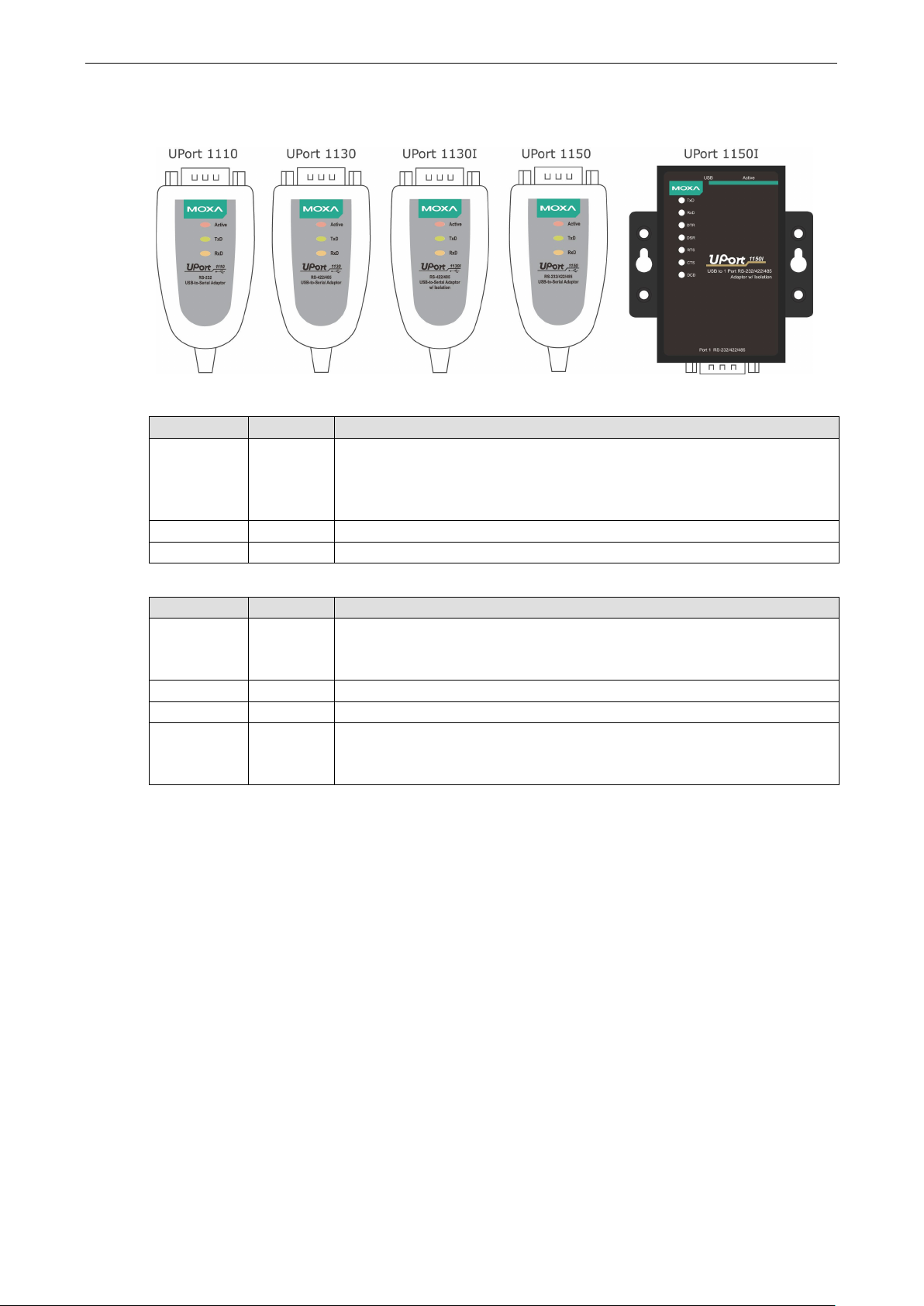
UPort 1110/1130/1130I/1150 LED description:
Name Color Description
Active Red This LED indicates normal operation.
Steady: The UPort is operational.
Off: A fault condition exists: there may b e a problem with the converter, the
driver installation, or PC configuration.
TxD Green Blinking: Serial device i s tr ansmitting data.
RxD Yellow Blinking: Serial device is receiv ing d a ta.
UPort 1150I LED description:
Name Color Description
Active Red Steady: The UPort is operational.
Off: A fault condition exists: there may be a problem with the converter, the
driver installation, or PC configuration.
TxD Green Blinking: Serial device i s tr ansmitting data.
RxD Yellow Blinking: Serial device is receiv ing d a ta.
DTR, DSR,
RTS, CTS,
DCD
Red Steady: Require these signals to operate.
Off: Disable these signals to opera te.
UPort 1100 Series Introduction
Adjustable Pull High/Low, Terminator Resistors for th e
RS-485 Port
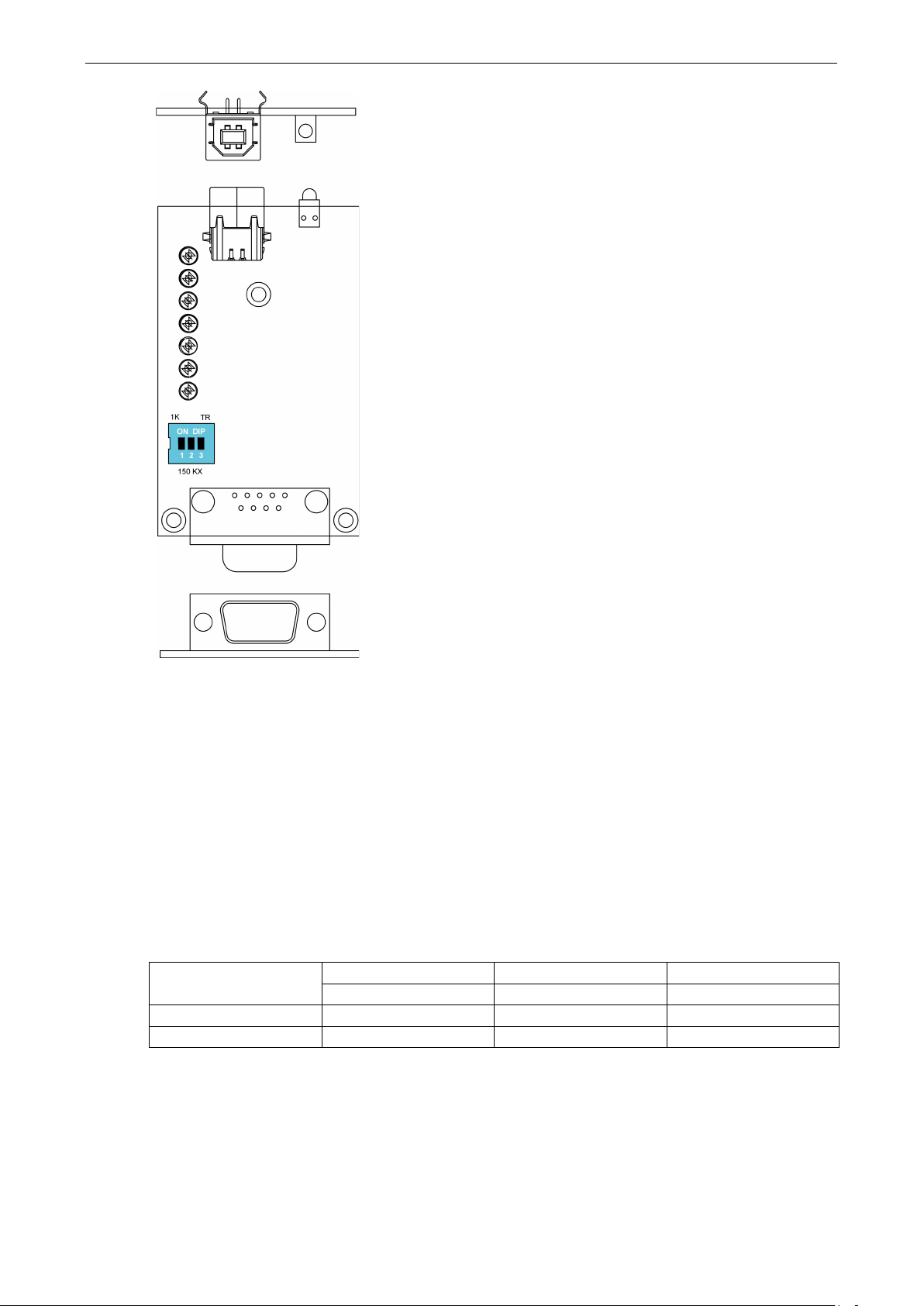
In some critical environments, you may need to add termination resistors to prevent the reflection of serial
signals. When using termination resistors, it is important to set the pull high/low resistors correctly so that the
electrical signal is not corrupted. The UPort uses DIP switches to set the pull high/low resistor values for each
serial port.
To set the pull high/low resistors to 150 kΩ, make sure both of the assigned DIP switches are in the OFF
position.
To set the pull high/low resistors to 1 kΩ, make sure both of the assigned DIP switches are in the ON
position. This is the default setting.
SW
ON 1kΩ 1kΩ 120 Ω
OFF 150 kΩ 150 kΩ Disable
1 2 3
Pull High Pull Low Terminator

2
2. Installation and Configuration
Installation of the converter i s a simple process. First, install t h e driver; then, plug the converter into a USB
port. When the converter is plugged in, Windows will load the correct drivers for the converter and the new
COM port. In this chapter, basic in stallation and configuration procedures are explained. Although the
installation screens will be for Windows 2000, the procedures are essentially the same for Windows 98 and later
versions of Windows operating system.
The following topics are covered in this chapter:
Initial Driver Installation
Hardware Installation
Windows 98/ME and Windows 2000
Windows XP, Windows 2003/Vista, and Windows 2008 and 2012 (32-bit and 64-bit)
Configuring the COM Port
Configuring the Converter
Removing the Converter
Uninstalling the Driver
Advanced UPort 1100 Driver Functions
Enable Fixed-base COM Mode
Install Linux Driver
Linux Kernel 2.4.20 and above
Linux Kernel 2.6.x
Installing the Windows CE Driver
Installation with an installation package for Win CE 6.0
Installation with an installation package for Win CE 5.0
Removing the Moxa WinCE 5.0 / CE 6.0 Driver
Installation with a CAB File
Removing the Moxa WinCE 5.0 / CE 6.0 Driver
UPort 1100 Series Installation and Configuration
Initial Driver Installation
The Documentation and Software CD contains the drivers for the converter. You may also download the drivers
at www.moxa.com
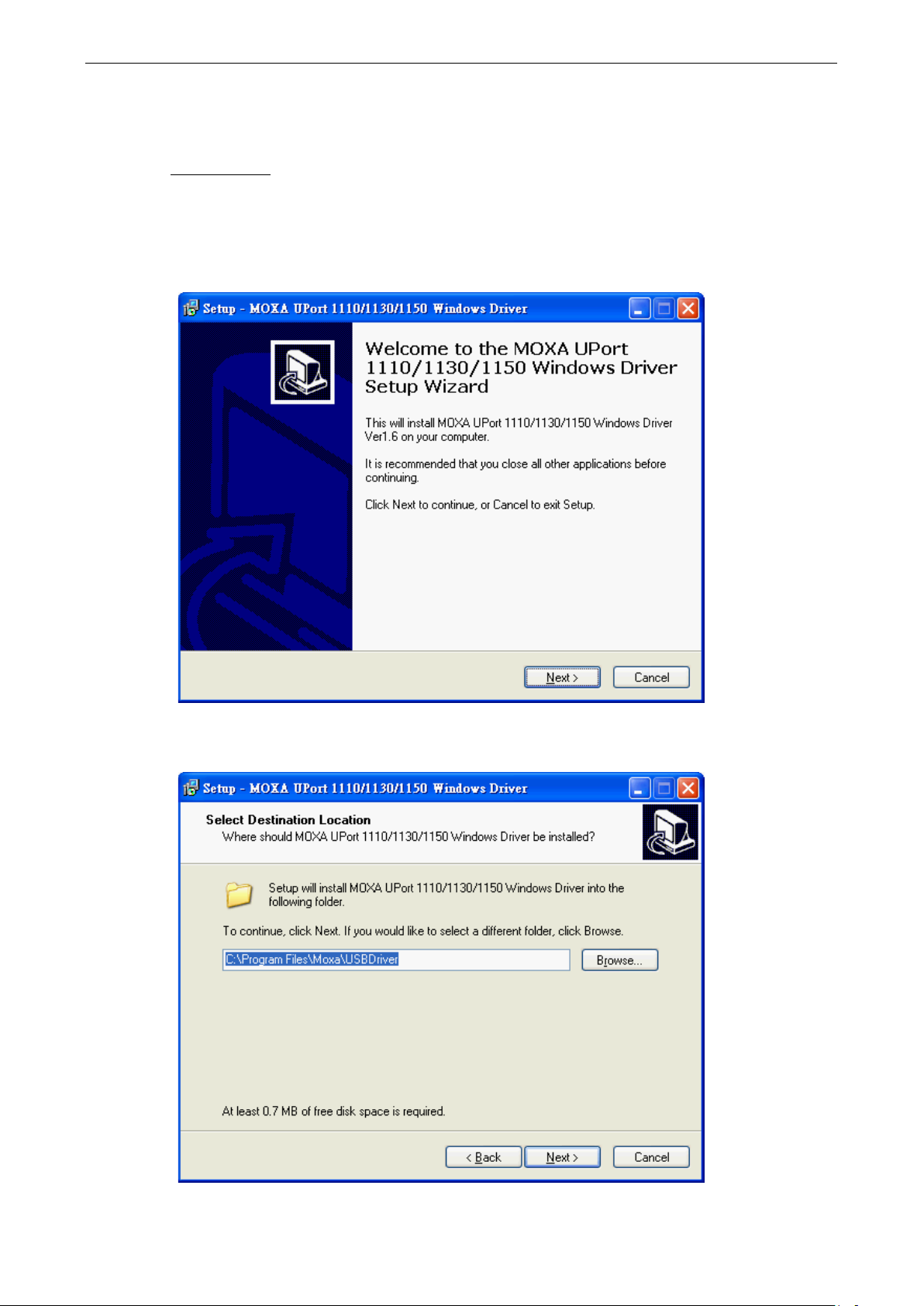
Use Windows Explore r to locate the driver installation file, which will be Setup or Install. O n the
Documentation and Software CD, this file will be located in the UPort 1100/Software folder, filed by
operating system. Double-click the Setup or Install file.
1. The Setup Wizard will open. Click Next to begin installing the driver.
. The installation pro cedure is the same for all Window s operating systems.
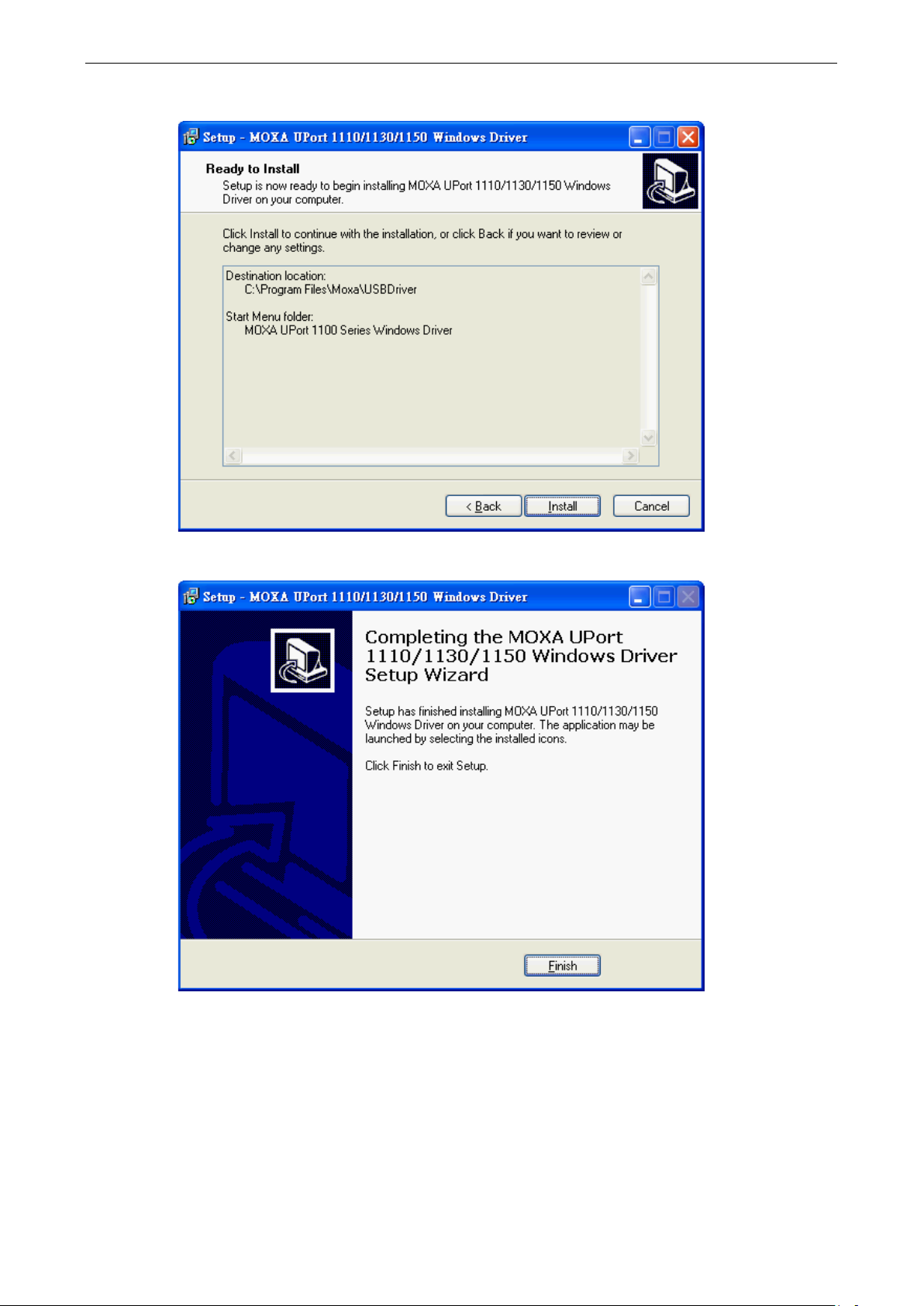
2. Click Next to install the driver in the indicated folder, or use the drop-down folder list to locate a different
folder.
UPort 1100 Series Installation and Configuration
3. Click Install to proceed with th e installation.
4. Click Finish to complete the installation of the driver.
UPort 1100 Series Installation and Configuration
ATTENTION
For best results, we recommend that you install the driver before pluggin g the converter into the USB port.
Please refer to the previous section on Initial Driver Installation for instructions.
Hardware Installation
After installing the driver, plug the converter into any upstream USB port, such as a USB port on your computer.
Windows will automatically detect the converter and begin installing the driver. When Windows finishes
installing the driver for the converter, it will detect a ne w COM port an d will then inst all another dri ver for t he
new COM port.
Windows 98/ME and Windows 2000
The following instructions are for Windows 98 and Windows 2000 systems:
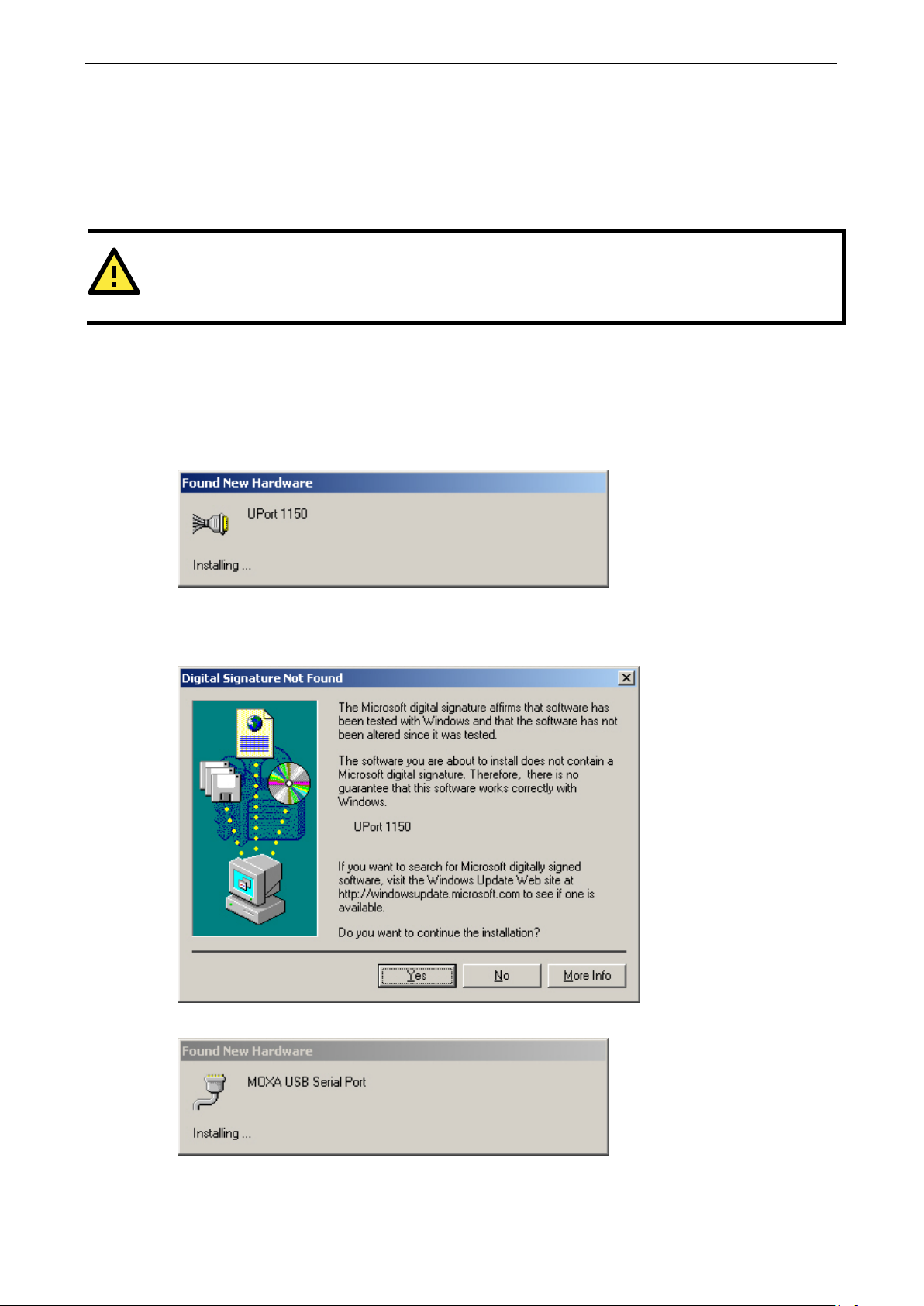
1. After plugging the converter into a USB port, the Found New Hardware window should open
automatically. The USB icon indicates th at the USB port is being installed. No action is required.
2. Windows 98 users may skip to the next step. On Windows 2000 systems, a window will pop up cautioning
you that this software has not passed Windows logo testing. This is a standard warning, and Moxa has
thoroughly tested the driver for safe Windows operation. Please click Yes to proceed.
3. Windows will automatically detect and install the new serial port. No further action is required
Loading…
Интерфейс USB
-
Стандарт USB
USB 1.1, совместим с USB 2.0
-
Разъем USB
USB Type A (подключается напрямую к PC)
-
Скорость
12 Мбит/с (Full-Speed USB)
Последовательный интерфейс
-
Количество портов
1
-
Разъем последовательного порта
DB9 «папа»
-
Тип интерфейса
RS-422/485
-
Передаваемые сигналы
RS-422: Tx+, Tx-, Rx+, Rx-, GNDRS-485 (2-проводный): Data+, Data-, GNDRS-485 (4-проводный): Rx+, Rx-, Tx+, Tx-, GND
-
Буфер FIFO, байт
64
Параметры последовательной связи
-
Бит данных
5, 6, 7, 8
-
Четность
Нет, чет, нечет, «0», «1»
-
Стоповых бит
1, 1.5, 2
-
Управление потоками данных
RTS/CTS, XON/XOFF
-
Скорость передачи данных, бит/сек
50 ~ 921 600
Драйверы для ОС
-
Драйверы для ОС
Linux 2.4.xLinux 2.6.xWindows 2012 (x64)Windows Embedded CE 5.0Windows Embedded CE 6.0Linux 3.xWindows 95/98/ME/NT/2000Windows XP/2003/Vista/2008/7/8/8.1/10 (x86/x64)
Защита
-
Защита от импульсных помех, кВ
15
Требования по электропитанию
-
Рабочее напряжение
Питание по шине USB
-
Потребление тока
60 мА при 5 В
Требования к окружающей среде
-
Рабочая температура, град. C
0 ~ 55
-
Рабочая влажность, %
5 ~ 95
-
Температура хранения, град. C
-20 ~ 70
Наличие международных сертификатов
-
Электромагнитная совместимость (EMI)
EN 55022 Class BEN 55024EN 61000-3-2EN 61000-3-3FCC Part 15 Subpart B Class BIEC 61000-4-2IEC 61000-4-3IEC 61000-4-4IEC 61000-4-5IEC 61000-4-6IEC 61000-4-8IEC 61000-4-11
-
Среднее время наработки на отказ (MTBF), часов
1949025
Конструктивные свойства
-
Габаритные размеры, мм
38.4 x 60 x 20
-
Материал корпуса
Пластик
-
Масса нетто, г
65
Монтаж
-
Монтаж
Настольный/настенный
Комплект поставки
-
Комплект поставки
Устройствократкое руководство пользователядокументация и ПО на CDпереходник DB9 «мама» в винтовые клеммы (1 шт.)
На складе
Артикул: 03471100
1-портовый конвертер USB в RS-422/485
Цена
116.1 $
9 243.60 ₽
с НДС 20%
Спецификация
Порты ввода-вывода |
|
| Всего последовательных портов | 1 |
| Количество разъемов RS-422/485 | 1 |
| Количество разъемов USB | 1 |
Электропитание |
|
| DC входное напряжение | 5…5 В |
Требования к условиям использования |
|
| Рабочая температура | 0…55 °C |
Реализация корпуса |
|
| Внешний вид и материал | Пластик повышенной прочности (ABS) |
| Монтаж | На стол |
Размеры |
|
| Ширина | 38.4 мм |
| Глубина | 20 мм |
| Высота | 60 мм |
Сертификация и поддерживаемые стандарты |
|
| Электромагнитные помехи (EMI) | FCC Part 15 Subpart B Class A, CISPR 32 |
| Стандарты ЭМС | МЭК 61000-4-2, МЭК 61000-4-3, МЭК 61000-4-4, МЭК 61000-4-5, МЭК 61000-4-6, МЭК 61000-4-8, EN 55024, EN 55032 |
Модификации
Вопросы о товаре
Можно ли подключить несколько устройств UPort к одному компьютеру?
Команда MOXA
Добрый день, Андрей. Да, можно. Несколько преобразователей UPort подключаются к ПК через USB, и каждому из них автоматически назначается отдельный виртуальный COM-порт.


product.general.view_in_space
Модификации на складе
UPort 1130
Вопросы о товаре (1)
9 243.60 ₽
с НДС 20%
- Главная
- →
- Каталог товаров
- →
- Автоматизация
- →
- Преобразователи
- →
- USB-хабы и преобразователи
- →
- Преобразователь MOXA UPort 1130
Компания Digital Angel™ (Цифровой Ангел) является поставщиком телекоммуникационного оборудования под торговой маркой MOXA на территории России и стран СНГ.
-
Цена
включает НДС 20%
+доставка
×
Доставка по Москве
Самовывоз со склада — 0₽, 3 дня
До пункта выдачи — от 250₽, 5 дней
Курьером до двери — от 420₽, 5 дней
Доставка по России
До пункта выдачи — от 280₽, 6 дней
Точная стоимость и сроки доставки
рассчитываются в корзине!
9 060 ₽ -
Срок поставки
3 дня -
Код для заказа
34583
Мы поставляем продукцию физическим лицам по онлайн-оплате и юридическим лицам — по безналичному расчету. Стоимость доставки будет рассчитана при оформлении заказа. Самовывоз со склада — бесплатно
- Производитель:MOXA
- Упаковка:6 x 3.8 x 2 см
- Вес:0.065кг
1-портовый преобразователь USB в RS-422/485
- Все USB-хабы и преобразователи
- Все USB-хабы и преобразователи MOXA
- Все товары MOXA
-
Преобразователь интерфейса MOXA UPort 1130 — отличный выбор конвертера RS-422/485 в USB. Вышеназванные стандарты используются в серийных промышленных устройствах с последовательными интерфейсами и применимы в большинстве сетевых протоколов. При помощи этого четырехпроводного преобразователя появляется возможность без лишних усилий и денежных трат создавать гибкие и сложные индустриальные сети, поскольку многие современные компьютеры и рабочие станции COM-портом не оборудованы вовсе.
Преобразователь интерфейса RS-422/485 в USB UPort 1130: особенности и характеристики
- Интерфейс RS-485 — наилучший из последовательных. Отличается хорошей помехозащищенностью, пропускной способностью и длиной линии связи (до 1,2 км).
- Скорость COM-порта — от 50 бит/с до 921,6 Кбит/с. Разъем: DB9M. Поддерживается стандарт USB 2.0.
- Программное обеспечение совместимо с Windows, WinCE и Linux. Конвертер является устройством Plug-and-Play и готов к работе сразу после установки.
- Доступна возможность управления клиентами через виртуальный COM-порт. Уникальные драйвера помогают сохранить сетевые настройки и номера COM-портов даже в случае отсоединения устройства и его повторного подключения в другой порт USB.
- Форм-фактор в виде кабеля с разъемами для подключения максимально удобен. Ударопрочный пластиковый корпус (ABS) имеет сверхкомпактные габариты: 38х60х20.
- Надежность подтверждена сертификатами электромагнитной совместимости и защиты от импульсных помех. Период работы на отказ (MTBF) — более 220 лет.
Благодаря простоте подключения и настройки модель переходника USB в RS-422/485 MOXA UPort 1130 могут быть использованы для подключения нескольких последовательных устройств, выполняющих разные функции, к одной рабочей станции. Например, для создания комплексной системы видеонаблюдения, включающей в себя видеокамеры, сенсоры, карт-ридеры и модемы. При этом не потребуется добавлять порты в материнскую плату рабочей станции или устанавливать лишнее программное обеспечение.
Характеристики:
- Количество портов: 1
- Материал корпуса: Пластик
- Монтаж: Настольный/настенный
- Среднее время наработки на отказ (MTBF), часов: 1949025
- Электромагнитная совместимость (EMI): EN 55022 Class B, EN 55024, EN 61000-3-2, EN 61000-3-3, FCC Part 15 Subpart B Class B, IEC 61000-4-2, IEC 61000-4-3, IEC 61000-4-4, IEC 61000-4-5, IEC 61000-4-6, IEC 61000-4-8, IEC 61000-4-11
- Бит данных: 5, 6, 7, 8
- Стоповых бит: 1, 1.5, 2
- Управление потоками данных: RTS/CTS, XON/XOFF
- Четность: Нет, чет, нечет, «0», «1»
- Передаваемые сигналы: RS-422: Tx+, Tx-, Rx+, Rx-, GND, RS-485 (2-проводный): Data+, Data-, GND, RS-485 (4-проводный): Rx+, Rx-, Tx+, Tx-, GND, RS-232: TxD, RxD, RTS, CTS, GND
- Рабочая влажность, %: 5 ~ 95
- Рабочая температура, град. C: 0 ~ 55
- Температура хранения, град. C: -20 ~ 70
- Потребление тока: 60 мА при 5 В
- Рабочее напряжение: Питание по шине USB
- Защита от импульсных помех, кВ: 15
- Скорость передачи данных, бит/сек: 50 ~ 921 600
- Драйверы для ОС: Linux 2.4.x, Linux 2.6.x, Windows 2012 (x64), Windows Embedded CE 5.0, Windows Embedded CE 6.0, Linux 3.x, Windows 95/98/ME/NT/2000, Windows XP/2003/Vista/2008/7/8/8.1/10 (x86/x64)
- Тип интерфейса: RS-422/485
- Разъем USB: USB Type A (подключается напрямую к PC)
- Скорость: 12 Мбит/с (Full-Speed USB)
- Стандарт USB: USB 1.1, совместим с USB 2.0
- Буфер FIFO, байт: 64
- Разъем последовательного порта: DB9 «папа»
- Тип устройства: 1-портовые преобразователи RS-232/422/485 в USB
Комплектация:
Устройство, краткое руководство пользователя, документация и ПО на CD, переходник DB9 «мама» в винтовые клеммы (1 шт.)
Добавьте в заказ
-
Документы
Программное обеспечение
Совместимые товары
-
1 537 ₽
Цена включает НДС 20%
Оптовая цена по запросуПереходник с DB9 «мама» на терминальный блок
Тарифные планы
Аналоги
-
15 605 ₽
Цена включает НДС 20%
Оптовая цена по запросу1-портовый преобразователь USB в RS-422/485 с изоляцией 2 КВ