

noscript>
-
Описание
-
Videos
Содержание: скрывать
- 1 Пылесос Xiaomi Mi G10
- 2 Характеристики
- 3 Описание
- 4 Что в коробке?
- Популярные вопросы
- 6 Документы
Пылесос Xiaomi Mi G10
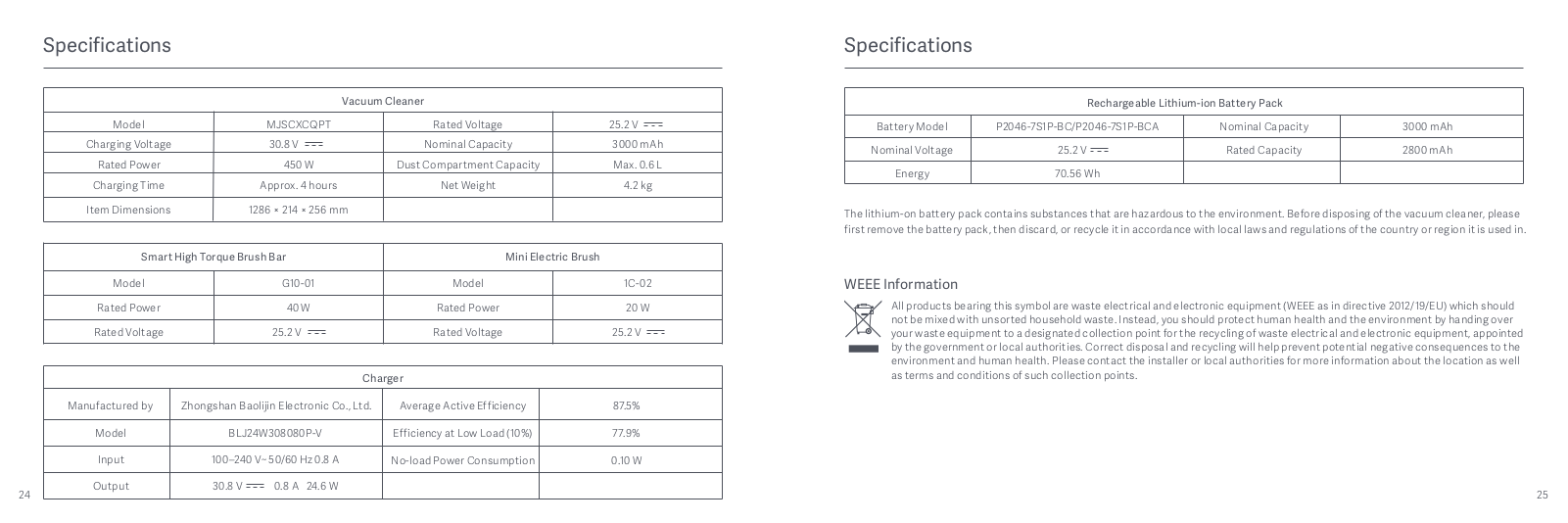
Характеристики
-
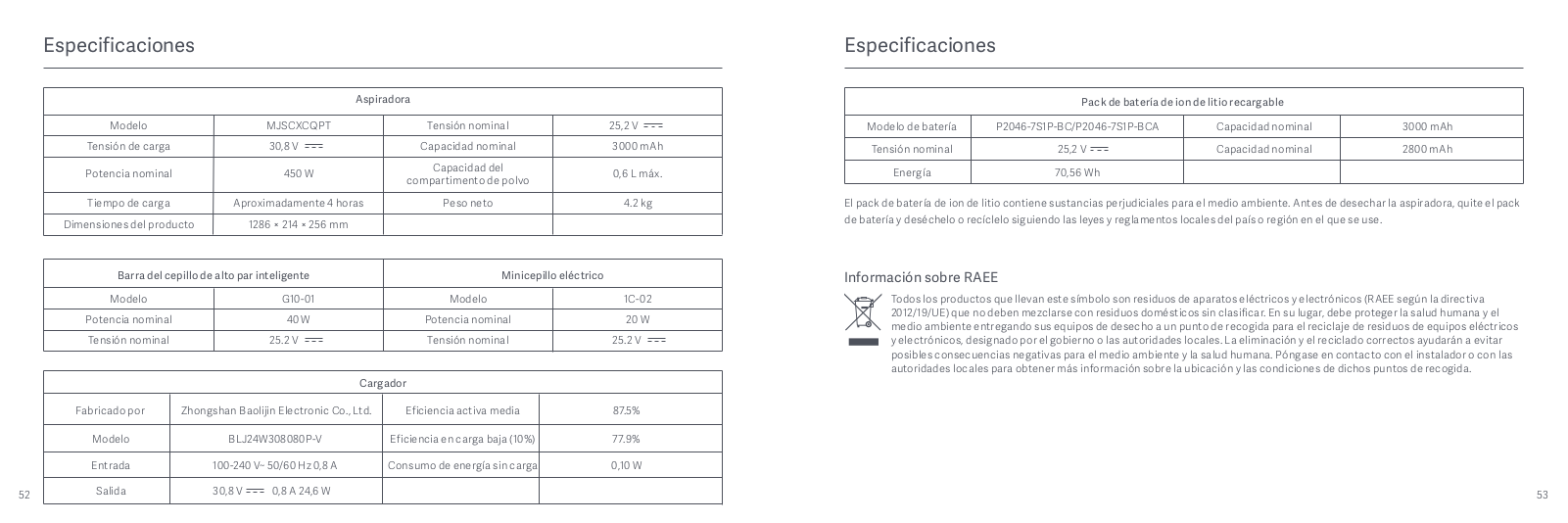
Особенность Описание Тип устройства Легкий, НЕРА Фактор формы Придерживаться Тип фильтра Ткань Источник питания Батарея заряжена Размеры продукта 10.08″ Д x 8.43″ Ш x 50.63″ В Напряжение 25.2 В Вес 8.82 фунта (приблизительно 4 кг) Мощность 150 Вт Бренд Xiaomi
Описание
Xiaomi Mi Vacuum Cleaner G10 — это высококачественный беспроводной пылесос, специально разработанный для мощной и эффективной уборки в любых условиях. Оснащённый передовым бесщеточным двигателем, G10 достигает мощности всасывания до 150 AW, что позволяет легко удалять грязь, пыль, шерсть домашних животных и другие загрязнения с различных поверхностей. Благодаря инновационной пятиступенчатой системе фильтрации, пылесос улавливает до 99,97% частиц размером до 0,3 микрона, включая пыльцу, аллергены и бактерии. Встроенный фильтр HEPA обеспечивает чистый воздух, который возвращается в ваш дом, создавая здоровую атмосферу.
Xiaomi G10 разработан с акцентом на удобство и маневренность: лёгкая и эргономичная конструкция позволяет без усилий перемещаться по дому, легко справляясь с уборкой вокруг мебели и в труднодоступных местах. Аккумулятор пылесоса обеспечивает до 65 минут непрерывной работы, в зависимости от выбранного режима, так что вы сможете эффективно убрать несколько комнат без необходимости подзарядки.
Среди других полезных особенностей — светодиодный дисплей, который отображает уровень заряда батареи и текущий режим работы, а также мусорный бак, который легко опорожняется одной рукой. Съёмный аккумулятор можно заряжать отдельно, что значительно продлевает срок службы устройства. В комплекте с пылесосом идет набор насадок, включая щелевую насадку, щетку для пыли и моторизованную насадку для пола, что делает Mi Vacuum Cleaner G10 идеальным выбором для всех типов уборки.
Xiaomi Mi Vacuum Cleaner G10 — это мощный, удобный и многофункциональный пылесос, который справится с любыми задачами по уборке в вашем доме, обеспечивая идеальную чистоту и свежесть.
Что в коробке?

-
Наименование Количество Пылесос Xiaomi Mi G10 ×1 Удлинитель ×1 Умная щетка для пола с высоким крутящим моментом ×1 Мини электрическая щетка ×1 Щетка для пыли 2-в-1 ×1 Щелевая насадка ×1 Кронштейн для зарядки и хранения 2-в-1 ×1 Резервуар для воды ×1 Ткань для швабры ×1 Адаптер питания ×1 Руководство пользователя ×1 Позиционная наклейка ×1
Особенности
Конечно, вот некоторые из ключевых особенностей пылесоса Xiaomi Mi Vacuum Cleaner G10:
- Мощное всасывание: Xiaomi Mi Vacuum G10 оснащён высокоскоростным бесщеточным двигателем, обеспечивающим всасывающую мощность до 150 AW. Это позволяет ему легко справляться с удалением шерсти домашних животных, пыли, грязи и других загрязнений на различных поверхностях, включая ковры, плитку и паркет.
Многоступенчатая фильтрация: Пылесос оснащён передовой пятиступенчатой системой фильтрации, которая улавливает бактерии, пыль и аллергены размером до 0,3 микрона с эффективностью до 99,97%. В комплекте с устройством также поставляется HEPA-фильтр, который гарантирует, что в ваш дом возвращается только чистый воздух, идеально подходящий для людей, страдающих аллергиями.
Эргономичный дизайн и лёгкость в использовании: G10 имеет компактную и лёгкую конструкцию, что делает его удобным для уборки в труднодоступных местах, таких как мебель, углы и другие препятствия. Эргономичная форма пылесоса способствует комфортному использованию даже в течение длительных периодов.
Долговечный аккумулятор: В зависимости от выбранного режима работы, пылесос способен работать до 65 минут на одном заряде, что позволяет выполнить уборку всего дома без необходимости частой подзарядки.
Светодиодный дисплей: Удобный светодиодный дисплей на корпусе пылесоса отображает текущий уровень заряда батареи и выбранный режим работы, что позволяет легко следить за оставшимся временем уборки.
Простота очистки мусорного бака: Мусорный бак пылесоса легко опорожняется одной рукой, что делает процесс ухода за устройством быстрым и удобным.
Съёмный аккумулятор: В G10 используется съёмная батарея, которую можно зарядить отдельно от пылесоса. Это не только продлевает срок службы устройства, но и упрощает процесс зарядки, позволяя всегда иметь запасной аккумулятор.
Универсальные насадки: В комплект входит несколько насадок, таких как щелевая насадка, щётка для пыли и моторизованная насадка для пола, что делает пылесос идеальным для уборки на разных типах поверхностей и в разных условиях.
Итог: Xiaomi — это мощный, эффективный и удобный беспроводной пылесос, который идеально подходит для комплексной уборки дома. Он объединяет в себе всё необходимое для создания комфортной и чистой среды, от мощного всасывания до продуманного дизайна и долговечной батареи.
Популярные вопросы
1. Как долго может работать на одном заряде?
Ответ:
Пылесос Xiaomi Mi G10 оснащен мощным аккумулятором, который в зависимости от выбранного режима работы может обеспечивать до 65 минут непрерывной уборки. Это идеальное время для того, чтобы убрать несколько комнат, не беспокоясь о подзарядке.
2. Какие типы загрязнений способен собирать пылесос?
Ответ:
Xiaomi Mi G10 эффективно справляется с различными типами загрязнений, включая шерсть домашних животных, пыль, грязь и мусор. Он оснащён высокоскоростным бесщеточным двигателем с мощностью всасывания до 150 AW, что позволяет быстро и качественно очищать ковры, плитку, паркет и другие поверхности.
3. Что такое пятиступенчатая система фильтрации и как она работает?
Ответ:
Пылесос Xiaomi Mi G10 использует пятиступенчатую систему фильтрации, которая улавливает до 99,97% частиц размером до 0,3 микрона, таких как пыль, аллергены, бактерии и даже пыльцу. В комплект входит HEPA-фильтр, который обеспечивает, что весь воздух, возвращающийся в помещение, остается чистым, что особенно полезно для людей с аллергиями.
4. Как осуществляется очистка мусорного бака?
Ответ:
Один из удобных аспектов пылесоса Xiaomi Mi G10 — это простота очистки мусорного бака. Он оснащен системой для опорожнения одним движением, что позволяет легко избавляться от накопленных грязи и мусора одной рукой, без лишних усилий или беспорядка.
5. Можно ли заряжать аккумулятор отдельно от пылесоса?
Ответ:
Да, пылесос Xiaomi Mi G10 оснащен съёмным аккумулятором, который можно заряжать отдельно от пылесоса. Это продлевает срок службы устройства, поскольку можно использовать запасной аккумулятор или удобно зарядить его, не прибегая к зарядке всего пылесоса.
Videos: Xiaomi Mi Vacuum Cleaner G10

Table of Contents
- Mi Vacuum Cleaner G10
- User Manual
- Safety Instructions
- Product Overview
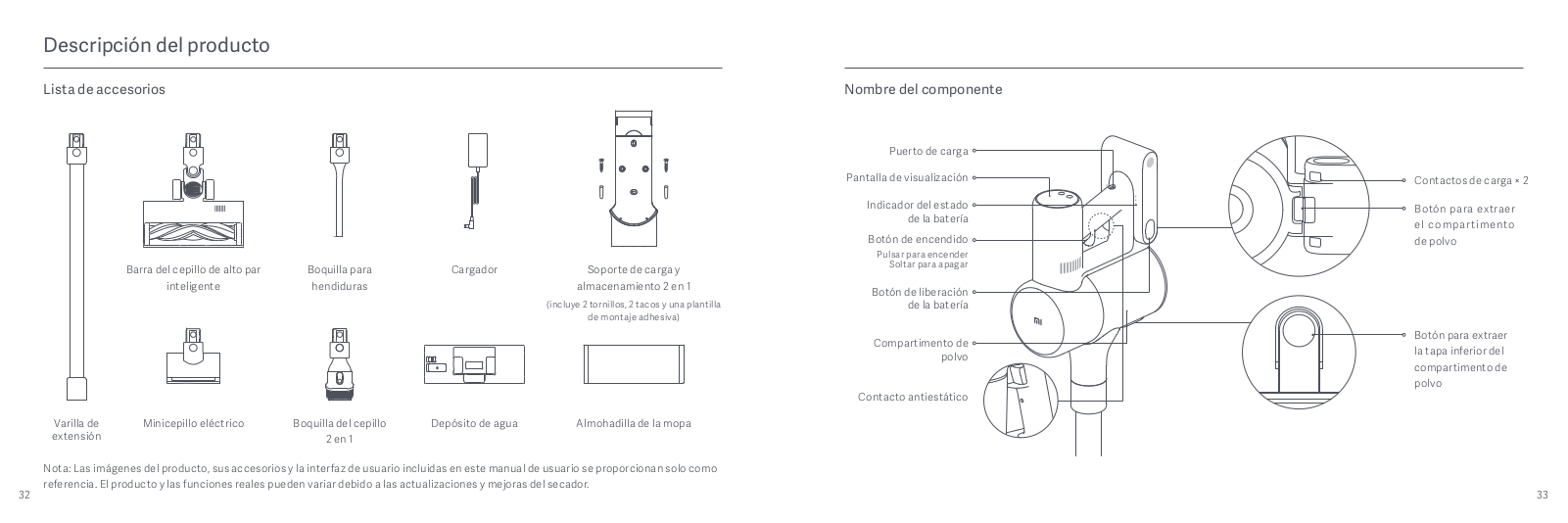
- Accessories List
- Component Name
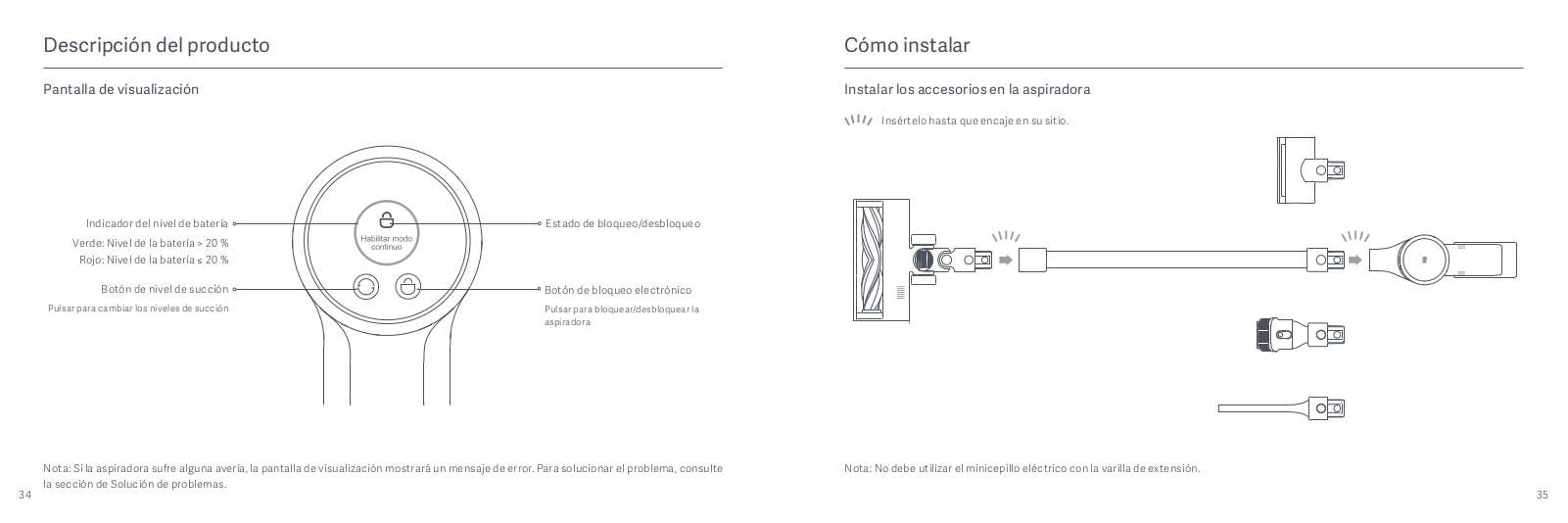
- Display Screen
- How to Install
- Installing the Accessories onto the Vacuum Cleaner
- Installing the 2-in-1 Charging & Storage Mount
- Charging
- Battery Status Indicator
- Display Screen
- How to Use
- Setting Language
- Switching Suction Levels
- Working Modes
- Using Different Accessories
- Using the Mopping Function
- Care & Maintenance
- Maintenance Precautions
- Cleaning the Vacuum Cleaner
- Cleaning the Dust Compartment, Pre-filter, and Cyclone Assembly
- Notes:
- Notes:
- Installing the Dust Compartment, Pre-filter, and Cyclone Assembly
- Cleaning the HEPA Filter
- Installing the HEPA Filter
- Cleaning the Smart High Torque Brush Bar
- Cleaning the Mini Electric Brush
- Cleaning the Water Tank and Mop Pad
- Water Dispenser Filter
- Battery Pack
- Specifications
- WEEE Information
- FAQ
- Troubleshooting
- Downloads
- Read User Manual Online (PDF format)
- Download This Manual (PDF format)
Mi Vacuum Cleaner G10
User Manual
Safety Instructions
This product is for household use only. Read this manual carefully before
use, and retain it for future
reference.
This appliance can be used by children aged from 8 years and above and persons
with reduced physical, sensory or mental capabilities or lack of experience
and knowledge if they have been given supervision or instruction concerning
use of the appliance in a safe way and understand the hazards involved.
Children shall not play with the appliance. Cleaning and user maintenance
shall not be made by children without supervision.
The appliance is only to be used with the power supply unit provided with the
appliance.
The vacuum cleaner is not a toy. Children may not play with or operate this
product. Please exercise caution when using the vacuum cleaner near children.
Do not allow children to clean or maintain the vacuum cleaner unless
supervised by a parent or guardian.
Only use the vacuum cleaner on dry indoor surfaces. Do not install, charge, or
use this product outdoors, such as in bathrooms, or near a pool.
Do not touch the plug or any part of the vacuum cleaner with wet hands.
To reduce the risk of fire, explosion, or personal injury, check to make sure
the lithium-ion battery and charger are undamaged before use. Do not use the
vacuum cleaner if either the battery or charger is damaged.
The smart high torque brush bar, mini electric brush, battery, extension rod,
and the vacuum cleaner are electrically conductive and should not be immersed
in water or other liquid. Make sure all parts are thoroughly dry after you
carry out cleaning on them.
To prevent injury caused by moving parts, turn off the vacuum cleaner before
cleaning the smart high torque
brush bar and mini electric brush. The smart high torque brush bar, dust
compartment, and filter must all be
properly installed before using the vacuum cleaner.
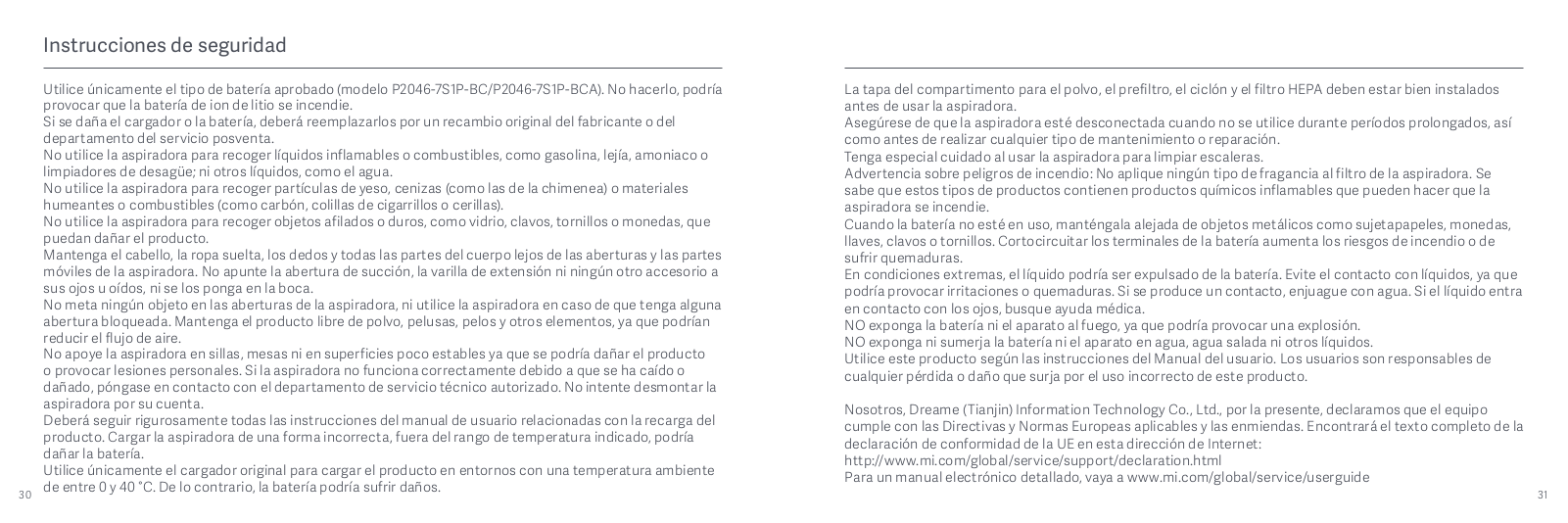
Only use the BLJ24W308080P-V battery charger provided with the appliance.
Only use the P2046-7S1P-BC/P2046-7S1P-BCA battery pack provided with the
appliance.
If the charger or battery becomes damaged, it must be replaced with a genuine
component purchased from the manufacturer or after-sales service department.
Do not use the vacuum cleaner to pick up flammable or combustible liquids,
such as gasoline, bleach, ammonia, or drain cleaners; nor other liquids like
water.
Do not use the vacuum cleaner to pick up drywall particles, ashes like
fireplace ash, or smoking or burning materials such as coal, cigarette butts
or matches.
Do not use the vacuum cleaner to pick up sharp or hard objects, such as glass,
nails, screws, or coins, which may damage the product.
Keep hair, loose clothing, fingers, and other parts of the body away from the
vacuum cleaner’s openings and moving parts. Do not point the suction opening,
extension rod, or other accessories at your eyes or ears or put them in your
mouth.
Do not put any object into the vacuum cleaner’s openings, nor use the vacuum
cleaner with any opening blocked. Keep free of dust, lint, hair, or other
items which may reduce airflow.
Do not rest the vacuum cleaner against a chair, table, or other unstable
surfaces, as this may cause damage to the product or personal injury. If the
vacuum cleaner malfunctions because of being knocked over or damaged, please
contact the authorized service department. Never attempt to disassemble the
vacuum cleaner on your own.
Only use the original charger to charge the product in environments with an
ambient temperature of 0°C to 40°C. Otherwise, the battery may damage.
The dust compartment cover, pre-filter, cyclone assembly, and HEPA filter must
all be properly installed prior
to using the vacuum cleaner.
Make sure the vacuum cleaner is unplugged when not used for extended periods
as well as prior to performing any maintenance or repairs.
Please be extra careful when using the vacuum cleaner to clean stairs.
Fire Hazard Warning: Do not apply any type of fragrance to the vacuum
cleaner’s filter. These types of products are known to contain flammable
chemicals which may cause the vacuum cleaner to catch fire.
When Battery is not in use, keep it away from all metal objects, such as paper
clips, coins, keys, nails, or screws. Shorting the battery terminals together
increases the risk of fire or burns.
Under abusive conditions, liquid may be ejected from the battery. Avoid
contact with liquid, as it may cause irritation or burns. If contact occurs,
flush with water. If liquid contacts eyes, seek medical help.
DO NOT expose the battery and appliance to fire as it may cause explosion.
DO NOT expose or submerge the battery and appliance in any water, salt water,
or other liquids.
Please strictly follow the instructions in this user manualwhen using the
vacuum cleaner. Users are responsible for any loss or damage that may arise
from improper use of the vacuum cleaner.
We Dreame (Tianjin) Information Technology Co., Ltd., hereby, declare that
this equipment is in compliance
with the applicable Directives and European Norms, and amendments. The full
text of the EU declaration of
conformity is available at the following internet address:
http://www.mi.com/global/service/support/declaration.html
For detailed e-manual, please go to
www.mi.com/global/service/userguide
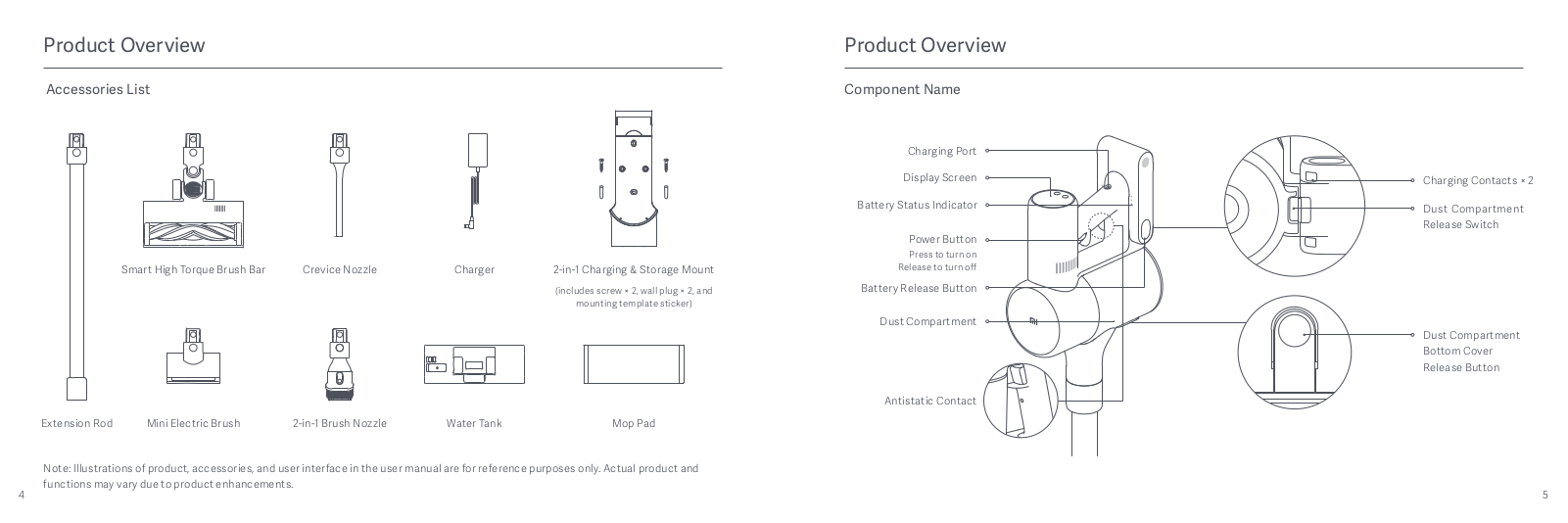
Product Overview
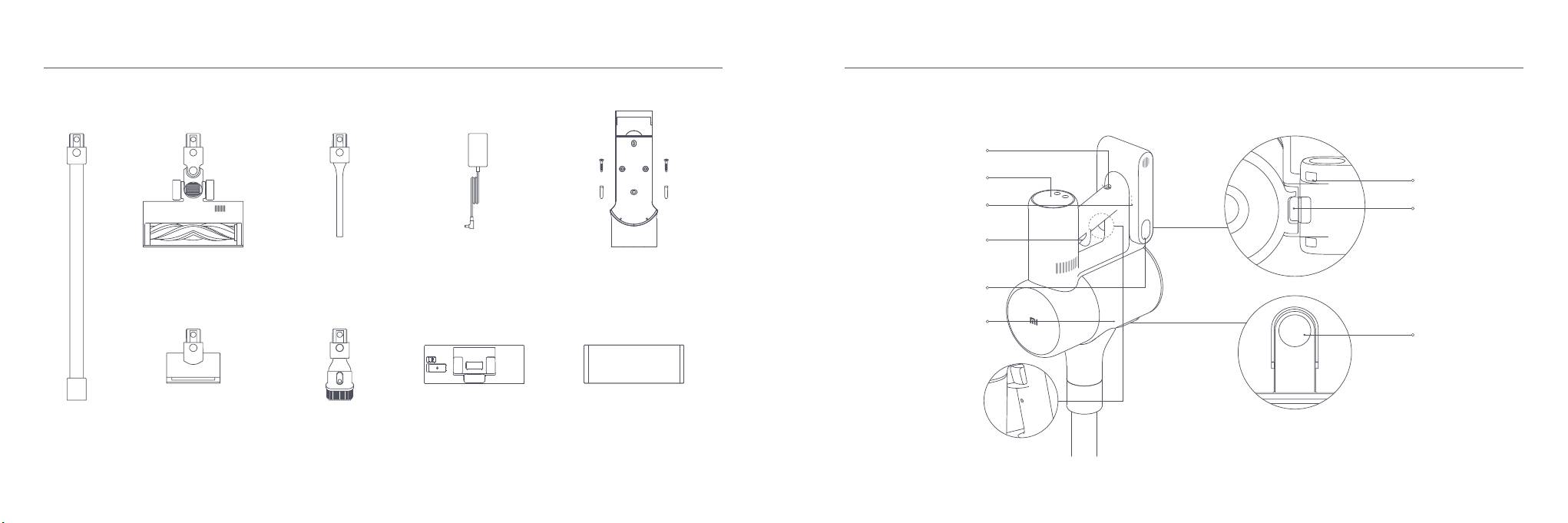
Accessories List

Note: Illustrations of product, accessories, and user interface in the
user manual are for reference purposes only. Actual product and functions may
vary due to product enhancements.
Component Name

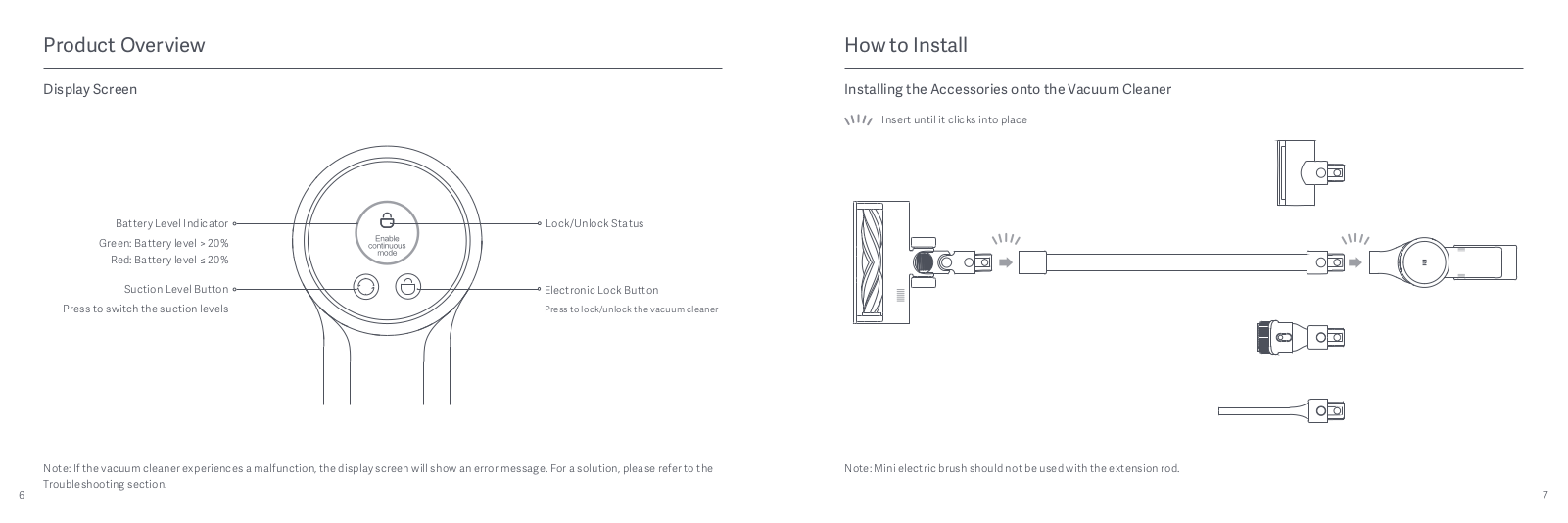
Display Screen

Note: If the vacuum cleaner experiences a malfunction, the display screen
will show an error message. For a solution, please refer to the
Troubleshooting section.
How to Install
Installing the Accessories onto the Vacuum Cleaner

Note: Mini electric brush should not be used with the extension rod.
Installing the 2-in-1 Charging & Storage Mount
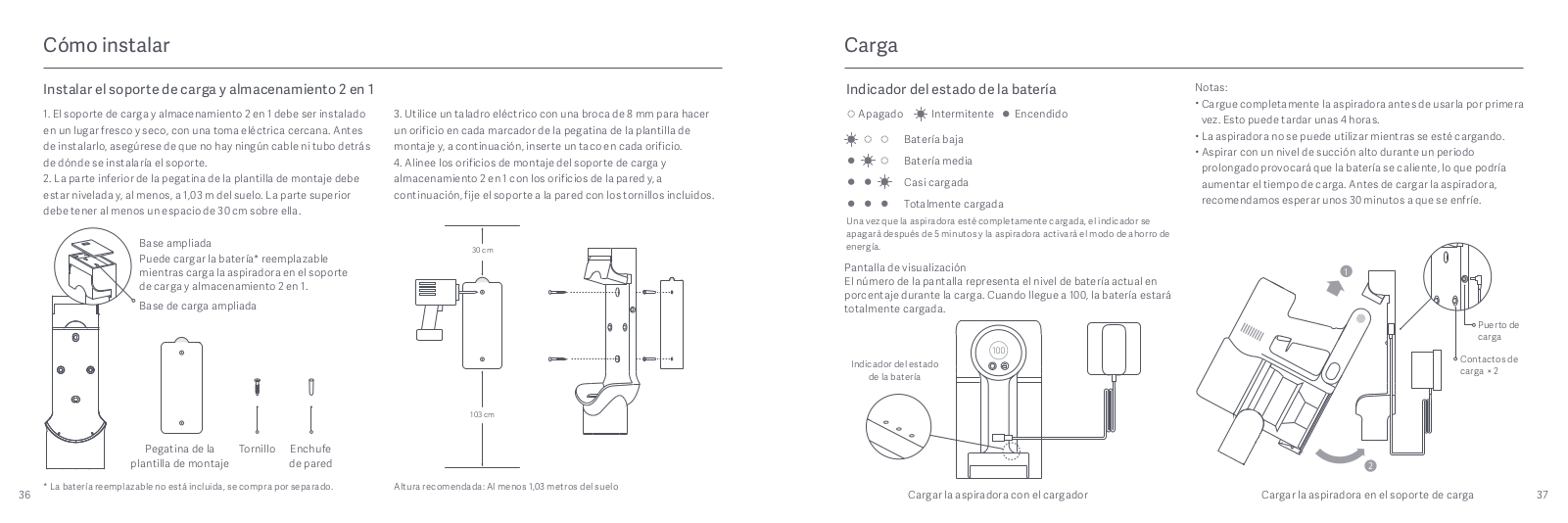
1. The 2-in-1 charging & storage mount should be installed in a cool, dry
place with an electrical outlet nearby. Prior to installing, ensure that there
are not any wires or pipes in the space directly behind where the mount will
be installed.
2. The bottom of the mounting template sticker should be level and at least
1.03 m from the ground, and its top should have at least 30 cm of clearance
above it.

* The replaceable battery is not included and purchased separately.
3. Use a power drill with an 8 mm drill bit to drill a hole into each hole
marker on the mounting template sticker, then insert a wall plug into each
hole.
4. Align the mounting holes on the 2-in-1 charging & storage mount to the
holes on the wall, then attach the mount to the wall using the included
screws.

Recommended Height: At least 1.03 meters from the ground
Charging
Battery Status Indicator
Once the vacuum cleaner is fully charged, the indicator will turn off after 5
minutes, and the vacuum cleaner will then enter the energy-saving mode.
Display Screen
The number on the display screen represents the current battery level in a
percentage during charging. When the number turns into 100, the battery is
fully charged.

Notes:
- Fully charge the vacuum cleaner before using it for the first time.
- This will take about 4 hours.
- The vacuum cleaner cannot be used while charging.
- Vacuuming at the highest suction level for a prolonged period will cause the battery to heat up, which may increase the charging time. Before charging the vacuum cleaner, it is better to cool it down for 30 minutes.

Charging the vacuum cleaner on the charging mount
How to Use
Setting Language
Press and hold the button O for 3 seconds to open the language list, then
press the button O to scroll through the language to select the desired one.
Press and hold the button O for 2 seconds to use the selected language.
Note: The display screen will go off if there is no operation for more
than 10 seconds.
Switching Suction Levels
Press the button to switch suction levels of eco, standard/ auto, and high
power. The corresponding suction level will be highlighted on the display
screen.
Only when using the smart high torque brush bar, the auto mode will be
activated and the notification of “Auto” will appear on the display screen.
The vacuum cleaner will then automatically switch the suction level between
the floor/tile and the carpet.
Note: Stop the vacuum cleaner at any time while cleaning, it will
continue to use the last selected suction level when started again.
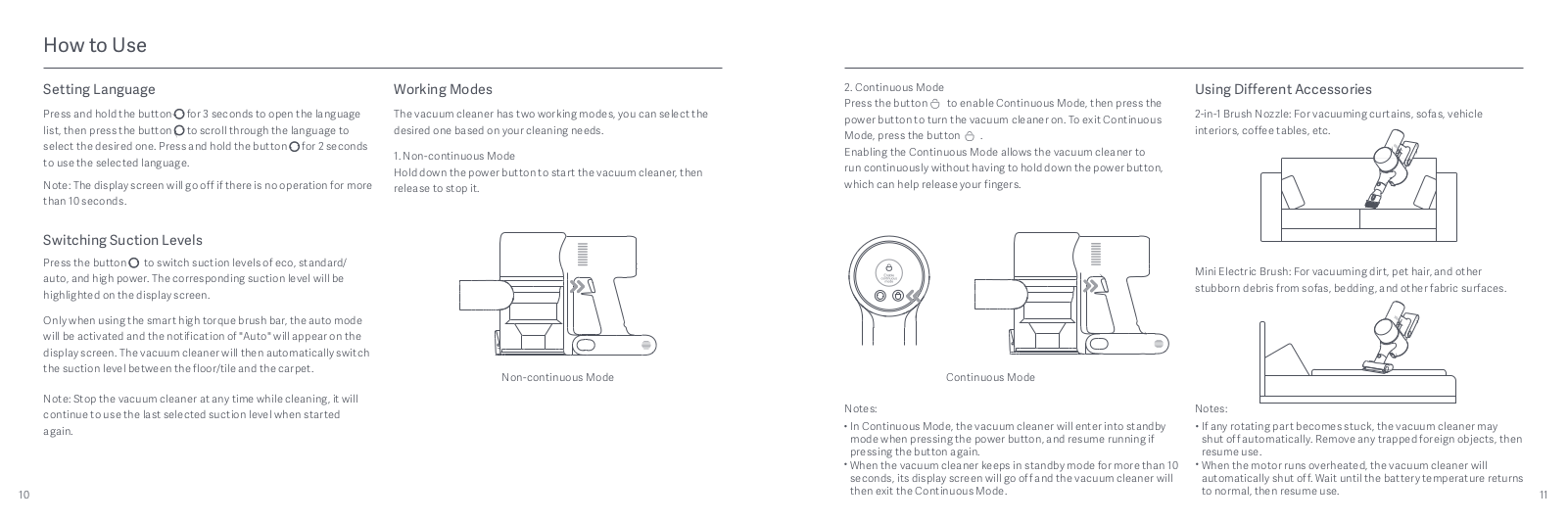
Working Modes
The vacuum cleaner has two working modes, you can select the desired one based
on your cleaning needs.
1. Non-continuous Mode
Hold down the power button to start the vacuum cleaner, then release to stop
it.
2. Continuous Mode
Press the button to enable Continuous Mode, then press the power button to
turn the vacuum cleaner on. To exit Continuous Mode, press the button .
Enabling the Continuous Mode allows the vacuum cleaner to run continuously
without having to hold down the power button, which can help release your
fingers.

Notes:
- In Continuous Mode, the vacuum cleaner will enter into standby mode when pressing the power button, and resume running if pressing the button again.
- When the vacuum cleaner keeps in standby mode for more than 10 seconds, its display screen will go off and the vacuum cleaner will then exit the Continuous Mode.
Using Different Accessories
2-in-1 Brush Nozzle: For vacuuming curtains, sofas, vehicle interiors,
coffee tables, etc.

Mini Electric Brush: For vacuuming dirt, pet hair, and other stubborn
debris from sofas, bedding, and other fabric surfaces.

Notes:
- If any rotating part becomes stuck, the vacuum cleaner may shut off automatically. Remove any trapped foreign objects, then resume use.
- When the motor runs overheated, the vacuum cleaner will automatically shut off. Wait until the battery temperature returns to normal, then resume use.
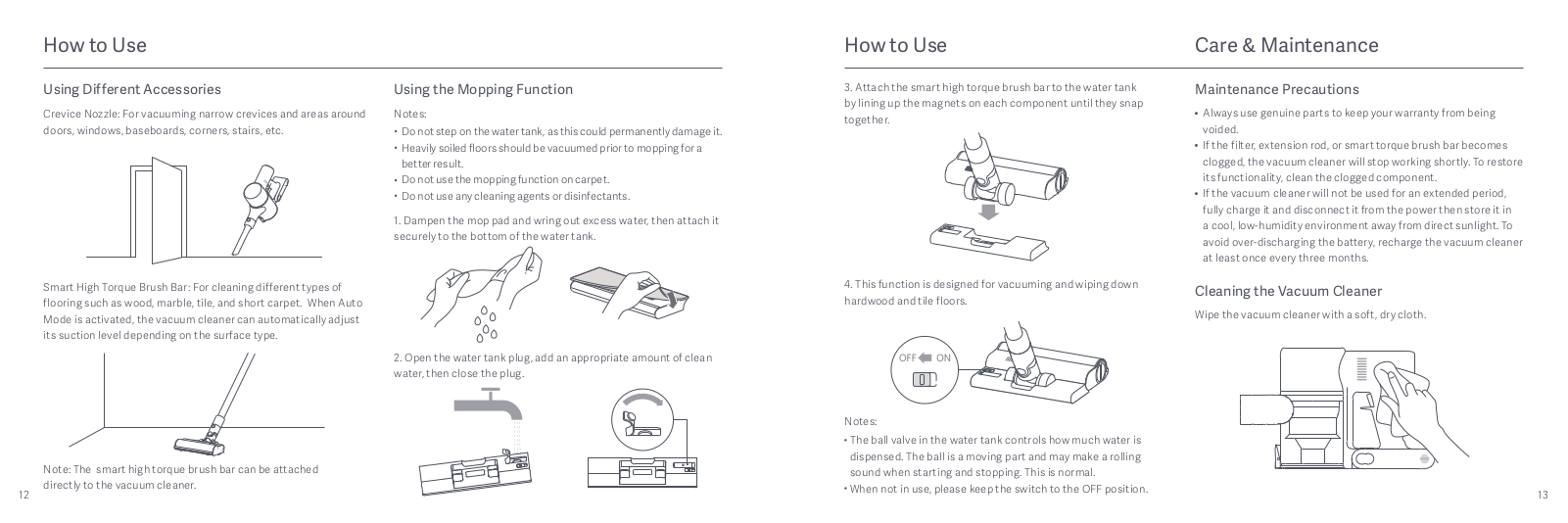
Crevice Nozzle: For vacuuming narrow crevices and areas around doors,
windows, baseboards, corners, stairs, etc.

Smart High Torque Brush Bar: For cleaning different types of flooring
such as wood, marble, tile, and short carpet. When Auto Mode is activated, the
vacuum cleaner can automatically adjust its suction level depending on the
surface type.

Note: The smart high torque brush bar can be attached directly to the
vacuum cleaner.
Using the Mopping Function
Notes:
- Do not step on the water tank, as this could permanently damage it.
- Heavily soiled floors should be vacuumed prior to mopping for a better result.
- Do not use the mopping function on carpet.
- Do not use any cleaning agents or disinfectants.
1. Dampen the mop pad and wring out excess water, then attach it securely to
the bottom of the water tank.

2. Open the water tank plug, add an appropriate amount of clean water, then
close the plug.

3. Attach the smart high torque brush bar to the water tank by lining up the
magnets on each component until they snap together.
4. This function is designed for vacuuming and wiping down hardwood and tile
floors.

Notes:
- The ball valve in the water tank controls how much water is dispensed. The ball is a moving part and may make a rolling sound when starting and stopping. This is normal.
- When not in use, please keep the switch to the OFF position.
Care & Maintenance
Maintenance Precautions
- Always use genuine parts to keep your warranty from being voided.
- If the filter, extension rod, or smart torque brush bar becomes clogged, the vacuum cleaner will stop working shortly. To restore its functionality, clean the clogged component.
- If the vacuum cleaner will not be used for an extended period, fully charge it and disconnect it from the power then store it in a cool, low-humidity environment away from direct sunlight. To avoid over-discharging the battery, recharge the vacuum cleaner at least once every three months.
Cleaning the Vacuum Cleaner
Wipe the vacuum cleaner with a soft, dry cloth.

Cleaning the Dust Compartment, Pre-filter, and Cyclone Assembly
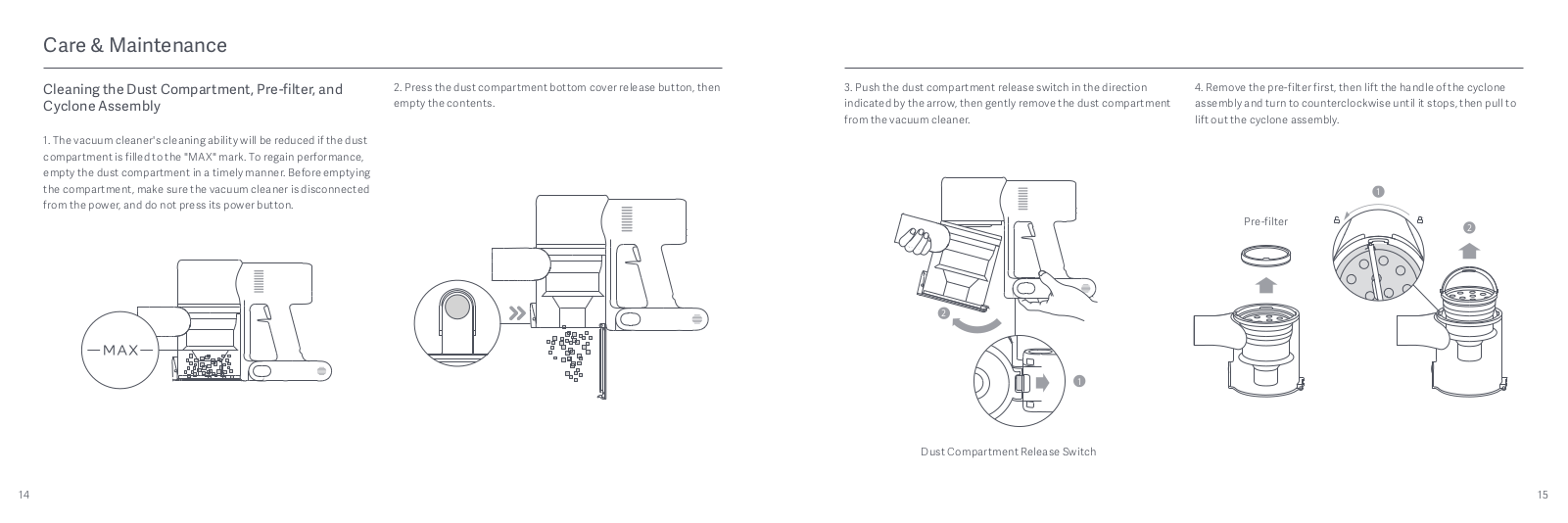
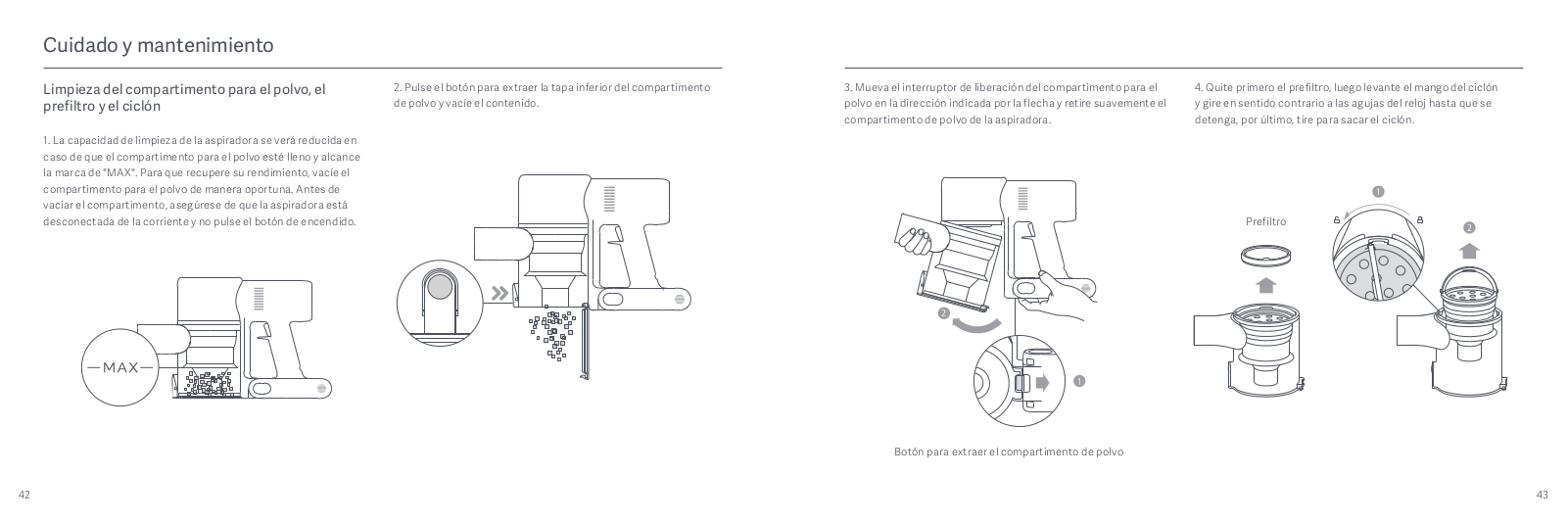
1. The vacuum cleaner’s cleaning ability will be reduced if the dust
compartment is filled to the “MAX” mark. To regain performance, empty the dust
compartment in a timely manner. Before emptying the compartment, make sure the
vacuum cleaner is disconnected from the power, and do not press its power
button.

2. Press the dust compartment bottom cover release button, then empty the
contents.

3. Push the dust compartment release switch in the direction indicated by the
arrow, then gently remove the dust compartment from the vacuum cleaner.

Dust Compartment Release Switch
4. Remove the pre-filter first, then lift the handle of the cyclone assembly
and turn to counterclockwise until it stops, then pull to lift out the cyclone
assembly.

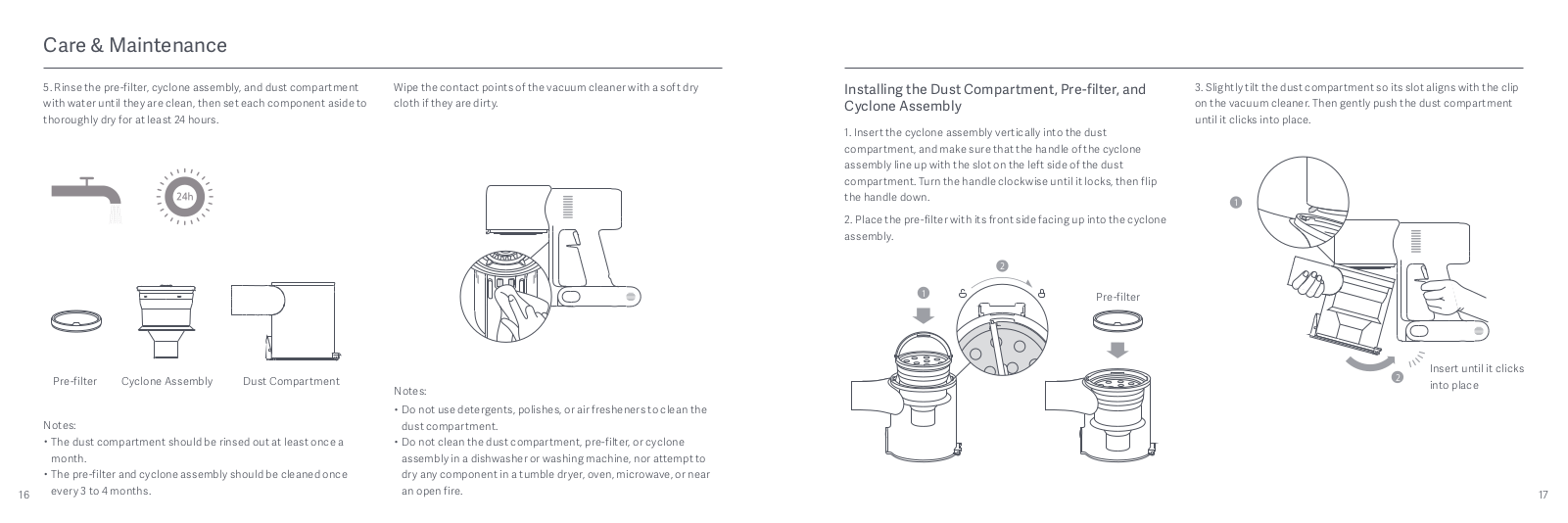
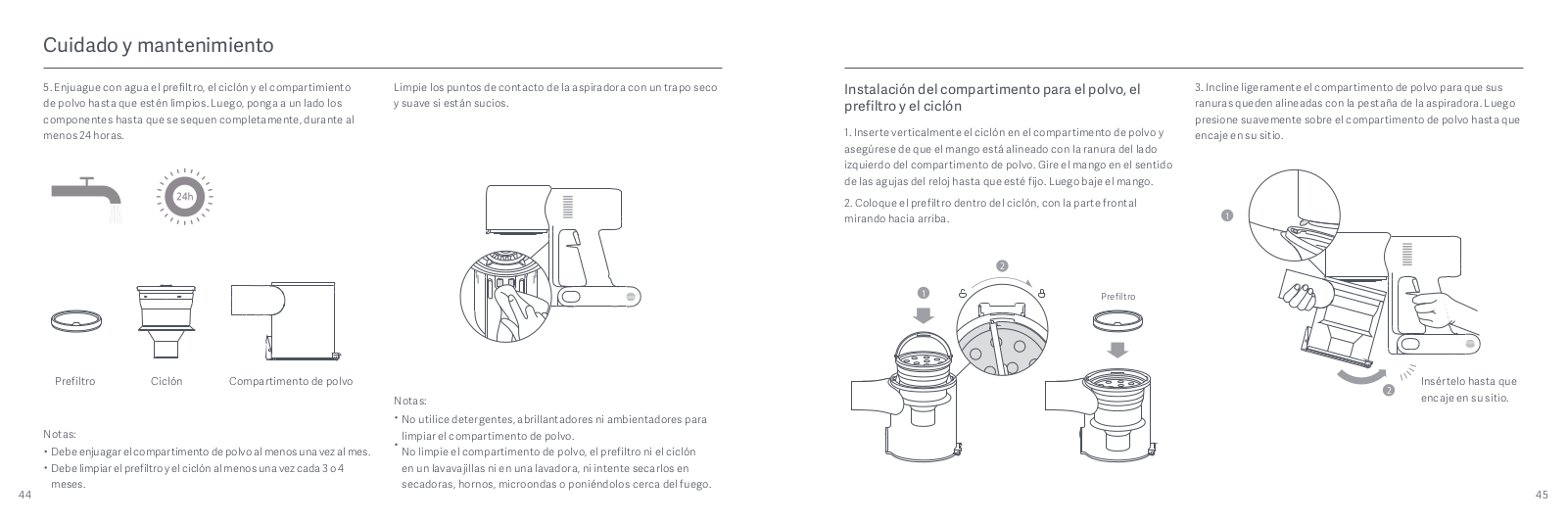
5. Rinse the pre-filter, cyclone assembly, and dust compartment with water
until they are clean, then set each component aside to thoroughly dry for at
least 24 hours.

Notes:
- The dust compartment should be rinsed out at least once a month.
- The pre-filter and cyclone assembly should be cleaned once every 3 to 4 months.
Wipe the contact points of the vacuum cleaner with a soft dry cloth if they
are dirty.

Notes:
- Do not use detergents, polishes, or air fresheners to clean the dust compartment.
- Do not clean the dust compartment, pre-filter, or cyclone assembly in a dishwasher or washing machine, nor attempt to dry any component in a tumble dryer, oven, microwave, or near an open fire.
Installing the Dust Compartment, Pre-filter, and Cyclone Assembly
1. Insert the cyclone assembly vertically into the dust compartment, and make
sure that the handle of the cyclone assembly line up with the slot on the left
side of the dust compartment. Turn the handle clockwise until it locks, then
flip the handle down.
2. Place the pre-filter with its front side facing up into the cyclone
assembly.

3. Slightly tilt the dust compartment so its slot aligns with the clip on the
vacuum cleaner. Then gently push the dust compartment until it clicks into
place

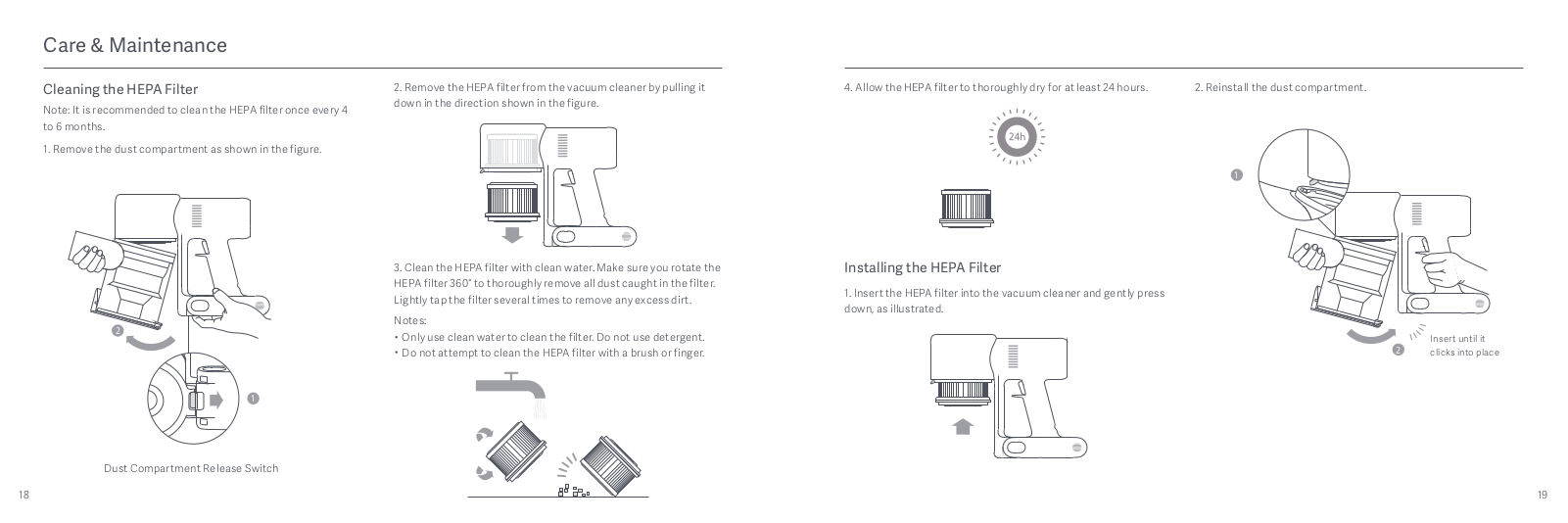
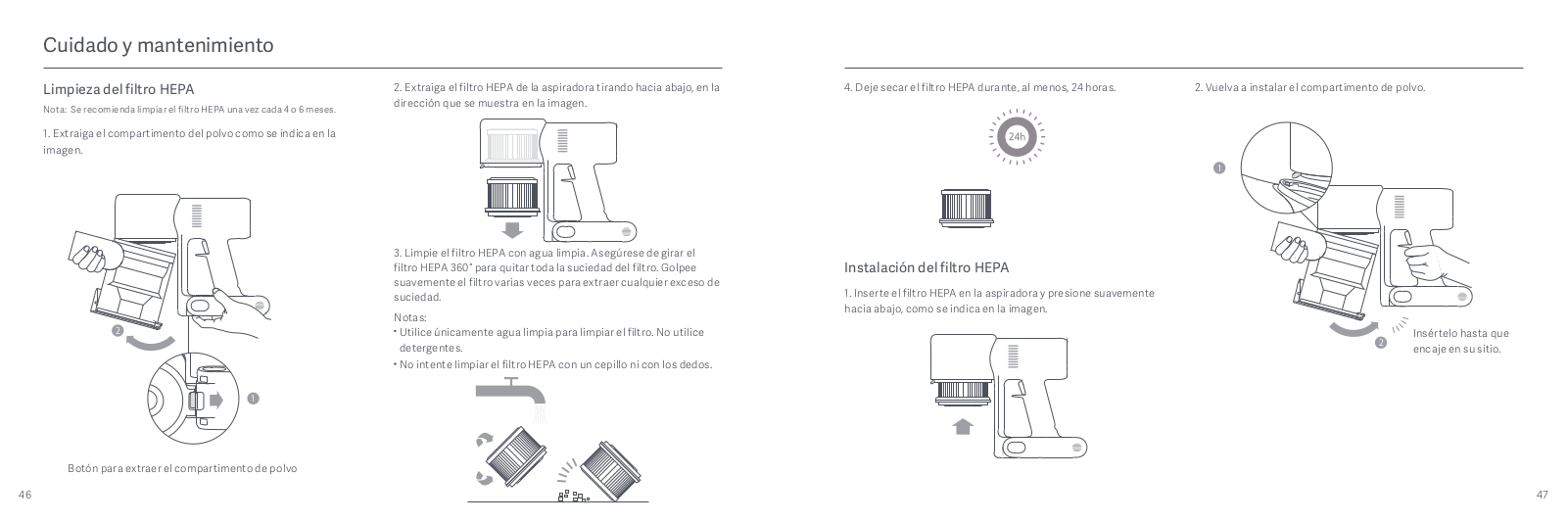
Cleaning the HEPA Filter
Note: It is recommended to clean the HEPA filter once every 4 to 6
months.

2. Remove the HEPA filter from the vacuum cleaner by pulling it down in the
direction shown in the figure.
3. Clean the HEPA filter with clean water. Make sure you rotate the HEPA
filter 360° to thoroughly remove all dust caught in the filter. Lightly tap
the filter several times to remove any excess dirt.
Notes:
- Only use clean water to clean the filter. Do not use detergent.
- Do not attempt to clean the HEPA filter with a brush or finger.

4. Allow the HEPA filter to thoroughly dry for at least 24 hours.
Installing the HEPA Filter
1. Insert the HEPA filter into the vacuum cleaner and gently press down, as
illustrated
2. Reinstall the dust compartment.

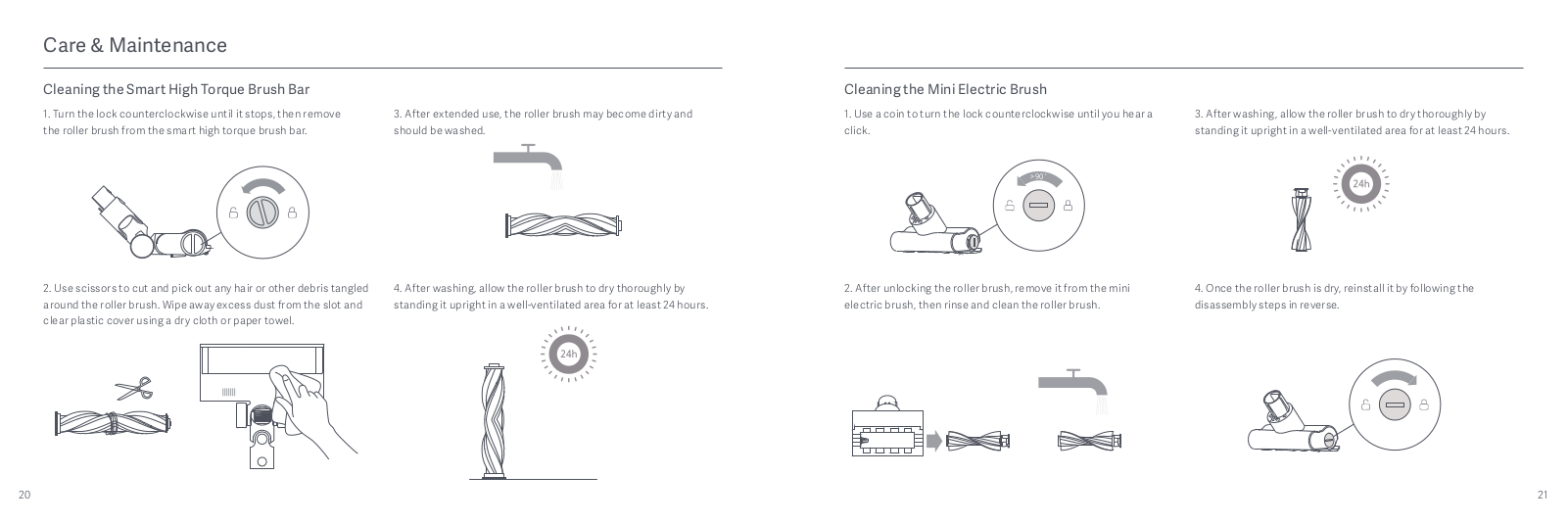
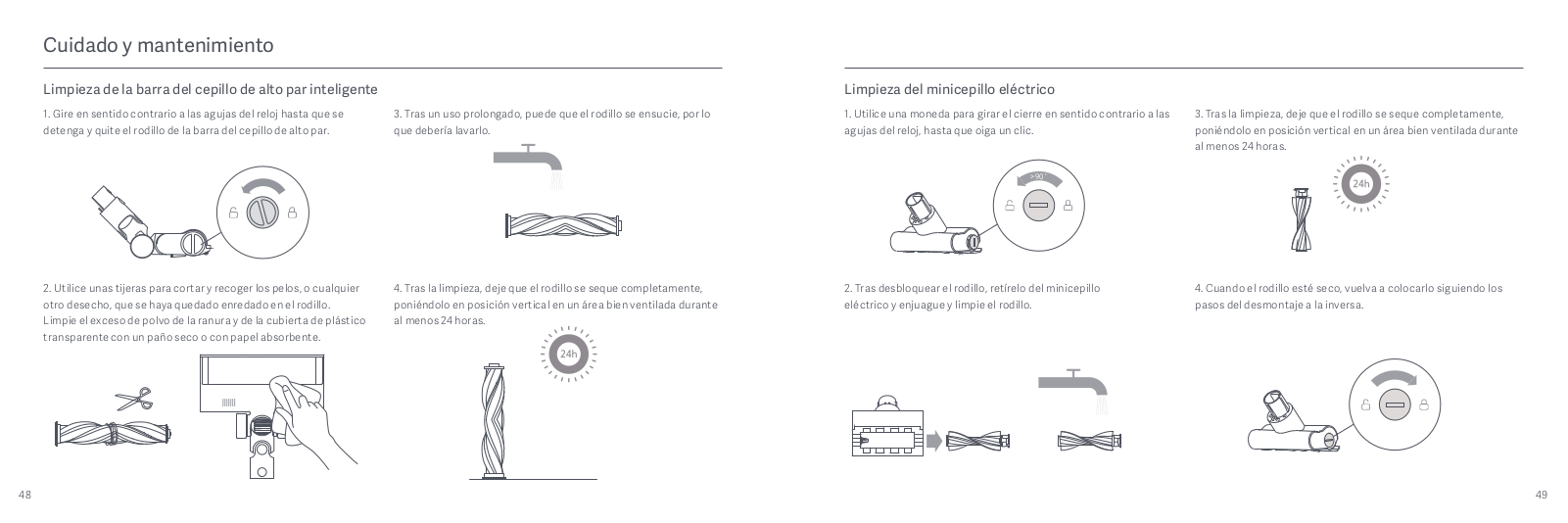
Cleaning the Smart High Torque Brush Bar
1. Turn the lock counterclockwise until it stops, then remove the roller
brush from the smart high torque brush bar.

2. Use scissors to cut and pick out any hair or other debris tangled around
the roller brush. Wipe away excess dust from the slot and clear plastic cover
using a dry cloth or paper towel.

3. After extended use, the roller brush may become dirty and should be
washed.
4. After washing, allow the roller brush to dry thoroughly by standing it
upright in a well-ventilated area for at least 24 hours.
Cleaning the Mini Electric Brush
1. Use a coin to turn the lock counterclockwise until you hear a click.

2. After unlocking the roller brush, remove it from the mini electric brush,
then rinse and clean the roller brush.

3. After washing, allow the roller brush to dry thoroughly by standing it
upright in a well-ventilated area for at least 24 hours.

4. Once the roller brush is dry, reinstall it by following the disassembly
steps in reverse.
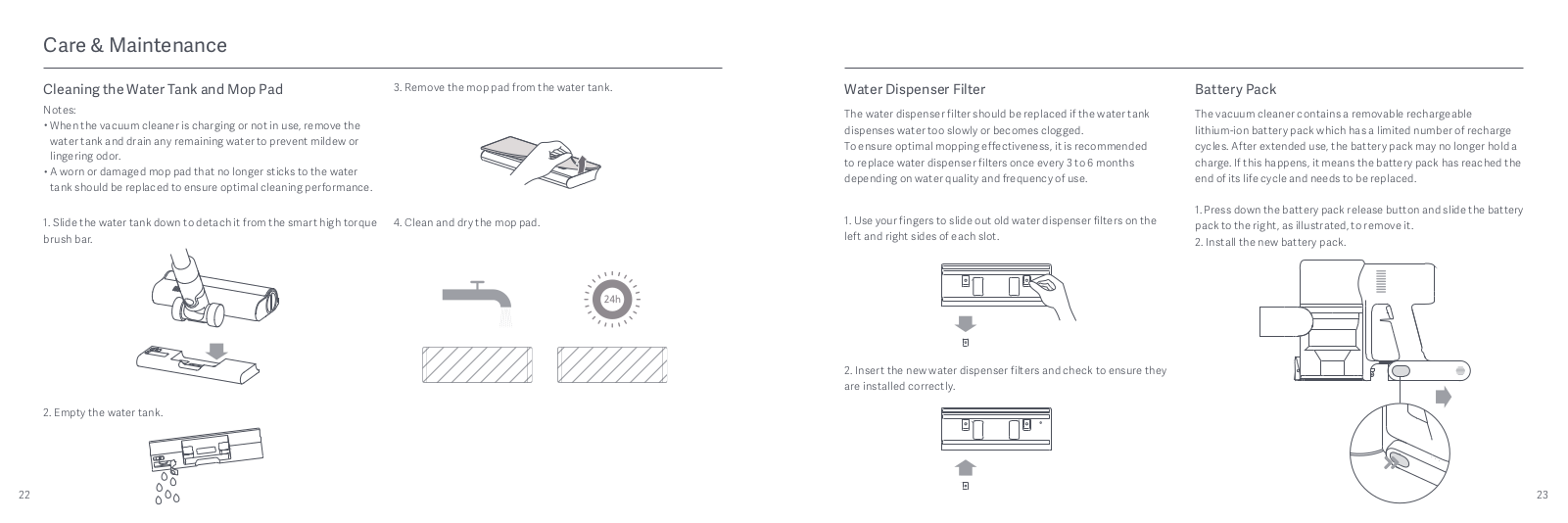
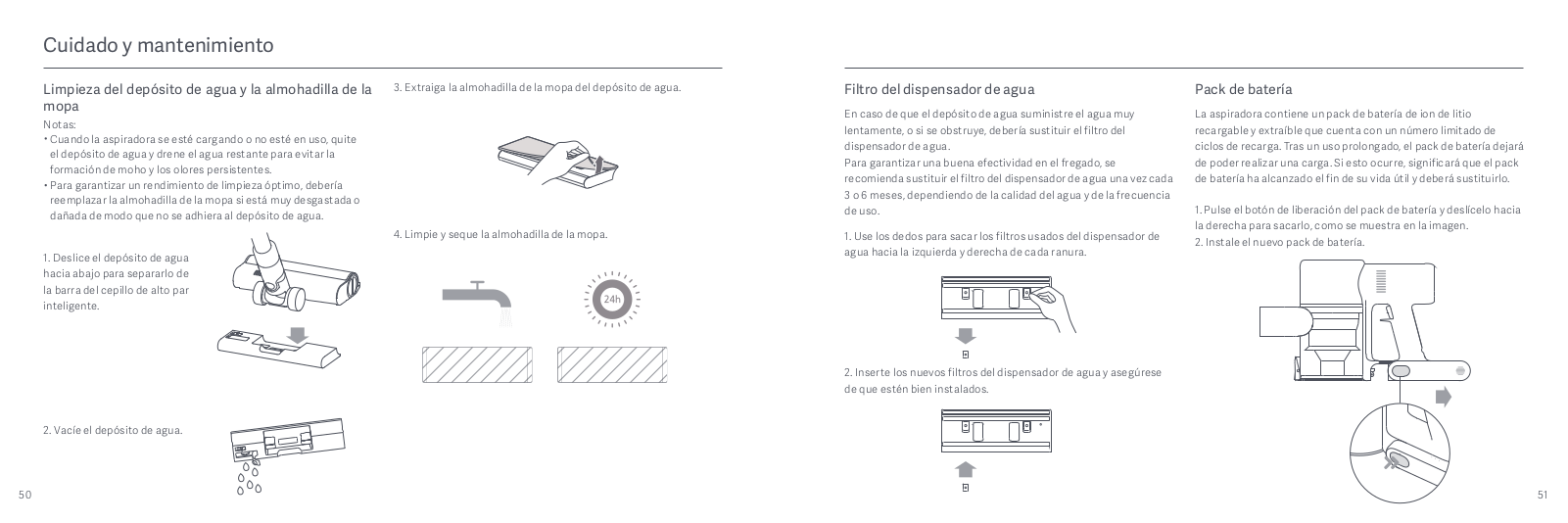
Cleaning the Water Tank and Mop Pad
Notes:
- When the vacuum cleaner is charging or not in use, remove the water tank and drain any remaining water to prevent mildew or lingering odor.
- A worn or damaged mop pad that no longer sticks to the water tank should be replaced to ensure optimal cleaning performance.
1. Slide the water tank down to detach it from the smart high torque brush
bar.
2. Empty the water tank.
3. Remove the mop pad from the water tank.
4. Clean and dry the mop pad.

Water Dispenser Filter
The water dispenser filter should be replaced if the water tank dispenses
water too slowly or becomes clogged.
To ensure optimal mopping effectiveness, it is recommended to replace water
dispenser filters once every 3 to 6 months depending on water quality and
frequency of use.
1. Use your fingers to slide out old water dispenser filters on the left and
right sides of each slot.
2. Insert the new water dispenser filters and check to ensure they are
installed correctly.
Battery Pack
The vacuum cleaner contains a removable rechargeable lithium-ion battery pack
which has a limited number of recharge cycles. After extended use, the battery
pack may no longer hold a charge. If this happens, it means the battery pack
has reached the end of its life cycle and needs to be replaced.
1. Press down the battery pack release button and slide the battery pack to
the right, as illustrated, to remove it.
2. Install the new battery pack.

Specifications


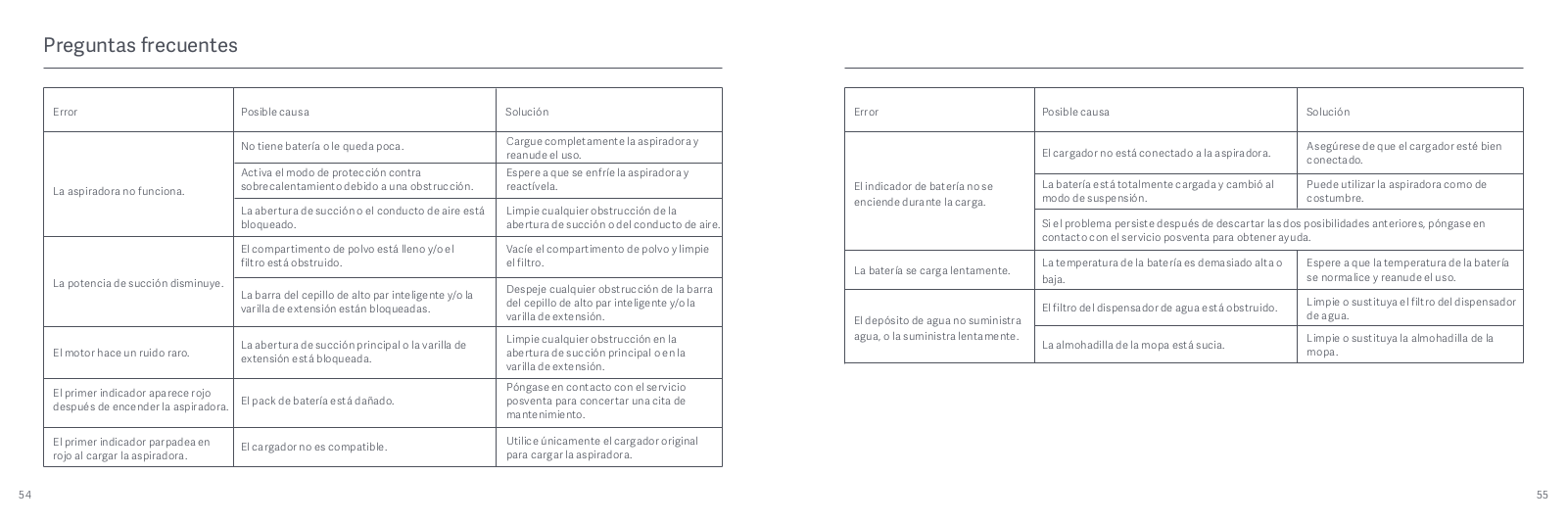
The lithium-on battery pack contains substances that are hazardous to the
environment. Before disposing of the vacuum cleaner, please first remove the
battery pack, then discard, or recycle it in accordance with local laws and
regulations of the country or region it is used in.
WEEE Information
All products bearing this symbol are waste electrical and electronic equipment
(WEEE as in directive 2012/19/EU) which should not be mixed with unsorted
household waste. Instead, you should protect human health and the environment
by handing over your waste equipment to a designated collection point for the
recycling of waste electrical and electronic equipment, appointed by the
government or local authorities. Correct disposal and recycling will help
prevent potential negative consequences to the environment and human health.
Please contact the installer or local authorities for more information about
the location as well as terms and conditions of such collection points.
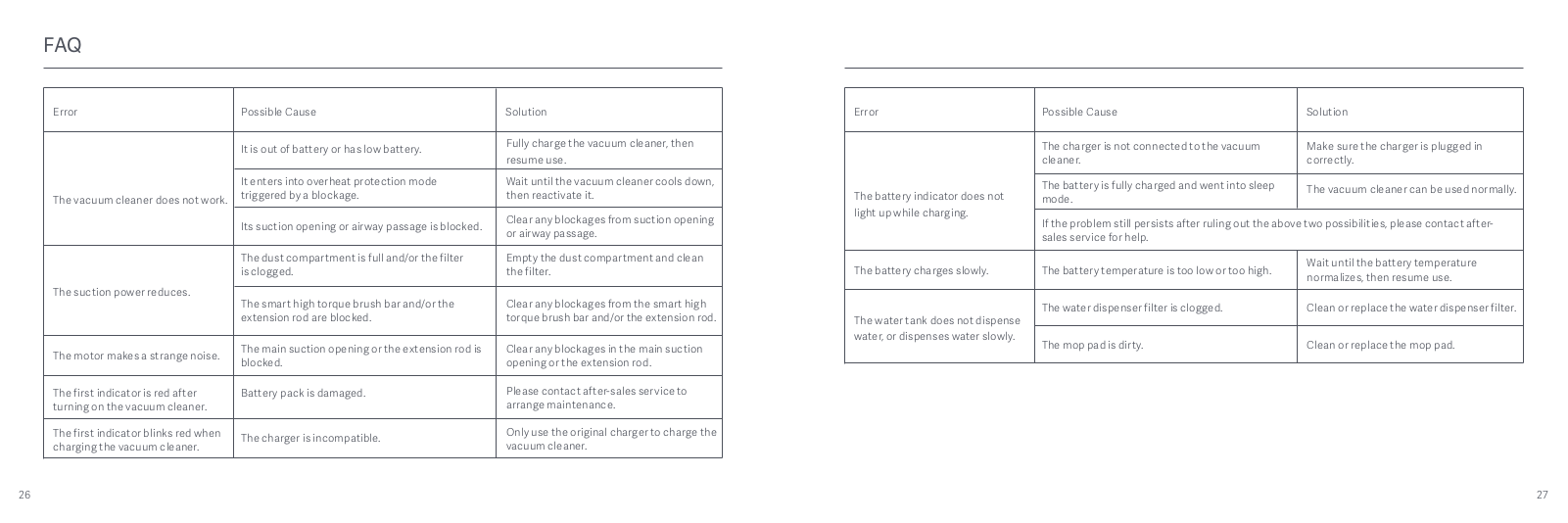
FAQ


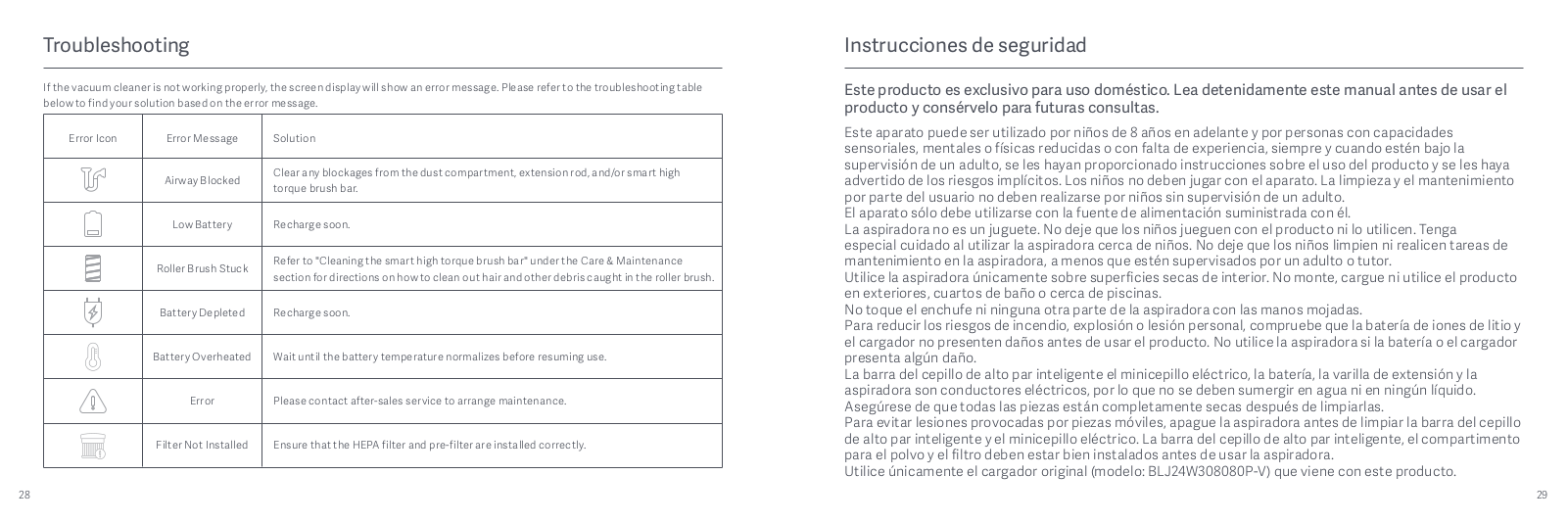
Troubleshooting
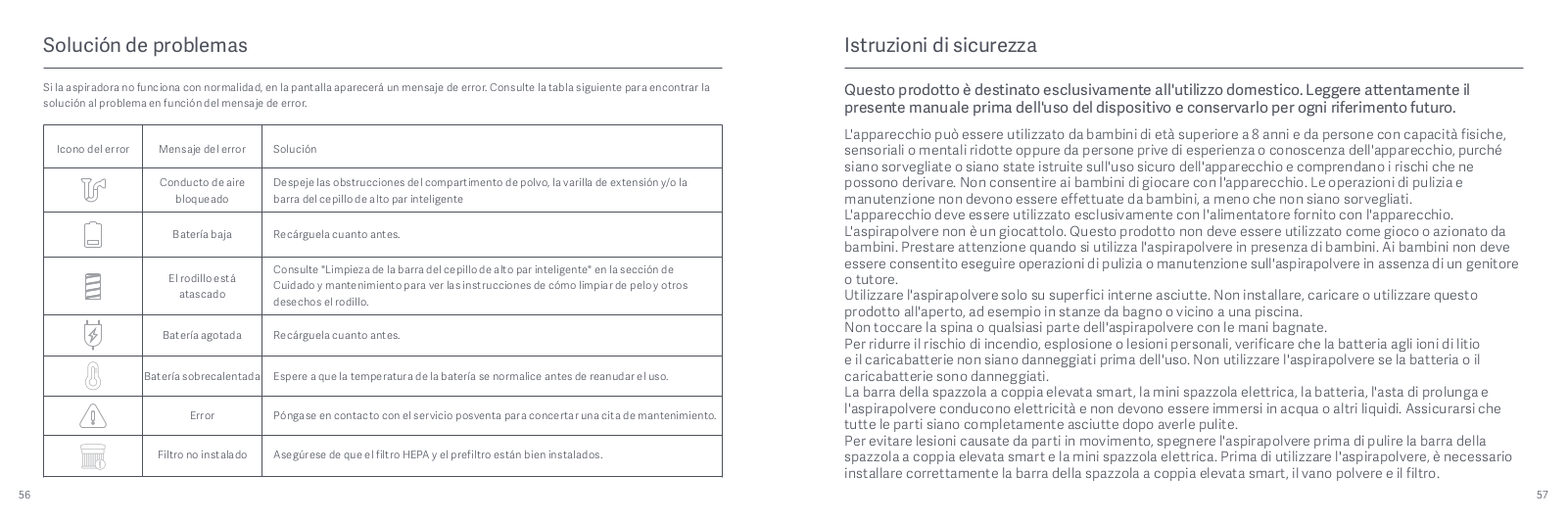
If the vacuum cleaner is not working properly, the screen display will show an
error message. Please refer to the troubleshooting table below to find your
solution based on the error message.

Downloads
Mi Vacuum Cleaner G10 Manual – Download [optimized]
Mi Vacuum Cleaner G10 Manual – Download
Read User Manual Online (PDF format)
Read User Manual Online (PDF format) >>
Download This Manual (PDF format)
Download this manual >>
Mi
Loading…
R
- Redmi 9
- Redmi Note 6 Pro
- Robot Vacuum Brush
- Robot Vacuum-Mop
- Robot Vacuum-Mop 2 Pro+
- Robot Vacuum-Mop Brush Replacement
- Robot Vacuum-Mop Essential
- Robot Vacuum-Mop P2
- Router 4A
- RTCGQ01LM
- RunMi 90 Points Special Edition
S
- S5002
- SCWXCQ01RR
- SDZS01RR
- SKV4109GL
- Smart Antibacterial Humidifier
- Smart Band 46
- Smart Band 53
- Smart Band 6
- Smart Compact Projector
- Smart Home Hub2
- Smart Kettle Pro
- Smart LED Bulb
- Smart LED Bulb Essential
- Smart LED Ceiling Light2
- Smart LED Desk Lamp Pro
- Smart Space Heater S2
- Smart Standing Fan 1C
- Smart Standing Fan Pro
- Sports
- Sports Bluetooth Earphones
- STYTJ02YM
- SXJ01ZM
T
- T26
- TDSEJ02JY
- Temperature and Humidity Monitor 22
- Temperature and Humidity Sensor
- True Wireless Earbuds6
- True Wireless Earbuds Basic 22
- True Wireless Earbuds Basic S
- True Wireless Earphones3
- True Wireless Earphones 22
- True Wireless Earphones 2 Basic3
- True Wireless Earphones 2S2
- True Wireless Earphones Lite2
- True Wireless Kopfhörer
- TV Stick2
- TWSEJ02LM
- TWSEJ06WM
V
- Vacuum Cleaner
- Vacuum Cleaner G10
- Vacuum Cleaner G9
- Vacuum Cleaner Light4
- Vacuum Cleaner mini
- VXN4305GL
W
- Watch
- Watch Lite2
- Wireless Charging Stand
- WPC01ZM
- WXKG01LM
- WXSMSBMW022
X
- XM300002
- XMSH07HM2
- XMTZC04HM
- XMYX02YM
- XPrint
- x Wiha 8-in-1 Precision Screwdriver
Y
- YDLYEJ02LM
- YDXJ01FM
- YKFJ01FM
- YLDP03YL
Z
- ZHF4009GL
- ZHF4020GL
- ZNCZ04LM
Loading…
Loading…
Nothing found
Vacuum Cleaner G10
User Manual
156 pgs41.49 Mb0
Table of contents
Loading…
…
Mi User Manual
Download
Specifications and Main Features
Frequently Asked Questions
User Manual



Loading…
+ 126 hidden pages
You need points to download manuals.
1 point = 1 manual.
You can buy points or you can get point for every manual you upload.
Buy points
Upload your manuals

For further information, please go to www.mi.com
Manufactured for: Xiaomi Communications Co., Ltd.
Manufactured by: Dreame (Tianjin) Information Technology Co., Ltd. (a Mi Ecosystem company)
Address: Room 2112-1-1, South District, Finance and Trade Center, No.6975 Yazhou Road, Dongjiang Bonded Port Area, Tianjin Pilot Free Trade Zone, Tianjin, China
Para más información, visite la página web www.mi.com.
Mi Vacuum Cleaner G10 User Manual
· 01
Fabricado para: Xiaomi Communications Co., Ltd.
Fabricado por: Dreame (Tianjin) Information Technology Co., Ltd. (una compañía de Mi Ecosystem)
Dirección: Room 2112-1-1, South District, Finance and Trade Center, No.6975 Yazhou Road, Dongjiang Bonded Port Area, Tianjin Pilot Free Trade Zone, Tianjin, China
Manual de usuario de Mi Vacuum Cleaner G10
· 29
Per ulteriori informazioni, visitare il sito www.mi.com
Fabbricato per: Xiaomi Communications Co., Ltd.
Fabbricato da: Dreame (Tianjin) Information Technology Co., Ltd. (una società Mi Ecosystem)
Indirizzo: Room 2112-1-1, South District, Finance and Trade Center, No.6975 Yazhou Road, Dongjiang Bonded Port Area, Tianjin Pilot Free Trade Zone, Tianjin, Cina
Manuale utente Mi Vacuum Cleaner G10
· 57
Pour en savoir plus, rendez-vous sur le site www.mi.com.
Fabriqué pour: Xiaomi Communications Co., Ltd.
Manuel d’utilisation de MiVacuumCleanerG10
· 85
Fabricant: Dreame (Tianjin) Information Technology Co., Ltd. (une société MiEcosystem)
Adresse: Room 2112-1-1, South District, Finance and Trade Center, No.6975 Yazhou Road, Dongjiang Bonded Port Area, Tianjin Pilot Free Trade Zone, Tianjin, Chine
Für weitere Informationen besuchen Sie bitte www.mi.com.
Mi Handstaubsauger G10 Benutzerhandbuch
· 113
Hergestellt für: Xiaomi Communications Co., Ltd.
Hersteller: Dreame (Tianjin) Information Technology Co., Ltd. (ein Unternehmen von Mi Ecosystem)
Adresse: Room 2112-1-1, South District, Finance and Trade Center, No.6975 Yazhou Road, Dongjiang Bonded Port Area, Tianjin Pilot Free Trade Zone, Tianjin, China
Руководство пользователя Пылесоса MiG10
· 141
Дополнительную информацию см. на веб-сайте www.mi.com.
Изготовлено для: Сяоми Техкоммуникации Ко., Лтд.(Китай)
Изготовитель: Dreame (Tianjin) Information Technology Co., Ltd. (компания MiEcosystem)
Mi ハンディクリーナー G10 取扱説明書
· 169
Адрес: Room 2112-1-1, South District, Finance and Trade Center, No.6975 Yazhou Road, Dongiang Bonded Port Area, Tianjin Pilot Free Trade Zone, Tianjin, China (Тяньцзинь, Китай)
詳細については、www.mi.com をご覧ください。
販売元:Xiaomi Communications Co., Ltd.
Mi 무선청소기 G10 사용 설명서
· 197
製造元:Dreame (Tianjin) Information Technology Co., Ltd. (Mi Ecosystem 企業)
所在地:Room 2112—1—1, South District, Finance and Trade Center, No.6975 Yazhou Road, Dongjiang Bonded Port Area, Tianjin Pilot Free Trade Zone, Tianjin, China
A/S 가 필요하시면 구매처나 현지 공식 A/S 센터로 연락하거나 www.mi.com/kr/ 에 방문하여 확인하십시오 .
Instrukcja obsługi odkurzacza Mi G10
· 225
의뢰업체 : Xiaomi Communications Co., Ltd.
제조업체 : Dreame (Tianjin) Information Technology Co., Ltd. (Mi 에코시스템 컴퍼니 )
주소 : Room 2112—1—1, South District, Finance and Trade Center, No.6975 Yazhou Road, Dongjiang Bonded Port Area, Tianjin Pilot Free Trade Zone, Tianjin, China
Mi G10
· 253
Więcej informacji: www.mi.com
Wyprodukowano dla: Xiaomi Communications Co., Ltd.
Producent: Dreame (Tianjin) Information Technology Co., Ltd. (spółka Mi Ecosystem)
Gebruikershandleiding Mi Stofzuiger G10
· 281
Adres: Room 2112-1-1, South District, Finance and Trade Center, No.6975 Yazhou Road, Dongjiang Bonded Port Area, Tianjin Pilot Free Trade Zone, Tianjin, Chiny
www.mi.com
Xiaomi Communications Co., Ltd :
.
(Mi Ecosystem ) Dreame (Tianjin) Information Technology Co., Ltd :
.
,Room 2112-1-1, South District, Finance and Trade Center, No.6975 Yazhou Road, Dongiang Bonded Port Area, Tianjin Pilot Free Trade Zone :
Ga voor meer informatie naar www.mi.com
Geproduceerd voor: Xiaomi Communications Co., Ltd.
Geproduceerd door: Dreame (Tianjin) Information Technology Co., Ltd. (een Mi Ecosystem-bedrijf)
Adres: Room 2112-1-1, South District, Finance and Trade Center, No.6975 Yazhou Road, Dongjiang Bonded Port Area, Tianjin Pilot Free Trade Zone, Tianjin, China
Made in China

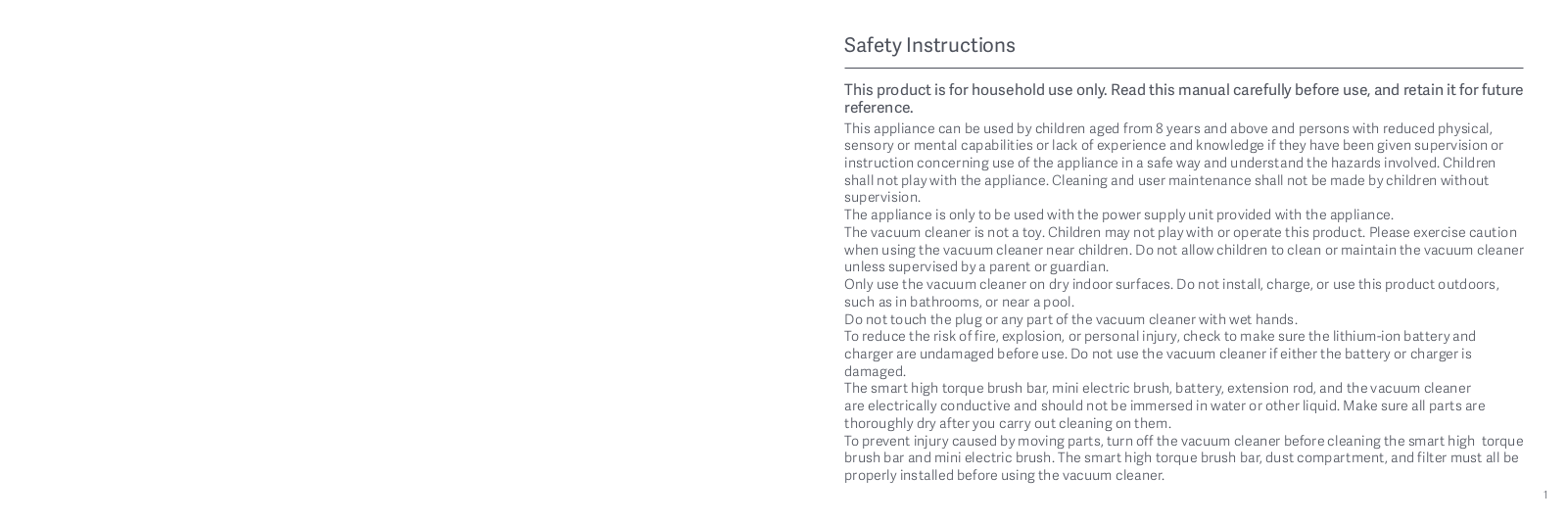
Safety Instructions
This product is for household use only. Read this manual carefully before use, and retain it for future
reference.
This appliance can be used by children aged from 8 years and above and persons with reduced physical,
sensory or mental capabilities or lack of experience and knowledge if they have been given supervision or
instruction concerning use of the appliance in a safe way and understand the hazards involved. Children
shall not play with the appliance. Cleaning and user maintenance shall not be made by children without
supervision.
The appliance is only to be used with the power supply unit provided with the appliance.
The vacuum cleaner is not a toy. Children may not play with or operate this product. Please exercise caution
when using the vacuum cleaner near children. Do not allow children to clean or maintain the vacuum cleaner
unless supervised by a parent or guardian.
Only use the vacuum cleaner on dry indoor surfaces. Do not install, charge, or use this product outdoors,
such as in bathrooms, or near a pool.
Do not touch the plug or any part of the vacuum cleaner with wet hands.
To reduce the risk of fire, explosion, or personal injury, check to make sure the lithium-ion battery and
charger are undamaged before use. Do not use the vacuum cleaner if either the battery or charger is
damaged.
The smart high torque brush bar, mini electric brush, battery, extension rod, and the vacuum cleaner
are electrically conductive and should not be immersed in water or other liquid. Make sure all parts are
thoroughly dry after you carry out cleaning on them.
To prevent injury caused by moving parts, turn off the vacuum cleaner before cleaning the smart high torque
brush bar and mini electric brush. The smart high torque brush bar, dust compartment, and filter must all be
properly installed before using the vacuum cleaner.
1

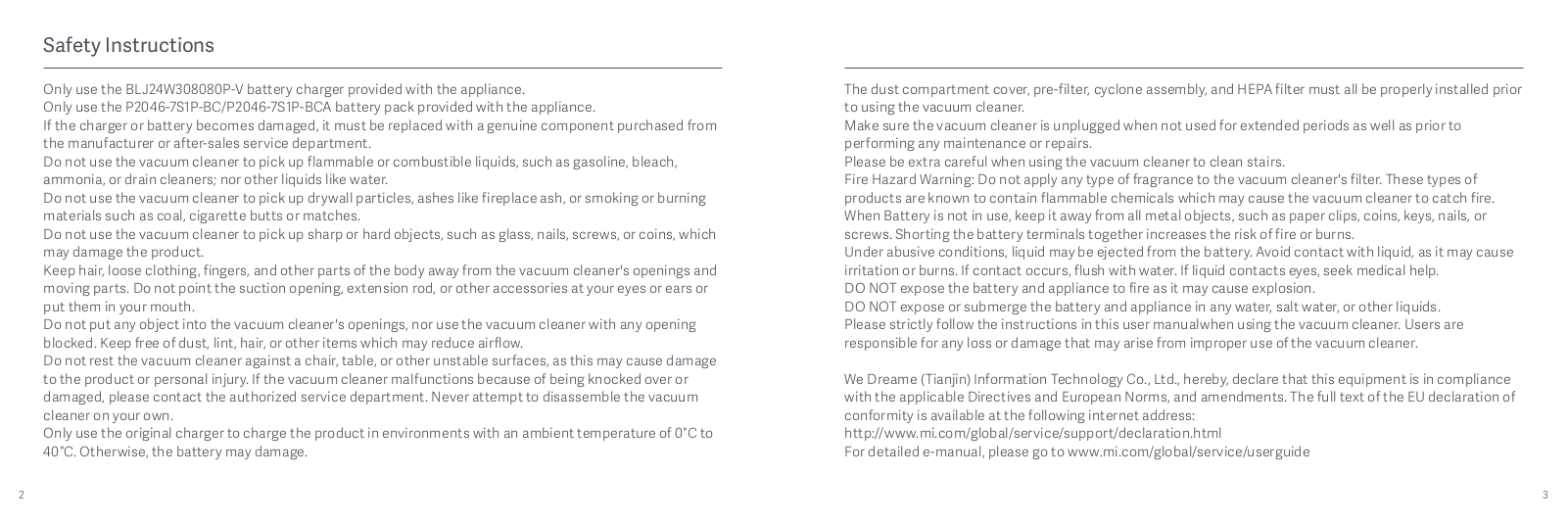
Safety Instructions
Only use the BLJ24W308080P-V battery charger provided with the appliance.
The dust compartment cover, pre-filter, cyclone assembly, and HEPA filter must all be properly installed prior
Only use the P2046-7S1P-BC/P2046—7S1P-BCA battery pack provided with the appliance.
to using the vacuum cleaner.
If the charger or battery becomes damaged, it must be replaced with a genuine component purchased from
Make sure the vacuum cleaner is unplugged when not used for extended periods as well as prior to
the manufacturer or after-sales service department.
performing any maintenance or repairs.
Do not use the vacuum cleaner to pick up flammable or combustible liquids, such as gasoline, bleach,
Please be extra careful when using the vacuum cleaner to clean stairs.
ammonia, or drain cleaners; nor other liquids like water.
Fire Hazard Warning: Do not apply any type of fragrance to the vacuum cleaner‘s filter. These types of
Do not use the vacuum cleaner to pick up drywall particles, ashes like fireplace ash, or smoking or burning
products are known to contain flammable chemicals which may cause the vacuum cleaner to catch fire.
materials such as coal, cigarette butts or matches.
When Battery is not in use, keep it away from all metal objects, such as paper clips, coins, keys, nails, or
Do not use the vacuum cleaner to pick up sharp or hard objects, such as glass, nails, screws, or coins, which
screws. Shorting the battery terminals together increases the risk of fire or burns.
may damage the product.
Under abusive conditions, liquid may be ejected from the battery. Avoid contact with liquid, as it may cause
Keep hair, loose clothing, fingers, and other parts of the body away from the vacuum cleaner’s openings and
irritation or burns. If contact occurs, flush with water. If liquid contacts eyes, seek medical help.
moving parts. Do not point the suction opening, extension rod, or other accessories at your eyes or ears or
DO NOT expose the battery and appliance to fire as it may cause explosion.
put them in your mouth.
DO NOT expose or submerge the battery and appliance in any water, salt water, or other liquids.
Do not put any object into the vacuum cleaner‘s openings, nor use the vacuum cleaner with any opening
Please strictly follow the instructions in this user manualwhen using the vacuum cleaner. Users are
blocked. Keep free of dust, lint, hair, or other items which may reduce airflow.
responsible for any loss or damage that may arise from improper use of the vacuum cleaner.
Do not rest the vacuum cleaner against a chair, table, or other unstable surfaces, as this may cause damage
to the product or personal injury. If the vacuum cleaner malfunctions because of being knocked over or
We Dreame (Tianjin) Information Technology Co., Ltd., hereby, declare that this equipment is in compliance
damaged, please contact the authorized service department. Never attempt to disassemble the vacuum
with the applicable Directives and European Norms, and amendments. The full text of the EU declaration of
cleaner on your own.
conformity is available at the following internet address:
Only use the original charger to charge the product in environments with an ambient temperature of 0°C to
http://www.mi.com/global/service/support/declaration.html
40°C. Otherwise, the battery may damage.
For detailed e—manual, please go to www.mi.com/global/service/userguide
2 3
Product Overview Product Overview
Accessories List Component Name
Charging Port
Display Screen
Charging Contacts × 2
Battery Status Indicator
Dust Compartment
Release Switch
Power Button
Press to turn on
Smart High Torque Brush Bar
Crevice Nozzle
Charger
2-in-1 Charging & Storage Mount
Release to turn off
(includes screw × 2, wall plug × 2, and
Battery Release Button
mounting template sticker)
Dust Compartment
Dust Compartment
Bottom Cover
Release Button
Antistatic Contact
Mini Electric BrushExtension Rod 2-in-1 Brush Nozzle
Water Tank
Mop Pad
Note: Illustrations of product, accessories, and user interface in the user manual are for reference purposes only. Actual product and
functions may vary due to product enhancements.
4 5
*Эта страница была автоматически переведена с английского языка.
Техническое обслуживание и ремонт
Сценарии использования аксессуаров
Щетка 2-в-1: подходит для очистки от пыли на таких поверхностях, как шторы, диваны и журнальные столики.
Электрическая щетка для клещей: подходит для очистки от пыли и клещей на тканевых поверхностях, таких как постельное белье и постельное белье.
Совет: Не рекомендуется использовать на поверхностях, склонных к тиканию и царапинам (например, шелк).
Наконечник: Если какая-либо из вращающихся частей застрянет, изделие может автоматически остановиться и может быть использовано снова после удаления всех застрявших посторонних предметов.
Двигатель автоматически остановится после защиты от высоких температур, пожалуйста, подождите, пока температура батареи не станет нормальной, прежде чем продолжить использование.
Щелевая всасывающая головка: подходит для очистки углов дверей и окон, углов стен, лестниц и других узких щелей.
Интеллектуальная сенсорная щетка для пола: подходит для мытья полов, мрамора, плитки, ковров с коротким ворсом и других полов. В автоматической коробке передач пылесос автоматически регулирует мощность всасывания в соответствии с различными типами пола.
Совет: Сенсорная щетка также может быть установлена непосредственно на основной блок.
Часто задаваемые вопросы
| Распространенные неисправности | Возможные причины | Решения |
| Не работает | Нет батареи или разряжен аккумулятор | Пожалуйста, полностью зарядите продукт перед его использованием |
| Автоматическая защита от высоких температур, вызванных засорами | Охладите продукт и перезапустите его. | |
| Закупорка отверстия или прохода для всасывания пыли | Очистите вакуумное отверстие или проход | |
| Пониженная мощность всасывания | Пылесборник заполнен, HEPA забит пылью | Пожалуйста, очистите пылесборники и HEPA |
| Умная сенсорная щетка, удлинитель и другие аксессуары забиты | Пожалуйста, очистите забитые щетки интеллектуальных датчиков, удлинители и другие аксессуары | |
| Мотор работает со странным звуком | Заблокированный главный всасывающий патрубок или удлинитель | Устранение препятствий в главном всасывающем отверстии, удлинителе |
| Первый индикатор всегда горит красным цветом при запуске | Поврежденный аккумулятор | Пожалуйста, обратитесь в сервисную службу для ремонта |
| Первый индикатор мигает красным во время зарядки | Несоответствующий адаптер питания | Пожалуйста, используйте оригинальный адаптер питания |
| Индикатор состояния аккумулятора не загорается во время зарядки | Основной продукт не подключен к адаптеру питания | Убедитесь, что адаптер питания подключен к сети |
| Аккумулятор полностью заряжен, аккумулятор переходит в спящий режим | Он работает правильно | |
| Исключите два вышеуказанных случая, если проблема не устранена, обратитесь в сервисную службу для ремонта. | ||