
View the manual for the Marshall Stanmore II here, for free. This user manual comes under the category speakers and has been rated by 4 people with an average of a 9. This manual is available in the following languages: English. Do you have a question about the Marshall Stanmore II?
Ask your question here
Frequently asked questions
Can’t find the answer to your question in the manual? You may find the answer to your question in the FAQs about the Marshall Stanmore II below.
What is the weight of the Marshall Stanmore II?
The Marshall Stanmore II has a weight of 1650 g.
Can bluetooth devices of different brands be connected to each other?
Yes, bluetooth is a universal method that allows different devices equipped with bluetooth to connect to each other.
What is the height of the Marshall Stanmore II?
The Marshall Stanmore II has a height of 185 mm.
What is the width of the Marshall Stanmore II?
The Marshall Stanmore II has a width of 350 mm.
What is bluetooth?
Bluetooth is a way of exchanging data wirelessly between electronic devices via radio waves. The distance between the two devices that exchange data can in most cases be no more than ten metres.
What is the depth of the Marshall Stanmore II?
The Marshall Stanmore II has a depth of 195 mm.
When is my volume too loud?
A volume above 80 decibels can be harmful to hearing. When the volume exceeds 120 decibels, direct damage can even occur. The chance of hearing damage depends on the listening frequency and duration.
Wat is Dolby Atmos?
Dolby Atmos is a technology that ensures that the sound is reflected from the ceiling to where you are listening. This makes it possible to create a 5.1 effect with only 1 speaker.
Is the manual of the Marshall Stanmore II available in English?
Yes, the manual of the Marshall Stanmore II is available in English .
Is your question not listed? Ask your question here

LEGAL & TRADEMARK NOTICE
• Design of device and packaging are intellectual properties of Zound Industries International AB and Marshall Amplication Plc. © All Rights
Reserved. Zound Industries International AB is hereinafter referred to as “Zound Industries” or “manufacturer”.
• MARSHALL, Marshall Amps, their respective logos, “Marshall” and “Marshall” trade dress are trademarks and intellectual property of Marshall
Amplication Plc and may not be used without permission. Permission granted to Zound Industries.
• Qualcomm aptX is a product of Qualcomm Technologies International, Ltd. Qualcomm is a trademark of Qualcomm Incorporated, registered in
the United States and other countries, used with permission. aptX is a trademark of Qualcomm Technologies International, Ltd., registered in
the United States and other countries, used with permission.
• The Bluetooth® wordmark and logos are registered trademarks owned by the Bluetooth SIG, Inc. and any use of such marks by Zound
Industries is under license.
• Apple and the Apple logo are trademarks of Apple Inc., registered in the U.S. and other countries. App Store is a service mark of Apple Inc.,
registered in the U.S. and other countries.
• Google Play and the Google Play logo are trademarks of Google LLC.
• All other trademarks are the property of their respective owners and may not be used without permission.
• For more legal information related to this product and to its use in your specic region, and for more detailed information about Zound Industries
and partner & license information, please visit the website: www.marshallheadphones.com. The user is recommended to visit the website
regularly for up-to-date information.
Zound Industries International AB, Centralplan 15, 111 20 Stockholm, Sweden
002.

INDICE
ITALIANO
SEZIONI
PAGINA
002. LEGAL & TRADEMARK NOTICE
004. CONTENUTO DELLA CONFEZIONE
005. DESCRIZIONE GENERALE
007. COLLEGARE STANMORE II
008. ACCENDERE/SPEGNERE STANMORE II
009. CONFIGURARE STANMORE II
010. SELEZIONARE LA SORGENTE AUDIO
011. COLLEGAMENTO TRAMITE BLUETOOTH (ASSOCIAZIONE)
012. COLLEGAMENTO TRAMITE INGRESSO AUX
013. COLLEGAMENTO TRAMITE INGRESSO RCA
014. REGOLARE VOLUME/BASSI/ALTI
015. CONTROLLO PLAY/PAUSA
016. ASSOCIARE PIÙ DIFFUSORI
017. MODALITÀ STANDBY
018. INFORMAZIONI TECNICHE
019. RISOLUZIONE DEI PROBLEMI
003.
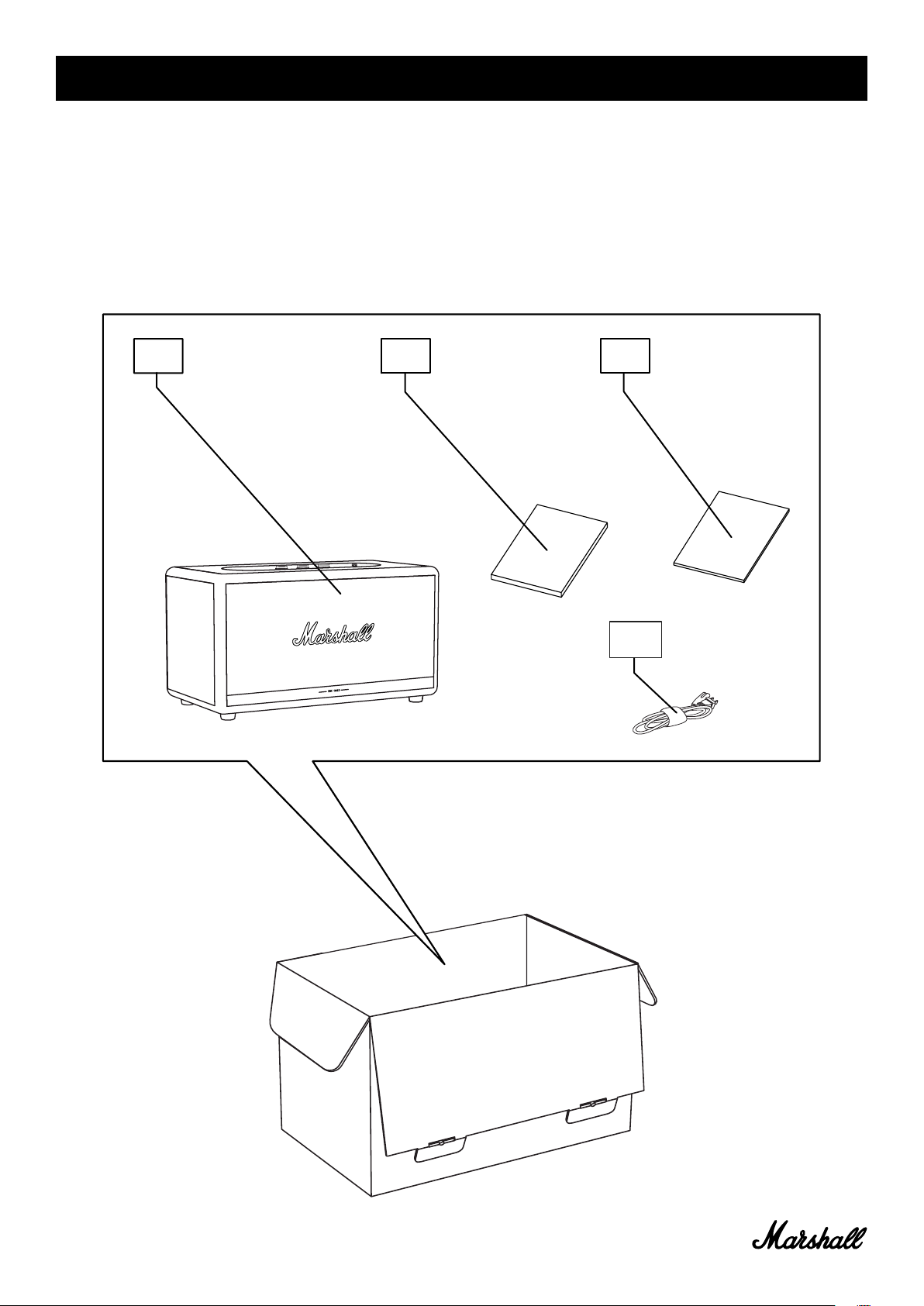
CONTENUTO DELLA CONFEZIONE
001. DIFFUSORE Bluetooth® STEREO SENZA FILI MARSHALL STANMORE II
002. GUIDA RAPIDA
003. IMPORTANTI ISTRUZIONI DI SICUREZZA
004. CAVO DI ALIMENTAZIONE
001.
002.
003.
004.
004.
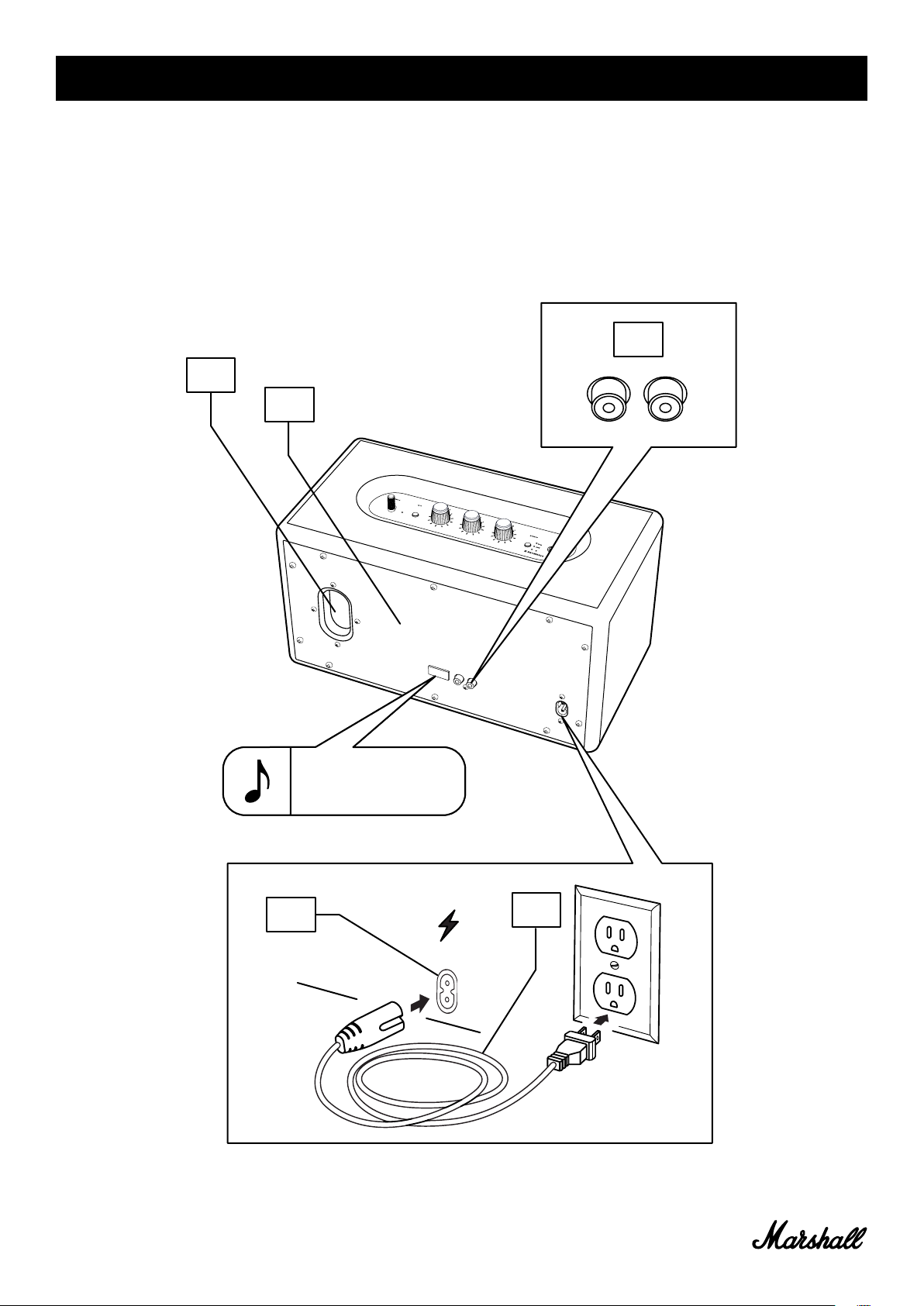
DESCRIZIONE GENERALE (CONTINUA)
009. PORTA DEI BASSI
010. PIASTRA POSTERIORE
011. INGRESSO RCA (DESTRO E SINISTRO)
012. INGRESSO RETE
013. CAVO DI ALIMENTAZIONE
009.
010.
011.
NOTA: L’ADESIVO CON NUMERO
DI SERIE E CODICE DATA SI
TROVA QUI.
012.
013.
006.
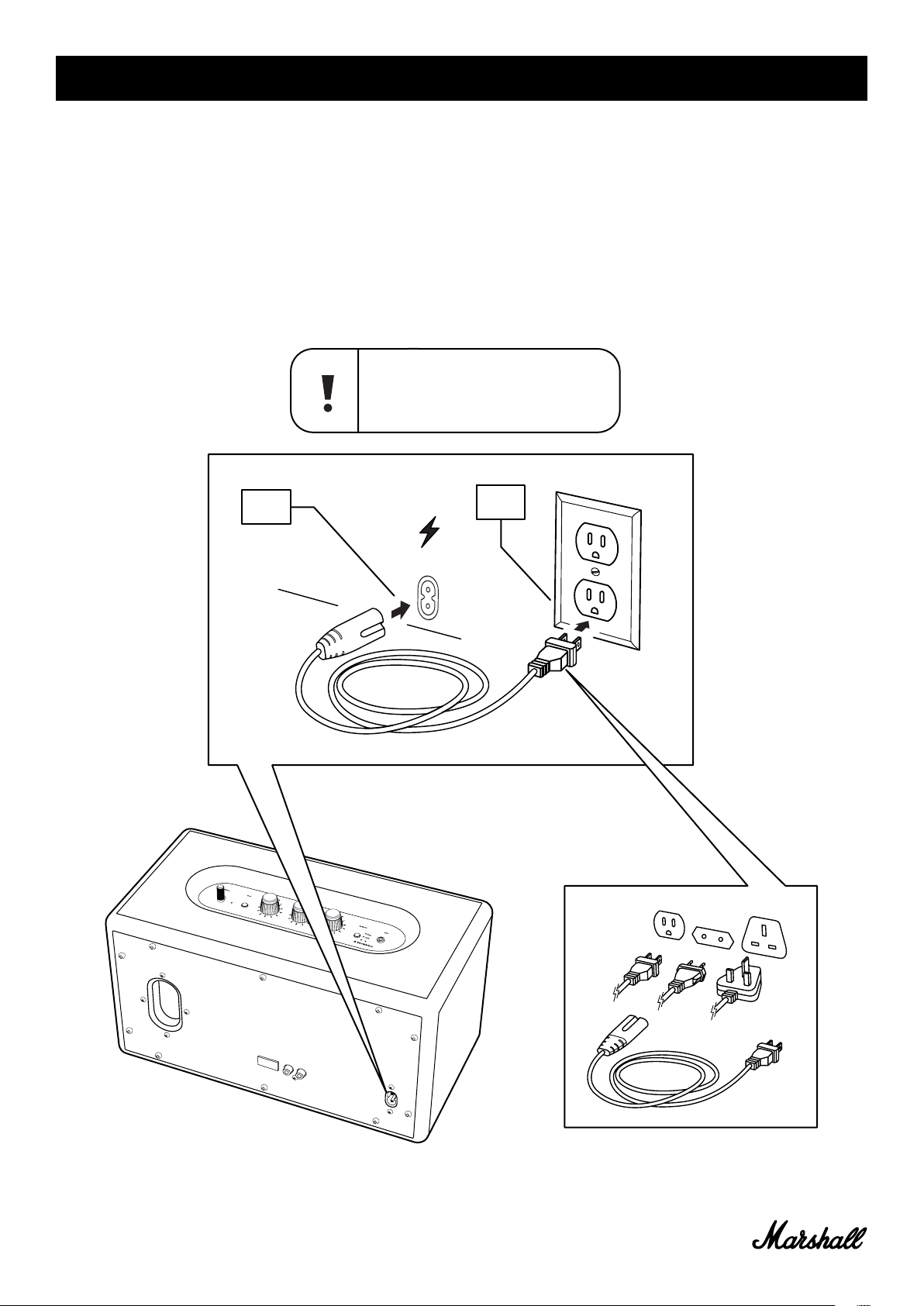
COLLEGARE STANMORE II
IMPORTANTE: ASSICURATI SEMPRE CHE IL CAVO DI ALIMENTAZIONE, IL JACK DI
ALIMENTAZIONE E IL DIFFUSORE SIANO COMPATIBILI CON L’ALIMENTAZIONE E LA
PRESA A MURO.
001. COLLEGA IL CAVO DI ALIMENTAZIONE ALL’INGRESSO DI RETE SUL DIFFUSORE.
002. COLLEGA IL JACK DI ALIMENTAZIONE ALLA PRESA A MURO.
ATTENZIONE: STACCA SEMPRE IL CAVO DI
ALIMENTAZIONE DALLA PRESA A MURO PRIMA DI
SCOLLEGARLO DAL DIFFUSORE.
001.
002.
007.
- June 6, 2024
- Marshall
Table of Contents
- LEGAL & TRADEMARK NOTICE
- BOX CONTENTS
- GENERAL DESCRIPTION
- PLUGGING IN THE STANMORE II
- TURNING THE STANMORE II ON/OFF
- SETTING UP THE STANMORE II
- SELECTING AUDIO SOURCE
- CONNECTING VIA Bluetooth (PAIRING)
- CONNECTING VIA AUX INPUT
- CONNECTING VIA RCA INPUT
- ADJUSTING THE VOLUME/BASS/TREBLE
- PLAY/PAUSE CONTROL
- COUPLE SPEAKERS
- STANDBY MODE
- TECHNICAL INFORMATION
- TROUBLESHOOTING
- References
- Read User Manual Online (PDF format)
- Download This Manual (PDF format)

STANMORE II BLUETOOTH
USER MANUAL
LEGAL & TRADEMARK NOTICE
- Design of device and packaging are intellectual properties of Zound Industries International AB and Marshall Amplification Plc. © All Rights Reserved. Zound Industries International AB is hereinafter referred to as “Zound Industries” or “manufacturer”.
- MARSHALL, Marshall Amps, their respective logos, “Marshall” and “Marshall” trade dress are trademarks and intellectual property of Marshall Amplification Plc and may not be used without permission. Permission granted to Zound Industries.
- Qualcomm aptX is a product of Qualcomm Technologies International, Ltd. Qualcomm is a trademark of Qualcomm Incorporated, registered in the United States and other countries, used with permission. aptX is a trademark of Qualcomm Technologies International, Ltd., registered in the United States and other countries, used with permission.
- The Bluetooth® wordmark and logos are registered trademarks owned by the Bluetooth SIG, Inc. and any use of such marks by Zound Industries is under license.
- Apple and the Apple logo are trademarks of Apple Inc., registered in the U.S. and other countries. App Store is a service mark of Apple Inc., registered in the U.S. and other countries.
- Google Play and the Google Play logo are trademarks of Google LLC.
- All other trademarks are the property of their respective owners and may not be used without permission.
- For more legal information related to this product and to its use in your specific region, and for more detailed information about Zound Industries and partner & license information, please visit the website: www.marshallheadphones.com. The user is recommended to visit the website regularly for up-to-date information.
Zound Industries International AB, Centralplan 15, 111 20 Stockholm, Sweden
BOX CONTENTS
- MARSHALL STANMORE II WIRELESS HOME Bluetooth ® SPEAKER
- QUICK START GUIDE
- IMPORTANT SAFETY INSTRUCTIONS
- MAINS LEAD

GENERAL DESCRIPTION
- AUX INPUT FOR 3.5 mm JACK
- SOURCE INDICATORS
- SOURCE BUTTON
- VOLUME KNOB
- BASS KNOB
- TREBLE KNOB
- PLAY/PAUSE BUTTON

- POWER LEVER
- BASS PORT
- BACKPLATE
- RCA INPUT (LEFT AND RIGHT)
- MAINS INPUT
- MAINS LEAD


PLUGGING IN THE STANMORE II
IMPORTANT: ALWAYS ENSURE THAT THE MAINS LEAD, POWER JACK AND SPEAKER
ARE COMPATIBLE WITH YOUR MAINS SUPPLY AND WALL SOCKET.
- CONNECT THE MAINS LEAD INTO THE MAINS INPUT ON THE SPEAKER.
- CONNECT THE POWER JACK TO THE WALL SOCKET.

TURNING THE STANMORE II ON/OFF
- ON: PULL AND HOLD THE POWER LEVER TOWARDS THE FRONT OF THE SPEAKER UNTIL THE POWER-ON SOUND PLAYS AND THE INDICATORS LIGHT UP.
OFF: PULL AND HOLD THE POWER LEVER TOWARDS THE FRONT OF THE SPEAKER UNTIL
THE POWER OFF SOUND PLAYS AND ALL INDICATORS TURN OFF.

SETTING UP THE STANMORE II
CONFIGURE THE SPEAKER WITH THE MARSHALL BLUETOOTH ® APP TO GET THE MOST OUT OF
IT. THE APP IS AVAILABLE FROM THE APP STORE AND GOOGLE PLAY.
- DOWNLOAD THE MARSHALL BLUETOOTH ® APP AND FOLLOW THE IN-APP INSTRUCTIONS.

SELECTING AUDIO SOURCE
THERE ARE MANY WAYS TO CONNECT TO YOUR STANMORE II, EITHER WIRELESSLY OR BY
CABLE.
- WIRELESS Bluetooth CONNECTION
- AUX – 3.5 mm STEREO JACK
- RCA – DOUBLE RCA (LEFT AND RIGHT) JACKS
- PUSH THE SOURCE BUTTON TO TOGGLE BETWEEN Bluetooth, AUX, AND RCA AUDIO SOURCE.
- A LIT INDICATOR SHOWS WHICH SOURCE IS SELECTED.
THE SOURCE CAN ALSO BE SELECTED FROM THE MARSHALL BLUETOOTH ® APP.

CONNECTING VIA Bluetooth (PAIRING)
-
SELECT Bluetooth AS THE INPUT. PUSHING THE SOURCE BUTTON TOGGLES THE INPUT SOURCES.
-
PUSH AND HOLD THE SOURCE BUTTON FOR 2 SECONDS.
THE Bluetooth INDICATOR STARTS TO BLINK. -
ENABLE Bluetooth ON YOUR DEVICE (SMARTPHONE, TABLET, COMPUTER).
-
SELECT STANMORE II FROM THE Bluetooth LIST AND ACCEPT PAIRING.
THE Bluetooth INDICATOR ON THE SPEAKER STOPS BLINKING AND REMAINS LIT WHEN THE
UNITS ARE CONNECTED.
STANMORE II CAN BE CONNECTED TO TWO Bluetooth DEVICES AT THE SAME TIME.
PLAYING A CONNECTED Bluetooth DEVICE WILL MAKE IT THE SELECTED AUDIO SOURCE,
PAUSING ANY PREVIOUSLY PLAYED AUDIO ON THE SECOND DEVICE.

CONNECTING VIA AUX INPUT
- CONNECT A 3.5 mm STEREO JACK TO THE INPUT LABELLED AUX ON THE TOP OF THE SPEAKER.
- CONNECT THE OTHER END OF THE LEAD TO THE AUDIO OUTPUT ON YOUR AUDIO SOURCE.
- SELECT AUX AS THE INPUT. PUSHING THE SOURCE BUTTON TOGGLES THE INPUT SOURCES.

CONNECTING VIA RCA INPUT
- CONNECT A LEAD WITH RCA JACKS TO THE INPUTS LABELLED RCA ON THE BACK OF THE SPEAKER.
- CONNECT THE OTHER END OF THE LEAD TO THE OUTPUT ON YOUR AUDIO SOURCE.
- SELECT RCA AS THE INPUT. PUSHING THE SOURCE BUTTON TOGGLES THE INPUT SOURCES.

ADJUSTING THE VOLUME/BASS/TREBLE
THE STANMORE II INCLUDES THREE CONTROLS FOR ADJUSTING THE AUDIO.
- VOLUME KNOB
- BASS KNOB
- TREBLE KNOB

PLAY/PAUSE CONTROL
THE STANMORE II HAS A PLAY/PAUSE BUTTON TO CONTROL THE MUSIC WHEN PLAYING VIA
Bluetooth.
- SINGLE-CLICK TO EITHER PLAY OR PAUSE.
- DOUBLE-CLICK TO SKIP FORWARD.
- TRIPLE-CLICK TO SKIP BACK.

COUPLE SPEAKERS
TWO ACTON II, STANMORE II OR WOBURN II SPEAKERS CAN BE COUPLED TO ACT AS ONE
SOUND SYSTEM. THERE ARE TWO MODES TO CHOOSE FROM:
-
AMBIENT MODE – TWO SPEAKERS PLAY THE SAME AUDIO SYNCHRONISED. EACH SPEAKER PLAYS BOTH THE LEFT AND RIGHT CHANNELS.
CHOOSE THIS MODE IF YOUR SPEAKERS ARE PLACED AT DIFFERENT HEIGHTS,
DIRECTIONS,S OR AREAS OF THE ROOM. -
STEREO MODE – TWO SPEAKERS OF THE SAME SIZE ARE COUPLED AS A STEREO PAIR. WITH ONE SPEAKER ON THE LEFT CHANNEL AND THE OTHER ON THE RIGHT.
CHOOSE THIS MODE IF THE SPEAKERS ARE PLACED AT THE SAME HEIGHT, EQUAL
DISTANCE, AND FACING THE SAME DIRECTION.
- TO COUPLE TWO SPEAKERS, OPEN THE MARSHALL BLUETOOTH ®APP AND CONNECT TO YOUR SPEAKERS.
- GO TO A COUPLE OF SPEAKERS AND FOLLOW THE IN-APP INSTRUCTION.

STANDBY MODE
IF THE STANMORE II IS LEFT UNUSED FOR 20 MINUTES THE SPEAKER GOES INTO STANDBY
TO SAVE ENERGY. IN THIS MODE ALL INDICATORS ARE OFF.
- INTERACT WITH ANY BUTTON OR KNOB ON THE TOP PANEL TO WAKE THE SPEAKER UP FROM STANDBY MODE.

TECHNICAL INFORMATION
ACOUSTIC SPECIFICATION
- STEREO LOUDSPEAKER WITH BASS REFLEX SYSTEM
- DIGITAL CLASS D AMPLIFIERS: 2 x 15 W + 1 x 50 W
- TWEETERS: 2 x ¾” dome tweeters
- WOOFER: 1 x 5¼” woofer
- BASS AND TREBLE TONE CONTROLS
- FREQUENCY RESPONSE: 50–20,000 Hz ±6 dB
- MAXIMUM SOUND PRESSURE LEVEL: 101 dB SPL @ 1 m
CONNECTIVITY
- Bluetooth ®: Bluetooth 5.0 with Qualcomm® aptX™
- AUX: 3.5 mm stereo jack
- RCA: RCA (left and right)
TECHNICAL INFORMATION
- MAINS INPUT VOLTAGE: 100–240 VAC
- MAINS FREQUENCY: 50–60 Hz
- SIZE: 350 x 195 x 185 mm
- WEIGHT: 4.65 kg
TROUBLESHOOTING
| PROBLEM | CAUSE | ACTION |
|---|---|---|
| THE STANMORE II DOES NOT TURN ON | The speaker is not connected to a mains | |
| electricity supply. | Connect the mains lead to the Stanmore II and a working |
wall socket.
Pull and hold the power lever towards the front of the speaker until the
indicators light up.
THERE IS NO AUDIO OR AUDIO IS TOO LOW| The wrong audio source is selected.
Volume is set too low on either the audio source or the speaker.| Ensure that
the device is connected to the Stanmore II.
Slightly increase the volume on your audio source or the speaker.
CANNOT CONNECT OR PAIR WITH A Bluetooth DEVICE| Bluetooth is not enabled on
your device (smartphone, tablet, computer). There are already two devices
connected to the speaker.
The speaker is not in pairing mode.| Activate Bluetooth on your device.
Disconnect one of the connected Bluetooth devices before connecting to the
speaker.
Push and hold the Bluetooth button for 3 seconds to make the speaker
discoverable by the device.
THE SPEAKER IS NOT RESPONDING| A software problem has occurred.| Unplug the
speaker mains plug from the wall socket, wait for 15 seconds, then plug it in
again.
Bluetooth CONNECTION DROPS OUT| The two Bluetooth devices are too far apart or
the connection is affected due to obstacles. There is a strong electric field
surrounding the Stanmore II.| Move the devices closer so that they are within
10 meters, and unobstructed by obstacles such as walls or doors.
Items such as microwave ovens, wireless network adapters, fluorescent lights,
and gas cookers use the same frequency range as the Bluetooth device. This
may lead to electrical disturbances.
THERE IS A CRACKLING SOUND| The amplifier is clipping as it has run out of
output power.| Decrease the volume on your audio source.
Lower the volume or bass on the Stanmore II.
THE AUDIO IS DISTORTED| Volume is set too high on the audio source.
The audio stream or audio file is of poor quality.
Volume is set too high on the Stanmore II.
Too much bass/treble on the speaker.| Turn down the playback volume on the
audio source.
Try another audio file or music player.
Lower the volume on the speaker.
Lower the bass/treble on the speaker.
ERRATIC PERFORMANCE| Interference from another electronic device.| Move the
Stanmore II to another spot.
Turn off or move the interfering electronic device.
NOTES:
A BLUETOOTH DEVICE COULD CAUSE AUDIO-RELATED OR TECHNICAL FAULTS, DEPENDING ON
USE, IN THE FOLLOWING CASES:
-
WHEN SOME PART OF THE BODY IS IN CONTACT WITH THE RECEIVING/TRANSMITTING SYSTEM FOR THE BLUETOOTH DEVICE
OR THE STANMORE II. -
ELECTRICAL VARIATIONS DUE TO OBSTACLES IN THE FORM OF WALLS, CORNERS, ETC.
-
EXPOSURE TO ELECTRICAL DISRUPTIONS FROM DEVICES WITHIN THE SAME FREQUENCY BAND, FOR EXAMPLE, MEDICAL
EQUIPMENT, MICROWAVE OVENS, AND WIRELESS NETWORKS.
THIS WIRELESS DEVICE MAY CAUSE ELECTRICAL DISRUPTIONS DURING USE.
WWW.MARSHALLHEADPHONES.COM
References
- Marshall — 60 years of loud | Marshall.com
Read User Manual Online (PDF format)
Read User Manual Online (PDF format) >>
Download This Manual (PDF format)
Download this manual >>
Хорошее руководство по эксплуатации
Законодательство обязывает продавца передать покупателю, вместе с товаром, руководство по эксплуатации Marshall Stanmore II Bluetooth. Отсутствие инструкции либо неправильная информация, переданная потребителю, составляют основание для рекламации в связи с несоответствием устройства с договором. В законодательстве допускается предоставлении руководства в другой, чем бумажная форме, что, в последнее время, часто используется, предоставляя графическую или электронную форму инструкции Marshall Stanmore II Bluetooth или обучающее видео для пользователей. Условием остается четкая и понятная форма.
Что такое руководство?
Слово происходит от латинского «instructio», тоесть привести в порядок. Следовательно в инструкции Marshall Stanmore II Bluetooth можно найти описание этапов поведения. Цель инструкции заключается в облегчении запуска, использования оборудования либо выполнения определенной деятельности. Инструкция является набором информации о предмете/услуге, подсказкой.
К сожалению немного пользователей находит время для чтения инструкций Marshall Stanmore II Bluetooth, и хорошая инструкция позволяет не только узнать ряд дополнительных функций приобретенного устройства, но и позволяет избежать возникновения большинства поломок.
Из чего должно состоять идеальное руководство по эксплуатации?
Прежде всего в инструкции Marshall Stanmore II Bluetooth должна находится:
— информация относительно технических данных устройства Marshall Stanmore II Bluetooth
— название производителя и год производства оборудования Marshall Stanmore II Bluetooth
— правила обслуживания, настройки и ухода за оборудованием Marshall Stanmore II Bluetooth
— знаки безопасности и сертификаты, подтверждающие соответствие стандартам
Почему мы не читаем инструкций?
Как правило из-за нехватки времени и уверенности в отдельных функциональностях приобретенных устройств. К сожалению само подсоединение и запуск Marshall Stanmore II Bluetooth это слишком мало. Инструкция заключает ряд отдельных указаний, касающихся функциональности, принципов безопасности, способов ухода (даже то, какие средства стоит использовать), возможных поломок Marshall Stanmore II Bluetooth и способов решения проблем, возникающих во время использования. И наконец то, в инструкции можно найти адресные данные сайта Marshall, в случае отсутствия эффективности предлагаемых решений. Сейчас очень большой популярностью пользуются инструкции в форме интересных анимаций или видео материалов, которое лучше, чем брошюра воспринимаются пользователем. Такой вид инструкции позволяет пользователю просмотреть весь фильм, не пропуская спецификацию и сложные технические описания Marshall Stanmore II Bluetooth, как это часто бывает в случае бумажной версии.
Почему стоит читать инструкции?
Прежде всего здесь мы найдем ответы касательно конструкции, возможностей устройства Marshall Stanmore II Bluetooth, использования отдельных аксессуаров и ряд информации, позволяющей вполне использовать все функции и упрощения.
После удачной покупки оборудования/устройства стоит посвятить несколько минут для ознакомления с каждой частью инструкции Marshall Stanmore II Bluetooth. Сейчас их старательно готовят или переводят, чтобы они были не только понятными для пользователя, но и чтобы выполняли свою основную информационно-поддерживающую функцию.
User Manual
22 pages
en
User Manual
22 pages
en
Marshall Stanmore II Specification
The Marshall Stanmore II is a versatile and powerful Bluetooth speaker designed to deliver high-quality sound with a classic aesthetic. It seamlessly combines modern features with the iconic Marshall design, making it a suitable choice for both audiophiles and casual listeners. The Stanmore II is equipped with advanced Bluetooth 5.0 with aptX technology, allowing for wireless music playback with a range of up to 30 feet, ensuring strong and stable connectivity.
The speaker houses a robust sound system with a 50-watt Class D amplifier for the woofer and two 15-watt Class D amplifiers for the tweeters, together providing a dynamic and immersive audio experience. The frequency response ranges from 50 Hz to 20 kHz, ensuring rich bass and crisp high notes. The Stanmore II features analog control knobs for bass, treble, and volume adjustments, offering users a tactile and precise way to fine-tune their listening experience.
Connectivity options are varied, with RCA and 3.5 mm input jacks available for wired connections, catering to different audio sources. The speaker’s wooden cabinet is wrapped in a textured vinyl finish and adorned with the iconic script logo, gold piping, and a vintage-inspired front fret, maintaining the brand’s signature look. The Stanmore II also incorporates a multi-host functionality, allowing seamless switching between two Bluetooth devices, enhancing its usability for shared environments.
This speaker is designed to deliver not only powerful sound but also a timeless design, making it a stylish addition to any room. Its combination of superior audio performance, aesthetic appeal, and user-friendly features solidifies the Marshall Stanmore II as a premium choice in the Bluetooth speaker market.
Marshall Stanmore II F.A.Q.
To connect your Marshall Stanmore II to a Bluetooth device, turn on the speaker, press the Bluetooth button to activate pairing mode, and select ‘Marshall Stanmore II’ from your device’s Bluetooth settings.
Ensure that the Stanmore II is in pairing mode and the device is within range. If issues persist, try resetting the Bluetooth settings on both the speaker and the device, or restart both devices.
To perform a factory reset, hold the Source button for 7 seconds until the LED indicators flash, which indicates that the reset is complete.
Use a dry, soft cloth to clean the exterior. Avoid using liquid cleaners. Regularly check connections and keep the speaker in a cool, dry place to prevent damage.
Download the Marshall Bluetooth app on your smartphone, connect to the speaker, and follow the in-app instructions to check for and install firmware updates.
Check if the speaker is powered on and the volume is turned up. Ensure the correct input source is selected and verify that the connected device’s volume is not muted.
The Stanmore II can remember up to 8 paired devices but can only actively connect to one device at a time. To switch devices, disconnect the current device and connect the new one.
Yes, you can connect the Stanmore II to a TV using Bluetooth or an audio cable via the AUX or RCA input, depending on the TV’s available outputs.
LED indicators display the active source and volume level. A flashing LED indicates pairing mode or an error, while a steady light indicates a stable connection.
For optimal sound quality, place the speaker on a solid surface away from walls, adjust the bass and treble knobs to your preference, and ensure the audio source is of high quality.