
Перейти к контенту
Автомагнитолы JVC
- Размер инструкции: 1.55 Мб
- Формат файла: pdf
Если вы потеряли инструкцию от автомагнитолы JVC KD-R45, можете скачать файл для просмотра на компьютере или печати.
Инструкция для автомагнитолы JVC KD-R45 на русском языке. В руководстве описаны возможности и полезные функции, а также правила эксплуатации. Перед использованием внимательно ознакомьтесь с инструкцией.
Чтобы не читать всю инструкцию вы можете выполнить поиск по содержимому внутри инструкции и быстро найти необходимую информацию. Рекомендации по использованию помогут увеличить срок службы автомагнитолы JVC KD-R45. Если у вас появилась проблема, то найдите раздел с описанием неисправностей и способами их решения. В нем указаны типичные поломки и способы их решения.

Having TROUBLE with operation?
Please reset your unit
Refer to page of How to reset your unit
Vous avez des PROBLÈMES de fonctionnement?
Réinitialisez votre appareil
Référez-vous à la page intitulée Comment réinitialiser votre appareil
ENGLISH
FRANÇAIS
KD-R521/KD-R422/
KD-R421/KD-R45
CD RECEIVER / RÉCEPTEUR CD
Dear Customer,
This apparatus is in conformance with the valid
European directives and standards regarding
electromagnetic compatibility and electrical safety.
European representative of Victor Company of
Japan, Limited is:
JVC Technical Services Europe GmbH
Postfach 10 05 04
61145 Friedberg
Germany
EN, FR
Cher(e) client(e),
Cet appareil est conforme aux directives et
normes européennes en vigueur concernant la
compatibilité électromagnétique et à la sécurité
électrique.
Représentant européen de la société Victor
Company of Japan, Limited:
JVC Technical Services Europe GmbH
Postfach 10 05 04
61145 Friedberg
Allemagne
1010DTSMDTJEIN© 2010 Victor Company of Japan, Limited
For canceling the display demonstration, see page 4. / Pour annuler la démonstration des
affichages, référez-vous à la page 4.
For installation and connections, refer to the separate manual.
Pour l’installation et les raccordements, se référer au manuel séparé.
INSTRUCTIONS
MANUEL D’INSTRUCTIONS
GET0705-003A
[E/EU]
CoverRear_KD-R521_003A_1.indd 1-2CoverRear_KD-R521_003A_1.indd 1-2 9/7/10 5:20:05 PM9/7/10 5:20:05 PM

Thank you for purchasing a JVC product.
Please read all instructions carefully before operation, to ensure your complete understanding and
to obtain the best possible performance from the unit.
IMPORTANT FOR LASER PRODUCTS
1. CLASS 1 LASER PRODUCT
2. CAUTION: Do not open the top cover. There are no user serviceable parts inside the unit; leave
all servicing to qualified service personnel.
3. CAUTION: Visible and/or invisible class 1M laser radiation when open. Do not view directly with
optical instruments.
4. REPRODUCTION OF LABEL: CAUTION LABEL, PLACED OUTSIDE THE UNIT.
WARNING:
Stop the car before operating the unit.
Caution:
Battery
Products
Information for Users on Disposal of
Old Equipment and Batteries
[European Union only]
These symbols indicate that the product and
the battery with this symbol should not be
disposed as general household waste at its
end-of-life.
If you wish to dispose of this product and
the battery, please do so in accordance with
applicable national legislation or other rules
in your country and municipality.
By disposing of this product correctly, you
will help to conserve natural resources and
will help prevent potential negative effects
on the environment and human health.
Notice:
The sign Pb below the symbol for batteries
indicates that this battery contains lead.
JVC bears no responsibility for any loss of data
in an iPod/iPhone and/or USB mass storage
class device while using this System.
2 ENGLISH
Adjust the volume so that you can hear sounds
outside the car. Driving with the volume too
high may cause an accident.
Caution on volume setting:
Digital devices (CD/USB) produce very little
noise compared with other sources. Lower the
volume before playing these digital sources to
avoid damaging the speakers by the sudden
increase of the output level.
Caution for DualDisc playback:
The Non-DVD side of a “DualDisc” does not
comply with the “Compact Disc Digital Audio”
standard. Therefore, the use of Non-DVD side
of a DualDisc on this product may not be
recommended.
Condensation : When the car is airconditioned, moisture may collect on the
laser lens. This may cause disc read errors. In
this case, remove the disc and wait for the
moisture to evaporate.
Temperature inside the car : If you have
parked the car for a long time in hot or cold
weather, wait until the temperature in the car
becomes normal before operating the unit.
EN02-19_KD-R521_003A_f.indd 2EN02-19_KD-R521_003A_f.indd 2 10/13/10 12:45:32 PM10/13/10 12:45:32 PM
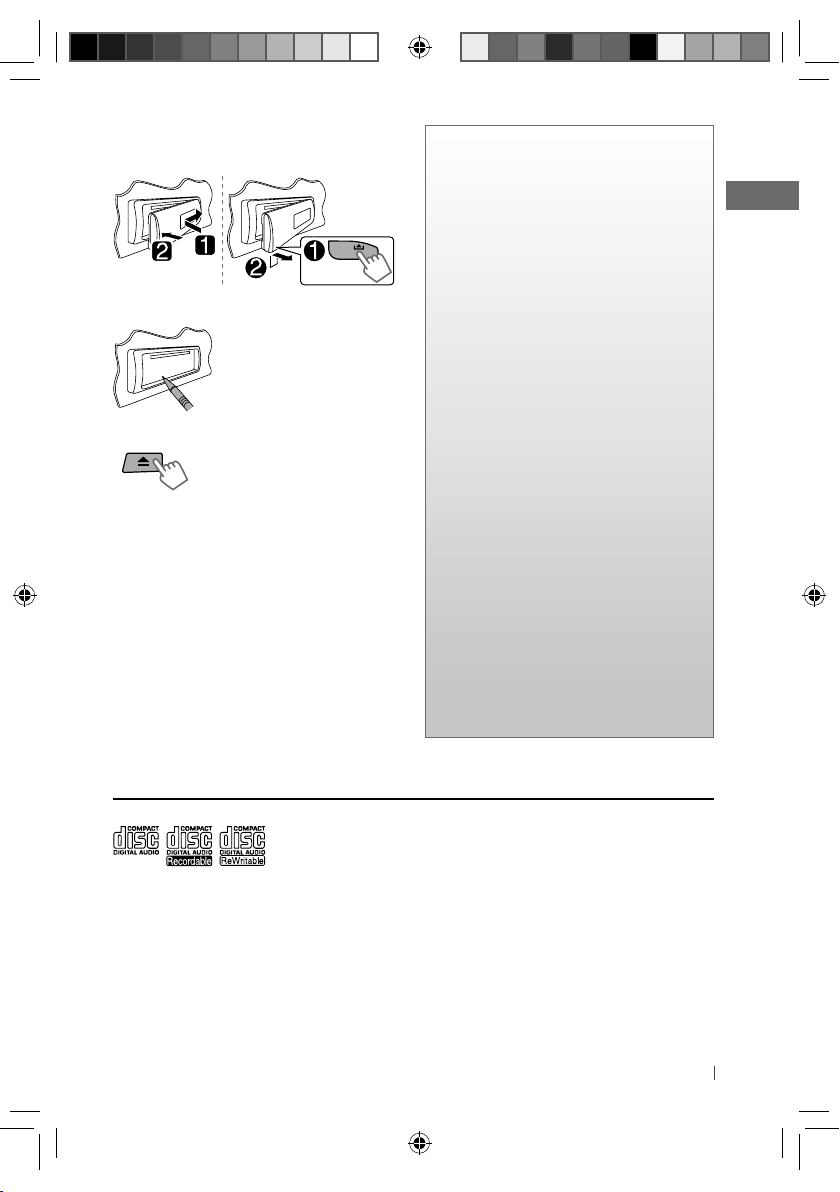
How to attach/detach the control
panel
How to reset your unit
Your preset adjustments will
also be erased.
How to forcibly eject a disc
[Hold]
• Be careful not to drop the disc when it ejects.
• If this does not work, reset your unit.
Maintenance
Cleaning the unit
Wipe off the dirt on the panel with a dry silicon
or soft cloth. Failure to observe this precaution
may result in damage to the unit.
Cleaning the connector
Wipe off dirt on the connector of the unit and
panel. Use a cotton swab or cloth.
CONTENTS
3 How to attach/detach the control
panel
3 How to reset your unit
3 How to forcibly eject a disc
3 Maintenance
3 About discs
4 Canceling the display
demonstration
4 Setting the clock
5 Basic operations
6 Listening to the radio
8 Listening to a disc
9 Connecting the other external
components
9 Listening to the other external
components
10 Listening to a USB device
11 Listening to an iPod/iPhone
(Available for KD-R521)
12 Selecting a preset sound mode
13 Menu operations
15 Using the remote controller
(For KD-R521/KD-R422/KD-R421: optionally
purchased)
16 Troubleshooting
18 Using Bluetooth ® devices
19 Specifications
About discs
This unit can only play the CDs with:
Discs that cannot be used:
• Discs that are not round.
• Discs with coloring on the recording surface
or discs that are dirty.
• You cannot play a Recordable/ReWritable
disc that has not been finalized. (For the
finalization process refer to your disc writing
software, and your disc recorder instruction
manual.)
• 3-inch CD cannot be used. Attempt to insert
using an adapter can cause malfunction.
EN02-19_KD-R521_003A_f.indd 3EN02-19_KD-R521_003A_f.indd 3 10/13/10 12:45:33 PM10/13/10 12:45:33 PM
Handling discs:
• Do not touch the recording surface of the
disc.
• Do not stick tape etc. on the disc, or use a disc
with tape stuck on it.
• Do not use any accessories for the disc.
• Clean from the center of the disc and move
outward.
• Clean the disc with a dry silicon or soft cloth.
Do not use any solvents.
• When removing discs from this unit, pull them
out horizontally.
• Remove the rims from the center hole and
disc edge before inserting a disc.
3ENGLISH

Canceling the display demonstration
Display demonstration will be activated automatically if no operation is done for about 20 seconds.
1 Turn on the power.
[Hold]
2
[Hold]
3
(Initial setting)
4 Select <DEMO OFF>.
5
6 Finish the procedure.
(Initial setting)
Setting the clock
1 Turn on the power.
[Hold]
2
3 Select <CLOCK>.
4 Select <CLOCK SET>.
5 Adjust the hour.
[Hold]
(Initial setting)
6 Adjust the minute.
7 Select <24H/12H>.
8 Select <24 HOUR> or
<12 HOUR>.
9 Finish the procedure.
(Initial setting)
4 ENGLISH
EN02-19_KD-R521_003A_f.indd 4EN02-19_KD-R521_003A_f.indd 4 10/13/10 12:45:33 PM10/13/10 12:45:33 PM
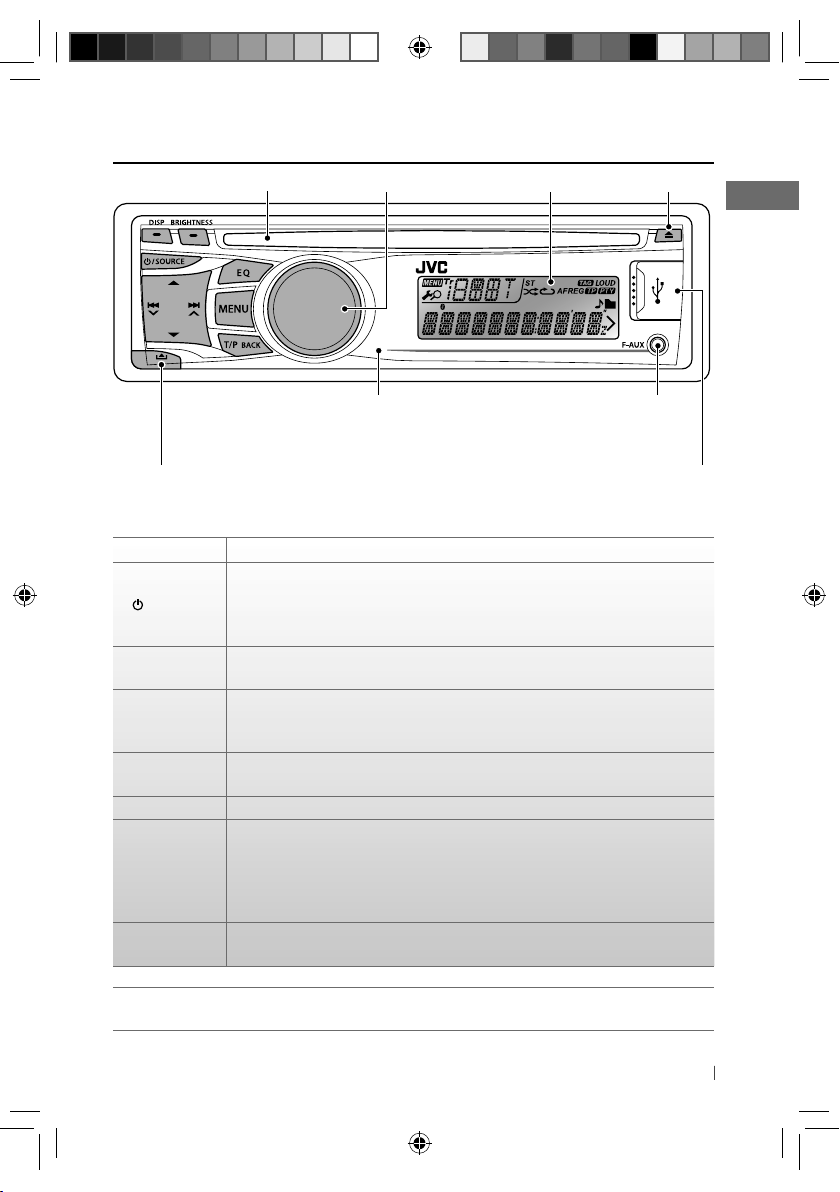
Basic operations
Loading slot
Remote sensor (for KD-R521/KD-R422/KD-R421)
You can control this unit with an optionally
purchased remote control, RM-RK52 (page 15, 16).
Detaches the panel
When you press or hold the following button(s)…
Button General operation
• Turns on/off [Hold].
/ SOURCE
Control dial
(turn)
Control dial
(press)
EQ
BRIGHTNESS Enters <BRIGHTNESS> menu directly. (page 13)
T/P BACK
DISP
• Selects the sources (FM, CD, USB or USB-IPOD, F-AUX, BT AUDIO or R-AUX or
BT PHONE, AM). “CD” or “USB” is selectable only when a disc is loaded or a USB
device is connected.
• Adjusts the volume level.
• Selects items.
• Mutes the sound during playback. If the source is “CD” or “USB/USB-IPOD”
playback pauses. Press the button again to cancel muting or resume playback.
• Confirms selection.
• Selects the sound mode.
• Enters tone level adjustment directly [Hold]. (page 12)
• Activates/deactivates TA Standby Reception.
• Enters PTY Searching mode [Hold].
• KD-R521: Selects the controlling terminal of an iPod/iPhone [Hold]. (page 11)
• Returns to the previous menu.
• Exit from the menu [Hold].
• Changes the display information.
• Scrolls the display information [Hold].
Control dial
Display window
Ejects the disc
Front auxiliary
input jack
USB (Universal Serial
Bus) input terminal
KD-R521/KD-R422/KD-R421 is equipped with the steering wheel remote control function.
• For details, refer also to the instructions supplied with the remote adapter.
5ENGLISH
EN02-19_KD-R521_003A_f.indd 5EN02-19_KD-R521_003A_f.indd 5 10/13/10 12:45:34 PM10/13/10 12:45:34 PM
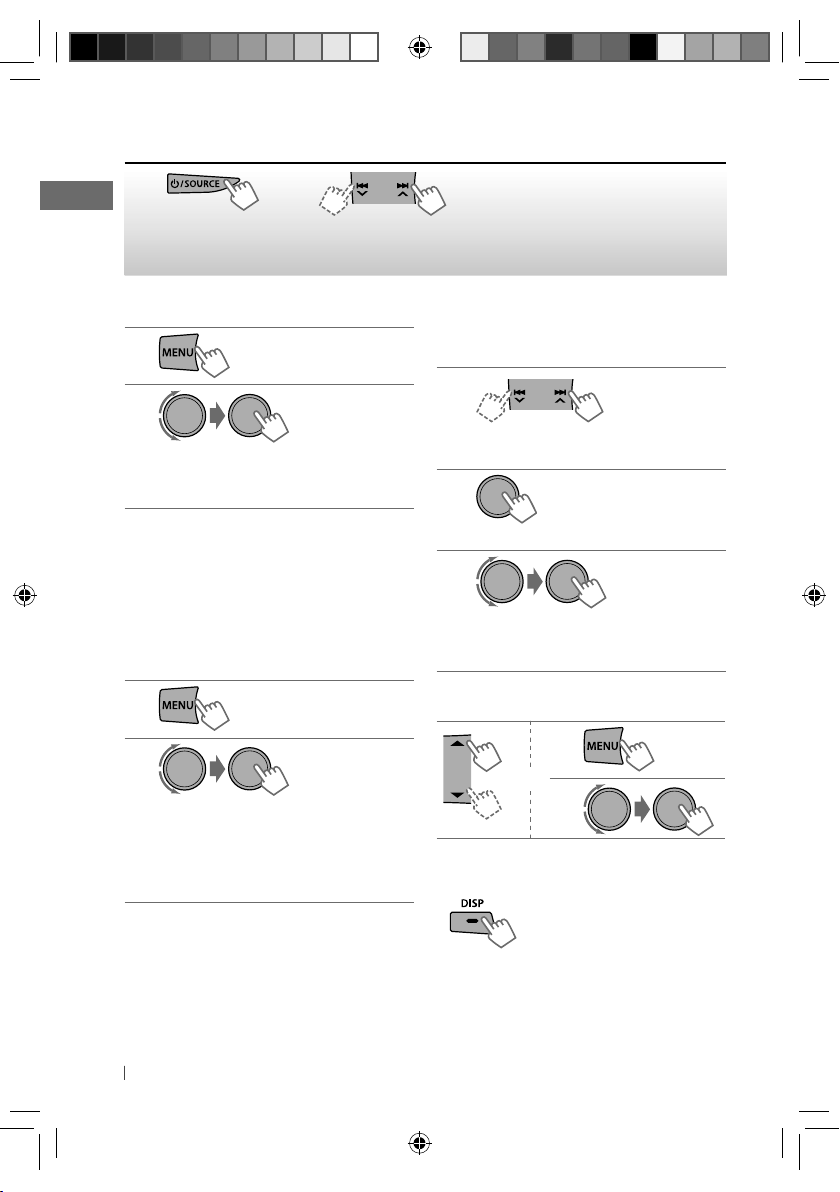
Listening to the radio
~
]
“FM” or “AM”
“ST” lights up when receiving an FM stereo broadcast with sufficient signal strength.
Ÿ
• [Press] Searches for stations automatically.
• [Hold] Searches for stations manually.
“M” flashes, then press the button
repeatedly.
Improving the FM reception
1
[Hold]
2
]
<TUNER> ] <MONO> ] <MONO ON>
Reception improves, but stereo effect
will be lost.
To restore the stereo effect, repeat the same
procedure to select <MONO OFF>.
Automatic presetting (FM)—
SSM (Strong-station Sequential Memory)
You can preset up to 18 stations for FM.
While listening to a station…
1
[Hold]
2
]
<TUNER> ] <SSM> ]
<SSM 01 – 06 / 07 – 12 / 13 – 18>
“SSM” flashes and local stations with the
strongest signal are searched and stored
automatically.
To preset another 6 stations, repeat the
above procedure by selecting one of the other
SSM setting ranges.
Manual presetting (FM/AM)
You can preset up to 18 stations for FM and 6
stations for AM.
1
]
Tune in to a station you want to
preset.
2
“PRESET MODE” flashes.
[Hold]
3
]
Selects preset number.
Preset number flashes and “MEMORY”
appears.
Selecting a preset station
1
or
2
Changing the display information (for nonRadio Data System station)
Frequency j Clock
6 ENGLISH
EN02-19_KD-R521_003A_f.indd 6EN02-19_KD-R521_003A_f.indd 6 10/13/10 12:45:34 PM10/13/10 12:45:34 PM
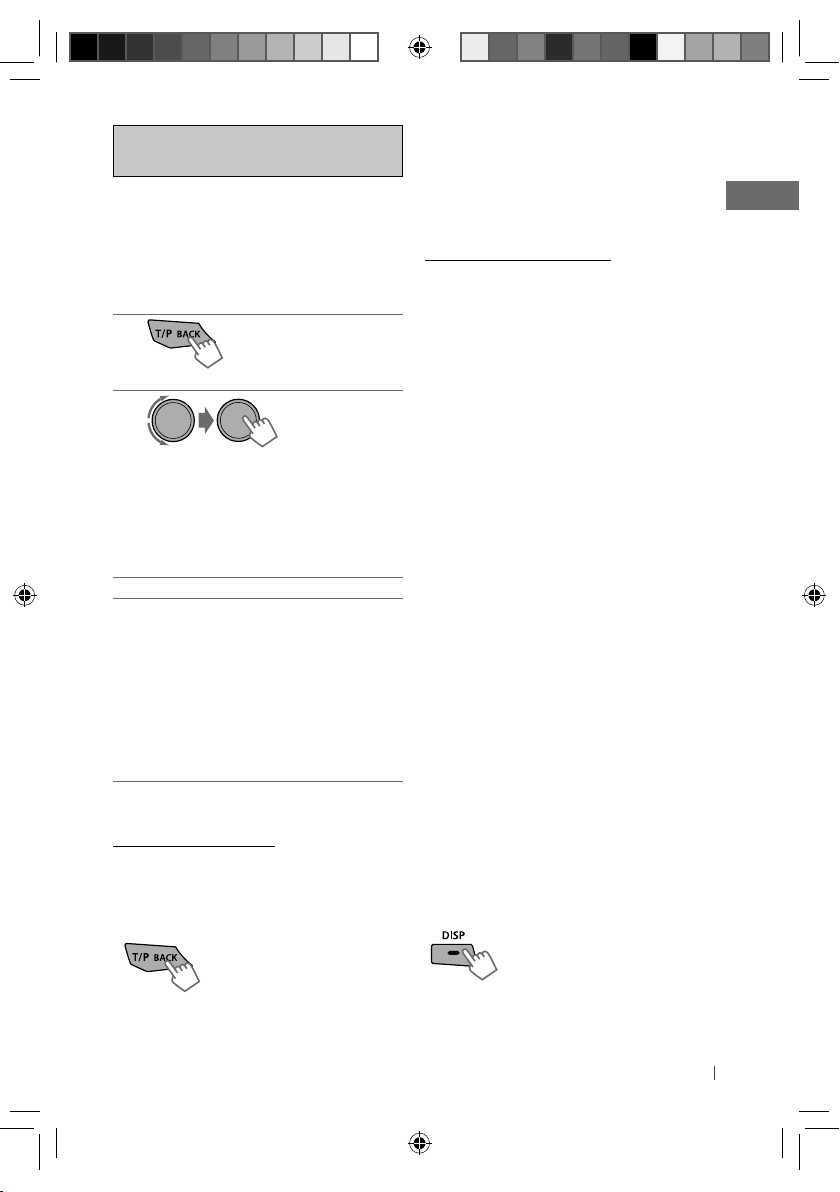
The following features are available
only for FM Radio Data System stations.
Searching for your favourite
FM Radio Data System
programme—
You can tune in to a station broadcasting your
favourite programme by searching for a PTY
code.
1
The last selected PTY code appears.
PTY Search
[Hold]
2
]
Select one of your favourite
programme types or a PTY code, and
start searching.
If there is a station broadcasting a
programme of the same PTY code as you
have selected, that station is tuned in.
PTY codes: NEWS, AFFAIRS, INFO, SPORT,
EDUCATE, DRAMA, CULTURE, SCIENCE,
VARIED, POP M (music), ROCK M (music),
EASY M (music), LIGHT M (music), CLASSICS,
OTHER M (music), WEATHER, FINANCE,
CHILDREN, SOCIAL, RELIGION, PHONE IN,
TRAVEL, LEISURE, JAZZ, COUNTRY,
NATION M (music), OLDIES, FOLK M (music),
DOCUMENT
Standby receptions
TA Standby Reception
TA Standby Reception allows the unit to switch
temporarily to Traffic Announcement (TA) from
any source other than AM.
To activate TA Standby Reception
If the TP indicator lights up, TA
Standby Reception is activated.
If the TP indicator flashes, TA
Standby Reception is not yet
activated.
• To activate the reception, tune in to another
station providing Radio Data System signals
required for TA Standby Reception.
• To deactivate the reception, press T/P BACK
again.
NEWS Standby Reception
NEWS Standby Reception allows the unit to
switch temporarily to your NEWS programme
from any source other than AM.
To activate NEWS Standby Reception, see
<NEWS-STBY>. (page 14)
Tracing the same programme—
Network-Tracking Reception
When driving in an area where FM reception is
not sufficient enough, this unit automatically
tunes in to another FM Radio Data System
station of the same network, possibly
broadcasting the same programme with
stronger signals.
To change the Network-Tracking Reception
setting, see <AF-REG>. (page 14)
Automatic station selection—
Programme Search
Usually when you select a preset number, the
station preset in that number is tuned in.
If the signals from the FM Radio Data System
preset station are not sufficient for good
reception, this unit, using the AF data, tunes in
to another frequency possibly broadcasting the
same programme as the original preset station
is broadcasting.
To activate Programme Search, see
<P-SEARCH>. (page 14)
Changing the display information
Station name (PS) = Station
Frequency = Programme type
(PTY) = Clock = (back to the
beginning)
7ENGLISH
EN02-19_KD-R521_003A_f.indd 7EN02-19_KD-R521_003A_f.indd 7 10/13/10 12:45:34 PM10/13/10 12:45:34 PM
Loading…
ENGLISH
FRANÇAIS
GET0705-003A
[E/EU]
EN, FR
1010DTSMDTJEIN
© 2010 Victor Company of Japan, Limited
KD-R521/KD-R422/
KD-R421/KD-R45
CD RECEIVER / RÉCEPTEUR CD
For canceling the display demonstration, see page 4. / Pour annuler la démonstration des
affichages, référez-vous à la page 4.
INSTRUCTIONS
MANUEL D’INSTRUCTIONS
For installation and connections, refer to the separate manual.
Pour l’installation et les raccordements, se référer au manuel séparé.
Dear Customer,
This apparatus is in conformance with the valid
European directives and standards regarding
electromagnetic compatibility and electrical safety.
European representative of Victor Company of
Japan, Limited is:
JVC Technical Services Europe GmbH
Postfach 10 05 04
61145 Friedberg
Germany
Cher(e) client(e),
Cet appareil est conforme aux directives et
normes européennes en vigueur concernant la
compatibilité électromagnétique et à la sécurité
électrique.
Représentant européen de la société Victor
Company of Japan, Limited:
JVC Technical Services Europe GmbH
Postfach 10 05 04
61145 Friedberg
Allemagne
Having TROUBLE with operation?
Please reset your unit
Refer to page of How to reset your unit
Vous avez des PROBLÈMES de fonctionnement?
Réinitialisez votre appareil
Référez-vous à la page intitulée Comment réinitialiser votre appareil
CoverRear_KD-R521_003A_1.indd 1-2
CoverRear_KD-R521_003A_1.indd 1-2
9/7/10 5:20:05 PM
9/7/10 5:20:05 PM
Хорошее руководство по эксплуатации
Законодательство обязывает продавца передать покупателю, вместе с товаром, руководство по эксплуатации JVC KD-R45. Отсутствие инструкции либо неправильная информация, переданная потребителю, составляют основание для рекламации в связи с несоответствием устройства с договором. В законодательстве допускается предоставлении руководства в другой, чем бумажная форме, что, в последнее время, часто используется, предоставляя графическую или электронную форму инструкции JVC KD-R45 или обучающее видео для пользователей. Условием остается четкая и понятная форма.
Что такое руководство?
Слово происходит от латинского «instructio», тоесть привести в порядок. Следовательно в инструкции JVC KD-R45 можно найти описание этапов поведения. Цель инструкции заключается в облегчении запуска, использования оборудования либо выполнения определенной деятельности. Инструкция является набором информации о предмете/услуге, подсказкой.
К сожалению немного пользователей находит время для чтения инструкций JVC KD-R45, и хорошая инструкция позволяет не только узнать ряд дополнительных функций приобретенного устройства, но и позволяет избежать возникновения большинства поломок.
Из чего должно состоять идеальное руководство по эксплуатации?
Прежде всего в инструкции JVC KD-R45 должна находится:
— информация относительно технических данных устройства JVC KD-R45
— название производителя и год производства оборудования JVC KD-R45
— правила обслуживания, настройки и ухода за оборудованием JVC KD-R45
— знаки безопасности и сертификаты, подтверждающие соответствие стандартам
Почему мы не читаем инструкций?
Как правило из-за нехватки времени и уверенности в отдельных функциональностях приобретенных устройств. К сожалению само подсоединение и запуск JVC KD-R45 это слишком мало. Инструкция заключает ряд отдельных указаний, касающихся функциональности, принципов безопасности, способов ухода (даже то, какие средства стоит использовать), возможных поломок JVC KD-R45 и способов решения проблем, возникающих во время использования. И наконец то, в инструкции можно найти адресные данные сайта JVC, в случае отсутствия эффективности предлагаемых решений. Сейчас очень большой популярностью пользуются инструкции в форме интересных анимаций или видео материалов, которое лучше, чем брошюра воспринимаются пользователем. Такой вид инструкции позволяет пользователю просмотреть весь фильм, не пропуская спецификацию и сложные технические описания JVC KD-R45, как это часто бывает в случае бумажной версии.
Почему стоит читать инструкции?
Прежде всего здесь мы найдем ответы касательно конструкции, возможностей устройства JVC KD-R45, использования отдельных аксессуаров и ряд информации, позволяющей вполне использовать все функции и упрощения.
После удачной покупки оборудования/устройства стоит посвятить несколько минут для ознакомления с каждой частью инструкции JVC KD-R45. Сейчас их старательно готовят или переводят, чтобы они были не только понятными для пользователя, но и чтобы выполняли свою основную информационно-поддерживающую функцию.
Содержание руководства
Страницы и текст этой инструкции
Инструкция автомагнитолы JVC KD-R45
Информация отображена на картинке
Информация отображена на картинке
Информация отображена на картинке
Информация отображена на картинке
Как использовать наш сайт инструкций OnlineManuals.ru
Наша цель состоит в том, чтобы предоставить вам быстрый доступ к содержанию инструкции для автомагнитолы JVC KD-R45.
С помощью онлайн просмотра, Вы можете быстро просмотреть содержимое инструкции и найти решение проблемы с автомагнитолы JVC KD-R45.
Для Вашего удобства
Если листать руководство пользователя автомагнитолы JVC KD-R45 прямо на сайте, не очень удобно для Вас, есть два возможных решения:
• Просмотр в полноэкранном режиме — легко просмотреть руководство пользователя (без загрузки его на свой компьютер), Вы можете использовать режим полноэкранного просмотра.
Для просмотра инструкции пользователя автомагнитолы JVC KD-R45 на полном экране, используйте кнопку «Открыть в Pdf-viewer».
• Загрузка на компьютер — Вы можете также скачать Инструкция автомагнитолы JVC KD-R45 на свой компьютер и сохранить его в файлах.
Многие люди предпочитают читать документы не на экране, а в печатной версии.
Возможность печати руководства пользователя также была предусмотрена на нашем сайте,
и вы можете использовать ее, нажав на иконку «печать» в Pdf-viewer.
Нет необходимости печатать все руководство автомагнитолы JVC KD-R45, можно выбрать только нужные страницы инструкции.