
- Потребитель
- Бизнес
Menu
- Потребительские товары
- Поддержка
- Поддержка товара
ГАРАНТИЯ
Краткое описание гарантии производителя
Срок покрытия
- Работа : 12 месяцев since 01/10/2007
- Запчасти : 12 месяцев since 01/10/2007
Точные условия гарантии доступны в гарантийном талоне, входящем в обязательный пакет документов, прилагаемых при покупке техники.
Если вам необходим ремонт, воспользуйтесь онлайн свяжитесь с нами.Пожалуйста, заранее подготовьте серийный номер вашего изделия и документы, подтверждающие покупку (чек). В негарантийных случаях может взиматься плата за диагностику, ремонтные работы и запчасти.
-
-
Ремонт
[Саундбар LG] Саундбар не воспроизводит звук телевизора
- Попробуйте это—————Если саундбар и телевизор подключены, но звук не слышен, попробуйте выполнитьследующие действия.1. Проверьте громкость саундбара.Увеличьте громкость с помощью пульта дистанционного управления саундбара иликнопок …
-
-
-
Исправление проблем
Нет звука
- Причины и симптомы—————— * Нет звука.Проверьте, не выскользнул ли кабель подключения к динамику.В случае подключения оптического кабеля проверьте состояние подключенияоптического кабеля.Проверьте, включен ли тихий режим.Если зап…
-
-
-
Исправление проблем
[Видео] — Что делать если наушники LG Tone не сопрягаются между собой. Не подключаются по Bluetooth к смартфону
- Что делать если наушники LG Tone не сопрягаются между собой. Не подключаются поBluetooth к телефону В случае, если Вы столкнулись с проблемой сопряжения наушников между другдругом или, например, произошла ошибка соединения с кейсом (вы прио…
-
-
-
Ремонт
[АУДИО LG] Нет звука
- Причины и симптомы—————— * Нет звука.Проверьте, не выскользнуло ли кабельное соединение с колонкой.В случае подключения оптического кабеля проверьте состояние подключенияоптического кабеля.Проверьте, включен ли тихий режим.Если …
-
-
-
Исправление проблем
Я совсем не слышу голоса
- Причины и симптомы—————— * Я совсем не слышу голоса.Если кабель отсутствует или выскользнул, то голос не слышен.Попробуйте это—————Проверьте подключение кабеля.+ (красный) и — (черный) динамика должны быть подключены пр…
-
-
-
Исправление проблем
Я подключил наушники, но звука нет
- Причины и симптомы—————— * Я подключил наушники, но звука нет.Вы полностью вставили наушник до конца, пока не услышите щелкающий звук?➔ Если немного ослаблен, то плохой контакт может привести к проблеме.Если контакт разъема для …
-
Узнай больше
-
Новых
продуктов нет.

OWNER’S MANUAL
Mini Hi-Fi
Audio
Please read this manual carefully before operating your set and retain it for future
reference.
MODEL
ON88
2004_Rev02
Copyright © 2020-2021 LG Electronics Inc. All Rights Reserved.
www.lg.com
Getting Started2
Safety Information
1
Getting Started
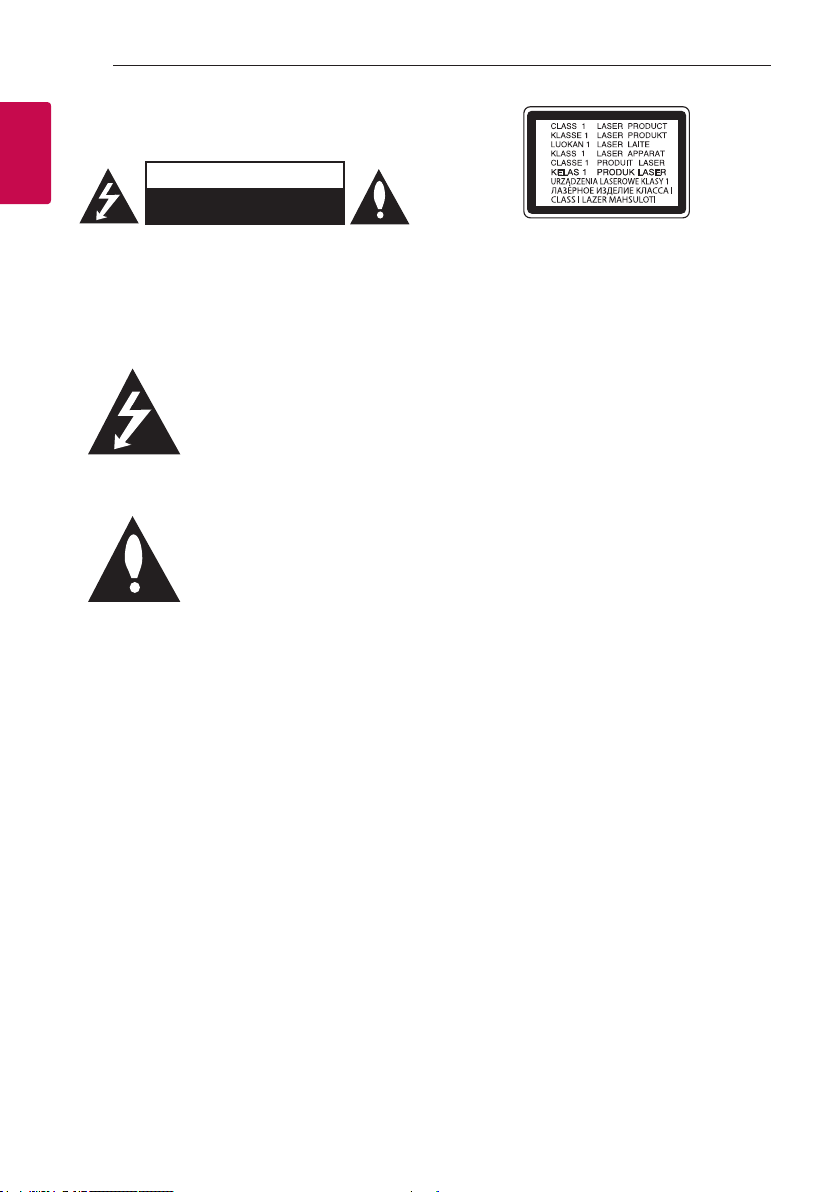
CAUTION: TO REDUCE THE RISK OF ELECTRIC
SHOCK DO NOT REMOVE COVER (OR BACK)
NO USER-SERVICEABLE PARTS INSIDE REFER
SERVICING TO QUALIFIED SERVICE PERSONNEL.
WARNING: TO PREVENT FIRE OR ELECTRIC SHOCK
HAZARD, DO NOT EXPOSE THIS PRODUCT TO RAIN
OR MOISTURE.
CAUTION: The apparatus should not be exposed to
water (dripping or splashing) and no objects lled
with liquids, such as vases, should be placed on the
apparatus.
WARNING: Do not install this equipment in a
conned space such as a book case or similar unit.
CAUTION: Do not use high voltage products around
this product. (ex. Electrical swatter) This product may
malfunction due to electrical shock.
CAUTION
RISK OF ELECTRIC SHOCK
DO NOT OPEN
This lightning ash with arrowhead
symbol within an equilateral
triangle is intended to alert the
user to the presence of uninsulated
dangerous voltage within the
product’s enclosure that may be of
sufcient magnitude to constitute
a risk of electric shock to persons.
The exclamation point within an
equilateral triangle is intended
to alert the user to the presence
of important operating and
maintenance (servicing)
instructions in the literature
accompanying the product.
CAUTION: This product employs a Laser System.
To ensure proper use of this product, please read
this owner’s manual carefully and retain it for future
reference. S hall the unit require maintenance,
contact an authorized service center.
Use of controls, adjustments or the performance of
procedures other than those specied herein may
result in hazardous radiation exposure. To prevent
direct exposure to laser beam, do not try to open the
enclosure.
CAUTION: Do not block any ventilation openings.
Install in accordance with the manufacturer’s
instructions.
Slots and openings in the cabinet are provided for
ventilation and to ensure reliable operation of the
product and to protect it from over heating. The
openings should never be blocked by placing the
product on a bed, sofa, rug or other similar surface.
This product should not be placed in a built-in
installation such as a bookcase or rack unless
proper ventilation is provided or the manufacturer’s
instruction has been adhered to.
NOTICE: For safety marking information including
product identication and supply ratings, please refer
to the main label on the bottom or the other surface
of the product.
Getting Started 3
CAUTION concerning the Power Cord
The Power Plug is the disconnecting device. In case
of an emergency, the Power Plug must remain readily
accessible.
Check the specication page of this owner’s manual
to be certain of the current requirements.
Do not overload wall outlets. Overloaded wall outlets,
loose or damaged wall outlets, extension cords,
frayed power cords, or damaged or cracked wire
insulation are dangerous. Any of these conditions
could result in electric shock or re. Periodically
examine the cord of your device, and if its appearance
indicates damage or deterioration, unplug it,
discontinue use of the device, and have the cord
replaced with an exact replacement part by an
authorized service center. Protect the power cord
from physical or mechanical abuse, such as being
twisted, kinked, pinched, closed in a door, or walked
upon. Pay particular attention to plugs, wall outlets,
and the point where the cord exits the device.
CAUTION: Be careful to make sure children do not
put their hands or any objects into the *speaker duct.
* speaker duct: A hole for plentiful bass sound on
speaker cabinet. (enclosure)
CAUTION: No naked ame sources, such as lighted
candles, should be placed on the apparatus.
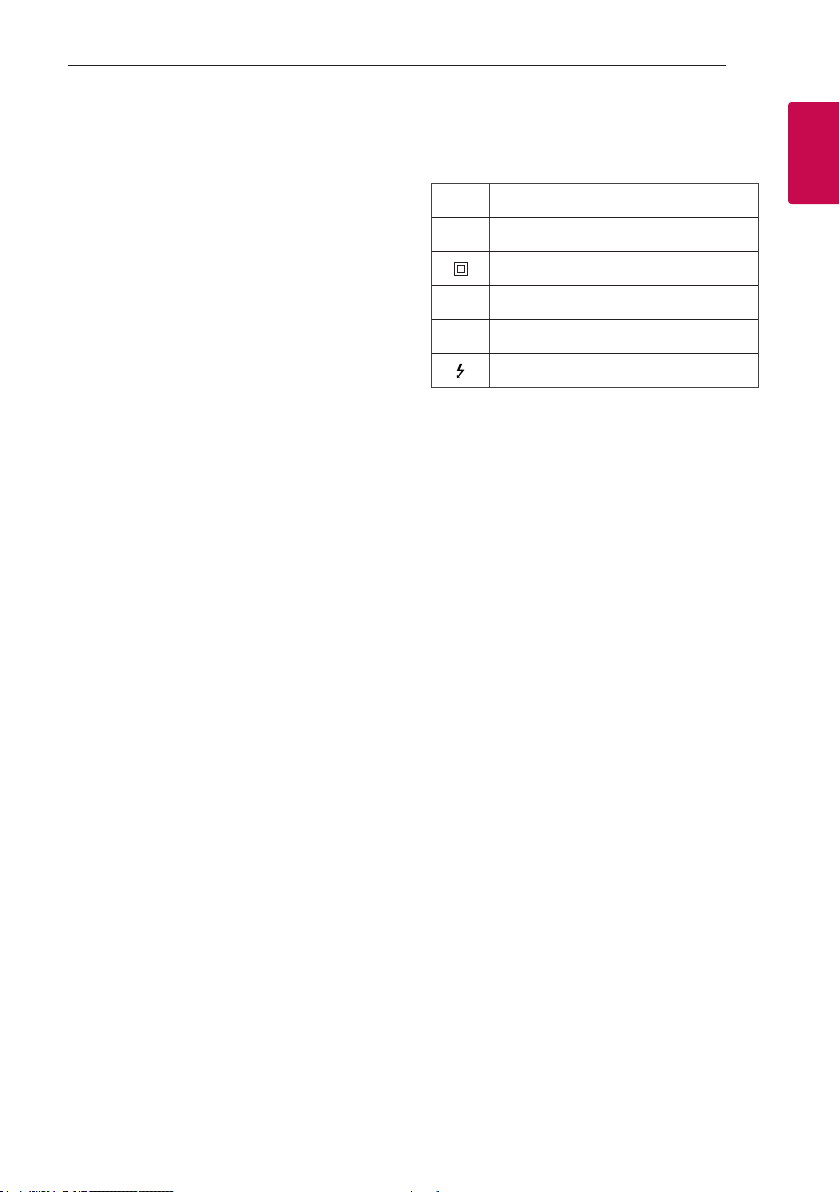
Symbols
Refers to alternating current (AC).
~
Refers to direct current (DC).
0
Refers to class II equipment.
Refers to stand-by.
1
Refers to “ON” (power).
!
Refers to dangerous voltage.
1
Getting Started

Table of Contents4
Table of Contents
1 Getting Started
2 Safety Information
6 Unique Features
7 Playable file Requirement
7 – Music file requirement
7 – Compatible USB Devices
7 – USB device requirement
8 Remote control
10 Top panel
12 Front panel / Rear panel
2 Connecting
14 AC Power Cord Connection
14 Optional Equipment Connection
14 – USB Connection
15 – Antenna Connection
16 – OPTICAL IN Connection
17 LG Sound Sync
3 Operating
18 Basic Operations
18 – CD/USB Operations
18 – Auto Play
19 – Selecting a folder and
an MP3/WMA file
20 – Deleting a file/folder or format
21 Playback Effect
21 – AUTO DJ
21 – DJ PAD
22 Using BLUETOOTH® wireless technology
22 – Listening to music stored on the Bluetooth
devices
25 Using the LG XBOOM App
25 – About “LG XBOOM” App
25 – Install “LG XBOOM” App onto Your
Bluetooth Device
26 – Activate Bluetooth with “LG XBOOM” App
27 Radio Operations
27 – Listening to the radio
27 – Improving poor FM reception
27 – Presetting the Radio Stations
27 – Deleting all the saved stations
28 Sound adjustment
28 – Setting the sound mode
28 – Setting the USER EQ
29 Advanced Operations
29 – JUKEBOX Playback

Table of Contents 5
30 Other Operations
30 – Turn off the sound temporarily
30 – DRC (Dynamic range control)
30 – CHILDSAFE Mode
31 – DEMO
31 – Resume stop
31 – Using your TV remote control
32 – Using Guitar
32 – Using Microphone
35 – LIGHTING
35 – Sleep Timer Setting
35 – Dimmer
36 – Auto power down
36 – AUTO POWER On
37 – Auto function change
38 Setting the Clock
38 – Setting the Clock through “LG XBOOM” App
38 – Using your unit as an alarm clock
39 WIRELESS PARTY LINK Connection
4 Troubleshooting
41 Troubleshooting
41 – General
42 – NOTES to release Demo mode
5 Appendix
43 General specifications
44 Trademarks and licenses
45 Maintenance
45 – Notes on Discs
45 – Handling the Unit
1
2
3
4
5

Getting Started6
Unique Features
BLUETOOTH®
1
Listens to music stored on your Bluetooth device.
Getting Started
Optical In
Listens to music from your optical device.
Playback effects
Listens to music with various sound and playback
effects.
LG XBOOM
LG XBOOM is an app designed to let you take
control of some of LG’s latest audio devices. (Page
25-26 )
LG Sound Sync
Controls volume level of this unit by the remote
control of your LG TV that is compatible with LG
Sound Sync.

Getting Started 7
Playable file
Requirement
Music file requirement
MP3/WMA le compatibility with this unit is limited
as follows.
y Sampling frequency: within 32 to 48 kHz (MP3),
within 32 to 48 kHz (WMA)
y Bit rate: within 32 to 320 kbps (MP3),
40 to 192 kbps (WMA)
y Maximum les: Data CD: 999 / USB: 2,000
y Maximum folders: Data CD: 99 / USB: 200
y File extensions: “.mp3”/ “.wma”
y Certain MP3/WMA les may not be played
depending on the type or format of the le.
y CD-ROM le format: ISO 9660/ JOLIET
y We recommend that you use Easy-CD Creator,
which creates an ISO 9660 le system.
y A protected le by DRM (Digital rights
management) cannot be played on the unit.
y The DTS disc is not supported.
You have to set the disc format option to [Mastered]
in order to make the discs compatible with the LG
players when formatting rewritable discs. When
setting the option to Live File System, you cannot use
it on LG players.
(Mastered/Live File System: Disc format system for
Windows Vista)
Compatible USB Devices
y MP3 Player: Flash type MP3 player.
y USB Flash Drive:
Devices that support USB2.0 or USB1.1.
y The USB function of this unit does not support all
USB devices.
USB device requirement
y Devices which require additional program
installation when you have connected it to a
computer, are not supported.
y Do not extract the USB device while in operation.
y For a large capacity USB, it may take longer than a
few minute to be searched.
y To prevent data loss, back up all data.
y If you use a USB extension cable or USB hub, the
USB device is not recognized.
y Using NTFS le system is not supported. (Only
FAT(16/ 32) le system is supported.)
y This unit recognizes up to 2,000 les.
y External HDD, Card readers, Locked devices, or
hard type USB devices are not supported.
y USB port of the unit cannot be connected to PC.
The unit cannot be used as a storage device.
y Some USB may not work with this unit.
1
Getting Started
Getting Started8
Remote control
1
Getting Started
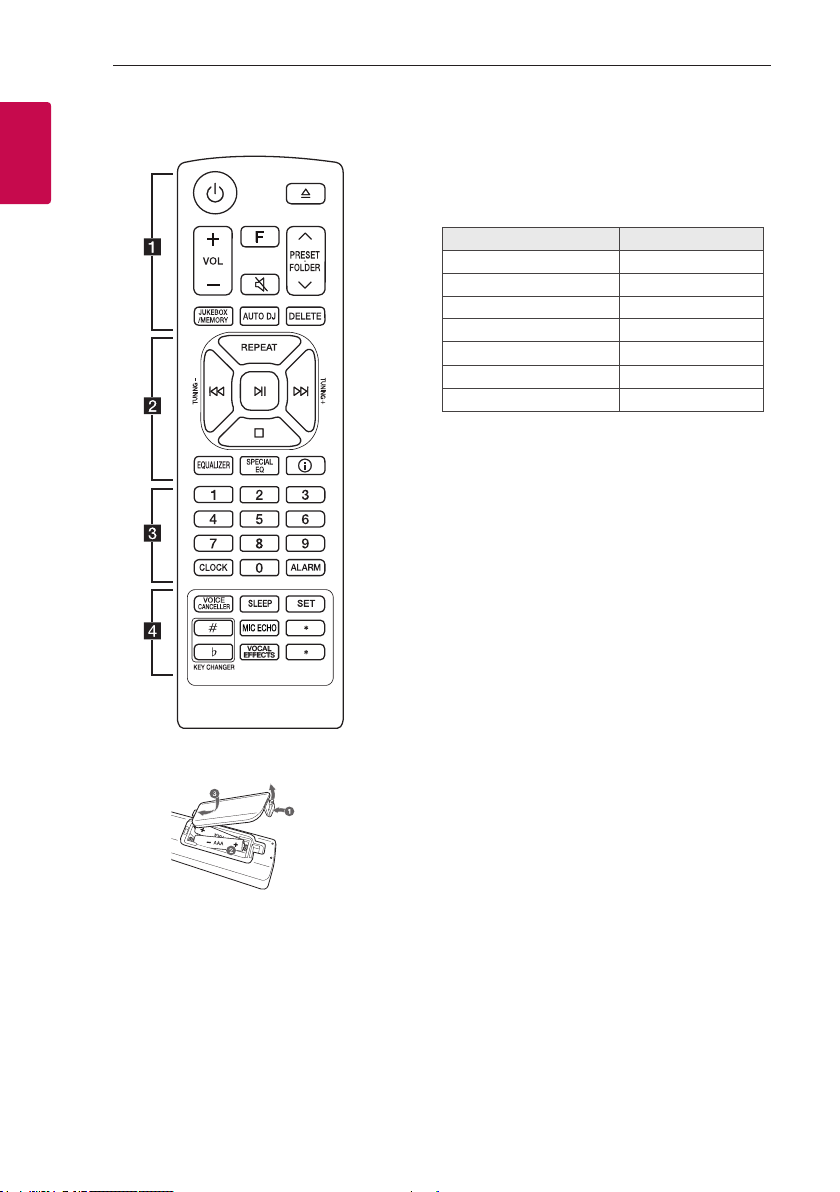
Replacement of battery
• • • • • • • • • • • • • • a • • • • • • • • • • • • •
1 (Standby): Turns the power on or off.
B (Open/Close): Opens and closes the disc tray.
VOL (Volume) +/-: Adjusts speaker volume.
F (Function): Selects the function and input source.
Input source / Function Display
Disc CD
USB USB1 / USB2
Optical OPTICAL
LG Sound Sync (Optical) LG OPT
Bluetooth BT
LG Sound Sync (Wireless) LG TV
Radio FM
[ (Mute):
— Mutes the sound.
— Controls this unit using TV remote. (Page 31)
PRESET·FOLDER W/S:
— Chooses a preset number for a radio station.
(Page 27)
— Searches for a folder of MP3/WMA les. When
a CD/USB containing MP3/WMA les in several
folders is being played, press PRESET·FOLDER
W/S to select the folder you want to play.
JUKEBOX/MEMORY:
— Stores radio stations. (Page 27)
— Selects JUKEBOX mode. (Page 29)
— Makes JUKEBOX list.
AUTO DJ: Selects the AUTO DJ mode. (Page 21)
DELETE:
— Deletes MP3/WMA les. (USB only). (Page 20)
— Deletes a song on the JUKEBOX list.
— Deletes all the saved stations.
Remove the battery cover on the rear of the remote
control, and insert the battery with 4 and 5
matched correctly.
Risk of re or explosion if the battery is replaced by
an incorrect type.

Getting Started 9
• • • • • • • • • • • • • • b • • • • • • • • • • • • •
REPEAT: Listens to your tracks/les repeatedly or
randomly.
TUNING-/+: Selects the radio stations.
C/V (Skip/Search):
— Skips backward or forward.
— Searches for a section within a track/le.
N (Play/Pause):
— Starts or pauses playback.
— Selects stereo/mono.
— Bluetooth connection lock (BT LOCK): Select the
Bluetooth function by pressing F repeatedly. And
long press N to limit Bluetooth connection to
only BT and LG TV.
Z (Stop):
— Stops playback.
— Cancels DELETE function.
EQUALIZER: Chooses sound impressions.
SPECIAL EQ: Chooses special equalizer.
J (Information):
— Sees information about your music. An MP3 le
often come with ID3 tag. The tag gives the Title,
Artist, Album or Time information.
— Sees optical source information in OPTICAL mode.
— Sees Bluetooth device name of the unit in BT
READY.
— Sees the name of connected all Bluetooth device
in Bluetooth mode.
— When these units are successfully connected each
other in WIRELESS PARTY LINK mode, each of
connected device names appears in the each unit.
• • • • • • • • • • • • • • c • • • • • • • • • • • • •
0 to 9 numerical buttons: Selects numbered tracks,
les, or preset number.
CLOCK: Sets a clock and checks a time.
ALARM: With the ALARM function you can turn on
CD, USB play and tuner reception at a desired time.
• • • • • • • • • • • • • • d • • • • • • • • • • • • •
VOICE CANCELLER: You can reduce the vocal tones
during music playback from various input sources.
SLEEP: Sets the system to turn off automatically at
a specified time.
(Dimmer: The display window will be darkened by
half.)
SET: Conrms the setting.
KEY CHANGER (L/l): Changes the key to suit your
vocal range.
MIC (Microphone) ECHO: Selects ECHO mode.
?: This button is not available.
VOCAL EFFECTS: Selects various vocal effects
mode.
1
Getting Started
Getting Started10
Top panel
1
Getting Started
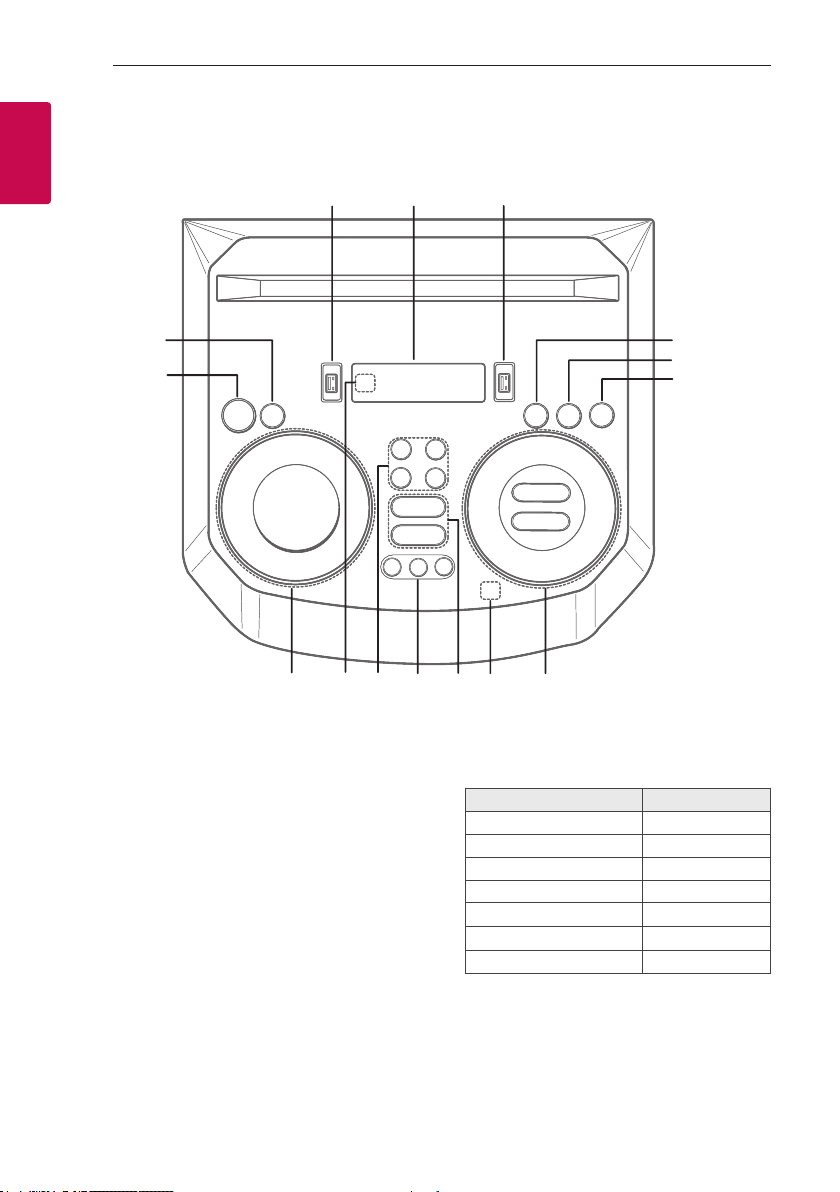
b
a
a 1 (Standby)
Turns the power on or off.
b DEMO
In power off status, if you press DEMO, show
demo mode.
c USB 1 Port
You can play sound les by connecting the USB
device.
d Display window
e USB 2 Port
You can play sound les by connecting the USB
device.
o
c
n
de
l
m
k
j
f F (Function)
Selects the function and input source.
Input source / Function Display
Disc CD
USB USB1 / USB2
Optical OPTICAL
LG Sound Sync (Optical) LG OPT
Bluetooth BT
LG Sound Sync (Wireless) LG TV
Radio FM
f
g
h
i

Getting Started 11
g LIGHTING
Selects the lighting mode.
h 3TWIN
Connects two units for TWIN mode in WIRELESS
PARTY LINK.
i C/V (Skip/Search)
— Skips backward or forward.
— Searches for a section within a track/le.
— Selects the radio stations.
N (Play/Pause)
— Starts or pauses playback.
— Selects stereo/mono.
— Bluetooth connection lock (BT LOCK):
Select the Bluetooth function by pressing
F repeatedly. And long press N to limit
Bluetooth connection to only BT and LG TV.
Z (Stop)
Stops playback or cancels DELETE function.
VOL (Volume) -/+
Adjusts speaker volume.
MIC (Microphone) / GUITAR -/+
Adjusts Microphone volume or Guitar volume.
j
(Auto Music Play)
Plays the audio currently playing by tagging the
mobile (with “LG XBOOM” App) to this unit.
(Android Only)
k VOICE CANCELLER
You can reduce the vocal tones during music
playback from various input sources.
B (Open/Close)
Opens and closes the disc tray.
l CLUB, DRUM, USER (DJ PAD)
Selects CLUB, DRUM or USER sound effect to
mix.
(If you want to use USER, you have to register a
source with “LG XBOOM” app.(Android Only))
1, 2, 3 (DJ PAD)
Press a desired sound pad.
m MIC (Microphone) ECHO
Selects ECHO mode.
VOCAL EFFECTS
Selects various vocal effects mode.
KEY CHANGER (l/L)
Changes the key to suit your vocal range.
n Remote sensor
o SPECIAL EQ / BASS BLAST (or BASS BLAST+)
— Chooses special equalizer.
— Press and hold to select BASS (or BASS+)
effect directly.
SEARCH
Moves to folder or file in selection mode.
OK
Selects a folder when searching a file.
USER EQ
Selects the equalizer created by your own.
Multi jog
— Searches a folder or a file.
— Turns clockwise or counterclockwise to control
the USER EQ level.
— Chooses special equalizer.
1
Getting Started
Getting Started12
Front panel / Rear panel
1
Getting Started
a
b
c
d
e
fg
h
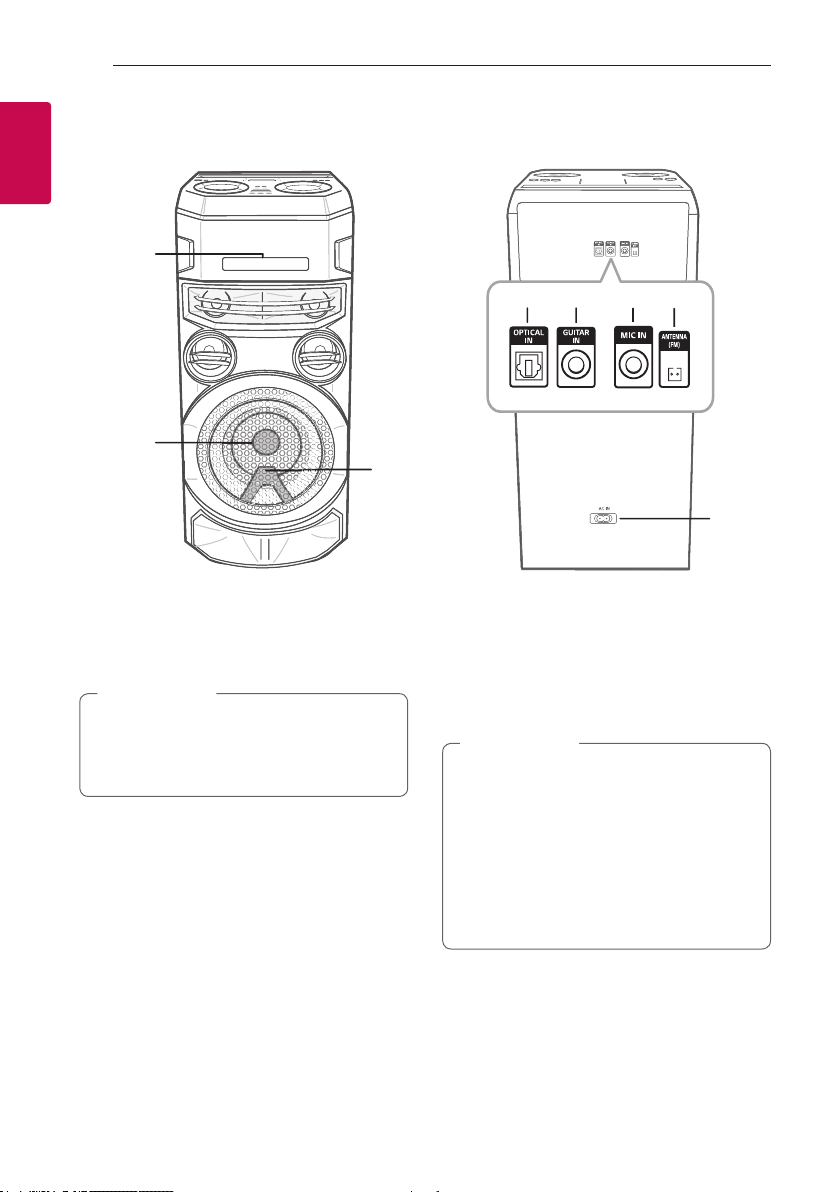
a Disc tray
b Lighting
c Remote sensor
Caution
>
Place the unit at a safe distance from the
child’s reach. Otherwise it may result in the unit
falling down and causing personal injury and/or
property damage.
d OPTICAL IN: Connect an optical device.
e GUITAR IN: Connect a guitar.
f MIC (Microphone) IN: Connect a microphone.
g ANTENNA (FM)
h AC IN socket
Caution
>
y Connect the power cord to wall outlet
directly if possible. Or when you use an
extension cable, it is highly recommended
to use an extension cable of 110 V / 15 A
or 230 V / 15 A, otherwise the unit may
not operate properly because of the lack of
power supply.
y Do not overload the extension cord with
excessive electrical load.
Useful functions for using the unit
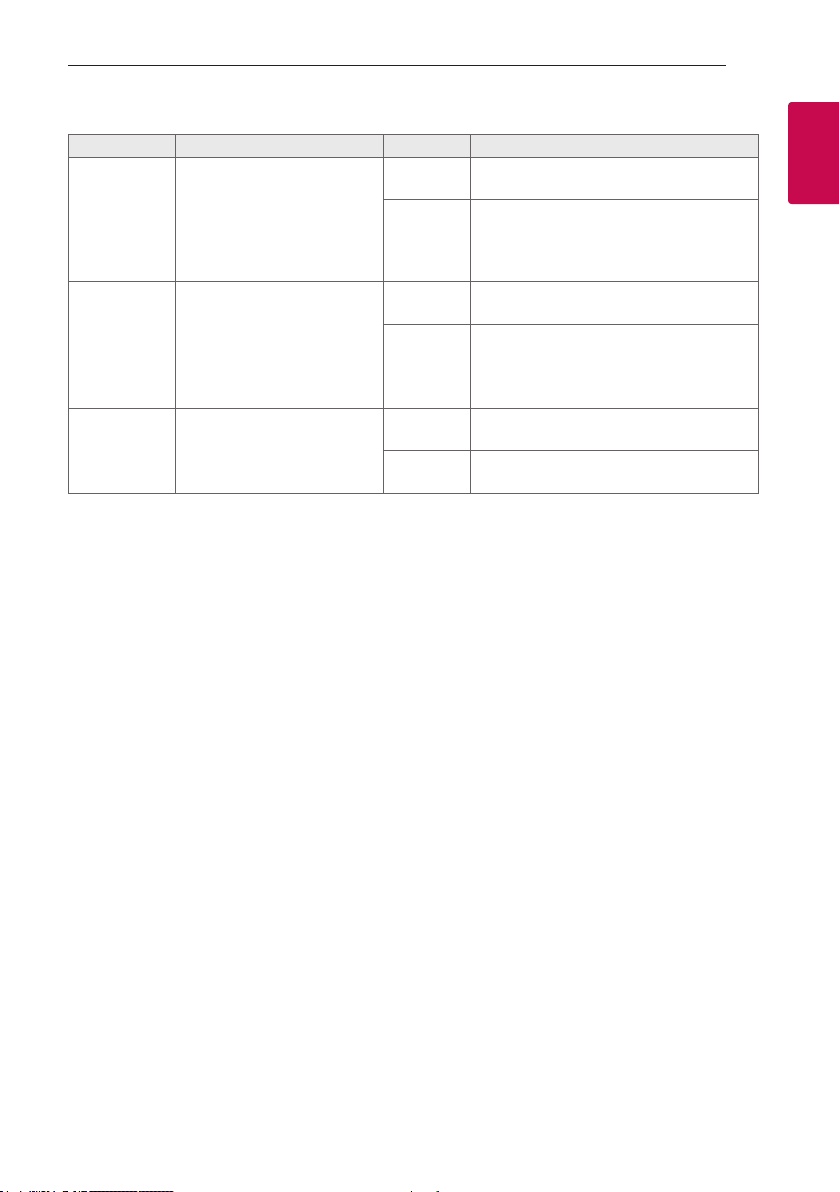
Function Description To do Do this
TV Remote On/
Off
(Page 31)
BT Lock On/Off
(Page 24)
Auto Power On
(Page 36)
It allows you to control the
volume of this unit by your TV
remote control even by other
company’s product.
Initial setting of this function
was set to on.
It allows you to connect a
Bluetooth device only on
BT (Bluetooth) and LG TV
functions.
Initial setting of this function
was set to off.
It allows the unit to turn on
automatically by input signals:
Optical, LG TV or
BT (Bluetooth)
ON
OFF
ON
OFF
ON
OFF
Press and hold [ on the remote control for
3 seconds in Optical function.
Press and hold [ on the remote control for
3 seconds in Optical function.
Press and hold N for 5 seconds in BT
(Bluetooth) function.
Press and hold N for 5 seconds in BT
(Bluetooth) function.
Turn off the unit by pressing 1 on the unit
for 5 seconds.
Turn off the unit by pressing 1 on the unit
for 5 seconds.
Getting Started 13
1
Getting Started

Connecting14
AC Power Cord
Connection
1. Connect one end of the AC power cord (included)
to the AC IN socket.
2
Connecting
2. Plug the other end into the wall outlet.
Note
,
Unplug the AC power cord from the wall outlet
if you do not use for an extended period of time.
Optional Equipment
Connection
USB Connection
Connect a USB device (or MP3 player, etc.) to the
USB ports on the unit.
USB device
Note
,
Removing the USB device from the unit:
1. Choose a different function/mode or
press Z twice in a row.
2. Remove the USB device from the unit.
Loading…
|
Код: 134662 Извините, товара сейчас нет в наличии
Бесплатная доставка Извините, товара сейчас нет в наличии Сравнить Новости интернет-магазина «Лаукар»:23.04.2025 26.02.2025 17.02.2025 Дополнительная информация в категории Музыкальный центр:Музыкальные центры — словарь терминов Таблица Авторизованных сервисных центров по брендам. Описание Инструкция Отзывы (0) В интернет-магазине бытовой техники «Лаукар» Вы можете скачать инструкцию к товару Музыкальный центр LG X-Boom ON88 совершенно бесплатно. Все инструкции, представленные на сайте интернет-магазина бытовой техники «Лаукар», предоставляются производителем товара. Для того чтобы скачать инструкцию, Вам необходимо нажать на ссылку «скачать инструкцию», расположенную ниже, а в случае, если ссылки нет, Скачать инструкцию Смотреть инструкцию 
Фирма-производитель оставляет за собой право на внесение изменений в конструкцию, дизайн и комплектацию товара: Музыкальный центр LG X-Boom ON88. Пожалуйста, сверяйте информацию о товаре с информацией на |
Инструкция
Посмотреть инструкция для LG ON88 бесплатно. Руководство относится к категории hi-fi системы, 1 человек(а) дали ему среднюю оценку 9.8. Руководство доступно на следующих языках: русский. У вас есть вопрос о LG ON88 или вам нужна помощь?
Задайте свой вопрос здесь
Ниже вы найдете технические характеристики изделия и руководства по эксплуатации LG ON88.
LG ON88 — это мощная и современная аудиосистема от компании LG. Система предлагает высококачественное звучание благодаря встроенным динамикам и технологии усиления звука. LG ON88 предлагает различные варианты подключения, включая Bluetooth, USB и аудиовход, что делает его универсальным в использовании. Система также имеет встроенный радиоприемник, что позволяет слушать радио непосредственно через устройство.
LG ON88 предлагает удобное управление с помощью пульта дистанционного управления или смартфона через приложение. Система имеет стильный дизайн, который будет хорошо смотреться в любом интерьере. Кроме того, LG ON88 компактный и легко переносимый, что делает его удобным для использования как дома, так и на уличных мероприятиях.
LG ON88 — это отличный выбор для любителей музыки, которые ценят качественное звучание и удобство использования.
Главная
| Бренд | LG |
| Модель | ON88 |
| Изделие | hi-fi система |
| Язык | русский |
| Тип файла | Руководство пользователя (PDF) |
Часто задаваемые вопросы
Не можете найти ответ на свой вопрос в руководстве? Вы можете найти ответ на свой вопрос ниже, в разделе часто задаваемых вопросов о LG ON88.
Могут ли устройства разных марок подключаться друг к другу при помощи Bluetooth?
Да, Bluetooth — универсальный метод, позволяющий различным устройствам, оснащенным Bluetooth, подключаться друг к другу.
Что такое Bluetooth?
Bluetooth — это способ обмена данными по беспроводной сети между электронными устройствами с помощью радиоволн. Расстояние между двумя устройствами обменивающимися данными в большинстве случаев составляет не более десяти метров.
Что такое HDMI?
HDMI расшифровывается как «интерфейс для мультимедиа высокой четкости». Кабель HDMI используется для передачи аудио- и видеосигналов между устройствами.
Когда звук считается слишком громким?
Уровень звука выше 80 децибел может нанести вред слуху. Уровень звука выше 120 децибел может нанести прямое повреждение слуху. Вероятность повреждения слуха зависит от частоты и продолжительности прослушивания.
Как лучше всего выполнять чистку hi-fi система?
Для удаления отпечатков пальцев лучше всего использовать слегка влажную салфетку для уборки или мягкую чистую ткань. Пыль в труднодоступных местах лучше всего удаляется потоком сжатого воздуха.
Что такое Dolby Atmos?
Dolby Atmos — это технология, которая обеспечивает отражение звука от потолка к месту нахождения слушателя. Это позволяет создать эффект 5.1 при помощи всего лишь одного динамика.
Инструкция LG ON88 доступно в русский?
Да, руководствоLG ON88 доступно врусский .
Не нашли свой вопрос? Задайте свой вопрос здесь