
Datasheet
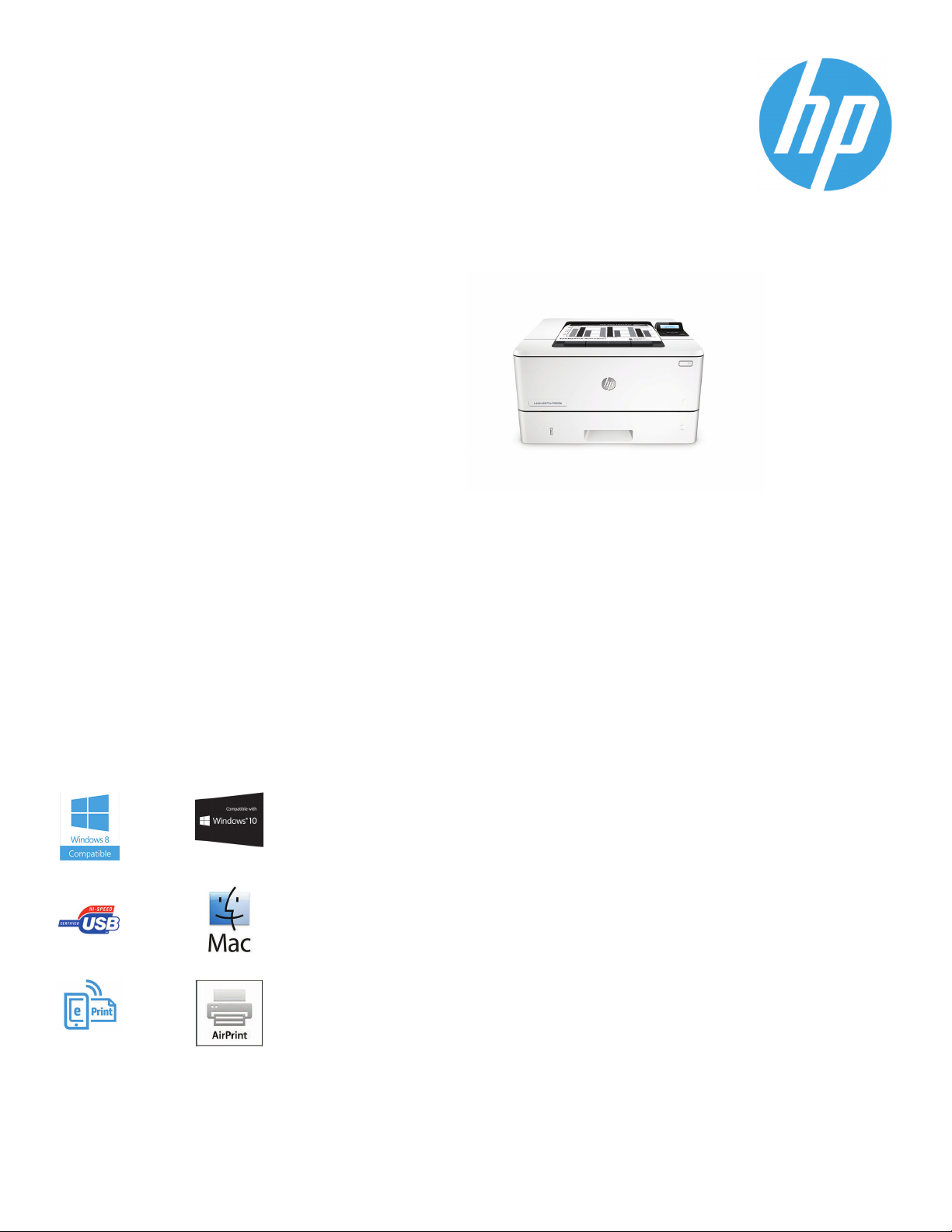
HP LaserJet Pro M402dn
Printing performance and
robust security built for how
you work. This capable printer
finishes jobs faster and
delivers comprehensive
security to guard against
threats.1Original HP Toner
cartridges with JetIntelligence
give you more pages.
2
Print speed:
fast as 5.6 sec black
Print Resolution:Black (best) 600 x 600 dpi, Up to 4800 x
600 enhanced dpi; Black (fine lines): Up to 1200 x 1200 dpi
Print TechnologyResolution:HP FastRes 1200, HP ProRes
1200, 600 dpi
Standard Connectivity:1 Hi-Speed USB 2.0; 1 Host USB; 1
Gigabit Ethernet 10/100/1000T network
Standard Memory:128 MB
Mobile Printing Capability:HP ePrint,Apple AirPrint™,
Morpria-certified, Google Cloud Print, Mobile Apps
Paper Handling:100-sheet multipurpose input Tray 1,
250-sheet input Tray 2; 150-sheet output bin, Optional
550-sheet tray 3
Display:2-line LCD (text and graphics)
Letter: Up to 40 ppm black; First Page Out: As
Fast printing. Strong protection.
●
Grab pages and go—without waiting around. This printer wakes up and prints faster than the competition.
●
Breeze through multipage documents with two-sided printing that’s faster than the competition.
●
Keep printing safe from boot up to shutdown with security features that guard against complex threats.
1
More. Pages, Performance, and Protection.
●
Get the most prints for your money—with Original HP High Yield Black Toner cartridges with JetIntelligence.
●
Count on consistent results at high speeds with precision black toner.
●
Help ensure you’re getting the authentic HP quality you paid for with innovative anti-fraud technology.
●
Print right away with preinstalled toner cartridges. Replace them with optional high-yield cartridges.
Save energy and easily manage tasks
●
Help save energy with HP Auto-On/Auto-Off Technology.
●
Print using less energy than competitors—enhanced by Original HP Toner cartridges with JetIntelligence.
●
Make the most of your office space, with a printer that conveniently fits right into your work style.
●
Easily manage devices and settings using HP Web Jetadmin with a suite of essential management features.
3
Stay connected with easy mobile printing options
●
Easily print from a variety of smartphones and tablets—generally no setup or apps required.
●
Easily set up, print, and share with built-in Ethernet networking.
6
1
2
4
5
1
Based on HP internal testing of top three leading competitors’ first page out from sleep mode and duplex print speed completed 8/2015. Subject to device settings. Actual results may
vary. For details see hp.com/go/Ljclaims 2 Based on cartridge yields for HP 80X compared with HP 26X Original HP LaserJet Toner Cartridges. For more information, see
hp.com/go/learnaboutsupplies 3
STAR® program’s Typical Electricity Consumption (TEC) method or as reported in energystar.gov of top three leading competitors as of 8/2015. Actual results may vary. For details see
hp.com/go/Ljclaims 5 HP Web Jetadmin is free and available for download at hp.com/go/webjetadmin6
and HP ePrint account registration may also be required. Some features require purchase of an optional accessory. Learn more at hp.com/go/mobileprinting
HP Auto-On/Auto-Off Technology capabilities subject to printer and settings; May require a firmware upgrade.4 Based on HP testing using the ENERGY
Wireless operations are compatible with 2.4 GHz operations only. App or software
Datasheet | HP LaserJet Pro M402dn
HP LaserJet Pro M402dn Specifications Table
Print Speed
Print Resolution
Print Technology
Print ResolutionTechnologies
Print CartridgesNumber
Standard Printlanguages
Printer SmartSoftware Features
Printer Management
Standard Connectivity
Network Capabilities
Network Ready
Wireless Capability
Mobile PrintingCapability
Memory
Processor Speed
Duty Cycle
Recommended MonthlyPage Volume
Media Types Supported
Media Weight Supported
Media Sizes Supported
Media Sizes Custom
Paper Handling
What’s in the box
Replacement Cartridges
Product Dimensions
Product Weight
Warranty Features
Energy Efficiency Compliance
Control Panel
Display Description
Software Included
Fonts and Typefaces
1
Declared yield value in accordance with ISO/IEC 19752. Actual yields vary considerably based on images printed and other factors. For more information, visit hp.com/go/learnaboutsupplies 2 Without optional 550-sheet tray; Dimensions with optional 550-sheet tray: 15 x
14.06 x 13.58 in ( 381 x 357 x 345 mm) 3 Job Storage feature requires a purchase of separate USB flash drive with a minimum of 16 GB capacity. 4 Measured using ISO/IEC 24734, excludes first set of test documents. For more information see hp.com/go/printerclaims. Exact
speed varies depending on the system configuration, software application, driver, and document complexity. 5 Measured using ISO/IEC 17629, excludes first set of test documents. For more information see hp.com/go/printerclaims. Exact speed varies depending on the system
configuration, software application, driver, and document complexity. 6 Duty cycle is defined as the maximum number of pages per month of imaged output. This value provides a comparison of product robustness in relation to other HP LaserJet or HP Color LaserJet devices,
and enables appropriate deployment of printers and MFPs to satisfy the demands of connected individuals or groups. 7 HP recommends that the number of printed pages per month be within the stated range for optimum device performance, based on factors including
supplies replacement intervals and device life over an extended warranty period.
hp.com/go/SureSupply; only available with Original HP supplies; Internet access required. 9 Not all «Compatible Operating Systems» are supported with inbox software; Full solution software available only for Windows 7 and newer; Legacy Windows Operation Systems (XP, Vista,
and equivalent servers) get print drivers only; Windows RT OS for Tablets (32-bit & 64-bit) uses a simplified HP print driver built into the RT OS; UNIX Modelscripts are available on HP.com ( Modelscripts are printer drivers for UNIX operating systems); Linux systems use in-OS
HPLIP software; HP Software for Mac is no longer included on the CD, but can be downloaded from hp.com — the Mac driver and Mac Utility are installed for Mac operating systems.
sold. Do not convert operating voltages. This will damage the printer and void the product warranty. 15 Typical Electricity Consumption (TEC) rating represents the typical electricity consumed by a product during 1 week, measured in kilowatt-hours (kWh).17 Acoustic values are
subject to change. For current information see hp.com/support. Configuration tested: base model, simplex printing, A4 paper at an average of 38 ppm.
Letter: Upto 40 ppm black;4First PageOut: As fast as5.6 sec black;
Black (best):600 x 600 dpi, Upto 4800 x 600enhanced dpi
Laser
HP FastRes1200, HP ProRes 1200,600 dpi
1 (black)
HP PCL 5,HP PCL 6, HPpostscript level 3 emulation, direct PDF(v 1.7) printing, URF, PCLM,PWG
Auto-duplex printing,N-up printing, collation, HPePrint, Apple AirPrint™, Google Cloud, Print
Mopria-certified, Instant-onTechnology, HPAuto-On/Auto-Off technology, JetIntelligence
Cartridge Technology, JobStorage with PIN printing
Printer AdministratorResource Kit (DriverConfiguration Utility, DriverDeployment Utility,
Managed Printing Administrator); HPWeb JetAdmin Software; HPProxy Agent Software;HP
Imaging and PrintingSecurity Center; HP Utility(Mac); HP Device Toolbox
1 Hi-SpeedUSB 2.0; 1 HostUSB; 1 Gigabit Ethernet 10/100/1000Tnetwork
Via built-in10/100/1000Base-TX Ethernet, Gigabit;Auto-crossover Ethernet; Authentication
via 802.1X
Standard (built-in Gigabit Ethernet)
No
HP ePrint,Apple AirPrint™, Morpria-certified, Google Cloud Print 2.0, Mobile Apps
Standard: 128MB; Maximum: 128 MB
1200 MHz /Hard disk: None
Monthly,letter: Up to 80,000pages
7
750 to 4000
Paper (plain, EcoFFICIENT, light, heavy, bond, colored, letterhead, preprinted, prepunched,
recycled, rough); envelopes; labels; transparencies
Tray 1: 16 to 46.6 lb; Tray 2, Optional 550-sheet Tray 3: 16 to 32 lb
Tray 1: Letter, Legal, Executive, Oficio (8.5 x 13 in), A4, A5, A6, B5 (JIS), Oficio (216 x 340 mm),
16K (195 x 270 mm), 16K (184 x 260 mm), 16K (197 x 273 mm), Japanese Postcard, Double
Japan Postcard Rotated, Envelope #10
Envelope Monarch, Envelope B5, Envelope C5, Envelope DL, Custom Size, A5-R, 4 x 6 in, 5 x 8
in, B6 (JIS), 10 x 15 in, statement; Tray 2 & Tray 3: Letter, Legal, Executive, Oficio (8.5 x 13 in),
A4, A5, A6, B5 (JIS), Oficio (216 x 340 mm), 16K (195 x 270 mm), 16K (184 x 260 mm), 16K
(197 x 273 mm), Custom Size, A5-R , 5 x 8 in, B6 (JIS), statement
Tray 1: 3 x 5 to 8.5 x 14 in; Tray 2, 3: 4.13 x 5.85 to 8.5 x 14 in
100-sheet multipurpose Tray 1, 250-sheet input Tray 2; 150-sheet output bin; Duplex
Options: Automatic(standard); Envelope Feeder: No; Standard Paper Trays: 2; Input
Capacities: Up to 350 sheets (Tray 1: up to 100 sheets; Tray 2: up to 250 sheets); Output
Capacities: Up to 150 sheets; Up to 10 envelopes; Up to 75 sheets
C5F94A HP LaserJet Pro M402dn; Preinstalled HP 26A Black LaserJet Toner Cartridge (~3100
pages); Getting Started Guide; Setup Poster; Support Flyer; Warranty Guide; Printer
documentation and software on CD -ROM; Power cord
HP 26A Black LaserJet TonerCar tridge (~3100 pages), CF226A; HP 26X Black LaserJet Toner
Cartridge (~9000 pages), CF226X
W x D x H: 15 x 14.06 x 8.5 in2; Maximum: 15 x 25 x 9.5 in
10
18.92 lb
One-year warranty, return to HP Authorized Service Provider
ENERGY STAR® certified; Blue Angel; EPEAT® Silver
2-line backlit LCD graphic display; Buttons (OK, Menu, Cancel, Back); LED indicator lights
(Attention, Ready)
2-line LCD (text and graphics)
For Windows 7: HP Software Installer/Uninstaller, HP PCL 6 Printer Driver,HP Device Experience
(DXP), HP Update, HP Device Toolbox,HP Printer Status and Alerts, HP Product Improvement
Study,Reconfigure your HP Device; Warranty and Legal Guide, User Guide; For Windows 8+: HP
Software Installer/Uninstaller, HP PCL-6 Printer Driver,HP Device Experience (DXP), Warranty
and Legal Guide, User Guide, Reconfigure your HP Device; For Windows XP, Windows Vista and
associated servers: HP Software Installer/Uninstaller, HP PCL.6 Printer Driver,Warranty and
Legal Guide, User Guide; For Mac OS: Welcome Screen (Directs users to http://www.HP.com or
OS App Source for LaserJet Software)
84 scalable TrueType fonts
6
1
1
8
HP SureSupply alerts you when your print cartridge is running low and helps you purchase online or locally through HP or a participating retailer. For more information, visit
5
Compatible Operating Systems
Compatible Network Operating
Systems
Minimum System Requirements
Power
Acoustics
Operating Environment
Security Management
Accessories
HP Service and Support Options
Learn more at
hp.com
Windows OS compatible with In-Box Driver: Windows XP SP3 all 32-bit editions (XP Home, XP
Pro, etc), Windows Vista all 32-bit editions (Home Basic, Premium, Professional, etc.), Windows
7 all 32 & 64-bit editions, Windows 8/8.1 all 32 & 64-bit editions (excluding RT OS for Tablets),
Windows 10 all 32 & 64-bit editions (excluding RT OS for Tablets); Windows OS compatible with
Universal Print Driver (From HP.com): Windows XP SP3 32 & 64-bit editions (XP Home, XP Pro,
etc.), Windows Vista all 32 & 64-bit editions (Home Basic, Premium, Professional, etc),
Windows 7 all 32 & 64-bit editions, Windows 8/8.1 all 32 & 64-bit editions (excluding RT OS for
Tablets),Windows 10 all 32 & 64-bit editions (excluding RT OS for Tablets);Mac OS (HP Print
Drivers available from HP.com and Apple Store): OS X 10.8 Mountain Lion, OS X 10.9 Mavericks,
OS X 10.10 Yosemite; Mobile OS (In-OS drivers): iOS, Android, Windows 8/8.1/10 RT; Linux OS
(In-OS HPLIP); Auto install: BOSS (3.0, 5.0), DEBIAN (6.0, 6.0.1, 6.0.2, 6.0.3, 6.0.4, 6.0.5, 6.0.6,
6.0.7, 6.0.8, 6.0.9, 6.0.10, 7.0, 7.1, 7.2, 7.3, 7.4, 7.5, 7.6), FEDORA (17, 18, 19, 20), LINUX MINT
(13, 14, 15, 16, 17), SUSE LINUX (12.2, 12.3, 13.1), UBUNTU (10.04, 11.10, 12.04,12.10, 13.04,
13.10, 14.04, 14.10); Manual install: MANDRIVA LINUX (2010.0, 2011.0), MEPIS (6.0, 6.5, 7.0,
8.0), PCLINUXOS (2006.0, 2006, 2007.0, 2007, 2008.0, 2008, 2009.0, 2009), RED HAT (8.0,
9.0), RED HAT ENTERPRISE LINUX (5.0, 6.0, 7.0), SLACKWARE LINUX (9.0, 9.1, 10.0, 10.1, 10.2,
11, 12, 12.1), GOS (8.04.1), IGOS (1.0), LINPUS LINUX(9.4, 9.5), LINUX FROM SCRATCH (6); Other
9
OS: UNIX
Windows OS compatible with In-Box Driver: Windows Server 2003/2003 R2 32-bit (SP1/SP2)
Standard/Enterprise (+ Cluster & Terminal Services), Windows Server 2008 32/64-bit (SP2)
Standard/Enterprise (+ Cluster & Terminal Services), Windows Server 2008 R2 64-bit (SP1)
Standard/Enterprise (+ Cluster & Terminal Services); Windows OS compatible with Universal
Print Driver (UPD) or Product-Specificdrivers from HP.com: Windows Server 2003/2003 R2
32-/64-bit (SP1/SP2) Standard/Enterprise/Datacenter (+ Cluster & Terminal Services),
Windows Server 2008/2008 R2 32-/64-bit (SP1/SP2) Standard/Enterprise/Datacenter (+
Cluster & Terminal Services), Windows Server 2012/2012 R2 64-bit
Standard/Foundation/Essentials/Datacenter(+ Cluster & TerminalSer vices); MS Windows
Server 2012 R2 Terminal Services: Citrix XenApp 7.5, Citrix XenDesktop 7.0, Citrix XenDesktop
7.5; MS Windows Server 2012 Terminal Services: Citrix XenApp 7.5, Citrix XenDesktop 7.0, Citrix
XenDesktop 7.5; MS Windows Server 2008 R2 SP1 TerminalSer vices: Citrix XenApp 6.0, Citrix
XenApp 6.5, Citrix XenApp 7.5, Citrix XenDesktop 5.6, Citrix XenDesktop 7.0, Citrix XenDesktop
7.5; MS Windows Server 2008 R2 Terminal Services: Citrix XenApp 6.0, Citrix XenApp 6.5, Citrix
XenDesktop 5.6; MS Windows Server 2008 Terminal Services: Citrix XenApp 5.0, Citrix XenApp
5.0 Feature Pack 2 & 3; MS Windows Server 2003 TerminalSer vices: Citrix Presentation
Server(TM) 4.5, Citrix Presentation Server 4.0; MS Windows Server 2003 Terminal Services:
Citrix Presentation Server 4.5, Citrix Presentation Server 4.0, Citrix MetaFrame® Presentation
Server,3.0, Citrix MetaFrame XP Presentation Server (Feature Release 1, 2, and 3); Novell
Servers (http://www.novell.com/iprint): Novell Open Enterprise Server 11/SP1 /SP2, Novell
Open Enterprise Server 2 for Linux; NetWare 6.5/SP8; Novell Clients
(http://www.novell.com/iprint): Novell iPrint Client v5.4 for Vista & Win7 & Win8 (32-bit, 64-bit),
Novell iPrint Client v5.4 for WinXP (32-bit, 64-bit)
PC: Windows 10 (32-bit/64-bit), Windows 8.1 (32-bit/64-bit), Windows 8 (32-bit/64-bit),
Windows 7 (32-bit/64-bit): 1 GHz processor,1 GB RAM (32-bit) or 2 GB R AM (64-bit), 400 MB
available hard disk space, CD/DVD-ROM or Internet, USB or Network port; Windows Vista
(32-bit): 1 GHz 32-bit (x86) processor, 1 GB RAM (32-bit), 400 MB available hard disk space,
CD/DVD-ROM or Internet, USB or Network port; Windows XP (32-bit) SP2: Pentium 233 MHz
processor, 512 MB RAM 400 MB available hard disk space, CD/DVD-ROM or Internet, USB or
Network port; Windows Server 2003 (32-bit) (SP1 or greater), Windows Server 2003 R2
(32-bit), Windows Server 2008 (32-bit) (SP1 or greater): 1 GHz 32-bit (x86) processor, 1 GB
RAM (32-bit), 400 MB available hard disk space, CD/DVD-ROM or Internet, USB or Network port;
Windows Server 2008 (64-bit) (SP1 or greater), Windows Server 2008 R2 (64-bit), Windows
Server 2008 R2 (64-bit) (SP1): 1 GHz 64-bit (x64) processor, 2 GB RAM (64-bit), 400 MB
available hard disk space, CD/DVD-ROM or Internet, USB or Network port; MAC: OS X 10.8
Mountain Lion; OS X 10.9 Mavericks; OS X 10.10 Yosemite; Internet; USB; 1 GB available hard
disk space; OS compatible hardware (For OS hardware requirements see
http://www.apple.com)
Power Supply Type: Internal (built-in) power supply; Power Requirements: 110-volt input
voltage: 110 to 127 VAC (+/- 10%), 50/60 Hz (+/- 2 Hz); 220-volt input voltage: 220 to 240 VAC
(+/- 10%), 50/60 Hz (+/- 2 Hz) (Not dual voltage, power supply varies by part number with
#option code identifier); Typical Electricity Consumption: 1.54 kWh/Week (Energy Star)15
Power Consumption: 591 watts (Active Printing), 6.1 watts (Ready), 2.8 watts (Sleep), 0.6
watts (Auto-On/Auto-Off, via USB connectivity), 0.1 watts (Shutdown or Off)
Acoustic Power Emissions (active): 6.8 B(A); Acoustic Power Emissions (ready): Inaudible;
Acoustic Pressure Emissions (active): 54 dB(A); Acoustic Pressure Emissions (ready):
17
Inaudible
Operating Temperature Range: 59 to 90.5°F; Recommended Operating Temperature: 63.5
to 77°F; Storage TemperatureRange: -4 to 104°F; Non-Operating Humidity Range: 10 to
90% RH; Operating Humidity Range: 10 to 80% RH; Recommended Humidity Operating
Range: 30 to 70% RH
Embedded Web Ser ver: password-protection, secure browsing via SSL/TLS; Network:
enable/disablenetwork ports and features, SNMPv1 & SNMPv2 community password change;
HP ePrint: HTTPS with certificate validation, HTTP Basic Access Authentication, SASL
authentication; Firewall and ACL; SNMPv3, 802.1X, Secure Boot
HP LaserJet 550-sheet Feeder/Tray D9P29A; HP v222w 16GB Mini USB Drive P0R81AA
U8TM2E — HP 3y Next Business Day LaserJet M402 Hardware Support; U8TM3E — HP 4y Next
Business Day LaserJet M402 Hardware Support; U8TM4E — HP 5y Next Business Day LaserJet
M402 Hardware Support; U8TM5E — HP 3y Next Business Day Exchange LaserJet M402 Service;
H3110E — HP Network Install Inkjet/Personal LaserJet Service
10
With 26A cartridge
14
Power requirements are based on the country/region where the printer is
14
© Copyright 2015
warranty statements accompanying such products and services. Nothing herein should be construed as constituting an additional warranty. HP shall not be liable for technical or editorial errors or
omissions contained herein. ENERGY STAR and the ENERGY STAR logo are registered U.S. marks. Windows is a registered trademark of Microsoft Corporation. AirPrint, iPad, iPhone, and iPod touch are
trademarks of Apple Inc., registered in the U.S. and other countries.
HP Development Company, L.P.
The information contained herein is subject to change without notice. The only warranties for HP products and services are set forth in the express
c04730667, July 2015
ПОДРОБНАЯ ИНСТРУКЦИЯ. ЗАМЕНА ТЕРМОПЛЕНКИ НА ПРИНТЕРЕ HP LaserJet pro m402dn/dw/m426
Без рекламы.
В данной статье я опишу процесс замены термопленки на
принтер HP LaserJet pro m402dn. На МФУ HP LaserJet pro MFP m402dn
процесс замены термоплёнки аналогичный.
Мы можем выполнить данный ремонт за вас!
Стоимость ремонта -3600р в стационаре.
Выезд по Москве: 400р
Выезд по Московской области: 600р
(в стоимость входит профилактика и все необходимые запчасти)
Свяжитесь с нами по ремонту
Начнем с инструмента. Нам понадобится:
— крестовая отвёртка
— шлицевая отвёртка
— маленькие пассатижи или утконосы
— изопропиловый спирт для очистки нагревательного элемента в печке
— platenclene — жидкость для очистки резиновой поверхности
— термопленка HP 1200 оригинал
— бушинги резинового вала две штуки (комплект) по необходимости
— термосмазка HP 300 Molykote
Замена термоплёнки на данном аппарате схожа с предыдущими моделями: HP LJ p2055, HP LJ m401dn,425.
Самое основное отличие — не надо снимать шестерни с печки, чтобы снять её с принтера. Это немного, но всё же обkегчает работу мастеру.
Порядок такой: снимаем лоток, вынимаем картридж, снимаем боковой пластик, снимаем заднюю крышку с модулем дуплекса,
снимаем печь, меняем плёнку, собираем всё в обратном порядке.
Итак приступим.
Вот пациент:
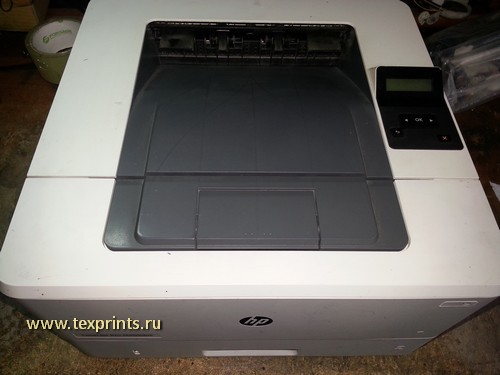
Вынимаем лоток для бумаги, приподнимаем принтер спереди. Видим зелёную защелку дуплекса. Тянем за неё и опускаем дуплекс вниз.
Откручиваем винт. И снимаем левую крышку, немного помогая себе шлицевой отвёрткой.
Поворачиваем принтер спиной.
Аккуратно поддеваем отвёрткой и отщелкиваем правую боковую крышку. Чисто теоретически её можно до конца не снимать.
Нам просто нужен доступ до винта, который сзади за ней. Это для особо ленивых.
Сзади принтера откручиваем два винта, которые держат крышку с дуплексом. После чего снимаем эту крышку.
Приподнимаем зад принтера. И откручиваем два самореза справа и слева, которые держат печку.
Поддеваем отвёрткой и снимаем черную пластиковую крышку, закрывающую подключения.
Отсоединяем два шлейфа проводов за этой крышкой.
Далее надо отключить кабель 220В. Для этого на коннекторе есть защелка снизу. Нажимаем на неё шлицевой отвёрткой, и вынимаем коннектор из разъема.
Теперь надо открутить два винта слева и справа, которые держат печь.
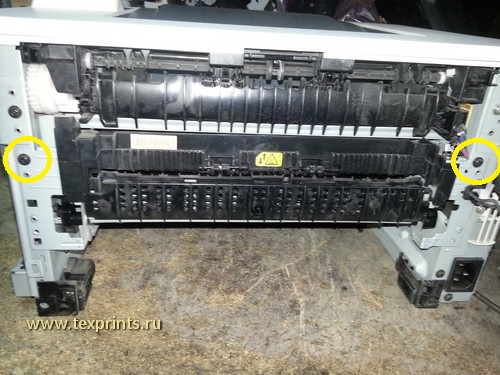
Отводим серый рычаг право, чтобы он вышел из зацепления, после чего вытаскиваем печь и кладём её на стол.
На печке откручиваем два винта, отсоединяем шлейф от разъёма, освобождаем этот шлейф.
Всё это для того, чтобы снять чёрную пластиковую крышку с печки.
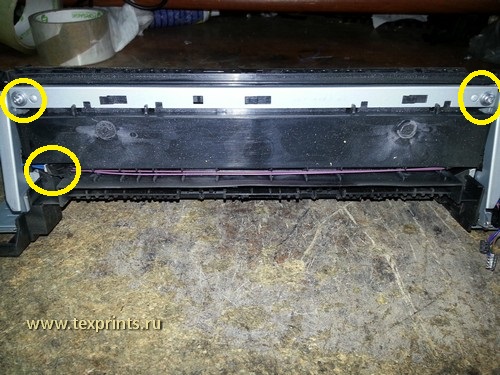
Аккуратно вынимаем из зацепа рычаг
Должно получиться как на фото ниже: два рычага разъединены.
Аккуратно поддеваем отвёрткой и снимаем черную крышку с печки.
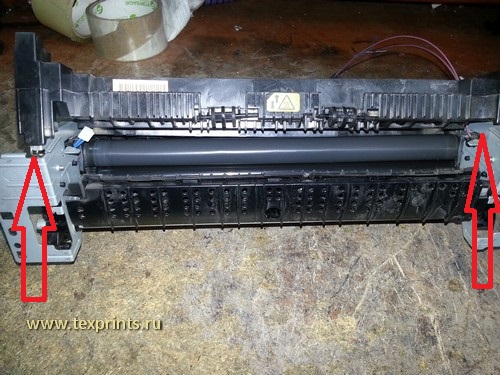
Утконосами снимаем пружину, и вынимаем металлическую прижимную планку (обозначена красной стрелкой.)
Аналогично с другой стороны.
После этого снимаем ложе в сборе и кладём на стол. На фото ниже показано это ложе, две прижимные пластины, которые мы снимали и две пружины.
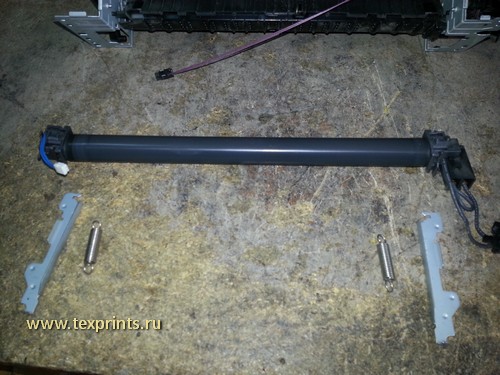
Справа снимаем заглушку, по которой скользит термоплёнка. На фото она уже снята.
После этого в эту сторону снимаем старую термоплёнку. На фото не видно — в моем случае присутствует выработка по краям плёнки, и по центру.
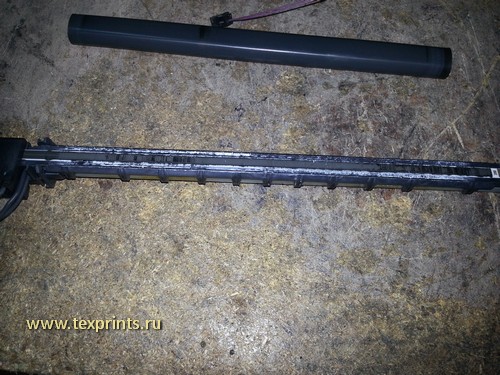
Теперь берём спирт, салфетку, и тщательно оттираем ложе и нагревательный элемент от остатков старой смазки, тонера и мусора.
После чего берём новую смазку, наносим её на нагревательный элемент примерно в таком количестве, как на фото ниже.
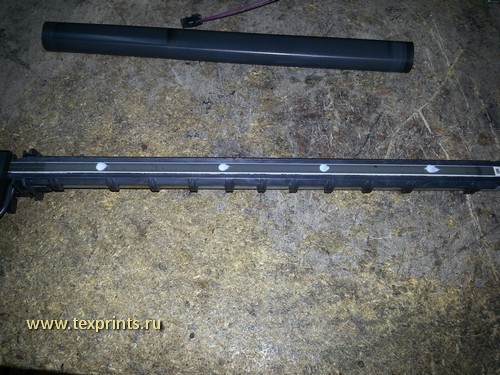
…и равномерно размазываем пальцем по всей поверхности нагревательного элемента.
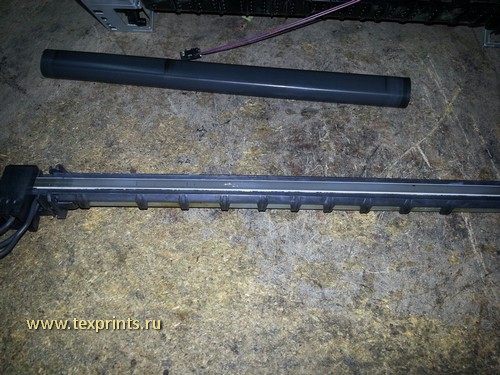
После этого одеваем новую плёнку. Обратите внимание, что на термоплёнке с одной стороны есть черный ободок — для снятия статики(обозначен жёлтой стрелкой).
Так вот этот ободок должен быть с той стороны, что на фото.
Далее всё собираем в обратном порядке. Особенных сложностей это вызвать не должно.
Отдельно нужно обратить внимание на пару моментов. Прочитайте обязательно.
Ставите ложе с термоэлементом обратно. Дальше устанавливаете прижимные пластины.
Далее надо одеть и натянуть пружину сначала с одной стороны, потом с другой.
Я делаю так: надеваю пружину нижней частью. Потом беру маленькие тонкие пассатижи, или утконосы (у кого что есть).
И, вытягивая пружину, одеваю её на выступ прижимной пластины. Как на фото ниже.
Следующий момент. Перед установкой прижимных пластин, убедитесь, что вы под ними проложили провода. Как на фото ниже.
Аналогично и с другой стороны. А то надо будет снова снимать пластины.
Аналогично и с другой стороны.
И еще обратите внимание на расстояние между прижимной пластиной и станиной печки.На фото ниже. Оно должно быть приблизительно такое. И одинаковое с обеих сторон.
Не надо вымерять с линейкой. Суть в том, что если с какой-то стороны расстояние больше, значит прижимная пластина не встала на своё место. Как результат — будет неравномерный прижим и неравномерное припекание тонера.
Далее ставим обратно печку, закручиваем, подсоединяем, ставим на место все в обратном порядке.
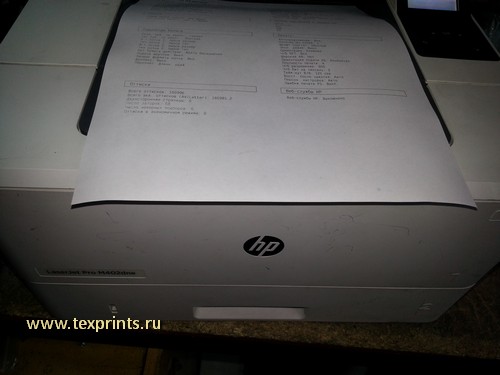
После чего печатаем тестовую страницу, пакуем.
Мы можем выполнить данный ремонт за вас!
Стоимость ремонта — 3600р в стационаре.
Выезд по Москве: 400р
Выезд по Московской области: 600р
(в стоимость входит профилактика и все необходимые запчасти)
Свяжитесь с нами по ремонту
С уважением,
www.texprints.ru
Москва,2019
Читайте также:
Datasheet | HP LaserJet Pro M402dn
HP LaserJet Pro M402dn Specifications Table
4
Print Speed      Letter: Up to 40 ppm black; First Page Out: As fast as 5.6 sec black;  5  Compatible Operating Systems  Windows OS compatible with In-Box Driver: Windows XP SP3 all 32-bit editions (XP Home, XP
Pro, etc), Windows Vista all 32-bit editions (Home Basic, Premium, Professional, etc.), Windows
Print Resolution  Black (best): 600 x 600 dpi, Up to 4800 x 600 enhanced dpi  7 all 32 & 64-bit editions, Windows 8/8.1 all 32 & 64-bit editions (excluding RT OS for Tablets),
Print Technology  Laser                                                 Windows 10 all 32 & 64-bit editions (excluding RT OS for Tablets); Windows OS compatible with
Universal Print Driver (From HP.com): Windows XP SP3 32 & 64-bit editions (XP Home, XP Pro,
Print Resolution Technologies  HP FastRes 1200, HP ProRes 1200, 600 dpi  etc.), Windows Vista all 32 & 64-bit editions (Home Basic, Premium, Professional, etc),
Windows 7 all 32 & 64-bit editions, Windows 8/8.1 all 32 & 64-bit editions (excluding RT OS for
Print Cartridges Number  1 (black)
Tablets), Windows 10 all 32 & 64-bit editions (excluding RT OS for Tablets); Mac OS (HP Print
Standard Print languages  HP PCL 5, HP PCL 6, HP postscript level 3 emulation, direct PDF (v 1.7) printing, URF, PCLM, PWG  Drivers available from HP.com and Apple Store): OS X 10.8 Mountain Lion, OS X 10.9 Mavericks,
OS X 10.10 Yosemite; Mobile OS (In-OS drivers): iOS, Android, Windows 8/8.1/10 RT; Linux OS
Printer Smart Software Features  Auto-duplex printing, N-up printing, collation, HP ePrint, Apple AirPrint™, Google Cloud, Print  (In-OS HPLIP); Auto install: BOSS (3.0, 5.0), DEBIAN (6.0, 6.0.1, 6.0.2, 6.0.3, 6.0.4, 6.0.5, 6.0.6,
Mopria-certified, Instant-on Technology, HP Auto-On/Auto-Off technology, JetIntelligence  6.0.7, 6.0.8, 6.0.9, 6.0.10, 7.0, 7.1, 7.2, 7.3, 7.4, 7.5, 7.6), FEDORA (17, 18, 19, 20), LINUX MINT
Cartridge Technology, Job Storage with PIN printing    (13, 14, 15, 16, 17), SUSE LINUX (12.2, 12.3, 13.1), UBUNTU (10.04, 11.10, 12.04,12.10, 13.04,
Printer Management  Printer Administrator Resource Kit (Driver Configuration Utility, Driver Deployment Utility,  13.10, 14.04, 14.10); Manual install: MANDRIVA LINUX (2010.0, 2011.0), MEPIS (6.0, 6.5, 7.0,
Managed Printing Administrator); HP Web JetAdmin Software; HP Proxy Agent Software; HP  8.0), PCLINUXOS (2006.0, 2006, 2007.0, 2007, 2008.0, 2008, 2009.0, 2009), RED HAT (8.0,
Imaging and Printing Security Center; HP Utility (Mac); HP Device Toolbox  9.0), RED HAT ENTERPRISE LINUX (5.0, 6.0, 7.0), SLACKWARE LINUX (9.0, 9.1, 10.0, 10.1, 10.2,
11, 12, 12.1), GOS (8.04.1), IGOS (1.0), LINPUS LINUX(9.4, 9.5), LINUX FROM SCRATCH (6); Other
Standard Connectivity  1 Hi-Speed USB 2.0; 1 Host USB; 1 Gigabit Ethernet 10/100/1000T network  OS: UNIX 9
Network Capabilities  Via built-in 10/100/1000Base-TX Ethernet, Gigabit; Auto-crossover Ethernet; Authentication  Compatible Network Operating  Windows OS compatible with In-Box Driver: Windows Server 2003/2003 R2 32-bit (SP1/SP2)
via 802.1X                             Systems          Standard/Enterprise (+ Cluster & Terminal Services), Windows Server 2008 32/64-bit (SP2)
Network Ready    Standard (built-in Gigabit Ethernet)                    Standard/Enterprise (+ Cluster & Terminal Services), Windows Server 2008 R2 64-bit (SP1)
Standard/Enterprise (+ Cluster & Terminal Services); Windows OS compatible with Universal
Wireless Capability  No                                                  Print Driver (UPD) or Product-Specific drivers from HP.com: Windows Server 2003/2003 R2
Mobile Printing Capability  HP ePrint,Apple AirPrint™, Morpria-certified, Google Cloud Print 2.0, Mobile Apps  32-/64-bit (SP1/SP2) Standard/Enterprise/Datacenter (+ Cluster & Terminal Services),
Windows Server 2008/2008 R2 32-/64-bit (SP1/SP2) Standard/Enterprise/Datacenter (+
Memory           Standard: 128 MB; Maximum: 128 MB                       Cluster & Terminal Services), Windows Server 2012/2012 R2 64-bit
Processor Speed  1200 MHz / Hard disk: None                              Standard/Foundation/Essentials/Datacenter (+ Cluster & Terminal Services); MS Windows
Server 2012 R2 Terminal Services: Citrix XenApp 7.5, Citrix XenDesktop 7.0, Citrix XenDesktop
Duty Cycle       Monthly, letter: Up to 80,000 pages 6                   7.5; MS Windows Server 2012 Terminal Services: Citrix XenApp 7.5, Citrix XenDesktop 7.0, Citrix
XenDesktop 7.5; MS Windows Server 2008 R2 SP1 Terminal Services: Citrix XenApp 6.0, Citrix
Recommended Monthly Page Volume 750 to 4000 7                            XenApp 6.5, Citrix XenApp 7.5, Citrix XenDesktop 5.6, Citrix XenDesktop 7.0, Citrix XenDesktop
7.5; MS Windows Server 2008 R2 Terminal Services: Citrix XenApp 6.0, Citrix XenApp 6.5, Citrix
Media Types Supported  Paper (plain, EcoFFICIENT, light, heavy, bond, colored, letterhead, preprinted, prepunched,  XenDesktop 5.6; MS Windows Server 2008 Terminal Services: Citrix XenApp 5.0, Citrix XenApp
recycled, rough); envelopes; labels; transparencies     5.0 Feature Pack 2 & 3; MS Windows Server 2003 Terminal Services: Citrix Presentation
Media Weight Supported  Tray 1: 16 to 46.6 lb; Tray 2, Optional 550-sheet Tray 3: 16 to 32 lb  Server(TM) 4.5, Citrix Presentation Server 4.0; MS Windows Server 2003 Terminal Services:
Citrix Presentation Server 4.5, Citrix Presentation Server 4.0, Citrix MetaFrame® Presentation
Media Sizes Supported  Tray 1: Letter, Legal, Executive, Oficio (8.5 x 13 in), A4, A5, A6, B5 (JIS), Oficio (216 x 340 mm),  Server, 3.0, Citrix MetaFrame XP Presentation Server (Feature Release 1, 2, and 3); Novell
16K (195 x 270 mm), 16K (184 x 260 mm), 16K (197 x 273 mm), Japanese Postcard, Double  Servers (http://www.novell.com/iprint): Novell Open Enterprise Server 11/SP1 /SP2, Novell
Japan Postcard Rotated, Envelope #10                    Open Enterprise Server 2 for Linux; NetWare 6.5/SP8; Novell Clients
Envelope Monarch, Envelope B5, Envelope C5, Envelope DL, Custom Size, A5-R, 4 x 6 in, 5 x 8  (http://www.novell.com/iprint): Novell iPrint Client v5.4 for Vista & Win7 & Win8 (32-bit, 64-bit),
in, B6 (JIS), 10 x 15 in, statement; Tray 2 & Tray 3: Letter, Legal, Executive, Oficio (8.5 x 13 in),  Novell iPrint Client v5.4 for WinXP (32-bit, 64-bit)
A4, A5, A6, B5 (JIS), Oficio (216 x 340 mm), 16K (195 x 270 mm), 16K (184 x 260 mm), 16K
(197 x 273 mm), Custom Size, A5-R, 5 x 8 in, B6 (JIS), statement  Minimum System Requirements  PC: Windows 10 (32-bit/64-bit), Windows 8.1 (32-bit/64-bit), Windows 8 (32-bit/64-bit),
Media Sizes Custom  Tray 1: 3 x 5 to 8.5 x 14 in; Tray 2, 3: 4.13 x 5.85 to 8.5 x 14 in  Windows 7 (32-bit/64-bit): 1 GHz processor, 1 GB RAM (32-bit) or 2 GB RAM (64-bit), 400 MB
available hard disk space, CD/DVD-ROM or Internet, USB or Network port; Windows Vista
Paper Handling   100-sheet multipurpose Tray 1, 250-sheet input Tray 2; 150-sheet output bin; Duplex  (32-bit): 1 GHz 32-bit (x86) processor, 1 GB RAM (32-bit), 400 MB available hard disk space,
Options: Automatic(standard); Envelope Feeder: No; Standard Paper Trays: 2; Input  CD/DVD-ROM or Internet, USB or Network port; Windows XP (32-bit) SP2: Pentium 233 MHz
Capacities: Up to 350 sheets (Tray 1: up to 100 sheets; Tray 2: up to 250 sheets); Output  processor, 512 MB RAM 400 MB available hard disk space, CD/DVD-ROM or Internet, USB or
Capacities: Up to 150 sheets; Up to 10 envelopes; Up to 75 sheets  Network port; Windows Server 2003 (32-bit) (SP1 or greater), Windows Server 2003 R2
What's in the box  C5F94A HP LaserJet Pro M402dn; Preinstalled HP 26A Black LaserJet Toner Cartridge (~3100  (32-bit), Windows Server 2008 (32-bit) (SP1 or greater): 1 GHz 32-bit (x86) processor, 1 GB
RAM (32-bit), 400 MB available hard disk space, CD/DVD-ROM or Internet, USB or Network port;
pages); Getting Started Guide; Setup Poster; Support Flyer; Warranty Guide; Printer  Windows Server 2008 (64-bit) (SP1 or greater), Windows Server 2008 R2 (64-bit), Windows
documentation and software on CD-ROM; Power cord 1      Server 2008 R2 (64-bit) (SP1): 1 GHz 64-bit (x64) processor, 2 GB RAM (64-bit), 400 MB
available hard disk space, CD/DVD-ROM or Internet, USB or Network port; MAC: OS X 10.8
Replacement Cartridges  HP 26A Black LaserJet Toner Cartridge (~3100 pages), CF226A; HP 26X Black LaserJet Toner  Mountain Lion; OS X 10.9 Mavericks; OS X 10.10 Yosemite; Internet; USB; 1 GB available hard
Cartridge (~9000 pages), CF226X 1                       disk space; OS compatible hardware (For OS hardware requirements see
Product Dimensions  W x D x H: 15 x 14.06 x 8.5 in ; Maximum: 15 x 25 x 9.5 in  http://www.apple.com)
2
Power            Power Supply Type: Internal (built-in) power supply; Power Requirements: 110-volt input
Product Weight   18.92 lb 10                                             voltage: 110 to 127 VAC (+/- 10%), 50/60 Hz (+/- 2 Hz); 220-volt input voltage: 220 to 240 VAC
Warranty Features  One-year warranty, return to HP Authorized Service Provider  (+/- 10%), 50/60 Hz (+/- 2 Hz) (Not dual voltage, power supply varies by part number with
#option code identifier); Typical Electricity Consumption: 1.54 kWh/Week (Energy Star) 15
Energy Efficiency Compliance  ENERGY STAR® certified; Blue Angel; EPEAT® Silver  Power Consumption: 591 watts (Active Printing), 6.1 watts (Ready), 2.8 watts (Sleep), 0.6
Control Panel    2-line backlit LCD graphic display; Buttons (OK, Menu, Cancel, Back); LED indicator lights  watts (Auto-On/Auto-Off, via USB connectivity), 0.1 watts (Shutdown or Off) 14
(Attention, Ready)                     Acoustics        Acoustic Power Emissions (active): 6.8 B(A); Acoustic Power Emissions (ready): Inaudible;
Acoustic Pressure Emissions (active): 54 dB(A); Acoustic Pressure Emissions (ready):
Display Description  2-line LCD (text and graphics)
Inaudible 17
Software Included  For Windows 7: HP Software Installer/Uninstaller, HP PCL 6 Printer Driver, HP Device Experience
(DXP), HP Update, HP Device Toolbox, HP Printer Status and Alerts, HP Product Improvement  Operating Environment  Operating Temperature Range: 59 to 90.5°F; Recommended Operating Temperature: 63.5
to 77°F; Storage Temperature Range: -4 to 104°F; Non-Operating Humidity Range: 10 to
Study, Reconfigure your HP Device; Warranty and Legal Guide, User Guide; For Windows 8+: HP  90% RH; Operating Humidity Range: 10 to 80% RH; Recommended Humidity Operating
Software Installer/Uninstaller, HP PCL-6 Printer Driver, HP Device Experience (DXP), Warranty  Range: 30 to 70% RH
and Legal Guide, User Guide, Reconfigure your HP Device; For Windows XP, Windows Vista and
associated servers: HP Software Installer/Uninstaller, HP PCL.6 Printer Driver, Warranty and  Security Management  Embedded Web Server: password-protection, secure browsing via SSL/TLS; Network:
Legal Guide, User Guide; For Mac OS: Welcome Screen (Directs users to http://www.HP.com or  enable/disable network ports and features, SNMPv1 & SNMPv2 community password change;
OS App Source for LaserJet Software)                    HP ePrint: HTTPS with certificate validation, HTTP Basic Access Authentication, SASL
Fonts and Typefaces  84 scalable TrueType fonts                          authentication; Firewall and ACL; SNMPv3, 802.1X, Secure Boot
Accessories      HP LaserJet 550-sheet Feeder/Tray D9P29A; HP v222w 16GB Mini USB Drive P0R81AA
HP Service and Support Options  U8TM2E - HP 3y Next Business Day LaserJet M402 Hardware Support; U8TM3E - HP 4y Next
Business Day LaserJet M402 Hardware Support; U8TM4E - HP 5y Next Business Day LaserJet
M402 Hardware Support; U8TM5E - HP 3y Next Business Day Exchange LaserJet M402 Service;
H3110E - HP Network Install Inkjet/Personal LaserJet Service
Learn more at
hp.com
1  Declared yield value in accordance with ISO/IEC 19752. Actual yields vary considerably based on images printed and other factors. For more information, visit hp.com/go/learnaboutsupplies  2  Without optional 550-sheet tray; Dimensions with optional 550-sheet tray: 15 x
14.06 x 13.58 in ( 381 x 357 x 345 mm)  3   Job Storage feature requires a purchase of separate USB flash drive with a minimum of 16 GB capacity.  4  Measured using ISO/IEC 24734, excludes first set of test documents. For more information see hp.com/go/printerclaims. Exact
speed varies depending on the system configuration, software application, driver, and document complexity.  5  Measured using ISO/IEC 17629, excludes first set of test documents. For more information see hp.com/go/printerclaims. Exact speed varies depending on the system
configuration, software application, driver, and document complexity.  6  Duty cycle is defined as the maximum number of pages per month of imaged output. This value provides a comparison of product robustness in relation to other HP LaserJet or HP Color LaserJet devices,
and enables appropriate deployment of printers and MFPs to satisfy the demands of connected individuals or groups.  7  HP recommends that the number of printed pages per month be within the stated range for optimum device performance, based on factors including
supplies replacement intervals and device life over an extended warranty period.  8  HP SureSupply alerts you when your print cartridge is running low and helps you purchase online or locally through HP or a participating retailer. For more information, visit
hp.com/go/SureSupply; only available with Original HP supplies; Internet access required.  9  Not all "Compatible Operating Systems" are supported with inbox software; Full solution software available only for Windows 7 and newer; Legacy Windows Operation Systems (XP, Vista,
and equivalent servers) get print drivers only; Windows RT OS for Tablets (32-bit & 64-bit) uses a simplified HP print driver built into the RT OS; UNIX Modelscripts are available on HP.com ( Modelscripts are printer drivers for UNIX operating systems); Linux systems use in-OS
HPLIP software; HP Software for Mac is no longer included on the CD, but can be downloaded from hp.com - the Mac driver and Mac Utility are installed for Mac operating systems.  10  With 26A cartridge   14  Power requirements are based on the country/region where the printer is
sold. Do not convert operating voltages. This will damage the printer and void the product warranty.  15  Typical Electricity Consumption (TEC) rating represents the typical electricity consumed by a product during 1 week, measured in kilowatt-hours (kWh). 17  Acoustic values are
subject to change. For current information see hp.com/support. Configuration tested: base model, simplex printing, A4 paper at an average of 38 ppm.
© Copyright 2015 HP Development Company, L.P. The information contained herein is subject to change without notice. The only warranties for HP products and services are set forth in the express
warranty statements accompanying such products and services. Nothing herein should be construed as constituting an additional warranty. HP shall not be liable for technical or editorial errors or
omissions contained herein. ENERGY STAR and the ENERGY STAR logo are registered U.S. marks. Windows is a registered trademark of Microsoft Corporation. AirPrint, iPad, iPhone, and iPod touch are
trademarks of Apple Inc., registered in the U.S. and other countries.
c04730667, July 2015
-
Инструкции по эксплуатации
1
HP LaserJet Pro M402dn (G3V21A) инструкция по эксплуатации
(126 страниц)
- Языки:Русский
-
Тип:
PDF -
Размер:
5.51 MB -
Описание:
Принтер
Просмотр
На NoDevice можно скачать инструкцию по эксплуатации для HP LaserJet Pro M402dn (G3V21A). Руководство пользователя необходимо для ознакомления с правилами установки и эксплуатации HP LaserJet Pro M402dn (G3V21A). Инструкции по использованию помогут правильно настроить HP LaserJet Pro M402dn (G3V21A), исправить ошибки и выявить неполадки.