
01.11.2023
Думаю каждый, кто начинает работать с планами обслуживания в Microsoft SQL сервере, столкнётся с ошибкой при удалении ненужного вам плана.
И звучит она примерно так:
Действие Удалить завершилось неудачно для объекта Задание


Конфликт инструкции DELETE с ограничением REFERENCE ... (ошибка: 547)
Эту проблему мы с вами и будем решать.
Итак, проблема неочевидна, на скриншоте страшноватые надписи с наименованием таблиц и каких-то параметров, ничего не понятно, а удалить план хочется.
Сама ошибка выглядит примерно так:
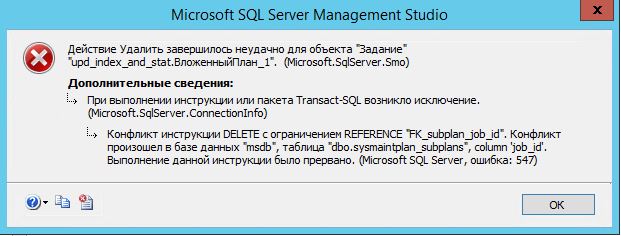
Вкратце: Действие Удалить завершилось неудачно для объекта Задание
Конфликт инструкции DELETE с ограничением REFERENCE … (ошибка: 547)
Для удаления данного задания нам понадобится открыть шелл MS SQL сервера, где мы сможем выполнять команды. Для этого закрываем окна с ошибкой и кликаем на верхней панели «Создать запрос»:
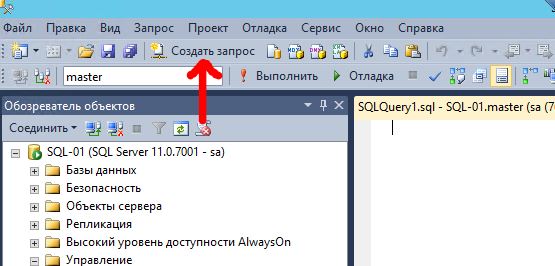
В правой части у нас появляется форма, где мы вводим следующую команду:
select * from msdb.dbo.sysmaintplan_plans
И нажимаем сверху на кнопку «Выполнить»:
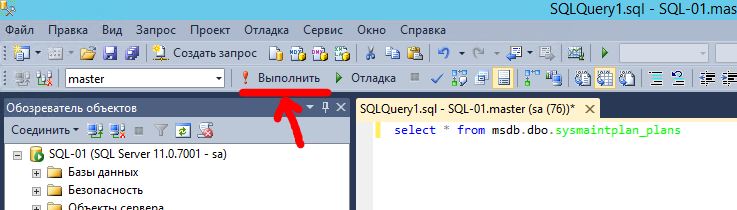
После нажатия на кнопку «Выполнить», снизу окна у нас появится информация о текущих планах обслуживания и будет столбец с указанием ID каждого плана, он нам и нужен:
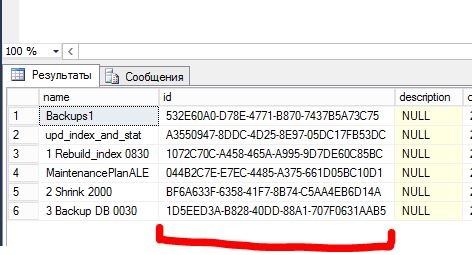
В списке мы находим название того, плана, что мы хотим удалить и видим его ID, в нашем случае это задание под номером 2 с ID: A3550947-8DDC-4D25-8E97-05DC17FB53DC. Копируем этот ID и формируем следующую команду в шелле SQL, предыдущую команду удаляем.
Получаем примерно следующее:
delete from msdb.dbo.sysmaintplan_subplans where plan_id = 'A3550947-8DDC-4D25-8E97-05DC17FB53DC'
Где в конце команды в кавычки мы вставляем скопированный ID. Нажимаем кнопку «Выполнить», снизу окна появится надпись «Запрос успешно выполнен». Отлично.
Ну и для положительного решения нашего вопроса выполняем второй и последний запрос в шелле (не забываем удалять предыдущую команду):
delete from msdb.dbo.sysmaintplan_plans where id = 'A3550947-8DDC-4D25-8E97-05DC17FB53DC'
Опять жмём «Выполнить» и опять должны увидеть надпись «Запрос успешно выполнен».
Отлично. Теперь мы спокойно можем удалить наше задание без всяких ошибок!
Напоследок хочется отметить один момент
: если задание создано через «Мастер планов обслуживания», то задания нужно удалять именно через каталог объектов «Управление» — «Планы обслуживания», в этом случае ошибки изначально не будет. Если же задание создавалось вручную, то, скорее всего, получите ошибку и решить её можно вышеприведённым методом.
На этом всё, удачи в администрировании!
If you’re getting SQL Server error 547 that reads something like “The DELETE statement conflicted with the REFERENCE constraint “FK_Projects_DepartmentID”. The conflict occurred in database “test”, table “dbo.Projects”, column ‘DepartmentID’“, you’re probably trying to delete data from a parent table of a foreign key relationship.
Example of Error
Here’s an example of code that produces the error:
DELETE FROM Departments WHERE DepartmentID = 1;Output:
Msg 547, Level 16, State 0, Line 1
The DELETE statement conflicted with the REFERENCE constraint "FK_Projects_DepartmentID". The conflict occurred in database "test", table "dbo.Projects", column 'DepartmentID'.
This occurred because I tried to delete data from the parent table when that table is being referenced by a foreign key constraint, and there’s data in the table using that foreign key.
This error will happen whenever you try to delete data from a parent table when the child table has ON DELETE NO ACTION specified in its foreign key (and it has at least one row that references the parent table). This is the default option, so unless another option was explicitly set for the foreign key, then it will raise the above 547 error whenever you try to delete data from the parent table that’s referenced by at least one row in a foreign key.
Solution
One way to fix this error is to delete the child data first, before deleting the parent data:
BEGIN TRANSACTION;

BEGIN TRY
    -- Delete from child tables first
    DELETE FROM Projects WHERE DepartmentID = 1;
    DELETE FROM Employees WHERE DepartmentID = 1;

    -- Then delete from the parent table
    DELETE FROM Departments WHERE DepartmentID = 1;

    COMMIT TRANSACTION;
    PRINT 'Transaction committed successfully.';
END TRY
BEGIN CATCH
    ROLLBACK TRANSACTION;
    PRINT 'An error occurred. Transaction rolled back.';
    PRINT ERROR_MESSAGE();
END CATCH
Output:
(1 row affected)
(1 row affected)
(1 row affected)
Transaction committed successfully.
In this case, we had two child tables referencing the parent table. So we deleted data from those first, followed by the data in the parent table. Doing it this way ensures that by the time we delete the data in the parent table, there are no child tables referencing it, and therefore we don’t get the error.
We also used a transaction to ensure that all deletions occurred atomically – we don’t want it to fail halfway through the operation leaving us with some data deleted and some remaining.
Another Option
Another way is to drop and recreate the foreign key constraints so that they’re defined with an option other than the ON DELETE NO ACTION option. This might be a preferred option if you anticipate that you’ll need to delete referential data again in the future.
Therefore, we could do the following:
-- Step 1: Drop existing foreign key constraints
ALTER TABLE Employees DROP CONSTRAINT FK_Employees_DepartmentID;
ALTER TABLE Projects DROP CONSTRAINT FK_Projects_DepartmentID;

-- Step 2: Recreate foreign key constraints with CASCADE DELETE option
ALTER TABLE Employees ADD CONSTRAINT FK_Employees_DepartmentID
FOREIGN KEY (DepartmentID) REFERENCES Departments(DepartmentID) ON DELETE CASCADE;

ALTER TABLE Projects ADD CONSTRAINT FK_Projects_DepartmentID
FOREIGN KEY (DepartmentID) REFERENCES Departments(DepartmentID) ON DELETE CASCADE;

-- Step 3: Delete from the parent table (child records will be automatically deleted)
DELETE FROM Departments WHERE DepartmentID = 1;
In this case we recreated the foreign keys with ON DELETE CASCADE. What this means is that, whenever we delete data from the parent table, SQL Server will automatically delete data from any child tables that reference it. Therefore we won’t need to delete data from the child tables first, like we did in the first solution.
SQL Server also provides a couple of other options in addition to the CASCADE option:
- We can use
ON DELETE SET NULLto set all the values that make up the foreign key toNULL. - Or we could use
ON DELETE SET DEFAULTto set the values that make up the foreign key to their default value (orNULLif there’s not explicit default value).
If you are a database developer or administrator, you may have come across the «Delete statement conflicted with reference constraint» error when trying to delete a record in a table that has a foreign key constraint. This error occurs because the record you are trying to delete is referenced by other records in another table. In this guide, we will show you how to fix this error and ensure smooth database operation.
Step-by-Step Solution
Identify the tables involved in the foreign key constraint: First, you need to identify the tables involved in the foreign key constraint. You can use the following SQL query to do this:
SELECT name FROM sys.foreign_keys WHERE referenced_object_id = OBJECT_ID('table_name')
Replace ‘table_name’ with the name of the table that has the foreign key constraint.
Disable the foreign key constraint: Once you have identified the tables involved in the foreign key constraint, you need to disable the constraint. You can use the following SQL query to do this:
ALTER TABLE table_name NOCHECK CONSTRAINT constraint_name
Replace ‘table_name’ with the name of the table that has the foreign key constraint and ‘constraint_name’ with the name of the foreign key constraint.
Delete the record: Now you can delete the record without getting the «Delete statement conflicted with reference constraint» error.
- Enable the foreign key constraint: After deleting the record, you need to enable the foreign key constraint again. You can use the following SQL query to do this:
ALTER TABLE table_name WITH CHECK CHECK CONSTRAINT constraint_name
FAQ
Q1. What is a foreign key constraint?
A foreign key constraint is a rule that ensures the integrity of the data in a database. It is used to link two tables together and enforce referential integrity.
Q2. Why am I getting the «Delete statement conflicted with reference constraint» error?
You are getting this error because you are trying to delete a record that is referenced by other records in another table.
Q3. How do I disable a foreign key constraint?
You can disable a foreign key constraint using the following SQL query:
ALTER TABLE table_name NOCHECK CONSTRAINT constraint_name
Replace ‘table_name’ with the name of the table that has the foreign key constraint and ‘constraint_name’ with the name of the foreign key constraint.
Q4. How do I enable a foreign key constraint?
You can enable a foreign key constraint using the following SQL query:
ALTER TABLE table_name WITH CHECK CHECK CONSTRAINT constraint_name
Replace ‘table_name’ with the name of the table that has the foreign key constraint and ‘constraint_name’ with the name of the foreign key constraint.
Q5. Is it safe to disable a foreign key constraint?
Disabling a foreign key constraint can lead to data integrity issues. It is recommended to disable the constraint only when necessary and enable it again as soon as possible.
- Understanding Referential Integrity and Foreign Keys
- How to Add and Drop a Foreign Key Constraint in SQL Server
Issue: When trying to delete a Scheduler job which was created as part of a maintenance plan, we get the following error
TITLE: Microsoft SQL Server Management Studio ------------------------------ Drop failed for Job 'manual_db_backups.Subplan_1'. (Microsoft.SqlServer.Smo) For help, click: http://go.microsoft.com/fwlink?ProdName=Microsoft+SQL+Server&ProdVer=9.00.3042.00&EvtSrc=Microsoft.SqlServer.Management.Smo.ExceptionTemplates.FailedOperationExceptionText&EvtID=Drop+Job&LinkId=20476 ------------------------------ ADDITIONAL INFORMATION: An exception occurred while executing a Transact-SQL statement or batch. (Microsoft.SqlServer.ConnectionInfo) ------------------------------ The DELETE statement conflicted with the REFERENCE constraint "FK_subplan_job_id". The conflict occurred in database "msdb", table "dbo.sysmaintplan_subplans", column 'job_id'. The statement has been terminated. (Microsoft SQL Server, Error: 547) For help, click: http://go.microsoft.com/fwlink?ProdName=Microsoft+SQL+Server&ProdVer=09.00.3042&EvtSrc=MSSQLServer&EvtID=547&LinkId=20476
We were getting the error even after removing the maintenance plan from SSIS.
To Resolve I did the following:
USE [MSDB]
GO

-- View the Maintenance plan subplans
select * from sysmaintplan_subplans

-- View the Maintenance plan logs
select * from sysmaintplan_log
To Delete the subplan:
USE [MSDB]
go

--Delete the Log history for the maintenance plan affected
DELETE FROM sysmaintplan_log
WHERE subplan_id in
  ( SELECT Subplan_ID from sysmaintplan_subplans
    -- change Subplan name where neccessary
  WHERE subplan_name = 'Subplan_1' )

-- Delete the subplan
DELETE FROM sysmaintplan_subplans
WHERE subplan_name = 'Subplan_1'
Transact sql error message Msg 547 Level 16 — The DELETE statement conflicted with the REFERENCE constraint — means that the you try to delete rows with at least one column that have reference in other table.
Msg 547 Level 16 Example:
Table students
| id | fist_name | last_name | gender | city | country | dep_id |
|---|---|---|---|---|---|---|
| 1 | Tom | WHITE | M | Los Angeles | US | 2 |
| 2 | Michael | JONES | M | New York | US | 3 |
| 8 | Daniel | MILLER | M | New York | US | 1 |
Table departments
| id | name |
|---|---|
| 1 | Anthropology |
| 2 | Biology |
| 3 | Chemistry |
| 4 | Computer Science |
Invalid delete:
USE model;
GO
DELETE FROM departments WHERE id=1 ;
GO
| Message |
|---|
| Msg 547, Level 16, State 0, Line 1 |
| The DELETE statement conflicted with the REFERENCE constraint «FK__students__dep_id__19DFD96B». The conflict occurred in database «model», table «dbo.students», column ‘dep_id’. The statement has been terminated. |
Correct delete:
USE model;
GO
DELETE FROM students WHERE dep_id=1;
GO
DELETE FROM departments WHERE id=1;
GO
| Message |
|---|
| (1 row(s) affected) |
| (1 row(s) affected) |
Other error messages:
- Conversion failed when converting date and/or time from character string
- Is not a defined system type
- Conversion failed when converting the varchar value
- Unknown object type used in a CREATE, DROP, or ALTER statement
- Cannot insert the value NULL into column
- Cannot insert explicit value for identity column in table
- The INSERT statement conflicted with the FOREIGN KEY constraint