
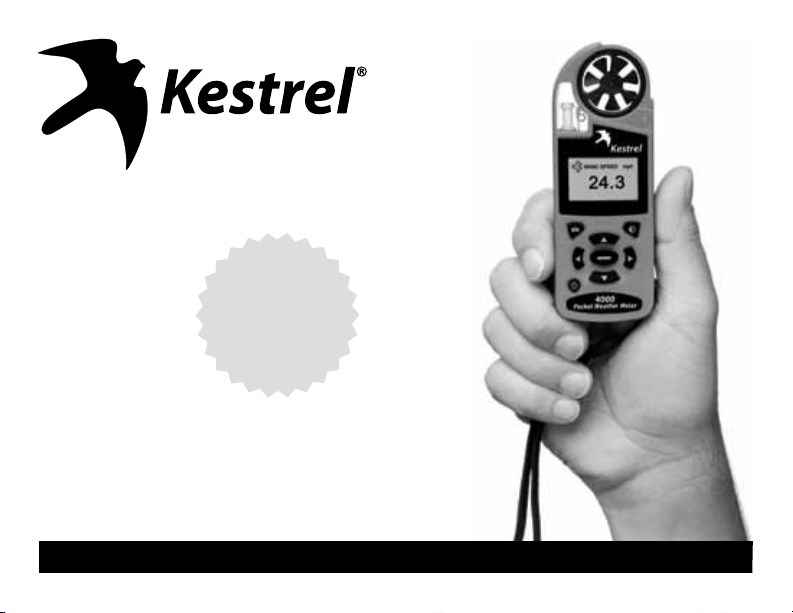
4000
Pocket Weather®Tracker
with Backlight
In a hurry?
Be sure to read pages
5-7 to ensure that
your Kestrel is setup
properly!
Instruction Manual For Kestrel 4000 &
Kestrel 4000 NV Models
1
www.kestrelweather.com 800.784.4221
Revised 07/27/10
Revised 09/07
Kestrel® 4000 Pocket Weather® Tracker 3
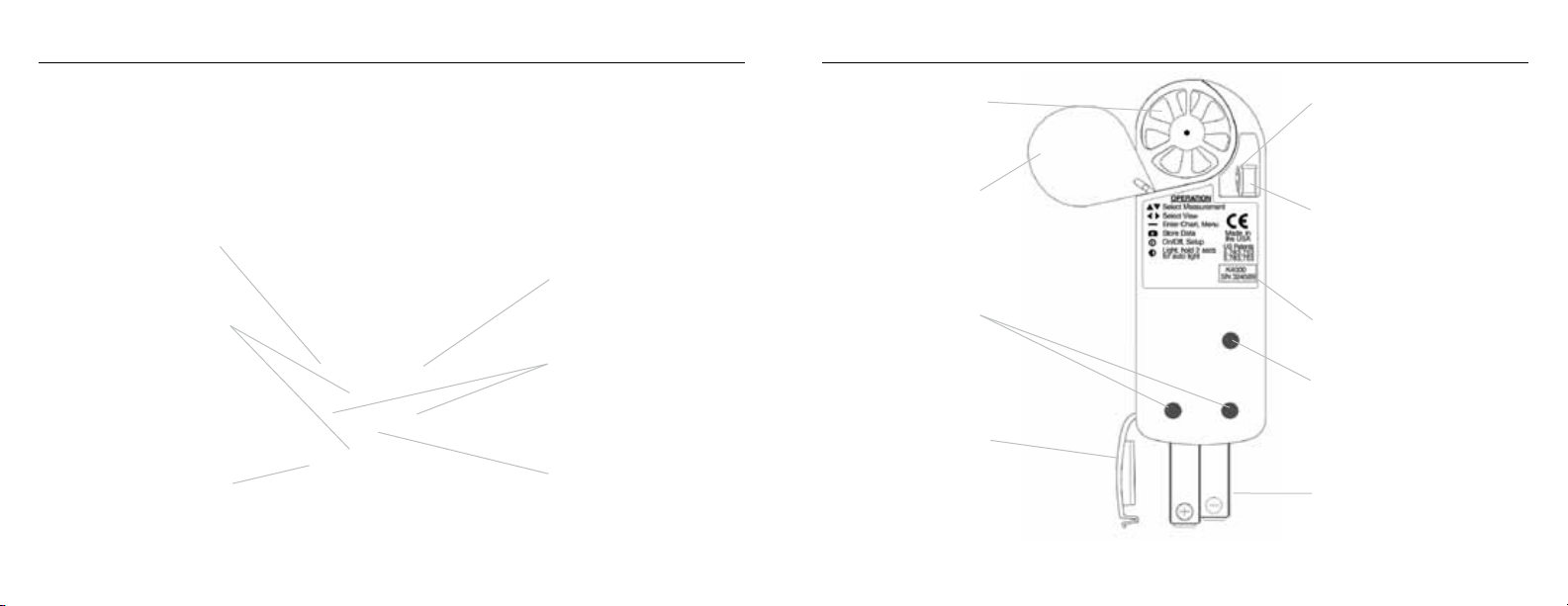
MANUAL MEMORY
BUTTON Press to manually
store current conditions
to memory.
MEASUREMENT BUTTONS
Press to scroll between
screens: Date/Time,
Measurements, User
Dened Screens.
POWER/SETUP BUTTON
Hold to turn power on or
o. Press to enter and exit
Main Setup Menu.
IMPELLER Zytec™
V-bearings on a userreplaceable impeller.
IMPELLER COVER Swivel
cover protects impeller
BACKLIGHT BUTTON Press
to activate backlight for
1 minute.
MODE BUTTONS
Press to change mode of
measurements: Current, Min/
Max/Avg, Chart.
COMMAND BUTTON In Chart
Screens, press to view data
points. In Setup Menus, press
to make selection.
when not in use.
DATA UPLOAD OPTICAL
COUPLER Software and
serial port interface
sold separately.
BATTERY DOOR
Sealed with o-ring to
keep product watertight.
FRONT BACK
TEMPERATURE SENSOR
Hermetically sealed precision
thermistor coiled to isolate from
case temperature.
HUMIDITY SENSOR Capacitive
sensor with secondary
thermistor to improve
accuracy and response.
SERIAL NUMBER
PRESSURE SENSOR Monolithic
silicon piezoresistive sensor.
Do NOT insert any objects
into this hole.
AAA BATTERIES
Kestrel® 4000 Pocket Weather® Tracker 5
TABLE OF CONTENTS
GETTING STARTED . . . . . . . . . . . . . . . . . . . . . . . . . . . . . . . . . . . . . . . . . . . . . . . . . . . . . . . . . . . . . . . . . . . . . . . . . . . . . . . . . . . . . 5
NAVIGATION . . . . . . . . . . . . . . . . . . . . . . . . . . . . . . . . . . . . . . . . . . . . . . . . . . . . . . . . . . . . . . . . . . . . . . . . . . . . . . . . . . . . . . . . . . . 6
SPECIAL FUNCTIONS . . . . . . . . . . . . . . . . . . . . . . . . . . . . . . . . . . . . . . . . . . . . . . . . . . . . . . . . . . . . . . . . . . . . . . . . . . . . . . . . . . . 8
MAIN SETUP MENU . . . . . . . . . . . . . . . . . . . . . . . . . . . . . . . . . . . . . . . . . . . . . . . . . . . . . . . . . . . . . . . . . . . . . . . . . . . . . . . . . . .13
APPLICATION EXAMPLES . . . . . . . . . . . . . . . . . . . . . . . . . . . . . . . . . . . . . . . . . . . . . . . . . . . . . . . . . . . . . . . . . . . . . . . . . . . . . . 18
MEMORY CAPABILITIES . . . . . . . . . . . . . . . . . . . . . . . . . . . . . . . . . . . . . . . . . . . . . . . . . . . . . . . . . . . . . . . . . . . . . . . . . . . . . . . .21
GLOSSARY . . . . . . . . . . . . . . . . . . . . . . . . . . . . . . . . . . . . . . . . . . . . . . . . . . . . . . . . . . . . . . . . . . . . . . . . . . . . . . . . . . . . . . . . . . . . 21
DEFAULT SETTINGS . . . . . . . . . . . . . . . . . . . . . . . . . . . . . . . . . . . . . . . . . . . . . . . . . . . . . . . . . . . . . . . . . . . . . . . . . . . . . . . . . . . .24
FREQUENTLY ASKED QUESTIONS . . . . . . . . . . . . . . . . . . . . . . . . . . . . . . . . . . . . . . . . . . . . . . . . . . . . . . . . . . . . . . . . . . . . . . 25
CUSTOMER SERVICE . . . . . . . . . . . . . . . . . . . . . . . . . . . . . . . . . . . . . . . . . . . . . . . . . . . . . . . . . . . . . . . . . . . . . . . . . . . . . . . . . . .27
Congratulations on the purchase of your Kestrel 4000 Pocket Weather Tracker! The Kestrel 4000 is the next
generation of weather monitoring. Now, you can instantly measure EVERY major environmental condition
easily, accurately and right in the palm of your hand.
While the Kestrel 4000 is user-friendly and simple to use, reading the instruction manual is recommended in
order to use the Kestrel 4000 to its fullest potential.
NK, manufacturer of Kestrel Pocket Weather Meters, is available to answer questions and provide support.
Contact NK by phone: 610.447.1555, fax: 610.447.1577, email: info@nkhome.com, or
web: www.nkhome.com.
GETTING STARTED
Battery Installation
Use only AAA batteries. Install batteries as indicated on the battery door. After installing the batteries, the
Kestrel 4000 will automatically start in the Date and Time Setting mode. (See Date and Time Setup below.)
Custom settings and chart data will be saved during a battery change; only the date/time and MMA values
will be lost.
Turning the Kestrel Meter ON and OFF
To turn the Kestrel Meter ON, press the button. To turn the Kestrel Meter OFF, hold the button for two
seconds. Or, press the button, then press the button with the word OFF highlighted. (Note: your unit
will continue to automatically store data when the power is turned o.) When rst turned on, the Kestrel
Meter will display a splash screen displaying the model number, the battery indicator, and the code version.
This battery indicator will indicate the percentage of battery life remaining, which is helpful in preventing
unexpected dead batteries.
Date and Time Setup
The rst time that you turn on your Kestrel Meter, as well as after a battery change, you
will need to set the date and time. The Introduction Screen will appear for 3 seconds,
followed by the Date/Time Setup Screen. Press the and buttons to scroll through
the settings. Press the and buttons to scroll through the setting options. After
entering the date and time, press the button to exit the Date/Time Setup. Then press
the button again to exit the Main Setup Menu.
Kestrel® 4000 Pocket Weather® Tracker 7
NAVIGATION
Measurements use
Wind Speed
Temperature
Wind Chill
Humidity
Heat Index
DP
Dew Point
WB
Wet Bulb
Barometric Pressure
Altitude
D
Density Altitude
and
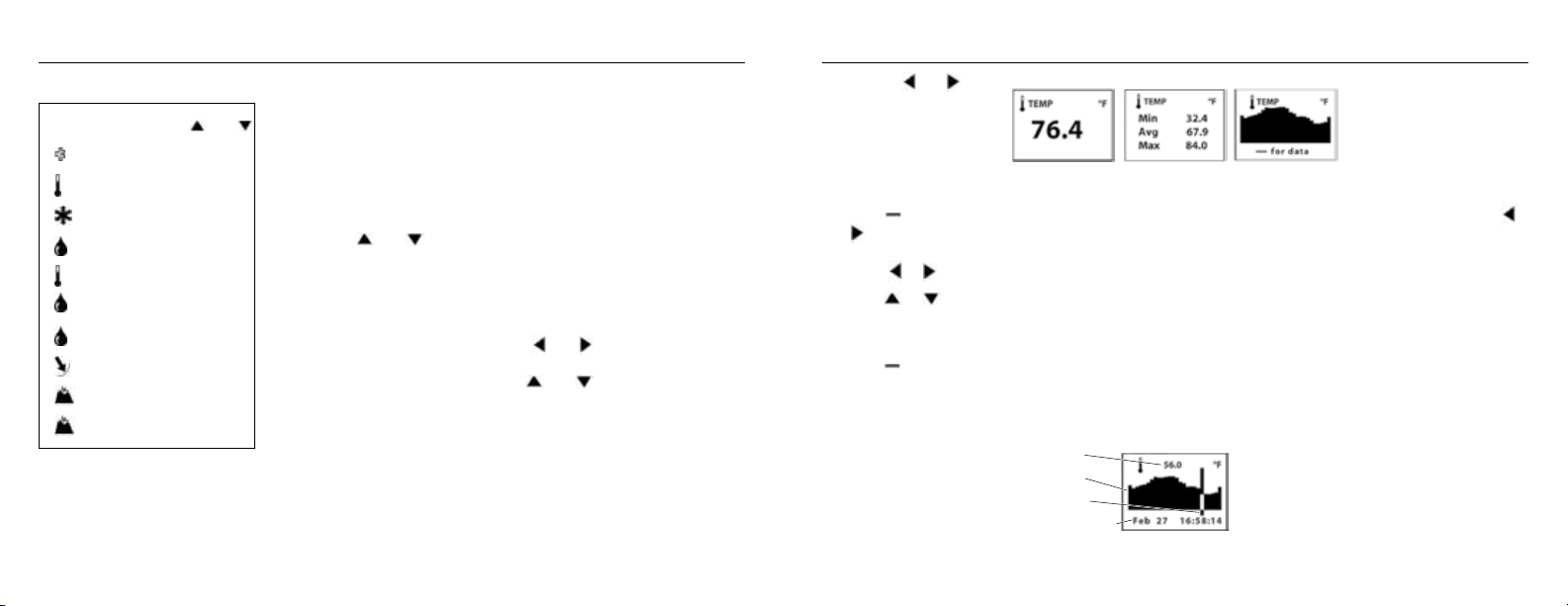
The Kestrel 4000 is set up to display 10 Measurements (some are
calculations) in 3 Modes.
The Measurements are listed here with their corresponding screen
icon. In addition to these Measurements and Modes, there are also 3
User Screens, which simultaneously show 3 current measurements,
and the Date & Time Screen, which gives the current date and
time. Use the
and buttons to scroll through the various
Measurements, followed by the 3 User Screens and the Date/Time
Screen. Any of these screens can be turned o so that you can
customize your Kestrel Meter to show the screens that your application
requires. (See the Measurements section in the Main Menu.)
The Modes are displayed below. Use the and buttons to scroll
through the various Modes. From any mode, you may still scroll to a
dierent Measurement by pressing the and buttons.
Current — Displays the instantaneous reading.
Min/Max/Avg — Displays the Minimum/Maximum/Average readings
from stored data. If there is no stored data, the values will be
displayed as —.-.
Chart — Displays a graphical representation of up to 2000 stored
data points for each measurement. If there is no stored data, the axis
will appear, but the chart will be blank. (See the following section
for information on Chart Navigation.)
Modes use
and
Navigation of Charts
The Kestrel 4000 is capable of storing up to 2000 data points for each measurement. To review the data,
press the button while viewing a chart. A cursor will appear on the most recent data point. Press the
and buttons to scroll through the data points. The date and time at which the data was stored will be
displayed at the bottom of the screen, and the data value will be displayed at the top of the screen. Hold
down the or button to scroll quickly through the data points.
Press the or button to review the data for the other measurements. Please note that the cursor will
remain at the same date and time. If new data is stored while viewing chart data, the entire chart will shift
left with the new data point charted on the right. The cursor will not shift with the chart.
Press the button to return to the Chart Mode.
Value
Chart
Cursor
Date & Time
Kestrel® 4000 Pocket Weather® Tracker 9
SPECIAL FUNCTIONS
User Screens
The Kestrel Meter has three User Screens that can be customized to display three current
measurements simultaneously. These screens can also be turned o. (See the Main Menu
section for setup instructions.)
Max/Avg for Wind Speed & Wind Chill
The Max/Avg values for the wind speed and wind chill values are measured independently from the stored
and charted data.
This allows the user to start and stop the averaging period in the most appropriate manner for their
application. Averaging on all wind-related values (Wind Speed and Wind Chill) will be started and
stopped together.
While viewing the Min/Max/Avg screen for any of these measurements, hold the unit into the wind, and
press the button when the screen displays “—average” to begin collecting data for all measurements, and
again when the screen displays “—stop” to stop collecting data and hold the values on the display. Press the
button when the screen displays “—clear” to clear the data. This routine will work simultaneously for all
measurements, regardless of which one is displayed while the routine is run. The Max/Avg for these wind
values will not aect any other Min/Max/Avg or stored data.
Manual Data Storage
To manually store data, press the button. One of the following will appear: Data Stored (data has been
captured and will appear on chart), Full (Overwrite is o and data log is full), or O (Manual Store button
has been disabled). (See the Main Setup Menu section for more information on memory.)
Backlight
The Kestrel Meter has a high-visibility green backlight, which makes the display easily read in low-light
conditions. The Kestrel 3500 NV has a night-vision preserving backlight which helps users to sustain natural
night vision. The NV’s backlight incorporates an optical lter to reduce overall brightness and minimize
blue and green spectrum light to preserve night vision. Additionally, the backlight is much dimmer than a
standard backlight, making it more dicult to detect with the naked eye in night operations. This backlight
appears soft greyish pink (not red) and is still in the visible spectrum, so it is not compatible with nightvision equipment.
It takes 30 to 45 minutes for the average eye to adapt to darkness and maximize night vision. Even a short
burst of white, yellow, green or blue light “bleaches out” the rod cell photoreceptors in the eye and causes
night blindness until the entire adaptation process can take place again. Light in the red spectrum does not
cause this “bleaching out”, preventing night blindness and night vision fatigue.
Press the
button within one minute to deactivate the light manually.
Relative Humidity
The Kestrel Meter is capable of measuring RH to a high accuracy: +/– 3% RH between 5 and 95%. To ensure
operation within these specications, please follow these recommendations:
• Avoid taking measurements in direct sunlight, which will heat the air inside the humidity sensor
• If your circumstances force you to expose the Kestrel Meter to a large temperature swing prior to taking
button to activate the backlight. The light will remain activated for one minute. Press the
enclosure and cause inaccurate readings.
a relative humidity reading (such as when taking a Kestrel Meter stored inside at 70° F outside to a
temperature of 40° F), you will need to take additional steps to ensure that the Kestrel Meter’s external
temperature sensor is in thermal equilibrium.
Kestrel® 4000 Pocket Weather® Tracker 11
• Ideally, provide an airow of at least 1 M/S (2.2 MPH), over the temperature sensor—point the
Kestrel Meter into the airow. If there is no airow, simply wave the unit back and forth so air
passes over the sensors. With airow over the temperature sensors and humidity chambers,
readings within specications will be provided within two to three minutes, even after a large
temperature shift.
• If no airow can be provided, you must allow sucient time for the RH value to stabilize. This can
take as long as 20 minutes—the greater the temperature change, the greater the time. You can
use the logging capability of the Kestrel Meter to conrm that the unit has stabilized to
a correct reading: Set the memory options to a relatively short logging interval (20 seconds
works well), select the graphical display of RH, and you can see when the value is no longer
changing signicantly. At that point, the RH value is stable and can be relied upon to be within the
accuracy specications.
Barometric Pressure and Altitude Adjustment
The Kestrel Meter measures “station” pressure—the actual air pressure in the measurement location—and
uses this value to calculate barometric pressure and altitude. Station pressure changes in response to
two things—changes in altitude and changes in the atmosphere. Because the Kestrel Meter is constantly
changing location and altitude, it is important to enter adjustments or “references” when accurate pressure
and altitude readings are needed.
Barometric pressure is station pressure corrected to sea level. In order to make the correction, the Kestrel
Meter needs an accurate reference altitude. Altitude is the height above sea level. In order to correctly
calculate altitude, the unit needs an accurate barometric pressure reference, also known as an “altimeter
setting”. Fortunately, you only need to know ONE of these values (current barometric pressure or current
altitude) in order to set your Kestrel Meter up to show accurate readings.
decrease the reference pressure. You will notice that the altitude will change with changes in the reference
pressure. Press the button to exit the adjustment mode. Set your Kestrel Meter down on a table and
allow the altitude reading to stabilize. (Note: very small changes in pressure generate noticeable changes
in altitude. In order to provide meaningful readings for activities where altitude changes quickly, the Kestrel
Meter features rapid altitude response. This is why the altitude readings tend to uctuate by a few feet.)
After obtaining a current altitude from the ALTITUDE screen, move to the BARO screen and enter this value
as your reference altitude by following the same procedure. Both readings will now be accurate.
to increase the reference altitude or the button to decrease the reference altitude. You will notice that
the barometric pressure will change with changes in the reference altitude. Press the button to exit the
adjustment mode. Again, allow the Kestrel Meter to stabilize, then enter the value from the BARO screen
as your reference pressure on the ALTITUDE screen by following the same procedure. Both readings are
nowaccurate.
When reviewing stored data, remember that changes in pressure AND changes in location/altitude will
aect the stored values. When tracking pressure changes relative to weather, set the reference altitude on
the BARO screen and keep the Kestrel Meter in one location. Your graph history will now show trends in
Starting with the known barometric pressure for your location: You can obtain your
current barometric pressure by checking an internet weather site for a nearby location,
or contacting a local airport. Set this value as your reference pressure on the ALTITUDE
screen to determine your correct altitude: Press the button to enter the reference
setting mode. Press the button to increase the reference pressure or the button to
Starting with a known altitude for your location:
topographical map or local landmark. Google Earth is an excellent free program that
provides the exact altitude for any given address: www.earth.google.com/. Set this
value as your reference altitude on the BARO screen to determine your barometric
pressure. Press the button to enter the reference setting
You can obtain your altitude from a
mode. Press the button
Loading…

СПЕЦ-ЦЕНА
-
Описание
-
Отзывы (0)
Описание
Ветромер Kestrel 4000 Night Vision w/ Bluetooth
Ветромер Kestrel 4000 Night Vision является базовым в линейке серии Kestrel 4000. Основной отличительной особенностью линейки Kestrel 4000 является то, что эти высокотехнологичные ветромеры могут запоминать до 2000 пунктов метеорологических данных, что позволяет отслеживать изменения в окружающей среде в течение долгого времени. Эта уникальная функция открывает совершенно новый мир возможностей отслеживания погоды для пользователей ветромеров Kestrel.
Ветромер Kestrel 4000 является первым в следующем поколении ветромеров Kestrel. В нем есть все функции доступные в Kestrel 3500 , плюс явное преимущество хранения данных, графические функции и технологии компьютерного интерфейса. С помощью этих дополнительных опций вы сможете записать изменения в погоде в течение долгого времени, просматривать эти изменения в виде графиков на дисплее Kestrel 4000, и даже загрузить данные на ПК или Mac с интерфейсом Kestrel. Kestrel 4000 серии теперь доступен с технологией Bluetooth, которая позволяет вам общаться с вашим Kestrel, расположенными на расстоянии до 30 футов с максимальным сроком службы аккумулятора вашего ветромера.
Каждый ветромер с функицей Bluetooth включает в себя специальное програмное обеспечение, предназначенное для быстрой и легкой настройки частоты передачи данных, загрузки записанных данных, графических данных и передача данных в другие приложения. Нет необходимости в приобретении допольнительного интерфейса для подключения, новые счетчики Kestrel с Bluetooth включают программное обеспечение, необходимое для организации беспроводной связи.
Для военных специалистов, Существует NV версия Kestrel 4000 в оливковом цвете с подсветкой экрана. Подсветка включает оптический фильтр, чтобы уменьшить общую яркость и минимизировать синий и зеленый спектры света для сохранения ночного видения. (Обратите внимание на подсветку появляется мягкий серовато розовый, не ‘красный’, и до сих пор в видимой области спектра, поэтому не совместим с приборами ночного видения.)
Ветромер Kestrel 4000 является необходимым инструментом для ученых, спортсменов, пожарных, автомобильных техников и специалистов сельского хозяйства. С Kestrel 4000 вы сможете не только узнать текущие погодные условия, но и отслеживать изменения в окружающей среде и, следовательно, делать прогнозы относительно того, что может произойти дальше.
В комплекте с ветромертром Kestrel 4000: Мягкий чехол, шнурки на запястье и шею, 5-летняя гарантия, 2 батарейки типа AAA, Kestrel Сертификат соответствия
Особенности:
- Текущая скорость ветра
- Средняя скорость ветра
- Максимальный порыв ветра
- Температура воздуха, воды и снега
- Холодный ветер
- Атмосферное давление
- Графики давления
- Индекс тепловой нагрузки
- Плотность по высоте
- Высота
- Точка росы
- Высокоточный датчик давления
- Относительная влажность воздуха
- Дата и время
- Автоматически сохраняет измерения, даже когда устройство выключено
- Водонепроницаем и плавает
- Вручную сохраняет измерения с нажатием кнопки
- Выборочное сохранение полученных измерений — 4000 ячеек для данных
- Графики и заметки
- Большой и удобный для чтения дисплей с подсветкой
- Настраиваемый дисплей для отображения необходимых измерений
- Функция удержания измерений
- Быстрые измерения, внешний термистор
- Загрузка измерений на PC или MAC
- Интерфейс на пяти языках (английском, французском, испанском, немецком и итальянском)
- Откидная крышка фентилятора
- Инновационный дизайн для стабильности и точности для измерений в условиях резких изменений погоды
- Патенты США №: 5783753, 5939645 и 6257074
- Сменный вентилятор
- Все инструменты и принадлежности полностью собраны в США
Комплектация:
- Мягкий чехол
- Шнурок на шею
- Шнурок на запястье
- 2 аккумулятора типа AAA
| Размеры | 127 х 45 х 28 мм |
| Вес | 102 г |
| Место происхождения: | США |
Вы можете купить Портативная метеостанция (анемометр) Kestrel 4000 Night Vision w/ Bluetooth по цене 29950 р. оформив заказ по телефону: +7 (495) 790-37-32 и назвав номер товара «2083»
Kestrel 4000 NV Weather Station PDF User Guides and Manuals for Free Download: Found (4) Manuals for Kestrel 4000 NV Device Model (Instruction Manual)
The Kestrel 4000 NV is an advanced handheld weather meter designed for professionals and enthusiasts alike. Tailored to provide precise environmental data, this device is particularly popular among those in the fields of hunting, outdoor sports, and meteorology. What sets the Kestrel 4000 NV apart is its combination of durability, ease of use, and comprehensive features that enable users to make well-informed decisions based on real-time weather conditions.
One of the standout features of the Kestrel 4000 NV is its built-in environmental sensors that measure a variety of atmospheric parameters. These include:
- Current wind speed and direction
- Temperature (both ambient and dew point)
- Humidity levels
- Barometric pressure
- Altimeter
- Heat stress index
This array of data allows users to gain a comprehensive understanding of their environment. Such measurements are critical for making decisions in activities ranging from outdoor sports to agricultural planning. The Kestrel 4000 NV’s capability to provide accurate readings in real-time is indispensable for anyone needing reliable weather data.
Another feature that deserves special mention is the Kestrel 4000 NV’s compatibility with various accessories. Users can attach optional sensors for even greater precision in specific measurements. This modular approach allows for customization according to the user’s needs, enhancing the overall utility of the device.
When it comes to usability, the Kestrel 4000 NV excels. The device is designed to be highly intuitive, with a straightforward interface that makes navigation simple even for first-time users. The screen is bright and easily readable, even in direct sunlight, ensuring users can access information without straining their eyes. Additionally, the ergonomic design enables comfortable use over extended periods, whether one is monitoring conditions or comparing them against previous data.
Portability is another aspect where the Kestrel 4000 NV shines. Its compact size and lightweight design make it easy to carry, fitting comfortably in a pocket or on a lanyard. This is particularly beneficial for outdoor enthusiasts who need to travel light while still possessing critical weather information at their fingertips.
Durability is a non-negotiable feature for field instruments, and the Kestrel 4000 NV doesn’t disappoint. Built to withstand harsh conditions, it boasts a waterproof and dustproof casing, ensuring reliability in various environments. This resilience means that whether one is hiking in rain or working in dusty fields, the Kestrel 4000 NV will perform consistently without any performance dips.
In summary, the Kestrel 4000 NV is a top-tier weather monitoring device that blends precision, usability, and portability into one compact unit. Its wide range of features makes it suitable for a variety of applications, making it a smart investment for anyone whose activities depend on accurate weather data. With its robust build quality and extensive sensor options, the Kestrel 4000 NV truly stands out in the market, offering exceptional value for both amateur and professional users alike.
FAQ: Types of Manuals and Their Contents
Kestrel 4000 NV Manuals come in various types, each serving a specific purpose to help users effectively operate and maintain their devices. Here are the common types of Kestrel 4000 NV User Guides and the information they typically include:
- User Manuals: Provide comprehensive instructions on how to use the device, including setup, features, and operation. They often include troubleshooting tips, safety information, and maintenance guidelines.
- Service Instructions: Designed for technicians and repair professionals, these manuals offer detailed information on diagnosing and repairing issues with the device. They include schematics, parts lists, and step-by-step repair procedures.
- Installation Guides: Focus on the installation process of the device, providing detailed instructions and diagrams for proper setup. They are essential for ensuring the device is installed correctly and safely.
- Maintenance Manuals: Provide guidance on routine maintenance tasks to keep the device in optimal condition. They cover cleaning procedures, part replacements, and regular servicing tips.
- Quick Start Guides: Offer a concise overview of the essential steps needed to get the device up and running quickly. They are ideal for users who need immediate assistance with basic setup and operation.
Each type of Kestrel 4000 NV instruction is designed to address specific needs, ensuring users have the necessary information to use, maintain, and repair their devices effectively.
Related Instructions for Kestrel 4000 NV:
2
4300
Instruction manual Kestrel GPS Instruction manual (File: kestrel-4300-instruction-manual-19, 11th Nov 2024)
19
1240
261
3
1000
Manual #EW98QH: 1000 Measuring Instruments Manual
2
1405
211
6
3550FW
Operation & user’s manual Kestrel Measuring Instruments Operation & user’s manual (File: kestrel-3550fw-operation-user-s-manual-24, 14.03.2025)
24
1114
201
7
2000
Manual 2000 Manual — 3447D6
2
599
132
9
4000
Instruction manual User Manual: Kestrel 4000 (J58YGW, Upd.Friday 24-01-2025)
9
1027
196
10
1000
Instruction manual Kestrel Weather Station Instruction manual (File: kestrel-1000-instruction-manual-12, 14th Dec 2024)
12
227
48
Weather Station Devices by Other Brands:
|
Auriol 114324-15-01 Operation And Safety Notes Auriol 114324-15-01 User Guide (Operation and safety notes), @8SJMDK IAN 114324 02 Nov 2024 | 149 |
|
|
Auriol IAN 94604 Operation And Safety Notes IAN 94604 (Weather Station ePDF User Manual, #EO97ON) RADIO-CONTROLLED WEATHER STATION 04 Feb 2025 | 69 |
|
|
Columbia Weather Systems Magellan 420 Operation & User’s Manual Columbia Weather Systems Magellan 420 User Manual (Operation & user’s manual), @7OU382 Magellan 420 Weather Station 14 May 2025 | 49 |
|
|
Solight TE86 Operating Manual TE86 (Weather Station ePDF Manual, #ANND9L) EN WEATHER STATION Solight TE86 09 Apr 2025 | 2 |
Categories:
Weather Radio
Kitchen Appliances
Inverter
Measuring Instruments
Weather Station
GPS

1
Revised 09/07
Instruction Manual For Kestrel 4000 &
Kestrel 4000 NV Models
4000
Pocket Weather
®
Tracker
with Backlight
www.kestrelweather.com
800.784.4221
In a hurry?
Be sure to read pages
5-7 to ensure that
your Kestrel is setup
properly!
Revised 07/27/10