
FAQ: Types of Manuals and Their Contents
JUMO IMAGO 500 Manuals come in various types, each serving a specific purpose to help users effectively operate and maintain their devices. Here are the common types of JUMO IMAGO 500 User Guides and the information they typically include:
- User Manuals: Provide comprehensive instructions on how to use the device, including setup, features, and operation. They often include troubleshooting tips, safety information, and maintenance guidelines.
- Service Instructions: Designed for technicians and repair professionals, these manuals offer detailed information on diagnosing and repairing issues with the device. They include schematics, parts lists, and step-by-step repair procedures.
- Installation Guides: Focus on the installation process of the device, providing detailed instructions and diagrams for proper setup. They are essential for ensuring the device is installed correctly and safely.
- Maintenance Manuals: Provide guidance on routine maintenance tasks to keep the device in optimal condition. They cover cleaning procedures, part replacements, and regular servicing tips.
- Quick Start Guides: Offer a concise overview of the essential steps needed to get the device up and running quickly. They are ideal for users who need immediate assistance with basic setup and operation.
Each type of JUMO IMAGO 500 instruction is designed to address specific needs, ensuring users have the necessary information to use, maintain, and repair their devices effectively.
Related Instructions for JUMO IMAGO 500:
1
dTRANS p02 DELTA
60
979
147
3
JB061B5
Operation & user’s manual JUMO Oven Operation & user’s manual (File: jumo-jb061b5-operation-user-s-manual-48, 21st Jan 2025)
48
160
34
5
TRANS T06 Junior
144
1296
312
6
Quantrol LC200
Operating manual JUMO Controller Operating manual (File: jumo-quantrol-lc200-operating-manual-40, 03rd Dec 2024)
40
656
105
7
mTRON B 70.4025.4
Installation instructions manual JUMO Control Unit Installation instructions manual (File: jumo-mtron-b-7040254-installation-instructions-manual-44, Sunday 08-12-2024)
44
133
27
10
dTRANS p02
Operating instructions manual JUMO Transmitter Operating instructions manual (File: jumo-dtrans-p02-operating-instructions-manual-64, 21.02.2025)
64
135
21
Controller Devices by Other Brands:
|
YASKAWA SI-P3 Technical Manual PDF Manual (@6512NQ), YASKAWA SI-P3 Controller (03/03/2025) MANUAL NO. SIEP C730600 42A 03 Mar 2025 | 35 |
|
|
Novus N1030T Instruction Manual Controller #ZBC2ZJ NOVUS AUTOMATION 02 Nov 2024 | 7 |
|
|
Graco 217075 Instructions-parts List Manual #8TA62Q: 217075 Controller Instructions-parts list manual 7642b 03 May 2025 | 8 |
|
|
Madas FRG/2MBC Manual Madas Controller Manual (File: madas-frg2mbc-manual-52, 13.04.2025) FRG/2MB 13 Apr 2025 | 52 |
Categories:
Transmitter
Server
Media Converter
Amplifier
Oven
Network Router
There are several device options (math, controller 3+4, C-level, recording) that can be enabled through the Setup program, using a release code.
In order to be able to access these options, the device must be online. In the Setup program, go to the ”Extras” menu in the task bar, and then to the item ”Enable device options”.
Activating ”Read code” opens a further window, in which the required options are marked:
Pressing the ”Generate code number” button will produce the required code numbers that you will need when you call the correct phone or fax number.
You will be given a release code that you can enter in the appropriate field, using the ”Enable” button.
Caution! The code number may be given with a mathematical sign.
Archived product
Multichannel process and program controllerJUMO IMAGO 500
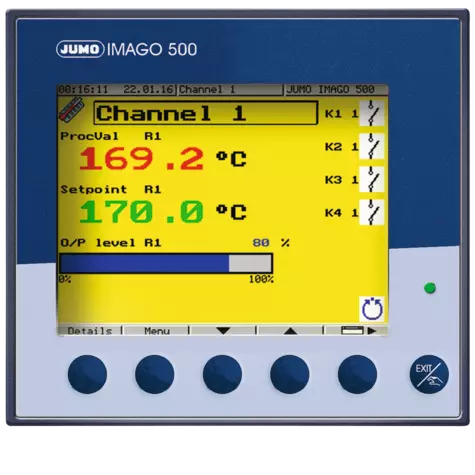
The JUMO IMAGO 500 is a process and program controller with up to 8 controller channels or 4 program channels. The user interface masks can be adapted according to individual preferences. 2 screen masks allow user-specific placement of text, process values, background images, and icons
Multichannel process and program controller
JUMO IMAGO 500
Downloads
Filter as document type
No related documents found.
Accessories
Are you looking for support?
Customer service
We care about your problems and will find solutions for you. We are also the contact persons for startup, repair, maintenance and calibration.
Team Service
+44 1279 635533
Contact us now!
- 5-ти дюймовый 27-ми цветный экран с подсветкой
- Свободная конфигурация экранного меню
- До 4-х каналов регулирования
- 50 программ с 1000 участками, динамически управляемые
- 16 предельных компараторов
- Модульный принцип устройства прибора
- Функция регистратора
- Каскадное регулирование
- PROFIBUS-DP интерфейс
- Математические и логические функции
- Телеуправление через внешний модем
- SЕТUP-программа и редактор для Windows 95/98/NT4.0/2000/ME
- UL-одобрение
Описание
Программируемый регулятор JUMO IMAGO 500 предназначен для регулирования технологических процессов с колличеством до 4 регулирующих или программных каналов. Лицевая панель прибора имеет размеры 144х130 мм, вырез для монтажа прибора в панели 92х9мм, глубина установки от 17 мм. Для отображения используется 5-ти дюймовый жидкокристалический 27-цветный экран. Меню внизу экрана можно свободно изменять и настраивать под конкретную задачу. Для 2 х свободноконфигурируемых экранных меню можно подобрать текст, значения величин процесса, фон и иконки в соответствии со спецификой применения прибора.
Максимально возможно установить 4 аналоговых и 6 дискретных входов в 6 гнезд расширения для дискретных или аналоговых выходов. Для удобства конфигурирования с помощью РС компьютера поставляется SETUP программа. Стандартные линеаризации для измерительных датчиков имеются в памяти прибора, кроме того, пользователь может дополнительно запрограммировать 4 линеаризированные таблицы. С помощью математического и логического модулей прибор можно настроить для различных задач регулирования и управления.
Прибор интегрируется в локальную сеть через 2 последовательных интерфейса RS422/485 или ProfiBus DP. Модули прибора пользователь может легко дополнить (см. блок схему). Электрические подключения осуществляются с обратной стороны прибора винтовыми зажимами.
- Аналогичные товары
Вся информация на сайте о товарах и ценах носит справочный характер и не является публичной офертой. Производитель оставляет за собой право изменять характеристики товара, его внешний вид и комплектность без предварительного уведомления продавца
ALL
#
A
B
C
D
E
F
G
H
I
J
K
L
M
N
O
P
Q
R
S
T
U
V
W
X
Y
Z
Loading …