
For Customer Use:
Enter below the Model No. and Serial
No. which are located either on the rear,
bottom or side of the cabinet. Retain this
information for future reference.
Model No.
Serial No.
GVT0011-001A
[J]
INSTRUCTIONS
MX-J30
COMPACT
DIGITAL AUDIO
MANUEL D’INSTRUCTIONS
Consists of CA-MXJ30 and SP-MXJ30.
Composé du CA-MXJ30 et SP-MXJ30.
COMPACT COMPONENT SYSTEM
SYSTEME DE COMPOSANTS COMPACT
SP-MXJ30
SP-MXJ30
CA-MXJ30
TAPE-
A
TAPE-
B
REC PAUSE
FADE
MUTING
FM MODE
RM–SMXJ30J REMOTE CONTROL
SLEEP
SOUND
MODE
ACTIVE
BASS EX.
+
–
POWER
STANDBY
CD
1
CD
1
CD
2
CD
3
CD
2
CD
3
PLAY & EXCHANGER
COMPACT
DIGITAL AUDIO
COMPU
PLAY
CONTROL
PHONES
PANEL
OPEN / CLOSE
TAPE
C D
AUX
FM AM
/
EJECT
EJECT
PLAY
REC/PLAY
AUTO REVERSE
AUTO REVERSE
VOLUME
1 BIT
DUAL D/A CONVERTER
+
–
MX-J30[J].COVER/5
99.1.27, 6:16 PM
1

COMPACT COMPONENT SYSTEM
SISTEMAS DE COMPONENTES COMPACTOS
SISTEMA DE COMPONENTE COMPACTO
MX-J30
Consists of CA-MXJ30 and SP-MXJ33
Consta del CA-MXJ30 el SP-MXJ33
Consta do CA-MXJ30 e SP-MXJ33
CA-MXJ30
SP-MXJ33
SP-MXJ33
CA-MXJ30
STANDBY
COMPACT
DIGITAL AUDIO
1 BIT
DUAL D/A CONVERTER
PLAY & EXCHANGER
COMPACT
DIGITAL AUDIO
SP-MXJ33CA-MXJ30SP-MXJ33
CD
3
CD
CD
3
CD
2
CD
1
VOLUME
2
CD
1
+
TAPE-
A
TAPE-
B
REC PAUSE
FADE
MUTING
RM–SMXJ30U REMOTE CONTROL
PHONES
PANEL
OPEN / CLOSE
MIC LEVEL
TAPE
MIN MAX
SOUND
ACTIVE
SLEEPECHO
MODE
BASS EX.
FM MODE
+
–
1
AUX
MIC
2
PLAY REC/PLAY
AUTO REVERSE AUTO REVERSE
EJECT EJECT
INSTRUCTIONS
MANUAL DE INSTRUCCIONES
INSTRUÇÕES
–
CD
FM AM
/
For Customer Use:
Enter below the Model No. and Serial
No. which are located either on the rear,
bottom or side of the cabinet. Retain this
information for future reference.
Model No.
Serial No.
GVT0011-003A
[ U, US, UT, UX, UY ]
Warnings, Cautions and Others
Avisos, precauciones y otras notas
Advertências, precauções e outras notas
Caution –– switch!
Disconnect the mains plug to shut the power off completely. The switch in any position does not disconnect the mains line. The power can be remote controlled.
Precaución –– Interruptor
Desconectar el cable de alimentación para desactivar la
alimentación totalmente. Cualquier que sea la posición de
ajuste del interruptor
completamente. La alimentación puede ser controlada
remotamente.
Precaução –– Interruptor
Desconectar o cabo de alimentação para desligar a
alimentação por completo. Qualquer que seja a posição
de ajuste do interruptor
completamente cortada. A alimentação pode ser
controlada remotamente.
!
, la alimentación no es cortada
!
, a alimentação não é
– G-1 –
CAUTION
To reduce the risk of electrical shocks, fire, etc.:
1. Do not remove screws, covers or cabinet.
2. Do not expose this appliance to rain or moisture.
PRECAUCIÓN
Para reducir riesgos de choques eléctricos, incendio,
etc.:
1. No extraiga los tornillos, los cubiertas ni la caja.
2. No exponga este aparato a la lluvia o a la
humedad.
PRECAUÇÃO
Para reduzir riscos de choques elétricos, incêndio, etc.:
1. Não remova parafusos e tampas ou desmonte a
caixa.
2. Não exponha este aparelho à chuva nem à
umidade.
– G-2 –
Caution: Proper Ventilation
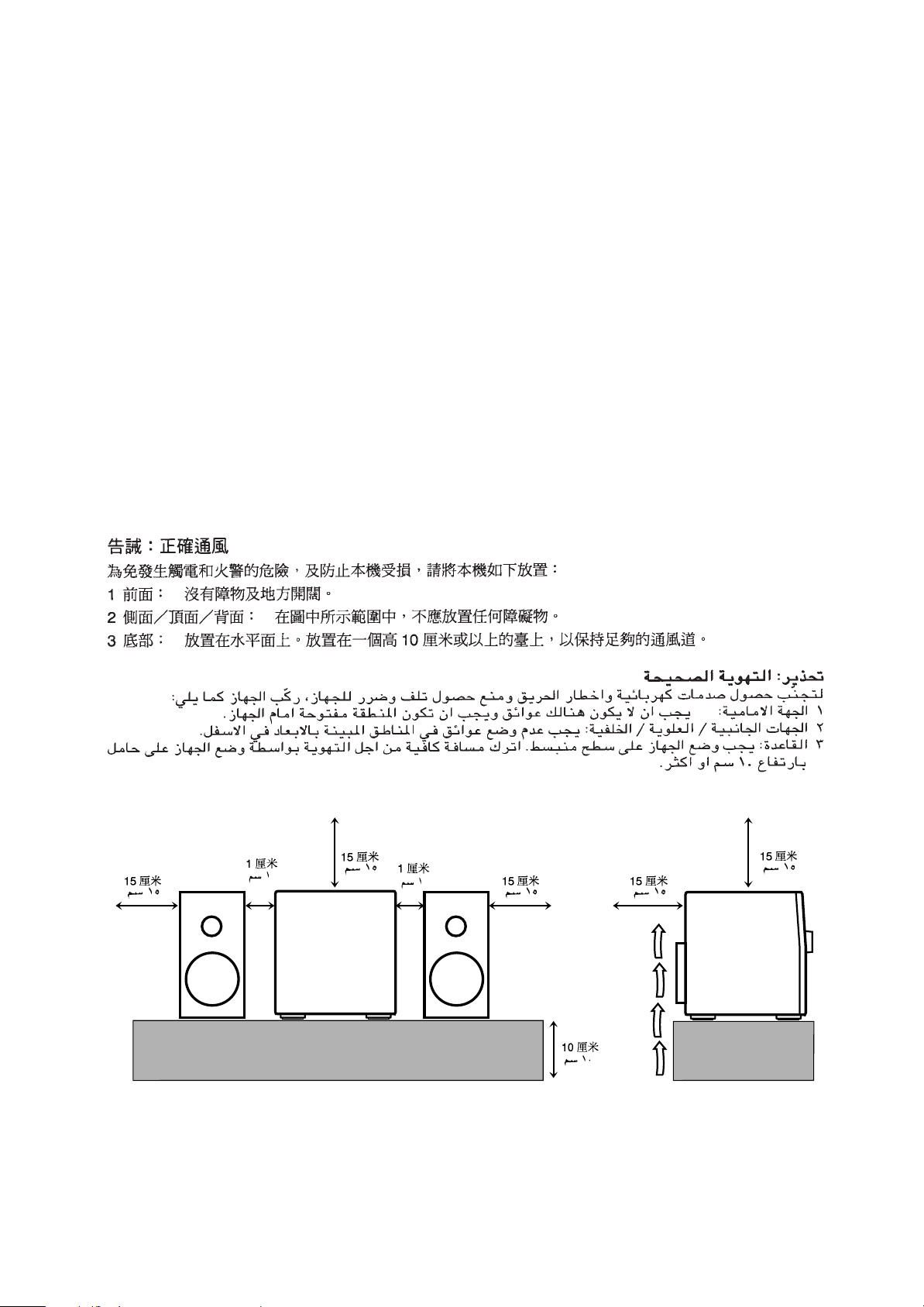
To avoid risk of electric shock and fire, and to prevent damage, locate the apparatus as follows:
1 Front: No obstructions and open spacing.
2 Sides/ Top/ Back: No obstructions should be placed in the areas shown by the dimensions below.
3 Bottom: Place on the level surface. Maintain an adequate air path for ventilation by placing on a stand
with a height of 10 cm or more.
Precaución: el aparato debe estar bien ventilado
Para evitar posibles riesgos de descargas eléctricas e incendios y prevenir cualquier posible daño, coloque el
aparato del modo siguiente:
1 Parte delantera: No ponga nada delante, deje el espacio libre.
2 Laterales/ parte superior/ parte trasera: No se debería colocar nada en las áreas y las distancias que se
detallan a continuación.
3 Parte inferior: Coloque el aparato sobre una superficie recta. Debe haber buena circulación de aire; para
ello, coloque el aparato sobre una base a una altura mínima de 10 cm.
Precaução: Ventilação adequada
Para evitar riscos de choques elétricos e incêndios, e prevenir avarias, instale o aparelho como segue:
1 Parte frontal: Sem obstruções e espaços abertos.
2 Partes laterais/Tampa/Posterior: Nenhuma obstrução deverá ser colocada entre as áreas cujas dimensões são
indicadas abaixo.
3 Parte inferior: Instale-o sobre uma superfície plana. Deverá ser mantido espaço suficiente para a ventilação
se este for instalado numa posição que tenha uma altura de 10 cm ou mais.
1 cm
15 cm
15 cm
15 cm 15 cm
1 cm
15 cm
1 cm1 cm
15 cm 15 cm
– G-3 –
10 cm
10 cm
15 cm
15 cm
15 cm
CA-D3SCA-D3S
CA-MXJ30 CA-MXJ30
IMPORTANT FOR LASER PRODUCTS / IMPORTANTE PARA PRODUCTOS LÁSER / IMPOTANTE
DANGER: Invisible laser
radiation when open and
interlock failed or defeated.
AVOID DIRECT EXPOSURE
TO BEAM. (e)
ADVARSEL: Usynlig laserstråling ved åbning, når
sikkerhedsafbrydere er ude
af funktion. Undgå udsættelse for stråling (d)
VARNING: Osynlig laserstrålning när denna del är
öppnad och spärren är
urkopplad. Betrakta ej
strålen. (s)
VARO: Avattaessa ja suojalukitus ohitettaessa olet
alttiina näkymättömälle
lasersäteilylle. Älä katso
säteeseen. (f)
PARA PRODUTOS LASER /
REPRODUCTION OF LABELS / REPRODUCCIÓN DE ETIQUETAS / REPRODUÇÃO DE ETIQUETAS
/
/
1 CLASSIFICATION LABEL, PLACED ON REAR ENCLO-
SURE
1 ETIQUETA DE CLASIFICACIÓN, PEGADA EN LA PARTE
POSTERIOR DE LA CAJA
1 ETIQUETA DE CLASSIFICAÇÃO LOCALIZADA NA PARTE
POSTERIOR DA CAIXA DO APARELHO.
CLASS 1
LASER PRODUCT
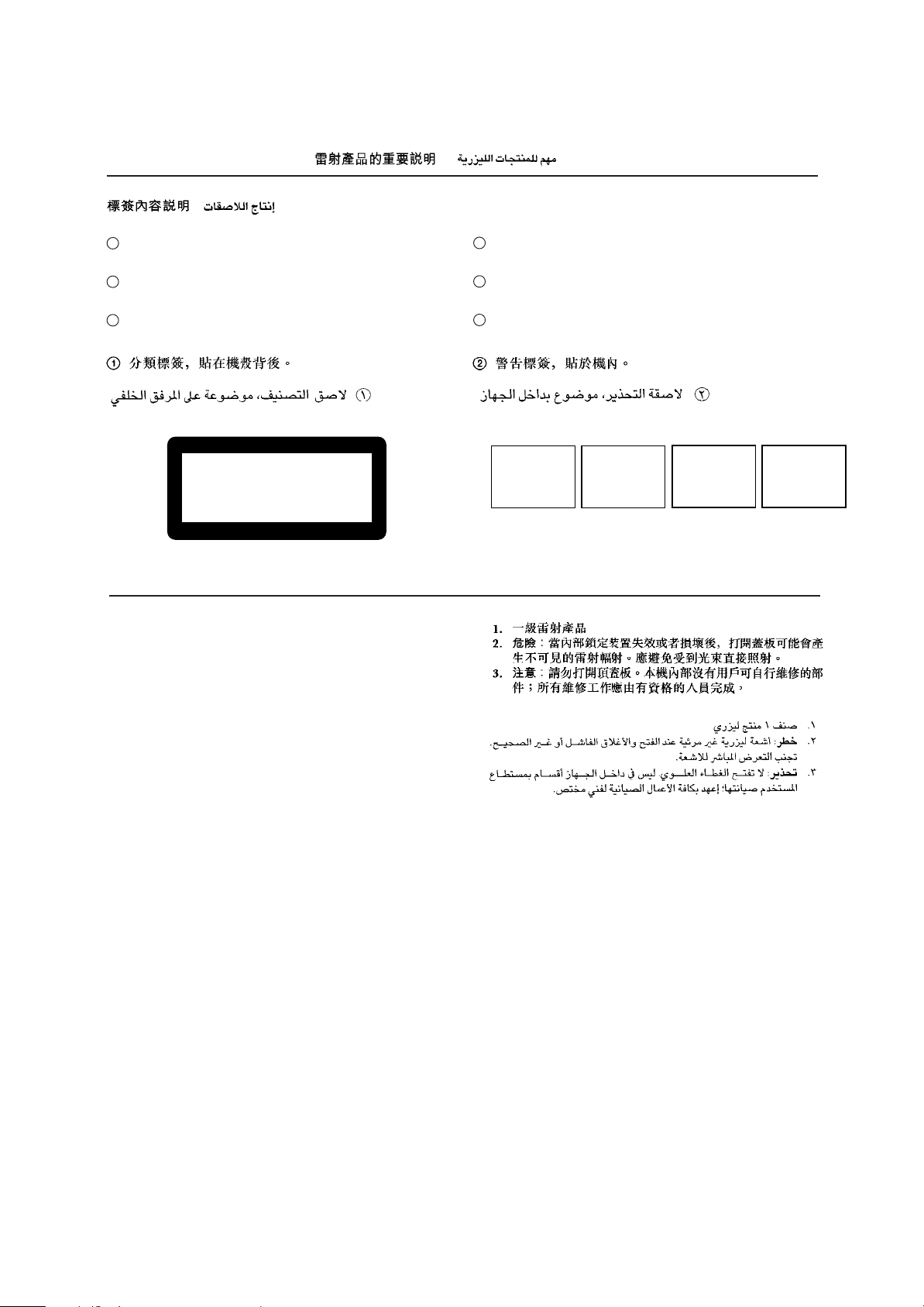
1. CLASS 1 LASER PRODUCT
2. DANGER: Invisible laser radiation when open and interlock
failed or defeated. Avoid direct exposure to beam.
3. CAUTION: Do not open the top cover. There are no user
serviceable parts inside the Unit; leave all servicing to qualified service personnel.
2 WARNING LABEL, PLACED INSIDE THE UNIT
2 ETIQUETA DE ADVERTENCIA, PEGADA EN EL INTE-
RIOR DE LA UNIDAD
2 ETIQUETA DE ADVERTÊNCIA LOCALIZADA NA PARTE
INTERNA DA UNIDADE.
1. PRODUCTO LÁSER CLASE 1
2. PELIGRO: En el interior hay radiación láser invisible. Evite el
contacto directo con el haz.
3. PRECAUCIÓN: No abra la tapa superior. En el interior de la
unidad no existen piezas reparables por el usuario; deje todo
servicio técnico en manos de personal calificado.
1. PRODUTO LASER CLASSE 1
2. PERIGO: O laser emite uma rediação invisível que é perigosa,
caso o aparelho esteja aberto e a trava inoperante ou
danificada. Evite exposição direta ao feixe dos raios.
3. CUIDADO: Não abra a caixa do aparelho. Não existem
peças reparáveis pelo usuário na parte interna da unidade.
Solicite assistência técnica somente a pessoal técnico
qualificado.
– G-4 –

Introduction
English
We would like to thank you for purchasing one of our JVC products.
Before operating this unit, read this manual carefully and thoroughly to
obtain the best possible performance from your unit, and retain this manual
for future reference.
About This Manual
This manual is organized as follows:
• The manual mainly explains operations using the
buttons and controls on the unit. You can also use the
buttons on the remote control if they have the same or
similar names (or marks) as those on the unit.
If operation using the remote control is different from
that using the unit, it is then explained.
• Basic and common information that is the same for many
functions is grouped in one place, and is not repeated in
each procedure. For instance, we do not repeat the
information about turning on/off the unit, setting the
volume, changing the sound effects, and others, which are
explained in the section “Common Operations” on pages 9
and 10.
• The following marks are used in this manual:
Gives you warnings and cautions to prevent
from a damage or risk of fire/electric shock.
Also gives you information which is not good
for obtaining the best possible performance
from the unit.
Gives you information and hints you had better
know.
Power sources
• When unplugging from the wall outlet, always pull the
plug, not the AC power cord.
DO NOT handle the AC power cord with wet
hands.
Moisture condensation
Moisture may condense on the lens inside the unit in the
following cases:
• After starting heating in the room
• In a damp room
• If the unit is brought directly from a cold to a warm place
Should this occur, the unit may malfunction. In this case,
leave the unit turned on for a few hours until the moisture
evaporates, unplug the AC power cord, and then plug it in
again.
Others
• Should any metallic object or liquid fall into the unit,
unplug the unit and consult your dealer before operating
any further.
• If you are not going to operate the unit for an extended
period of time, unplug the AC power cord from the wall
outlet.
Precautions
Installation
• Install in a place which is level, dry and neither too hot nor
too cold — between 5˚C (41˚F) and 35˚C (95˚F).
• Install the unit in a location with adequate ventilation to
prevent internal heat built-up in the unit.
• Leave sufficient distance between the unit and the TV.
• Keep the speakers away from the TV to avoid interference
with TV.
DO NOT install the unit in a location near heat
sources, or in a place subject to direct sunlight,
excessive dust or vibration.
DO NOT disassemble the unit since there are no
user serviceable parts inside.
If anything goes wrong, unplug the AC power cord and
consult your dealer.
– 1 –

Contents
Location of the Buttons and Controls………………….. 3
Front Panel ……………………………………………………….. 4
Remote Control …………………………………………………. 5
English
Playing Back Tapes…………………………………………… 15
Playing Back a Tape …………………………………………. 15
Locating the beginning of a Song — Music Scan…. 15
Getting Started…………………………………………………… 6
Unpacking ………………………………………………………… 6
Putting the Batteries into the Remote Control ……….. 6
Connecting Antennas …………………………………………. 6
Connecting Speakers ………………………………………….. 7
Connecting Other Equipment………………………………. 8
Adjusting the Voltage Selector …………………………….. 8
Common Operations ………………………………………….. 9
Setting the Clock ……………………………………………….. 9
Setting the AM Tuner Interval Spacing…………………. 9
Turning On the Po wer and Selecting the Sources……… 9
Adjusting the Volume……………………………………….. 10
Reinforcing the Bass Sound ………………………………. 10
Selecting the Sound Modes ……………………………….. 10
Listening to FM and AM Broadcasts …………………. 11
Tuning in a Station …………………………………………… 11
Presetting Stations ……………………………………………. 11
Tuning in a Preset Station …………………………………. 11
Playing Back CDs …………………………………………….. 12
Loading CDs …………………………………………………… 12
Playing Back the Entire Discs
— Continuous Play……………………………………… 12
Basic CD Operations………………………………………… 12
Programming the Playing Order of the Tracks
— Program Play …………………………………………. 13
Playing at Random — Random Play ………………….. 14
Repeating Tracks or CDs — Repeat Play ……………. 14
Prohibiting Disc Ejection — Tray Lock………………. 14
Recording ………………………………………………………… 16
Recording Tapes on Deck B ………………………………. 16
Dubbing Tapes…………………………………………………. 17
CD Direct Recording………………………………………… 17
Using the Microphones……………………………………… 18
Singing Along………………………………………………….. 18
Using the Timers………………………………………………. 19
Using Daily Timer……………………………………………. 19
Using Recording Timer…………………………………….. 20
Using Sleep Timer……………………………………………. 21
Timer Priority………………………………………………….. 21
Maintenance …………………………………………………….. 22
Troubleshooting ……………………………………………….. 23
Specifications……………………………………………………. 24
– 2 –
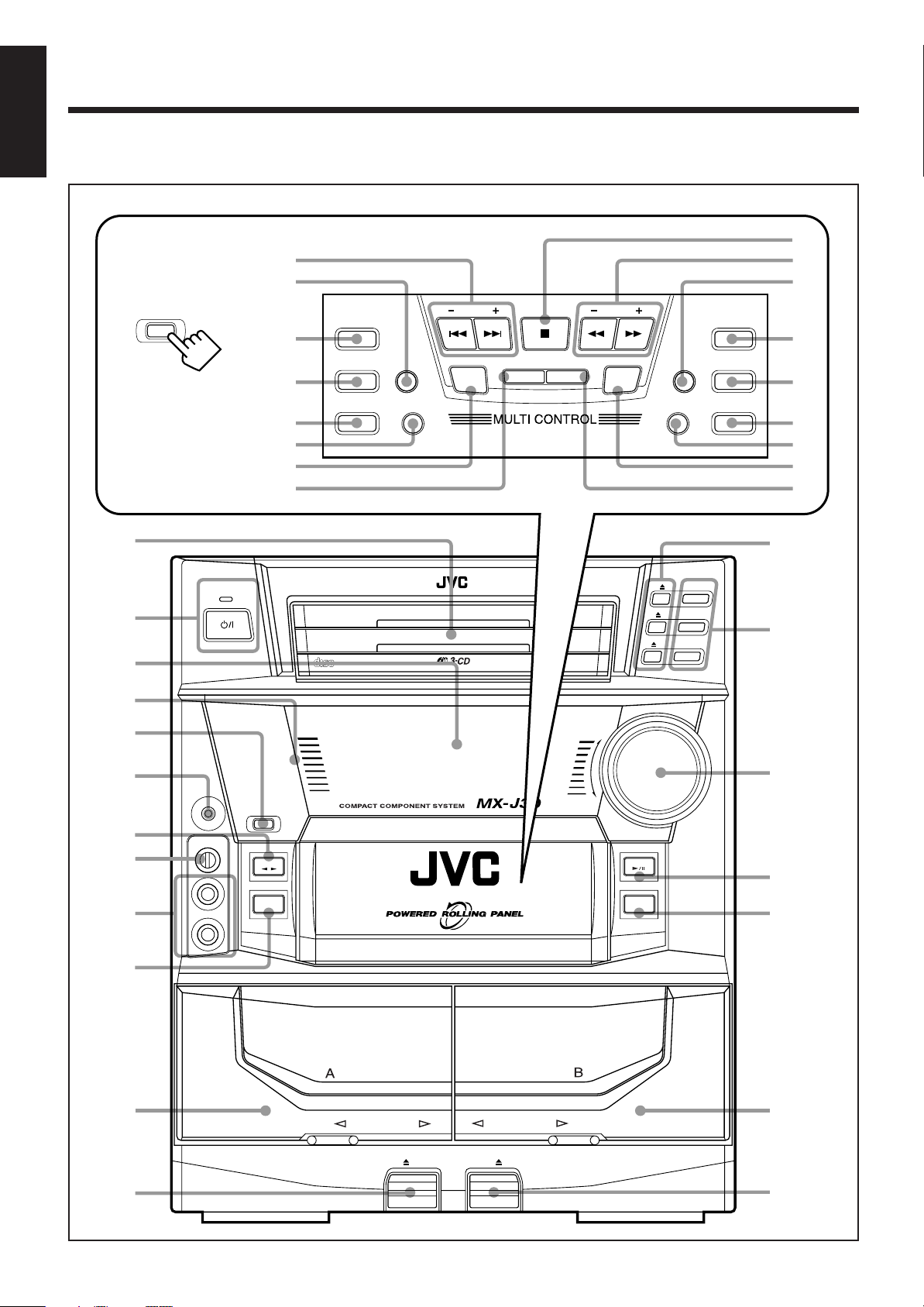
Location of the Buttons and Controls
English
Become familiar with the buttons and controls on your unit.
Powered Rolling Panel
PANEL
OPEN / CLOSE
Press PANEL OPEN/
CLOSE to open the panel.
To close the panel, press
the button again.
1
STANDBY
2
3
;
a
s
d
f
g
h
j
REC
START/STOP
DUBBING
CD REC START DECK A/B
COMPACT
DIGITAL AUDIO
REVERSE
MODE
PRESET
TIMER
/CLOCK
PLAY & EXCHANGER
DEMO
SET CANCEL
k
l
/
TUNING
PROGRAM
z
SOUND
MODE
DISPLAY
ACTIVE BASS EX.
RANDOM
x
REPEAT
c
v
b
n
e
CD
3
CD
CD
3
CD
2
CD
1
2
CD
1
r
4
5
6
7
8
9
p
q
PHONES
MIC LEVEL
MIN MAX
MIC
1 BIT
DUAL D/A CONVERTER
VOLUME
+
t
REC/PLAY
–
CD
y
FM AM
/
u
i
PANEL
OPEN / CLOSE
TAPE
1
AUX
2
PLAY
AUTO REVERSE
AUTO REVERSE
w
EJECT EJECT
o
– 3 –
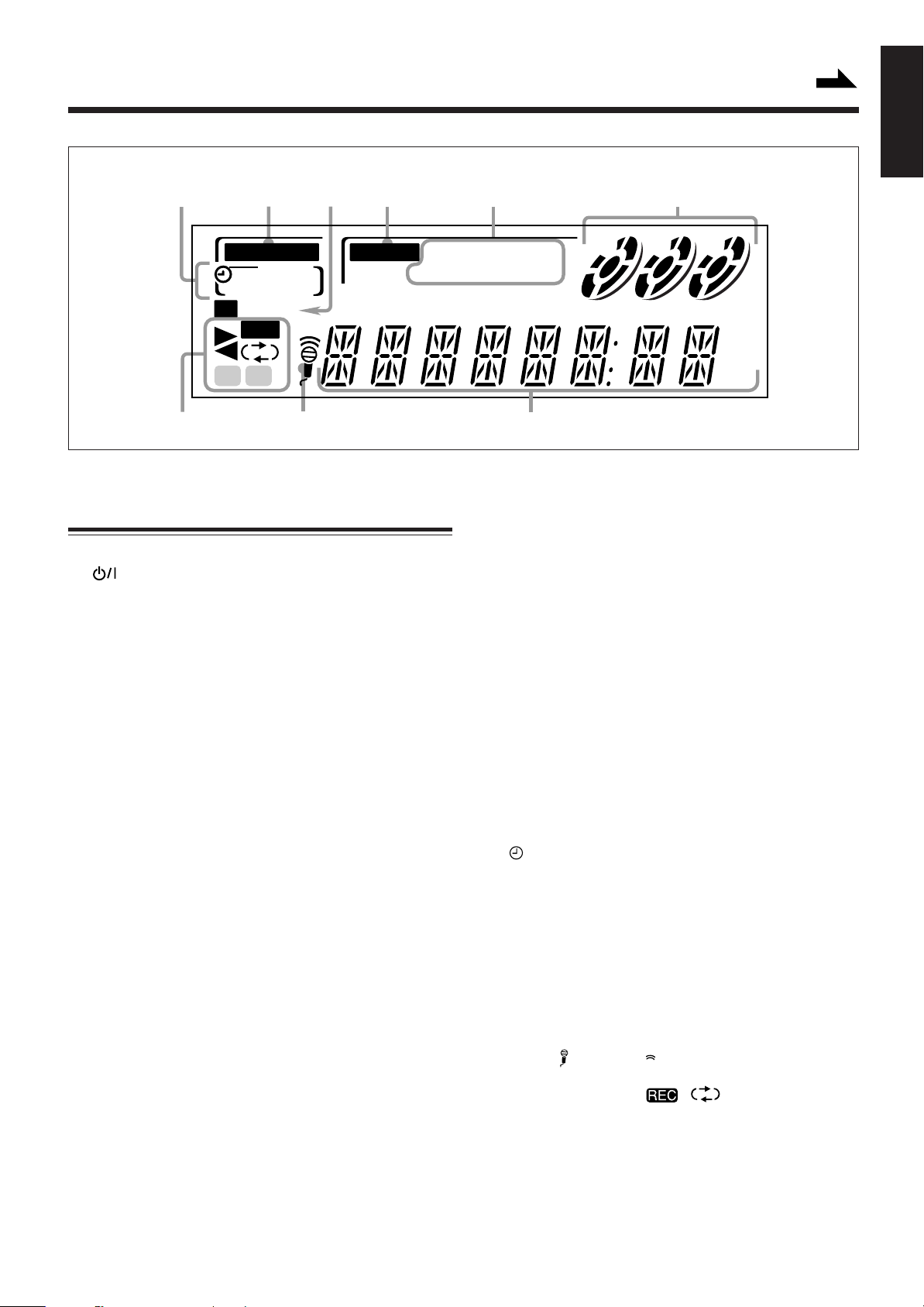
Display Window
Continued
English
1
32
A.BASS EX
45 6
S.MODE
SLEEP
REC DAILY
ST
MONO
REC
AB
9
See pages in the parentheses for details.
Front Panel
1 Disc trays
2 (standby/on) button and STANDBY lamp (9)
3 Display window
4 Remote sensor
5 PANEL OPEN/CLOSE button (9)
Pressing this button also turns on the unit.
6 PHONES jack (10)
7 TAPE 2 3 button and lamp (15)
Pressing this button also turns on the unit.
8 MIC LEVEL control (18)
9 MIC 1 and MIC 2 jacks (18)
p AUX button and lamp (9)
Pressing this button also turns on the unit.
q Deck A cassette holder (15)
w 0 EJECT button for deck A (15)
e 0 (CD tray open/close) buttons (12)
Pressing one of these buttons also turns on the unit.
r Disc number buttons (CD 1, CD 2, and CD 3) (12)
Pressing one of these buttons also turns on the unit.
t VOLUME control (10, 18)
y CD 6 (play/pause) button and lamp (12)
Pressing this button also turns on the unit.
u FM/AM button and lamp (11)
Pressing this button also turns on the unit.
i Deck B cassette holder (15)
o EJECT 0 button for deck B (15)
Powered Rolling Panel
; PRESET – / + buttons (11)
4 / ¢ (reverse search/forward search) buttons
(9, 13, 19 – 21)
a REVERSE MODE button (15, 17)
REPEA TALL 1 CD
RANDOM PRGM
78
s REC START/STOP button (16)
d DUBBING button (17)
f CD REC START button (17)
g DECK A/B button (15)
h TIMER/CLOCK button (9, 19)
j SET button (9, 19)
k 7 (stop) button (12, 15)
l TUNING – / + buttons (11)
1 / ¡ (fast left/fast right) buttons (13, 15)
/ DISPLAY button (9)
z PROGRAM button (13, 17)
x RANDOM button (14)
c REPEAT button (14)
v ACTIVE BASS EX. (Extension) button and lamp (10)
b SOUND MODE button (10)
n CANCEL button (9, 14, 19 – 21)
DEMO button (8)
Display window
1 Timer indicators
• , SLEEP, REC, and DAILY indicators
2 A. BASS EX (Active Bass Extension) indicator
3 Tuner operation indicators
• ST (stereo) and MONO indicators
4 S. MODE (sound mode) indicator
5 CD play mode indicators
• REPEAT (ALL/1CD/1), RANDOM, and PRGM
(program) indicators
6 Disc indicators
7 Main display
• Shows the source name, frequency, etc.
8 Karaoke ( ) and echo ( ) indicators
9 Tape operation indicators
• 2 3 (tape direction), , (reverse mode) and
A/B (operating deck) indicators
1 2 3
kHz
MHz
– 4 –
Loading…
Document Download |
‹
›
JVC MX-J30 Manual Online:
3.9,
2894
votes
JVC MX-J30 User Manual
JVC MX-J30 User Guide
JVC MX-J30 Online Manual
Text of JVC MX-J30 User Guide:
Related Products and Documents (Stereo System):
-
JVC CA-HXZ3R Stereo System Instructions manual
CA-HXZ3R
jvc/ca-hxz3r.pdf, 47 -
JVC UX-L30R Stereo System Instructions manual
UX-L30R
jvc/ux-l30r.pdf, 32 -
JVC HX-Z1 Stereo System Instructions manual
HX-Z1
jvc/hx-z1.pdf, 68 -
JVC RA-P31B Stereo System Instructions
RA-P31B
jvc/ra-p31b.pdf, 2 -
JVC 0803AIMMDWJEM Stereo System Instructions manual
0803AIMMDWJEM
jvc/0803aimmdwjem.pdf, 68 -
JVC KD-DV6206 Stereo System Instructions manual
KD-DV6206
jvc/kd-dv6206.pdf, 56 -
JVC MX-D602T Stereo System Instructions manual
MX-D602T
jvc/mx-d602t.pdf, 48 -
JVC FS-GD6S Stereo System Instructions manual
FS-GD6S
jvc/fs-gd6s.pdf, 42
Comparable Devices:
| # | Manufacturer | Model | Document Type | File | Updated | Pages | Size |
|---|---|---|---|---|---|---|---|
| 1 | KitchenAid | KHB2561OB | Instructions and recipes manual | kitchenaid/khb2561ob-68V.pdf | 16 Jan 2024 | 64 | |
| 2 | NEC | NP405 | Technical specifications | nec/np405-23G.pdf | 28 Sep 2023 | 2 | |
| 3 | Brother | DCP-585CW | Quick setup manual | brother/dcp-585cw-Y2U.pdf | 06 May 2025 | 28 | 1.77 Mb |
| 4 | Profoto | D4 | Operation & user’s manual | profoto/d4-L2T.pdf | 28 Jan 2024 | 24 | |
| 5 | Musical Fidelity | X-150 | Instructions for use | musical-fidelity/x-150-3G2.pdf | 31 May 2024 | 4 | |
| 6 | Bionaire | BCM6100 | Instruction leaflet | bionaire/bcm6100-NJ5.pdf | 18 May 2025 | 2 | 0.24 Mb |
Similar Resources:
Stereo System Instructions:
-
B&K Amplifier AV6125
AV6125 (Amplifier ePDF Guide, #GZ8RQ1)
AV6125, 16
-
Canon Projector LV-8300
Projector PDF Brochure & specs
LV-8300, 4
-
Kathrein Receiver UFS 733si
Kathrein Receiver UFS 733si Operating manual
UFS 733si, 76
-
Apevia Computer Accessories X-Pleasure
Apevia X-Pleasure Computer Accessories Install manual
X-Pleasure, 9
-
Agilent Technologies Multimeter U1252B
Agilent Technologies Product User Guide: U1252B PDF User’s manual and service manual — R825Q7
U1252B, 191
-
websense Firewall V5000
Firewall PDF Quick start manual
V5000, 2
-
CDA Cooktop HVG 96 Series
CDA Cooktop Manual for installation, use and maintenance (File: cda-hvg-4q5-series-manual-for-installation-use-and-maintenance-24, Thursday 05-12-2024)
HVG 96 Series, 24
-
Tiger Electronic Toys Video Game 72-503
Tiger Electronic Toys 72-503 User Guide (Doc Type: Video Game Instructions manual)
72-503, 14
-
Arctic Other SILENCER 4 ULTRA
SILENCER 4 ULTRA (Other ePDF User Guide, #YD2M2H)
SILENCER 4 ULTRA, 1
-
York Fitness Home Gym Inspiration 50026
Inspiration 50026 (Home Gym ePDF Guide, #R781F2)
Inspiration 50026, 36
-
Samsung Camcorder SC-D371
Camcorder #A79UWR
SC-D371, 110
-
Janam Handhelds AI4100
Janam Handhelds Operation & user’s manual (File: janam-ai4100-operation-user-s-manual-105, 16/03/2025)
AI4100, 105
Comments, Questions and Opinions:
- Topics
- manualsbase, manuals,
- Collection
- manuals_jvc; manuals; additional_collections
- Language
- English
- Item Size
- 15.0M
- Addeddate
- 2020-08-16 02:18:50
- Identifier
- manualsbase-id-432415
- Identifier-ark
- ark:/13960/t9f56vb9g
- Ocr
- ABBYY FineReader 11.0 (Extended OCR)
- Page_number_confidence
- 81.48
- Ppi
- 300
- Scanner
- Internet Archive Python library 1.9.4
plus-circle Add Review
plus-circle Add Review
comment
Reviews
There are no reviews yet. Be the first one to
write a review.
77
Views
DOWNLOAD OPTIONS
download 1 file
ABBYY GZ download
Temporarily Unavailable
DAISY
For users with print-disabilities
Temporarily Unavailable
EPUB
download 1 file
FULL TEXT download
download 1 file
ITEM TILE download
download 1 file
PAGE NUMBERS JSON download
download 1 file
PDF download
download 1 file
SINGLE PAGE PROCESSED JP2 ZIP download
download 1 file
TORRENT download
download 12 Files
download 6 Original
SHOW ALL
IN COLLECTIONS
Manuals: JVC (Japan Victor Corporation) Manuals
The Manual Library
Additional Collections
Uploaded by
chris85
on

COMPACT COMPONENT SYSTEM
SYSTEME DE COMPOSANTS COMPACT
Consists of CA-MXJ30 and SP-MXJ30.
Composé du CA-MXJ30 et SP-MXJ30.
|
SOUND |
ACTIVE |
|
MODE |
BASS EX. SLEEP |
|
TAPE-A |
|
|
TAPE-B |
|
|
REC PAUSE |
|
|
FM MODE |
+
FADE
MUTING
–
RM–SMXJ30J REMOTE CONTROL
SP-MXJ30 |
CA-MXJ30 |
SP-MXJ30 |
|
|
STANDBY |
CD3 |
||
|
CD3 |
CD2 |
||
|
POWER |
|||
|
CD2 |
CD1 |
||
|
PLAY & EXCHANGER |
CD1 |
||
1 BIT |
VOLUME |
||
|
DUAL D/A CONVERTER |
+ |
||
|
PHONES |
– |
||
|
PANEL |
|||
|
OPEN / CLOSE |
|||
|
TAPE |
C D |
||
|
COMPU |
|||
|
PLAY |
|||
|
CONTROL |
|||
|
AUX |
FM/ AM |
PLAYREC/PLAY
|
AUTO REVERSE |
AUTO REVERSE |
|
EJECT |
EJECT |
INSTRUCTIONS
MANUEL D’INSTRUCTIONS
COMPACT
DIGITAL AUDIO
For Customer Use:
Enter below the Model No. and Serial No. which are located either on the rear, bottom or side of the cabinet. Retain this information for future reference.
Model No.
Serial No.
GVT0011-001A
[J]
|
MX-J30[J].COVER/5 |
1 |
99.1.27, 6:16 PM |