
Seats and Restraint Systems
……………………… 1-1
Front Seats
……………………………………….. 1-3
Rear Seats
……………………………………….. 1-9
Safety Belts
……………………………………… 1-23
Child Restraints
………………………………… 1-45
Air Bag Systems
……………………………….. 1-72
Restraint System Check
………………………. 1-87
Features and Controls
………………………………. 2-1
Keys
……………………………………………….. 2-3
Doors and Locks
………………………………… 2-8
Windows
…………………………………………. 2-15
Theft-Deterrent Systems
………………………. 2-18
Starting and Operating Your Vehicle
……….. 2-20
Mirrors
……………………………………………. 2-42
OnStar
®
System
……………………………….. 2-51
HomeLink
®
Transmitter
……………………….. 2-53
Storage Areas
………………………………….. 2-57
Sunroof
………………………………………….. 2-60
Vehicle Personalization
……………………….. 2-61
Instrument Panel
……………………………………… 3-1
Instrument Panel Overview
…………………….. 3-4
Climate Controls
……………………………….. 3-22
Warning Lights, Gages and Indicators
……… 3-39
Driver Information Center (DIC)
……………… 3-56
Audio System(s)
………………………………… 3-76
Driving Your Vehicle
………………………………… 4-1
Your Driving, the Road, and Your Vehicle
…….. 4-2
Towing
…………………………………………… 4-55
Service and Appearance Care
…………………….. 5-1
Service
…………………………………………….. 5-3
Fuel
………………………………………………… 5-4
Checking Things Under the Hood
…………… 5-10
All-Wheel Drive
…………………………………. 5-51
Rear Axle
……………………………………….. 5-52
Four-Wheel Drive
………………………………. 5-53
Front Axle
……………………………………….. 5-54
Bulb Replacement
……………………………… 5-55
Windshield Wiper Blade Replacement
……… 5-61
Tires
……………………………………………… 5-62
Appearance Care
…………………………….. 5-102
Vehicle Identification
…………………………. 5-110
Electrical System
……………………………… 5-110
Capacities and Specifications
………………. 5-120
Maintenance Schedule
………………………………. 6-1
Maintenance Schedule
………………………….. 6-2
Customer Assistance and Information
………….. 7-1
Customer Assistance and Information
……….. 7-2
Reporting Safety Defects
……………………… 7-10
Index
………………………………………………………..1
2004 Chevrolet Tahoe/Suburban Owner Manual M
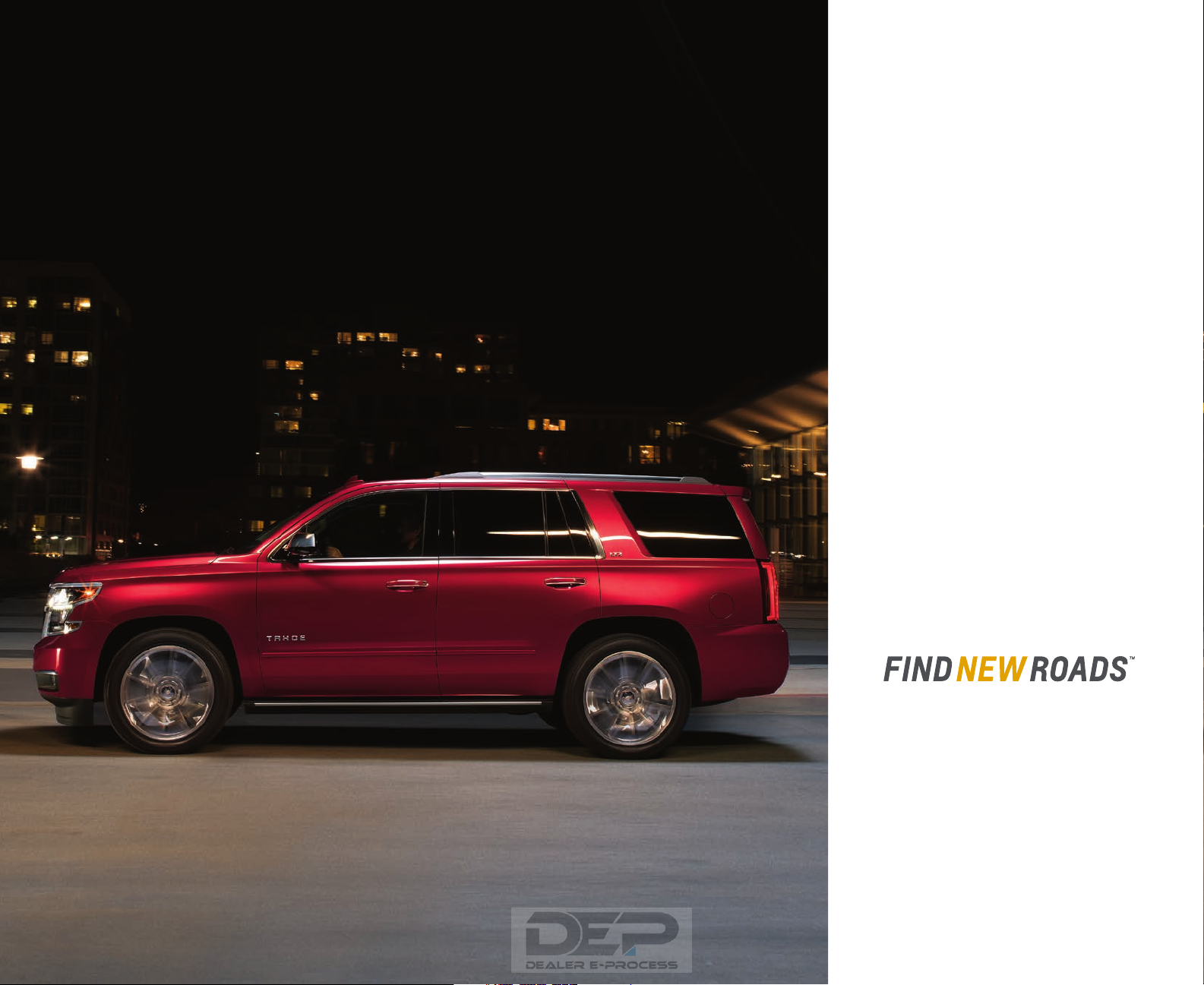
Tahoe LTZ in Siren Red Tintcoat (extra-cost
color) with available 22″ wheels and powerretractable assist steps.
PREMIUM STYLE MEETS
PURPOSEFUL CAPABILITY.
The award-winning Tahoe offers
a superb blend of sophistication,
craftsmanship and capability.
This premium SUV is stunning to
look at. It boasts a finely tailored,
spacious interior with the technology
you need to stay connected to your
world. With these credentials, it’s not
surprising Tahoe has been honored
by MotorWeek with its 2015 “Drivers’
Choice Award — Best Large Utility.”
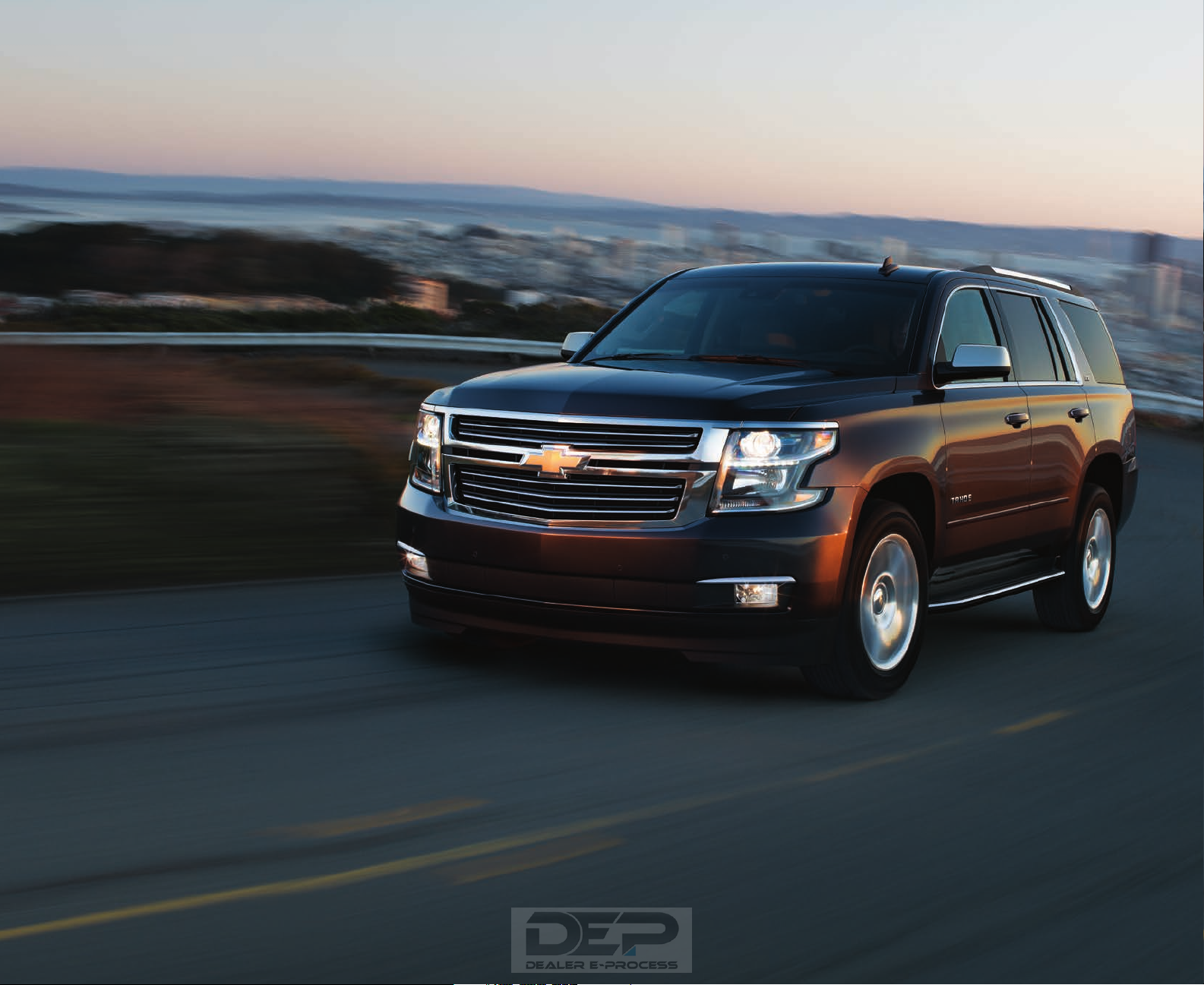
EXTERIOR DESIGN
TAHOE. FROM THE FAMILY OF THE
BEST-SELLING FULL-SIZE SUVs.
Tahoe LTZ in Tungsten Metallic.
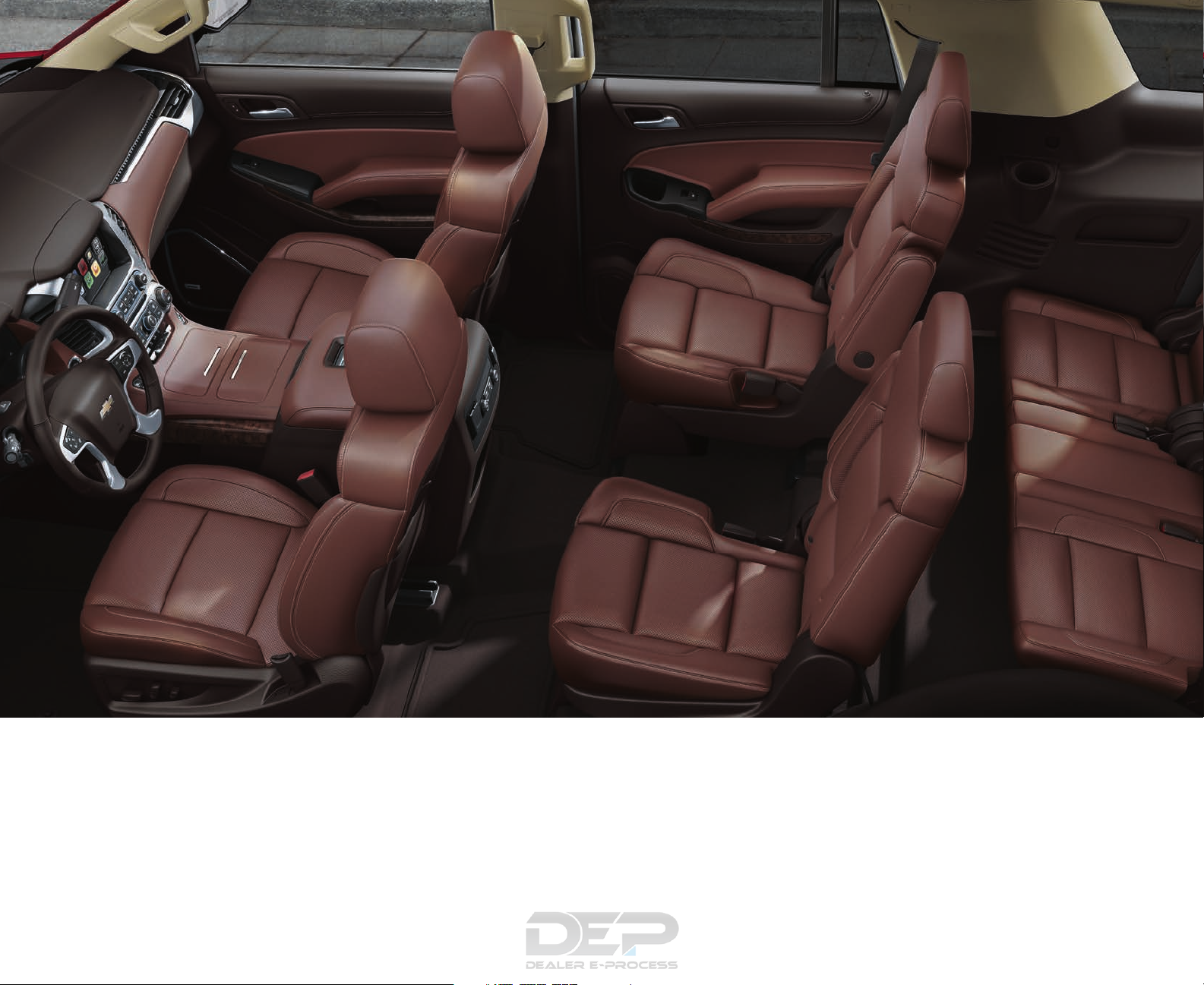
INTERIOR DESIGN
Tahoe LTZ interior in Cocoa/Mahogany
(extra-cost color) with perforated leather
appointments and available features.
“… keeps the outside world out
as effectively as does a luxury sedan.”
— Car and Driver
1
2
3
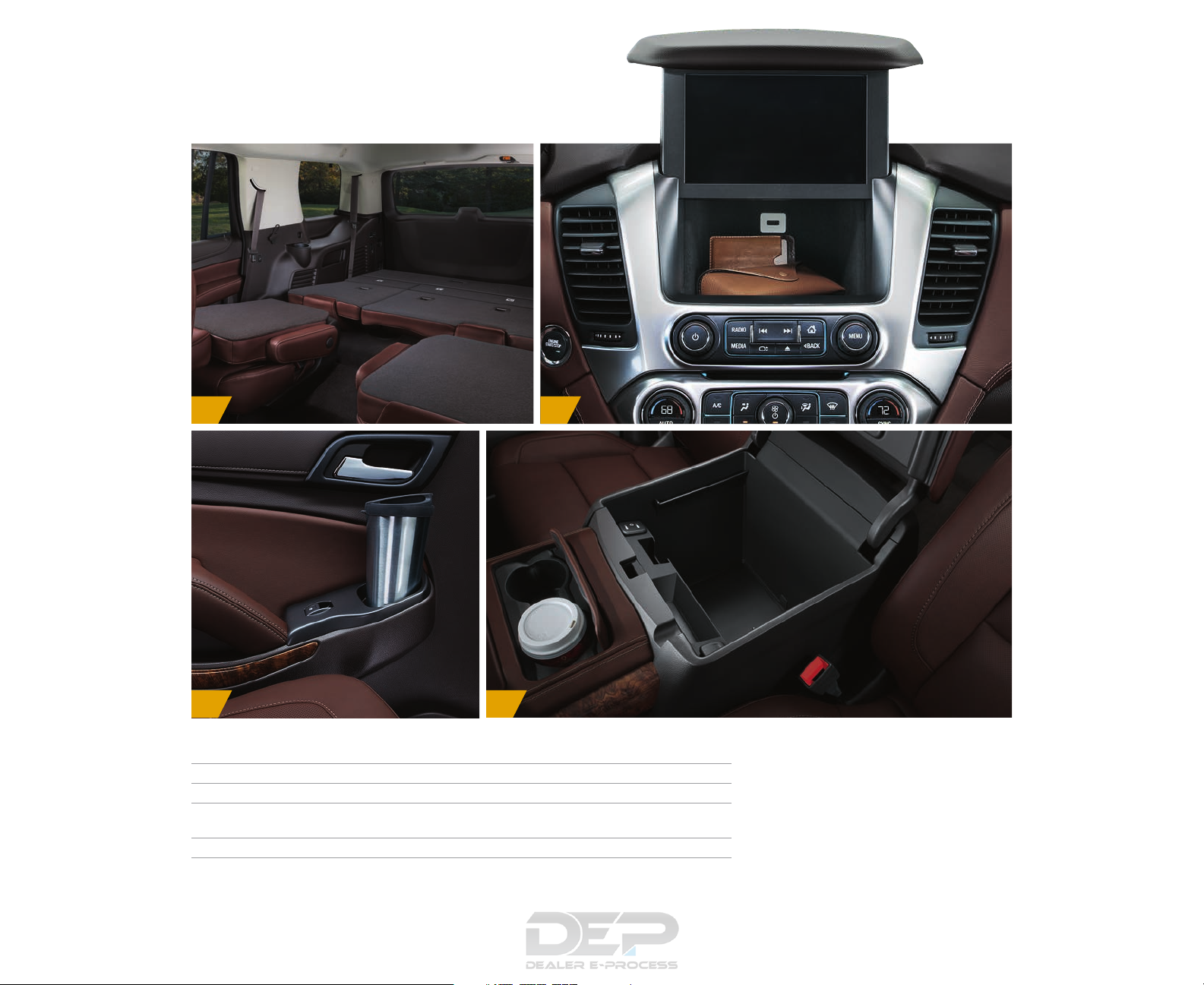
EXPAND YOUR PERSONAL SPACE.
1. With the available power feature, the second- and third-row seats fold flat in less than five seconds.
2. There’s lockable storage behind the 8-inch diagonal color touch-screen.
3. Each door has storage for maps, umbrellas and other small items, and with up to 15 cup holders,
you’ll find at least one in reach from every seat.
4. The center console opens to store larger items like a laptop, a tablet or hanging files.
4
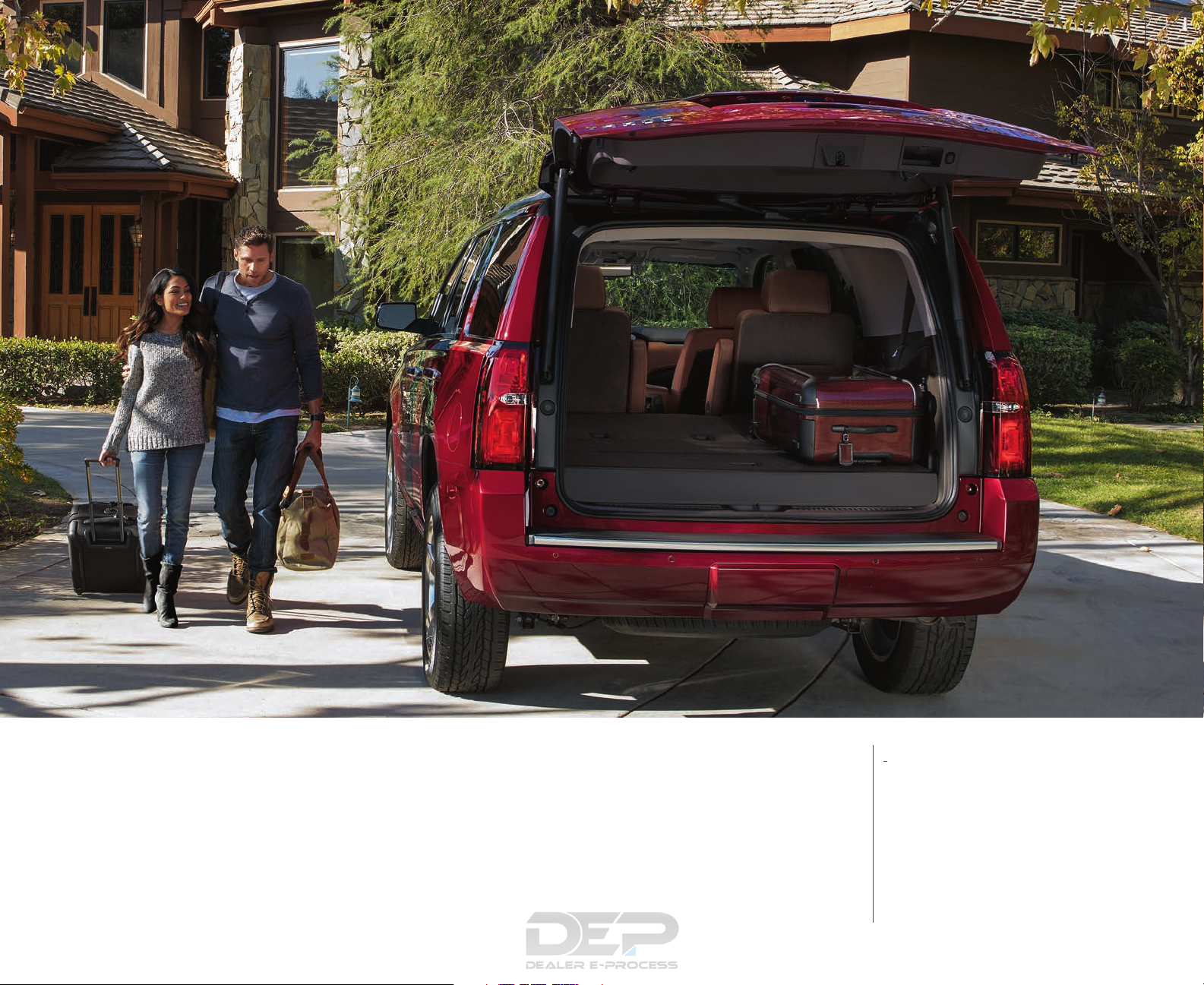
Tahoe LTZ in Siren Red Tintcoat
(extra-cost color) with available
power-retractable assist steps.
VERSATILITY DEFINED. How you use your
Tahoe changes from day to day and even
from trip to trip. The supremely quiet and
comfortable interior provides spaciousness
for up to nine passengers in LS models.
FAST-FOLDING REAR SEATS. Enjoy the
convenience of the fastest available
power-release second-row and powerfolding third-row seats of any competitor.
WIDE OPEN SPACES. With the second-
and third-row seats folded flat, Tahoe
offers 94.7 cu. ft. of cargo space.
1
HANDS-FREE POWER LIFTGATE. Standard
on LTZ, the hands-free programmable
power liftgate ensures that you’ll worry
less about the liftgate hitting a garage
door or being out of your reach. A sensor
under the rear bumper allows you to open
the liftgate with a gentle kicking motion.
1 Cargo and load capacity limited by weight and distribution.
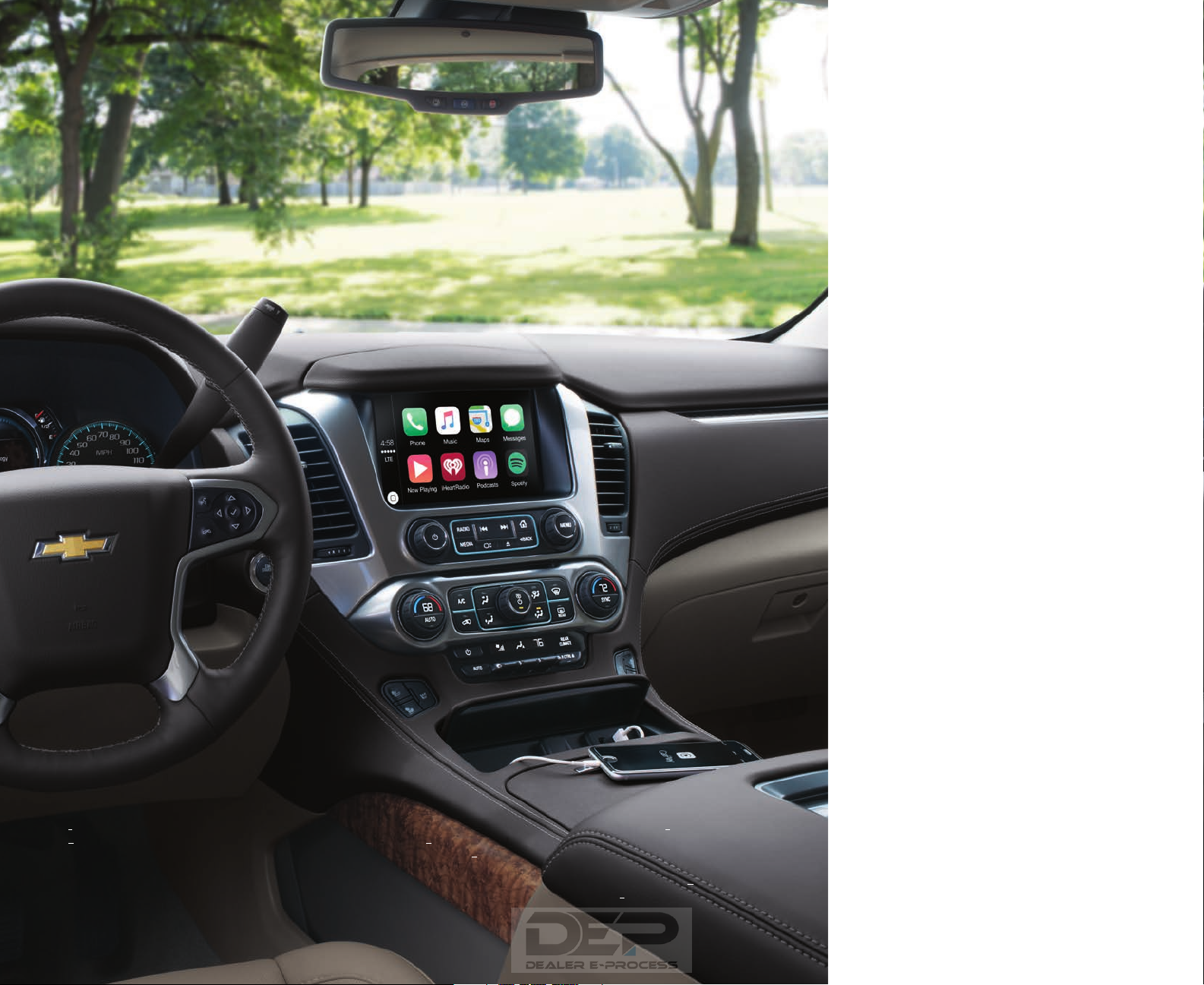
TECHNOLOGY
EASY ACCESS TO YOUR APPS. Chevy
Tahoe is the first vehicle in its class with
standard Apple CarPlay
1
compatibility.
This system takes some of the iPhone®
features you’d want to access and puts
them on your vehicle’s display in a smart,
simple manner. You’ll have access to
Phone, Music, Maps and Messages, as
well as some of your favorite audio apps
(e.g., iHeartRadio,
Bluetooth®
2
Spotify 2) controlled via
3
controls or the touch-screen
display in your SUV. Additionally, pair up to
10 compatible Bluetooth
with Chevrolet MyLink
3
enabled devices
4
and access your
contacts list, take phone calls and play
your favorite music.
Tahoe LTZ interior in Cocoa/Dune
with available features.
1 Vehicle user interface is a product of Apple and its terms and privacy statements apply. Requires compatible smartphone and data plan rates apply. 2 Data plan rates apply.
3 Go to my.chevrolet.com/learn to find out which phones are compatible with the vehicle. 4 Full functionality requires compatible Bluetooth and smartphone, and USB
connectivity for some devices. Map coverage available in the United States, Puerto Rico and Canada. 5 If you decide to continue service after your trial, the subscription plan
you choose will automatically renew thereafter and you will be charged according to your chosen payment method at then-current rates. Fees and taxes apply. To cancel you
must call SiriusXM at 1-866-635-2349. See SiriusXM Customer Agreement for complete terms at siriusxm.com. All fees and programming subject to change. 6 The system
wirelessly charges one PMA- or Qi-compatible mobile device. To che ck for phone or other device compatibility, see my.chevrolet.com/learn. 7 Not compatible with all devices.
Apple CarPlay and iPhone are trademarks of Apple Inc., registered in the U.S. and other countries.
SIRIUSXM SATELLITE RADIO.
5
Listen to
over 150 channels of commercial-free
music from every genre, live play-byplay sports, the biggest news and talk,
and the hottest entertainment at your
fingertips, 24/7. Welcome to an All Access
Package that lets you listen to all of it
everywhere — in your vehicle, at home
or in the office on your computer, or on
your smartphone or tablet.
ALWAYS IN CHARGE. With as many
as 13 charging locations, including an
available wireless charging pad
up to six USB ports
7
to connect phones,
6
and
tablets and other portable devices, you’ll
always stay in touch with your world.
STORE UP TO 60 FAVORITES. Chevrolet
4
MyLink
lets you program dozens of
favorites, including radio stations,
contacts, destinations (requires
Chevrolet MyLink Radio with available
Navigation), music and other media.
Canadian Vehicle Owners
3
Danger, Warning, and Caution
3
Instrument Panel Overview
7
Initial Drive Information
9
Remote Keyless Entry (RKE) System
9
Heated and Cooled Front Seats
15
Head Restraint Adjustment
15
Passenger Sensing System
16
Steering Wheel Adjustment
17
Throttle and Brake Pedal Adjustment
18
Windshield Wiper/Washer
20
Portable Audio Devices
24
Steering Wheel Controls
24
Driver Information Center (DIC)
25
Forward Collision Alert (FCA) System
26
Front Automatic Braking (FAB) System
26
Lane Keep Assist (LKA)
26
Lane Change Alert (LCA)
26
Rear Vision Camera (RVC)
27
Rear Cross Traffic Alert (RCTA) System
27
Universal Remote System
28
Performance and Maintenance
29
Traction Control/Electronic Stability Control
29
Engine Oil Life System
29
Driving for Better Fuel Economy
30
Roadside Assistance Program
31
Keys, Doors, and Windows
32
Remote Keyless Entry (RKE) System
36
Remote Keyless Entry (RKE) System Operation (Key Access)
36
Remote Keyless Entry (RKE) System Operation (Keyless Access)
38
Immobilizer Operation (Key Access)
55
Immobilizer Operation (Keyless Access)
55
Interior Rearview Mirrors
59
Manual Rearview Mirror
59
Automatic Dimming Rearview Mirror
60
Heated and Cooled Front Seats
71
How to Wear Safety Belts Properly
82
Safety Belt Use During Pregnancy
88
Replacing Safety Belt System Parts after a Crash
90
Where Are the Airbags?
92
When Should an Airbag Inflate?
93
What Makes an Airbag Inflate?
95
How Does an Airbag Restrain?
95
What Will You See after an Airbag Inflates?
95
Passenger Sensing System
97
Servicing the Airbag-Equipped Vehicle
101
Adding Equipment to the Airbag-Equipped Vehicle
101
Replacing Airbag System Parts after a Crash
102
Infants and Young Children
104
Child Restraint Systems
107
Where to Put the Restraint
108
Lower Anchors and Tethers for Children (LATCH System)
110
Replacing LATCH System Parts After a Crash
117
Securing Child Restraints (Center Front Seat)
118
Securing Child Restraints (Rear Seat)
118
Securing Child Restraints (Front Passenger Seat)
120
Instrument Panel Storage
123
Center Console Storage
124
Additional Storage Features
125
Instruments and Controls
127
Steering Wheel Adjustment
128
Steering Wheel Controls
129
Heated Steering Wheel
130
Windshield Wiper/Washer
130
Rear Window Wiper/Washer
132
Warning Lights, Gauges, and Indicators
137
Engine Oil Pressure Gauge
142
Engine Coolant Temperature Gauge
143
Safety Belt Reminders
145
Airbag Readiness Light
145
Passenger Airbag Status Indicator
146
Charging System Light
147
Malfunction Indicator Lamp (Check Engine Light)
147
Brake System Warning Light
149
Antilock Brake System (ABS) Warning Light
150
Lane Keep Assist (LKA) Light
150
Vehicle Ahead Indicator
151
StabiliTrak® OFF Light
151
Traction Control System (TCS)/StabiliTrak® Light
151
Low Fuel Warning Light
152
Driver Information Center (DIC) (Base Level)
154
Driver Information Center (DIC) (Uplevel)
156
Head-Up Display (HUD)
158
Battery Voltage and Charging Messages
162
Brake System Messages
163
Cruise Control Messages
163
Engine Cooling System Messages
164
Engine Power Messages
165
Key and Lock Messages
166
Object Detection System Messages
167
Ride Control System Messages
168
Airbag System Messages
170
Steering System Messages
170
Starting the Vehicle Messages
170
Transmission Messages
171
Vehicle Reminder Messages
173
Washer Fluid Messages
173
Vehicle Personalization
174
Universal Remote System
180
Universal Remote System Programming
180
Universal Remote System Operation
183
Exterior Lamp Controls
184
Exterior Lamps Off Reminder
186
Headlamp High/Low-Beam Changer
186
Daytime Running Lamps (DRL)
187
Automatic Headlamp System
187
Hazard Warning Flashers
188
Turn and Lane-Change Signals
188
Instrument Panel Illumination Control
189
Battery Load Management
191
Battery Power Protection
192
Theft-Deterrent Feature
194
Rear Side Window Antenna
202
Bluetooth (Infotainment Controls — Base Radio)
210
Bluetooth (Voice Recognition — Base Radio)
214
Trademarks and License Agreements
219
Climate Control Systems
221
Dual Automatic Climate Control System
221
Rear Climate Control System
225
Passenger Compartment Air Filter
226
Driving and Operating
228
Hill and Mountain Roads
238
If the Vehicle Is Stuck
239
Starting and Operating
245
Adjustable Throttle and Brake Pedal
245
Ignition Positions (Keyless Access)
246
Ignition Positions (Key Access)
248
Retained Accessory Power (RAP)
252
Parking over Things That Burn
254
Active Fuel Management®
255
Running the Vehicle While Parked
256
Automatic Transmission
256
Antilock Brake System (ABS)
266
Hill Start Assist (HSA)
267
Traction Control/Electronic Stability Control
268
Hill Descent Control (HDC)
270
Magnetic Ride Control
271
Automatic Level Control
271
Adaptive Cruise Control
274
Driver Assistance Systems
281
Assistance Systems for Parking or Backing
282
Assistance Systems for Driving
284
Forward Collision Alert (FCA) System
284
Front Automatic Braking (FAB) System
287
Side Blind Zone Alert (SBZA)
288
Lane Change Alert (LCA)
288
Lane Departure Warning (LDW)
290
Lane Keep Assist (LKA)
290
California Fuel Requirements
293
Fuels in Foreign Countries
293
Filling a Portable Fuel Container
296
General Towing Information
297
Driving Characteristics and Towing Tips
297
Trailer Sway Control (TSC)
309
Conversions and Add-Ons
310
Add-On Electrical Equipment
310
California Proposition 65 Warning
312
California Perchlorate Materials Requirements
313
Accessories and Modifications
313
Doing Your Own Service Work
313
Engine Compartment Overview
315
Engine Oil Life System
318
Automatic Transmission Fluid
319
Engine Air Cleaner/Filter
322
Battery — North America
332
Automatic Transmission Shift Lock Control Function Check
335
Ignition Transmission Lock Check
336
Park Brake and P (Park) Mechanism Check
336
Wiper Blade Replacement
336
Windshield Replacement
337
High Intensity Discharge (HID) Lighting
339
Front Turn Signal Lamps
340
Taillamps, Turn Signal, Stoplamps, and Back-Up Lamps
340
Electrical System Overload
342
Engine Compartment Fuse Block
343
Instrument Panel Fuse Block (Left)
346
Instrument Panel Fuse Block (Right)
349
Rear Compartment Fuse Block
351
Tire Sidewall Labeling
354
Tire Terminology and Definitions
356
Tire Pressure for High-Speed Operation
360
Tire Pressure Monitor System
361
Tire Pressure Monitor Operation
362
When It Is Time for New Tires
366
Different Size Tires and Wheels
368
Uniform Tire Quality Grading
369
Wheel Alignment and Tire Balance
370
Jump Starting — North America
383
Recreational Vehicle Towing
386
Service and Maintenance
401
Special Application Services
408
Additional Maintenance and Care
408
Recommended Fluids, Lubricants, and Parts
411
Recommended Fluids and Lubricants
411
Maintenance Replacement Parts
412
Vehicle Identification
415
Vehicle Identification Number (VIN)
415
Service Parts Identification Label
415
Capacities and Specifications
416
Engine Drive Belt Routing
417
Customer Satisfaction Procedure
418
Customer Assistance Offices
420
Customer Assistance for Text Telephone (TTY) Users
421
GM Mobility Reimbursement Program
422
Roadside Assistance Program
422
Scheduling Service Appointments
424
Courtesy Transportation Program
424
Collision Damage Repair
425
Service Publications Ordering Information
427
Radio Frequency Statement
428
Reporting Safety Defects
428
Reporting Safety Defects to the United States Government
428
Reporting Safety Defects to the Canadian Government
429
Reporting Safety Defects to General Motors
429
Vehicle Data Recording and Privacy
429
OnStar Additional Information
436
Where could I locate the VIN number for my Chevrolet?
The position of the VIN number varies among car brands and models. It might be imprinted on the car’s frame or displayed on a plate. It’s advisable to refer to the manual of the Chevrolet Tahoe (2016) for precise details on where to find the VIN number.
How can I check my Chevrolet Tahoe (2016) tire pressure?
You can check your Chevrolet Tahoe (2016) tire pressure using a tire pressure gauge. The recommended tire pressure can usually be found on a sticker inside the driver’s door or in the owner’s manual.
What type of oil does my Chevrolet Tahoe need?
The type of oil your Chevrolet Tahoe needs depends on the engine. Consult the owner’s manual for the recommended oil viscosity and specification.
What exactly is a VIN number?
A VIN number, also known as a Vehicle Identification Number, serves as a unique identifier for each vehicle. It is best to consult the manual of the Chevrolet Tahoe (2016) for the exact location of the VIN number.
Where can I find information about my Chevrolet Tahoe warranty coverage?
Details about your Chevrolet Tahoe (2016) warranty coverage can be found in the warranty booklet provided with the vehicle. It typically includes information on the duration and coverage of different components.
When should I schedule maintenance for my Chevrolet Tahoe?
Regular maintenance is essential for optimal vehicle performance. Details regarding the frequency of maintenance and specific tasks can be found in the maintenance instructions. Typically, major servicing should occur every two years or after covering 30,000 kilometers.
How do I reset the maintenance light on my Chevrolet Tahoe dashboard?
To reset the maintenance light on your Chevrolet Tahoe (2016) dashboard, follow the instructions outlined in the owner’s manual. Usually, it involves pressing a combination of buttons while the vehicle is in a specific mode.
At what intervals should I consider replacing my Chevrolet brake fluid?
It’s recommended to replace the brake fluid in your Chevrolet Tahoe (2016) every two years.
What should I do if my Chevrolet Tahoe check engine light comes on?
If your Chevrolet Tahoe (2016) check engine light comes on, it indicates a potential issue with the vehicle. It’s advisable to have the vehicle diagnosed by a qualified mechanic to determine the cause of the problem.
How often should I rotate the tires on my Chevrolet Tahoe?
Tire rotation helps ensure even wear and extends the life of your tires. It’s generally recommended to rotate the tires every 6,000 to 8,000 miles, or as specified in the Chevrolet Tahoe (2016) owner’s manual.
What should I do if my Chevrolet battery dies?
If your Chevrolet Tahoe battery dies, you can jump-start the vehicle using jumper cables and another vehicle with a charged battery. Alternatively, you can call roadside assistance for help.
What should I do if one or more doors refuse to open from the inside?
If you encounter difficulty opening doors from the inside, it’s likely that the child safety lock is engaged. The method to disengage the child safety lock varies depending on the car’s brand and model.
How do I program a new key fob for my Chevrolet Tahoe?
Programming a new key fob for your Chevrolet Tahoe typically requires following specific instructions outlined in the owner’s manual or seeking assistance from a dealership or locksmith.
What is the recommended interval for replacing the air filter in my Chevrolet Tahoe?
The recommended interval for replacing the air filter in your Chevrolet Tahoe (2016) varies depending on driving conditions. It’s generally recommended to check the air filter every 12,000 to 15,000 miles and replace it if necessary.
Is the manual for the Chevrolet Tahoe (2016) accessible in English?
Yes, the manual for the Chevrolet Tahoe (2016) is indeed available in English.
- Topics
- Car Service Manuals, chevrolet,
- Collection
- manuals_chevrolet; manuals; additional_collections
- Language
- English
- Item Size
- 144.4M
- Addeddate
- 2016-11-08 20:16:39
- Identifier
- car-service-manuals-chevrolet-2016-tahoe
- Identifier-ark
- ark:/13960/t9867h94n
- Ocr
- ABBYY FineReader 11.0
- Pages
- 453
- Ppi
- 300
plus-circle Add Review
plus-circle Add Review
comment
Reviews
There are no reviews yet. Be the first one to
write a review.
103
Views
DOWNLOAD OPTIONS
download 1 file
ABBYY GZ download
Temporarily Unavailable
DAISY
For users with print-disabilities
Temporarily Unavailable
EPUB
download 1 file
FULL TEXT download
download 1 file
ITEM TILE download
download 1 file
PDF download
download 1 file
SINGLE PAGE PROCESSED JP2 ZIP download
download 1 file
TORRENT download
download 12 Files
download 6 Original
SHOW ALL
IN COLLECTIONS
Manuals: Chevrolet
The Manual Library
Additional Collections
Uploaded by
chris85
on