

N68C-GS4 FX /
N68C-S4 FX
User Manual
Version 1.0
Published October 2013
Copyright©2013 ASRock INC. All rights reserved.
11
1
11

Copyright Notice:Copyright Notice:
Copyright Notice:
Copyright Notice:Copyright Notice:
No part of this manual may be reproduced, transcribed, transmitted, or translated in
any language, in any form or by any means, except duplication of documentation by
the purchaser for backup purpose, without written consent of ASRock Inc.
Products and corporate names appearing in this manual may or may not be registered trademarks or copyrights of their respective companies, and are used only for
identification or explanation and to the owners’ benefit, without intent to infringe.
Disclaimer:Disclaimer:
Disclaimer:
Disclaimer:Disclaimer:
Specifications and information contained in this manual are furnished for informational use only and subject to change without notice, and should not be constructed
as a commitment by ASRock. ASRock assumes no responsibility for any errors or
omissions that may appear in this manual.
With respect to the contents of this manual, ASRock does not provide warranty of
any kind, either expressed or implied, including but not limited to the implied warranties or conditions of merchantability or fitness for a particular purpose.
In no event shall ASRock, its directors, officers, employees, or agents be liable for
any indirect, special, incidental, or consequential damages (including damages for
loss of profits, loss of business, loss of data, interruption of business and the like),
even if ASRock has been advised of the possibility of such damages arising from a n y
defect or error in the manual or product.
This device complies with Part 15 of the FCC Rules. Operation is subject to the
following two conditions:
(1) this device may not cause harmful interference, and
(2) this device must accept any interference received, including interference that
may cause undesired operation.
CALIFORNIA, USA ONLY
The Lithium battery adopted on this motherboard contains Perchlorate, a toxic
substance controlled in Perchlorate Best Management Practices (BMP) regulations
passed by the California Legislature. When you discard the Lithium battery in
California, USA, please follow the related regulations in advance.
“Perchlorate Material-special handling may apply, see
www.dtsc.ca.gov/hazardouswaste/perchlorate”
ASRock Website: http://www.asrock.com
22
2
22

ContentsContents
Contents
ContentsContents
1.1.
IntroductionIntroduction
1.
Introduction
1.1.
IntroductionIntroduction
1.1 Package Contents…………………………………………………………… 5
1.2 Specifications …………………………………………………………………. 6
1.3 Unique Features ……………………………………………………………… 9
1.4 Motherboard Layout …………………………………………………………. 1 1
1.5 I/O Panel………………………………………………………………………… 12
2.2.
InstallationInstallation
2.
Installation
2.2.
InstallationInstallation
Pre-installation Precautions ………………………………………………………. 14
2.1 CPU Installation ………………………………………………………………. 15
2.2 Installation of CPU Fan a nd Heatsink………………………………….. 15
2.3 Installation of Memory Modules (DIMM) ……………………………… 16
2.4 Expansion Slots (PCI and PCI Express Slots) ……………………………. 18
2.5 Jumpers Se tup ……………………………………………………………….. 19
2.6 Onboard Headers and Connectors ……………………………………… 20
2.7 Driver Installation Guide ……………………………………………………. 24
2.8 Installing Windows® 8 / 8 64-bit / 7 / 7 64-bit / VistaTM / Vista
64-bit / XP / XP 64-bit Without RAID Functions ……………………. 24
2.9 Installing Windows® 8 / 8 64-bit / 7 / 7 64-bit / VistaTM / Vista
64-bit / XP / XP 64-bit With RAID Functions ………………………… 24
2.9.1 Installing Windows® XP / XP 64-bit With RAID
2.9.2 Installing Windows® 8 / 8 64-bit / 7 / 7 64-bit / VistaTM /
2.10 Untied Overclocking T echnology ………………………………………… 26
2.1 1 ASRock Home Cloud……………………………………………………….. 27
3.3.
BIOS SBIOS S
3.
BIOS S
3.3.
BIOS SBIOS S
3.1 Introduction …………………………………………………………………….. 35
3.2 Main Screen …………………………………………………………………… 36
3.3 OC Tweaker Screen …………………………………………………………. 37
3.4 Advanced Screen …………………………………………………………….. 42
ETUP UTILITYETUP UTILITY
ETUP UTILITY
ETUP UTILITYETUP UTILITY
3.1.1 BIOS Menu Bar ……………………………………………………… 35
3.1.2 Navigation Keys …………………………………………………….. 36
3.4.1 CPU Configuration………………………………………………….. 43
3.4.2 Chipset Configuration ……………………………………………… 44
3.4.3 ACPI Configuration …………………………………………………. 45
3.4.4 Storage Configuration……………………………………………… 46
3.4.5 PCIPnP Configuration……………………………………………… 48
3.4.6 Floppy Configuration……………………………………………….. 49
3.4.7 Super IO Configuration ……………………………………………. 49
…………………………………………………..…………………………………………………..
…………………………………………………..
…………………………………………………..…………………………………………………..
…………………………………………………….…………………………………………………….
…………………………………………………….
…………………………………………………….…………………………………………………….
Functions ……………………………………………………………. 24
TM
Vista
64-bit With RAID Functions …………………………. 25
…………………………………………..…………………………………………..
…………………………………………..
…………………………………………..…………………………………………..
5 5
5
5 5
14 14
14
14 14
TM
TM
35 35
35
35 35
33
3
33

3.4.8 USB Configuration ………………………………………………….. 51
3.5 Hardware Health Event Monitoring Screen …………………………… 52
3.6 Boot Screen …………………………………………………………………… 53
3.6.1 Boot Settings Configuration……………………………………… 53
3.7 Security Screen………………………………………………………………. 54
3.8 Exit Screen…………………………………………………………………….. 55
4.4.
Software SupportSoftware Support
4.
Software Support
4.4.
Software SupportSoftware Support
4.1 Install Operating System ………………………………………………….. 56
4.2 Support CD Information …………………………………………………….. 56
4.2.1 Running Support CD……………………………………………….. 56
4.2.2 Drivers Menu …………………………………………………………. 56
4.2.3 Utilities Menu ………………………………………………………… 56
4.2.4 Contact Information…………………………………………………. 56
…………………………………………………………………………………………
……………………………………………
…………………………………………………………………………………………
56 56
56
56 56
44
4
44

1.1.
IntroductionIntroduction
1.
Introduction
1.1.
IntroductionIntroduction
Thank you for purcha sing ASRock N68C-GS4 FX / N68C-S4 FX motherboard, a reliable
motherboard produced under ASRock’s consistently stringent quality control. It delivers
excellent performance with robust design conf orming to ASRock’s commitment to quality and endurance.
In this manual, cha pter 1 a nd 2 contain introduction of the motherboard and step-by-ste p
guide to the hardware installation. Chapter 3 and 4 contain the configuration guide to
BIOS setup and information of the Support CD.
Because the motherboard specifications and the BIOS software might be
updated, the content of this manual will be subject to change without
notice. In case any modifications of this manual occur, the updated
version will be available on ASRock website without further notice. You
may find the latest VGA cards and CPU support lists on ASRock website
as well. ASRock website
If you require technical support related to this motherboard, please visit
our website for specific information about the model you are using.
www.asrock.com/support/index.asp
http://www.asrock.com
1.1 P1.1 P
1.1 P
1.1 P1.1 P
One ASRock N68C-GS4 FX / N68C-S4 FX Motherboard (Micro ATX Form Factor)
One ASRock N68C-GS4 FX / N68C-S4 FX Quick Installation Guide
One ASRock N68C-GS4 FX / N68C-S4 FX Support CD
Two Serial ATA (SATA) Data Cables (Optional)
One I/O Panel Shield
ackack
age Contentsage Contents
ack
age Contents
ackack
age Contentsage Contents
55
5
55

1.2 Specifications1.2 Specifications
1.2 Specifications
1.2 Specifications1.2 Specifications
Platform — Micro ATX Form Factor
A-Style — Home Cloud (N68C-GS4 FX)
CPU — Support for Socket AM3+ processors
— Support for AM3 proce ssors: AMD PhenomTM II X6 / X4 / X3 /
X2 (except 920 / 940) / Athlon II X4 / X3 / X2 / Sempron
processors (see CAUTION 1)
— Support for Socket AM2+ / AM2 processors: AMD Phenom
FX / Phenom / Athlon 64 FX / Athlon 64 X2 Dual-Core / Athlon
X2 Dual-Core / Athlon 64 / Sempron processor
— Supports 8-Core CPU
— Supports UCC feature (Unlock CPU Core) (see CAUTION 2)
— Supports AMD’s Cool ‘n’ QuietTM T e chnology
— FSB 1000 MHz (2.0 GT/s)
— Supports Untied Overclocking Technology
— Supports Hyper-Transport Technology
Chipset — NVIDIA® GeForce 7025 / nForce 630a
Memory — Dual Channel DDR3/DDR2 Memory Technology
— 2 x DDR3 DIMM slots
— Support DDR3 1600/1333/1066 non-ECC, un-buf fered memory
(see CAUTION 3)
— Max. ca pacity of system memory: 16GB (see CAUTION 4)
— 2 x DDR2 DIMM slots
— Support DDR2 1066/800/667/533 non-ECC, un-buf fered memory
(see CAUTION 5)
— Max. capacity of system memory: 8GB (see CAUTION 4)
Expansion Slot — 1 x PCI Express x16 slot
— 1 x PCI Express x1 slot
— 2 x PCI slots
Graphics — Integrated N VIDIA® GeForce 7025 gra phics
— D X9.0 VGA, Pixel Shader 3.0
— Max. shared memory 256MB
— Supports D-Sub with max. resolution up to 1920×1440
@ 60Hz
Audio — 5.1 CH HD Audio (Realtek ALC662 / VIA® VT1705 Audio Codec)
LAN N68C-GS4 FX:
— Qualcomm® Atheros® AR8171, speed 10/100/1000 Mb/s
— Supports Qualcomm® Atheros® Security Wa ke On Internet
Technology
— Supports Wa ke-On-LAN
TM
66
6
66

— Supports Energy Efficient Ethernet 802.3az
— Supports PXE
N68C-S4 FX:
— Atheros® AR8152, speed 10/100 Mb/s
— Supports Wa ke-On-LAN
— Supports PXE
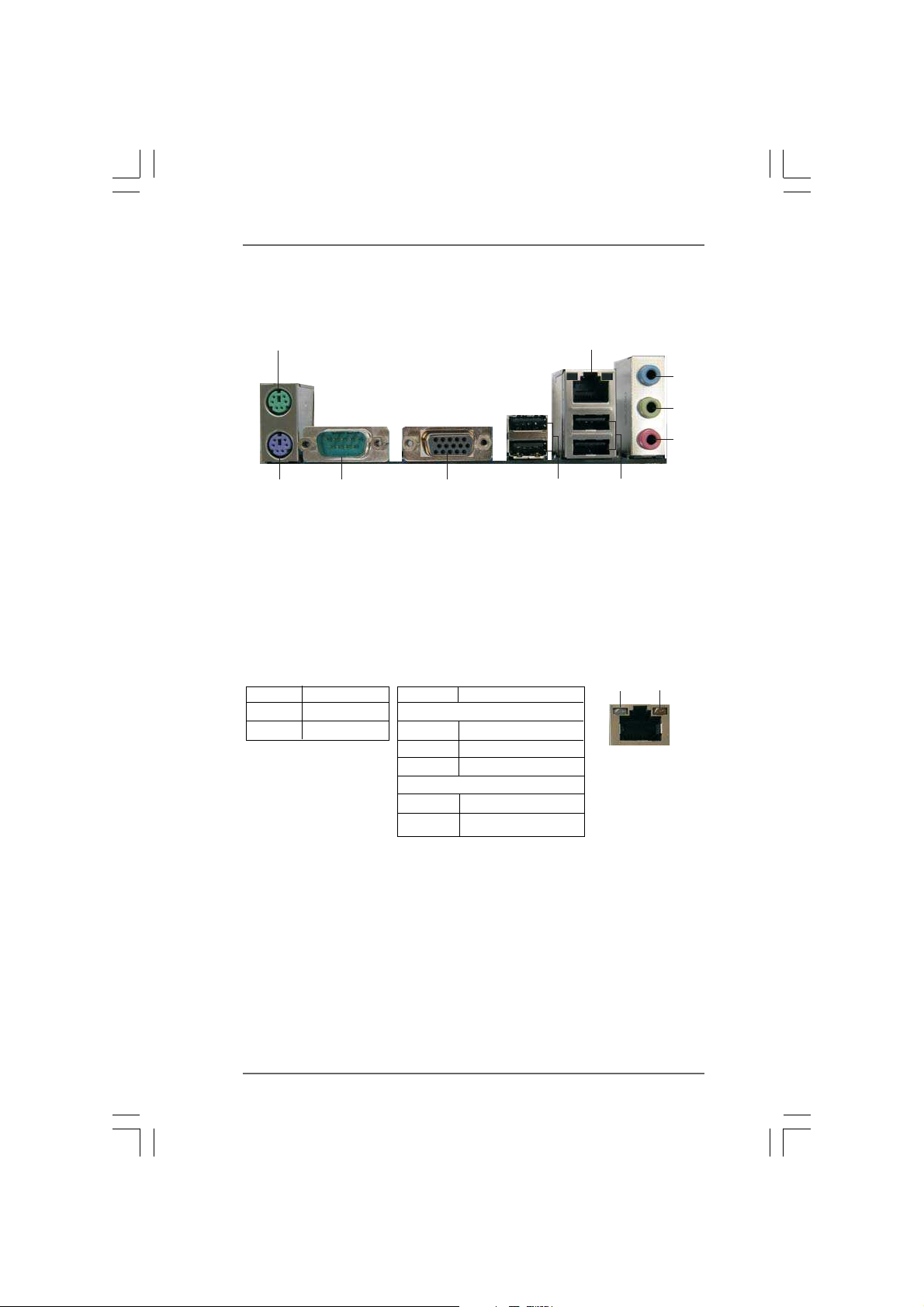
Rear Panel I/O I/O Panel
— 1 x PS/2 Mouse Port
— 1 x PS/2 Keyboard Port
— 1 x Serial Port: COM1
— 1 x VGA Port
— 4 x USB 2.0 Ports
— 1 x RJ-45 LAN Port with LED (ACT/LINK LED a nd SPEED LED)
— HD Audio Jack: Line in / Front Speaker / Microphone
Storage — 4 x SATA2 3.0Gb/s conne ctors, support RAID (RAID 0, RAID 1,
RAID 0+1, RAID 5, JBOD), NCQ and Hot Plug
Connector — 1 x A TA133 IDE connector (supports 2 x IDE devices)
— 1 x Floppy connector
— 1 x Print port header
— 1 x Chassis intrusion hea der
— 1 x CPU Fan connector (4-pin)
— 1 x Chassis Fa n connector (3-pin)
— 1 x Power Fan connector (3-pin)
— 1 x 24 pin A TX power connector
— 1 x 4 pin 12V power connector
— 1 x Front panel audio header
— 3 x USB 2.0 headers (support 6 USB 2.0 ports)
BIOS Feature — 8Mb AMI Legal BIOS
— Supports “Plug and Play”
— ACPI 1.1 Compli a nt W a ke Up Events
— Supports jumperfree
— SMBIOS 2.3.1 Support
— CPU, VCCM, NB Voltage Multi-adjustment
Support CD — Drivers, Utilities, AntiV irus Software (T ri al Version), Google
Chrome Browser and Toolbar, Start8 (30 days tri al)
Hardware — CPU T e mperature Sensing
Monitor — Chassis Temperature Sensing
— CPU Fan Tachometer
— Chassis Fa n Tachometer
— CPU Quiet Fan
— CASE OPEN detection
— Voltage Monitoring: +12V, +5V, +3.3V, Vcore
77
7
77

OS — Microsoft® Windows® 8.1 32-bit / 8.1 64-bit / 8 32-bit / 8 64-bit
/ 7 32-bit / 7 64-bit / VistaTM 32-bit / VistaTM 64-bit / XP 32-bit /
XP 64-bit (see CAUTION 6)
Certifications — FCC, CE, WHQL
— ErP/EuP ready (ErP/EuP ready power supply is required)
* For detailed product information, please visit our website: http://www.asrock.com
WA R NING
Please realize that there is a certain risk involved with overclocking, including adjusting
the setting in the BIOS, applying Untied Overclocking Technology, or using the thirdparty overclocking tools. Overclocking may affect your system stability, or even
cause damage to the components and devices of your system. It should be done at
your own risk and expense. We are not responsible for possible damage caused by
overclocking.
CAUTION!
1. This motherboard supports CPU up to 95W. Please refer to our website for
CPU support list. ASRock website
2. UCC (Unlock CPU Core) feature simplifies AMD CPU activation. As long as
a simple switch of the BIOS option “ASrock UCC”, you can unlock the extra
CPU core to enjoy an instant performance boost. When UCC feature is
enabled, the dual-core or triple-core CPU will boost to the quad-core CPU,
and some CPU, including quad-core CPU, can also increase L3 cache size
up to 6MB, which means you can enjoy the upgrade CPU performance with
a better price. Please be noted that UCC feature is supported with AM2+ /
AM3 / AM3+ CPU only, and in addition, not every AM2+ / AM3 / AM3+ CPU can
support this function because some CPU’s hidden core may be
malfunctioned.
3. Whether 1600MHz memory speed is supported depends on the AM3/
AM3+ CPU you adopt. If you want to adopt DDR3 1600 memory module
on this motherboard, please refer to the memory support list on our
website for the compatible memory modules.
ASRock website
4. Due to the operating system limitation, the actual memory size may be
less than 4GB for the reservation for system usage under Windows® 8
/ 7 / Vista
limitation.
5. Whether 1066MHz memory speed is supported depends on the AM2+
/ AM3 CPU you adopt. If you want to adopt DDR2 1066 memory module
on this motherboard, please refer to the memory support list on our
website for the compatible memory modules.
ASRock website
6. This motherboard does not support RAID mode under Windows® 8.1
32-bit / 8.1 64-bit.
http://www.asrock.com
TM
/ XP. For Windows® OS with 64-bit CPU, there is no such
http://www.asrock.com
http://www.asrock.com
88
8
88

1.3 Unique Features1.3 Unique Features
1.3 Unique Features
1.3 Unique Features1.3 Unique Features
ASRock OC Tuner
ASRock OC Tuner is a user-friendly overclocking tool which allows
you to surveil your system by hardware monitor function and overclock
your hardware devices to get the best system performance under
WindowsR environment. Plea se visit our website for the operation
procedures of ASRock OC T uner.
ASRock Instant Boot
ASRock Instant Boot allows you to turn on your PC in just a few
seconds, provides a much more efficient way to save energy, time,
money, and improves system running speed for your system. It
leverages the S3 and S4 ACPI feature s which normally ena ble the
Sleep/Standby a nd Hibernation modes in WindowsR to shorten boot
up time. By calling S3 and S4 at specific timing during the shutdown and startup process, Instant Boot allows you to enter your
WindowsR desktop in a few seconds.
ASRock Instant Fla sh
ASRock Instant Flash is a BIOS flash utility embedded in Flash
ROM. This convenient BIOS update tool allows you to update system BIOS without entering operating systems first like MS-DOS or
WindowsR. With this utility, you can press the <F6> key during the
POST or the <F2> key to enter into the BIOS setup menu to access ASRock Insta nt Flash. Just launch this tool and save the new
BIOS file to your USB flash drive, floppy dis k or hard drive, then you
can update your BIOS only in a few clicks without preparing an
additional floppy diskette or other complicated flash utility. Please
be noted that the USB flash drive or hard drive must use F AT32/16/
12 file system.
ASRock OC DNA
The software name itself – OC DNA literally tells you what it is
capable of. OC DNA, an exclusive utility developed by ASRock,
provides a convenient way for the user to record the OC settings
and share with others. It helps you to save your overclocking record
under the operating system and simplif ies the complicated recording process of overclocking settings. With OC DNA, you can save
your OC settings as a profile a nd share with your friends! Y our friends
then can load the OC profile to the ir own system to get the same
99
9
99

OC settings as yours! Please be noticed that the OC profile can
only be shared and worked on the sa me motherboard.
ASRock APP Charger
If you desire a faster, less restricted way of charging your Apple
devices, such as iPhone/iPa d/iPod Touch, ASRock has prepared a
wonderful solution for you — ASRock APP Charger. Simply install
the APP Charger driver, it makes your iPhone charge much quickly
from your computer and up to 40% fa ster tha n before. ASRock APP
Charger allows you to quickly charge many Apple devices si multaneously and even supports continuous charging when your PC enters into Standby mode (S1), Suspend to RAM (S3), hibernation
mode (S4) or power off (S5). With APP Charger driver installed, you
can easily enjoy the marvelous charging experience.
ASRock XFast USB
ASRock XFast USB can boost USB storage device performance.
The performance may depend on the propertie s of the device.
ASRock XFast LAN
ASRock XFast LAN provides a faster internet access, which includes the benefits listed below . LAN Application Prioritization: You
can configure your application’s priority ideally and/or add new
programs. Lower Latency in Game: After setting online game’s priority higher, it ca n lower the latency in games. Traffic Sha ping: You
can watch Youtube HD videos a nd download si multa neously. RealTime An alysis of Your Data: With the status window , you ca n easily
recognize which data strea ms you are transferring currently.
ASRock XFast RAM
ASRock XFast RAM fully utilizes the me mory spa ce that ca nnot be
used under WindowsR OS 32-bit CPU. ASRock XFast RAM shortens the loading time of previously visited websites, making web
surfing faster than ever. And it also boosts the speed of Adobe
Photoshop 5 times fa ster . Another a dvantage of ASRock XFa st RAM
is that it reduces the frequency of accessing your SSDs or HDDs in
order to extend their lifespan.
1010
10
1010

1.4 Motherboard Layout1.4 Motherboard Layout
1.4 Motherboard Layout
1.4 Motherboard Layout1.4 Motherboard Layout
Keyboard
Mouse
PS2
PS2
ATX12V1
CPU_FAN1
COM1
VGA1
USB 2.0
T:USB2
B: USB3
USB 2.0
T:USB0
B: USB1
Bottom:
MIC IN
HD_AUDIO1
1
FRONT
AUDIO
CODEC
Center:
Super
Top:
RJ-45
I/O
1
Top:
LINE IN
LAN
PHY
PCIE1
PCIE2
RoHS
PCI1
CI1
PWR_FAN1
FLOPPY1
PCI2
SOCKET AM2/AM3/AM3+
X
Fast RAM
X
Fast LAN
NVIDIA
GeForce
7025 /
nForce
630a
LPT1
SATAII_1
SATAII_2 SATAII_4
CMOS
BATTERY
CLRCMOS1
1
PANEL1
1
1
11
HDLED RESET
(PORT0.0)
(PORT0.1) (PORT1.1)
PLED PWRBTN
FSB800
DDRII_1 (64bit, 240-pin module)
SATAII_3
X
CHA_FAN1
DDR3_A1 (64bit, 240-pin module)
(PORT1.0)
8Mb
BIOS
Fast USB
SPEAKER1
1
FSB800
DDR3_B1 (64bit, 240-pin module)
DDRII_2 (64bit, 240-pin module)
1
USB4_5
USB6_7
1
ATXPWR1
IDE1
1
USB8_9
1 CPU Fan Connector (CPU_FAN1) 11 USB 2.0 Header (USB8_9)
2 ATX 12V Power Connector (ATX12V1) 12 USB 2.0 Header (USB6_7)
3 2 x 240-pin DDR2 DIMM Slots 13 USB 2.0 Header (USB4_5)
(Dual Channel: DDRII_1, DDRII_2; Yellow) 14 Chassis Speaker Header (SPEAKER1)
4 2 x 240-pin DDR3 DIMM Slots 15 Chassis Fan Connector (CHA_FAN1)
(Dual Channel: DDR3_A1, DDR3_B1; Black) 16 System Panel Header (PANEL1)
5 ATX Power Connector (ATXPWR1) 17 Clear CMOS Jumper (CLRCMOS1)
6 Primary IDE Connector (IDE1) 18 Print Port Header (LPT1)
7 SATA2 Connector (SATAII_1 (PORT 0.0)) 19 Floppy Connector (FLOPPY1)
8 SATA2 Connector (SATAII_3 (PORT 1.0)) 20 Power Fan Connector (PWR_FAN1)
9 SATA2 Connector (SATAII_4 (PORT 1.1)) 21 Chassis Intrusion Header (CI1)
10 SATA2 Connector (SATAII_2 (PORT 0.1)) 22 Front Panel Audio Header (HD_AUDIO1)
1111
11
1111
1.5 I/O P1.5 I/O P
1.5 I/O P
1.5 I/O P1.5 I/O P
anelanel
anel
anelanel
1
2
3
4
5
910
1 PS/2 Mouse Port (Green) 6 USB 2.0 Ports (USB01)
* 2 RJ-45 Port 7 USB 2.0 Ports (USB23)
3 Line In (Light Blue) 8 D-Sub Port
4 Front Speaker (Lime) 9 COM Port
5 Microphone (Pink) 10 PS/2 Keyboard Port (Purple)
* There are two LED next to the LAN port. Please refer to the table below for the LAN port LED
indications.
LAN Port LED Indications
Activity/Link LED SPEED LED
Status Description Status Description
8
7
Off No Activity N68C-GS4 FX:
Blinking Data Activity Off 10Mbps connection
Orange 100Mbps connection
Green 1Gbps connection
N68C-S4 FX:
Off 10Mbps connection
Orange 100Mbps connection
6
ACT/LINK
LED
LAN Port
SPEED
LED
1212
12
1212

For Realtek ALC662 Audio Codec:
To enable Multi-Streaming function, you need to connect a front panel audio cable to the front
panel audio header. Please refer to below steps for the software setting of Multi-Streaming.
For Windows® XP:
After restarting your computer, you will find “Mixer” tool on your system. Please select “Mixer
ToolBox” , click “Enable playback multi-streaming”, and click “ok”. Choose “2CH” or
“4CH” and then you are allowed to select “Realtek HDA Primary output” to use Rear Speaker
and Front Speaker, or select “Realtek HDA Audio 2nd output” to use front panel audio. Then
reboot your system.
For Windows
®
8 / 7 / VistaTM:
After restarting your computer, please double-click “Realtek HD Audio Manager” on the
system tray. Set “Speaker Configuration” to “Quadraphonic” or “Stereo”. Click “Device
advanced settings”, choose “Make front and rear output devices playbacks two different audio
streams simultaneously”, and click “ok”. Then reboot your system.
®
For VIA
VT1705 Audio Codec:
To enable Multi-Streaming function, you need to connect a front panel audio cable to the front
panel audio header. After restarting your computer, you will find “VIA HD Audio Deck” tool on
your system. Please follow below instructions according to the OS you install.
For Windows
®
XP OS:
Please click “VIA HD Audio Deck” icon , and click “Speaker”. Then you are allowed to
select “2 Channel” or “4 Channel”. Click “Power” to save your change.
For Windows® 8 / 7 / VistaTM OS:
Please click “VIA HD Audio Deck” icon , and click “Advanced Options” on the left side
on the bottom. In “Advanced Options” screen, select “Independent Headphone”, and click
“OK” to save your change.
1313
13
1313

InstallationInstallation
2.2.
2.
Installation
InstallationInstallation
2.2.
This is a Micro ATX form factor motherboard. Before you install the motherboard, study
the configuration of your chassis to en sure that the motherboard fits into it.
Pre-installation PrecautionsPre-installation Precautions
Pre-installation Precautions
Pre-installation PrecautionsPre-installation Precautions
Take note of the following precautions before you install motherboard
components or change any motherboard settings.
Before you install or remove any component, ensure that the
power is switched off or the power cord is detached from the
power supply. Failure to do so may cause severe damage to the
motherboard, peripherals, and/or components.
1. Unplug the power cord from the wall socket before touching any
component.
2. To avoid damaging the motherboard components due to static
electricity, NEVER place your motherboard directly on the carpet or
the like. Also remember to use a grounded wrist strap or touch a
safety grounded object before you handle components.
3. Hold components by the edges and do not touch the ICs.
4. Whenever you uninstall any component, place it on a grounded antistatic pad or in the bag that comes with the component.
5. When pla cing screws into the screw holes to se cure the motherboard
to the chassis, please do not over-tighten the screws! Doing so may
damage the motherboard.
1414
14
1414

2.1 CPU Installation2.1 CPU Installation
2.1 CPU Installation
2.1 CPU Installation2.1 CPU Installation
Step 1. Unlock the socket by lifting the lever up to a 90
o
angle.
Step 2. Position the CPU directly above the socket such that the CPU corner with
the golden triangle matches the socket corner with a small tri angle.
Step 3. Carefully insert the CPU into the socket until it fits in place.
The CPU fits only in one correct orientation. DO NOT force the CPU
into the socket to avoid bending of the pins.
Step 4. When the CPU is in place, press it firmly on the socket while you push
down the socket lever to secure the CPU. The lever clicks on the side tab
to indicate that it is locked.
Lever 90° Up
CPU Golden Triangle
Socker Corner Small
Triangle
STEP 1:
Lift Up The Socket Lever
2.2 Installation of CPU Fan and Heatsink2.2 Installation of CPU Fan and Heatsink
2.2 Installation of CPU Fan and Heatsink
2.2 Installation of CPU Fan and Heatsink2.2 Installation of CPU Fan and Heatsink
STEP 2 / STEP 3:
Match The CPU Golden Triangle
To The Socket Corner Small
Triangle
STEP 4:
Push Down And Lock
The Socket Lever
After you install the CPU into this motherboard, it is necessary to install a
larger heatsink and cooling fan to dissipate heat. You also need to spray
thermal grease between the CPU a nd the heatsink to improve heat dissi pation.
Make sure that the CPU and the he atsink are securely fa stened a nd in good
contact with ea ch other . Then connect the CPU fa n to the CPU F AN connector (CPU_FAN1, see Page 11, No. 1). For proper installation, please kindly
refer to the instruction manuals of the CPU fa n and the heatsink.
1515
15
1515

2.3 Installation of Memor2.3 Installation of Memor
2.3 Installation of Memor
2.3 Installation of Memor2.3 Installation of Memor
y Modules (DIMM)y Modules (DIMM)
y Modules (DIMM)
y Modules (DIMM)y Modules (DIMM)
This motherboard provides two 240-pin DDR2 (Double Data Rate 2) DIMM slots and
two 240-pin DDR3 (Double Data Rate 3) DIMM slots, and supports Dual Channel
Memory Technology. For dual channel configuration, you always need to install
identical (the same bra nd, speed, size and chip-type) DDR2/DD R3 DIMM pair in
the slots of the same color. In other words, you have to install identical DDR2
DIMM pair in Dual Channel (DDRII_1 a nd DDRII_2; Yellow slots; see p.11 No.3), or
identical DDR3 DIMM pair in Dual Cha nnel (DDR3_A1 a nd DDR3_B1; Bla ck slots;
see p.11 No.4), so that Dual Channel Memory Technology can be activated. You
may refer to the Dual Cha nnel Memory Configuration Table below .
Dual Channel DDR2 Memory Configurations
(DS: Double Side, SS: Single Side)
DDRII_1 DDRII_2
(Yellow Slot) (Yellow Slot)
2 memory modules SS SS
2 memory modules DS DS
Dual Channel DDR3 Memory Configurations
(DS: Double Side, SS: Single Side)
DDR3_A1 DDR3_B1
(Black Slot) (Black Slot)
2 memory modules SS SS
2 memory modules DS DS
1. If you want to install two memory modules, for optimal compatibility and reliability, it is recommended to install them in the slots of
the same color. In other words, install them in the set of black slots
(DDR3_A1 and DDR3_B1), or in the set of yellow slots (DDRII_1
and DDRII_2).
2. If only one memory module is installed in the DIMM slot on this
motherboard, it is unable to activate the Dual Channel Memory
Technology.
3. It is not allowed to install a DDR3 memory module into DDR2 slot
or install a DDR2 memory module into DDR3 slot; otherwise, this
motherboard and DIMM may be damaged.
4. DDR2 and DDR3 memory modules cannot be installed on this
motherboard at the same time.
5. DDR3 memory module is only supported by installing AM3/AM3+
CPU. DDR2 memory module is only supported by installing AM2/
AM2+/AM3 CPU.
1616
16
1616

Installing a DIMMInstalling a DIMM
Installing a DIMM
Installing a DIMMInstalling a DIMM
Please make sure to disconnect power supply before adding or
removing DIMMs or the system components.
Step 1. Unlock a DIMM slot by pre ssing the retaining cli ps outward.
Step 2. Align a DIMM on the slot such that the notch on the DIMM matches the bre a k
on the slot.
notch
break
notch
break
The DIMM only fits in one correct orientation. It will cause permanent
damage to the motherboard and the DIMM if you force the DIMM into the slot
at incorrect orientation.
Step 3. Firmly insert the DIMM into the slot until the retaining clips at both ends fully
sna p ba ck in place and the DIMM is properly seated.
1717
17
1717
Loading…
Manuals.eu
- Manuals.eu
- ASRock
- Computers & Peripherals
- Mainboards
- N68C-GS4 FX
- User Manual
×
1
2
3
4
5
6
7
8
9
10
11
12
13
14
15
16
17
18
19
20
21
22
23
24
25
26
27
28
29
30
31
32
33
34
35
36
37
38
39
40
41
42
43
44
45
46
47
48
49
50
51
52
53
54
55
56
⟨
⟩
Copyright © Manuals.eu
Agreement
Privacy Policy
Contact us
ASROCK N68C-GS4 FX Motherboard PDF User Guides and Manuals for Free Download: Found (2) Manuals for ASROCK N68C-GS4 FX Device Model (Operation & User’s Manual)
The ASROCK N68C-GS4 FX motherboard is a remarkable piece of hardware that has garnered attention from DIY enthusiasts and budget-conscious builders alike. As a part of the ASROCK lineup, the N68C-GS4 FX aims to strike a balance between performance, features, and affordability. While it may not be as feature-rich as some higher-end models, the capabilities it offers for its price point make it a compelling choice for certain types of builds.
At first glance, the ASROCK N68C-GS4 FX presents a straightforward layout that is easy to work with, especially for novice builders. The board supports AM3 and AM3+ processors, allowing users flexibility in choosing their CPU. Notably, it can accommodate a range of AMD processors, which is a plus for those looking to get the most value out of their build. Furthermore, the motherboard supports up to 16GB of DDR3 memory, providing ample capacity for most applications, be it gaming, media consumption, or light productivity tasks.
One of the most engaging features of the ASROCK N68C-GS4 FX is its compatibility with various graphics and storage options. The board includes PCI Express x16 and x1 slots, allowing users to install dedicated graphics cards to enhance gaming experiences or computational tasks. Additionally, it provides several SATA ports for connecting SSDs and HDDs, ensuring that users can enjoy swift data access speeds, which are paramount in today’s computing landscape.
While the ASROCK brand is known for its reliability, the N68C-GS4 FX does have its limitations. Here are some considerations:
- Integrated Graphics: The integrated graphics may not perform well for modern gaming or graphics-intensive applications.
- Limited Expansion Slots: With fewer expansion slots compared to more expensive models, users may find their options constrained over time.
- Basic Audio: The onboard audio, while adequate for everyday use, lacks the depth and quality that dedicated sound cards can provide.
- BIOS Features: The BIOS may not be as user-friendly as that of higher-end motherboards, potentially challenging those who wish to overclock or customize settings.
In terms of performance, the ASROCK N68C-GS4 FX holds its ground in everyday tasks such as office applications, internet browsing, and streaming. While it may struggle in modern gaming environments, especially with high settings, it handles older games relatively well. This makes it an ideal choice for users who primarily engage in non-demanding activities and seek to build a cost-effective system.
Another notable aspect of the ASROCK N68C-GS4 FX is its build quality. The components used in this motherboard provide a solid foundation, ensuring durability and longevity. Assembly is hassle-free, thanks to a well-organized motherboard layout that minimizes the chance of cable clutter and enhances airflow within the case. Moreover, the motherboard comes with a decent warranty, which adds an extra layer of confidence for consumers.
In conclusion, while the ASROCK N68C-GS4 FX may not be the most advanced motherboard on the market, it certainly fulfills the needs of budget-conscious builders or those looking to craft a basic workstation. Its compatibility with various AMD processors, memory support, and decent storage options make it a solid choice for those who prioritize functionality over frills. Ideal for light gaming, everyday computing, and home office applications, the ASROCK N68C-GS4 FX proves that good performance doesn’t always have to come with a hefty price tag.