

G3010 series
Manuel en ligne
Fonctionnement élémentaire
Réseau
Gestion du papier, des originaux, des Cartouches d’encre, etc.
Entretien
Présentation de la machine
Informations sur le papier
Impression
Copie
Numérisation
Foire aux questions
Liste des codes de support d’erreur
Français (French)

Contenu
Utilisation du Manuel en ligne. . . . . . . . . . . . . . . . . . . . . . . . . . . . . . . . . . . . . . . . 9
Symboles utilisés dans ce document. . . . . . . . . . . . . . . . . . . . . . . . . . . . . . . . . . . . . . . . . 10
Utilisateurs d’appareils tactiles (Windows). . . . . . . . . . . . . . . . . . . . . . . . . . . . . . . . . . . . . 11
Marques et licences. . . . . . . . . . . . . . . . . . . . . . . . . . . . . . . . . . . . . . . . . . . . . . . . . . . . . . 12
Fonctionnement élémentaire. . . . . . . . . . . . . . . . . . . . . . . . . . . . . . . . . . . . . . . . 26
Impression de photos à partir d’un ordinateur. . . . . . . . . . . . . . . . . . . . . . . . . . . . . . . . . . 27
Impression de photos à partir d’un smartphone ou d’une tablette. . . . . . . . . . . . . . . . . . . 31
Copie. . . . . . . . . . . . . . . . . . . . . . . . . . . . . . . . . . . . . . . . . . . . . . . . . . . . . . . . . . . . . . . . . 33
Réseau. . . . . . . . . . . . . . . . . . . . . . . . . . . . . . . . . . . . . . . . . . . . . . . . . . . . . . . . 36
Restrictions. . . . . . . . . . . . . . . . . . . . . . . . . . . . . . . . . . . . . . . . . . . . . . . . . . . . . . . . . . . . . 39
Astuces sur la connexion réseau. . . . . . . . . . . . . . . . . . . . . . . . . . . . . . . . . . . . . . . . . . . . 41
Paramètres de réseau par défaut. . . . . . . . . . . . . . . . . . . . . . . . . . . . . . . . . . . . . . . . . . . . . . . . . . . . . . 42
Une autre imprimante portant ce nom a été trouvée. . . . . . . . . . . . . . . . . . . . . . . . . . . . . . . . . . . . . . . . 43
Connexion à un autre ordinateur via un réseau local/Modification de la méthode de connexion (USB
remplacé par réseau local). . . . . . . . . . . . . . . . . . . . . . . . . . . . . . . . . . . . . . . . . . . . . . . . . . . . . . . . . . . 44
Impression des paramètres de réseau. . . . . . . . . . . . . . . . . . . . . . . . . . . . . . . . . . . . . . . . . . . . . . . . . . 45
Méthode de reconfiguration de connexion au réseau sans fil. . . . . . . . . . . . . . . . . . . . . . . . . . . . . . . . . 49
Gestion du papier, des originaux, des Cartouches d’encre, etc.. . . . . . . . . . . . . 50
Chargement du papier. . . . . . . . . . . . . . . . . . . . . . . . . . . . . . . . . . . . . . . . . . . . . . . . . . . . 51
Chargement de papier ordinaire/photo. . . . . . . . . . . . . . . . . . . . . . . . . . . . . . . . . . . . . . . . . . . . . . . . . . 52
Chargement des enveloppes. . . . . . . . . . . . . . . . . . . . . . . . . . . . . . . . . . . . . . . . . . . . . . . . . . . . . . . . . . 56
Chargement des originaux. . . . . . . . . . . . . . . . . . . . . . . . . . . . . . . . . . . . . . . . . . . . . . . . . 59
Chargement d’originaux sur la vitre d’exposition. . . . . . . . . . . . . . . . . . . . . . . . . . . . . . . . . . . . . . . . . . . 60
Originaux pris en charge. . . . . . . . . . . . . . . . . . . . . . . . . . . . . . . . . . . . . . . . . . . . . . . . . . . . . . . . . . . . . 62
Rechargement des Cartouches d’encre. . . . . . . . . . . . . . . . . . . . . . . . . . . . . . . . . . . . . . . 63
Rechargement des Cartouches d’encre. . . . . . . . . . . . . . . . . . . . . . . . . . . . . . . . . . . . . . . . . . . . . . . . . 64
Contrôle du niveau d’encre. . . . . . . . . . . . . . . . . . . . . . . . . . . . . . . . . . . . . . . . . . . . . . . . . . . . . . . . . . . 72
Astuces pour l’encre. . . . . . . . . . . . . . . . . . . . . . . . . . . . . . . . . . . . . . . . . . . . . . . . . . . . . . . . . . . . . . . . 74
Entretien. . . . . . . . . . . . . . . . . . . . . . . . . . . . . . . . . . . . . . . . . . . . . . . . . . . . . . . 75
Si l’impression est pâle ou irrégulière. . . . . . . . . . . . . . . . . . . . . . . . . . . . . . . . . . . . . . . . . 76

Procédure d’entretien. . . . . . . . . . . . . . . . . . . . . . . . . . . . . . . . . . . . . . . . . . . . . . . . . . . . . . . . . . . . . . . . 77
Impression du motif de vérification des buses. . . . . . . . . . . . . . . . . . . . . . . . . . . . . . . . . . . . . . . . . . . . . 79
Examen du motif de vérification des buses. . . . . . . . . . . . . . . . . . . . . . . . . . . . . . . . . . . . . . . . . . . . . . . 80
Nettoyage de la tête d’impression. . . . . . . . . . . . . . . . . . . . . . . . . . . . . . . . . . . . . . . . . . . . . . . . . . . . . . 81
Nettoyage en profondeur de la tête d’impression. . . . . . . . . . . . . . . . . . . . . . . . . . . . . . . . . . . . . . . . . . 82
Alignement de la Tête d’impression. . . . . . . . . . . . . . . . . . . . . . . . . . . . . . . . . . . . . . . . . . . . . . . . . . . . . 83
Nettoyage. . . . . . . . . . . . . . . . . . . . . . . . . . . . . . . . . . . . . . . . . . . . . . . . . . . . . . . . . . . . . . 86
Nettoyage des rouleaux d’entraînement du papier. . . . . . . . . . . . . . . . . . . . . . . . . . . . . . . . . . . . . . . . . 87
Nettoyage de l’intérieur de l’imprimante (nettoyage de la platine inférieure). . . . . . . . . . . . . . . . . . . . . . 89
Aperçu. . . . . . . . . . . . . . . . . . . . . . . . . . . . . . . . . . . . . . . . . . . . . . . . . . . . . . . . . 91
Sécurité. . . . . . . . . . . . . . . . . . . . . . . . . . . . . . . . . . . . . . . . . . . . . . . . . . . . . . . . . . . . . . . . 92
Précautions de sécurité. . . . . . . . . . . . . . . . . . . . . . . . . . . . . . . . . . . . . . . . . . . . . . . . . . . . . . . . . . . . . . 93
Informations sur les réglementations. . . . . . . . . . . . . . . . . . . . . . . . . . . . . . . . . . . . . . . . . . . . . . . . . . . . 94
WEEE (EU&EEA). . . . . . . . . . . . . . . . . . . . . . . . . . . . . . . . . . . . . . . . . . . . . . . . . . . . . . . . . . . . . . . . . . 95
Précautions de manipulation. . . . . . . . . . . . . . . . . . . . . . . . . . . . . . . . . . . . . . . . . . . . . . 105
Restrictions légales relatives à la numérisation/copie. . . . . . . . . . . . . . . . . . . . . . . . . . . . . . . . . . . . . . 106
Précautions de manipulation de l’imprimante. . . . . . . . . . . . . . . . . . . . . . . . . . . . . . . . . . . . . . . . . . . . 107
Transport de votre imprimante. . . . . . . . . . . . . . . . . . . . . . . . . . . . . . . . . . . . . . . . . . . . . . . . . . . . . . . . 108
En cas de réparation, de prêt ou de mise au rebut de l’imprimante. . . . . . . . . . . . . . . . . . . . . . . . . . . 110
Garantie d’une qualité d’impression optimale. . . . . . . . . . . . . . . . . . . . . . . . . . . . . . . . . . . . . . . . . . . . 111
Principaux composants et utilisation. . . . . . . . . . . . . . . . . . . . . . . . . . . . . . . . . . . . . . . . . 112
Principaux composants. . . . . . . . . . . . . . . . . . . . . . . . . . . . . . . . . . . . . . . . . . . . . . . . . . . . . . . . . . . . . 113
Face avant. . . . . . . . . . . . . . . . . . . . . . . . . . . . . . . . . . . . . . . . . . . . . . . . . . . . . . . . . . . . . . . . . . . 114
Face arrière. . . . . . . . . . . . . . . . . . . . . . . . . . . . . . . . . . . . . . . . . . . . . . . . . . . . . . . . . . . . . . . . . . 116
Vue de l’intérieur. . . . . . . . . . . . . . . . . . . . . . . . . . . . . . . . . . . . . . . . . . . . . . . . . . . . . . . . . . . . . . 117
Panneau de contrôle. . . . . . . . . . . . . . . . . . . . . . . . . . . . . . . . . . . . . . . . . . . . . . . . . . . . . . . . . . . 118
Alimentation. . . . . . . . . . . . . . . . . . . . . . . . . . . . . . . . . . . . . . . . . . . . . . . . . . . . . . . . . . . . . . . . . . . . . . 120
Vérification que la machine est sous tension. . . . . . . . . . . . . . . . . . . . . . . . . . . . . . . . . . . . . . . . . 121
Mise sous tension/hors tension de l’imprimante. . . . . . . . . . . . . . . . . . . . . . . . . . . . . . . . . . . . . . 122
Vérification de la prise secteur et du cordon d’alimentation. . . . . . . . . . . . . . . . . . . . . . . . . . . . . . 124
Débranchement de l’imprimante. . . . . . . . . . . . . . . . . . . . . . . . . . . . . . . . . . . . . . . . . . . . . . . . . . 125
Indication d’écran LCD. . . . . . . . . . . . . . . . . . . . . . . . . . . . . . . . . . . . . . . . . . . . . . . . . . . . . . . . . . . . . . 126
Modification des paramètres. . . . . . . . . . . . . . . . . . . . . . . . . . . . . . . . . . . . . . . . . . . . . . . 127
Modification des paramètres de l’imprimante depuis votre ordinateur (Windows). . . . . . . . . . . . . . . . . 128

Changement des options d’impression. . . . . . . . . . . . . . . . . . . . . . . . . . . . . . . . . . . . . . . . . . . . . 129
Enregistrement d’un profil d’impression fréquemment utilisé. . . . . . . . . . . . . . . . . . . . . . . . . . . . 130
Sélection de la cartouche d’encre à utiliser. . . . . . . . . . . . . . . . . . . . . . . . . . . . . . . . . . . . . . . . . . 132
Gestion de l’alimentation de l’Imprimante. . . . . . . . . . . . . . . . . . . . . . . . . . . . . . . . . . . . . . . . . . . 133
Modification du mode de fonctionnement de l’Imprimante. . . . . . . . . . . . . . . . . . . . . . . . . . . . . . . 135
Modification des paramètres à partir du Panneau de contrôle. . . . . . . . . . . . . . . . . . . . . . . . . . . . . . . 137
Activation de la notification de l’encre restante. . . . . . . . . . . . . . . . . . . . . . . . . . . . . . . . . . . . . . . 138
Initialisation des paramètres de l’imprimante. . . . . . . . . . . . . . . . . . . . . . . . . . . . . . . . . . . . . . . . . 139
Activation/Désactivation de la fonction Connexion sans fil. . . . . . . . . . . . . . . . . . . . . . . . . . . . . . 140
Spécifications. . . . . . . . . . . . . . . . . . . . . . . . . . . . . . . . . . . . . . . . . . . . . . . . . . . . . . . . . . 141
Informations sur le papier. . . . . . . . . . . . . . . . . . . . . . . . . . . . . . . . . . . . . . . . . 145
Types de support pris en charge. . . . . . . . . . . . . . . . . . . . . . . . . . . . . . . . . . . . . . . . . . . 146
Limite de chargement du papier. . . . . . . . . . . . . . . . . . . . . . . . . . . . . . . . . . . . . . . . . . . . . . . . . . . . . . 148
Types de support non pris en charge. . . . . . . . . . . . . . . . . . . . . . . . . . . . . . . . . . . . . . . . 150
Manipulation du papier. . . . . . . . . . . . . . . . . . . . . . . . . . . . . . . . . . . . . . . . . . . . . . . . . . . 151
Impression. . . . . . . . . . . . . . . . . . . . . . . . . . . . . . . . . . . . . . . . . . . . . . . . . . . . . 152
Impression depuis un ordinateur. . . . . . . . . . . . . . . . . . . . . . . . . . . . . . . . . . . . . . . . . . . 153
Impression depuis le logiciel d’application (pilote d’imprimante Windows). . . . . . . . . . . . . . . . . . . . . . 154
Configuration d’impression élémentaire. . . . . . . . . . . . . . . . . . . . . . . . . . . . . . . . . . . . . . . . . . . . . 155
Paramètres de papier dans le pilote d’imprimante. . . . . . . . . . . . . . . . . . . . . . . . . . . . . . . . 158
Les diverses méthodes d’impression. . . . . . . . . . . . . . . . . . . . . . . . . . . . . . . . . . . . . . . . . . . . . . . 159
Définition d’un Format page et d’une Orientation. . . . . . . . . . . . . . . . . . . . . . . . . . . . . . . . . 160
Définition du nombre de copies et de l’ordre d’impression. . . . . . . . . . . . . . . . . . . . . . . . . . 162
Exécution d’une impression sans bordure. . . . . . . . . . . . . . . . . . . . . . . . . . . . . . . . . . . . . . . 164
Impression proportionnée. . . . . . . . . . . . . . . . . . . . . . . . . . . . . . . . . . . . . . . . . . . . . . . . . . . 167
Impression mise en page. . . . . . . . . . . . . . . . . . . . . . . . . . . . . . . . . . . . . . . . . . . . . . . . . . . . 170
Impression Mosaïque/Poster. . . . . . . . . . . . . . . . . . . . . . . . . . . . . . . . . . . . . . . . . . . . . . . . . 172
Impression recto/verso. . . . . . . . . . . . . . . . . . . . . . . . . . . . . . . . . . . . . . . . . . . . . . . . . . . . . 175
Configuration de l’impression des enveloppes. . . . . . . . . . . . . . . . . . . . . . . . . . . . . . . . . . . 177
Impression sur cartes postales. . . . . . . . . . . . . . . . . . . . . . . . . . . . . . . . . . . . . . . . . . . . . . . 179
Présentation du pilote d’imprimante. . . . . . . . . . . . . . . . . . . . . . . . . . . . . . . . . . . . . . . . . . . . . . . . 181
Canon IJ Pilote d’imprimante. . . . . . . . . . . . . . . . . . . . . . . . . . . . . . . . . . . . . . . . . . . . . . . . . 182
Ouverture de l’écran de configuration du pilote d’imprimante. . . . . . . . . . . . . . . . . . . . 183

Écran d’état Canon IJ. . . . . . . . . . . . . . . . . . . . . . . . . . . . . . . . . . . . . . . . . . . . . . . . . . . . . . 184
Instructions d’utilisation (pilote d’imprimante). . . . . . . . . . . . . . . . . . . . . . . . . . . . . . . . . . . . 186
Description du pilote d’imprimante. . . . . . . . . . . . . . . . . . . . . . . . . . . . . . . . . . . . . . . . . . . . . . . . . 188
Description de l’onglet Configuration rapide. . . . . . . . . . . . . . . . . . . . . . . . . . . . . . . . . . . . . 189
Description de l’onglet Principal. . . . . . . . . . . . . . . . . . . . . . . . . . . . . . . . . . . . . . . . . . . . . . . 196
Description de l’onglet Configuration de la page. . . . . . . . . . . . . . . . . . . . . . . . . . . . . . . . . . 202
Description de l’onglet Entretien. . . . . . . . . . . . . . . . . . . . . . . . . . . . . . . . . . . . . . . . . . . . . . 214
Description de l’écran d’état d’imprimante Canon IJ. . . . . . . . . . . . . . . . . . . . . . . . . . . . . . . 216
Installation des MP Drivers. . . . . . . . . . . . . . . . . . . . . . . . . . . . . . . . . . . . . . . . . . . . . . . . . . 219
Impression depuis un smartphone ou une tablette. . . . . . . . . . . . . . . . . . . . . . . . . . . . . . 220
Impression/numérisation en connexion directe sans fil. . . . . . . . . . . . . . . . . . . . . . . . . . . . . . . . . . . . . 221
Copie. . . . . . . . . . . . . . . . . . . . . . . . . . . . . . . . . . . . . . . . . . . . . . . . . . . . . . . . . 223
Copie de documents sur papier ordinaire. . . . . . . . . . . . . . . . . . . . . . . . . . . . . . . . . . . . . 224
Passage du format de page A4 à Lettre et inversement. . . . . . . . . . . . . . . . . . . . . . . . . 225
Numérisation. . . . . . . . . . . . . . . . . . . . . . . . . . . . . . . . . . . . . . . . . . . . . . . . . . . 226
Numérisation à partir d’un ordinateur (Windows). . . . . . . . . . . . . . . . . . . . . . . . . . . . . . . 227
Numérisation en fonction du type ou de l’objet de l’élément (IJ Scan Utility). . . . . . . . . . . . . . . . . . . . . 228
Fonctions IJ Scan Utility. . . . . . . . . . . . . . . . . . . . . . . . . . . . . . . . . . . . . . . . . . . . . . . . . . . . . . . . 229
Numérisation facile (Numérisation auto). . . . . . . . . . . . . . . . . . . . . . . . . . . . . . . . . . . . . . . . . . . . 231
Numérisation de documents et de photos. . . . . . . . . . . . . . . . . . . . . . . . . . . . . . . . . . . . . . . . . . . 232
Numérisation avec un logiciel d’application (ScanGear). . . . . . . . . . . . . . . . . . . . . . . . . . . . . . . . . . . . 233
Qu’est-ce que ScanGear (pilote du scanner) ?. . . . . . . . . . . . . . . . . . . . . . . . . . . . . . . . . . . . . . . 234
Démarrage de ScanGear (pilote du scanner). . . . . . . . . . . . . . . . . . . . . . . . . . . . . . . . . . . . . . . . 236
Numérisation en Mode de base. . . . . . . . . . . . . . . . . . . . . . . . . . . . . . . . . . . . . . . . . . . . . . . . . . . 237
Écrans de ScanGear (pilote du scanner). . . . . . . . . . . . . . . . . . . . . . . . . . . . . . . . . . . . . . . . . . . . 240
Onglet Mode de base. . . . . . . . . . . . . . . . . . . . . . . . . . . . . . . . . . . . . . . . . . . . . . . . . . . . . . 241
Onglet Mode avancé. . . . . . . . . . . . . . . . . . . . . . . . . . . . . . . . . . . . . . . . . . . . . . . . . . . . . . . 249
Remarques générales (pilote du scanner). . . . . . . . . . . . . . . . . . . . . . . . . . . . . . . . . . . . . . . . . . . 256
Astuces pour la numérisation. . . . . . . . . . . . . . . . . . . . . . . . . . . . . . . . . . . . . . . . . . . . . . . . . . . . . . . . . 258
Positionnement des originaux (Numérisation à partir d’un ordinateur). . . . . . . . . . . . . . . . . . . . . 259
Paramètres de numérisation réseau. . . . . . . . . . . . . . . . . . . . . . . . . . . . . . . . . . . . . . . . . . . . . . . 261
Numérisation à l’aide d’un smartphone ou d’une tablette. . . . . . . . . . . . . . . . . . . . . . . . . 264

Foire aux questions. . . . . . . . . . . . . . . . . . . . . . . . . . . . . . . . . . . . . . . . . . . . . . 265
Paramètres réseau et problèmes courants. . . . . . . . . . . . . . . . . . . . . . . . . . . . . . . . . . . . 267
Problèmes de communication réseau. . . . . . . . . . . . . . . . . . . . . . . . . . . . . . . . . . . . . . . 269
Impossible de détecter une imprimante sur le réseau. . . . . . . . . . . . . . . . . . . . . . . . . . . . . . . . . . . . . . 270
Impossible de détecter l’imprimante sur l’écran Vérifier paramètres d’impression pendant de la
configuration (Windows). . . . . . . . . . . . . . . . . . . . . . . . . . . . . . . . . . . . . . . . . . . . . . . . . . . . . . . . 271
Impossible de détecter l’imprimante sur l’écran Vérifier paramètres d’impression pendant la
configuration du réseau sans fil (Windows) — Vérification de l’état de l’alimentation. . . . . . . 272
Impossible de détecter l’imprimante sur l’écran Vérifier paramètres d’impression pendant la
configuration du réseau sans fil (Windows) — Vérification de la connexion réseau PC. . . . . 273
Impossible de détecter l’imprimante sur l’écran Vérifier paramètres d’impression pendant la
configuration du réseau sans fil (Windows) — Vérification des paramètres de réseau sans fil de
l’imprimante. . . . . . . . . . . . . . . . . . . . . . . . . . . . . . . . . . . . . . . . . . . . . . . . . . . . . . . . . . . . . . 274
Impossible de détecter l’imprimante sur l’écran Vérifier paramètres d’impression pendant la
configuration du réseau sans fil (Windows) — Vérification de l’environnement du réseau sans fil
. . . . . . . . . . . . . . . . . . . . . . . . . . . . . . . . . . . . . . . . . . . . . . . . . . . . . . . . . . . . . . . . . . . . . . . . 275
Impossible de détecter l’imprimante sur l’écran Vérifier paramètres d’impression pendant la
configuration du réseau sans fil (Windows) — Vérification de l’adresse IP de l’imprimante. . 277
Impossible de détecter l’imprimante sur l’écran Vérifier paramètres d’impression pendant la
configuration du réseau sans fil (Windows) — Vérification des paramètres du logiciel de sécurité
. . . . . . . . . . . . . . . . . . . . . . . . . . . . . . . . . . . . . . . . . . . . . . . . . . . . . . . . . . . . . . . . . . . . . . . . 278
Impossible de détecter l’imprimante sur l’écran Vérifier paramètres d’impression pendant la
configuration du réseau sans fil (Windows) — Vérification des paramètres du routeur sans fil. .
. . . . . . . . . . . . . . . . . . . . . . . . . . . . . . . . . . . . . . . . . . . . . . . . . . . . . . . . . . . . . . . . . . . . . . . . 279
Impossible de continuer au-delà de l’écran Connexion de l’imprimante. . . . . . . . . . . . . . . . . . . . 280
Imprimante introuvable sur le réseau sans fil. . . . . . . . . . . . . . . . . . . . . . . . . . . . . . . . . . . . . . . . 282
Problèmes de connexion réseau. . . . . . . . . . . . . . . . . . . . . . . . . . . . . . . . . . . . . . . . . . . . . . . . . . . . . . 285
L’imprimante a soudainement cessé de fonctionner pour une raison inconnue. . . . . . . . . . . . . . 286
Clé réseau inconnue. . . . . . . . . . . . . . . . . . . . . . . . . . . . . . . . . . . . . . . . . . . . . . . . . . . . . . . . . . . 291
Impossible d’utiliser l’imprimante après le remplacement du routeur sans fil ou la modification de
ses paramètres. . . . . . . . . . . . . . . . . . . . . . . . . . . . . . . . . . . . . . . . . . . . . . . . . . . . . . . . . . . . . . . 293
Autres problèmes liés au réseau. . . . . . . . . . . . . . . . . . . . . . . . . . . . . . . . . . . . . . . . . . . . . . . . . . . . . . 295
Vérification des informations de réseau. . . . . . . . . . . . . . . . . . . . . . . . . . . . . . . . . . . . . . . . . . . . . 296
Restauration des réglages par défaut. . . . . . . . . . . . . . . . . . . . . . . . . . . . . . . . . . . . . . . . . . . . . . 298
Problèmes liés à l’impression. . . . . . . . . . . . . . . . . . . . . . . . . . . . . . . . . . . . . . . . . . . . . . 299
L’impression ne démarre pas. . . . . . . . . . . . . . . . . . . . . . . . . . . . . . . . . . . . . . . . . . . . . . . . . . . . . . . . . 300
L’encre ne s’écoule pas. . . . . . . . . . . . . . . . . . . . . . . . . . . . . . . . . . . . . . . . . . . . . . . . . . . . . . . . . . . . . 302
6

L’encre s’épuise rapidement. . . . . . . . . . . . . . . . . . . . . . . . . . . . . . . . . . . . . . . . . . . . . . . . . . . . . . . . . 304
L’alimentation du papier ne se fait pas normalement/Erreur « Pas de papier ». . . . . . . . . . . . . . . . . . 305
Les résultats de l’impression ne sont pas satisfaisants. . . . . . . . . . . . . . . . . . . . . . . . . . . . . . . . . . . . . 307
Le papier est vierge/L’impression est floue/Les couleurs ne sont pas fidèles/Des traces blanches
apparaissent. . . . . . . . . . . . . . . . . . . . . . . . . . . . . . . . . . . . . . . . . . . . . . . . . . . . . . . . . . . . . . . . . 309
Les couleurs ne sont pas imprimées correctement. . . . . . . . . . . . . . . . . . . . . . . . . . . . . . . . . . . . 312
Les lignes ne sont pas alignées. . . . . . . . . . . . . . . . . . . . . . . . . . . . . . . . . . . . . . . . . . . . . . . . . . . 314
Le papier est taché / La surface imprimée est rayée. . . . . . . . . . . . . . . . . . . . . . . . . . . . . . . . . . . 315
Ligne verticale près de l’image. . . . . . . . . . . . . . . . . . . . . . . . . . . . . . . . . . . . . . . . . . . . . . . . . . . 318
Problèmes liés à la numérisation (Windows). . . . . . . . . . . . . . . . . . . . . . . . . . . . . . . . . . 319
Problèmes liés à la numérisation. . . . . . . . . . . . . . . . . . . . . . . . . . . . . . . . . . . . . . . . . . . . . . . . . . . . . . 320
Le scanner ne fonctionne pas. . . . . . . . . . . . . . . . . . . . . . . . . . . . . . . . . . . . . . . . . . . . . . . . . . . . 321
ScanGear (pilote du scanner) ne démarre pas. . . . . . . . . . . . . . . . . . . . . . . . . . . . . . . . . . . . . . . 322
Problèmes mécaniques. . . . . . . . . . . . . . . . . . . . . . . . . . . . . . . . . . . . . . . . . . . . . . . . . . 323
Impossible de mettre l’imprimante sous tension. . . . . . . . . . . . . . . . . . . . . . . . . . . . . . . . . . . . . . . . . . 324
Mise hors tension automatique. . . . . . . . . . . . . . . . . . . . . . . . . . . . . . . . . . . . . . . . . . . . . . . . . . . . . . . 325
Problèmes de connexion USB. . . . . . . . . . . . . . . . . . . . . . . . . . . . . . . . . . . . . . . . . . . . . . . . . . . . . . . . 326
Impossible de communiquer avec l’imprimante via USB. . . . . . . . . . . . . . . . . . . . . . . . . . . . . . . . . . . . 327
Problèmes liés à l’installation et au téléchargement. . . . . . . . . . . . . . . . . . . . . . . . . . . . . 328
Impossible d’installer les pilotes MP Drivers (Windows). . . . . . . . . . . . . . . . . . . . . . . . . . . . . . . . . . . . 329
Mise à jour des MP Drivers dans un environnement réseau (Windows). . . . . . . . . . . . . . . . . . . . . . . . 331
Erreurs et messages. . . . . . . . . . . . . . . . . . . . . . . . . . . . . . . . . . . . . . . . . . . . . . . . . . . . . 332
En cas d’erreur. . . . . . . . . . . . . . . . . . . . . . . . . . . . . . . . . . . . . . . . . . . . . . . . . . . . . . . . . . . . . . . . . . . . 333
Un message (code de support) s’affiche. . . . . . . . . . . . . . . . . . . . . . . . . . . . . . . . . . . . . . . . . . . . . . . . 340
Liste des codes de support d’erreur. . . . . . . . . . . . . . . . . . . . . . . . . . . . . . . . . 344
Liste des codes support d’erreur (bourrages papier). . . . . . . . . . . . . . . . . . . . . . . . . . . . 346
1300. . . . . . . . . . . . . . . . . . . . . . . . . . . . . . . . . . . . . . . . . . . . . . . . . . . . . . . . . . . . . . . . . . . . . . . . . . . . 347
Bourrage papier à l’intérieur de l’imprimante. . . . . . . . . . . . . . . . . . . . . . . . . . . . . . . . . . . . . . . . . . . . . 349
1000. . . . . . . . . . . . . . . . . . . . . . . . . . . . . . . . . . . . . . . . . . . . . . . . . . . . . . . . . . . . . . . . . 353
1200. . . . . . . . . . . . . . . . . . . . . . . . . . . . . . . . . . . . . . . . . . . . . . . . . . . . . . . . . . . . . . . . . 354
1430. . . . . . . . . . . . . . . . . . . . . . . . . . . . . . . . . . . . . . . . . . . . . . . . . . . . . . . . . . . . . . . . . 355
1640. . . . . . . . . . . . . . . . . . . . . . . . . . . . . . . . . . . . . . . . . . . . . . . . . . . . . . . . . . . . . . . . . 359
1700. . . . . . . . . . . . . . . . . . . . . . . . . . . . . . . . . . . . . . . . . . . . . . . . . . . . . . . . . . . . . . . . . 360

1890. . . . . . . . . . . . . . . . . . . . . . . . . . . . . . . . . . . . . . . . . . . . . . . . . . . . . . . . . . . . . . . . . 361
2900. . . . . . . . . . . . . . . . . . . . . . . . . . . . . . . . . . . . . . . . . . . . . . . . . . . . . . . . . . . . . . . . . 362
2901. . . . . . . . . . . . . . . . . . . . . . . . . . . . . . . . . . . . . . . . . . . . . . . . . . . . . . . . . . . . . . . . . 363
4103. . . . . . . . . . . . . . . . . . . . . . . . . . . . . . . . . . . . . . . . . . . . . . . . . . . . . . . . . . . . . . . . . 364
5011. . . . . . . . . . . . . . . . . . . . . . . . . . . . . . . . . . . . . . . . . . . . . . . . . . . . . . . . . . . . . . . . . 365
5012. . . . . . . . . . . . . . . . . . . . . . . . . . . . . . . . . . . . . . . . . . . . . . . . . . . . . . . . . . . . . . . . . 366
5100. . . . . . . . . . . . . . . . . . . . . . . . . . . . . . . . . . . . . . . . . . . . . . . . . . . . . . . . . . . . . . . . . 367
5200. . . . . . . . . . . . . . . . . . . . . . . . . . . . . . . . . . . . . . . . . . . . . . . . . . . . . . . . . . . . . . . . . 368
5B00. . . . . . . . . . . . . . . . . . . . . . . . . . . . . . . . . . . . . . . . . . . . . . . . . . . . . . . . . . . . . . . . . 369
6000. . . . . . . . . . . . . . . . . . . . . . . . . . . . . . . . . . . . . . . . . . . . . . . . . . . . . . . . . . . . . . . . . 370

Utilisation du Manuel en ligne
Environnement d’exploitation
Symboles utilisés dans ce document
Utilisateurs d’appareils tactiles (Windows)
Impression du manuel en ligne
Marques et licences
Captures d’écran dans ce manuel
9

Symboles utilisés dans ce document
Avertissement
Instructions dont le non-respect peut entraîner la mort ou des blessures graves provoquées par un
fonctionnement incorrect du matériel. Ces instructions doivent être respectées afin de garantir un
fonctionnement sûr.
Attention
Instructions dont le non-respect peut entraîner des blessures graves ou des dommages matériels dus à
un fonctionnement incorrect du matériel. Ces instructions doivent être respectées afin de garantir un
fonctionnement sûr.
Important
Instructions contenant des informations importantes. Pour éviter les détériorations et les blessures ou
une utilisation inappropriée du produit, veuillez lire ces indications.
Remarque
Instructions comprenant des remarques et des explications complémentaires.
Principes essentiels
Instructions décrivant les opérations de base de votre produit.
Remarque
• Les icônes peuvent varier en fonction du produit utilisé.
10

Utilisateurs d’appareils tactiles (Windows)
Pour les opérations tactiles, vous devez remplacer le « clic droit » dans ce document par l’action définie
dans le système d’exploitation. Par exemple, si l’action consiste à « appuyer et maintenir enfoncé » dans
votre système d’exploitation, utilisez cette action à la place du « clic droit ».
11

Marques et licences
• Microsoft est une marque déposée de Microsoft Corporation.
• Windows est une marque ou une marque déposée de Microsoft Corporation aux États-Unis et/ou dans
d’autres pays.
• Windows Vista est une marque ou une marque déposée de Microsoft Corporation aux États-Unis et/ou
dans d’autres pays.
• Internet Explorer est une marque ou une marque déposée de Microsoft Corporation aux États-Unis
et/ou dans d’autres pays.
• Mac, Mac OS, macOS, OS X, AirPort, App Store, AirPrint, le logo AirPrint, Safari, Bonjour, iPad, iPhone
et iPod touch sont des marques d’Apple Inc., déposées aux États-Unis et dans d’autres pays.
• IOS est une marque ou une marque déposée de Cisco aux États-Unis et dans d’autres pays, et est
utilisé sous licence.
• Google Cloud Print, Google Chrome, Chrome OS, Chromebook, Android, Google Play, Google Drive,
Google Apps et Google Analytics sont des marques déposées ou commerciales de Google Inc.
• Adobe, Acrobat, Flash, Photoshop, Photoshop Elements, Lightroom, Adobe RGB et Adobe RGB (1998)
sont des marques déposées ou des marques d’Adobe Systems Incorporated aux États-Unis et/ou dans
d’autres pays.
• Bluetooth est une marque de Bluetooth SIG, Inc., aux États-Unis et sous licence de Canon Inc.
• Autodesk et AutoCAD sont des marques déposées ou commerciales d’Autodesk, Inc. et/ou de ses
filiales aux États-Unis et/ou dans d’autres pays.
Remarque
• Le nom officiel de Windows Vista est le système d’exploitation Microsoft Windows Vista.
Copyright (c) 2003-2015 Apple Inc. All rights reserved.
Redistribution and use in source and binary forms, with or without modification, are permitted provided
that the following conditions are met:
1. Redistributions of source code must retain the above copyright notice, this list of conditions and the
following disclaimer.
2. Redistributions in binary form must reproduce the above copyright notice, this list of conditions and
the following disclaimer in the documentation and/or other materials provided with the distribution.
3. Neither the name of Apple Inc. («Apple») nor the names of its contributors may be used to endorse or
promote products derived from this software without specific prior written permission.
THIS SOFTWARE IS PROVIDED BY APPLE AND ITS CONTRIBUTORS «AS IS» AND ANY EXPRESS
OR IMPLIED WARRANTIES, INCLUDING, BUT NOT LIMITED TO, THE IMPLIED WARRANTIES OF
MERCHANTABILITY AND FITNESS FOR A PARTICULAR PURPOSE ARE DISCLAIMED. IN NO
EVENT SHALL APPLE OR ITS CONTRIBUTORS BE LIABLE FOR ANY DIRECT, INDIRECT,
INCIDENTAL, SPECIAL, EXEMPLARY, OR CONSEQUENTIAL DAMAGES (INCLUDING, BUT NOT
LIMITED TO, PROCUREMENT OF SUBSTITUTE GOODS OR SERVICES; LOSS OF USE, DATA, OR
PROFITS; OR BUSINESS INTERRUPTION) HOWEVER CAUSED AND ON ANY THEORY OF
LIABILITY, WHETHER IN CONTRACT, STRICT LIABILITY, OR TORT (INCLUDING NEGLIGENCE OR
OTHERWISE) ARISING IN ANY WAY OUT OF THE USE OF THIS SOFTWARE, EVEN IF ADVISED OF
THE POSSIBILITY OF SUCH DAMAGE.
Apache License
12

Version 2.0, January 2004
http://www.apache.org/licenses/
TERMS AND CONDITIONS FOR USE, REPRODUCTION, AND DISTRIBUTION
1. Definitions.
«License» shall mean the terms and conditions for use, reproduction, and distribution as defined by
Sections 1 through 9 of this document.
«Licensor» shall mean the copyright owner or entity authorized by the copyright owner that is granting
the License.
«Legal Entity» shall mean the union of the acting entity and all other entities that control, are controlled
by, or are under common control with that entity. For the purposes of this definition, «control» means
(i) the power, direct or indirect, to cause the direction or management of such entity, whether by
contract or otherwise, or (ii) ownership of fifty percent (50%) or more of the outstanding shares, or (iii)
beneficial ownership of such entity.
«You» (or «Your») shall mean an individual or Legal Entity exercising permissions granted by this
License.
«Source» form shall mean the preferred form for making modifications, including but not limited to
software source code, documentation source, and configuration files.
«Object» form shall mean any form resulting from mechanical transformation or translation of a Source
form, including but not limited to compiled object code, generated documentation, and conversions to
other media types.
«Work» shall mean the work of authorship, whether in Source or Object form, made available under
the License, as indicated by a copyright notice that is included in or attached to the work (an example
is provided in the Appendix below).
«Derivative Works» shall mean any work, whether in Source or Object form, that is based on (or
derived from) the Work and for which the editorial revisions, annotations, elaborations, or other
modifications represent, as a whole, an original work of authorship. For the purposes of this License,
Derivative Works shall not include works that remain separable from, or merely link (or bind by name)
to the interfaces of, the Work and Derivative Works thereof.
«Contribution» shall mean any work of authorship, including the original version of the Work and any
modifications or additions to that Work or Derivative Works thereof, that is intentionally submitted to
Licensor for inclusion in the Work by the copyright owner or by an individual or Legal Entity
authorized to submit on behalf of the copyright owner. For the purposes of this definition, «submitted»
means any form of electronic, verbal, or written communication sent to the Licensor or its
representatives, including but not limited to communication on electronic mailing lists, source code
control systems, and issue tracking systems that are managed by, or on behalf of, the Licensor for
the purpose of discussing and improving the Work, but excluding communication that is
conspicuously marked or otherwise designated in writing by the copyright owner as «Not a
Contribution.»
«Contributor» shall mean Licensor and any individual or Legal Entity on behalf of whom a Contribution
has been received by Licensor and subsequently incorporated within the Work.
2. Grant of Copyright License. Subject to the terms and conditions of this License, each Contributor
hereby grants to You a perpetual, worldwide, non-exclusive, no-charge, royalty-free, irrevocable
13

copyright license to reproduce, prepare Derivative Works of, publicly display, publicly perform,
sublicense, and distribute the Work and such Derivative Works in Source or Object form.
3. Grant of Patent License. Subject to the terms and conditions of this License, each Contributor hereby
grants to You a perpetual, worldwide, non-exclusive, no-charge, royalty-free, irrevocable (except as
stated in this section) patent license to make, have made, use, offer to sell, sell, import, and
otherwise transfer the Work, where such license applies only to those patent claims licensable by
such Contributor that are necessarily infringed by their Contribution(s) alone or by combination of
their Contribution(s) with the Work to which such Contribution(s) was submitted. If You institute patent
litigation against any entity (including a cross-claim or counterclaim in a lawsuit) alleging that the
Work or a Contribution incorporated within the Work constitutes direct or contributory patent
infringement, then any patent licenses granted to You under this License for that Work shall terminate
as of the date such litigation is filed.
4. Redistribution. You may reproduce and distribute copies of the Work or Derivative Works thereof in
any medium, with or without modifications, and in Source or Object form, provided that You meet the
following conditions:
1. You must give any other recipients of the Work or Derivative Works a copy of this License; and
2. You must cause any modified files to carry prominent notices stating that You changed the files;
and
3. You must retain, in the Source form of any Derivative Works that You distribute, all copyright,
patent, trademark, and attribution notices from the Source form of the Work, excluding those
notices that do not pertain to any part of the Derivative Works; and
4. If the Work includes a «NOTICE» text file as part of its distribution, then any Derivative Works that
You distribute must include a readable copy of the attribution notices contained within such
NOTICE file, excluding those notices that do not pertain to any part of the Derivative Works, in at
least one of the following places: within a NOTICE text file distributed as part of the Derivative
Works; within the Source form or documentation, if provided along with the Derivative Works; or,
within a display generated by the Derivative Works, if and wherever such third-party notices
normally appear. The contents of the NOTICE file are for informational purposes only and do not
modify the License. You may add Your own attribution notices within Derivative Works that You
distribute, alongside or as an addendum to the NOTICE text from the Work, provided that such
additional attribution notices cannot be construed as modifying the License.
You may add Your own copyright statement to Your modifications and may provide additional or
different license terms and conditions for use, reproduction, or distribution of Your modifications,
or for any such Derivative Works as a whole, provided Your use, reproduction, and distribution of
the Work otherwise complies with the conditions stated in this License.
5. Submission of Contributions. Unless You explicitly state otherwise, any Contribution intentionally
submitted for inclusion in the Work by You to the Licensor shall be under the terms and conditions of
this License, without any additional terms or conditions. Notwithstanding the above, nothing herein
shall supersede or modify the terms of any separate license agreement you may have executed with
Licensor regarding such Contributions.
6. Trademarks. This License does not grant permission to use the trade names, trademarks, service
marks, or product names of the Licensor, except as required for reasonable and customary use in
describing the origin of the Work and reproducing the content of the NOTICE file.
7. Disclaimer of Warranty. Unless required by applicable law or agreed to in writing, Licensor provides
the Work (and each Contributor provides its Contributions) on an «AS IS» BASIS, WITHOUT
WARRANTIES OR CONDITIONS OF ANY KIND, either express or implied, including, without
14

limitation, any warranties or conditions of TITLE, NON-INFRINGEMENT, MERCHANTABILITY, or
FITNESS FOR A PARTICULAR PURPOSE. You are solely responsible for determining the
appropriateness of using or redistributing the Work and assume any risks associated with Your
exercise of permissions under this License.
8. Limitation of Liability. In no event and under no legal theory, whether in tort (including negligence),
contract, or otherwise, unless required by applicable law (such as deliberate and grossly negligent
acts) or agreed to in writing, shall any Contributor be liable to You for damages, including any direct,
indirect, special, incidental, or consequential damages of any character arising as a result of this
License or out of the use or inability to use the Work (including but not limited to damages for loss of
goodwill, work stoppage, computer failure or malfunction, or any and all other commercial damages
or losses), even if such Contributor has been advised of the possibility of such damages.
9. Accepting Warranty or Additional Liability. While redistributing the Work or Derivative Works thereof,
You may choose to offer, and charge a fee for, acceptance of support, warranty, indemnity, or other
liability obligations and/or rights consistent with this License. However, in accepting such obligations,
You may act only on Your own behalf and on Your sole responsibility, not on behalf of any other
Contributor, and only if You agree to indemnify, defend, and hold each Contributor harmless for any
liability incurred by, or claims asserted against, such Contributor by reason of your accepting any
such warranty or additional liability.
END OF TERMS AND CONDITIONS
—- Part 1: CMU/UCD copyright notice: (BSD like) ——
Copyright 1989, 1991, 1992 by Carnegie Mellon University
Derivative Work — 1996, 1998-2000
Copyright 1996, 1998-2000 The Regents of the University of California
All Rights Reserved
Permission to use, copy, modify and distribute this software and its documentation for any purpose and
without fee is hereby granted, provided that the above copyright notice appears in all copies and that both
that copyright notice and this permission notice appear in supporting documentation, and that the name of
CMU and The Regents of the University of California not be used in advertising or publicity pertaining to
distribution of the software without specific written permission.
CMU AND THE REGENTS OF THE UNIVERSITY OF CALIFORNIA DISCLAIM ALL WARRANTIES
WITH REGARD TO THIS SOFTWARE, INCLUDING ALL IMPLIED WARRANTIES OF
MERCHANTABILITY AND FITNESS. IN NO EVENT SHALL CMU OR THE REGENTS OF THE
UNIVERSITY OF CALIFORNIA BE LIABLE FOR ANY SPECIAL, INDIRECT OR CONSEQUENTIAL
DAMAGES OR ANY DAMAGES WHATSOEVER RESULTING FROM THE LOSS OF USE, DATA OR
PROFITS, WHETHER IN AN ACTION OF CONTRACT, NEGLIGENCE OR OTHER TORTIOUS ACTION,
ARISING OUT OF OR IN CONNECTION WITH THE USE OR PERFORMANCE OF THIS SOFTWARE.
—- Part 2: Networks Associates Technology, Inc copyright notice (BSD) ——
Copyright (c) 2001-2003, Networks Associates Technology, Inc
All rights reserved.
Redistribution and use in source and binary forms, with or without modification, are permitted provided
that the following conditions are met:
15

* Redistributions of source code must retain the above copyright notice, this list of conditions and the
following disclaimer.
* Redistributions in binary form must reproduce the above copyright notice, this list of conditions and the
following disclaimer in the documentation and/or other materials provided with the distribution.
* Neither the name of the Networks Associates Technology, Inc nor the names of its contributors may be
used to endorse or promote products derived from this software without specific prior written permission.
THIS SOFTWARE IS PROVIDED BY THE COPYRIGHT HOLDERS AND CONTRIBUTORS «AS IS»
AND ANY EXPRESS OR IMPLIED WARRANTIES, INCLUDING, BUT NOT LIMITED TO, THE IMPLIED
WARRANTIES OF MERCHANTABILITY AND FITNESS FOR A PARTICULAR PURPOSE ARE
DISCLAIMED. IN NO EVENT SHALL THE COPYRIGHT HOLDERS OR CONTRIBUTORS BE LIABLE
FOR ANY DIRECT, INDIRECT, INCIDENTAL, SPECIAL, EXEMPLARY, OR CONSEQUENTIAL
DAMAGES (INCLUDING, BUT NOT LIMITED TO, PROCUREMENT OF SUBSTITUTE GOODS OR
SERVICES; LOSS OF USE, DATA, OR PROFITS; OR BUSINESS INTERRUPTION) HOWEVER
CAUSED AND ON ANY THEORY OF LIABILITY, WHETHER IN CONTRACT, STRICT LIABILITY, OR
TORT (INCLUDING NEGLIGENCE OR OTHERWISE) ARISING IN ANY WAY OUT OF THE USE OF
THIS SOFTWARE, EVEN IF ADVISED OF THE POSSIBILITY OF SUCH DAMAGE.
—- Part 3: Cambridge Broadband Ltd. copyright notice (BSD) ——
Portions of this code are copyright (c) 2001-2003, Cambridge Broadband Ltd.
All rights reserved.
Redistribution and use in source and binary forms, with or without modification, are permitted provided
that the following conditions are met:
* Redistributions of source code must retain the above copyright notice, this list of conditions and the
following disclaimer.
* Redistributions in binary form must reproduce the above copyright notice, this list of conditions and the
following disclaimer in the documentation and/or other materials provided with the distribution.
* The name of Cambridge Broadband Ltd. may not be used to endorse or promote products derived from
this software without specific prior written permission.
THIS SOFTWARE IS PROVIDED BY THE COPYRIGHT HOLDER «AS IS» AND ANY EXPRESS OR
IMPLIED WARRANTIES, INCLUDING, BUT NOT LIMITED TO, THE IMPLIED WARRANTIES OF
MERCHANTABILITY AND FITNESS FOR A PARTICULAR PURPOSE ARE DISCLAIMED. IN NO
EVENT SHALL THE COPYRIGHT HOLDER BE LIABLE FOR ANY DIRECT, INDIRECT, INCIDENTAL,
SPECIAL, EXEMPLARY, OR CONSEQUENTIAL DAMAGES (INCLUDING, BUT NOT LIMITED TO,
PROCUREMENT OF SUBSTITUTE GOODS OR SERVICES; LOSS OF USE, DATA, OR PROFITS; OR
BUSINESS INTERRUPTION) HOWEVER CAUSED AND ON ANY THEORY OF LIABILITY, WHETHER
IN CONTRACT, STRICT LIABILITY, OR TORT (INCLUDING NEGLIGENCE OR OTHERWISE) ARISING
IN ANY WAY OUT OF THE USE OF THIS SOFTWARE, EVEN IF ADVISED OF THE POSSIBILITY OF
SUCH DAMAGE.
—- Part 4: Sun Microsystems, Inc. copyright notice (BSD) ——
Copyright c 2003 Sun Microsystems, Inc., 4150 Network Circle, Santa Clara, California 95054, U.S.A. All
rights reserved.
Use is subject to license terms below.
16

This distribution may include materials developed by third parties.
Sun, Sun Microsystems, the Sun logo and Solaris are trademarks or registered trademarks of Sun
Microsystems, Inc. in the U.S. and other countries.
Redistribution and use in source and binary forms, with or without modification, are permitted provided
that the following conditions are met:
* Redistributions of source code must retain the above copyright notice, this list of conditions and the
following disclaimer.
* Redistributions in binary form must reproduce the above copyright notice, this list of conditions and the
following disclaimer in the documentation and/or other materials provided with the distribution.
* Neither the name of the Sun Microsystems, Inc. nor the names of its contributors may be used to
endorse or promote products derived from this software without specific prior written permission.
THIS SOFTWARE IS PROVIDED BY THE COPYRIGHT HOLDERS AND CONTRIBUTORS «AS IS»
AND ANY EXPRESS OR IMPLIED WARRANTIES, INCLUDING, BUT NOT LIMITED TO, THE IMPLIED
WARRANTIES OF MERCHANTABILITY AND FITNESS FOR A PARTICULAR PURPOSE ARE
DISCLAIMED. IN NO EVENT SHALL THE COPYRIGHT HOLDERS OR CONTRIBUTORS BE LIABLE
FOR ANY DIRECT, INDIRECT, INCIDENTAL, SPECIAL, EXEMPLARY, OR CONSEQUENTIAL
DAMAGES (INCLUDING, BUT NOT LIMITED TO, PROCUREMENT OF SUBSTITUTE GOODS OR
SERVICES; LOSS OF USE, DATA, OR PROFITS; OR BUSINESS INTERRUPTION) HOWEVER
CAUSED AND ON ANY THEORY OF LIABILITY, WHETHER IN CONTRACT, STRICT LIABILITY, OR
TORT (INCLUDING NEGLIGENCE OR OTHERWISE) ARISING IN ANY WAY OUT OF THE USE OF
THIS SOFTWARE, EVEN IF ADVISED OF THE POSSIBILITY OF SUCH DAMAGE.
—- Part 5: Sparta, Inc copyright notice (BSD) ——
Copyright (c) 2003-2012, Sparta, Inc
All rights reserved.
Redistribution and use in source and binary forms, with or without modification, are permitted provided
that the following conditions are met:
* Redistributions of source code must retain the above copyright notice, this list of conditions and the
following disclaimer.
* Redistributions in binary form must reproduce the above copyright notice, this list of conditions and the
following disclaimer in the documentation and/or other materials provided with the distribution.
* Neither the name of Sparta, Inc nor the names of its contributors may be used to endorse or promote
products derived from this software without specific prior written permission.
THIS SOFTWARE IS PROVIDED BY THE COPYRIGHT HOLDERS AND CONTRIBUTORS «AS IS»
AND ANY EXPRESS OR IMPLIED WARRANTIES, INCLUDING, BUT NOT LIMITED TO, THE IMPLIED
WARRANTIES OF MERCHANTABILITY AND FITNESS FOR A PARTICULAR PURPOSE ARE
DISCLAIMED. IN NO EVENT SHALL THE COPYRIGHT HOLDERS OR CONTRIBUTORS BE LIABLE
FOR ANY DIRECT, INDIRECT, INCIDENTAL, SPECIAL, EXEMPLARY, OR CONSEQUENTIAL
DAMAGES (INCLUDING, BUT NOT LIMITED TO, PROCUREMENT OF SUBSTITUTE GOODS OR
SERVICES; LOSS OF USE, DATA, OR PROFITS; OR BUSINESS INTERRUPTION) HOWEVER
CAUSED AND ON ANY THEORY OF LIABILITY, WHETHER IN CONTRACT, STRICT LIABILITY, OR
TORT (INCLUDING NEGLIGENCE OR OTHERWISE) ARISING IN ANY WAY OUT OF THE USE OF
THIS SOFTWARE, EVEN IF ADVISED OF THE POSSIBILITY OF SUCH DAMAGE.
17

—- Part 6: Cisco/BUPTNIC copyright notice (BSD) ——
Copyright (c) 2004, Cisco, Inc and Information Network Center of Beijing University of Posts and
Telecommunications.
All rights reserved.
Redistribution and use in source and binary forms, with or without modification, are permitted provided
that the following conditions are met:
* Redistributions of source code must retain the above copyright notice, this list of conditions and the
following disclaimer.
* Redistributions in binary form must reproduce the above copyright notice, this list of conditions and the
following disclaimer in the documentation and/or other materials provided with the distribution.
* Neither the name of Cisco, Inc, Beijing University of Posts and Telecommunications, nor the names of
their contributors may be used to endorse or promote products derived from this software without specific
prior written permission.
THIS SOFTWARE IS PROVIDED BY THE COPYRIGHT HOLDERS AND CONTRIBUTORS «AS IS»
AND ANY EXPRESS OR IMPLIED WARRANTIES, INCLUDING, BUT NOT LIMITED TO, THE IMPLIED
WARRANTIES OF MERCHANTABILITY AND FITNESS FOR A PARTICULAR PURPOSE ARE
DISCLAIMED. IN NO EVENT SHALL THE COPYRIGHT HOLDERS OR CONTRIBUTORS BE LIABLE
FOR ANY DIRECT, INDIRECT, INCIDENTAL, SPECIAL, EXEMPLARY, OR CONSEQUENTIAL
DAMAGES (INCLUDING, BUT NOT LIMITED TO, PROCUREMENT OF SUBSTITUTE GOODS OR
SERVICES; LOSS OF USE, DATA, OR PROFITS; OR BUSINESS INTERRUPTION) HOWEVER
CAUSED AND ON ANY THEORY OF LIABILITY, WHETHER IN CONTRACT, STRICT LIABILITY, OR
TORT (INCLUDING NEGLIGENCE OR OTHERWISE) ARISING IN ANY WAY OUT OF THE USE OF
THIS SOFTWARE, EVEN IF ADVISED OF THE POSSIBILITY OF SUCH DAMAGE.
—- Part 7: Fabasoft R&D Software GmbH & Co KG copyright notice (BSD) ——
Copyright (c) Fabasoft R&D Software GmbH & Co KG, 2003 oss@fabasoft.com
Author: Bernhard Penz <bernhard.penz@fabasoft.com>
Redistribution and use in source and binary forms, with or without modification, are permitted provided
that the following conditions are met:
* Redistributions of source code must retain the above copyright notice, this list of conditions and the
following disclaimer.
* Redistributions in binary form must reproduce the above copyright notice, this list of conditions and the
following disclaimer in the documentation and/or other materials provided with the distribution.
* The name of Fabasoft R&D Software GmbH & Co KG or any of its subsidiaries, brand or product names
may not be used to endorse or promote products derived from this software without specific prior written
permission.
THIS SOFTWARE IS PROVIDED BY THE COPYRIGHT HOLDER «AS IS» AND ANY EXPRESS OR
IMPLIED WARRANTIES, INCLUDING, BUT NOT LIMITED TO, THE IMPLIED WARRANTIES OF
MERCHANTABILITY AND FITNESS FOR A PARTICULAR PURPOSE ARE DISCLAIMED. IN NO
EVENT SHALL THE COPYRIGHT HOLDER BE LIABLE FOR ANY DIRECT, INDIRECT, INCIDENTAL,
SPECIAL, EXEMPLARY, OR CONSEQUENTIAL DAMAGES (INCLUDING, BUT NOT LIMITED TO,
PROCUREMENT OF SUBSTITUTE GOODS OR SERVICES; LOSS OF USE, DATA, OR PROFITS; OR
BUSINESS INTERRUPTION) HOWEVER CAUSED AND ON ANY THEORY OF LIABILITY, WHETHER
18

IN CONTRACT, STRICT LIABILITY, OR TORT (INCLUDING NEGLIGENCE OR OTHERWISE) ARISING
IN ANY WAY OUT OF THE USE OF THIS SOFTWARE, EVEN IF ADVISED OF THE POSSIBILITY OF
SUCH DAMAGE.
—- Part 8: Apple Inc. copyright notice (BSD) ——
Copyright (c) 2007 Apple Inc. All rights reserved.
Redistribution and use in source and binary forms, with or without modification, are permitted provided
that the following conditions are met:
1. Redistributions of source code must retain the above copyright notice, this list of conditions and the
following disclaimer.
2. Redistributions in binary form must reproduce the above copyright notice, this list of conditions and
the following disclaimer in the documentation and/or other materials provided with the distribution.
3. Neither the name of Apple Inc. («Apple») nor the names of its contributors may be used to endorse or
promote products derived from this software without specific prior written permission.
THIS SOFTWARE IS PROVIDED BY APPLE AND ITS CONTRIBUTORS «AS IS» AND ANY EXPRESS
OR IMPLIED WARRANTIES, INCLUDING, BUT NOT LIMITED TO, THE IMPLIED WARRANTIES OF
MERCHANTABILITY AND FITNESS FOR A PARTICULAR PURPOSE ARE DISCLAIMED. IN NO
EVENT SHALL APPLE OR ITS CONTRIBUTORS BE LIABLE FOR ANY DIRECT, INDIRECT,
INCIDENTAL, SPECIAL, EXEMPLARY, OR CONSEQUENTIAL DAMAGES (INCLUDING, BUT NOT
LIMITED TO, PROCUREMENT OF SUBSTITUTE GOODS OR SERVICES; LOSS OF USE, DATA, OR
PROFITS; OR BUSINESS INTERRUPTION) HOWEVER CAUSED AND ON ANY THEORY OF
LIABILITY, WHETHER IN CONTRACT, STRICT LIABILITY, OR TORT (INCLUDING NEGLIGENCE OR
OTHERWISE) ARISING IN ANY WAY OUT OF THE USE OF THIS SOFTWARE, EVEN IF ADVISED OF
THE POSSIBILITY OF SUCH DAMAGE.
—- Part 9: ScienceLogic, LLC copyright notice (BSD) ——
Copyright (c) 2009, ScienceLogic, LLC
All rights reserved.
Redistribution and use in source and binary forms, with or without modification, are permitted provided
that the following conditions are met:
* Redistributions of source code must retain the above copyright notice, this list of conditions and the
following disclaimer.
* Redistributions in binary form must reproduce the above copyright notice, this list of conditions and the
following disclaimer in the documentation and/or other materials provided with the distribution.
* Neither the name of ScienceLogic, LLC nor the names of its contributors may be used to endorse or
promote products derived from this software without specific prior written permission.
THIS SOFTWARE IS PROVIDED BY THE COPYRIGHT HOLDERS AND CONTRIBUTORS «AS IS» AND
ANY EXPRESS OR IMPLIED WARRANTIES, INCLUDING, BUT NOT LIMITED TO, THE IMPLIED
WARRANTIES OF MERCHANTABILITY AND FITNESS FOR A PARTICULAR PURPOSE ARE
DISCLAIMED. IN NO EVENT SHALL THE COPYRIGHT HOLDERS OR CONTRIBUTORS BE LIABLE
FOR ANY DIRECT, INDIRECT, INCIDENTAL, SPECIAL, EXEMPLARY, OR CONSEQUENTIAL
DAMAGES (INCLUDING, BUT NOT LIMITED TO, PROCUREMENT OF SUBSTITUTE GOODS OR
SERVICES; LOSS OF USE, DATA, OR PROFITS; OR BUSINESS INTERRUPTION) HOWEVER
19

CAUSED AND ON ANY THEORY OF LIABILITY, WHETHER IN CONTRACT, STRICT LIABILITY, OR
TORT (INCLUDING NEGLIGENCE OR OTHERWISE) ARISING IN ANY WAY OUT OF THE USE OF
THIS SOFTWARE, EVEN IF ADVISED OF THE POSSIBILITY OF SUCH DAMAGE.
LEADTOOLS
Copyright (C) 1991-2009 LEAD Technologies, Inc.
CMap Resources
————————————————————
Copyright 1990-2009 Adobe Systems Incorporated.
All rights reserved.
Copyright 1990-2010 Adobe Systems Incorporated.
All rights reserved.
Redistribution and use in source and binary forms, with or
without modification, are permitted provided that the
following conditions are met:
Redistributions of source code must retain the above
copyright notice, this list of conditions and the following
disclaimer.
Redistributions in binary form must reproduce the above
copyright notice, this list of conditions and the following
disclaimer in the documentation and/or other materials
provided with the distribution.
Neither the name of Adobe Systems Incorporated nor the names
of its contributors may be used to endorse or promote
products derived from this software without specific prior
written permission.
THIS SOFTWARE IS PROVIDED BY THE COPYRIGHT HOLDERS AND
CONTRIBUTORS «AS IS» AND ANY EXPRESS OR IMPLIED WARRANTIES,
INCLUDING, BUT NOT LIMITED TO, THE IMPLIED WARRANTIES OF
MERCHANTABILITY AND FITNESS FOR A PARTICULAR PURPOSE ARE
DISCLAIMED. IN NO EVENT SHALL THE COPYRIGHT HOLDER OR
CONTRIBUTORS BE LIABLE FOR ANY DIRECT, INDIRECT, INCIDENTAL,
SPECIAL, EXEMPLARY, OR CONSEQUENTIAL DAMAGES (INCLUDING, BUT
NOT LIMITED TO, PROCUREMENT OF SUBSTITUTE GOODS OR SERVICES;
LOSS OF USE, DATA, OR PROFITS; OR BUSINESS INTERRUPTION)
HOWEVER CAUSED AND ON ANY THEORY OF LIABILITY, WHETHER IN
CONTRACT, STRICT LIABILITY, OR TORT (INCLUDING NEGLIGENCE OR
OTHERWISE) ARISING IN ANY WAY OUT OF THE USE OF THIS
SOFTWARE, EVEN IF ADVISED OF THE POSSIBILITY OF SUCH DAMAGE.
————————————————————
MIT License
20

Copyright (c) 1998, 1999, 2000 Thai Open Source Software Center Ltd
Permission is hereby granted, free of charge, to any person obtaining a copy of this software and
associated documentation files (the «Software»), to deal in the Software without restriction, including
without limitation the rights to use, copy, modify, merge, publish, distribute, sublicense, and/or sell copies
of the Software, and to permit persons to whom the Software is furnished to do so, subject to the following
conditions:
The above copyright notice and this permission notice shall be included in all copies or substantial
portions of the Software.
THE SOFTWARE IS PROVIDED «AS IS», WITHOUT WARRANTY OF ANY KIND, EXPRESS OR
IMPLIED, INCLUDING BUT NOT LIMITED TO THE WARRANTIES OF MERCHANTABILITY, FITNESS
FOR A PARTICULAR PURPOSE AND NONINFRINGEMENT. IN NO EVENT SHALL THE AUTHORS OR
COPYRIGHT HOLDERS BE LIABLE FOR ANY CLAIM, DAMAGES OR OTHER LIABILITY, WHETHER
IN AN ACTION OF CONTRACT, TORT OR OTHERWISE, ARISING FROM, OUT OF OR IN
CONNECTION WITH THE SOFTWARE OR THE USE OR OTHER DEALINGS IN THE SOFTWARE.
Copyright 2000 Computing Research Labs, New Mexico State University
Copyright 2001-2015 Francesco Zappa Nardelli
Permission is hereby granted, free of charge, to any person obtaining a copy of this software and
associated documentation files (the «Software»), to deal in the Software without restriction, including
without limitation the rights to use, copy, modify, merge, publish, distribute, sublicense, and/or sell copies
of the Software, and to permit persons to whom the Software is furnished to do so, subject to the following
conditions:
The above copyright notice and this permission notice shall be included in all copies or substantial
portions of the Software.
THE SOFTWARE IS PROVIDED «AS IS», WITHOUT WARRANTY OF ANY KIND, EXPRESS OR
IMPLIED, INCLUDING BUT NOT LIMITED TO THE WARRANTIES OF MERCHANTABILITY, FITNESS
FOR A PARTICULAR PURPOSE AND NONINFRINGEMENT. IN NO EVENT SHALL THE COMPUTING
RESEARCH LAB OR NEW MEXICO STATE UNIVERSITY BE LIABLE FOR ANY CLAIM, DAMAGES OR
OTHER LIABILITY, WHETHER IN AN ACTION OF CONTRACT, TORT OR OTHERWISE, ARISING
FROM, OUT OF OR IN CONNECTION WITH THE SOFTWARE OR THE USE OR OTHER DEALINGS IN
THE SOFTWARE.
Written by Joel Sherrill <joel@OARcorp.com>.
COPYRIGHT (c) 1989-2000.
On-Line Applications Research Corporation (OAR).
Permission to use, copy, modify, and distribute this software for any purpose without fee is hereby
granted, provided that this entire notice is included in all copies of any software which is or includes a
copy or modification of this software.
THIS SOFTWARE IS BEING PROVIDED «AS IS», WITHOUT ANY EXPRESS OR IMPLIED WARRANTY.
IN PARTICULAR, THE AUTHOR MAKES NO REPRESENTATION OR WARRANTY OF ANY KIND
CONCERNING THE MERCHANTABILITY OF THIS SOFTWARE OR ITS FITNESS FOR ANY
PARTICULAR PURPOSE.
21

(1) Red Hat Incorporated
Copyright (c) 1994-2009 Red Hat, Inc. All rights reserved.
This copyrighted material is made available to anyone wishing to use, modify, copy, or redistribute it
subject to the terms and conditions of the BSD License. This program is distributed in the hope that it will
be useful, but WITHOUT ANY WARRANTY expressed or implied, including the implied warranties of
MERCHANTABILITY or FITNESS FOR A PARTICULAR PURPOSE. A copy of this license is available at
http://www.opensource.org/licenses. Any Red Hat trademarks that are incorporated in the source code or
documentation are not subject to the BSD License and may only be used or replicated with the express
permission of Red Hat, Inc.
(2) University of California, Berkeley
Copyright (c) 1981-2000 The Regents of the University of California.
All rights reserved.
Redistribution and use in source and binary forms, with or without modification, are permitted provided
that the following conditions are met:
* Redistributions of source code must retain the above copyright notice, this list of conditions and the
following disclaimer.
* Redistributions in binary form must reproduce the above copyright notice, this list of conditions and the
following disclaimer in the documentation and/or other materials provided with the distribution.
* Neither the name of the University nor the names of its contributors may be used to endorse or promote
products derived from this software without specific prior written permission.
THIS SOFTWARE IS PROVIDED BY THE COPYRIGHT HOLDERS AND CONTRIBUTORS «AS IS» AND
ANY EXPRESS OR IMPLIED WARRANTIES, INCLUDING, BUT NOT LIMITED TO, THE IMPLIED
WARRANTIES OF MERCHANTABILITY AND FITNESS FOR A PARTICULAR PURPOSE ARE
DISCLAIMED. IN NO EVENT SHALL THE COPYRIGHT OWNER OR CONTRIBUTORS BE LIABLE FOR
ANY DIRECT, INDIRECT, INCIDENTAL, SPECIAL, EXEMPLARY, OR CONSEQUENTIAL DAMAGES
(INCLUDING, BUT NOT LIMITED TO, PROCUREMENT OF SUBSTITUTE GOODS OR SERVICES;
LOSS OF USE, DATA, OR PROFITS; OR BUSINESS INTERRUPTION) HOWEVER CAUSED AND ON
ANY THEORY OF LIABILITY, WHETHER IN CONTRACT, STRICT LIABILITY, OR TORT (INCLUDING
NEGLIGENCE OR OTHERWISE) ARISING IN ANY WAY OUT OF THE USE OF THIS SOFTWARE,
EVEN IF ADVISED OF THE POSSIBILITY OF SUCH DAMAGE.
The FreeType Project LICENSE
—————————-
2006-Jan-27
Copyright 1996-2002, 2006 by
David Turner, Robert Wilhelm, and Werner Lemberg
Introduction
============
The FreeType Project is distributed in several archive packages; some of them may contain, in addition to
the FreeType font engine, various tools and contributions which rely on, or relate to, the FreeType Project.
22

This license applies to all files found in such packages, and which do not fall under their own explicit
license. The license affects thus the FreeType font engine, the test programs, documentation and
makefiles, at the very least.
This license was inspired by the BSD, Artistic, and IJG (Independent JPEG Group) licenses, which all
encourage inclusion and use of free software in commercial and freeware products alike. As a
consequence, its main points are that:
o We don’t promise that this software works. However, we will be interested in any kind of bug reports.
(`as is’ distribution)
o You can use this software for whatever you want, in parts or full form, without having to pay us.
(`royalty-free’ usage)
o You may not pretend that you wrote this software. If you use it, or only parts of it, in a program, you
must acknowledge somewhere in your documentation that you have used the FreeType code. (`credits’)
We specifically permit and encourage the inclusion of this software, with or without modifications, in
commercial products.
We disclaim all warranties covering The FreeType Project and assume no liability related to The
FreeType Project.
Finally, many people asked us for a preferred form for a credit/disclaimer to use in compliance with this
license. We thus encourage you to use the following text:
«»»
Portions of this software are copyright © <year> The FreeType
Project (www.freetype.org). All rights reserved.
«»»
Please replace <year> with the value from the FreeType version you actually use.
Legal Terms
===========
0. Definitions
—————
Throughout this license, the terms `package’, `FreeType Project’, and `FreeType archive’ refer to the set
of files originally distributed by the authors (David Turner, Robert Wilhelm, and Werner Lemberg) as the
`FreeType Project’, be they named as alpha, beta or final release.
`You’ refers to the licensee, or person using the project, where `using’ is a generic term including
compiling the project’s source code as well as linking it to form a `program’ or `executable’.
This program is referred to as `a program using the FreeType engine’.
This license applies to all files distributed in the original FreeType Project, including all source code,
binaries and documentation, unless otherwise stated in the file in its original, unmodified form as
distributed in the original archive.
If you are unsure whether or not a particular file is covered by this license, you must contact us to verify
this.
The FreeType Project is copyright (C) 1996-2000 by David Turner, Robert Wilhelm, and Werner Lemberg.
All rights reserved except as specified below.
23

1. No Warranty
—————
THE FREETYPE PROJECT IS PROVIDED `AS IS’ WITHOUT WARRANTY OF ANY KIND, EITHER
EXPRESS OR IMPLIED, INCLUDING, BUT NOT LIMITED TO, WARRANTIES OF MERCHANTABILITY
AND FITNESS FOR A PARTICULAR PURPOSE. IN NO EVENT WILL ANY OF THE AUTHORS OR
COPYRIGHT HOLDERS BE LIABLE FOR ANY DAMAGES CAUSED BY THE USE OR THE INABILITY
TO USE, OF THE FREETYPE PROJECT.
2. Redistribution
——————
This license grants a worldwide, royalty-free, perpetual and irrevocable right and license to use, execute,
perform, compile, display, copy, create derivative works of, distribute and sublicense the FreeType Project
(in both source and object code forms) and derivative works thereof for any purpose; and to authorize
others to exercise some or all of the rights granted herein, subject to the following conditions:
o Redistribution of source code must retain this license file (`FTL.TXT’) unaltered; any additions, deletions
or changes to the original files must be clearly indicated in accompanying documentation. The copyright
notices of the unaltered, original files must be preserved in all copies of source files.
o Redistribution in binary form must provide a disclaimer that states that the software is based in part of
the work of the FreeType Team, in the distribution documentation. We also encourage you to put an URL
to the FreeType web page in your documentation, though this isn’t mandatory.
These conditions apply to any software derived from or based on the FreeType Project, not just the
unmodified files. If you use our work, you must acknowledge us. However, no fee need be paid to us.
3. Advertising
—————
Neither the FreeType authors and contributors nor you shall use the name of the other for commercial,
advertising, or promotional purposes without specific prior written permission.
We suggest, but do not require, that you use one or more of the following phrases to refer to this software
in your documentation or advertising materials: `FreeType Project’, `FreeType Engine’, `FreeType library’,
or `FreeType Distribution’.
As you have not signed this license, you are not required to accept it. However, as the FreeType Project
is copyrighted material, only this license, or another one contracted with the authors, grants you the right
to use, distribute, and modify it.
Therefore, by using, distributing, or modifying the FreeType Project, you indicate that you understand and
accept all the terms of this license.
4. Contacts
————
There are two mailing lists related to FreeType:
o freetype@nongnu.org
Discusses general use and applications of FreeType, as well as future and wanted additions to the library
and distribution.
24

If you are looking for support, start in this list if you haven’t found anything to help you in the
documentation.
o freetype-devel@nongnu.org
Discusses bugs, as well as engine internals, design issues, specific licenses, porting, etc.
Our home page can be found at
http://www.freetype.org
— end of FTL.TXT —
Les informations suivantes s’appliquent uniquement aux produits prenant en charge la fonction Wi-Fi.
(c) 2009-2013 by Jeff Mott. All rights reserved.
Redistribution and use in source and binary forms, with or without modification, are permitted provided
that the following conditions are met:
* Redistributions of source code must retain the above copyright notice, this list of conditions, and the
following disclaimer.
* Redistributions in binary form must reproduce the above copyright notice, this list of conditions, and the
following disclaimer in the documentation or other materials provided with the distribution.
* Neither the name CryptoJS nor the names of its contributors may be used to endorse or promote
products derived from this software without specific prior written permission.
THIS SOFTWARE IS PROVIDED BY THE COPYRIGHT HOLDERS AND CONTRIBUTORS «AS IS,»
AND ANY EXPRESS OR IMPLIED WARRANTIES, INCLUDING, BUT NOT LIMITED TO, THE IMPLIED
WARRANTIES OF MERCHANTABILITY AND FITNESS FOR A PARTICULAR PURPOSE, ARE
DISCLAIMED. IN NO EVENT SHALL THE COPYRIGHT HOLDER OR CONTRIBUTORS BE LIABLE
FOR ANY DIRECT, INDIRECT, INCIDENTAL, SPECIAL, EXEMPLARY, OR CONSEQUENTIAL
DAMAGES (INCLUDING, BUT NOT LIMITED TO, PROCUREMENT OF SUBSTITUTE GOODS OR
SERVICES; LOSS OF USE, DATA, OR PROFITS; OR BUSINESS INTERRUPTION) HOWEVER
CAUSED AND ON ANY THEORY OF LIABILITY, WHETHER IN CONTRACT, STRICT LIABILITY, OR
TORT (INCLUDING NEGLIGENCE OR OTHERWISE) ARISING IN ANY WAY OUT OF THE USE OF
THIS SOFTWARE, EVEN IF ADVISED OF THE POSSIBILITY OF SUCH DAMAGE.
25

Fonctionnement élémentaire
Impression de photos à partir d’un ordinateur
Impression de photos à partir d’un smartphone ou d’une tablette
Copie
26

Impression de photos à partir d’un ordinateur
Cette section explique comment imprimer des photos avec My Image Garden.
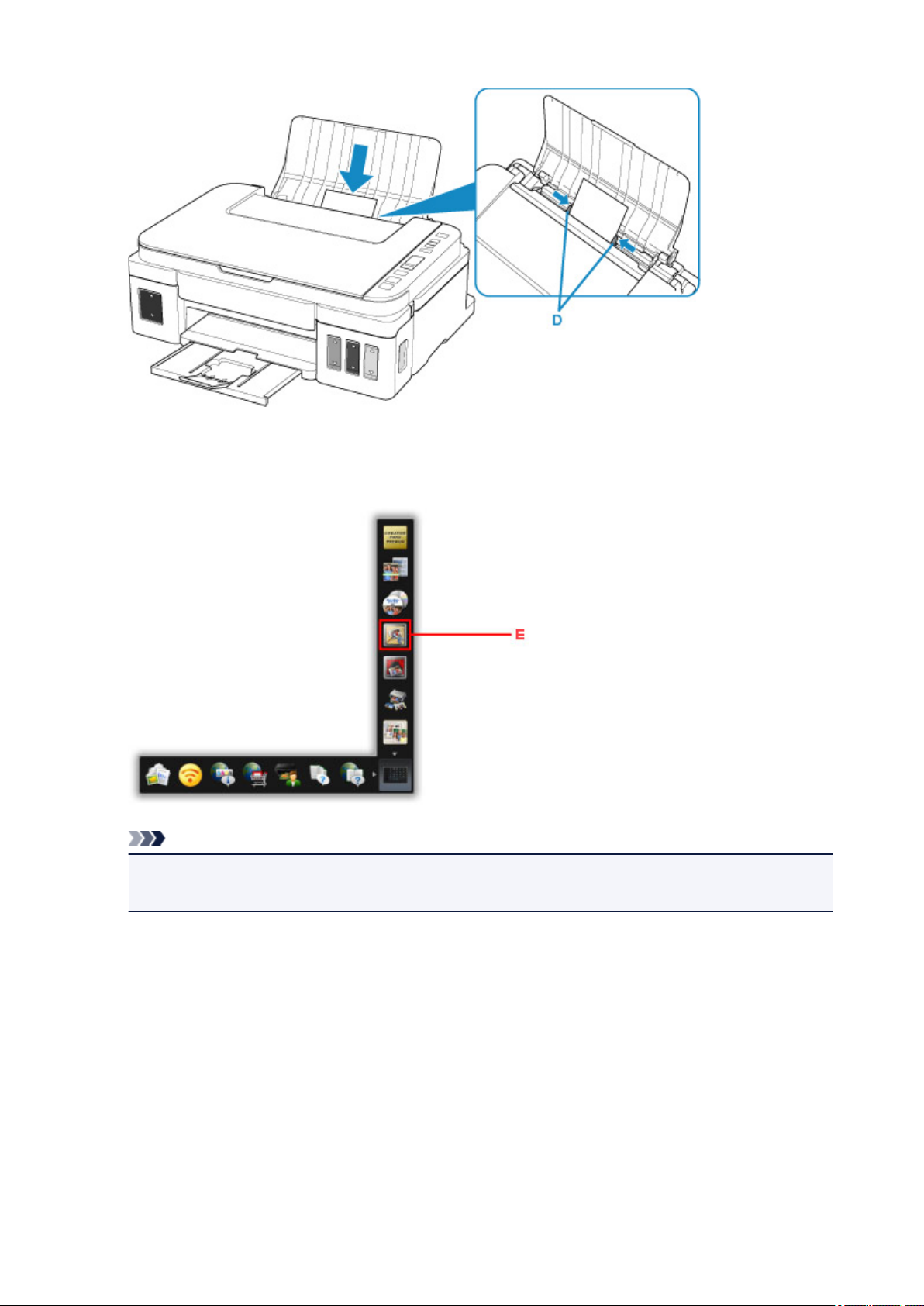
1. Ouvrez le support papier (A).
2.
Tirez le bac de sortie papier (B), puis ouvrez l’extension du bac de sortie papier (C).
3. Chargez le papier AVEC LA FACE À IMPRIMER VERS LE HAUT.
4. Alignez les guides papier (D) avec la largeur du papier.
27
5.
Cliquez sur l’icône My Image Garden (E) dans Quick Menu.
L’écran Menu Guide s’affiche.
Remarque
Le nombre et le type des icônes affichées dépendent de la région, de l’imprimante ou du scanner
•
enregistré et des applications installées.
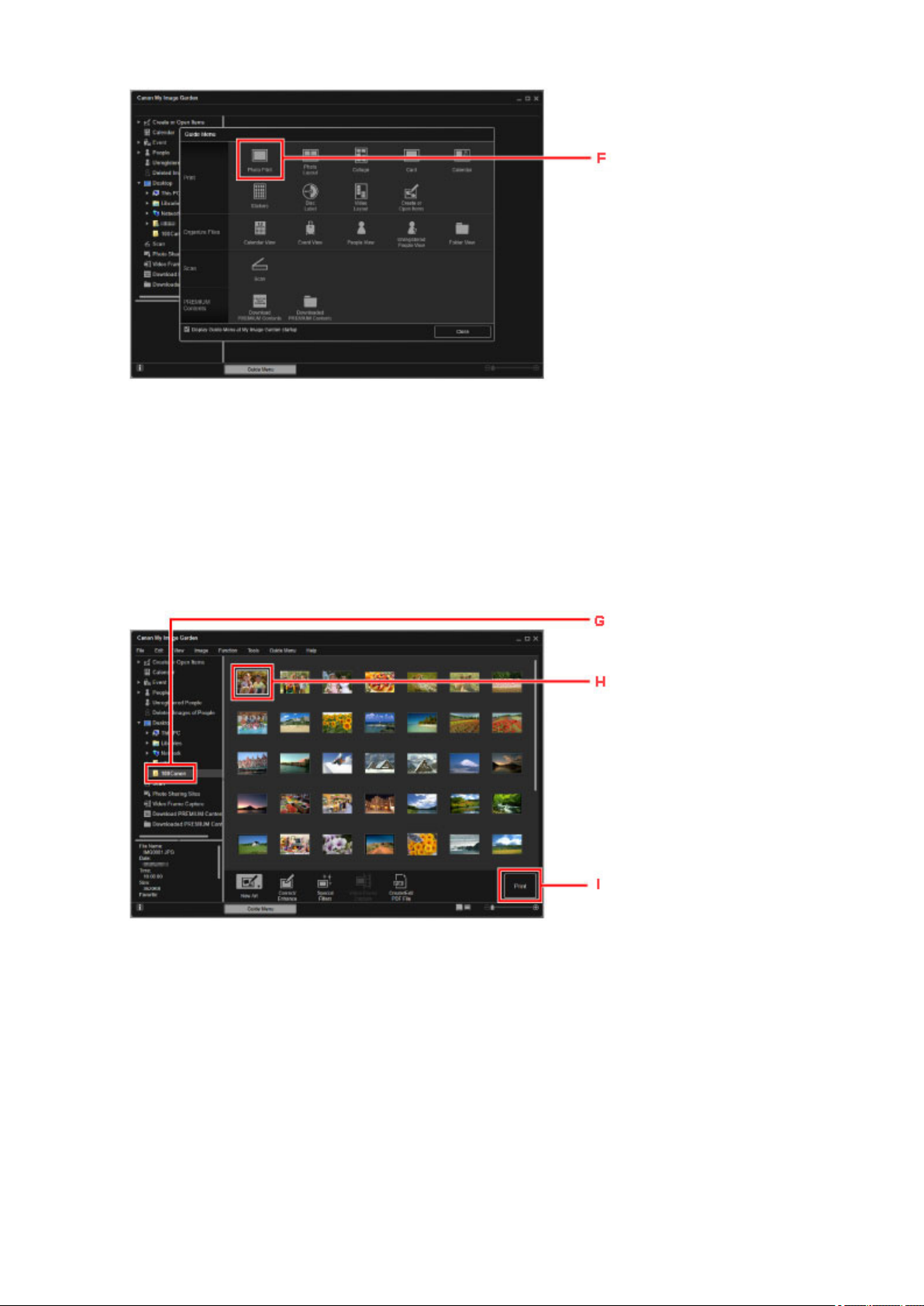
6. Cliquez sur l’icône Impression photo (F).
28
7.
Cliquez sur le dossier (G) contenant les photos à imprimer.
8.
Cliquez sur les photos (H) à imprimer.
Pour sélectionner deux photos (ou plus) en même temps, cliquez dessus tout en appuyant sur la touche
Ctrl.
9.
Cliquez sur Imprimer (I).
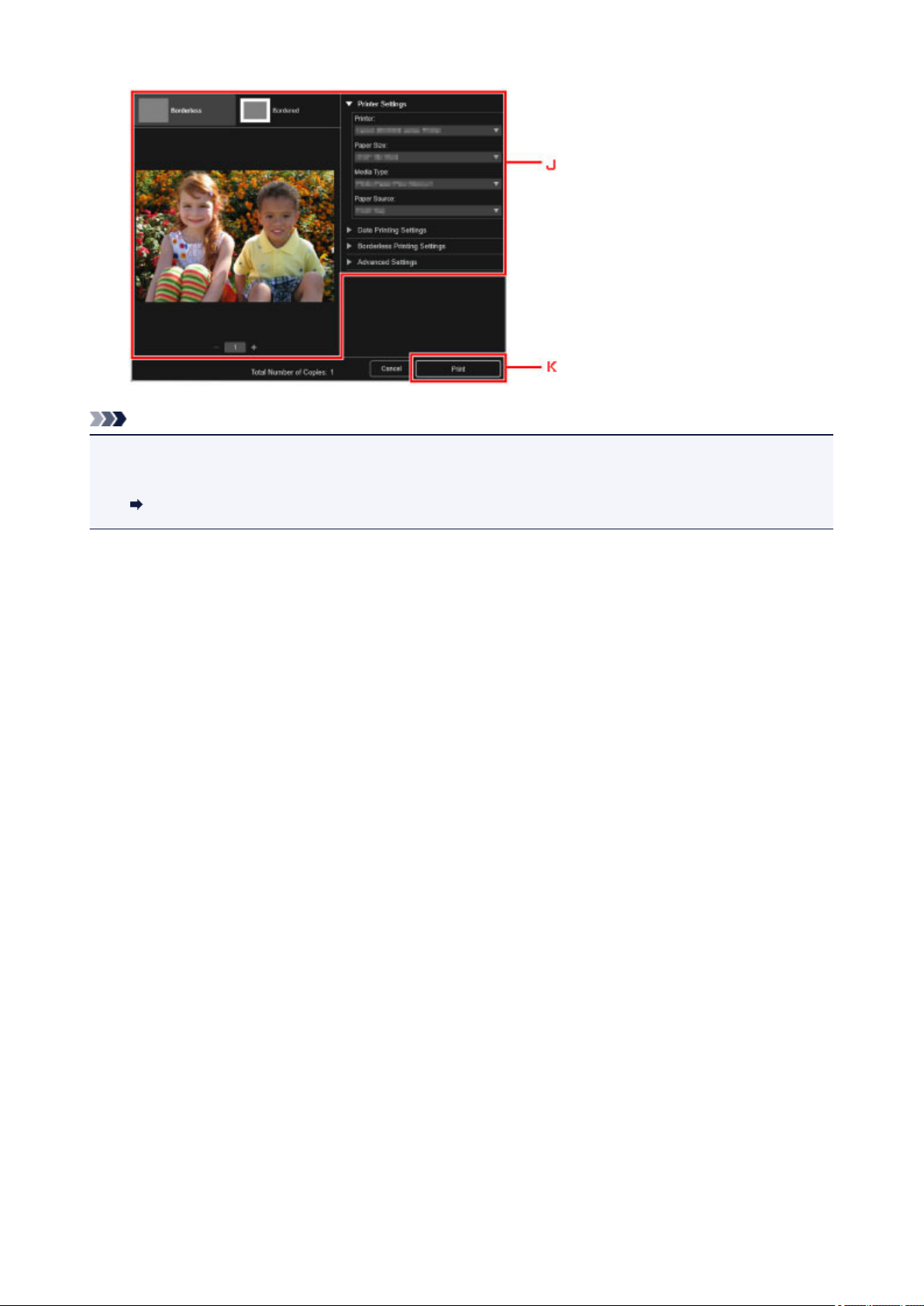
10. Spécifiez le nombre de copies, le nom de votre imprimante, le type de support, etc. (J).
11. Cliquez sur Imprimer (K).
29
Remarque
• My Image Garden vous permet d’utiliser des images de diverses manières sur votre ordinateur, telles
que des photos prises avec un appareil photo numérique.
Guide My Image Garden
30
Loading…
-
Драйверы
5
-
Руководства по ремонту
2
-
Инструкции по эксплуатации
15
Языки:
Canon PIXMA G3410 инструкция по эксплуатации
(60 страниц)
- Языки:Арабский, Болгарский, Румынский, Русский, Словенский, Украинский, Хорватский
-
Тип:
PDF -
Размер:
13.41 MB -
Описание:
This pdf manual is a Getting Started Guide.
Просмотр
Canon PIXMA G3410 инструкция по эксплуатации
(369 страниц)
- Языки:Русский
-
Тип:
PDF -
Размер:
7 MB -
Описание:
Многфункциональное устройство (мфу)
Просмотр
Canon PIXMA G3410 инструкция по эксплуатации
(369 страниц)
- Языки:Русский
-
Тип:
PDF -
Размер:
7.33 MB -
Описание:
Instructions on product functions and software are provided in this PDF manual. It is recommended to download this file if you prefer a hard copy (printed) manual.
Просмотр
Canon PIXMA G3410 инструкция по эксплуатации
(60 страниц)
- Языки:Арабский, Болгарский, Румынский, Русский, Словенский, Украинский, Хорватский
-
Тип:
PDF -
Размер:
12.6 MB -
Описание:
This pdf manual is a Getting Started Guide.
Просмотр
Canon PIXMA G3410 инструкция по эксплуатации
(356 страниц)
- Языки:Английский
-
Тип:
PDF -
Размер:
7.26 MB -
Описание:
Instructions on product functions and software are provided in this PDF manual. It is recommended to download this file if you prefer a hard copy (printed) manual.
Просмотр
Canon PIXMA G3410 инструкция по эксплуатации
(84 страницы)
- Языки:Датский, Итальянский, Латышский, Литовский, Немецкий, Нидерландский, Финский, Шведский, Эстонский
-
Тип:
PDF -
Размер:
18.55 MB -
Описание:
This pdf manual is a Getting Started Guide.
Просмотр
Canon PIXMA G3410 инструкция по эксплуатации
(12 страниц)
- Языки:Иврит
-
Тип:
PDF -
Размер:
2.03 MB -
Описание:
This document contains the information required to assist with the setup of your product.
Просмотр
Canon PIXMA G3410 инструкция по эксплуатации
(366 страниц)
- Языки:Словацкий
-
Тип:
PDF -
Размер:
7.34 MB -
Описание:
Instructions on product functions and software are provided in this PDF manual. It is recommended to download this file if you prefer a hard copy (printed) manual.
Просмотр
Canon PIXMA G3410 инструкция по эксплуатации
(369 страниц)
- Языки:Португальский
-
Тип:
PDF -
Размер:
7.32 MB -
Описание:
Instructions on product functions and software are provided in this PDF manual. It is recommended to download this file if you prefer a hard copy (printed) manual.
Просмотр
Canon PIXMA G3410 инструкция по эксплуатации
(370 страниц)
- Языки:Польский
-
Тип:
PDF -
Размер:
7.35 MB -
Описание:
Instructions on product functions and software are provided in this PDF manual. It is recommended to download this file if you prefer a hard copy (printed) manual.
Просмотр
Canon PIXMA G3410 инструкция по эксплуатации
(367 страниц)
- Языки:Венгерский
-
Тип:
PDF -
Размер:
7.35 MB -
Описание:
Instructions on product functions and software are provided in this PDF manual. It is recommended to download this file if you prefer a hard copy (printed) manual.
Просмотр
Canon PIXMA G3410 инструкция по эксплуатации
(12 страниц)
- Языки:Казахский
-
Тип:
PDF -
Размер:
971.82 KB -
Описание:
This document contains the information required to assist with the setup of your product.
Просмотр
Canon PIXMA G3410 инструкция по эксплуатации
(84 страницы)
- Языки:Датский, Итальянский, Латышский, Литовский, Немецкий, Нидерландский, Финский, Шведский, Эстонский
-
Тип:
PDF -
Размер:
17.38 MB -
Описание:
This pdf manual is a Getting Started Guide.
Просмотр
Canon PIXMA G3410 инструкция по эксплуатации
(365 страниц)
- Языки:Чешский
-
Тип:
PDF -
Размер:
7.33 MB -
Описание:
Instructions on product functions and software are provided in this PDF manual. It is recommended to download this file if you prefer a hard copy (printed) manual.
Просмотр
Canon PIXMA G3410 инструкция по эксплуатации
(84 страницы)
- Языки:Болгарский, Венгерский, Греческий, Польский, Румынский, Словацкий, Словенский, Турецкий, Хорватский, Чешский
-
Тип:
PDF -
Размер:
17.42 MB -
Описание:
This pdf manual is a Getting Started Guide.
Просмотр
На NoDevice можно скачать инструкцию по эксплуатации для Canon PIXMA G3410. Руководство пользователя необходимо для ознакомления с правилами установки и эксплуатации Canon PIXMA G3410. Инструкции по использованию помогут правильно настроить Canon PIXMA G3410, исправить ошибки и выявить неполадки.
-
Страница 1
User’s Guide User’s Guide Laser Beam Printer[…]
-
Страница 2
1 Contents T urning the Printer ON/OFF . . . . . . . . . . . . . . . . . . . . . . . . . . . . . . . . . . . . . . . 2 Tu r ning the Printer ON . . . . . . . . . . . . . . . . . . . . . . . . . . . . . . . . . . . . . . . . . . 2 Tu r ning the Printer OFF. . . . . . . . . . . . . . . . . . . . . . . . . . . . . . . . . . . . . . . . . . 3 Online an[…]
-
Страница 3
2 T urning the Printer ON/OFF The printer can be tur ned ON/OFF using the power s witch on the right side of the printer body . Be sure to obser ve the f ollo wing instructions in order to prev ent une xpected problems . T urning the Printer ON To use this pr inter , press » » of the pow er switch to turn the printer ON. After running a s[…]
-
Страница 4
3 If no abnormality is found during the self-diagnostic test, the オンライン indicator , 印 刷可 indicator and P aper Source indicator f or the currently selected paper source come on, < 00 インサツ カノウ >, <00 LIPS>, or <00 ESC/P> appears in the displa y , and the printer is ready to print. The f ollowing inf[…]
-
Страница 5
4 1 Make sure that the ジ ジ ジ ジ ョ ョ ョ ョ ブ ブ ブ ブ indicator is off. 2 Press » » of the power s witch on the printer . Off[…]
-
Страница 6
5 Online and Offline When the printer can receive data from the computer and print the data, the printer is in the state of «Online», and when the printer is disconnected with the computer and cannot receiv e data, the printer is in the state of «Offline». To perform the settings for each menu using the control panel, s witch […]
-
Страница 7
6 NO TE If the printer has entered the sleep mode 1, the オンライン indicator is off e v en when the printer is online, and only the 印刷可 indicator and 主電源 indicator are on. If the printer has entered the sleep mode 2, only the 主電源 indicator is on. If the printer receives data while it is in the sleep mode , the mode is releas[…]
-
Страница 8
7 Paper Requirements Usable Paper To ensure optimum performance, use only paper that f alls within the specifications in the f ollowing lists . Using inappropriate paper ma y result in deterioration in print quality or paper jams. IMPOR T ANT When continuously printing the paper of 200 mm wide or less , the saf ety function that pre vents damages […]
-
Страница 9
8 * 1 Y ou can load paper of the following custom paper sizes . — When loading paper in por trait orientation: Width 76.2 to 215.9 mm; Length 127.0 to 355.6 mm — When loading paper in landscape orientation (only when LIPS LX Printer Dr iv er is used): Width 127.0 to 215.9 mm; Length 127.0 to 215.9 mm * 2 Y ou can load paper of the following custom […]
-
Страница 10
9 ■ Heavy P aper This printer can pr int hea vy paper that is 76.2 to 215.9 mm wide, 127.0 to 355.6 mm long, and that weighs between 90 and 199 g/m 2 , including the standard paper siz es: A4, B5, A5, Legal, Letter , Ex ecutiv e, P ostcard, Reply postcard, and 4 on 1 postcard. Heavy paper that weighs between 90 and 120 g/m 2 can be loaded in the […]
-
Страница 11
10 • Be sure to load them in portrait orientation with the printing side facing up . (: F eeding direction) • Printing speed drops when printing postcards, repla y postcards , or 4 on 1 postcards. ■ En velope The env elopes that can be used with this printer are Y OUGA T A No . 4 and Y OUGA T A No . 2 with the f ollowing structures only . Loa[…]
-
Страница 12
11 • Bef ore loading the en velopes , flatten the stac k of env elopes to release an y remaining air , and press the f old lines along the edges tight. • Do not print on the re verse side (glued side) of en v elopes . • When loading the en velopes , load them so that the flap is to ward the left of the printer when view ed from the front. ([…]
-
Страница 13
12 ■ Plain P aper/Heavy P aper/T ransparency/Label Y ou cannot pr int on any area within 5 mm of the edges of paper . ■ P ostcar d/Reply P ostcar d/4 on 1 P ostcar d Y ou cannot pr int on any area within 5 mm of the edges of a postcard. IMPOR T ANT Y ou may not obtain the optim um print quality when printing postcard data with no margin. It is […]
-
Страница 14
13 Y ou may hav e to change the printable area bef ore printing, depending on the application you use . * 7.6 mm for the right edge of an env elope at a size of Y OUGA T A No. 4 or Y OUGA T A No. 2 when LIPS LX Pr inter Driver is used IMPOR T ANT Y ou may not obtain the optim um print quality when printing env elope data with no margin. It is recom[…]
-
Страница 15
14 -P aper that has already been printed by a cop y machine or another laser printer (The re verse side of the paper is also un usab le. Using the multi-purpose tra y , how ev er , you can perf orm 2-sided pr inting man ually on the other side of pre viously printed paper . Y ou cannot print on the printed side again.) -P aper with jagged edges -W […]
-
Страница 16
15 Paper Capacity of the Output T rays * Actual paper capacity varies depending on the installation environment, paper type and paper siz e. P aper T ype Output T rays* Output T ray Sub-output T ray Plain paper (64 g/m 2 ) Appro x. 250 sheets Appro x. 50 sheets Heavy paper (90 g/m 2 ) Appro x. 100 sheets Appro x. 50 sheets Heavy paper (128 g/m 2 ) […]
-
Страница 17
16 Loading Paper in the Paper Cassette Load paper in the paper cassette. The paper loading methods are diff erent between standard size paper and custom siz e paper . Theref ore, load paper properly using the f ollowing procedures . • Standard Size P aper (See p . 16) • Custom Size P aper (See p . 21) IMPOR T ANT F or more details on the usab l[…]
-
Страница 18
17 1 Pull out the paper cassette. CA UTION Be sure to take the paper cassette out of the printer before loading paper . If paper is loaded while the paper cassette is partially pulled out, the paper cassette may dr op or the printer may become dama ged resulting in personal injury . 2 When changing the size of the paper to be loaded, adjust the len[…]
-
Страница 19
18 ● While holding the lock release le ver of the rear paper guide, slide the guide to the size mark for the paper to be loaded. Align the position of (A) with the size mark for the paper to be loaded. IMPOR T ANT Do not use the «8.5 x 13» position. 3 Load the paper stack so that the rear edge is aligned with the paper guide. CA UTION W[…]
-
Страница 20
19 • To print letterhead paper or paper printed with a logo , load the paper so that the printing side is facing do wn, as sho wn in the f ollowing figures . (: F eeding direction) Cassette 1 Cassette 2[…]
-
Страница 21
20 4 Hold down the paper as sho wn in the figure, make sure that the paper stack does not e xceed the load limit marks (A), and then set it under the hooks (B) on the paper guides. Make sure that ther e is sufficient space between the hooks of the paper guides and the paper stack. If there is no suf ficient space, slightly reduce the amount of p[…]
-
Страница 22
21 IMPOR T ANT The f ollowing sho ws the paper capacity of the paper cassette . Be sure that the paper stack does not e xceed the load limit marks. If the paper stac k e xceeds the load limit marks, this ma y result in misf eeds . 5 Set the paper cassette in the printer . Push the paper cassette into the printer firmly until the front side of the […]
-
Страница 23
22 -W hen the paper is loaded in portrait orientation: < ユーザセッテイサイズ R > • When you change the orientation of the loaded custom siz e paper frequently , it is conv enient if y ou set < カセット N(N=1、2)用紙サイズ > to < フリー >. When < カセット N (N=1、2)用紙サイズ > is s[…]
-
Страница 24
23 2 Load the paper so that the edge of the paper is aligned with the front side of the paper cassette. CA UTION When loading paper , take care not to cut your hands with the edges of the paper . IMPOR T ANT • If you use paper that has been poor ly cut, multiple sheets of paper ma y be f ed at once. In this case, f an the paper thoroughly , and t[…]
-
Страница 25
24 NO TE • To print letterhead paper or paper printed with a logo when loading paper in por trait orientation, load the paper so that the printing side is f acing down as sho wn in the f ollowing figures . (: F eeding direction) Cassette 1 Cassette 2[…]
-
Страница 26
25 • To print letterhead paper or paper printed with a logo when loading paper in landscape orientation, load the paper so that the printing side is f acing do wn as shown in the f ollo wing figures. (: F eeding direction) 3 While holding the lock release le ver of the side paper guides, slide the guides to the size mark for the loaded paper . T[…]
-
Страница 27
26 IMPOR T ANT Be sure to align the paper guides with the width of the paper . If the paper guides are too loose or too tight, this ma y result in misf eeds or paper jams . 4 While holding the lock release le ver of the rear paper guide, slide the guide to the size mark for the loaded paper . Cassette 1 Cassette 2[…]
-
Страница 28
27 5 Hold down the paper as sho wn in the figure, make sure that the paper stack does not e xceed the load limit marks (A), and then set it under the hooks (B) on the paper guides. Make sure that ther e is sufficient space between the hooks of the paper guides and the paper stack. If there is no suf ficient space, slightly reduce the amount of p[…]
-
Страница 29
28 IMPOR T ANT The f ollowing sho ws the paper capacity of the paper cassette . Be sure that the paper stack does not e xceed the load limit marks. If the paper stac k e xceeds the load limit marks, this ma y result in misf eeds . 6 Set the paper cassette in the printer . Push the paper cassette into the printer firmly until the front side of the […]
-
Страница 30
29 Loading Paper in the Multi-purpose T ray Load paper in the multi-purpose tray . The paper loading procedure varies depending on the paper type. Refer to the respectiv e procedures f or each paper type. • Plain P aper , Heavy P aper , T ransparency , Label (See «Loading P aper (Other than P ostcards and En v elopes),» on p . 29) • P[…]
-
Страница 31
30 2 Pull out the auxiliary tray . IMPOR T ANT Be sure to pull out the auxiliary tra y when loading paper in the m ulti-pur pose tra y . 3 When loading long-size paper such as A4 etc, open the tra y extension.[…]
-
Страница 32
31 4 Spread the paper guides a little wider than the actual paper width. 5 Before loading transparencies or labels, fan them in small batches and align the edges. CA UTION When loading paper , take care not to cut your hands with the edges of the paper . IMPOR T ANT • Be sure to f an the transparencies or labels thoroughly bef ore loading them. I[…]
-
Страница 33
32 6 Gently load the stac k of paper with the printing side facing up until it touches the bac k of the tray . Be sure that the paper stack is loaded under the load limit guides (A). CA UTION When loading paper , take care not to cut your hands with the edges of the paper . IMPOR T ANT • The multi-purpose tra y can be loaded with up to the n umbe[…]
-
Страница 34
33 NO TE To print letterhead paper or paper printed with a logo , load the paper in the proper orientation according to the f ollowing instructions: — When loading paper at a siz e of A4, B5, A5, Legal, Letter , or Executiv e, or when loading custom siz e paper in por trait orientation, load the paper so that the printing side is facing up as sho w[…]
-
Страница 35
34 -W hen loading custom siz e paper in landscape orientation, load the paper so that the printing side is f acing up as shown in the f ollo wing figures. (: F eeding direction) 7 Align the paper guides with both sides of the stack.[…]
-
Страница 36
35 IMPOR T ANT Be sure to align the paper guides with the width of the paper . If the paper guides are too loose or too tight, this ma y result in misf eeds or paper jams . Loading Postcards and Envelopes Y ou can load postcards at sizes of P ostcard, Reply postcard, 4 on 1 postcard, and 4 on 1 postcard recommended by Canon, and en v elopes at size[…]
-
Страница 37
36 2 Pull out the auxiliary tray . IMPOR T ANT Be sure to pull out the auxiliary tra y when loading paper in the m ulti-pur pose tra y . 3 When loading long-size paper such as 4 on 1 postcard etc, open the tray e xtension.[…]
-
Страница 38
37 4 Spread the paper guides a little wider than the actual paper width. 5 Before loading en velopes, align them as shown in the follo wing figures. ● Place the stack of en velopes on a flat surface , flatten them to release any remaining air , and be sure that the edges are pressed tightly . CA UTION When loading paper , take care not to cut […]
-
Страница 39
38 ● Loosen any stiff corner s of the en velopes and flatten curls as shown in the figure. ● Align the edges of the en velopes on a flat surface. 6 Gently load the stac k of en velopes with the printing side facing up until it touches the bac k of the multi-purpose tra y as shown in the figure. Be sure that the paper stack is loaded under t[…]
-
Страница 40
39 CA UTION When loading paper , take care not to cut your hands with the edges of the paper . IMPOR T ANT • Load postcards or en velopes as sho wn in the f ollowing figures . (: F eeding direction) -Y OUGA T A No. 4/Y OUGA T A No . 2 Load the en velopes so that the fl ap is tow ard the left of the printer when view ed from the front. -P ostcar[…]
-
Страница 41
40 • Y ou can load up to approximately 50 sheets of postcards at siz es of P ostcard, Reply postcard, 4 on 1 postcard, and 4 on 1 postcard recommended b y Canon, and up to 10 sheets of en velopes in the m ulti-purpose tra y . Make sure that the paper stack does not e xceed the load limit guides. • Y ou cannot pr int on the re v erse side (glued[…]
-
Страница 42
41 Paper Jams When a paper jam occurs during pr inting f or some reason, the printer beeps, displa ying the message < 13 ヨウシガ ツマリマシタ > in the displa y . When a paper jam occurs, remo ve the jammed paper using the f ollo wing procedure, and then resume the job . If the message that indicates the paper jam does not disa[…]
-
Страница 43
42 • The error message ma y remain if jammed paper is remo v ed without opening the front cov er . In this case, open and close the front co v er once. • Do not touch the high-v oltage contacts (A) or the electrical contact (B) sho wn in the figure, as this ma y result in damage to the printer . • Do not touch the transf er roller (C), as th[…]
-
Страница 44
43 • The surroundings of the output tr ay and sub-output tr a y are hot during printing or immediately after printing. When taking out of the paper or remo ving jammed paper , be careful not to touch the surroundings of the output tr a y or sub-output tra y .[…]
-
Страница 45
44 Paper Jam Area The messages displa yed in the displa y indicate where the paper is jammed. P aper Jam Area Displa y Message a Duple x print transpor t area リョウメンユニット エリア b Output tra y , Sub-output tra y ハイシ エリア c Inside the front cov er マエカバー エリア d Multi-pur pose tra y テザシトレイ[…]
-
Страница 46
45 Procedure for Clearing Paper Jams Remov e any jammed paper using the f ollo wing procedures. 1 Confirm all the messages that appear in the display . Messages appear one at a time. Confirm all of them. As the messages disappear when the cover is open, take a note of them if requir ed. 2 If y ou are using the multi-purpose tra y and see the jamm[…]
-
Страница 47
46 3 Close the multi-purpose tra y . b c a[…]
-
Страница 48
47 4 Open the front co ver . Open the front cover gently while pr essing the lever on the top surface of the cover . 5 Remove the toner cartridge from the printer .[…]
-
Страница 49
48 6 Place the toner cartridg e into the pr otective bag. 7 Raise the transport guide , then tilt it to ward y ou. Holding the green tab, raise the transport guide, then tilt it toward you. CA UTION Do not take your hands off the transport guide. The transpor t guide ma y snap back to its original position, and this ma y result in personal injury .[…]
-
Страница 50
49 8 Remove an y jammed paper b y pulling it in the direction of the arro w . Remove the jammed paper gently to prevent unfixed toner fr om spilling. IMPOR T ANT If the jammed paper cannot be remo v ed easily , do not try to remov e it f orcefully but proceed to the ne xt step . 9 Move the transport guide back to its original position slo wly . CA[…]
-
Страница 51
50 10 Check the output tra y and remo ve any jammed paper . IMPOR T ANT If the jammed paper cannot be remo v ed easily , do not try to remov e it f orcefully but proceed to the ne xt step . NO TE If unfix ed toner is on the remov ed paper , it may adhere to the paper to be printed ne xt. 11 Open the sub-output tray . Open the sub-output tray compl[…]
-
Страница 52
51 12 T urn the green dial in the sub-output tray in the direction of the arro w to send an y jammed paper . When you have been perfor ming automatic 2-sided printing 13 Close the sub-output tray .[…]
-
Страница 53
52 14 Close the front co ver . Close the front cover completely until it clicks. 15 Pull out the paper cassette.[…]
-
Страница 54
53 If the paper feeder is installed, pull out the paper cassette of the paper feeder also. 16 Push any jammed paper do wnwar d slowl y and for cefully to remove it. In case of the printer unit[…]
-
Страница 55
54 In case of the paper feeder If you ha ve not been perf orming automatic 2-sided printing, proceed to Step 20. IMPOR T ANT Be sure not to touch the f eed rollers (A) of the printer unit and paper f eeder . This ma y result in damage to the printer or printer error . (A)[…]
-
Страница 56
55 17 Open the duplex print transport guide . Press the gr een lock release switch (A) as shown in the figur e. 18 Remove an y jammed paper b y pulling it in the direction of the arro w . (A)[…]
-
Страница 57
56 19 Close the duplex print transport guide . Close both sides of the duplex print transport guide fir mly . IMPOR T ANT Make sure that the duple x pr int transport guide is closed completely . If the duplex print transpor t guide is not closed completely , this ma y result in misf eeds or paper jams. 20 Set the paper cassette in the printer . Pu[…]
-
Страница 58
57 If the paper feeder is installed, set the paper cassette of the paper feeder also. 21 Open the front co ver . Open the front cover gently while pr essing the lever on the top surface of the cover .[…]
-
Страница 59
58 22 T ake the toner cartridg e out of the pr otective bag. 23 Push the toner cartridg e into the printer until it touches the back of the printer while aligning (A) on both sides of the toner cartridg e with the toner cartridg e guides inside the printer . (A) (A)[…]
-
Страница 60
59 24 Close the front co ver . Close the front cover completely until it clicks.[…]
-
Страница 61
60 Replacing the T oner Cartridge This section describes how to replace or handle the toner car tridges and precautions on storing them. When < ト ト ト ト ナ ナ ナ ナ ー ー ー ー ヨ ヨ ヨ ヨ ウ ウ ウ ウ イ イ イ イ / / / / カ カ カ カ ク ク ク ク ニ ニ ニ ニ ン ン ン ン > Appear[…]
-
Страница 62
61 IMPOR T ANT If the printing appears faint or inconsistent e v en when the message < 16 トナー ヨウイ > or < 16 トナー カクニン > does not appear , this may be due to the toner cartridge reaching the end of its lif e. Do not continue to use the toner cartridge, and replace it with a new one when there is deterior[…]
-
Страница 63
62 1 Open the front co ver . Open the front cover gently while pr essing the lever on the top surface of the cover . 2 Remove the toner cartridge from the printer .[…]
-
Страница 64
63 IMPOR T ANT Do not touch the high-v oltage contacts (A) or the electrical contact (B) sho wn in the figure, as this ma y result in damage to the printer . 3 If chipped paper or toner accum ulates on the transport guide , clean the transport guide. ● Raise the transport guide . Holding the green tab, raise the transport guide. CA UTION Do not […]
-
Страница 65
64 ● Using a slightly dampened c loth with water , wipe off c hipped paper and toner that are attached to the transport guide . After wiping off the dir t, wipe the area with a soft, dry cloth. IMPOR T ANT • Do not use a cleaning agent such as mild detergent. • Be sure not to touch the f eed roller (A). This ma y result in damage to the print[…]
-
Страница 66
65 ● Move the transport guide back to its original position slo wly . CA UTION Do not take your hands off the transport guide until it moves bac k to its original position. The transport guide may snap bac k to its original position, and this may result in per sonal injury . 4 T ake the new toner cartridge out of the protective bag after taking i[…]
-
Страница 67
66 5 Hold the toner cartridg e as shown in the figure, and shake it gently 5 or 6 times to evenl y distrib ute the toner inside the cartridg e. IMPOR T ANT • If toner is not distributed e v enly , this may result in deterioration in print quality . Be sure to carry out this procedure properly . • Be sure to shak e the toner car tridge gently .[…]
-
Страница 68
67 CA UTION If the sealing tape is pulled out for cefully or stopped at midpoint, toner may spill out. If the toner gets into y our eyes or mouth, wash them immediately with cold water and immediatel y consult a physician. IMPOR T ANT • Do not pull the sealing tape diagonally , upwards , or downw ards. If the tape is se vered, it ma y become dif?[…]
-
Страница 69
68 7 Hold the toner cartridg e pr operly with the arr owed side facing up as shown in the figure. IMPOR T ANT Do not hold the toner cartr idge in a manner that is not directed in this procedure .[…]
-
Страница 70
69 8 Push the toner cartridg e into the printer until it touches the back of the printer while aligning (A) on both sides of the toner cartridg e with the toner cartridg e guides inside the printer . 9 Close the front co ver . Close the front cover completely until it clicks. IMPOR T ANT • If you cannot close the front co v er , chec k if the ton[…]
-
Страница 71
70 Canceling a Job If you w ant to cancel the job currently being printed, perform «Cancel Job» using the f ollowing procedure . A job cancel allo ws you to cancel the job currently being receiv ed or processed. This option does not affect the ne xt print data or the jobs that hav e not been processed y et. IMPOR T ANT • Cancel the job […]
-
Страница 72
71 Confirming the Printer Features This printer is provided with a function of Status Print that allows you to chec k the menu settings , etc. Use these functions when required after installing and connecting the printer , f or e xample when you w ant to check the oper ation. Status Print pr ints inf ormation about the currently av ailable functio[…]
-
Страница 73
72 4 Confirm the contents of the Status Print. Status Print prints information as shown in the following figure. Status Print allows you to confirm infor mation about the currently available functions, a list of the setting values specified in the printer function menu, the versions of the software and hardwar e equipped with the printer , and […]
-
Страница 74
73 Ser vice Call Display When a problem has occurred and the printer does not work properly , the ser vice call shown in the figure appears: 1 T urn the power OFF , wait for 10 seconds or longer , and then turn it ON again. If the message does not reappear , the printer can be used as normal. If the error message still appears, proceed to the ne x[…]
-
Страница 75
74 2 Note down the alphan umeric characters and messa ge in the display . 3 T urn the printer and computer OFF a , remove the USB cab le b , disconnect the power plug fr om the A C po wer outlet c , and then remove the gr ound wire fr om the ground terminal d . IMPOR T ANT After removing the po wer cord, store the g round wire with its cap on. 4 Co[…]
-
Страница 76
75 Message List When the printer cannot continue printing for some reason (an error status), the printer beeps, the メッセージ indicator comes on, and an error message that indicates the description of the error appears in the display . A Warning message appears in the displa y when the printer requires some remedy (a war ning status) although[…]
-
Страница 77
76 12 カバーガ アイテイマス Cause The front cov er is open. Remedy Close the front cov er firmly . If the printer is not online, press [ オンライン ]. 13 ヨウシガ ツマリマシタ Cause P aper is jammed inside the printer . Remedy Remov e the jammed paper and set the paper cassette and cov ers to the original position.[…]
-
Страница 78
77 32 リョウメンインサツ エ ラー <A uto Error Skip> Cause The printer received data f or 2-sided printing of a paper size (including the paper orientation) or paper type on which the printer cannot perform automatic 2-sided printing. Remedy Press [ オンライン ] to continue printing. How e ver , the data on each side is pr[…]
G3010 series
Онлайн-руководство
Основные операции Сеть Обращение с бумагой, оригиналами, чернильными контейнерами и т. д. Обслуживание
Обзор устройства Сведения о бумаге Печать Копирование Сканирование
Часто задаваемые вопросы Список кодов поддержки для ошибок
Русский (Russian)
Содержание
Использование документа Онлайн-руководство. . . . . . . . . . . . . . . . . . . . . . . 9
Обозначения, используемые в настоящем документе. . . . . . . . . . . . . . . . . . . . . . . . . 10
Пользователи устройства с активированными сенсорными функциями (Windows). . 11
Товарные знаки и лицензии. . . . . . . . . . . . . . . . . . . . . . . . . . . . . . . . . . . . . . . . . . . . . . . 12
Основные операции. . . . . . . . . . . . . . . . . . . . . . . . . . . . . . . . . . . . . . . . . . . . . . 26
Печать фотографий с компьютера. . . . . . . . . . . . . . . . . . . . . . . . . . . . . . . . . . . . . . . . . 27
Печать фотографий со смартфона или планшета. . . . . . . . . . . . . . . . . . . . . . . . . . . . . 31
Копирование. . . . . . . . . . . . . . . . . . . . . . . . . . . . . . . . . . . . . . . . . . . . . . . . . . . . . . . . . . . 33
Сеть. . . . . . . . . . . . . . . . . . . . . . . . . . . . . . . . . . . . . . . . . . . . . . . . . . . . . . . . . . . 36
Ограничения. . . . . . . . . . . . . . . . . . . . . . . . . . . . . . . . . . . . . . . . . . . . . . . . . . . . . . . . . . . 39
Рекомендации по сетевому подключению. . . . . . . . . . . . . . . . . . . . . . . . . . . . . . . . . . . 41
Параметры сети по умолчанию. . . . . . . . . . . . . . . . . . . . . . . . . . . . . . . . . . . . . . . . . . . . . . . . . . . . . . 42
Обнаружен еще один принтер с таким же именем. . . . . . . . . . . . . . . . . . . . . . . . . . . . . . . . . . . . . . . 43
Подключение к другому компьютеру через локальную сеть/Изменение способа подключения с
USB на локальную сеть. . . . . . . . . . . . . . . . . . . . . . . . . . . . . . . . . . . . . . . . . . . . . . . . . . . . . . . . . . . . . 44
Печать параметров сети. . . . . . . . . . . . . . . . . . . . . . . . . . . . . . . . . . . . . . . . . . . . . . . . . . . . . . . . . . . . 45
Метод повторной конфигурации беспроводного сетевого соединения. . . . . . . . . . . . . . . . . . . . . . 50
Обращение с бумагой, оригиналами, чернильными контейнерами и т. д.. . 51
Загрузка бумаги. . . . . . . . . . . . . . . . . . . . . . . . . . . . . . . . . . . . . . . . . . . . . . . . . . . . . . . . . 52
Загрузка обычной бумаги или фотобумаги. . . . . . . . . . . . . . . . . . . . . . . . . . . . . . . . . . . . . . . . . . . . . 53
Загрузка конвертов. . . . . . . . . . . . . . . . . . . . . . . . . . . . . . . . . . . . . . . . . . . . . . . . . . . . . . . . . . . . . . . . 57
Загрузка оригиналов. . . . . . . . . . . . . . . . . . . . . . . . . . . . . . . . . . . . . . . . . . . . . . . . . . . . . 60
Загрузка оригиналов на Стекло рабочей поверхности. . . . . . . . . . . . . . . . . . . . . . . . . . . . . . . . . . . . 61
Поддерживаемые оригиналы. . . . . . . . . . . . . . . . . . . . . . . . . . . . . . . . . . . . . . . . . . . . . . . . . . . . . . . . 63
Повторная заправка чернильных контейнеров. . . . . . . . . . . . . . . . . . . . . . . . . . . . . . . 64
Повторная заправка чернильных контейнеров. . . . . . . . . . . . . . . . . . . . . . . . . . . . . . . . . . . . . . . . . . 65
Проверка уровня чернил. . . . . . . . . . . . . . . . . . . . . . . . . . . . . . . . . . . . . . . . . . . . . . . . . . . . . . . . . . . . 73
Советы по чернилам. . . . . . . . . . . . . . . . . . . . . . . . . . . . . . . . . . . . . . . . . . . . . . . . . . . . . . . . . . . . . . . 75
Обслуживание. . . . . . . . . . . . . . . . . . . . . . . . . . . . . . . . . . . . . . . . . . . . . . . . . . 76
Если печать стала бледной или неравномерной. . . . . . . . . . . . . . . . . . . . . . . . . . . . . . 77
Процедура обслуживания. . . . . . . . . . . . . . . . . . . . . . . . . . . . . . . . . . . . . . . . . . . . . . . . . . . . . . . . . . . 78
Печать образца для проверки сопел. . . . . . . . . . . . . . . . . . . . . . . . . . . . . . . . . . . . . . . . . . . . . . . . . . 80
Оценка образца для проверки сопел. . . . . . . . . . . . . . . . . . . . . . . . . . . . . . . . . . . . . . . . . . . . . . . . . . 81
Очистка печатающей головки. . . . . . . . . . . . . . . . . . . . . . . . . . . . . . . . . . . . . . . . . . . . . . . . . . . . . . . . 82
Глубокая очистка печатающих головок. . . . . . . . . . . . . . . . . . . . . . . . . . . . . . . . . . . . . . . . . . . . . . . . 83
Выравнивание печатающей головки. . . . . . . . . . . . . . . . . . . . . . . . . . . . . . . . . . . . . . . . . . . . . . . . . . 84
Очистка. . . . . . . . . . . . . . . . . . . . . . . . . . . . . . . . . . . . . . . . . . . . . . . . . . . . . . . . . . . . . . . 87
Очистка подающих роликов. . . . . . . . . . . . . . . . . . . . . . . . . . . . . . . . . . . . . . . . . . . . . . . . . . . . . . . . . 88
Очистка внутренних компонентов принтера (очистка поддона). . . . . . . . . . . . . . . . . . . . . . . . . . . . . 90
Обзор. . . . . . . . . . . . . . . . . . . . . . . . . . . . . . . . . . . . . . . . . . . . . . . . . . . . . . . . . 92
Безопасность. . . . . . . . . . . . . . . . . . . . . . . . . . . . . . . . . . . . . . . . . . . . . . . . . . . . . . . . . . . 93
Меры предосторожности. . . . . . . . . . . . . . . . . . . . . . . . . . . . . . . . . . . . . . . . . . . . . . . . . . . . . . . . . . . . 94
Нормативная информация. . . . . . . . . . . . . . . . . . . . . . . . . . . . . . . . . . . . . . . . . . . . . . . . . . . . . . . . . . 96 WEEE (EU&EEA). . . . . . . . . . . . . . . . . . . . . . . . . . . . . . . . . . . . . . . . . . . . . . . . . . . . . . . . . . . . . . . . . . 97
Предосторожности при обращении. . . . . . . . . . . . . . . . . . . . . . . . . . . . . . . . . . . . . . . . . 98
Юридические ограничения на сканирование/копирование. . . . . . . . . . . . . . . . . . . . . . . . . . . . . . . . 99
Меры предосторожности при обращении с принтером. . . . . . . . . . . . . . . . . . . . . . . . . . . . . . . . . . 100
Перемещение принтера. . . . . . . . . . . . . . . . . . . . . . . . . . . . . . . . . . . . . . . . . . . . . . . . . . . . . . . . . . . 101
При ремонте, предоставлении во временное пользование или утилизации принтера. . . . . . . . . 103
Сохранение высокого качества печати. . . . . . . . . . . . . . . . . . . . . . . . . . . . . . . . . . . . . . . . . . . . . . . 104
Основные компоненты и их использование. . . . . . . . . . . . . . . . . . . . . . . . . . . . . . . . . 105
Основные компоненты. . . . . . . . . . . . . . . . . . . . . . . . . . . . . . . . . . . . . . . . . . . . . . . . . . . . . . . . . . . . . 106
Вид спереди. . . . . . . . . . . . . . . . . . . . . . . . . . . . . . . . . . . . . . . . . . . . . . . . . . . . . . . . . . . . . . . . . 107
Вид сзади. . . . . . . . . . . . . . . . . . . . . . . . . . . . . . . . . . . . . . . . . . . . . . . . . . . . . . . . . . . . . . . . . . . 109
Вид внутренних частей. . . . . . . . . . . . . . . . . . . . . . . . . . . . . . . . . . . . . . . . . . . . . . . . . . . . . . . . 110
Панель управления. . . . . . . . . . . . . . . . . . . . . . . . . . . . . . . . . . . . . . . . . . . . . . . . . . . . . . . . . . . 111
Электропитание. . . . . . . . . . . . . . . . . . . . . . . . . . . . . . . . . . . . . . . . . . . . . . . . . . . . . . . . . . . . . . . . . . 113
Проверка включения питания. . . . . . . . . . . . . . . . . . . . . . . . . . . . . . . . . . . . . . . . . . . . . . . . . . . 114
Включение и выключение Принтера. . . . . . . . . . . . . . . . . . . . . . . . . . . . . . . . . . . . . . . . . . . . . 115
Проверка штепселя и кабеля питания. . . . . . . . . . . . . . . . . . . . . . . . . . . . . . . . . . . . . . . . . . . . 117
Отключение принтера. . . . . . . . . . . . . . . . . . . . . . . . . . . . . . . . . . . . . . . . . . . . . . . . . . . . . . . . . 118
Индикация на ЖК-дисплее. . . . . . . . . . . . . . . . . . . . . . . . . . . . . . . . . . . . . . . . . . . . . . . . . . . . . . . . . 119
Изменение параметров. . . . . . . . . . . . . . . . . . . . . . . . . . . . . . . . . . . . . . . . . . . . . . . . . 121
Изменение параметров принтера с компьютера (Windows). . . . . . . . . . . . . . . . . . . . . . . . . . . . . . . 122
Изменение параметров печати. . . . . . . . . . . . . . . . . . . . . . . . . . . . . . . . . . . . . . . . . . . . . . . . . . 123
Регистрация профиля часто используемой конфигурации печати. . . . . . . . . . . . . . . . . . . . . 124
Выбор используемого чернильного контейнера. . . . . . . . . . . . . . . . . . . . . . . . . . . . . . . . . . . . 126
Управление питанием Принтера. . . . . . . . . . . . . . . . . . . . . . . . . . . . . . . . . . . . . . . . . . . . . . . . 127
Изменение режима работы Принтера. . . . . . . . . . . . . . . . . . . . . . . . . . . . . . . . . . . . . . . . . . . . 129
Изменение параметров с помощью панели управления. . . . . . . . . . . . . . . . . . . . . . . . . . . . . . . . . 131
Включение уведомлений о чернилах. . . . . . . . . . . . . . . . . . . . . . . . . . . . . . . . . . . . . . . . . . . . . 132
Инициализация параметров принтера. . . . . . . . . . . . . . . . . . . . . . . . . . . . . . . . . . . . . . . . . . . . 133
Включение/выключение функции беспроводного соединения. . . . . . . . . . . . . . . . . . . . . . . . 134
Технические характеристики. . . . . . . . . . . . . . . . . . . . . . . . . . . . . . . . . . . . . . . . . . . . . 135
Сведения о бумаге. . . . . . . . . . . . . . . . . . . . . . . . . . . . . . . . . . . . . . . . . . . . . 139
Поддерживаемые типы носителей. . . . . . . . . . . . . . . . . . . . . . . . . . . . . . . . . . . . . . . . 140
Предел загрузки бумаги. . . . . . . . . . . . . . . . . . . . . . . . . . . . . . . . . . . . . . . . . . . . . . . . . . . . . . . . . . . 142
Неподдерживаемые типы носителей. . . . . . . . . . . . . . . . . . . . . . . . . . . . . . . . . . . . . . 144
Обращение с бумагой. . . . . . . . . . . . . . . . . . . . . . . . . . . . . . . . . . . . . . . . . . . . . . . . . . 145
Печать. . . . . . . . . . . . . . . . . . . . . . . . . . . . . . . . . . . . . . . . . . . . . . . . . . . . . . . . 146
Печать с компьютера. . . . . . . . . . . . . . . . . . . . . . . . . . . . . . . . . . . . . . . . . . . . . . . . . . . 147
Печать с помощью прикладной программы (драйвер принтера Windows). . . . . . . . . . . . . . . . . . . 148
Настройка основной печати. . . . . . . . . . . . . . . . . . . . . . . . . . . . . . . . . . . . . . . . . . . . . . . . . . . . 149
Параметры бумаги в драйвере принтера. . . . . . . . . . . . . . . . . . . . . . . . . . . . . . . . . . . . . 152
Различные способы печати. . . . . . . . . . . . . . . . . . . . . . . . . . . . . . . . . . . . . . . . . . . . . . . . . . . . . 153
Настройка «Размер стр.» и «Ориентация». . . . . . . . . . . . . . . . . . . . . . . . . . . . . . . . . . . . . . 154
Настройка количества копий и порядка печати страниц. . . . . . . . . . . . . . . . . . . . . . . . . 156
Выполнение печати без полей. . . . . . . . . . . . . . . . . . . . . . . . . . . . . . . . . . . . . . . . . . . . . . 158
Печать с масштабированием. . . . . . . . . . . . . . . . . . . . . . . . . . . . . . . . . . . . . . . . . . . . . . . 161
Печать на развороте. . . . . . . . . . . . . . . . . . . . . . . . . . . . . . . . . . . . . . . . . . . . . . . . . . . . . . 164
Печать в виде плитки/постера. . . . . . . . . . . . . . . . . . . . . . . . . . . . . . . . . . . . . . . . . . . . . . 166
Двухсторонняя печать. . . . . . . . . . . . . . . . . . . . . . . . . . . . . . . . . . . . . . . . . . . . . . . . . . . . . 169
Настройка печати конверта. . . . . . . . . . . . . . . . . . . . . . . . . . . . . . . . . . . . . . . . . . . . . . . . 171
Печать на открытках. . . . . . . . . . . . . . . . . . . . . . . . . . . . . . . . . . . . . . . . . . . . . . . . . . . . . . 173
Общие сведения о драйвере принтера. . . . . . . . . . . . . . . . . . . . . . . . . . . . . . . . . . . . . . . . . . . 175
Драйвер принтера Canon IJ. . . . . . . . . . . . . . . . . . . . . . . . . . . . . . . . . . . . . . . . . . . . . . . . 176
Открытие экрана настройки драйвера принтера. . . . . . . . . . . . . . . . . . . . . . . . . . . 177
Монитор состояния Canon IJ. . . . . . . . . . . . . . . . . . . . . . . . . . . . . . . . . . . . . . . . . . . . . . . . 178
Инструкции по эксплуатации (Драйвер принтера). . . . . . . . . . . . . . . . . . . . . . . . . . . . . . 180
Описание драйвера принтера. . . . . . . . . . . . . . . . . . . . . . . . . . . . . . . . . . . . . . . . . . . . . . . . . . . 182
Описание вкладки «Быстрая установка». . . . . . . . . . . . . . . . . . . . . . . . . . . . . . . . . . . . . . 183
Описание вкладки Главная. . . . . . . . . . . . . . . . . . . . . . . . . . . . . . . . . . . . . . . . . . . . . . . . . 190
Описание вкладки Страница. . . . . . . . . . . . . . . . . . . . . . . . . . . . . . . . . . . . . . . . . . . . . . . . 196
Описание вкладки Обслуживание. . . . . . . . . . . . . . . . . . . . . . . . . . . . . . . . . . . . . . . . . . . 209
Описание функции «Монитор состояния Canon IJ». . . . . . . . . . . . . . . . . . . . . . . . . . . . . . 211
Установка MP Drivers. . . . . . . . . . . . . . . . . . . . . . . . . . . . . . . . . . . . . . . . . . . . . . . . . . . . . . 214
Печать со смартфона или планшета. . . . . . . . . . . . . . . . . . . . . . . . . . . . . . . . . . . . . . 215
Печать/сканирование в режиме беспроводного прямого подключения. . . . . . . . . . . . . . . . . . . . . 216
Копирование. . . . . . . . . . . . . . . . . . . . . . . . . . . . . . . . . . . . . . . . . . . . . . . . . . . 219
Создание копий на обычной бумаге. . . . . . . . . . . . . . . . . . . . . . . . . . . . . . . . . . . . . . . 220
Выбор размера страницы между A4 и Letter. . . . . . . . . . . . . . . . . . . . . . . . . . . . . . . . 221
Сканирование. . . . . . . . . . . . . . . . . . . . . . . . . . . . . . . . . . . . . . . . . . . . . . . . . . 222
Сканирование с компьютера (Windows). . . . . . . . . . . . . . . . . . . . . . . . . . . . . . . . . . . . 223
Сканирование в соответствии с типом или целью исходного документа (IJ Scan Utility). . . . . . . 224
Возможности IJ Scan Utility. . . . . . . . . . . . . . . . . . . . . . . . . . . . . . . . . . . . . . . . . . . . . . . . . . . . . 225
Легкое сканирование (автоматическое сканирование). . . . . . . . . . . . . . . . . . . . . . . . . . . . . . . 227
Сканирование документов и фотографий. . . . . . . . . . . . . . . . . . . . . . . . . . . . . . . . . . . . . . . . . 228
Сканирование с помощью приложения (ScanGear). . . . . . . . . . . . . . . . . . . . . . . . . . . . . . . . . . . . . 229
Назначение программы ScanGear (драйвера сканера). . . . . . . . . . . . . . . . . . . . . . . . . . . . . . 230
Запуск программы ScanGear (драйвер сканера). . . . . . . . . . . . . . . . . . . . . . . . . . . . . . . . . . . . 232
Сканирование в основном режиме. . . . . . . . . . . . . . . . . . . . . . . . . . . . . . . . . . . . . . . . . . . . . . . 233
Окна программы ScanGear (драйвер сканера). . . . . . . . . . . . . . . . . . . . . . . . . . . . . . . . . . . . . 236
Вкладка Основной режим. . . . . . . . . . . . . . . . . . . . . . . . . . . . . . . . . . . . . . . . . . . . . . . . . . 237
Вкладка Расш. режим. . . . . . . . . . . . . . . . . . . . . . . . . . . . . . . . . . . . . . . . . . . . . . . . . . . . . 246
Общие замечания (драйвер сканера). . . . . . . . . . . . . . . . . . . . . . . . . . . . . . . . . . . . . . . . . . . . 253
Рекомендации по сканированию. . . . . . . . . . . . . . . . . . . . . . . . . . . . . . . . . . . . . . . . . . . . . . . . . . . . 255
Размещение оригиналов (сканирование с компьютера). . . . . . . . . . . . . . . . . . . . . . . . . . . . . 256
Параметры сетевого сканирования. . . . . . . . . . . . . . . . . . . . . . . . . . . . . . . . . . . . . . . . . . . . . . 258
Сканирование с помощью смартфона/планшета. . . . . . . . . . . . . . . . . . . . . . . . . . . . 261
Часто задаваемые вопросы. . . . . . . . . . . . . . . . . . . . . . . . . . . . . . . . . . . . . . 262
Параметры сети и распространенные неполадки. . . . . . . . . . . . . . . . . . . . . . . . . . . . 264
Проблемы сетевого взаимодействия. . . . . . . . . . . . . . . . . . . . . . . . . . . . . . . . . . . . . . 266
Не удается обнаружить принтер в сети. . . . . . . . . . . . . . . . . . . . . . . . . . . . . . . . . . . . . . . . . . . . . . . 267
Не удается обнаружить принтер на экране Проверить параметры принтера во время настройки (Windows). . . . . . . . . . . . . . . . . . . . . . . . . . . . . . . . . . . . . . . . . . . . . . . . . . . . . . . . . . 268
Не удается обнаружить принтер на экране Проверить параметры принтера во время настройки беспроводной сети (Windows) — проверка состояния питания. . . . . . . . . . . 269
Не удается обнаружить принтер на экране Проверить параметры принтера во время настройки беспроводной сети (Windows) — проверка подключения компьютера к сети. .
. . . . . . . . . . . . . . . . . . . . . . . . . . . . . . . . . . . . . . . . . . . . . . . . . . . . . . . . . . . . . . . . . . . . . . . . 270
Не удается обнаружить принтер на экране Проверить параметры принтера во время настройки беспроводной сети (Windows) — проверка настроек беспроводной сети принтера. . . . . . . . . . . . . . . . . . . . . . . . . . . . . . . . . . . . . . . . . . . . . . . . . . . . . . . . . . . . . . . . 271
Не удается обнаружить принтер на экране Проверить параметры принтера во время настройки беспроводной сети (Windows) — проверка среды беспроводной сети. . . . . 272
Не удается обнаружить принтер на экране Проверить параметры принтера во время настройки беспроводной сети (Windows) — проверка IP-адреса принтера. . . . . . . . . . 274
Не удается обнаружить принтер на экране Проверить параметры принтера во время настройки беспроводной сети (Windows) — проверка параметров защитного программного обеспечения. . . . . . . . . . . . . . . . . . . . . . . . . . . . . . . . . . . . . . . . . . . . . . . . . 275
Не удается обнаружить принтер на экране Проверить параметры принтера во время настройки беспроводной сети (Windows) — проверка параметров маршрутизатора беспроводной сети. . . . . . . . . . . . . . . . . . . . . . . . . . . . . . . . . . . . . . . . . . . . . . . . . . . . . . . 277
Невозможно продолжить работу после появления экрана Подключение принтера. . . . . . . 278
Не удается найти Принтер при использовании беспроводной локальной сети. . . . . . . . . . . 280
Проблемы сетевого подключения. . . . . . . . . . . . . . . . . . . . . . . . . . . . . . . . . . . . . . . . . . . . . . . . . . . 283
Принтер внезапно прекратил работу по неизвестной причине. . . . . . . . . . . . . . . . . . . . . . . . 284
Неизвестный ключ сети. . . . . . . . . . . . . . . . . . . . . . . . . . . . . . . . . . . . . . . . . . . . . . . . . . . . . . . . 289
Не удается использовать принтер после замены маршрутизатора беспроводной сети или изменения параметров маршрутизатора. . . . . . . . . . . . . . . . . . . . . . . . . . . . . . . . . . . . . . . . . . 291
Другие проблемы с сетью. . . . . . . . . . . . . . . . . . . . . . . . . . . . . . . . . . . . . . . . . . . . . . . . . . . . . . . . . . 293
Проверка сведений о сети. . . . . . . . . . . . . . . . . . . . . . . . . . . . . . . . . . . . . . . . . . . . . . . . . . . . . 294
Восстановление заводских настроек по умолчанию. . . . . . . . . . . . . . . . . . . . . . . . . . . . . . . . 296
Проблемы с печатью. . . . . . . . . . . . . . . . . . . . . . . . . . . . . . . . . . . . . . . . . . . . . . . . . . . 297
Печать не начинается. . . . . . . . . . . . . . . . . . . . . . . . . . . . . . . . . . . . . . . . . . . . . . . . . . . . . . . . . . . . . 298
Чернила не поступают. . . . . . . . . . . . . . . . . . . . . . . . . . . . . . . . . . . . . . . . . . . . . . . . . . . . . . . . . . . . . 300
6
Чернила быстро заканчиваются. . . . . . . . . . . . . . . . . . . . . . . . . . . . . . . . . . . . . . . . . . . . . . . . . . . . . 302
Бумага подается неправильно, или появилось сообщение об отсутствии бумаги. . . . . . . . . . . . 303
Неудовлетворительные результаты печати. . . . . . . . . . . . . . . . . . . . . . . . . . . . . . . . . . . . . . . . . . . 305
Пустая бумага/Нечеткая печать/Неверные цвета/Белые полосы. . . . . . . . . . . . . . . . . . . . . . 307
Неверные цвета. . . . . . . . . . . . . . . . . . . . . . . . . . . . . . . . . . . . . . . . . . . . . . . . . . . . . . . . . . . . . . 310
Линии не выровнены. . . . . . . . . . . . . . . . . . . . . . . . . . . . . . . . . . . . . . . . . . . . . . . . . . . . . . . . . . 312
Бумага испачкана / Отпечатанная поверхность поцарапана. . . . . . . . . . . . . . . . . . . . . . . . . . 313
Вертикальная линия рядом с изображением. . . . . . . . . . . . . . . . . . . . . . . . . . . . . . . . . . . . . . 316
Проблемы при сканировании (Windows). . . . . . . . . . . . . . . . . . . . . . . . . . . . . . . . . . . . 317
Проблемы при сканировании. . . . . . . . . . . . . . . . . . . . . . . . . . . . . . . . . . . . . . . . . . . . . . . . . . . . . . . 318
Сканер не работает. . . . . . . . . . . . . . . . . . . . . . . . . . . . . . . . . . . . . . . . . . . . . . . . . . . . . . . . . . . 319 ScanGear (драйвер сканера) не запускается. . . . . . . . . . . . . . . . . . . . . . . . . . . . . . . . . . . . . . . 320
Механические неисправности. . . . . . . . . . . . . . . . . . . . . . . . . . . . . . . . . . . . . . . . . . . . 321
Принтер не включается. . . . . . . . . . . . . . . . . . . . . . . . . . . . . . . . . . . . . . . . . . . . . . . . . . . . . . . . . . . . 322
Питание выключается автоматически. . . . . . . . . . . . . . . . . . . . . . . . . . . . . . . . . . . . . . . . . . . . . . . . 323
Проблемы подключения USB. . . . . . . . . . . . . . . . . . . . . . . . . . . . . . . . . . . . . . . . . . . . . . . . . . . . . . . 324
Не удается подключиться к принтеру по USB. . . . . . . . . . . . . . . . . . . . . . . . . . . . . . . . . . . . . . . . . . 325
Проблемы при установке и загрузке. . . . . . . . . . . . . . . . . . . . . . . . . . . . . . . . . . . . . . . 326
Не удается установить драйверы MP Drivers (Windows). . . . . . . . . . . . . . . . . . . . . . . . . . . . . . . . . 327
Обновление MP Drivers в сетевом окружении (Windows). . . . . . . . . . . . . . . . . . . . . . . . . . . . . . . . . 329
Ошибки и сообщения. . . . . . . . . . . . . . . . . . . . . . . . . . . . . . . . . . . . . . . . . . . . . . . . . . . 330
Произошла ошибка. . . . . . . . . . . . . . . . . . . . . . . . . . . . . . . . . . . . . . . . . . . . . . . . . . . . . . . . . . . . . . . 331
Отображается сообщение (код поддержки). . . . . . . . . . . . . . . . . . . . . . . . . . . . . . . . . . . . . . . . . . . . 338
Список кодов поддержки для ошибок. . . . . . . . . . . . . . . . . . . . . . . . . . . . . . 343
Список кодов поддержки для ошибок (замятия бумаги). . . . . . . . . . . . . . . . . . . . . . . 345
1300. . . . . . . . . . . . . . . . . . . . . . . . . . . . . . . . . . . . . . . . . . . . . . . . . . . . . . . . . . . . . . . . . . . . . . . . . . . . 346
Бумага замялась внутри принтера. . . . . . . . . . . . . . . . . . . . . . . . . . . . . . . . . . . . . . . . . . . . . . . . . . . 348
1000. . . . . . . . . . . . . . . . . . . . . . . . . . . . . . . . . . . . . . . . . . . . . . . . . . . . . . . . . . . . . . . . . 352 1200. . . . . . . . . . . . . . . . . . . . . . . . . . . . . . . . . . . . . . . . . . . . . . . . . . . . . . . . . . . . . . . . . 353 1430. . . . . . . . . . . . . . . . . . . . . . . . . . . . . . . . . . . . . . . . . . . . . . . . . . . . . . . . . . . . . . . . . 354 1640. . . . . . . . . . . . . . . . . . . . . . . . . . . . . . . . . . . . . . . . . . . . . . . . . . . . . . . . . . . . . . . . . 358 1700. . . . . . . . . . . . . . . . . . . . . . . . . . . . . . . . . . . . . . . . . . . . . . . . . . . . . . . . . . . . . . . . . 359 1890. . . . . . . . . . . . . . . . . . . . . . . . . . . . . . . . . . . . . . . . . . . . . . . . . . . . . . . . . . . . . . . . . 360
2900. . . . . . . . . . . . . . . . . . . . . . . . . . . . . . . . . . . . . . . . . . . . . . . . . . . . . . . . . . . . . . . . . 361 2901. . . . . . . . . . . . . . . . . . . . . . . . . . . . . . . . . . . . . . . . . . . . . . . . . . . . . . . . . . . . . . . . . 362 4103. . . . . . . . . . . . . . . . . . . . . . . . . . . . . . . . . . . . . . . . . . . . . . . . . . . . . . . . . . . . . . . . . 363 5011. . . . . . . . . . . . . . . . . . . . . . . . . . . . . . . . . . . . . . . . . . . . . . . . . . . . . . . . . . . . . . . . . 364 5012. . . . . . . . . . . . . . . . . . . . . . . . . . . . . . . . . . . . . . . . . . . . . . . . . . . . . . . . . . . . . . . . . 365 5100. . . . . . . . . . . . . . . . . . . . . . . . . . . . . . . . . . . . . . . . . . . . . . . . . . . . . . . . . . . . . . . . . 366 5200. . . . . . . . . . . . . . . . . . . . . . . . . . . . . . . . . . . . . . . . . . . . . . . . . . . . . . . . . . . . . . . . . 367 5B00. . . . . . . . . . . . . . . . . . . . . . . . . . . . . . . . . . . . . . . . . . . . . . . . . . . . . . . . . . . . . . . . . 368 6000. . . . . . . . . . . . . . . . . . . . . . . . . . . . . . . . . . . . . . . . . . . . . . . . . . . . . . . . . . . . . . . . . 369
Использование документа Онлайн-руководство
Условия эксплуатации
Обозначения, используемые в настоящем документе
Пользователи устройства с активированными сенсорными функциями
(Windows)
Печать онлайн-руководства
Товарные знаки и лицензии
Снимки экранов в данном руководстве
9
Обозначения, используемые в настоящем документе
Предупреждение!
Несоблюдение этих указаний может привести к тяжелым травмам, вплоть до смертельного исхода, вследствие неправильной эксплуатации оборудования. Обязательно следуйте этим указаниям в целях безопасной эксплуатации.
Осторожно!
Несоблюдение этих указаний может привести к травмам или материальному ущербу вследствие неправильной эксплуатации оборудования. Обязательно следуйте этим указаниям в целях безопасной эксплуатации.
Внимание!
Инструкции, содержащие важные сведения. Во избежание причинения повреждений и нанесения травмы или ненадлежащего использования изделия обязательно прочтите эти указания.
Примечание.
Инструкции, в том числе примечания о работе устройства и дополнительные пояснения.
Основные сведения
Инструкции, разъясняющие основные операции с продуктом.
Примечание.
• Значки могут быть другими — это зависит от модели продукта.
10
Пользователи устройства с активированными сенсорными функциями (Windows)
Для касаний необходимо заменить действие «щелчок правой кнопкой мыши» в этом документе на действие, установленное в операционной системе. Например, если в операционной системе установлено действие «нажатие и удерживание», замените «щелчок правой кнопкой мыши» на «нажатие и удерживание».
11
Товарные знаки и лицензии
•Microsoft является охраняемым товарным знаком Microsoft Corporation.
•Windows является товарным знаком или зарегистрированным товарным знаком Microsoft Corporation в США и других странах.
•Windows Vista является товарным знаком или зарегистрированным товарным знаком Microsoft Corporation в США и других странах.
•Internet Explorer является товарным знаком или зарегистрированным товарным знаком Microsoft Corporation в США и других странах.
•Mac, Mac OS, macOS, OS X, AirPort, App Store, AirPrint, логотип AirPrint, Safari, Bonjour, iPad, iPhone и iPod touch являются товарными знаками компании Apple Inc., зарегистрированными в США и других странах.
•IOS является товарным знаком или зарегистрированным товарным знаком компании Cisco в США, других странах и используется по лицензии.
•Google Cloud Print, Google Chrome, Chrome OS, Chromebook, Android, Google Play, Google Drive, Google Apps и Google Analytics являются зарегистрированными товарными знаками или товарными знаками компании Google Inc.
•Adobe, Acrobat, Flash, Photoshop, Photoshop Elements, Lightroom, Adobe RGB и Adobe RGB (1998)
являются зарегистрированными товарными знаками или товарными знаками компании Adobe Systems Incorporated в США и/или других странах.
•Bluetooth является товарным знаком корпорации Bluetooth SIG, Inc. в США, предоставленным по лицензии корпорации Canon Inc.
•Autodesk и AutoCAD являются зарегистрированными товарными знаками или товарными знаками компании Autodesk, Inc. и/или ее дочерних компаний и/или филиалов в США и/или других странах.
Примечание.
• Официальное название Windows Vista — операционная система Microsoft Windows Vista.
Copyright (c) 2003-2015 Apple Inc. All rights reserved.
Redistribution and use in source and binary forms, with or without modification, are permitted provided that the following conditions are met:
1.Redistributions of source code must retain the above copyright notice, this list of conditions and the following disclaimer.
2.Redistributions in binary form must reproduce the above copyright notice, this list of conditions and the following disclaimer in the documentation and/or other materials provided with the distribution.
3.Neither the name of Apple Inc. («Apple») nor the names of its contributors may be used to endorse or promote products derived from this software without specific prior written permission.
THIS SOFTWARE IS PROVIDED BY APPLE AND ITS CONTRIBUTORS «AS IS» AND ANY EXPRESS OR IMPLIED WARRANTIES, INCLUDING, BUT NOT LIMITED TO, THE IMPLIED WARRANTIES OF MERCHANTABILITY AND FITNESS FOR A PARTICULAR PURPOSE ARE DISCLAIMED. IN NO EVENT SHALL APPLE OR ITS CONTRIBUTORS BE LIABLE FOR ANY DIRECT, INDIRECT, INCIDENTAL, SPECIAL, EXEMPLARY, OR CONSEQUENTIAL DAMAGES (INCLUDING, BUT NOT LIMITED TO, PROCUREMENT OF SUBSTITUTE GOODS OR SERVICES; LOSS OF USE, DATA, OR PROFITS; OR BUSINESS INTERRUPTION) HOWEVER CAUSED AND ON ANY THEORY OF LIABILITY, WHETHER IN CONTRACT, STRICT LIABILITY, OR TORT (INCLUDING NEGLIGENCE OR
12
OTHERWISE) ARISING IN ANY WAY OUT OF THE USE OF THIS SOFTWARE, EVEN IF ADVISED OF THE POSSIBILITY OF SUCH DAMAGE.
Apache License
Version 2.0, January 2004
http://www.apache.org/licenses/
TERMS AND CONDITIONS FOR USE, REPRODUCTION, AND DISTRIBUTION
1.Definitions.
«License» shall mean the terms and conditions for use, reproduction, and distribution as defined by Sections 1 through 9 of this document.
«Licensor» shall mean the copyright owner or entity authorized by the copyright owner that is granting the License.
«Legal Entity» shall mean the union of the acting entity and all other entities that control, are controlled by, or are under common control with that entity. For the purposes of this definition, «control» means
(i) the power, direct or indirect, to cause the direction or management of such entity, whether by contract or otherwise, or (ii) ownership of fifty percent (50%) or more of the outstanding shares, or (iii) beneficial ownership of such entity.
«You» (or «Your») shall mean an individual or Legal Entity exercising permissions granted by this License.
«Source» form shall mean the preferred form for making modifications, including but not limited to software source code, documentation source, and configuration files.
«Object» form shall mean any form resulting from mechanical transformation or translation of a Source form, including but not limited to compiled object code, generated documentation, and conversions to other media types.
«Work» shall mean the work of authorship, whether in Source or Object form, made available under the License, as indicated by a copyright notice that is included in or attached to the work (an example is provided in the Appendix below).
«Derivative Works» shall mean any work, whether in Source or Object form, that is based on (or derived from) the Work and for which the editorial revisions, annotations, elaborations, or other modifications represent, as a whole, an original work of authorship. For the purposes of this License, Derivative Works shall not include works that remain separable from, or merely link (or bind by name) to the interfaces of, the Work and Derivative Works thereof.
«Contribution» shall mean any work of authorship, including the original version of the Work and any modifications or additions to that Work or Derivative Works thereof, that is intentionally submitted to Licensor for inclusion in the Work by the copyright owner or by an individual or Legal Entity authorized to submit on behalf of the copyright owner. For the purposes of this definition, «submitted» means any form of electronic, verbal, or written communication sent to the Licensor or its representatives, including but not limited to communication on electronic mailing lists, source code control systems, and issue tracking systems that are managed by, or on behalf of, the Licensor for the purpose of discussing and improving the Work, but excluding communication that is conspicuously marked or otherwise designated in writing by the copyright owner as «Not a Contribution.»
13
«Contributor» shall mean Licensor and any individual or Legal Entity on behalf of whom a Contribution has been received by Licensor and subsequently incorporated within the Work.
2.Grant of Copyright License. Subject to the terms and conditions of this License, each Contributor hereby grants to You a perpetual, worldwide, non-exclusive, no-charge, royalty-free, irrevocable copyright license to reproduce, prepare Derivative Works of, publicly display, publicly perform, sublicense, and distribute the Work and such Derivative Works in Source or Object form.
3.Grant of Patent License. Subject to the terms and conditions of this License, each Contributor hereby grants to You a perpetual, worldwide, non-exclusive, no-charge, royalty-free, irrevocable (except as stated in this section) patent license to make, have made, use, offer to sell, sell, import, and otherwise transfer the Work, where such license applies only to those patent claims licensable by such Contributor that are necessarily infringed by their Contribution(s) alone or by combination of their Contribution(s) with the Work to which such Contribution(s) was submitted. If You institute patent litigation against any entity (including a cross-claim or counterclaim in a lawsuit) alleging that the Work or a Contribution incorporated within the Work constitutes direct or contributory patent infringement, then any patent licenses granted to You under this License for that Work shall terminate as of the date such litigation is filed.
4.Redistribution. You may reproduce and distribute copies of the Work or Derivative Works thereof in any medium, with or without modifications, and in Source or Object form, provided that You meet the following conditions:
1.You must give any other recipients of the Work or Derivative Works a copy of this License; and
2.You must cause any modified files to carry prominent notices stating that You changed the files; and
3.You must retain, in the Source form of any Derivative Works that You distribute, all copyright, patent, trademark, and attribution notices from the Source form of the Work, excluding those notices that do not pertain to any part of the Derivative Works; and
4.If the Work includes a «NOTICE» text file as part of its distribution, then any Derivative Works that You distribute must include a readable copy of the attribution notices contained within such NOTICE file, excluding those notices that do not pertain to any part of the Derivative Works, in at least one of the following places: within a NOTICE text file distributed as part of the Derivative Works; within the Source form or documentation, if provided along with the Derivative Works; or, within a display generated by the Derivative Works, if and wherever such third-party notices normally appear. The contents of the NOTICE file are for informational purposes only and do not modify the License. You may add Your own attribution notices within Derivative Works that You distribute, alongside or as an addendum to the NOTICE text from the Work, provided that such additional attribution notices cannot be construed as modifying the License.
You may add Your own copyright statement to Your modifications and may provide additional or different license terms and conditions for use, reproduction, or distribution of Your modifications, or for any such Derivative Works as a whole, provided Your use, reproduction, and distribution of the Work otherwise complies with the conditions stated in this License.
5.Submission of Contributions. Unless You explicitly state otherwise, any Contribution intentionally submitted for inclusion in the Work by You to the Licensor shall be under the terms and conditions of this License, without any additional terms or conditions. Notwithstanding the above, nothing herein shall supersede or modify the terms of any separate license agreement you may have executed with Licensor regarding such Contributions.
14
6.Trademarks. This License does not grant permission to use the trade names, trademarks, service marks, or product names of the Licensor, except as required for reasonable and customary use in describing the origin of the Work and reproducing the content of the NOTICE file.
7.Disclaimer of Warranty. Unless required by applicable law or agreed to in writing, Licensor provides the Work (and each Contributor provides its Contributions) on an «AS IS» BASIS, WITHOUT WARRANTIES OR CONDITIONS OF ANY KIND, either express or implied, including, without limitation, any warranties or conditions of TITLE, NON-INFRINGEMENT, MERCHANTABILITY, or FITNESS FOR A PARTICULAR PURPOSE. You are solely responsible for determining the appropriateness of using or redistributing the Work and assume any risks associated with Your exercise of permissions under this License.
8.Limitation of Liability. In no event and under no legal theory, whether in tort (including negligence), contract, or otherwise, unless required by applicable law (such as deliberate and grossly negligent acts) or agreed to in writing, shall any Contributor be liable to You for damages, including any direct, indirect, special, incidental, or consequential damages of any character arising as a result of this License or out of the use or inability to use the Work (including but not limited to damages for loss of goodwill, work stoppage, computer failure or malfunction, or any and all other commercial damages or losses), even if such Contributor has been advised of the possibility of such damages.
9.Accepting Warranty or Additional Liability. While redistributing the Work or Derivative Works thereof, You may choose to offer, and charge a fee for, acceptance of support, warranty, indemnity, or other liability obligations and/or rights consistent with this License. However, in accepting such obligations, You may act only on Your own behalf and on Your sole responsibility, not on behalf of any other Contributor, and only if You agree to indemnify, defend, and hold each Contributor harmless for any liability incurred by, or claims asserted against, such Contributor by reason of your accepting any such warranty or additional liability.
END OF TERMS AND CONDITIONS
—-Part 1: CMU/UCD copyright notice: (BSD like) ——
Copyright 1989, 1991, 1992 by Carnegie Mellon University
Derivative Work — 1996, 1998-2000
Copyright 1996, 1998-2000 The Regents of the University of California
All Rights Reserved
Permission to use, copy, modify and distribute this software and its documentation for any purpose and without fee is hereby granted, provided that the above copyright notice appears in all copies and that both that copyright notice and this permission notice appear in supporting documentation, and that the name of CMU and The Regents of the University of California not be used in advertising or publicity pertaining to distribution of the software without specific written permission.
CMU AND THE REGENTS OF THE UNIVERSITY OF CALIFORNIA DISCLAIM ALL WARRANTIES WITH REGARD TO THIS SOFTWARE, INCLUDING ALL IMPLIED WARRANTIES OF MERCHANTABILITY AND FITNESS. IN NO EVENT SHALL CMU OR THE REGENTS OF THE UNIVERSITY OF CALIFORNIA BE LIABLE FOR ANY SPECIAL, INDIRECT OR CONSEQUENTIAL DAMAGES OR ANY DAMAGES WHATSOEVER RESULTING FROM THE LOSS OF USE, DATA OR PROFITS, WHETHER IN AN ACTION OF CONTRACT, NEGLIGENCE OR OTHER TORTIOUS ACTION, ARISING OUT OF OR IN CONNECTION WITH THE USE OR PERFORMANCE OF THIS SOFTWARE.
15
—- Part 2: Networks Associates Technology, Inc copyright notice (BSD) ——
Copyright (c) 2001-2003, Networks Associates Technology, Inc
All rights reserved.
Redistribution and use in source and binary forms, with or without modification, are permitted provided that the following conditions are met:
*Redistributions of source code must retain the above copyright notice, this list of conditions and the following disclaimer.
*Redistributions in binary form must reproduce the above copyright notice, this list of conditions and the following disclaimer in the documentation and/or other materials provided with the distribution.
*Neither the name of the Networks Associates Technology, Inc nor the names of its contributors may be used to endorse or promote products derived from this software without specific prior written permission.
THIS SOFTWARE IS PROVIDED BY THE COPYRIGHT HOLDERS AND CONTRIBUTORS «AS IS» AND ANY EXPRESS OR IMPLIED WARRANTIES, INCLUDING, BUT NOT LIMITED TO, THE IMPLIED WARRANTIES OF MERCHANTABILITY AND FITNESS FOR A PARTICULAR PURPOSE ARE DISCLAIMED. IN NO EVENT SHALL THE COPYRIGHT HOLDERS OR CONTRIBUTORS BE LIABLE FOR ANY DIRECT, INDIRECT, INCIDENTAL, SPECIAL, EXEMPLARY, OR CONSEQUENTIAL DAMAGES (INCLUDING, BUT NOT LIMITED TO, PROCUREMENT OF SUBSTITUTE GOODS OR SERVICES; LOSS OF USE, DATA, OR PROFITS; OR BUSINESS INTERRUPTION) HOWEVER CAUSED AND ON ANY THEORY OF LIABILITY, WHETHER IN CONTRACT, STRICT LIABILITY, OR TORT (INCLUDING NEGLIGENCE OR OTHERWISE) ARISING IN ANY WAY OUT OF THE USE OF THIS SOFTWARE, EVEN IF ADVISED OF THE POSSIBILITY OF SUCH DAMAGE.
—- Part 3: Cambridge Broadband Ltd. copyright notice (BSD) ——
Portions of this code are copyright (c) 2001-2003, Cambridge Broadband Ltd.
All rights reserved.
Redistribution and use in source and binary forms, with or without modification, are permitted provided that the following conditions are met:
*Redistributions of source code must retain the above copyright notice, this list of conditions and the following disclaimer.
*Redistributions in binary form must reproduce the above copyright notice, this list of conditions and the following disclaimer in the documentation and/or other materials provided with the distribution.
*The name of Cambridge Broadband Ltd. may not be used to endorse or promote products derived from this software without specific prior written permission.
THIS SOFTWARE IS PROVIDED BY THE COPYRIGHT HOLDER «AS IS» AND ANY EXPRESS OR IMPLIED WARRANTIES, INCLUDING, BUT NOT LIMITED TO, THE IMPLIED WARRANTIES OF MERCHANTABILITY AND FITNESS FOR A PARTICULAR PURPOSE ARE DISCLAIMED. IN NO EVENT SHALL THE COPYRIGHT HOLDER BE LIABLE FOR ANY DIRECT, INDIRECT, INCIDENTAL, SPECIAL, EXEMPLARY, OR CONSEQUENTIAL DAMAGES (INCLUDING, BUT NOT LIMITED TO, PROCUREMENT OF SUBSTITUTE GOODS OR SERVICES; LOSS OF USE, DATA, OR PROFITS; OR BUSINESS INTERRUPTION) HOWEVER CAUSED AND ON ANY THEORY OF LIABILITY, WHETHER IN CONTRACT, STRICT LIABILITY, OR TORT (INCLUDING NEGLIGENCE OR OTHERWISE) ARISING IN ANY WAY OUT OF THE USE OF THIS SOFTWARE, EVEN IF ADVISED OF THE POSSIBILITY OF SUCH DAMAGE.
16
—- Part 4: Sun Microsystems, Inc. copyright notice (BSD) ——
Copyright c 2003 Sun Microsystems, Inc., 4150 Network Circle, Santa Clara, California 95054, U.S.A. All rights reserved.
Use is subject to license terms below.
This distribution may include materials developed by third parties.
Sun, Sun Microsystems, the Sun logo and Solaris are trademarks or registered trademarks of Sun Microsystems, Inc. in the U.S. and other countries.
Redistribution and use in source and binary forms, with or without modification, are permitted provided that the following conditions are met:
*Redistributions of source code must retain the above copyright notice, this list of conditions and the following disclaimer.
*Redistributions in binary form must reproduce the above copyright notice, this list of conditions and the following disclaimer in the documentation and/or other materials provided with the distribution.
*Neither the name of the Sun Microsystems, Inc. nor the names of its contributors may be used to endorse or promote products derived from this software without specific prior written permission.
THIS SOFTWARE IS PROVIDED BY THE COPYRIGHT HOLDERS AND CONTRIBUTORS «AS IS» AND ANY EXPRESS OR IMPLIED WARRANTIES, INCLUDING, BUT NOT LIMITED TO, THE IMPLIED WARRANTIES OF MERCHANTABILITY AND FITNESS FOR A PARTICULAR PURPOSE ARE DISCLAIMED. IN NO EVENT SHALL THE COPYRIGHT HOLDERS OR CONTRIBUTORS BE LIABLE FOR ANY DIRECT, INDIRECT, INCIDENTAL, SPECIAL, EXEMPLARY, OR CONSEQUENTIAL DAMAGES (INCLUDING, BUT NOT LIMITED TO, PROCUREMENT OF SUBSTITUTE GOODS OR SERVICES; LOSS OF USE, DATA, OR PROFITS; OR BUSINESS INTERRUPTION) HOWEVER CAUSED AND ON ANY THEORY OF LIABILITY, WHETHER IN CONTRACT, STRICT LIABILITY, OR TORT (INCLUDING NEGLIGENCE OR OTHERWISE) ARISING IN ANY WAY OUT OF THE USE OF THIS SOFTWARE, EVEN IF ADVISED OF THE POSSIBILITY OF SUCH DAMAGE.
—- Part 5: Sparta, Inc copyright notice (BSD) ——
Copyright (c) 2003-2012, Sparta, Inc
All rights reserved.
Redistribution and use in source and binary forms, with or without modification, are permitted provided that the following conditions are met:
*Redistributions of source code must retain the above copyright notice, this list of conditions and the following disclaimer.
*Redistributions in binary form must reproduce the above copyright notice, this list of conditions and the following disclaimer in the documentation and/or other materials provided with the distribution.
*Neither the name of Sparta, Inc nor the names of its contributors may be used to endorse or promote products derived from this software without specific prior written permission.
THIS SOFTWARE IS PROVIDED BY THE COPYRIGHT HOLDERS AND CONTRIBUTORS «AS IS» AND ANY EXPRESS OR IMPLIED WARRANTIES, INCLUDING, BUT NOT LIMITED TO, THE IMPLIED WARRANTIES OF MERCHANTABILITY AND FITNESS FOR A PARTICULAR PURPOSE ARE DISCLAIMED. IN NO EVENT SHALL THE COPYRIGHT HOLDERS OR CONTRIBUTORS BE LIABLE FOR ANY DIRECT, INDIRECT, INCIDENTAL, SPECIAL, EXEMPLARY, OR CONSEQUENTIAL DAMAGES (INCLUDING, BUT NOT LIMITED TO, PROCUREMENT OF SUBSTITUTE GOODS OR
17
SERVICES; LOSS OF USE, DATA, OR PROFITS; OR BUSINESS INTERRUPTION) HOWEVER CAUSED AND ON ANY THEORY OF LIABILITY, WHETHER IN CONTRACT, STRICT LIABILITY, OR TORT (INCLUDING NEGLIGENCE OR OTHERWISE) ARISING IN ANY WAY OUT OF THE USE OF THIS SOFTWARE, EVEN IF ADVISED OF THE POSSIBILITY OF SUCH DAMAGE.
—- Part 6: Cisco/BUPTNIC copyright notice (BSD) ——
Copyright (c) 2004, Cisco, Inc and Information Network Center of Beijing University of Posts and Telecommunications.
All rights reserved.
Redistribution and use in source and binary forms, with or without modification, are permitted provided that the following conditions are met:
*Redistributions of source code must retain the above copyright notice, this list of conditions and the following disclaimer.
*Redistributions in binary form must reproduce the above copyright notice, this list of conditions and the following disclaimer in the documentation and/or other materials provided with the distribution.
*Neither the name of Cisco, Inc, Beijing University of Posts and Telecommunications, nor the names of their contributors may be used to endorse or promote products derived from this software without specific prior written permission.
THIS SOFTWARE IS PROVIDED BY THE COPYRIGHT HOLDERS AND CONTRIBUTORS «AS IS» AND ANY EXPRESS OR IMPLIED WARRANTIES, INCLUDING, BUT NOT LIMITED TO, THE IMPLIED WARRANTIES OF MERCHANTABILITY AND FITNESS FOR A PARTICULAR PURPOSE ARE DISCLAIMED. IN NO EVENT SHALL THE COPYRIGHT HOLDERS OR CONTRIBUTORS BE LIABLE FOR ANY DIRECT, INDIRECT, INCIDENTAL, SPECIAL, EXEMPLARY, OR CONSEQUENTIAL DAMAGES (INCLUDING, BUT NOT LIMITED TO, PROCUREMENT OF SUBSTITUTE GOODS OR SERVICES; LOSS OF USE, DATA, OR PROFITS; OR BUSINESS INTERRUPTION) HOWEVER CAUSED AND ON ANY THEORY OF LIABILITY, WHETHER IN CONTRACT, STRICT LIABILITY, OR TORT (INCLUDING NEGLIGENCE OR OTHERWISE) ARISING IN ANY WAY OUT OF THE USE OF THIS SOFTWARE, EVEN IF ADVISED OF THE POSSIBILITY OF SUCH DAMAGE.
—- Part 7: Fabasoft R&D Software GmbH & Co KG copyright notice (BSD) ——
Copyright (c) Fabasoft R&D Software GmbH & Co KG, 2003 oss@fabasoft.com
Author: Bernhard Penz <bernhard.penz@fabasoft.com>
Redistribution and use in source and binary forms, with or without modification, are permitted provided that the following conditions are met:
*Redistributions of source code must retain the above copyright notice, this list of conditions and the following disclaimer.
*Redistributions in binary form must reproduce the above copyright notice, this list of conditions and the following disclaimer in the documentation and/or other materials provided with the distribution.
*The name of Fabasoft R&D Software GmbH & Co KG or any of its subsidiaries, brand or product names may not be used to endorse or promote products derived from this software without specific prior written permission.
THIS SOFTWARE IS PROVIDED BY THE COPYRIGHT HOLDER «AS IS» AND ANY EXPRESS OR IMPLIED WARRANTIES, INCLUDING, BUT NOT LIMITED TO, THE IMPLIED WARRANTIES OF
18
MERCHANTABILITY AND FITNESS FOR A PARTICULAR PURPOSE ARE DISCLAIMED. IN NO EVENT SHALL THE COPYRIGHT HOLDER BE LIABLE FOR ANY DIRECT, INDIRECT, INCIDENTAL, SPECIAL, EXEMPLARY, OR CONSEQUENTIAL DAMAGES (INCLUDING, BUT NOT LIMITED TO, PROCUREMENT OF SUBSTITUTE GOODS OR SERVICES; LOSS OF USE, DATA, OR PROFITS; OR BUSINESS INTERRUPTION) HOWEVER CAUSED AND ON ANY THEORY OF LIABILITY, WHETHER IN CONTRACT, STRICT LIABILITY, OR TORT (INCLUDING NEGLIGENCE OR OTHERWISE) ARISING IN ANY WAY OUT OF THE USE OF THIS SOFTWARE, EVEN IF ADVISED OF THE POSSIBILITY OF SUCH DAMAGE.
—- Part 8: Apple Inc. copyright notice (BSD) ——
Copyright (c) 2007 Apple Inc. All rights reserved.
Redistribution and use in source and binary forms, with or without modification, are permitted provided that the following conditions are met:
1.Redistributions of source code must retain the above copyright notice, this list of conditions and the following disclaimer.
2.Redistributions in binary form must reproduce the above copyright notice, this list of conditions and the following disclaimer in the documentation and/or other materials provided with the distribution.
3.Neither the name of Apple Inc. («Apple») nor the names of its contributors may be used to endorse or promote products derived from this software without specific prior written permission.
THIS SOFTWARE IS PROVIDED BY APPLE AND ITS CONTRIBUTORS «AS IS» AND ANY EXPRESS OR IMPLIED WARRANTIES, INCLUDING, BUT NOT LIMITED TO, THE IMPLIED WARRANTIES OF MERCHANTABILITY AND FITNESS FOR A PARTICULAR PURPOSE ARE DISCLAIMED. IN NO EVENT SHALL APPLE OR ITS CONTRIBUTORS BE LIABLE FOR ANY DIRECT, INDIRECT, INCIDENTAL, SPECIAL, EXEMPLARY, OR CONSEQUENTIAL DAMAGES (INCLUDING, BUT NOT LIMITED TO, PROCUREMENT OF SUBSTITUTE GOODS OR SERVICES; LOSS OF USE, DATA, OR PROFITS; OR BUSINESS INTERRUPTION) HOWEVER CAUSED AND ON ANY THEORY OF LIABILITY, WHETHER IN CONTRACT, STRICT LIABILITY, OR TORT (INCLUDING NEGLIGENCE OR OTHERWISE) ARISING IN ANY WAY OUT OF THE USE OF THIS SOFTWARE, EVEN IF ADVISED OF THE POSSIBILITY OF SUCH DAMAGE.
—- Part 9: ScienceLogic, LLC copyright notice (BSD) ——
Copyright (c) 2009, ScienceLogic, LLC
All rights reserved.
Redistribution and use in source and binary forms, with or without modification, are permitted provided that the following conditions are met:
*Redistributions of source code must retain the above copyright notice, this list of conditions and the following disclaimer.
*Redistributions in binary form must reproduce the above copyright notice, this list of conditions and the following disclaimer in the documentation and/or other materials provided with the distribution.
*Neither the name of ScienceLogic, LLC nor the names of its contributors may be used to endorse or promote products derived from this software without specific prior written permission.
THIS SOFTWARE IS PROVIDED BY THE COPYRIGHT HOLDERS AND CONTRIBUTORS «AS IS» AND ANY EXPRESS OR IMPLIED WARRANTIES, INCLUDING, BUT NOT LIMITED TO, THE IMPLIED
19
WARRANTIES OF MERCHANTABILITY AND FITNESS FOR A PARTICULAR PURPOSE ARE DISCLAIMED. IN NO EVENT SHALL THE COPYRIGHT HOLDERS OR CONTRIBUTORS BE LIABLE FOR ANY DIRECT, INDIRECT, INCIDENTAL, SPECIAL, EXEMPLARY, OR CONSEQUENTIAL DAMAGES (INCLUDING, BUT NOT LIMITED TO, PROCUREMENT OF SUBSTITUTE GOODS OR SERVICES; LOSS OF USE, DATA, OR PROFITS; OR BUSINESS INTERRUPTION) HOWEVER CAUSED AND ON ANY THEORY OF LIABILITY, WHETHER IN CONTRACT, STRICT LIABILITY, OR TORT (INCLUDING NEGLIGENCE OR OTHERWISE) ARISING IN ANY WAY OUT OF THE USE OF THIS SOFTWARE, EVEN IF ADVISED OF THE POSSIBILITY OF SUCH DAMAGE.
LEADTOOLS
Copyright (C) 1991-2009 LEAD Technologies, Inc.
CMap Resources
————————————————————
Copyright 1990-2009 Adobe Systems Incorporated.
All rights reserved.
Copyright 1990-2010 Adobe Systems Incorporated.
All rights reserved.
Redistribution and use in source and binary forms, with or without modification, are permitted provided that the following conditions are met:
Redistributions of source code must retain the above copyright notice, this list of conditions and the following disclaimer.
Redistributions in binary form must reproduce the above copyright notice, this list of conditions and the following disclaimer in the documentation and/or other materials provided with the distribution.
Neither the name of Adobe Systems Incorporated nor the names of its contributors may be used to endorse or promote
products derived from this software without specific prior written permission.
THIS SOFTWARE IS PROVIDED BY THE COPYRIGHT HOLDERS AND CONTRIBUTORS «AS IS» AND ANY EXPRESS OR IMPLIED WARRANTIES, INCLUDING, BUT NOT LIMITED TO, THE IMPLIED WARRANTIES OF MERCHANTABILITY AND FITNESS FOR A PARTICULAR PURPOSE ARE DISCLAIMED. IN NO EVENT SHALL THE COPYRIGHT HOLDER OR CONTRIBUTORS BE LIABLE FOR ANY DIRECT, INDIRECT, INCIDENTAL, SPECIAL, EXEMPLARY, OR CONSEQUENTIAL DAMAGES (INCLUDING, BUT NOT LIMITED TO, PROCUREMENT OF SUBSTITUTE GOODS OR SERVICES; LOSS OF USE, DATA, OR PROFITS; OR BUSINESS INTERRUPTION) HOWEVER CAUSED AND ON ANY THEORY OF LIABILITY, WHETHER IN CONTRACT, STRICT LIABILITY, OR TORT (INCLUDING NEGLIGENCE OR
20
OTHERWISE) ARISING IN ANY WAY OUT OF THE USE OF THIS
SOFTWARE, EVEN IF ADVISED OF THE POSSIBILITY OF SUCH DAMAGE.
————————————————————
MIT License
Copyright (c) 1998, 1999, 2000 Thai Open Source Software Center Ltd
Permission is hereby granted, free of charge, to any person obtaining a copy of this software and associated documentation files (the «Software»), to deal in the Software without restriction, including without limitation the rights to use, copy, modify, merge, publish, distribute, sublicense, and/or sell copies of the Software, and to permit persons to whom the Software is furnished to do so, subject to the following conditions:
The above copyright notice and this permission notice shall be included in all copies or substantial portions of the Software.
THE SOFTWARE IS PROVIDED «AS IS», WITHOUT WARRANTY OF ANY KIND, EXPRESS OR IMPLIED, INCLUDING BUT NOT LIMITED TO THE WARRANTIES OF MERCHANTABILITY, FITNESS FOR A PARTICULAR PURPOSE AND NONINFRINGEMENT. IN NO EVENT SHALL THE AUTHORS OR COPYRIGHT HOLDERS BE LIABLE FOR ANY CLAIM, DAMAGES OR OTHER LIABILITY, WHETHER IN AN ACTION OF CONTRACT, TORT OR OTHERWISE, ARISING FROM, OUT OF OR IN CONNECTION WITH THE SOFTWARE OR THE USE OR OTHER DEALINGS IN THE SOFTWARE.
Copyright 2000 Computing Research Labs, New Mexico State University
Copyright 2001-2015 Francesco Zappa Nardelli
Permission is hereby granted, free of charge, to any person obtaining a copy of this software and associated documentation files (the «Software»), to deal in the Software without restriction, including without limitation the rights to use, copy, modify, merge, publish, distribute, sublicense, and/or sell copies of the Software, and to permit persons to whom the Software is furnished to do so, subject to the following conditions:
The above copyright notice and this permission notice shall be included in all copies or substantial portions of the Software.
THE SOFTWARE IS PROVIDED «AS IS», WITHOUT WARRANTY OF ANY KIND, EXPRESS OR IMPLIED, INCLUDING BUT NOT LIMITED TO THE WARRANTIES OF MERCHANTABILITY, FITNESS FOR A PARTICULAR PURPOSE AND NONINFRINGEMENT. IN NO EVENT SHALL THE COMPUTING RESEARCH LAB OR NEW MEXICO STATE UNIVERSITY BE LIABLE FOR ANY CLAIM, DAMAGES OR OTHER LIABILITY, WHETHER IN AN ACTION OF CONTRACT, TORT OR OTHERWISE, ARISING FROM, OUT OF OR IN CONNECTION WITH THE SOFTWARE OR THE USE OR OTHER DEALINGS IN THE SOFTWARE.
Written by Joel Sherrill <joel@OARcorp.com>.
COPYRIGHT (c) 1989-2000.
On-Line Applications Research Corporation (OAR).
21
Permission to use, copy, modify, and distribute this software for any purpose without fee is hereby granted, provided that this entire notice is included in all copies of any software which is or includes a copy or modification of this software.
THIS SOFTWARE IS BEING PROVIDED «AS IS», WITHOUT ANY EXPRESS OR IMPLIED WARRANTY. IN PARTICULAR, THE AUTHOR MAKES NO REPRESENTATION OR WARRANTY OF ANY KIND CONCERNING THE MERCHANTABILITY OF THIS SOFTWARE OR ITS FITNESS FOR ANY PARTICULAR PURPOSE.
(1) Red Hat Incorporated
Copyright (c) 1994-2009 Red Hat, Inc. All rights reserved.
This copyrighted material is made available to anyone wishing to use, modify, copy, or redistribute it subject to the terms and conditions of the BSD License. This program is distributed in the hope that it will be useful, but WITHOUT ANY WARRANTY expressed or implied, including the implied warranties of MERCHANTABILITY or FITNESS FOR A PARTICULAR PURPOSE. A copy of this license is available at http://www.opensource.org/licenses. Any Red Hat trademarks that are incorporated in the source code or documentation are not subject to the BSD License and may only be used or replicated with the express permission of Red Hat, Inc.
(2) University of California, Berkeley
Copyright (c) 1981-2000 The Regents of the University of California.
All rights reserved.
Redistribution and use in source and binary forms, with or without modification, are permitted provided that the following conditions are met:
*Redistributions of source code must retain the above copyright notice, this list of conditions and the following disclaimer.
*Redistributions in binary form must reproduce the above copyright notice, this list of conditions and the following disclaimer in the documentation and/or other materials provided with the distribution.
*Neither the name of the University nor the names of its contributors may be used to endorse or promote products derived from this software without specific prior written permission.
THIS SOFTWARE IS PROVIDED BY THE COPYRIGHT HOLDERS AND CONTRIBUTORS «AS IS» AND ANY EXPRESS OR IMPLIED WARRANTIES, INCLUDING, BUT NOT LIMITED TO, THE IMPLIED WARRANTIES OF MERCHANTABILITY AND FITNESS FOR A PARTICULAR PURPOSE ARE DISCLAIMED. IN NO EVENT SHALL THE COPYRIGHT OWNER OR CONTRIBUTORS BE LIABLE FOR ANY DIRECT, INDIRECT, INCIDENTAL, SPECIAL, EXEMPLARY, OR CONSEQUENTIAL DAMAGES (INCLUDING, BUT NOT LIMITED TO, PROCUREMENT OF SUBSTITUTE GOODS OR SERVICES; LOSS OF USE, DATA, OR PROFITS; OR BUSINESS INTERRUPTION) HOWEVER CAUSED AND ON ANY THEORY OF LIABILITY, WHETHER IN CONTRACT, STRICT LIABILITY, OR TORT (INCLUDING NEGLIGENCE OR OTHERWISE) ARISING IN ANY WAY OUT OF THE USE OF THIS SOFTWARE, EVEN IF ADVISED OF THE POSSIBILITY OF SUCH DAMAGE.
The FreeType Project LICENSE
—————————-
2006-Jan-27
Copyright 1996-2002, 2006 by
22
David Turner, Robert Wilhelm, and Werner Lemberg
Introduction
============
The FreeType Project is distributed in several archive packages; some of them may contain, in addition to the FreeType font engine, various tools and contributions which rely on, or relate to, the FreeType Project.
This license applies to all files found in such packages, and which do not fall under their own explicit license. The license affects thus the FreeType font engine, the test programs, documentation and makefiles, at the very least.
This license was inspired by the BSD, Artistic, and IJG (Independent JPEG Group) licenses, which all encourage inclusion and use of free software in commercial and freeware products alike. As a consequence, its main points are that:
o We don’t promise that this software works. However, we will be interested in any kind of bug reports. (`as is’ distribution)
o You can use this software for whatever you want, in parts or full form, without having to pay us. (`royalty-free’ usage)
o You may not pretend that you wrote this software. If you use it, or only parts of it, in a program, you must acknowledge somewhere in your documentation that you have used the FreeType code. (`credits’)
We specifically permit and encourage the inclusion of this software, with or without modifications, in commercial products.
We disclaim all warranties covering The FreeType Project and assume no liability related to The FreeType Project.
Finally, many people asked us for a preferred form for a credit/disclaimer to use in compliance with this license. We thus encourage you to use the following text:
«»»
Portions of this software are copyright © <year> The FreeType
Project (www.freetype.org). All rights reserved.
«»»
Please replace <year> with the value from the FreeType version you actually use.
Legal Terms
===========
0. Definitions
—————
Throughout this license, the terms `package’, `FreeType Project’, and `FreeType archive’ refer to the set of files originally distributed by the authors (David Turner, Robert Wilhelm, and Werner Lemberg) as the `FreeType Project’, be they named as alpha, beta or final release.
`You’ refers to the licensee, or person using the project, where `using’ is a generic term including compiling the project’s source code as well as linking it to form a `program’ or `executable’.
This program is referred to as `a program using the FreeType engine’.
23
This license applies to all files distributed in the original FreeType Project, including all source code, binaries and documentation, unless otherwise stated in the file in its original, unmodified form as distributed in the original archive.
If you are unsure whether or not a particular file is covered by this license, you must contact us to verify this.
The FreeType Project is copyright (C) 1996-2000 by David Turner, Robert Wilhelm, and Werner Lemberg. All rights reserved except as specified below.
1. No Warranty
—————
THE FREETYPE PROJECT IS PROVIDED `AS IS’ WITHOUT WARRANTY OF ANY KIND, EITHER EXPRESS OR IMPLIED, INCLUDING, BUT NOT LIMITED TO, WARRANTIES OF MERCHANTABILITY AND FITNESS FOR A PARTICULAR PURPOSE. IN NO EVENT WILL ANY OF THE AUTHORS OR COPYRIGHT HOLDERS BE LIABLE FOR ANY DAMAGES CAUSED BY THE USE OR THE INABILITY TO USE, OF THE FREETYPE PROJECT.
2. Redistribution
——————
This license grants a worldwide, royalty-free, perpetual and irrevocable right and license to use, execute, perform, compile, display, copy, create derivative works of, distribute and sublicense the FreeType Project (in both source and object code forms) and derivative works thereof for any purpose; and to authorize others to exercise some or all of the rights granted herein, subject to the following conditions:
o Redistribution of source code must retain this license file (`FTL.TXT’) unaltered; any additions, deletions or changes to the original files must be clearly indicated in accompanying documentation. The copyright notices of the unaltered, original files must be preserved in all copies of source files.
o Redistribution in binary form must provide a disclaimer that states that the software is based in part of the work of the FreeType Team, in the distribution documentation. We also encourage you to put an URL to the FreeType web page in your documentation, though this isn’t mandatory.
These conditions apply to any software derived from or based on the FreeType Project, not just the unmodified files. If you use our work, you must acknowledge us. However, no fee need be paid to us.
3. Advertising
—————
Neither the FreeType authors and contributors nor you shall use the name of the other for commercial, advertising, or promotional purposes without specific prior written permission.
We suggest, but do not require, that you use one or more of the following phrases to refer to this software in your documentation or advertising materials: `FreeType Project’, `FreeType Engine’, `FreeType library’, or `FreeType Distribution’.
As you have not signed this license, you are not required to accept it. However, as the FreeType Project is copyrighted material, only this license, or another one contracted with the authors, grants you the right to use, distribute, and modify it.
Therefore, by using, distributing, or modifying the FreeType Project, you indicate that you understand and accept all the terms of this license.
4. Contacts
24
————
There are two mailing lists related to FreeType:
o freetype@nongnu.org
Discusses general use and applications of FreeType, as well as future and wanted additions to the library and distribution.
If you are looking for support, start in this list if you haven’t found anything to help you in the documentation.
o freetype-devel@nongnu.org
Discusses bugs, as well as engine internals, design issues, specific licenses, porting, etc.
Our home page can be found at
http://www.freetype.org
— end of FTL.TXT —
Следующая информация относится только к продуктам, поддерживающим Wi-Fi.
(c) 2009-2013 by Jeff Mott. All rights reserved.
Redistribution and use in source and binary forms, with or without modification, are permitted provided that the following conditions are met:
*Redistributions of source code must retain the above copyright notice, this list of conditions, and the following disclaimer.
*Redistributions in binary form must reproduce the above copyright notice, this list of conditions, and the following disclaimer in the documentation or other materials provided with the distribution.
*Neither the name CryptoJS nor the names of its contributors may be used to endorse or promote products derived from this software without specific prior written permission.
THIS SOFTWARE IS PROVIDED BY THE COPYRIGHT HOLDERS AND CONTRIBUTORS «AS IS,» AND ANY EXPRESS OR IMPLIED WARRANTIES, INCLUDING, BUT NOT LIMITED TO, THE IMPLIED WARRANTIES OF MERCHANTABILITY AND FITNESS FOR A PARTICULAR PURPOSE, ARE DISCLAIMED. IN NO EVENT SHALL THE COPYRIGHT HOLDER OR CONTRIBUTORS BE LIABLE FOR ANY DIRECT, INDIRECT, INCIDENTAL, SPECIAL, EXEMPLARY, OR CONSEQUENTIAL DAMAGES (INCLUDING, BUT NOT LIMITED TO, PROCUREMENT OF SUBSTITUTE GOODS OR SERVICES; LOSS OF USE, DATA, OR PROFITS; OR BUSINESS INTERRUPTION) HOWEVER CAUSED AND ON ANY THEORY OF LIABILITY, WHETHER IN CONTRACT, STRICT LIABILITY, OR TORT (INCLUDING NEGLIGENCE OR OTHERWISE) ARISING IN ANY WAY OUT OF THE USE OF THIS SOFTWARE, EVEN IF ADVISED OF THE POSSIBILITY OF SUCH DAMAGE.
25
Основные операции
Печать фотографий с компьютера
Печать фотографий со смартфона или планшета
Копирование
26
Печать фотографий с компьютера
Вданном разделе описано, как печатать фотографии с помощью приложения My Image Garden.
1.Откройте упор для бумаги (A).
2.Выдвиньте лоток приема бумаги (B) и откройте дополнительный лоток приема бумаги
(C).
3.Загрузите бумагу СТОРОНОЙ ДЛЯ ПЕЧАТИ ВВЕРХ.
4.Выровняйте направляющие бумаги (D) по ширине бумаги.
27
5. Щелкните значок My Image Garden (E) в меню Quick Menu.
Отобразится экран Меню навигации (Guide Menu).
Примечание.
•Количество и тип отображаемых значков зависят от региона, зарегистрированной модели принтера/сканера и установленных приложений.
6.Щелкните значок Фотопечать (Photo Print) (F).
28
7.Щелкните папку (G) с фотографиями, которые нужно напечатать.
8.Щелкните фотографии (H), которые нужно напечатать.
Чтобы выбрать несколько фотографий одновременно, щелкните их, удерживая клавишу Ctrl.
9. Щелкните Печать (Print) (I).
10.Укажите число копий, имя принтера, тип носителя и т. п. (J).
11.Щелкните Печать (Print) (K).
29
Примечание.
•Программа My Image Garden позволяет по-разному использовать на компьютере изображения, в том числе фотографии с цифрового фотоаппарата.
Руководство по My Image Garden
30
Печать фотографий со смартфона или планшета
Данный раздел содержит описание печати фотографий с помощью приложения Canon PRINT Inkjet/ SELPHY.
Подробные сведения о загрузке Canon PRINT Inkjet/SELPHY см. ниже.
Простая печать со смартфона или планшета с помощью Canon PRINT Inkjet/SELPHY
1. Откройте упор для бумаги (A).
2.Выдвиньте лоток приема бумаги (B) и откройте дополнительный лоток приема бумаги
(C).
3.Загрузите бумагу СТОРОНОЙ ДЛЯ ПЕЧАТИ ВВЕРХ.
4.Выровняйте направляющие бумаги (D) по ширине бумаги.
31
5.Запустите приложение (Canon PRINT Inkjet/SELPHY) на смартфоне или планшете.
6.Выберите Фотопечать (Photo Print) на экране Canon PRINT Inkjet/SELPHY.
Отображается список фотографий, сохраненных на смартфоне или планшете.
7. Выберите фотографию.
Возможен одновременный выбор сразу нескольких фотографий.
8.Укажите количество копий, размер бумаги и прочее.
9.Выберите Печать (Print).
32
Копирование
В данном разделе описывается, как загружать оригиналы и выполнять копирование на обычную бумагу.
1. Откройте упор для бумаги (A).
2.Выдвиньте лоток приема бумаги (B) и откройте дополнительный лоток приема бумаги
(C).
3.Загрузите бумагу СТОРОНОЙ ДЛЯ ПЕЧАТИ ВВЕРХ.
4.Выровняйте направляющие бумаги (D) по ширине бумаги.
33
5.Откройте крышку сканера (E).
6.Поместите оригинал СТОРОНОЙ ДЛЯ КОПИРОВАНИЯ ВНИЗ и совместите его с меткой выравнивания (F).
7.Закройте крышку сканера.
8.Нажмите кнопку Черный (Black) (G) или Цвет (Color) (H).
34
Внимание!
• Не открывайте крышку сканера до завершения копирования.
Примечание.
• Данный принтер имеет ряд других удобных функций копирования.
Копирование
35
Сеть
Доступные способы подключения
Для принтера доступны следующие методы подключения.
•Беспроводное подключение Подключайте принтер к устройствам (например, компьютеру, смартфону или планшету) с помощью маршрутизатора беспроводной сети.
При наличии маршрутизатора беспроводной сети рекомендуется использовать его для установления беспроводного подключения.
◦Методы подключения зависят от типа маршрутизатора беспроводной сети.
◦В принтере можно изменить параметры сети, такие как SSID и протокол защиты.
◦После установки соединения между устройством и маршрутизатором беспроводной сети и появления на экране устройства значка (значок Wi-Fi) можно подключить устройство к принтеру с помощью маршрутизатора.
•Беспроводное прямое подключение Подключайте принтер к устройствам (например, компьютеру, смартфону или планшету) без
использования маршрутизатора беспроводной сети.
◦При использовании принтера с беспроводным прямым подключением соединение с Интернетом принтера становится недоступным. В этом случае веб-службы для принтера использовать нельзя.
◦При подсоединении устройства, подключенного к Интернету через маршрутизатор беспроводной сети, к принтеру, который использует функцию беспроводного прямого подключения, соединение между устройством и маршрутизатором будет отключено. В этом случае соединение устройства может быть автоматически переключено на соединение передачи мобильных данных (в зависимости от устройства). К интернет-соединению с помощью мобильного устройства применяются платежи за передачу данных.
◦В режиме беспроводного прямого подключения можно подключить до пяти устройств одновременно. При попытке подключения шестого устройства, когда пять устройств уже подключены, отображается ошибка. При отображении ошибки отключите устройство, которое не используется, затем снова настройте параметры.
◦Параметры сети, такие как SSID и протокол защиты, указываются автоматически.
Примечание.
•Принтер можно подключить к компьютеру с помощью USB-кабеля (USB-подключение). Подготовьте USB-кабель. Дополнительные сведения см. в разделе Подключение к другому
36
компьютеру через локальную сеть/Изменение способа подключения с USB на локальную сеть.
Параметры и настройка сетевого подключения
Настройте параметры подключения принтера к компьютеру, смартфону или планшету.
Для получения дополнительных сведений о процедуре настройки щелкните здесь.
Изменение параметров сети
Дополнительные сведения об изменении параметров подключения принтера к компьютеру, смартфону или планшету см. ниже.
• Чтобы изменить способ подключения к сети, выполните следующие действия: Метод повторной конфигурации беспроводного сетевого соединения
Изменение режима подключения
• Добавление компьютера, смартфона или планшета на принтер:
Подключение к другому компьютеру через локальную сеть/Изменение способа подключения
сUSB на локальную сеть
•Временное использование беспроводного прямого подключения:
Печать/сканирование в режиме беспроводного прямого подключения
IJ Network Device Setup Utility
IJ Network Device Setup Utility проверяет или диагностирует параметры принтера и компьютера и восстанавливает их состояние, если с сетевым соединением возникли проблемы. Выберите одну из ссылок ниже для загрузки IJ Network Device Setup Utility.
Загрузка IJ Network Device Setup Utility
•Настройка/изменение параметров сети
Параметры сети можно настроить с помощью IJ Network Device Setup Utility.
IJ Network Device Setup Utility (Windows)
•Диагностика и исправление параметров сети
Параметры сети можно диагностировать или исправить с помощью IJ Network Device Setup Utility.
IJ Network Device Setup Utility (Windows)
Рекомендации по сетевому подключению
См. советы по использованию принтера по сети ниже.
Рекомендации по сетевому подключению Настройка конфигурации принтера с помощью веб-браузера
Устранение неполадок
Дополнительные сведения об устранении неполадок сетевого подключения см. в разделе Параметры сети и распространенные неполадки.
Уведомление/ограничение
Дополнительные сведения см. ниже.
• Ограничения для параметров сети: Ограничения
37
• Уведомления при печати с использованием веб-службы:
Уведомление о печати с помощью веб-службы
38
Ограничения
При подключении другого устройства, когда одно устройство (например, компьютер) уже подключено к принтеру, используйте тот же метод подключения, что и для первого устройства.
При подключении с использованием другого метода подключение к используемому устройству будет отключено.
Подключение через маршрутизатор беспроводной сети
•Убедитесь, что устройство и маршрутизатор беспроводной сети подключены. Информацию о проверке этих параметров см. в руководстве, входящем в комплект поставки маршрутизатора беспроводной сети, или свяжитесь с производителем.
Если устройство уже подключено к принтеру без использования маршрутизатора беспроводной сети, снова подключите его с помощью маршрутизатора беспроводной сети.
•Конфигурация, функции маршрутизатора, процедуры настройки и параметры защиты маршрутизаторов беспроводной сети зависят от системного окружения. Для получения сведений см. руководство по маршрутизатору беспроводной сети или обратитесь к его производителю.
•Этот принтер не поддерживает IEEE802.11ac, IEEE802.11a или IEEE802.11n (5 ГГц).
Проверьте, поддерживает ли используемое устройство стандарт IEEE802.11n (2,4 ГГц), IEEE802.11g или IEEE802.11b.
•Если устройство настроено на режим «Только IEEE802.11n», использование протоколов защиты WEP и TKIP невозможно. Измените протокол защиты устройства на какой-либо другой протокол, отличный от WEP и TKIP, или измените настройку на какую-либо другую, отличную от «Только IEEE802.11n».
Соединение между устройством и беспроводным маршрутизатором может быть временно выключено при изменении настройки. Не переходите к следующему экрану этого руководства до завершения настройки.
•Для использования устройства в офисе обратитесь к администратору сети.
•Обратите внимание, что при подключении к сети без защиты существует риск раскрытия личной информации сторонним лицам.
Беспров. прямое подключение (режим точки доступа)
Внимание!
•При подсоединении устройства, подключенного к Интернету через маршрутизатор беспроводной сети, к принтеру, который находится в режиме беспроводного прямого подключения, существующее соединение между устройством и маршрутизатором будет отключено. В этом случае соединение устройства может быть автоматически переключено на соединение передачи мобильных данных (в зависимости от устройства). К передаче мобильных данных по сети Интернет могут применяться платежи (в зависимости от тарифного плана).
•При подключении устройства и принтера в режиме беспроводного прямого подключения информация о соединении сохраняется в параметрах Wi-Fi. Устройство может подключиться к принтеру автоматически, даже после отключения или подключения к другому маршрутизатору беспроводной сети.
39
•Чтобы предотвратить автоматическое подключение к принтеру, который находится в режиме беспроводного прямого подключения, измените режим подключения после использования принтера или отмените автоматическое подключение в параметрах Wi-Fi устройства.
Информацию о проверке или изменении параметров маршрутизатора беспроводной сети см. в руководстве маршрутизатора беспроводной сети или обратитесь к производителю.
•При установке соединения между устройством и принтером в режиме беспроводного прямого подключения Интернет-соединение может быть недоступно в зависимости от используемой среды. В этом случае веб-службы для принтера использовать нельзя.
•В режиме беспроводного прямого подключения можно подключить до пяти устройств одновременно. При попытке подключения шестого устройства, когда пять устройств уже подключены, отображается ошибка.
При отображении ошибки отключите устройство, которое не использует принтер, затем снова настройте параметры.
•Устройства, подключенные к принтеру в режиме беспроводного прямого подключения, не могут взаимодействовать друг с другом.
•При использовании режима беспроводного прямого подключения нельзя обновить микропрограмму принтера.
•Когда устройство подключено к принтеру без использования маршрутизатора беспроводной сети и вы хотите снова настроить его на использование того же метода соединения, сначала отключите устройство. Отключите соединение между устройством и принтером на экране параметров Wi-Fi.
40
Рекомендации по сетевому подключению
Параметры сети по умолчанию
Обнаружен еще один принтер с таким же именем
Подключение к другому компьютеру через локальную сеть/Изменение способа подключения с USB на локальную сеть
Печать параметров сети
Метод повторной конфигурации беспроводного сетевого соединения
41
Параметры сети по умолчанию
Соединение с локальной сетью по умолчанию
|
Элемент |
По умолчанию |
|
Смена локальной сети |
Выключить сеть (Disable LAN) |
|
SSID |
BJNPSETUP |
|
Защита беспров. сети |
Выключено |
|
IP-адрес (IPv4) |
Автоматич. настройка |
|
IP-адрес (IPv6) |
Автоматич. настройка |
|
Задать имя принтера* |
XXXXXXXXXXXX |
|
Включить/выключить IPv6 |
Включить |
|
Включение/выключение WSD |
Включить |
|
Настройка тайм-аута |
15 минут |
|
Вкл./выкл. Bonjour |
Включить |
|
Имя службы |
Canon G3010 series |
|
Настройка протокола LPR |
Включить |
|
Протокол RAW |
Включить |
|
LLMNR |
Активно |
(«XX» означает буквенно-цифровые символы.)
* Значение по умолчанию зависит от принтера.
Параметры по умолчанию для беспроводного прямого подключения
|
Элемент |
По умолчанию |
|
SSID (идентификатор для беспроводного прямого подключения) |
XXXXXX-G3010series * |
|
Пароль |
Серийный номер принтера |
|
Защита беспров. сети |
WPA2-PSK (AES) |
*«XXXXXX» — это последние 6 цифр MAC-адреса принтера.
42
Обнаружен еще один принтер с таким же именем
Во время настройки при обнаружении принтера на экране результатов могут отобразиться другие принтеры с таким же именем.
Выберите принтер путем проверки соответствующих параметров принтера и параметров на экране результатов определения.
Проверьте такие идентификаторы, как MAC-адрес и серийный номер принтера, чтобы выбрать нужный принтер из приведенного списка.
Примечание.
• Серийный номер может не отображаться на экране результатов.
Чтобы проверить MAC-адрес и серийный номер принтера, распечатайте информацию о параметрах сети с помощью панели управления.
Печать параметров сети
43
Подключение к другому компьютеру через локальную сеть/ Изменение способа подключения с USB на локальную сеть
Чтобы добавить компьютер для подключения к принтеру в локальной сети или для изменения способа подключения с USB на локальную сеть, выполните настройку с помощью установочного компакт-диска или следуйте инструкциям на веб-странице.
44
Печать параметров сети
Используйте панель управления для выполнения печати текущих параметров сети принтера.
Внимание!
•В распечатке параметров сети содержатся важные сведения о сети. Следует соблюдать осторожность.
1.Убедитесь, что принтер включен.
2.Загрузите два листа обычной бумаги формата A4 или Letter.
3.Нажмите кнопку Информация (Information).
Принтер начинает печать информации о сетевых параметрах.
Выполняется печать следующей информации о сетевых параметрах принтера. (Некоторые элементы не отображаются в зависимости от параметров принтера.)
|
Номер |
Элемент |
Описание |
Значение |
|
элемента |
|||
|
1 |
Product Information |
Сведения о продукте |
– |
|
1-1 |
Product Name |
Название продукта |
XXXXXXXX |
|
1-2 |
ROM Version |
Версия ПЗУ |
XXXXXXXX |
|
1-3 |
Serial Number |
Серийный номер |
XXXXXXXX |
|
2 |
Network Diagnostics |
Диагностика сети |
― |
|
2-1 |
Diagnostic Result |
Результат диагно- |
XXXXXXXX |
|
стики |
|||
|
2-2 |
Result Codes |
Коды результата |
XXXXXXXX |
|
2-3 |
Result Code Details |
Сведения о коде ре- |
http://canon.com/ijnwt |
|
зультата |
|||
|
3 |
Wireless LAN |
Беспроводная сеть |
Enable/Disable |
|
3-1 |
WPS PIN CODE |
PIN-код WPS |
XXXXXXXX |
|
3-2 |
Infrastructure |
Инфраструктура |
Enable/Disable |
|
3-2-1 |
Signal Strength |
Уровень сигнала |
от 0 до 100 [%] |
|
3-2-2 |
Link Quality |
Качество связи |
от 0 до 100 [%] |
|
3-2-3 |
Frequency |
Частота |
XX (ГГц) |
|
3-2-4 |
MAC Address |
MAC-адрес |
XX:XX:XX:XX:XX:XX |
45
|
3-2-5 |
Connection |
Состояние соедине- |
Active/Inactive |
|
ния |
|||
|
3-2-6 |
SSID |
SSID |
Идентификатор SSID беспроводной сети |
|
3-2-7 |
Channel |
Канал |
XX (от 1 до 13) |
|
3-2-8 |
Encryption |
Метод шифрования |
None/WEP/TKIP/AES |
|
3-2-9 |
WEP Key Length |
Длина WEP-ключа |
Inactive/128/64 |
|
(бит) |
|||
|
3-2-10 |
Authentication |
Метод проверки под- |
None/auto/open/shared/WPA-PSK/WPA2-PSK |
|
линности |
|||
|
3-2-11 |
TCP/IPv4 |
TCP/IPv4 |
Enable |
|
3-2-12 |
IP Address |
IP-адрес |
XXX.XXX.XXX.XXX |
|
3-2-13 |
Subnet Mask |
Маска подсети |
XXX.XXX.XXX.XXX |
|
3-2-14 |
Default Gateway |
Шлюз по умолчанию |
XXX.XXX.XXX.XXX |
|
3-2-15 |
TCP/IPv6 |
TCP/IPv6 |
Enable/Disable |
|
3-2-16 |
Link Local Address |
Адрес локального |
XXXX:XXXX:XXXX:XXXX |
|
канала |
XXXX:XXXX:XXXX:XXXX |
||
|
3-2-17 |
Link Local Prefix |
Длина префикса ло- |
XXX |
|
Length |
кального канала |
||
|
3-2-18 |
Stateless Address1 |
Адрес без сохране- |
XXXX:XXXX:XXXX:XXXX |
|
ния состояния 1 |
XXXX:XXXX:XXXX:XXXX |
||
|
3-2-19 |
Stateless Prefix |
Длина префикса без |
XXX |
|
Length1 |
сохранения состоя- |
||
|
ния 1 |
|||
|
3-2-20 |
Stateless Address2 |
Адрес без сохране- |
XXXX:XXXX:XXXX:XXXX |
|
ния состояния 2 |
XXXX:XXXX:XXXX:XXXX |
||
|
3-2-21 |
Stateless Prefix |
Длина префикса без |
XXX |
|
Length2 |
сохранения состоя- |
||
|
ния 2 |
|||
|
3-2-22 |
Stateless Address3 |
Адрес без сохране- |
XXXX:XXXX:XXXX:XXXX |
|
ния состояния 3 |
XXXX:XXXX:XXXX:XXXX |
||
|
3-2-23 |
Stateless Prefix |
Длина префикса без |
XXX |
|
Length3 |
сохранения состоя- |
||
|
ния 3 |
|||
|
3-2-24 |
Stateless Address4 |
Адрес без сохране- |
XXXX:XXXX:XXXX:XXXX |
|
ния состояния 4 |
XXXX:XXXX:XXXX:XXXX |
||
46
|
3-2-25 |
Stateless Prefix |
Длина префикса без |
XXX |
|
Length4 |
сохранения состоя- |
||
|
ния 4 |
|||
|
3-2-26 |
Default Gateway1 |
Шлюз по умолчанию |
XXXX:XXXX:XXXX:XXXX |
|
1 |
XXXX:XXXX:XXXX:XXXX |
||
|
3-2-27 |
Default Gateway2 |
Шлюз по умолчанию |
XXXX:XXXX:XXXX:XXXX |
|
2 |
XXXX:XXXX:XXXX:XXXX |
||
|
3-2-28 |
Default Gateway3 |
Шлюз по умолчанию |
XXXX:XXXX:XXXX:XXXX |
|
3 |
XXXX:XXXX:XXXX:XXXX |
||
|
3-2-29 |
Default Gateway4 |
Шлюз по умолчанию |
XXXX:XXXX:XXXX:XXXX |
|
4 |
XXXX:XXXX:XXXX:XXXX |
||
|
3-2-33 |
IPsec |
Настройки IPsec |
Active |
|
3-2-34 |
Security Protocol |
Метод защиты |
ESP/ESP & AH/AH |
|
3-3 |
Access Point Mode |
Режим работы для |
Enable/Disable |
|
беспроводного пря- |
|||
|
мого подключения |
|||
|
3-3-1 |
MAC Address |
MAC-адрес |
XX:XX:XX:XX:XX:XX |
|
3-3-2 |
Connection |
Состояние соедине- |
Active/Inactive |
|
ния |
|||
|
3-3-3 |
SSID |
SSID |
SSID беспроводного прямого подключения |
|
3-3-4 |
Password |
Пароль |
Пароль беспроводного прямого подключения (10 |
|
буквенно-цифровых символов) |
|||
|
3-3-5 |
Channel |
Канал |
3 |
|
3-3-6 |
Encryption |
Метод шифрования |
AES |
|
3-3-7 |
Authentication |
Метод проверки под- |
WPA2-PSK |
|
линности |
|||
|
3-3-8 |
TCP/IPv4 |
TCP/IPv4 |
Enable |
|
3-3-9 |
IP Address |
IP-адрес |
XXX.XXX.XXX.XXX |
|
3-3-10 |
Subnet Mask |
Маска подсети |
XXX.XXX.XXX.XXX |
|
3-3-11 |
Default Gateway |
Шлюз по умолчанию |
XXX.XXX.XXX.XXX |
|
3-3-12 |
TCP/IPv6 |
TCP/IPv6 |
Enable/Disable |
|
3-3-13 |
Link Local Address |
Адрес локального |
XXXX:XXXX:XXXX:XXXX |
|
канала |
XXXX:XXXX:XXXX:XXXX |
||
47
|
3-3-14 |
Link Local Prefix |
Длина префикса ло- |
XXX |
|
Length |
кального канала |
||
|
3-3-15 |
IPsec |
Настройки IPsec |
Active |
|
3-3-16 |
Security Protocol |
Метод защиты |
– |
|
5 |
Other Settings |
Другие параметры |
– |
|
5-1 |
Printer Name |
Имя принтера |
Имя принтера (не более 15 буквенно-цифровых сим- |
|
волов) |
|||
|
5-4 |
WSD Printing |
Настройка печати |
Enable/Disable |
|
WSD |
|||
|
5-5 |
WSD Timeout |
Тайм-аут |
1/5/10/15/20 [мин.] |
|
5-6 |
LPD Printing |
Настройка печати |
Enable/Disable |
|
LPD |
|||
|
5-7 |
RAW Printing |
Настройка печати |
Enable/Disable |
|
RAW |
|||
|
5-9 |
Bonjour |
Настройка Bonjour |
Enable/Disable |
|
5-10 |
Bonjour Service |
Имя службы Bonjour |
Имя службы Bonjour (не более 52 буквенно-цифро- |
|
Name |
вых символов) |
||
|
5-11 |
LLMNR |
Настройка LLMNR |
Enable/Disable |
|
5-12 |
SNMP |
Настройка SNMP |
Enable/Disable |
|
5-14 |
DNS Server |
Полученный автома- |
Auto/Manual |
|
тически адрес DNS- |
|||
|
сервера |
|||
|
5-15 |
Primary Server |
Адрес главного сер- |
XXX.XXX.XXX.XXX |
|
вера |
|||
|
5-16 |
Secondary Server |
Адрес дополнитель- |
XXX.XXX.XXX.XXX |
|
ного сервера |
|||
|
5-17 |
Proxy Server |
Настройка прокси- |
Enable/Disable |
|
сервера |
|||
|
5-18 |
Proxy Address |
Прокси-адрес |
XXXXXXXXXXXXXXXXXXXX |
|
5-19 |
Proxy Port |
Спецификация про- |
От 1 до 65535 |
|
кси-порта |
|||
|
5-20 |
Cert. |
Отпечаток пальцев |
XXXXXXXX XXXXXXXX XXXXXXXX |
|
Fingerprt(SHA-1) |
сертификата (SHA-1) |
XXXXXXXX XXXXXXXX |
|
48
|
5-21 |
Cert. |
Отпечаток пальцев |
XXXXXXXX XXXXXXXX XXXXXXXX XXXXXXXX |
|
Fingerprt(SHA-256) |
сертификата |
XXXXXXXX XXXXXXXX XXXXXXXX XXXXXXXX |
|
|
(SHA-256) |
|||
(«XX» означает буквенно-цифровые символы.)
49
Метод повторной конфигурации беспроводного сетевого соединения
Чтобы изменить способ подключения по беспроводной сети (инфраструктура или беспроводное прямое подключение), выполните одну из приведенных ниже процедур.
•Повторите установку с использованием установочного компакт-диска или веб-страницы.
•Выполните настройку на экране Параметры сети (Network Settings) в IJ Network Device Setup Utility.
Внимание!
•Прежде чем настраивать параметры с помощью IJ Network Device Setup Utility, включите на принтере режим простого беспроводного подключения, выполнив следующие действия.
1.Убедитесь, что принтер включен.
2.Нажмите кнопку Прямое (Direct) и отпустите ее после появления значка (Прямое).
Следуйте инструкциям на смартфоне или планшете.
50