
Радиостанция Icom IC-F21
Рация Icom IC-F21 – компактная, маловесная портативная радиостанция, разработанная японскими конструкторами. Отличительными характеристиками модели являются повышенная выходная мощность (4Вт), высокая (для устройств данного класса) чувствительность 0,25 мкВ. Несмотря на отсутствие дисплея, рация очень популярна у профессионалов, так как имеет надежный, прочный корпус, оснащена всеми нужными внешними элементами управления и встроенными опциями современного передатчика.
Описание оборудования:
Переносная рация Icom IC-F21 работает в 16 каналах связи, в том числе в режиме объединенной группы абонентов. За счет функции шумоподавления обеспечивается хорошая связь. Регулятор мощности дает возможность настраивать прибор под конкретные потребности. Программирование осуществляется посредством персонального компьютера.
Надежный прибор отлично зарекомендовал себя при эксплуатации в особых условиях.
Все это позволяет использовать рацию не только в помещениях, например, на складах или в цеху, но и на открытой местности, в лесу, в горах. Этому способствует малый вес оборудования в 310 грамм.
Простота применения делает оборудование привлекательным для новичков. Эксплуатация прибора возможна без особой подготовки. Достаточно прочесть инструкцию пользователя.
Рация Icom IC-F21 оснащена такими возможностями, как:
Более подробная информация о рации Icom IC-F21 доступна в рамках бесплатной консультации нашего менеджера. Звоните.
Комплект поставки рации:
1. Радиостанция — 1 шт. 2. Антенна — 1 шт. 3. Аккумулятор — 1 шт. 4. Крепление на пояс (клипса) — 1 шт. 5. Инструкция на русском языке — 1 шт.
Инструкция для рации Icom IC-F21
К вашему вниманию прилагается инструкция рации Icom IC-F21, загрузите с нашего сайта – Скачать файл
INSTRUCTION MANUAL
VHF TRANSCEIVER
iF11/S
UHF TRANSCEIVER
iF21/S
This device complies with Part 15 of the FCC rules. Operation is subject to the following two conditions: (1) This device may not cause harmful interference, and (2) this
device must accept any interference received, including interference that may cause undesired operation.

SAFETY TRAINING INFORMATION
Your Icom radio generates RF electromagnetic
energy during transmit mode. This radio is designed for and classified as “Occupational Use
Only”, meaning it must be used only during the
course of employment by individuals aware of the
hazards, and the ways to minimize such hazards.
This radio is NOT intended for use by the “General Population” in an uncontrolled environment.
This radio has been tested and complies with the FCC RF exposure limits for “Occupational Use Only.” In addition, your Icom radio
complies with the following Standards and Guidelines with regard to
RF energy and electromagnetic energy levels and evaluation of
such levels for exposure to humans:
• FCC OET Bulletin 65 Edition 97-01 Supplement C, Evaluating
Compliance with FCC Guidelines for Human Exposure to Radio
Frequency Electromagnetic Fields.
• American National Standards Institute (C95.1 – 1992), IEEE Standard for Safety Levels with Respect to Human Exposure to Radio
Frequency Electromagnetic Fields, 3 kHz to 300 GHz.
• American National Standards Institute (C95.3 – 1992), IEEE Recommended Practice for the Measurement of Potentially Hazardous
Electromagnetic Fields – RF and Microwave.
To ensure that your exposure to RF electromagnetic energy is within the FCC allowable limits for
occupational use, always adhere to the following
guidelines:
• DO NOT operate the radio without a proper antenna attached, as
this may damage the radio and may also cause you to exceed FCC
RF exposure limits. A proper antenna is the antenna supplied with
i

this radio by the manufacturer or an antenna specifically authorized
by the manufacturer for use with this radio.
“
• DO NOT transmit for more than 50% of total radio use time (
duty cycle”). Transmitting more than 50% of the time can cause
FCC RF exposure compliance requirements to be exceeded. The
radio is transmitting when the “TX indicator” lights red. You can
cause the radio to transmit by pressing the “PTT” switch.
• ALWAYS use Icom authorized accessories (antennas, batteries,
belt clips, speaker/mics, etc). Use of unauthorized accessories can
cause the FCC RF exposure compliance requirements to be exceeded.
• ALWAYS keep the antenna at least 2.5 cm (1 inch) away from the
body when transmitting and only use the Icom belt-clips, listed in p. 22,
when attaching the radio to your belt, etc., to ensure FCC RF exposure compliance requirements are not exceeded. To provide the
recipients of your transmission the best sound quality, hold the antenna at least 5 cm (2 inches) from mouth, and slightly off to one
side.
The information listed above provides the user with the information
needed to make him or her aware of RF exposure, and what to do to
assure that this radio operates within the FCC RF exposure limits of this
radio.
50%
Electromagnetic Interference/Compatibility
During transmissions, your Icom radio generates RF energy that
can possibly cause interference with other devices or systems. To
avoid such interference, turn off the radio in areas where signs are
posted to do so. DO NOT operate the transmitter in areas that are
sensitive to electromagnetic radiation such as hospitals, aircraft,
and blasting sites.
ii

FOREWORD
Thank you for purchasing the IC-F11/S, F21/S FM transceiver.
READ ALL INSTRUCTIONS carefully and completely before using
the transceiver.
SAVE THIS INSTRUCTION MANUAL–This instruction manual
contains important operating instructions for the transceiver.
IMPORTANT
R CAUTION! NEVER hold the transceiver so that the antenna is
very close to, or touching exposed parts of the body, especially the
face or eyes, while transmitting. The transceiver will perform best if
the microphone is 2 to 4 in. (5 to 10 cm) away from the lips and the
transceiver is vertical.
R CAUTION! NEVER operate the transceiver with a headset or
other audio accessories at high volume levels.
R CAUTION! NEVER short the terminals of the battery pack.
DO NOT push the PTT when not actually desiring to transmit.
AVOID using or placing the transceiver in direct sunlight or in areas
with temperatures below +14°F (–10°C) or above +122°F (+50°C).
DO NOT modify the transceiver for any reason.
KEEP the transceiver from the heavy rain, and Never immerse it in
the water. The transceiver construction is water resistant, not
water proof.
The use of non-Icom battery packs/chargers may impair transceiver
performance and invalidate the warranty.
FCC caution: Changes or modifications to this transceiver, not
expressly approved by Icom Inc., could void your authority to operate this transceiver under FCC regulations.
iii

TABLE OF CONTENTS
SAFETY TRAINING INFORMATION . . . . . . . . . . . . . . . . . . . . . . .i-ii
FOREWORD . . . . . . . . . . . . . . . . . . . . . . . . . . . . . . . . . . . . . . . . . .iii
IMPORTANT . . . . . . . . . . . . . . . . . . . . . . . . . . . . . . . . . . . . . . . . . .iii
TABLE OF CONTENTS . . . . . . . . . . . . . . . . . . . . . . . . . . . . . . . . .iv
1 PANEL DESCRIPTION . . . . . . . . . . . . . . . . . . . . . . . . . . . . . .1–3
‘ Switches, controls, keys and connectors . . . . . . . . . . . . . . .1–2
‘ LED indicator . . . . . . . . . . . . . . . . . . . . . . . . . . . . . . . . . . . . . .3
2 ACCESSORIES . . . . . . . . . . . . . . . . . . . . . . . . . . . . . . . . . . . . . .4
3 BATTERY PACKS . . . . . . . . . . . . . . . . . . . . . . . . . . . . . . . . .5–11
‘ Battery pack replacement . . . . . . . . . . . . . . . . . . . . . . . . . . . .5
‘ Battery cautions . . . . . . . . . . . . . . . . . . . . . . . . . . . . . . . . . . . .6
‘ Battery charging . . . . . . . . . . . . . . . . . . . . . . . . . . . . . . . . . .7-9
‘ Charging NOTE . . . . . . . . . . . . . . . . . . . . . . . . . . . . . . . . . .10
‘ Battery case (Option) . . . . . . . . . . . . . . . . . . . . . . . . . . . . . .11
44 PPRROOGGRRAAMMMMAABBLLEE FFUUNNCCTTIIOONNSS .. .. .. .. .. .. .. .. .. .. .. .. .. .. .. .. .. .. .. .. ..
‘ General . . . . . . . . . . . . . . . . . . . . . . . . . . . . . . . . . . . . . . . . .12
5 CONVENTIONAL OPERATION . . . . . . . . . . . . . . . . . . . . . .17-18
‘ Receiving and transmitting . . . . . . . . . . . . . . . . . . . . . . . . . .17
‘ Call procedure . . . . . . . . . . . . . . . . . . . . . . . . . . . . . . . . . . . .18
‘ Transmitting notes . . . . . . . . . . . . . . . . . . . . . . . . . . . . . . . . .18
6 CLONING . . . . . . . . . . . . . . . . . . . . . . . . . . . . . . . . . . . . . . . . . .20
7 OPTION . . . . . . . . . . . . . . . . . . . . . . . . . . . . . . . . . . . . . . . . .21-22
12-16
iv
1
y
u
Speaker
Mic
w
e
r
t
i
2CH version
CH1↔CH2
16CH version
CH1 to CH16
q
SP
MIC
‘‘
PANEL DESCRIPTION
Switches, controls, keys and
connectors
1

PANEL DESCRIPTION
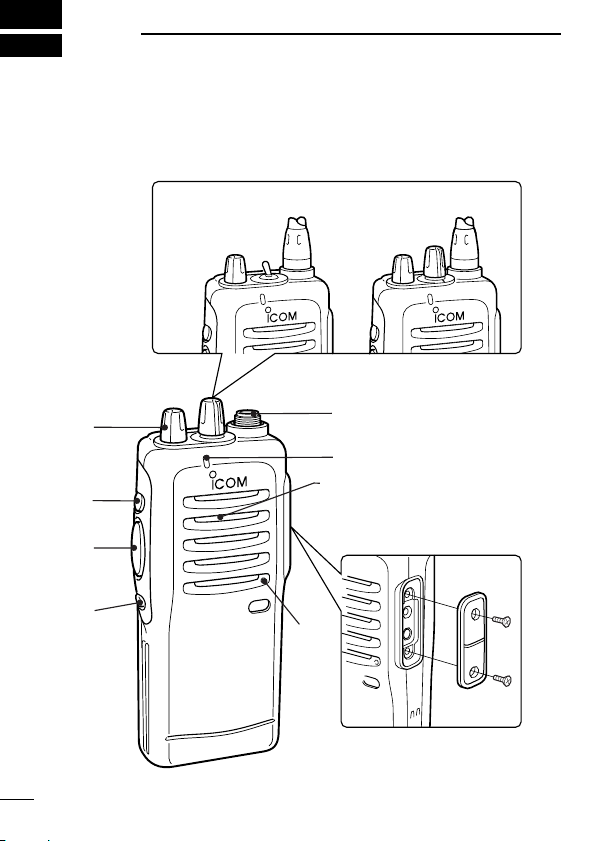
q CHANNEL SELECTOR/SW [CH]
• 2CH version: Toggle the CH switch to select CH1 or CH2.
• 16CH version: Turn the selector knob to select the pro-
grammed operating channel.
w VOLUME CONTROL [OFF/VOL]
Turns power ON and adjusts the audio level.
e DEALER-PROGRAMMABLE KEY [Upper]
Can be programmed for one of several functions by your Icom
dealer.
r PTT SWITCH [PTT]
Push and hold to transmit; release to receive.
t DEALER-PROGRAMMABLE KEY [Lower]
Can be programmed for one of several functions by your Icom
dealer.
y ANTENNA CONNECTOR
Connects the supplied antenna.
u TX/RX INDICATOR LED (see p. 3)
• Lights red while transmitting.
• Lights green while receiving a signal, or squelch is open.
i [SP]/[MIC] JACK
Connects optional speaker-microphone.
NOTE: Above functions depend on pre-setting.
DD
Programmable key reference ([Red] depends on version.)
Red
Upper
Lower
*These functions are available when the optional Speaker/Mic. is con-
nected.
Mic Up*
Mic Down*
Mic A*
Mic B*
1
2
1
R R R R
R R
O O
O O
R R R R
R R
G
G G
R
PANEL DESCRIPTION
‘‘
LED indicator
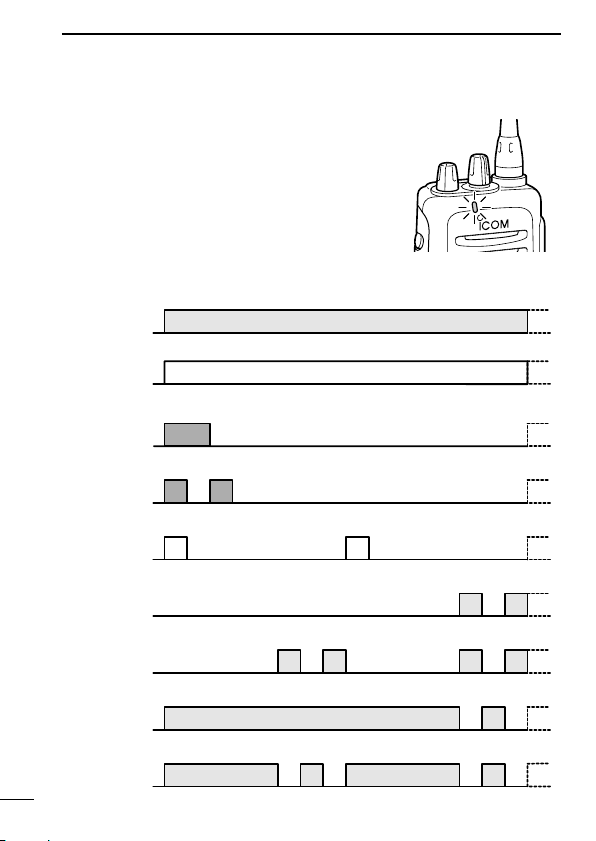
The TX/RX indicator LED indicates several
more information as follows;
(Ref.; R=Red, G=Green, O=Orange)
• TX: Turns Red while transmitting a signal.
• RX: Turns Green while receiving a signal.
• Call LED (ON): When receiving a matched 2/5TONE.
• Call LED (Blink): When receiving a matched 2/5TONE.
• Fast/Slow scan: Blinks while Fast/Slow scan is activated.
•Low BATT1: You should charge the battery. (blinks slowly)
•Low BATT2: You must charge the battery. (blinks fast)
•TX low BATT1: Low BATT1 was detected during TX mode.
•TX low BATT2: Low BATT2 was detected during TX mode.
3
ACCESSORIES
‘‘
Accessory attachment
D Supplied accessories
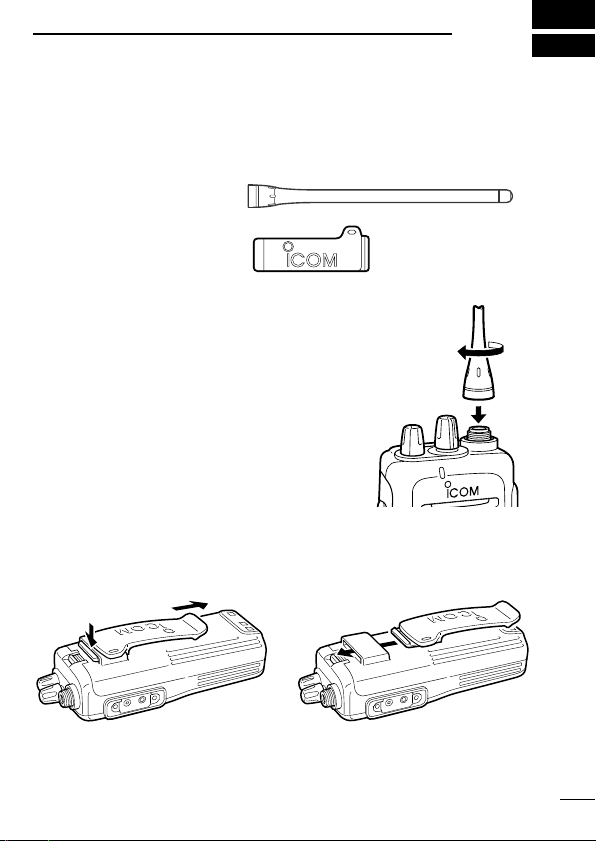
The transceiver comes supplied with the following accessories.
q Flexible antenna
w Belt clip
D Antenna
The antenna screws onto the transceiver as
illustrated right.
D Belt clip
Attach the belt clip to the transceiver as illustrated below.
2
4
Loading…
Document Download |
‹
›
Icom IC-F21 Manual Online:
4.3,
2711
votes
Icom IC-F21 User Manual
Icom IC-F21 User Guide
Icom IC-F21 Online Manual
Text of Icom IC-F21 User Guide:
More Instructions:
|
Icom IC-F21 Service manual
|
DOWNLOAD | |
|
Icom IC-F21 Service manual
|
DOWNLOAD | |
|
Icom IC-F21 Instruction manual
|
DOWNLOAD |
Related Products and Documents (Transceiver):
-
Icom IC-756PRO Transceiver Instruction manual
IC-756PRO
icom/ic-756pro.pdf, 84 -
Icom IC-92AD Transceiver Instruction manual
IC-92AD
icom/ic-92ad.pdf, 156 -
Icom IC-F3011 Transceiver Instruction manual
IC-F3011
icom/ic-f3011.pdf, 48 -
Icom IC-M87 Transceiver Instruction manual
IC-M87
icom/ic-m87.pdf, 40 -
Icom IC-2710H Transceiver Instruction manual
IC-2710H
icom/ic-2710h.pdf, 88 -
Icom IC-V80 Transceiver Instruction manual
IC-V80
icom/ic-v80.pdf, 64 -
Icom iF5062D Transceiver Instruction manual
iF5062D
icom/if5062d.pdf, 32 -
Icom iF5061D Transceiver Instruction manual
iF5061D
icom/if5061d.pdf, 32
Comparable Devices:
| # | Manufacturer | Model | Document Type | File | Updated | Pages | Size |
|---|---|---|---|---|---|---|---|
| 1 | Ryobi | RBL30MVA | Operator’s manual | ryobi/rbl30mva-IF9.pdf | 28 Jun 2024 | 16 | 1.25 Mb |
| 2 | Tiger Electronics | Lights 65-101 | Instruction manual | tiger-electronics/lights-65-101-JO6.pdf | 11 Nov 2023 | 2 | 0.35 Mb |
| 3 | EAW | LA118z | Technical specifications | eaw/la118z-S7T.pdf | 17 Dec 2024 | 2 | 0.5 Mb |
| 4 | Rosen | RE9269D | Instructions manual | rosen/re9269d-HLW.pdf | 11 Mar 2025 | 13 | 0.6 Mb |
| 5 | Zanussi | ZE1001IS | Instructions for the use and care | zanussi/ze1001is-R38.pdf | 21 Jan 2024 | 24 | 4.44 Mb |
| 6 | Peavey | MIXER/AMPLIFIER UMA 35T | Operating manual | peavey/mixer-amplifier-uma-35t-4NN.pdf | 18 Dec 2024 | 8 | 0.36 Mb |
Similar Resources:
Transceiver Instructions:
-
HP Laptop 2133 — Mini-Note — C7-M 1.6 GHz ULV
Security manual for HP 2133 — Mini-Note — C7-M 1.6 GHz ULV Laptop
2133 — Mini-Note — C7-M 1.6 GHz ULV, 33
-
Pioneer Stereo Receiver XR-VS88
Pioneer Product User Manual: XR-VS88 PDF Service manual — DIBQXR
XR-VS88, 30
-
iLive Speakers ISB223B
iLive Speakers ISB223B Operation & user’s manual
ISB223B, 2
-
Electrolux Refrigerator SMART 726485
PDF Guide (@GRP62L), Electrolux SMART 726485 Refrigerator (10/11/2024)
SMART 726485, 2
-
Poulan Pro Chainsaw 952802144
Chainsaw #9EF3RW
952802144, 21
-
Nautilus Home Gym ONE
Home Gym Owner’s manual (Nautilus ONE)
ONE, 25
-
Black & Decker Vacuum Cleaner Dustbuster Flexi PD1080
Dustbuster Flexi PD1080 Original instructions manual — A98NLM
Dustbuster Flexi PD1080, 12
-
LG Cell Phone P936
LG P936 Guide (Operation & user’s manual), @X8E79Z
P936, 482
-
Metronic Receiver Eco zapbox 2
Eco zapbox 2 Instruction manual — LVJU46
Eco zapbox 2, 20
-
Sony Wireless Access Point PCWA-A100 — Wireless Lan Access Point
Sony PCWA-A100 — Wireless Lan Access Point User Manual (Operating instructions manual), @6L2673
PCWA-A100 — Wireless Lan Access Point, 32
-
VerdeLife Grill BYRON
Grill #DYTFA9
BYRON, 4
-
Leonardo Paint Sprayer ATD-6865
Leonardo Paint Sprayer ATD-6865 Manual
ATD-6865, 2
Comments, Questions and Opinions:
Icom IC-F21 Transceiver PDF User Guides and Manuals for Free Download: Found (4) Manuals for Icom IC-F21 Device Model (Instruction Manual, Service Manual)
The Icom IC-F21 is a compact and versatile handheld transceiver that has garnered significant attention in the radio communication community. Known for its robust performance and user-friendly interface, the IC-F21 serves as an excellent choice for both enthusiasts and professionals alike. Designed for durability and ease of use, this radio is ideal for a range of applications, from emergency services to event management. Let’s delve deeper into what makes the IC-F21 a preferred option in its category.
One of the standout features of the Icom IC-F21 is its impressive battery life. Powered by a high-capacity lithium-ion battery, users can expect exceptional longevity, ensuring that the radio remains operational throughout long shifts or extended outdoor adventures. This is particularly crucial in scenarios where communication is vital, and downtime could lead to serious consequences.
Here’s a breakdown of the key features of the Icom IC-F21:
- Durability: The IC-F21 is designed to withstand the rigors of outdoor use. With a rugged construction and weather-resistant design, it can handle various environmental conditions.
- Audio Quality: This model delivers clear and intelligible audio, which is essential for maintaining effective communication in noisy settings or during critical operations.
- Customization: Users can personalize their radio settings, including channel programming and output power levels, making it suitable for various operational needs.
- Compact Size: Lightweight and easily portable, the IC-F21 fits comfortably in a pocket or can be carried using a belt clip, making it convenient for on-the-go communication.
- Wide Frequency Range: It covers a diverse range of frequencies, allowing seamless communication across different environments and applications.
When it comes to usability, the Icom IC-F21 excels. The interface is intuitive, featuring a straightforward keypad and a clear display that makes navigation simple. Even those new to radio communication will find the learning curve minimal. Moreover, the unit includes easy-to-follow instructions, ensuring users can get started without a hassle.
In terms of performance, this transceiver is capable of delivering reliable communication over considerable distances. It supports various modes, enhancing its usability for different types of operations, whether in urban areas or rural settings. The ability to switch between channels seamlessly contributes to its efficiency, allowing users to stay connected regardless of their location.
Another advantage of the Icom IC-F21 is its affordability relative to its feature set. While there are higher-end models available on the market, the IC-F21 provides exceptional value without skimping on performance. It is an excellent investment for those needing a dependable handheld transceiver without breaking the bank.
However, no product is without its drawbacks. Some users have noted that while the audio quality is generally excellent, it can sometimes become distorted in extreme conditions. Additionally, while the battery life is impressive, heavy usage may require a backup battery for prolonged operations. These are minor concerns that can easily be mitigated with proper planning.
In summary, the Icom IC-F21 is a formidable option for anyone seeking a reliable and efficient handheld transceiver. Its impressive battery life, durability, audio quality, and user-friendly design make it a strong contender in the crowded radio communication market. Whether for professional use or personal hobbies, investing in the IC-F21 will likely prove beneficial. Highly recommended for those who prioritize communication reliability in all scenarios.